保留正文与补采附件。源页面当前未重新核验;具体限制见交付清单。
 We value your privacy
We use cookies to enhance your browsing experience, serve personalised ads or content, and analyse our traffic. By clicking "Accept All", you consent to our use of cookies.
Customise Reject All Accept All
Customise Consent Preferences
We value your privacy
We use cookies to enhance your browsing experience, serve personalised ads or content, and analyse our traffic. By clicking "Accept All", you consent to our use of cookies.
Customise Reject All Accept All
Customise Consent Preferences  We use cookies to help you navigate efficiently and perform certain functions. You will find detailed information about all cookies under each consent category below.
The cookies that are categorised as "Necessary" are stored on your browser as they are essential for enabling the basic functionalities of the site. ... Show more
NecessaryAlways Active
Necessary cookies are required to enable the basic features of this site, such as providing secure log-in or adjusting your consent preferences. These cookies do not store any personally identifiable data.
We use cookies to help you navigate efficiently and perform certain functions. You will find detailed information about all cookies under each consent category below.
The cookies that are categorised as "Necessary" are stored on your browser as they are essential for enabling the basic functionalities of the site. ... Show more
NecessaryAlways Active
Necessary cookies are required to enable the basic features of this site, such as providing secure log-in or adjusting your consent preferences. These cookies do not store any personally identifiable data.
-
Cookie
BCTempID
-
Duration
10 minutes
-
Description
No description available.
-
Cookie
__cf_bm
-
Duration
1 hour
-
Description
This cookie, set by Cloudflare, is used to support Cloudflare Bot Management.
-
Cookie
AWSALBCORS
-
Duration
7 days
-
Description
Amazon Web Services set this cookie for load balancing.
-
Cookie
_cfuvid
-
Duration
session
-
Description
Cloudflare sets this cookie to track users across sessions to optimize user experience by maintaining session consistency and providing personalized services
-
Cookie
li_gc
-
Duration
6 months
-
Description
Linkedin set this cookie for storing visitor's consent regarding using cookies for non-essential purposes.
-
Cookie
__hssrc
-
Duration
session
-
Description
This cookie is set by Hubspot whenever it changes the session cookie. The __hssrc cookie set to 1 indicates that the user has restarted the browser, and if the cookie does not exist, it is assumed to be a new session.
-
Cookie
__hssc
-
Duration
1 hour
-
Description
HubSpot sets this cookie to keep track of sessions and to determine if HubSpot should increment the session number and timestamps in the __hstc cookie.
-
Cookie
wpEmojiSettingsSupports
-
Duration
session
-
Description
WordPress sets this cookie when a user interacts with emojis on a WordPress site. It helps determine if the user's browser can display emojis properly.
-
Cookie
BCSessionID
-
Duration
1 year 1 month 4 days
-
Description
Blueconic sets this cookie as a unique identifier for the BlueConic profile.
-
Cookie
_octo
-
Duration
1 year
-
Description
No description available.
-
Cookie
logged_in
-
Duration
1 year
-
Description
No description available.
-
Cookie
__Secure-YEC
-
Duration
past
-
Description
YouTube sets this cookie to stores the user's video player preferences using embedded YouTube video
-
Cookie
__eoi
-
Duration
6 months
-
Description
Description is currently not available.
-
Cookie
AWSALBTGCORS
-
Duration
7 days
-
Description
No description available.
-
Cookie
login-status-p
-
Duration
past
-
Description
Description is currently not available.
-
Cookie
AWSALBTG
-
Duration
7 days
-
Description
No description available.
-
Cookie
csrf_token
-
Duration
session
-
Description
No description available.
-
Cookie
token_v2
-
Duration
1 day
-
Description
Description is currently not available.
-
Cookie
D
-
Duration
1 year
-
Description
Description is currently not available.
-
Cookie
PHPSESSID
-
Duration
session
-
Description
This cookie is native to PHP applications. The cookie stores and identifies a user's unique session ID to manage user sessions on the website. The cookie is a session cookie and will be deleted when all the browser windows are closed.
-
Cookie
VISITOR_PRIVACY_METADATA
-
Duration
6 months
-
Description
YouTube sets this cookie to store the user's cookie consent state for the current domain.
-
Cookie
cookietest
-
Duration
session
-
Description
The cookietest cookie is typically used to determine whether the user's browser accepts cookies, essential for website functionality and user experience.
-
Cookie
__Host-airtable-session
-
Duration
1 year
-
Description
This cookie is used to enable us to integrate the services of Airtable.
-
Cookie
__Host-airtable-session.sig
-
Duration
1 year
-
Description
This cookie is used to enable us to integrate the services of Airtable.
-
Cookie
m
-
Duration
1 year 1 month 4 days
-
Description
Stripe sets this cookie for fraud prevention purposes. It identifies the device used to access the website, allowing the website to be formatted accordingly.
-
Cookie
BIGipServer*
-
Duration
session
-
Description
Marketo sets this cookie to collect information about the user's online activity and build a profile about their interests to provide advertisements relevant to the user.
-
Cookie
__cfruid
-
Duration
session
-
Description
Cloudflare sets this cookie to identify trusted web traffic.
-
Cookie
_GRECAPTCHA
-
Duration
6 months
-
Description
Google Recaptcha service sets this cookie to identify bots to protect the website against malicious spam attacks.
-
Cookie
__Secure-YNID
-
Duration
6 months
-
Description
Google cookie used to protect user security and prevent fraud, especially during the login process.
-
Cookie
cookieyes-consent
-
Duration
1 year
-
Description
CookieYes sets this cookie to remember users' consent preferences so that their preferences are respected on subsequent visits to this site. It does not collect or store any personal information about the site visitors.
Functional
Functional cookies help perform certain functionalities like sharing the content of the website on social media platforms, collecting feedback, and other third-party features.
-
Cookie
lidc
-
Duration
1 day
-
Description
LinkedIn sets the lidc cookie to facilitate data center selection.
-
Cookie
brw
-
Duration
1 year
-
Description
No description available.
-
Cookie
brwConsent
-
Duration
5 minutes
-
Description
Description is currently not available.
-
Cookie
WMF-Uniq
-
Duration
1 year
-
Description
Description is currently not available.
-
Cookie
loom_anon_comment
-
Duration
1 year
-
Description
No description available.
-
Cookie
loom_referral_video
-
Duration
session
-
Description
Description is currently not available.
-
Cookie
VISITOR_INFO1_LIVE
-
Duration
6 months
-
Description
A cookie set by YouTube to measure bandwidth that determines whether the user gets the new or old player interface.
-
Cookie
yt-remote-connected-devices
-
Duration
Never Expires
-
Description
YouTube sets this cookie to store the user's video preferences using embedded YouTube videos.
-
Cookie
ytidb::LAST_RESULT_ENTRY_KEY
-
Duration
Never Expires
-
Description
The cookie ytidb::LAST_RESULT_ENTRY_KEY is used by YouTube to store the last search result entry that was clicked by the user. This information is used to improve the user experience by providing more relevant search results in the future.
-
Cookie
yt-remote-device-id
-
Duration
Never Expires
-
Description
YouTube sets this cookie to store the user's video preferences using embedded YouTube videos.
-
Cookie
yt-remote-session-name
-
Duration
session
-
Description
The yt-remote-session-name cookie is used by YouTube to store the user's video player preferences using embedded YouTube video.
-
Cookie
yt-remote-fast-check-period
-
Duration
session
-
Description
The yt-remote-fast-check-period cookie is used by YouTube to store the user's video player preferences for embedded YouTube videos.
-
Cookie
yt-remote-session-app
-
Duration
session
-
Description
The yt-remote-session-app cookie is used by YouTube to store user preferences and information about the interface of the embedded YouTube video player.
-
Cookie
yt-remote-cast-available
-
Duration
session
-
Description
The yt-remote-cast-available cookie is used to store the user's preferences regarding whether casting is available on their YouTube video player.
-
Cookie
yt-remote-cast-installed
-
Duration
session
-
Description
The yt-remote-cast-installed cookie is used to store the user's video player preferences using embedded YouTube video.
-
Cookie
cp_session
-
Duration
3 months
-
Description
Codepen sets this cookie for Help systems found in the website.
-
Cookie
loid
-
Duration
1 year 1 month 4 days
-
Description
This cookie is set by the Reddit. The cookie enables the sharing of content from the website onto the social media platform.
Analytics
Analytical cookies are used to understand how visitors interact with the website. These cookies help provide information on metrics such as the number of visitors, bounce rate, traffic source, etc.
-
Cookie
__hstc
-
Duration
6 months
-
Description
Hubspot set this main cookie for tracking visitors. It contains the domain, initial timestamp (first visit), last timestamp (last visit), current timestamp (this visit), and session number (increments for each subsequent session).
-
Cookie
hubspotutk
-
Duration
6 months
-
Description
HubSpot sets this cookie to keep track of the visitors to the website. This cookie is passed to HubSpot on form submission and used when deduplicating contacts.
-
Cookie
_ga
-
Duration
1 year 1 month 4 days
-
Description
Google Analytics sets this cookie to calculate visitor, session and campaign data and track site usage for the site's analytics report. The cookie stores information anonymously and assigns a randomly generated number to recognise unique visitors.
-
Cookie
ga*
-
Duration
1 year 1 month 4 days
-
Description
Google Analytics sets this cookie to store and count page views.
-
Cookie
__Host-psifi.analyticsTrace
-
Duration
6 hours
-
Description
Description is currently not available.
-
Cookie
__Host-psifi.analyticsTraceV2
-
Duration
6 hours
-
Description
Description is currently not available.
-
Cookie
_gh_sess
-
Duration
session
-
Description
GitHub sets this cookie for temporary application and framework state between pages like what step the user is on in a multiple step form.
-
Cookie
YSC
-
Duration
session
-
Description
YSC cookie is set by Youtube and is used to track the views of embedded videos on Youtube pages.
-
Cookie
ajs_anonymous_id
-
Duration
1 year
-
Description
This cookie is set by Segment to count the number of people who visit a certain site by tracking if they have visited before.
-
Cookie
vuid
-
Duration
1 year 1 month 4 days
-
Description
Vimeo installs this cookie to collect tracking information by setting a unique ID to embed videos on the website.
Performance
Performance cookies are used to understand and analyse the key performance indexes of the website which helps in delivering a better user experience for the visitors.
-
Cookie
AWSALB
-
Duration
7 days
-
Description
AWSALB is an application load balancer cookie set by Amazon Web Services to map the session to the target.
-
Cookie
acq
-
Duration
past
-
Description
Description is currently not available.
-
Cookie
acq.sig
-
Duration
past
-
Description
Description is currently not available.
-
Cookie
ptc
-
Duration
2 years
-
Description
No description available.
Advertisement
Advertisement cookies are used to provide visitors with customised advertisements based on the pages you visited previously and to analyse the effectiveness of the ad campaigns.
-
Cookie
muc_ads
-
Duration
1 year 1 month 4 days
-
Description
Twitter sets this cookie to collect user behaviour and interaction data to optimize the website.
-
Cookie
guest_id_marketing
-
Duration
1 year 1 month 4 days
-
Description
Twitter sets this cookie to identify and track the website visitor.
-
Cookie
guest_id_ads
-
Duration
1 year 1 month 4 days
-
Description
Twitter sets this cookie to identify and track the website visitor.
-
Cookie
personalization_id
-
Duration
1 year 1 month 4 days
-
Description
Twitter sets this cookie to integrate and share features for social media and also store information about how the user uses the website, for tracking and targeting.
-
Cookie
guest_id
-
Duration
1 year 1 month 4 days
-
Description
Twitter sets this cookie to identify and track the website visitor. It registers if a user is signed in to the Twitter platform and collects information about ad preferences.
-
Cookie
bcookie
-
Duration
1 year
-
Description
LinkedIn sets this cookie from LinkedIn share buttons and ad tags to recognize browser IDs.
-
Cookie
__Secure-ROLLOUT_TOKEN
-
Duration
6 months
-
Description
YouTube sets this cookie to manage feature rollout and experimentation. It helps Google control which new features or interface changes are shown to users as part of testing and staged rollouts, ensuring consistent experience for a given user during an experiment.
-
Cookie
yt.innertube::nextId
-
Duration
Never Expires
-
Description
YouTube sets this cookie to register a unique ID to store data on what videos from YouTube the user has seen.
-
Cookie
yt.innertube::requests
-
Duration
Never Expires
-
Description
YouTube sets this cookie to register a unique ID to store data on what videos from YouTube the user has seen.
-
Cookie
session_tracker
-
Duration
session
-
Description
This cookie is set by the Reddit. This cookie is used to identify trusted web traffic. It also helps in adverstising on the website.
-
Cookie
edgebucket
-
Duration
session
-
Description
Reddit sets this cookie to save the information about a log-on Reddit user, for the purpose of advertisement recommendations and updating the content.
-
Cookie
did
-
Duration
1 year
-
Description
Arbor sets this cookie to show targeted ads to site visitors.This cookie expires after 2 months or 1 year.
Uncategorised
Other uncategorised cookies are those that are being analysed and have not been classified into a category as yet.
No cookies to display.
Reject All Save My Preferences Accept All
Toggle SearchToggle Mobile Navigation
Publish AI, ML & data-science insights to a global community of data professionals.
Sign inSubmit an Article
LatestEditor's PicksNewsletterShipAI
Write For TDS
LinkedInXToggle Search
Artificial Intelligence
PyTorch Introduction - Training a Computer Vision Algorithm
In this post of the PyTorch Introduction, we'll learn how to train a computer vision model using a Convolutional Neural Network with...
Ivo Bernardo
May 30, 202410 min read
In this post, we'll learn how to train a computer vision model using a convolutional Neural Network in PyTorch
 Self-Driving Cars are mostly Powered by Computer Vision Algorithms - Image generated by AI in Microsoft Designer
PyTorch is currently one of the hottest libraries in the Deep Learning field. Used by thousand of developers around the world, the library gained prominence since the release of ChatGPT and the introduction of deep learning into mainstream news headlines.
With its capabilities of efficiently training deep learning models (with GPU-ready features), it has become a machine learning engineer and data scientist's best friend when it comes to train complex neural network algorithms.
So far, in this PyTorch series, we've covered several fundamentals that gave us the foundations to work with this library from scratch. For example:
Learn this step by step with the interactive AI Engineer, AI and Data Scientist and Machine Learning roadmaps.
Self-Driving Cars are mostly Powered by Computer Vision Algorithms - Image generated by AI in Microsoft Designer
PyTorch is currently one of the hottest libraries in the Deep Learning field. Used by thousand of developers around the world, the library gained prominence since the release of ChatGPT and the introduction of deep learning into mainstream news headlines.
With its capabilities of efficiently training deep learning models (with GPU-ready features), it has become a machine learning engineer and data scientist's best friend when it comes to train complex neural network algorithms.
So far, in this PyTorch series, we've covered several fundamentals that gave us the foundations to work with this library from scratch. For example:
Learn this step by step with the interactive AI Engineer, AI and Data Scientist and Machine Learning roadmaps.
In this blog post, we are finally going to bring out the big guns and train our first computer vision algorithm. Alongside, we'll also get to know convolutional neural networks (CNNs), a famous set of architectures tailored for training computer vision models. Although we'll use a simple dataset here (making it accessible for anyone to run this code on their computer), the principles we'll see can be applied to other image classification algorithms.
Let's start!
Loading and Preparing the Data
As a way for everyone to be able to run this pipeline without the need for a GPU, we'll keep it simple and use the ever-present MNIST dataset.
This dataset consists of handwritten digits and is available in torchvision by running the following code:
python
import torchvision
from torchvision.transforms import transforms

transform = transforms.Compose([
    transforms.ToTensor(),
    transforms.Normalize((0.5,), (0.5,))
])

# Load training and test datasets
train_dataset = torchvision.datasets.MNIST(root='./data', train=True, download=True, transform=transform)
test_dataset = torchvision.datasets.MNIST(root='./data', train=False, download=True, transform=transform)
Note: I'll add the imports we need during the code for visualization purposes, but the recommendation is that you always put them on top of your code
torchvision.datasets also has another cool feature: we can immediately add a transform that will be applied directly to images. In our case, our transform pipeline will:
- Transform our data to tensor;
- Normalize the data;
Although not very important for this grayscale dataset (as it only contains one channel of color) normalization will definitely help the gradient descent process and prevent exploding or vanishing gradients during the training of our models.
With our datasets in memory, it's time to see what our tensors contain! Let's take a look at the first one:
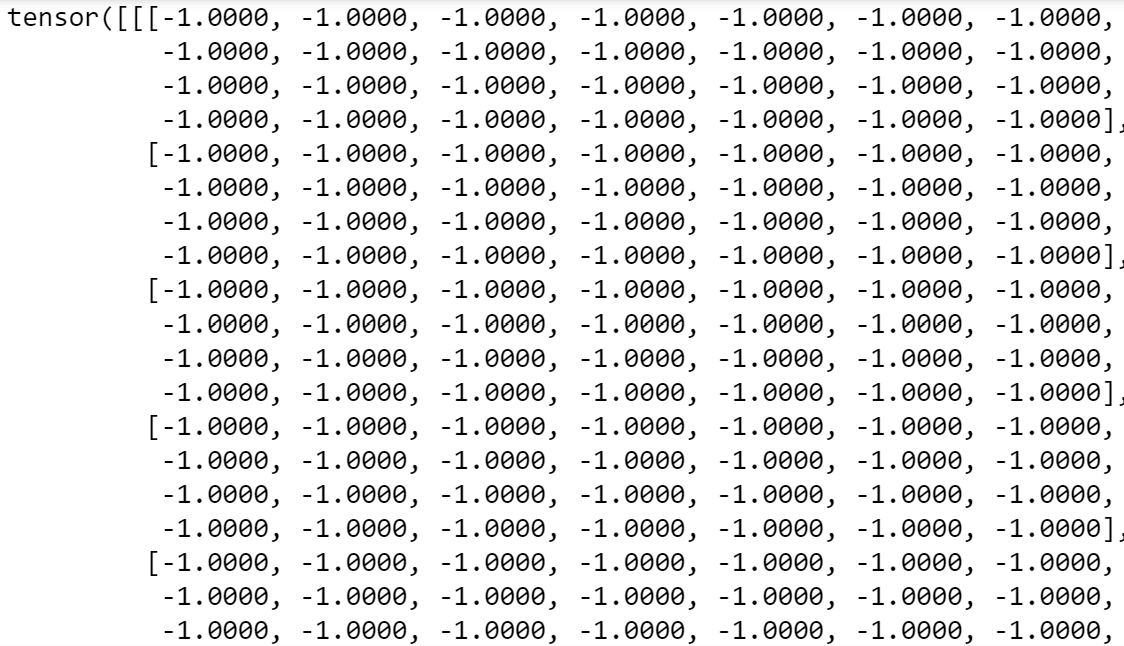 First Tensor of MNIST dataset - Image by Author
Errr.. ok, hard to visualize! let's see the shape of the tensor:
First Tensor of MNIST dataset - Image by Author
Errr.. ok, hard to visualize! let's see the shape of the tensor:
 We have a 28 x 28 tensor of 1 channel. Maybe it's better to visualize our tensor in image format! Let's do that:
javascript
We have a 28 x 28 tensor of 1 channel. Maybe it's better to visualize our tensor in image format! Let's do that:
javascript
import matplotlib.pyplot as plt
import numpy as np

image, label = train_dataset[0]
image = np.transpose(image, (1, 2, 0))
plt.figure(figsize=(4, 4))
plt.imshow(image)
plt.title(label);
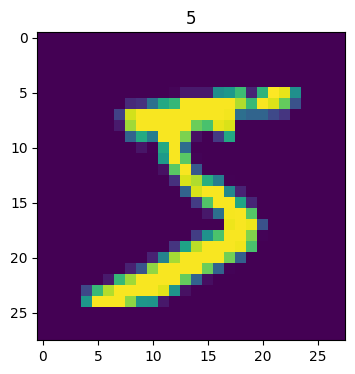 Number 5, MNIST Dataset - Image by Author
We have the number 5 in the first row! Let's see another tensor in the dataset:
makefile
Number 5, MNIST Dataset - Image by Author
We have the number 5 in the first row! Let's see another tensor in the dataset:
makefile
image, label = train_dataset[120]
image = np.transpose(image, (1, 2, 0))
plt.figure(figsize=(4, 4))
plt.imshow(image)
plt.title(label);
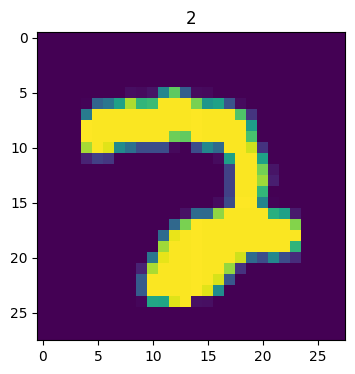 Number 2 on MNIST Dataset - Image by Author
Number 2!
Now, our goal is to classify these numbers with the correct digit. Basically, our algorithm will have to check, based on these tensors, how to classify the number on the image.
As usual, in pytorch , we need to use batches to feed the data to our neural network - if we need it,
Number 2 on MNIST Dataset - Image by Author
Number 2!
Now, our goal is to classify these numbers with the correct digit. Basically, our algorithm will have to check, based on these tensors, how to classify the number on the image.
As usual, in pytorch , we need to use batches to feed the data to our neural network - if we need it, torch has it!
kotlin
import torch

train_loader = torch.utils.data.DataLoader(train_dataset, batch_size=30, shuffle=True)
test_loader = torch.utils.data.DataLoader(test_dataset, batch_size=30)
We're using 30 examples on each batch. This will help us train our neural network, next.
With our data in-place, let's create our model!
Creating a Standard Neural Network Model
Before training our model, let's see the classes that our model will need to classify:
makefile
class_names = train_dataset.classes
class_names
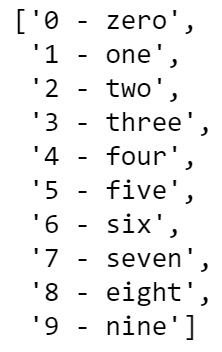 Classes on the MNIST Dataset
So our first algorithm will be super simple - a single hidden layer with ReLU activation. If this sentence sounds odd to you, consider visiting the other blog posts of this series, which are linked in the introduction!
python
Classes on the MNIST Dataset
So our first algorithm will be super simple - a single hidden layer with ReLU activation. If this sentence sounds odd to you, consider visiting the other blog posts of this series, which are linked in the introduction!
python
class MNIST_NN(nn.Module):
    def __init__(self, input_shape: int,
                 hidden_units: int,
                 output_shape: int):
        super().__init__()

        # Create a hidden layer with non-linearities
        self.layer_stack = nn.Sequential(
            nn.Flatten(),
            nn.Linear(in_features=input_shape, out_features=hidden_units),
            nn.ReLU(),
            nn.Linear(in_features=hidden_units, out_features=output_shape),
            nn.ReLU()
        )

    def forward(self, x: torch.Tensor):
        return self.layer_stack(x)
We'll use 150 units in our hidden layer:
ini
model_non_linear = MNIST_NN(input_shape=28*28,
 hidden_units=150,
 output_shape=len(class_names))
As a loss function, we'll use CrossEntropy (suitable for classification problems) and we will use stochastic gradient descent optimizer (with 0.01 learning rate):
ini
loss_function = nn.CrossEntropyLoss()
optimizer = torch.optim.SGD(params=model_1.parameters(),
 lr=0.01)
Time to define our train and test steps next:
scss
def train_step(model: torch.nn.Module,
               data_loader: torch.utils.data.DataLoader,
               loss_fn: torch.nn.Module,
               optimizer: torch.optim.Optimizer,
               accuracy_fn):

    # Zero loss and acc
    train_loss, train_acc = 0, 0

    model.train()

    for batch, (X, y) in enumerate(data_loader):

        y_pred = model(X)
        loss = loss_fn(y_pred, y)
        train_loss += loss.item()
        train_acc += accuracy_fn(y_true=y,
                                 y_pred=y_pred.argmax(dim=1))

        optimizer.zero_grad()
        loss.backward()
        optimizer.step()

    train_loss /= len(data_loader)
    train_acc /= len(data_loader)
    print(f"Train loss: {train_loss:.2f} | Train accuracy: {train_acc:.2f}%")

    return train_loss

def test_step(data_loader: torch.utils.data.DataLoader,
              model: torch.nn.Module,
              loss_fn: torch.nn.Module,
              accuracy_fn):
    test_loss, test_acc = 0, 0
    model.eval()

    with torch.no_grad():
        for X, y in data_loader:
            test_pred = model(X)
            test_loss += loss_fn(test_pred, y).item()
            test_acc += accuracy_fn(y_true=y,
                                    y_pred=test_pred.argmax(dim=1))

        test_loss /= len(data_loader)
        test_acc /= len(data_loader)
        print(f"Test loss: {test_loss:.5f} | Test accuracy: {test_acc:.2f}%n")

        return test_loss
These steps have been approached in our Training a Linear Model blog post. Feel free to revisit it if you are finding this difficult to grasp!
In a nutshell, we are creating the training and step processes that will help our neural network perform back-propagation.
Alright, everything is in its place. Time to train our feed-forward NN model:
python
loss_hist = {}

loss_hist['train'] = {}
loss_hist['test'] = {}

epochs = 10
for epoch in tqdm(range(epochs)):
    print(f"Epoch: {epoch}n---------")
    train_loss = train_step(data_loader=train_loader,
        model=model_non_linear,
        loss_fn=loss_function,
        optimizer=optimizer,
        accuracy_fn=accuracy_fn
    )

    loss_hist['train'][epoch] = train_loss

    test_loss = test_step(data_loader=test_loader,
        model=model_non_linear,
        loss_fn=loss_function,
        accuracy_fn=accuracy_fn
    )

    loss_hist['test'][epoch] = test_loss
We'll train it for 10 epochs. Remember that a training epoch is a complete pass on the data, so our neural network will see each example 10 times. After a while (depending on your system's resources), the neural network should finish the training process:
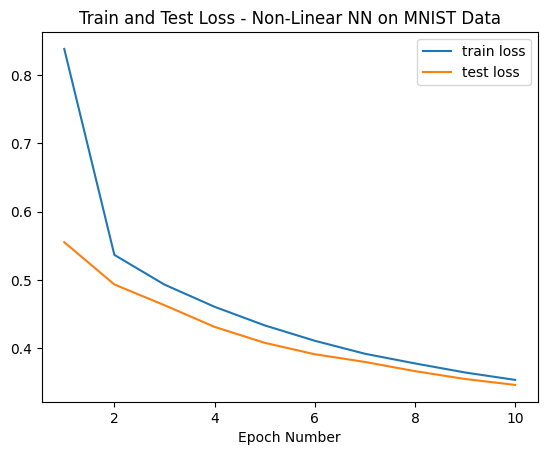 Train and Test Loss Evolution - Image by Author)
We could probably continue to train our neural network for a while as it seems that the loss still had some points room for further improvement past 10 epochs.
In terms of accuracy, let's see the status of the accuracy and loss in the last epoch:
Train and Test Loss Evolution - Image by Author)
We could probably continue to train our neural network for a while as it seems that the loss still had some points room for further improvement past 10 epochs.
In terms of accuracy, let's see the status of the accuracy and loss in the last epoch:
 Train and Test Accuracy on last epoch - Image by Author
Cool, around 87% accuracy and our model isn't showing signs of overfit!
Finally, let's pass some handwritten images through the algorithm and see how it's performing in the classification of digits. For that, we'll use a custom
Train and Test Accuracy on last epoch - Image by Author
Cool, around 87% accuracy and our model isn't showing signs of overfit!
Finally, let's pass some handwritten images through the algorithm and see how it's performing in the classification of digits. For that, we'll use a custom show_predict_digit function:
python
def show_predict_digit(model, dataset, index):
    image_tensor = dataset.data[index].unsqueeze(0).unsqueeze(0).to(torch.float32)
    plt.figure(figsize=(4, 4))
    plt.imshow(image_tensor.squeeze(0).squeeze(0))

    with torch.no_grad():
        output = model(image_tensor)

    return torch.argmax(output)
Starting with the digit on index 0 in our test set:
python
show_predict_digit(model_non_linear,
 test_dataset,
 0)
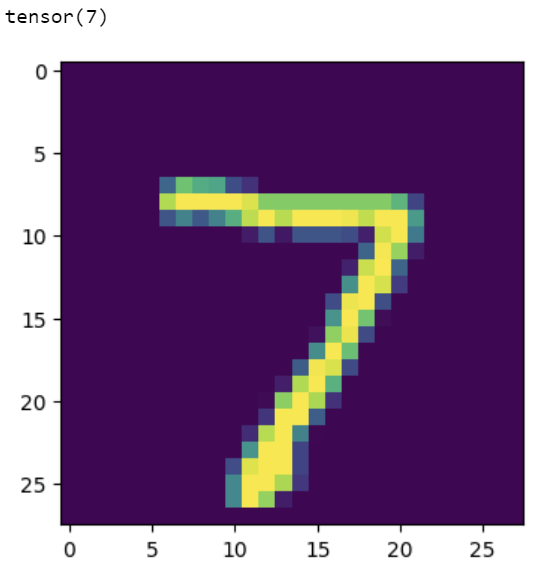 Prediction of Digit "7" using our model - image by author
Right above the image, do you see "tensor(7)"? This is the output from our neural network. In a perfect world, this would match the digit we are seeing on the screen, everytime.
In this case, we got this digit correctly! Our neural network is predicting the digit 7. Let's see another example:
Prediction of Digit "7" using our model - image by author
Right above the image, do you see "tensor(7)"? This is the output from our neural network. In a perfect world, this would match the digit we are seeing on the screen, everytime.
In this case, we got this digit correctly! Our neural network is predicting the digit 7. Let's see another example:
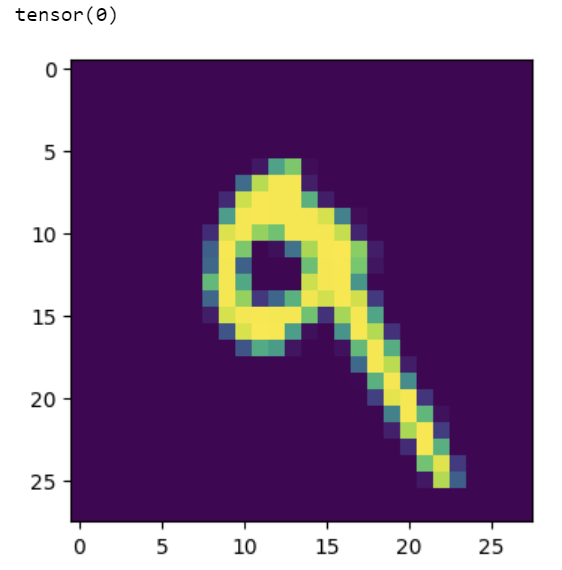 Prediction of Digit "0" using our model - image by author
Too bad! :-( As our image highlights the circle on the digit "9", our neural network is incorrectly classifying the digit as "0". There's certainly still some room for improvement in the algorithm!
It's expected that feed-forward neural networks exhibit this behavior, particularly in problems that suffer from large dimensionality (such as image classification that rely on pixel-by-pixel features).
In the next part of this blog post, we'll try to solve this issue by fitting our first convolutional neural network, a specific type of neural network that is tailored to deal with computer vision problems.
Prediction of Digit "0" using our model - image by author
Too bad! :-( As our image highlights the circle on the digit "9", our neural network is incorrectly classifying the digit as "0". There's certainly still some room for improvement in the algorithm!
It's expected that feed-forward neural networks exhibit this behavior, particularly in problems that suffer from large dimensionality (such as image classification that rely on pixel-by-pixel features).
In the next part of this blog post, we'll try to solve this issue by fitting our first convolutional neural network, a specific type of neural network that is tailored to deal with computer vision problems.
Training a Convolutional Neural Network
Let's now build a new neural network model using pytorch— in this case, we're going to use a convolutional neural network (CNN).
These types of neural network architectures are tailored for vision algorithms and to work with high dimensionality data. When it comes to image data, they focus on specific features within the image with its architecture being loosely inspired by the human eye.
Some of the most famous operations of a CNN are pooling, sampling and flatten operations - they help our algorithm converge faster and with less error. Explaining convolutional neural networks is outside of the scope of this post, but you can check this awesome blog post on TDS and this great visualizer on how data passes through the layers of a CNN.
python
class SimpleCNN(nn.Module):
    def __init__(self):
        super(SimpleCNN, self).__init__()
        self.conv1 = nn.Conv2d(in_channels=1, out_channels=32,
                               kernel_size=3, padding=1)
        self.conv2 = nn.Conv2d(32, 64, kernel_size=3, padding=1)
        self.pool = nn.MaxPool2d(kernel_size=2, stride=2)
        self.fc1 = nn.Linear(64 * 7 * 7, 128)
        self.fc2 = nn.Linear(128, 10)
        self.dropout = nn.Dropout(0.5)
        self.batch_norm1 = nn.BatchNorm2d(32)
        self.batch_norm2 = nn.BatchNorm2d(64)

    def forward(self, x):
        x = self.pool(F.relu(self.batch_norm1(self.conv1(x))))
        x = self.pool(F.relu(self.batch_norm2(self.conv2(x))))
        x = torch.flatten(x, 1)
        x = F.relu(self.fc1(x))
        x = self.dropout(x)
        x = self.fc2(x)
        return x
In our convolutional neural network, we have the following architecture:
- A normalized convolutional layer with a 3 by 3 kernel and 32 output channels.
- A pooling operation with RELU activation, processed in
self.pool(F.relu(self.batch_norm1(self.conv1(x))))
- A second normalized convolutional layer with a 3 by 3 kernel.
- A pooling operation with RELU activation, processed in
self.pool(F.relu(self.batch_norm2(self.conv2(x))))
- A flattening layer -
torch.flatten(x,1)
- Finally, two fully connected layers with a dropout in-between to prevent overfit.
Training a CNN in pytorch is similar to training a typical feed-forward neural network:
ini
net = SimpleCNN()

optimizer = torch.optim.SGD(params=net.parameters(),
                            lr=0.05)
In this example, we'll be using stochastic gradient descent with 0.05learning rate. We can rely on code we previously defined to train the network:
python
loss_hist_cnn = {}

loss_hist_cnn['train'] = {}
loss_hist_cnn['test'] = {}

epochs = 10
for epoch in tqdm(range(epochs)):
    print(f"Epoch: {epoch}n---------")
    loss_cnn = train_step(data_loader=train_loader,
        model=net,
        loss_fn=loss_function,
        optimizer=optimizer,
        accuracy_fn=accuracy_fn
    )

    loss_hist_cnn['train'][epoch] = loss_cnn

    loss_cnn_test = test_step(data_loader=test_loader,
        model=net,
        loss_fn=loss_function,
        accuracy_fn=accuracy_fn
    )

    loss_hist_cnn['test'][epoch] = loss_cnn_test
After our 10th epoch, these are the results of our accuracy and loss:
 Train and Test Accuracy on last epoch of CNN— Image by Author
Cool! It seemed we improved our model's accuracy by a lot, by more than 10 percentage points. This is clearly outperforming the simple non-linear architecture.
Let's confirm that by plotting the train and test loss curves:
Train and Test Accuracy on last epoch of CNN— Image by Author
Cool! It seemed we improved our model's accuracy by a lot, by more than 10 percentage points. This is clearly outperforming the simple non-linear architecture.
Let's confirm that by plotting the train and test loss curves:
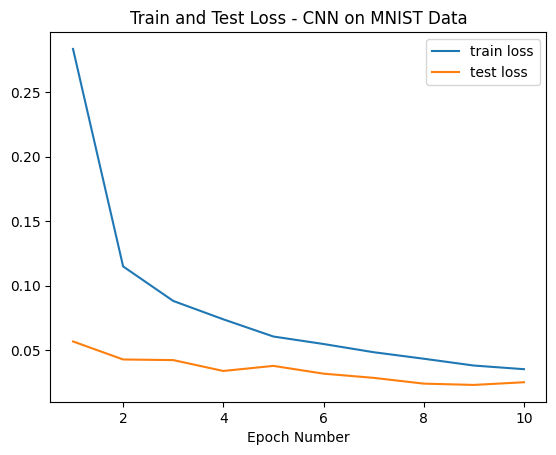 Train and Test Loss Evolution - Image by Author
We have the confirmation that loss is lower than the first experiment. But, we'll not celebrate yet! It's time for the litmus test: let's see how our model is classifying the "9" digit that our first classifier was predicting incorrectly:
Train and Test Loss Evolution - Image by Author
We have the confirmation that loss is lower than the first experiment. But, we'll not celebrate yet! It's time for the litmus test: let's see how our model is classifying the "9" digit that our first classifier was predicting incorrectly:
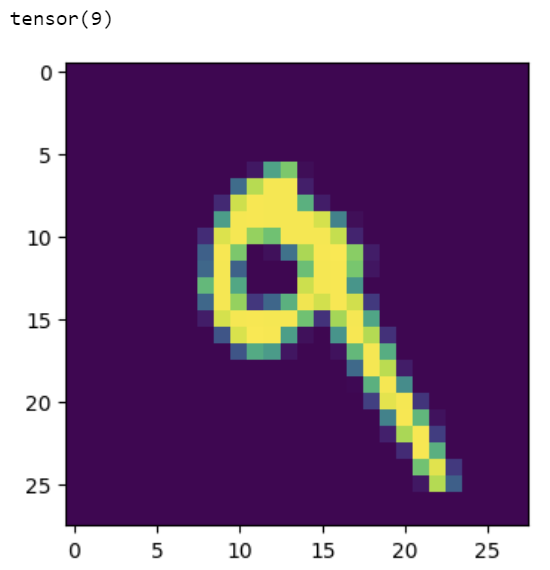 Prediction of Digit "9" using our CNN model - image by author
So cool! We're now able to predict this digit correctly using a CNN. To wrap things up and out of curiosity, let's see another random example:
scss
Prediction of Digit "9" using our CNN model - image by author
So cool! We're now able to predict this digit correctly using a CNN. To wrap things up and out of curiosity, let's see another random example:
scss
show_predict_digit_cnn(net,
                  test_dataset,
                  15)
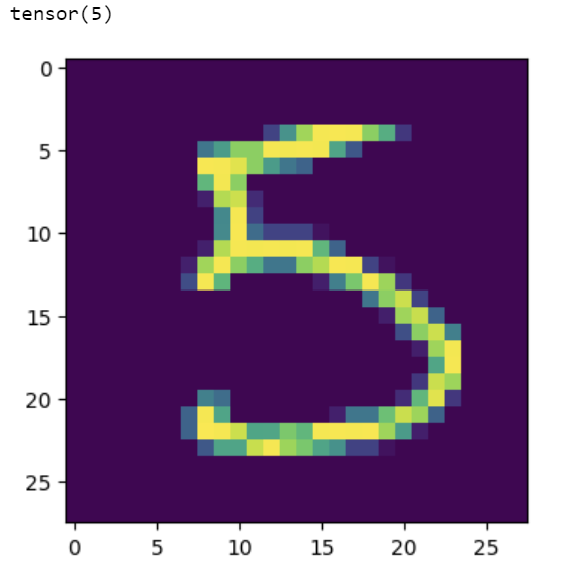 Prediction of Digit "5" using our CNN model - image by author
Another example correct! Can you check more digits and see if you can find the rare cases where our CNN is falling?
Prediction of Digit "5" using our CNN model - image by author
Another example correct! Can you check more digits and see if you can find the rare cases where our CNN is falling?
And that's a wrap for this post! Thank you for reading until the end and I hope that these examples helped you understand how to train a convolutional neural network using pytorch . It was also our first time dealing with these types of layers within the framework and it's really cool to see how torch is built similar to lego bricks! As soon as you understand how the layers work, mixing and matching them will give you extraordinary abilities when it comes to building deep learning models.
In summary, here's what we've done in this blog post:
- Trained our first computer vision model
- Fitted a typical feed-forward neural network on the MNIST dataset
- Fitted a CNN on the MNIST dataset
- Touched lightly upon the concept of CNNs and got to know conv, flatten, and pool layers.
Hope you've enjoyed this and see you on the next PyTorch post!
You can check the first PyTorch blog posts from this series [[here](https://towardsdatascience.com/pytorch-introduction-building-your-first-linear-model-d868a8681a41)](https://towardsdatascience.com/pytorch-introduction-tensors-and-tensor-calculations-412ff818bd5b?sk=2cf4d44549664fc647baa3455e9d78e8) and here. I also recommend that you visit PyTorch Zero to Mastery Course, an amazing free resource that inspired the methodology behind this post or go through our DareData's pytorch learning pod, available here.
Feel free to drop by on my newly created youTube channel - the Data Journey where I'll be adding content on data Science and machine learning in the next couple of months and looking forward to seeing you there!
The dataset used in this post is under the MIT license.
Register Now to Continue Reading
Unlock Towards Data Science with a Free Account
All articles on Towards Data Science are available to registered users. Create a free account today to access this article and thousands more.
Register for freeSign in to your account
 Written By
See all from Ivo Bernardo
Artificial IntelligenceComputer VisionData ScienceDeep LearningMachine Learning
Share This Article
Towards Data Science is a community publication. Submit your insights to reach our global audience and earn through the TDS Author Payment Program.
Write for TDS
Related Articles
Data Science
The Dos and Don'ts of data engineering
Nam Nguyen
August 6, 20216 min read
Machine Learning
A deep dive into multi-threading and multi-processing with Python and how they are related to concurrency and parallelism
Giorgos Myrianthous
January 21, 202210 min read
Deep Learning
Let's discover how neural networks learn, step by step
Nikhil Dasari
July 19, 20269 min read
Data Science
A pragmatic journey using website analytics as a real-world example
Corné Potgieter
February 20, 202611 min read
Machine Learning
From casinos to AI: unveiling the power of Monte Carlo methods in complex environments
Slava Efimov
May 23, 202413 min read
Data Science
This week students are starting to think about what awesome data product they want to build for their capstone project. Also GA hosted a...
Alexander Barriga
March 8, 20174 min read
NLP
With code examples and explanations.
Michael Markin
September 15, 20226 min read
Machine Learning
Setting up Autodock Vina
Jose Manuel Napoles-Duarte
May 3, 20208 min read
Programming
How to make your favorite Excel feature in another analytic language (VBA/SQL/PYTHON/M query/DAX powerBI)
Aymen
January 10, 20216 min read
Your home for data science and AI. The world's leading publication for data science, data analytics, data engineering, machine learning, and artificial intelligence professionals.
Subscribe to Our NewsletterWrite For TDS•About•Advertise•Privacy Policy•Terms of Use
© Insight Media Group, LLC 2026•The New Stack•roadmap.sh•Creator Network
Recommended Articles
Close