保留正文与补采附件。源页面当前未重新核验;具体限制见交付清单。
 We value your privacy
We use cookies to enhance your browsing experience, serve personalised ads or content, and analyse our traffic. By clicking "Accept All", you consent to our use of cookies.
Customise Reject All Accept All
Customise Consent Preferences
We value your privacy
We use cookies to enhance your browsing experience, serve personalised ads or content, and analyse our traffic. By clicking "Accept All", you consent to our use of cookies.
Customise Reject All Accept All
Customise Consent Preferences  We use cookies to help you navigate efficiently and perform certain functions. You will find detailed information about all cookies under each consent category below.
The cookies that are categorised as "Necessary" are stored on your browser as they are essential for enabling the basic functionalities of the site. ... Show more
NecessaryAlways Active
Necessary cookies are required to enable the basic features of this site, such as providing secure log-in or adjusting your consent preferences. These cookies do not store any personally identifiable data.
We use cookies to help you navigate efficiently and perform certain functions. You will find detailed information about all cookies under each consent category below.
The cookies that are categorised as "Necessary" are stored on your browser as they are essential for enabling the basic functionalities of the site. ... Show more
NecessaryAlways Active
Necessary cookies are required to enable the basic features of this site, such as providing secure log-in or adjusting your consent preferences. These cookies do not store any personally identifiable data.
-
Cookie
BCTempID
-
Duration
10 minutes
-
Description
No description available.
-
Cookie
__cf_bm
-
Duration
1 hour
-
Description
This cookie, set by Cloudflare, is used to support Cloudflare Bot Management.
-
Cookie
AWSALBCORS
-
Duration
7 days
-
Description
Amazon Web Services set this cookie for load balancing.
-
Cookie
_cfuvid
-
Duration
session
-
Description
Cloudflare sets this cookie to track users across sessions to optimize user experience by maintaining session consistency and providing personalized services
-
Cookie
li_gc
-
Duration
6 months
-
Description
Linkedin set this cookie for storing visitor's consent regarding using cookies for non-essential purposes.
-
Cookie
__hssrc
-
Duration
session
-
Description
This cookie is set by Hubspot whenever it changes the session cookie. The __hssrc cookie set to 1 indicates that the user has restarted the browser, and if the cookie does not exist, it is assumed to be a new session.
-
Cookie
__hssc
-
Duration
1 hour
-
Description
HubSpot sets this cookie to keep track of sessions and to determine if HubSpot should increment the session number and timestamps in the __hstc cookie.
-
Cookie
wpEmojiSettingsSupports
-
Duration
session
-
Description
WordPress sets this cookie when a user interacts with emojis on a WordPress site. It helps determine if the user's browser can display emojis properly.
-
Cookie
BCSessionID
-
Duration
1 year 1 month 4 days
-
Description
Blueconic sets this cookie as a unique identifier for the BlueConic profile.
-
Cookie
_octo
-
Duration
1 year
-
Description
No description available.
-
Cookie
logged_in
-
Duration
1 year
-
Description
No description available.
-
Cookie
__Secure-YEC
-
Duration
past
-
Description
YouTube sets this cookie to stores the user's video player preferences using embedded YouTube video
-
Cookie
__eoi
-
Duration
6 months
-
Description
Description is currently not available.
-
Cookie
AWSALBTGCORS
-
Duration
7 days
-
Description
No description available.
-
Cookie
login-status-p
-
Duration
past
-
Description
Description is currently not available.
-
Cookie
AWSALBTG
-
Duration
7 days
-
Description
No description available.
-
Cookie
csrf_token
-
Duration
session
-
Description
No description available.
-
Cookie
token_v2
-
Duration
1 day
-
Description
Description is currently not available.
-
Cookie
D
-
Duration
1 year
-
Description
Description is currently not available.
-
Cookie
PHPSESSID
-
Duration
session
-
Description
This cookie is native to PHP applications. The cookie stores and identifies a user's unique session ID to manage user sessions on the website. The cookie is a session cookie and will be deleted when all the browser windows are closed.
-
Cookie
VISITOR_PRIVACY_METADATA
-
Duration
6 months
-
Description
YouTube sets this cookie to store the user's cookie consent state for the current domain.
-
Cookie
cookietest
-
Duration
session
-
Description
The cookietest cookie is typically used to determine whether the user's browser accepts cookies, essential for website functionality and user experience.
-
Cookie
__Host-airtable-session
-
Duration
1 year
-
Description
This cookie is used to enable us to integrate the services of Airtable.
-
Cookie
__Host-airtable-session.sig
-
Duration
1 year
-
Description
This cookie is used to enable us to integrate the services of Airtable.
-
Cookie
m
-
Duration
1 year 1 month 4 days
-
Description
Stripe sets this cookie for fraud prevention purposes. It identifies the device used to access the website, allowing the website to be formatted accordingly.
-
Cookie
BIGipServer*
-
Duration
session
-
Description
Marketo sets this cookie to collect information about the user's online activity and build a profile about their interests to provide advertisements relevant to the user.
-
Cookie
__cfruid
-
Duration
session
-
Description
Cloudflare sets this cookie to identify trusted web traffic.
-
Cookie
_GRECAPTCHA
-
Duration
6 months
-
Description
Google Recaptcha service sets this cookie to identify bots to protect the website against malicious spam attacks.
-
Cookie
__Secure-YNID
-
Duration
6 months
-
Description
Google cookie used to protect user security and prevent fraud, especially during the login process.
-
Cookie
cookieyes-consent
-
Duration
1 year
-
Description
CookieYes sets this cookie to remember users' consent preferences so that their preferences are respected on subsequent visits to this site. It does not collect or store any personal information about the site visitors.
Functional
Functional cookies help perform certain functionalities like sharing the content of the website on social media platforms, collecting feedback, and other third-party features.
-
Cookie
lidc
-
Duration
1 day
-
Description
LinkedIn sets the lidc cookie to facilitate data center selection.
-
Cookie
brw
-
Duration
1 year
-
Description
No description available.
-
Cookie
brwConsent
-
Duration
5 minutes
-
Description
Description is currently not available.
-
Cookie
WMF-Uniq
-
Duration
1 year
-
Description
Description is currently not available.
-
Cookie
loom_anon_comment
-
Duration
1 year
-
Description
No description available.
-
Cookie
loom_referral_video
-
Duration
session
-
Description
Description is currently not available.
-
Cookie
VISITOR_INFO1_LIVE
-
Duration
6 months
-
Description
A cookie set by YouTube to measure bandwidth that determines whether the user gets the new or old player interface.
-
Cookie
yt-remote-connected-devices
-
Duration
Never Expires
-
Description
YouTube sets this cookie to store the user's video preferences using embedded YouTube videos.
-
Cookie
ytidb::LAST_RESULT_ENTRY_KEY
-
Duration
Never Expires
-
Description
The cookie ytidb::LAST_RESULT_ENTRY_KEY is used by YouTube to store the last search result entry that was clicked by the user. This information is used to improve the user experience by providing more relevant search results in the future.
-
Cookie
yt-remote-device-id
-
Duration
Never Expires
-
Description
YouTube sets this cookie to store the user's video preferences using embedded YouTube videos.
-
Cookie
yt-remote-session-name
-
Duration
session
-
Description
The yt-remote-session-name cookie is used by YouTube to store the user's video player preferences using embedded YouTube video.
-
Cookie
yt-remote-fast-check-period
-
Duration
session
-
Description
The yt-remote-fast-check-period cookie is used by YouTube to store the user's video player preferences for embedded YouTube videos.
-
Cookie
yt-remote-session-app
-
Duration
session
-
Description
The yt-remote-session-app cookie is used by YouTube to store user preferences and information about the interface of the embedded YouTube video player.
-
Cookie
yt-remote-cast-available
-
Duration
session
-
Description
The yt-remote-cast-available cookie is used to store the user's preferences regarding whether casting is available on their YouTube video player.
-
Cookie
yt-remote-cast-installed
-
Duration
session
-
Description
The yt-remote-cast-installed cookie is used to store the user's video player preferences using embedded YouTube video.
-
Cookie
cp_session
-
Duration
3 months
-
Description
Codepen sets this cookie for Help systems found in the website.
-
Cookie
loid
-
Duration
1 year 1 month 4 days
-
Description
This cookie is set by the Reddit. The cookie enables the sharing of content from the website onto the social media platform.
Analytics
Analytical cookies are used to understand how visitors interact with the website. These cookies help provide information on metrics such as the number of visitors, bounce rate, traffic source, etc.
-
Cookie
__hstc
-
Duration
6 months
-
Description
Hubspot set this main cookie for tracking visitors. It contains the domain, initial timestamp (first visit), last timestamp (last visit), current timestamp (this visit), and session number (increments for each subsequent session).
-
Cookie
hubspotutk
-
Duration
6 months
-
Description
HubSpot sets this cookie to keep track of the visitors to the website. This cookie is passed to HubSpot on form submission and used when deduplicating contacts.
-
Cookie
_ga
-
Duration
1 year 1 month 4 days
-
Description
Google Analytics sets this cookie to calculate visitor, session and campaign data and track site usage for the site's analytics report. The cookie stores information anonymously and assigns a randomly generated number to recognise unique visitors.
-
Cookie
ga*
-
Duration
1 year 1 month 4 days
-
Description
Google Analytics sets this cookie to store and count page views.
-
Cookie
__Host-psifi.analyticsTrace
-
Duration
6 hours
-
Description
Description is currently not available.
-
Cookie
__Host-psifi.analyticsTraceV2
-
Duration
6 hours
-
Description
Description is currently not available.
-
Cookie
_gh_sess
-
Duration
session
-
Description
GitHub sets this cookie for temporary application and framework state between pages like what step the user is on in a multiple step form.
-
Cookie
YSC
-
Duration
session
-
Description
YSC cookie is set by Youtube and is used to track the views of embedded videos on Youtube pages.
-
Cookie
ajs_anonymous_id
-
Duration
1 year
-
Description
This cookie is set by Segment to count the number of people who visit a certain site by tracking if they have visited before.
-
Cookie
vuid
-
Duration
1 year 1 month 4 days
-
Description
Vimeo installs this cookie to collect tracking information by setting a unique ID to embed videos on the website.
Performance
Performance cookies are used to understand and analyse the key performance indexes of the website which helps in delivering a better user experience for the visitors.
-
Cookie
AWSALB
-
Duration
7 days
-
Description
AWSALB is an application load balancer cookie set by Amazon Web Services to map the session to the target.
-
Cookie
acq
-
Duration
past
-
Description
Description is currently not available.
-
Cookie
acq.sig
-
Duration
past
-
Description
Description is currently not available.
-
Cookie
ptc
-
Duration
2 years
-
Description
No description available.
Advertisement
Advertisement cookies are used to provide visitors with customised advertisements based on the pages you visited previously and to analyse the effectiveness of the ad campaigns.
-
Cookie
muc_ads
-
Duration
1 year 1 month 4 days
-
Description
Twitter sets this cookie to collect user behaviour and interaction data to optimize the website.
-
Cookie
guest_id_marketing
-
Duration
1 year 1 month 4 days
-
Description
Twitter sets this cookie to identify and track the website visitor.
-
Cookie
guest_id_ads
-
Duration
1 year 1 month 4 days
-
Description
Twitter sets this cookie to identify and track the website visitor.
-
Cookie
personalization_id
-
Duration
1 year 1 month 4 days
-
Description
Twitter sets this cookie to integrate and share features for social media and also store information about how the user uses the website, for tracking and targeting.
-
Cookie
guest_id
-
Duration
1 year 1 month 4 days
-
Description
Twitter sets this cookie to identify and track the website visitor. It registers if a user is signed in to the Twitter platform and collects information about ad preferences.
-
Cookie
bcookie
-
Duration
1 year
-
Description
LinkedIn sets this cookie from LinkedIn share buttons and ad tags to recognize browser IDs.
-
Cookie
__Secure-ROLLOUT_TOKEN
-
Duration
6 months
-
Description
YouTube sets this cookie to manage feature rollout and experimentation. It helps Google control which new features or interface changes are shown to users as part of testing and staged rollouts, ensuring consistent experience for a given user during an experiment.
-
Cookie
yt.innertube::nextId
-
Duration
Never Expires
-
Description
YouTube sets this cookie to register a unique ID to store data on what videos from YouTube the user has seen.
-
Cookie
yt.innertube::requests
-
Duration
Never Expires
-
Description
YouTube sets this cookie to register a unique ID to store data on what videos from YouTube the user has seen.
-
Cookie
session_tracker
-
Duration
session
-
Description
This cookie is set by the Reddit. This cookie is used to identify trusted web traffic. It also helps in adverstising on the website.
-
Cookie
edgebucket
-
Duration
session
-
Description
Reddit sets this cookie to save the information about a log-on Reddit user, for the purpose of advertisement recommendations and updating the content.
-
Cookie
did
-
Duration
1 year
-
Description
Arbor sets this cookie to show targeted ads to site visitors.This cookie expires after 2 months or 1 year.
Uncategorised
Other uncategorised cookies are those that are being analysed and have not been classified into a category as yet.
No cookies to display.
Reject All Save My Preferences Accept All
Toggle SearchToggle Mobile Navigation
Publish AI, ML & data-science insights to a global community of data professionals.
Sign inSubmit an Article
LatestEditor's PicksNewsletterShipAI
Write For TDS
LinkedInXToggle Search
Optimizing the Data Processing Performance in PySpark
PySpark techniques and strategies to tackle common performance challenges: A practical walkthrough
John Leung
November 7, 20249 min read
Apache Spark has been one of the leading analytical engines in recent years due to its power in distributed data processing. PySpark, the Python API for Spark, is often used for personal and enterprise projects to address data challenges. For example, we can efficiently implement feature engineering for time-series data using PySpark, including ingestion, extraction, and visualization. However, despite its capacity to handle large datasets, performance bottlenecks can still arise under various scenarios such as extreme data distribution and complex data transformation workflow.
This article will examine different common performance issues in data processing with PySpark on Databricks, and walk through various strategies for fine-tuning to achieve faster execution.
 Photo by Veri Ivanova on Unsplash
Imagine you open an online retail shop that offers a variety of products and is primarily targeted at U.S. customers. You plan to analyze buying habits from current transactions to satisfy more needs of current customers and serve more new ones. This motivates you to put much effort into processing the transaction records as a preparation step.
0 Mock data
We first simulate 1 million transaction records (surely expected to handle much larger datasets in real big data scenarios) in a CSV file. Each record includes a customer ID, product purchased, and transaction details such as payment methods and total amounts. One note worth mentioning is that a product agent with customer ID #100 has a significant customer base, and thus occupies a significant portion of purchases in your shop for drop-shipping.
Below are the codes demonstrating this scenario:
python
import csv
import datetime
import numpy as np
import random

# Remove existing 'retail_transactions.csv' file, if any
! rm -f /p/a/t/h retail_transactions.csv

# Set the no of transactions and othet configs
no_of_iterations = 1000000
data = []
csvFile = 'retail_transactions.csv'

# Open a file in write mode
with open(csvFile, 'w', newline='') as f:

   fieldnames = ['orderID', 'customerID', 'productID', 'state', 'paymentMthd', 'totalAmt', 'invoiceTime']
   writer = csv.DictWriter(f, fieldnames=fieldnames)
   writer.writeheader()

   for num in range(no_of_iterations):
     # Create a transaction record with random values
     new_txn = {
     'orderID': num,
     'customerID': random.choice([100, random.randint(1, 100000)]),
     'productID': np.random.randint(10000, size=random.randint(1, 5)).tolist(),
     'state': random.choice(['CA', 'TX', 'FL', 'NY', 'PA', 'OTHERS']),
     'paymentMthd': random.choice(['Credit card', 'Debit card', 'Digital wallet', 'Cash on delivery', 'Cryptocurrency']),
     'totalAmt': round(random.random() * 5000, 2),
     'invoiceTime': datetime.datetime.now().isoformat()
     }

     data.append(new_txn)

  writer.writerows(data)
After mocking the data, we load the CSV file into the PySpark DataFrame using Databrick's Jupyter Notebook.
python
# Set file location and type
file_location = "/FileStore/tables/retail_transactions.csv"
file_type = "csv"

# Define CSV options
schema = "orderID INTEGER, customerID INTEGER, productID INTEGER, state STRING, paymentMthd STRING, totalAmt DOUBLE, invoiceTime TIMESTAMP"
first_row_is_header = "true"
delimiter = ","

# Read CSV files into DataFrame
df = spark.read.format(file_type)
  .schema(schema)
  .option("header", first_row_is_header)
  .option("delimiter", delimiter)
  .load(file_location)
We additionally create a reusable decorator utility to measure and compare the execution time of different approaches within each function.
python
import time

# Measure the excution time of a given function
def time_decorator(func):
  def wrapper(*args, **kwargs):
    begin_time = time.time()
    output = func(*args, **kwargs)
    end_time = time.time()
    print(f"Execution time of function {func.__name__}: {round(end_time - begin_time, 2)} seconds.")
  return output
return wrapper
Okay, all the preparation is completed. Let's explore different potential challenges of execution performance in the following sections.
1 Storage
Spark uses Resilient Distributed Dataset (RDD) as its core building blocks, with data typically kept in memory by default. Whether executing computations (like joins and aggregations) or storing data across the cluster, all operations contribute to memory usage in a unified region.
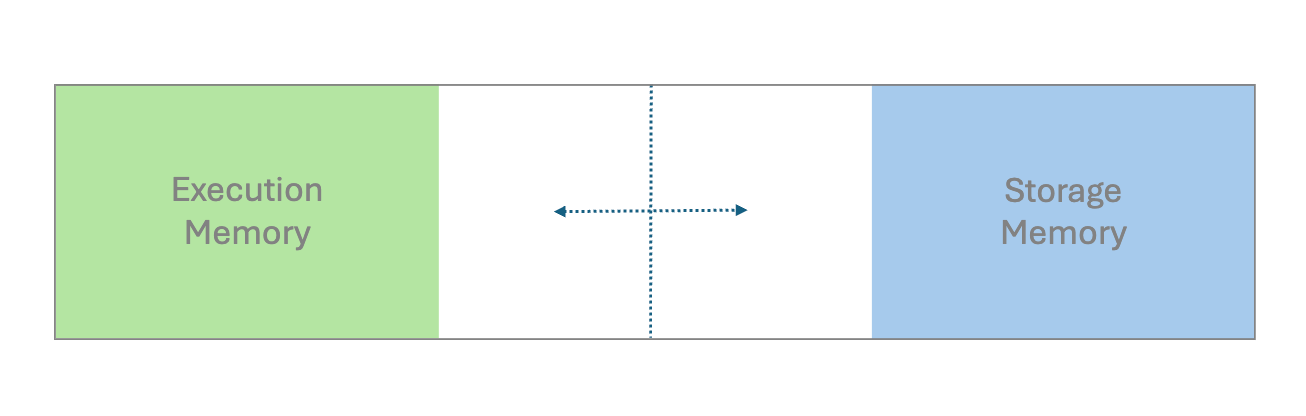 A unified region with execution memory and storage memory (Image by author)
If we design improperly, the available memory may become insufficient. This causes excess partitions to spill onto the disk, which results in performance degradation.
Caching and persisting intermediate results or frequently accessed datasets are common practices. While both cache and persist serve the same purposes, they may differ in their storage levels. The resources should be used optimally to ensure efficient read and write operations.
A unified region with execution memory and storage memory (Image by author)
If we design improperly, the available memory may become insufficient. This causes excess partitions to spill onto the disk, which results in performance degradation.
Caching and persisting intermediate results or frequently accessed datasets are common practices. While both cache and persist serve the same purposes, they may differ in their storage levels. The resources should be used optimally to ensure efficient read and write operations.
For example, if transformed data will be reused repeatedly for computations and algorithms across different subsequent stages, it is advisable to cache that data.
Code example: Assume we want to investigate different subsets of transaction records using a digital wallet as the payment method.
- Inefficient - Without caching
python
from pyspark.sql.functions import col

@time_decorator
def without_cache(data):
  # 1st filtering
  df2 = data.where(col("paymentMthd") == "Digital wallet")
  count = df2.count()

  # 2nd filtering
  df3 = df2.where(col("totalAmt") > 2000)
  count = df3.count()

  return count

display(without_cache(df))
- Efficient - Caching on a critical dataset
python
from pyspark.sql.functions import col

@time_decorator
def after_cache(data):
  # 1st filtering with cache
  df2 = data.where(col("paymentMthd") == "Digital wallet").cache()
  count = df2.count()

  # 2nd filtering
  df3 = df2.where(col("totalAmt") > 2000)
  count = df3.count()

  return count

display(after_cache(df))
After caching, even if we want to filter the transformed dataset with different transaction amount thresholds or other data dimensions, the execution times will still be more manageable.
2 Shuffle
When we perform operations like joining DataFrames or grouping by data fields, shuffling occurs. This is necessary to redistribute all records across the cluster and to ensure those with the same key are on the same node. This in turn facilitates simultaneous processing and combining of the results.
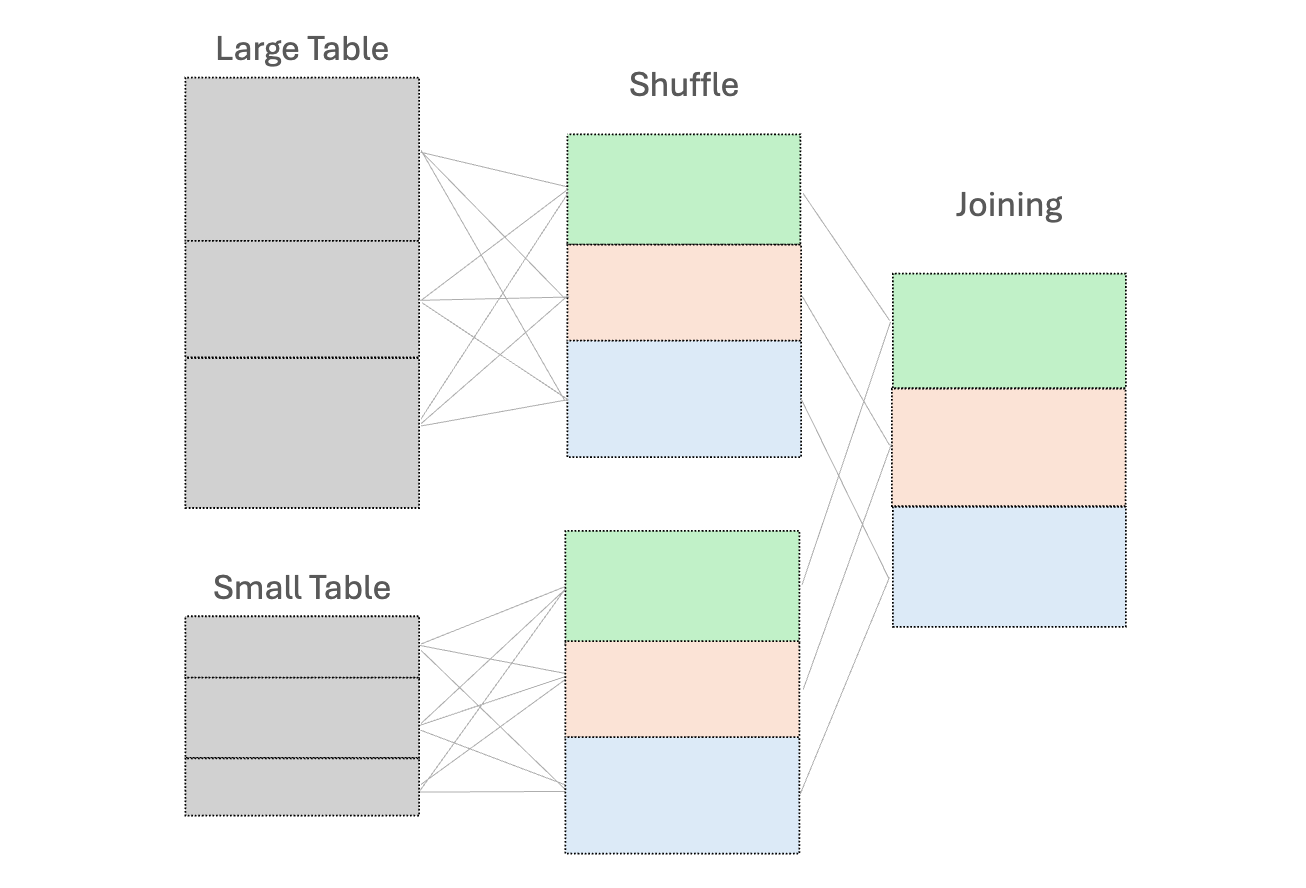 Shuffle join (Image by author)
However, this shuffle operation is costly - high execution times and additional network overhead due to data movement between nodes.
To reduce shuffling, there are several strategies:
(1) Use broadcast variables for the small dataset, to send a read-only copy to every worker node for local processing
Shuffle join (Image by author)
However, this shuffle operation is costly - high execution times and additional network overhead due to data movement between nodes.
To reduce shuffling, there are several strategies:
(1) Use broadcast variables for the small dataset, to send a read-only copy to every worker node for local processing
While "small" dataset is often defined by a maximum memory threshold of 8GB per executor, the ideal size for broadcasting should be determined through experimentation on specific case.
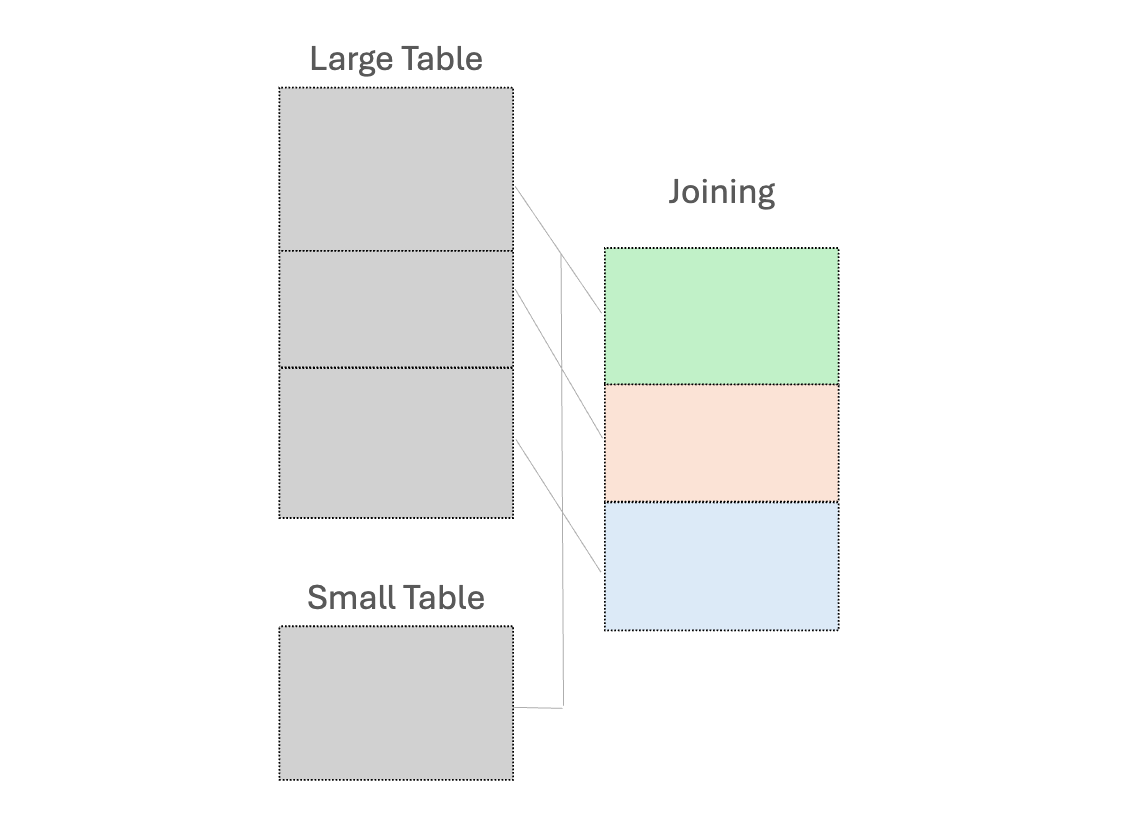 Broadcast join (Image by author)
(2) Early filtering, to minimize the amount of data processed as early as possible; and
(3) Control the number of partitions to ensure optimal performance
Code examples: Assume we want to return the transaction records that match our list of states, along with their full names
Broadcast join (Image by author)
(2) Early filtering, to minimize the amount of data processed as early as possible; and
(3) Control the number of partitions to ensure optimal performance
Code examples: Assume we want to return the transaction records that match our list of states, along with their full names
- Inefficient - shuffle join between a large dataset and a small one
python
from pyspark.sql.functions import col

@time_decorator
def no_broadcast_var(data):
  # Create small dataframe
  small_data = [("CA", "California"), ("TX", "Texas"), ("FL", "Florida")]
  small_df = spark.createDataFrame(small_data, ["state", "stateLF"])

  # Perform joining
  result_no_broadcast = data.join(small_df, "state")

  return result_no_broadcast.count()

display(no_broadcast_var(df))
- Efficient - join the large dataset with the small one using a broadcast variable
python
from pyspark.sql.functions import col, broadcast

@time_decorator
def have_broadcast_var(data):
  small_data = [("CA", "California"), ("TX", "Texas"), ("FL", "Florida")]
  small_df = spark.createDataFrame(small_data, ["state", "stateFullName"])

  # Create broadcast variable and perform joining
  result_have_broadcast = data.join(broadcast(small_df), "state")

  return result_have_broadcast.count()

display(have_broadcast_var(df))
3 Skewness
Data can sometimes be unevenly distributed, especially for data fields used as the key for processing. This leads to imbalanced partition sizes, in which some partitions are significantly larger or smaller than the average.
Since the execution performance is limited by the longest-running tasks, it is necessary to address the over-burdened nodes.
One common approach is salting. This works by adding randomized numbers to the skewed key so that there is a more uniform distribution across partitions. Let's say when aggregating data based on the skewed key, we will aggregate using the salted key and then aggregate with the original key. Another method is re-partitioning, which increases the number of partitions to help distribute the data more evenly.
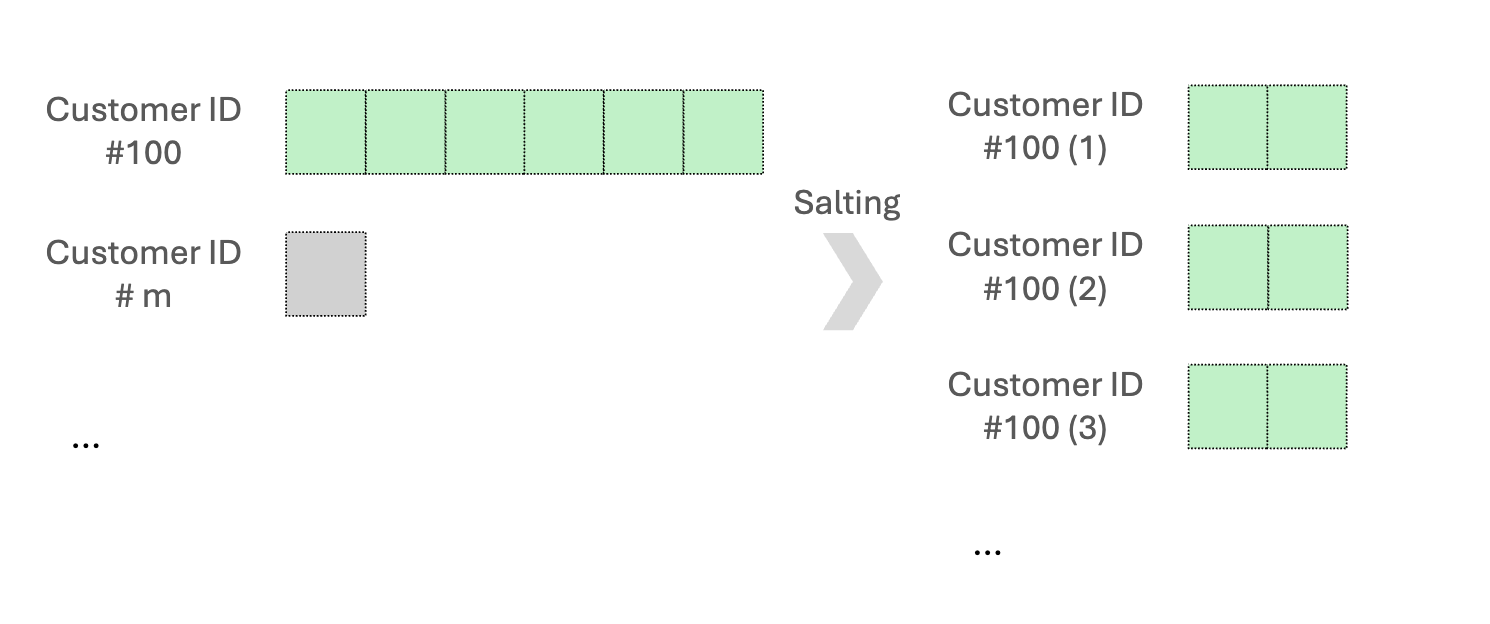 Data distribution - Before and after salting (Image by author)
Code examples: We want to aggregate an asymmetric dataset, mainly skewed by customer ID #100.
Data distribution - Before and after salting (Image by author)
Code examples: We want to aggregate an asymmetric dataset, mainly skewed by customer ID #100.
- Inefficient - directly use the skewed key
python
from pyspark.sql.functions import col, desc

@time_decorator
def no_salting(data):
  # Perform aggregation
  agg_data = data.groupBy("customerID").agg({"totalAmt": "sum"}).sort(desc("sum(totalAmt)"))
  return agg_data

display(no_salting(df))
- Efficient - use the salting skewed key for aggregation
python
from pyspark.sql.functions import col, lit, concat, rand, split, desc

@time_decorator
def have_salting(data):
  # Salt the customerID by adding the suffix
  salted_data = data.withColumn("salt", (rand() * 8).cast("int"))
                .withColumn("saltedCustomerID", concat(col("customerID"), lit("_"), col("salt")))

  # Perform aggregation
 agg_data = salted_data.groupBy("saltedCustomerID").agg({"totalAmt": "sum"})

 # Remove salt for further aggregation
 final_result = agg_data.withColumn("customerID", split(col("saltedCustomerID"), "_")[0]).groupBy("customerID").agg({"sum(totalAmt)": "sum"}).sort(desc("sum(sum(totalAmt))"))

 return final_result

display(have_salting(df))
A random prefix or suffix to the skewed keys will both work. Generally, 5 to 10 random values are a good starting point to balance between spreading out the data and maintaining high complexity.
4 Serialization
People often prefer using user-defined functions (UDFs) since it is flexible in customizing the data processing logic. However, UDFs operate on a row-by-row basis. The code shall be serialized by the Python interpreter, sent to the executor JVM, and then deserialized. This incurs high serialization costs and prevents Spark from optimizing and processing the code efficiently.
The simple and direct approach is to avoid using UDFs when possible.
We should first consider using the built-in Spark functions, which can handle tasks such as aggregation, arrays/maps operations, date/time stamps, and JSON data processing. If the built-in functions do not satisfy your desired tasks indeed, we can consider using pandas UDFs. They are built on top of Apache Arrow for lower overhead costs and higher performance, compared to UDFs.
Code examples: The transaction price is discounted based on the originating state.
- Inefficient - using a UDF
python
from pyspark.sql.functions import udf
from pyspark.sql.types import DoubleType
from pyspark.sql import functions as F
import numpy as np

# UDF to calculate discounted amount
def calculate_discount(state, amount):
  if state == "CA":
    return amount * 0.90  # 10% off
  else:
    return amount * 0.85  # 15% off

discount_udf = udf(calculate_discount, DoubleType())

@time_decorator
def have_udf(data):
  # Use the UDF
  discounted_data = data.withColumn("discountedTotalAmt", discount_udf("state", "totalAmt"))

  # Show the results
  return discounted_data.select("customerID", "totalAmt", "state", "discountedTotalAmt").show()

display(have_udf(df))
- Efficient - using build-in PySpark functions
python
from pyspark.sql.functions import when

@time_decorator
def no_udf(data):
  # Use when and otherwise to discount the amount based on conditions
  discounted_data = data.withColumn(
  "discountedTotalAmt",
  when(data.state == "CA", data.totalAmt * 0.90)  # 10% off
  .otherwise(data.totalAmt * 0.85))  # 15% off

  # Show the results
  return discounted_data.select("customerID", "totalAmt", "state", "discountedTotalAmt").show()

display(no_udf(df))
In this example, we use the built-in PySpark functions "when and otherwise" to effectively check multiple conditions in sequence. There are unlimited examples based on our familiarity with those functions. For instance, pyspark.sql.functions.transforma function that aids in applying a transformation to each element in the input array has been introduced since PySpark version 3.1.0.
5 Spill
As discussed in the Storage section, a spill occurs by writing temporary data from memory to disk due to insufficient memory to hold all the required data. Many performance issues we have covered are related to spills. For example, operations that shuffle large amounts of data between partitions can easily lead to memory exhaustion and subsequent spill.
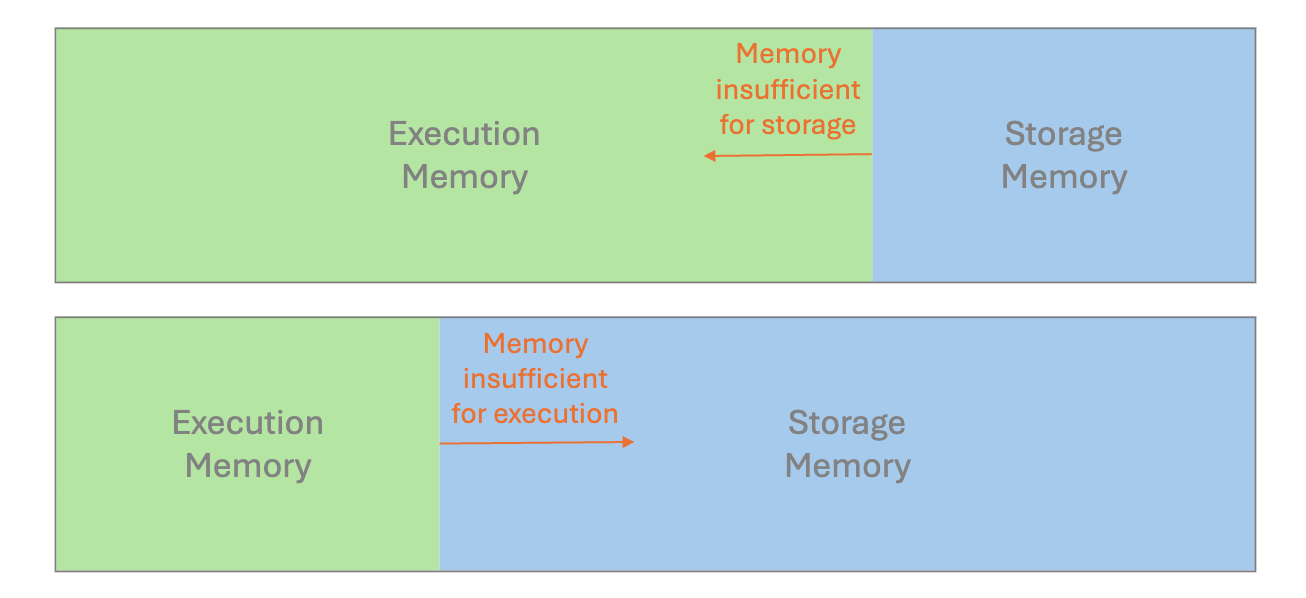 Different scenarios of spill due to insufficient memory (Image by author)
It is crucial to examine the performance metrics in Spark UI. If we discover the statistics for Spill(Memory) and Spill(Disk), the spill is probably the reason for long-running tasks. To remediate this, try to instantiate a cluster with more memory per worker, e.g. increase the executor process size, by tuning the configuration value
Different scenarios of spill due to insufficient memory (Image by author)
It is crucial to examine the performance metrics in Spark UI. If we discover the statistics for Spill(Memory) and Spill(Disk), the spill is probably the reason for long-running tasks. To remediate this, try to instantiate a cluster with more memory per worker, e.g. increase the executor process size, by tuning the configuration value spark.executor.memory; Alternatively, we can configure spark.memory.fraction to adjust how much memory is allocated for execution and storage.
Wrapping it Up
We came across several common factors leading to performance degradation in PySpark, and the possible improvement methods:
- Storage: use cache and persist to store the frequently used intermediate results
- Shuffle: use broadcast variables for a small dataset to facilitate Spark's local processing
- Skewness: execute salting or repartitioning to distribute the skewed data more uniformly
- Serialization: prefer to use built-in Spark functions to optimize the performance
- Spill: adjust the configuration value to allocate memory wisely
Recently, Adaptive Query Execution (AQE) has been newly addressed for dynamic planning and re-planning of queries based on runtime stats. This supports different features of query re-optimization that occur during query execution, which creates a great optimization technique. However, understanding data characteristics during the initial design is still essential, as it informs better strategies for writing effective codes and queries while using AQE for fine-tuning.
Before you go
If you enjoy this reading, I invite you to **** follow my Medium page and LinkedIn page. By doing so, you can stay updated with exciting content related to data science side projects, Machine Learning Operations (MLOps) demonstrations, and project management methodologies.
Simplifying the Python Code for Data Engineering Projects
Feature Engineering for Time-Series Using PySpark on Databricks
Register Now to Continue Reading
Unlock Towards Data Science with a Free Account
All articles on Towards Data Science are available to registered users. Create a free account today to access this article and thousands more.
Register for freeSign in to your account
 Written By
See all from John Leung
Big DataData ProcessingOptimizationPythonSpark
Share This Article
Towards Data Science is a community publication. Submit your insights to reach our global audience and earn through the TDS Author Payment Program.
Write for TDS
Related Articles
Artificial Intelligence
Part 1 : Data cleaning and manipulation
Soner Yıldırım
January 11, 20216 min read
Simple best practices for protecting API keys
Aashish Nair
March 7, 20234 min read
Programming
Matplotlib visualizations don't have to be an eyesore - These tips will help.
Dario Radečić
August 29, 20225 min read
Machine Learning
Two options: Local Outlier Factor and Gaussian Mixture Models
Gustavo Santos
November 2, 20225 min read
Artificial Intelligence
From tutorial to practical examples of Python Singleton design pattern
Christopher Tao
March 31, 20247 min read
Programming
Seamless Integration of Python, Pandas, and LLM
Dmitrii Eliuseev
March 22, 202412 min read
Coding
Can you use the pipe operator for pandas dataframes?
Marcin Kozak
September 28, 20228 min read
Machine Learning
A simplified analysis of the potential effects of aridification and climate change in Denver, Colorado
Martin Palkovic
December 2, 20207 min read
Programming
Master method chaining, assign(), and pipe() to write cleaner, testable, production-ready Pandas code
Ibrahim Salami
April 12, 202614 min read
Your home for data science and AI. The world's leading publication for data science, data analytics, data engineering, machine learning, and artificial intelligence professionals.
Subscribe to Our NewsletterWrite For TDS•About•Advertise•Privacy Policy•Terms of Use
© Insight Media Group, LLC 2026•The New Stack•roadmap.sh•Creator Network
Recommended Articles
Close