保留正文与补采附件。源页面当前未重新核验;具体限制见交付清单。
 We value your privacy
We use cookies to enhance your browsing experience, serve personalised ads or content, and analyse our traffic. By clicking "Accept All", you consent to our use of cookies.
Customise Reject All Accept All
Customise Consent Preferences
We value your privacy
We use cookies to enhance your browsing experience, serve personalised ads or content, and analyse our traffic. By clicking "Accept All", you consent to our use of cookies.
Customise Reject All Accept All
Customise Consent Preferences  We use cookies to help you navigate efficiently and perform certain functions. You will find detailed information about all cookies under each consent category below.
The cookies that are categorised as "Necessary" are stored on your browser as they are essential for enabling the basic functionalities of the site. ... Show more
NecessaryAlways Active
Necessary cookies are required to enable the basic features of this site, such as providing secure log-in or adjusting your consent preferences. These cookies do not store any personally identifiable data.
We use cookies to help you navigate efficiently and perform certain functions. You will find detailed information about all cookies under each consent category below.
The cookies that are categorised as "Necessary" are stored on your browser as they are essential for enabling the basic functionalities of the site. ... Show more
NecessaryAlways Active
Necessary cookies are required to enable the basic features of this site, such as providing secure log-in or adjusting your consent preferences. These cookies do not store any personally identifiable data.
-
Cookie
BCTempID
-
Duration
10 minutes
-
Description
No description available.
-
Cookie
__cf_bm
-
Duration
1 hour
-
Description
This cookie, set by Cloudflare, is used to support Cloudflare Bot Management.
-
Cookie
AWSALBCORS
-
Duration
7 days
-
Description
Amazon Web Services set this cookie for load balancing.
-
Cookie
_cfuvid
-
Duration
session
-
Description
Cloudflare sets this cookie to track users across sessions to optimize user experience by maintaining session consistency and providing personalized services
-
Cookie
li_gc
-
Duration
6 months
-
Description
Linkedin set this cookie for storing visitor's consent regarding using cookies for non-essential purposes.
-
Cookie
__hssrc
-
Duration
session
-
Description
This cookie is set by Hubspot whenever it changes the session cookie. The __hssrc cookie set to 1 indicates that the user has restarted the browser, and if the cookie does not exist, it is assumed to be a new session.
-
Cookie
__hssc
-
Duration
1 hour
-
Description
HubSpot sets this cookie to keep track of sessions and to determine if HubSpot should increment the session number and timestamps in the __hstc cookie.
-
Cookie
wpEmojiSettingsSupports
-
Duration
session
-
Description
WordPress sets this cookie when a user interacts with emojis on a WordPress site. It helps determine if the user's browser can display emojis properly.
-
Cookie
BCSessionID
-
Duration
1 year 1 month 4 days
-
Description
Blueconic sets this cookie as a unique identifier for the BlueConic profile.
-
Cookie
_octo
-
Duration
1 year
-
Description
No description available.
-
Cookie
logged_in
-
Duration
1 year
-
Description
No description available.
-
Cookie
__Secure-YEC
-
Duration
past
-
Description
YouTube sets this cookie to stores the user's video player preferences using embedded YouTube video
-
Cookie
__eoi
-
Duration
6 months
-
Description
Description is currently not available.
-
Cookie
AWSALBTGCORS
-
Duration
7 days
-
Description
No description available.
-
Cookie
login-status-p
-
Duration
past
-
Description
Description is currently not available.
-
Cookie
AWSALBTG
-
Duration
7 days
-
Description
No description available.
-
Cookie
csrf_token
-
Duration
session
-
Description
No description available.
-
Cookie
token_v2
-
Duration
1 day
-
Description
Description is currently not available.
-
Cookie
D
-
Duration
1 year
-
Description
Description is currently not available.
-
Cookie
PHPSESSID
-
Duration
session
-
Description
This cookie is native to PHP applications. The cookie stores and identifies a user's unique session ID to manage user sessions on the website. The cookie is a session cookie and will be deleted when all the browser windows are closed.
-
Cookie
VISITOR_PRIVACY_METADATA
-
Duration
6 months
-
Description
YouTube sets this cookie to store the user's cookie consent state for the current domain.
-
Cookie
cookietest
-
Duration
session
-
Description
The cookietest cookie is typically used to determine whether the user's browser accepts cookies, essential for website functionality and user experience.
-
Cookie
__Host-airtable-session
-
Duration
1 year
-
Description
This cookie is used to enable us to integrate the services of Airtable.
-
Cookie
__Host-airtable-session.sig
-
Duration
1 year
-
Description
This cookie is used to enable us to integrate the services of Airtable.
-
Cookie
m
-
Duration
1 year 1 month 4 days
-
Description
Stripe sets this cookie for fraud prevention purposes. It identifies the device used to access the website, allowing the website to be formatted accordingly.
-
Cookie
BIGipServer*
-
Duration
session
-
Description
Marketo sets this cookie to collect information about the user's online activity and build a profile about their interests to provide advertisements relevant to the user.
-
Cookie
__cfruid
-
Duration
session
-
Description
Cloudflare sets this cookie to identify trusted web traffic.
-
Cookie
_GRECAPTCHA
-
Duration
6 months
-
Description
Google Recaptcha service sets this cookie to identify bots to protect the website against malicious spam attacks.
-
Cookie
__Secure-YNID
-
Duration
6 months
-
Description
Google cookie used to protect user security and prevent fraud, especially during the login process.
-
Cookie
cookieyes-consent
-
Duration
1 year
-
Description
CookieYes sets this cookie to remember users' consent preferences so that their preferences are respected on subsequent visits to this site. It does not collect or store any personal information about the site visitors.
Functional
Functional cookies help perform certain functionalities like sharing the content of the website on social media platforms, collecting feedback, and other third-party features.
-
Cookie
lidc
-
Duration
1 day
-
Description
LinkedIn sets the lidc cookie to facilitate data center selection.
-
Cookie
brw
-
Duration
1 year
-
Description
No description available.
-
Cookie
brwConsent
-
Duration
5 minutes
-
Description
Description is currently not available.
-
Cookie
WMF-Uniq
-
Duration
1 year
-
Description
Description is currently not available.
-
Cookie
loom_anon_comment
-
Duration
1 year
-
Description
No description available.
-
Cookie
loom_referral_video
-
Duration
session
-
Description
Description is currently not available.
-
Cookie
VISITOR_INFO1_LIVE
-
Duration
6 months
-
Description
A cookie set by YouTube to measure bandwidth that determines whether the user gets the new or old player interface.
-
Cookie
yt-remote-connected-devices
-
Duration
Never Expires
-
Description
YouTube sets this cookie to store the user's video preferences using embedded YouTube videos.
-
Cookie
ytidb::LAST_RESULT_ENTRY_KEY
-
Duration
Never Expires
-
Description
The cookie ytidb::LAST_RESULT_ENTRY_KEY is used by YouTube to store the last search result entry that was clicked by the user. This information is used to improve the user experience by providing more relevant search results in the future.
-
Cookie
yt-remote-device-id
-
Duration
Never Expires
-
Description
YouTube sets this cookie to store the user's video preferences using embedded YouTube videos.
-
Cookie
yt-remote-session-name
-
Duration
session
-
Description
The yt-remote-session-name cookie is used by YouTube to store the user's video player preferences using embedded YouTube video.
-
Cookie
yt-remote-fast-check-period
-
Duration
session
-
Description
The yt-remote-fast-check-period cookie is used by YouTube to store the user's video player preferences for embedded YouTube videos.
-
Cookie
yt-remote-session-app
-
Duration
session
-
Description
The yt-remote-session-app cookie is used by YouTube to store user preferences and information about the interface of the embedded YouTube video player.
-
Cookie
yt-remote-cast-available
-
Duration
session
-
Description
The yt-remote-cast-available cookie is used to store the user's preferences regarding whether casting is available on their YouTube video player.
-
Cookie
yt-remote-cast-installed
-
Duration
session
-
Description
The yt-remote-cast-installed cookie is used to store the user's video player preferences using embedded YouTube video.
-
Cookie
cp_session
-
Duration
3 months
-
Description
Codepen sets this cookie for Help systems found in the website.
-
Cookie
loid
-
Duration
1 year 1 month 4 days
-
Description
This cookie is set by the Reddit. The cookie enables the sharing of content from the website onto the social media platform.
Analytics
Analytical cookies are used to understand how visitors interact with the website. These cookies help provide information on metrics such as the number of visitors, bounce rate, traffic source, etc.
-
Cookie
__hstc
-
Duration
6 months
-
Description
Hubspot set this main cookie for tracking visitors. It contains the domain, initial timestamp (first visit), last timestamp (last visit), current timestamp (this visit), and session number (increments for each subsequent session).
-
Cookie
hubspotutk
-
Duration
6 months
-
Description
HubSpot sets this cookie to keep track of the visitors to the website. This cookie is passed to HubSpot on form submission and used when deduplicating contacts.
-
Cookie
_ga
-
Duration
1 year 1 month 4 days
-
Description
Google Analytics sets this cookie to calculate visitor, session and campaign data and track site usage for the site's analytics report. The cookie stores information anonymously and assigns a randomly generated number to recognise unique visitors.
-
Cookie
ga*
-
Duration
1 year 1 month 4 days
-
Description
Google Analytics sets this cookie to store and count page views.
-
Cookie
__Host-psifi.analyticsTrace
-
Duration
6 hours
-
Description
Description is currently not available.
-
Cookie
__Host-psifi.analyticsTraceV2
-
Duration
6 hours
-
Description
Description is currently not available.
-
Cookie
_gh_sess
-
Duration
session
-
Description
GitHub sets this cookie for temporary application and framework state between pages like what step the user is on in a multiple step form.
-
Cookie
YSC
-
Duration
session
-
Description
YSC cookie is set by Youtube and is used to track the views of embedded videos on Youtube pages.
-
Cookie
ajs_anonymous_id
-
Duration
1 year
-
Description
This cookie is set by Segment to count the number of people who visit a certain site by tracking if they have visited before.
-
Cookie
vuid
-
Duration
1 year 1 month 4 days
-
Description
Vimeo installs this cookie to collect tracking information by setting a unique ID to embed videos on the website.
Performance
Performance cookies are used to understand and analyse the key performance indexes of the website which helps in delivering a better user experience for the visitors.
-
Cookie
AWSALB
-
Duration
7 days
-
Description
AWSALB is an application load balancer cookie set by Amazon Web Services to map the session to the target.
-
Cookie
acq
-
Duration
past
-
Description
Description is currently not available.
-
Cookie
acq.sig
-
Duration
past
-
Description
Description is currently not available.
-
Cookie
ptc
-
Duration
2 years
-
Description
No description available.
Advertisement
Advertisement cookies are used to provide visitors with customised advertisements based on the pages you visited previously and to analyse the effectiveness of the ad campaigns.
-
Cookie
muc_ads
-
Duration
1 year 1 month 4 days
-
Description
Twitter sets this cookie to collect user behaviour and interaction data to optimize the website.
-
Cookie
guest_id_marketing
-
Duration
1 year 1 month 4 days
-
Description
Twitter sets this cookie to identify and track the website visitor.
-
Cookie
guest_id_ads
-
Duration
1 year 1 month 4 days
-
Description
Twitter sets this cookie to identify and track the website visitor.
-
Cookie
personalization_id
-
Duration
1 year 1 month 4 days
-
Description
Twitter sets this cookie to integrate and share features for social media and also store information about how the user uses the website, for tracking and targeting.
-
Cookie
guest_id
-
Duration
1 year 1 month 4 days
-
Description
Twitter sets this cookie to identify and track the website visitor. It registers if a user is signed in to the Twitter platform and collects information about ad preferences.
-
Cookie
bcookie
-
Duration
1 year
-
Description
LinkedIn sets this cookie from LinkedIn share buttons and ad tags to recognize browser IDs.
-
Cookie
__Secure-ROLLOUT_TOKEN
-
Duration
6 months
-
Description
YouTube sets this cookie to manage feature rollout and experimentation. It helps Google control which new features or interface changes are shown to users as part of testing and staged rollouts, ensuring consistent experience for a given user during an experiment.
-
Cookie
yt.innertube::nextId
-
Duration
Never Expires
-
Description
YouTube sets this cookie to register a unique ID to store data on what videos from YouTube the user has seen.
-
Cookie
yt.innertube::requests
-
Duration
Never Expires
-
Description
YouTube sets this cookie to register a unique ID to store data on what videos from YouTube the user has seen.
-
Cookie
session_tracker
-
Duration
session
-
Description
This cookie is set by the Reddit. This cookie is used to identify trusted web traffic. It also helps in adverstising on the website.
-
Cookie
edgebucket
-
Duration
session
-
Description
Reddit sets this cookie to save the information about a log-on Reddit user, for the purpose of advertisement recommendations and updating the content.
-
Cookie
did
-
Duration
1 year
-
Description
Arbor sets this cookie to show targeted ads to site visitors.This cookie expires after 2 months or 1 year.
Uncategorised
Other uncategorised cookies are those that are being analysed and have not been classified into a category as yet.
No cookies to display.
Reject All Save My Preferences Accept All
Toggle SearchToggle Mobile Navigation
Publish AI, ML & data-science insights to a global community of data professionals.
Sign inSubmit an Article
LatestEditor's PicksNewsletterShipAI
Write For TDS
LinkedInXToggle Search
Deep Learning
Optimizing PyTorch Model Inference on CPU
Flyin’ Like a Lion on Intel Xeon
Chaim Rand
December 8, 202517 min read
 Photo by Ingo Stiller on Unsplash
As reliance on AI models grows, so does the criticality of optimizing their runtime performance. While the degree to which AI models will outperform human intelligence remains a heated topic of debate, their need for powerful and expensive compute resources is unquestionable — and even notorious.
In previous posts, we covered the topic of AI model optimization — primarily in the context of model training — and demonstrated how it can have a decisive impact on the cost and speed of AI model development. In this post, we focus our attention on AI model inference, where model optimization has an additional objective: To minimize the latency of inference requests and improve the user experience of the model consumer.
In this post, we will assume that the platform on which model inference is performed is a 4th Gen Intel® Xeon® Scalable CPU processor, more specifically, an Amazon EC2 c7i.xlarge instance (with 4 Intel Xeon vCPUs) running a dedicated Deep Learning Ubuntu (22.04) AMI and a CPU build of PyTorch 2.8.0. Of course, the choice of a model deployment platform is one of the many important decisions taken when designing an AI solution along with the choice of model architecture, development framework, training accelerator, data format, deployment strategy, etc. — each one of which must be taken with consideration of the associated costs and runtime speed. The choice of a CPU processor for running model inference may seem surprising in an era in which the number of dedicated AI inference accelerators is continuously growing. However, as we will see, there are some occasions when the best (and cheapest) option may very well be just a good old-fashioned CPU.
We will introduce a toy image-classification model and proceed to demonstrate some of the optimization opportunities for AI model inference on an Intel® Xeon® CPU. The deployment of an AI model typically includes a full inference server solution, but for the sake of simplicity, we will limit our discussion to just the model’s core execution. For a primer on model inference serving, please see our previous post: The Case for Centralized AI Model Inference Serving.
Learn this step by step with the interactive Machine Learning roadmap.
Our intention in this post is to demonstrate that: 1) a few simple optimization techniques can result in meaningful performance gains and 2) that reaching such results does not require specialized expertise in performance analyzers (such as Intel® VTune™ Profiler) or on the inner workings of the low-level compute kernels. Importantly, the process of AI model optimization can differ considerably based on the model architecture and runtime environment. Optimizing for training will differ from optimizing for inference. Optimizing a transformer model will differ from optimizing a CNN model. Optimizing a 22-billion-parameter model will differ from optimizing a 100-million parameter model. Optimizing a model to run on a GPU will differ from optimizing it for a CPU. Even different generations of the same CPU family may have different computation components and, consequently, different optimization techniques. While the high-level steps for optimizing a given model on a given instance are pretty standard, the specific course it will take and the end result can vary greatly based on the project at hand.
The code snippets we will share are intended for demonstrative purposes. Please do not rely on their accuracy or their optimality. Please do not interpret our mention of any tool or technique as an endorsement for its use. Ultimately, the best design choices for your use case will greatly depend on the details of your project and, given the extent of the potential impact on performance, should be evaluated with the appropriate time and attention.
Photo by Ingo Stiller on Unsplash
As reliance on AI models grows, so does the criticality of optimizing their runtime performance. While the degree to which AI models will outperform human intelligence remains a heated topic of debate, their need for powerful and expensive compute resources is unquestionable — and even notorious.
In previous posts, we covered the topic of AI model optimization — primarily in the context of model training — and demonstrated how it can have a decisive impact on the cost and speed of AI model development. In this post, we focus our attention on AI model inference, where model optimization has an additional objective: To minimize the latency of inference requests and improve the user experience of the model consumer.
In this post, we will assume that the platform on which model inference is performed is a 4th Gen Intel® Xeon® Scalable CPU processor, more specifically, an Amazon EC2 c7i.xlarge instance (with 4 Intel Xeon vCPUs) running a dedicated Deep Learning Ubuntu (22.04) AMI and a CPU build of PyTorch 2.8.0. Of course, the choice of a model deployment platform is one of the many important decisions taken when designing an AI solution along with the choice of model architecture, development framework, training accelerator, data format, deployment strategy, etc. — each one of which must be taken with consideration of the associated costs and runtime speed. The choice of a CPU processor for running model inference may seem surprising in an era in which the number of dedicated AI inference accelerators is continuously growing. However, as we will see, there are some occasions when the best (and cheapest) option may very well be just a good old-fashioned CPU.
We will introduce a toy image-classification model and proceed to demonstrate some of the optimization opportunities for AI model inference on an Intel® Xeon® CPU. The deployment of an AI model typically includes a full inference server solution, but for the sake of simplicity, we will limit our discussion to just the model’s core execution. For a primer on model inference serving, please see our previous post: The Case for Centralized AI Model Inference Serving.
Learn this step by step with the interactive Machine Learning roadmap.
Our intention in this post is to demonstrate that: 1) a few simple optimization techniques can result in meaningful performance gains and 2) that reaching such results does not require specialized expertise in performance analyzers (such as Intel® VTune™ Profiler) or on the inner workings of the low-level compute kernels. Importantly, the process of AI model optimization can differ considerably based on the model architecture and runtime environment. Optimizing for training will differ from optimizing for inference. Optimizing a transformer model will differ from optimizing a CNN model. Optimizing a 22-billion-parameter model will differ from optimizing a 100-million parameter model. Optimizing a model to run on a GPU will differ from optimizing it for a CPU. Even different generations of the same CPU family may have different computation components and, consequently, different optimization techniques. While the high-level steps for optimizing a given model on a given instance are pretty standard, the specific course it will take and the end result can vary greatly based on the project at hand.
The code snippets we will share are intended for demonstrative purposes. Please do not rely on their accuracy or their optimality. Please do not interpret our mention of any tool or technique as an endorsement for its use. Ultimately, the best design choices for your use case will greatly depend on the details of your project and, given the extent of the potential impact on performance, should be evaluated with the appropriate time and attention.
Why CPU?
With the ever-increasing number of hardware solutions for executing AI/ML model inference, our choice of a CPU may seem surprising. In this section, we describe some scenarios in which CPU may be the preferred platform for inference.
- Accessibility : The use of dedicated AI accelerators — such as GPUs — typically requires dedicated deployment and maintenance or, alternatively, access to such instances on a cloud service platform. CPUs, on the other hand, are everywhere. Designing a solution to run on a CPU provides much greater flexibility and increases the opportunities for deployment.
- Availability : Even if your algorithm can access an AI accelerator, there is the question of availability. AI accelerators are in extremely high demand, and even if/when you are able to acquire one, whether it be on-prem or in the cloud, you may choose to prioritize them for tasks that are even more resource intensive, such as AI model training.
- Reduced Latency : There are many situations in which your AI model is just one component in a pipeline of software algorithms running on a standard CPU. While the AI model may perform significantly faster on an AI accelerator, when taking into account the time required to send an inference request over the network, it is quite possible that running it on the same CPU will be faster.
- Underuse of Accelerator : AI accelerators are typically quite expensive. To justify their cost, your goal should be to keep them fully occupied, minimizing their idle time. In some cases, the inference load will not justify the cost of an expensive AI accelerator.
- Model Architecture : These days, we tend to automatically assume that AI models will perform significantly better on AI accelerators than on CPUs. And while more often than not, this is indeed the case, your model may include layers that perform better on CPU. For example, sequential algorithms such as Non-Maximum Suppression (NMS) and the Hungarian matching algorithm tend to perform better on CPU than GPU and are often offloaded onto the CPU even if a GPU is available (e.g., see here). If your model contains many such layers, running it on a CPU might not be such a bad option.
Why Intel Xeon?
Intel® Xeon® Scalable CPU processors come with built-in accelerators for the matrix and convolution operators that are common in typical AI/ML workloads. These include AVX-512 (introduced in Gen1), the VNNI extension (Gen2), and AMX (Gen4). The AMX engine, in particular, includes specialized hardware instructions for executing AI models using bfloat16 and int8 precision data types. The acceleration engines are tightly integrated with Intel’s optimized software stack, which includes oneDNN, OpenVINO, and the Intel Extension for PyTorch (IPEX). These libraries utilize the dedicated Intel® Xeon® hardware capabilities to optimize model execution with minimal code changes.
Despite the arguments made in this section, the choice of inference vehicle should be made after considering all options available and after assessing the opportunities for optimization on each one. In the next sections, we will introduce a toy experiment and explore some of the optimization opportunities on CPU.
Inference Experiment
In this section, we define a toy AI model inference experiment comprising a Resnet50 image classification model, a randomly generated input batch, and a simple benchmarking utility which we use to report the average number of input samples processed per second (SPS).
python
import torch, torchvision
import time


def get_model():
    model = torchvision.models.resnet50()
    model = model.eval()
    return model


def get_input(batch_size):
    batch = torch.randn(batch_size, 3, 224, 224)
    return batch


def get_inference_fn(model):
    def infer_fn(batch):
        with torch.inference_mode():
            output = model(batch)
        return output
    return infer_fn


def benchmark(infer_fn, batch):
    # warm-up
    for _ in range(10):
        _ = infer_fn(batch)

    iters = 100

    start = time.time()
    for _ in range(iters):
        _ = infer_fn(batch)
    end = time.time()

    return (end - start) / iters


batch_size = 1
model = get_model()
batch = get_input(batch_size)
infer_fn = get_inference_fn(model)
avg_time = benchmark(infer_fn, batch)
print(f"\nAverage samples per second: {(batch_size/avg_time):.2f}")
The baseline performance of our toy model is 22.76 samples per second (SPS).
Model Inference Optimization
In this section, we apply a number of optimizations to our toy experiment and assess their impact on runtime performance. Our focus will be on optimization techniques that can be applied with relative ease. While it is quite likely that additional performance gains can be achieved, these may require much greater specialization and a more significant time investment.
Our focus will be on optimizations that do not change the model architecture; optimization techniques such as model distillation and model pruning are out of the context of this post. Also out of scope are methods for optimizing specific model components, e.g., by implementing custom PyTorch operators.
In a previous post we discussed AI model optimization on Intel XEON CPUs in the context of training workloads. In this section we will revisit some of the techniques mentioned there, this time in the context of AI model inference. We will complement these with optimization techniques that are unique to inference settings, including model compilation for inference, INT8 quantization, and multi-worker inference.
The order in which we present the optimization methods is not binding. In fact, some of the techniques are interdependent; for example, increasing the number of inference workers could impact the optimal choice of batch size.
Optimization 1: Batched Inference
A common method for increasing resource utilization while reducing the average inference response time is to group input samples into batches. In real-world scenarios, we need to make sure to cap the batch size so that we meet the service level response time requirements, but for the purposes of our experiment we ignore this requirement. Experimenting with different batch sizes we find that a batch size of 8 results in a throughput of 26.28 SPS, 15% higher than the baseline result.
Note that in the case that the shapes of the input samples vary, batching requires more handling (e.g., see here).
Optimization 2: Channels-Last Memory Format
By default in PyTorch, 4D tensors are stored in NCHW format, i.e., the four dimensions represent the batch size, channels, height, and width, respectively. However, the channels-last or NHWC format (i.e., batch size, height, width, and channels) exhibits better performance on CPU. Adjusting our inference script to apply the channels-last optimization is a simple matter of setting the memory format of both the model and the input to torch.channels_last as shown below:
python
def get_model(channels_last=False):
    model = torchvision.models.resnet50()
    if channels_last:
        model= model.to(memory_format=torch.channels_last)
    model = model.eval()
    return model

def get_input(batch_size, channels_last=False):
    batch = torch.randn(batch_size, 3, 224, 224)
    if channels_last:
        batch = batch.to(memory_format=torch.channels_last)
    return batch


batch_size = 8
model = get_model(channels_last=True)
batch = get_input(batch_size, channels_last=True)
infer_fn = get_inference_fn(model)
avg_time = benchmark(infer_fn, batch)
print(f"\nAverage samples per second: {(batch_size/avg_time):.2f}")
Applying the channels-last memory optimization, results in a further boost of 25% in throughput.
The impact of this optimization is most noticeable on models that have many convolutional layers. It is not expected to make a noticeable impact on other model architectures (e.g., transformer models).
Please see the PyTorch documentation for more details on the memory format optimization and the Intel documentation for details on how this is implemented internally in oneDNN.
Optimization 3: Automatic Mixed Precision
Modern Intel® Xeon® Scalable processors (from Gen3) include native support for the bfloat16 data type, a 16-bit floating point alternative to the standard float32. We can take advantage of this by applying PyTorch’s automatic mixed precision package, torch.amp, as demonstrated below:
python
def get_inference_fn(model, enable_amp=False):
    def infer_fn(batch):
        with torch.inference_mode(), torch.amp.autocast(
                'cpu',
                dtype=torch.bfloat16,
                enabled=enable_amp
        ):
            output = model(batch)
        return output
    return infer_fn

batch_size = 8
model = get_model(channels_last=True)
batch = get_input(batch_size, channels_last=True)
infer_fn = get_inference_fn(model, enable_amp=True)
avg_time = benchmark(infer_fn, batch)
print(f"\nAverage samples per second: {(batch_size/avg_time):.2f}")
The result of applying mixed precision is a throughput of 86.95 samples per second, 2.6 times the previous experiment and 3.8 times the baseline result.
Note that the use of a reduced precision floating point type can have an impact on numerical accuracy, and its effect on model quality performance must be evaluated.
Optimization 4: Memory Allocation Optimization
Typical AI/ML workloads require the allocation and access of large blocks of memory. A number of optimization techniques are aimed at tuning the way memory is allocated and used during model execution. One common step is to replace the default system allocator (ptmalloc) with an alternative memory allocation libraries, such as Jemalloc and TCMalloc, which have been shown to perform better on common AI/ML workloads (e.g., see here). To install TCMalloc run:
bash
sudo apt-get install google-perftools
We program its use via the LD_PRELOAD environment variable:
bash
LD_PRELOAD=/usr/lib/x86_64-linux-gnu/libtcmalloc.so.4 python main.py
This optimization results in another significant performance boost: 117.54 SPS, 35% higher than our previous experiment!!
Optimization 5: Enable Huge Page Allocations
By default, the Linux kernel allocates memory in blocks of 4 KB, commonly referred to as pages. The mapping between the virtual and physical memory addresses is managed by the CPU’s Memory Management Unit (MMU), which uses a small hardware cache called the Translation Lookaside Buffer (TLB). The TLB is limited in the number entries it can hold. When you have many small pages (as in large neural network models), the number of TLB cache misses can climb quickly, increasing latency and slowing down the speed of the program. A common way to address this is to use “huge pages” — blocks of 2 MB (or 1 GB) per page. This reduces the number of TLB entries required, improving memory access efficiency and lowering allocation latency.
bash
export THP_MEM_ALLOC_ENABLE=1
In the case of our model, the impact is negligible. However, this is an important optimization for many AI/ML workloads.
Optimization 6: IPEX
Intel® Extension for PyTorch (IPEX) is a library extension for PyTorch with the latest performance optimizations for Intel hardware. To install it we run:
bash
pip install intel_extension_for_pytorch
In the code block below, we demonstrate the basic use of the ipex.optimize API.
python
import intel_extension_for_pytorch as ipex

def get_model(channels_last=False, ipex_optimize=False):
    model = torchvision.models.resnet50()

    if channels_last:
        model= model.to(memory_format=torch.channels_last)

    model = model.eval()

    if ipex_optimize:
        model = ipex.optimize(model, dtype=torch.bfloat16)

    return model
The resultant throughout is 159.31 SPS, for another 36% performance boost.
Please see the official documentation for more details on the many optimizations that IPEX has to offer.
Optimization 7: Model Compilation
Another popular PyTorch optimization is torch.compile. Introduced in PyTorch 2.0, this just-in-time (JIT) compilation feature, performs kernel fusion and other optimizations. In a previous post we covered PyTorch compilation in great detail, covering some its many features, controls, and limitations. Here we demonstrate its basic use:
python
def get_model(channels_last=False, ipex_optimize=False, compile=False):
    model = torchvision.models.resnet50()

    if channels_last:
        model= model.to(memory_format=torch.channels_last)

    model = model.eval()

    if ipex_optimize:
        model = ipex.optimize(model, dtype=torch.bfloat16)

    if compile:
        model = torch.compile(model)

    return model
Applying torch.compile on the IPEX-optimized model results in a throughput of 144.5 SPS, which is lower than our previous experiment. In the case of our model, IPEX and torch.compile do not coexist well. When applying just the torch.compile the throughput is 133.36 SPS.
The general takeaway from this experiment is that, for a given model, any two optimization techniques could interfere with one another. This necessitates evaluating the impact of multiple configurations on the runtime performance of a given model in order to find the best one.
Optimization 8: Auto-tune Environment Setup With **torch.xeon.run_cpu**
There are a number of environment settings that control thread and memory management and can be used to further fine-tune the runtime performance of an AI/ML workload. Rather than setting these manually, PyTorch offers the torch.xeon.run_cpu script that does this automatically. In preparation for the use of this script, we install Intel’s threading and multiprocessing libraries, one TBB and Intel OpenMP. We also add a symbolic link to our TCMalloc installation.
bash
# install TBB
sudo apt install -y libtbb12
# install openMP
pip install intel-openmp
# link to tcmalloc
sudo ln -sf /usr/lib/x86_64-linux-gnu/libtcmalloc.so.4 /usr/lib/libtcmalloc.so
In the case of our toy model, using torch.xeon.run_cpu increases the throughput to 162.15 SPS — a slight increase over our previous maximum of 159.31 SPS.
Please see the PyTorch documentation for more features of the torch.xeon.run_cpu and more details on the environment variables it applies.
Optimization 9: Multi-worker Inference
Another popular technique for increasing resource utilization and scale is to load multiple instances of the AI model and run them in parallel in separate processes. Although this technique is more commonly applied on machines with many CPUs (separated into multiple NUMA nodes) — not on our small 4-vCPU instance — we include it here for the sake of demonstration. In the script below we run 2 instances of our model in parallel:
bash
python -m torch.backends.xeon.run_cpu --ninstances 2 main.py
This results in a throughput of 169.4 SPS — additional modest but meaningful 4% increase.
Optimization 10: INT8 Quantization
INT8 quantization is another common technique for accelerating AI model inference execution. In INT8 quantization, the floating point datatypes of the model weights and activations are replaced by 8-bit integers. Intel’s Xeon processors include dedicated accelerators for processing INT8 operations (e.g., see here). INT8 quantization can result in a meaningful increase in speed and a lower memory footprint. Importantly, the reduced bit-precision can have a significant impact on the quality of the model output. There are many different approaches to INT8 quantization some of which include calibration or retraining. There are also a wide variety of tools and libraries for applying quantization. A full discussion on the topic of quantization is beyond the scope of this post.
Since in this post we are interested just in the potential performance impact, we demonstrate one quantization scheme using TorchAO, without consideration of the impact on model quality. In the code block below, we implement PyTorch 2 Export Quantization with X86 Backend through Inductor. INT8 quantization is another common technique for accelerating AI model inference execution. In INT8 quantization, the floating point datatypes of the model weights and activations are replaced by 8-bit integers. Intel’s Xeon processors include dedicated accelerators for processing INT8 operations (e.g., see here). INT8 quantization can result in a meaningful increase in speed and a lower memory footprint.
Importantly, the reduced bit-precision can have a significant impact on the quality of the model output. There are many different approaches to INT8 quantization some of which include calibration or retraining. There are also a wide variety of tools and libraries for applying quantization. A full discussion on the topic of quantization is beyond the scope of this post. Since in this post we are interested just in the potential performance impact, we demonstrate one quantization scheme using TorchAO, without consideration of the impact on model quality. In the code block below, we implement PyTorch 2 Export Quantization with X86 Backend through Inductor. Please see the documentation for the full details:
python
from torchao.quantization.pt2e.quantize_pt2e import prepare_pt2e, convert_pt2e
import torchao.quantization.pt2e.quantizer.x86_inductor_quantizer as xiq

def quantize_model(model):
    x = torch.randn(4, 3, 224, 224).contiguous(
                            memory_format=torch.channels_last)
    example_inputs = (x,)
    batch_dim = torch.export.Dim("batch")
    with torch.no_grad():
        exported_model = torch.export.export(
            model,
            example_inputs,
            dynamic_shapes=((batch_dim,
                             torch.export.Dim.STATIC,
                             torch.export.Dim.STATIC,
                             torch.export.Dim.STATIC),
                            )
        ).module()
    quantizer = xiq.X86InductorQuantizer()
    quantizer.set_global(xiq.get_default_x86_inductor_quantization_config())
    prepared_model = prepare_pt2e(exported_model, quantizer)
    prepared_model(*example_inputs)
    converted_model = convert_pt2e(prepared_model)
    optimized_model = torch.compile(converted_model)
    return optimized_model


batch_size = 8
model = get_model(channels_last=True)
model = quantize_model(model)
batch = get_input(batch_size, channels_last=True)
infer_fn = get_inference_fn(model, enable_amp=True)
avg_time = benchmark(infer_fn, batch)
print(f"\nAverage samples per second: {(batch_size/avg_time):.2f}")
This results in a throughput of 172.67 SPS.
Please see here for more details on quantization in PyTorch.
Optimization 11: Graph Compilation and Execution With ONNX
There are a number of third party libraries that specialize in compiling PyTorch models into graph representations and optimizing them for runtime performance on target inference devices. One of the most popular libraries for this is Open Neural Network Exchange (ONNX). ONNX performs ahead-of-time compilation of AI/ML models and executes them using a dedicated runtime library.
While ONNX compilation support is included in PyTorch, we require the following library for executing an ONNX model:
bash
pip install onnxruntime
In the code block below, we demonstrate ONNX compilation and model execution:
python
def export_to_onnx(model, onnx_path="resnet50.onnx"):
    dummy_input = torch.randn(4, 3, 224, 224)
    batch = torch.export.Dim("batch")
    torch.onnx.export(
        model,
        dummy_input,
        onnx_path,
        input_names=["input"],
        output_names=["output"],
        dynamic_shapes=((batch,
                         torch.export.Dim.STATIC,
                         torch.export.Dim.STATIC,
                         torch.export.Dim.STATIC),
                        ),
        dynamo=True
    )
    return onnx_path

def onnx_infer_fn(onnx_path):
    import onnxruntime as ort

    sess = ort.InferenceSession(
        onnx_path,
        providers=["CPUExecutionProvider"]
    )
    input_name = sess.get_inputs()[0].name

    def infer_fn(batch):
        result = sess.run(None, {input_name: batch})
        return result
    return infer_fn

batch_size = 8
model = get_model()
onnx_path = export_to_onnx(model)
batch = get_input(batch_size).numpy()
infer_fn = onnx_infer_fn(onnx_path)
avg_time = benchmark(infer_fn, batch)
print(f"\nAverage samples per second: {(batch_size/avg_time):.2f}")
The resultant throughput is 44.92 SPS, far lower than in our previous experiments. In the case of our toy model, the ONNX runtime does not provide a benefit.
Optimization 12: Graph Compilation and Execution with OpenVINO
Another opensource toolkit aimed at deploying highly performant AI solutions is OpenVINO. OpenVINO is highly optimized for model execution on Intel hardware — e.g., by fully leveraging the Intel AMX instructions. A common way to apply OpenVINO in PyTorch is to first convert the model to ONNX:
python
from openvino import Core

def compile_openvino_model(onnx_path):
    core = Core()
    model = core.read_model(onnx_path)
    compiled = core.compile_model(model, "CPU")
    return compiled

def openvino_infer_fn(compiled_model):
    def infer_fn(batch):
        result = compiled_model([batch])[0]
        return result
    return infer_fn

batch_size = 8
model = get_model()
onnx_path = export_to_onnx(model)
ovm = compile_openvino_model(onnx_path)
batch = get_input(batch_size).numpy()
infer_fn = openvino_infer_fn(ovm)
avg_time = benchmark(infer_fn, batch)
print(f"\nAverage samples per second: {(batch_size/avg_time):.2f}")
The result of this optimization is a throughput of 297.33 SPS, nearly twice as fast as our previous best experiment!!
Please see the official documentation for more details on OpenVINO.
Optimization 13: INT8 Quantization in OpenVINO with NNCF
As our final optimization, we revisit INT8 quantization, this time in the framework of OpenVINO compilation. As before, there are a number of methods for performing quantization — aimed at minimizing the impact on quality performance. Here we demonstrate the basic flow using the NNCF library as documented here.
python
class RandomDataset(torch.utils.data.Dataset):

    def __len__(self):
        return 10000

    def __getitem__(self, idx):
        return torch.randn(3, 224, 224)

def nncf_quantize(onnx_path):
    import nncf

    core = Core()
    onnx_model = core.read_model(onnx_path)
    calibration_loader = torch.utils.data.DataLoader(RandomDataset())
    input_name = onnx_model.inputs[0].get_any_name()
    transform_fn = lambda data_item: {input_name: data_item.numpy()}
    calibration_dataset = nncf.Dataset(calibration_loader, transform_fn)
    quantized_model = nncf.quantize(onnx_model, calibration_dataset)
    return core.compile_model(quantized_model, "CPU")

batch_size = 8
model = get_model()
onnx_path = export_to_onnx(model)
q_model = nncf_quantize(onnx_path)
batch = get_input(batch_size).numpy()
infer_fn = openvino_infer_fn(q_model)
avg_time = benchmark(infer_fn, batch)
print(f"\nAverage samples per second: {(batch_size/avg_time):.2f}")
This results in a throughput of 482.46(!!) SPS, another drastic improvement and over 18 times faster than our baseline experiment.
Results
We summarize the results of our experiments in the table below:
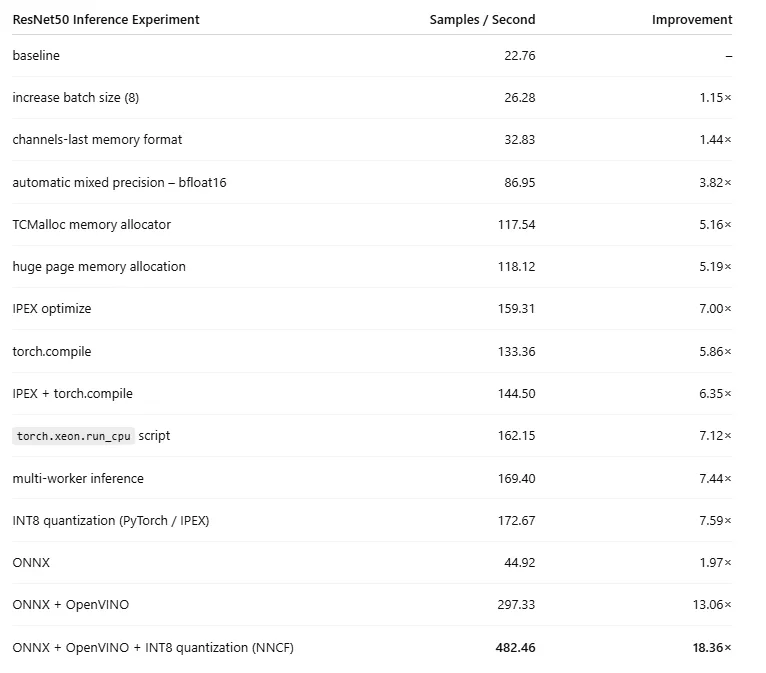 ResNet50 Inference Experiment (by Author)
In the case of our toy model, the optimizations steps we demonstrated resulted in huge performance gains. Importantly, the impact of each optimization can vary greatly based on the details of the model. You may find that some of these techniques do not apply to your model, or do not result in improved performance. For example, when we reapply the same sequence of optimizations to a Vision Transformer (ViT) model, the resultant performance boost is 8.41X — still significant, but less than the 18.36X of our experiment. Please see the appendix to this post for details.
Our focus has been on runtime performance, but it is critical that you also evaluate the impact of each optimization on other metrics that are important to you — most importantly model quality.
ResNet50 Inference Experiment (by Author)
In the case of our toy model, the optimizations steps we demonstrated resulted in huge performance gains. Importantly, the impact of each optimization can vary greatly based on the details of the model. You may find that some of these techniques do not apply to your model, or do not result in improved performance. For example, when we reapply the same sequence of optimizations to a Vision Transformer (ViT) model, the resultant performance boost is 8.41X — still significant, but less than the 18.36X of our experiment. Please see the appendix to this post for details.
Our focus has been on runtime performance, but it is critical that you also evaluate the impact of each optimization on other metrics that are important to you — most importantly model quality.
There are, undoubtedly, many more optimization techniques that can be applied; we have merely scratched the surface. Hopefully, the
Summary
This post continues our series on the important topic of AI/ML model runtime performance analysis and optimization. Our focus in this post was on model inference on Intel® Xeon® CPU processors. Given the ubiquity and prevalence of CPUs, the ability to execute models on them in a reliable and performant manner, can be extremely compelling. As we have shown, by applying a number of relatively simple techniques, we can achieve considerable gains in model performance with profound implications on inference costs and inference latency.
Please do not hesitate to reach out with comments, questions, or corrections.
Appendix: Vision Transformer Optimization
To demonstrate how the impact of the runtime optimizations we discussed depend on the details of the AI/ML model, we reran our experiment on a Vision Transformer (ViT) model from the popular timm library:
python
from timm.models.vision_transformer import VisionTransformer

def get_model(channels_last=False, ipex_optimize=False, compile=False):
    model = VisionTransformer()

    if channels_last:
        model= model.to(memory_format=torch.channels_last)

    model = model.eval()

    if ipex_optimize:
        model = ipex.optimize(model, dtype=torch.bfloat16)

    if compile:
        model = torch.compile(model)

    return model
One modification in this experiment was to apply OpenVINO compilation directly to the PyTorch model rather than an intermediate ONNX model. This was due to the fact that OpenVINO compilation failed on the ViT ONNX model. The revised NNCF quantization and OpenVINO compilation sequence is shown below:
python
import openvino as ov
import nncf


batch_size = 8
model = get_model()
calibration_loader = torch.utils.data.DataLoader(RandomDataset())
calibration_dataset = nncf.Dataset(calibration_loader)

# quantize PyTorch model
model = nncf.quantize(model, calibration_dataset)
ovm = ov.convert_model(model, example_input=torch.randn(1, 3, 224, 224))
ovm = ov.compile_model(ovm)
batch = get_input(batch_size).numpy()
infer_fn = openvino_infer_fn(ovm)
avg_time = benchmark(infer_fn, batch)
print(f"\nAverage samples per second: {(batch_size/avg_time):.2f}")
The table below summarizes the results of the optimizations discussed in this post when applied to the ViT model:
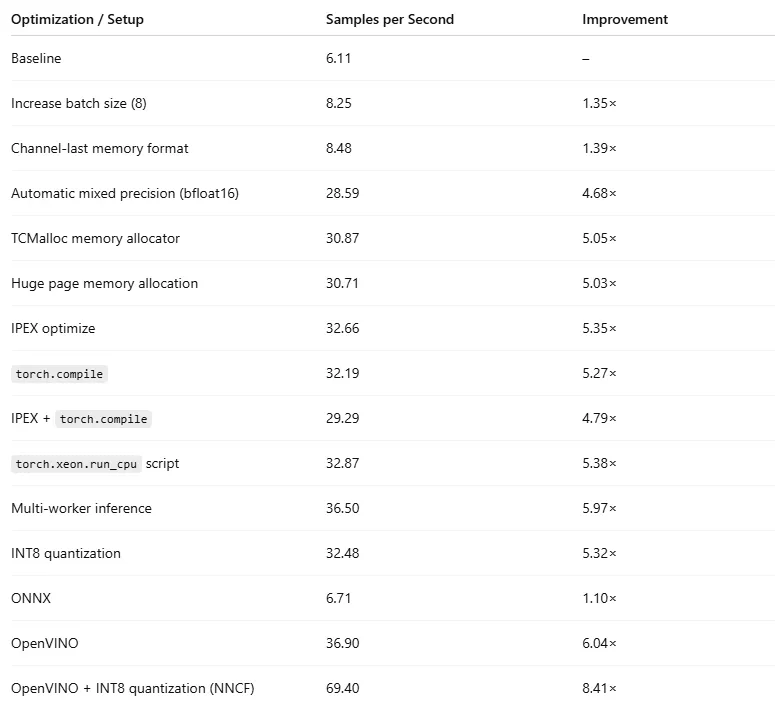 Vision Transformer Inference Experiment (by Author)
Register Now to Continue Reading
Unlock Towards Data Science with a Free Account
All articles on Towards Data Science are available to registered users. Create a free account today to access this article and thousands more.
Register for freeSign in to your account
 Written By
See all from Chaim Rand
Deep DivesArtificial IntelligenceInferenceOnnxPytorch
Share This Article
Towards Data Science is a community publication. Submit your insights to reach our global audience and earn through the TDS Author Payment Program.
Write for TDS
Related Articles
Programming
A deep dive into the various SCD types and how they can be implemented in Data Warehouses
Giorgos Myrianthous
May 3, 202414 min read
Deep Learning
Pytorch based siamese CNN for shoe similarity and showing how to build an end to end similarity pipeline
Michael Sugimura
October 15, 201810 min read
Deep Learning
Autoregressive rollout and uncertainty propagation. Second in a series on probabilistic forecasting for physical signals.
Waleed Esmail
September 25, 202620 min read
Deep Learning
Multi-agent reinforcement learning in a custom game environment to train 4 agents and have them play the mobile phone game Fate Grand Order
Michael Sugimura
December 17, 201923 min read
Deep Learning
Optimizing border crossing with object detection and tracking
Danilo Najkov
February 16, 202312 min read
Artificial Intelligence
An easy and straightforward guide to machine learning and classification with decision trees.
Dario Radečić
February 10, 20215 min read
Deep Learning
Enable yourself for writing dataloader for both image and sequential data by reading this blog
Harsh Maheshwari
May 8, 20217 min read
Deep Learning
Learn how to use the Builder design pattern to enhance your code
Marcello Politi
October 12, 20236 min read
Artificial Intelligence
Top Use-cases for customer analytics and how to do them
Pranay Dave
November 18, 20206 min read
Your home for data science and AI. The world's leading publication for data science, data analytics, data engineering, machine learning, and artificial intelligence professionals.
Subscribe to Our NewsletterWrite For TDS•About•Advertise•Privacy Policy•Terms of Use
© Insight Media Group, LLC 2026•The New Stack•roadmap.sh•Creator Network
Recommended Articles
Close