保留正文与补采附件。源页面当前未重新核验;具体限制见交付清单。
 We value your privacy
We use cookies to enhance your browsing experience, serve personalised ads or content, and analyse our traffic. By clicking "Accept All", you consent to our use of cookies.
Customise Reject All Accept All
Customise Consent Preferences
We value your privacy
We use cookies to enhance your browsing experience, serve personalised ads or content, and analyse our traffic. By clicking "Accept All", you consent to our use of cookies.
Customise Reject All Accept All
Customise Consent Preferences  We use cookies to help you navigate efficiently and perform certain functions. You will find detailed information about all cookies under each consent category below.
The cookies that are categorised as "Necessary" are stored on your browser as they are essential for enabling the basic functionalities of the site. ... Show more
NecessaryAlways Active
Necessary cookies are required to enable the basic features of this site, such as providing secure log-in or adjusting your consent preferences. These cookies do not store any personally identifiable data.
We use cookies to help you navigate efficiently and perform certain functions. You will find detailed information about all cookies under each consent category below.
The cookies that are categorised as "Necessary" are stored on your browser as they are essential for enabling the basic functionalities of the site. ... Show more
NecessaryAlways Active
Necessary cookies are required to enable the basic features of this site, such as providing secure log-in or adjusting your consent preferences. These cookies do not store any personally identifiable data.
-
Cookie
BCTempID
-
Duration
10 minutes
-
Description
No description available.
-
Cookie
__cf_bm
-
Duration
1 hour
-
Description
This cookie, set by Cloudflare, is used to support Cloudflare Bot Management.
-
Cookie
AWSALBCORS
-
Duration
7 days
-
Description
Amazon Web Services set this cookie for load balancing.
-
Cookie
_cfuvid
-
Duration
session
-
Description
Cloudflare sets this cookie to track users across sessions to optimize user experience by maintaining session consistency and providing personalized services
-
Cookie
li_gc
-
Duration
6 months
-
Description
Linkedin set this cookie for storing visitor's consent regarding using cookies for non-essential purposes.
-
Cookie
__hssrc
-
Duration
session
-
Description
This cookie is set by Hubspot whenever it changes the session cookie. The __hssrc cookie set to 1 indicates that the user has restarted the browser, and if the cookie does not exist, it is assumed to be a new session.
-
Cookie
__hssc
-
Duration
1 hour
-
Description
HubSpot sets this cookie to keep track of sessions and to determine if HubSpot should increment the session number and timestamps in the __hstc cookie.
-
Cookie
wpEmojiSettingsSupports
-
Duration
session
-
Description
WordPress sets this cookie when a user interacts with emojis on a WordPress site. It helps determine if the user's browser can display emojis properly.
-
Cookie
BCSessionID
-
Duration
1 year 1 month 4 days
-
Description
Blueconic sets this cookie as a unique identifier for the BlueConic profile.
-
Cookie
_octo
-
Duration
1 year
-
Description
No description available.
-
Cookie
logged_in
-
Duration
1 year
-
Description
No description available.
-
Cookie
__Secure-YEC
-
Duration
past
-
Description
YouTube sets this cookie to stores the user's video player preferences using embedded YouTube video
-
Cookie
__eoi
-
Duration
6 months
-
Description
Description is currently not available.
-
Cookie
AWSALBTGCORS
-
Duration
7 days
-
Description
No description available.
-
Cookie
login-status-p
-
Duration
past
-
Description
Description is currently not available.
-
Cookie
AWSALBTG
-
Duration
7 days
-
Description
No description available.
-
Cookie
csrf_token
-
Duration
session
-
Description
No description available.
-
Cookie
token_v2
-
Duration
1 day
-
Description
Description is currently not available.
-
Cookie
D
-
Duration
1 year
-
Description
Description is currently not available.
-
Cookie
PHPSESSID
-
Duration
session
-
Description
This cookie is native to PHP applications. The cookie stores and identifies a user's unique session ID to manage user sessions on the website. The cookie is a session cookie and will be deleted when all the browser windows are closed.
-
Cookie
VISITOR_PRIVACY_METADATA
-
Duration
6 months
-
Description
YouTube sets this cookie to store the user's cookie consent state for the current domain.
-
Cookie
cookietest
-
Duration
session
-
Description
The cookietest cookie is typically used to determine whether the user's browser accepts cookies, essential for website functionality and user experience.
-
Cookie
__Host-airtable-session
-
Duration
1 year
-
Description
This cookie is used to enable us to integrate the services of Airtable.
-
Cookie
__Host-airtable-session.sig
-
Duration
1 year
-
Description
This cookie is used to enable us to integrate the services of Airtable.
-
Cookie
m
-
Duration
1 year 1 month 4 days
-
Description
Stripe sets this cookie for fraud prevention purposes. It identifies the device used to access the website, allowing the website to be formatted accordingly.
-
Cookie
BIGipServer*
-
Duration
session
-
Description
Marketo sets this cookie to collect information about the user's online activity and build a profile about their interests to provide advertisements relevant to the user.
-
Cookie
__cfruid
-
Duration
session
-
Description
Cloudflare sets this cookie to identify trusted web traffic.
-
Cookie
_GRECAPTCHA
-
Duration
6 months
-
Description
Google Recaptcha service sets this cookie to identify bots to protect the website against malicious spam attacks.
-
Cookie
__Secure-YNID
-
Duration
6 months
-
Description
Google cookie used to protect user security and prevent fraud, especially during the login process.
-
Cookie
cookieyes-consent
-
Duration
1 year
-
Description
CookieYes sets this cookie to remember users' consent preferences so that their preferences are respected on subsequent visits to this site. It does not collect or store any personal information about the site visitors.
Functional
Functional cookies help perform certain functionalities like sharing the content of the website on social media platforms, collecting feedback, and other third-party features.
-
Cookie
lidc
-
Duration
1 day
-
Description
LinkedIn sets the lidc cookie to facilitate data center selection.
-
Cookie
brw
-
Duration
1 year
-
Description
No description available.
-
Cookie
brwConsent
-
Duration
5 minutes
-
Description
Description is currently not available.
-
Cookie
WMF-Uniq
-
Duration
1 year
-
Description
Description is currently not available.
-
Cookie
loom_anon_comment
-
Duration
1 year
-
Description
No description available.
-
Cookie
loom_referral_video
-
Duration
session
-
Description
Description is currently not available.
-
Cookie
VISITOR_INFO1_LIVE
-
Duration
6 months
-
Description
A cookie set by YouTube to measure bandwidth that determines whether the user gets the new or old player interface.
-
Cookie
yt-remote-connected-devices
-
Duration
Never Expires
-
Description
YouTube sets this cookie to store the user's video preferences using embedded YouTube videos.
-
Cookie
ytidb::LAST_RESULT_ENTRY_KEY
-
Duration
Never Expires
-
Description
The cookie ytidb::LAST_RESULT_ENTRY_KEY is used by YouTube to store the last search result entry that was clicked by the user. This information is used to improve the user experience by providing more relevant search results in the future.
-
Cookie
yt-remote-device-id
-
Duration
Never Expires
-
Description
YouTube sets this cookie to store the user's video preferences using embedded YouTube videos.
-
Cookie
yt-remote-session-name
-
Duration
session
-
Description
The yt-remote-session-name cookie is used by YouTube to store the user's video player preferences using embedded YouTube video.
-
Cookie
yt-remote-fast-check-period
-
Duration
session
-
Description
The yt-remote-fast-check-period cookie is used by YouTube to store the user's video player preferences for embedded YouTube videos.
-
Cookie
yt-remote-session-app
-
Duration
session
-
Description
The yt-remote-session-app cookie is used by YouTube to store user preferences and information about the interface of the embedded YouTube video player.
-
Cookie
yt-remote-cast-available
-
Duration
session
-
Description
The yt-remote-cast-available cookie is used to store the user's preferences regarding whether casting is available on their YouTube video player.
-
Cookie
yt-remote-cast-installed
-
Duration
session
-
Description
The yt-remote-cast-installed cookie is used to store the user's video player preferences using embedded YouTube video.
-
Cookie
cp_session
-
Duration
3 months
-
Description
Codepen sets this cookie for Help systems found in the website.
-
Cookie
loid
-
Duration
1 year 1 month 4 days
-
Description
This cookie is set by the Reddit. The cookie enables the sharing of content from the website onto the social media platform.
Analytics
Analytical cookies are used to understand how visitors interact with the website. These cookies help provide information on metrics such as the number of visitors, bounce rate, traffic source, etc.
-
Cookie
__hstc
-
Duration
6 months
-
Description
Hubspot set this main cookie for tracking visitors. It contains the domain, initial timestamp (first visit), last timestamp (last visit), current timestamp (this visit), and session number (increments for each subsequent session).
-
Cookie
hubspotutk
-
Duration
6 months
-
Description
HubSpot sets this cookie to keep track of the visitors to the website. This cookie is passed to HubSpot on form submission and used when deduplicating contacts.
-
Cookie
_ga
-
Duration
1 year 1 month 4 days
-
Description
Google Analytics sets this cookie to calculate visitor, session and campaign data and track site usage for the site's analytics report. The cookie stores information anonymously and assigns a randomly generated number to recognise unique visitors.
-
Cookie
ga*
-
Duration
1 year 1 month 4 days
-
Description
Google Analytics sets this cookie to store and count page views.
-
Cookie
__Host-psifi.analyticsTrace
-
Duration
6 hours
-
Description
Description is currently not available.
-
Cookie
__Host-psifi.analyticsTraceV2
-
Duration
6 hours
-
Description
Description is currently not available.
-
Cookie
_gh_sess
-
Duration
session
-
Description
GitHub sets this cookie for temporary application and framework state between pages like what step the user is on in a multiple step form.
-
Cookie
YSC
-
Duration
session
-
Description
YSC cookie is set by Youtube and is used to track the views of embedded videos on Youtube pages.
-
Cookie
ajs_anonymous_id
-
Duration
1 year
-
Description
This cookie is set by Segment to count the number of people who visit a certain site by tracking if they have visited before.
-
Cookie
vuid
-
Duration
1 year 1 month 4 days
-
Description
Vimeo installs this cookie to collect tracking information by setting a unique ID to embed videos on the website.
Performance
Performance cookies are used to understand and analyse the key performance indexes of the website which helps in delivering a better user experience for the visitors.
-
Cookie
AWSALB
-
Duration
7 days
-
Description
AWSALB is an application load balancer cookie set by Amazon Web Services to map the session to the target.
-
Cookie
acq
-
Duration
past
-
Description
Description is currently not available.
-
Cookie
acq.sig
-
Duration
past
-
Description
Description is currently not available.
-
Cookie
ptc
-
Duration
2 years
-
Description
No description available.
Advertisement
Advertisement cookies are used to provide visitors with customised advertisements based on the pages you visited previously and to analyse the effectiveness of the ad campaigns.
-
Cookie
muc_ads
-
Duration
1 year 1 month 4 days
-
Description
Twitter sets this cookie to collect user behaviour and interaction data to optimize the website.
-
Cookie
guest_id_marketing
-
Duration
1 year 1 month 4 days
-
Description
Twitter sets this cookie to identify and track the website visitor.
-
Cookie
guest_id_ads
-
Duration
1 year 1 month 4 days
-
Description
Twitter sets this cookie to identify and track the website visitor.
-
Cookie
personalization_id
-
Duration
1 year 1 month 4 days
-
Description
Twitter sets this cookie to integrate and share features for social media and also store information about how the user uses the website, for tracking and targeting.
-
Cookie
guest_id
-
Duration
1 year 1 month 4 days
-
Description
Twitter sets this cookie to identify and track the website visitor. It registers if a user is signed in to the Twitter platform and collects information about ad preferences.
-
Cookie
bcookie
-
Duration
1 year
-
Description
LinkedIn sets this cookie from LinkedIn share buttons and ad tags to recognize browser IDs.
-
Cookie
__Secure-ROLLOUT_TOKEN
-
Duration
6 months
-
Description
YouTube sets this cookie to manage feature rollout and experimentation. It helps Google control which new features or interface changes are shown to users as part of testing and staged rollouts, ensuring consistent experience for a given user during an experiment.
-
Cookie
yt.innertube::nextId
-
Duration
Never Expires
-
Description
YouTube sets this cookie to register a unique ID to store data on what videos from YouTube the user has seen.
-
Cookie
yt.innertube::requests
-
Duration
Never Expires
-
Description
YouTube sets this cookie to register a unique ID to store data on what videos from YouTube the user has seen.
-
Cookie
session_tracker
-
Duration
session
-
Description
This cookie is set by the Reddit. This cookie is used to identify trusted web traffic. It also helps in adverstising on the website.
-
Cookie
edgebucket
-
Duration
session
-
Description
Reddit sets this cookie to save the information about a log-on Reddit user, for the purpose of advertisement recommendations and updating the content.
-
Cookie
did
-
Duration
1 year
-
Description
Arbor sets this cookie to show targeted ads to site visitors.This cookie expires after 2 months or 1 year.
Uncategorised
Other uncategorised cookies are those that are being analysed and have not been classified into a category as yet.
No cookies to display.
Reject All Save My Preferences Accept All
Toggle SearchToggle Mobile Navigation
Publish AI, ML & data-science insights to a global community of data professionals.
Sign inSubmit an Article
LatestEditor's PicksNewsletterShipAI
Write For TDS
LinkedInXToggle Search
Artificial Intelligence
How to Use OpenAI's Function Calling
An Overview of Function Calling and Its Implications for Building LLM Apps
John Adeojo
July 25, 20236 min read
 Image by Author: Generated with Midjourney
Structuring the Unstructured
Function calling is an innovation from OpenAI that has expanded the possibilities when it comes to app development around large language models.
However, I have found that it remains misunderstood by some. In this article, I aim to clarify function calling in the time it takes you to make a cup of coffee.
If you have aspirations to build LLM apps, integrate LLMs into your business, or simply expand your knowledge in this area, then this article is for you.
Learn this step by step with the interactive AI Engineer, AI and Data Scientist and Computer Science roadmaps.
What's So Great About Function Calling?
Function calling allows us to develop natural language interfaces atop our existing APIs. If this sounds confusing to you, don't worry - the details will become clearer as you read on.
So, what does a natural language API look like? I believe it's best to demonstrate this diagrammatically. Here's an example app that uses function calling to enable users to find flights.
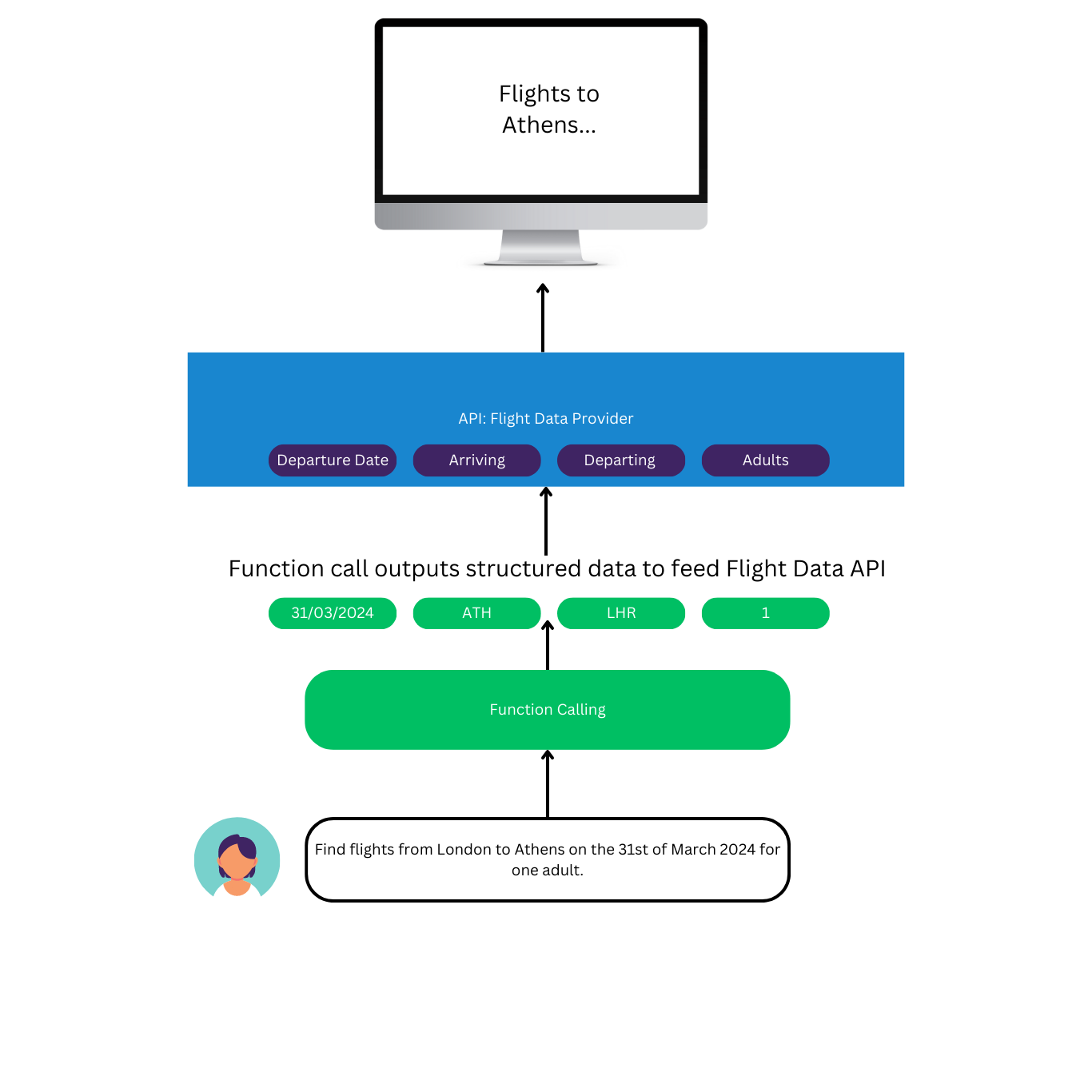 Image by Author: Diagrammatic representation of function calling
To implement this type of app without function calling, you would need to prompt the user to input the flight information using menus, selection boxes, and the like.
Function calling also facilitates the possibility of users making requests by voice. All you would need is an additional transcription service, and voilà, you have an AI personal assistant.
Hopefully, you should now be forming a clearer picture of function calling and its purpose. Let's cement this newfound knowledge with some technical walkthroughs.
Image by Author: Diagrammatic representation of function calling
To implement this type of app without function calling, you would need to prompt the user to input the flight information using menus, selection boxes, and the like.
Function calling also facilitates the possibility of users making requests by voice. All you would need is an additional transcription service, and voilà, you have an AI personal assistant.
Hopefully, you should now be forming a clearer picture of function calling and its purpose. Let's cement this newfound knowledge with some technical walkthroughs.
Function Calling with One Function
Let's examine a simple use case atop a weather API.
The most basic use case involves function calling with one function. To illustrate this, I have modelled an API that provides a temperature forecast - see here.
Please take a moment to study this temperature API; note that it has two arguments: location and date.
Now, suppose we wanted to build an app based on this API. The first step we might take is to write a script that utilises a function call for our user queries. It would look something like this:
Let's discuss the function calling. We define our functions as a list of dictionaries. The function allows us to extract arguments from a user query, which we can then use to feed our API. In our case, the arguments we wish to extract are "location" and "date".
We state the name of our function, in this case, "get_temperature", and provide a description of what it does.
Next, we need to describe the arguments of the function, which is crucial. What we receive back from the function call is influenced by how we do this. Take a look at how I have outlined the descriptions and types for the two arguments "location" and "date".
The descriptions are significant because function calling is powered by OpenAI's large language models, which interpret the descriptions and respond accordingly.
Next, we set up our OpenAI model. The setup resembles a standard text generation use case with two key differences - the "functions" parameter and the "function_call" parameter.
We pass the functions we defined in the dictionary to the "functions" parameter. For the "function_call" parameter, we set it to "auto", allowing the large language model to decide when to use a function or not use one at all.
So, let's see what happens when we run a query through this function call.
Here's our query:
query = "What's the temperature forecast in Berlin on the 1st of September 2023?"
And here's the response:
json
<OpenAIObject at 0x1fd8de69ea0> JSON: {
  "role": "assistant",
  "content": null,
  "function_call": {
    "name": "get_temperature",
    "arguments": "{n  "location": "Berlin",n  "date": "2023-09-01"n}"
  }
}
The first thing to note is that the function call has returned a structured response, a json object.
Secondly, the function call has determined from our query that we wish to use the "get_temperature" function, and it has parsed the arguments for that function (location and date) accordingly.
This is excellent as we can now send these arguments to the weather API we constructed and obtain a response about the temperature.
python
# Parse the location and date from our function call response

def parse_function(response):
    parsed_output = response["function_call"]["arguments"]
    parsed_output = json.loads(parsed_output)
    return parsed_output

location = parse_function(response)['location']
date = parse_function(response)['date']

# Get our weather data

data = get_temperature(location, date)
And here's the response we get back from our weather API:
bash
'{"location": "Berlin", "date": "2023-09-01", "temerature": 9.72, "scale": "Farenheit"}'
Note : It's important to understand that function calling does not execute the function. It merely parses out the arguments for your function from a natural language input.
Function Calling with Multiple Functions
We can even specify multiple functions to "call" from. This is particularly useful when we have a natural language interface sitting atop multiple APIs. Let's illustrate this with an example.
To complement our weather API, I have modelled a news headline API, which generates a mock news headline based on a topic.
The topic itself will be requested from a natural language query, which we can parse using function calling.
We can add this to our existing function call. Here's how it appears:
Because we have set the "function_call" parameter to "auto", the large language model can deduce the most suitable function to call based solely on the query. Let's see how this works for two different queries.
query_1 = "What's the temperature forecast in NYC at the end of September 2023?"
Response from query 1:
json
<OpenAIObject at 0x1fd8de6b590> JSON: {
  "role": "assistant",
  "content": null,
  "function_call": {
    "name": "get_temperature",
    "arguments": "{n  "location": "NYC",n  "date": "2023-09-30"n}"
  }
}
Now let's run the multi-function function call on a different query.
query_2 = "Give me the latest headline news on Berlin"
Response from query 2:
json
<OpenAIObject at 0x1fd8de67e00> JSON: {
  "role": "assistant",
  "content": null,
  "function_call": {
    "name": "get_current_news",
    "arguments": "{n  "topic": "Berlin"n}"
  }
}
In both cases, the function call has correctly selected which function to get the arguments for based on the queries.
What If We Don't Use It?
At this point, you might be asking yourself: "This is great, but can't I achieve the same result with the chat completion API and a prompt? Why do we need function calling at all?"
Well, the short answer is structure. While the chat completion API is trained to respond to a user query, you can prompt it to perform a "function call", but the output you get may not be structured, making it difficult to parse the arguments.
Consider this for example:
Here we have skipped function calling altogether and simply asked the chat completion API to respond with our arguments with some prompting.
And the response:
bash
'The news topic required is "Berlin".'
Although the answer is correct, it's more difficult to parse as an argument because it is unstructured.
There is also the issue of consistency. You can attempt to enforce some structure through prompting, but the responses may not always be structured as you desire.
Function calling guarantees a structured response every time, making it a more reliable method of parsing arguments to feed a downstream function.
Conclusion
Function calling opens the door to the development of a host of new LLM-based applications. We can now consistently generate structured outputs from unstructured data.
If you wish to explore how you can build your first LLM app, read this:
How to Build an LLM Application
Thanks for reading.
The full notebook, is available via my GitHub repo. There is also a live video tutorial on YouTube.
If you're keen to enhance your skills in artificial intelligence, join the waiting list for my course, where I will guide you through the process of developing large language model powered applications.
If you're seeking AI-transformation for your business, book a discovery call today.
Brainqub3 | AI software development
For more insights on artificial intelligence, data science, and large language models you can subscribe to the YouTube channel.
Register Now to Continue Reading
Unlock Towards Data Science with a Free Account
All articles on Towards Data Science are available to registered users. Create a free account today to access this article and thousands more.
Register for freeSign in to your account
 Written By
See all from John Adeojo
Artificial IntelligenceData ScienceLarge Language ModelsOpenAIProgramming
Share This Article
Towards Data Science is a community publication. Submit your insights to reach our global audience and earn through the TDS Author Payment Program.
Write for TDS
Related Articles
Programming
Auto-differentiation and JIT compilation make a compelling case.
Thomas Reid
May 28, 202515 min read
Data Science
Abstract: DataPrep.Connector is a component of the DataPrep library for Python that speeds up data loading. The tool reduces the overhead...
Hilal Asmat
March 26, 20215 min read
Artificial Intelligence
This is the fourth part of the series Uncertainty In Deep Learning. This post covers how to create a basic bayesian cnn model.
Kaan Bıçakcı
March 15, 20228 min read
Artificial Intelligence
And I do not know how to feel about it
Soner Yıldırım
October 7, 20224 min read
Artificial Intelligence
A comparison between the latest versions of PyTorch (1.8) and Tensorflow (2.5) Tensorflow/Keras & Pytorch...
Mostafa Ibrahim
May 22, 20215 min read
Artificial Intelligence
The flexibility matters.
Soner Yıldırım
September 10, 20203 min read
Data Science
A simple tutorial on how to enhance your Seaborn violin plots with ease
Andy McDonald
June 26, 20235 min read
Data Science
When we are children and the world seems to be filled with infinite, endless and wondrous possibilities, we are asked what we wanted to be...
Edwin Jarquin
October 27, 20203 min read
Data Science
Not just dimensionality reduction, but rather find latent variables
Rukshan Pramoditha
February 5, 20219 min read
Your home for data science and AI. The world's leading publication for data science, data analytics, data engineering, machine learning, and artificial intelligence professionals.
Subscribe to Our NewsletterWrite For TDS•About•Advertise•Privacy Policy•Terms of Use
© Insight Media Group, LLC 2026•The New Stack•roadmap.sh•Creator Network