保留正文与补采附件。源页面当前未重新核验;具体限制见交付清单。
 We value your privacy
We use cookies to enhance your browsing experience, serve personalised ads or content, and analyse our traffic. By clicking "Accept All", you consent to our use of cookies.
Customise Reject All Accept All
Customise Consent Preferences
We value your privacy
We use cookies to enhance your browsing experience, serve personalised ads or content, and analyse our traffic. By clicking "Accept All", you consent to our use of cookies.
Customise Reject All Accept All
Customise Consent Preferences  We use cookies to help you navigate efficiently and perform certain functions. You will find detailed information about all cookies under each consent category below.
The cookies that are categorised as "Necessary" are stored on your browser as they are essential for enabling the basic functionalities of the site. ... Show more
NecessaryAlways Active
Necessary cookies are required to enable the basic features of this site, such as providing secure log-in or adjusting your consent preferences. These cookies do not store any personally identifiable data.
We use cookies to help you navigate efficiently and perform certain functions. You will find detailed information about all cookies under each consent category below.
The cookies that are categorised as "Necessary" are stored on your browser as they are essential for enabling the basic functionalities of the site. ... Show more
NecessaryAlways Active
Necessary cookies are required to enable the basic features of this site, such as providing secure log-in or adjusting your consent preferences. These cookies do not store any personally identifiable data.
-
Cookie
BCTempID
-
Duration
10 minutes
-
Description
No description available.
-
Cookie
__cf_bm
-
Duration
1 hour
-
Description
This cookie, set by Cloudflare, is used to support Cloudflare Bot Management.
-
Cookie
AWSALBCORS
-
Duration
7 days
-
Description
Amazon Web Services set this cookie for load balancing.
-
Cookie
_cfuvid
-
Duration
session
-
Description
Cloudflare sets this cookie to track users across sessions to optimize user experience by maintaining session consistency and providing personalized services
-
Cookie
li_gc
-
Duration
6 months
-
Description
Linkedin set this cookie for storing visitor's consent regarding using cookies for non-essential purposes.
-
Cookie
__hssrc
-
Duration
session
-
Description
This cookie is set by Hubspot whenever it changes the session cookie. The __hssrc cookie set to 1 indicates that the user has restarted the browser, and if the cookie does not exist, it is assumed to be a new session.
-
Cookie
__hssc
-
Duration
1 hour
-
Description
HubSpot sets this cookie to keep track of sessions and to determine if HubSpot should increment the session number and timestamps in the __hstc cookie.
-
Cookie
wpEmojiSettingsSupports
-
Duration
session
-
Description
WordPress sets this cookie when a user interacts with emojis on a WordPress site. It helps determine if the user's browser can display emojis properly.
-
Cookie
BCSessionID
-
Duration
1 year 1 month 4 days
-
Description
Blueconic sets this cookie as a unique identifier for the BlueConic profile.
-
Cookie
_octo
-
Duration
1 year
-
Description
No description available.
-
Cookie
logged_in
-
Duration
1 year
-
Description
No description available.
-
Cookie
__Secure-YEC
-
Duration
past
-
Description
YouTube sets this cookie to stores the user's video player preferences using embedded YouTube video
-
Cookie
__eoi
-
Duration
6 months
-
Description
Description is currently not available.
-
Cookie
AWSALBTGCORS
-
Duration
7 days
-
Description
No description available.
-
Cookie
login-status-p
-
Duration
past
-
Description
Description is currently not available.
-
Cookie
AWSALBTG
-
Duration
7 days
-
Description
No description available.
-
Cookie
csrf_token
-
Duration
session
-
Description
No description available.
-
Cookie
token_v2
-
Duration
1 day
-
Description
Description is currently not available.
-
Cookie
D
-
Duration
1 year
-
Description
Description is currently not available.
-
Cookie
PHPSESSID
-
Duration
session
-
Description
This cookie is native to PHP applications. The cookie stores and identifies a user's unique session ID to manage user sessions on the website. The cookie is a session cookie and will be deleted when all the browser windows are closed.
-
Cookie
VISITOR_PRIVACY_METADATA
-
Duration
6 months
-
Description
YouTube sets this cookie to store the user's cookie consent state for the current domain.
-
Cookie
cookietest
-
Duration
session
-
Description
The cookietest cookie is typically used to determine whether the user's browser accepts cookies, essential for website functionality and user experience.
-
Cookie
__Host-airtable-session
-
Duration
1 year
-
Description
This cookie is used to enable us to integrate the services of Airtable.
-
Cookie
__Host-airtable-session.sig
-
Duration
1 year
-
Description
This cookie is used to enable us to integrate the services of Airtable.
-
Cookie
m
-
Duration
1 year 1 month 4 days
-
Description
Stripe sets this cookie for fraud prevention purposes. It identifies the device used to access the website, allowing the website to be formatted accordingly.
-
Cookie
BIGipServer*
-
Duration
session
-
Description
Marketo sets this cookie to collect information about the user's online activity and build a profile about their interests to provide advertisements relevant to the user.
-
Cookie
__cfruid
-
Duration
session
-
Description
Cloudflare sets this cookie to identify trusted web traffic.
-
Cookie
_GRECAPTCHA
-
Duration
6 months
-
Description
Google Recaptcha service sets this cookie to identify bots to protect the website against malicious spam attacks.
-
Cookie
__Secure-YNID
-
Duration
6 months
-
Description
Google cookie used to protect user security and prevent fraud, especially during the login process.
-
Cookie
cookieyes-consent
-
Duration
1 year
-
Description
CookieYes sets this cookie to remember users' consent preferences so that their preferences are respected on subsequent visits to this site. It does not collect or store any personal information about the site visitors.
Functional
Functional cookies help perform certain functionalities like sharing the content of the website on social media platforms, collecting feedback, and other third-party features.
-
Cookie
lidc
-
Duration
1 day
-
Description
LinkedIn sets the lidc cookie to facilitate data center selection.
-
Cookie
brw
-
Duration
1 year
-
Description
No description available.
-
Cookie
brwConsent
-
Duration
5 minutes
-
Description
Description is currently not available.
-
Cookie
WMF-Uniq
-
Duration
1 year
-
Description
Description is currently not available.
-
Cookie
loom_anon_comment
-
Duration
1 year
-
Description
No description available.
-
Cookie
loom_referral_video
-
Duration
session
-
Description
Description is currently not available.
-
Cookie
VISITOR_INFO1_LIVE
-
Duration
6 months
-
Description
A cookie set by YouTube to measure bandwidth that determines whether the user gets the new or old player interface.
-
Cookie
yt-remote-connected-devices
-
Duration
Never Expires
-
Description
YouTube sets this cookie to store the user's video preferences using embedded YouTube videos.
-
Cookie
ytidb::LAST_RESULT_ENTRY_KEY
-
Duration
Never Expires
-
Description
The cookie ytidb::LAST_RESULT_ENTRY_KEY is used by YouTube to store the last search result entry that was clicked by the user. This information is used to improve the user experience by providing more relevant search results in the future.
-
Cookie
yt-remote-device-id
-
Duration
Never Expires
-
Description
YouTube sets this cookie to store the user's video preferences using embedded YouTube videos.
-
Cookie
yt-remote-session-name
-
Duration
session
-
Description
The yt-remote-session-name cookie is used by YouTube to store the user's video player preferences using embedded YouTube video.
-
Cookie
yt-remote-fast-check-period
-
Duration
session
-
Description
The yt-remote-fast-check-period cookie is used by YouTube to store the user's video player preferences for embedded YouTube videos.
-
Cookie
yt-remote-session-app
-
Duration
session
-
Description
The yt-remote-session-app cookie is used by YouTube to store user preferences and information about the interface of the embedded YouTube video player.
-
Cookie
yt-remote-cast-available
-
Duration
session
-
Description
The yt-remote-cast-available cookie is used to store the user's preferences regarding whether casting is available on their YouTube video player.
-
Cookie
yt-remote-cast-installed
-
Duration
session
-
Description
The yt-remote-cast-installed cookie is used to store the user's video player preferences using embedded YouTube video.
-
Cookie
cp_session
-
Duration
3 months
-
Description
Codepen sets this cookie for Help systems found in the website.
-
Cookie
loid
-
Duration
1 year 1 month 4 days
-
Description
This cookie is set by the Reddit. The cookie enables the sharing of content from the website onto the social media platform.
Analytics
Analytical cookies are used to understand how visitors interact with the website. These cookies help provide information on metrics such as the number of visitors, bounce rate, traffic source, etc.
-
Cookie
__hstc
-
Duration
6 months
-
Description
Hubspot set this main cookie for tracking visitors. It contains the domain, initial timestamp (first visit), last timestamp (last visit), current timestamp (this visit), and session number (increments for each subsequent session).
-
Cookie
hubspotutk
-
Duration
6 months
-
Description
HubSpot sets this cookie to keep track of the visitors to the website. This cookie is passed to HubSpot on form submission and used when deduplicating contacts.
-
Cookie
_ga
-
Duration
1 year 1 month 4 days
-
Description
Google Analytics sets this cookie to calculate visitor, session and campaign data and track site usage for the site's analytics report. The cookie stores information anonymously and assigns a randomly generated number to recognise unique visitors.
-
Cookie
ga*
-
Duration
1 year 1 month 4 days
-
Description
Google Analytics sets this cookie to store and count page views.
-
Cookie
__Host-psifi.analyticsTrace
-
Duration
6 hours
-
Description
Description is currently not available.
-
Cookie
__Host-psifi.analyticsTraceV2
-
Duration
6 hours
-
Description
Description is currently not available.
-
Cookie
_gh_sess
-
Duration
session
-
Description
GitHub sets this cookie for temporary application and framework state between pages like what step the user is on in a multiple step form.
-
Cookie
YSC
-
Duration
session
-
Description
YSC cookie is set by Youtube and is used to track the views of embedded videos on Youtube pages.
-
Cookie
ajs_anonymous_id
-
Duration
1 year
-
Description
This cookie is set by Segment to count the number of people who visit a certain site by tracking if they have visited before.
-
Cookie
vuid
-
Duration
1 year 1 month 4 days
-
Description
Vimeo installs this cookie to collect tracking information by setting a unique ID to embed videos on the website.
Performance
Performance cookies are used to understand and analyse the key performance indexes of the website which helps in delivering a better user experience for the visitors.
-
Cookie
AWSALB
-
Duration
7 days
-
Description
AWSALB is an application load balancer cookie set by Amazon Web Services to map the session to the target.
-
Cookie
acq
-
Duration
past
-
Description
Description is currently not available.
-
Cookie
acq.sig
-
Duration
past
-
Description
Description is currently not available.
-
Cookie
ptc
-
Duration
2 years
-
Description
No description available.
Advertisement
Advertisement cookies are used to provide visitors with customised advertisements based on the pages you visited previously and to analyse the effectiveness of the ad campaigns.
-
Cookie
muc_ads
-
Duration
1 year 1 month 4 days
-
Description
Twitter sets this cookie to collect user behaviour and interaction data to optimize the website.
-
Cookie
guest_id_marketing
-
Duration
1 year 1 month 4 days
-
Description
Twitter sets this cookie to identify and track the website visitor.
-
Cookie
guest_id_ads
-
Duration
1 year 1 month 4 days
-
Description
Twitter sets this cookie to identify and track the website visitor.
-
Cookie
personalization_id
-
Duration
1 year 1 month 4 days
-
Description
Twitter sets this cookie to integrate and share features for social media and also store information about how the user uses the website, for tracking and targeting.
-
Cookie
guest_id
-
Duration
1 year 1 month 4 days
-
Description
Twitter sets this cookie to identify and track the website visitor. It registers if a user is signed in to the Twitter platform and collects information about ad preferences.
-
Cookie
bcookie
-
Duration
1 year
-
Description
LinkedIn sets this cookie from LinkedIn share buttons and ad tags to recognize browser IDs.
-
Cookie
__Secure-ROLLOUT_TOKEN
-
Duration
6 months
-
Description
YouTube sets this cookie to manage feature rollout and experimentation. It helps Google control which new features or interface changes are shown to users as part of testing and staged rollouts, ensuring consistent experience for a given user during an experiment.
-
Cookie
yt.innertube::nextId
-
Duration
Never Expires
-
Description
YouTube sets this cookie to register a unique ID to store data on what videos from YouTube the user has seen.
-
Cookie
yt.innertube::requests
-
Duration
Never Expires
-
Description
YouTube sets this cookie to register a unique ID to store data on what videos from YouTube the user has seen.
-
Cookie
session_tracker
-
Duration
session
-
Description
This cookie is set by the Reddit. This cookie is used to identify trusted web traffic. It also helps in adverstising on the website.
-
Cookie
edgebucket
-
Duration
session
-
Description
Reddit sets this cookie to save the information about a log-on Reddit user, for the purpose of advertisement recommendations and updating the content.
-
Cookie
did
-
Duration
1 year
-
Description
Arbor sets this cookie to show targeted ads to site visitors.This cookie expires after 2 months or 1 year.
Uncategorised
Other uncategorised cookies are those that are being analysed and have not been classified into a category as yet.
No cookies to display.
Reject All Save My Preferences Accept All
Toggle SearchToggle Mobile Navigation
Publish AI, ML & data-science insights to a global community of data professionals.
Sign inSubmit an Article
LatestEditor's PicksNewsletterShipAI
Write For TDS
LinkedInXToggle Search
Large Language Models
How to Build Your Own Custom LLM Memory Layer from Scratch
Step-by-step guide to building autonomous memory retrieval systems
Avishek Biswas
February 4, 202614 min read
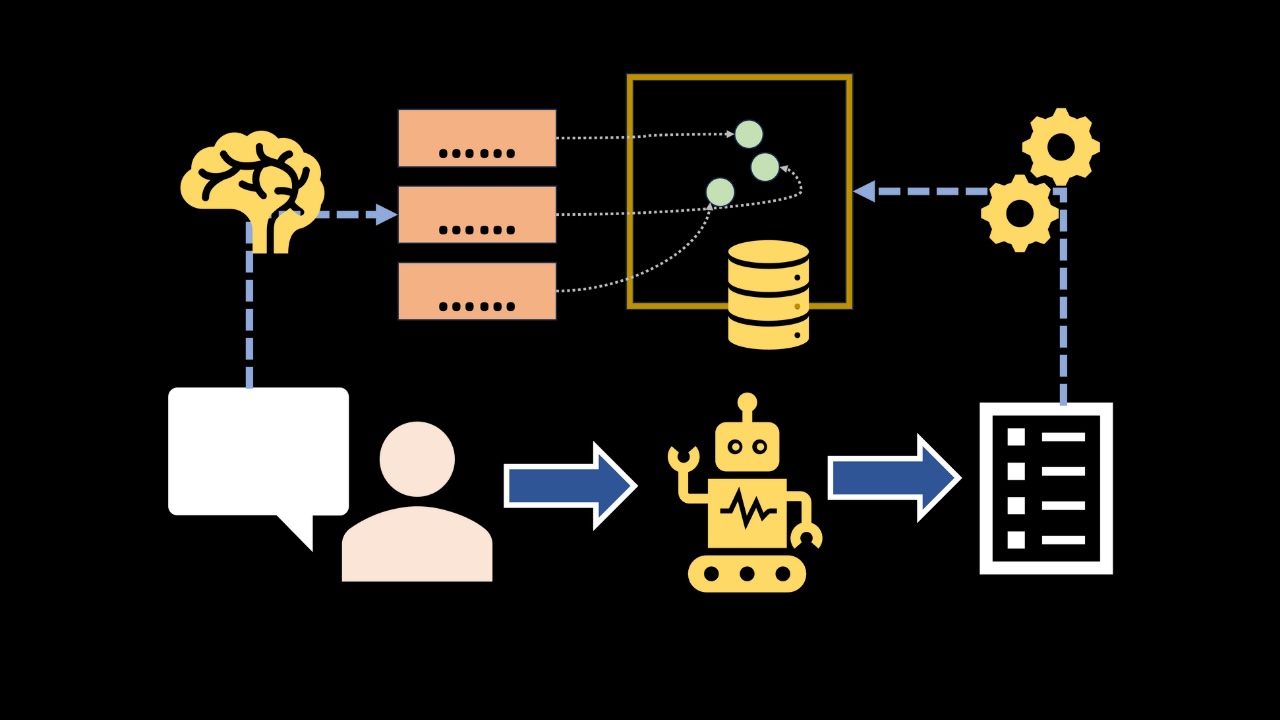 Every LLM call is a fresh start. Unless you explicitly supply information from previous sessions, the model has no built‑in sense of continuity across requests or sessions. This stateless design is great for parallelism and safety, but it poses a huge challenge for chat applications that requires user-level personalization.
If your chatbot treats the user as a stranger every time they log in, how can it ever generate personalized responses?
In this article, we will build a simple memory system from scratch, inspired by the popular Mem0 architecture.
Unless otherwise mentioned, all illustrations embedded here were created by me, the author.
The goal of this article is to educate readers on memory management as a context engineering problem. At the end of the article you will also find:
- A GitHub link that contains the full memory project, you can host yourself
- An in-depth YouTube tutorial that goes over the concepts line by line.
Learn this step by step with the interactive AI Engineer roadmap.
Memory as a Context Engineering problem
Context Engineering is the technique of filling in the context of an LLM with all the relevant information it needs to complete a task. In my opinion, memory is one of the hardest and most interesting context engineering problems.
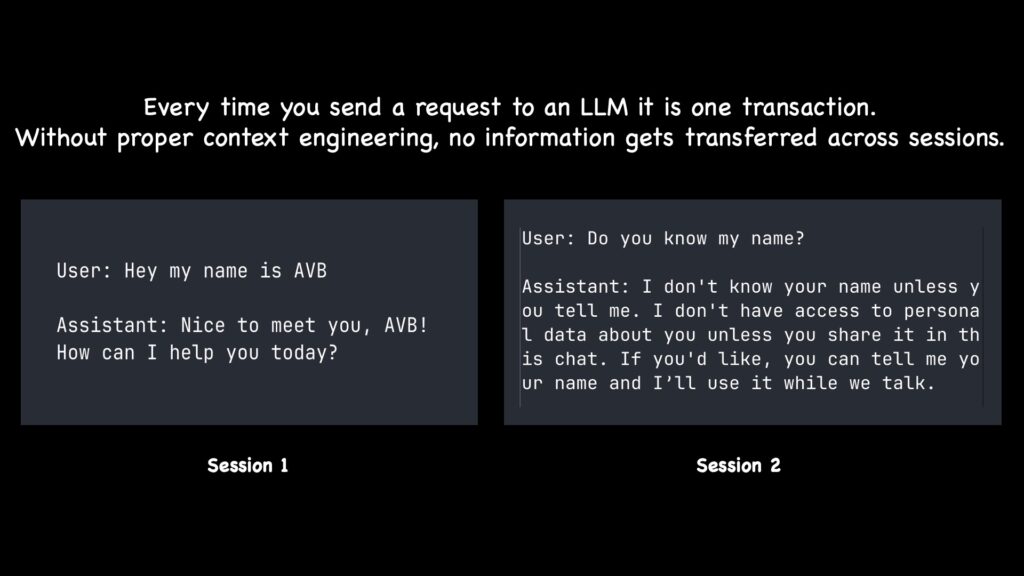 LLMs do not come with memory!
Tackling memory introduces you (as a developer) to some of the most important techniques required in almost all context engineering problems, namely:
LLMs do not come with memory!
Tackling memory introduces you (as a developer) to some of the most important techniques required in almost all context engineering problems, namely:
- Extracting structured information from raw text streams
- Summarization
- Vector databases
- Query generation and similarity search
- Query post-processing and re-ranking
- Agentic tool calling
And so much more.
As we are building our memory layer from scratch, we will have to apply all of these techniques! Read on.
High‑level architecture
At a glance, the system should be able to do four things: extract , embed, retrieve, and maintain. Let's scout the high-level plans before we begin the implementation.
Components
• Extraction : Extracts candidate atomic memories from the current user-assistant messages.
• Vector DB : Embed the extracted factoids into continuous vectors and store them in a vector database.
• Retrieval : When the user asks a question, we will generate a query with an LLM and retrieve memories similar to that query.
• Maintenance : Using a ReAct (Reasoning and Acting) loop, the agent decides whether to add, update, delete, or no‑op based on the turn and contradictions with existing facts.
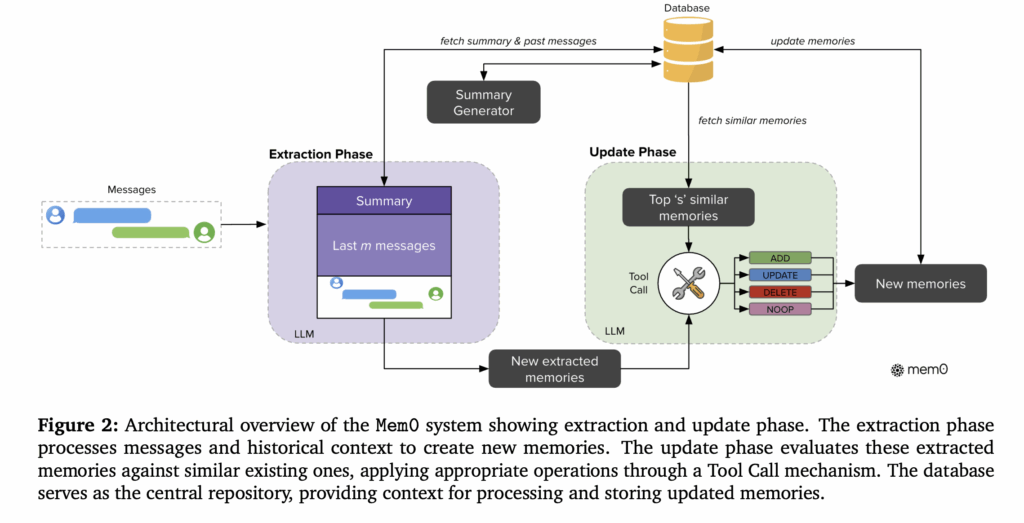 The Mem0 architecture (Source: Mem0 paper)
_Importantly, every step above should be optional._If the LLM agent does not need access to previous memories to answer a question, it should not try to search our vector database at all.
The strategy is to provide the LLM all the tools it can need to accomplish the tasks, along with clear instructions of what each tool does - and rely on the LLM's intelligence to use these tools autonomously!
Let's see this in action!
2) Memory Extraction with DSPy: From Transcript to Factoids
In this section, let's design a robust extraction step that converts conversation transcripts into a handful of atomic, categorized factoids.
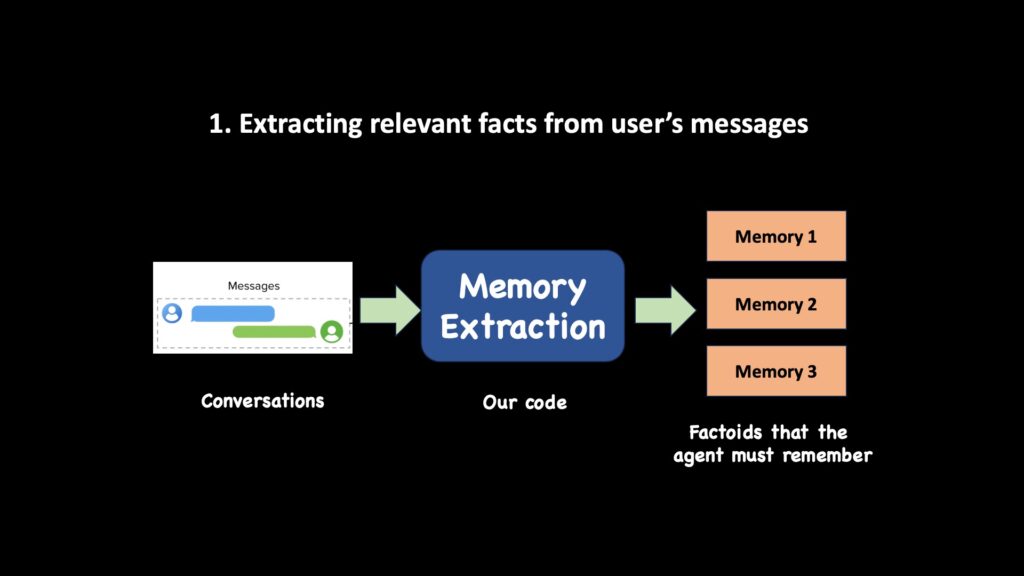 The image shows a diagram of extracting relevant facts from user's messages and storing them in memory.
What we are extracting and why it matters
The goal is to make a memory store that is a per-user, persistent vector-backed database.
What is a "good" memory?
A short, self-contained fact—an atomic unit—that can be embedded and retrieved later with high precision.
With DSPy, extracting structured information is very straightforward. Consider the code snippet below.
- We define a DSPy signature called
MemoryExtract.
- The inputs of this signature (annotated as
InputField) are the transcript,
- and the expected output (annotated as
OutputField) is a list of strings containing each factoid.
Context string in, list of memory strings out.
python
# ... other imports
import dspy
from pydantic import BaseModel

class MemoryExtract(dspy.Signature):
    """
Extract relevant information from the conversation.
Memories are atomic independent factoids that we must learn about the user.
If transcript does not contain any information worth extracting, return empty list.
"""

    transcript: str = dspy.InputField()
    memories: list[str] = dspy.OutputField()

memory_extractor = dspy.Predict(MemoryExtract)
In DSPy, the signature's docstring is used as a system prompt. We can customize the docstring to explicitly tailor the kind of information that the LLM will extract from the conversation.
Finally, to extract memories, we pass the conversation history into the memory extractor as a JSON string. Check out the code snippet below.
python
async def extract_memories_from_messages(messages):
    transcript = json.dumps(messages)
    with dspy.context(lm=dspy.LM(model=MODEL_NAME)):
        out = await memory_extractor.acall(transcript=transcript)
    return out.memories # returns a list of memories
That's it! Let's run the code with a dummy conversation and see what happens.
python
if __name__ == "__main__":
    messages = [
        {
            "role": "user",
            "content": "I like coffee"
        },
        {
            "role": "assistant",
            "content": "Got it!"
        },
        {
            "role": "user",
            "content": "actually, no I like tea more. I also like football"
        }
    ]
    memories = asyncio.run(extract_memories_from_messages(messages))
    print(memories)

'''
Outputs:

[
    "User used to like tea, but does not anymore",
    "User likes coffee",
    "User likes football"
]
'''
As you can see, we can extract independent factoids from conversations. What does this mean?
We can save the extracted factoids in a database that exists outside the chat session.
If DSPy interests you, check out this Context Engineering with DSPy article that goes deeper into the concept. Or watch this video below
Please accept cookies to access this content
Embedding extracted memories
So we can extract memories from conversations. Next, let's embed them so we can eventually store them in a vector database.
In this project, we will use QDrant as our vector database - they have a cool free tier that is extremely fast and supports additional features like hybrid filtering (where you can pass SQL "where"-like attribute filters to your vector query search).
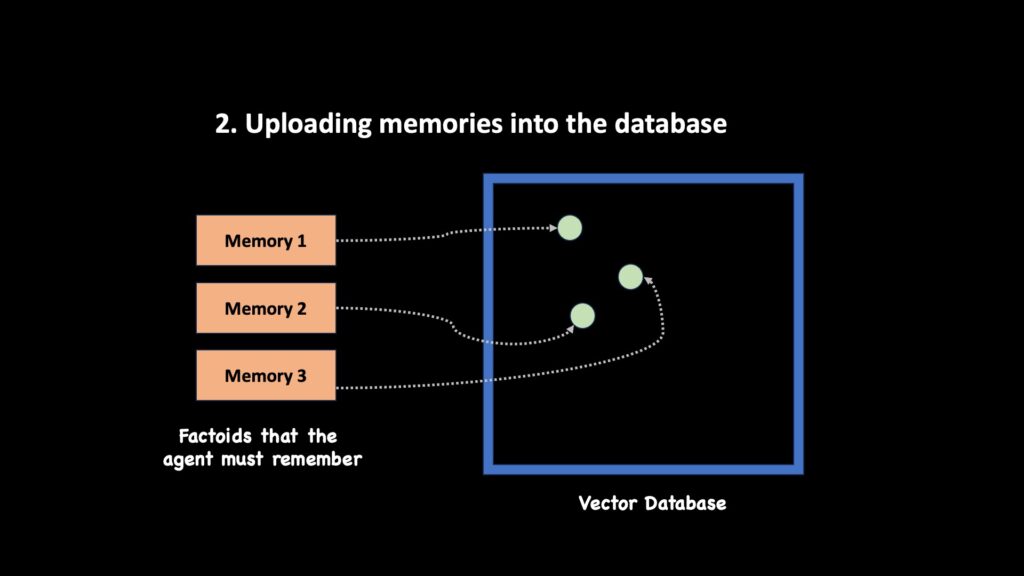 The image shows the process of uploading memories into a vector database.
Choosing the embedding model and fixing the dimension
For cost, speed, and solid quality on short factoids, we choose text-embedding-3-small. We pin the vector size to 64, which lowers storage and speeds up search while remaining expressive enough for concise memories. This is a hyperparam we can tune later to suit our needs.
python
client = openai.AsyncClient()
async def generate_embeddings(strings: list[str]):
    out = await client.embeddings.create(
        input=strings,
        model="text-embedding-3-small",
        dimensions=64
    )
    embeddings = [item.embedding for item in out.data]
    return embeddings
To insert into QDrant, let's create our databases first and create an index on user_id. This will let us quickly filter our records by users.
python
from qdrant_client import AsyncQdrantClient
COLLECTION_NAME = "memories"
async def create_memory_collection():
    if not (await client.collection_exists(COLLECTION_NAME)):
        await client.create_collection(
            collection_name=COLLECTION_NAME,
            vectors_config=VectorParams(size=64, distance=Distance.DOT),
        )

        await client.create_payload_index(
            collection_name=COLLECTION_NAME,
            field_name="user_id",
            field_schema=models.PayloadSchemaType.INTEGER
        )
I like to define contracts using Pydantic at the top so that other modules know the output shape of these functions.
python
from pydantic import BaseModel

class EmbeddedMemory(BaseModel):
    user_id: int
    memory_text: str
    date: str
    embedding: list[float]

class RetrievedMemory(BaseModel):
    point_id: str
    user_id: int
    memory_text: str
    date: str
    score: float
Next, let's write helper functions to insert, delete, and update memories.
python
async def insert_memories(memories: list[EmbeddedMemory]):
    """
    Given a list of memories, insert them to the database
    """

    await client.upsert(
        collection_name=COLLECTION_NAME,
        points=[
            models.PointStruct(
                id=uuid4().hex,
                payload={
                    "user_id": memory.user_id,
                    "memory_text": memory.memory_text,
                    "date": memory.date
                },
                vector=memory.embedding
            )
            for memory in memories
        ]
    )

async def delete_records(point_ids):
    """
    Delete a list of point ids from the database
    """

    await client.delete(
        collection_name=COLLECTION_NAME,
        points_selector=models.PointIdsList(
            points=point_ids
        )
    )
Similarly, let's write one for searching. This accepts a search vector and a user_id, and fetches nearest neighbors to that vector.
python
from qdrant_client.models import Distance, Filter, models

async def search_memories(
    search_vector: list[float],
    user_id: int,
    topk_neighbors=5
):

    # Filter by user_id
    must_conditions: list[models.Condition] = [
        models.FieldCondition(
            key="user_id",
            match=models.MatchValue(value=user_id)
        )
    ]

    outs = await client.query_points(
        collection_name=COLLECTION_NAME,
        query=search_vector,
        with_payload=True,
        query_filter=Filter(must=must_conditions),
        score_threshold=0.1,
        limit=topk_neighbors
    )

    return [
        convert_retrieved_records(point)
        for point in outs.points
        if point is not None
    ]
Notice how we can set hybrid query filters like the models.MatchValue filter. Creating the index on user_id allows us to run these queries quickly against our data. You can extend this idea to include category tags, date ranges, and any other metadata that your application cares about. Just make sure to create an index for faster retrieval performance.
In the next chapter, we will connect this storage layer to our agent loop using DSPy Signatures and ReAct (Reasoning and Acting).
Memory Retrieval
In this section, we build a clean retrieval interface that pulls the most relevant, per-user memories for a given turn.
Our algorithm is simple - we will create a tool-calling chatbot agent. At every turn, the agent receives the transcript of the conversation and must generate an answer. Let's define the DSPy signature.
python
class ResponseGenerator(dspy.Signature):
    """
You will be given a past conversation transcript between user and an AI agent. Also the latest question by the user.
You have the option to look up the past memories from a vector database to fetch relevant context if required.
If you can't find the answer to user's question from transcript or from your own internal knowledge, use the provided search tool calls to search for information.
You must output the final response, and also decide the latest interaction needs to be recorded into the memory database. New memories are meant to store new information that the user provides.
New memories should be made when the USER provides new info. It is not to save information about the the AI or the assistant.
    """
    transcript: list[dict] = dspy.InputField()
    question: str = dspy.InputField()

    response: str = dspy.OutputField()
    save_memory: bool = dspy.OutputField(description=
        "True if a new memory record needs to be created for the latest interaction"
                                  )
The docstring of the dspy Signature acts as additional instructions we pass into the LLM to help it pick its actions. Also, notice the save_memory flag we marked as an OutputField. We are asking the LLM also to output if a new memory needs to be saved because of the latest interaction with the answer.
We also need to solve how we want to fetch relevant memories into the agent's context. One option is to always execute the search_memories function, but there are two big problems with this:
- Not all user questions need a memory retrieval.
- While the search_memories function expects a search vector, it is not always straightforward "what text we should be embedding". It could be the entire transcript, or just the user's latest message, or it could be a transformation of the current conversation context.
Thankfully, we can default to tool-calling. When the agent thinks it lacks context to carry out a request, it can invoke a tool call to fetch relevant memories related to the conversation's context. In DSPy, tools can be created by just writing vanilla Python function with a docstring. The LLM reads this docstring to decide when and how to call this tool.
python
    async def fetch_similar_memories(search_text: str):
        """
Search memories from vector database if conversation requires additional context.

Args:
- search_text : The string to embed and do vector similarity search
        """

        search_vector = (await generate_embeddings([search_text]))[0]
        memories = await search_memories(search_vector,
                                         user_id=user_id)
        memories_str = [
            f"id={m_.id}\ntext={m_.text}\ncreated_at={m_.date}"
            for m_ in memories
        ]
        return {
            "memories": memories_str
        }
Note that we keep track of the user's id externally and use it from our source of truth without asking the LLM to generate it. This guarantees isolation contextual to the current chat session.
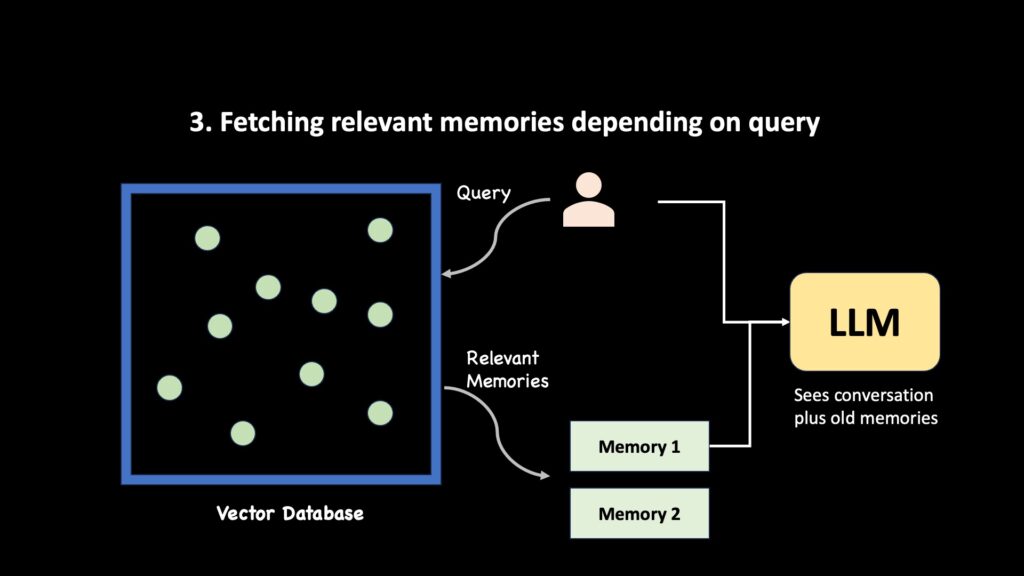 The image illustrates the process of fetching relevant memories from a vector database based on a query, which are then used by a Large Language Model (LLM) along with the current conversation.
Next, let's create a ReAct agent with DSPy. ReAct stands for "Reasoning and Acting". Basically, the LLM agent observes the data (in this case, the conversation history), reasons about it, and then acts
The image illustrates the process of fetching relevant memories from a vector database based on a query, which are then used by a Large Language Model (LLM) along with the current conversation.
Next, let's create a ReAct agent with DSPy. ReAct stands for "Reasoning and Acting". Basically, the LLM agent observes the data (in this case, the conversation history), reasons about it, and then acts
An action can be to generate an answer directly or try to retrieve memories first.
python
    response_generator = dspy.ReAct(
        ResponseGenerator,
        tools=[fetch_similar_memories],
        max_iters=4
    )
In an agentic flow, the DSPy ReAct policy can craft a concise search_text from the current turn and the known task. The ReAct agent can call the fetch_similar_memories upto 4 times to search for memories before it must answer the user's question.
Other Retrieval Strategies
You can also choose other retrieval strategies than just similarity search. Here are some ideas:
- Keyword Search - Look into algorithms like BM-25 or TF-IDF
- Category Filtering - If you force every memory to have clear metadata tagging (like "food", "sports", "habits"), the agent can generate queries to search these specific subcategories instead of the whole memory stack.
- Time Queries - Allow the agent to retrieve records from specific time ranges!
These choices largely depend on your application.
Whatever your retrieval strategy is, once the tool fetches the LLM answers, the agent is going to generate answers from the retrieved data! Remember, it also outputs that save_memory flag? We can trigger our custom update logic when it is turned to true.
python
out = await response_generator.acall(
    transcript=past_messages,
    question=question,
)

response = out.response # the response
save_memory = out.save_memory # the LLM's decision to save memory or not

past_messages.extend(
    [
    {"role": "user", "content": question},
    {"role": "assistant", "content": response},
    ]
) # update conversation stack

if (save_memory): # Update memories only if LLM outputs this flag as true
    update_result = await update_memories(
        user_id=user_id,
        messages=past_messages,
    )
Let's see how the update step works.
Memory Maintenance
Memory is not a simple log of records. It is an ever-evolving pool of information. Some memories should be deleted because it is no longer relevant. Some memories must be updated because the underlying world conditions have changed.
For example, suppose we had a memory for "user loves tea", and we just got to know that the "user hates tea". Instead of creating a brand new memory, we should delete the old memory and create a new one.
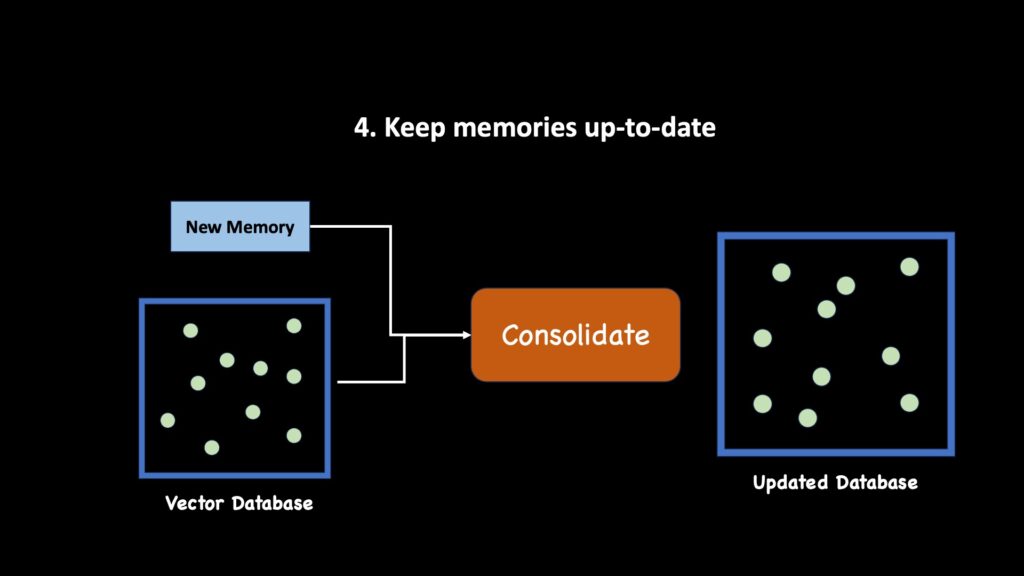 Given a new memory and an existing vector database state, how do we determine the updated database state?
When the response generator agent decides to save new memories, we will use a separate agentic flow to decide how to do the updates. The Update memory agent receives as input the new memory, and a list of similar memories to the conversation state.
python
Given a new memory and an existing vector database state, how do we determine the updated database state?
When the response generator agent decides to save new memories, we will use a separate agentic flow to decide how to do the updates. The Update memory agent receives as input the new memory, and a list of similar memories to the conversation state.
python
    .... # if save_memory is True
    response = await update_memories_agent(
        user_id=user_id,
        existing_memories=similar_memories,
        messages=messages
    )
Once we have decided to update the memory database, there are four logical things the memory manager agent can do:
• add_memory(text) : Inserts a brand-new atomic factoid. It computes a fresh embedding and writes the record for the current user. It should also apply deduplication logic before insertion.
• update_memory(id, updated_text) : Replaces an existing memory’s text. It deletes the old point, re-embeds the new text, and reinserts it under the same user, optionally preserving or adjusting categories. This is the canonical way to handle refinements or corrections.
• delete_memories(ids): Removes one or more memories that are no longer valid due to contradictions or obsolescence.
• no_op() : Explicitly does nothing if the maintenance agent decides that the new memory is irrelevant or already fully captured in the database state.
Again this architecture is inspired by the Mem0 research paper.
The code below shows these tools integrated into a DSPy ReAct agent with a structured signature and tool selection loop.
python
class MemoryWithIds(BaseModel):
    memory_id: int
    memory_text: str

class UpdateMemorySignature(dspy.Signature):
    """
You will be given the conversation between user and assistant and some similar memories from the database. Your goal is to decide how to combine the new memories into the database with the existing memories.

Actions meaning:
- ADD: add new memories into the database as a new memory
- UPDATE: update an existing memory with richer information.
- DELETE: remove memory items from the database that aren't required anymore due to new information
- NOOP: No need to take any action

If no action is required you can finish.

Think less and do actions.
    """
    messages: list[dict] = dspy.InputField()
    existing_memories: list[MemoryWithIds] = dspy.InputField()
    summary: str = dspy.OutputField(
        description="Summarize what you did. Very short (less than 10 words)"
    )
Next, let's write the tools our maintenance agent needs. We need functions to add, delete, update memories, and a dummy no_op function the LLM can call when it wants to "pass".
python
async def update_memories_agent(
    user_id: int,
    messages: list[dict],
    existing_memories: list[RetrievedMemory]
):

    def get_point_id_from_memory_id(memory_id):
        return existing_memories[memory_id].point_id

    async def add_memory(memory_ext: str) -> str:
        """
    Add the new_memory into the database.
        """
        embeddings = await generate_embeddings(
            [memory_text]
        )
        await insert_memories(
            memories = [
                EmbeddedMemory(
                    user_id=user_id,
                    memory_text=memory_text,
                    date=datetime.now().strftime("%Y-%m-%d %H:%m"),
                    embedding=embeddings[0]
                )
            ]
        )

        return f"Memory: '{memory_text}' was added to DB"

    async def update(memory_id: int,
                     updated_memory_text: str,
                     ):
        """
    Updating memory_id to use updated_memory_text

    Args:
    memory_id: integer index of the memory to replace

    updated_memory_text: Simple atomic factoid to replace the old memory with the new memory
        """

        point_id = get_point_id_from_memory_id(memory_id)
        await delete_records([point_id])

        embeddings = await generate_embeddings(
            [updated_memory_text]
        )

        await insert_memories(
            memories = [
                EmbeddedMemory(
                    user_id=user_id,
                    memory_text=updated_memory_text,
                    categories=categories,
                    date=datetime.now().strftime("%Y-%m-%d %H:%m"),
                    embedding=embeddings[0]
                )
            ]
        )
        return f"Memory {memory_id} has been updated to: '{updated_memory_text}'"

    async def noop():
        """
Call this is no action is required
        """
        return "No action done"

    async def delete(memory_ids: list[int]):
        """
    Remove these memory_ids from the database
        """
        await delete_records(memory_ids)
        return f"Memory {memory_ids} deleted"


    memory_updater = dspy.ReAct(
        UpdateMemorySignature,
            tools=[add_memory, update, delete, noop],
            max_iters=3
    )

    out = await memory_updater.acall(
        messages=messages,
        existing_memories=memory_ids
    )
And that's it! Depending on what action the ReAct agent chooses, we can simply insert, delete, update, or ignore the new memories. Below you can see a simple example of how things look when we run the code.
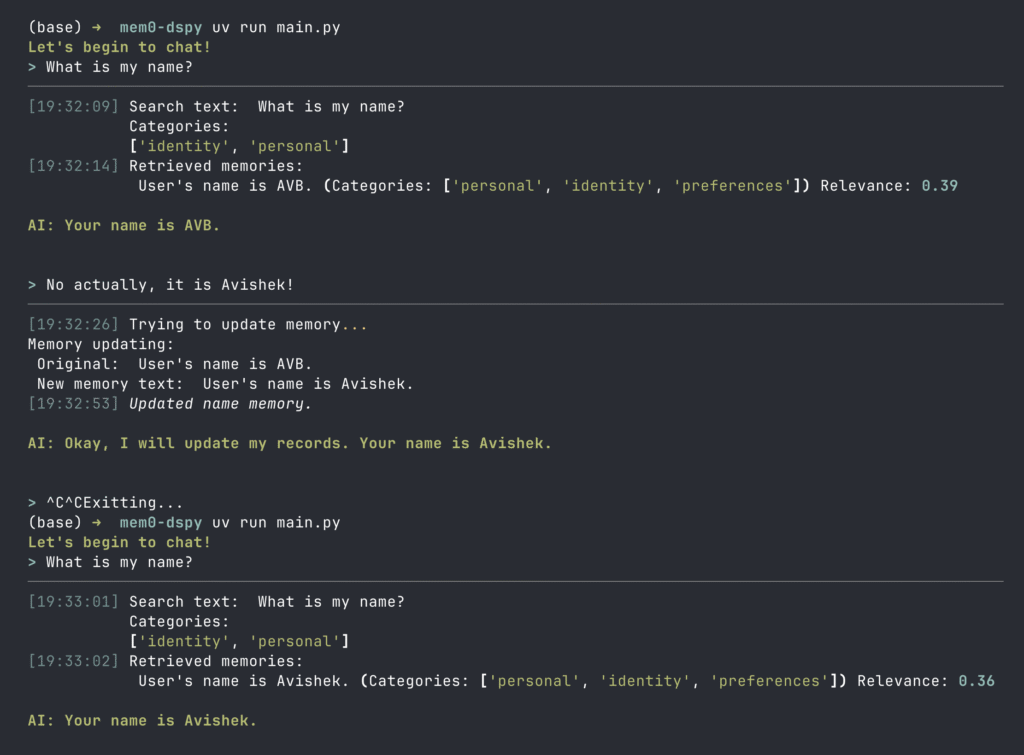 Example of how sessions with a memory-enabled agent would go. Notice we exit out of the session midway, but the agent remembers key details I had shared earlier. It can also later update these information adaptively according to conversation state!
The full version of the code also has additional features like metadata tagging for accurate retrieval which I didn't cover in this article to keep it beginner-friendly. Be sure to check out the GitHub repo below or the YouTube tutorial to explore the full project!
Example of how sessions with a memory-enabled agent would go. Notice we exit out of the session midway, but the agent remembers key details I had shared earlier. It can also later update these information adaptively according to conversation state!
The full version of the code also has additional features like metadata tagging for accurate retrieval which I didn't cover in this article to keep it beginner-friendly. Be sure to check out the GitHub repo below or the YouTube tutorial to explore the full project!
What's next
You can watch the full video tutorial that goes into more detail about building Memory agents here.
Please accept cookies to access this content
The code repo can be found here:https://github.com/avbiswas/mem0-dspy
This tutorial explained the building blocks of a memory system. Here are some ideas on how to expand this idea:
- A Graph Memory system - instead of using a vector database, store memories in a graph database. This means, your dspy modules should extract triplets instead of flat strings to represent memories.
- Metadata - Alongside text, insert additional attribute filters. For example, you can group all "food" related memories. This will allow the LLM agents to query specific tags while fetching memories, instead of querying all memories at once.
- Optimizing prompts per user : You can keep track of integral information in your memory database and directly inject it into the system prompt. These get passed into each message as session memory.
- File-Based Systems : Another common pattern that is emerging is file-based retrieval. The core principles remain the same that we discussed here, but instead of a vector database, you can use a file system. Inserting and updating records means writing .md files. And querying will usually involve additional indexing steps or simply use tools like regex searches or grep.
My Patreon:
https://www.patreon.com/NeuralBreakdownwithAVB
My YouTube channel:
https://www.youtube.com/@avb_fj
Follow me on Twitter:
https://x.com/neural_avb
Read my articles:
https://towardsdatascience.com/author/neural-avb/
Register Now to Continue Reading
Unlock Towards Data Science with a Free Account
All articles on Towards Data Science are available to registered users. Create a free account today to access this article and thousands more.
Register for freeSign in to your account
 Written By
See all from Avishek Biswas
Deep DivesContext EngineeringLlmLlm ApplicationsMemory Management
Share This Article
Towards Data Science is a community publication. Submit your insights to reach our global audience and earn through the TDS Author Payment Program.
Write for TDS
Related Articles
Deep Learning
Scaling from 117M to 175B: Insights into GPT-2 and GPT-3.
Shirley Li
January 13, 20259 min read
Artificial Intelligence
How depth estimation, foundation segmentation, and geometric fusion are converging into spatial intelligence
Florent Poux, Ph.D.
April 10, 202616 min read
Large Language Models
Best practices for data quality, retrieval design, and evaluation in production RAG systems
Sabrine Bendimerad
December 19, 20259 min read
Large Language Models
Results from tests devised to compare the power and limitations of these language models that are just an URL away
Luciano Abriata
September 26, 202323 min read
Artificial Intelligence
Decoding the Math behind Q-Learning, Action-Value Functions, Bellman Equations, and building them from scratch in Python.
Cristian Leo
February 28, 202434 min read
Artificial Intelligence
A sober perspective as to why boring is best, even for AI
Mathieu Lemay
April 29, 20237 min read
Artificial Intelligence
Comprehensive Guide to Fine-Tuning Phi-2 using Direct Preference Optimization
Yanli Liu
January 30, 202411 min read
Artificial Intelligence
Our weekly selection of must-read Editors' Picks and original features
TDS Editors
April 27, 20234 min read
Machine Learning
The magic behind multimodal models unlocked through contrastive learning
Slava Efimov
July 14, 20256 min read
Your home for data science and AI. The world's leading publication for data science, data analytics, data engineering, machine learning, and artificial intelligence professionals.
Subscribe to Our NewsletterWrite For TDS•About•Advertise•Privacy Policy•Terms of Use
© Insight Media Group, LLC 2026•The New Stack•roadmap.sh•Creator Network
Recommended Articles
Close