保留正文与补采附件。源页面当前未重新核验;具体限制见交付清单。
 We value your privacy
We use cookies to enhance your browsing experience, serve personalised ads or content, and analyse our traffic. By clicking "Accept All", you consent to our use of cookies.
Customise Reject All Accept All
Customise Consent Preferences
We value your privacy
We use cookies to enhance your browsing experience, serve personalised ads or content, and analyse our traffic. By clicking "Accept All", you consent to our use of cookies.
Customise Reject All Accept All
Customise Consent Preferences  We use cookies to help you navigate efficiently and perform certain functions. You will find detailed information about all cookies under each consent category below.
The cookies that are categorised as "Necessary" are stored on your browser as they are essential for enabling the basic functionalities of the site. ... Show more
NecessaryAlways Active
Necessary cookies are required to enable the basic features of this site, such as providing secure log-in or adjusting your consent preferences. These cookies do not store any personally identifiable data.
We use cookies to help you navigate efficiently and perform certain functions. You will find detailed information about all cookies under each consent category below.
The cookies that are categorised as "Necessary" are stored on your browser as they are essential for enabling the basic functionalities of the site. ... Show more
NecessaryAlways Active
Necessary cookies are required to enable the basic features of this site, such as providing secure log-in or adjusting your consent preferences. These cookies do not store any personally identifiable data.
-
Cookie
BCTempID
-
Duration
10 minutes
-
Description
No description available.
-
Cookie
__cf_bm
-
Duration
1 hour
-
Description
This cookie, set by Cloudflare, is used to support Cloudflare Bot Management.
-
Cookie
AWSALBCORS
-
Duration
7 days
-
Description
Amazon Web Services set this cookie for load balancing.
-
Cookie
_cfuvid
-
Duration
session
-
Description
Cloudflare sets this cookie to track users across sessions to optimize user experience by maintaining session consistency and providing personalized services
-
Cookie
li_gc
-
Duration
6 months
-
Description
Linkedin set this cookie for storing visitor's consent regarding using cookies for non-essential purposes.
-
Cookie
__hssrc
-
Duration
session
-
Description
This cookie is set by Hubspot whenever it changes the session cookie. The __hssrc cookie set to 1 indicates that the user has restarted the browser, and if the cookie does not exist, it is assumed to be a new session.
-
Cookie
__hssc
-
Duration
1 hour
-
Description
HubSpot sets this cookie to keep track of sessions and to determine if HubSpot should increment the session number and timestamps in the __hstc cookie.
-
Cookie
wpEmojiSettingsSupports
-
Duration
session
-
Description
WordPress sets this cookie when a user interacts with emojis on a WordPress site. It helps determine if the user's browser can display emojis properly.
-
Cookie
BCSessionID
-
Duration
1 year 1 month 4 days
-
Description
Blueconic sets this cookie as a unique identifier for the BlueConic profile.
-
Cookie
_octo
-
Duration
1 year
-
Description
No description available.
-
Cookie
logged_in
-
Duration
1 year
-
Description
No description available.
-
Cookie
__Secure-YEC
-
Duration
past
-
Description
YouTube sets this cookie to stores the user's video player preferences using embedded YouTube video
-
Cookie
__eoi
-
Duration
6 months
-
Description
Description is currently not available.
-
Cookie
AWSALBTGCORS
-
Duration
7 days
-
Description
No description available.
-
Cookie
login-status-p
-
Duration
past
-
Description
Description is currently not available.
-
Cookie
AWSALBTG
-
Duration
7 days
-
Description
No description available.
-
Cookie
csrf_token
-
Duration
session
-
Description
No description available.
-
Cookie
token_v2
-
Duration
1 day
-
Description
Description is currently not available.
-
Cookie
D
-
Duration
1 year
-
Description
Description is currently not available.
-
Cookie
PHPSESSID
-
Duration
session
-
Description
This cookie is native to PHP applications. The cookie stores and identifies a user's unique session ID to manage user sessions on the website. The cookie is a session cookie and will be deleted when all the browser windows are closed.
-
Cookie
VISITOR_PRIVACY_METADATA
-
Duration
6 months
-
Description
YouTube sets this cookie to store the user's cookie consent state for the current domain.
-
Cookie
cookietest
-
Duration
session
-
Description
The cookietest cookie is typically used to determine whether the user's browser accepts cookies, essential for website functionality and user experience.
-
Cookie
__Host-airtable-session
-
Duration
1 year
-
Description
This cookie is used to enable us to integrate the services of Airtable.
-
Cookie
__Host-airtable-session.sig
-
Duration
1 year
-
Description
This cookie is used to enable us to integrate the services of Airtable.
-
Cookie
m
-
Duration
1 year 1 month 4 days
-
Description
Stripe sets this cookie for fraud prevention purposes. It identifies the device used to access the website, allowing the website to be formatted accordingly.
-
Cookie
BIGipServer*
-
Duration
session
-
Description
Marketo sets this cookie to collect information about the user's online activity and build a profile about their interests to provide advertisements relevant to the user.
-
Cookie
__cfruid
-
Duration
session
-
Description
Cloudflare sets this cookie to identify trusted web traffic.
-
Cookie
_GRECAPTCHA
-
Duration
6 months
-
Description
Google Recaptcha service sets this cookie to identify bots to protect the website against malicious spam attacks.
-
Cookie
__Secure-YNID
-
Duration
6 months
-
Description
Google cookie used to protect user security and prevent fraud, especially during the login process.
-
Cookie
cookieyes-consent
-
Duration
1 year
-
Description
CookieYes sets this cookie to remember users' consent preferences so that their preferences are respected on subsequent visits to this site. It does not collect or store any personal information about the site visitors.
Functional
Functional cookies help perform certain functionalities like sharing the content of the website on social media platforms, collecting feedback, and other third-party features.
-
Cookie
lidc
-
Duration
1 day
-
Description
LinkedIn sets the lidc cookie to facilitate data center selection.
-
Cookie
brw
-
Duration
1 year
-
Description
No description available.
-
Cookie
brwConsent
-
Duration
5 minutes
-
Description
Description is currently not available.
-
Cookie
WMF-Uniq
-
Duration
1 year
-
Description
Description is currently not available.
-
Cookie
loom_anon_comment
-
Duration
1 year
-
Description
No description available.
-
Cookie
loom_referral_video
-
Duration
session
-
Description
Description is currently not available.
-
Cookie
VISITOR_INFO1_LIVE
-
Duration
6 months
-
Description
A cookie set by YouTube to measure bandwidth that determines whether the user gets the new or old player interface.
-
Cookie
yt-remote-connected-devices
-
Duration
Never Expires
-
Description
YouTube sets this cookie to store the user's video preferences using embedded YouTube videos.
-
Cookie
ytidb::LAST_RESULT_ENTRY_KEY
-
Duration
Never Expires
-
Description
The cookie ytidb::LAST_RESULT_ENTRY_KEY is used by YouTube to store the last search result entry that was clicked by the user. This information is used to improve the user experience by providing more relevant search results in the future.
-
Cookie
yt-remote-device-id
-
Duration
Never Expires
-
Description
YouTube sets this cookie to store the user's video preferences using embedded YouTube videos.
-
Cookie
yt-remote-session-name
-
Duration
session
-
Description
The yt-remote-session-name cookie is used by YouTube to store the user's video player preferences using embedded YouTube video.
-
Cookie
yt-remote-fast-check-period
-
Duration
session
-
Description
The yt-remote-fast-check-period cookie is used by YouTube to store the user's video player preferences for embedded YouTube videos.
-
Cookie
yt-remote-session-app
-
Duration
session
-
Description
The yt-remote-session-app cookie is used by YouTube to store user preferences and information about the interface of the embedded YouTube video player.
-
Cookie
yt-remote-cast-available
-
Duration
session
-
Description
The yt-remote-cast-available cookie is used to store the user's preferences regarding whether casting is available on their YouTube video player.
-
Cookie
yt-remote-cast-installed
-
Duration
session
-
Description
The yt-remote-cast-installed cookie is used to store the user's video player preferences using embedded YouTube video.
-
Cookie
cp_session
-
Duration
3 months
-
Description
Codepen sets this cookie for Help systems found in the website.
-
Cookie
loid
-
Duration
1 year 1 month 4 days
-
Description
This cookie is set by the Reddit. The cookie enables the sharing of content from the website onto the social media platform.
Analytics
Analytical cookies are used to understand how visitors interact with the website. These cookies help provide information on metrics such as the number of visitors, bounce rate, traffic source, etc.
-
Cookie
__hstc
-
Duration
6 months
-
Description
Hubspot set this main cookie for tracking visitors. It contains the domain, initial timestamp (first visit), last timestamp (last visit), current timestamp (this visit), and session number (increments for each subsequent session).
-
Cookie
hubspotutk
-
Duration
6 months
-
Description
HubSpot sets this cookie to keep track of the visitors to the website. This cookie is passed to HubSpot on form submission and used when deduplicating contacts.
-
Cookie
_ga
-
Duration
1 year 1 month 4 days
-
Description
Google Analytics sets this cookie to calculate visitor, session and campaign data and track site usage for the site's analytics report. The cookie stores information anonymously and assigns a randomly generated number to recognise unique visitors.
-
Cookie
ga*
-
Duration
1 year 1 month 4 days
-
Description
Google Analytics sets this cookie to store and count page views.
-
Cookie
__Host-psifi.analyticsTrace
-
Duration
6 hours
-
Description
Description is currently not available.
-
Cookie
__Host-psifi.analyticsTraceV2
-
Duration
6 hours
-
Description
Description is currently not available.
-
Cookie
_gh_sess
-
Duration
session
-
Description
GitHub sets this cookie for temporary application and framework state between pages like what step the user is on in a multiple step form.
-
Cookie
YSC
-
Duration
session
-
Description
YSC cookie is set by Youtube and is used to track the views of embedded videos on Youtube pages.
-
Cookie
ajs_anonymous_id
-
Duration
1 year
-
Description
This cookie is set by Segment to count the number of people who visit a certain site by tracking if they have visited before.
-
Cookie
vuid
-
Duration
1 year 1 month 4 days
-
Description
Vimeo installs this cookie to collect tracking information by setting a unique ID to embed videos on the website.
Performance
Performance cookies are used to understand and analyse the key performance indexes of the website which helps in delivering a better user experience for the visitors.
-
Cookie
AWSALB
-
Duration
7 days
-
Description
AWSALB is an application load balancer cookie set by Amazon Web Services to map the session to the target.
-
Cookie
acq
-
Duration
past
-
Description
Description is currently not available.
-
Cookie
acq.sig
-
Duration
past
-
Description
Description is currently not available.
-
Cookie
ptc
-
Duration
2 years
-
Description
No description available.
Advertisement
Advertisement cookies are used to provide visitors with customised advertisements based on the pages you visited previously and to analyse the effectiveness of the ad campaigns.
-
Cookie
muc_ads
-
Duration
1 year 1 month 4 days
-
Description
Twitter sets this cookie to collect user behaviour and interaction data to optimize the website.
-
Cookie
guest_id_marketing
-
Duration
1 year 1 month 4 days
-
Description
Twitter sets this cookie to identify and track the website visitor.
-
Cookie
guest_id_ads
-
Duration
1 year 1 month 4 days
-
Description
Twitter sets this cookie to identify and track the website visitor.
-
Cookie
personalization_id
-
Duration
1 year 1 month 4 days
-
Description
Twitter sets this cookie to integrate and share features for social media and also store information about how the user uses the website, for tracking and targeting.
-
Cookie
guest_id
-
Duration
1 year 1 month 4 days
-
Description
Twitter sets this cookie to identify and track the website visitor. It registers if a user is signed in to the Twitter platform and collects information about ad preferences.
-
Cookie
bcookie
-
Duration
1 year
-
Description
LinkedIn sets this cookie from LinkedIn share buttons and ad tags to recognize browser IDs.
-
Cookie
__Secure-ROLLOUT_TOKEN
-
Duration
6 months
-
Description
YouTube sets this cookie to manage feature rollout and experimentation. It helps Google control which new features or interface changes are shown to users as part of testing and staged rollouts, ensuring consistent experience for a given user during an experiment.
-
Cookie
yt.innertube::nextId
-
Duration
Never Expires
-
Description
YouTube sets this cookie to register a unique ID to store data on what videos from YouTube the user has seen.
-
Cookie
yt.innertube::requests
-
Duration
Never Expires
-
Description
YouTube sets this cookie to register a unique ID to store data on what videos from YouTube the user has seen.
-
Cookie
session_tracker
-
Duration
session
-
Description
This cookie is set by the Reddit. This cookie is used to identify trusted web traffic. It also helps in adverstising on the website.
-
Cookie
edgebucket
-
Duration
session
-
Description
Reddit sets this cookie to save the information about a log-on Reddit user, for the purpose of advertisement recommendations and updating the content.
-
Cookie
did
-
Duration
1 year
-
Description
Arbor sets this cookie to show targeted ads to site visitors.This cookie expires after 2 months or 1 year.
Uncategorised
Other uncategorised cookies are those that are being analysed and have not been classified into a category as yet.
No cookies to display.
Reject All Save My Preferences Accept All
Toggle SearchToggle Mobile Navigation
Publish AI, ML & data-science insights to a global community of data professionals.
Sign inSubmit an Article
LatestEditor's PicksNewsletterShipAI
Write For TDS
LinkedInXToggle Search
Data Science
Create Synthetic Dataset Using Llama 3.1 to Fine-Tune Your LLM
Using the giant Llama 3.1 405B and Nvidia Nemotron 4 reward model to create a synthetic dataset for instruction fine-tuning.
Hesam Sheikh
August 7, 20249 min read
 Created by AI using Leonardo.AI
Data is the heart of AI and while it is a valuable asset, we know how challenging and costly it is to develop high-quality datasets. A well-curated and filtered dataset can make up for a lack of complexity in a model. This is also the case with Large Language Models where smaller-sized models have shown to outperform bigger LLMs by leveraging good data.
In this article, we will explore how to use Llama 3.1 405B to create a synthetic dataset of git commands in natural language. I will show how you can use this 405B beast without running tens of GPUs in parallel. After having an initial dataset of instructions and responses, we will use Nvidia's Nemotron 4 as a reward model to filter out any bad prompt/response pairs. Finally, we will push this dataset to HuggingFace for later fine-tuning of our LLM.
This will be fast, free, and will leave you much in control.
I will keep this post concise and knowledge-packed, so make sure to read through the end and familiarize yourself with this essential skill.
Learn this step by step with the interactive AI and Data Scientist, Computer Science, AI Engineer and Machine Learning roadmaps.
Created by AI using Leonardo.AI
Data is the heart of AI and while it is a valuable asset, we know how challenging and costly it is to develop high-quality datasets. A well-curated and filtered dataset can make up for a lack of complexity in a model. This is also the case with Large Language Models where smaller-sized models have shown to outperform bigger LLMs by leveraging good data.
In this article, we will explore how to use Llama 3.1 405B to create a synthetic dataset of git commands in natural language. I will show how you can use this 405B beast without running tens of GPUs in parallel. After having an initial dataset of instructions and responses, we will use Nvidia's Nemotron 4 as a reward model to filter out any bad prompt/response pairs. Finally, we will push this dataset to HuggingFace for later fine-tuning of our LLM.
This will be fast, free, and will leave you much in control.
I will keep this post concise and knowledge-packed, so make sure to read through the end and familiarize yourself with this essential skill.
Learn this step by step with the interactive AI and Data Scientist, Computer Science, AI Engineer and Machine Learning roadmaps.
🦙 Why Llama 3.1
Meta has gained a firm foothold with the release of their latest family of LLMs, Llama 3.1. The new family includes an upgraded version of the previous 8B and 70B models with increased reasoning abilities and a giant 405B model.
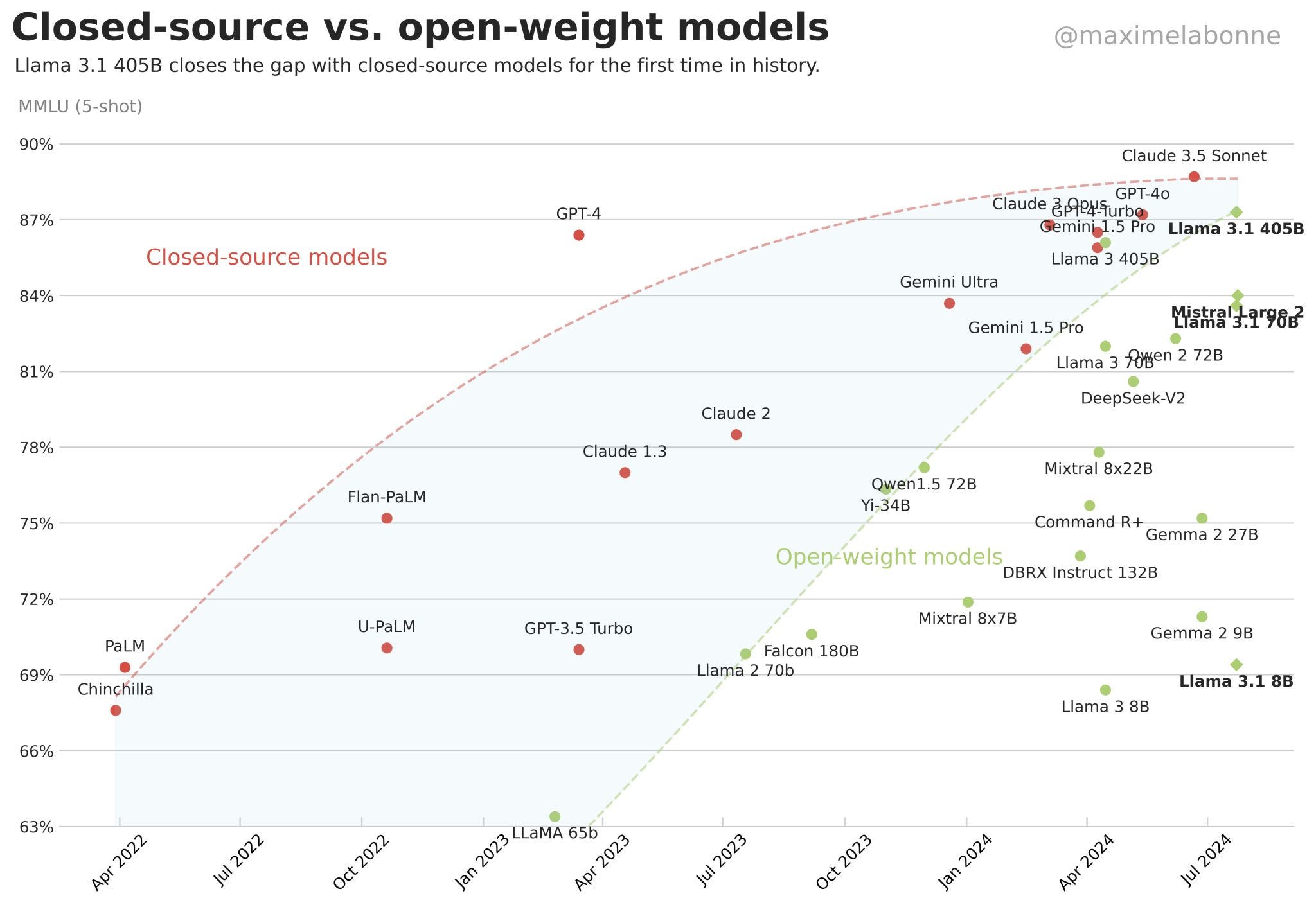 Llama 3.1 405 has been successful in reaching nearly the benchmark of the best closed-source models. (diagram by Maxime Labonne, with permission)
Llama 3.1 405B isn't just impressive in terms of the sheer scale, but also by closing the gap between closed-source and open-source models, more than ever before (above figure).
This capability of the 405B model makes it ideal for some of the most important and nuanced workflows, such as Retrieval-Augmented Generation (RAG), supervised fine-tuning (SFT), and most importantly synthetic data generation.
Llama 3.1 405 has been successful in reaching nearly the benchmark of the best closed-source models. (diagram by Maxime Labonne, with permission)
Llama 3.1 405B isn't just impressive in terms of the sheer scale, but also by closing the gap between closed-source and open-source models, more than ever before (above figure).
This capability of the 405B model makes it ideal for some of the most important and nuanced workflows, such as Retrieval-Augmented Generation (RAG), supervised fine-tuning (SFT), and most importantly synthetic data generation.
Why Synthetic Data?
Synthetic data is created using an artificial model by reproducing the characteristics and features of real-world data. At some point, you will need to work with it when you need more data than you have.
Our example of a dataset of git commands in natural language can show this perfectly. If we want to create an application that takes as input, what the user needs and then suggests the right git command for it, then at the heart of this application we will need an expert LLM. We could use GPT-4o or Claude and will most likely get good results. But there is the problem of the cost. So the alternative would be to fine-tune a Small Language Model (SML) such as Llama 3.1 8B or Gemma 2 2B (which I will get to in a later post).
And guess what we need for fine-tuning... Data!
Since I didn't find the right dataset for this task, we are left with only one solution: to create our dataset synthetically using Llama 3.1 405B.
🛠 ️Building the Dataset
To build a synthetic dataset using AI, we will use the following outline. You can choose any other LLMs from what I have chosen.
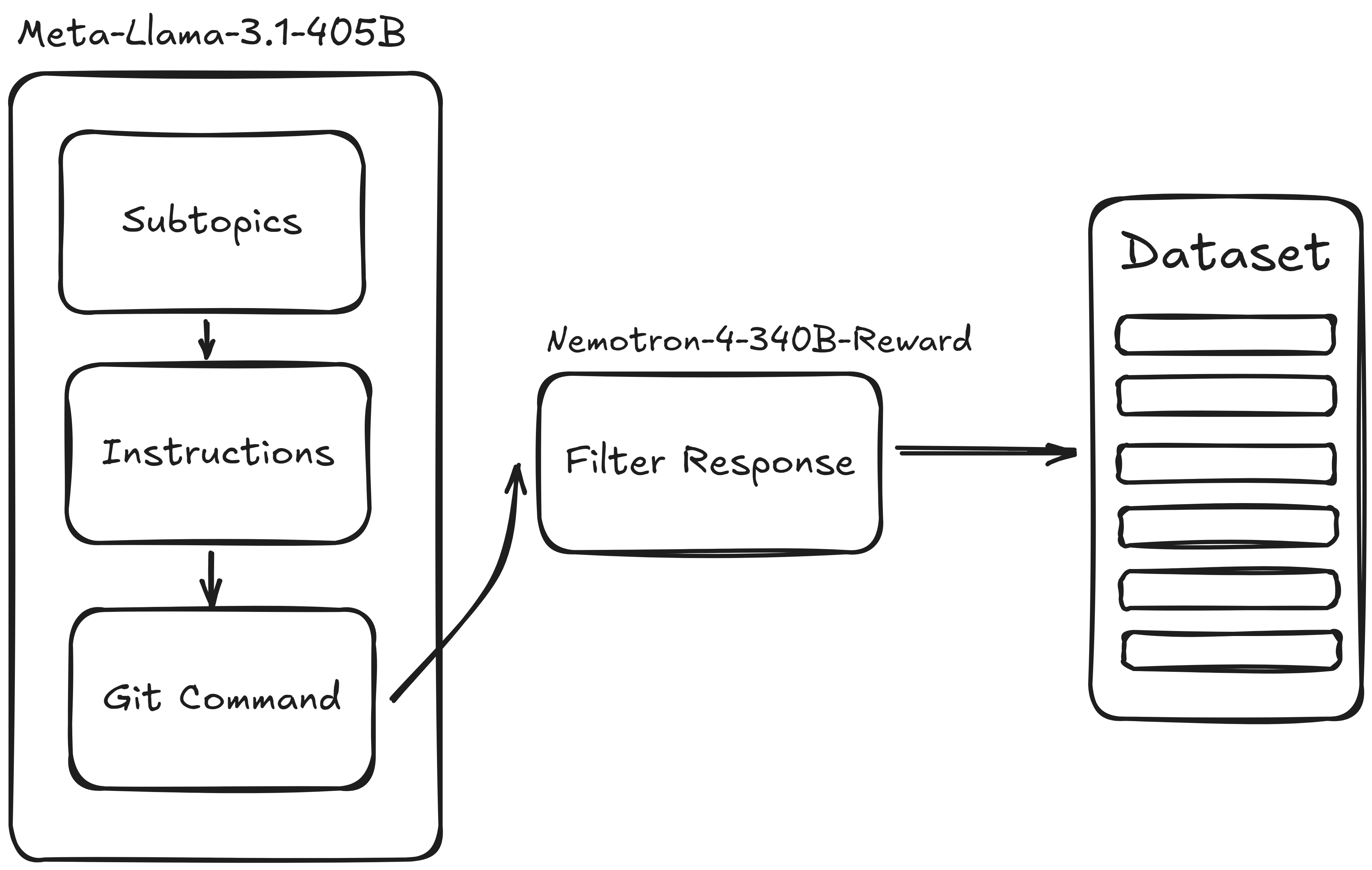 Our outline of creating a synthetic dataset. (by author)
Setting Up the API Key
We will use the Nvidia NIM API to leverage these big LLMs without the hassle of running them locally. Running a model like Llama 3.1 405B on the device would normally require multiple H100 GPUs and unless you work in an organization with such resources, you need to use external APIs.
To access your free Nvidia credits, go to Llama 3.1 on Nvidia NIM, and click on Get API Key. This is what we will use in our code or a .env file. Once we have the API, we can set up our connection to the Nvidia server to use the models remotely.
python
client = OpenAI(
    base_url="https://integrate.api.nvidia.com/v1",
    api_key=os.environ["NVIDIA_API_KEY"]
)
MODEL = "meta/llama-3.1-405b-instruct"
Generate Subtopics
Ideally, we like our dataset to cover various scenarios and situations as much as possible. One way to ensure this is to define subtopics and ask Llama 3.1 to provide instructions/response pairs for each of the subtopics. We can choose these subtopics ourselves or leave it to the LLM to decide. I took the second approach in the following code snippet.
python
n_subtopics = 5

TOPIC_GENERATION_PROMPT_TEMPLATE = """
I want to create a synthetic dataset of natural language and Git commands. Based on this context, give me {n_subtopics} subtopics
to cover what needs to be covered when working with Git.

The list must be without numbers, and without any description of the subtopics. The subtopics should be separated by a comma. There must be no other text than the list.
"""

def generate_subtopics(client, n_subtopics):
    prompt = TOPIC_GENERATION_PROMPT_TEMPLATE.format(n_subtopics=n_subtopics)
    response = client.chat.completions.create(
        model=MODEL,
        messages=[
            {"role": "user",
             "content": prompt}
        ],
        temperature=0.2,
        top_p=0.7,
    )
    return response

responses = generate_subtopics(client, n_subtopics=n_subtopics)
print(responses.choices[0].message.content)
The LLM suggests five topics: Branching, Merging, Committing, Remote repositories, and Resolving conflicts. It seems like a fair selection of subjects to cover.
Generate Instructions
Having five subtopics of working with Git, we need Llama 3.1 to generate a set of instructions (or prompts) regarding each of the subtopics. I have asked for one hundred instructions per topic, so ideally, I should get 500 prompts.
One thing to keep in mind is that when asking for N number of instructions: it is rare that the model would return exactly as many as you want, even a big model like this.
Eventually, I got a total of 335 instructions for 5 subtopics, which is very different from 500. There are methods to ensure this doesn't happen but for the sake of simplicity, we won't dwell on this.
python
n_instructions = 100

INSTRUCTION_PROMPT_TEMPLATE = """
The objective is to create a dataset of user instructions in natural language that should be returned by Git commands.
Given a topic in Git, generate {n_instructions} possible concise instructions that could be given to an AI assitant about that topic.
Write some of these instructions as if given by someone with limited knowledge of Git terminologies and knowledge,
like a beginner programmer. Your response should be in a list format.

The topic is: {sub_topic}
The list must be without numbers. The questions/instructions should be separated by a newline character. There must be no other text than the list.
"""
subtopic_list = responses.choices[0].message.content.split(",")
def generate_instructions(client, sub_topic, n_instructions):
    print(f"Generating Instructions for {sub_topic}.")
    prompt = INSTRUCTION_PROMPT_TEMPLATE.format(sub_topic=sub_topic, n_instructions=n_instructions)
    response = client.chat.completions.create(
        model=MODEL,
        messages=[
            {"role": "user",
             "content": prompt}
        ],
        temperature=0.2,
        top_p=0.7,
    )
    return response.choices[0].message.content

def instructions_generator(client, subtopic_list, n_instructions):
    instruction_list = [generate_instructions(client, subtopic, n_instructions) for subtopic in subtopic_list]
    return instruction_list

instruction_list = instructions_generator(client, subtopic_list, n_instructions)

instruction_list_formatted = []
for instruction_set in instruction_list:
    instruction_list_formatted.extend([instruction.strip() for instruction in instruction_set.split("n") if instruction])
print(instruction_list_formatted)
Here are some examples of the generated instructions:
vbnet
'Make a branch that I can merge back into the main branch','I want to make a branch that is based on an older version of the code','Can you show me a log of all commits that have been made to the repository this year?',
Response Generation
For each of the provided instructions, we will also ask for a response. As you can see in the following code snippet, I have specifically asked my responses to be on-topic, informative, and concise. By the end, I will have a list of instruction and response pairs.
python
RESPONSE_PROMPT_TEMPLATE = """
Given an question/instruction related to Git, generate a response that could be given.
Keep the response on-topic, informative, concise.

The user prompt is: {instruction}
"""
def generate_responses(client, instruction):
    prompt = RESPONSE_PROMPT_TEMPLATE.format(instruction=instruction)
    response = client.chat.completions.create(
        model=MODEL,
        messages=[
            {"role": "user",
             "content": prompt}
        ],
        temperature=0.2,
        top_p=0.7,
        max_tokens=1024,
    )
    return response.choices[0].message.content

def response_generator(client, instruction_list):
    response_list = [generate_responses(client, instruction) for instruction in instruction_list]
    return response_list

instruction_response_list = response_generator(client, instruction_list_formatted)
instruction_response_pair_list = []
for instruction, response in zip(instruction_list_formatted, instruction_response_list):
    instruction_response_pair_list.append(
        {
            "instruction": instruction,
            "responses": response,
        }
    )
swift
{"instruction": "Can you make a branch for me and name it "new-feature"",
"responses": "To create a new branch named "new-feature", you can use the following Git command:nn`git branch new-feature`nnThis will create a new branch with the specified name. If you want to switch to the new branch immediately, you can use:nn`git checkout -b new-feature`nnThis will create the branch and switch to it in one step."}
Filtering Responses with Nemotron 4
Even though we have our instruction/response pairs, not all of the responses are high-quality. They may be verbose, complex, or false. This is where Nvidia's Nemotron 4 340B Reward model comes into play. It is made exactly for our use case, as according to Nvidia, it "can be used as part of a synthetic data generation pipeline to create training data that helps researchers and developers build their own LLMs."
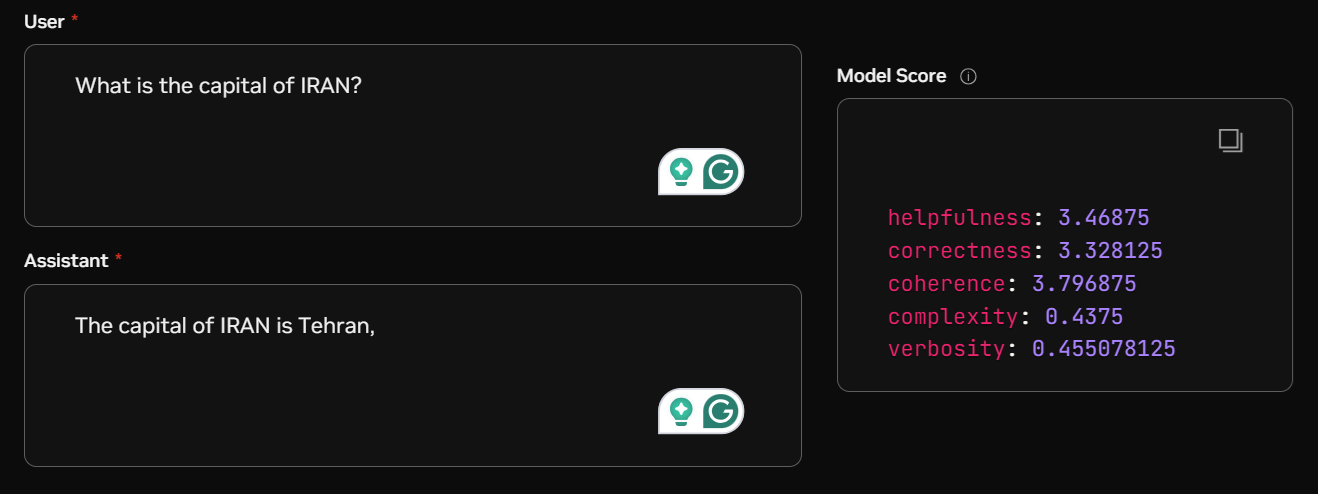 Example use of Nemotron 4. (by author)
We will give each one of our instruction/response pairs to Nemotron 4, and receive five scores ranging from 0 to 4. These five scores are helpfulness, correctness, coherence, complexity, and verbosity. To use the model, I will first define a simple function to feed an instruction and a response to the model and receive the five scores in the shape of a dict.
python
Example use of Nemotron 4. (by author)
We will give each one of our instruction/response pairs to Nemotron 4, and receive five scores ranging from 0 to 4. These five scores are helpfulness, correctness, coherence, complexity, and verbosity. To use the model, I will first define a simple function to feed an instruction and a response to the model and receive the five scores in the shape of a dict.
python
def get_scores_from_response(score_response_template):
    logprobs = score_response_template.choices[0].logprobs.content
    score_dict = {}
    for score in logprobs:
        score_dict[score.token] = score.logprob
    return score_dict

def get_response_and_scores(client, model, question, response_content):
    messages = [
        {
            "role": "user",
            "content": question
        },
        {
            "role": "assistant",
            "content": response_content
        }
    ]
    response = client.chat.completions.create(
        model=model,
        messages=messages,
    )
    scores = get_scores_from_response(response)
    return scores
After we have a score for each of the rows in our dataset, we can filter the dataset using each of the five provided criteria. I will filter out bad responses based on helpfulness and verbosity , as I want to keep my responses concise and informative.
python
helpfulness_THRESHOLD = 3
verbosity_THRESHOLD = 2.5
synthetic_data = [data for i, data in enumerate(synthetic_data)
                  if not (score_list[i]["helpfulness"] < helpfulness_THRESHOLD or
                          score_list[i]["verbosity"] > verbosity_THRESHOLD)]
Push the Dataset to HuggingFace
Finally, once you have the finished dataset, it's a good practice to push it to HuggingFace to use it later or to share it with other developers. To do this, first log in to HuggingFace and provide a token , following the provided link on the login page.
csharp
from huggingface_hub import login
login()
Then you can load the saved dataset and upload it on your HuggingFace page.
kotlin
with open(f'synthetic_data_filtered.jsonl', 'r') as f:
    data = [json.loads(line) for line in f]
dataset = Dataset.from_list(data)
dataset_dict = DatasetDict({"train": dataset})
dataset_dict.push_to_hub("hesamsheikh/git-prompt")
Congrats 🏆 ! So far you have been able to use Llama 3.1 to create a dataset of instructions and responses, and Nemotron 4 to refine the dataset and filter out bad responses. In the end, we saw how easy it is to push the dataset to HuggingFace with no effort. Create Synthetic Dataset from 1 TOPIC for Instruction Finetuning is also a great inspiration for this article and I would suggest you watch it if you like this topic.
Here is also the repository where you can find the complete code I have used. Don't forget to star ⭐the repo if you check it out.
Creating Synthetic Dataset Using Llama 3.1 405B and Nemotron 4
Thank you for reading through the article! Please share your opinions and suggestions if you think any modifications are required.
Let's Connect!
Subscribe for FREE to be notified of new articles! You can also find me on LinkedIn and Twitter .
Get an email whenever Hesam Sheikh publishes.
Further Reads
If you have reached so far, you might also find these articles interesting:
What We Still Don't Understand About Machine Learning
A Comprehensive Guide to Collaborative AI Agents in Practice
Register Now to Continue Reading
Unlock Towards Data Science with a Free Account
All articles on Towards Data Science are available to registered users. Create a free account today to access this article and thousands more.
Register for freeSign in to your account
 Written By
See all from Hesam Sheikh
Data ScienceLarge Language ModelsMachine LearningProgrammingSynthetic Data
Share This Article
Towards Data Science is a community publication. Submit your insights to reach our global audience and earn through the TDS Author Payment Program.
Write for TDS
Related Articles
LLM Applications
Learn how to become a more efficient programmer with local testing
Eivind Kjosbakken
December 13, 20257 min read
Programming
A comprehensive overview of running SQL commands on R Data frames
Zoumana Keita
June 16, 20227 min read
Artificial Intelligence
A novel approach towards increasing accuracy of Sentiment Classification quickly and efficiently
Utkarsh Lal
May 27, 20225 min read
Machine Learning
The differences in terms of cost functions, Ordinary Least Square (OLS), Gradient Descent (GD), and Maximum Likelihood Estimation (MLE).
Aaron Zhu
April 10, 202213 min read
Data Science
We Use Tableau Data Visualizations to Hunt for Industries Containing Potentially Cheap Stocks
Tony Yiu
July 15, 201911 min read
Artificial Intelligence
Explained with examples
Soner Yıldırım
April 16, 20214 min read
Machine Learning
Understanding modern techniques for encoding geographic coordinates in a neural network
Ruth Crasto
October 1, 202410 min read
Machine Learning
It's easy with DAGsHub Storage
Martin Daniel
January 18, 20215 min read
Machine Learning
Learn these advanced techniques and see how they can help improve results
Peggy Chang
September 17, 202111 min read
Your home for data science and AI. The world's leading publication for data science, data analytics, data engineering, machine learning, and artificial intelligence professionals.
Subscribe to Our NewsletterWrite For TDS•About•Advertise•Privacy Policy•Terms of Use
© Insight Media Group, LLC 2026•The New Stack•roadmap.sh•Creator Network
Recommended Articles
Close