保留正文与补采附件。源页面当前未重新核验;具体限制见交付清单。
 We value your privacy
We use cookies to enhance your browsing experience, serve personalised ads or content, and analyse our traffic. By clicking "Accept All", you consent to our use of cookies.
Customise Reject All Accept All
Customise Consent Preferences
We value your privacy
We use cookies to enhance your browsing experience, serve personalised ads or content, and analyse our traffic. By clicking "Accept All", you consent to our use of cookies.
Customise Reject All Accept All
Customise Consent Preferences  We use cookies to help you navigate efficiently and perform certain functions. You will find detailed information about all cookies under each consent category below.
The cookies that are categorised as "Necessary" are stored on your browser as they are essential for enabling the basic functionalities of the site. ... Show more
NecessaryAlways Active
Necessary cookies are required to enable the basic features of this site, such as providing secure log-in or adjusting your consent preferences. These cookies do not store any personally identifiable data.
We use cookies to help you navigate efficiently and perform certain functions. You will find detailed information about all cookies under each consent category below.
The cookies that are categorised as "Necessary" are stored on your browser as they are essential for enabling the basic functionalities of the site. ... Show more
NecessaryAlways Active
Necessary cookies are required to enable the basic features of this site, such as providing secure log-in or adjusting your consent preferences. These cookies do not store any personally identifiable data.
-
Cookie
BCTempID
-
Duration
10 minutes
-
Description
No description available.
-
Cookie
__cf_bm
-
Duration
1 hour
-
Description
This cookie, set by Cloudflare, is used to support Cloudflare Bot Management.
-
Cookie
AWSALBCORS
-
Duration
7 days
-
Description
Amazon Web Services set this cookie for load balancing.
-
Cookie
_cfuvid
-
Duration
session
-
Description
Cloudflare sets this cookie to track users across sessions to optimize user experience by maintaining session consistency and providing personalized services
-
Cookie
li_gc
-
Duration
6 months
-
Description
Linkedin set this cookie for storing visitor's consent regarding using cookies for non-essential purposes.
-
Cookie
__hssrc
-
Duration
session
-
Description
This cookie is set by Hubspot whenever it changes the session cookie. The __hssrc cookie set to 1 indicates that the user has restarted the browser, and if the cookie does not exist, it is assumed to be a new session.
-
Cookie
__hssc
-
Duration
1 hour
-
Description
HubSpot sets this cookie to keep track of sessions and to determine if HubSpot should increment the session number and timestamps in the __hstc cookie.
-
Cookie
wpEmojiSettingsSupports
-
Duration
session
-
Description
WordPress sets this cookie when a user interacts with emojis on a WordPress site. It helps determine if the user's browser can display emojis properly.
-
Cookie
BCSessionID
-
Duration
1 year 1 month 4 days
-
Description
Blueconic sets this cookie as a unique identifier for the BlueConic profile.
-
Cookie
_octo
-
Duration
1 year
-
Description
No description available.
-
Cookie
logged_in
-
Duration
1 year
-
Description
No description available.
-
Cookie
__Secure-YEC
-
Duration
past
-
Description
YouTube sets this cookie to stores the user's video player preferences using embedded YouTube video
-
Cookie
__eoi
-
Duration
6 months
-
Description
Description is currently not available.
-
Cookie
AWSALBTGCORS
-
Duration
7 days
-
Description
No description available.
-
Cookie
login-status-p
-
Duration
past
-
Description
Description is currently not available.
-
Cookie
AWSALBTG
-
Duration
7 days
-
Description
No description available.
-
Cookie
csrf_token
-
Duration
session
-
Description
No description available.
-
Cookie
token_v2
-
Duration
1 day
-
Description
Description is currently not available.
-
Cookie
D
-
Duration
1 year
-
Description
Description is currently not available.
-
Cookie
PHPSESSID
-
Duration
session
-
Description
This cookie is native to PHP applications. The cookie stores and identifies a user's unique session ID to manage user sessions on the website. The cookie is a session cookie and will be deleted when all the browser windows are closed.
-
Cookie
VISITOR_PRIVACY_METADATA
-
Duration
6 months
-
Description
YouTube sets this cookie to store the user's cookie consent state for the current domain.
-
Cookie
cookietest
-
Duration
session
-
Description
The cookietest cookie is typically used to determine whether the user's browser accepts cookies, essential for website functionality and user experience.
-
Cookie
__Host-airtable-session
-
Duration
1 year
-
Description
This cookie is used to enable us to integrate the services of Airtable.
-
Cookie
__Host-airtable-session.sig
-
Duration
1 year
-
Description
This cookie is used to enable us to integrate the services of Airtable.
-
Cookie
m
-
Duration
1 year 1 month 4 days
-
Description
Stripe sets this cookie for fraud prevention purposes. It identifies the device used to access the website, allowing the website to be formatted accordingly.
-
Cookie
BIGipServer*
-
Duration
session
-
Description
Marketo sets this cookie to collect information about the user's online activity and build a profile about their interests to provide advertisements relevant to the user.
-
Cookie
__cfruid
-
Duration
session
-
Description
Cloudflare sets this cookie to identify trusted web traffic.
-
Cookie
_GRECAPTCHA
-
Duration
6 months
-
Description
Google Recaptcha service sets this cookie to identify bots to protect the website against malicious spam attacks.
-
Cookie
__Secure-YNID
-
Duration
6 months
-
Description
Google cookie used to protect user security and prevent fraud, especially during the login process.
-
Cookie
cookieyes-consent
-
Duration
1 year
-
Description
CookieYes sets this cookie to remember users' consent preferences so that their preferences are respected on subsequent visits to this site. It does not collect or store any personal information about the site visitors.
Functional
Functional cookies help perform certain functionalities like sharing the content of the website on social media platforms, collecting feedback, and other third-party features.
-
Cookie
lidc
-
Duration
1 day
-
Description
LinkedIn sets the lidc cookie to facilitate data center selection.
-
Cookie
brw
-
Duration
1 year
-
Description
No description available.
-
Cookie
brwConsent
-
Duration
5 minutes
-
Description
Description is currently not available.
-
Cookie
WMF-Uniq
-
Duration
1 year
-
Description
Description is currently not available.
-
Cookie
loom_anon_comment
-
Duration
1 year
-
Description
No description available.
-
Cookie
loom_referral_video
-
Duration
session
-
Description
Description is currently not available.
-
Cookie
VISITOR_INFO1_LIVE
-
Duration
6 months
-
Description
A cookie set by YouTube to measure bandwidth that determines whether the user gets the new or old player interface.
-
Cookie
yt-remote-connected-devices
-
Duration
Never Expires
-
Description
YouTube sets this cookie to store the user's video preferences using embedded YouTube videos.
-
Cookie
ytidb::LAST_RESULT_ENTRY_KEY
-
Duration
Never Expires
-
Description
The cookie ytidb::LAST_RESULT_ENTRY_KEY is used by YouTube to store the last search result entry that was clicked by the user. This information is used to improve the user experience by providing more relevant search results in the future.
-
Cookie
yt-remote-device-id
-
Duration
Never Expires
-
Description
YouTube sets this cookie to store the user's video preferences using embedded YouTube videos.
-
Cookie
yt-remote-session-name
-
Duration
session
-
Description
The yt-remote-session-name cookie is used by YouTube to store the user's video player preferences using embedded YouTube video.
-
Cookie
yt-remote-fast-check-period
-
Duration
session
-
Description
The yt-remote-fast-check-period cookie is used by YouTube to store the user's video player preferences for embedded YouTube videos.
-
Cookie
yt-remote-session-app
-
Duration
session
-
Description
The yt-remote-session-app cookie is used by YouTube to store user preferences and information about the interface of the embedded YouTube video player.
-
Cookie
yt-remote-cast-available
-
Duration
session
-
Description
The yt-remote-cast-available cookie is used to store the user's preferences regarding whether casting is available on their YouTube video player.
-
Cookie
yt-remote-cast-installed
-
Duration
session
-
Description
The yt-remote-cast-installed cookie is used to store the user's video player preferences using embedded YouTube video.
-
Cookie
cp_session
-
Duration
3 months
-
Description
Codepen sets this cookie for Help systems found in the website.
-
Cookie
loid
-
Duration
1 year 1 month 4 days
-
Description
This cookie is set by the Reddit. The cookie enables the sharing of content from the website onto the social media platform.
Analytics
Analytical cookies are used to understand how visitors interact with the website. These cookies help provide information on metrics such as the number of visitors, bounce rate, traffic source, etc.
-
Cookie
__hstc
-
Duration
6 months
-
Description
Hubspot set this main cookie for tracking visitors. It contains the domain, initial timestamp (first visit), last timestamp (last visit), current timestamp (this visit), and session number (increments for each subsequent session).
-
Cookie
hubspotutk
-
Duration
6 months
-
Description
HubSpot sets this cookie to keep track of the visitors to the website. This cookie is passed to HubSpot on form submission and used when deduplicating contacts.
-
Cookie
_ga
-
Duration
1 year 1 month 4 days
-
Description
Google Analytics sets this cookie to calculate visitor, session and campaign data and track site usage for the site's analytics report. The cookie stores information anonymously and assigns a randomly generated number to recognise unique visitors.
-
Cookie
ga*
-
Duration
1 year 1 month 4 days
-
Description
Google Analytics sets this cookie to store and count page views.
-
Cookie
__Host-psifi.analyticsTrace
-
Duration
6 hours
-
Description
Description is currently not available.
-
Cookie
__Host-psifi.analyticsTraceV2
-
Duration
6 hours
-
Description
Description is currently not available.
-
Cookie
_gh_sess
-
Duration
session
-
Description
GitHub sets this cookie for temporary application and framework state between pages like what step the user is on in a multiple step form.
-
Cookie
YSC
-
Duration
session
-
Description
YSC cookie is set by Youtube and is used to track the views of embedded videos on Youtube pages.
-
Cookie
ajs_anonymous_id
-
Duration
1 year
-
Description
This cookie is set by Segment to count the number of people who visit a certain site by tracking if they have visited before.
-
Cookie
vuid
-
Duration
1 year 1 month 4 days
-
Description
Vimeo installs this cookie to collect tracking information by setting a unique ID to embed videos on the website.
Performance
Performance cookies are used to understand and analyse the key performance indexes of the website which helps in delivering a better user experience for the visitors.
-
Cookie
AWSALB
-
Duration
7 days
-
Description
AWSALB is an application load balancer cookie set by Amazon Web Services to map the session to the target.
-
Cookie
acq
-
Duration
past
-
Description
Description is currently not available.
-
Cookie
acq.sig
-
Duration
past
-
Description
Description is currently not available.
-
Cookie
ptc
-
Duration
2 years
-
Description
No description available.
Advertisement
Advertisement cookies are used to provide visitors with customised advertisements based on the pages you visited previously and to analyse the effectiveness of the ad campaigns.
-
Cookie
muc_ads
-
Duration
1 year 1 month 4 days
-
Description
Twitter sets this cookie to collect user behaviour and interaction data to optimize the website.
-
Cookie
guest_id_marketing
-
Duration
1 year 1 month 4 days
-
Description
Twitter sets this cookie to identify and track the website visitor.
-
Cookie
guest_id_ads
-
Duration
1 year 1 month 4 days
-
Description
Twitter sets this cookie to identify and track the website visitor.
-
Cookie
personalization_id
-
Duration
1 year 1 month 4 days
-
Description
Twitter sets this cookie to integrate and share features for social media and also store information about how the user uses the website, for tracking and targeting.
-
Cookie
guest_id
-
Duration
1 year 1 month 4 days
-
Description
Twitter sets this cookie to identify and track the website visitor. It registers if a user is signed in to the Twitter platform and collects information about ad preferences.
-
Cookie
bcookie
-
Duration
1 year
-
Description
LinkedIn sets this cookie from LinkedIn share buttons and ad tags to recognize browser IDs.
-
Cookie
__Secure-ROLLOUT_TOKEN
-
Duration
6 months
-
Description
YouTube sets this cookie to manage feature rollout and experimentation. It helps Google control which new features or interface changes are shown to users as part of testing and staged rollouts, ensuring consistent experience for a given user during an experiment.
-
Cookie
yt.innertube::nextId
-
Duration
Never Expires
-
Description
YouTube sets this cookie to register a unique ID to store data on what videos from YouTube the user has seen.
-
Cookie
yt.innertube::requests
-
Duration
Never Expires
-
Description
YouTube sets this cookie to register a unique ID to store data on what videos from YouTube the user has seen.
-
Cookie
session_tracker
-
Duration
session
-
Description
This cookie is set by the Reddit. This cookie is used to identify trusted web traffic. It also helps in adverstising on the website.
-
Cookie
edgebucket
-
Duration
session
-
Description
Reddit sets this cookie to save the information about a log-on Reddit user, for the purpose of advertisement recommendations and updating the content.
-
Cookie
did
-
Duration
1 year
-
Description
Arbor sets this cookie to show targeted ads to site visitors.This cookie expires after 2 months or 1 year.
Uncategorised
Other uncategorised cookies are those that are being analysed and have not been classified into a category as yet.
No cookies to display.
Reject All Save My Preferences Accept All
Toggle SearchToggle Mobile Navigation
Publish AI, ML & data-science insights to a global community of data professionals.
Sign inSubmit an Article
LatestEditor's PicksNewsletterShipAI
Write For TDS
LinkedInXToggle Search
Data Engineering
I Thought Loading Data Was the Finish Line. It Was the Starting Point.
Building my first dbt models and learning what “analysis-ready” data actually means
Ibrahim Salami
August 9, 20269 min read
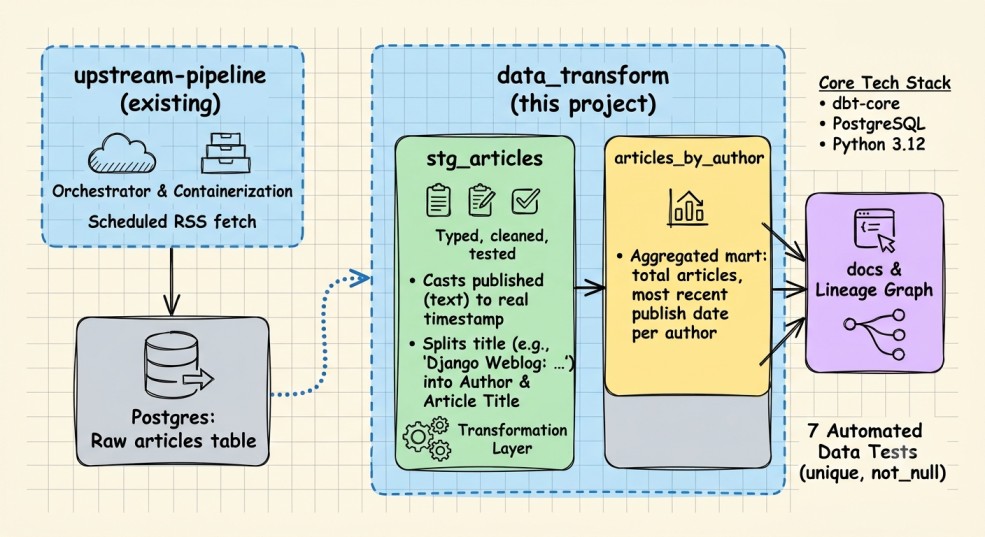 Architectural Diagram Generated by Gemini AI
When I started this journey, I gave myself a 12-month roadmap to go from data analyst to data engineer. I'm only about two months into it. In that short stretch I've already built two ETL pipelines from scratch, the first one pulling GitHub repo data into SQLite, the second one pulling RSS articles into PostgreSQL with Docker and Kestra handling the orchestration. I wrote about scheduling that second pipeline to run automatically every hour, and at the time, that felt like a real milestone. The data was flowing in on its own, no manual runs, no me remembering to trigger anything.
But somewhere between writing that article and starting this one, I ran a query on my own data and realized something. I couldn't sort my articles by date properly. I couldn't tell which blogs were publishing the most. The data had been sitting in Postgres for weeks, technically "loaded," and I hadn't actually looked at it closely until I needed it for something.
Turns out I'd built two pipelines and skipped the part that makes the data useful. Extract, load, and then nothing. No transformation, no modeling, no real structure past "it's in a table now."
This article is about fixing that. I finally sat down and learned dbt, and in the process learned what "analysis ready" actually means, because it turns out loading data and having usable data are two very different things.
Learn this step by step with the interactive Data Engineer roadmap.
Architectural Diagram Generated by Gemini AI
When I started this journey, I gave myself a 12-month roadmap to go from data analyst to data engineer. I'm only about two months into it. In that short stretch I've already built two ETL pipelines from scratch, the first one pulling GitHub repo data into SQLite, the second one pulling RSS articles into PostgreSQL with Docker and Kestra handling the orchestration. I wrote about scheduling that second pipeline to run automatically every hour, and at the time, that felt like a real milestone. The data was flowing in on its own, no manual runs, no me remembering to trigger anything.
But somewhere between writing that article and starting this one, I ran a query on my own data and realized something. I couldn't sort my articles by date properly. I couldn't tell which blogs were publishing the most. The data had been sitting in Postgres for weeks, technically "loaded," and I hadn't actually looked at it closely until I needed it for something.
Turns out I'd built two pipelines and skipped the part that makes the data useful. Extract, load, and then nothing. No transformation, no modeling, no real structure past "it's in a table now."
This article is about fixing that. I finally sat down and learned dbt, and in the process learned what "analysis ready" actually means, because it turns out loading data and having usable data are two very different things.
Learn this step by step with the interactive Data Engineer roadmap.
The Data Was Loaded. It Just Wasn't Usable.
Here's what my articles table actually looked like once I stopped and paid attention to it.
The schema itself was simple, honestly about as simple as a table can get:
sql
CREATE TABLE IF NOT EXISTS articles (
    id TEXT PRIMARY KEY,
    title TEXT NOT NULL,
    link TEXT NOT NULL,
    summary TEXT,
    published TEXT
);
Notice that last column. published is a TEXT field. Not a timestamp, not a date, just a plain string that happened to look like a date if you squinted at it.
When I queried the ten most recent articles, this is what came back:
text
title                                                    | published
----------------------------------------------------------+---------------------------------
Django Weblog: Last Call 2026 Django Developer Survey      | Wed, 08 Jul 2026 19:31:21 +0000
Mike Driscoll: New Book Release: Python Typing              | Wed, 08 Jul 2026 18:46:18 +0000
That looks fine at a glance. It's readable. But try to actually do anything with it. Want the articles from the last 7 days? You can't filter on that without casting it first, every single time, in every single query. Want to sort chronologically and trust the order? Text sorting and date sorting aren't the same thing, and depending on the format, they can quietly disagree with each other.
Then there was the second problem, the one I almost missed entirely because it was hiding in plain sight. Look at those titles again:
markup
Django Weblog: Last Call 2026 Django Developer SurveyMike Driscoll: New Book Release: Python Typing
Every single title in this feed follows the same pattern. Author or blog name, a colon, then the actual headline. That's real, structured information sitting inside a single text field, completely unusable as a filter or a group-by. I couldn't answer a question as simple as "which blogs post the most on Planet Python" because that information wasn't a column. It was just text, buried.
So that was the actual state of things. Two pipelines built, data flowing in on schedule, and I still couldn't answer basic questions about my own data. Loading it was never the finish line. I just hadn't gotten to the starting point yet.
Why dbt, Specifically
My first instinct was to just fix this in Python, since that's the tool I already trust. Write a script that reads from articles, parses the dates, splits the titles, writes the results into new columns or a new table. And that would have worked, technically.
But the more I thought about it, the more that felt like patching the same hole I'd already dug twice. Both of my pipelines were extract and load, full stop, and if I bolted transformation logic onto a Python script again, I'd just be adding a third untested, undocumented step to a system that already had two. I wouldn't be learning anything new. I'd just be writing more of the same thing I already knew how to write.
dbt does this differently, and that difference is kind of the whole point of the tool. Instead of a script that runs once and produces some output you have to trust blindly, dbt models are SQL that gets version controlled, tested, and documented as part of the same workflow. You write a transformation, and in the same project you can assert things about it: this column should never be null, this ID should always be unique. If those assumptions break, you find out immediately, not three weeks later when a chart looks wrong and you have no idea why.
It also matches how the industry actually works. Every data engineering job post I've looked at over the past two months mentions dbt, or something dbt-shaped. Learning it wasn't just about fixing my RSS data, it was about learning the tool that's become the default way teams handle the "T" in ETL.
So instead of another Python script, I decided to actually sit down and learn dbt properly, on data I already had, with problems I already understood. Here's how that went.
Setting Up (and Immediately Hitting a Wall)
Getting dbt installed should have been the boring part. It wasn't.
I tried pip install dbt-postgres and got a wall of dependency resolution errors, dbt-core had no matching distribution for my environment. Turns out I was running Python 3.14, which is new enough that dbt hadn't caught up to it yet. dbt Core officially supports up to 3.13 right now, and there's usually a lag before it supports whatever Python just released.
The fix wasn't complicated once I understood the actual problem, install an older, supported Python version alongside my existing one, and build a virtual environment specifically for dbt using that:
bash
py -3.12 -m venv dbt-env
dbt-env\Scripts\activate
pip install dbt-postgres
That's a small thing, but it's the kind of small thing that eats an hour if you don't know to look for it, and I think it's worth including here because it's exactly the kind of setup friction that doesn't show up in tutorials. Tutorials assume your environment already works. Mine didn't, and I'd guess I'm not the only one running a Python version that's ahead of what dbt currently supports.
Once that was sorted, connecting dbt to my existing Postgres database (already running locally in Docker from my RSS pipeline) was straightforward. dbt init, pick postgres, plug in the host, port, credentials, and database name, and dbt debug confirms the connection:
markup
All checks passed!
With that, I had a dbt project sitting on top of the same Postgres instance my RSS pipeline had been writing to for weeks. Time to actually fix the data.
Building the Staging Model
The first real dbt concept I had to understand was the difference between a source and a model. My raw articles table isn't something dbt built, it's external data that already exists, so dbt calls it a source. I defined that in a sources.yml file, which is really just dbt's way of formally acknowledging "this table exists, and I depend on it":
yaml
sources:
  - name: rss_pipeline
    schema: public
    tables:
      - name: articles
From there, I built my first actual model, stg_articles, a staging model whose entire job is to clean up the raw data without doing anything fancy yet. This is where both of my original problems got fixed in the same file.
For the date:
sql
to_timestamp(published, 'Dy, DD Mon YYYY HH24:MI:SS OF') as published_at
For the buried author name:
sql
split_part(title, ':', 1) as author,
trim(substring(title from position(':' in title) + 1)) as article_title
I ran dbt run, then went and actually queried the result instead of assuming it worked:
markup
published_raw published_atSun, 05 Jul 2026 16:29:47 +0000 2026-07-05 16:29:47+00
Real timestamps. And when I checked the author split:
markup
author | article_titlePython Software Foundation | Python Packaging Council Inaugural Election Dates
Clean separation, even on titles with more than one colon in them, like a PyCoder's Weekly issue title that had a colon in both the source name and the headline itself. The split logic only breaks on the first colon, so it held up fine.
Adding Tests
This is the part that made the whole project feel less like "I wrote some SQL" and more like actual engineering. I added tests directly in a schema file next to the model:
yaml
columns:
  - name: article_id
    tests:
      - unique
      - not_null
  - name: published_at
    tests:
      - not_null
Running dbt test doesn't just check that the SQL runs, it checks that my assumptions about the data actually hold:
markup
PASS=4 WARN=0 ERROR=0 SKIP=0 NO-OP=0 REUSED=0 TOTAL=4
That not_null test on published_at specifically is the one that would have caught it if my date format string had been wrong. Instead of silently producing nulls I might not notice for weeks, I'd have seen a failed test the moment I ran it.
Building a Mart, and Finally Asking a Real Question
With clean staging data in place, I built one more model on top of it, articles_by_author, which aggregates the data into something I could actually ask a question of: which blogs post the most, and how recently.
sql
select
    author,
    count(*) as total_articles,
    max(published_at) as most_recent_article,
    min(published_at) as earliest_article
from {{ ref('stg_articles') }}
group by author
order by total_articles desc
That ref() function instead of source() matters here, it's how dbt knows this model depends on stg_articles, not on the raw table directly. That dependency tracking is what builds the lineage graph later.
The result was the first genuinely new thing I could see in this data since I started collecting it two months ago:
markup
author total_articles most_recent_articlePython Software Foundation 5 2026-07-09 14:11:06+00Django Weblog 4 2026-07-08 19:31:21+00
A question I couldn't answer a week earlier, answered in one query, on data I'd already had sitting around the whole time.
Seeing the Whole Thing
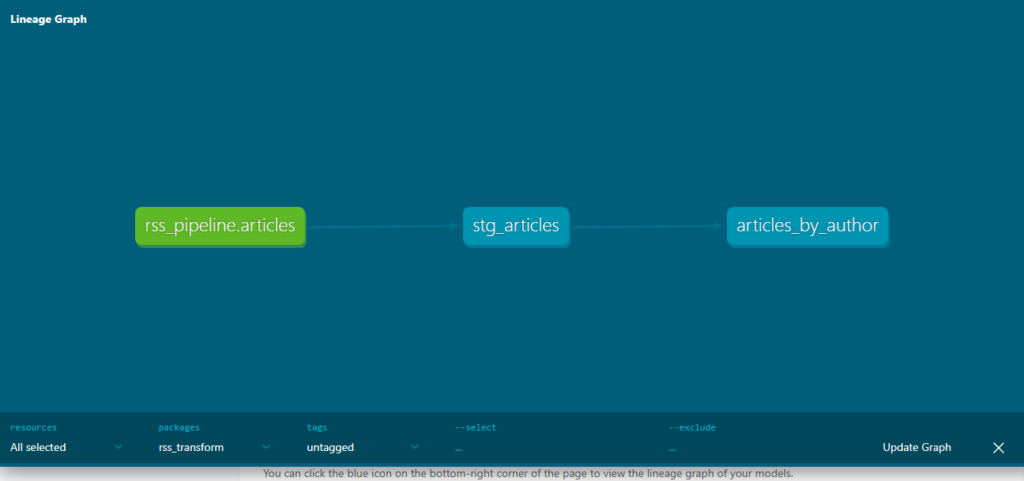
The last step was running dbt docs generate and dbt docs serve, which builds an interactive documentation site with a lineage graph, basically a visual map of how data flows through the project. Mine showed exactly three connected nodes:
Where This Leaves Me
So that's the project. Two clean models, seven passing tests, and a lineage graph that actually shows a real chain from raw data to something I can ask questions of. Compared to where I started this piece, unable to sort by date or tell which blogs posted the most, that's a real shift, even if the underlying dataset didn't change at all. Same data. Very different usefulness.
I want to be honest about what this isn't, though. This is still running entirely on my own machine. The Postgres database, the dbt project, all of it lives locally in Docker, which means none of this exists anywhere the moment my laptop is off. There's also only one RSS feed feeding into this right now, so "which blogs post the most" is a fairly small question with a fairly small dataset behind it. And I haven't touched anything around alerting or monitoring if a test starts failing quietly in the background.
None of that takes away from what I actually learned here, though. I think there's a difference between a project being finished and a project having taught you what it was supposed to teach you. This one did the second thing. I understand the difference between a source and a model now. I understand why tests aren't optional if you actually want to trust your own data. And I understand, in a very concrete way this time, why "the data is loaded" and "the data is usable" are two completely different claims.
The next problem is obvious, honestly. Everything I built here still depends on my laptop being on and Docker running. That's the next wall I'm going to hit, and probably the next thing I write about, taking this whole stack off my machine and putting it somewhere it can actually run without me.
Two months into a twelve month roadmap, and I think that's about right. Slower than I'd like some days, but every wall I've hit so far has taught me something I couldn't have learned by reading about it first.
Thanks for reading!
This is part of my ongoing series documenting my transition from systems analyst to data engineer. If you’ve been following along, thank you.
Connect with me on LinkedIn ,YouTube , and Twitter .
Register Now to Continue Reading
Unlock Towards Data Science with a Free Account
All articles on Towards Data Science are available to registered users. Create a free account today to access this article and thousands more.
Register for freeSign in to your account
 Written By
See all from Ibrahim Salami
Career ChangeData EngineeringData PipelineData ScienceDbt
Share This Article
Towards Data Science is a community publication. Submit your insights to reach our global audience and earn through the TDS Author Payment Program.
Write for TDS
Related Articles
Artificial Intelligence
A fully comprehensive, clear & concise explanation to help you uncover the real truth about the enigmatic cost function.
Vagif Aliyev
November 23, 20206 min read
Data Science
The United States Treasury makes it easy to retrieve US federal government debt data with its Debt Information API
Randy Runtsch
April 23, 20226 min read
Data Science
Inspired in the movie Moneyball, we build an efficient NBA team, learning about the basics of linear programming
Nicolas Garcia Aramouni
January 23, 20228 min read
Data Science
According to Gartner, only 20% of data science projects bring business outcomes by 2022. So, applying data science is a promising but...
Andrey Koptelov
October 4, 20216 min read
Data Engineering
From startups to enterprise, companies are lowering costs and regaining control over their operations
Ari Joury, PhD
March 14, 20257 min read
Data Engineering
A deep-dive on higher-order functions and how they can be used in designing data transformations for functional data pipelines
Ong Chin Hwee
February 7, 202210 min read
Data Science
Where we started vs. where we are now in the data world
Prukalpa Sankar
December 22, 202214 min read
Data Science
Given the current climate, is data science for you?
Haden Pelletier
June 27, 20247 min read
Data Engineering
Understand what data as a product is by looking at an example.
Xavier Gumara Rigol
July 8, 20216 min read
Your home for data science and AI. The world's leading publication for data science, data analytics, data engineering, machine learning, and artificial intelligence professionals.
Subscribe to Our NewsletterWrite For TDS•About•Advertise•Privacy Policy•Terms of Use
© Insight Media Group, LLC 2026•The New Stack•roadmap.sh•Creator Network
Recommended Articles
Close