保留正文与补采附件。源页面当前未重新核验;具体限制见交付清单。
 We value your privacy
We use cookies to enhance your browsing experience, serve personalised ads or content, and analyse our traffic. By clicking "Accept All", you consent to our use of cookies.
Customise Reject All Accept All
Customise Consent Preferences
We value your privacy
We use cookies to enhance your browsing experience, serve personalised ads or content, and analyse our traffic. By clicking "Accept All", you consent to our use of cookies.
Customise Reject All Accept All
Customise Consent Preferences  We use cookies to help you navigate efficiently and perform certain functions. You will find detailed information about all cookies under each consent category below.
The cookies that are categorised as "Necessary" are stored on your browser as they are essential for enabling the basic functionalities of the site. ... Show more
NecessaryAlways Active
Necessary cookies are required to enable the basic features of this site, such as providing secure log-in or adjusting your consent preferences. These cookies do not store any personally identifiable data.
We use cookies to help you navigate efficiently and perform certain functions. You will find detailed information about all cookies under each consent category below.
The cookies that are categorised as "Necessary" are stored on your browser as they are essential for enabling the basic functionalities of the site. ... Show more
NecessaryAlways Active
Necessary cookies are required to enable the basic features of this site, such as providing secure log-in or adjusting your consent preferences. These cookies do not store any personally identifiable data.
-
Cookie
BCTempID
-
Duration
10 minutes
-
Description
No description available.
-
Cookie
__cf_bm
-
Duration
1 hour
-
Description
This cookie, set by Cloudflare, is used to support Cloudflare Bot Management.
-
Cookie
AWSALBCORS
-
Duration
7 days
-
Description
Amazon Web Services set this cookie for load balancing.
-
Cookie
_cfuvid
-
Duration
session
-
Description
Cloudflare sets this cookie to track users across sessions to optimize user experience by maintaining session consistency and providing personalized services
-
Cookie
li_gc
-
Duration
6 months
-
Description
Linkedin set this cookie for storing visitor's consent regarding using cookies for non-essential purposes.
-
Cookie
__hssrc
-
Duration
session
-
Description
This cookie is set by Hubspot whenever it changes the session cookie. The __hssrc cookie set to 1 indicates that the user has restarted the browser, and if the cookie does not exist, it is assumed to be a new session.
-
Cookie
__hssc
-
Duration
1 hour
-
Description
HubSpot sets this cookie to keep track of sessions and to determine if HubSpot should increment the session number and timestamps in the __hstc cookie.
-
Cookie
wpEmojiSettingsSupports
-
Duration
session
-
Description
WordPress sets this cookie when a user interacts with emojis on a WordPress site. It helps determine if the user's browser can display emojis properly.
-
Cookie
BCSessionID
-
Duration
1 year 1 month 4 days
-
Description
Blueconic sets this cookie as a unique identifier for the BlueConic profile.
-
Cookie
_octo
-
Duration
1 year
-
Description
No description available.
-
Cookie
logged_in
-
Duration
1 year
-
Description
No description available.
-
Cookie
__Secure-YEC
-
Duration
past
-
Description
YouTube sets this cookie to stores the user's video player preferences using embedded YouTube video
-
Cookie
__eoi
-
Duration
6 months
-
Description
Description is currently not available.
-
Cookie
AWSALBTGCORS
-
Duration
7 days
-
Description
No description available.
-
Cookie
login-status-p
-
Duration
past
-
Description
Description is currently not available.
-
Cookie
AWSALBTG
-
Duration
7 days
-
Description
No description available.
-
Cookie
csrf_token
-
Duration
session
-
Description
No description available.
-
Cookie
token_v2
-
Duration
1 day
-
Description
Description is currently not available.
-
Cookie
D
-
Duration
1 year
-
Description
Description is currently not available.
-
Cookie
PHPSESSID
-
Duration
session
-
Description
This cookie is native to PHP applications. The cookie stores and identifies a user's unique session ID to manage user sessions on the website. The cookie is a session cookie and will be deleted when all the browser windows are closed.
-
Cookie
VISITOR_PRIVACY_METADATA
-
Duration
6 months
-
Description
YouTube sets this cookie to store the user's cookie consent state for the current domain.
-
Cookie
cookietest
-
Duration
session
-
Description
The cookietest cookie is typically used to determine whether the user's browser accepts cookies, essential for website functionality and user experience.
-
Cookie
__Host-airtable-session
-
Duration
1 year
-
Description
This cookie is used to enable us to integrate the services of Airtable.
-
Cookie
__Host-airtable-session.sig
-
Duration
1 year
-
Description
This cookie is used to enable us to integrate the services of Airtable.
-
Cookie
m
-
Duration
1 year 1 month 4 days
-
Description
Stripe sets this cookie for fraud prevention purposes. It identifies the device used to access the website, allowing the website to be formatted accordingly.
-
Cookie
BIGipServer*
-
Duration
session
-
Description
Marketo sets this cookie to collect information about the user's online activity and build a profile about their interests to provide advertisements relevant to the user.
-
Cookie
__cfruid
-
Duration
session
-
Description
Cloudflare sets this cookie to identify trusted web traffic.
-
Cookie
_GRECAPTCHA
-
Duration
6 months
-
Description
Google Recaptcha service sets this cookie to identify bots to protect the website against malicious spam attacks.
-
Cookie
__Secure-YNID
-
Duration
6 months
-
Description
Google cookie used to protect user security and prevent fraud, especially during the login process.
-
Cookie
cookieyes-consent
-
Duration
1 year
-
Description
CookieYes sets this cookie to remember users' consent preferences so that their preferences are respected on subsequent visits to this site. It does not collect or store any personal information about the site visitors.
Functional
Functional cookies help perform certain functionalities like sharing the content of the website on social media platforms, collecting feedback, and other third-party features.
-
Cookie
lidc
-
Duration
1 day
-
Description
LinkedIn sets the lidc cookie to facilitate data center selection.
-
Cookie
brw
-
Duration
1 year
-
Description
No description available.
-
Cookie
brwConsent
-
Duration
5 minutes
-
Description
Description is currently not available.
-
Cookie
WMF-Uniq
-
Duration
1 year
-
Description
Description is currently not available.
-
Cookie
loom_anon_comment
-
Duration
1 year
-
Description
No description available.
-
Cookie
loom_referral_video
-
Duration
session
-
Description
Description is currently not available.
-
Cookie
VISITOR_INFO1_LIVE
-
Duration
6 months
-
Description
A cookie set by YouTube to measure bandwidth that determines whether the user gets the new or old player interface.
-
Cookie
yt-remote-connected-devices
-
Duration
Never Expires
-
Description
YouTube sets this cookie to store the user's video preferences using embedded YouTube videos.
-
Cookie
ytidb::LAST_RESULT_ENTRY_KEY
-
Duration
Never Expires
-
Description
The cookie ytidb::LAST_RESULT_ENTRY_KEY is used by YouTube to store the last search result entry that was clicked by the user. This information is used to improve the user experience by providing more relevant search results in the future.
-
Cookie
yt-remote-device-id
-
Duration
Never Expires
-
Description
YouTube sets this cookie to store the user's video preferences using embedded YouTube videos.
-
Cookie
yt-remote-session-name
-
Duration
session
-
Description
The yt-remote-session-name cookie is used by YouTube to store the user's video player preferences using embedded YouTube video.
-
Cookie
yt-remote-fast-check-period
-
Duration
session
-
Description
The yt-remote-fast-check-period cookie is used by YouTube to store the user's video player preferences for embedded YouTube videos.
-
Cookie
yt-remote-session-app
-
Duration
session
-
Description
The yt-remote-session-app cookie is used by YouTube to store user preferences and information about the interface of the embedded YouTube video player.
-
Cookie
yt-remote-cast-available
-
Duration
session
-
Description
The yt-remote-cast-available cookie is used to store the user's preferences regarding whether casting is available on their YouTube video player.
-
Cookie
yt-remote-cast-installed
-
Duration
session
-
Description
The yt-remote-cast-installed cookie is used to store the user's video player preferences using embedded YouTube video.
-
Cookie
cp_session
-
Duration
3 months
-
Description
Codepen sets this cookie for Help systems found in the website.
-
Cookie
loid
-
Duration
1 year 1 month 4 days
-
Description
This cookie is set by the Reddit. The cookie enables the sharing of content from the website onto the social media platform.
Analytics
Analytical cookies are used to understand how visitors interact with the website. These cookies help provide information on metrics such as the number of visitors, bounce rate, traffic source, etc.
-
Cookie
__hstc
-
Duration
6 months
-
Description
Hubspot set this main cookie for tracking visitors. It contains the domain, initial timestamp (first visit), last timestamp (last visit), current timestamp (this visit), and session number (increments for each subsequent session).
-
Cookie
hubspotutk
-
Duration
6 months
-
Description
HubSpot sets this cookie to keep track of the visitors to the website. This cookie is passed to HubSpot on form submission and used when deduplicating contacts.
-
Cookie
_ga
-
Duration
1 year 1 month 4 days
-
Description
Google Analytics sets this cookie to calculate visitor, session and campaign data and track site usage for the site's analytics report. The cookie stores information anonymously and assigns a randomly generated number to recognise unique visitors.
-
Cookie
ga*
-
Duration
1 year 1 month 4 days
-
Description
Google Analytics sets this cookie to store and count page views.
-
Cookie
__Host-psifi.analyticsTrace
-
Duration
6 hours
-
Description
Description is currently not available.
-
Cookie
__Host-psifi.analyticsTraceV2
-
Duration
6 hours
-
Description
Description is currently not available.
-
Cookie
_gh_sess
-
Duration
session
-
Description
GitHub sets this cookie for temporary application and framework state between pages like what step the user is on in a multiple step form.
-
Cookie
YSC
-
Duration
session
-
Description
YSC cookie is set by Youtube and is used to track the views of embedded videos on Youtube pages.
-
Cookie
ajs_anonymous_id
-
Duration
1 year
-
Description
This cookie is set by Segment to count the number of people who visit a certain site by tracking if they have visited before.
-
Cookie
vuid
-
Duration
1 year 1 month 4 days
-
Description
Vimeo installs this cookie to collect tracking information by setting a unique ID to embed videos on the website.
Performance
Performance cookies are used to understand and analyse the key performance indexes of the website which helps in delivering a better user experience for the visitors.
-
Cookie
AWSALB
-
Duration
7 days
-
Description
AWSALB is an application load balancer cookie set by Amazon Web Services to map the session to the target.
-
Cookie
acq
-
Duration
past
-
Description
Description is currently not available.
-
Cookie
acq.sig
-
Duration
past
-
Description
Description is currently not available.
-
Cookie
ptc
-
Duration
2 years
-
Description
No description available.
Advertisement
Advertisement cookies are used to provide visitors with customised advertisements based on the pages you visited previously and to analyse the effectiveness of the ad campaigns.
-
Cookie
muc_ads
-
Duration
1 year 1 month 4 days
-
Description
Twitter sets this cookie to collect user behaviour and interaction data to optimize the website.
-
Cookie
guest_id_marketing
-
Duration
1 year 1 month 4 days
-
Description
Twitter sets this cookie to identify and track the website visitor.
-
Cookie
guest_id_ads
-
Duration
1 year 1 month 4 days
-
Description
Twitter sets this cookie to identify and track the website visitor.
-
Cookie
personalization_id
-
Duration
1 year 1 month 4 days
-
Description
Twitter sets this cookie to integrate and share features for social media and also store information about how the user uses the website, for tracking and targeting.
-
Cookie
guest_id
-
Duration
1 year 1 month 4 days
-
Description
Twitter sets this cookie to identify and track the website visitor. It registers if a user is signed in to the Twitter platform and collects information about ad preferences.
-
Cookie
bcookie
-
Duration
1 year
-
Description
LinkedIn sets this cookie from LinkedIn share buttons and ad tags to recognize browser IDs.
-
Cookie
__Secure-ROLLOUT_TOKEN
-
Duration
6 months
-
Description
YouTube sets this cookie to manage feature rollout and experimentation. It helps Google control which new features or interface changes are shown to users as part of testing and staged rollouts, ensuring consistent experience for a given user during an experiment.
-
Cookie
yt.innertube::nextId
-
Duration
Never Expires
-
Description
YouTube sets this cookie to register a unique ID to store data on what videos from YouTube the user has seen.
-
Cookie
yt.innertube::requests
-
Duration
Never Expires
-
Description
YouTube sets this cookie to register a unique ID to store data on what videos from YouTube the user has seen.
-
Cookie
session_tracker
-
Duration
session
-
Description
This cookie is set by the Reddit. This cookie is used to identify trusted web traffic. It also helps in adverstising on the website.
-
Cookie
edgebucket
-
Duration
session
-
Description
Reddit sets this cookie to save the information about a log-on Reddit user, for the purpose of advertisement recommendations and updating the content.
-
Cookie
did
-
Duration
1 year
-
Description
Arbor sets this cookie to show targeted ads to site visitors.This cookie expires after 2 months or 1 year.
Uncategorised
Other uncategorised cookies are those that are being analysed and have not been classified into a category as yet.
No cookies to display.
Reject All Save My Preferences Accept All
Toggle SearchToggle Mobile Navigation
Publish AI, ML & data-science insights to a global community of data professionals.
Sign inSubmit an Article
LatestEditor's PicksNewsletterShipAI
Write For TDS
LinkedInXToggle Search
Data Engineering
Data Quality Doesn't Need to Be Complicated
Three Zero-Cost Solutions That Take Hours, Not Months
Cai Parry-Jones
December 10, 20248 min read
 A 'data quality' certified pipeline. Source: unsplash.com
In my career, data quality initiatives have usually meant big changes. From governance processes to costly tools to dbt implementation - data quality projects never seem to want to be small.
What's more, fixing the data quality issues this way often leads to new problems. More complexity, higher costs, slower data project releases...
A 'data quality' certified pipeline. Source: unsplash.com
In my career, data quality initiatives have usually meant big changes. From governance processes to costly tools to dbt implementation - data quality projects never seem to want to be small.
What's more, fixing the data quality issues this way often leads to new problems. More complexity, higher costs, slower data project releases...
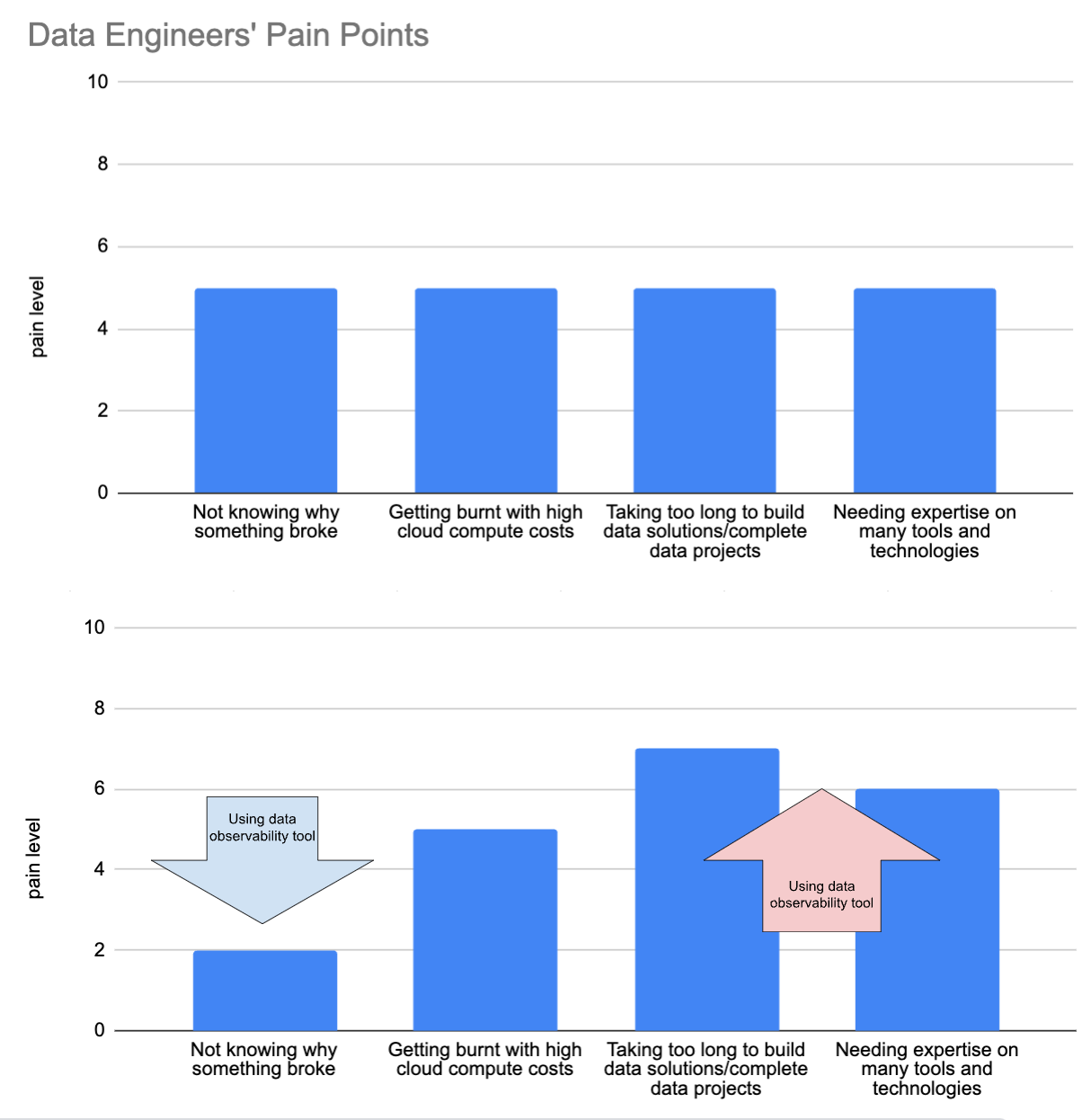 created by the author using Google Sheets
But it doesn't have to be this way.
Learn this step by step with the interactive Data Engineer roadmap.
While companies like Google and Meta require extensive data quality frameworks due to their massive scale and complexity, most organizations can achieve excellent data quality with much simpler approaches.
In this article, we'll delve into three methods small to medium sized data projects can use to quickly improve their data quality, all while keeping complexity to a minimum and new costs at zero. Let's get to it!
created by the author using Google Sheets
But it doesn't have to be this way.
Learn this step by step with the interactive Data Engineer roadmap.
While companies like Google and Meta require extensive data quality frameworks due to their massive scale and complexity, most organizations can achieve excellent data quality with much simpler approaches.
In this article, we'll delve into three methods small to medium sized data projects can use to quickly improve their data quality, all while keeping complexity to a minimum and new costs at zero. Let's get to it!
TL;DR
- Take advantage of old school database tricks, like ENUM data types, and column constraints.
- Create a custom dashboard for your specific data quality problem.
- Generate data lineage with one small Python script.
Take advantage of old school database tricks
In the last 10–15 years we've seen massive changes to the data industry, notably big data, parallel processing, cloud computing, data warehouses, and new tools (lots and lots of new tools).
Consequently, we've had to say goodbye to some things to make room for all this new stuff. Some positives (Microsoft Access comes to mind), but some are questionable at best, such as traditional data design principles and data quality and validation at ingestion. The latter will be the subject of this section.
Firstly, what do I mean by "data quality and validation at ingestion"? Simply, it means checking data before it enters a table. Think of a bouncer outside a nightclub.
What it has been replaced with is build-then-test, which means putting new data in tables first, and then checking it later. Build-then-test is the chosen method for many modern data quality tools, including the most popular, dbt.
Dbt runs the whole data transformation pipeline first, and only once all the new data is in place, it checks to see if the data is good. Of course, this can be the optimal solution in many cases. For example, if the business is happy to sacrifice quality for speed, or if there is a QA table before a production table (coined by Netflix as Write-Audit-Publish). However, engineers who only use this method of data quality are potentially missing out on some big wins for their organization.
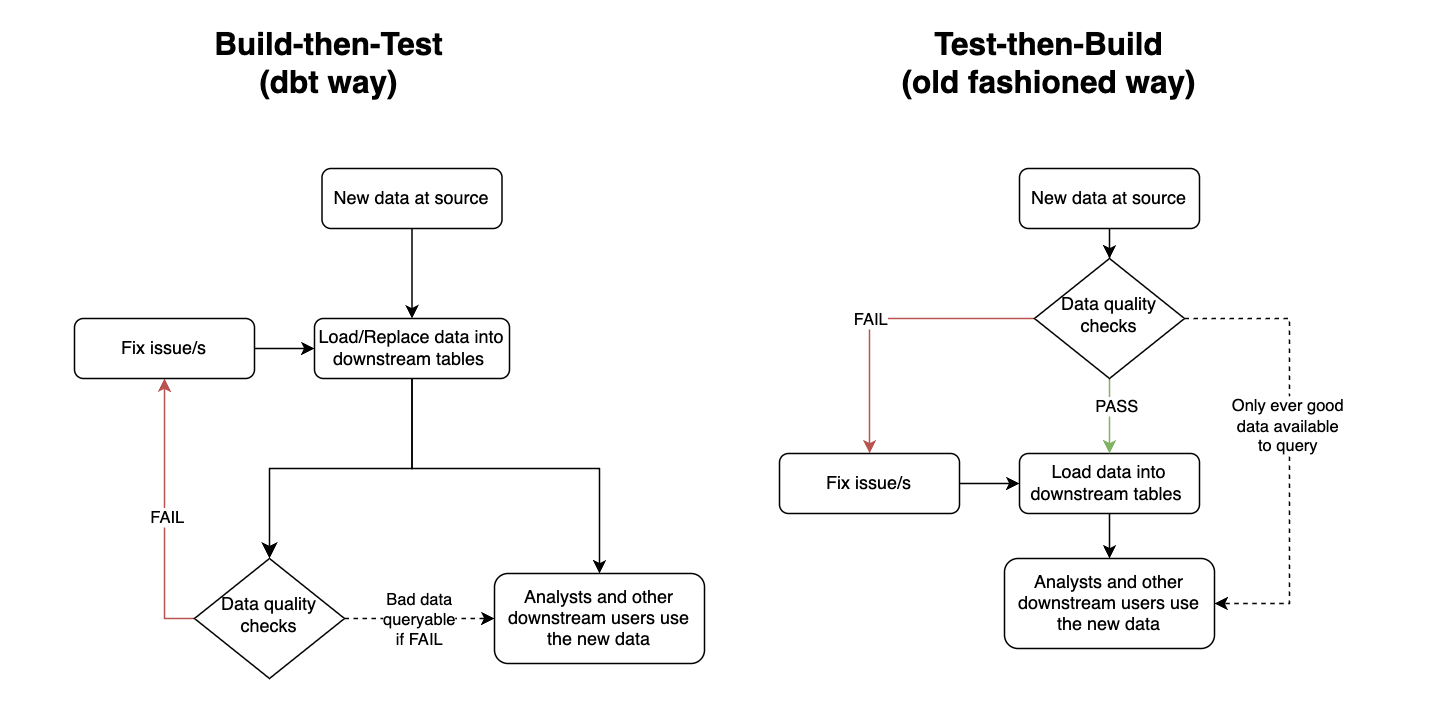 Testing before vs after generating tables. Created by the author using draw.io
Test-then-build has two main benefits over build-then-test.
The first is that it ensures the data in downstream tables meets the data quality standards expected at all times. This gives the data a level of trustworthiness, so often lacking, for downstream users. It can also reduce anxiety for the data engineer/s responsible for the pipeline.
I remember when I owned a key financial pipeline for a company I used to work for. Unfortunately, this pipeline was very prone to data quality issues, and the solution in place was a build-then-test system, which ran each night. This meant I needed to rush to my station early in the morning each day to check the results of the run before any downstream users started looking at their data. If there were any issues I then needed to either quickly fix the issue or send a Slack message of shame announcing to the business the data sucks and to please be patient while I fix it.
Of course, test-then-build doesn't totally fix this anxiety issue. The story would change from needing to rush to fix the issue to avoid bad data for downstream users to rushing to fix the issue to avoid stale data for downstream users. However, engineering is all about weighing the pros and cons of different solutions. And in this scenario I know old data would have been the best of two evils for both the business and my sanity.
The second benefit test-then-build has is that it can be much simpler to implement, especially compared to setting up a whole QA area, which is a bazooka-to-a-bunny solution for solving most data quality issues. All you need to do is include your data quality criteria when you create the table. Have a look at the below PostgreSQL query:
sql
Testing before vs after generating tables. Created by the author using draw.io
Test-then-build has two main benefits over build-then-test.
The first is that it ensures the data in downstream tables meets the data quality standards expected at all times. This gives the data a level of trustworthiness, so often lacking, for downstream users. It can also reduce anxiety for the data engineer/s responsible for the pipeline.
I remember when I owned a key financial pipeline for a company I used to work for. Unfortunately, this pipeline was very prone to data quality issues, and the solution in place was a build-then-test system, which ran each night. This meant I needed to rush to my station early in the morning each day to check the results of the run before any downstream users started looking at their data. If there were any issues I then needed to either quickly fix the issue or send a Slack message of shame announcing to the business the data sucks and to please be patient while I fix it.
Of course, test-then-build doesn't totally fix this anxiety issue. The story would change from needing to rush to fix the issue to avoid bad data for downstream users to rushing to fix the issue to avoid stale data for downstream users. However, engineering is all about weighing the pros and cons of different solutions. And in this scenario I know old data would have been the best of two evils for both the business and my sanity.
The second benefit test-then-build has is that it can be much simpler to implement, especially compared to setting up a whole QA area, which is a bazooka-to-a-bunny solution for solving most data quality issues. All you need to do is include your data quality criteria when you create the table. Have a look at the below PostgreSQL query:
sql
CREATE TYPE currency_code_type AS ENUM (
    'USD', -- United States Dollar
    'EUR', -- Euro
    'GBP', -- British Pound Sterling
    'JPY', -- Japanese Yen
    'CAD', -- Canadian Dollar
    'AUD', -- Australian Dollar
    'CNY', -- Chinese Yuan
    'INR', -- Indian Rupee
    'BRL', -- Brazilian Real
    'MXN'  -- Mexican Peso
);

CREATE TYPE payment_status AS ENUM (
    'pending',
    'completed',
    'failed',
    'refunded',
    'partially_refunded',
    'disputed',
    'canceled'
);

CREATE TABLE daily_revenue (
    id INTEGER PRIMARY KEY,
    date DATE NOT NULL,
    revenue_source revenue_source_type NOT NULL,
    gross_amount NUMERIC(15,2) NOT NULL CHECK (gross_amount >= 0),
    net_amount NUMERIC(15,2) NOT NULL CHECK (net_amount >= 0),
    currency currency_code_type,
    transaction_count INTEGER NOT NULL CHECK (transaction_count >= 0),
    notes TEXT,

    CHECK (net_amount <= gross_amount),
    CHECK (gross_amount >= processing_fees + tax_amount),
    CHECK (date <= CURRENT_DATE),
    CONSTRAINT unique_daily_source UNIQUE (date, revenue_source)
);
These 14 lines of code will ensure the daily_revenue table enforces the following standards:
id
- Primary key constraint ensures uniqueness.
date
- Cannot be a future date (via CHECK constraint).
- Forms part of a unique constraint with revenue_source.
revenue_source
- Cannot be NULL.
- Forms part of a unique constraint with date.
- Must be a valid value from revenue_source_type enum.
gross_amount
- Cannot be NULL.
- Must be >= 0.
- Must be >= processing_fees + tax_amount.
- Must be >= net_amount.
- Precise decimal handling.
net_amount
- Cannot be NULL.
- Must be >= 0.
- Must be <= gross_amount.
- Precise decimal handling.
currency
- Must be a valid value from currency_code_type enum.
transaction_count
- Cannot be NULL.
- Must be >= 0.
It's simple. Reliable. And would you believe all of this was available to us since the release of PostgreSQL 6.5... which came out in 1999!
Of course there's no such thing as a free lunch. Enforcing constraints this way does have its drawbacks. For example, it makes the table a lot less flexible, and it will reduce the performance when updating the table. As always, you need to think like an engineer before diving into any tool/technology/method.
Create a custom dashboard
I have a confession to make. I used to think good data engineers didn't use dashboard tools to solve their problems. I thought a real engineer looks at logs, hard-to-read code, and whatever else made them look smart if someone ever glanced at their computer screen.
I was dumb.
It turns out they can be really valuable if executed effectively for a clear purpose. Furthermore, most BI tools make creating dashboards super easy and quick, without (too) much time spent learning the tool.
Back to my personal pipeline experiences. I used to manage a daily aggregated table of all the business' revenue sources. Each source came from a different revenue provider, and as such a different system. Some would be via API calls, others via email, and others via a shared S3 bucket. As any engineer would expect, some of these sources fell over from time-to-time, and because they came from third parties, I couldn't fix the issue at source (only ask, which had very limited success).
Originally, I had only used failure logs to determine where things needed fixing. The problem was priority. Some failures needed quickly fixing, while others were not important enough to drop everything for (we had some revenue sources that literally reported pennies each day). As a result, there was a build up of small data quality issues, which became difficult to keep track of.
Enter Tableau.
I created a very basic dashboard that highlighted metadata by revenue source and date for the last 14 days. Three metrics were all I needed:
- A green or red mark indicating whether data was present or missing.
- The row count of the data.
- The sum of revenue of the data.
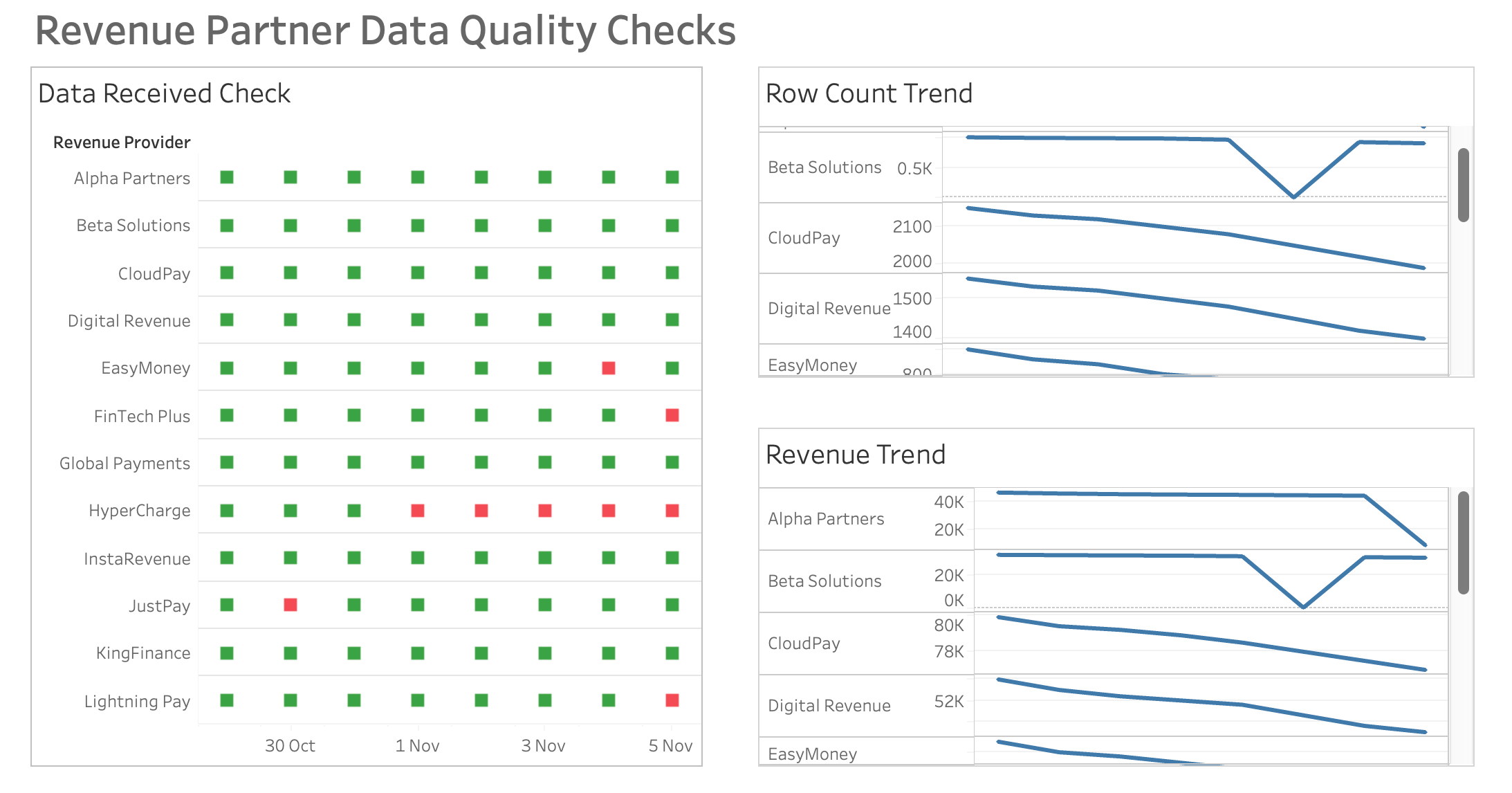 A simple yet effective dashboard. Created by the author using Tableau
This made the pipeline's data quality a whole lot easier to manage. Not only was it much quicker for me to glance at where the issues were, but it was user-friendly enough for other people to read from too, allowing for shared responsibility.
After implementing the dashboard, bug tickets reported by the business related to the pipeline dropped to virtually zero, as did my risk of a stroke.
A simple yet effective dashboard. Created by the author using Tableau
This made the pipeline's data quality a whole lot easier to manage. Not only was it much quicker for me to glance at where the issues were, but it was user-friendly enough for other people to read from too, allowing for shared responsibility.
After implementing the dashboard, bug tickets reported by the business related to the pipeline dropped to virtually zero, as did my risk of a stroke.
Map your data with a lineage chart
Simple data observability solutions don't just stop at dashboards.
Data lineage can be a dream for quickly spotting what tables have been affected by bad data upstream.
However, it can also be a mammoth task to implement.
The number one culprit for this, in my opinion, is dbt. A key selling point of the open-source tool is its data lineage capabilities. But to achieve this you have to bow down to dbt's framework. Including, but not limited to:
- Implementing Jinja3 in all you SQL files.
- Creating a YAML file for each data model.
- Add Source data configuration via YAML files.
- Set up a development and testing process e.g. development environment, version control, CI/CD.
- Infrastructure set-up e.g. hosting your own server or purchasing a managed version (dbtCloud).
Yeah, it's a lot.
But it doesn't have to be. Ultimately, all you need for dynamic data lineage is a machine that scans your SQL files, and something to output a user-friendly lineage map. Thanks to Python, this can be achieved using a script with as few as 100 lines of code.
If you know a bit of Python and LLM prompting you should be able to hack the code in an hour. Alternatively, there's a lightweight open-source Python tool called SQL-WatchPup that already has the code.
Provided you have all your SQL files available, in 15 minutes of set up you should be able to generate dynamic data lineage maps like so:
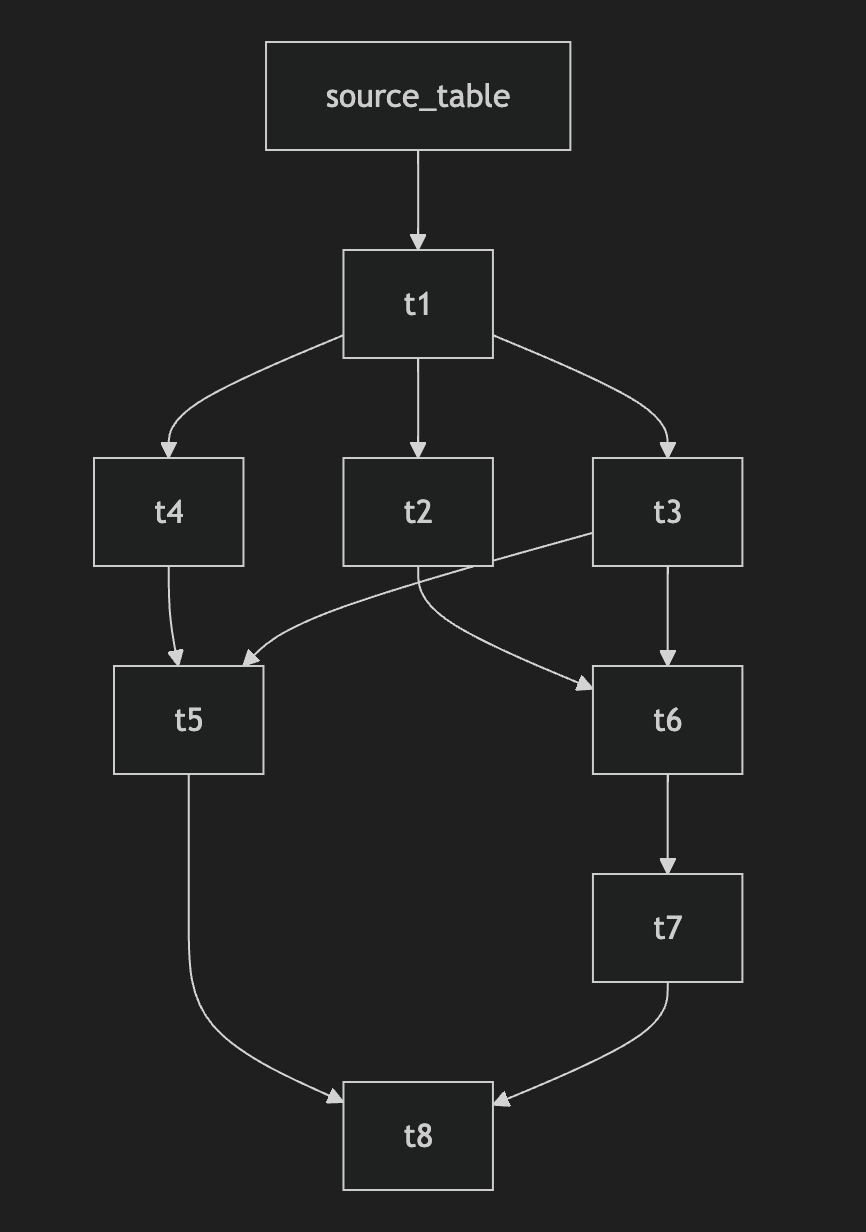 Example data lineage map output. Created by the author using SQL-WatchPup
That's it. No server hosting costs. No extra computer languages to learn. No restructuring of your files. Just running one simple Python script locally.
Example data lineage map output. Created by the author using SQL-WatchPup
That's it. No server hosting costs. No extra computer languages to learn. No restructuring of your files. Just running one simple Python script locally.
Conclusion
Let's face it - we all love shiny new in-vogue tools, but sometimes the best solutions are old, uncool, and/or unpopular.
The next time you're faced with data quality headaches, take a step back before diving into that massive infrastructure overhaul. Ask yourself: Could a simple database constraint, a basic dashboard, or a lightweight Python script do the trick?
Your sanity will thank you for it. Your company's budget will too.
Register Now to Continue Reading
Unlock Towards Data Science with a Free Account
All articles on Towards Data Science are available to registered users. Create a free account today to access this article and thousands more.
Register for freeSign in to your account
 Written By
See all from Cai Parry-Jones
Data EngineeringData QualityDbtTableauTips And Tricks
Share This Article
Towards Data Science is a community publication. Submit your insights to reach our global audience and earn through the TDS Author Payment Program.
Write for TDS
Related Articles
Data Science
Census datasets and many public datasets contain longitude and latitude values nowadays. It is intuitive...
Alina Zhang
September 5, 20182 min read
Data Science
This article explains both the conceptual framework and practical code implementation for syncing data from API endpoints to your database.
Daniel Khoa Le
June 30, 20248 min read
Data Engineering
A sample setup and template to manage, develop and deploy your Cloud Functions
Rakibul Haque
May 24, 20214 min read
Data Engineering
Rethinking data warehousing: Why redefinition is necessary even beyond Modern Data Warehouse (MDW) and Lakehouse Models
Bernd Wessely
July 30, 20248 min read
Data Engineering
Data engineering to create a Flourish map of wastewater testing by US county. Combines CDC/Biobot datasets using pandas set() operations.
Chuck Connell
March 30, 20226 min read
Data Engineering
How to Instantly Detect Data Quality Issues and Identify their Causes
Robin von Malottki
October 3, 202410 min read
Programming
Using Azure DevOps, Databricks Spark, Cosmos DB Gremlin API and Azure Data Factory
René Bremer
October 25, 20206 min read
Data Engineering
How data teams can build more resilient incident workflows with DevOps best practices.
Glen Willis
September 2, 20219 min read
Data Science
Learn about Crystal Bar Charts and create your own with Python
Nick Gerend
December 29, 202312 min read
Your home for data science and AI. The world's leading publication for data science, data analytics, data engineering, machine learning, and artificial intelligence professionals.
Subscribe to Our NewsletterWrite For TDS•About•Advertise•Privacy Policy•Terms of Use
© Insight Media Group, LLC 2026•The New Stack•roadmap.sh•Creator Network
Recommended Articles
Close