保留正文与补采附件。源页面当前未重新核验;具体限制见交付清单。
 We value your privacy
We use cookies to enhance your browsing experience, serve personalised ads or content, and analyse our traffic. By clicking "Accept All", you consent to our use of cookies.
Customise Reject All Accept All
Customise Consent Preferences
We value your privacy
We use cookies to enhance your browsing experience, serve personalised ads or content, and analyse our traffic. By clicking "Accept All", you consent to our use of cookies.
Customise Reject All Accept All
Customise Consent Preferences  We use cookies to help you navigate efficiently and perform certain functions. You will find detailed information about all cookies under each consent category below.
The cookies that are categorised as "Necessary" are stored on your browser as they are essential for enabling the basic functionalities of the site. ... Show more
NecessaryAlways Active
Necessary cookies are required to enable the basic features of this site, such as providing secure log-in or adjusting your consent preferences. These cookies do not store any personally identifiable data.
We use cookies to help you navigate efficiently and perform certain functions. You will find detailed information about all cookies under each consent category below.
The cookies that are categorised as "Necessary" are stored on your browser as they are essential for enabling the basic functionalities of the site. ... Show more
NecessaryAlways Active
Necessary cookies are required to enable the basic features of this site, such as providing secure log-in or adjusting your consent preferences. These cookies do not store any personally identifiable data.
-
Cookie
BCTempID
-
Duration
10 minutes
-
Description
No description available.
-
Cookie
__cf_bm
-
Duration
1 hour
-
Description
This cookie, set by Cloudflare, is used to support Cloudflare Bot Management.
-
Cookie
AWSALBCORS
-
Duration
7 days
-
Description
Amazon Web Services set this cookie for load balancing.
-
Cookie
_cfuvid
-
Duration
session
-
Description
Cloudflare sets this cookie to track users across sessions to optimize user experience by maintaining session consistency and providing personalized services
-
Cookie
li_gc
-
Duration
6 months
-
Description
Linkedin set this cookie for storing visitor's consent regarding using cookies for non-essential purposes.
-
Cookie
__hssrc
-
Duration
session
-
Description
This cookie is set by Hubspot whenever it changes the session cookie. The __hssrc cookie set to 1 indicates that the user has restarted the browser, and if the cookie does not exist, it is assumed to be a new session.
-
Cookie
__hssc
-
Duration
1 hour
-
Description
HubSpot sets this cookie to keep track of sessions and to determine if HubSpot should increment the session number and timestamps in the __hstc cookie.
-
Cookie
wpEmojiSettingsSupports
-
Duration
session
-
Description
WordPress sets this cookie when a user interacts with emojis on a WordPress site. It helps determine if the user's browser can display emojis properly.
-
Cookie
BCSessionID
-
Duration
1 year 1 month 4 days
-
Description
Blueconic sets this cookie as a unique identifier for the BlueConic profile.
-
Cookie
_octo
-
Duration
1 year
-
Description
No description available.
-
Cookie
logged_in
-
Duration
1 year
-
Description
No description available.
-
Cookie
__Secure-YEC
-
Duration
past
-
Description
YouTube sets this cookie to stores the user's video player preferences using embedded YouTube video
-
Cookie
__eoi
-
Duration
6 months
-
Description
Description is currently not available.
-
Cookie
AWSALBTGCORS
-
Duration
7 days
-
Description
No description available.
-
Cookie
login-status-p
-
Duration
past
-
Description
Description is currently not available.
-
Cookie
AWSALBTG
-
Duration
7 days
-
Description
No description available.
-
Cookie
csrf_token
-
Duration
session
-
Description
No description available.
-
Cookie
token_v2
-
Duration
1 day
-
Description
Description is currently not available.
-
Cookie
D
-
Duration
1 year
-
Description
Description is currently not available.
-
Cookie
PHPSESSID
-
Duration
session
-
Description
This cookie is native to PHP applications. The cookie stores and identifies a user's unique session ID to manage user sessions on the website. The cookie is a session cookie and will be deleted when all the browser windows are closed.
-
Cookie
VISITOR_PRIVACY_METADATA
-
Duration
6 months
-
Description
YouTube sets this cookie to store the user's cookie consent state for the current domain.
-
Cookie
cookietest
-
Duration
session
-
Description
The cookietest cookie is typically used to determine whether the user's browser accepts cookies, essential for website functionality and user experience.
-
Cookie
__Host-airtable-session
-
Duration
1 year
-
Description
This cookie is used to enable us to integrate the services of Airtable.
-
Cookie
__Host-airtable-session.sig
-
Duration
1 year
-
Description
This cookie is used to enable us to integrate the services of Airtable.
-
Cookie
m
-
Duration
1 year 1 month 4 days
-
Description
Stripe sets this cookie for fraud prevention purposes. It identifies the device used to access the website, allowing the website to be formatted accordingly.
-
Cookie
BIGipServer*
-
Duration
session
-
Description
Marketo sets this cookie to collect information about the user's online activity and build a profile about their interests to provide advertisements relevant to the user.
-
Cookie
__cfruid
-
Duration
session
-
Description
Cloudflare sets this cookie to identify trusted web traffic.
-
Cookie
_GRECAPTCHA
-
Duration
6 months
-
Description
Google Recaptcha service sets this cookie to identify bots to protect the website against malicious spam attacks.
-
Cookie
__Secure-YNID
-
Duration
6 months
-
Description
Google cookie used to protect user security and prevent fraud, especially during the login process.
-
Cookie
cookieyes-consent
-
Duration
1 year
-
Description
CookieYes sets this cookie to remember users' consent preferences so that their preferences are respected on subsequent visits to this site. It does not collect or store any personal information about the site visitors.
Functional
Functional cookies help perform certain functionalities like sharing the content of the website on social media platforms, collecting feedback, and other third-party features.
-
Cookie
lidc
-
Duration
1 day
-
Description
LinkedIn sets the lidc cookie to facilitate data center selection.
-
Cookie
brw
-
Duration
1 year
-
Description
No description available.
-
Cookie
brwConsent
-
Duration
5 minutes
-
Description
Description is currently not available.
-
Cookie
WMF-Uniq
-
Duration
1 year
-
Description
Description is currently not available.
-
Cookie
loom_anon_comment
-
Duration
1 year
-
Description
No description available.
-
Cookie
loom_referral_video
-
Duration
session
-
Description
Description is currently not available.
-
Cookie
VISITOR_INFO1_LIVE
-
Duration
6 months
-
Description
A cookie set by YouTube to measure bandwidth that determines whether the user gets the new or old player interface.
-
Cookie
yt-remote-connected-devices
-
Duration
Never Expires
-
Description
YouTube sets this cookie to store the user's video preferences using embedded YouTube videos.
-
Cookie
ytidb::LAST_RESULT_ENTRY_KEY
-
Duration
Never Expires
-
Description
The cookie ytidb::LAST_RESULT_ENTRY_KEY is used by YouTube to store the last search result entry that was clicked by the user. This information is used to improve the user experience by providing more relevant search results in the future.
-
Cookie
yt-remote-device-id
-
Duration
Never Expires
-
Description
YouTube sets this cookie to store the user's video preferences using embedded YouTube videos.
-
Cookie
yt-remote-session-name
-
Duration
session
-
Description
The yt-remote-session-name cookie is used by YouTube to store the user's video player preferences using embedded YouTube video.
-
Cookie
yt-remote-fast-check-period
-
Duration
session
-
Description
The yt-remote-fast-check-period cookie is used by YouTube to store the user's video player preferences for embedded YouTube videos.
-
Cookie
yt-remote-session-app
-
Duration
session
-
Description
The yt-remote-session-app cookie is used by YouTube to store user preferences and information about the interface of the embedded YouTube video player.
-
Cookie
yt-remote-cast-available
-
Duration
session
-
Description
The yt-remote-cast-available cookie is used to store the user's preferences regarding whether casting is available on their YouTube video player.
-
Cookie
yt-remote-cast-installed
-
Duration
session
-
Description
The yt-remote-cast-installed cookie is used to store the user's video player preferences using embedded YouTube video.
-
Cookie
cp_session
-
Duration
3 months
-
Description
Codepen sets this cookie for Help systems found in the website.
-
Cookie
loid
-
Duration
1 year 1 month 4 days
-
Description
This cookie is set by the Reddit. The cookie enables the sharing of content from the website onto the social media platform.
Analytics
Analytical cookies are used to understand how visitors interact with the website. These cookies help provide information on metrics such as the number of visitors, bounce rate, traffic source, etc.
-
Cookie
__hstc
-
Duration
6 months
-
Description
Hubspot set this main cookie for tracking visitors. It contains the domain, initial timestamp (first visit), last timestamp (last visit), current timestamp (this visit), and session number (increments for each subsequent session).
-
Cookie
hubspotutk
-
Duration
6 months
-
Description
HubSpot sets this cookie to keep track of the visitors to the website. This cookie is passed to HubSpot on form submission and used when deduplicating contacts.
-
Cookie
_ga
-
Duration
1 year 1 month 4 days
-
Description
Google Analytics sets this cookie to calculate visitor, session and campaign data and track site usage for the site's analytics report. The cookie stores information anonymously and assigns a randomly generated number to recognise unique visitors.
-
Cookie
ga*
-
Duration
1 year 1 month 4 days
-
Description
Google Analytics sets this cookie to store and count page views.
-
Cookie
__Host-psifi.analyticsTrace
-
Duration
6 hours
-
Description
Description is currently not available.
-
Cookie
__Host-psifi.analyticsTraceV2
-
Duration
6 hours
-
Description
Description is currently not available.
-
Cookie
_gh_sess
-
Duration
session
-
Description
GitHub sets this cookie for temporary application and framework state between pages like what step the user is on in a multiple step form.
-
Cookie
YSC
-
Duration
session
-
Description
YSC cookie is set by Youtube and is used to track the views of embedded videos on Youtube pages.
-
Cookie
ajs_anonymous_id
-
Duration
1 year
-
Description
This cookie is set by Segment to count the number of people who visit a certain site by tracking if they have visited before.
-
Cookie
vuid
-
Duration
1 year 1 month 4 days
-
Description
Vimeo installs this cookie to collect tracking information by setting a unique ID to embed videos on the website.
Performance
Performance cookies are used to understand and analyse the key performance indexes of the website which helps in delivering a better user experience for the visitors.
-
Cookie
AWSALB
-
Duration
7 days
-
Description
AWSALB is an application load balancer cookie set by Amazon Web Services to map the session to the target.
-
Cookie
acq
-
Duration
past
-
Description
Description is currently not available.
-
Cookie
acq.sig
-
Duration
past
-
Description
Description is currently not available.
-
Cookie
ptc
-
Duration
2 years
-
Description
No description available.
Advertisement
Advertisement cookies are used to provide visitors with customised advertisements based on the pages you visited previously and to analyse the effectiveness of the ad campaigns.
-
Cookie
muc_ads
-
Duration
1 year 1 month 4 days
-
Description
Twitter sets this cookie to collect user behaviour and interaction data to optimize the website.
-
Cookie
guest_id_marketing
-
Duration
1 year 1 month 4 days
-
Description
Twitter sets this cookie to identify and track the website visitor.
-
Cookie
guest_id_ads
-
Duration
1 year 1 month 4 days
-
Description
Twitter sets this cookie to identify and track the website visitor.
-
Cookie
personalization_id
-
Duration
1 year 1 month 4 days
-
Description
Twitter sets this cookie to integrate and share features for social media and also store information about how the user uses the website, for tracking and targeting.
-
Cookie
guest_id
-
Duration
1 year 1 month 4 days
-
Description
Twitter sets this cookie to identify and track the website visitor. It registers if a user is signed in to the Twitter platform and collects information about ad preferences.
-
Cookie
bcookie
-
Duration
1 year
-
Description
LinkedIn sets this cookie from LinkedIn share buttons and ad tags to recognize browser IDs.
-
Cookie
__Secure-ROLLOUT_TOKEN
-
Duration
6 months
-
Description
YouTube sets this cookie to manage feature rollout and experimentation. It helps Google control which new features or interface changes are shown to users as part of testing and staged rollouts, ensuring consistent experience for a given user during an experiment.
-
Cookie
yt.innertube::nextId
-
Duration
Never Expires
-
Description
YouTube sets this cookie to register a unique ID to store data on what videos from YouTube the user has seen.
-
Cookie
yt.innertube::requests
-
Duration
Never Expires
-
Description
YouTube sets this cookie to register a unique ID to store data on what videos from YouTube the user has seen.
-
Cookie
session_tracker
-
Duration
session
-
Description
This cookie is set by the Reddit. This cookie is used to identify trusted web traffic. It also helps in adverstising on the website.
-
Cookie
edgebucket
-
Duration
session
-
Description
Reddit sets this cookie to save the information about a log-on Reddit user, for the purpose of advertisement recommendations and updating the content.
-
Cookie
did
-
Duration
1 year
-
Description
Arbor sets this cookie to show targeted ads to site visitors.This cookie expires after 2 months or 1 year.
Uncategorised
Other uncategorised cookies are those that are being analysed and have not been classified into a category as yet.
No cookies to display.
Reject All Save My Preferences Accept All
Toggle SearchToggle Mobile Navigation
Publish AI, ML & data-science insights to a global community of data professionals.
Sign inSubmit an Article
LatestEditor's PicksNewsletterShipAI
Write For TDS
LinkedInXToggle Search
Large Language Models
Evaluating Your RAG Solution
A guide to building and evaluating RAG solutions by leveraging LLM-as-a-Judge capabilities.
Alex Davis
September 17, 202513 min read
 Image by Author
Introduction
Retrieval-Augmented Generation (RAG) solutions are everywhere. Over the past few years, we have seen them grow rapidly as organizations use RAG or hybrid-RAG solutions in customer service, healthcare, intelligence, and more. But how do we evaluate these solutions? And what methods can we use to determine the strengths and weaknesses of our RAG models?
This article will give an introduction to RAG by building our own chatbot with open-source research data using LangChain and more. We will also leverage DeepEval to evaluate our RAG pipeline for both our retriever and generator. Lastly, we will discuss methods for human-testing RAG solutions.
Retrieval-Augmented Generation
With the emergence of LLMs, lots of criticisms were raised when these "base" pre-trained models would give incorrect answers, despite being trained on massive datasets. With that came Retrieval-Augmented Generation (RAG), a combination of search and generation capabilities that reference context-specific information before generating a response.
Learn this step by step with the interactive AI Engineer roadmap.
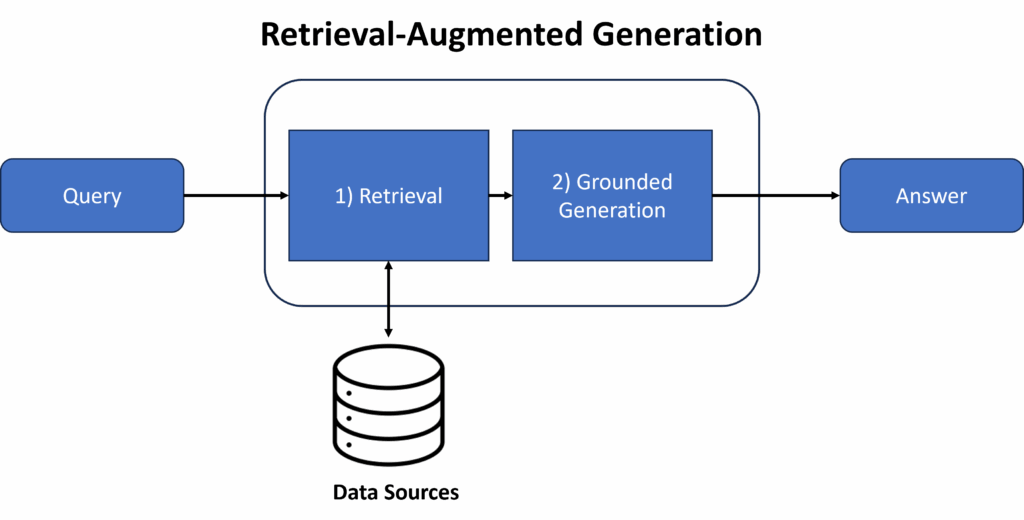 Image by Author
RAG has become very popular over the last few years due to its ability to reduce hallucinations and improve factuality. They are flexible, easy to update, and much cheaper than fine-tuning LLMs. We come across RAG solutions on a daily basis now. For example, many organizations have leveraged RAG to build internal chatbots for employees to navigate their knowledge base, and external chatbots to support customer service and other business functions.
Image by Author
RAG has become very popular over the last few years due to its ability to reduce hallucinations and improve factuality. They are flexible, easy to update, and much cheaper than fine-tuning LLMs. We come across RAG solutions on a daily basis now. For example, many organizations have leveraged RAG to build internal chatbots for employees to navigate their knowledge base, and external chatbots to support customer service and other business functions.
Building a RAG Pipeline
For our RAG solution, we will use abstracts from open-source research related to artificial intelligence. We can use this data to generate more "technical" answers when asking questions related to artificial intelligence, machine learning, etc.
The data used comes from the OpenAlex API (https://openalex.org/). This is a dataset/catalogue of open-source research from around the world. The data is freely accessible under a No Rights Reserved license (CC0 license).
Data Ingestion
First, we need to load our data using the OpenAlex API. Below is code to conduct searches by publication year and key terms. We run a search for AI/ML using key terms like "deep learning", "natural language processing", "computer vision", etc.
python
import pandas as pd
import requests

def import_data(pages, start_year, end_year, search_terms):

    """
    This function is used to use the OpenAlex API, conduct a search on works, a return a dataframe with associated works.

    Inputs:
        - pages: int, number of pages to loop through
        - search_terms: str, keywords to search for (must be formatted according to OpenAlex standards)
        - start_year and end_year: int, years to set as a range for filtering works
    """

    #create an empty dataframe
    search_results = pd.DataFrame()

    for page in range(1, pages):

        #use paramters to conduct request and format to a dataframe
        response = requests.get(f'https://api.openalex.org/works?page={page}&per-page=200&filter=publication_year:{start_year}-{end_year},type:article&search={search_terms}')
        data = pd.DataFrame(response.json()['results'])

        #append to empty dataframe
        search_results = pd.concat([search_results, data])

    #subset to relevant features
    search_results = search_results[["id", "title", "display_name", "publication_year", "publication_date",
                                        "type", "countries_distinct_count","institutions_distinct_count",
                                        "has_fulltext", "cited_by_count", "keywords", "referenced_works_count", "abstract_inverted_index"]]

    return(search_results)

#search for AI-related research
ai_search = import_data(30, 2018, 2025, "'artificial intelligence' OR 'deep learn' OR 'neural net' OR 'natural language processing' OR 'machine learn' OR 'large language models' OR 'small language models'")
When querying the OpenAlex database, the abstracts are returned as an inverted index. Below is a function to undo the inverted index and return the original text of the abstract.
python
def undo_inverted_index(inverted_index):

    """
    The purpose of the function is to 'undo' and inverted index. It inputs an inverted index and
    returns the original string.
    """

    #create empty lists to store uninverted index
    word_index = []
    words_unindexed = []

    #loop through index and return key-value pairs
    for k,v in inverted_index.items():
        for index in v: word_index.append([k,index])

    #sort by the index
    word_index = sorted(word_index, key = lambda x : x[1])

    #join only the values and flatten
    for pair in word_index:
        words_unindexed.append(pair[0])
    words_unindexed = ' '.join(words_unindexed)

    return(words_unindexed)

#create 'original_abstract' feature
ai_search['original_abstract'] = list(map(undo_inverted_index, ai_search['abstract_inverted_index']))
Create a Vector Database
Next, we need to generate embeddings to represent the abstracts, and store them in a vector database. It is a best practice to leverage vector databases as they are designed for low-latency queries and can scale to handle billions of data points. They also use specialized indexing and nearest neighbor algorithms to quickly retrieve data based on contextual and/or semantic similarity, making them essential for LLM applications.
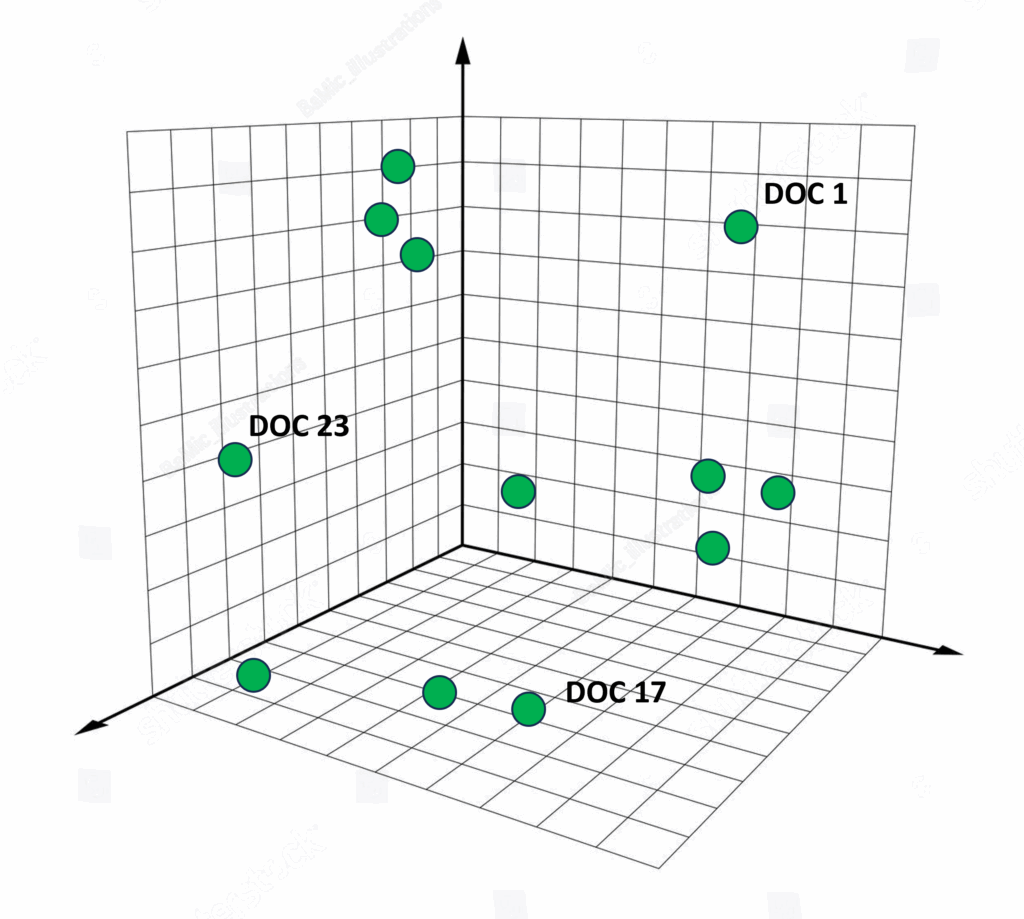 Image by Author
First, we import the necessary libraires from LangChain and load our embedding model from HuggingFace. While we can probably get better results using larger embedding models, I decided to use a smaller model to emphasize speed in this pipeline.
You can find and compare embedding models based on their size, performance, intended use, etc. by using the MTEB leaderboard from Hugging Face (https://huggingface.co/spaces/mteb/leaderboard ).
Image by Author
First, we import the necessary libraires from LangChain and load our embedding model from HuggingFace. While we can probably get better results using larger embedding models, I decided to use a smaller model to emphasize speed in this pipeline.
You can find and compare embedding models based on their size, performance, intended use, etc. by using the MTEB leaderboard from Hugging Face (https://huggingface.co/spaces/mteb/leaderboard ).
python
from langchain_community.docstore.in_memory import InMemoryDocstore
from langchain_community.vectorstores import FAISS
from langchain_huggingface.embeddings import HuggingFaceEmbeddings
from langchain_core.documents import Document

#load embedding model
embeddings = HuggingFaceEmbeddings(model_name="thenlper/gte-small")
Next, we create our vector database using FAISS (or LangChain's wrapper for FAISS). We start by creating the index and formatting our data and documents, while also storing their metadata (title and year). We then create a list of IDs, add the documents and IDs to the database, and save the database locally.
python
#save index with faiss
index = faiss.IndexFlatL2(len(embeddings.embed_query("hello world")))

#format abstracts as documents
documents = [Document(page_content=ai_search['original_abstract'][i], metadata={"title": ai_search['title'][i], "year": ai_search['publication_year'][i]}) for i in range(len(ai_search))]

#create list of ids as strings
n = len(ai_search)
ids = list(range(1, n + 1))
ids = [str(x) for x in my_list]

#add documents to vector store
vector_store.add_documents(documents=documents, ids=ids)

#save the vector store
vector_store.save_local("Data/faiss_index")
With LangChain's vector stores, we can query our documents directly. Let's quickly test this by searching for "computer vision". We can see below that the first document returned , "Face Detection and Recognition Using OPENCV", is highly-related to computer vision.
python
#test that vector database is working
vector_store.similarity_search("computer vision", k=3)
[Document(id='783', metadata={'title': 'FACE DETECTION AND RECOGNITION USING OPENCV', 'year': 2020}, page_content='Computer Vision is one of the most fascinating and challenging tasks in the field of Artificial Intelligence.Computer Vision serves as a link between computer software and the visuals we see around us.It enables...
Create RAG Pipeline
Now let's develop our RAG pipeline. A major component of a RAG solution is the generative model leveraged to generate the responses. For this, we will use OpenAI's model from LangChain.
So we can compare the response before and after we implement the RAG pipeline, let's ask the "base" model: "What are the most recent advancements in computer vision?".
python
from langchain_openai import OpenAI
from langchain.chains import RetrievalQA
from langchain import PromptTemplate

#set API key
OPENAI_API_KEY = os.getenv("OPENAI_API_KEY","API KEY")

#load llm
llm = OpenAI(openai_api_key=OPENAI_API_KEY)

#test llm response
llm.invoke("What are the most recent advancements in computer vision?")
'\n\n1. Deep Learning: Deep learning, a subset of machine learning, has shown significant progress in computer vision tasks such as object detection, recognition, and image classification. It uses neural networks with multiple hidden layers to learn and extract features from images, leading to more accurate and efficient results.\n\n2. Generative Adversarial Networks (GANs): GANs are a type of deep learning algorithm that generates new images by learning from a large dataset. They have been used in tasks such as image synthesis, super-resolution, and image-to-image translation, and have shown impressive results in creating realistic images.\n\n3. Convolutional Neural Networks (CNNs): CNNs are a type of deep learning algorithm that has revolutionized the field of computer vision. They are highly effective in extracting features from images and have been used in various tasks such as image classification, object detection, and segmentation.\n\n4. Transfer Learning: Transfer learning allows a pre-trained model to be used on a different task or dataset without starting from scratch. It has shown promising results in computer vision tasks, especially for tasks with limited training data.\n\n5. Image Segmentation: With advancements in deep learning, image segmentation has become more accurate and efficient. It involves dividing an image into different regions or segments to identify objects'
From the response above, we can see a general summary of computer vision, a high-level description of how it works, and different types of models and applications. While it is a good summary, is does not directly answer our question. A great opportunity for RAG!
Next, we will build the components for our RAG pipeline. First we need a retriever to grab the top k documents related to our query. We then build a prompt instructing our model how to respond to questions. Lastly, we combine them with the base generative model to create our pipeline.
Let's quickly retest our query of "What are the most recent advancements in computer vision?".
python
#test that vector database is working
retriever = db.as_retriever(search_kwargs={"k": 3})

#create a prompt template
template = """<|user|>
Relevant information:
{context}

Provide a concise answer to the following question using relevant information provided above:
{question}
If the information above does not answer the question, say that you do not know. Keep answers to 3 sentences or shorter.<|end|>
<|assistant|>"""

#define prompt template
prompt = PromptTemplate(
    template=template,
    input_variables=["context", "question"])

#create RAG pipeline
rag = RetrievalQA.from_chain_type(llm=llm, chain_type="stuff", retriever=retriever, return_source_documents=True,
                                  chain_type_kwargs={"prompt": prompt}, verbose = True)

#test rag response
rag.invoke("What are the most recent advancements in computer vision?")
The most recent advancements in computer vision include the emergence of large language models equipped with vision capabilities, such as OpenAI's GPT-4V, Google's Bard AI, and Microsoft's Bing AI. These models are able to analyze images and have the ability to access real-time information, making them directly embedded in many applications. Further advancements are expected as AI continues to rapidly evolve.
This response does a much better job at answering our question. It directly addresses the most recent advancements by calling out specific capabilities, models, and how they contribute to advancing computer vision. This is a promising result for our technical chatbot.
But this is not a proper evaluation. Next, we will further test our RAG solution on a number of metrics to help us determine if its ready for production.
···
LLM-as-a-Judge
To begin evaluating our solution, we will use another generative model to determine how our RAG solution meets certain criteria. While LLM-as-a-Judge methods have some caveats and need to be used carefully, they offer a lot of flexibility and efficiency. They can also give detailed insights during the evaluation process, as you will see below.
Our RAG consists of 2 main components, the retriever and generator. We will evaluate these components separately. Our findings could prompt us to tune hyperparameters, replace the embedding model, or use a difference generative model.
Retriever Evaluation
First we will evaluate our retriever, the component that fetches the relevant content. We will judge on 3 metrics:
- Contextual Precision: Represents a greater ability of the retrieval system to correctly rank relevant nodes. It first uses an LLM to determine whether each node is relevant to the input, before calculating the weighted cumulative precision.
- Contextual Recall: Represents a greater ability of the retrieval system to capture all relevant information from the total available relevant set within your knowledge base.
- Contextual Relevancy: Evaluates the overall relevance of the information presented for the given output.
First, we import the libraries and initialize the metrics.
python
from deepeval import evaluate
from deepeval.test_case import LLMTestCase, LLMTestCaseParams
from deepeval.metrics import (
    ContextualPrecisionMetric,
    ContextualRecallMetric,
    ContextualRelevancyMetric)

#set your OpenAI API key
os.environ["OPENAI_API_KEY"] = "API KEY"

# Initialize metrics
contextual_precision = ContextualPrecisionMetric()
contextual_recall = ContextualRecallMetric()
contextual_relevancy = ContextualRelevancyMetric()
Next, we need to build a test case, an expected output to a given query. These testing datasets can be difficult to build, and should have input from domain experts who understand the questions that may be asked, and what those answers should be.
For this example, we will just create one test case with a mock expected output. This will not give us the true result, but will give us a result as an example.
python
#define user query
input = 'What are the most recent advancements in computer vision?'

#RAG output
actual_output = rag.invoke(input)['result']

#contexts used from the retriver
retrieved_contexts = []
for el in range(0,3):
  retrieved_contexts.append(rag.invoke(input)['source_documents'][el].page_content)

#expected output (example)
expected_output = 'Recent advancements in computer vision include Vision-Language Models (VLMs) that merge vision and language, Neural Radiance Fields (NeRFs) for 3D scene generation, and powerful Diffusion Models and Generative AI for creating realistic visuals. Other key areas are Edge AI for real-time processing, enhanced 3D vision techniques like NeRFs and Visual SLAM, advanced self-supervised learning methods, deepfake detection systems, and increased focus on Ethical AI and Explainable AI (XAI) to ensure fairness and transparency.'
With the components above, we can now build our test case and compute our 3 metrics.
python
#create test case
test_case = LLMTestCase(
    input=input,
    actual_output=actual_output,
    retrieval_context=retrieved_contexts,
    expected_output=expected_output)

#compute contextual precision and print results
contextual_precision.measure(test_case)
print("Score: ", contextual_precision.score)
print("Reason: ", contextual_precision.reason)

#compute contextual recall and print results
contextual_recall.measure(test_case)
print("Score: ", contextual_recall.score)
print("Reason: ", contextual_recall.reason)

#compute relevancy precision and print results
contextual_relevancy.measure(test_case)
print("Score: ", contextual_relevancy.score)
print("Reason: ", contextual_relevancy.reason)
Score: 1.0 Reason: The score is 1.00 because the relevant nodes are ranked at the top: the first node discusses 'recent progress on computer vision algorithms' and 'prominent achievements,' and the second node covers the 'evolution of computer vision' and foundational advancements. The irrelevant node, which only describes the OpenCV toolkit and lacks discussion of recent advancements, is correctly ranked last. This perfect ordering ensures the highest contextual precision.
Score: 0.0 Reason: The score is 0.00 because none of the sentences in the expected output can be traced back to any node(s) in the retrieval context; there is no overlap or relevant information present.
Score: 0.5555555555555556 Reason: The score is 0.56 because, while there are several statements that discuss recent progress and deep learning advancements in computer vision (e.g., 'The prominent achievements in computer vision tasks such as image classification, object detection and image segmentation brought by deep learning techniques are highlighted.'), much of the context is general background or unrelated details (e.g., 'The explanation of the term 'convolutional' as a mathematical operation is not directly relevant to the advancements in computer vision.').
As seen above, one of the benefits of using an LLM as a judge is that we get detailed feedback on why our scores are what they are. For example, get a 55% for contextual relevancy because the LLM deemed some of the information unnecessary (slightly going down a rabbit hole about CNNs).
We can also use the 'evaluate' function from DeepEval to better automate this process. This is useful when testing your RAG on several test cases.
python
#run all metrics with 'evaluate' function
evaluate(test_cases=[test_case],
         metrics=[contextual_precision, contextual_recall, contextual_relevancy])
Generation Evaluation
Next, we evaluate our generator, which generates the responses based on the context given by the retriever. Here, we will compute 2 metrics:
- Answer Relevancy: Similar to contextual relevancy, evaluates whether the prompt template in your generator is able to instruct your LLM to give relevant outputs based on the context.
- Faithfulness: Evaluates whether the LLM used in your generator can output information that does not hallucinate or contradict any factual information presented in the retrieval context.
As before, lets initialize the metrics.
python
from deepeval.metrics import AnswerRelevancyMetric, FaithfulnessMetric

answer_relevancy = AnswerRelevancyMetric()
faithfulness = FaithfulnessMetric()

#compute answer relevancy and print results
answer_relevancy.measure(test_case)
print("Score: ", answer_relevancy.score)
print("Reason: ", answer_relevancy.reason)

#compute faithfulness and print results
faithfulness.measure(test_case)
print("Score: ", faithfulness.score)
print("Reason: ", faithfulness.reason)
Score: 1.0 Reason: The score is 1.00 because the answer was fully relevant and addressed the question directly without any irrelevant information. Great job staying focused and informative!
Score: 1.0 Reason: Great job! There are no contradictions, so the actual output is fully faithful to the retrieval context.
As seen above, our generator operates very well (with this test case). The answer remains relevant and the model does not contradict itself. Again, we can use the 'evaluate' function to evaluate several test cases.
python
#run all metrics with 'evaluate' function
evaluate(test_cases=[test_case],
         metrics=[answer_relevancy, faithfulness])
A caveat of using these metrics is that they generic and only go after a few aspects of our generated output, like relevancy. But we can also create tailored metrics to determine how well our RAG solution performs in areas important to us specifically.
For example, we can pose questions like "How does my RAG handle dark humor?", or "Is the output written at a kid-friendly level?". For our example, let's determine how well our RAG provides technically written responses.
python
from deepeval.metrics import GEval

#create evaluation for technical language
tech_eval = GEval(
    name="Technical Language",
    criteria="Determine how technically written the actual output is",
    evaluation_params=[LLMTestCaseParams.ACTUAL_OUTPUT])

#run evaluation
tech_eval.measure(test_case)
print("Score: ", tech_eval.score)
print("Reason: ", tech_eval.reason)
Score: 0.6437823499114202 Reason: The response uses appropriate technical terminology such as 'deep learning', 'image classification', 'object detection', 'image segmentation', 'GPUs', and 'FPGAs'. The explanations are clear but somewhat general, lacking specific examples or recent breakthroughs. The technical detail is moderate, mentioning both algorithmic and hardware aspects, but does not delve into particular models or methods. The writing is mostly formal and adheres to technical conventions, but the depth and specificity could be improved.
In the output above, we can see that our RAG produces somewhat technically written answers. It uses the appropriate technical terminology with clear explanations, but lacks examples. This is likely due to using abstracts as our data source, which are written at a somewhat high level.
Human Evaluation
While LLM-as-a-judge methods give us a lot a great information, they are generic and should be caveated as they do not fully assess real-world applicability. Humans however, can better explore this, as no one knows the data better than the domain experts within the organization.
Human evaluation typically reviews for correctness, justification quality, and fluency. Evaluators must determine if the output is accurate, logically connects retrieved evidence to the conclusion, is natural, and useful. It is important to keep in mind the data, user, and purpose of your RAG solution to properly address these domain-specific requirements.
···
Conclusion
In this article, we were able to build a RAG pipeline using open source research by leveraging FAISS, LangChain, and more. We also dove into how we can evaluate RAG solutions, evaluating both our retriever and generator. Libraries like DeepEval leverage LLM-as-a-judge metrics to build test cases and determine relevancy, faithfulness, and more. Lastly, we discussed how important human evaluation is when determining the real-world applicability or your RAG solution.
···
I hope you have enjoyed my article! Please feel free to comment, ask questions, or request other topics.
Connect with me on LinkedIn:https://www.linkedin.com/in/alexdavis2020/
Register Now to Continue Reading
Unlock Towards Data Science with a Free Account
All articles on Towards Data Science are available to registered users. Create a free account today to access this article and thousands more.
Register for freeSign in to your account
 Written By
See all from Alex Davis
Deep DivesLlmLlm EvaluationNLPRag
Share This Article
Towards Data Science is a community publication. Submit your insights to reach our global audience and earn through the TDS Author Payment Program.
Write for TDS
Related Articles
Data Science
Simulating the probability that your singular vote swings the election in November
Jarom Hulet
October 15, 202419 min read
Artificial Intelligence
In-depth explanation of the Naive Bayes family of classifiers, including a text classification example in Python
Dr. Roi Yehoshua
June 1, 202324 min read
Deep Learning
Part 2 - Visual classification via Description from LLMs
Alexey Kravets
November 25, 20236 min read
Large Language Models
How I used open-source models to explore new frontiers in efficient code generation, using my MacBook and local LLMs
Stefano Bosisio
January 19, 20268 min read
Large Language Models
Enterprise Document Intelligence [Vol.1 #8quater] - Two angles on the cascade, cost and a validation loop, backed by a real sweep of twenty local models against a hosted flagship
Kezhan Shi
July 24, 202611 min read
NLP
In this tutorial we will be retraining a RoBERTa LM for a more personalised downstream-oriented dataset.
Tanmay Garg
December 13, 20204 min read
Artificial Intelligence
avoid the outdated methods of integrating AI into your coding workflow by going beyond ChatGPT
Hesam Sheikh
August 29, 20247 min read
Machine Learning
A review of Chomsky's views on linguistics and LLMs
Mohamad Aboufoul
December 5, 202212 min read
Deep Learning
A brief journey from Perceptron to ResNet
Oliver Kramer
October 21, 202212 min read
Your home for data science and AI. The world's leading publication for data science, data analytics, data engineering, machine learning, and artificial intelligence professionals.
Subscribe to Our NewsletterWrite For TDS•About•Advertise•Privacy Policy•Terms of Use
© Insight Media Group, LLC 2026•The New Stack•roadmap.sh•Creator Network
Recommended Articles
Close