保留正文与补采附件。源页面当前未重新核验;具体限制见交付清单。
 We value your privacy
We use cookies to enhance your browsing experience, serve personalised ads or content, and analyse our traffic. By clicking "Accept All", you consent to our use of cookies.
Customise Reject All Accept All
Customise Consent Preferences
We value your privacy
We use cookies to enhance your browsing experience, serve personalised ads or content, and analyse our traffic. By clicking "Accept All", you consent to our use of cookies.
Customise Reject All Accept All
Customise Consent Preferences  We use cookies to help you navigate efficiently and perform certain functions. You will find detailed information about all cookies under each consent category below.
The cookies that are categorised as "Necessary" are stored on your browser as they are essential for enabling the basic functionalities of the site. ... Show more
NecessaryAlways Active
Necessary cookies are required to enable the basic features of this site, such as providing secure log-in or adjusting your consent preferences. These cookies do not store any personally identifiable data.
We use cookies to help you navigate efficiently and perform certain functions. You will find detailed information about all cookies under each consent category below.
The cookies that are categorised as "Necessary" are stored on your browser as they are essential for enabling the basic functionalities of the site. ... Show more
NecessaryAlways Active
Necessary cookies are required to enable the basic features of this site, such as providing secure log-in or adjusting your consent preferences. These cookies do not store any personally identifiable data.
-
Cookie
BCTempID
-
Duration
10 minutes
-
Description
No description available.
-
Cookie
__cf_bm
-
Duration
1 hour
-
Description
This cookie, set by Cloudflare, is used to support Cloudflare Bot Management.
-
Cookie
AWSALBCORS
-
Duration
7 days
-
Description
Amazon Web Services set this cookie for load balancing.
-
Cookie
_cfuvid
-
Duration
session
-
Description
Cloudflare sets this cookie to track users across sessions to optimize user experience by maintaining session consistency and providing personalized services
-
Cookie
li_gc
-
Duration
6 months
-
Description
Linkedin set this cookie for storing visitor's consent regarding using cookies for non-essential purposes.
-
Cookie
__hssrc
-
Duration
session
-
Description
This cookie is set by Hubspot whenever it changes the session cookie. The __hssrc cookie set to 1 indicates that the user has restarted the browser, and if the cookie does not exist, it is assumed to be a new session.
-
Cookie
__hssc
-
Duration
1 hour
-
Description
HubSpot sets this cookie to keep track of sessions and to determine if HubSpot should increment the session number and timestamps in the __hstc cookie.
-
Cookie
wpEmojiSettingsSupports
-
Duration
session
-
Description
WordPress sets this cookie when a user interacts with emojis on a WordPress site. It helps determine if the user's browser can display emojis properly.
-
Cookie
BCSessionID
-
Duration
1 year 1 month 4 days
-
Description
Blueconic sets this cookie as a unique identifier for the BlueConic profile.
-
Cookie
_octo
-
Duration
1 year
-
Description
No description available.
-
Cookie
logged_in
-
Duration
1 year
-
Description
No description available.
-
Cookie
__Secure-YEC
-
Duration
past
-
Description
YouTube sets this cookie to stores the user's video player preferences using embedded YouTube video
-
Cookie
__eoi
-
Duration
6 months
-
Description
Description is currently not available.
-
Cookie
AWSALBTGCORS
-
Duration
7 days
-
Description
No description available.
-
Cookie
login-status-p
-
Duration
past
-
Description
Description is currently not available.
-
Cookie
AWSALBTG
-
Duration
7 days
-
Description
No description available.
-
Cookie
csrf_token
-
Duration
session
-
Description
No description available.
-
Cookie
token_v2
-
Duration
1 day
-
Description
Description is currently not available.
-
Cookie
D
-
Duration
1 year
-
Description
Description is currently not available.
-
Cookie
PHPSESSID
-
Duration
session
-
Description
This cookie is native to PHP applications. The cookie stores and identifies a user's unique session ID to manage user sessions on the website. The cookie is a session cookie and will be deleted when all the browser windows are closed.
-
Cookie
VISITOR_PRIVACY_METADATA
-
Duration
6 months
-
Description
YouTube sets this cookie to store the user's cookie consent state for the current domain.
-
Cookie
cookietest
-
Duration
session
-
Description
The cookietest cookie is typically used to determine whether the user's browser accepts cookies, essential for website functionality and user experience.
-
Cookie
__Host-airtable-session
-
Duration
1 year
-
Description
This cookie is used to enable us to integrate the services of Airtable.
-
Cookie
__Host-airtable-session.sig
-
Duration
1 year
-
Description
This cookie is used to enable us to integrate the services of Airtable.
-
Cookie
m
-
Duration
1 year 1 month 4 days
-
Description
Stripe sets this cookie for fraud prevention purposes. It identifies the device used to access the website, allowing the website to be formatted accordingly.
-
Cookie
BIGipServer*
-
Duration
session
-
Description
Marketo sets this cookie to collect information about the user's online activity and build a profile about their interests to provide advertisements relevant to the user.
-
Cookie
__cfruid
-
Duration
session
-
Description
Cloudflare sets this cookie to identify trusted web traffic.
-
Cookie
_GRECAPTCHA
-
Duration
6 months
-
Description
Google Recaptcha service sets this cookie to identify bots to protect the website against malicious spam attacks.
-
Cookie
__Secure-YNID
-
Duration
6 months
-
Description
Google cookie used to protect user security and prevent fraud, especially during the login process.
-
Cookie
cookieyes-consent
-
Duration
1 year
-
Description
CookieYes sets this cookie to remember users' consent preferences so that their preferences are respected on subsequent visits to this site. It does not collect or store any personal information about the site visitors.
Functional
Functional cookies help perform certain functionalities like sharing the content of the website on social media platforms, collecting feedback, and other third-party features.
-
Cookie
lidc
-
Duration
1 day
-
Description
LinkedIn sets the lidc cookie to facilitate data center selection.
-
Cookie
brw
-
Duration
1 year
-
Description
No description available.
-
Cookie
brwConsent
-
Duration
5 minutes
-
Description
Description is currently not available.
-
Cookie
WMF-Uniq
-
Duration
1 year
-
Description
Description is currently not available.
-
Cookie
loom_anon_comment
-
Duration
1 year
-
Description
No description available.
-
Cookie
loom_referral_video
-
Duration
session
-
Description
Description is currently not available.
-
Cookie
VISITOR_INFO1_LIVE
-
Duration
6 months
-
Description
A cookie set by YouTube to measure bandwidth that determines whether the user gets the new or old player interface.
-
Cookie
yt-remote-connected-devices
-
Duration
Never Expires
-
Description
YouTube sets this cookie to store the user's video preferences using embedded YouTube videos.
-
Cookie
ytidb::LAST_RESULT_ENTRY_KEY
-
Duration
Never Expires
-
Description
The cookie ytidb::LAST_RESULT_ENTRY_KEY is used by YouTube to store the last search result entry that was clicked by the user. This information is used to improve the user experience by providing more relevant search results in the future.
-
Cookie
yt-remote-device-id
-
Duration
Never Expires
-
Description
YouTube sets this cookie to store the user's video preferences using embedded YouTube videos.
-
Cookie
yt-remote-session-name
-
Duration
session
-
Description
The yt-remote-session-name cookie is used by YouTube to store the user's video player preferences using embedded YouTube video.
-
Cookie
yt-remote-fast-check-period
-
Duration
session
-
Description
The yt-remote-fast-check-period cookie is used by YouTube to store the user's video player preferences for embedded YouTube videos.
-
Cookie
yt-remote-session-app
-
Duration
session
-
Description
The yt-remote-session-app cookie is used by YouTube to store user preferences and information about the interface of the embedded YouTube video player.
-
Cookie
yt-remote-cast-available
-
Duration
session
-
Description
The yt-remote-cast-available cookie is used to store the user's preferences regarding whether casting is available on their YouTube video player.
-
Cookie
yt-remote-cast-installed
-
Duration
session
-
Description
The yt-remote-cast-installed cookie is used to store the user's video player preferences using embedded YouTube video.
-
Cookie
cp_session
-
Duration
3 months
-
Description
Codepen sets this cookie for Help systems found in the website.
-
Cookie
loid
-
Duration
1 year 1 month 4 days
-
Description
This cookie is set by the Reddit. The cookie enables the sharing of content from the website onto the social media platform.
Analytics
Analytical cookies are used to understand how visitors interact with the website. These cookies help provide information on metrics such as the number of visitors, bounce rate, traffic source, etc.
-
Cookie
__hstc
-
Duration
6 months
-
Description
Hubspot set this main cookie for tracking visitors. It contains the domain, initial timestamp (first visit), last timestamp (last visit), current timestamp (this visit), and session number (increments for each subsequent session).
-
Cookie
hubspotutk
-
Duration
6 months
-
Description
HubSpot sets this cookie to keep track of the visitors to the website. This cookie is passed to HubSpot on form submission and used when deduplicating contacts.
-
Cookie
_ga
-
Duration
1 year 1 month 4 days
-
Description
Google Analytics sets this cookie to calculate visitor, session and campaign data and track site usage for the site's analytics report. The cookie stores information anonymously and assigns a randomly generated number to recognise unique visitors.
-
Cookie
ga*
-
Duration
1 year 1 month 4 days
-
Description
Google Analytics sets this cookie to store and count page views.
-
Cookie
__Host-psifi.analyticsTrace
-
Duration
6 hours
-
Description
Description is currently not available.
-
Cookie
__Host-psifi.analyticsTraceV2
-
Duration
6 hours
-
Description
Description is currently not available.
-
Cookie
_gh_sess
-
Duration
session
-
Description
GitHub sets this cookie for temporary application and framework state between pages like what step the user is on in a multiple step form.
-
Cookie
YSC
-
Duration
session
-
Description
YSC cookie is set by Youtube and is used to track the views of embedded videos on Youtube pages.
-
Cookie
ajs_anonymous_id
-
Duration
1 year
-
Description
This cookie is set by Segment to count the number of people who visit a certain site by tracking if they have visited before.
-
Cookie
vuid
-
Duration
1 year 1 month 4 days
-
Description
Vimeo installs this cookie to collect tracking information by setting a unique ID to embed videos on the website.
Performance
Performance cookies are used to understand and analyse the key performance indexes of the website which helps in delivering a better user experience for the visitors.
-
Cookie
AWSALB
-
Duration
7 days
-
Description
AWSALB is an application load balancer cookie set by Amazon Web Services to map the session to the target.
-
Cookie
acq
-
Duration
past
-
Description
Description is currently not available.
-
Cookie
acq.sig
-
Duration
past
-
Description
Description is currently not available.
-
Cookie
ptc
-
Duration
2 years
-
Description
No description available.
Advertisement
Advertisement cookies are used to provide visitors with customised advertisements based on the pages you visited previously and to analyse the effectiveness of the ad campaigns.
-
Cookie
muc_ads
-
Duration
1 year 1 month 4 days
-
Description
Twitter sets this cookie to collect user behaviour and interaction data to optimize the website.
-
Cookie
guest_id_marketing
-
Duration
1 year 1 month 4 days
-
Description
Twitter sets this cookie to identify and track the website visitor.
-
Cookie
guest_id_ads
-
Duration
1 year 1 month 4 days
-
Description
Twitter sets this cookie to identify and track the website visitor.
-
Cookie
personalization_id
-
Duration
1 year 1 month 4 days
-
Description
Twitter sets this cookie to integrate and share features for social media and also store information about how the user uses the website, for tracking and targeting.
-
Cookie
guest_id
-
Duration
1 year 1 month 4 days
-
Description
Twitter sets this cookie to identify and track the website visitor. It registers if a user is signed in to the Twitter platform and collects information about ad preferences.
-
Cookie
bcookie
-
Duration
1 year
-
Description
LinkedIn sets this cookie from LinkedIn share buttons and ad tags to recognize browser IDs.
-
Cookie
__Secure-ROLLOUT_TOKEN
-
Duration
6 months
-
Description
YouTube sets this cookie to manage feature rollout and experimentation. It helps Google control which new features or interface changes are shown to users as part of testing and staged rollouts, ensuring consistent experience for a given user during an experiment.
-
Cookie
yt.innertube::nextId
-
Duration
Never Expires
-
Description
YouTube sets this cookie to register a unique ID to store data on what videos from YouTube the user has seen.
-
Cookie
yt.innertube::requests
-
Duration
Never Expires
-
Description
YouTube sets this cookie to register a unique ID to store data on what videos from YouTube the user has seen.
-
Cookie
session_tracker
-
Duration
session
-
Description
This cookie is set by the Reddit. This cookie is used to identify trusted web traffic. It also helps in adverstising on the website.
-
Cookie
edgebucket
-
Duration
session
-
Description
Reddit sets this cookie to save the information about a log-on Reddit user, for the purpose of advertisement recommendations and updating the content.
-
Cookie
did
-
Duration
1 year
-
Description
Arbor sets this cookie to show targeted ads to site visitors.This cookie expires after 2 months or 1 year.
Uncategorised
Other uncategorised cookies are those that are being analysed and have not been classified into a category as yet.
No cookies to display.
Reject All Save My Preferences Accept All
Toggle SearchToggle Mobile Navigation
Publish AI, ML & data-science insights to a global community of data professionals.
Sign inSubmit an Article
LatestEditor's PicksNewsletterShipAI
Write For TDS
LinkedInXToggle Search
Machine Learning
Linear Discriminant Analysis (LDA)
Discover how LDA helps identify critical data features
Ingo Nowitzky
October 12, 202412 min read
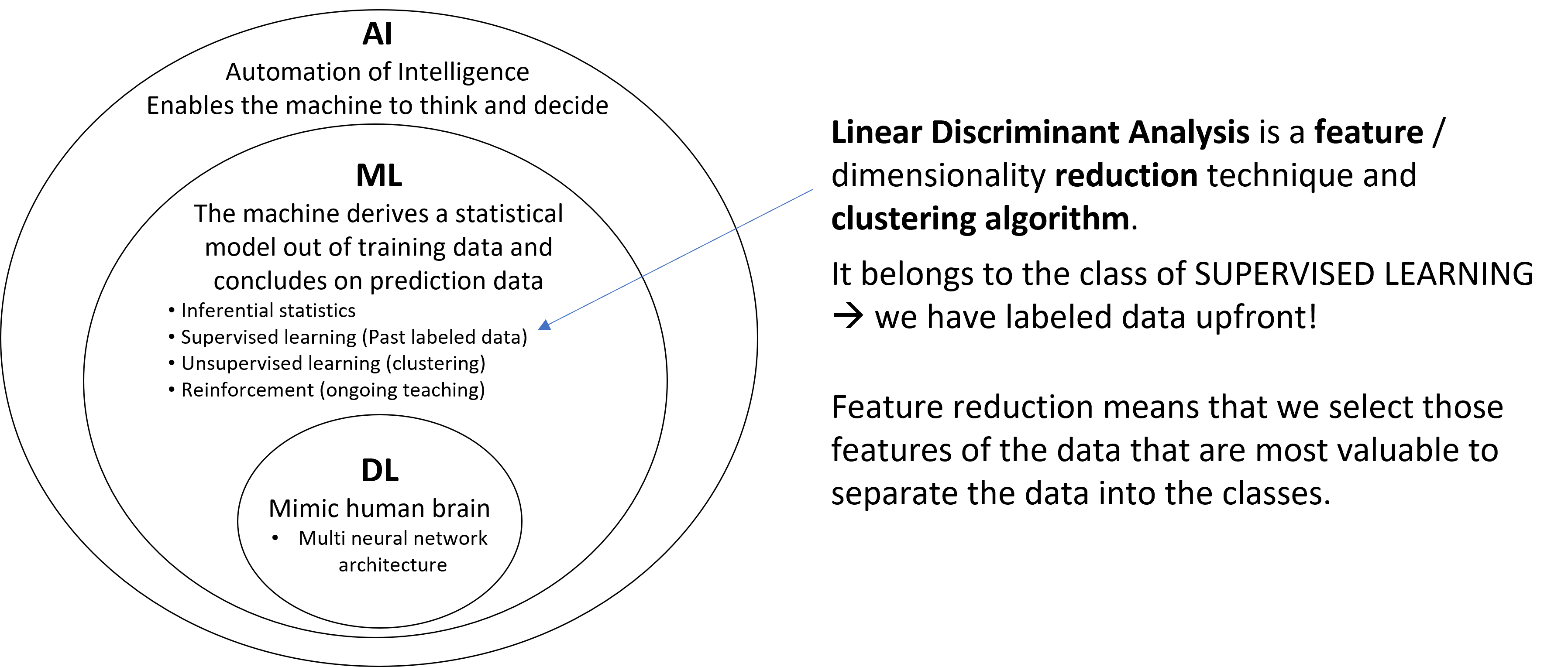 Classification of LDA within AI and ML Methods | image by author
This article aims to explore Linear Discriminant Analysis (LDA), focusing on its core ideas, its mathematical implementation in code, and a practical example from manufacturing. I hope you're on board. Let's get started!
Who works with industrial data in practice will be familiar with this situation: The datasets usually have many features, and it is often unclear which of the features are important and which are less. "Important" is a relative term in this context. Often, the goal is to differentiate the datasets from each other, i.e., to classify them. A very typical task is to distinguish good parts from bad parts and to identify the causes (aka features) that lead to the failure of the parts.
A commonly used method is the well-known Principal Component Analysis (PCA). While PCA belongs to the un supervised methods, the less widespread LDA is a supervised method and thus learns from labeled data. Therefore, it is particularly suited for explaining failure patterns from large datasets.
Learn this step by step with the interactive Machine Learning roadmap.
Classification of LDA within AI and ML Methods | image by author
This article aims to explore Linear Discriminant Analysis (LDA), focusing on its core ideas, its mathematical implementation in code, and a practical example from manufacturing. I hope you're on board. Let's get started!
Who works with industrial data in practice will be familiar with this situation: The datasets usually have many features, and it is often unclear which of the features are important and which are less. "Important" is a relative term in this context. Often, the goal is to differentiate the datasets from each other, i.e., to classify them. A very typical task is to distinguish good parts from bad parts and to identify the causes (aka features) that lead to the failure of the parts.
A commonly used method is the well-known Principal Component Analysis (PCA). While PCA belongs to the un supervised methods, the less widespread LDA is a supervised method and thus learns from labeled data. Therefore, it is particularly suited for explaining failure patterns from large datasets.
Learn this step by step with the interactive Machine Learning roadmap.
1. Goal and Principle of LDA
The goal of LDA is to linearly combine the features of the data so that the labels of the datasets are best separated from each other, and the number of new features is reduced to a predefined count. In AI jargon, this is typically referred to as a projection to a lower-dimensional space.
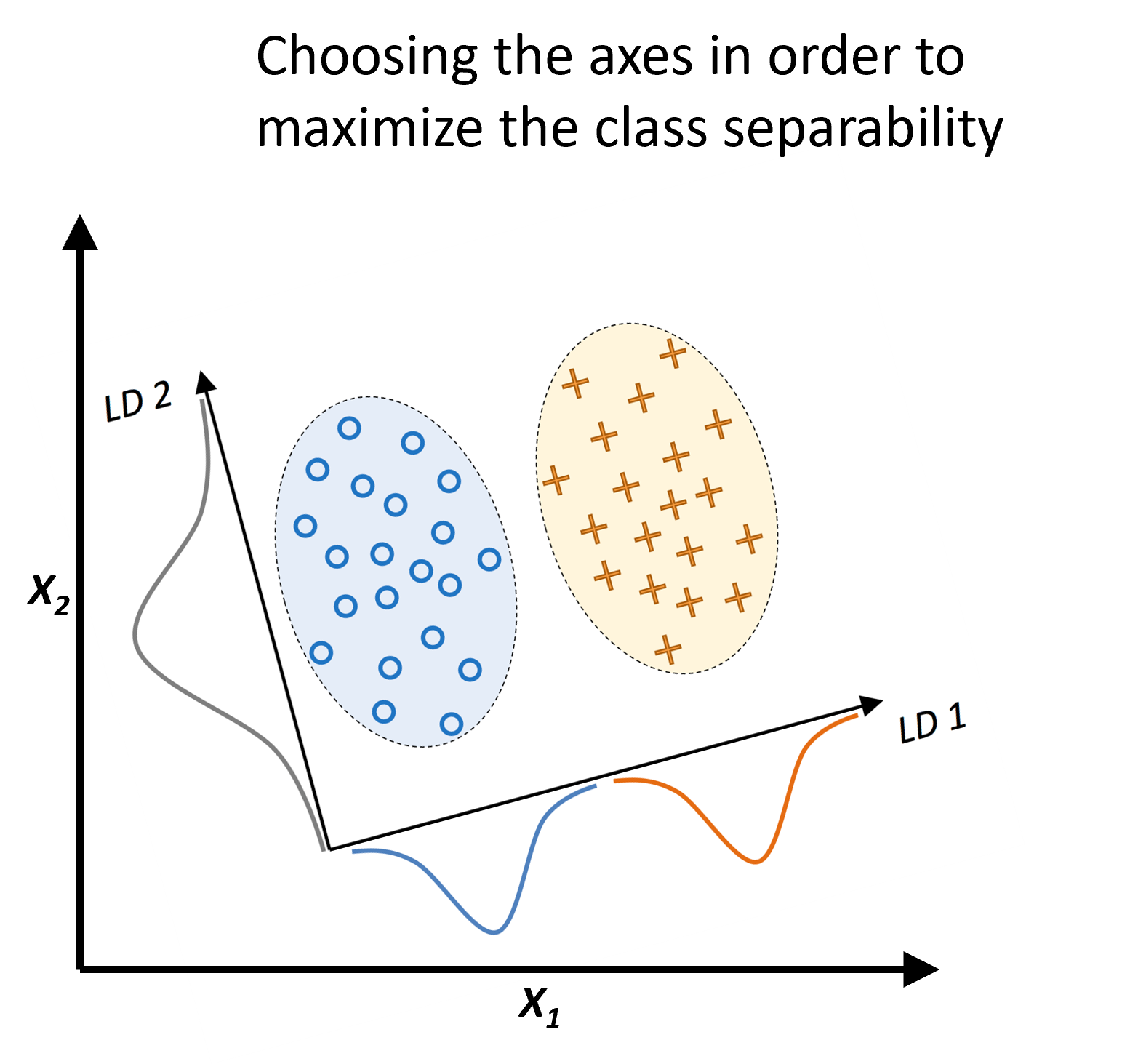 Principle of LDA | image modified from Raschka/Mirjalili, 2019
Excursus: What is dimensionality and what is dimensionality reduction?
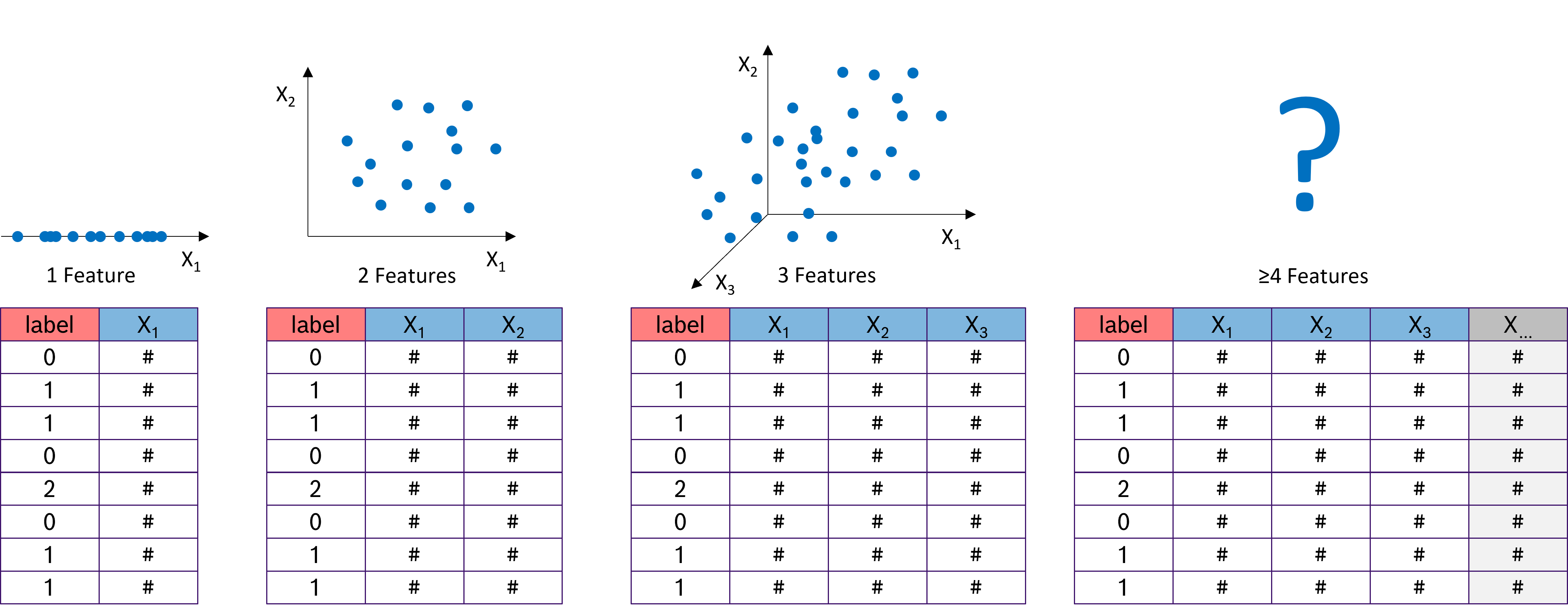 Dimensions and graphical representation | image by author
Dimensionality refers to the number of features in a dataset. With just one measurement (or feature), such as the tool temperature from an injection molding machine, we can represent it on a number line. Two features, like temperature and tool pressure, are still manageable: we can easily plot the data on an x-y chart. With three features - temperature, tool pressure, and injection pressure - things get more interesting, but we can still plot the data in a 3D x-y-z chart. However, when we add more features, such as viscosity, electrical conductivity, and others, the complexity increases.
Dimensions and graphical representation | image by author
Dimensionality refers to the number of features in a dataset. With just one measurement (or feature), such as the tool temperature from an injection molding machine, we can represent it on a number line. Two features, like temperature and tool pressure, are still manageable: we can easily plot the data on an x-y chart. With three features - temperature, tool pressure, and injection pressure - things get more interesting, but we can still plot the data in a 3D x-y-z chart. However, when we add more features, such as viscosity, electrical conductivity, and others, the complexity increases.
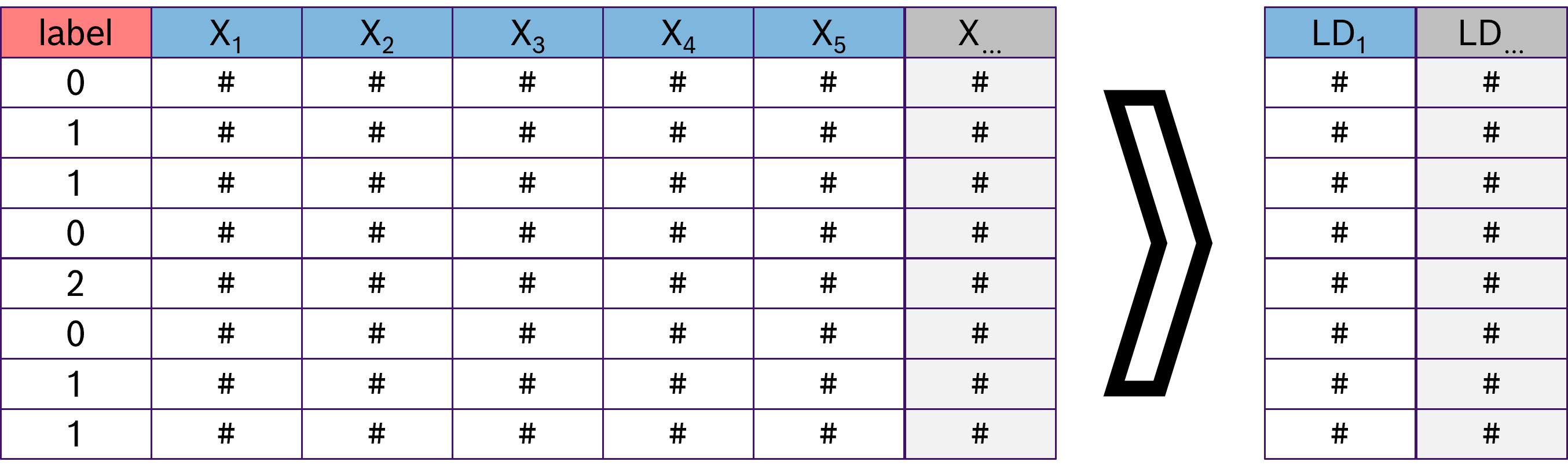 Dimensionality reduction | image by author
In practice, datasets often contain hundreds or even thousands of features. This presents a challenge because many machine learning algorithms perform poorly as datasets grow too large. Additionally, the amount of data required increases exponentially with the number of dimensions to achieve statistical significance. This phenomenon is known as the "curse of dimensionality." These factors make it essential to determine which features are relevant and to eliminate the less meaningful ones early in the data science process.
Dimensionality reduction | image by author
In practice, datasets often contain hundreds or even thousands of features. This presents a challenge because many machine learning algorithms perform poorly as datasets grow too large. Additionally, the amount of data required increases exponentially with the number of dimensions to achieve statistical significance. This phenomenon is known as the "curse of dimensionality." These factors make it essential to determine which features are relevant and to eliminate the less meaningful ones early in the data science process.
2. How does LDA work?
The process of Linear Discriminant Analysis (LDA) can be broken down into five key steps.
Step 1: Compute the d -dimensional mean vectors for each of the k classes separately from the dataset.
Remember that LDA is a supervised machine learning technique, meaning we can utilize the known labels. In the first step, we calculate the mean vectors _mean c for all samples belonging to a specific class c. To do this, we filter the feature matrix by class label and compute the mean for each of the d features. As a result, we obtain k mean vectors (one for each of the k classes), each with a length of d (corresponding to the d features).
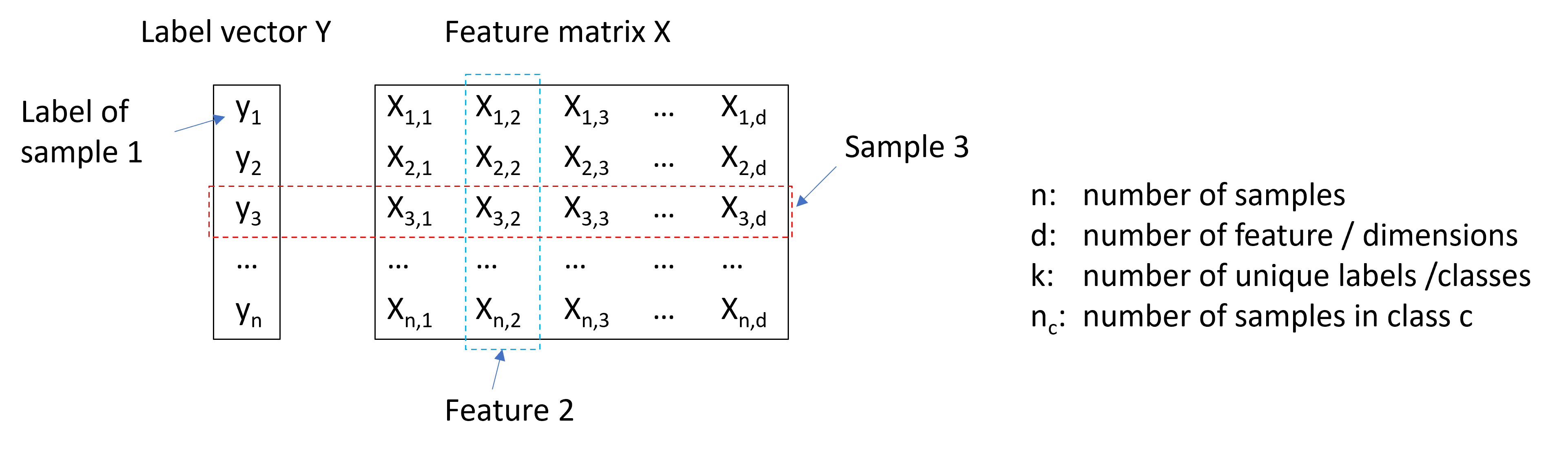 Label vector Y and feature matrix X | image by author
Step 2: Compute the scatter matrices (between-class scatter matrix and within-class scatter matrix).
The within-class scatter matrix measures the variation among samples within the same class. To find a subspace with optimal separability, we aim to minimize the values in this matrix. In contrast, the between-class scatter matrix measures the variation between different classes. For optimal separability, we aim to maximize the values in this matrix. Intuitively, within-class scatter looks at how compact each class is, whereas between-class scatter examines how far apart different classes are.
Label vector Y and feature matrix X | image by author
Step 2: Compute the scatter matrices (between-class scatter matrix and within-class scatter matrix).
The within-class scatter matrix measures the variation among samples within the same class. To find a subspace with optimal separability, we aim to minimize the values in this matrix. In contrast, the between-class scatter matrix measures the variation between different classes. For optimal separability, we aim to maximize the values in this matrix. Intuitively, within-class scatter looks at how compact each class is, whereas between-class scatter examines how far apart different classes are.
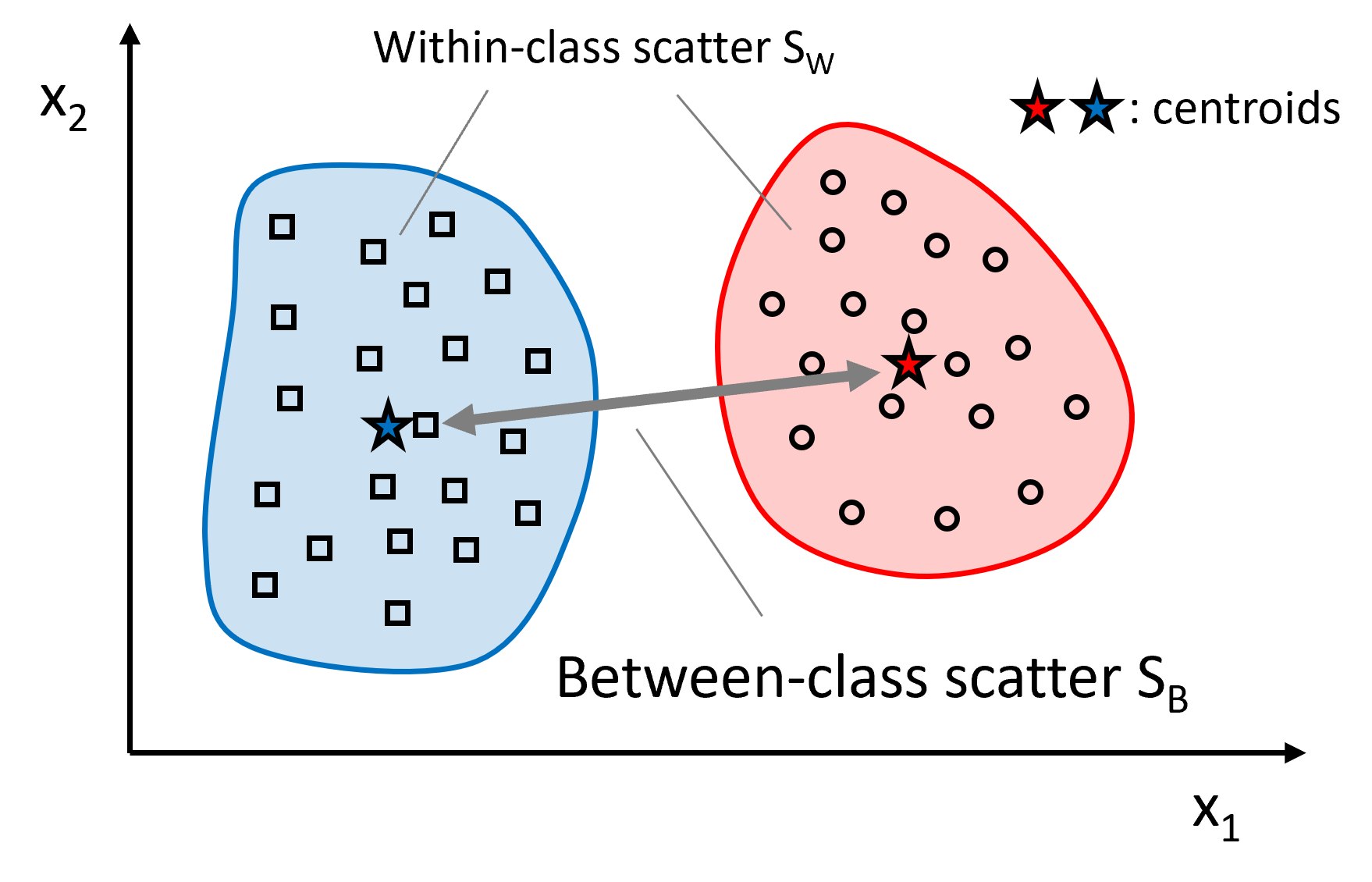 Within-class and between-class scatter matrices | image by author
Let's start with the within-class scatter matrix _S W. It is calculated as the sum of the scatter matrices _S c for each individual class:
The between-class scatter matrix _S B is derived from the differences between the class means _mean c and the overall mean of the entire dataset:
where mean refers to the mean vector calculated over all samples, regardless of their class labels.
Step 3: Calculate the eigenvectors and eigenvalues for the ratio of _S W and _S B .
As mentioned, for optimal class separability, we aim to maximize _S B and minimize _S W . We can achieve both by maximizing the ratio _S_B/S W . In linear algebra terms, this ratio corresponds to the scatter matrix _S_W⁻¹ S B , which is maximized in the subspace spanned by the eigenvectors with the highest eigenvalues. The eigenvectors define the directions of this subspace, while the eigenvalues represent the magnitude of the distortion. We will select the m eigenvectors associated with the highest eigenvalues.
Within-class and between-class scatter matrices | image by author
Let's start with the within-class scatter matrix _S W. It is calculated as the sum of the scatter matrices _S c for each individual class:
The between-class scatter matrix _S B is derived from the differences between the class means _mean c and the overall mean of the entire dataset:
where mean refers to the mean vector calculated over all samples, regardless of their class labels.
Step 3: Calculate the eigenvectors and eigenvalues for the ratio of _S W and _S B .
As mentioned, for optimal class separability, we aim to maximize _S B and minimize _S W . We can achieve both by maximizing the ratio _S_B/S W . In linear algebra terms, this ratio corresponds to the scatter matrix _S_W⁻¹ S B , which is maximized in the subspace spanned by the eigenvectors with the highest eigenvalues. The eigenvectors define the directions of this subspace, while the eigenvalues represent the magnitude of the distortion. We will select the m eigenvectors associated with the highest eigenvalues.
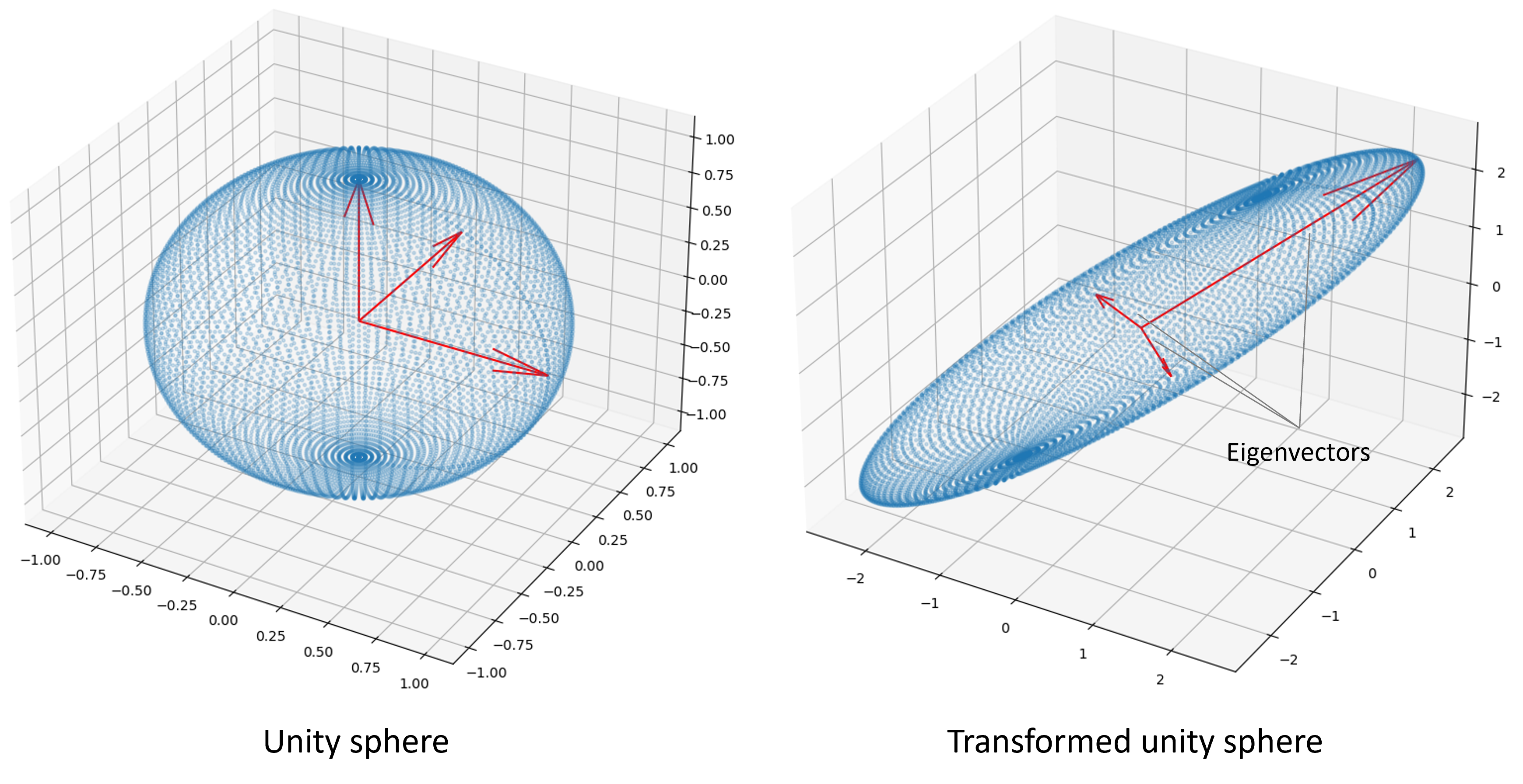 Subspace spanned by eigenvectors | image by author
Step 4: Sort the eigenvectors in descending order of their corresponding eigenvalues, and select the m eigenvectors with the largest eigenvalues to form a _d × m-_dimensional transformation matrix W.
Remember, our goal is not only to project the data into a subspace that enhances class separability but also to reduce dimensionality. The eigenvectors will define the axes of our new feature subspace. To decide which eigenvectors to discard for the lower-dimensional subspace, we need to examine their corresponding eigenvalues. In simple terms, the eigenvectors with the smallest eigenvalues contribute the least to class separation, and these are the ones we want to drop. The typical approach is to rank the eigenvalues in descending order and select the top m eigenvectors. m is a freely chosen parameter. The larger m , the less information is lost during the transformation.
After sorting the eigenpairs by decreasing eigenvalues and selecting the top m pairs, the next step is to construct the d × m -dimensional transformation matrix W. This is done by stacking the m selected eigenvectors horizontally, resulting in the matrix W :
The first column of W represents the eigenvector corresponding to the highest eigenvalue, the second column represents the eigenvector corresponding to the second highest eigenvalue, and so on.
Step 5: Use W to project the samples onto the new subspace.
In the final step, we use the _d × m-_dimensional transformation matrix W , which we composed from the top m selected eigenvectors, to project our samples onto the new subspace:
where X is the initial n × d -dimensional feature matrix representing our samples, and Z is the newly transformed n × m -dimensional feature matrix in the new subspace. This means that the selected eigenvectors serve as the "recipes" for transforming the original features into the new features (the Linear Discriminants): The eigenvector with the highest eigenvalue provides the transformation recipe for LD1 , the eigenvector with the second highest eigenvalue corresponds to LD2 , and so on.
Subspace spanned by eigenvectors | image by author
Step 4: Sort the eigenvectors in descending order of their corresponding eigenvalues, and select the m eigenvectors with the largest eigenvalues to form a _d × m-_dimensional transformation matrix W.
Remember, our goal is not only to project the data into a subspace that enhances class separability but also to reduce dimensionality. The eigenvectors will define the axes of our new feature subspace. To decide which eigenvectors to discard for the lower-dimensional subspace, we need to examine their corresponding eigenvalues. In simple terms, the eigenvectors with the smallest eigenvalues contribute the least to class separation, and these are the ones we want to drop. The typical approach is to rank the eigenvalues in descending order and select the top m eigenvectors. m is a freely chosen parameter. The larger m , the less information is lost during the transformation.
After sorting the eigenpairs by decreasing eigenvalues and selecting the top m pairs, the next step is to construct the d × m -dimensional transformation matrix W. This is done by stacking the m selected eigenvectors horizontally, resulting in the matrix W :
The first column of W represents the eigenvector corresponding to the highest eigenvalue, the second column represents the eigenvector corresponding to the second highest eigenvalue, and so on.
Step 5: Use W to project the samples onto the new subspace.
In the final step, we use the _d × m-_dimensional transformation matrix W , which we composed from the top m selected eigenvectors, to project our samples onto the new subspace:
where X is the initial n × d -dimensional feature matrix representing our samples, and Z is the newly transformed n × m -dimensional feature matrix in the new subspace. This means that the selected eigenvectors serve as the "recipes" for transforming the original features into the new features (the Linear Discriminants): The eigenvector with the highest eigenvalue provides the transformation recipe for LD1 , the eigenvector with the second highest eigenvalue corresponds to LD2 , and so on.
 Projection of X onto the linear discriminants LD
3. Implementing Linear Discriminant Analysis (LDA) from Scratch
To demonstrate the theory and mathematics in action, we will program our own LDA from scratch using only numpy.
python
import numpy as np

class LDA_fs:
    """
    Performs a Linear Discriminant Analysis (LDA)

    Methods
    =======
    fit_transform():
        Fits the model to the data X and Y, derives the transformation matrix W
    and projects the feature matrix X onto the m LDA axes
    """

    def __init__(self, m):
        """
        Parameters
        ==========
        m : int
            Number of LDA axes onto which the data will be projected

        Returns
        =======
        None
        """
        self.m = m

    def fit_transform(self, X, Y):
        """
        Parameters
        ==========
        X : array(n_samples, n_features)
            Feature matrix of the dataset
        Y = array(n_samples)
            Label vector of the dataset

        Returns
        =======
        X_transform : New feature matrix projected onto the m LDA axes

        """

        # Get number of features (columns)
        self.n_features = X.shape[1]
        # Get unique class labels
        class_labels = np.unique(Y)
        # Get the overall mean vector (independent of the class labels)
        mean_overall = np.mean(X, axis=0)  # Mean of each feature
        # Initialize both scatter matrices with zeros
        SW = np.zeros((self.n_features, self.n_features))  # Within scatter matrix
        SB = np.zeros((self.n_features, self.n_features))  # Between scatter matrix

        # Iterate over all classes and select the corresponding data
        for c in class_labels:
            # Filter X for class c
            X_c = X[Y == c]
            # Calculate the mean vector for class c
            mean_c = np.mean(X_c, axis=0)
            # Calculate within-class scatter for class c
            SW += (X_c - mean_c).T.dot((X_c - mean_c))
            # Number of samples in class c
            n_c = X_c.shape[0]
            # Difference between the overall mean and the mean of class c --> between-class scatter
            mean_diff = (mean_c - mean_overall).reshape(self.n_features, 1)
            SB += n_c * (mean_diff).dot(mean_diff.T)

        # Determine SW^-1 * SB
        A = np.linalg.inv(SW).dot(SB)
        # Get the eigenvalues and eigenvectors of (SW^-1 * SB)
        eigenvalues, eigenvectors = np.linalg.eig(A)
        # Keep only the real parts of eigenvalues and eigenvectors
        eigenvalues = np.real(eigenvalues)
        eigenvectors = np.real(eigenvectors.T)

        # Sort the eigenvalues descending (high to low)
        idxs = np.argsort(np.abs(eigenvalues))[::-1]
        self.eigenvalues = np.abs(eigenvalues[idxs])
        self.eigenvectors = eigenvectors[idxs]
        # Store the first m eigenvectors as transformation matrix W
        self.W = self.eigenvectors[0:self.m]

        # Transform the feature matrix X onto LD axes
        return np.dot(X, self.W.T)
4. Applying LDA to an Industrial Dataset
To see LDA in action, we will apply it to a typical task in the production environment. We have data from a simple manufacturing line with only 7 stations. Each of these stations sends a data point (yes, I know, only one data point is highly unrealistic). Unfortunately, our line produces a significant number of defective parts, and we want to find out which stations are responsible for this.
First, we load the data and take an initial look.
python
import pandas as pd

# URL to Github repository
url = "https://raw.githubusercontent.com/IngoNowitzky/LDA_Medium/main/production_line_data.csv"

# Read csv to DataFrame
data = pd.read_csv(url)

# Print first 5 lines
data.head()
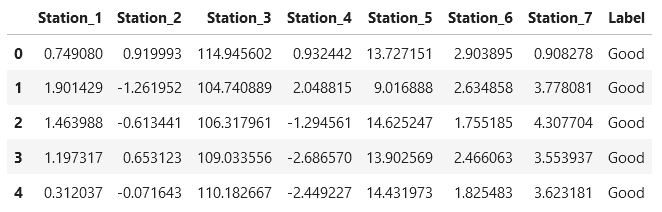 Next, we study the distribution of the data using the
 .describe() method from Pandas.
python
# Show average, min and max of numerical values
data.describe()
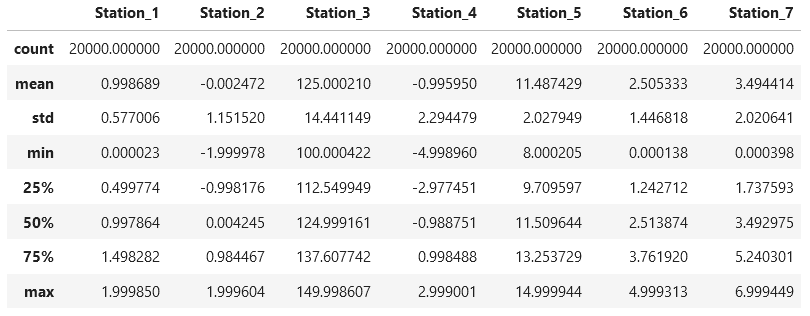 We see that we have 20,000 data points, and the measurements range from -5 to +150. Hence, we note for later that we need to normalize the dataset: the different magnitudes of the numerical values would otherwise negatively affect the LDA. How many good parts and how many bad parts do we have?
python
We see that we have 20,000 data points, and the measurements range from -5 to +150. Hence, we note for later that we need to normalize the dataset: the different magnitudes of the numerical values would otherwise negatively affect the LDA. How many good parts and how many bad parts do we have?
python
# Count the number of good and bad parts
label_counts = data['Label'].value_counts()

# Display the results
print("Number of Good and Bad Parts:")
print(label_counts)
 We have 19,031 good parts and 969 defective parts. The fact that the dataset is so imbalanced is an issue for further analysis. Therefore, we select all defective parts and an equal number of randomly chosen good parts for the further processing.
python
We have 19,031 good parts and 969 defective parts. The fact that the dataset is so imbalanced is an issue for further analysis. Therefore, we select all defective parts and an equal number of randomly chosen good parts for the further processing.
python
# Select all bad parts
bad_parts = data[data['Label'] == 'Bad']

# Randomly select an equal number of good parts
good_parts = data[data['Label'] == 'Good'].sample(n=len(bad_parts), random_state=42)

# Combine both subsets to create a balanced dataset
balanced_data = pd.concat([bad_parts, good_parts])

# Shuffle the combined dataset
balanced_data = balanced_data.sample(frac=1, random_state=42).reset_index(drop=True)

# Display the number of good and bad parts in the balanced dataset
print("Number of Good and Bad Parts in the balanced dataset:")
print(balanced_data['Label'].value_counts())
 Now, let's apply our LDA from scratch to the balanced dataset. We use the
 StandardScaler from sklearn to normalize the measurements for each feature to have a mean of 0 and a standard deviation of 1. We choose only one linear discriminant axis (m=1) onto which we project the data. This helps us clearly see which features are most relevant in distinguishing good from bad parts, and we visualize the projected data in a histogram.
python
import matplotlib.pyplot as plt
from sklearn.preprocessing import StandardScaler

# Separate features and labels
X = balanced_data.drop(columns=['Label'])
y = balanced_data['Label']

# Normalize the features
scaler = StandardScaler()
X_scaled = scaler.fit_transform(X)

# Perform LDA
lda = LDA_fs(m=1)  # Instanciate LDA object with 1 axis
X_lda = lda.fit_transform(X_scaled, y) # Fit the model and project the data

# Plot the LDA projection
plt.figure(figsize=(10, 6))
plt.hist(X_lda[y == 'Good'], bins=20, alpha=0.7, label='Good', color='green')
plt.hist(X_lda[y == 'Bad'], bins=20, alpha=0.7, label='Bad', color='red')
plt.title("LDA Projection of Good and Bad Parts")
plt.xlabel("LDA Component")
plt.ylabel("Frequency")
plt.legend()
plt.show()

# Examine feature contributions to the LDA component
feature_importance = pd.DataFrame({'Feature': X.columns, 'LDA Coefficient': lda.W[0]})
feature_importance = feature_importance.sort_values(by='LDA Coefficient', ascending=False)

# Display feature importance
print("Feature Contributions to LDA Component:")
print(feature_importance)
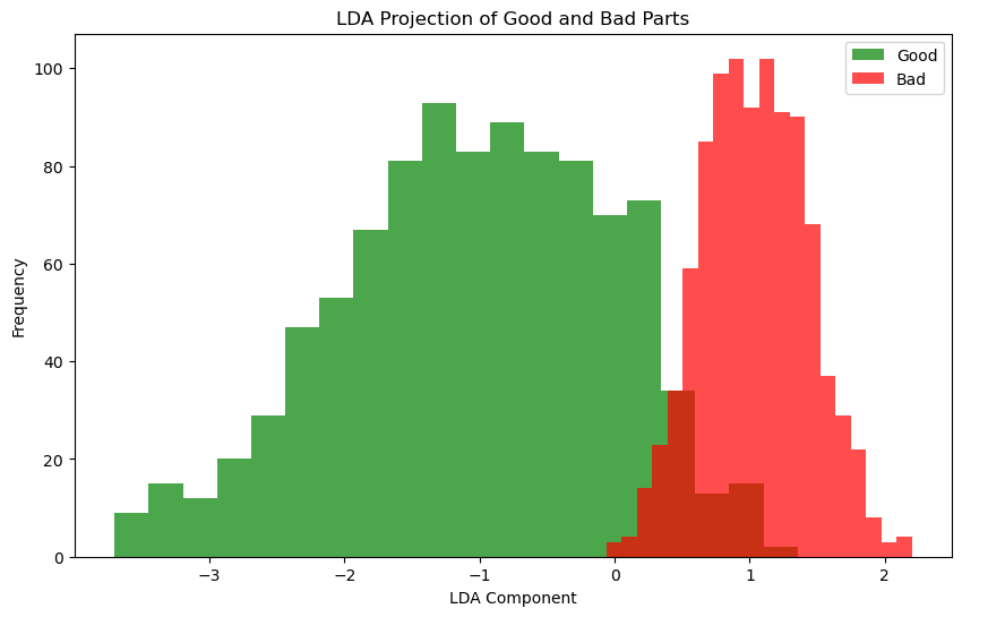 Feature matrix projected to one LD (m=1)
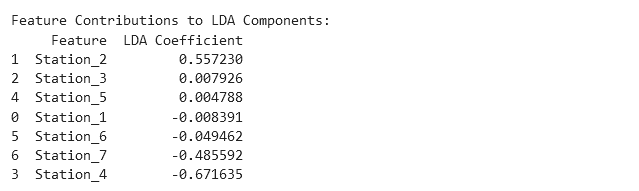 Feature importance = How much do the stations contribute to class separation?
The histogram shows that we can separate the good parts from the defective parts very well, with only a small overlap. This is already a positive result and indicates that our LDA was successful.
The "LDA Coefficients" from the table "Feature Contributions to LDA Components" represent the eigenvector from the first (and only, since m=1) column of our transformation matrix W. They indicate the direction and magnitude with which the normalized measurements from the stations are projected onto the linear discriminant axis. The values in the table are sorted in descending order. We need to read the table from both the top and the bottom simultaneously because the absolute value of the coefficient indicates the significance of each station in separating the classes and, consequently, its contribution to the production of defective parts. The sign indicates whether a lower or higher measurement increases the likelihood of defective parts. Let's take a closer look at our example:
The largest absolute value is from Station 4, with a coefficient of -0.672. This means that Station 4 has the strongest influence on part failure. Due to the negative sign, higher positive measurements are projected towards a negative linear discriminant (LD). The histogram shows that a negative LD is associated with good (green) parts. Conversely, low and negative measurements at this station increase the likelihood of part failure. The second highest absolute value is from Station 2, with a coefficient of 0.557. Therefore, this station is the second most significant contributor to part failures. The positive sign indicates that high positive measurements are projected towards the positive LD. From the histogram, we know that a high positive LD value is associated with a high likelihood of failure. In other words, high measurements at Station 2 lead to part failures. The third highest coefficient comes from Station 7, with a value of -0.486. This makes Station 7 the third largest contributor to part failures. The negative sign again indicates that high positive values at this station lead to a negative LD (which corresponds to good parts). Conversely, low and negative values at this station lead to part failures. All other LDA coefficients are an order of magnitude smaller than the three mentioned, the associated stations therefore have no influence on part failure.
Are the results of our LDA analysis correct? As you may have already guessed, the production dataset is synthetically generated. I labeled all parts as defective where the measurement at Station 2 was greater than 0.5, the value at Station 4 was less than -2.5, and the value at Station 7 was less than 3. It turns out that the LDA hit the mark perfectly!
python
Feature importance = How much do the stations contribute to class separation?
The histogram shows that we can separate the good parts from the defective parts very well, with only a small overlap. This is already a positive result and indicates that our LDA was successful.
The "LDA Coefficients" from the table "Feature Contributions to LDA Components" represent the eigenvector from the first (and only, since m=1) column of our transformation matrix W. They indicate the direction and magnitude with which the normalized measurements from the stations are projected onto the linear discriminant axis. The values in the table are sorted in descending order. We need to read the table from both the top and the bottom simultaneously because the absolute value of the coefficient indicates the significance of each station in separating the classes and, consequently, its contribution to the production of defective parts. The sign indicates whether a lower or higher measurement increases the likelihood of defective parts. Let's take a closer look at our example:
The largest absolute value is from Station 4, with a coefficient of -0.672. This means that Station 4 has the strongest influence on part failure. Due to the negative sign, higher positive measurements are projected towards a negative linear discriminant (LD). The histogram shows that a negative LD is associated with good (green) parts. Conversely, low and negative measurements at this station increase the likelihood of part failure. The second highest absolute value is from Station 2, with a coefficient of 0.557. Therefore, this station is the second most significant contributor to part failures. The positive sign indicates that high positive measurements are projected towards the positive LD. From the histogram, we know that a high positive LD value is associated with a high likelihood of failure. In other words, high measurements at Station 2 lead to part failures. The third highest coefficient comes from Station 7, with a value of -0.486. This makes Station 7 the third largest contributor to part failures. The negative sign again indicates that high positive values at this station lead to a negative LD (which corresponds to good parts). Conversely, low and negative values at this station lead to part failures. All other LDA coefficients are an order of magnitude smaller than the three mentioned, the associated stations therefore have no influence on part failure.
Are the results of our LDA analysis correct? As you may have already guessed, the production dataset is synthetically generated. I labeled all parts as defective where the measurement at Station 2 was greater than 0.5, the value at Station 4 was less than -2.5, and the value at Station 7 was less than 3. It turns out that the LDA hit the mark perfectly!
python
# Determine if a sample is a good or bad part based on the conditions
data['Label'] = np.where(
(data['Station_2'] > 0.5) & (data['Station_4'] < -2.5) & (data['Station_7'] < 3),
'Bad',
'Good'
)
5. Conclusion
Linear Discriminant Analysis (LDA) not only reduces the complexity of datasets but also highlights the key features that drive class separation, making it highly effective for identifying failure causes in production systems. It is a straightforward yet powerful method with practical applications and is readily available in libraries like scikit-learn.
To achieve optimal results, it is crucial to balance the dataset (ensure a similar number of samples in each class) and normalize it (mean of 0 and standard deviation of 1). The next time you work with a large dataset containing class labels and numerous features, why not give LDA a try?
Register Now to Continue Reading
Unlock Towards Data Science with a Free Account
All articles on Towards Data Science are available to registered users. Create a free account today to access this article and thousands more.
Register for freeSign in to your account
 Written By
PhD Engineer, Lean Production professional, and AI enthisiast.
See all from Ingo Nowitzky
class-separationData PreparationDimensionality ReductionFailure DetectionMachine Learning
Share This Article
Towards Data Science is a community publication. Submit your insights to reach our global audience and earn through the TDS Author Payment Program.
Write for TDS
Related Articles
Machine Learning
A Machine Learning approach to eye pose estimation from just a single front-facing perspective as input.
Ryan Rudes
September 21, 20207 min read
Machine Learning
Hacking Granger Causality Test with ML Approaches
Marco Cerliani
April 6, 20235 min read
Artificial Intelligence
A walkthrough of some of Facebook's interview questions!
Terence Shin, MSc, MBA
March 8, 20208 min read
Artificial Intelligence
Everybody knows what Gradient Descent is and how it works. Ever wondered why it works? Here's a mathematical explanation
Kunj Mehta
October 20, 20214 min read
Deep Learning
A guide to getting your deep learning model into production with TensorFlow Serving.
Zito Relova
April 13, 20214 min read
Deep Learning
It is a common practice to use cross-entropy in the loss function while constructing a Generative Adversarial Network [1] even though...
J. Rafid Siddiqui, PhD
February 6, 20223 min read
Agentic AI
An 85% accurate agent fails four out of five times on a 10-step task. Here's the arithmetic nobody runs before deploying.
Kaushik Rajan
March 20, 202611 min read
Deep Learning
Semi-Supervised Learning (SSL) has blossomed in the deep learning research community - we share lessons learned taking SSL into production.
Varun Nair
September 25, 202016 min read
Machine Learning
An Introduction To MLflow Tracking
Ram Vegiraju
March 22, 20224 min read
Your home for data science and AI. The world's leading publication for data science, data analytics, data engineering, machine learning, and artificial intelligence professionals.
Subscribe to Our NewsletterWrite For TDS•About•Advertise•Privacy Policy•Terms of Use
© Insight Media Group, LLC 2026•The New Stack•roadmap.sh•Creator Network
Recommended Articles
Close