How I Reduced Our React Bundle by 62%: Lessons in Real-World Performance Engineering

I write technical articles that analyze real world engineering problems through the lens of production systems.
My work focuses on architectural tradeoffs, UI layer system design, performance optimization, and reliability patterns derived from shipping and maintaining scalable applications.
TL;DR: What You’ll Learn
How to visualize bundle bloat with rollup-plugin-visualizer
Why switching PrimeIcons → React Icons saved 550KB instantly
The lazy loading mistake that made things 90% worse (yes, worse)
Route-level vs component-level code splitting: where to draw the line
Final result: 62% reduction, zero warnings, and hard-earned lessons
⚠️ Learning Journey Disclaimer
This article documents a local optimization work I conducted as an intern. All metrics are from my development environment, not production deployments. While the techniques are production-ready, the specific performance improvements haven’t been validated with real users yet. This is my learning process, shared transparently, including the spectacular Build 3 failure.
This was less about shrinking numbers and more about learning how to reason about performance trade-offs in real systems.
The Problem: When Your Production Build Screams for Help
You’ve just wrapped up a development sprint. Everything works perfectly in development. You run npm run build to preview the production bundle, and your terminal erupts in warnings:
⚠️ Some chunks are larger than 500 kB after minification.
- Consider using dynamic import() to code-split the application
- Use build.rollupOptions.output.manualChunks to improve chunking
That was my reality as an engineering intern curious about production builds. While working on a React-based internal tool, I ran npm run build one afternoon and discovered that my main application chunk had ballooned to 893.07 kB with a single CSS warning still lingering. The total bundle sat at 1,976.3 kB uncompressed and 409.65 kB when compressed.
Initially, I wondered if I should just ignore these warnings. After all, the app worked fine locally. But after researching the real-world impact of bundle size on Core Web Vitals, user retention, and mobile performance, I realized this was an opportunity to dive deep into performance optimization.
This wasn’t just a warning to dismiss. It was a critical performance liability. Every unnecessary kilobyte translates directly to:
Longer Time to Interactive (TTI)
Higher bounce rates on slower networks
Increased CDN and hosting costs
Poor Core Web Vitals scores damaging SEO
Frustrated users, especially on mobile devices
What followed was a systematic optimization journey spanning four builds, including one spectacular disaster that taught me more than any success. Here’s the complete story.
About This Project
This optimization was performed locally on my development machine as a learning exercise. I’m working on a React-based internal tool built with Vite, and after noticing build warnings, I decided to systematically investigate bundle optimization strategies.
Important context: This hasn’t been deployed to production yet. All metrics and results in this article come from local builds and my development environment. I’m documenting this process both as a learning exercise.
Step 1: Profiling the Bundle with rollup-plugin-visualizer
Before making any changes, I needed complete visibility into what was consuming bundle space. You can’t optimize what you can’t measure.
Why rollup-plugin-visualizer?
Vite uses Rollup under the hood, and rollup-plugin-visualizer generates an interactive treemap visualization of your production bundle. Think of it as Chrome DevTools' Coverage tab, but specifically for your build output, showing exactly which packages and modules are consuming space.
Installation:
npm install --save-dev rollup-plugin-visualizer
Configuration in vite.config.js:
import { visualizer } from 'rollup-plugin-visualizer';
export default defineConfig({
  plugins: [
    react(),
    visualizer({
      open: true,
      gzipSize: true,
      brotliSize: true,
      filename: './dist/stats.html'
    })
  ]
});
Running the production build now generates an interactive HTML report showing:
Parsed size (actual file size on disk)
Compressed size (what actually gets transferred)
Brotli size (even better compression for modern CDNs)
Visual treemap of which packages consume the most space
What the Visualizer Exposed
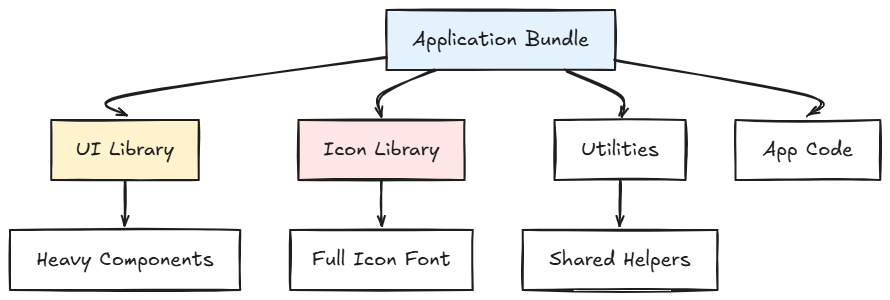
The treemap immediately revealed the problems:
PrimeIcons: Shipping an entire CSS-based icon font library despite using only ~15 icons
Heavy components: Large third-party UI libraries loaded synchronously on initial render
The visualizer became my north star for every subsequent optimization. Each change would be validated by re-running the build and checking the treemap.
Step 2: Surgical Dependency Replacement: PrimeIcons to React Icons
Build 1 Baseline

Main chunk: 893.07 kB
Total bundle: 1,976.3 kB
Total compressed: 409.65 kB
JS Warnings: 1
CSS Warnings: 1
Build Time: 8.76s
The PrimeIcons Problem
PrimeIcons follows the traditional icon font approach, a monolithic architecture that is fundamentally incompatible with modern tree-shaking:
Ships a complete CSS file containing all icon definitions
Loads every icon’s vector data via font files, regardless of actual usage
Requires className-based styling:
<i className="pi pi-home">Zero tree-shaking: you pay the full cost even if you use a single icon
In my case, I was using approximately 15 icons but shipping the entire library to every user.
Why React Icons?
React Icons is a component-based, tree-shakeable icon library that aggregates 20+ popular icon sets (Font Awesome, Material Icons, Feather, Heroicons, Bootstrap Icons, and more) into a unified API.
Key Technical Advantages:
1. Aggressive Tree-Shaking Through ES Modules
React Icons uses ES module exports with each icon as a standalone React component. Modern bundlers like Vite can analyze the import graph and eliminate unused code at build time.
// Before: PrimeIcons (loads entire library)
import 'primeicons/primeicons.css';
<i className="pi pi-home" />
// After: React Icons (only bundles what you import)
import { FaHome } from 'react-icons/fa';
<FaHome />
Only FaHome gets bundled. The other 2,000+ icons? Completely eliminated. This is dead code elimination at its finest.
2. Type Safety and Developer Experience
Icons become first-class React components with full TypeScript definitions:
IntelliSense autocomplete in your IDE
Compile-time error checking
No more typos in className strings
Clear dependency tracking
3. Props-Based Styling
<FaHome
  size={24}
  color="#3b82f6"
  style={{ marginRight: 8 }}
  className="hover:scale-110 transition-transform"
/>
Size, color, and styles are props, with no CSS classes required. This makes dynamic theming trivial and eliminates global CSS pollution.
4. Icon Set Flexibility
Need icons from multiple design systems? React Icons makes it seamless:
import { MdDashboard } from 'react-icons/md';  // Material Design
import { FaUserCircle } from 'react-icons/fa';  // Font Awesome
import { HiChartBar } from 'react-icons/hi';    // Heroicons
import { BiCog } from 'react-icons/bi';         // Bootstrap Icons
This design-system agnosticism is invaluable as product requirements evolve. No need to commit to a single icon family upfront.
5. Performance at Scale
Pure React components with minimal runtime overhead
Better integration with React’s reconciliation algorithm
No global CSS to parse
Easier to audit dependencies
Simpler to update without breaking changes
Business Impact Beyond Bundle Size
Developer Velocity: Switching icons no longer requires hunting through CSS documentation. Import, use, done.
Design Flexibility: Product designers can mix icon styles without engineering constraints.
Maintainability: Explicit imports make it trivial to find and update icon usage. No more grep-ing for className strings.
Future-Proofing: React Icons tracks upstream icon libraries, ensuring access to the latest icons without manual CSS updates.
Migration Strategy
I approached the migration systematically:
Audit current usage: Ran global search for
className="pito identify all PrimeIcons instancesCreate mapping document: Built a table mapping PrimeIcons to React Icons equivalents (e.g.,
pi-home→FaHome)Incremental replacement: Swapped icons file-by-file, testing for visual regressions
Remove PrimeIcons: Uninstalled the package and purged all CSS imports
Validate: Checked treemap to confirm elimination
Build 2 Results

Main chunk: 893.07 kB (no change)
Total bundle: 1,425.92 kB (-550.38 kB, -28%)
Total compressed: 304.6 kB (-105.05 kB, -26%)
JS Warnings: 0 ✅
CSS Warnings: 1
Build Time: 6.81s (-22%)
Critical Observation: The main chunk size didn’t decrease, but the total bundle dropped by 550 kB and build time improved by 22%.
Why? PrimeIcons’ CSS and font files were distributed across multiple asset files. Eliminating them had a cascading effect on the overall bundle. Additionally, React Icons’ compile-time approach reduced the work Vite needed to do during builds.
The JS warning disappeared completely, a major win for build health.
Step 3: The Lazy Loading Disaster (And Recovery)
Encouraged by the PrimeIcons success, I decided to implement aggressive code-splitting using React’s lazy() and Suspense. The theory was sound: split the application into smaller chunks loaded on-demand, reducing initial bundle size.
The Mistake: Over-Aggressive Component Splitting
I lazily loaded almost everything:
// Pages (reasonable)
const Dashboard = lazy(() => import('./pages/Dashboard'));
const Analytics = lazy(() => import('./pages/Analytics'));
const Settings = lazy(() => import('./pages/Settings'));
// Components (mistake)
const Navbar = lazy(() => import('./components/Navbar'));
const Sidebar = lazy(() => import('./components/Sidebar'));
const Footer = lazy(() => import('./components/Footer'));
const UserProfile = lazy(() => import('./components/UserProfile'));
const DataTable = lazy(() => import('./components/DataTable'));
// ...and many more
I even split small utility components that were used across multiple pages. The logic seemed reasonable: “smaller chunks = better performance, right?”
Build 3 Results (The Catastrophe)

Main chunk: 1,291.70 kB (+398.63 kB, +45%) 🔴
Total bundle: 2,706.42 kB (+1,280.5 kB, +90%) 🔴
Total compressed: 740.79 kB (+436.19 kB, +143%) 🔴
JS Warnings: 1 ⚠️
Build Time: 8.76s (+29%)
Code Splitting: MAJOR REGRESSION
The bundle exploded. Not only was the main chunk 45% larger, but the total bundle nearly doubled. The compressed size grew by 143%, which was even worse than the uncompressed growth. Build warnings returned.
Root Cause Analysis: Why Over-Splitting Failed
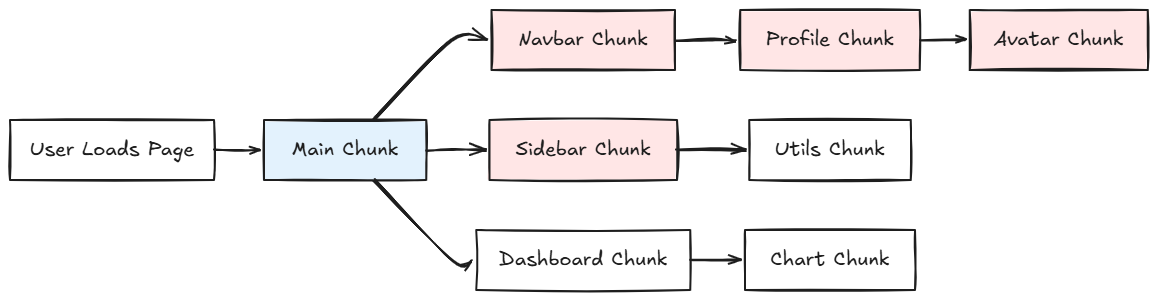
1. Shared Dependency Duplication
When you aggressively split components, Rollup attempts to extract shared dependencies into common chunks. However, its heuristics aren’t perfect. I ended up with:
React duplicated across 8+ chunks
React Router code in 12 chunks
Utility functions copy-pasted everywhere
The bundler couldn’t determine optimal common chunks, so it erred on the side of duplication to avoid complex dependency graphs.
2. HTTP Request Overhead
Instead of one optimized 337 kB chunk, I had:
47 chunks ranging from 5 KB to 200 KB
Multiple waterfall requests as components loaded other lazy components
Connection setup overhead for each request
3. Waterfall Loading Cascade
The real killer was sequential loading:
User visits page → Loads main chunk → Parses
→ Encounters lazy Navbar → Loads Navbar chunk → Parses
→ Navbar lazy loads UserProfile → Loads UserProfile chunk → Parses
→ UserProfile lazy loads Avatar → Loads Avatar chunk → Parses
This would create a 4-level waterfall in production where each component had to fully load before the next could start.
4. Compression Efficiency Loss
Gzip and Brotli build compression dictionaries based on repeated patterns in files. Larger files provide more opportunities for dictionary building, achieving better compression ratios.
By splitting into tiny chunks, I eliminated these opportunities:
A 100 KB file might compress to 25 KB (75% compression)
Ten 10 KB files might compress to 4 KB each (60% compression each)
Net result: 40 KB vs 25 KB, 60% more data transferred
This explained why my compressed size grew even more dramatically than raw size.
5. Module Boundary Overhead
Each lazy chunk includes Vite/Webpack runtime code for:
Dynamic import handling
Module registry updates
Chunk dependency resolution
Error boundary logic
With 47 chunks, this overhead appeared 47 times. In a monolithic bundle, it appears once.
The Recovery: Strategic, Route-Level Code Splitting
I reverted all component-level splitting and applied lazy loading only where it provided measurable value:
✅ Route-Level Code Splitting (The Sweet Spot)
// Excellent: Split by routes
const Dashboard = lazy(() => import('./pages/Dashboard'));
const Analytics = lazy(() => import('./pages/Analytics'));
const AdminPanel = lazy(() => import('./pages/AdminPanel'));
const Reports = lazy(() => import('./pages/Reports'));
<Suspense fallback={<PageLoader />}>
  <Routes>
    <Route path="/dashboard" element={<Dashboard />} />
    <Route path="/analytics" element={<Analytics />} />
    <Route path="/admin" element={<AdminPanel />} />
    <Route path="/reports" element={<Reports />} />
  </Routes>
</Suspense>
Why this works perfectly:
Users navigate to different routes at different times
Route boundaries are natural application seams
Each route chunk is substantial (50–150 kB), enabling good compression
No waterfall loading. Route components are top-level.
Users get only what they need, when they need it
✅ Heavy, Conditional Features
// Good: Lazy load large, rarely-used features
const ChartingDashboard = lazy(() => import('./features/ChartingDashboard'));
const PDFGenerator = lazy(() => import('./features/PDFGenerator'));
const VideoPlayer = lazy(() => import('./features/VideoPlayer'));
// Only load when user explicitly requests
{showAdvancedCharts && (
  <Suspense fallback={<Spinner />}>
    <ChartingDashboard />
  </Suspense>
)}
These components are:
Large (100+ KB)
Used by <20% of users
Behind user actions (clicks, toggles)
Self-contained with minimal dependencies
❌ Critical UI Components (Never Split These)
// Bad: Don't lazy load critical path components
import Navbar from './components/Navbar';
import Sidebar from './components/Sidebar';
import Footer from './components/Footer';
import ErrorBoundary from './components/ErrorBoundary';
Why synchronous imports are mandatory here:
These components render on every page load
Users see them immediately, since splitting only delays FCP.
They’re part of the application skeleton
No caching benefit since they’re always needed
Splitting creates layout shift and loading flashes
The principle I learned: If a component appears on initial render of any route, it belongs in the main bundle.
Build 4 Results (The Victory)

Main chunk: 336.87 kB (-954.83 kB from Build 3, -62% from Build 1)
Total bundle: 1,427.13 kB (-1,279.29 kB, nearly back to Build 2)
Total compressed: 292.29 kB (-448.5 kB, -29% from Build 1)
JS Warnings: 0 ✅
CSS Warnings: 0 ✅
Build Time: 7.43s
Code Splitting: Excellent ✅
Largest Chunk: 145.93 kB ✅
By limiting lazy loading to routes and conditional features, I achieved:
62% main chunk reduction from baseline
28% total bundle reduction from baseline
29% smaller compressed size from baseline
All warnings eliminated
Proper code-splitting without overhead
Excellent compression ratios restored
Build Progression: Complete Analysis

Key Learnings: What Worked and What Catastrophically Failed
✅ Strategies That Delivered Results
Bundle Analysis First: rollup-plugin-visualizer prevented blind optimization
Tree-Shakeable Dependencies: React Icons, date-fns, modular Lodash eliminated dead code
Route-Level Code Splitting: Perfect granularity for lazy loading
Manual Vendor Chunks: Improved cache hit rates and prevented duplication
Measuring Compressed Sizes: Gzip metrics matter more than raw file sizes
❌ Strategies That Backfired Spectacularly
Component-Level Lazy Loading: Created exponentially more problems than solutions
Splitting Critical UI: Navbar/Sidebar splitting delayed FCP with zero benefit
Ignoring Compression Efficiency: Small chunks compress poorly. This is a critical oversight.
Premature Optimization: Applying lazy loading before profiling wasted days
Chasing Warnings Blindly: Build 3 fixed warnings but destroyed performance
Production Best Practices for React Bundles
1. Establish Bundle Budgets in CI/CD
// package.json
{
  "scripts": {
    "build": "vite build",
    "build:check": "vite build && node scripts/check-bundle-size.js"
  }
}
Fail builds if bundles exceed thresholds. Prevent regressions before they ship.
2. Monitor Continuously with Lighthouse CI
Integrate Lighthouse into CI to catch performance regressions:
# .github/workflows/lighthouse.yml
- name: Run Lighthouse CI
  uses: treosh/lighthouse-ci-action@v9
  with:
    budgetPath: ./budget.json
    uploadArtifacts: true
3. Educate Your Team
Share bundle reports in code reviews. Include screenshots from rollup-plugin-visualizer in PRs that add dependencies. Make performance everyone’s responsibility.
4. Implement Progressive Enhancement
Core functionality should work even if lazy chunks fail to load. Use error boundaries:
<Suspense fallback={<Spinner />}>
  <ErrorBoundary fallback={<ErrorMessage />}>
    <LazyComponent />
  </ErrorBoundary>
</Suspense>
5. Audit Dependencies Quarterly
Set calendar reminders to review node_modules. Libraries grow over time. That 50 KB package might be 150 KB now.
Key Takeaways for Your Next Performance Optimization
Always profile first: You can’t optimize what you can’t measure
Start with low-hanging fruit: Dependencies are often the biggest wins
Understand compression: Small chunks compress poorly; size your chunks accordingly
Respect natural boundaries: Routes are perfect split points; small components aren’t
Test incrementally: One change at a time, with full metrics each step
Embrace failure as learning: Build 3 taught me more than any tutorial
Think holistically: Bundle size is just one metric; consider TTI, FCP, and user experience
Conclusion
As an intern, tackling this optimization taught me more about React, bundling, and production engineering than any tutorial could. The Build 3 disaster was humbling but invaluable, as it taught me that understanding why an optimization works matters more than blindly applying best practices from blog posts.
The journey from 893KB to 337KB was not just about bundle size. It was about developing engineering judgment, including knowing when to optimize, how to measure impact, and when to roll back and try a different approach.
Bundle optimization is a discipline, not a destination. This journey reinforced that more optimization is not always better. It is about the right optimization applied at the right boundaries, informed by real data and user needs.
If you’re seeing build warnings in your React projects, treat it as an opportunity to learn. The tools exist, the techniques work, and yes, you’ll make mistakes along the way (I certainly did). But each mistake teaches you something valuable.
If deployed, these optimizations could benefit users, reduce infrastructure costs, and improve team velocity. I’m documenting my process openly, including failures, to help other junior developers approach performance optimization systematically.
Resources
rollup-plugin-visualizer: Bundle analysis treemap
React Icons: Tree-shakeable icon components
Vite Build Optimizations: Official Vite performance guide
Web.dev Performance Budgets: Google’s bundle size recommendations
Note: This article was originally published on Medium and is republished here for wider access and long-term reference.