保留正文与补采附件。源页面当前未重新核验;具体限制见交付清单。
 We value your privacy
We use cookies to enhance your browsing experience, serve personalised ads or content, and analyse our traffic. By clicking "Accept All", you consent to our use of cookies.
Customise Reject All Accept All
Customise Consent Preferences
We value your privacy
We use cookies to enhance your browsing experience, serve personalised ads or content, and analyse our traffic. By clicking "Accept All", you consent to our use of cookies.
Customise Reject All Accept All
Customise Consent Preferences  We use cookies to help you navigate efficiently and perform certain functions. You will find detailed information about all cookies under each consent category below.
The cookies that are categorised as "Necessary" are stored on your browser as they are essential for enabling the basic functionalities of the site. ... Show more
NecessaryAlways Active
Necessary cookies are required to enable the basic features of this site, such as providing secure log-in or adjusting your consent preferences. These cookies do not store any personally identifiable data.
We use cookies to help you navigate efficiently and perform certain functions. You will find detailed information about all cookies under each consent category below.
The cookies that are categorised as "Necessary" are stored on your browser as they are essential for enabling the basic functionalities of the site. ... Show more
NecessaryAlways Active
Necessary cookies are required to enable the basic features of this site, such as providing secure log-in or adjusting your consent preferences. These cookies do not store any personally identifiable data.
-
Cookie
BCTempID
-
Duration
10 minutes
-
Description
No description available.
-
Cookie
__cf_bm
-
Duration
1 hour
-
Description
This cookie, set by Cloudflare, is used to support Cloudflare Bot Management.
-
Cookie
AWSALBCORS
-
Duration
7 days
-
Description
Amazon Web Services set this cookie for load balancing.
-
Cookie
_cfuvid
-
Duration
session
-
Description
Cloudflare sets this cookie to track users across sessions to optimize user experience by maintaining session consistency and providing personalized services
-
Cookie
li_gc
-
Duration
6 months
-
Description
Linkedin set this cookie for storing visitor's consent regarding using cookies for non-essential purposes.
-
Cookie
__hssrc
-
Duration
session
-
Description
This cookie is set by Hubspot whenever it changes the session cookie. The __hssrc cookie set to 1 indicates that the user has restarted the browser, and if the cookie does not exist, it is assumed to be a new session.
-
Cookie
__hssc
-
Duration
1 hour
-
Description
HubSpot sets this cookie to keep track of sessions and to determine if HubSpot should increment the session number and timestamps in the __hstc cookie.
-
Cookie
wpEmojiSettingsSupports
-
Duration
session
-
Description
WordPress sets this cookie when a user interacts with emojis on a WordPress site. It helps determine if the user's browser can display emojis properly.
-
Cookie
BCSessionID
-
Duration
1 year 1 month 4 days
-
Description
Blueconic sets this cookie as a unique identifier for the BlueConic profile.
-
Cookie
_octo
-
Duration
1 year
-
Description
No description available.
-
Cookie
logged_in
-
Duration
1 year
-
Description
No description available.
-
Cookie
__Secure-YEC
-
Duration
past
-
Description
YouTube sets this cookie to stores the user's video player preferences using embedded YouTube video
-
Cookie
__eoi
-
Duration
6 months
-
Description
Description is currently not available.
-
Cookie
AWSALBTGCORS
-
Duration
7 days
-
Description
No description available.
-
Cookie
login-status-p
-
Duration
past
-
Description
Description is currently not available.
-
Cookie
AWSALBTG
-
Duration
7 days
-
Description
No description available.
-
Cookie
csrf_token
-
Duration
session
-
Description
No description available.
-
Cookie
token_v2
-
Duration
1 day
-
Description
Description is currently not available.
-
Cookie
D
-
Duration
1 year
-
Description
Description is currently not available.
-
Cookie
PHPSESSID
-
Duration
session
-
Description
This cookie is native to PHP applications. The cookie stores and identifies a user's unique session ID to manage user sessions on the website. The cookie is a session cookie and will be deleted when all the browser windows are closed.
-
Cookie
VISITOR_PRIVACY_METADATA
-
Duration
6 months
-
Description
YouTube sets this cookie to store the user's cookie consent state for the current domain.
-
Cookie
cookietest
-
Duration
session
-
Description
The cookietest cookie is typically used to determine whether the user's browser accepts cookies, essential for website functionality and user experience.
-
Cookie
__Host-airtable-session
-
Duration
1 year
-
Description
This cookie is used to enable us to integrate the services of Airtable.
-
Cookie
__Host-airtable-session.sig
-
Duration
1 year
-
Description
This cookie is used to enable us to integrate the services of Airtable.
-
Cookie
m
-
Duration
1 year 1 month 4 days
-
Description
Stripe sets this cookie for fraud prevention purposes. It identifies the device used to access the website, allowing the website to be formatted accordingly.
-
Cookie
BIGipServer*
-
Duration
session
-
Description
Marketo sets this cookie to collect information about the user's online activity and build a profile about their interests to provide advertisements relevant to the user.
-
Cookie
__cfruid
-
Duration
session
-
Description
Cloudflare sets this cookie to identify trusted web traffic.
-
Cookie
_GRECAPTCHA
-
Duration
6 months
-
Description
Google Recaptcha service sets this cookie to identify bots to protect the website against malicious spam attacks.
-
Cookie
__Secure-YNID
-
Duration
6 months
-
Description
Google cookie used to protect user security and prevent fraud, especially during the login process.
-
Cookie
cookieyes-consent
-
Duration
1 year
-
Description
CookieYes sets this cookie to remember users' consent preferences so that their preferences are respected on subsequent visits to this site. It does not collect or store any personal information about the site visitors.
Functional
Functional cookies help perform certain functionalities like sharing the content of the website on social media platforms, collecting feedback, and other third-party features.
-
Cookie
lidc
-
Duration
1 day
-
Description
LinkedIn sets the lidc cookie to facilitate data center selection.
-
Cookie
brw
-
Duration
1 year
-
Description
No description available.
-
Cookie
brwConsent
-
Duration
5 minutes
-
Description
Description is currently not available.
-
Cookie
WMF-Uniq
-
Duration
1 year
-
Description
Description is currently not available.
-
Cookie
loom_anon_comment
-
Duration
1 year
-
Description
No description available.
-
Cookie
loom_referral_video
-
Duration
session
-
Description
Description is currently not available.
-
Cookie
VISITOR_INFO1_LIVE
-
Duration
6 months
-
Description
A cookie set by YouTube to measure bandwidth that determines whether the user gets the new or old player interface.
-
Cookie
yt-remote-connected-devices
-
Duration
Never Expires
-
Description
YouTube sets this cookie to store the user's video preferences using embedded YouTube videos.
-
Cookie
ytidb::LAST_RESULT_ENTRY_KEY
-
Duration
Never Expires
-
Description
The cookie ytidb::LAST_RESULT_ENTRY_KEY is used by YouTube to store the last search result entry that was clicked by the user. This information is used to improve the user experience by providing more relevant search results in the future.
-
Cookie
yt-remote-device-id
-
Duration
Never Expires
-
Description
YouTube sets this cookie to store the user's video preferences using embedded YouTube videos.
-
Cookie
yt-remote-session-name
-
Duration
session
-
Description
The yt-remote-session-name cookie is used by YouTube to store the user's video player preferences using embedded YouTube video.
-
Cookie
yt-remote-fast-check-period
-
Duration
session
-
Description
The yt-remote-fast-check-period cookie is used by YouTube to store the user's video player preferences for embedded YouTube videos.
-
Cookie
yt-remote-session-app
-
Duration
session
-
Description
The yt-remote-session-app cookie is used by YouTube to store user preferences and information about the interface of the embedded YouTube video player.
-
Cookie
yt-remote-cast-available
-
Duration
session
-
Description
The yt-remote-cast-available cookie is used to store the user's preferences regarding whether casting is available on their YouTube video player.
-
Cookie
yt-remote-cast-installed
-
Duration
session
-
Description
The yt-remote-cast-installed cookie is used to store the user's video player preferences using embedded YouTube video.
-
Cookie
cp_session
-
Duration
3 months
-
Description
Codepen sets this cookie for Help systems found in the website.
-
Cookie
loid
-
Duration
1 year 1 month 4 days
-
Description
This cookie is set by the Reddit. The cookie enables the sharing of content from the website onto the social media platform.
Analytics
Analytical cookies are used to understand how visitors interact with the website. These cookies help provide information on metrics such as the number of visitors, bounce rate, traffic source, etc.
-
Cookie
__hstc
-
Duration
6 months
-
Description
Hubspot set this main cookie for tracking visitors. It contains the domain, initial timestamp (first visit), last timestamp (last visit), current timestamp (this visit), and session number (increments for each subsequent session).
-
Cookie
hubspotutk
-
Duration
6 months
-
Description
HubSpot sets this cookie to keep track of the visitors to the website. This cookie is passed to HubSpot on form submission and used when deduplicating contacts.
-
Cookie
_ga
-
Duration
1 year 1 month 4 days
-
Description
Google Analytics sets this cookie to calculate visitor, session and campaign data and track site usage for the site's analytics report. The cookie stores information anonymously and assigns a randomly generated number to recognise unique visitors.
-
Cookie
ga*
-
Duration
1 year 1 month 4 days
-
Description
Google Analytics sets this cookie to store and count page views.
-
Cookie
__Host-psifi.analyticsTrace
-
Duration
6 hours
-
Description
Description is currently not available.
-
Cookie
__Host-psifi.analyticsTraceV2
-
Duration
6 hours
-
Description
Description is currently not available.
-
Cookie
_gh_sess
-
Duration
session
-
Description
GitHub sets this cookie for temporary application and framework state between pages like what step the user is on in a multiple step form.
-
Cookie
YSC
-
Duration
session
-
Description
YSC cookie is set by Youtube and is used to track the views of embedded videos on Youtube pages.
-
Cookie
ajs_anonymous_id
-
Duration
1 year
-
Description
This cookie is set by Segment to count the number of people who visit a certain site by tracking if they have visited before.
-
Cookie
vuid
-
Duration
1 year 1 month 4 days
-
Description
Vimeo installs this cookie to collect tracking information by setting a unique ID to embed videos on the website.
Performance
Performance cookies are used to understand and analyse the key performance indexes of the website which helps in delivering a better user experience for the visitors.
-
Cookie
AWSALB
-
Duration
7 days
-
Description
AWSALB is an application load balancer cookie set by Amazon Web Services to map the session to the target.
-
Cookie
acq
-
Duration
past
-
Description
Description is currently not available.
-
Cookie
acq.sig
-
Duration
past
-
Description
Description is currently not available.
-
Cookie
ptc
-
Duration
2 years
-
Description
No description available.
Advertisement
Advertisement cookies are used to provide visitors with customised advertisements based on the pages you visited previously and to analyse the effectiveness of the ad campaigns.
-
Cookie
muc_ads
-
Duration
1 year 1 month 4 days
-
Description
Twitter sets this cookie to collect user behaviour and interaction data to optimize the website.
-
Cookie
guest_id_marketing
-
Duration
1 year 1 month 4 days
-
Description
Twitter sets this cookie to identify and track the website visitor.
-
Cookie
guest_id_ads
-
Duration
1 year 1 month 4 days
-
Description
Twitter sets this cookie to identify and track the website visitor.
-
Cookie
personalization_id
-
Duration
1 year 1 month 4 days
-
Description
Twitter sets this cookie to integrate and share features for social media and also store information about how the user uses the website, for tracking and targeting.
-
Cookie
guest_id
-
Duration
1 year 1 month 4 days
-
Description
Twitter sets this cookie to identify and track the website visitor. It registers if a user is signed in to the Twitter platform and collects information about ad preferences.
-
Cookie
bcookie
-
Duration
1 year
-
Description
LinkedIn sets this cookie from LinkedIn share buttons and ad tags to recognize browser IDs.
-
Cookie
__Secure-ROLLOUT_TOKEN
-
Duration
6 months
-
Description
YouTube sets this cookie to manage feature rollout and experimentation. It helps Google control which new features or interface changes are shown to users as part of testing and staged rollouts, ensuring consistent experience for a given user during an experiment.
-
Cookie
yt.innertube::nextId
-
Duration
Never Expires
-
Description
YouTube sets this cookie to register a unique ID to store data on what videos from YouTube the user has seen.
-
Cookie
yt.innertube::requests
-
Duration
Never Expires
-
Description
YouTube sets this cookie to register a unique ID to store data on what videos from YouTube the user has seen.
-
Cookie
session_tracker
-
Duration
session
-
Description
This cookie is set by the Reddit. This cookie is used to identify trusted web traffic. It also helps in adverstising on the website.
-
Cookie
edgebucket
-
Duration
session
-
Description
Reddit sets this cookie to save the information about a log-on Reddit user, for the purpose of advertisement recommendations and updating the content.
-
Cookie
did
-
Duration
1 year
-
Description
Arbor sets this cookie to show targeted ads to site visitors.This cookie expires after 2 months or 1 year.
Uncategorised
Other uncategorised cookies are those that are being analysed and have not been classified into a category as yet.
No cookies to display.
Reject All Save My Preferences Accept All
Toggle SearchToggle Mobile Navigation
Publish AI, ML & data-science insights to a global community of data professionals.
Sign inSubmit an Article
LatestEditor's PicksNewsletterShipAI
Write For TDS
LinkedInXToggle Search
Artificial Intelligence
The Algorithm That Made Google Google
How PageRank transformed how we searched the internet, and why it's still playing an important role in LLMs with Graph RAG.
Cristian Leo
December 18, 202417 min read
 Image generated by DALL-E
In the late 1990s, two Stanford University graduate students, Larry Page and Sergey Brin, were working on their PhD research when they came across an interesting idea.
Larry was particularly fascinated by the way web pages linked to one another. He saw the internet as a vast network of citations, similar to how academic papers reference each other. This sparked an idea: what if a web page's importance could be measured by how many other pages linked to it? But not just that - what if the importance of those linking pages also mattered?
Intrigued by that idea, Larry started building an algorithm that would later be named "PageRank" (a clever play on his last name). The algorithm treated each link to a webpage as a vote of confidence, but with a twist - votes from more important pages carried more weight.
Sergey Brin, interested in Larry's concept, joined him. Together, they worked from their dorm rooms, building a search engine that would use this ranking system. At first, they called their project "BackRub" due to its analysis of backward links.
As their project grew, they realized they had something special on their hands. Their search engine was producing significantly better results than existing search engines of the time. In 1998, they decided to take a leave of absence from Stanford to focus on their project full-time.
They renamed their search engine "Google" - again a play, this time on the mathematical term "googol" (a number represented by 1 followed by 100 zeros) - reflecting their ambition to organize the vast amount of information on the web. With some initial funding from investors, including a $100,000 check written in their garage office, Google was officially born. The rest is history.
Learn this step by step with the interactive AI Engineer and Machine Learning roadmaps.
Image generated by DALL-E
In the late 1990s, two Stanford University graduate students, Larry Page and Sergey Brin, were working on their PhD research when they came across an interesting idea.
Larry was particularly fascinated by the way web pages linked to one another. He saw the internet as a vast network of citations, similar to how academic papers reference each other. This sparked an idea: what if a web page's importance could be measured by how many other pages linked to it? But not just that - what if the importance of those linking pages also mattered?
Intrigued by that idea, Larry started building an algorithm that would later be named "PageRank" (a clever play on his last name). The algorithm treated each link to a webpage as a vote of confidence, but with a twist - votes from more important pages carried more weight.
Sergey Brin, interested in Larry's concept, joined him. Together, they worked from their dorm rooms, building a search engine that would use this ranking system. At first, they called their project "BackRub" due to its analysis of backward links.
As their project grew, they realized they had something special on their hands. Their search engine was producing significantly better results than existing search engines of the time. In 1998, they decided to take a leave of absence from Stanford to focus on their project full-time.
They renamed their search engine "Google" - again a play, this time on the mathematical term "googol" (a number represented by 1 followed by 100 zeros) - reflecting their ambition to organize the vast amount of information on the web. With some initial funding from investors, including a $100,000 check written in their garage office, Google was officially born. The rest is history.
Learn this step by step with the interactive AI Engineer and Machine Learning roadmaps.
Breaking down PageRank
Now, let's imagine we have 4 high school students: Amy, Bob, Charlie, and Diana. They are trying to decide who is more and less "cool", and how "cool" everyone is depends on how much support they get from the others. In particular, they have a pool of 100 "cool" points that is distributed to each student, hence 25 points each. Then, each student needs to give all their points to one or more students.
Let's say:
- Amy vouches for Bob
- Bob vouches for Amy
- Charlie vouches for Amy and Diana
- Diana vouches for everyone
After one round:
- Amy gets points from Bob (25) and half of Charlie's points (12.5) totaling 37.5 points
- Bob gets points from Amy (25) totaling 25 points
- Diana gets half of Charlie's points (12.5) totaling 12.5 points
Then, the points get redistributed again and again until they stabilize. With this mechanism, the more popular you are, the more valuable your vouch is.
This is basically how PageRank works, just with websites instead of students and links instead of vouchers.
The Math Behind PageRank
At its heart, PageRank is based on a simple, but very powerful idea: the importance of a webpage can be determined by the quantity and quality of links pointing to it. This concept can be broken down into several key principles:
- Every link to a page is a vote of confidence for that page.
- The importance of the page casting the vote matters.
- The more links a page casts, the less weight each link carries.
First, we need to understand the concept of the "random surfer." Imagine you're mindlessly clicking links on the internet (we've all been there, right?). You start on a random page, click a link, then another, and another. Occasionally, you get bored and just type in a new web address. This aimless journey is what we call the "random surfer model."
The PageRank of a webpage is basically the probability that this random surfer will end up on that page after clicking around for a really, really long time (theoretically, an infinite amount of time, but let's not get too philosophical here).
Now, here's where it gets interesting. The PageRank formula looks like this:
 PageRank formula - Image by Author
Where:
PageRank formula - Image by Author
Where:
- PR(A) is the PageRank of page A
- d is the damping factor (typically 0.85), which represents the probability that the random surfer will continue clicking links rather than jumping to a random page.
- N is the total number of pages in the network
- PR(T_i) is the PageRank of pages T_i which links to page A
- C(T_i) is the number of outbound links from page T_i
- n is the number of pages that link to page A
Now, let's look at the two parts of this formula:
 Left component in PageRank Formula - Image by Author
This is the probability that our random surfer gets bored and jumps directly to page A. It's like rolling a die with N sides (where N is the number of pages on the internet) and landing on page A.
Left component in PageRank Formula - Image by Author
This is the probability that our random surfer gets bored and jumps directly to page A. It's like rolling a die with N sides (where N is the number of pages on the internet) and landing on page A.
 Right component in PageRank Formula - Image by Author
This is the meaty part. It represents the probability of arriving at page A by following links. Each term in this sum is the PageRank of a page linking to A, divided by the number of links on that page.
PageRank is also recursive, which means that page A depends on the PageRank of the pages linking to it, which in turn depend on the pages linking to them, and so on. It's like a never-ending chain of popularity contests!
So how do we actually calculate this? We use an iterative process:
Right component in PageRank Formula - Image by Author
This is the meaty part. It represents the probability of arriving at page A by following links. Each term in this sum is the PageRank of a page linking to A, divided by the number of links on that page.
PageRank is also recursive, which means that page A depends on the PageRank of the pages linking to it, which in turn depend on the pages linking to them, and so on. It's like a never-ending chain of popularity contests!
So how do we actually calculate this? We use an iterative process:
- Start by giving every page an equal PageRank (let's say 1/N).
- Use our formula to calculate new PageRank values for each page.
- Repeat step 2 until the values stop changing much between iterations.
Now, you might be thinking, "Wait a minute, what about pages with no outgoing links? Or pages that only link to each other?" Great questions! These are what we call "dangling nodes" and "rank sinks," and they can cause problems for our algorithm.
For dangling nodes (pages with no outgoing links), we usually pretend they link to all other pages equally. For rank sinks (groups of pages that only link to each other), the random jump factor (1-d) helps prevent them from hoarding all the PageRank.
Ok that seems easy when dealing with 4 pages, but how can we scale it to the whole internet? Here, we use a few tricks to make it manageable:
- Sparse Matrix Representation : Most pages only link to a few others, so we can save a lot of memory by only storing the non-zero elements of our link matrix.
- Distributed Computing : We can split up the calculation across many computers, each working on a different part of the web.
- Approximation Methods : For really huge networks, we might use algorithms that give us a good estimate of PageRank without calculating it exactly for every single page.
And remember, the web is constantly changing. New pages are created, old ones disappear, links are added and removed. So Google (and other search engines) need to keep updating their PageRank calculations all the time.
Practical example
Let's start with a small web of just four pages to illustrate how PageRank actually works in practice. Imagine we have pages A, B, C, and D with the following link structure:
- Page A links to B and C
- Page B links to C and D
- Page C links to A
- Page D links to C
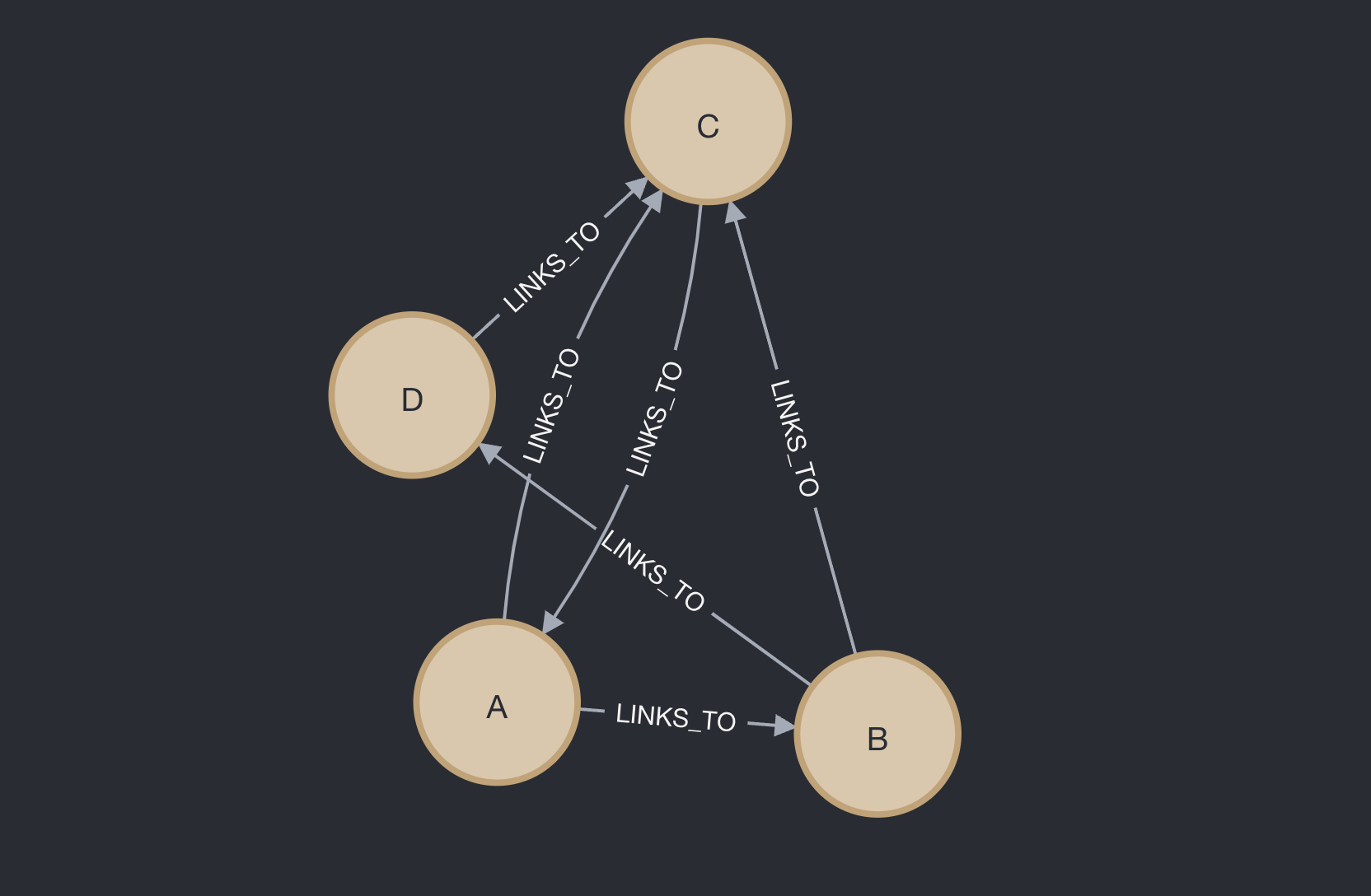 4 pages example visualized in a Knowledge Graph - Image by Author
Now, let's calculate the PageRank for these pages step by step. We'll use a damping factor (d) of 0.85, which is the typical value used in practice.
Step 1: Initialize PageRank We start by giving each page an equal PageRank. Since we have 4 pages, each page starts with a PageRank of 1/4 = 0.25.
4 pages example visualized in a Knowledge Graph - Image by Author
Now, let's calculate the PageRank for these pages step by step. We'll use a damping factor (d) of 0.85, which is the typical value used in practice.
Step 1: Initialize PageRank We start by giving each page an equal PageRank. Since we have 4 pages, each page starts with a PageRank of 1/4 = 0.25.
 Equal probabilities among the 4 pages - Image by Author
Step 2: Calculate new PageRank values Now we'll use our PageRank formula for each page. Remember, the formula is:
Calculate new page rank values using PageRank formula - Image by Author
Where N is the total number of pages (4 in our case), Y are the pages linking to X, and C(Y) is the number of outbound links from Y.
Equal probabilities among the 4 pages - Image by Author
Step 2: Calculate new PageRank values Now we'll use our PageRank formula for each page. Remember, the formula is:
Calculate new page rank values using PageRank formula - Image by Author
Where N is the total number of pages (4 in our case), Y are the pages linking to X, and C(Y) is the number of outbound links from Y.
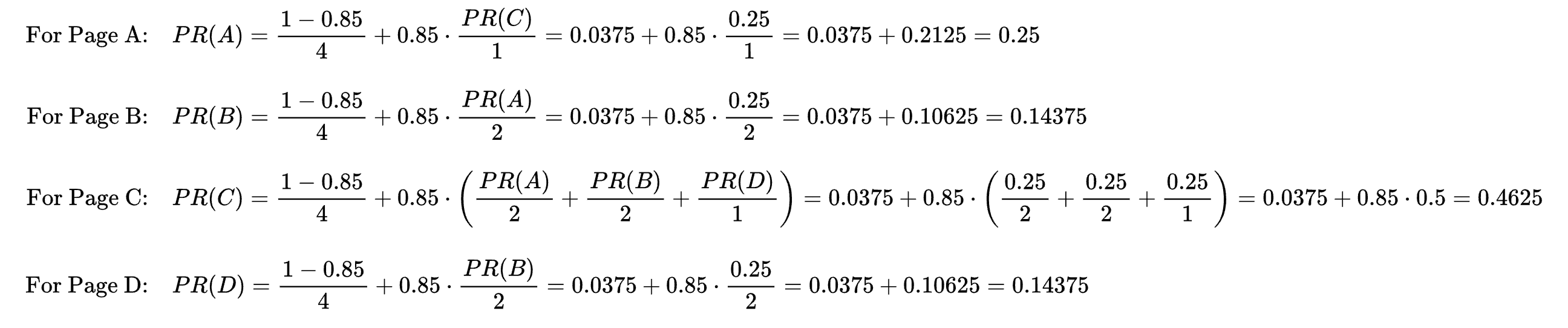 First iteration of calculation for 4 pages - Image by Author
Step 3: Iterate Now we use these new PageRank values and repeat the calculation. Let's do one more iteration:
First iteration of calculation for 4 pages - Image by Author
Step 3: Iterate Now we use these new PageRank values and repeat the calculation. Let's do one more iteration:
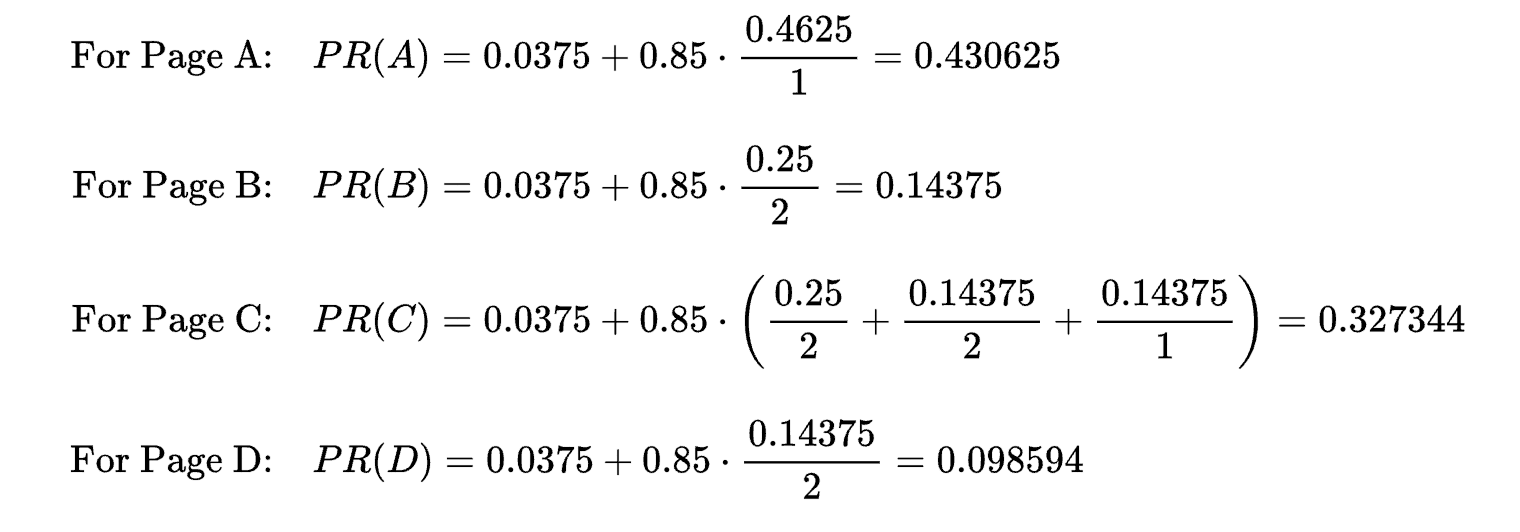 Second iteration of calculation for 4 pages - Image by Author
We would continue this process until the values converge (change very little between iterations). Indeed, the PageRank algorithm is guaranteed to converge because of the properties of the Google matrix (the matrix representing the web's link structure plus the damping factor). This matrix is stochastic (each column sums to 1) and irreducible (there's a path between any two pages), which ensures convergence to a unique solution.
Second iteration of calculation for 4 pages - Image by Author
We would continue this process until the values converge (change very little between iterations). Indeed, the PageRank algorithm is guaranteed to converge because of the properties of the Google matrix (the matrix representing the web's link structure plus the damping factor). This matrix is stochastic (each column sums to 1) and irreducible (there's a path between any two pages), which ensures convergence to a unique solution.
4: From Math to Code
Now, it's time to switch from theory to practice with a Python implementation of PageRank on a Knowledge Graph. Here, we will:
- Connect to a Neo4j graph database.
- Create a small sample graph structure to understand the basics.
- Crawl a subset of Wikipedia pages to build a larger, more realistic network of links.
- Load this network into Neo4j, creating nodes for pages and relationships for links.
- Implement PageRank in Python from scratch and run it on the graph data stored in Neo4j.
You can find all the code we will cover in this section on this Jupyter Notebook:
rag-knowledge-graph/pagerank/demo.ipynb at main · cristianleoo/rag-knowledge-graph
Setting up the Neo4j Connection
First, we need to set up a connection to our Neo4j database. Neo4j is a graph database that stores data in nodes (think webpages) and relationships (think hyperlinks). Connecting to it allows us to store our crawled data and run queries to build the link structure we need for PageRank. If you read my previous Graph RAG article, you would already know how to set it up, so just jump straight to the code. If not, let's first go over the Neo4j installation process. We will be using Neo4j just because it provides an easy installation and free option for local hosting (I don't have any sort of affiliation with it).
To install Neo4j simply visit the Neo4j Desktop Download Page and click Download. Open Neo4j Desktop after installation. Sign in or create a Neo4j account (required to activate the software).
Once logged in, create a New Project :
- Click on the
**+**button in the top-left corner.
- Name your project (e.g., "PageRank").
Inside your project, click on **Add Database**. SelectLocal DBMS and click Create a Local Graph.
Configure your database:
- Name : Enter a name (e.g.,
neo4j).
- Password : Set a password (e.g.,
pagerank). Remember this password for later.
Click Create to initialize the database.
Now, let's move on to the code:
python
from neo4j import GraphDatabase
import json
import wikipediaapi
import random
from tqdm import tqdm
from collections import deque
import numpy as np
We import the GraphDatabase class to connect to a Neo4j database and run queries against it. This will be our main class to handle operation against our Knowledge Graph.
Next, we import a series of Python libraries: json for reading and writing data in JSON format, wikipediaapi for accessing Wikipedia pages, random for random selection of links, tqdm for progress bars, deque (a double-ended queue) for efficiently handling lists we will treat like queues, and numpy for mathematical operations.
python
# Connect to Neo4j
uri = "bolt://localhost:7687"  # Change this to your Neo4j URI
username = "neo4j"  # Change this to your Neo4j username
password = "pagerank"  # Change this to your Neo4j password

driver = GraphDatabase.driver(uri, auth=(username, password))
Let's define the connection for the Neo4j instance. In a production environment, you'd make sure these credentials are secure, but for our demonstration, we'll keep it simple.
Next, we create a driver object that lets us open sessions to the database and run queries. Think of this as "plugging in" your Python code to the Neo4j database engine.
Crawling Wikipedia
For our example, we will crawl 100 pages from Wikipedia, starting from a single article. We'll follow links to other articles, pick a few at random, and build a larger link network. This mimics the random surfer model we discussed, except we're not just simulating a random surfer's journey - we're actually collecting the links themselves.
python
def crawl_wiki_network(start_title, max_articles=100, max_links_per_article=5):
    # Initialize Wikipedia API
    wiki = wikipediaapi.Wikipedia(
        'RAG Knowledge Graph (cristianleonardi@gmail.com)',
        'en'
    )
This crawl_wiki_network **** function starts at a given Wikipedia article and crawls through linked pages. Inside it, we create a Wikipedia API object. The arguments identify our application and language (English in this case).
python
    # Track visited pages and links
    visited_pages = set()
    links_data = []
    pages_to_visit = deque([start_title])
Let's initialize visited_pages = set() to keep track of which pages we've already processed so we don't repeat work. Next, links_data = [] will store information about the links we discover: from which page the link came, to which page it goes, and some context.
Also, we start with a queue that initially contains just one page: the page we start from (e.g., "Artificial intelligence"). We'll pull pages off this queue and explore them.
python
    with tqdm(total=max_articles) as pbar:
        while pages_to_visit and len(visited_pages) < max_articles:
            current_title = pages_to_visit.popleft()

            if current_title in visited_pages:
                continue
We use tqdm for a nice progress bar so we know how many articles we've processed out of max_articles. We continue crawling as long as there are pages to visit and we haven't hit our limit of articles via the while loop.
popleft() removes the next page title from our queue, and in case we've already seen this page, skip it to avoid loops.
python
            page = wiki.page(current_title)
            if not page.exists():
                continue
Next, we fetch the page from Wikipedia, and in case of broken links we skip the page.
python
            visited_pages.add(current_title)
            pbar.update(1)
Once, we visit the new page, we add it to the visited_pages set, and update our progress bar, showing that we've successfully processed another article.
python
            # Get all links from the page
            page_links = list(page.links.items())

            # Randomly select a subset of links
            selected_links = random.sample(
                page_links,
                min(max_links_per_article, len(page_links))
            )
Next, we get all the links found on the current page, and pick a few links at random, up to max_links_per_article. This mimics the idea that our random surfer won't follow every single link, just a handful.
python
            # Process selected links
            for link_title, link_page in selected_links:
                if link_page.exists():
                    # Add link to queue for future processing
                    pages_to_visit.append(link_title)

                    # Get the first paragraph as context
                    context = link_page.summary.split('n')[0] if link_page.summary else ""

                    links_data.append({
                        "from": current_title,
                        "to": link_title,
                        "context": context
                    })
Next, we iterate over each chosen link, and for each valid link (skipping broken as before):
- We add it to our queue, so we can explore it in a future iteration.
- Extract a bit of context (like a snippet of text) from the linked page, giving us more info if needed.
- Store the "from → to" link in
links_data. This data will later help us build a graph in Neo4j and eventually run PageRank.
python
return links_data
After we've reached our maximum number of articles or run out of links, we return all the link data we collected.
Saving the Crawled Network
Now we have a crawler that returns link data. Let's save this data as a JSON file for future use.
python
def save_network(start_title, output_file="wikipedia_network.json"):
    links_data = crawl_wiki_network(start_title)
    if links_data:
        with open(output_file, 'w', encoding='utf-8') as f:
            json.dump(links_data, f, indent=2, ensure_ascii=False)
        print(f"Saved {len(links_data)} links to {output_file}")
This function runs the crawler, takes the returned links_data, and writes it out to a JSON file.
python
# You can start with any article
start_article = "Artificial intelligence"
save_network(start_article)
We choose a starting point for our crawl - here it's "Artificial intelligence." We could pick any article to begin the chain, and run the whole process and save the results.
_(As the crawler runs, we'll see a progress bar. Eventually, it prints something like: "Saved 495 links to wikipedia network.json".)
Loading the Network into Neo4j
Now that we have a JSON file full of link data, let's load it into Neo4j so we can store and query the network there. This will let us handle larger datasets more easily and perform efficient lookups when we implement PageRank.
python
def load_wiki_network(file_path="wikipedia_network.json"):
    # Read the JSON file
    with open(file_path, 'r', encoding='utf-8') as f:
        links_data = json.load(f)

    # Connect to Neo4j and load the data
    with driver.session() as session:
        # Create unique constraints if they don't exist
        session.run("CREATE CONSTRAINT page_name IF NOT EXISTS FOR (p:Page) REQUIRE p.name IS UNIQUE")

        # Create nodes and relationships
        for link in links_data:
            # Create or merge nodes and relationship
            session.run(
                """
                MERGE (from:Page {name: $from})
                MERGE (to:Page {name: $to})
                CREATE (from)-[:REFERENCES {context: $context}]->(to)
                """,
                parameters={"from": link["from"], "to": link["to"], "context": link["context"]}
            )

    print(f"Successfully loaded {len(links_data)} relationships into Neo4j")
load_wiki_network takes the JSON file path and loads the link data into Neo4j. It first reads the JSON file containing all the link relationships, and open a Neo4j session, allowing us to run queries. Next, we run a few Cypher queries (SQL for Knowledge Graph) for each page:
**CREATE CONSTRAINT page_name IF NOT EXISTS**: Enforce that each Page node must have a unique name, preventing duplicates.**MERGE (from:Page {name: $from}) ...**:MERGE either finds or creates a node. This ensures we don't create the same page node multiple times.**CREATE (from)-[:REFERENCES {context: $context}]->(to)**: Here we create aREFERENCES relationship between two pages. We store context as a property. In a real scenario, this might help with downstream tasks like summarization or topic analysis.
python
load_wiki_network()
Finally, we load all the links we discovered into Neo4j, resulting in a rich network we can run PageRank on.
(After running, we might see: "Successfully loaded 495 relationships into Neo4j")
Once, we have our graph, let's visualize it. There are a few way to visualize our newly created Knowledge Graph, but probably the easiest is using Neo4j browser. Switch back to Neo4j desktop, click on the arrow pointing down next to "Open", and click on "Neo4j Browser":
 Screenshot of Neo4j desktop - Image by Author
Once you are in, run the following Cypher query:
sql
Screenshot of Neo4j desktop - Image by Author
Once you are in, run the following Cypher query:
sql
MATCH (n) RETURN n
This will fetch all the nodes, and plot our Knowledge Graph. In my case, mine looks like this:
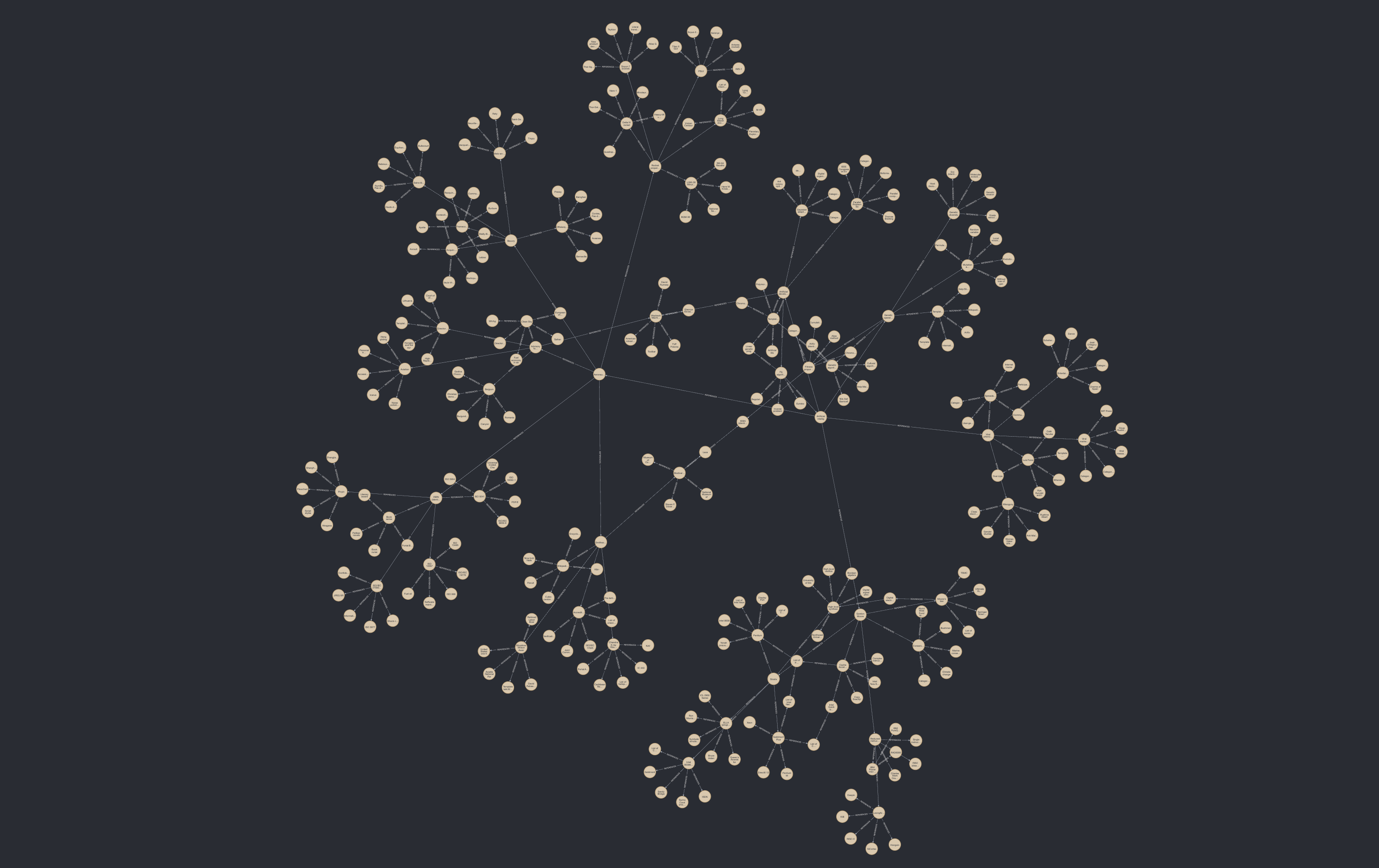 Knowledge Graph containing random Wikipedia topics - Image by Author
Resetting the Graph (Optional)
If at any point you want to start fresh, you can clear out all the data from Neo4j:
python
with driver.session() as session:
    session.run("MATCH (n) DETACH DELETE n")
    print("Graph has been reset - all nodes and relationships deleted.")
**MATCH (n) DETACH DELETE n**finds all nodesn and deletes them along with their relationships. This is a complete reset of the graph.
Implementing the PageRank Algorithm in Python
Now that we have our graph of pages and links stored in Neo4j, we can implement PageRank from scratch. Remember how the math worked? We'll apply the iterative method we described, but this time reading real data from our Neo4j database.
python
def get_pages(tx):
    result = tx.run("MATCH (p:Page) RETURN p.name AS name")
    return [record["name"] for record in result]

def get_links(tx):
    result = tx.run("MATCH (p1:Page)-[:LINKS_TO]->(p2:Page) RETURN p1.name AS from, p2.name AS to")
    links = {}
    for record in result:
        if record["from"] not in links:
            links[record["from"]] = []
        links[record["from"]].append(record["to"])
    return links
get_pages(tx) runs a Cypher query to get all page names from the database. We return a list of these names.
get_links(tx) queries all LINKS_TO relationships. We build a dictionary where each key is a page and each value is a list of pages it links to. This gives us the outbound link structure we need for PageRank.
python
def page_rank(pages, links, damping_factor=0.85, max_iterations=100, tol=1.0e-6):
    n = len(pages)
    ranks = np.ones(n) / n
    page_index = {page: i for i, page in enumerate(pages)}
It's finally time to create the function that will handle the PageRank algorithm. Let's start by setting:
n = len(pages): The total number of pages.ranks = np.ones(n) / n: Initialize all PageRank values equally, just like our earlier examples, giving each page 1/N initially.page_index = {page: i ...}: Create an index mapping from page names to their array index. This helps us store and access ranks efficiently.
python
for _ in range(max_iterations):
        new_ranks = np.zeros(n)
        for page, out_links in links.items():
            if out_links:
                share = ranks[page_index[page]] / len(out_links)
                for linked_page in out_links:
                    new_ranks[page_index[linked_page]] += share
            else:
                # If a page has no out-links, it is a "dangling node"
                # We distribute its rank evenly across all pages
                new_ranks += ranks[page_index[page]] / n
Next, we iterate multiple times until PageRank converges or we hit the limit. Each iteration starts with a blank slate. If the page has outbound links, we split its current rank among those links (like distributing "votes").
For each linked page, add the "share" of PageRank. If a page has no outbound links, it's a dangling node. We distribute its rank among all pages equally (this matches the theoretical fix for dangling nodes we discussed).
python
        # Apply damping
        new_ranks = damping_factor * new_ranks + (1 - damping_factor) / n
Remember our formula:
PageRank formula - Image by Author
The first part (1-d)/N is the "random jump" probability. We multiply our accumulated ranks by d and add the (1-d)/N term to every page.
kotlin
        if np.linalg.norm(new_ranks - ranks, 1) < tol:
            break
        ranks = new_ranks
Next, we compute the difference between the new ranks and the old ones. If this difference (the "update") is very small, it means we've converged. If the change is less than the tolerance tol, we stop early. Our PageRank values have stabilized. Otherwise, we continue another iteration using the new ranks.
python
return {page: ranks[page_index[page]] for page in pages}
Finally, we return a dictionary of {page_name: page_rank_value}, making it easy to see which pages have the highest PageRank.
python
with driver.session() as session:
    pages = session.execute_read(get_pages)
    links = session.execute_read(get_links)
    ranks = page_rank(pages, links)
    print(ranks)
Now, let's get all pages and links, and run our PageRank algorithm on the retrieved network, print out the PageRank scores for each page.
Connecting Back to the Math
This Python code reflects the math we discussed earlier. The page_rank function is essentially performing the iterative calculation of the eigenvector solution. Each iteration corresponds to one application of the formula:
R(t+1) = d*M*R(t) + (1-d)*1/N
Where M is our link structure and 1/N is the uniform distribution for the random jump. If you look closely at the code, every iteration updates the new_ranks in a way that mirrors applying M and then adding (1-d)/N. Once the difference between new_ranks and ranks is very small, we've found our stable vector: the PageRank values.
Conclusion
Now, before we get too carried away, let's remember that PageRank isn't perfect, and has a few weak spots:
- Link Spam : Just like email spam, some folks try to game the system by creating fake links.
- The "Rich Get Richer" Problem : New websites start with low PageRank, making it harder for them to climb the rankings.
Search engines like Google now use incredibly complex systems that go way beyond just PageRank. But the core idea of PageRank - that the web's structure itself contains valuable information - is still at the heart of how we organize and find information online. Especially now in the AI world PageRank is coming back as a hot topic. For example, we see PageRank in Graph Neural Networks, which usePageRank-like methods to spread information through complex networks, and Graph RAG (Retrieval-Augmented Generation) where language models can use PageRank-style algorithms to navigate vast knowledge graphs.
Register Now to Continue Reading
Unlock Towards Data Science with a Free Account
All articles on Towards Data Science are available to registered users. Create a free account today to access this article and thousands more.
Register for freeSign in to your account
 Written By
See all from Cristian Leo
Artificial IntelligenceGetting StartedMachine LearningPythonRetrieval Augmented Gen
Share This Article
Towards Data Science is a community publication. Submit your insights to reach our global audience and earn through the TDS Author Payment Program.
Write for TDS
Related Articles
Machine Learning
Implementing Amazon's DataWig in Python to impute missing values in tabular data
Kenneth Leung
August 24, 20222 min read
Machine Learning
A-Z project to generate mood scores based on the songs I listen to everyday and color my online mood tracker accordingly
Irene Chang
November 9, 20213 min read
Artificial Intelligence
How to build and train an AI model to identify various common anomaly patterns in time-series data
Tirthajyoti Sarkar
August 15, 20217 min read
Programming
Solving Sudoku With Python3 And Backtracking
Ben Bellerose
February 26, 20224 min read
Machine Learning
A practical explanatory guide for the classification of Iris flowers Output: Output: randomSplit() splits the...
Manusha Priyanjalee
June 1, 20211 min read
Machine Learning
Machine Learning course by Andrew Ng & Stanford review
Dmytro Nikolaiev (Dimid)
October 29, 20215 min read
Artificial Intelligence
AI and Definitions of Terrorism In Social Media
Alex Moltzau
July 25, 20190 min read
Artificial Intelligence
A demo using European GDP data
Fabio Sigrist
June 21, 202314 min read
Machine Learning
Simple methods that can nullify the effects of missing values
Egor Howell
September 17, 20213 min read
Your home for data science and AI. The world's leading publication for data science, data analytics, data engineering, machine learning, and artificial intelligence professionals.
Subscribe to Our NewsletterWrite For TDS•About•Advertise•Privacy Policy•Terms of Use
© Insight Media Group, LLC 2026•The New Stack•roadmap.sh•Creator Network
Recommended Articles
Close