保留正文与补采附件。源页面当前未重新核验;具体限制见交付清单。
 We value your privacy
We use cookies to enhance your browsing experience, serve personalised ads or content, and analyse our traffic. By clicking "Accept All", you consent to our use of cookies.
Customise Reject All Accept All
Customise Consent Preferences
We value your privacy
We use cookies to enhance your browsing experience, serve personalised ads or content, and analyse our traffic. By clicking "Accept All", you consent to our use of cookies.
Customise Reject All Accept All
Customise Consent Preferences  We use cookies to help you navigate efficiently and perform certain functions. You will find detailed information about all cookies under each consent category below.
The cookies that are categorised as "Necessary" are stored on your browser as they are essential for enabling the basic functionalities of the site. ... Show more
NecessaryAlways Active
Necessary cookies are required to enable the basic features of this site, such as providing secure log-in or adjusting your consent preferences. These cookies do not store any personally identifiable data.
We use cookies to help you navigate efficiently and perform certain functions. You will find detailed information about all cookies under each consent category below.
The cookies that are categorised as "Necessary" are stored on your browser as they are essential for enabling the basic functionalities of the site. ... Show more
NecessaryAlways Active
Necessary cookies are required to enable the basic features of this site, such as providing secure log-in or adjusting your consent preferences. These cookies do not store any personally identifiable data.
-
Cookie
BCTempID
-
Duration
10 minutes
-
Description
No description available.
-
Cookie
__cf_bm
-
Duration
1 hour
-
Description
This cookie, set by Cloudflare, is used to support Cloudflare Bot Management.
-
Cookie
AWSALBCORS
-
Duration
7 days
-
Description
Amazon Web Services set this cookie for load balancing.
-
Cookie
_cfuvid
-
Duration
session
-
Description
Cloudflare sets this cookie to track users across sessions to optimize user experience by maintaining session consistency and providing personalized services
-
Cookie
li_gc
-
Duration
6 months
-
Description
Linkedin set this cookie for storing visitor's consent regarding using cookies for non-essential purposes.
-
Cookie
__hssrc
-
Duration
session
-
Description
This cookie is set by Hubspot whenever it changes the session cookie. The __hssrc cookie set to 1 indicates that the user has restarted the browser, and if the cookie does not exist, it is assumed to be a new session.
-
Cookie
__hssc
-
Duration
1 hour
-
Description
HubSpot sets this cookie to keep track of sessions and to determine if HubSpot should increment the session number and timestamps in the __hstc cookie.
-
Cookie
wpEmojiSettingsSupports
-
Duration
session
-
Description
WordPress sets this cookie when a user interacts with emojis on a WordPress site. It helps determine if the user's browser can display emojis properly.
-
Cookie
BCSessionID
-
Duration
1 year 1 month 4 days
-
Description
Blueconic sets this cookie as a unique identifier for the BlueConic profile.
-
Cookie
_octo
-
Duration
1 year
-
Description
No description available.
-
Cookie
logged_in
-
Duration
1 year
-
Description
No description available.
-
Cookie
__Secure-YEC
-
Duration
past
-
Description
YouTube sets this cookie to stores the user's video player preferences using embedded YouTube video
-
Cookie
__eoi
-
Duration
6 months
-
Description
Description is currently not available.
-
Cookie
AWSALBTGCORS
-
Duration
7 days
-
Description
No description available.
-
Cookie
login-status-p
-
Duration
past
-
Description
Description is currently not available.
-
Cookie
AWSALBTG
-
Duration
7 days
-
Description
No description available.
-
Cookie
csrf_token
-
Duration
session
-
Description
No description available.
-
Cookie
token_v2
-
Duration
1 day
-
Description
Description is currently not available.
-
Cookie
D
-
Duration
1 year
-
Description
Description is currently not available.
-
Cookie
PHPSESSID
-
Duration
session
-
Description
This cookie is native to PHP applications. The cookie stores and identifies a user's unique session ID to manage user sessions on the website. The cookie is a session cookie and will be deleted when all the browser windows are closed.
-
Cookie
VISITOR_PRIVACY_METADATA
-
Duration
6 months
-
Description
YouTube sets this cookie to store the user's cookie consent state for the current domain.
-
Cookie
cookietest
-
Duration
session
-
Description
The cookietest cookie is typically used to determine whether the user's browser accepts cookies, essential for website functionality and user experience.
-
Cookie
__Host-airtable-session
-
Duration
1 year
-
Description
This cookie is used to enable us to integrate the services of Airtable.
-
Cookie
__Host-airtable-session.sig
-
Duration
1 year
-
Description
This cookie is used to enable us to integrate the services of Airtable.
-
Cookie
m
-
Duration
1 year 1 month 4 days
-
Description
Stripe sets this cookie for fraud prevention purposes. It identifies the device used to access the website, allowing the website to be formatted accordingly.
-
Cookie
BIGipServer*
-
Duration
session
-
Description
Marketo sets this cookie to collect information about the user's online activity and build a profile about their interests to provide advertisements relevant to the user.
-
Cookie
__cfruid
-
Duration
session
-
Description
Cloudflare sets this cookie to identify trusted web traffic.
-
Cookie
_GRECAPTCHA
-
Duration
6 months
-
Description
Google Recaptcha service sets this cookie to identify bots to protect the website against malicious spam attacks.
-
Cookie
__Secure-YNID
-
Duration
6 months
-
Description
Google cookie used to protect user security and prevent fraud, especially during the login process.
-
Cookie
cookieyes-consent
-
Duration
1 year
-
Description
CookieYes sets this cookie to remember users' consent preferences so that their preferences are respected on subsequent visits to this site. It does not collect or store any personal information about the site visitors.
Functional
Functional cookies help perform certain functionalities like sharing the content of the website on social media platforms, collecting feedback, and other third-party features.
-
Cookie
lidc
-
Duration
1 day
-
Description
LinkedIn sets the lidc cookie to facilitate data center selection.
-
Cookie
brw
-
Duration
1 year
-
Description
No description available.
-
Cookie
brwConsent
-
Duration
5 minutes
-
Description
Description is currently not available.
-
Cookie
WMF-Uniq
-
Duration
1 year
-
Description
Description is currently not available.
-
Cookie
loom_anon_comment
-
Duration
1 year
-
Description
No description available.
-
Cookie
loom_referral_video
-
Duration
session
-
Description
Description is currently not available.
-
Cookie
VISITOR_INFO1_LIVE
-
Duration
6 months
-
Description
A cookie set by YouTube to measure bandwidth that determines whether the user gets the new or old player interface.
-
Cookie
yt-remote-connected-devices
-
Duration
Never Expires
-
Description
YouTube sets this cookie to store the user's video preferences using embedded YouTube videos.
-
Cookie
ytidb::LAST_RESULT_ENTRY_KEY
-
Duration
Never Expires
-
Description
The cookie ytidb::LAST_RESULT_ENTRY_KEY is used by YouTube to store the last search result entry that was clicked by the user. This information is used to improve the user experience by providing more relevant search results in the future.
-
Cookie
yt-remote-device-id
-
Duration
Never Expires
-
Description
YouTube sets this cookie to store the user's video preferences using embedded YouTube videos.
-
Cookie
yt-remote-session-name
-
Duration
session
-
Description
The yt-remote-session-name cookie is used by YouTube to store the user's video player preferences using embedded YouTube video.
-
Cookie
yt-remote-fast-check-period
-
Duration
session
-
Description
The yt-remote-fast-check-period cookie is used by YouTube to store the user's video player preferences for embedded YouTube videos.
-
Cookie
yt-remote-session-app
-
Duration
session
-
Description
The yt-remote-session-app cookie is used by YouTube to store user preferences and information about the interface of the embedded YouTube video player.
-
Cookie
yt-remote-cast-available
-
Duration
session
-
Description
The yt-remote-cast-available cookie is used to store the user's preferences regarding whether casting is available on their YouTube video player.
-
Cookie
yt-remote-cast-installed
-
Duration
session
-
Description
The yt-remote-cast-installed cookie is used to store the user's video player preferences using embedded YouTube video.
-
Cookie
cp_session
-
Duration
3 months
-
Description
Codepen sets this cookie for Help systems found in the website.
-
Cookie
loid
-
Duration
1 year 1 month 4 days
-
Description
This cookie is set by the Reddit. The cookie enables the sharing of content from the website onto the social media platform.
Analytics
Analytical cookies are used to understand how visitors interact with the website. These cookies help provide information on metrics such as the number of visitors, bounce rate, traffic source, etc.
-
Cookie
__hstc
-
Duration
6 months
-
Description
Hubspot set this main cookie for tracking visitors. It contains the domain, initial timestamp (first visit), last timestamp (last visit), current timestamp (this visit), and session number (increments for each subsequent session).
-
Cookie
hubspotutk
-
Duration
6 months
-
Description
HubSpot sets this cookie to keep track of the visitors to the website. This cookie is passed to HubSpot on form submission and used when deduplicating contacts.
-
Cookie
_ga
-
Duration
1 year 1 month 4 days
-
Description
Google Analytics sets this cookie to calculate visitor, session and campaign data and track site usage for the site's analytics report. The cookie stores information anonymously and assigns a randomly generated number to recognise unique visitors.
-
Cookie
ga*
-
Duration
1 year 1 month 4 days
-
Description
Google Analytics sets this cookie to store and count page views.
-
Cookie
__Host-psifi.analyticsTrace
-
Duration
6 hours
-
Description
Description is currently not available.
-
Cookie
__Host-psifi.analyticsTraceV2
-
Duration
6 hours
-
Description
Description is currently not available.
-
Cookie
_gh_sess
-
Duration
session
-
Description
GitHub sets this cookie for temporary application and framework state between pages like what step the user is on in a multiple step form.
-
Cookie
YSC
-
Duration
session
-
Description
YSC cookie is set by Youtube and is used to track the views of embedded videos on Youtube pages.
-
Cookie
ajs_anonymous_id
-
Duration
1 year
-
Description
This cookie is set by Segment to count the number of people who visit a certain site by tracking if they have visited before.
-
Cookie
vuid
-
Duration
1 year 1 month 4 days
-
Description
Vimeo installs this cookie to collect tracking information by setting a unique ID to embed videos on the website.
Performance
Performance cookies are used to understand and analyse the key performance indexes of the website which helps in delivering a better user experience for the visitors.
-
Cookie
AWSALB
-
Duration
7 days
-
Description
AWSALB is an application load balancer cookie set by Amazon Web Services to map the session to the target.
-
Cookie
acq
-
Duration
past
-
Description
Description is currently not available.
-
Cookie
acq.sig
-
Duration
past
-
Description
Description is currently not available.
-
Cookie
ptc
-
Duration
2 years
-
Description
No description available.
Advertisement
Advertisement cookies are used to provide visitors with customised advertisements based on the pages you visited previously and to analyse the effectiveness of the ad campaigns.
-
Cookie
muc_ads
-
Duration
1 year 1 month 4 days
-
Description
Twitter sets this cookie to collect user behaviour and interaction data to optimize the website.
-
Cookie
guest_id_marketing
-
Duration
1 year 1 month 4 days
-
Description
Twitter sets this cookie to identify and track the website visitor.
-
Cookie
guest_id_ads
-
Duration
1 year 1 month 4 days
-
Description
Twitter sets this cookie to identify and track the website visitor.
-
Cookie
personalization_id
-
Duration
1 year 1 month 4 days
-
Description
Twitter sets this cookie to integrate and share features for social media and also store information about how the user uses the website, for tracking and targeting.
-
Cookie
guest_id
-
Duration
1 year 1 month 4 days
-
Description
Twitter sets this cookie to identify and track the website visitor. It registers if a user is signed in to the Twitter platform and collects information about ad preferences.
-
Cookie
bcookie
-
Duration
1 year
-
Description
LinkedIn sets this cookie from LinkedIn share buttons and ad tags to recognize browser IDs.
-
Cookie
__Secure-ROLLOUT_TOKEN
-
Duration
6 months
-
Description
YouTube sets this cookie to manage feature rollout and experimentation. It helps Google control which new features or interface changes are shown to users as part of testing and staged rollouts, ensuring consistent experience for a given user during an experiment.
-
Cookie
yt.innertube::nextId
-
Duration
Never Expires
-
Description
YouTube sets this cookie to register a unique ID to store data on what videos from YouTube the user has seen.
-
Cookie
yt.innertube::requests
-
Duration
Never Expires
-
Description
YouTube sets this cookie to register a unique ID to store data on what videos from YouTube the user has seen.
-
Cookie
session_tracker
-
Duration
session
-
Description
This cookie is set by the Reddit. This cookie is used to identify trusted web traffic. It also helps in adverstising on the website.
-
Cookie
edgebucket
-
Duration
session
-
Description
Reddit sets this cookie to save the information about a log-on Reddit user, for the purpose of advertisement recommendations and updating the content.
-
Cookie
did
-
Duration
1 year
-
Description
Arbor sets this cookie to show targeted ads to site visitors.This cookie expires after 2 months or 1 year.
Uncategorised
Other uncategorised cookies are those that are being analysed and have not been classified into a category as yet.
No cookies to display.
Reject All Save My Preferences Accept All
Toggle SearchToggle Mobile Navigation
Publish AI, ML & data-science insights to a global community of data professionals.
Sign inSubmit an Article
LatestEditor's PicksNewsletterShipAI
Write For TDS
LinkedInXToggle Search
Machine Learning
Linear Regression With Bootstrapping
There were others who had forced their way to the top from the lowest rung by the aid of their bootstraps
James Andrew Godwin
March 13, 20219 min read
 Bootstrapping Linear Regression | Photo by Ahmad Dirini
This article builds on my Linear Regression and Bootstrap Resampling pieces.
For the literary-minded among my readers, the subtitle is a quote from 'Ulysses' 1922, by James Joyce! The origin of the term "bootstrap" is in literature, though not from Joyce. The usage denotes: to better oneself by one's own efforts - further evolving to encompass metaphors for a series of self-sustaining processes that proceed without external help, the context we are likely most familiar with.
For data scientists and machine learning engineers, this bootstrapping context is an important tool for sampling data. For this reason, it is one of the most important to consider what underlies the variation of numbers, the variation of distributions. We use resampling when we have a small amount of data as it allows us to see how much variation there would have been.
The following content helps to explain two types of bootstrapping as applied to linear regression models!
Learn this step by step with the interactive Machine Learning roadmap.
Bootstrapping Linear Regression | Photo by Ahmad Dirini
This article builds on my Linear Regression and Bootstrap Resampling pieces.
For the literary-minded among my readers, the subtitle is a quote from 'Ulysses' 1922, by James Joyce! The origin of the term "bootstrap" is in literature, though not from Joyce. The usage denotes: to better oneself by one's own efforts - further evolving to encompass metaphors for a series of self-sustaining processes that proceed without external help, the context we are likely most familiar with.
For data scientists and machine learning engineers, this bootstrapping context is an important tool for sampling data. For this reason, it is one of the most important to consider what underlies the variation of numbers, the variation of distributions. We use resampling when we have a small amount of data as it allows us to see how much variation there would have been.
The following content helps to explain two types of bootstrapping as applied to linear regression models!
Learn this step by step with the interactive Machine Learning roadmap.
Python Jupyter notebook example
We treat the data sample we have as the only representation of the population that we have. Then to get more datasets from it, we resample the data with replacement.
For example, say we polled a classroom of 20 students on how old the teacher is. Their 20 answers are simulated below:
text
import numpy as np
from scipy import stats
import matplotlib.pyplot as plt
from sklearn.utils import resample
text
%matplotlib inline
text
# 20 student guesses of the teacher's age
teacher_age = [24, 40, 27, 33, 31, 33, 35, 32, 29, 34, 39, 40, 41, 36, 34, 35, 29, 30, 35, 98]
text
# expected age could be the average
teacher_avg = np.mean(teacher_age)
print('Average of teacher age guesses: {} years old'.format(teacher_avg))
text
teacher_std = np.std(teacher_age)
print('Std_Dev of teacher age guesses: {0:.2f} years'.format(teacher_std))
print(len(teacher_age))
 Considering the guesses, only 5 of them are above the average. Visually inspecting the data we see that this is because of one outlier of 98 years. While we may consider dropping this outlier to get a better guess, we can also use bootstrap resampling to get more data that approaches the parent distribution. Here we will repeatedly sample with replacement to get a set of subsamples. Each subsample will also have 20 data points, the same as the original.
N.B: Remember that when sampling with replacement, it is possible - but unlikely, to get a subsample that has the outlier picked several times! We set the
Considering the guesses, only 5 of them are above the average. Visually inspecting the data we see that this is because of one outlier of 98 years. While we may consider dropping this outlier to get a better guess, we can also use bootstrap resampling to get more data that approaches the parent distribution. Here we will repeatedly sample with replacement to get a set of subsamples. Each subsample will also have 20 data points, the same as the original.
N.B: Remember that when sampling with replacement, it is possible - but unlikely, to get a subsample that has the outlier picked several times! We set the replace=True flag in np.random.choice .
text
n_sets = 100
n_samples = len(teacher_age)
text
def generate_samples(dataset, n):
 return list(np.random.choice(dataset, size=n, replace=True))
text
boot_samples = [generate_samples(teacher_age, n_samples) for _ in range(n_sets)]
text
print('Here are the top 3 samples generated:')
print('{}, ...'.format(boot_samples[0:3]))
 Now we calculate the mean and standard deviation of each sample and then output the average of the averaged means and the average of the 100 subsampled standard deviations
text
Now we calculate the mean and standard deviation of each sample and then output the average of the averaged means and the average of the 100 subsampled standard deviations
text
sample_means = [np.mean(x) for x in boot_samples]
sample_stdev = [np.std(x) for x in boot_samples]
text
# take the average of all the means
set_mean = np.mean(sample_means)
# average of all the std_devs
set_stdev = np.mean(sample_stdev)
text
print('Average of the sample averages: {0:.2f}'.format(set_mean))
print('Average of the sample st. devs: {0:.2f}'.format(set_stdev))
 A little better
Hmm - so far bootstrapping has barely changed anything. The sample averages of the sets are very similar (which we expect), but we also have not done much with the 100 subsamples we created.
Let us create a function that drops the lowest and highest N elements from the subsamples and apply this function to each sample and then investigate the averages and standard deviations of all the bootstrapped samples:
text
A little better
Hmm - so far bootstrapping has barely changed anything. The sample averages of the sets are very similar (which we expect), but we also have not done much with the 100 subsamples we created.
Let us create a function that drops the lowest and highest N elements from the subsamples and apply this function to each sample and then investigate the averages and standard deviations of all the bootstrapped samples:
text
def trim_mean(dataset, n):
 # sort dataset in ascending order
 sorted_list = sorted(dataset)
 # trim the list (each list is of size: 20 - 2 = 18)
 trimmed_list = sorted_list[n:(len(sorted_list) - n)]
 return(trimmed_list)
text
# apply function to all n (100) samples
boot_trims = [trim_mean(x, 1) for x in boot_samples]
text
# each sample mean and st. dev.
trimmed_means = [np.mean(x) for x in boot_trims]
trimmed_stdevs = [np.std(x) for x in boot_trims]
text
# average of all the means
trimmed_mean_avg = np.mean(trimmed_means)
# And the average of all the standard deviations
trimmed_stdev = np.mean(trimmed_stdevs)
text
print('Average of the sample averages: {:.2f}'.format(trimmed_mean_avg))
print('Average of the sample std_devs: {:.2f}'.format(trimmed_stdev))
 Note the change in numbers!
Histogram of the means
text
import seaborn as sns
text
bins = [x for x in range(25, 55)]
text
ax = sns.distplot(sample_means, bins, label='Original Bootstrap')
ax = sns.distplot(trimmed_means, bins, label='Trimmed Bootstrap')
ax.legend(loc='upper right')
plt.show()
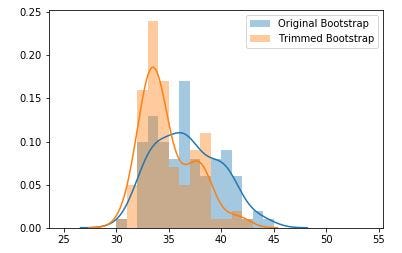 Notice with the Trimmed means we have fewer outlier data to the right
The multi-modality (multiple peaks) are an artifact of the subsampling - they are heavily influenced by the random data subsampled, but overall the data appear to be normally distributed.
How do the distributions differ if we trim more data points? Let us find out:
text
Notice with the Trimmed means we have fewer outlier data to the right
The multi-modality (multiple peaks) are an artifact of the subsampling - they are heavily influenced by the random data subsampled, but overall the data appear to be normally distributed.
How do the distributions differ if we trim more data points? Let us find out:
text
# create different trimmed means
boot_trim1 = [trimmed_mean(x, 1) for x in boot_samples]
boot_trim2 = [trimmed_mean(x, 2) for x in boot_samples]
boot_trim3 = [trimmed_mean(x, 3) for x in boot_samples]
boot_trim4 = [trimmed_mean(x, 4) for x in boot_samples]
text
# sample each mean and std dev
trimmed_mean1 = [np.mean(x) for x in boot_trim1]
trimmed_stdev1 = [np.std(x) for x in boot_trim1]
text
trimmed_mean2 = [np.mean(x) for x in boot_trim2]
trimmed_stdev2 = [np.std(x) for x in boot_trim2]
text
trimmed_mean3 = [np.mean(x) for x in boot_trim3]
trimmed_stdev3 = [np.std(x) for x in boot_trim3]
text
trimmed_mean4 = [np.mean(x) for x in boot_trim4]
trimmed_stdev4 = [np.std(x) for x in boot_trim4]
text
# plot the means
bins = [x for x in range(25, 55)]
text
ax = sns.distplot(trimmed_mean1, bins, label='Trimmed 1') #trim most #extreme min and max values
ax = sns.distplot(trimmed_mean2, bins, label='Trimmed 2')
ax = sns.distplot(trimmed_mean3, bins, label='Trimmed 3')
ax = sns.distplot(trimmed_mean4, bins, label='Trimmed 4') # trim 4 #most extreme min and max values
ax.legend(loc='upper right')
plt.show()
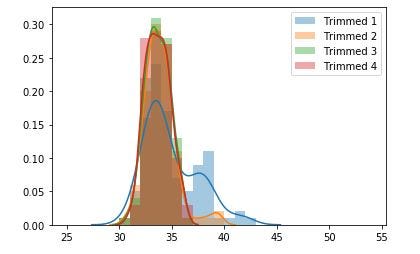 Notice how there is less and less multi-modality as more and more data is trimmed. Taken to the limit this trimming function would return only the value closest to the median. The students guesses are now closely distributed around what we would consider the "true mean," which is the teachers age!
Bootstrapping Regression
The bootstrap method can be applied to regression models. Bootstrapping a regression model gives insight into how variable the model parameters are. It is useful to know how much random variation there is in regression coefficients simply because of small changes in data values.
As with most statistics, it is possible to bootstrap almost any regression model. However, since bootstrap resampling uses a large number of subsamples, it can be computationally intensive.
N.B: For large-scale problems, it is necessary to use other resampling methods like k-fold cross-validation. Happy Data Science Land (nee Physics Land) is not the same grey world of floating-point inaccuracies and compromises need to be made.
Let us create our data and fit the linear regression:
text
import numpy as np
import matplotlib.pyplot as plt
import pandas as pd
import statsmodels.formula.api as sm
text
# synthetic sample data
n_points = 25
x = np.linspace(0, 10, n_points)
y = x + (np.random.rand(len(x)) * 5)
data_df = pd.DataFrame({'x': x, 'y': y})
text
ols_model = sm.ols(formula = 'y ~ x', data=data_df)
text
results = ols_model.fit()
text
# coefficients
print('Intercept, x-Slope : {}'.format(results.params))
y_pred = ols_model.fit().predict(data_df['x'])
text
# plot results
plt.scatter(x, y)
plt.plot(x, y_pred, linewidth=2)
plt.grid(True)
plt.xlabel('x')
plt.ylabel('y')
plt.title('x vs y')
plt.show()
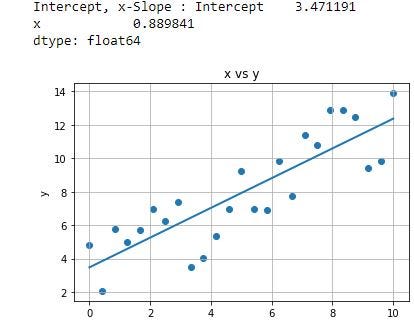 Least-squares linear regression
Resample points
The first type of bootstrapping to perform is parametric resampling. Parametric because our model has a parameter, the mean, which we are trying to estimate.
The pandas sample function will help us with this process:
text
# resample with replacement each row
boot_slopes = []
boot_interc = []
n_boots = 100
plt.figure()
for _ in range(n_boots):
 # sample the rows, same size, with replacement
 sample_df = data_df.sample(n=n_points, replace=True)
 # fit a linear regression
 ols_model_temp = sm.ols(formula = 'y ~ x', data=sample_df)
 results_temp = ols_model_temp.fit()

 # append coefficients
 boot_interc.append(results_temp.params[0])
 boot_slopes.append(results_temp.params[1])

 # plot a greyed out line
 y_pred_temp = ols_model_temp.fit().predict(sample_df['x'])
 plt.plot(sample_df['x'], y_pred_temp, color='grey', alpha=0.2)
text
# add data points
plt.scatter(x, y)
plt.plot(x, y_pred, linewidth=2)
plt.grid(True)
plt.xlabel('x')
plt.ylabel('y')
plt.title('x vs y')
plt.show()
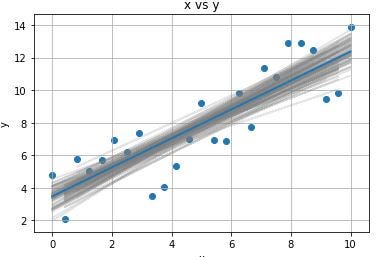 Note the shape of the greyed out bands | They are more concentrated at center than the edge
The bands above are positioned more around the center of the data than at the edges because more data are concentrated at the center than at the edges.
Distribution of slope and intercept coefficients:
text
Note the shape of the greyed out bands | They are more concentrated at center than the edge
The bands above are positioned more around the center of the data than at the edges because more data are concentrated at the center than at the edges.
Distribution of slope and intercept coefficients:
text
sns.distplot(boot_slopes)
plt.show()
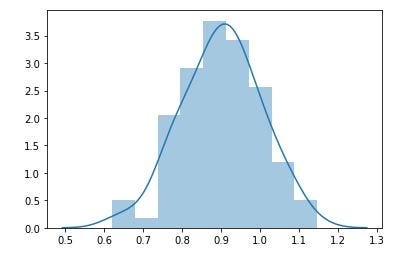 Nice normal distribution of slopes
text
Nice normal distribution of slopes
text
sns.distplot(boot_interc)
plt.show()
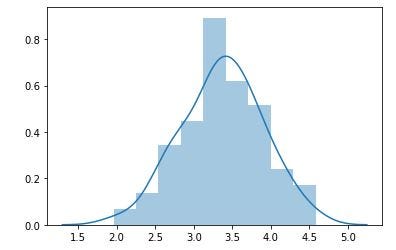 Pretty normal distribution of std_dev of slopes
The data above paints a pretty picture from parametric bootstrapping. However, if by chance, and this is more likely, we had sparse data, there may be a chance that our random selection of points are entirely in one area and not in another - recall the mention that the outlier can be sampled several times despite being a single outlying point.
To fight this, we can apply a different type of bootstrapping, called 'non-parametric bootstrapping ' whereby we apply bootstrapping on the residuals, and not the parameter itself.
Pretty normal distribution of std_dev of slopes
The data above paints a pretty picture from parametric bootstrapping. However, if by chance, and this is more likely, we had sparse data, there may be a chance that our random selection of points are entirely in one area and not in another - recall the mention that the outlier can be sampled several times despite being a single outlying point.
To fight this, we can apply a different type of bootstrapping, called 'non-parametric bootstrapping ' whereby we apply bootstrapping on the residuals, and not the parameter itself.
Resample Residuals (Non-Parametric Bootstrapping)
The idea is that we want to observe a point at every x-position that we have a point in the original data. Therefore, we fit the original data and re-shuffle the residuals at every point.
N.B: The assumption underlying our ability to do this is that the errors are independent and identically distributed (IID) among our data.
text
# create synthetic sample data
n_points = 25
x = np.linspace(0, 10, n_points)
y = x + (np.random.rand(len(x)) * 5)
data_df = pd.DataFrame({'x': x, 'y': y})
text
# fit linear regression model
ols_model = sm.ols(formula = 'y ~ x', data=data_df)
results = ols_model.fit()
text
# get predicted values
y_pred = results.predict(data_df['x'])
text
# get residual values
resids = results.resid
Now that we fitted the values and residuals from our least-squares fit, we generate N (100) new sets of data by sampling the residuals and adding them to the fitted values :
text
boot2_slopes = []
boot2_interc = []
n_boots = 100
plt.figure()
for _ in range(n_boots):
 # create a sampling of the residuals with replacement
 boot_resids = np.random.choice(resids, n_points, replace=True)
 y_temp = [y_pred_i + resid_i for y_pred_i, resid_i in zip(y_pred, boot_resids)]

 sample_df = pd.DataFrame({'x': list(x), 'y': y_temp})
 # Fit a linear regression
 ols_model_temp = sm.ols(formula = 'y ~ x', data=sample_df)
 results_temp = ols_model_temp.fit()

 # get coefficients
 boot2_interc.append(results_temp.params[0])
 boot2_slopes.append(results_temp.params[1])

 # plot a greyed out line
 y_pred_temp = ols_model_temp.fit().predict(sample_df['x'])
 plt.plot(sample_df['x'], y_pred_temp, color='grey', alpha=0.2)
text
# add data points
plt.scatter(x, y)
plt.plot(x, y_pred, linewidth=2)
plt.grid(True)
plt.xlabel('x')
plt.ylabel('y')
plt.title('x vs y')
plt.show()
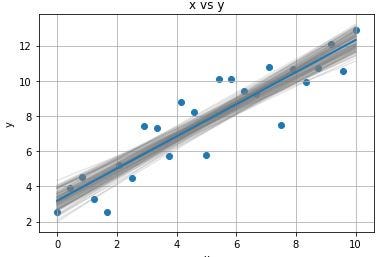 As before, the lines converge more in the center
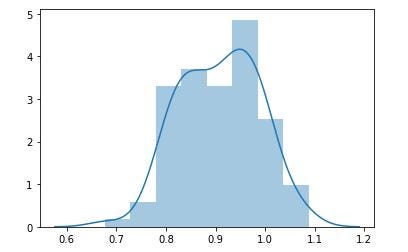
Again we check the distributions of the parameters:
text
As before, the lines converge more in the center
Again we check the distributions of the parameters:
text
sns.distplot(boot2_slopes)
plt.show()
 text
text
sns.distplot(boot2_interc)
plt.show()
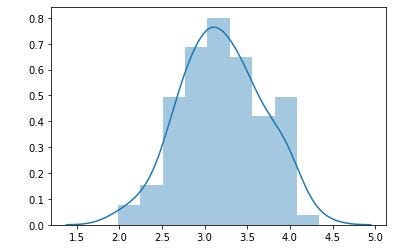 This helps us understand ther error in our parameters with linear regression. In fact, this type of bootstrapping can be extended to most linear and non-linear models that have a unique, optimal solution. Using this methodology allows us to get an error distribution for every parameter!
Conclusion
Bootstrap is not the only resampling method, there are several, but IMO it is the among the best for production models because it makes minimal assumptions about the parent distribution and is well implemented into many languages and packages.
In this article we looked at applying bootstrapping techniques to linear regression in two ways:
Parametric bootstrapping - resampling from all of the points:
- Sample the data with replacement numerous times (100)
- Fit a linear regression to each sample
- Store the coefficients (intercept and slopes)
- Plot a histogram of the parameters
Non-parametric boostrapping - resampling on the residuals with an uneven distribution of feature values:
- Find the optimal linear regression on all the original data
- Extract the residuals from the fit
- Create new y-values using the residual samples
- Fit the linear regression with the new y-values
- Store the slope and intercepts
- Plot a histogram of the parameters
Like Ulysses himself in his "Odessy" - I hope I have created a simple narrative that helps illustrate bootstrap resampling in the context of linear regressions. Next I will continue writing about regression but with the added wrinkle of talking about overfitting and using regularization help with that!
Find me on Linkedin
Physicist cum Data Scientist- Available for new opportunity | SaaS | Sports | Start-ups | Scale-ups
Register Now to Continue Reading
Unlock Towards Data Science with a Free Account
All articles on Towards Data Science are available to registered users. Create a free account today to access this article and thousands more.
Register for freeSign in to your account
 Written By
See all from James Andrew Godwin
BootstrapLinear RegressionMachine LearningTowards Data Science
Share This Article
Towards Data Science is a community publication. Submit your insights to reach our global audience and earn through the TDS Author Payment Program.
Write for TDS
Related Articles
Machine Learning
A whirlwind tour of Machine Learning Lifecycle Management
Merlin Schäfer
May 30, 20236 min read
Deep Learning
Fix the input ordering by using seeds
Pascal Janetzky
January 9, 20236 min read
Machine Learning
From static embeddings to contextual meaning
Angela and Kezhan Shi
December 24, 20259 min read
Programming
Want to install a specific Python package version with Pip? This article will show you how with hands-on examples and guides.
Dario Radečić
April 5, 20236 min read
Machine Learning
Boost your model performance with stacking in this step-by-step tutorial
Jen Wadkins
October 6, 202112 min read
Machine Learning
A tutorial on saving and reusing Tensorflow-trained models
Rahul Bhadani
January 12, 20214 min read
Artificial Intelligence
Thoughts and Theory Issues with current research trends in NLP can hamper the free development...
Federico Bianchi
June 3, 20217 min read
Artificial Intelligence
Improving machine learning models' performance with hyperparameter optimization.
Farzad Nobar
June 5, 202311 min read
Machine Learning
A Data Science approach to predict the best candidates to be targeted for a marketing campaign
Gonçalo Guimarães Gomes
September 28, 202011 min read
Your home for data science and AI. The world's leading publication for data science, data analytics, data engineering, machine learning, and artificial intelligence professionals.
Subscribe to Our NewsletterWrite For TDS•About•Advertise•Privacy Policy•Terms of Use
© Insight Media Group, LLC 2026•The New Stack•roadmap.sh•Creator Network
Recommended Articles
Close