保留正文与补采附件。源页面当前未重新核验;具体限制见交付清单。
 We value your privacy
We use cookies to enhance your browsing experience, serve personalised ads or content, and analyse our traffic. By clicking "Accept All", you consent to our use of cookies.
Customise Reject All Accept All
Customise Consent Preferences
We value your privacy
We use cookies to enhance your browsing experience, serve personalised ads or content, and analyse our traffic. By clicking "Accept All", you consent to our use of cookies.
Customise Reject All Accept All
Customise Consent Preferences  We use cookies to help you navigate efficiently and perform certain functions. You will find detailed information about all cookies under each consent category below.
The cookies that are categorised as "Necessary" are stored on your browser as they are essential for enabling the basic functionalities of the site. ... Show more
NecessaryAlways Active
Necessary cookies are required to enable the basic features of this site, such as providing secure log-in or adjusting your consent preferences. These cookies do not store any personally identifiable data.
We use cookies to help you navigate efficiently and perform certain functions. You will find detailed information about all cookies under each consent category below.
The cookies that are categorised as "Necessary" are stored on your browser as they are essential for enabling the basic functionalities of the site. ... Show more
NecessaryAlways Active
Necessary cookies are required to enable the basic features of this site, such as providing secure log-in or adjusting your consent preferences. These cookies do not store any personally identifiable data.
-
Cookie
BCTempID
-
Duration
10 minutes
-
Description
No description available.
-
Cookie
__cf_bm
-
Duration
1 hour
-
Description
This cookie, set by Cloudflare, is used to support Cloudflare Bot Management.
-
Cookie
AWSALBCORS
-
Duration
7 days
-
Description
Amazon Web Services set this cookie for load balancing.
-
Cookie
_cfuvid
-
Duration
session
-
Description
Cloudflare sets this cookie to track users across sessions to optimize user experience by maintaining session consistency and providing personalized services
-
Cookie
li_gc
-
Duration
6 months
-
Description
Linkedin set this cookie for storing visitor's consent regarding using cookies for non-essential purposes.
-
Cookie
__hssrc
-
Duration
session
-
Description
This cookie is set by Hubspot whenever it changes the session cookie. The __hssrc cookie set to 1 indicates that the user has restarted the browser, and if the cookie does not exist, it is assumed to be a new session.
-
Cookie
__hssc
-
Duration
1 hour
-
Description
HubSpot sets this cookie to keep track of sessions and to determine if HubSpot should increment the session number and timestamps in the __hstc cookie.
-
Cookie
wpEmojiSettingsSupports
-
Duration
session
-
Description
WordPress sets this cookie when a user interacts with emojis on a WordPress site. It helps determine if the user's browser can display emojis properly.
-
Cookie
BCSessionID
-
Duration
1 year 1 month 4 days
-
Description
Blueconic sets this cookie as a unique identifier for the BlueConic profile.
-
Cookie
_octo
-
Duration
1 year
-
Description
No description available.
-
Cookie
logged_in
-
Duration
1 year
-
Description
No description available.
-
Cookie
__Secure-YEC
-
Duration
past
-
Description
YouTube sets this cookie to stores the user's video player preferences using embedded YouTube video
-
Cookie
__eoi
-
Duration
6 months
-
Description
Description is currently not available.
-
Cookie
AWSALBTGCORS
-
Duration
7 days
-
Description
No description available.
-
Cookie
login-status-p
-
Duration
past
-
Description
Description is currently not available.
-
Cookie
AWSALBTG
-
Duration
7 days
-
Description
No description available.
-
Cookie
csrf_token
-
Duration
session
-
Description
No description available.
-
Cookie
token_v2
-
Duration
1 day
-
Description
Description is currently not available.
-
Cookie
D
-
Duration
1 year
-
Description
Description is currently not available.
-
Cookie
PHPSESSID
-
Duration
session
-
Description
This cookie is native to PHP applications. The cookie stores and identifies a user's unique session ID to manage user sessions on the website. The cookie is a session cookie and will be deleted when all the browser windows are closed.
-
Cookie
VISITOR_PRIVACY_METADATA
-
Duration
6 months
-
Description
YouTube sets this cookie to store the user's cookie consent state for the current domain.
-
Cookie
cookietest
-
Duration
session
-
Description
The cookietest cookie is typically used to determine whether the user's browser accepts cookies, essential for website functionality and user experience.
-
Cookie
__Host-airtable-session
-
Duration
1 year
-
Description
This cookie is used to enable us to integrate the services of Airtable.
-
Cookie
__Host-airtable-session.sig
-
Duration
1 year
-
Description
This cookie is used to enable us to integrate the services of Airtable.
-
Cookie
m
-
Duration
1 year 1 month 4 days
-
Description
Stripe sets this cookie for fraud prevention purposes. It identifies the device used to access the website, allowing the website to be formatted accordingly.
-
Cookie
BIGipServer*
-
Duration
session
-
Description
Marketo sets this cookie to collect information about the user's online activity and build a profile about their interests to provide advertisements relevant to the user.
-
Cookie
__cfruid
-
Duration
session
-
Description
Cloudflare sets this cookie to identify trusted web traffic.
-
Cookie
_GRECAPTCHA
-
Duration
6 months
-
Description
Google Recaptcha service sets this cookie to identify bots to protect the website against malicious spam attacks.
-
Cookie
__Secure-YNID
-
Duration
6 months
-
Description
Google cookie used to protect user security and prevent fraud, especially during the login process.
-
Cookie
cookieyes-consent
-
Duration
1 year
-
Description
CookieYes sets this cookie to remember users' consent preferences so that their preferences are respected on subsequent visits to this site. It does not collect or store any personal information about the site visitors.
Functional
Functional cookies help perform certain functionalities like sharing the content of the website on social media platforms, collecting feedback, and other third-party features.
-
Cookie
lidc
-
Duration
1 day
-
Description
LinkedIn sets the lidc cookie to facilitate data center selection.
-
Cookie
brw
-
Duration
1 year
-
Description
No description available.
-
Cookie
brwConsent
-
Duration
5 minutes
-
Description
Description is currently not available.
-
Cookie
WMF-Uniq
-
Duration
1 year
-
Description
Description is currently not available.
-
Cookie
loom_anon_comment
-
Duration
1 year
-
Description
No description available.
-
Cookie
loom_referral_video
-
Duration
session
-
Description
Description is currently not available.
-
Cookie
VISITOR_INFO1_LIVE
-
Duration
6 months
-
Description
A cookie set by YouTube to measure bandwidth that determines whether the user gets the new or old player interface.
-
Cookie
yt-remote-connected-devices
-
Duration
Never Expires
-
Description
YouTube sets this cookie to store the user's video preferences using embedded YouTube videos.
-
Cookie
ytidb::LAST_RESULT_ENTRY_KEY
-
Duration
Never Expires
-
Description
The cookie ytidb::LAST_RESULT_ENTRY_KEY is used by YouTube to store the last search result entry that was clicked by the user. This information is used to improve the user experience by providing more relevant search results in the future.
-
Cookie
yt-remote-device-id
-
Duration
Never Expires
-
Description
YouTube sets this cookie to store the user's video preferences using embedded YouTube videos.
-
Cookie
yt-remote-session-name
-
Duration
session
-
Description
The yt-remote-session-name cookie is used by YouTube to store the user's video player preferences using embedded YouTube video.
-
Cookie
yt-remote-fast-check-period
-
Duration
session
-
Description
The yt-remote-fast-check-period cookie is used by YouTube to store the user's video player preferences for embedded YouTube videos.
-
Cookie
yt-remote-session-app
-
Duration
session
-
Description
The yt-remote-session-app cookie is used by YouTube to store user preferences and information about the interface of the embedded YouTube video player.
-
Cookie
yt-remote-cast-available
-
Duration
session
-
Description
The yt-remote-cast-available cookie is used to store the user's preferences regarding whether casting is available on their YouTube video player.
-
Cookie
yt-remote-cast-installed
-
Duration
session
-
Description
The yt-remote-cast-installed cookie is used to store the user's video player preferences using embedded YouTube video.
-
Cookie
cp_session
-
Duration
3 months
-
Description
Codepen sets this cookie for Help systems found in the website.
-
Cookie
loid
-
Duration
1 year 1 month 4 days
-
Description
This cookie is set by the Reddit. The cookie enables the sharing of content from the website onto the social media platform.
Analytics
Analytical cookies are used to understand how visitors interact with the website. These cookies help provide information on metrics such as the number of visitors, bounce rate, traffic source, etc.
-
Cookie
__hstc
-
Duration
6 months
-
Description
Hubspot set this main cookie for tracking visitors. It contains the domain, initial timestamp (first visit), last timestamp (last visit), current timestamp (this visit), and session number (increments for each subsequent session).
-
Cookie
hubspotutk
-
Duration
6 months
-
Description
HubSpot sets this cookie to keep track of the visitors to the website. This cookie is passed to HubSpot on form submission and used when deduplicating contacts.
-
Cookie
_ga
-
Duration
1 year 1 month 4 days
-
Description
Google Analytics sets this cookie to calculate visitor, session and campaign data and track site usage for the site's analytics report. The cookie stores information anonymously and assigns a randomly generated number to recognise unique visitors.
-
Cookie
ga*
-
Duration
1 year 1 month 4 days
-
Description
Google Analytics sets this cookie to store and count page views.
-
Cookie
__Host-psifi.analyticsTrace
-
Duration
6 hours
-
Description
Description is currently not available.
-
Cookie
__Host-psifi.analyticsTraceV2
-
Duration
6 hours
-
Description
Description is currently not available.
-
Cookie
_gh_sess
-
Duration
session
-
Description
GitHub sets this cookie for temporary application and framework state between pages like what step the user is on in a multiple step form.
-
Cookie
YSC
-
Duration
session
-
Description
YSC cookie is set by Youtube and is used to track the views of embedded videos on Youtube pages.
-
Cookie
ajs_anonymous_id
-
Duration
1 year
-
Description
This cookie is set by Segment to count the number of people who visit a certain site by tracking if they have visited before.
-
Cookie
vuid
-
Duration
1 year 1 month 4 days
-
Description
Vimeo installs this cookie to collect tracking information by setting a unique ID to embed videos on the website.
Performance
Performance cookies are used to understand and analyse the key performance indexes of the website which helps in delivering a better user experience for the visitors.
-
Cookie
AWSALB
-
Duration
7 days
-
Description
AWSALB is an application load balancer cookie set by Amazon Web Services to map the session to the target.
-
Cookie
acq
-
Duration
past
-
Description
Description is currently not available.
-
Cookie
acq.sig
-
Duration
past
-
Description
Description is currently not available.
-
Cookie
ptc
-
Duration
2 years
-
Description
No description available.
Advertisement
Advertisement cookies are used to provide visitors with customised advertisements based on the pages you visited previously and to analyse the effectiveness of the ad campaigns.
-
Cookie
muc_ads
-
Duration
1 year 1 month 4 days
-
Description
Twitter sets this cookie to collect user behaviour and interaction data to optimize the website.
-
Cookie
guest_id_marketing
-
Duration
1 year 1 month 4 days
-
Description
Twitter sets this cookie to identify and track the website visitor.
-
Cookie
guest_id_ads
-
Duration
1 year 1 month 4 days
-
Description
Twitter sets this cookie to identify and track the website visitor.
-
Cookie
personalization_id
-
Duration
1 year 1 month 4 days
-
Description
Twitter sets this cookie to integrate and share features for social media and also store information about how the user uses the website, for tracking and targeting.
-
Cookie
guest_id
-
Duration
1 year 1 month 4 days
-
Description
Twitter sets this cookie to identify and track the website visitor. It registers if a user is signed in to the Twitter platform and collects information about ad preferences.
-
Cookie
bcookie
-
Duration
1 year
-
Description
LinkedIn sets this cookie from LinkedIn share buttons and ad tags to recognize browser IDs.
-
Cookie
__Secure-ROLLOUT_TOKEN
-
Duration
6 months
-
Description
YouTube sets this cookie to manage feature rollout and experimentation. It helps Google control which new features or interface changes are shown to users as part of testing and staged rollouts, ensuring consistent experience for a given user during an experiment.
-
Cookie
yt.innertube::nextId
-
Duration
Never Expires
-
Description
YouTube sets this cookie to register a unique ID to store data on what videos from YouTube the user has seen.
-
Cookie
yt.innertube::requests
-
Duration
Never Expires
-
Description
YouTube sets this cookie to register a unique ID to store data on what videos from YouTube the user has seen.
-
Cookie
session_tracker
-
Duration
session
-
Description
This cookie is set by the Reddit. This cookie is used to identify trusted web traffic. It also helps in adverstising on the website.
-
Cookie
edgebucket
-
Duration
session
-
Description
Reddit sets this cookie to save the information about a log-on Reddit user, for the purpose of advertisement recommendations and updating the content.
-
Cookie
did
-
Duration
1 year
-
Description
Arbor sets this cookie to show targeted ads to site visitors.This cookie expires after 2 months or 1 year.
Uncategorised
Other uncategorised cookies are those that are being analysed and have not been classified into a category as yet.
No cookies to display.
Reject All Save My Preferences Accept All
Toggle SearchToggle Mobile Navigation
Publish AI, ML & data-science insights to a global community of data professionals.
Sign inSubmit an Article
LatestEditor's PicksNewsletterShipAI
Write For TDS
LinkedInXToggle Search
ChatGPT
Advanced Query Transformations to Improve RAG
Different approaches to query transformations
Iulia Brezeanu
January 10, 20249 min read
 Image by author. AI Generated.
Retrieval augmented generation has become one of the most discussed topics in generative AI literature. With the daily influx of blog articles and scientific papers, it can be challenging to stay updated. However, the popularity of RAG is well-deserved, as no other solution has proven as efficient for mitigating hallucinations in large language models.
RAG enhances a language model's general knowledge with reliable external sources like Wikipedia pages, private PDFs, etc. That's why the most important step for RAG is to ensure that our retrieval finds the right documents to feed into the model.
We need RAG so much because we currently face limitations in fitting full documents into the context window. Reasons include restricted token length for model inputs, the proportional increase in computational cost, and issues like "lost in the middle" which refers to a phenomenon where models struggle to use information found in the middle of a long input context [2].
Learn this step by step with the interactive Prompt Engineering and Machine Learning roadmaps.
Image by author. AI Generated.
Retrieval augmented generation has become one of the most discussed topics in generative AI literature. With the daily influx of blog articles and scientific papers, it can be challenging to stay updated. However, the popularity of RAG is well-deserved, as no other solution has proven as efficient for mitigating hallucinations in large language models.
RAG enhances a language model's general knowledge with reliable external sources like Wikipedia pages, private PDFs, etc. That's why the most important step for RAG is to ensure that our retrieval finds the right documents to feed into the model.
We need RAG so much because we currently face limitations in fitting full documents into the context window. Reasons include restricted token length for model inputs, the proportional increase in computational cost, and issues like "lost in the middle" which refers to a phenomenon where models struggle to use information found in the middle of a long input context [2].
Learn this step by step with the interactive Prompt Engineering and Machine Learning roadmaps.
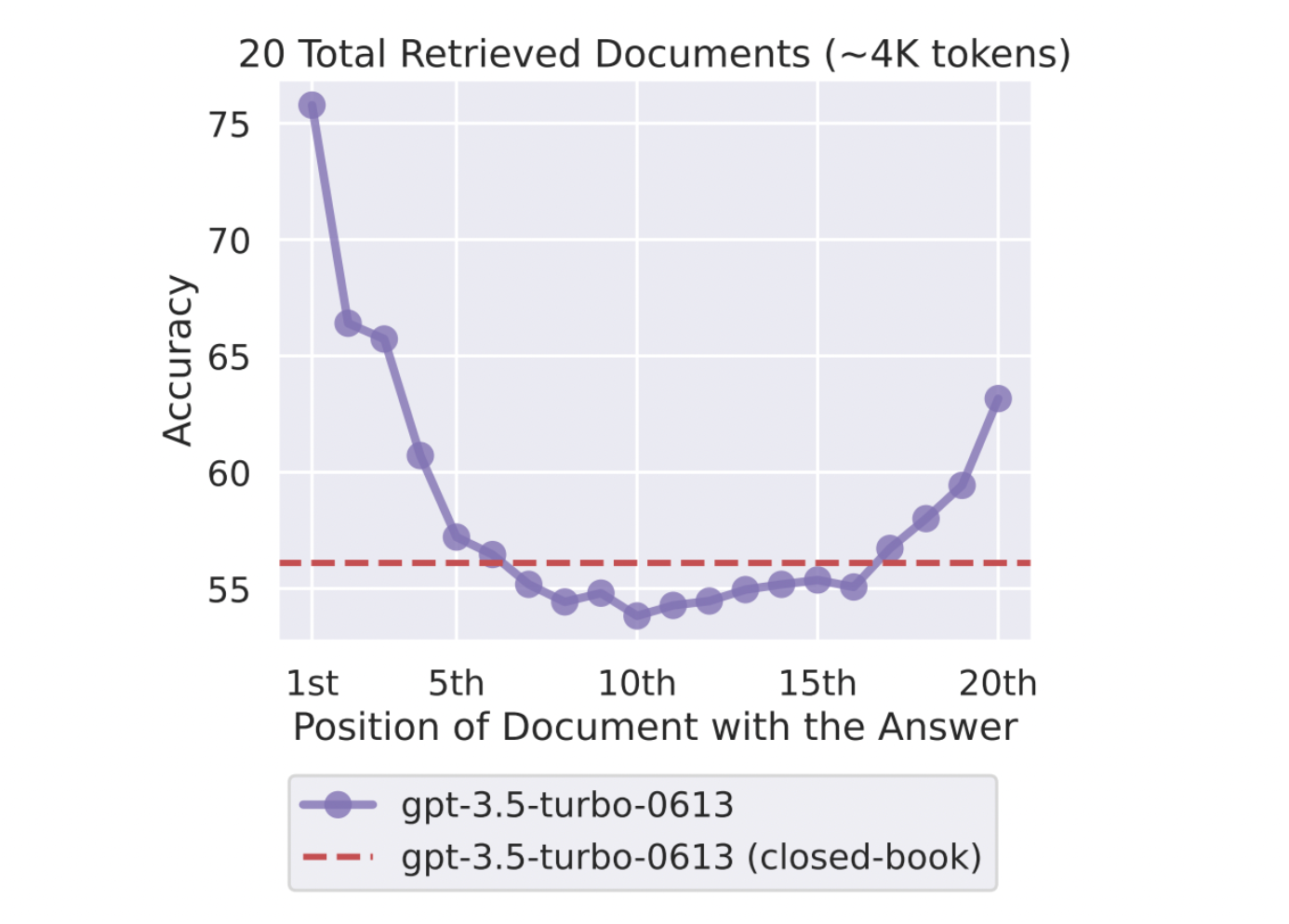 Relationship between model performance and the position of the relevant information in the context window.[2]
If the retrieved documents are too long or irrelevant, as the saying goes, garbage in, garbage out.
There are many techniques for enhancing RAG, creating the additional challenge of knowing when to apply each. In this article, we will analyze query transformations and how to use a router to select the appropriate transformation based on the input prompt.
The idea behind query transformations is that the retriever may not consider a user's initial prompt particularly similar to the relevant documents in the database. In these cases, we can modify the query to increase its relevance to our sources before retrieving and feeding them to the language model.
We will start with a simple RAG application by loading three Wikipedia pages about Nicolas Cage, The Best of Times (the television pilot in which Nicolas Cage made his acting debut), and Leonardo DiCaprio.
We will then split the documents into chunks of 256 characters with no overlap. These chunks will be embedded and indexed in a Vector Store, which stores everything in memory by default, but if you want persistent options, dozens of options are available.
python
Relationship between model performance and the position of the relevant information in the context window.[2]
If the retrieved documents are too long or irrelevant, as the saying goes, garbage in, garbage out.
There are many techniques for enhancing RAG, creating the additional challenge of knowing when to apply each. In this article, we will analyze query transformations and how to use a router to select the appropriate transformation based on the input prompt.
The idea behind query transformations is that the retriever may not consider a user's initial prompt particularly similar to the relevant documents in the database. In these cases, we can modify the query to increase its relevance to our sources before retrieving and feeding them to the language model.
We will start with a simple RAG application by loading three Wikipedia pages about Nicolas Cage, The Best of Times (the television pilot in which Nicolas Cage made his acting debut), and Leonardo DiCaprio.
We will then split the documents into chunks of 256 characters with no overlap. These chunks will be embedded and indexed in a Vector Store, which stores everything in memory by default, but if you want persistent options, dozens of options are available.
python
WikipediaReader = download_loader("WikipediaReader")

loader = WikipediaReader()
pages = ['Nicolas_Cage', 'The_Best_of_Times_(1981_film)', 'Leonardo DiCaprio']
documents = loader.load_data(pages=pages, auto_suggest=False, redirect = False)

llm = OpenAI(temperature=0, model="gpt-3.5-turbo")
gpt3 = OpenAI(temperature=0, model="text-davinci-003")

embed_model = OpenAIEmbedding(model= OpenAIEmbeddingModelType.TEXT_EMBED_ADA_002)
service_context_gpt3 = ServiceContext.from_defaults(llm=gpt3, chunk_size = 256, chunk_overlap=0, embed_model=embed_model)

index = VectorStoreIndex.from_documents(documents, service_context=service_context_gpt3)
retriever = index.as_retriever(similarity_top_k=3)
Now, we have to make sure that the model answers only based on the context and does not rely on its training data, even if it may have previously learned the answer.
python
# The response from original prompt
from llama_index.prompts import PromptTemplate

template = (
"We have provided context information below. n"
    "---------------------n"
    "{context_str}"
    "n---------------------n"
    "Given this information, please answer the question: {query_str}n"
    "Don't give an answer unless it is supported by the context above.n"
)

qa_template = PromptTemplate(template)
We will test the RAG application we just created using two more complex queries. Let's take a look at the first one.
Query 1 - "Who directed the pilot that marked the acting debut of Nicolas Cage?"
The first challenging query requires linking multiple pieces of information: Nicolas Cage's acting debut and the director of that specific film. The prompt mentions only Nicolas Cage, while the director's name is not included anywhere.
Since the model doesn't know the name of the television pilot that marked Cage's debut, called "The Best of Times", it cannot retrieve the relevant details from the documents we indexed.
python
question = "Who directed the pilot that marked the acting debut of Nicolas Cage?"

contexts = retriever.retrieve(question)
context_list = [n.get_content() for n in contexts]

prompt = qa_template.format(context_str="nn".join(context_list), query_str=question)
response = llm.complete(prompt)

print(str(response))
 Simple RAG output for the first query. Image by author
Query 2 - "Compare the education received by Nicolas Cage and Leonardo DiCaprio."
For the second query, the retriever selects relevant chunks of text only about Leonardo DiCaprio's education. The chunks about Nicolas Cage are irrelevant, so we cannot get an accurate comparison.
python
Simple RAG output for the first query. Image by author
Query 2 - "Compare the education received by Nicolas Cage and Leonardo DiCaprio."
For the second query, the retriever selects relevant chunks of text only about Leonardo DiCaprio's education. The chunks about Nicolas Cage are irrelevant, so we cannot get an accurate comparison.
python
question = "Compare the education received by Nicolas Cage and Leonardo DiCaprio."

contexts = retriever.retrieve(question)

context_list = [n.get_content() for n in contexts]

prompt = qa_template.format(context_str="nn".join(context_list), query_str=question)

response = llm.complete(prompt)
print(str(response))
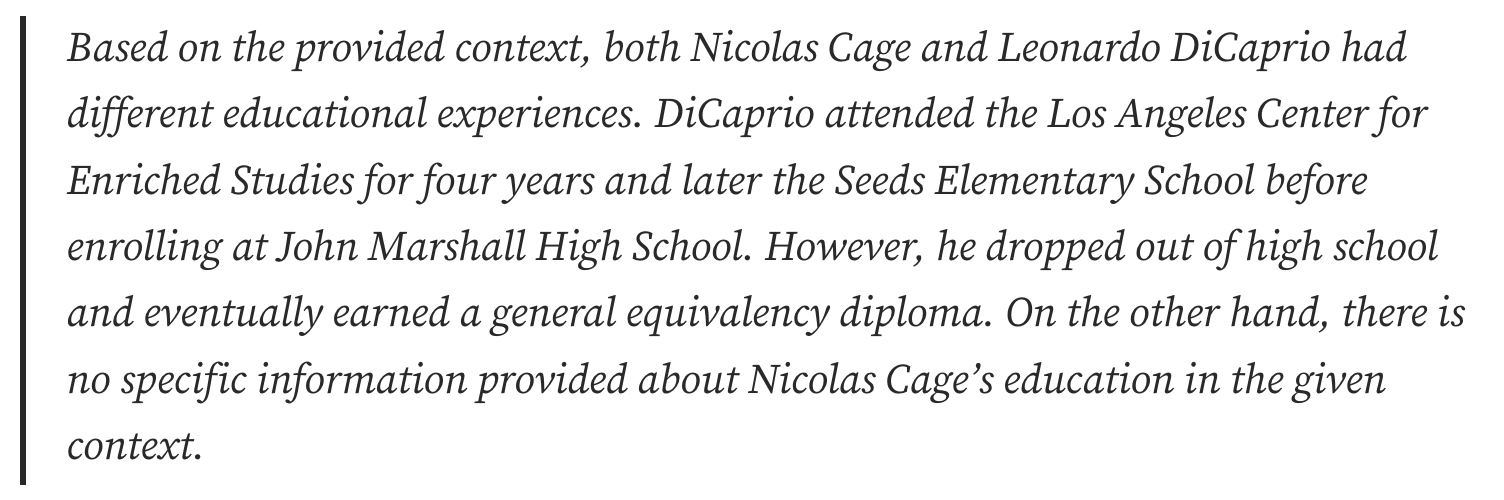 Simple RAG output for the second query. Image by author.
Let's analyze some query transformation techniques and see which works best in each case.
Simple RAG output for the second query. Image by author.
Let's analyze some query transformation techniques and see which works best in each case.
HyDE
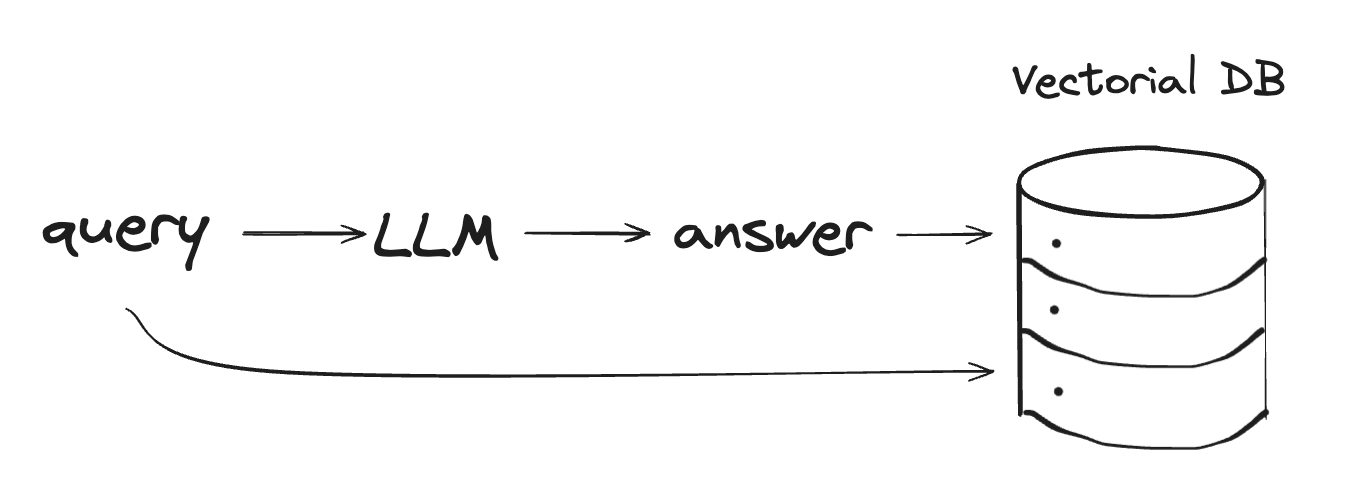 HyDE. Image by the author.
Hypothetical Document Embeddings (HyDE) is a technique for generating document embeddings to retrieve relevant documents without needing actual training data. First, an LLM creates a hypothetical answer in response to a query. While reflecting patterns of relevance to the query, this answer includes information that might not be factually accurate.
Next, both the query and the generated answer are transformed into embeddings. The system then identifies and retrieves actual documents from a predefined database that are closest to these embeddings in the vector space.
HyDE. Image by the author.
Hypothetical Document Embeddings (HyDE) is a technique for generating document embeddings to retrieve relevant documents without needing actual training data. First, an LLM creates a hypothetical answer in response to a query. While reflecting patterns of relevance to the query, this answer includes information that might not be factually accurate.
Next, both the query and the generated answer are transformed into embeddings. The system then identifies and retrieves actual documents from a predefined database that are closest to these embeddings in the vector space.
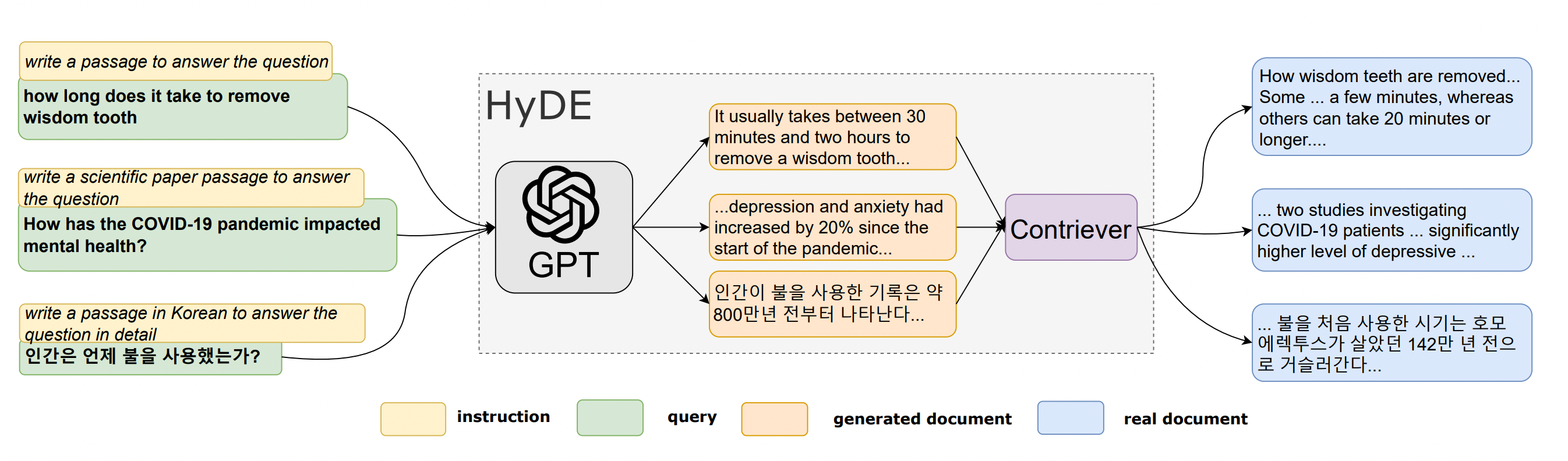 Illustration of the HyDE model [3]
python
Illustration of the HyDE model [3]
python
from llama_index.indices.query.query_transform import HyDEQueryTransform
from llama_index.query_engine.transform_query_engine import (
    TransformQueryEngine,
)

index = VectorStoreIndex.from_documents(documents, service_context=service_context_gpt3)
query_engine = index.as_query_engine(similarity_top_k=3)

hyde = HyDEQueryTransform(include_original=True)
hyde_query_engine = TransformQueryEngine(query_engine, hyde)
Query 1
python
response = hyde_query_engine.query("Who directed the pilot that marked the acting debut of Nicolas Cage?")
print(response)
 HyDE RAG output for the first query. Image by author.
We have made some partial progress - the model's answer is still incorrect, but it has moved closer to the right response. Specifically, it was now able to identify the name of the television pilot ("Best of Times"). Let's see what the hallucinated answer looks like.
python
HyDE RAG output for the first query. Image by author.
We have made some partial progress - the model's answer is still incorrect, but it has moved closer to the right response. Specifically, it was now able to identify the name of the television pilot ("Best of Times"). Let's see what the hallucinated answer looks like.
python
query_bundle = hyde("Who directed the pilot that marked the acting debut of Nicolas Cage?")
hyde_doc = query_bundle.embedding_strs[0]
hyde_doc
 HyDE output for the first query. Image by author.
While it is not true that Francis Coppola directed "The Best of Times", at least the hallucination included the movie's name.
Query 2
python
HyDE output for the first query. Image by author.
While it is not true that Francis Coppola directed "The Best of Times", at least the hallucination included the movie's name.
Query 2
python
response = hyde_query_engine.query("Compare the education received by Nicolas Cage and Leonardo DiCaprio.")
print(response)
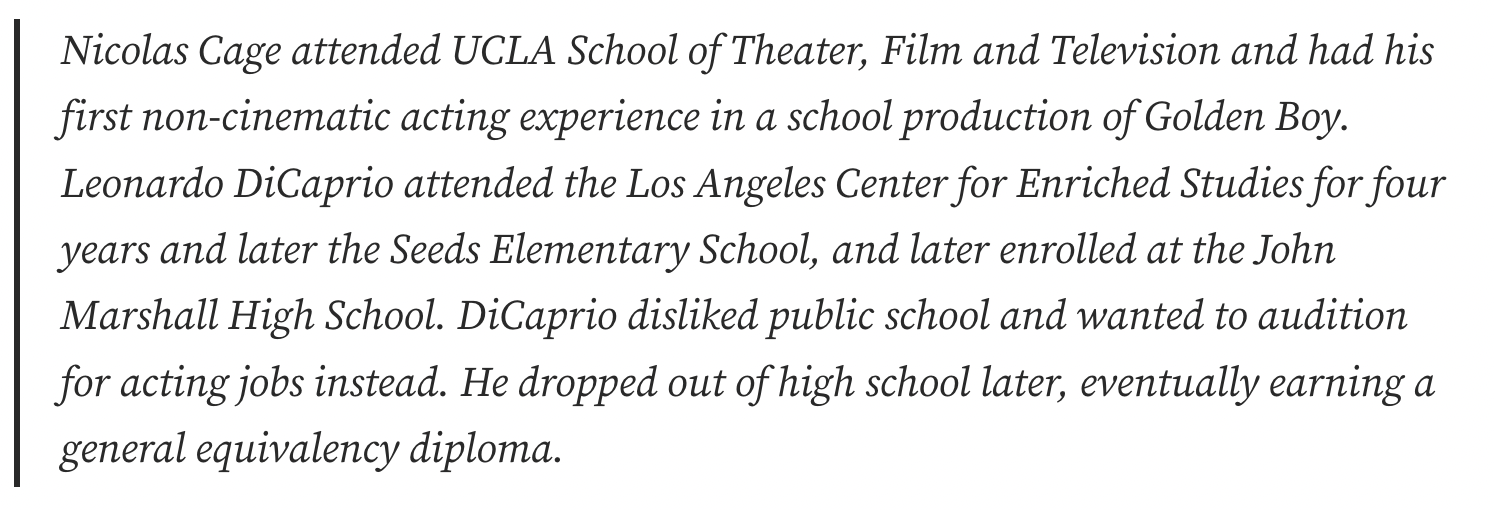 HyDE RAG output for the second query. Image by author.
The answer is correct because the hallucinated answer improved the output significantly. The LLM already had information about the actors' education in the training data.
HyDE RAG output for the second query. Image by author.
The answer is correct because the hallucinated answer improved the output significantly. The LLM already had information about the actors' education in the training data.
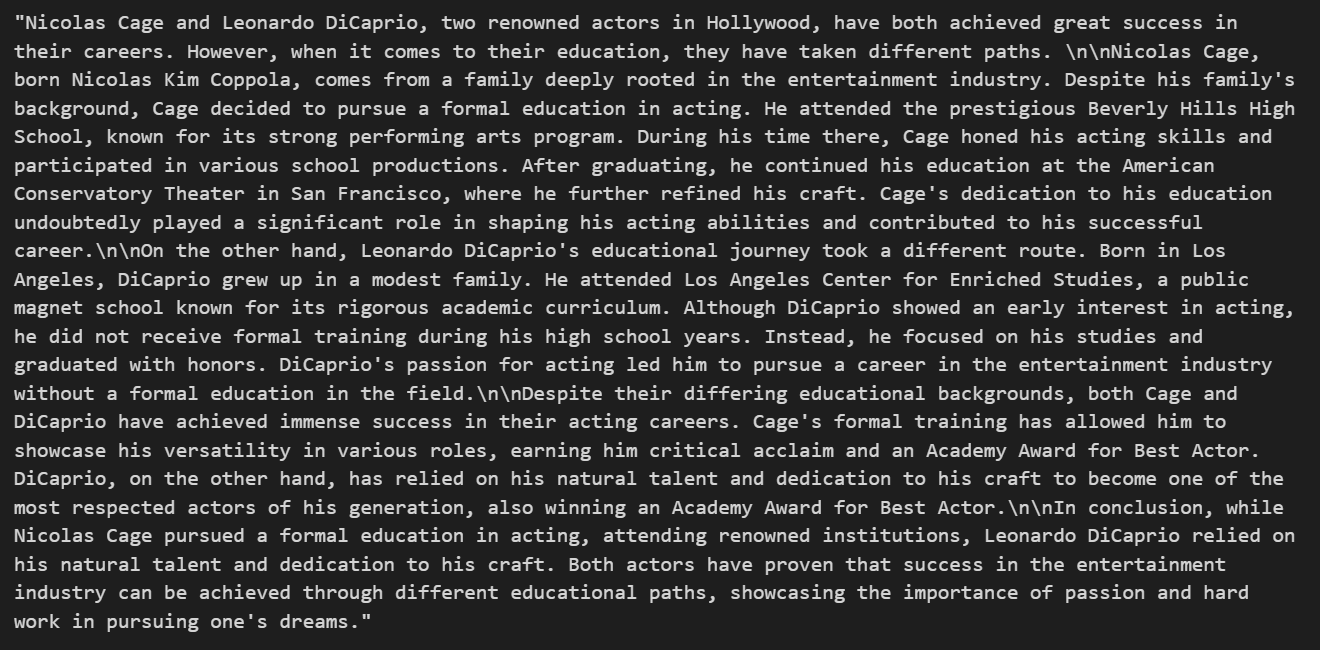 HyDE output for the second query. Image by author.
Sub Questions
The Sub Questions technique uses a divide-and-conquer approach to handle complex questions. It first analyzes the questions and breaks them down into simpler sub-questions. Each sub-question targets different relevant documents that can provide part of the answer.
The engine then gathers the intermediate responses and synthesizes all the partial results into a final response.
python
# setup base query engine as tool
query_engine_tools = [
    QueryEngineTool(
        query_engine=vector_query_engine,
        metadata=ToolMetadata(
            name="Sub-question query engine",
            description="Questions about actors",
        ),
    ),
]

query_engine = SubQuestionQueryEngine.from_defaults(
    query_engine_tools=query_engine_tools,
    service_context=service_context,
    use_async= False
)
Query 1
 Sub Questions RAG output for the first query. Image by author.
 Generated Sub Questions for the first query. Image by author.
There are no ways to break down this question into simpler sub-questions that would make it easier to answer. The model tried to generate one sub-question but didn't provide any additional context beyond the original query, wasting computation on ineffective transformations.
Query 2
Generated Sub Questions for the first query. Image by author.
There are no ways to break down this question into simpler sub-questions that would make it easier to answer. The model tried to generate one sub-question but didn't provide any additional context beyond the original query, wasting computation on ineffective transformations.
Query 2
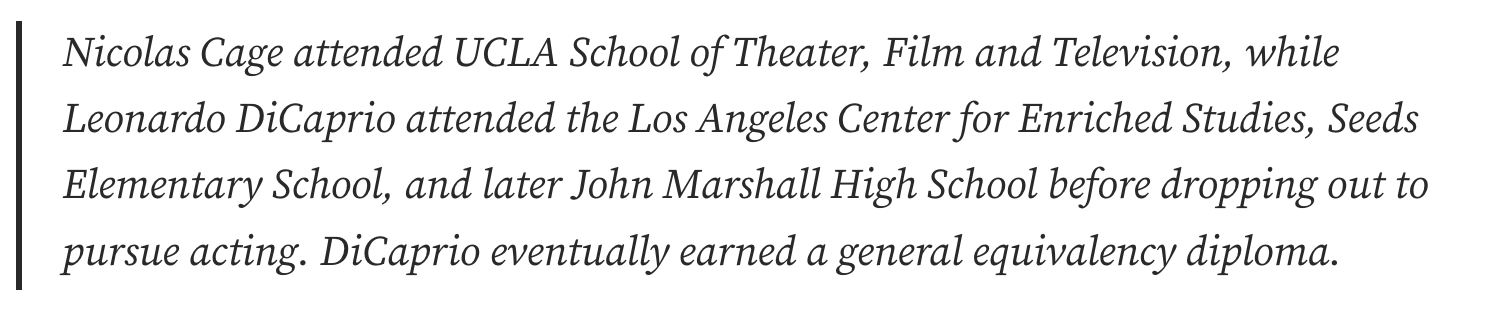 Sub Questions RAG output for the second query. Image by author.
 Generated Sub Questions for the second query. Image by author.
This time, generating sub-questions was extremely useful because we needed to compare two distinct pieces of information - the educational backgrounds of two different people. Each sub-question can be answered independently using the retrieved context.
Generated Sub Questions for the second query. Image by author.
This time, generating sub-questions was extremely useful because we needed to compare two distinct pieces of information - the educational backgrounds of two different people. Each sub-question can be answered independently using the retrieved context.
Multi-Step Query Transformation
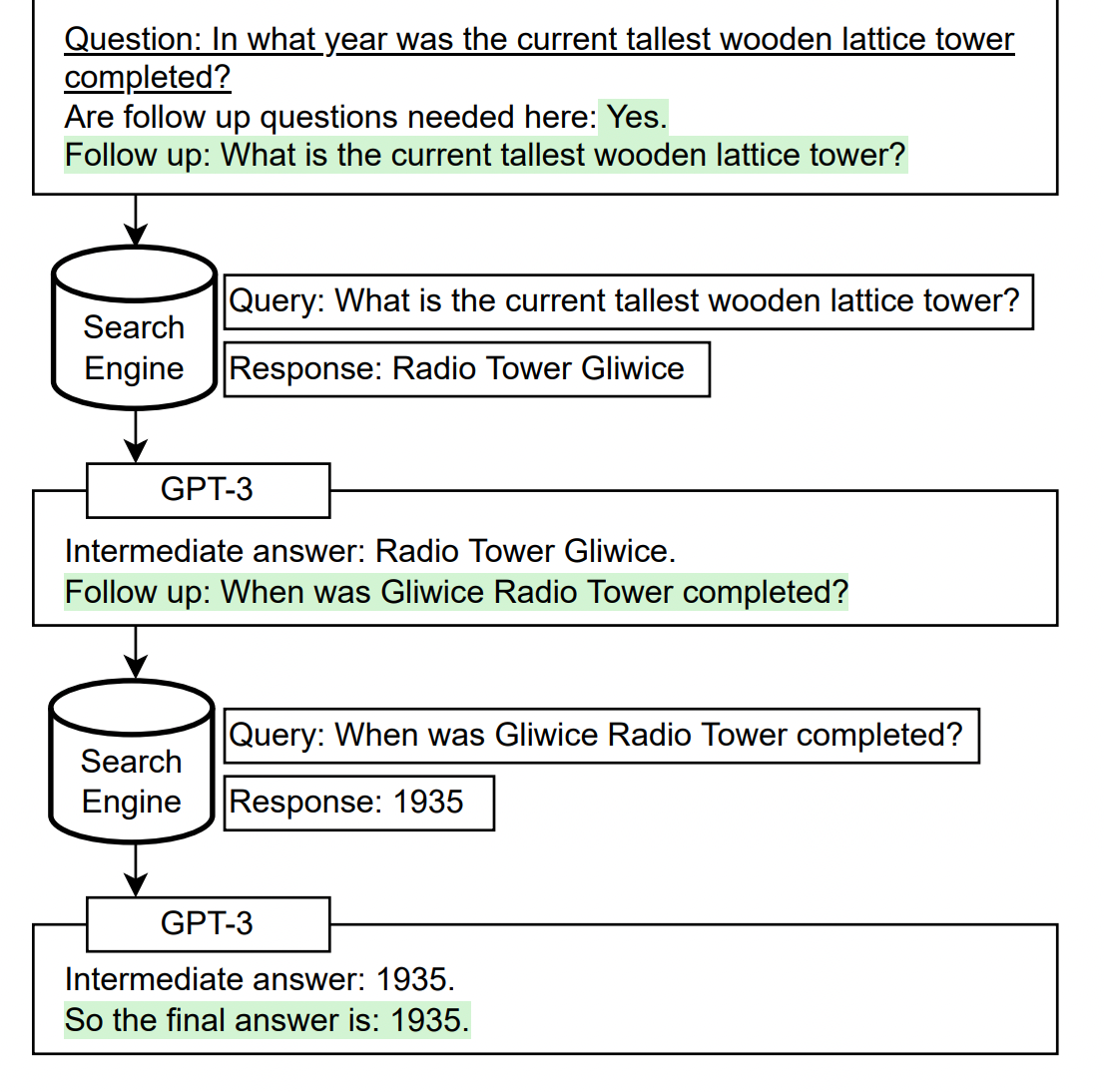 Self-ask + Search Engine [1]
The multi-step query transformation approach is based on the self-ask method, where the language model asks and answers follow-up questions to itself before answering the original question. This helps the model combine facts and insights it learned separately during pretraining.
The original paper showed that LLMs often fail to compose two facts together, even if they know each one independently. For example, a model may know Fact A and Fact B but fail to deduce the implication of A and B together.
The self-ask method aims to overcome this limitation. At test time, we simply provide the prompt and question to the model. Then, it automatically generates any necessary follow-up questions to connect facts, compose reasoning steps, and decide when to stop [1].
python
Self-ask + Search Engine [1]
The multi-step query transformation approach is based on the self-ask method, where the language model asks and answers follow-up questions to itself before answering the original question. This helps the model combine facts and insights it learned separately during pretraining.
The original paper showed that LLMs often fail to compose two facts together, even if they know each one independently. For example, a model may know Fact A and Fact B but fail to deduce the implication of A and B together.
The self-ask method aims to overcome this limitation. At test time, we simply provide the prompt and question to the model. Then, it automatically generates any necessary follow-up questions to connect facts, compose reasoning steps, and decide when to stop [1].
python
query_engine = MultiStepQueryEngine(
    query_engine=query_engine,
    query_transform=step_decompose_transform_gpt3,
    index_summary=index_summary
)
Query 1
Don Mischer directed the pilot that marked the acting debut of Nicolas Cage.
This is the first time we have had a correct answer to this query! Let's see the intermediate questions.
 MultiStepQueryEngine output for the first query. Image by author.
The output of the first sub-question was the following:
The Best of Times pilot that marked the acting debut of Nicolas Cage was not directed by anyone in the Coppola family. It was directed by Rod Amateau.
Having identified the pilot name, the second sub-question now asks specifically about the director:
Who directed the Best of Times pilot that marked the acting debut of Nicolas Cage?
This multi-step approach helped the model build on the additional context from the prior question and led us to the correct answer.
Query 2
Nicolas Cage received education in the field of theater, film, and television at UCLA School of Theater, Film and Television. On the other hand, Leonardo DiCaprio attended the Los Angeles Center for Enriched Studies, Seeds Elementary School, and John Marshall High School. However, DiCaprio dropped out of high school and later earned a general equivalency diploma.
MultiStepQueryEngine output for the first query. Image by author.
The output of the first sub-question was the following:
The Best of Times pilot that marked the acting debut of Nicolas Cage was not directed by anyone in the Coppola family. It was directed by Rod Amateau.
Having identified the pilot name, the second sub-question now asks specifically about the director:
Who directed the Best of Times pilot that marked the acting debut of Nicolas Cage?
This multi-step approach helped the model build on the additional context from the prior question and led us to the correct answer.
Query 2
Nicolas Cage received education in the field of theater, film, and television at UCLA School of Theater, Film and Television. On the other hand, Leonardo DiCaprio attended the Los Angeles Center for Enriched Studies, Seeds Elementary School, and John Marshall High School. However, DiCaprio dropped out of high school and later earned a general equivalency diploma.
 MultiStepQueryEngine output for the second query. Image by author.
The multi-step approach was also useful in this case. Our opinion is that for the second query, the sub-question technique from before is a better fit because it can be parallelized. The questions are independent and don't need to build on top of each other. But a multi-step approach can also be useful.
MultiStepQueryEngine output for the second query. Image by author.
The multi-step approach was also useful in this case. Our opinion is that for the second query, the sub-question technique from before is a better fit because it can be parallelized. The questions are independent and don't need to build on top of each other. But a multi-step approach can also be useful.
RouterQueryEngine
Each query transformation proved useful for different cases. The sub-question decomposition works best for questions that can be broken into simpler sub-questions, like comparing Nicolas Cage and Leonardo DiCaprio's education.
Multi-step transformation works best for queries that require exploring context iteratively, like linking multiple facets of information.
Simple queries might not need any transformations at all, and applying them would be a waste of resources.
To handle choosing between all these cases, we can use a RouterQueryEngine - we give an LLM a set of tools for query transformations and let it decide the best one to apply based on the input prompt.
makefile
query_engine = RouterQueryEngine(
    selector=PydanticSingleSelector.from_defaults(),
    query_engine_tools=[
        simple_tool,
        multi_step_tool,
        sub_question_tool,
    ],
)
We created a router that allows selection between no transformation, sub-question decomposition, or multi-step transformations as needed for each unique query. Let's examine how the router reasons about which approach to take.
First of all, we will choose a very simple question that needs no transformations.
ini
response_1 = query_engine.query("What is Nicolas Cage's profession?")
 RouterQueryEngine output choosing simple_tool. Image by author.
The router made the right choice by assessing that the query is relatively simple. No query transformations are needed to decompose or expand this question since it asks directly about a single fact regarding Nicolas Cage's occupation.
ini
RouterQueryEngine output choosing simple_tool. Image by author.
The router made the right choice by assessing that the query is relatively simple. No query transformations are needed to decompose or expand this question since it asks directly about a single fact regarding Nicolas Cage's occupation.
ini
response_2 = query_engine.query("Compare the education received by Nicolas Cage and Leonardo DiCaprio.")
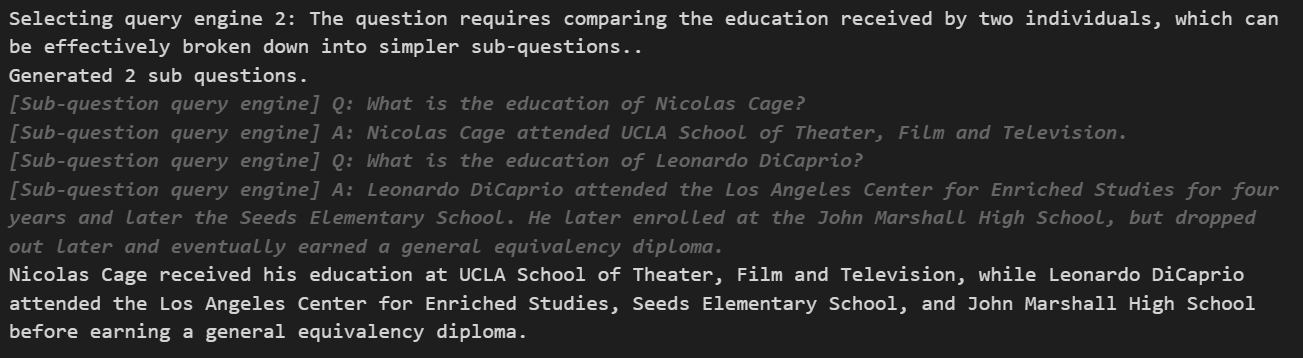 RouterQueryEngine output choosing sub_question_tool. Image by author.
To answer a comparative question, the router accurately broke it down into simpler sub-questions about each individual.
ini
RouterQueryEngine output choosing sub_question_tool. Image by author.
To answer a comparative question, the router accurately broke it down into simpler sub-questions about each individual.
ini
response_3 = query_engine.query("Who directed the pilot that marked the acting debut of Nicolas Cage?")
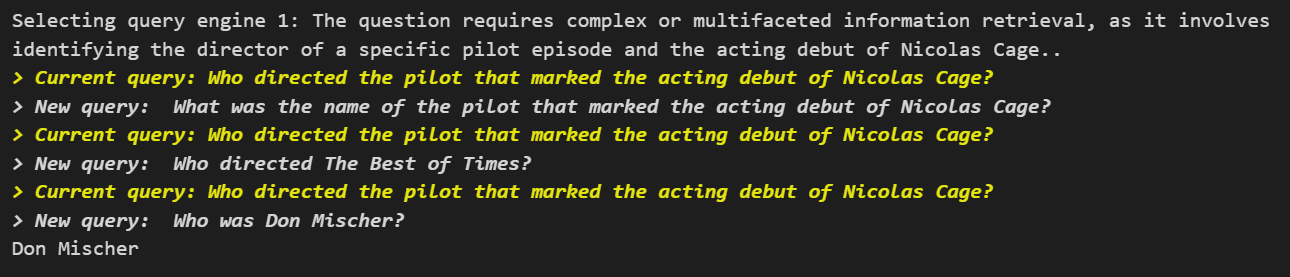 RouterQueryEngine output choosing multi_step_tool. Image by author.
For the third query, the router recognizes that answering correctly requires linking multiple pieces of contextual information - specifically, identifying the pilot episode that marked Cage's acting debut and then determining who directed that particular pilot.
RouterQueryEngine output choosing multi_step_tool. Image by author.
For the third query, the router recognizes that answering correctly requires linking multiple pieces of contextual information - specifically, identifying the pilot episode that marked Cage's acting debut and then determining who directed that particular pilot.
Conclusion
As we have explored, enhancing RAG through advanced query transformations can significantly improve model performance.
While query transformation is just one of many techniques for improving retrieval, it demonstrates the potential and need for customized analysis that merges retrieval with the reasoning capabilities inherent to LLMs.
. . .
If you enjoyed this article, join Text Generation - our newsletter has two weekly posts with the latest insights on Generative AI and Large Language Models.
You can find the full code for this project on GitHub.
You can also find me on LinkedIn .
. . .
References
- Measuring and Narrowing the Compositionality Gap in Language Models
- Lost in the Middle: How Language Models Use Long Contexts
- Precise Zero-Shot Dense Retrieval without Relevance Labels
Register Now to Continue Reading
Unlock Towards Data Science with a Free Account
All articles on Towards Data Science are available to registered users. Create a free account today to access this article and thousands more.
Register for freeSign in to your account
 Written By
See all from Iulia Brezeanu
ChatGPTGenerative Ai ToolsHands On TutorialsLlmNLP
Share This Article
Towards Data Science is a community publication. Submit your insights to reach our global audience and earn through the TDS Author Payment Program.
Write for TDS
Related Articles
Programming
When clean code hides inefficiencies: what we learned from fixing a few lines of code and saving 90% in LLM cost.
Uri Peled
August 21, 20258 min read
Artificial Intelligence
Your guide to the web's new LLM-ready content standard
Derick Ruiz
November 28, 20245 min read
Machine Learning
A step-by-step guide to building interpretable topic models
Shashank Kapadia
August 19, 201912 min read
Artificial Intelligence
What is numeracy in NLP and why it matters?
Misho Dungarov
November 22, 202013 min read
NLP
Many NLP tasks can be solved with keyword-based approaches. For those that can't, try spaCy's linguistic features or a Transformer model.
Jared Rand
November 30, 20207 min read
Machine Learning
Making models smarter by incorporating better learning objectives
Slava Efimov
November 22, 20234 min read
Machine Learning
A detailed exploration of the Voyager Paper and its findings on tool usage
Matthew Gunton
May 1, 20248 min read
Deep Learning
Training a state of the art text classifier with Pytorch and Fastai with minimal setup!
Yash Prakash
January 5, 20213 min read
Artificial Intelligence
A promising alternative approach to improve forecasting
Nikos Kafritsas
December 2, 20248 min read
Your home for data science and AI. The world's leading publication for data science, data analytics, data engineering, machine learning, and artificial intelligence professionals.
Subscribe to Our NewsletterWrite For TDS•About•Advertise•Privacy Policy•Terms of Use
© Insight Media Group, LLC 2026•The New Stack•roadmap.sh•Creator Network
Recommended Articles
Close