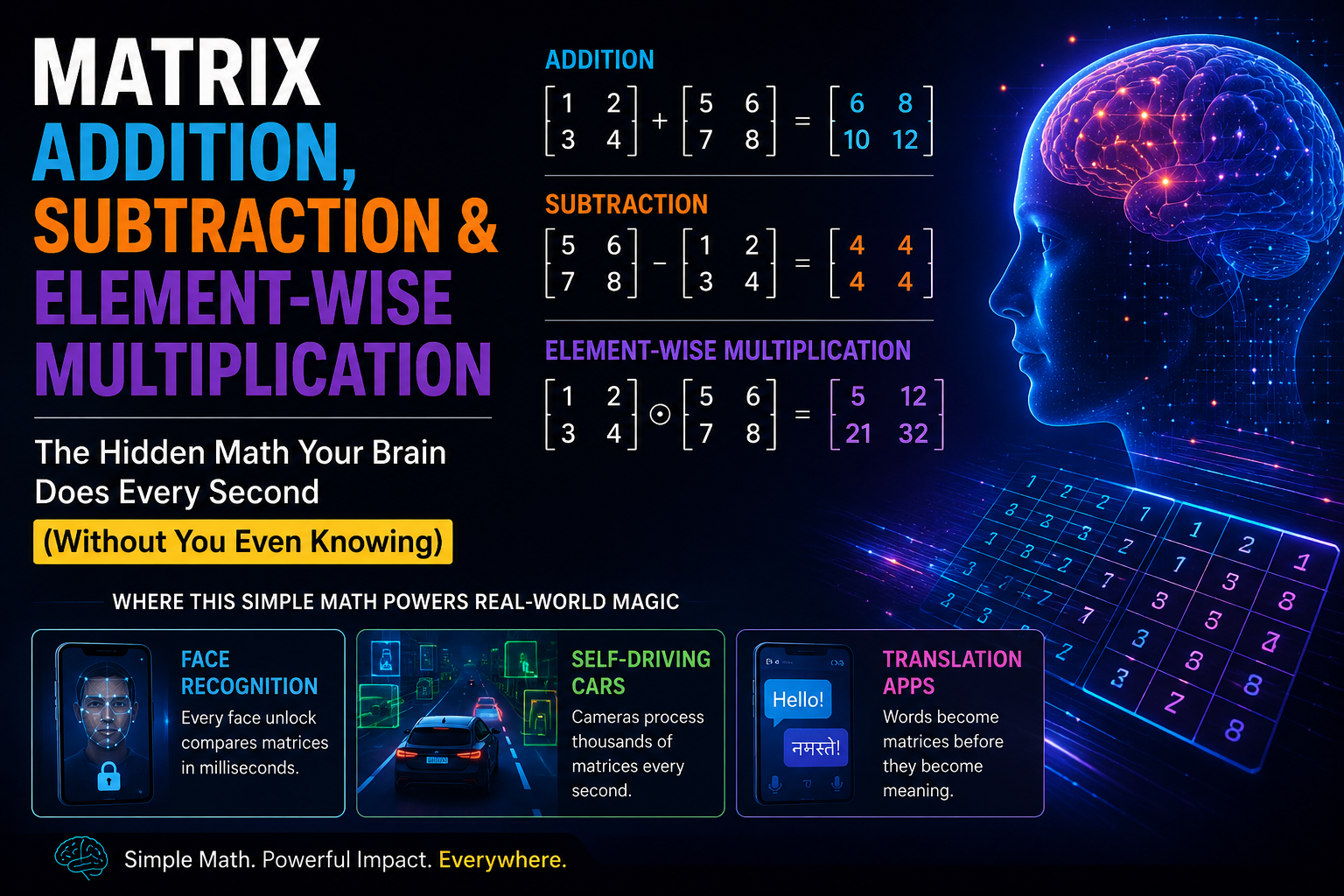
Right now, without asking your permission, your brain is doing something incredible.
Look at any face nearby — a friend, a family member, even a photo on your phone. In less than half a second, you know exactly who it is. You didn't sit down and "calculate" it. You didn't compare eyebrow shapes on a checklist. It just... happened.
Here's the part that should genuinely surprise you.
When your phone does the exact same thing — unlocking with Face ID, or Instagram putting a filter perfectly over your face — it isn't "just happening." Somewhere inside that phone, in a few thousandths of a second, a chip is quietly doing millions of additions, subtractions, and multiplications on a giant table of numbers. Your face isn't stored as a "face." It's stored as a matrix — a table of numbers — and the phone recognizes you by doing plain arithmetic on that table, over and over, unbelievably fast.
Your brain does something similar, using billions of neurons instead of numbers in a table. Different machinery. Same underlying idea: compare things, measure differences, filter out what doesn't matter, keep what does.
This blog is about the three simplest operations that make this possible — matrix addition, matrix subtraction, and element-wise multiplication. They sound boring. They are not. These three operations, simple enough to teach a ten-year-old, are quietly running inside every face-unlock, every video call background blur, every translation app, and every self-driving car camera on the planet.
I'm going to explain every single part of this slowly, assuming you're seeing it for the first time. If you already know what a matrix is, feel free to skim the recap. If you don't — stay right here, because everything after this point depends on it.
By the end of this blog, you will understand, with zero confusion:
What a matrix really is, one more time, explained as simply as humanly possible
The one rule that governs addition, subtraction, and element-wise multiplication
How to do all three by hand, on paper, with tiny numbers, before touching any code
How to write the Python code for all three, explained line by line
Real, specific examples of where these exact operations run inside face recognition, self-driving cars, and translation apps
Why understanding this tiny bit of math should genuinely change how you see your phone
Grab a cup of tea. This one is worth taking slow.
Let's strip away every intimidating word first.
A matrix is just numbers, arranged neatly in rows and columns. That's it. Nothing more.
Here's an example. Imagine you check the weather every day for 3 days, and you record the temperature and humidity.
| Day | Temperature (°C) | Humidity (%) |
|---|---|---|
| Monday | 30 | 65 |
| Tuesday | 32 | 60 |
| Wednesday | 28 | 70 |
Now strip away the labels — the words "Monday," "Temperature," and so on — and keep only the numbers:
30   65
32   60
28   70
This is a matrix. Three rows (one for each day), two columns (one for temperature, one for humidity).
That's genuinely the whole definition. A matrix is a grid of numbers. Rows go left to right. Columns go top to bottom. When people say "machine learning uses matrices," this is literally all they mean — the computer stores its data as grids like the one above, instead of as English sentences.
Because a computer cannot understand "Monday" or "hot" or "a face." A computer can only understand numbers. So every single piece of information you feed into a Machine Learning system — a photo, a sentence, a sound recording, a video — first gets converted into a big grid of numbers, exactly like the temperature table above, just usually a lot bigger.
A single black-and-white photo on your phone, even a small one, might be a grid of 100 rows and 100 columns — that's 10,000 numbers, just to describe one small photo. Each number represents how bright or dark one tiny dot (called a pixel) is. A colour photo needs three of these grids stacked together — one for red brightness, one for green brightness, one for blue brightness.
Sit with that for a second. Every photo you've ever taken is secretly a matrix (or three of them) full of plain numbers. Nothing magical. Just numbers in a grid.
Now — once your data is sitting there as a grid of numbers, how do you actually do anything useful with it? That's where the operations in this blog come in.
Before we touch addition, subtraction, or multiplication, there's one rule you must lock into memory. Every confusion beginners have with these three operations comes from forgetting this rule.
You can only add, subtract, or element-wise multiply two matrices if they are the exact same size — same number of rows, same number of columns.
Think of it like matching socks from a laundry basket. You can only pair a left sock with its matching right sock — the exact one from the exact same pair. You can't pair a size 8 sock with a size 11 sock and call it a match. Sizes must be identical.
Matrices work the same way for these three operations. If Matrix A has 3 rows and 2 columns, then Matrix B must also have exactly 3 rows and exactly 2 columns. Not "close." Not "a bit smaller." Identical.
Why does this rule exist? Because all three operations we're about to learn work by grabbing one number from Matrix A, grabbing the number sitting in the exact same position in Matrix B, and combining just those two numbers. If Matrix B doesn't have a number in that position (because it's a different size), there's nothing to grab. The operation simply breaks.
Here's a picture to burn into your memory:
   Matrix A (3 rows, 3 cols)      Matrix B (3 rows, 3 cols)

  ┌─────┬─────┬─────┐           ┌─────┬─────┬─────┐
  │ a11 │ a12 │ a13 │           │ b11 │ b12 │ b13 │
  ├─────┼─────┼─────┤           ├─────┼─────┼─────┤
  │ a21 │ a22 │ a23 │           │ b21 │ b22 │ b23 │
  ├─────┼─────┼─────┤           ├─────┼─────┼─────┤
  │ a31 │ a32 │ a33 │           │ b31 │ b32 │ b33 │
  └─────┴─────┴─────┘           └─────┴─────┴─────┘

Position (row 1, col 1) in A only ever combines with position (row 1, col 1) in B.
Position (row 2, col 3) in A only ever combines with position (row 2, col 3) in B.
And so on, for every single position.
Keep that picture in mind. Every example from here on is just this same picture, with real numbers dropped in.
Imagine you're building a very simple self-driving car project as a hobby. You've fitted two cheap sensors on the front of the toy car:
One camera-based sensor that estimates "how much should I turn left or right," based on the lane lines it sees
One ultrasonic sensor that estimates "how much should I turn left or right," based on how close obstacles are
Each sensor gives you a small grid of correction numbers, say a 2x2 grid representing four zones in front of the car (top-left, top-right, bottom-left, bottom-right of the camera's view).
To get the car's final decision, you don't pick one sensor and ignore the other. You add the two grids together, position by position, and the car steers based on the combined total. If both sensors agree "turn right a little," the combined number is bigger, and the car turns right more confidently. If they disagree, the combined number partially cancels out, and the car plays it safer.
That combining step — grid plus grid, position by position — is matrix addition. Nothing more mysterious than that.
Let's use tiny, friendly numbers so you can follow every step with your own eyes.
Matrix A =    2   3
              5   1

Matrix B =    4   0
              1   6
Both are 2 rows by 2 columns. Same size. We're allowed to add them.
To add, we go position by position:
Position (row 1, col 1): 2 + 4 = 6
Position (row 1, col 2): 3 + 0 = 3
Position (row 2, col 1): 5 + 1 = 6
Position (row 2, col 2): 1 + 6 = 7
Result =    6   3
            6   7
That's genuinely all matrix addition is. Four tiny additions, each one completely independent of the others. Position (1,1) never talks to position (2,2). Every cell minds its own business.
For any two matrices A and B, of the same size:
result[row][column] = A[row][column] + B[row][column]
Don't let the notation scare you — result[row][column] just means "the number sitting at that particular row and column." You're going to see this bracket notation a lot in Machine Learning, and it always means exactly this: "go find the number at this specific position."
We'll do this in two ways — first, the "slow but honest" way using a loop, so you can see every single addition happen one at a time, exactly like we just did by hand. Then, the fast, real-world way that you'll actually use in projects.
import numpy as np

matrix_A = np.random.randn(5, 5)   # a random 5x5 grid of numbers
matrix_B = np.random.randn(5, 5)   # another random 5x5 grid, same size

# matrix addition — the slow, manual way
output = np.zeros((5, 5))   # start with an empty 5x5 grid, all zeros

for i in range(matrix_A.shape[0]):        # walk through every row
    for j in range(matrix_A.shape[1]):    # walk through every column in that row
        output[i, j] = matrix_A[i, j] + matrix_B[i, j]   # add just these two numbers

print(output)
Let's slow down and explain every unfamiliar piece here, because if you're new to Python, this can look like gibberish at first glance.
import numpy as np — NumPy is a free Python toolkit built specifically for working with grids of numbers (matrices). Almost every Machine Learning tool (Scikit-learn, TensorFlow, PyTorch) is built on top of it. We're just borrowing its tools.
np.random.randn(5, 5) — this creates a 5-row, 5-column grid, filled with random decimal numbers. We're using random numbers here purely so you can copy this code and see some result, even without real data.
np.zeros((5, 5)) — this creates an empty 5x5 grid, filled entirely with zeros, ready for us to fill in with real answers. Think of it as a blank table waiting to be written on.
matrix_A.shape[0] — .shape tells you the size of a matrix, as (rows, columns). So .shape[0] means "the number of rows," and .shape[1] means "the number of columns."
for i in range(...) and for j in range(...) — these two loops are how we walk through every row (i) and every column (j) inside that row, one at a time — exactly the same way we manually went position by position in our hand example above.
matrix_A[i, j] — this grabs the exact number sitting at row i, column j. This is precisely the bracket notation from our rule above.
So this entire block of code is doing nothing more than what we did by hand with the 2x2 example — just repeating it automatically, 25 times (5 rows times 5 columns), instead of you doing it with a pen.
# vectorized (fast) implementation
print(matrix_A + matrix_B)
That's it. One line. Same exact result as the loop above. NumPy has already written that loop internally, in a much faster, more optimized way (in a language called C, which runs far quicker than plain Python). This is the version you will actually type in real projects — the loop above was purely so you understood what's happening underneath that single + sign.
This is the part most tutorials skip, and it's the part that actually matters. Let's not stay abstract. Let's go concrete.
1. Face recognition and Face ID (Computer Vision)
When your phone's camera captures your face to unlock the screen, it doesn't just take one single photo. It takes several photos in a tiny fraction of a second (multiple "frames"), because a single photo can have random noise — a slightly shaky hand, a flicker in the light, a tiny sensor glitch.
Each of these photos is a matrix of pixel brightness numbers. To get a cleaner, more reliable picture of your face, the phone adds these matrices together (and then divides by how many photos it took — we'll get to why that division matters, but the important part right now is the addition). Random noise in one photo tends to cancel out random noise in another, while your actual face — which doesn't change between these split-second frames — gets reinforced and stays strong.
So literally, every time you unlock your phone with your face, a matrix addition is happening, on real pixel data, in under a second, without you ever knowing.
2. Self-driving cars combining sensors (Computer Vision + Robotics)
Self-driving cars don't rely on a single camera. They combine data from cameras, radar, and sometimes lidar (a laser-based distance sensor). Each of these produces its own grid of numbers describing "what's around the car" from a slightly different angle or method.
To make one confident decision — "there is an object 10 meters ahead, slightly to the left" — the car's software often needs to combine (add) these different sensor grids together, so a weak or noisy signal from one sensor gets supported by a stronger signal from another. If the camera is confused because of glare, but the radar clearly detects an object, the combined (added) result still correctly shows "something is there."
3. Video call background blur and lighting correction
When Zoom, Google Meet, or Instagram applies a "beauty filter" or corrects your lighting during a video call, it's often combining your original video frame (as a matrix of pixel numbers) with a second "correction" matrix — one that brightens shadows, smooths skin tones, or adds warmth to colours. Adding these two matrices together, pixel by pixel, produces the final image you see on screen, instantly, 30 times a second.
Here's the number that should genuinely surprise you: a single video call frame, even at a modest resolution, can easily contain over 2 million individual pixel numbers. Your video call app adds correction values to every single one of those 2 million numbers, roughly 30 times every second, just so your face looks a little nicer on a call. And it does all of this in the background, so smoothly that you've probably never once thought about it.
Now imagine a completely different scene — a security camera watching an empty office at 2 AM.
The camera takes a photo every second. Most of the time, nothing changes — the desk is still there, the chair is still there, the wall is still the wall. But the moment someone walks into the room, something in that photo changes.
How does the security system know something changed, automatically, without a human watching the screen all night?
It takes the current photo (as a matrix of pixel numbers) and subtracts the previous photo (also a matrix of pixel numbers) from it, position by position. In the areas where nothing changed — the desk, the chair, the wall — the subtraction gives a result very close to zero, because the pixel value barely moved between the two photos. But in the area where a person is now standing, the pixel values are very different from a second ago, so the subtraction gives a large, non-zero number.
The security system doesn't need to "see" a person. It just needs to notice: "these specific positions in the grid changed by a lot." That's subtraction, doing the job of a night guard.
Matrix A (this second)  =    120   118
                              45    46

Matrix B (one second ago) =  119   117
                              45    98
Subtracting position by position, A - B:
(row 1, col 1): 120 - 119 = 1
(row 1, col 2): 118 - 117 = 1
(row 2, col 1): 45 - 45 = 0
(row 2, col 2): 46 - 98 = -52
Result =    1     1
            0    -52
Look at that bottom-right number: -52. That's a huge, sudden change compared to the tiny 1s and 0 everywhere else. That single large number is exactly how a motion detector "notices" movement — not by understanding what a person looks like, but simply by noticing that one part of the grid changed far more than the rest.
result[row][column] = A[row][column] - B[row][column]
One important detail that's different from addition: order matters here. A - B is not the same as B - A. If you swap the order, you get the exact opposite numbers (positive becomes negative and vice versa). This makes sense if you think about it — "how much bigger is today than yesterday" and "how much bigger is yesterday than today" are naturally opposite answers.
import numpy as np

mat_A = np.random.randn(3, 4)
mat_B = np.random.randn(3, 4)

# matrix subtraction — manual, step by step
out = np.zeros((3, 4))
for i in range(mat_A.shape[0]):
    for j in range(mat_A.shape[1]):
        out[i, j] = mat_A[i, j] - mat_B[i, j]

print(out)
# shortcut, same result
print(mat_A - mat_B)
Exactly the same structure as addition — the only thing that changed is the - instead of + inside the loop. That's genuinely the only difference between how addition and subtraction are coded.
1. Motion detection in CCTV and home security cameras
As explained above — comparing "this frame" minus "the previous frame" is one of the most common, simplest ways cheap security cameras and baby monitors detect movement, without needing any advanced Machine Learning model at all. Just plain subtraction, repeated for every pixel, dozens of times a second.
2. Background removal in video calls
That "blur my background" or "replace my background" button in Zoom and Google Meet often relies on comparing the current frame against a stored picture of what the empty background normally looks like. Wherever the subtraction gives close to zero, the software assumes "that's the background, keep it blurred." Wherever the subtraction gives a big difference, the software assumes "that's you, keep it sharp." One subtraction, applied across millions of pixels, decides your entire video call background in real time.
3. Handwriting and digit recognition (the "postal code reading" example)
Post offices around the world use automated systems to read handwritten postal codes on envelopes. A common early step: the system has an "ideal" version of what each digit (0 through 9) typically looks like, stored as a matrix of pixel values. When it scans your handwritten digit, it subtracts your digit's pixel matrix from each of these ten "ideal" digit matrices. Whichever subtraction produces numbers closest to zero overall — meaning your handwriting matches that ideal digit most closely — is picked as the system's best guess.
This is a simplified version of how digit recognition works, and modern systems use much more sophisticated methods (we'll get there in future blogs, and yes, that involves the "neural network" and "loss function" words you may have heard — don't worry about those yet, they build on exactly what you're learning right now). But underneath even the fanciest modern digit-recognition AI, subtraction — measuring "how far off is my guess from the truth" — is still the starting point of the entire idea.
4. Google Translate and other translation apps — checking their own mistakes
Here's a genuinely surprising one. When a translation model is being taught (this is called "training," and again — don't worry, we'll dedicate a whole future blog to exactly how training works), it makes a guess translation, then compares that guess to the correct human translation. Both the guess and the correct answer get represented as matrices of numbers (this is how computers represent words and sentences — again, a topic for a dedicated future blog). The model subtracts one from the other to measure exactly how wrong its guess was, position by position, word by word.
That single subtraction — "guess minus truth" — is quietly one of the most repeated calculations in all of Machine Learning. It happens billions of times while a model like Google Translate is being built, long before you ever type a sentence into it.
Here's where most beginners get genuinely confused, so let's go slowly and carefully.
There are actually two completely different things people call "multiplying matrices" in Machine Learning. This blog covers the simpler one. The other one — true matrix multiplication — is powerful enough that it deserves its own entire blog (the next one in this series), so don't worry about it yet.
For now, picture a stage performance with a spotlight. The performer is standing on a fully-lit stage, but the spotlight operator wants the audience to focus only on the performer, and dim out everything else.
Imagine the entire stage is represented as a grid of brightness numbers (that's your original image). Now imagine a second grid, the exact same size, made only of 1s and 0s — wherever the spotlight is shining, put a 1. Wherever it's dark, put a 0.
Now, multiply these two grids together, position by position — not by combining whole rows and columns (that's the other kind of multiplication, coming next blog), just multiplying the one number in grid one by the one number sitting in the exact same position in grid two.
Wherever the spotlight grid has a 1, multiplying by 1 leaves the original brightness completely unchanged (because anything times 1 stays the same). Wherever the spotlight grid has a 0, multiplying by 0 wipes that number out completely (because anything times 0 becomes 0).
The result? Exactly the effect the spotlight operator wanted — the performer stays fully visible, and everything else goes completely black. That's element-wise multiplication (sometimes called the Hadamard product, if you ever see that fancier name in a textbook — same simple idea, fancier label).
Original brightness (Matrix A) =    80   90
                                     70   60

Spotlight mask (Matrix B) =          1    0
                                      0    1
Multiplying position by position:
(row 1, col 1): 80 × 1 = 80
(row 1, col 2): 90 × 0 = 0
(row 2, col 1): 70 × 0 = 0
(row 2, col 2): 60 × 1 = 60
Result =    80    0
             0   60
Notice exactly what happened — the top-left and bottom-right numbers survived untouched, and the other two got completely wiped to zero, purely because of what was sitting in the same position in the mask. That's the entire trick behind element-wise multiplication: it decides, position by position, what to keep and what to erase.
result[row][column] = A[row][column] × B[row][column]
Same shape requirement as addition and subtraction — no exceptions.
import numpy as np

A = np.random.randn(10, 4)
B = np.random.randn(10, 4)
result = np.zeros((10, 4))

# matrix element-wise multiplication — manual
for i in range(A.shape[0]):
    for j in range(A.shape[1]):
        result[i, j] = A[i, j] * B[i, j]

print(result)
# shortcut version
print(A * B)
Here's an important warning, worth reading twice: in NumPy, the plain * symbol between two matrices does element-wise multiplication — this spotlight-style, position-by-position multiplication. It does not do the other, more powerful "true matrix multiplication" that you'll meet in the next blog. Beginners very commonly assume * means the "real" matrix multiplication from their math class, and this single mix-up quietly breaks a huge number of first Machine Learning projects. We'll compare the two side by side properly in the next blog, so this distinction becomes crystal clear.
1. Instagram and Snapchat filters (Computer Vision)
That vignette effect — where the corners of your photo go darker while your face stays bright — is a textbook example of element-wise multiplication. The app builds a mask matrix (numbers close to 1 in the middle, fading down towards 0 at the corners) and multiplies it, position by position, with your photo's brightness matrix. No fancy filter software required conceptually — just a mask, and one multiplication, spread across every pixel of your selfie.
2. Object detection — "which pixels actually belong to the object?" (Computer Vision)
When a self-driving car's computer vision system detects a pedestrian in its camera feed, it doesn't just draw a box around them — many modern systems also produce something called a segmentation mask: a grid of 1s and 0s marking exactly which individual pixels belong to "pedestrian" versus "everything else" (road, sky, other cars). To isolate exactly what the pedestrian looks like, separate from the background, the system element-wise multiplies the camera image with this mask — keeping every pixel where the mask says 1 (pedestrian), and wiping out everything the mask says is 0 (not pedestrian).
This is the exact same "spotlight" idea from our story above — just now the stakes are a self-driving car needing to know precisely where a human is standing, down to the pixel.
3. Google Translate and language models — hiding words the model "shouldn't see yet" (NLP, Transformers)
Here's a genuinely surprising, low-level example, and I promise it's simpler than it sounds.
Imagine you're translating the English sentence "I am going home" into French, one word at a time. When the translation model is figuring out the second French word, it absolutely must not be allowed to "peek" at what the third, fourth, or fifth French word will eventually be — otherwise it would just be cheating, copying an answer it hasn't earned yet, instead of genuinely learning to translate.
Modern translation systems (built on something called "Transformers" — the same family of technology behind tools like ChatGPT, ultimately something we'll unpack properly in a much later blog) use a mask matrix made of 1s and 0s to physically block the model from seeing future words while it's working on the current one. This mask gets element-wise multiplied with the model's internal "attention" numbers (again — a topic for later, don't worry about the word "attention" for now). Wherever the mask has a 0, that future word's influence gets wiped out completely, exactly like the spotlight example. Wherever the mask has a 1, the information is allowed to flow through normally.
Here's the number that should genuinely shock you: a single sentence being translated can involve this masking multiplication happening thousands of times, across grids containing tens of thousands of numbers, and the entire process — for an average sentence — takes well under a second on modern hardware. Every single time you get an instant translation from an app on your phone, thousands of these tiny "spotlight" multiplications have already silently happened, hiding exactly the right words from the model at exactly the right moment, so it's forced to genuinely predict rather than cheat.
Let's put everything from this blog into one place, so it's easy to come back to later.
| Operation | Symbol | Same-shape rule? | What it means in plain English | What it "does" to your data |
|---|---|---|---|---|
| Addition | A + B |
Yes, required | "What's the combined total?" | Merges two things into one stronger signal |
| Subtraction | A - B |
Yes, required | "How far apart are these two things?" | Measures change, difference, or error |
| Element-wise multiplication | A * B (in NumPy) |
Yes, required | "How much of A should survive, based on B?" | Filters, masks, or scales specific positions |
Every single one of these three operations shares the exact same rhythm: look at one position, grab the matching number from the other matrix, combine just those two, move to the next position. No number ever affects its neighbours. No row talks to another row. That's precisely what makes these three "the simple ones" of linear algebra — and it's exactly why, on their own, they can't yet do the one thing that makes a neural network genuinely "think." That's a job for a different, more powerful kind of multiplication, waiting for you in the next blog.
Let's step back for a second, because I think this point deserves its own space, away from the code and the tables.
You unlock your phone with your face roughly, what, 50 times a day? Maybe more. Each time, in a fraction of a second that feels completely instant to you, a chip inside that phone is capturing a photo of your face as a giant grid of numbers, likely combining several such grids together with addition to clean out noise, possibly subtracting a stored reference face-grid to measure "how close is this to the real owner," and applying masks through element-wise multiplication to focus only on the relevant parts of your face — ignoring your hair, your background, your earrings.
None of this feels like "math" to you. It feels instant. It feels like magic. But it isn't magic — it's arithmetic, done at a scale that's honestly hard to fully picture. A modest face-unlock system can easily involve comparisons across tens of thousands of numbers, and it needs to do this in well under a second, every single time, correctly, for years, without ever really failing.
And here's the genuinely humbling part. Your own brain does something at least as impressive, arguably more impressive, using biological neurons instead of numbers in a grid — and it does it without you feeling like you're doing any "math" at all. You don't consciously add, subtract, or multiply anything when you glance at a friend's face and instantly know who they are. Your brain's neurons are doing something that mathematicians and engineers still don't fully understand how to perfectly replicate — yet the version we've managed to build, using nothing more advanced than the three operations in this blog (stacked and repeated at enormous scale), is now good enough to unlock a phone, drive a car down a highway, and translate a sentence between two languages you've never studied.
That's really the whole point of this blog, underneath all the code and tables. Machine Learning isn't secretly complicated wizardry hiding behind intimidating words. It's these exact three operations — combine, compare, filter — done relentlessly, at a scale of millions of numbers, over and over, until something that looks like "understanding" quietly emerges. Once you truly see that, formulas stop feeling scary. They start feeling like a language describing something your own brain has been fluent in, without a textbook, since the day you were born.
You now know how to combine two matrices, measure the gap between them, and apply a "spotlight" mask to focus on exactly what matters. These three operations are honestly everywhere — but on their own, they can't do the one thing that makes a neural network genuinely combine and weigh information in a smart way, the way your brain weighs "how much should I trust each of my senses" when you catch a ball or recognize a voice on the phone.
That requires a different, much more powerful kind of multiplication — one where an entire row from one matrix meets an entire column from another, and every single number gets a say in the final answer, not just its one matching partner.
In the next blog, we're going to open that up properly: matrix multiplication, how it's genuinely different from the element-wise multiplication you just learned, along with transpose and cross product — two supporting tools you'll need to make real matrix multiplication actually work in practice. We'll use the exact same low-level, real-world examples — face recognition, self-driving cars, and translation apps — so you can see, step by step, how this next operation takes everything from today and turns it into something that can genuinely make decisions.
If today felt like learning to use a torch, next time is going to feel like learning to wire the whole circuit board.
See you in the next one.
#machine-learning #ai #matrix #maths #linear-algebra #python #numpy #data-science #deeplearning #computer-vision #nlp #beginners