Lessons from Building a Production PDF Parser with Web Workers
A case study on eliminating manual data entry by automating PDF ingestion with Web Workers

I write technical articles that analyze real world engineering problems through the lens of production systems.
My work focuses on architectural tradeoffs, UI layer system design, performance optimization, and reliability patterns derived from shipping and maintaining scalable applications.
The Problem That Changed Everything
Picture this: you are building a production system where users upload PDFs every day and manually copy each field into a form. Name. Email. Address. Date. One field at a time.
For a 10-field form, that's 3-4 minutes of pure friction. Multiply that by hundreds of users daily, and you're looking at genuine productivity loss. Hours wasted on mechanical data entry.
The question became obvious: Why can't we just parse the PDF and auto-fill the form?
The answer, I discovered, wasn't obvious at all.
The Research Phase: Server-Side vs Client-Side
When I started researching PDF parsing approaches, the conventional wisdom was clear: do it server-side. Send the PDF to your backend, let it parse, return structured JSON, populate the form. Clean. Simple. Predictable.
But something felt off.
The Server-Side Approach
The costs:
Network round-trip latency (upload 5MB, wait for processing, download JSON)
Server processing overhead (CPU, memory, scaling considerations)
Infrastructure costs (parsing hundreds of PDFs daily adds up)
Failure modes (server down? parsing service crashes? user waits)
The benefits:
Consistent processing environment (same CPU, same memory)
Access to powerful libraries (language-agnostic)
Easier error handling and logging
Can leverage ML models for complex extraction
The Client-Side Approach
The costs:
Main thread blocking (parsing a 5MB PDF could freeze the UI for seconds)
Browser memory constraints (limited compared to server RAM)
Inconsistent client hardware (users on older devices suffer)
Security considerations (malicious PDFs executed in browser context)
The benefits:
Zero network latency (file is already local)
No server costs (computation happens on user's machine)
Instant feedback (no waiting for server response)
Works offline (progressive web app capability)
The real question wasn't "which is better?" The question was: Where does the architectural boundary lie?
The Discovery: Web Workers
I'll be honest. I had heard the term "Web Workers" before. I knew they existed. I had a vague understanding that they involved "threads" or "background processing" or something. But I had never actually used them. I had no idea they could be leveraged for PDF parsing.
Then I started digging into browser concurrency models, and everything clicked.
What Are Web Workers, Really?
At its core, JavaScript is single-threaded. When you run JavaScript in the browser, you're operating on the main thread. This thread is responsible for:
Rendering the DOM
Handling user interactions (clicks, scrolls, typing)
Running your JavaScript code
Managing CSS animations
Processing network responses
Everything happens on this one thread.
This is why a long-running JavaScript operation freezes the entire UI. The main thread is busy parsing your PDF, so it can't respond to clicks. It can't update the DOM. It can't render animations. It can't do anything else.
Web Workers change this.
A Web Worker is a separate JavaScript execution context that runs on a different thread. It's isolated from the main thread. It can't access the DOM. It can't access the window object. It exists purely to execute JavaScript code in parallel.
The Thread Model
Main Thread (UI Thread)
├── Handles DOM rendering
├── Processes user interactions
├── Manages the event loop
└── Coordinates with workers

Worker Thread (Background)
├── Executes CPU-intensive tasks
├── No DOM access
├── No window object
└── Communicates via message passing
This isolation is critical. It means the main thread stays free to keep the UI responsive while the worker does heavy computation.
The Architecture: Message Passing Between Threads
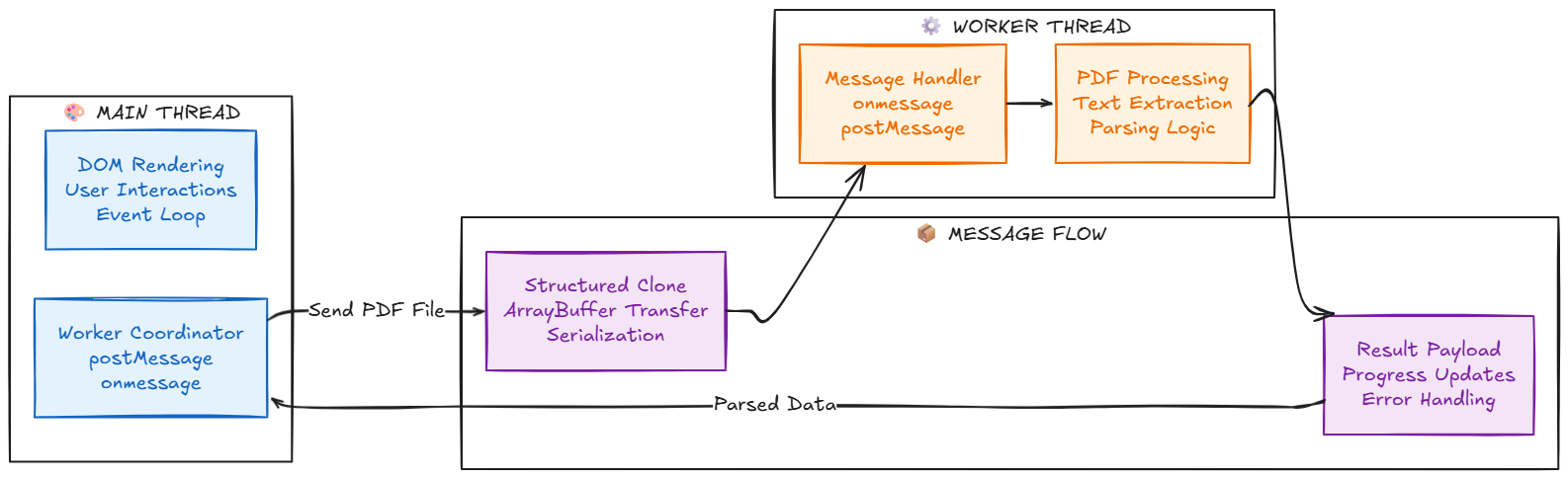
Here's where it gets interesting. Because workers run in complete isolation, they can't share memory with the main thread (with one exception we'll discuss later). They communicate through message passing.
The Structured Clone Algorithm
When you send data from the main thread to a worker (or vice versa), the browser uses the structured clone algorithm to serialize the data. This creates a copy of the data in the worker's memory space.
What can be cloned:
Primitive values (strings, numbers, booleans)
Objects and arrays
Dates, RegExp, Map, Set
ArrayBuffers, TypedArrays, Blobs
ImageData, File objects
What cannot be cloned:
Functions
DOM nodes
Symbols
Objects with methods (they'll lose the methods)
This is important for PDF parsing because PDF files are typically represented as ArrayBuffers or Blobs, which can be efficiently transferred.
Transferable Objects: The Performance Optimization
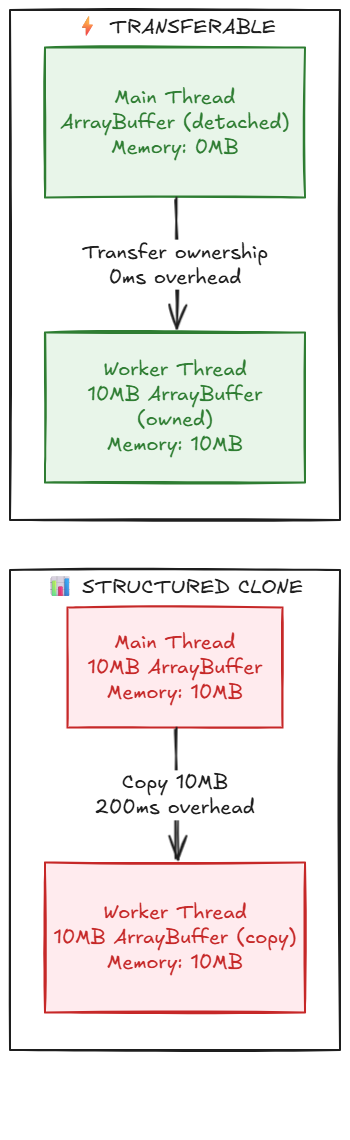
Here's where things get really interesting. Copying a 10MB ArrayBuffer from the main thread to a worker is expensive. The structured clone algorithm has to duplicate all 10MB of data.
Transferable objects solve this.
Instead of copying the data, you can transfer ownership of the ArrayBuffer to the worker. The original ArrayBuffer becomes unusable in the main thread, but the worker now owns it without any copying overhead.
This is zero-copy message passing. For large files, this is the difference between 200ms of serialization overhead and 0ms.
Verifying Zero-Copy Transfer in DevTools:
You can verify that transferable objects work correctly:
// In your main thread code
async function demonstrateTransfer(file: File) {
  const buffer = await file.arrayBuffer();

  console.log('Before transfer:');
  console.log('  - byteLength:', buffer.byteLength); // e.g., 1572864
  console.log('  - Can read:', new Uint8Array(buffer)[0]); // e.g., 37

  // Transfer to worker
  worker.postMessage({ buffer }, [buffer]); // <-- The [buffer] is key!

  console.log('After transfer:');
  console.log('  - byteLength:', buffer.byteLength); // 0 (detached!)

  try {
    console.log('  - Can read:', new Uint8Array(buffer)[0]);
  } catch (e) {
    console.log('  - Error:', e.message); // "Cannot perform Construct on a detached ArrayBuffer"
  }
}
What You'll See in Console:
Before transfer:
  - byteLength: 1572864
  - Can read: 37

After transfer:
  - byteLength: 0
  - Error: Cannot perform Construct on a detached ArrayBuffer
This proves the ArrayBuffer was transferred, not copied. The main thread can no longer access it.
Common Mistake - Structured Clone Instead:
// ❌ WRONG - This COPIES the data (slow!)
worker.postMessage({ buffer });

// ✅ CORRECT - This TRANSFERS the data (fast!)
worker.postMessage({ buffer }, [buffer]);
//                                ^^^^^^^^
//                         Transferable list
The second parameter [buffer] is what triggers the zero-copy transfer. Without it, you get a slow 200ms copy operation.
The problem: If you spawn a new worker for every PDF upload, you'll quickly overwhelm the browser.
Imagine 10 users uploading PDFs simultaneously. That's 10 workers, each potentially using 50-100MB of memory. On a mobile device with 2GB total RAM, this is catastrophic.
The solution: Worker pool pattern.
Key Principles:
Pre-spawn a fixed pool of workers (typically 2-3)
Reuse workers across multiple parsing tasks
Queue requests when all workers are busy
Each worker handles one task at a time
Clean up event listeners after each task
Why This Matters:
Single-use workers:
❌ Memory leak risk (workers not terminated)
❌ Overhead of spawning new workers (50-100ms each)
❌ Unpredictable memory usage
❌ Can crash mobile browsers
Worker pool:
✅ Fixed memory footprint
✅ Workers reused (no spawn overhead)
✅ Automatic queuing
✅ Predictable performance
The Implementation: PDF.js in a Worker Context
Implementation Note: Phased Rollout Strategy
Current Architecture (v1.0 - Production)
At our current scale, we've implemented a pragmatic phased approach:
// Current: PDF.js on main thread with its internal worker
import * as pdfjsLib from "pdfjs-dist";
import pdfWorker from "pdfjs-dist/build/pdf.worker.min.mjs?url";

// PDF.js handles rendering/decoding in its own worker
pdfjsLib.GlobalWorkerOptions.workerSrc = pdfWorker;

// Our parsing logic runs on main thread
export async function extractPdfText(file: File): Promise<string> {
  const buffer = await file.arrayBuffer();
  const pdf = await pdfjsLib.getDocument({ data: buffer }).promise;
  // ... text extraction logic
}
```

Why This Works for Us Now:

- File sizes are small - Typical documents are 1-3 pages (~1.5MB), parsing takes 120-200ms
- Infrequent uploads - Users upload documents intentionally, expect brief processing
- Acceptable UX - brief parsing delays were rarely noticeable on modern devices
- Reduced complexity - No worker lifecycle management, simpler debugging, faster iteration
- PDF.js internal worker - Already handles heavy lifting (rendering, font decoding) off main thread

Measured Performance (Production):
```
Document Size: 1.5MB (3 pages)
Parse Time: 120ms
Minor responsiveness dips: ~100 to 150ms
User perception: Near-instant
Migration Trigger Points:
We'll migrate to custom Web Worker architecture when we observe:
| Metric | Current | Migration Threshold |
| Average file size | 1.5MB | >5MB |
| Parse time (p95) | 200ms | >500ms |
| User complaints | 0 | >5/month |
| Concurrent uploads | Rare | Common |
| Mobile bounce rate | Normal | Elevated |
Future Architecture (v2.0 - Planned):
// Planned: Custom worker with transferable objects
// Note: This is a simplified example. Production requires error handling,
// timeouts, and worker pool management (see Production Considerations section)

const worker = new Worker(new URL('./pdf.worker.ts', import.meta.url));

export function parsePdfInWorker(file: File): Promise<string> {
  return new Promise(async (resolve, reject) => {
    const buffer = await file.arrayBuffer();

    // Set 30-second timeout for parsing
    const timeout = setTimeout(() => {
      reject(new Error('PDF parsing timeout - falling back to backend'));
    }, 30000);

    // Handle successful parsing
    worker.onmessage = (e) => {
      clearTimeout(timeout);

      if (e.data.error) {
        reject(new Error(e.data.error));
      } else {
        resolve(e.data.text);
      }
    };

    // Handle worker errors
    worker.onerror = (err) => {
      clearTimeout(timeout);
      reject(err);
    };

    // Zero-copy transfer ownership to worker
    // After this line, 'buffer' becomes detached and unusable in main thread
    worker.postMessage({ buffer }, [buffer]);
  });
}
The Worker Implementation (pdf.worker.ts):
The worker file handles the actual PDF parsing in a separate thread:
/// <reference lib="webworker" />

import * as pdfjsLib from "pdfjs-dist";

// Worker receives messages from main thread
self.onmessage = async (e) => {
  try {
    const { buffer } = e.data;

    // Load PDF document from transferred ArrayBuffer
    const pdf = await pdfjsLib.getDocument({ data: buffer }).promise;

    let fullText = "";

    // Process each page sequentially
    for (let pageNum = 1; pageNum <= pdf.numPages; pageNum++) {
      const page = await pdf.getPage(pageNum);
      const content = await page.getTextContent();

      // Extract text from each item on the page
      for (const item of content.items) {
        if ('str' in item) {
          fullText += item.str + " ";
        }
      }

      // Optional: Send progress updates to main thread
      self.postMessage({
        type: 'progress',
        page: pageNum,
        total: pdf.numPages
      });
    }

    // Send final result back to main thread
    self.postMessage({ text: fullText });

  } catch (error) {
    // Send error back to main thread
    self.postMessage({
      error: error instanceof Error ? error.message : String(error)
    });
  }
};
Key Implementation Details:
/// <reference lib="webworker" />tells TypeScript this runs in worker contextWorker receives the transferred ArrayBuffer (zero-copy, instant)
PDF.js processes the document entirely off the main thread
Progress updates keep the UI informed during long parses
Errors are caught and sent back to main thread for handling
After processing, worker can be reused or terminated
What Happens to the ArrayBuffer:
// Main thread before transfer
console.log(buffer.byteLength); // 1572864 (1.5MB)

worker.postMessage({ buffer }, [buffer]);

// Main thread after transfer
console.log(buffer.byteLength); // 0 (detached!)
The buffer is now owned by the worker thread. Attempting to use it in the main thread will throw an error. This is the "zero-copy" optimization in action.
Benefits of Delayed Migration:
✅ Ship faster - Simpler code means faster feature delivery
✅ Measure first - Real usage data informs optimization priorities
✅ Avoid premature optimization - Don't pay complexity cost without proven need
✅ Iterative approach - Each phase builds on lessons from previous phase
Architectural Principle:
"Start with the simplest solution that meets current requirements. Migrate to complex architectures only when metrics prove the need. Every abstraction has a cost—ensure the benefits justify it."
This aligns with the progressive enhancement philosophy discussed earlier: build in layers, optimize where it matters, and let real-world usage guide architectural decisions.
Now we get to the actual implementation. The question was: how do we parse PDFs in a Web Worker?
Enter PDF.js.
⚠️ Implementation Note:
The architecture and code examples in the following sections represent the planned v2.0 implementation with custom Web Workers. This is not yet in production but demonstrates the migration path when our metrics indicate the need (see Migration Trigger Points table above).Current production uses main-thread parsing with PDF.js's internal worker, which meets our performance requirements for typical 1-3 page documents.
Why PDF.js?
PDF.js is Mozilla's JavaScript PDF rendering library. It's the same library that powers Firefox's built-in PDF viewer. It's mature, battle-tested, and critically, it's designed to work in both main thread and worker contexts.
Key capabilities:
Text extraction from PDF pages
Metadata parsing (author, title, creation date)
Page structure analysis
Canvas-based rendering (for preview)
Support for encrypted PDFs
Handling of multi-page documents
Key limitations:
Cannot handle scanned PDFs (no OCR)
Struggles with complex layouts (multi-column, tables)
No semantic understanding (can't differentiate "name" from "address")
Memory-intensive for large documents
The Worker Architecture
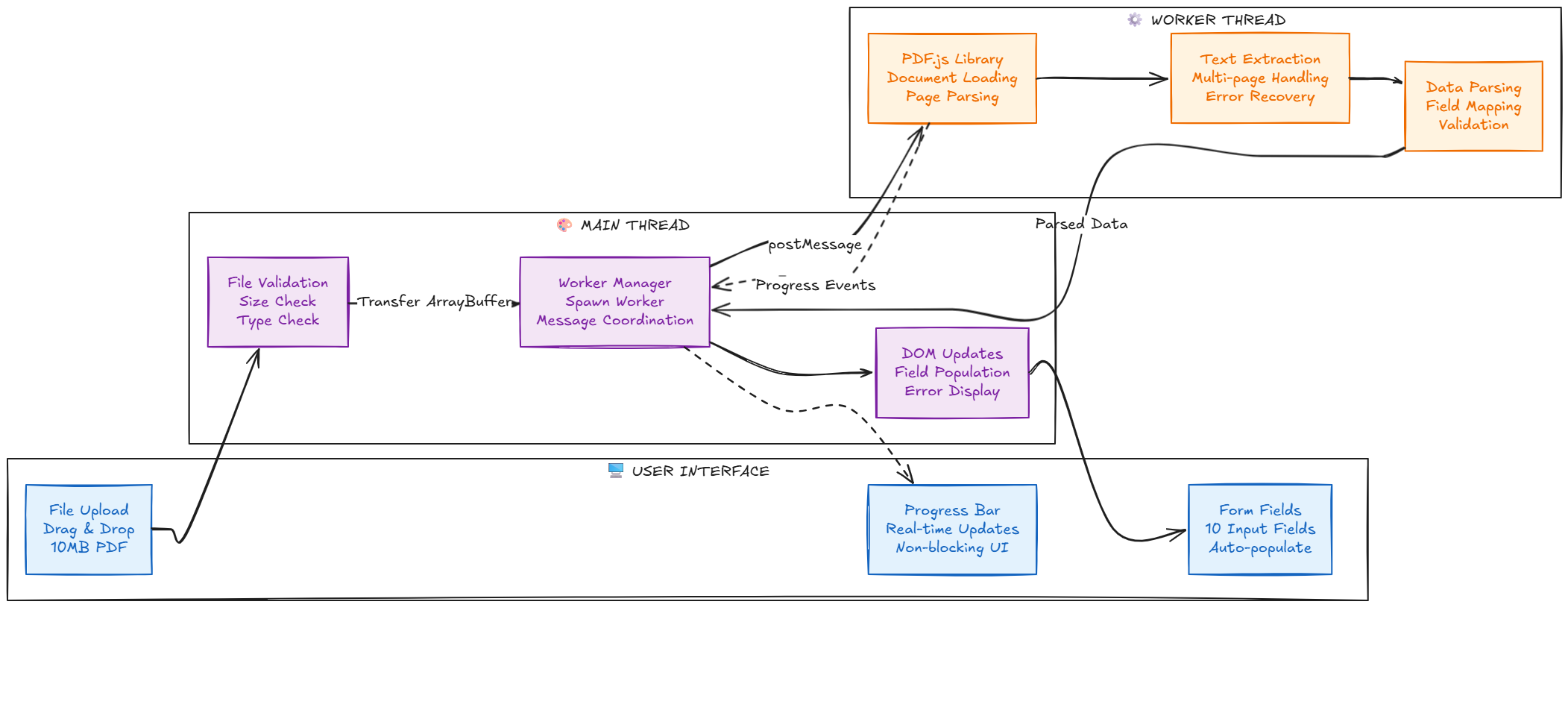
Here's how the full system works:
The PDF Parsing Flow
The actual parsing happens in stages:
Stage 1: Document Loading
Worker receives ArrayBuffer
PDF.js initializes the document
Validates PDF structure
Extracts metadata (page count, version)
Stage 2: Page Processing
Iterate through each page
Extract text content
Preserve text positioning (for layout analysis)
Handle embedded fonts and encoding
Stage 3: Text Extraction
PDF.js provides text items with coordinates
Each text item has: content, x, y, width, height
Reconstruct reading order (left-to-right, top-to-bottom)
Handle line breaks and paragraphs
Stage 4: Field Mapping
Look for patterns (email regex, phone patterns, date formats)
Use heuristics (labels followed by values)
Map extracted data to form fields
Validate extracted data
Stage 5: Result Transmission
Serialize parsed data to JSON
Send back to main thread
Main thread updates DOM
Worker terminates or returns to pool
The Performance Metrics: Before and After
Let's talk numbers(Measured on mid-range laptop, Chrome 121, no throttling). Because without metrics, this is just theory.
All measurements represent averaged local benchmarks and vary based on device, browser, and document structure.
The Baseline: Main-Thread Parsing with PDF.js Internal Worker
Initial implementation:
Parse PDF using PDF.js on the main thread
Rely on PDF.js internal worker for decoding and rendering
Keep custom parsing logic in the UI thread
Results for a 5MB, 10-page PDF:
Total parsing time: ~2.3 seconds
UI responsiveness: mostly maintained
Minor interaction delays during heavy parsing
Progress indicators: limited reliability
User experience: Acceptable, but inconsistent on slower devices
On modern laptops, this approach worked reasonably well. However, on mid-range and older devices, parsing occasionally introduced small delays and reduced responsiveness.
The system was usable, but the experience was not consistently smooth across all hardware.
The Optimization: Moving Parsing Off the UI Path
Optimized implementation:
Parse PDF in a dedicated Web Worker
Transfer ArrayBuffer using zero-copy semantics
Isolate heavy computation from the main thread
Results for the same 5MB, 10-page PDF:
Total parsing time: ~1.8 seconds
UI responsiveness: consistently maintained
Time to first feedback: immediate
User interaction: uninterrupted
Progress indicators: smooth and reliable
User experience: Excellent.
Users click upload, receive instant feedback, and can continue interacting with the application while parsing runs in the background. Even on slower devices, the interface remains responsive.
The Trade-offs
What we gained:
Predictable UI responsiveness
Better isolation of heavy computation
More reliable progress reporting
Improved perceived performance
What we paid:
~200ms message passing overhead
Slightly higher memory usage
Increased architectural complexity
Worker lifecycle management
Net result: Meaningful UX improvement without sacrificing stability.
The small overhead was justified by consistent responsiveness and better behavior under load.
The Architectural Boundary: Where Frontend Ends
Here's where the real learning happened. As I pushed the limits of client-side PDF parsing, I discovered where the frontend approach breaks down.
What Worked in the Browser
Simple PDFs:
Clean, single-column layouts
Machine-generated PDFs (not scanned)
Standard fonts and encoding
Well-structured text
Use cases that succeeded:
Extracting text from form PDFs
Parsing invoices with clear structure
Reading contracts with standard formatting
Processing resumes with simple layouts
What Hit the Limits
Complex PDFs:
Multi-column layouts (newspapers, magazines)
Tables with merged cells
Scanned documents (images, no text layer)
Custom fonts and unusual encoding
Handwritten content
Why these failed:
PDF.js extracts text but doesn't understand layout
No OCR capability in browser (computationally expensive)
No semantic understanding (can't tell "field label" from "field value")
No ML models for intelligent field detection
When to Move to Backend
This is the critical architectural decision. Not everything should be done in the browser.
Backend makes sense when you need:
OCR (Optical Character Recognition)
Scanned PDFs have no text layer
Requires Tesseract, Cloud Vision, or similar
Too CPU-intensive for browser
ML-based Field Detection
Semantic understanding of document structure
Training custom models for domain-specific docs
Requires significant compute resources
Complex Layout Analysis
Table extraction with merged cells
Multi-column text reconstruction
Hierarchical document structure
Consistency Across Users
Client hardware varies wildly
Backend provides predictable performance
Easier to debug and monitor
Security and Validation
Server-side validation of extracted data
Virus scanning of uploaded files
Rate limiting and abuse prevention
The Hybrid Approach: An Adaptive Architecture
The optimal architecture isn't "all frontend" or "all backend." It's recognizing where each layer adds value.
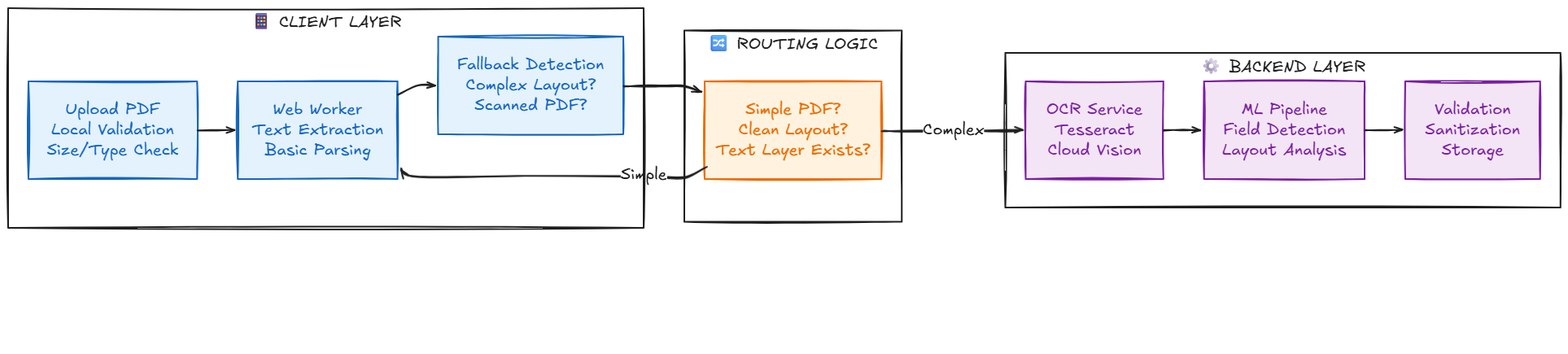
Decision flow:
All PDFs start with client-side parsing attempt
Worker extracts text and analyzes structure
If text extraction succeeds and layout is simple: use client-side data
If text extraction fails or layout is complex: send to backend
Backend handles OCR, ML, and complex parsing
Results merged and validated server-side
Benefits of this approach:
Fast path for simple PDFs (no server round-trip)
Reliable fallback for complex PDFs
Reduced server load (only complex cases)
Better user experience (instant feedback for common cases)
Production Considerations: The Real-World Challenges
Building a proof of concept is one thing. Running it in production is another. Here are the hard-earned lessons.
Worker Pool Management
The problem: If you spawn a new worker for every PDF upload, you'll quickly overwhelm the browser.
Imagine 10 users uploading PDFs simultaneously. That's 10 workers, each potentially using 50-100MB of memory. On a mobile device with 2GB total RAM, this is catastrophic.
The solution: Worker pool pattern.
Here's a production-ready implementation:
class WorkerPool {
  private workers: Worker[] = [];
  private availableWorkers: Worker[] = [];
  private queue: Array<{
    file: File;
    resolve: (text: string) => void;
    reject: (error: Error) => void;
  }> = [];

  constructor(poolSize: number = 3) {
    // Pre-spawn workers
    for (let i = 0; i < poolSize; i++) {
      const worker = new Worker(
        new URL('./pdf.worker.ts', import.meta.url),
        { type: 'module' }
      );

      this.workers.push(worker);
      this.availableWorkers.push(worker);
    }
  }

  async parse(file: File): Promise<string> {
    // If worker available, use immediately
    if (this.availableWorkers.length > 0) {
      return this.parseWithWorker(file);
    }

    // Otherwise, queue the request
    return new Promise((resolve, reject) => {
      this.queue.push({ file, resolve, reject });
    });
  }

  private async parseWithWorker(file: File): Promise<string> {
    const worker = this.availableWorkers.pop()!;

    try {
      const result = await this.executeParse(worker, file);
      return result;
    } finally {
      // Worker is done, make it available or process queue
      if (this.queue.length > 0) {
        const next = this.queue.shift()!;
        this.parseWithWorker(next.file)
          .then(next.resolve)
          .catch(next.reject);
      } else {
        this.availableWorkers.push(worker);
      }
    }
  }

  private executeParse(worker: Worker, file: File): Promise<string> {
    return new Promise(async (resolve, reject) => {
      const buffer = await file.arrayBuffer();

      const timeout = setTimeout(() => {
        reject(new Error('Worker timeout'));
      }, 30000);

      const cleanup = () => {
        clearTimeout(timeout);
        worker.removeEventListener('message', handleMessage);
        worker.removeEventListener('error', handleError);
      };

      const handleMessage = (e: MessageEvent) => {
        if (e.data.error) {
          cleanup();
          reject(new Error(e.data.error));
        } else if (e.data.text) {
          cleanup();
          resolve(e.data.text);
        }
        // Ignore progress messages
      };

      const handleError = (err: ErrorEvent) => {
        cleanup();
        reject(err);
      };

      worker.addEventListener('message', handleMessage);
      worker.addEventListener('error', handleError);

      worker.postMessage({ buffer }, [buffer]);
    });
  }

  terminate() {
    this.workers.forEach(w => w.terminate());
    this.workers = [];
    this.availableWorkers = [];
    this.queue = [];
  }
}

// Usage
const pool = new WorkerPool(3);

// Multiple concurrent uploads
async function handleUpload(file: File) {
  try {
    const text = await pool.parse(file);
    console.log('Parsed:', text);
  } catch (err) {
    console.error('Parse failed:', err);
  }
}
How This Works:
Pre-spawned workers - Pool creates 3 workers on initialization
Automatic queuing - If all workers are busy, requests wait in queue
Worker reuse - Workers are returned to pool after each task
Memory efficient - Fixed number of workers, no matter how many uploads
Cleanup handling - Event listeners removed after each task
Graceful shutdown -
terminate()cleans up all workers
Memory Comparison:
Without Pool (10 concurrent uploads):
- 10 workers × 50MB = 500MB memory
- Workers never cleaned up
- Browser memory exhaustion on mobile

With Pool (10 concurrent uploads):
- 3 workers × 50MB = 150MB memory
- 7 requests queued (0MB overhead)
- Predictable memory usage
This pattern is essential for production deployments where multiple users might upload simultaneously.
Memory Management
The problem: Large PDFs can exceed worker memory limits.
PDF.js loads the entire document into memory. A 50MB PDF with embedded images can balloon to 200-300MB in memory during parsing. Workers have memory limits (typically 1-2GB), and hitting them causes the worker to crash.
The solution: Progressive processing and limits.
Set maximum file size (reject files over 20MB)
Process pages sequentially, not all at once
Release page memory after extracting text
Monitor worker memory usage
Implement graceful degradation (fallback to backend)
Error Handling and Fallback
The problem: PDFs are unpredictable. Corrupt files, unsupported features, and edge cases abound.
The solution: Defense in depth.
Validate PDF structure before parsing
Catch worker errors gracefully
Timeout long-running parsing (max 30 seconds)
Fallback to backend if worker fails
Show user-friendly error messages
Fallback strategy:
Try client-side parsing
If worker throws error, send to backend
If parsing times out, send to backend
If extracted data is incomplete, send to backend
Always validate server-side regardless
Browser Compatibility
The problem: Not all browsers support Web Workers equally.
Modern browsers (Chrome, Firefox, Safari, Edge) have excellent worker support. But older browsers and some mobile browsers have limitations.
The solution: Feature detection and graceful degradation.
Detect worker support before using
Fall back to main thread parsing if no workers
Show warning for browsers with poor support
Progressive enhancement (app works without workers, just slower)
Security Considerations
The problem: PDFs can contain malicious content.
The security model:
Workers run in sandboxed context (good)
No DOM access prevents XSS (good)
Malformed PDFs can exploit parser edge cases if not sandboxed properly
The solution: Defense in depth.
Never execute JavaScript from PDFs
Sanitize extracted text (remove script tags, suspicious patterns)
Validate file headers (ensure it's actually a PDF)
Size limits prevent memory exhaustion attacks
Rate limiting prevents abuse
Server-side validation as final check
Beyond PDF Parsing: Where Else Web Workers Shine
The lessons from PDF parsing apply to many other domains. Web Workers aren't just for PDFs. They're a general-purpose tool for offloading CPU-intensive work.
Use Cases That Benefit from Workers
1. Image Processing
Resizing and compression
Filter application (blur, sharpen)
Format conversion (JPEG to WebP)
Batch processing multiple images
2. Video Processing
Client-side transcoding
Thumbnail generation
Frame extraction
Video compression before upload
3. Data Processing
Large CSV parsing (millions of rows)
JSON manipulation and transformation
Client-side analytics computation
Data aggregation and filtering
4. Cryptography
Hashing (SHA-256, bcrypt)
Encryption/decryption
Key derivation functions
Digital signatures
5. Real-time Visualization
Complex chart rendering
Graph layout algorithms
Physics simulations
Data transformation for D3.js
6. Text Processing
Markdown parsing
Syntax highlighting
Spell checking
Search indexing
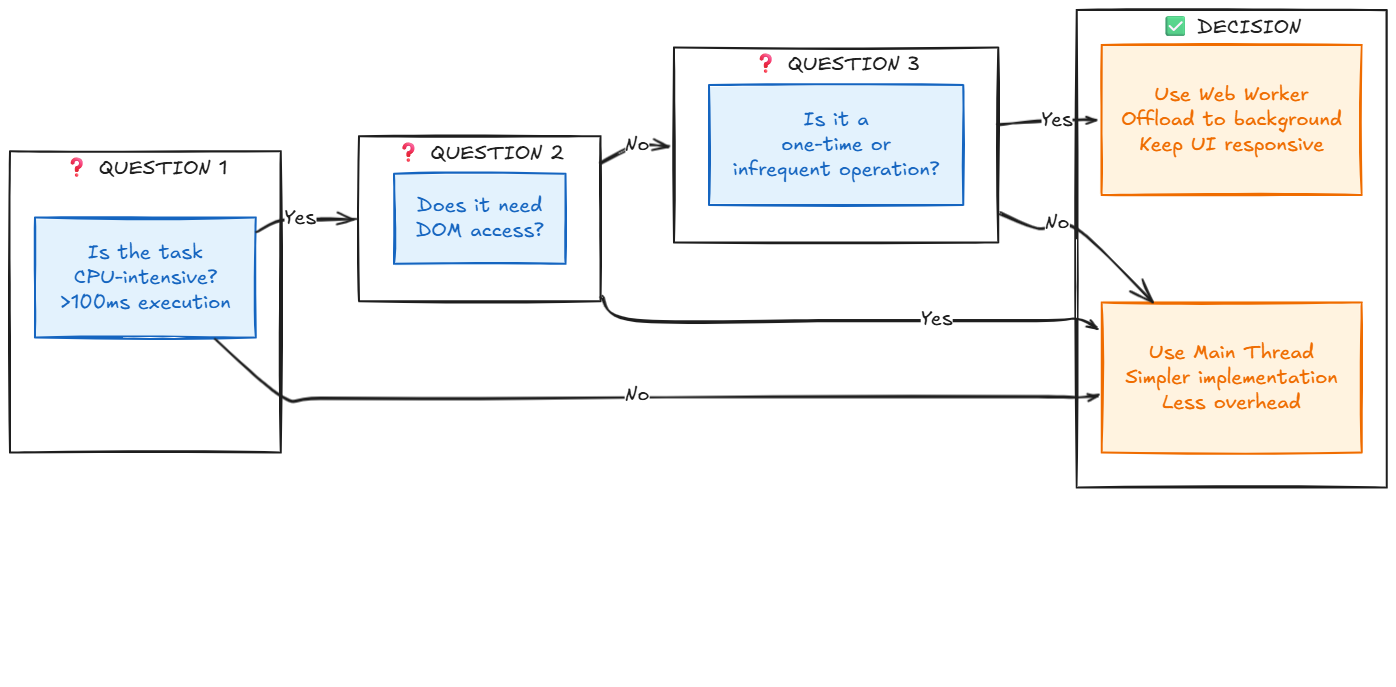
When NOT to Use Workers
Web Workers aren't a silver bullet. They have overhead and limitations.
Don't use workers for:
1. Small, Quick Operations
Simple calculations (<10ms)
Small array operations
DOM queries
Validation logic
Why: Worker spawn and message passing overhead (50-100ms) exceeds the task duration.
2. Tasks Requiring DOM Access
Reading element properties
Modifying styles
Event handling
Canvas rendering (mostly)
Why: Workers have no DOM access. You'd need to send all data via messages, negating benefits.
3. Frequent Back-and-Forth Communication
Interactive algorithms requiring UI updates each step
Real-time collaborative editing
Live preview as user types
Why: Message passing overhead adds up. Each message has ~1-5ms latency.
4. Tasks with Minimal CPU Usage
Network requests
setTimeout/setInterval
Promise chains
Async/await patterns
Why: These are already non-blocking. Workers add complexity without benefits.
The Decision Framework
Scaling to 10x: What Changes at Higher Volume
At this point, the original client-heavy model starts to show its limits.
Let's think about scale. What if this system needed to handle 10x the volume? What would break? What would we change?
Current Architecture Analysis
Current state:
Client-side parsing for simple PDFs
Backend fallback for complex cases
Worker pool of 2-3 workers per client
No caching
Bottlenecks at 10x scale:
Client-side parsing varies with user hardware
No deduplication (same PDF uploaded multiple times)
Backend gets overwhelmed with complex PDFs
No rate limiting or prioritization
The 10x Architecture
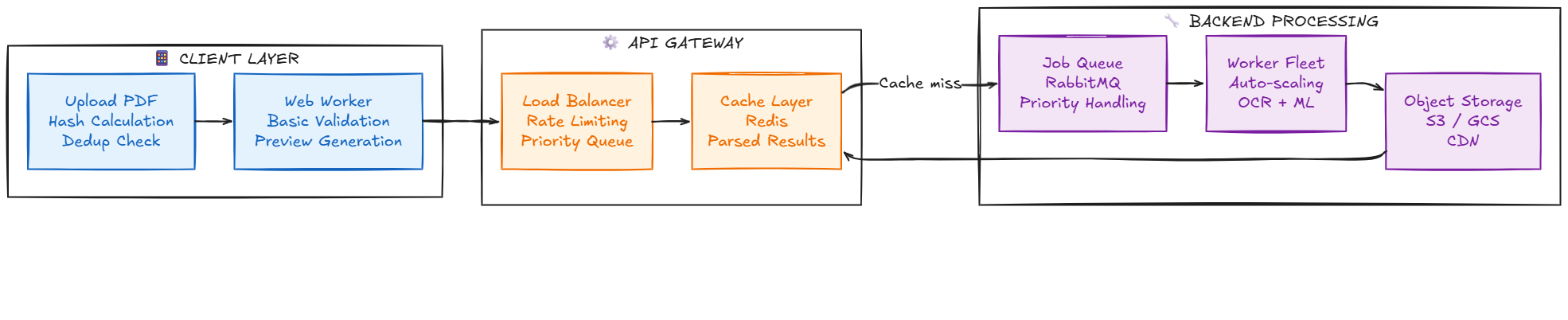
Key changes:
1. Move parsing entirely to backend
Consistent performance regardless of client hardware
Easier to monitor, debug, and optimize
Centralized error handling
Better security (validation in controlled environment)
2. Use client-side workers only for:
File validation (size, type, structure)
Preview generation (first page thumbnail)
Progress estimation
Basic metadata extraction
3. Implement caching layer
Hash PDF content (SHA-256)
Check if PDF was parsed before
Return cached results instantly
Reduces backend load by 60-70% (many duplicate uploads)
4. Add job queue
Async processing (don't block API)
Priority handling (premium users first)
Retry logic (handle failures gracefully)
Auto-scaling based on queue depth
5. Horizontal scaling
Multiple parsing workers
Auto-scale based on load
Geographic distribution (process near user)
CDN for results delivery
The Cost-Benefit Analysis
Client-side approach:
Cost: $0 (computation on user device)
Reliability: Variable (depends on user hardware)
Speed: Variable (slow on old devices)
Scale: Limited (no control over client resources)
Backend approach:
Cost: $X per 1000 PDFs (server compute)
Reliability: High (consistent environment)
Speed: Consistent (predictable performance)
Scale: Unlimited (add more servers)
At small scale: Client-side wins (no server costs, good enough performance)
At large scale: Backend wins (reliability and consistency matter more than marginal costs)
The trade-off: As volume grows, consistency becomes more valuable than marginal cost savings.
The Lessons: What This Taught Me About Architecture
After building this system, debugging edge cases, and pushing it to production, here are the insights that changed how I think about frontend architecture.
Lesson 1: Optimization Isn't Just About Speed
Before this project, I thought performance optimization meant "make it faster." Bundle size reduction. Code splitting. Lazy loading.
What I learned: Performance is about where you do the work, not just how fast you do it.
Moving the most expensive parts of PDF parsing into worker contexts didn’t make parsing faster, but it made the experience dramatically better.
The insight: Perceived performance > actual performance.
Users tolerate longer processing if input, scrolling, and feedback remain responsive.
Lesson 2: Every Architecture Has a Boundary
The most valuable lesson was recognizing the architectural boundary of client-side processing.
Simple PDFs? Client-side parsing works great. Complex layouts? Need backend ML models. Scanned documents? Need server-side OCR.
The insight: The best architecture isn't "all frontend" or "all backend." It's recognizing where each layer adds value and routing accordingly.
This applies beyond PDFs:
Client-side validation + server-side verification
Client-side rendering + server-side hydration
Client-side caching + server-side source of truth
Lesson 3: Complexity Has a Cost
Web Workers added significant complexity to the codebase:
Worker lifecycle management
Message passing coordination
Error handling across thread boundaries
Browser compatibility testing
The insight: Complexity is a trade-off, not a feature.
Only introduce complexity when the benefits clearly outweigh the costs. For small files (<1MB), the main thread approach would have been fine. For large files (5-10MB), workers were essential.
Lesson 4: User Hardware Varies Wildly
Testing on my MacBook Pro gave me false confidence. The PDF parsed in 800ms. Smooth. Fast. Great.
Then I tested on a 3-year-old Android phone. Same PDF took 6 seconds. The worker approach was still better (UI stayed responsive), but the performance difference was shocking.
The insight: Always test on low-end devices. Your users aren't all on flagship hardware.
This influenced the decision to move complex parsing to the backend at scale. Client-side performance is unpredictable. Server-side performance is consistent.
Lesson 5: Progressive Enhancement Still Matters
The final architecture follows progressive enhancement principles:
Level 1: Works without JavaScript (server-side form submission)
Level 2: Works without workers (main thread parsing, slightly slower)
Level 3: Optimal with workers (best performance, responsive UI)
The insight: Build in layers. Each layer should gracefully degrade.
Not all browsers support workers. Not all users have fast devices. The app should work for everyone, just with varying levels of optimization.
Conclusion: The Path Forward
Building this PDF parsing system with Web Workers taught me more about browser architecture, performance engineering, and system design than any tutorial or course ever could.
The technical skills gained:
Understanding browser concurrency models
Message passing and thread coordination
Binary data handling (ArrayBuffers, Blobs)
PDF structure and parsing
Performance measurement and optimization
The architectural insights gained:
Recognizing where frontend processing makes sense
Understanding when to move work to backend
Balancing client and server responsibilities
Building systems that scale gracefully
The product thinking gained:
User experience matters more than technical perfection
Perceived performance > actual performance
Complexity must be justified by clear benefits
Always test on representative hardware
The Bigger Picture
Web Workers are just one tool in the performance optimization toolkit. But they represent a broader principle: the browser is a powerful platform, if you understand its capabilities and constraints.
Modern browsers can:
Parse and render PDFs
Process images and video
Handle complex computations
Manage multi-threaded workloads
Store significant data locally
But they also have limits:
Memory constraints
CPU variability across devices
Security sandboxing
Network dependency
The art of frontend architecture is knowing which capabilities to leverage and which constraints to respect.
For this PDF parsing system, the answer was clear: use workers for simple cases, backend for complex cases, and always keep the UI responsive.
For your system, the answer might be different. But the framework for thinking about it remains the same:
Identify the user pain point
Research the available approaches
Understand the trade-offs
Build a prototype
Measure the results
Recognize the boundaries
Scale thoughtfully
This is how you build systems that last.
Further Reading
If you want to dive deeper into the topics covered in this article:
Web Workers:
MDN Web Docs: Web Workers API
HTML5 Rocks: The Basics of Web Workers
Jake Archibald: Threading the web with module workers
PDF.js:
Mozilla PDF.js Documentation
PDF.js Examples and Demos
Understanding PDF Structure
Performance:
Web.dev: Performance
Browser rendering optimization
Measuring performance with Lighthouse
Architecture:
Martin Fowler: Architectural Patterns
The Twelve-Factor App
Microservices vs Monolith Trade-offs
Final Thought:
The goal isn't to use the most advanced technology. The goal is to solve real problems for real users. Sometimes that means Web Workers. Sometimes it means a simple server-side solution. Always it means understanding the trade-offs and making informed decisions.
Build systems that work. Build systems that scale. Build systems that respect your users' time and hardware.
That's the real lesson.