保留正文与补采附件。源页面当前未重新核验;具体限制见交付清单。
 We value your privacy
We use cookies to enhance your browsing experience, serve personalised ads or content, and analyse our traffic. By clicking "Accept All", you consent to our use of cookies.
Customise Reject All Accept All
Customise Consent Preferences
We value your privacy
We use cookies to enhance your browsing experience, serve personalised ads or content, and analyse our traffic. By clicking "Accept All", you consent to our use of cookies.
Customise Reject All Accept All
Customise Consent Preferences  We use cookies to help you navigate efficiently and perform certain functions. You will find detailed information about all cookies under each consent category below.
The cookies that are categorised as "Necessary" are stored on your browser as they are essential for enabling the basic functionalities of the site. ... Show more
NecessaryAlways Active
Necessary cookies are required to enable the basic features of this site, such as providing secure log-in or adjusting your consent preferences. These cookies do not store any personally identifiable data.
We use cookies to help you navigate efficiently and perform certain functions. You will find detailed information about all cookies under each consent category below.
The cookies that are categorised as "Necessary" are stored on your browser as they are essential for enabling the basic functionalities of the site. ... Show more
NecessaryAlways Active
Necessary cookies are required to enable the basic features of this site, such as providing secure log-in or adjusting your consent preferences. These cookies do not store any personally identifiable data.
-
Cookie
BCTempID
-
Duration
10 minutes
-
Description
No description available.
-
Cookie
__cf_bm
-
Duration
1 hour
-
Description
This cookie, set by Cloudflare, is used to support Cloudflare Bot Management.
-
Cookie
AWSALBCORS
-
Duration
7 days
-
Description
Amazon Web Services set this cookie for load balancing.
-
Cookie
_cfuvid
-
Duration
session
-
Description
Cloudflare sets this cookie to track users across sessions to optimize user experience by maintaining session consistency and providing personalized services
-
Cookie
li_gc
-
Duration
6 months
-
Description
Linkedin set this cookie for storing visitor's consent regarding using cookies for non-essential purposes.
-
Cookie
__hssrc
-
Duration
session
-
Description
This cookie is set by Hubspot whenever it changes the session cookie. The __hssrc cookie set to 1 indicates that the user has restarted the browser, and if the cookie does not exist, it is assumed to be a new session.
-
Cookie
__hssc
-
Duration
1 hour
-
Description
HubSpot sets this cookie to keep track of sessions and to determine if HubSpot should increment the session number and timestamps in the __hstc cookie.
-
Cookie
wpEmojiSettingsSupports
-
Duration
session
-
Description
WordPress sets this cookie when a user interacts with emojis on a WordPress site. It helps determine if the user's browser can display emojis properly.
-
Cookie
BCSessionID
-
Duration
1 year 1 month 4 days
-
Description
Blueconic sets this cookie as a unique identifier for the BlueConic profile.
-
Cookie
_octo
-
Duration
1 year
-
Description
No description available.
-
Cookie
logged_in
-
Duration
1 year
-
Description
No description available.
-
Cookie
__Secure-YEC
-
Duration
past
-
Description
YouTube sets this cookie to stores the user's video player preferences using embedded YouTube video
-
Cookie
__eoi
-
Duration
6 months
-
Description
Description is currently not available.
-
Cookie
AWSALBTGCORS
-
Duration
7 days
-
Description
No description available.
-
Cookie
login-status-p
-
Duration
past
-
Description
Description is currently not available.
-
Cookie
AWSALBTG
-
Duration
7 days
-
Description
No description available.
-
Cookie
csrf_token
-
Duration
session
-
Description
No description available.
-
Cookie
token_v2
-
Duration
1 day
-
Description
Description is currently not available.
-
Cookie
D
-
Duration
1 year
-
Description
Description is currently not available.
-
Cookie
PHPSESSID
-
Duration
session
-
Description
This cookie is native to PHP applications. The cookie stores and identifies a user's unique session ID to manage user sessions on the website. The cookie is a session cookie and will be deleted when all the browser windows are closed.
-
Cookie
VISITOR_PRIVACY_METADATA
-
Duration
6 months
-
Description
YouTube sets this cookie to store the user's cookie consent state for the current domain.
-
Cookie
cookietest
-
Duration
session
-
Description
The cookietest cookie is typically used to determine whether the user's browser accepts cookies, essential for website functionality and user experience.
-
Cookie
__Host-airtable-session
-
Duration
1 year
-
Description
This cookie is used to enable us to integrate the services of Airtable.
-
Cookie
__Host-airtable-session.sig
-
Duration
1 year
-
Description
This cookie is used to enable us to integrate the services of Airtable.
-
Cookie
m
-
Duration
1 year 1 month 4 days
-
Description
Stripe sets this cookie for fraud prevention purposes. It identifies the device used to access the website, allowing the website to be formatted accordingly.
-
Cookie
BIGipServer*
-
Duration
session
-
Description
Marketo sets this cookie to collect information about the user's online activity and build a profile about their interests to provide advertisements relevant to the user.
-
Cookie
__cfruid
-
Duration
session
-
Description
Cloudflare sets this cookie to identify trusted web traffic.
-
Cookie
_GRECAPTCHA
-
Duration
6 months
-
Description
Google Recaptcha service sets this cookie to identify bots to protect the website against malicious spam attacks.
-
Cookie
__Secure-YNID
-
Duration
6 months
-
Description
Google cookie used to protect user security and prevent fraud, especially during the login process.
-
Cookie
cookieyes-consent
-
Duration
1 year
-
Description
CookieYes sets this cookie to remember users' consent preferences so that their preferences are respected on subsequent visits to this site. It does not collect or store any personal information about the site visitors.
Functional
Functional cookies help perform certain functionalities like sharing the content of the website on social media platforms, collecting feedback, and other third-party features.
-
Cookie
lidc
-
Duration
1 day
-
Description
LinkedIn sets the lidc cookie to facilitate data center selection.
-
Cookie
brw
-
Duration
1 year
-
Description
No description available.
-
Cookie
brwConsent
-
Duration
5 minutes
-
Description
Description is currently not available.
-
Cookie
WMF-Uniq
-
Duration
1 year
-
Description
Description is currently not available.
-
Cookie
loom_anon_comment
-
Duration
1 year
-
Description
No description available.
-
Cookie
loom_referral_video
-
Duration
session
-
Description
Description is currently not available.
-
Cookie
VISITOR_INFO1_LIVE
-
Duration
6 months
-
Description
A cookie set by YouTube to measure bandwidth that determines whether the user gets the new or old player interface.
-
Cookie
yt-remote-connected-devices
-
Duration
Never Expires
-
Description
YouTube sets this cookie to store the user's video preferences using embedded YouTube videos.
-
Cookie
ytidb::LAST_RESULT_ENTRY_KEY
-
Duration
Never Expires
-
Description
The cookie ytidb::LAST_RESULT_ENTRY_KEY is used by YouTube to store the last search result entry that was clicked by the user. This information is used to improve the user experience by providing more relevant search results in the future.
-
Cookie
yt-remote-device-id
-
Duration
Never Expires
-
Description
YouTube sets this cookie to store the user's video preferences using embedded YouTube videos.
-
Cookie
yt-remote-session-name
-
Duration
session
-
Description
The yt-remote-session-name cookie is used by YouTube to store the user's video player preferences using embedded YouTube video.
-
Cookie
yt-remote-fast-check-period
-
Duration
session
-
Description
The yt-remote-fast-check-period cookie is used by YouTube to store the user's video player preferences for embedded YouTube videos.
-
Cookie
yt-remote-session-app
-
Duration
session
-
Description
The yt-remote-session-app cookie is used by YouTube to store user preferences and information about the interface of the embedded YouTube video player.
-
Cookie
yt-remote-cast-available
-
Duration
session
-
Description
The yt-remote-cast-available cookie is used to store the user's preferences regarding whether casting is available on their YouTube video player.
-
Cookie
yt-remote-cast-installed
-
Duration
session
-
Description
The yt-remote-cast-installed cookie is used to store the user's video player preferences using embedded YouTube video.
-
Cookie
cp_session
-
Duration
3 months
-
Description
Codepen sets this cookie for Help systems found in the website.
-
Cookie
loid
-
Duration
1 year 1 month 4 days
-
Description
This cookie is set by the Reddit. The cookie enables the sharing of content from the website onto the social media platform.
Analytics
Analytical cookies are used to understand how visitors interact with the website. These cookies help provide information on metrics such as the number of visitors, bounce rate, traffic source, etc.
-
Cookie
__hstc
-
Duration
6 months
-
Description
Hubspot set this main cookie for tracking visitors. It contains the domain, initial timestamp (first visit), last timestamp (last visit), current timestamp (this visit), and session number (increments for each subsequent session).
-
Cookie
hubspotutk
-
Duration
6 months
-
Description
HubSpot sets this cookie to keep track of the visitors to the website. This cookie is passed to HubSpot on form submission and used when deduplicating contacts.
-
Cookie
_ga
-
Duration
1 year 1 month 4 days
-
Description
Google Analytics sets this cookie to calculate visitor, session and campaign data and track site usage for the site's analytics report. The cookie stores information anonymously and assigns a randomly generated number to recognise unique visitors.
-
Cookie
ga*
-
Duration
1 year 1 month 4 days
-
Description
Google Analytics sets this cookie to store and count page views.
-
Cookie
__Host-psifi.analyticsTrace
-
Duration
6 hours
-
Description
Description is currently not available.
-
Cookie
__Host-psifi.analyticsTraceV2
-
Duration
6 hours
-
Description
Description is currently not available.
-
Cookie
_gh_sess
-
Duration
session
-
Description
GitHub sets this cookie for temporary application and framework state between pages like what step the user is on in a multiple step form.
-
Cookie
YSC
-
Duration
session
-
Description
YSC cookie is set by Youtube and is used to track the views of embedded videos on Youtube pages.
-
Cookie
ajs_anonymous_id
-
Duration
1 year
-
Description
This cookie is set by Segment to count the number of people who visit a certain site by tracking if they have visited before.
-
Cookie
vuid
-
Duration
1 year 1 month 4 days
-
Description
Vimeo installs this cookie to collect tracking information by setting a unique ID to embed videos on the website.
Performance
Performance cookies are used to understand and analyse the key performance indexes of the website which helps in delivering a better user experience for the visitors.
-
Cookie
AWSALB
-
Duration
7 days
-
Description
AWSALB is an application load balancer cookie set by Amazon Web Services to map the session to the target.
-
Cookie
acq
-
Duration
past
-
Description
Description is currently not available.
-
Cookie
acq.sig
-
Duration
past
-
Description
Description is currently not available.
-
Cookie
ptc
-
Duration
2 years
-
Description
No description available.
Advertisement
Advertisement cookies are used to provide visitors with customised advertisements based on the pages you visited previously and to analyse the effectiveness of the ad campaigns.
-
Cookie
muc_ads
-
Duration
1 year 1 month 4 days
-
Description
Twitter sets this cookie to collect user behaviour and interaction data to optimize the website.
-
Cookie
guest_id_marketing
-
Duration
1 year 1 month 4 days
-
Description
Twitter sets this cookie to identify and track the website visitor.
-
Cookie
guest_id_ads
-
Duration
1 year 1 month 4 days
-
Description
Twitter sets this cookie to identify and track the website visitor.
-
Cookie
personalization_id
-
Duration
1 year 1 month 4 days
-
Description
Twitter sets this cookie to integrate and share features for social media and also store information about how the user uses the website, for tracking and targeting.
-
Cookie
guest_id
-
Duration
1 year 1 month 4 days
-
Description
Twitter sets this cookie to identify and track the website visitor. It registers if a user is signed in to the Twitter platform and collects information about ad preferences.
-
Cookie
bcookie
-
Duration
1 year
-
Description
LinkedIn sets this cookie from LinkedIn share buttons and ad tags to recognize browser IDs.
-
Cookie
__Secure-ROLLOUT_TOKEN
-
Duration
6 months
-
Description
YouTube sets this cookie to manage feature rollout and experimentation. It helps Google control which new features or interface changes are shown to users as part of testing and staged rollouts, ensuring consistent experience for a given user during an experiment.
-
Cookie
yt.innertube::nextId
-
Duration
Never Expires
-
Description
YouTube sets this cookie to register a unique ID to store data on what videos from YouTube the user has seen.
-
Cookie
yt.innertube::requests
-
Duration
Never Expires
-
Description
YouTube sets this cookie to register a unique ID to store data on what videos from YouTube the user has seen.
-
Cookie
session_tracker
-
Duration
session
-
Description
This cookie is set by the Reddit. This cookie is used to identify trusted web traffic. It also helps in adverstising on the website.
-
Cookie
edgebucket
-
Duration
session
-
Description
Reddit sets this cookie to save the information about a log-on Reddit user, for the purpose of advertisement recommendations and updating the content.
-
Cookie
did
-
Duration
1 year
-
Description
Arbor sets this cookie to show targeted ads to site visitors.This cookie expires after 2 months or 1 year.
Uncategorised
Other uncategorised cookies are those that are being analysed and have not been classified into a category as yet.
No cookies to display.
Reject All Save My Preferences Accept All
Toggle SearchToggle Mobile Navigation
Publish AI, ML & data-science insights to a global community of data professionals.
Sign inSubmit an Article
LatestEditor's PicksNewsletterShipAI
Write For TDS
LinkedInXToggle Search
Large Language Models
Setting Up Your Own Large Language Model
Still a long way to go, but the future is promising
Ivo Bernardo
July 4, 202610 min read
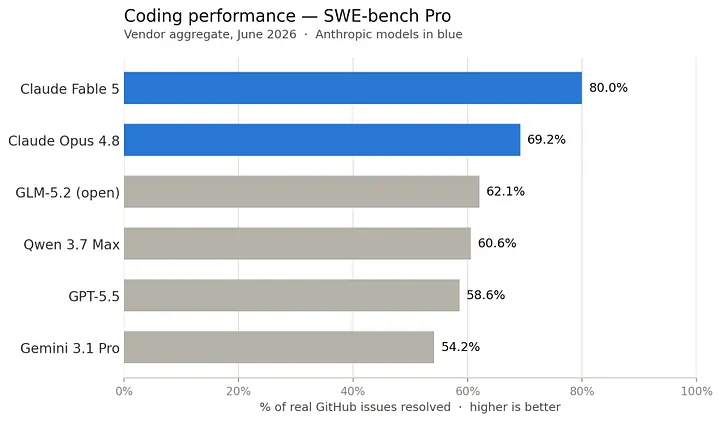 Image by Author
You’ve likely seen the headlines: frontier AI models are increasingly at risk of being locked behind strict export controls or mounting API costs.
As this technology embeds itself into our daily lives, the open-source movement isn’t just a philosophical preference, it is a necessary mechanism to keep AI in the hands of everyday users. We aren’t at parity yet; the proprietary models from the massive tech labs still hold a commanding lead in pure performance. But, we can hope that the gap is closing fast. Around the clock, an independent community of researchers and developers is pushing to ensure this technology is accessible to anyone with a computer.
Image by Author
You’ve likely seen the headlines: frontier AI models are increasingly at risk of being locked behind strict export controls or mounting API costs.
As this technology embeds itself into our daily lives, the open-source movement isn’t just a philosophical preference, it is a necessary mechanism to keep AI in the hands of everyday users. We aren’t at parity yet; the proprietary models from the massive tech labs still hold a commanding lead in pure performance. But, we can hope that the gap is closing fast. Around the clock, an independent community of researchers and developers is pushing to ensure this technology is accessible to anyone with a computer.
Today, the foundation for true democratization is already here: you can run a highly capable model entirely on your own laptop. For today’s experiment, I set out to find a large language model that can run entirely on my laptop — and use it for the simple tasks I’d normally hand off to a big lab model.
We’ll install Qwen 3 8B on my MacBook Air, run it fully offline, and finally have a language model living on my own machine instead of a distant datacenter. The Qwen family of models have been trained by Alibaba (the chinese company) and are fully open source, available on the internet for everyone to download. The model has 9 billion weights and takes up around 6gb of your RAM when loaded.
What follows now is a practical, start-to-finish guide to running a proper local LLM on an Apple Silicon Mac and it includes the terminal commands you need. But before we open the terminal, we need to talk about why this is worth doing at all.
···
Learn this step by step with the interactive AI Engineer roadmap.
Why Do This?
Most of the time, cloud models are better and easier. I’m not going to pretend an 8-billion parameter model on a laptop beats frontier AI. It doesn’t and I will keep using the massive cloud models for heavy lifting.
But the constant pricing and sovereignity wars around AI may make open source and local models very relevant for a future where having access to the technology will make a huge difference. Every time you use Claude or ChatGPT, you are sending your data to some remote servers where the access can be blocked at any time.
“ Digital sovereignty ” is a grand phrase for a very ordinary desire: we may want to own the thing that reads our most sensitive thoughts, the same way you own a physical notebook or keep some cash at home.
A local model answers that cleanly in the AI world. Once it’s downloaded, nothing leaves the machine. No API keys, no shifting terms of service, no quiet data retention policies. You can pull the Wi-Fi card out and it keeps working. For the highly sensitive part of your work, that alone may be worth the price of admission.
People love to say local models are “ democratizing ” AI. I want that to be true, but we aren’t there yet. Running this stack still assumes you own a €1,500 laptop with massive unified memory and you’re comfortable in a command line. That’s a narrow, lucky slice of the world.
But the trajectory is democratizing. Two years ago, running a decent offline model required a dedicated workstation and serious technical pain. This weekend, it took me a couple of hours and 5 gigabytes of disk space.
So let’s install the thing.
···
The Machine and the Specs
I built this on a MacBook Air M4 with 24 GB of unified memory and about 235 GB of free storage. This was a fresh start: no Homebrew, no Python environment nightmares.
The number that actually matters here is the 24 GB. Apple Silicon’s “unified memory” is the magic trick that makes Macs so exceptionally good at this. Because the CPU and GPU share the exact same memory pool, massive neural network weights don’t have to be sluggishly shuttled back and forth.
An 8B model takes up about 5 GB on disk and sits at roughly 6 GB in memory when loaded. On a 24 GB machine, that’s deeply comfortable. You could run a 14B model and still keep dozens of browser tabs open. (If you’re on an 8 GB Mac, stick to the 1.5B or 3B models and close your other apps).
···
Why Ollama?
There are a dozen ways to run local AI, and most of them ask you to care about compiler flags and dependency trees. You shouldn’t have to.
Ollama is an open source framework and tool that just works. It’s a single binary that bundles a highly optimized model runner (llama.cpp using Apple's Metal for GPU acceleration), a Docker-style model registry, and a local HTTP API. You install it, you pull a model, and you talk to it. That’s it!
···
Step 1: Install Ollama (No Homebrew Required)
Ollama ships as a standard macOS app in a zip file. The command-line interface (CLI) lives secretly inside the app bundle, so we can set it up entirely by hand.
bash
# Download the Apple Silicon build
cd ~/Downloads
curl -L -o Ollama-darwin.zip https://ollama.com/download/Ollama-darwin.zip
# Unzip and move the app into your Applications folder
unzip -o -q Ollama-darwin.zip
mv Ollama.app /Applications/
If you don’t know how to open the terminal, just go to your Mac applications and search for “terminal”:
Step 2: Put Ollama on Your PATH
I didn’t want to fight with sudo permissions in /usr/local/bin, so I symlinked the bundled CLI into a local directory I own — this is just a handy shortcut to speed up the installation and spin up the LLM.
bash
# Create a local bin directory and symlink the CLI
mkdir -p ~/.local/bin
ln -sf /Applications/Ollama.app/Contents/Resources/ollama ~/.local/bin/ollama

# Make it permanent in your zsh profile
echo 'export PATH="$HOME/.local/bin:$PATH"' >> ~/.zshrc
# Apply it to your current shell
export PATH="$HOME/.local/bin:$PATH"
ollama --version
Step 3: Start the Server
Ollama runs a lightweight background server to expose the API and manage your computer’s memory.
bash
# Start the server and log output
mkdir -p ~/.ollama/logs
nohup ollama serve > ~/.ollama/logs/serve.log 2>&1 &

# Ping it to check if it's alive
curl -s http://127.0.0.1:11434/api/version
If the command above returns a “version”, ollama is set up!
 Return of Ollama Version in Mac Terminal
Note: You can also just double-click the Ollama app in your Applications folder to run this server via your menu bar. I did it via terminal to see exactly what was happening under the hood.
···
Return of Ollama Version in Mac Terminal
Note: You can also just double-click the Ollama app in your Applications folder to run this server via your menu bar. I did it via terminal to see exactly what was happening under the hood.
···
Step 4: Pull the Model
Well this one is as easy as it gets:
bash
ollama pull qwen3:8b
ollama list
Go make a coffee. The download is about 5.2 GB.
After running ollama list, you’ll see the model available for you:
 Downloaded LLM available Locally
···
Downloaded LLM available Locally
···
Step 5: Talk to the new digital Brain in your Computer
You have three distinct ways to interact with your new local model.
1. Interactive Chat (The Easiest)
bash
ollama run qwen3:8b
Running the following command will launch the interactive chat:
 Interactive Chat Window
In the default mode, the model will spill out the “thinking tokens”, something that is normally abstracted and hidden in most commercial tools.
I’m going to start by asking my local model what it thinks about open source models:
Interactive Chat Window
In the default mode, the model will spill out the “thinking tokens”, something that is normally abstracted and hidden in most commercial tools.
I’m going to start by asking my local model what it thinks about open source models:
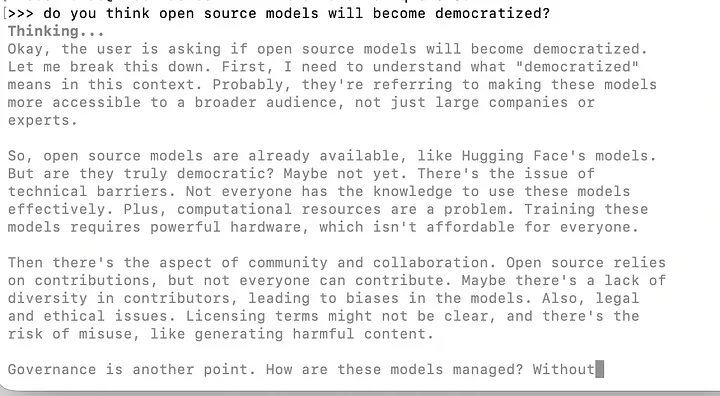 Answer from the Local Model (Thinking Tokens)
The light grey text represents the model’s internal reasoning process. These models perform extensive calculation before generating a response, and for local models, this thinking phase accounts for a significant portion of the total time until the model spews out a response.
After doing the thinking process, here is the answer from the model:
Answer from the Local Model (Thinking Tokens)
The light grey text represents the model’s internal reasoning process. These models perform extensive calculation before generating a response, and for local models, this thinking phase accounts for a significant portion of the total time until the model spews out a response.
After doing the thinking process, here is the answer from the model:
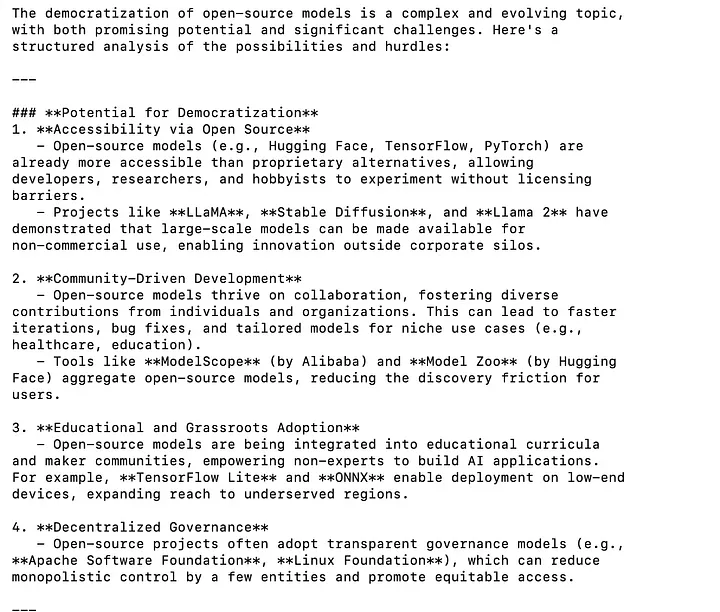 Answer from Local Model
Was with most tools, these models also retain some context from previous interactions:
Answer from Local Model
Was with most tools, these models also retain some context from previous interactions:
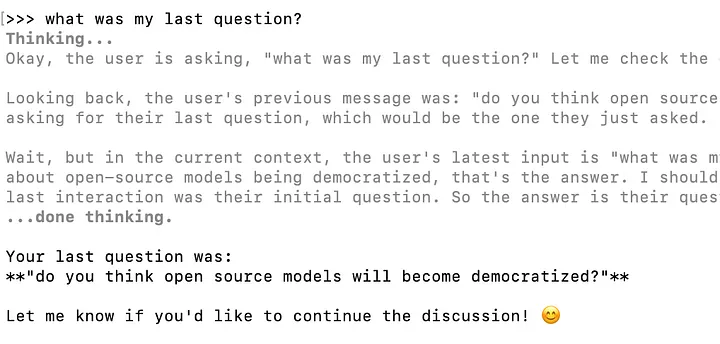 New question to Local Model
The model is outputting 5.7 tokens per second because I’m in battery saving mode. If I turn it down, we will probably see a value of 15–20 tokens per second.
···
2. One-Shot Terminal Commands
New question to Local Model
The model is outputting 5.7 tokens per second because I’m in battery saving mode. If I turn it down, we will probably see a value of 15–20 tokens per second.
···
2. One-Shot Terminal Commands
To interact with your local model, you can also provide the question outside of the interactive mode:
bash
ollama run qwen3:8b "write a python script that tells me how many vowels a word has"
Here’s the script that our local large language model built:
python
```python
# Prompt the user for a word
word = input("Enter a word: ")

# Define the set of vowels
vowels = {'a', 'e', 'i', 'o', 'u'}

# Initialize a counter
count = 0

# Convert the word to lowercase and check each character
for char in word.lower():
    if char in vowels:
        count += 1

# Output the result
print(f"Number of vowels: {count}")
···
3. The HTTP API (For Scripts and Apps)
Can you only use this within the terminal commands?
Of course not! If you are comfortable with Python, you can build any local script using your local model:
python
import json, urllib.request

req = urllib.request.Request(
    "http://127.0.0.1:11434/api/generate",
    data=json.dumps({
        "model": "qwen3:8b",
        "prompt": "Give me three uses for a local LLM.",
        "stream": False,
        "think": False,
    }).encode(),
    headers={"Content-Type": "application/json"},
)
print(json.loads(urllib.request.urlopen(req).read())["response"])
Here is the answer from the model after running this Python script:
markup
Sure! Here are three common and practical uses for a **local LLM (Large Language Model)**:1. **Personalized Assistance and Productivity**A local LLM can act as a private AI assistant, helping with tasks like email drafting, scheduling, note-taking, and even coding. Since it runs locally, it maintains user privacy and doesn't rely on internet connectivity.2. **Content Creation and Language Processing**You can use a local LLM to generate creative content such as blog posts, stories, scripts, or marketing copy. It can also assist with language translation, grammar checking, and summarizing text.3. **Custom Applications and Integration**A local LLM can be integrated into custom applications or workflows, such as chatbots, customer support systems, or data analysis tools. This allows for tailored solutions without exposing sensitive data to external servers.Let me know if you'd like examples of how to implement these uses!
Cool! You can now create your own applications with your own local model quite easily.
···
Fine-Tuning the Experience — Taming the “Thinking” Tokens
Qwen 3 is a hybrid reasoning model. By default, it generates a verbose <think>...</think> block outlining its chain of thought before providing the actual answer. Sometimes you want to see the math but most of the time, you just want the answer quickly (and cut some time from waiting the output tokens from the thinking process).
Here is how you bypass the reasoning pass:
- Disable it entirely:
ollama run qwen3:8b --think=false
- Run it, but hide it from the UI:
ollama run qwen3:8b --hidethinking
- In scripts: Pass
"think": false in your JSON payload.
···
A Warning About Web Search
Models are static up until their training data. That means that they can’t access data after they were trained, and companies have been relying on web search tools to augment the capability of the models. For example for our local model:
 Last day of training data of our Local Model
But, Ollama allows you to hand the model a web-search tool. This sounds incredible but there’s a catch.
The search itself executes on Ollama’s hosted cloud service. The moment you enable it, your prompts are being sent over the internet to fetch search results. The model stays local, but your queries do not. This may violate the principle of privacy you want to guarantee with the setup.
···
Last day of training data of our Local Model
But, Ollama allows you to hand the model a web-search tool. This sounds incredible but there’s a catch.
The search itself executes on Ollama’s hosted cloud service. The moment you enable it, your prompts are being sent over the internet to fetch search results. The model stays local, but your queries do not. This may violate the principle of privacy you want to guarantee with the setup.
···
Bonus: VS Code Integration
The ultimate endgame for me was getting an offline coding assistant. The cleanest, entirely free path for this is the Continue.dev extension.
- Install VS Code and the Continue extension.
- Open Continue’s configuration file at
~/.continue/config.yaml.
- Point it at your local Ollama server:
yaml
name: Local Assistant
version: 1.0.0
models:
  - name: Qwen3 8B (local)
    provider: ollama
    model: qwen3:8b
    roles:
      - chat
      - edit
      - apply
  - name: Qwen3 8B Autocomplete
    provider: ollama
    model: qwen3:8b
    roles:
      - autocomplete
Pro-tip: An 8B model is slightly too heavy for the split-second latency you want for inline code autocomplete. I highly recommend pulling a smaller model specifically for that task (ollama pull qwen2.5-coder:1.5b-base), mapping it to the autocomplete role, and letting Qwen3 8B handle the heavier chat tasks.
···
What if I have a Windows Computer?
As I’m not on a windows for this tutorial, I haven’t tried it extensively. But the good news is that the Ollama package is available for Windows computers here.
The install process may differ a bit, but the logic behind using Ollama and pulling the models will be exactly the same.
···
Where This Leaves Me
My total footprint for this project was 156 MB for the software and 5.2 GB for the model itself.
I now have a highly capable language model living permanently on my hard drive. For public, complex work, I will still reach for the cloud. But for the drafts I don’t want ingested into training data, the offline flights, and the legally bound client documents? This intelligence is now on my computer.
This may be a bit too techy for most people still, but things are becoming more democratized. And it’s not just about availability. On the performance front, open-source models are improving at a staggering pace, delivering results that make the future of local AI look incredibly promising. For example, GLM 5.2 and Qwen 3.7 Max are catching up to the big labs’ models performance:
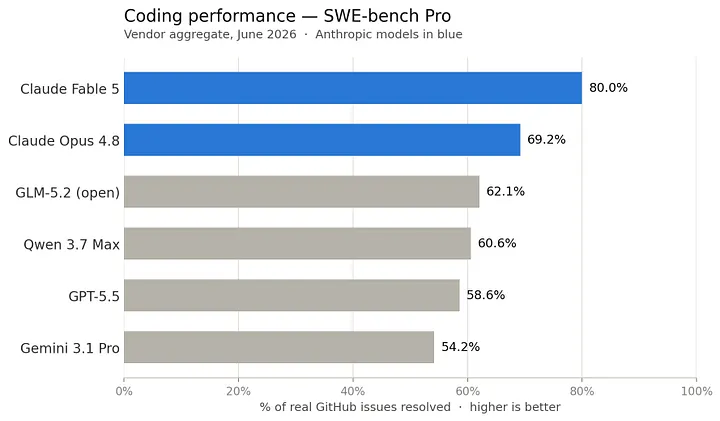 Comparison of Models performance on Software Engineering Benchmark - Image by Author
As the technical floor keeps dropping, “owning your own AI” is going to stop being a luxury reserved for developers with expensive laptops. That is the version of AI democratization I actually believe in.
Go give your laptop another brain this weekend and long live open source!
Comparison of Models performance on Software Engineering Benchmark - Image by Author
As the technical floor keeps dropping, “owning your own AI” is going to stop being a luxury reserved for developers with expensive laptops. That is the version of AI democratization I actually believe in.
Go give your laptop another brain this weekend and long live open source!
Register Now to Continue Reading
Unlock Towards Data Science with a Free Account
All articles on Towards Data Science are available to registered users. Create a free account today to access this article and thousands more.
Register for freeSign in to your account
 Written By
See all from Ivo Bernardo
Artificial IntelligenceLlmOllamaOpen SourceProgramming
Share This Article
Towards Data Science is a community publication. Submit your insights to reach our global audience and earn through the TDS Author Payment Program.
Write for TDS
Related Articles
Artificial Intelligence
Implementing A2C with/without multiple workers with TensorFlow 2.x
Abhishek Suran
August 2, 20202 min read
Data Science
Bringing software engineering discipline to data transformations
Mike Huls
March 21, 202611 min read
Programming
Implementing custom distribution sampling in SciPy
Mark Jamison
April 22, 20222 min read
Artificial Intelligence
Looking at the Differences between Unsupervised and Supervised Learning
Marco Santos
May 25, 20206 min read
Artificial Intelligence
This article talks about how this pandemic has given the AI-ML duo a much-needed push and how this newly-found friendship is working out...
Praveen Mishra
October 7, 20209 min read
Artificial Intelligence
Productionize your Scikit-Learn models with Azure Container Instances
Edwin Tan
June 6, 202212 min read
Programming
All ideas can be turned into action in a matter of time now.
Soner Yıldırım
September 18, 20257 min read
Artificial Intelligence
How and why is repeating tokens harming LLMs? Why is this a problem?
Salvatore Raieli
June 20, 202314 min read
Large Language Models
Cleaning up survey responses using OpenAI's GPT Model. Full Code with Github link.
Naresh Ram
June 7, 202317 min read
Your home for data science and AI. The world's leading publication for data science, data analytics, data engineering, machine learning, and artificial intelligence professionals.
Subscribe to Our NewsletterWrite For TDS•About•Advertise•Privacy Policy•Terms of Use
© Insight Media Group, LLC 2026•The New Stack•roadmap.sh•Creator Network
Recommended Articles
Close