保留正文与补采附件。源页面当前未重新核验;具体限制见交付清单。
 We value your privacy
We use cookies to enhance your browsing experience, serve personalised ads or content, and analyse our traffic. By clicking "Accept All", you consent to our use of cookies.
Customise Reject All Accept All
Customise Consent Preferences
We value your privacy
We use cookies to enhance your browsing experience, serve personalised ads or content, and analyse our traffic. By clicking "Accept All", you consent to our use of cookies.
Customise Reject All Accept All
Customise Consent Preferences  We use cookies to help you navigate efficiently and perform certain functions. You will find detailed information about all cookies under each consent category below.
The cookies that are categorised as "Necessary" are stored on your browser as they are essential for enabling the basic functionalities of the site. ... Show more
NecessaryAlways Active
Necessary cookies are required to enable the basic features of this site, such as providing secure log-in or adjusting your consent preferences. These cookies do not store any personally identifiable data.
We use cookies to help you navigate efficiently and perform certain functions. You will find detailed information about all cookies under each consent category below.
The cookies that are categorised as "Necessary" are stored on your browser as they are essential for enabling the basic functionalities of the site. ... Show more
NecessaryAlways Active
Necessary cookies are required to enable the basic features of this site, such as providing secure log-in or adjusting your consent preferences. These cookies do not store any personally identifiable data.
-
Cookie
BCTempID
-
Duration
10 minutes
-
Description
No description available.
-
Cookie
__cf_bm
-
Duration
1 hour
-
Description
This cookie, set by Cloudflare, is used to support Cloudflare Bot Management.
-
Cookie
AWSALBCORS
-
Duration
7 days
-
Description
Amazon Web Services set this cookie for load balancing.
-
Cookie
_cfuvid
-
Duration
session
-
Description
Cloudflare sets this cookie to track users across sessions to optimize user experience by maintaining session consistency and providing personalized services
-
Cookie
li_gc
-
Duration
6 months
-
Description
Linkedin set this cookie for storing visitor's consent regarding using cookies for non-essential purposes.
-
Cookie
__hssrc
-
Duration
session
-
Description
This cookie is set by Hubspot whenever it changes the session cookie. The __hssrc cookie set to 1 indicates that the user has restarted the browser, and if the cookie does not exist, it is assumed to be a new session.
-
Cookie
__hssc
-
Duration
1 hour
-
Description
HubSpot sets this cookie to keep track of sessions and to determine if HubSpot should increment the session number and timestamps in the __hstc cookie.
-
Cookie
wpEmojiSettingsSupports
-
Duration
session
-
Description
WordPress sets this cookie when a user interacts with emojis on a WordPress site. It helps determine if the user's browser can display emojis properly.
-
Cookie
BCSessionID
-
Duration
1 year 1 month 4 days
-
Description
Blueconic sets this cookie as a unique identifier for the BlueConic profile.
-
Cookie
_octo
-
Duration
1 year
-
Description
No description available.
-
Cookie
logged_in
-
Duration
1 year
-
Description
No description available.
-
Cookie
__Secure-YEC
-
Duration
past
-
Description
YouTube sets this cookie to stores the user's video player preferences using embedded YouTube video
-
Cookie
__eoi
-
Duration
6 months
-
Description
Description is currently not available.
-
Cookie
AWSALBTGCORS
-
Duration
7 days
-
Description
No description available.
-
Cookie
login-status-p
-
Duration
past
-
Description
Description is currently not available.
-
Cookie
AWSALBTG
-
Duration
7 days
-
Description
No description available.
-
Cookie
csrf_token
-
Duration
session
-
Description
No description available.
-
Cookie
token_v2
-
Duration
1 day
-
Description
Description is currently not available.
-
Cookie
D
-
Duration
1 year
-
Description
Description is currently not available.
-
Cookie
PHPSESSID
-
Duration
session
-
Description
This cookie is native to PHP applications. The cookie stores and identifies a user's unique session ID to manage user sessions on the website. The cookie is a session cookie and will be deleted when all the browser windows are closed.
-
Cookie
VISITOR_PRIVACY_METADATA
-
Duration
6 months
-
Description
YouTube sets this cookie to store the user's cookie consent state for the current domain.
-
Cookie
cookietest
-
Duration
session
-
Description
The cookietest cookie is typically used to determine whether the user's browser accepts cookies, essential for website functionality and user experience.
-
Cookie
__Host-airtable-session
-
Duration
1 year
-
Description
This cookie is used to enable us to integrate the services of Airtable.
-
Cookie
__Host-airtable-session.sig
-
Duration
1 year
-
Description
This cookie is used to enable us to integrate the services of Airtable.
-
Cookie
m
-
Duration
1 year 1 month 4 days
-
Description
Stripe sets this cookie for fraud prevention purposes. It identifies the device used to access the website, allowing the website to be formatted accordingly.
-
Cookie
BIGipServer*
-
Duration
session
-
Description
Marketo sets this cookie to collect information about the user's online activity and build a profile about their interests to provide advertisements relevant to the user.
-
Cookie
__cfruid
-
Duration
session
-
Description
Cloudflare sets this cookie to identify trusted web traffic.
-
Cookie
_GRECAPTCHA
-
Duration
6 months
-
Description
Google Recaptcha service sets this cookie to identify bots to protect the website against malicious spam attacks.
-
Cookie
__Secure-YNID
-
Duration
6 months
-
Description
Google cookie used to protect user security and prevent fraud, especially during the login process.
-
Cookie
cookieyes-consent
-
Duration
1 year
-
Description
CookieYes sets this cookie to remember users' consent preferences so that their preferences are respected on subsequent visits to this site. It does not collect or store any personal information about the site visitors.
Functional
Functional cookies help perform certain functionalities like sharing the content of the website on social media platforms, collecting feedback, and other third-party features.
-
Cookie
lidc
-
Duration
1 day
-
Description
LinkedIn sets the lidc cookie to facilitate data center selection.
-
Cookie
brw
-
Duration
1 year
-
Description
No description available.
-
Cookie
brwConsent
-
Duration
5 minutes
-
Description
Description is currently not available.
-
Cookie
WMF-Uniq
-
Duration
1 year
-
Description
Description is currently not available.
-
Cookie
loom_anon_comment
-
Duration
1 year
-
Description
No description available.
-
Cookie
loom_referral_video
-
Duration
session
-
Description
Description is currently not available.
-
Cookie
VISITOR_INFO1_LIVE
-
Duration
6 months
-
Description
A cookie set by YouTube to measure bandwidth that determines whether the user gets the new or old player interface.
-
Cookie
yt-remote-connected-devices
-
Duration
Never Expires
-
Description
YouTube sets this cookie to store the user's video preferences using embedded YouTube videos.
-
Cookie
ytidb::LAST_RESULT_ENTRY_KEY
-
Duration
Never Expires
-
Description
The cookie ytidb::LAST_RESULT_ENTRY_KEY is used by YouTube to store the last search result entry that was clicked by the user. This information is used to improve the user experience by providing more relevant search results in the future.
-
Cookie
yt-remote-device-id
-
Duration
Never Expires
-
Description
YouTube sets this cookie to store the user's video preferences using embedded YouTube videos.
-
Cookie
yt-remote-session-name
-
Duration
session
-
Description
The yt-remote-session-name cookie is used by YouTube to store the user's video player preferences using embedded YouTube video.
-
Cookie
yt-remote-fast-check-period
-
Duration
session
-
Description
The yt-remote-fast-check-period cookie is used by YouTube to store the user's video player preferences for embedded YouTube videos.
-
Cookie
yt-remote-session-app
-
Duration
session
-
Description
The yt-remote-session-app cookie is used by YouTube to store user preferences and information about the interface of the embedded YouTube video player.
-
Cookie
yt-remote-cast-available
-
Duration
session
-
Description
The yt-remote-cast-available cookie is used to store the user's preferences regarding whether casting is available on their YouTube video player.
-
Cookie
yt-remote-cast-installed
-
Duration
session
-
Description
The yt-remote-cast-installed cookie is used to store the user's video player preferences using embedded YouTube video.
-
Cookie
cp_session
-
Duration
3 months
-
Description
Codepen sets this cookie for Help systems found in the website.
-
Cookie
loid
-
Duration
1 year 1 month 4 days
-
Description
This cookie is set by the Reddit. The cookie enables the sharing of content from the website onto the social media platform.
Analytics
Analytical cookies are used to understand how visitors interact with the website. These cookies help provide information on metrics such as the number of visitors, bounce rate, traffic source, etc.
-
Cookie
__hstc
-
Duration
6 months
-
Description
Hubspot set this main cookie for tracking visitors. It contains the domain, initial timestamp (first visit), last timestamp (last visit), current timestamp (this visit), and session number (increments for each subsequent session).
-
Cookie
hubspotutk
-
Duration
6 months
-
Description
HubSpot sets this cookie to keep track of the visitors to the website. This cookie is passed to HubSpot on form submission and used when deduplicating contacts.
-
Cookie
_ga
-
Duration
1 year 1 month 4 days
-
Description
Google Analytics sets this cookie to calculate visitor, session and campaign data and track site usage for the site's analytics report. The cookie stores information anonymously and assigns a randomly generated number to recognise unique visitors.
-
Cookie
ga*
-
Duration
1 year 1 month 4 days
-
Description
Google Analytics sets this cookie to store and count page views.
-
Cookie
__Host-psifi.analyticsTrace
-
Duration
6 hours
-
Description
Description is currently not available.
-
Cookie
__Host-psifi.analyticsTraceV2
-
Duration
6 hours
-
Description
Description is currently not available.
-
Cookie
_gh_sess
-
Duration
session
-
Description
GitHub sets this cookie for temporary application and framework state between pages like what step the user is on in a multiple step form.
-
Cookie
YSC
-
Duration
session
-
Description
YSC cookie is set by Youtube and is used to track the views of embedded videos on Youtube pages.
-
Cookie
ajs_anonymous_id
-
Duration
1 year
-
Description
This cookie is set by Segment to count the number of people who visit a certain site by tracking if they have visited before.
-
Cookie
vuid
-
Duration
1 year 1 month 4 days
-
Description
Vimeo installs this cookie to collect tracking information by setting a unique ID to embed videos on the website.
Performance
Performance cookies are used to understand and analyse the key performance indexes of the website which helps in delivering a better user experience for the visitors.
-
Cookie
AWSALB
-
Duration
7 days
-
Description
AWSALB is an application load balancer cookie set by Amazon Web Services to map the session to the target.
-
Cookie
acq
-
Duration
past
-
Description
Description is currently not available.
-
Cookie
acq.sig
-
Duration
past
-
Description
Description is currently not available.
-
Cookie
ptc
-
Duration
2 years
-
Description
No description available.
Advertisement
Advertisement cookies are used to provide visitors with customised advertisements based on the pages you visited previously and to analyse the effectiveness of the ad campaigns.
-
Cookie
muc_ads
-
Duration
1 year 1 month 4 days
-
Description
Twitter sets this cookie to collect user behaviour and interaction data to optimize the website.
-
Cookie
guest_id_marketing
-
Duration
1 year 1 month 4 days
-
Description
Twitter sets this cookie to identify and track the website visitor.
-
Cookie
guest_id_ads
-
Duration
1 year 1 month 4 days
-
Description
Twitter sets this cookie to identify and track the website visitor.
-
Cookie
personalization_id
-
Duration
1 year 1 month 4 days
-
Description
Twitter sets this cookie to integrate and share features for social media and also store information about how the user uses the website, for tracking and targeting.
-
Cookie
guest_id
-
Duration
1 year 1 month 4 days
-
Description
Twitter sets this cookie to identify and track the website visitor. It registers if a user is signed in to the Twitter platform and collects information about ad preferences.
-
Cookie
bcookie
-
Duration
1 year
-
Description
LinkedIn sets this cookie from LinkedIn share buttons and ad tags to recognize browser IDs.
-
Cookie
__Secure-ROLLOUT_TOKEN
-
Duration
6 months
-
Description
YouTube sets this cookie to manage feature rollout and experimentation. It helps Google control which new features or interface changes are shown to users as part of testing and staged rollouts, ensuring consistent experience for a given user during an experiment.
-
Cookie
yt.innertube::nextId
-
Duration
Never Expires
-
Description
YouTube sets this cookie to register a unique ID to store data on what videos from YouTube the user has seen.
-
Cookie
yt.innertube::requests
-
Duration
Never Expires
-
Description
YouTube sets this cookie to register a unique ID to store data on what videos from YouTube the user has seen.
-
Cookie
session_tracker
-
Duration
session
-
Description
This cookie is set by the Reddit. This cookie is used to identify trusted web traffic. It also helps in adverstising on the website.
-
Cookie
edgebucket
-
Duration
session
-
Description
Reddit sets this cookie to save the information about a log-on Reddit user, for the purpose of advertisement recommendations and updating the content.
-
Cookie
did
-
Duration
1 year
-
Description
Arbor sets this cookie to show targeted ads to site visitors.This cookie expires after 2 months or 1 year.
Uncategorised
Other uncategorised cookies are those that are being analysed and have not been classified into a category as yet.
No cookies to display.
Reject All Save My Preferences Accept All
Toggle SearchToggle Mobile Navigation
Publish AI, ML & data-science insights to a global community of data professionals.
Sign inSubmit an Article
LatestEditor's PicksNewsletterShipAI
Write For TDS
LinkedInXToggle Search
Deep Learning
Optimizing Data Transfer in AI/ML Workloads
A deep dive on data transfer bottlenecks, their identification, and their resolution with the help of NVIDIA Nsight™ Systems
Chaim Rand
January 3, 202614 min read
 Photo by Daniel Seßler on Unsplash
In a typical AI/ML workload, a deep learning model is executed on a dedicated GPU accelerator using input data batches it receives from a CPU host. Ideally, the GPU — the more expensive resource — should be maximally utilized, with minimal periods of idle time. In particular, this means that every time it completes its execution on a batch, the subsequent batch will be “ripe and ready” for processing. When this does not happen, the GPU idles while waiting for input data — a common performance bottleneck often referred to as GPU starvation.
In previous posts, (e.g., see A Caching Strategy for Identifying Bottlenecks on the Data Input Pipeline), we discussed common causes of this issue, including: inefficient storage retrieval, CPU resource exhaustion, and host-to-device transfer bottlenecks. In this post, we zoom in on data transfer bottlenecks and revisit their identification and resolution — this time with the help of NVIDIA Nsight™ Systems (nsys), a performance profiler designed for analyzing the system-wide activity of workloads running on NVIDIA GPUs.
Learn this step by step with the interactive Machine Learning roadmap.
Photo by Daniel Seßler on Unsplash
In a typical AI/ML workload, a deep learning model is executed on a dedicated GPU accelerator using input data batches it receives from a CPU host. Ideally, the GPU — the more expensive resource — should be maximally utilized, with minimal periods of idle time. In particular, this means that every time it completes its execution on a batch, the subsequent batch will be “ripe and ready” for processing. When this does not happen, the GPU idles while waiting for input data — a common performance bottleneck often referred to as GPU starvation.
In previous posts, (e.g., see A Caching Strategy for Identifying Bottlenecks on the Data Input Pipeline), we discussed common causes of this issue, including: inefficient storage retrieval, CPU resource exhaustion, and host-to-device transfer bottlenecks. In this post, we zoom in on data transfer bottlenecks and revisit their identification and resolution — this time with the help of NVIDIA Nsight™ Systems (nsys), a performance profiler designed for analyzing the system-wide activity of workloads running on NVIDIA GPUs.
Learn this step by step with the interactive Machine Learning roadmap.
NVIDIA Nsight vs. PyTorch Profiler
Readers familiar with our work may be surprised at the mention of NVIDIA Nsight profiler rather than PyTorch Profiler. In our previous posts we have advocated strongly for the use of PyTorch Profiler in AI/ML model development as a tool for identifying and optimizing runtime performance. Time and again, we have demonstrated its application to a wide variety of performance issues. Its use does not require any special installations and can be run without special OS permissions. NVIDIA Nsight profiler, on the other hand, requires a dedicated system setup (or a dedicated NVIDIA container) and — for some of its features — elevated permissions, making its use less accessible and more complicated than PyTorch Profiler.
The two profilers differ in their focus: PyTorch profiler is a framework profiler tightly coupled with PyTorch and heavily focused on how models use the PyTorch software stack and supporting libraries. NVIDIA Nsight profiler is a system -level profiler; it does not know the details of the model being run or which framework is being used, but rather how the components of the entire system are being used and utilized. While PyTorch Profiler excels at tracing the low-level operations of a PyTorch model execution, nsys provides a detailed view of the activities of the entire system (GPU hardware, CUDA streams, OS interrupts, Network, PCIe, etc.). For many performance issues PyTorch profiler is sufficient for identifying and solving the source of the bottleneck; But some situations call for nsys profiler, the “big guns”, for deriving deeper insights into the inner workings of the underlying system.
In this post we intend to demonstrate some of the unique capabilities of nsys profiler and their application to the common data-transfer bottleneck.
Outline
To facilitate our discussion we will define a toy ML workload with a data-transfer performance bottleneck and proceed to introduce a number of successive optimizations in an attempt to solve it. Throughout the process, we will use the nsys profiler in order to analyze the system performance and assess the impact of the code modifications.
Setup
We will run our experiments on an Amazon EC2 g6e.2xlarge instance with an NVIDIA L40S GPU running an AWS Deep Learning (Ubuntu 24.04) AMI with PyTorch (2.8). To install the nsys-cli profiler (version 2025.6.1) we follow the official NVIDIA guidelines:
bash
wget https://developer.nvidia.com/downloads/assets/tools/secure/nsight-systems/2025_6/NsightSystems-linux-cli-public-2025.6.1.190-3689520.deb
sudo apt install ./NsightSystems-linux-cli-public-2025.6.1.190-3689520.deb
The NVIDIA Tools Extension (NVTX) library allows us to annotate our code with human-readable labels to increase the readability and comprehension of the performance trace. While PyTorch offers built-in NVTX support via its torch.cuda.nvtx APIs, we will use the standalone nvtx package (version 0.2.14) which supports color-coding the trace timeline for better visual analysis:
bash
pip install nvtx
Disclaimers
The code we will share is intended for demonstrative purposes; please do not rely on its correctness or optimality. Please do not interpret our use of any library, tool, or platform, as an endorsement of its use. The impact of the optimizations we will cover can vary greatly based on the details of the model and the runtime environment. Please be sure to assess their effect on your own use case before integrating their use.
Many thanks to Yitzhak Levi and Gilad Wasserman for their contributions to this post.
A Toy PyTorch Model
We introduce a training script intentionally designed to consist of a bottleneck on the data-input pipeline.
In the code block below we define a simple image classification model with a ResNet-18 backbone.
python
import time, torch, torchvision

DEVICE = "cuda"
model = torchvision.models.resnet18().to(DEVICE).train()
optimizer = torch.optim.Adam(model.parameters())
Next, we define a synthetic dataset which we will use to train our toy model.
python
from torch.utils.data import Dataset, DataLoader

WARMUP_STEPS = 10
PROFILE_STEPS = 3
COOLDOWN_STEPS = 1
TOTAL_STEPS = WARMUP_STEPS + PROFILE_STEPS + COOLDOWN_STEPS
BATCH_SIZE = 64
TOTAL_SAMPLES = TOTAL_STEPS * BATCH_SIZE
IMG_SIZE = 512

# A synthetic Dataset with random images and labels
class FakeDataset(Dataset):

    def __len__(self):
        return TOTAL_SAMPLES

    def __getitem__(self, index):
        img = torch.randn((3, IMG_SIZE, IMG_SIZE))
        label = torch.tensor(index % 10)
        return img, label

train_loader = DataLoader(
    FakeDataset(),
    batch_size=BATCH_SIZE
)
Lastly, we define a standard training step programmed to run nsys-profiler for three steps using the torch.cuda.profiler.start and stop commands — intended for use in conjunction with the nsys cli. We highlight the components of the training step using the nvtx.annotate utility. Please refer to the official documentation for more details on profiling with nsys in PyTorch.
python
import nvtx
from torch.cuda import profiler

def copy_data(batch):
    data, targets = batch
    data_gpu = data.to(DEVICE)
    targets_gpu = targets.to(DEVICE)
    return data_gpu, targets_gpu


def compute_step(model, batch, optimizer):
    data, targets = batch
    output = model(data)
    loss = torch.nn.functional.cross_entropy(output, targets)
    loss.backward()
    optimizer.step()
    optimizer.zero_grad()
    return loss


data_iter = iter(train_loader)

for i in range(TOTAL_STEPS):

    if i == WARMUP_STEPS:
        # start nsys profiler
        torch.cuda.synchronize()
        start_time = time.perf_counter()
        profiler.start()
    elif i == WARMUP_STEPS + PROFILE_STEPS:
        # stop nsys profiler
        torch.cuda.synchronize()
        profiler.stop()
        end_time = time.perf_counter()

    with nvtx.annotate(f"Batch {i}", color="blue"):
        with nvtx.annotate("get batch", color="red"):
            batch = next(data_iter)
        with nvtx.annotate("copy batch", color="yellow"):
            batch = copy_data(batch)
        with nvtx.annotate("Compute", color="green"):
            compute_step(model, batch, optimizer)

total_time = end_time - start_time
throughput = PROFILE_STEPS / total_time
print(f"Throughput: {throughput:.2f} steps/sec")
We run our script using the cudaProfilerApi option to start and stop the profiler programmatically. Please see the official documentation for full details on profiling from the nsys cli.
bash
nsys profile \
  --capture-range=cudaProfilerApi \
  --trace=cuda,nvtx,osrt \
  --output=baseline \
  python train.py
This results in a baseline.nsys-rep trace file that we copy over to our development machine for analysis.
In order to draw a comparison to PyTorch profiler, we define an alternative training loop programmed with PyTorch Profiler and annotated with the torch.profiler.record_function utility:
python
from torch.profiler import (
    profile, record_function, schedule, tensorboard_trace_handler
)

with profile(
    schedule=schedule(wait=0, warmup=WARMUP_STEPS,
                      active=PROFILE_STEPS, repeat=1),
    on_trace_ready=tensorboard_trace_handler('./baseline'),
    record_shapes=True,
    with_stack=True
) as prof:
    for i in range(TOTAL_STEPS):
        with record_function("get batch"):
            batch = next(data_iter)
        with record_function("copy batch"):
            batch = copy_data(batch)
        with record_function("compute"):
            compute_step(model, batch, optimizer)
        prof.step()
The throughput of our baseline experiment is 2.97 steps-per-second. In the next sections we will use the profile traces to identify performance bottlenecks in our training step and try to improve on this result.
Baseline Performance Analysis
To analyze the resultant nsys trace file, we open it in the Nsight Systems GUI application. In the image below we zoom in on the timeline of two of the training steps captured by the profiler:
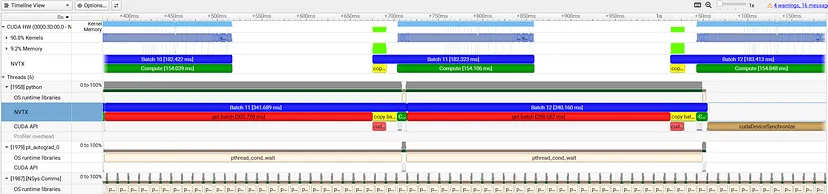 Baseline Nsight Systems Profiler Trace (by Author)
The trace contains a wealth of information, just a subset of which we will touch on in this post. Please see the nsys documentation for additional functionalities and features.
The timeline is divided into two parts: the CUDA section which reports GPU activity and the threads section which reports the CPU activity. The CUDA section makes a clear distinction between the GPU kernel (compute) activity (90.9%) and memory activity (9.1%). The top bars in each section report the utilization of each of the resources and both sections include an NVTX section with the colored annotations we included in our training step. We note the following observations:
Baseline Nsight Systems Profiler Trace (by Author)
The trace contains a wealth of information, just a subset of which we will touch on in this post. Please see the nsys documentation for additional functionalities and features.
The timeline is divided into two parts: the CUDA section which reports GPU activity and the threads section which reports the CPU activity. The CUDA section makes a clear distinction between the GPU kernel (compute) activity (90.9%) and memory activity (9.1%). The top bars in each section report the utilization of each of the resources and both sections include an NVTX section with the colored annotations we included in our training step. We note the following observations:
- The GPU is idle for roughly 50% of each training step. This can be seen by the portion of time taken by each batch (in blue) in the GPU NVTX bar and the large blocks of whitespace in between them.
- The GPU activity for each batch starts immediately after the “get batch” activity has completed on the CPU. It starts with the host-to-device memory copy, marked in light green and continues with the kernel computations, marked in light blue.
- Once the CPU has launched the GPU memory and compute commands for batch N , it proceeds to the next batch in the training loop — leading to a partial overlap of batch N+1 on the CPU with batch N on the GPU.
- The vast majority of the CPU thread is spent on the “get batch” activity. This constitutes the primary bottleneck in our baseline experiment.
The profiling trace points to a clear culprit — the dataloader. By default, PyTorch performs single process data loading — a single CPU process is used to load the next data input batch, copy it to the GPU, and launch the compute kernels — all in a sequential manner. This typically results in severe under-utilization of the CPU resources by: 1) limiting dataloading to just a single process, and 2) making the loading of the next batch contingent on the completion of the CPU processing (i.e., kernel loading) of the previous batch. Our irresponsible use of our CPU resources has resulted in our GPU being starved for input data.
The same conclusion could have been reached using PyTorch Profiler trace shown below:
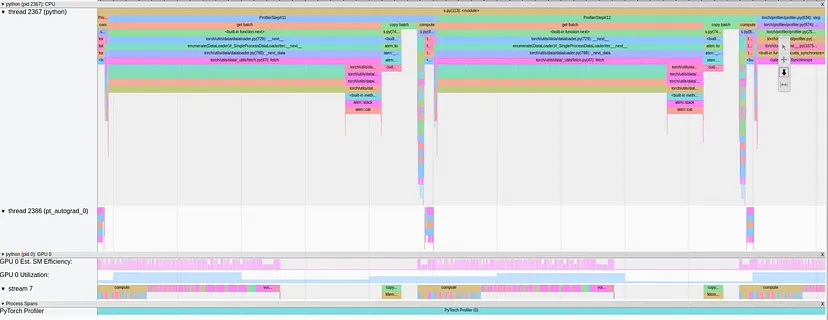 Baseline PyTorch Profiler Trace (by Author)
Here too, we can see long periods of GPU underutilization that are caused by the long “get batch” blocks on the CPU side.
Baseline PyTorch Profiler Trace (by Author)
Here too, we can see long periods of GPU underutilization that are caused by the long “get batch” blocks on the CPU side.
Optimization 1: Multi-Process Data Loading
The first step is to modify the data input pipeline to use multi-process data loading. We set the number of workers to match the 8 vCPUs available on our Amazon EC2 g6e.2xlarge instance. In a real-world scenario, this value should be tuned for optimal throughput:
python
NUM_WORKERS = 8

train_loader = DataLoader(
    FakeDataset(),
    batch_size=BATCH_SIZE,
    num_workers=NUM_WORKERS
)
Following this change our throughput jumps to 4.81 steps per second — a 62% improvement over our baseline result. The corresponding nsys profiler trace is shown below:
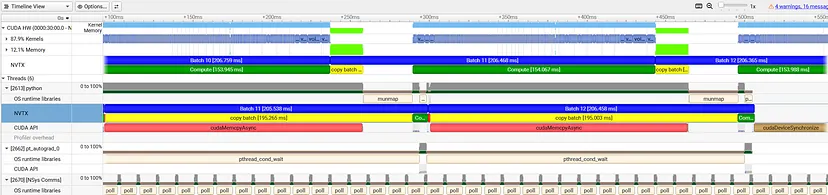 Multiproc Dataloading Nsight Systems Profiler Timeline (by Author)
Note that the red “get batch” segment has become just a tiny sliver of each step in the NVTX bar. In its place, the yellow “copy batch” block now takes center stage. As a result of our use of multi-process dataloading, there is now always a new batch ready for processing — but can we do better?
Taking a closer look at the GPU section we see that there is still a significant portion (~290 milliseconds) of idle time in between the memory operation and the kernel compute. This idle time is perfectly aligned with an “munmap” operation in the OS runtime bar. The “munmap” block is a CPU-side memory cleanup operation performed just after the CUDA memory copy is complete. It occurs at the tail-end of the long yellow “copy batch” operation. The compute kernels are launched onto the GPU only after the memory cleanup has completed. This is a clear pattern of synchronous host-to-device memory copy: The CPU cannot proceed with kernel loading until the data copy operation has been fully completed and the GPU stays idle until the CPU loads the kernels.
The PyTorch profiler trace shows the same GPU idle time but it does not provide the same “munmap” hint. This is our first example of the advantage of the system-wide visibility of the nsys profiler.
Multiproc Dataloading Nsight Systems Profiler Timeline (by Author)
Note that the red “get batch” segment has become just a tiny sliver of each step in the NVTX bar. In its place, the yellow “copy batch” block now takes center stage. As a result of our use of multi-process dataloading, there is now always a new batch ready for processing — but can we do better?
Taking a closer look at the GPU section we see that there is still a significant portion (~290 milliseconds) of idle time in between the memory operation and the kernel compute. This idle time is perfectly aligned with an “munmap” operation in the OS runtime bar. The “munmap” block is a CPU-side memory cleanup operation performed just after the CUDA memory copy is complete. It occurs at the tail-end of the long yellow “copy batch” operation. The compute kernels are launched onto the GPU only after the memory cleanup has completed. This is a clear pattern of synchronous host-to-device memory copy: The CPU cannot proceed with kernel loading until the data copy operation has been fully completed and the GPU stays idle until the CPU loads the kernels.
The PyTorch profiler trace shows the same GPU idle time but it does not provide the same “munmap” hint. This is our first example of the advantage of the system-wide visibility of the nsys profiler.
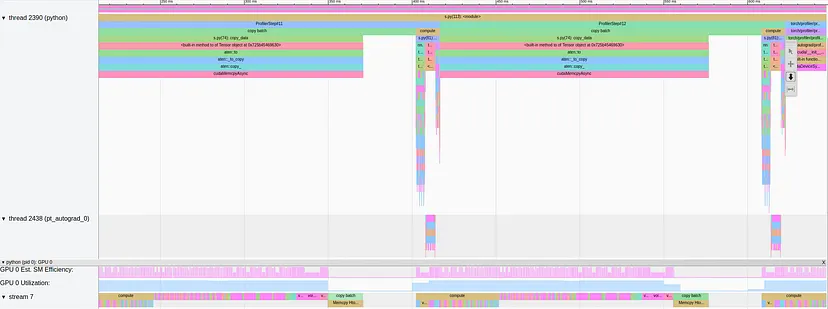 Multiproc Dataloading PyTorch Profiler Trace (by Author)
With our finding of the data-copy performance bottleneck in hand, we proceed to our next optimization.
Multiproc Dataloading PyTorch Profiler Trace (by Author)
With our finding of the data-copy performance bottleneck in hand, we proceed to our next optimization.
Optimization 2: Asynchronous Data Transfer
The solution to the bottleneck we have found is to program our training step to load data asynchronously. This enables the CPU to launch the compute kernels immediately after sending the memory copy command — without waiting for the memory copy to be completed. This way the GPU can begin processing the kernels as soon as the CUDA memory copy is done. Enabling asynchronous data copy requires two changes: First we must program the dataloader to use pinned memory (instead of pageable memory), and second, we must pass non_blocking=True argument to the to() operations:
python
NUM_WORKERS = 8
ASYNC_DATATRANSFER = True


train_loader = DataLoader(
    FakeDataset(),
    batch_size=BATCH_SIZE,
    num_workers=NUM_WORKERS,
    pin_memory=ASYNC_DATATRANSFER
)

def copy_data(batch):
    data, targets = batch
    data_gpu = data.to(DEVICE, non_blocking=ASYNC_DATATRANSFER)
    targets_gpu = targets.to(DEVICE, non_blocking=ASYNC_DATATRANSFER)
    return data_gpu, targets_gpu
Using asynchronous dataloading results in a throughput of 5.91 steps per second — an additional 23% improvement and 99% improvement overall. The resultant profiling trace is shown below:
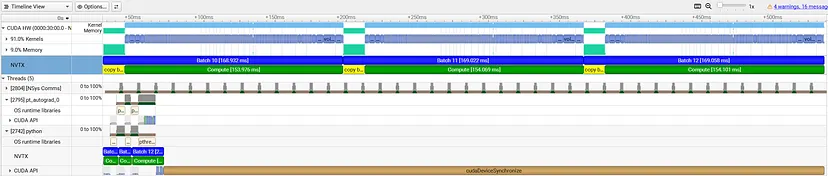 Async Dataloading Nsight Systems Profiler Timeline (by Author)
We now see all of the CPU operations bunched together at the beginning of the trace. We have removed all performance obstacles on the CPU side allowing it to freely load the data and kernels to the GPU. In the GPU section, we see continuous activity without any idle time. We do, however, see a clear separation between CUDA memory activities (in light green) and CUDA kernel activities (in light blue). PyTorch profiler, in contrast, does not make this distinction clear. This is another advantage of the hardware-centric profiler and, in the case of our toy experiment, is what informs the next steps of our optimization.
Async Dataloading Nsight Systems Profiler Timeline (by Author)
We now see all of the CPU operations bunched together at the beginning of the trace. We have removed all performance obstacles on the CPU side allowing it to freely load the data and kernels to the GPU. In the GPU section, we see continuous activity without any idle time. We do, however, see a clear separation between CUDA memory activities (in light green) and CUDA kernel activities (in light blue). PyTorch profiler, in contrast, does not make this distinction clear. This is another advantage of the hardware-centric profiler and, in the case of our toy experiment, is what informs the next steps of our optimization.
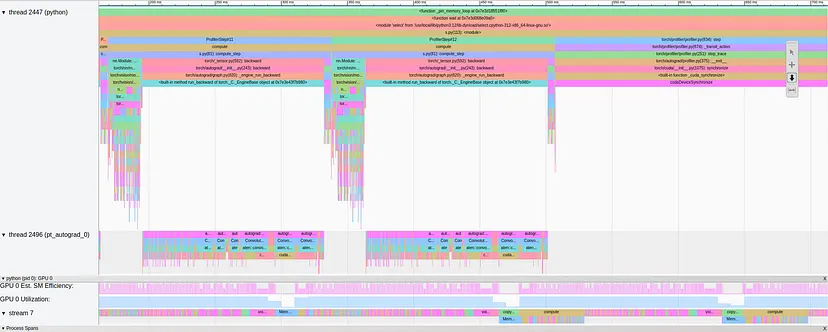 Async Dataloading PyTorch Profiler Trace (by Author)
Optimization 3: Pipelining With CUDA Streams
Our final optimizations derive from the fact that modern GPUs, such as the NVIDIA L40S, use independent engines for copying memory (the DMA) and executing compute kernels (the SMs). We can take advantage of this by parallelizing the distinct memory and kernel activities we saw in the nsys profiler trace. We will program this through the use of CUDA streams.
In a previous post, we expanded on the opportunity for optimizing AI/ML workloads using CUDA Streams. Here, we apply a similar pipelining strategy: We define two distinct “copy” and “compute” CUDA streams and program the “copy” stream to copy batch N+1 at the same time that the “compute” stream is processing batch N :
python
# define two CUDA streams
compute_stream = torch.cuda.Stream()
copy_stream = torch.cuda.Stream()


# extract first batch
next_batch = next(data_iter)
with torch.cuda.stream(copy_stream):
    next_batch = copy_data(next_batch)

for i in range(TOTAL_STEPS):

    if i == WARMUP_STEPS:
        torch.cuda.synchronize()
        start_time = time.perf_counter()
        profiler.start()
    elif i == WARMUP_STEPS + PROFILE_STEPS:
        torch.cuda.synchronize()
        profiler.stop()
        end_time = time.perf_counter()

    with nvtx.annotate(f"Batch {i}", color="blue"):
        # wait for copy stream to complete copy of batch N
        compute_stream.wait_stream(copy_stream)
        batch = next_batch

        # execute model on batch N+1 compute stream
        try:
            with nvtx.annotate("get batch", color="red"):
                next_batch = next(data_iter)
            with torch.cuda.stream(copy_stream):
                with nvtx.annotate("copy batch", color="yellow"):
                    next_batch = copy_data(next_batch)
        except:
            # reached end of dataset
            next_batch = None

        # execute model on batch N compute stream
        with torch.cuda.stream(compute_stream):
            with nvtx.annotate("Compute", color="green"):
                compute_step(model, batch, optimizer)

total_time = end_time - start_time
throughput = PROFILE_STEPS / total_time
print(f"Throughput: {throughput:.2f} steps/sec")
This optimization results in a throughput of 6.44 steps per second — a 9% improvement over our previous experiment. We note that the impact of this optimization is capped by the duration of the longer of the two operation types. In our previous profile trace, the memory block took 15.5 milliseconds and the kernel block took 155 milliseconds. In the current profile trace, the entire GPU steps takes 155 milliseconds, which means that the memory copy time is completed hidden by the kernel compute time and that our optimization reaches the maximum possible result.
The use of the CUDA streams and its impact on GPU utilization can be seen in the traces of both profilers:
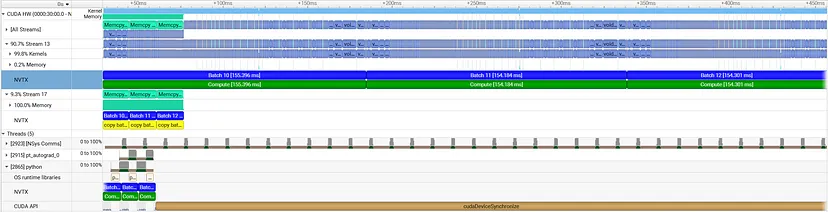 Pipelined Nsight Systems Profiler Timeline (by Author)
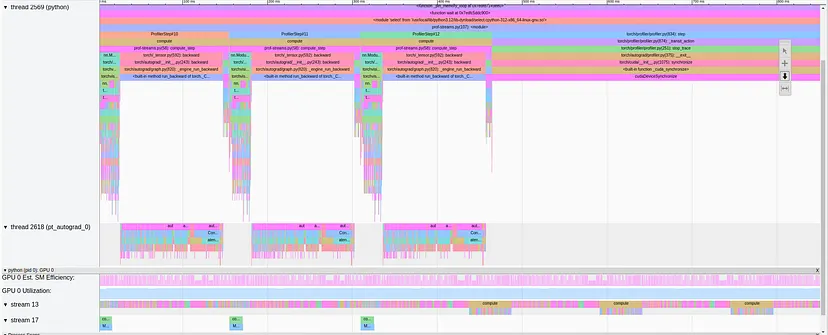 Pipelined PyTorch Profiler Trace (by Author)
Optimization 4: Prefetching to CUDA
For our final step, we move the data copying from the main training loop process to the data loading process: Rather than explicitly calling the copy function inside the training loop, we assume that the batches returned from the data iterator are already placed on the GPU.
In the code block below, we wrap our dataloader with a CUDA-prefetching iterator class. Note, that this is a simplified implementation intended for the purposes of demonstration. More work may be required for more complex scenarios (e.g., DDP training). Alternatively, you may consider a third-party implementation such as torchtnt.utils.data.data_prefetcher.CudaDataPrefetcher:
python
class DataPrefetcher:
    def __init__(self, loader):
        self.loader = iter(loader)
        self.stream = torch.cuda.Stream()
        self.next_batch = None
        self.preload()

    def preload(self):
        try:
            data, targets = next(self.loader)

            with torch.cuda.stream(self.stream):
                with nvtx.annotate("copy batch", color="yellow"):
                    next_data = data.to(DEVICE, non_blocking=True)
                    next_targets = targets.to(DEVICE, non_blocking=True)
            self.next_batch = (next_data, next_targets)
        except:
            self.next_batch = (None, None)

    def __iter__(self):
        return self

    def __next__(self):
        torch.cuda.current_stream().wait_stream(self.stream)
        data, targets = self.next_batch
        self.preload()
        return data, targets


data_iter = DataPrefetcher(train_loader)

for i in range(TOTAL_STEPS):
    if i == WARMUP_STEPS:
        torch.cuda.synchronize()
        start_time = time.perf_counter()
        profiler.start()
    elif i == WARMUP_STEPS + PROFILE_STEPS:
        torch.cuda.synchronize()
        profiler.stop()
        end_time = time.perf_counter()

    with nvtx.annotate(f"Batch {i}", color="blue"):
        with nvtx.annotate("get batch", color="red"):
            batch = next(data_iter)
        with nvtx.annotate("Compute", color="green"):
            loss = compute_step(model, batch, optimizer)

total_time = end_time - start_time
throughput = PROFILE_STEPS / total_time
print(f"Throughput: {throughput:.2f} steps/sec")
This optimization results in a throughput of 6.44 steps per second — the same as our previous experiment. This should not surprise us since we have already seen that the throughput is bound by the 155 millisecond GPU compute and our optimization has not done anything to reduce the kernel compute time.
More generally, despite the removal of the copy call from the main loop, you may have a hard time finding a situation where this will have a meaningful impact on performance since the call is already being called asynchronously. However, given the minimal changes to the training loop, you may find this solution to be cleaner and/or to be more applicable for use with high-level libraries that do not enable fine-grained control of the training loop.
Unsurprisingly, the profile traces for this experiment appear nearly identical to the previous ones. The main difference is the placement of the yellow “copy data” block in the NVTX row of the CPU section.
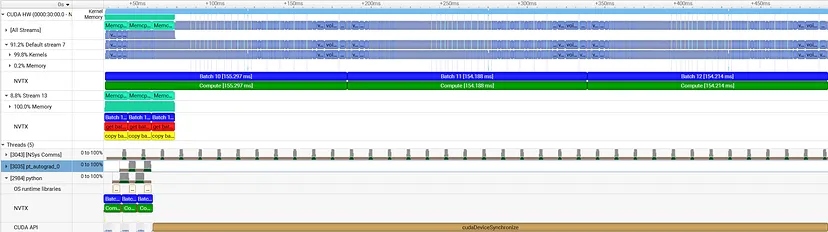 Data Prefetching Nsight Systems Profiler Timeline (by Author)
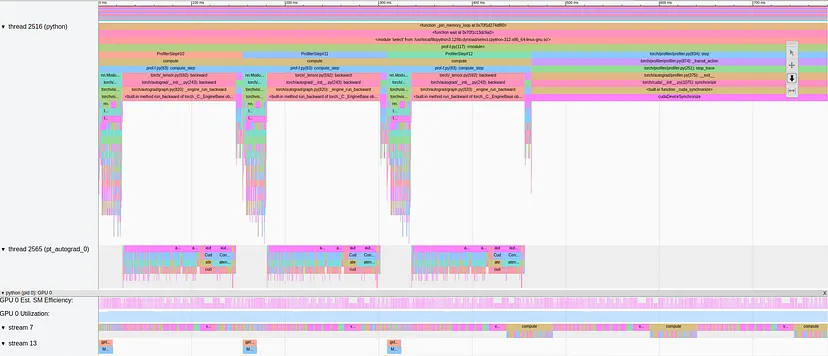 Data Prefetching PyTorch Profiler Trace (by Author)
Results
The table below summarizes the results of our experiments:
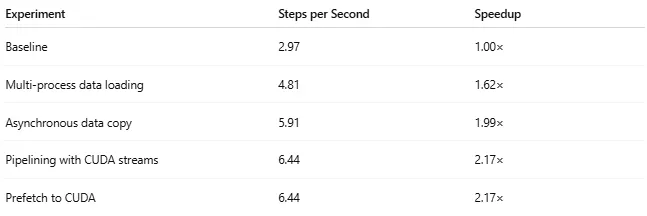 Experiment Results (by Author)
The optimizations, which were driven by the use of Nsight Systems profiler, resulted in an overall increase of 2.17X to the runtime performance.
Experiment Results (by Author)
The optimizations, which were driven by the use of Nsight Systems profiler, resulted in an overall increase of 2.17X to the runtime performance.
Summary
GPU starvation is a common performance bottleneck that can have a devastating impact on the efficiency and costs of AI/ML workloads. In this post, we demonstrated how to use the Nsight Systems profiler to study the causes of the performance bottleneck and take informed steps towards their resolution. Along the way, we emphasized the unique capabilities of Nsight Systems profiler when compared to the built-in framework-centric PyTorch Profiler — specifically its deep system-level visibility.
Our focus, in this post has been on the host-to-device data copy that typically occurs at the beginning of the training step. However, data-transfer bottlenecks can appear at different stages of training. In a sequel to this post we intend to repeat our nsys profiling analysis on data copies going in the opposite direction — from the device to the host. Stay tuned!
Register Now to Continue Reading
Unlock Towards Data Science with a Free Account
All articles on Towards Data Science are available to registered users. Create a free account today to access this article and thousands more.
Register for freeSign in to your account
 Written By
See all from Chaim Rand
Deep DivesArtificial IntelligenceMachine LearningModel OptimizationPytorch
Share This Article
Towards Data Science is a community publication. Submit your insights to reach our global audience and earn through the TDS Author Payment Program.
Write for TDS
Related Articles
Deep Learning
A PyTorch implementation on one of the most popular semantic segmentation models.
Muhammad Ardi Putra
September 20, 202418 min read
Artificial Intelligence
- Introduction
Damian Ejlli
July 29, 202110 min read
Deep Learning
Scalable and equivariant spherical CNNs by DISCO convolutions
Jason McEwen
March 15, 20236 min read
Deep Learning
A Simple Solution for Increasing Resource Utilization and Accelerating Training
Chaim Rand
May 31, 202214 min read
Artificial Intelligence
Grab a pen and paper
Łukasz Gebel
August 14, 20205 min read
Large Language Models
Enterprise Document Intelligence [Vol.1 #5B] - One PDF in, a relational set of DataFrames out: lines, pages, TOC, images, cross-references, captions, spans, and a parsing summary
Kezhan Shi
June 11, 202625 min read
Artificial Intelligence
Why I am joining Le Wagon, the best Data Science bootcamp for startups.
Renato Boemer
February 11, 20216 min read
Deep Learning
A novel approach for denoising medical images
Shubhankar Rawat
October 14, 20225 min read
Machine Learning
There were others who had forced their way to the top from the lowest rung by the aid of their bootstraps
James Andrew Godwin
March 13, 20219 min read
Your home for data science and AI. The world's leading publication for data science, data analytics, data engineering, machine learning, and artificial intelligence professionals.
Subscribe to Our NewsletterWrite For TDS•About•Advertise•Privacy Policy•Terms of Use
© Insight Media Group, LLC 2026•The New Stack•roadmap.sh•Creator Network
Recommended Articles
Close