保留正文与补采附件。源页面当前未重新核验;具体限制见交付清单。
 We value your privacy
We use cookies to enhance your browsing experience, serve personalised ads or content, and analyse our traffic. By clicking "Accept All", you consent to our use of cookies.
Customise Reject All Accept All
Customise Consent Preferences
We value your privacy
We use cookies to enhance your browsing experience, serve personalised ads or content, and analyse our traffic. By clicking "Accept All", you consent to our use of cookies.
Customise Reject All Accept All
Customise Consent Preferences  We use cookies to help you navigate efficiently and perform certain functions. You will find detailed information about all cookies under each consent category below.
The cookies that are categorised as "Necessary" are stored on your browser as they are essential for enabling the basic functionalities of the site. ... Show more
NecessaryAlways Active
Necessary cookies are required to enable the basic features of this site, such as providing secure log-in or adjusting your consent preferences. These cookies do not store any personally identifiable data.
We use cookies to help you navigate efficiently and perform certain functions. You will find detailed information about all cookies under each consent category below.
The cookies that are categorised as "Necessary" are stored on your browser as they are essential for enabling the basic functionalities of the site. ... Show more
NecessaryAlways Active
Necessary cookies are required to enable the basic features of this site, such as providing secure log-in or adjusting your consent preferences. These cookies do not store any personally identifiable data.
-
Cookie
BCTempID
-
Duration
10 minutes
-
Description
No description available.
-
Cookie
__cf_bm
-
Duration
1 hour
-
Description
This cookie, set by Cloudflare, is used to support Cloudflare Bot Management.
-
Cookie
AWSALBCORS
-
Duration
7 days
-
Description
Amazon Web Services set this cookie for load balancing.
-
Cookie
_cfuvid
-
Duration
session
-
Description
Cloudflare sets this cookie to track users across sessions to optimize user experience by maintaining session consistency and providing personalized services
-
Cookie
li_gc
-
Duration
6 months
-
Description
Linkedin set this cookie for storing visitor's consent regarding using cookies for non-essential purposes.
-
Cookie
__hssrc
-
Duration
session
-
Description
This cookie is set by Hubspot whenever it changes the session cookie. The __hssrc cookie set to 1 indicates that the user has restarted the browser, and if the cookie does not exist, it is assumed to be a new session.
-
Cookie
__hssc
-
Duration
1 hour
-
Description
HubSpot sets this cookie to keep track of sessions and to determine if HubSpot should increment the session number and timestamps in the __hstc cookie.
-
Cookie
wpEmojiSettingsSupports
-
Duration
session
-
Description
WordPress sets this cookie when a user interacts with emojis on a WordPress site. It helps determine if the user's browser can display emojis properly.
-
Cookie
BCSessionID
-
Duration
1 year 1 month 4 days
-
Description
Blueconic sets this cookie as a unique identifier for the BlueConic profile.
-
Cookie
_octo
-
Duration
1 year
-
Description
No description available.
-
Cookie
logged_in
-
Duration
1 year
-
Description
No description available.
-
Cookie
__Secure-YEC
-
Duration
past
-
Description
YouTube sets this cookie to stores the user's video player preferences using embedded YouTube video
-
Cookie
__eoi
-
Duration
6 months
-
Description
Description is currently not available.
-
Cookie
AWSALBTGCORS
-
Duration
7 days
-
Description
No description available.
-
Cookie
login-status-p
-
Duration
past
-
Description
Description is currently not available.
-
Cookie
AWSALBTG
-
Duration
7 days
-
Description
No description available.
-
Cookie
csrf_token
-
Duration
session
-
Description
No description available.
-
Cookie
token_v2
-
Duration
1 day
-
Description
Description is currently not available.
-
Cookie
D
-
Duration
1 year
-
Description
Description is currently not available.
-
Cookie
PHPSESSID
-
Duration
session
-
Description
This cookie is native to PHP applications. The cookie stores and identifies a user's unique session ID to manage user sessions on the website. The cookie is a session cookie and will be deleted when all the browser windows are closed.
-
Cookie
VISITOR_PRIVACY_METADATA
-
Duration
6 months
-
Description
YouTube sets this cookie to store the user's cookie consent state for the current domain.
-
Cookie
cookietest
-
Duration
session
-
Description
The cookietest cookie is typically used to determine whether the user's browser accepts cookies, essential for website functionality and user experience.
-
Cookie
__Host-airtable-session
-
Duration
1 year
-
Description
This cookie is used to enable us to integrate the services of Airtable.
-
Cookie
__Host-airtable-session.sig
-
Duration
1 year
-
Description
This cookie is used to enable us to integrate the services of Airtable.
-
Cookie
m
-
Duration
1 year 1 month 4 days
-
Description
Stripe sets this cookie for fraud prevention purposes. It identifies the device used to access the website, allowing the website to be formatted accordingly.
-
Cookie
BIGipServer*
-
Duration
session
-
Description
Marketo sets this cookie to collect information about the user's online activity and build a profile about their interests to provide advertisements relevant to the user.
-
Cookie
__cfruid
-
Duration
session
-
Description
Cloudflare sets this cookie to identify trusted web traffic.
-
Cookie
_GRECAPTCHA
-
Duration
6 months
-
Description
Google Recaptcha service sets this cookie to identify bots to protect the website against malicious spam attacks.
-
Cookie
__Secure-YNID
-
Duration
6 months
-
Description
Google cookie used to protect user security and prevent fraud, especially during the login process.
-
Cookie
cookieyes-consent
-
Duration
1 year
-
Description
CookieYes sets this cookie to remember users' consent preferences so that their preferences are respected on subsequent visits to this site. It does not collect or store any personal information about the site visitors.
Functional
Functional cookies help perform certain functionalities like sharing the content of the website on social media platforms, collecting feedback, and other third-party features.
-
Cookie
lidc
-
Duration
1 day
-
Description
LinkedIn sets the lidc cookie to facilitate data center selection.
-
Cookie
brw
-
Duration
1 year
-
Description
No description available.
-
Cookie
brwConsent
-
Duration
5 minutes
-
Description
Description is currently not available.
-
Cookie
WMF-Uniq
-
Duration
1 year
-
Description
Description is currently not available.
-
Cookie
loom_anon_comment
-
Duration
1 year
-
Description
No description available.
-
Cookie
loom_referral_video
-
Duration
session
-
Description
Description is currently not available.
-
Cookie
VISITOR_INFO1_LIVE
-
Duration
6 months
-
Description
A cookie set by YouTube to measure bandwidth that determines whether the user gets the new or old player interface.
-
Cookie
yt-remote-connected-devices
-
Duration
Never Expires
-
Description
YouTube sets this cookie to store the user's video preferences using embedded YouTube videos.
-
Cookie
ytidb::LAST_RESULT_ENTRY_KEY
-
Duration
Never Expires
-
Description
The cookie ytidb::LAST_RESULT_ENTRY_KEY is used by YouTube to store the last search result entry that was clicked by the user. This information is used to improve the user experience by providing more relevant search results in the future.
-
Cookie
yt-remote-device-id
-
Duration
Never Expires
-
Description
YouTube sets this cookie to store the user's video preferences using embedded YouTube videos.
-
Cookie
yt-remote-session-name
-
Duration
session
-
Description
The yt-remote-session-name cookie is used by YouTube to store the user's video player preferences using embedded YouTube video.
-
Cookie
yt-remote-fast-check-period
-
Duration
session
-
Description
The yt-remote-fast-check-period cookie is used by YouTube to store the user's video player preferences for embedded YouTube videos.
-
Cookie
yt-remote-session-app
-
Duration
session
-
Description
The yt-remote-session-app cookie is used by YouTube to store user preferences and information about the interface of the embedded YouTube video player.
-
Cookie
yt-remote-cast-available
-
Duration
session
-
Description
The yt-remote-cast-available cookie is used to store the user's preferences regarding whether casting is available on their YouTube video player.
-
Cookie
yt-remote-cast-installed
-
Duration
session
-
Description
The yt-remote-cast-installed cookie is used to store the user's video player preferences using embedded YouTube video.
-
Cookie
cp_session
-
Duration
3 months
-
Description
Codepen sets this cookie for Help systems found in the website.
-
Cookie
loid
-
Duration
1 year 1 month 4 days
-
Description
This cookie is set by the Reddit. The cookie enables the sharing of content from the website onto the social media platform.
Analytics
Analytical cookies are used to understand how visitors interact with the website. These cookies help provide information on metrics such as the number of visitors, bounce rate, traffic source, etc.
-
Cookie
__hstc
-
Duration
6 months
-
Description
Hubspot set this main cookie for tracking visitors. It contains the domain, initial timestamp (first visit), last timestamp (last visit), current timestamp (this visit), and session number (increments for each subsequent session).
-
Cookie
hubspotutk
-
Duration
6 months
-
Description
HubSpot sets this cookie to keep track of the visitors to the website. This cookie is passed to HubSpot on form submission and used when deduplicating contacts.
-
Cookie
_ga
-
Duration
1 year 1 month 4 days
-
Description
Google Analytics sets this cookie to calculate visitor, session and campaign data and track site usage for the site's analytics report. The cookie stores information anonymously and assigns a randomly generated number to recognise unique visitors.
-
Cookie
ga*
-
Duration
1 year 1 month 4 days
-
Description
Google Analytics sets this cookie to store and count page views.
-
Cookie
__Host-psifi.analyticsTrace
-
Duration
6 hours
-
Description
Description is currently not available.
-
Cookie
__Host-psifi.analyticsTraceV2
-
Duration
6 hours
-
Description
Description is currently not available.
-
Cookie
_gh_sess
-
Duration
session
-
Description
GitHub sets this cookie for temporary application and framework state between pages like what step the user is on in a multiple step form.
-
Cookie
YSC
-
Duration
session
-
Description
YSC cookie is set by Youtube and is used to track the views of embedded videos on Youtube pages.
-
Cookie
ajs_anonymous_id
-
Duration
1 year
-
Description
This cookie is set by Segment to count the number of people who visit a certain site by tracking if they have visited before.
-
Cookie
vuid
-
Duration
1 year 1 month 4 days
-
Description
Vimeo installs this cookie to collect tracking information by setting a unique ID to embed videos on the website.
Performance
Performance cookies are used to understand and analyse the key performance indexes of the website which helps in delivering a better user experience for the visitors.
-
Cookie
AWSALB
-
Duration
7 days
-
Description
AWSALB is an application load balancer cookie set by Amazon Web Services to map the session to the target.
-
Cookie
acq
-
Duration
past
-
Description
Description is currently not available.
-
Cookie
acq.sig
-
Duration
past
-
Description
Description is currently not available.
-
Cookie
ptc
-
Duration
2 years
-
Description
No description available.
Advertisement
Advertisement cookies are used to provide visitors with customised advertisements based on the pages you visited previously and to analyse the effectiveness of the ad campaigns.
-
Cookie
muc_ads
-
Duration
1 year 1 month 4 days
-
Description
Twitter sets this cookie to collect user behaviour and interaction data to optimize the website.
-
Cookie
guest_id_marketing
-
Duration
1 year 1 month 4 days
-
Description
Twitter sets this cookie to identify and track the website visitor.
-
Cookie
guest_id_ads
-
Duration
1 year 1 month 4 days
-
Description
Twitter sets this cookie to identify and track the website visitor.
-
Cookie
personalization_id
-
Duration
1 year 1 month 4 days
-
Description
Twitter sets this cookie to integrate and share features for social media and also store information about how the user uses the website, for tracking and targeting.
-
Cookie
guest_id
-
Duration
1 year 1 month 4 days
-
Description
Twitter sets this cookie to identify and track the website visitor. It registers if a user is signed in to the Twitter platform and collects information about ad preferences.
-
Cookie
bcookie
-
Duration
1 year
-
Description
LinkedIn sets this cookie from LinkedIn share buttons and ad tags to recognize browser IDs.
-
Cookie
__Secure-ROLLOUT_TOKEN
-
Duration
6 months
-
Description
YouTube sets this cookie to manage feature rollout and experimentation. It helps Google control which new features or interface changes are shown to users as part of testing and staged rollouts, ensuring consistent experience for a given user during an experiment.
-
Cookie
yt.innertube::nextId
-
Duration
Never Expires
-
Description
YouTube sets this cookie to register a unique ID to store data on what videos from YouTube the user has seen.
-
Cookie
yt.innertube::requests
-
Duration
Never Expires
-
Description
YouTube sets this cookie to register a unique ID to store data on what videos from YouTube the user has seen.
-
Cookie
session_tracker
-
Duration
session
-
Description
This cookie is set by the Reddit. This cookie is used to identify trusted web traffic. It also helps in adverstising on the website.
-
Cookie
edgebucket
-
Duration
session
-
Description
Reddit sets this cookie to save the information about a log-on Reddit user, for the purpose of advertisement recommendations and updating the content.
-
Cookie
did
-
Duration
1 year
-
Description
Arbor sets this cookie to show targeted ads to site visitors.This cookie expires after 2 months or 1 year.
Uncategorised
Other uncategorised cookies are those that are being analysed and have not been classified into a category as yet.
No cookies to display.
Reject All Save My Preferences Accept All
Toggle SearchToggle Mobile Navigation
Publish AI, ML & data-science insights to a global community of data professionals.
Sign inSubmit an Article
LatestEditor's PicksNewsletterShipAI
Write For TDS
LinkedInXToggle Search
Programming
Write Pandas Like a Pro With Method Chaining Pipelines
Master method chaining, assign(), and pipe() to write cleaner, testable, production-ready Pandas code
Ibrahim Salami
April 12, 202614 min read
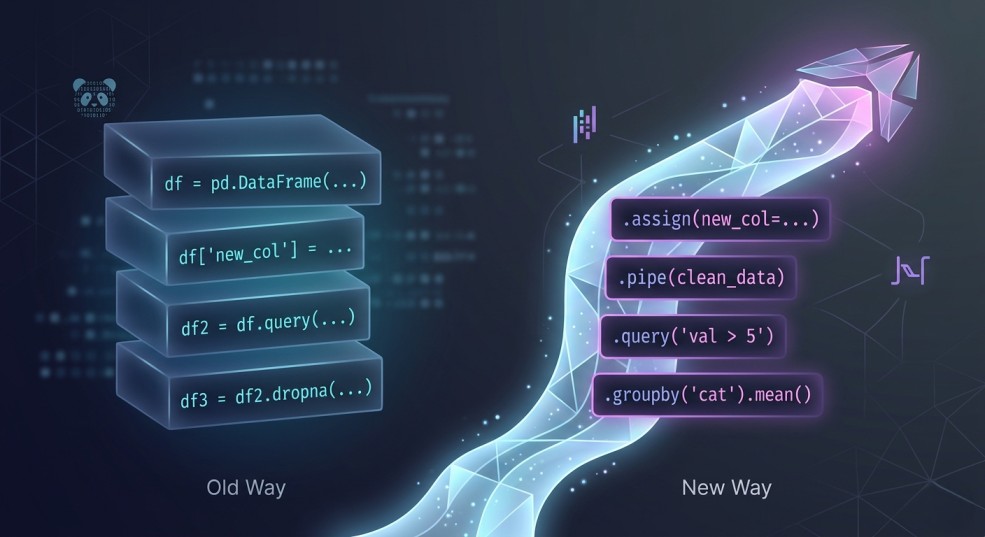 Generated with Gemini AI
I opened an old notebook recently and immediately closed it.
Not because it was wrong. The code worked. The numbers checked out.
But I had no idea what was going on.
There were variables everywhere.
Generated with Gemini AI
I opened an old notebook recently and immediately closed it.
Not because it was wrong. The code worked. The numbers checked out.
But I had no idea what was going on.
There were variables everywhere. df1, df2, final_df, final_final. Each step made sense in isolation, but as a whole it felt like I was tracing a maze. I had to read line by line just to understand what I had already done.
And the funny thing is, this is how most of us start with Pandas.
You learn a few operations. You filter here, create a column there, group and aggregate. It gets the job done. But over time, your code starts to feel harder to trust, harder to revisit, and definitely harder to share.
That was the point I realized something.
The gap between beginner and intermediate Pandas users is not about knowing more functions. It is about how you structure your transformations.
There is a pattern that quietly changes everything once you see it. Your code becomes easier to read. Easier to debug. Easier to build on.
It is called method chaining.
In this article, I will walk through how I started using method chaining properly, along with assign() and pipe(), and how it changed the way I write Pandas code. If you have ever felt like your notebooks are getting messy as they grow, this will probably click for you.
Learn this step by step with the interactive Computer Science roadmap.
The Shift: What Intermediate Pandas Users Do Differently
At first, I thought getting better at Pandas meant learning more functions.
More tricks. More syntax. More ways to manipulate data.
But the more I built, the more I noticed something. The people who were actually good at Pandas were not necessarily using more functions than I was. Their code just looked… different.
Cleaner. More intentional. Easier to follow.
Instead of writing step by step code with lots of intermediate variables, they wrote transformations that flowed into each other. You could read their code from top to bottom and understand exactly what was happening to the data at each stage.
It almost felt like reading a story.
That is when it clicked for me. The real upgrade is not about what you use. It is about how you structure it.
Instead of thinking:
“What do I do next to this DataFrame?”
You start thinking:
“What transformation comes next?”
That small shift changes everything.
And this is where method chaining comes in.
Method chaining is not just a cleaner way to write Pandas. It is a different way to think about working with data. Each step takes your DataFrame, transforms it, and passes it along. No unnecessary variables. No jumping around.
Just a clear, readable flow from raw data to final result.
In the next section, I will show you exactly what this looks like using a real example.
The “Before”: How Most of Us Write Pandas
To make this concrete, let’s say we want to answer a simple question:
Which product categories are generating the most revenue each month?
I pulled a small sales dataset with order details, product categories, prices, and dates. Nothing fancy.
python
import pandas as pd
df = pd.read_csv("sales.csv")
print(df.head())
Output
text
order_id customer_id     product     category  quantity  price  order_date
0      1001        C001      Laptop  Electronics         1   1200  2023-01-05
1      1002        C002  Headphones  Electronics         2    150  2023-01-07
2      1003        C003    Sneakers      Fashion         1     80  2023-01-10
3      1004        C001     T-Shirt      Fashion         3     25  2023-01-12
4      1005        C004     Blender         Home         1     60  2023-01-15
Now, here is how I would have written this not too long ago:
python
# Create a new column for revenue
df["revenue"] = df["quantity"] * df["price"]

# Filter for orders from 2023 onwards
df_filtered = df[df["order_date"] >= "2023-01-01"]

# Convert order_date to datetime and extract month
df_filtered["month"] = pd.to_datetime(df_filtered["order_date"]).dt.to_period("M")

# Group by category and month, then sum revenue
grouped = df_filtered.groupby(["category", "month"])["revenue"].sum()

# Convert Series back to DataFrame
result = grouped.reset_index()

# Sort by revenue descending
result = result.sort_values(by="revenue", ascending=False)
print(result)
This works. You get your answer.
text
  category    month  revenue
1  Electronics  2023-02     2050
2  Electronics  2023-03     1590
0  Electronics  2023-01     1500
8         Home  2023-03      225
6         Home  2023-01      210
5      Fashion  2023-03      205
7         Home  2023-02      180
4      Fashion  2023-02      165
3      Fashion  2023-01      155
But there are a few problems that start to show up as your analysis grows.
First, the flow is hard to follow. You have to keep track of df, df_filtered, grouped, and result. Each variable represents a slightly different state of the data.
Second, the logic is scattered. The transformation is happening step by step, but not in a way that feels connected. You are mentally stitching things together as you read.
Third, it is harder to reuse or test. If you want to tweak one part of the logic, you now have to trace where everything is being modified.
This is the kind of code that works fine today… but becomes painful when you come back to it a week later.
Now compare that to how the same logic looks when you start thinking in transformations instead of steps.
The “After”: When Everything Clicks
Now let’s solve the exact same problem again.
Same dataset. Same goal.
Which product categories are generating the most revenue each month?
Here’s what it looks like when you start thinking in transformations:
python
result = (
pd.read_csv("sales.csv") # Start with raw data
.assign(
# Create revenue column
revenue=lambda df: df["quantity"] * df["price"],

# Convert order_date to datetime
order_date=lambda df: pd.to_datetime(df["order_date"]),

# Extract month from order_date
month=lambda df: df["order_date"].dt.to_period("M")
)
# Filter for orders from 2023 onwards
.loc[lambda df: df["order_date"] >= "2023-01-01"]

# Group by category and month, then sum revenue
.groupby(["category", "month"], as_index=False)["revenue"]
.sum()

# Sort by revenue descending
.sort_values(by="revenue", ascending=False)
)
print(result)
Same output. Completely different feel.
text
 category    month  revenue
1  Electronics  2023-02     2050
2  Electronics  2023-03     1590
0  Electronics  2023-01     1500
8         Home  2023-03      225
6         Home  2023-01      210
5      Fashion  2023-03      205
7         Home  2023-02      180
4      Fashion  2023-02      165
3      Fashion  2023-01      155
The first thing you notice is that everything flows. There is no jumping between variables or trying to remember what df_filtered or grouped meant.
Each step builds on the last one.
You start with the raw data, then:
- create revenue
- convert dates
- extract the month
- filter
- group
- aggregate
- sort
All in one continuous pipeline.
You can read it top to bottom and understand exactly what is happening to the data at each stage.
That is the part that surprised me the most.
It is not just shorter code. It is clearer code.
And once you get used to this, going back to the old way feels… uncomfortable.
There are a couple of things happening here that make this work so well.
We are not just chaining methods. We are using a few specific tools that make chaining actually practical.
In the next section, let’s break those down.
Breaking Down the Pattern
When I first saw this style of Pandas code, it looked a bit intimidating.
Everything was chained together. No intermediate variables. A lot happening in a small space.
But once I slowed down and broke it into pieces, it started to make sense.
There are really just three ideas carrying everything here:
- method chaining
assign()pipe()
Let’s go through them one by one.
Method Chaining (The Foundation)
At its core, method chaining is simple. Each step takes a DataFrame, applies a transformation, and returns a new DataFrame. That new DataFrame is immediately passed into the next step.
So instead of this:
python
df = step1(df)

df = step2(df)

df = step3(df)
You do this:
python
df = step1(df).step2().step3()
That is literally it.
But the impact is bigger than it looks.
It forces you to think in terms of flow. Each line becomes one transformation. You are no longer jumping around or storing temporary states. You are just moving forward.
That is why the code starts to feel more readable. You can follow the transformation from start to finish without holding multiple versions of the data in your head.
assign() — Keeping Everything in the Flow
This is the one that really unlocked chaining for me.
Before this, anytime I wanted to create a new column, I would break the flow:
python
df["revenue"] = df["quantity"] * df["price"]
That works, but it interrupts the pipeline.
assign() lets you do the same thing without breaking the chain:
python
.assign(revenue=lambda df: df["quantity"] * df["price"])
At first, the lambda df: part felt weird.
But the idea is simple. You are saying:
“Take the current DataFrame, and use it to define this new column.”
The key benefit is that everything stays in one place. You can see where the column is created and how it is used, all within the same flow.
It also encourages a cleaner style where transformations are grouped logically instead of scattered across the notebook.
pipe() — Where Things Start to Feel Powerful
pipe() is the one I ignored at first.
I thought, “I can already chain methods, why do I need this?”
Then I ran into a problem.
Some transformations are just too complex to fit neatly into a chain.
You either:
write messy inline logic
or break the chain completely
That is where pipe() comes in.
It allows you to pass your DataFrame into a custom function without breaking the flow.
For example:
python
def filter_high_value_orders(df):
    return df[df["revenue"] > 500]

df = (
    pd.read_csv("sales.csv")
    .assign(revenue=lambda df: df["quantity"] * df["price"])
    .pipe(filter_high_value_orders)
)
Now your logic is cleaner, reusable and easier to test
This is the point where things started to feel different for me.
Instead of writing long scripts, I was starting to build small, reusable transformation steps.
And that is when it clicked.
This is not just about writing cleaner Pandas code. It is about writing code that scales as your analysis gets more complex.
In the next section, I want to show how this changes the way you think about working with data entirely.
Thinking in Pipelines (The Real Upgrade)
Up until this point, it might feel like we just made the code look nicer.
But something deeper is happening here.
When you start using method chaining consistently, the way you think about working with data begins to change.
Before, my approach was very step-by-step.
I would look at a DataFrame and think:
“What do I do next?”
- Filter it.
- Modify it.
- Store it.
- Move on.
Each step felt a bit disconnected from the last.
But with method chaining, that question changes.
Now it becomes:
“What transformation comes next?”
That shift is small, but it changes how you structure everything.
You stop thinking in terms of isolated steps and start thinking in terms of a flow. A pipeline. Data comes in, gets transformed stage by stage, and produces an output.
And the code reflects that.
Each line is not just doing something. It is part of a sequence. A clear progression from raw data to insight.
This also makes your code easier to reason about.
If something breaks, you do not have to scan the entire notebook. You can look at the pipeline and ask:
- which transformation might be wrong?
- where did the data change in an unexpected way?
It becomes easier to debug because the logic is linear and visible.
Another thing I noticed is that it naturally pushes you toward better habits.
- You start writing smaller transformations.
- You start naming things more clearly.
- You start thinking about reuse without even trying.
And that is where it starts to feel less like “just Pandas” and more like building actual data workflows.
At this point, you are not just analyzing data.
You are designing how data flows.
Real-World Refactor: From Messy to Clean
Let me show you how this actually plays out.
Instead of jumping straight from messy code to a perfect chain, I want to walk through how I would refactor this step by step. This is usually how it happens in real life anyway.
Step 1: The Starting Point (Messy but Works)
python
df = pd.read_csv("sales.csv")  # Load dataset

# Create revenue column
df["revenue"] = df["quantity"] * df["price"]

# Filter orders from 2023 onwards
df_filtered = df[df["order_date"] >= "2023-01-01"]

# Convert order_date and extract month
df_filtered["month"] = pd.to_datetime(df_filtered["order_date"]).dt.to_period("M")

# Group by category and month, then sum revenue
grouped = df_filtered.groupby(["category", "month"])["revenue"].sum()

# Convert to DataFrame
result = grouped.reset_index()

# Sort results
result = result.sort_values(by="revenue", ascending=False)
Nothing wrong here. This is how most of us start.
But we can already see:
- too many intermediate variables
- transformations are scattered
- harder to follow as it grows
Step 2: Reduce Unnecessary Variables
First, remove variables that are not really needed.
python
df = pd.read_csv("sales.csv")  # Load dataset

# Create new columns upfront
df["revenue"] = df["quantity"] * df["price"]
df["month"] = pd.to_datetime(df["order_date"]).dt.to_period("M")

result = (
    # Filter relevant rows
    df[df["order_date"] >= "2023-01-01"]

    # Aggregate revenue by category and month
    .groupby(["category", "month"])["revenue"]
    .sum()

    # Convert to DataFrame
    .reset_index()

    # Sort results
    .sort_values(by="revenue", ascending=False)
)
Already better. There are fewer moving parts, and some flow is starting to appear
Step 3: Introduce Basic Chaining
Now we start chaining more deliberately.
python
result = (
    pd.read_csv("sales.csv")  # Start with raw data

    .assign(
        # Create revenue column
        revenue=lambda df: df["quantity"] * df["price"],

        # Extract month from order_date
        month=lambda df: pd.to_datetime(df["order_date"]).dt.to_period("M")
    )

    # Filter for recent orders
    .loc[lambda df: df["order_date"] >= "2023-01-01"]

    # Group and aggregate
    .groupby(["category", "month"])["revenue"]
    .sum()

    # Convert to DataFrame
    .reset_index()

    # Sort results
    .sort_values(by="revenue", ascending=False)
)
At this point, the flow is clear, transformations are grouped logically, and we are no longer jumping between variables.
Step 4: Clean It Up Further
Small tweaks make a big difference.
python
result = (
    pd.read_csv("sales.csv")  # Load data

    .assign(
        # Create revenue
        revenue=lambda df: df["quantity"] * df["price"],

        # Ensure order_date is datetime
        order_date=lambda df: pd.to_datetime(df["order_date"]),

        # Extract month from order_date
        month=lambda df: df["order_date"].dt.to_period("M")
    )

    # Filter relevant time range
    .loc[lambda df: df["order_date"] >= "2023-01-01"]

    # Aggregate revenue
    .groupby(["category", "month"], as_index=False)["revenue"]
    .sum()

    # Sort results
    .sort_values(by="revenue", ascending=False)
)
Now there are no redundant conversions, there's cleaner grouping and more consistent structure.
Step 5: When pipe() Becomes Useful
Let’s say the logic grows. Maybe we only care about high-revenue rows.
Instead of stuffing that logic into the chain, we extract it:
python
def filter_high_revenue(df):
    # Keep only rows where revenue is above threshold
    return df[df["revenue"] > 500]
Now we plug it into the pipeline:
python
result = (
    pd.read_csv("sales.csv")  # Load data

    .assign(
        # Create revenue
        revenue=lambda df: df["quantity"] * df["price"],

        # Convert and extract time features
        order_date=lambda df: pd.to_datetime(df["order_date"]),
        month=lambda df: df["order_date"].dt.to_period("M")
    )

    # Apply custom transformation
    .pipe(filter_high_revenue)

    # Filter by date
    .loc[lambda df: df["order_date"] >= "2023-01-01"]

    # Aggregate results
    .groupby(["category", "month"], as_index=False)["revenue"]
    .sum()

    # Sort output
    .sort_values(by="revenue", ascending=False)
)
This is where it starts to feel different. Your code is no longer just a script. Now, it's a sequence of reusable transformations.
What I like about this process is that you do not need to jump straight to the final version.
You can evolve your code gradually.
- Start messy.
- Reduce variables.
- Introduce chaining.
- Extract logic when needed.
That is how this pattern actually sticks.
Next, let’s talk about a few mistakes I made while learning this so you do not run into the same issues.
Common Mistakes (I Made Most of These)
When I started using method chaining, I definitely overdid it.
Everything felt cleaner, so I tried to force everything into a chain. That led to some… questionable code.
Here are a few mistakes I ran into so you do not have to.
1. Over-Chaining Everything
At some point, I thought longer chains = better code.
Not true.
python
# This gets hard to read very quickly
df = (
    df
    .assign(...)
    .loc[...]
    .groupby(...)
    .agg(...)
    .reset_index()
    .rename(...)
    .sort_values(...)
    .query(...)
)
Yes, it is technically clean. But now it is doing too much in one place.
Fix:
- Break your chain when it starts to feel dense.
- Group related transformations together
- Split logically different steps
- Think readability first, not cleverness.
2. Forcing Logic Into One Line
I used to cram complex logic into assign() or loc() just to keep the chain going.
That usually makes things worse.
python
.assign(
  revenue_flag=lambda df: np.where(
    (df["quantity"] * df["price"] > 500) & (df["category"] == "Electronics"),
    "High",
    "Low" ) )
This works, but it is not very readable.
Fix:
If the logic is complex, extract it.
python
def add_revenue_flag(df):
    df["revenue_flag"] = np.where(
        (df["quantity"] * df["price"] > 500) & (df["category"] == "Electronics"),
        "High",
        "Low"
    )
    return df

df = df.pipe(add_revenue_flag)
Cleaner. Easier to test. Easier to reuse.
3. Ignoring pipe() for Too Long
I avoided pipe() at first because it felt unnecessary. But without it, you hit a ceiling.
You either:
break your chain
or write messy inline logic
Fix:
- Use
pipe() as soon as your logic stops being simple.
- It is what turns your code from a script into something modular.
4. Losing Readability With Poor Naming
When you start using custom functions with pipe(), naming matters a lot.
Bad:
def transform(df): ...
Better:
def filter_high_revenue(df): ...
Now your pipeline reads like a story:
.pipe(filter_high_revenue)
That small change makes a big difference.
5. Thinking This Is About Shorter Code
This one took me a while to realize. Method chaining is not about writing fewer lines. It is about writing code that is easier to read, reason about and come back to later
Sometimes the chained version is longer. That is fine. If it is clearer, it is better.
Let’s wrap this up and tie it back to the “intermediate” idea.
Conclusion: Leveling Up Your Pandas Game
If you’ve followed along, you’ve seen a small shift with a big impact.
By thinking in transformations instead of steps, using method chaining , assign() , and pipe() , your code stops being just a collection of lines and becomes a clear, readable flow.
Here’s what changes when you internalize this pattern:
- You can read your code top to bottom without getting lost.
- You can reuse transformations easily, making your notebooks more modular.
- You can debug and test without tracing dozens of intermediate variables.
- You start thinking in pipelines, not just steps.
This is exactly what separates a beginner from an intermediate Pandas user.
You’re no longer just “making it work.” You’re designing your analysis in a way that scales, is maintainable, and looks good to anyone who reads it—even future you.
Try It Yourself
Pick a messy notebook you’ve been working on and refactor just one part using method chaining.
- Start with
assign() for new columns
- Use
loc[] to filter
- Introduce
pipe() for any custom logic
You’ll be surprised how much clearer your notebook becomes, almost immediately.
That’s it. You’ve just unlocked intermediate Pandas.
Your next step? Keep practicing, build your own pipelines, and notice how your thinking about data transforms along with your code.
Register Now to Continue Reading
Unlock Towards Data Science with a Free Account
All articles on Towards Data Science are available to registered users. Create a free account today to access this article and thousands more.
Register for freeSign in to your account
 Written By
See all from Ibrahim Salami
CodingData ScienceMethod ChainingPandasPython
Share This Article
Towards Data Science is a community publication. Submit your insights to reach our global audience and earn through the TDS Author Payment Program.
Write for TDS
Related Articles
Artificial Intelligence
Normalising JSON Objects in Pandas is not difficult if you know these tricks
Christopher Tao
February 14, 20226 min read
Machine Learning
MLJ is a meta-package for machine learning in Julia. Its first version has been released only in 2019. So its creators could build on more...
Roland Schätzle
February 22, 202213 min read
Machine Learning
Bring Explainability to the Next Level preserving Simplicity
Marco Cerliani
February 24, 20216 min read
Programming
The advanced usage of the re.sub() function
Christopher Tao
July 19, 20205 min read
Machine Learning
Basketball has existed for more than a hundred years, and as the game evolved with new rules and regulations, so did the players. The NBA...
Ahmed Jyad
November 16, 202012 min read
Programming
And how to use them
Vicky Yu
January 26, 20233 min read
Programming
A deeper look at how to configure the App Engine and decipher related costs Google's...
Andrew Didinchuk
May 13, 20217 min read
Artificial Intelligence
Make your scripts more efficient and appealing.
Soner Yıldırım
August 21, 20215 min read
Data Science
Open Data Barcelona is Barcelona´s data service which contains around 400 datasets, covering a wide rage of topics such as population...
Amanda Iglesias Moreno
September 1, 20199 min read
Your home for data science and AI. The world's leading publication for data science, data analytics, data engineering, machine learning, and artificial intelligence professionals.
Subscribe to Our NewsletterWrite For TDS•About•Advertise•Privacy Policy•Terms of Use
© Insight Media Group, LLC 2026•The New Stack•roadmap.sh•Creator Network
Recommended Articles
Close