保留正文与补采附件。源页面当前未重新核验;具体限制见交付清单。
 We value your privacy
We use cookies to enhance your browsing experience, serve personalised ads or content, and analyse our traffic. By clicking "Accept All", you consent to our use of cookies.
Customise Reject All Accept All
Customise Consent Preferences
We value your privacy
We use cookies to enhance your browsing experience, serve personalised ads or content, and analyse our traffic. By clicking "Accept All", you consent to our use of cookies.
Customise Reject All Accept All
Customise Consent Preferences  We use cookies to help you navigate efficiently and perform certain functions. You will find detailed information about all cookies under each consent category below.
The cookies that are categorised as "Necessary" are stored on your browser as they are essential for enabling the basic functionalities of the site. ... Show more
NecessaryAlways Active
Necessary cookies are required to enable the basic features of this site, such as providing secure log-in or adjusting your consent preferences. These cookies do not store any personally identifiable data.
We use cookies to help you navigate efficiently and perform certain functions. You will find detailed information about all cookies under each consent category below.
The cookies that are categorised as "Necessary" are stored on your browser as they are essential for enabling the basic functionalities of the site. ... Show more
NecessaryAlways Active
Necessary cookies are required to enable the basic features of this site, such as providing secure log-in or adjusting your consent preferences. These cookies do not store any personally identifiable data.
-
Cookie
BCTempID
-
Duration
10 minutes
-
Description
No description available.
-
Cookie
__cf_bm
-
Duration
1 hour
-
Description
This cookie, set by Cloudflare, is used to support Cloudflare Bot Management.
-
Cookie
AWSALBCORS
-
Duration
7 days
-
Description
Amazon Web Services set this cookie for load balancing.
-
Cookie
_cfuvid
-
Duration
session
-
Description
Cloudflare sets this cookie to track users across sessions to optimize user experience by maintaining session consistency and providing personalized services
-
Cookie
li_gc
-
Duration
6 months
-
Description
Linkedin set this cookie for storing visitor's consent regarding using cookies for non-essential purposes.
-
Cookie
__hssrc
-
Duration
session
-
Description
This cookie is set by Hubspot whenever it changes the session cookie. The __hssrc cookie set to 1 indicates that the user has restarted the browser, and if the cookie does not exist, it is assumed to be a new session.
-
Cookie
__hssc
-
Duration
1 hour
-
Description
HubSpot sets this cookie to keep track of sessions and to determine if HubSpot should increment the session number and timestamps in the __hstc cookie.
-
Cookie
wpEmojiSettingsSupports
-
Duration
session
-
Description
WordPress sets this cookie when a user interacts with emojis on a WordPress site. It helps determine if the user's browser can display emojis properly.
-
Cookie
BCSessionID
-
Duration
1 year 1 month 4 days
-
Description
Blueconic sets this cookie as a unique identifier for the BlueConic profile.
-
Cookie
_octo
-
Duration
1 year
-
Description
No description available.
-
Cookie
logged_in
-
Duration
1 year
-
Description
No description available.
-
Cookie
__Secure-YEC
-
Duration
past
-
Description
YouTube sets this cookie to stores the user's video player preferences using embedded YouTube video
-
Cookie
__eoi
-
Duration
6 months
-
Description
Description is currently not available.
-
Cookie
AWSALBTGCORS
-
Duration
7 days
-
Description
No description available.
-
Cookie
login-status-p
-
Duration
past
-
Description
Description is currently not available.
-
Cookie
AWSALBTG
-
Duration
7 days
-
Description
No description available.
-
Cookie
csrf_token
-
Duration
session
-
Description
No description available.
-
Cookie
token_v2
-
Duration
1 day
-
Description
Description is currently not available.
-
Cookie
D
-
Duration
1 year
-
Description
Description is currently not available.
-
Cookie
PHPSESSID
-
Duration
session
-
Description
This cookie is native to PHP applications. The cookie stores and identifies a user's unique session ID to manage user sessions on the website. The cookie is a session cookie and will be deleted when all the browser windows are closed.
-
Cookie
VISITOR_PRIVACY_METADATA
-
Duration
6 months
-
Description
YouTube sets this cookie to store the user's cookie consent state for the current domain.
-
Cookie
cookietest
-
Duration
session
-
Description
The cookietest cookie is typically used to determine whether the user's browser accepts cookies, essential for website functionality and user experience.
-
Cookie
__Host-airtable-session
-
Duration
1 year
-
Description
This cookie is used to enable us to integrate the services of Airtable.
-
Cookie
__Host-airtable-session.sig
-
Duration
1 year
-
Description
This cookie is used to enable us to integrate the services of Airtable.
-
Cookie
m
-
Duration
1 year 1 month 4 days
-
Description
Stripe sets this cookie for fraud prevention purposes. It identifies the device used to access the website, allowing the website to be formatted accordingly.
-
Cookie
BIGipServer*
-
Duration
session
-
Description
Marketo sets this cookie to collect information about the user's online activity and build a profile about their interests to provide advertisements relevant to the user.
-
Cookie
__cfruid
-
Duration
session
-
Description
Cloudflare sets this cookie to identify trusted web traffic.
-
Cookie
_GRECAPTCHA
-
Duration
6 months
-
Description
Google Recaptcha service sets this cookie to identify bots to protect the website against malicious spam attacks.
-
Cookie
__Secure-YNID
-
Duration
6 months
-
Description
Google cookie used to protect user security and prevent fraud, especially during the login process.
-
Cookie
cookieyes-consent
-
Duration
1 year
-
Description
CookieYes sets this cookie to remember users' consent preferences so that their preferences are respected on subsequent visits to this site. It does not collect or store any personal information about the site visitors.
Functional
Functional cookies help perform certain functionalities like sharing the content of the website on social media platforms, collecting feedback, and other third-party features.
-
Cookie
lidc
-
Duration
1 day
-
Description
LinkedIn sets the lidc cookie to facilitate data center selection.
-
Cookie
brw
-
Duration
1 year
-
Description
No description available.
-
Cookie
brwConsent
-
Duration
5 minutes
-
Description
Description is currently not available.
-
Cookie
WMF-Uniq
-
Duration
1 year
-
Description
Description is currently not available.
-
Cookie
loom_anon_comment
-
Duration
1 year
-
Description
No description available.
-
Cookie
loom_referral_video
-
Duration
session
-
Description
Description is currently not available.
-
Cookie
VISITOR_INFO1_LIVE
-
Duration
6 months
-
Description
A cookie set by YouTube to measure bandwidth that determines whether the user gets the new or old player interface.
-
Cookie
yt-remote-connected-devices
-
Duration
Never Expires
-
Description
YouTube sets this cookie to store the user's video preferences using embedded YouTube videos.
-
Cookie
ytidb::LAST_RESULT_ENTRY_KEY
-
Duration
Never Expires
-
Description
The cookie ytidb::LAST_RESULT_ENTRY_KEY is used by YouTube to store the last search result entry that was clicked by the user. This information is used to improve the user experience by providing more relevant search results in the future.
-
Cookie
yt-remote-device-id
-
Duration
Never Expires
-
Description
YouTube sets this cookie to store the user's video preferences using embedded YouTube videos.
-
Cookie
yt-remote-session-name
-
Duration
session
-
Description
The yt-remote-session-name cookie is used by YouTube to store the user's video player preferences using embedded YouTube video.
-
Cookie
yt-remote-fast-check-period
-
Duration
session
-
Description
The yt-remote-fast-check-period cookie is used by YouTube to store the user's video player preferences for embedded YouTube videos.
-
Cookie
yt-remote-session-app
-
Duration
session
-
Description
The yt-remote-session-app cookie is used by YouTube to store user preferences and information about the interface of the embedded YouTube video player.
-
Cookie
yt-remote-cast-available
-
Duration
session
-
Description
The yt-remote-cast-available cookie is used to store the user's preferences regarding whether casting is available on their YouTube video player.
-
Cookie
yt-remote-cast-installed
-
Duration
session
-
Description
The yt-remote-cast-installed cookie is used to store the user's video player preferences using embedded YouTube video.
-
Cookie
cp_session
-
Duration
3 months
-
Description
Codepen sets this cookie for Help systems found in the website.
-
Cookie
loid
-
Duration
1 year 1 month 4 days
-
Description
This cookie is set by the Reddit. The cookie enables the sharing of content from the website onto the social media platform.
Analytics
Analytical cookies are used to understand how visitors interact with the website. These cookies help provide information on metrics such as the number of visitors, bounce rate, traffic source, etc.
-
Cookie
__hstc
-
Duration
6 months
-
Description
Hubspot set this main cookie for tracking visitors. It contains the domain, initial timestamp (first visit), last timestamp (last visit), current timestamp (this visit), and session number (increments for each subsequent session).
-
Cookie
hubspotutk
-
Duration
6 months
-
Description
HubSpot sets this cookie to keep track of the visitors to the website. This cookie is passed to HubSpot on form submission and used when deduplicating contacts.
-
Cookie
_ga
-
Duration
1 year 1 month 4 days
-
Description
Google Analytics sets this cookie to calculate visitor, session and campaign data and track site usage for the site's analytics report. The cookie stores information anonymously and assigns a randomly generated number to recognise unique visitors.
-
Cookie
ga*
-
Duration
1 year 1 month 4 days
-
Description
Google Analytics sets this cookie to store and count page views.
-
Cookie
__Host-psifi.analyticsTrace
-
Duration
6 hours
-
Description
Description is currently not available.
-
Cookie
__Host-psifi.analyticsTraceV2
-
Duration
6 hours
-
Description
Description is currently not available.
-
Cookie
_gh_sess
-
Duration
session
-
Description
GitHub sets this cookie for temporary application and framework state between pages like what step the user is on in a multiple step form.
-
Cookie
YSC
-
Duration
session
-
Description
YSC cookie is set by Youtube and is used to track the views of embedded videos on Youtube pages.
-
Cookie
ajs_anonymous_id
-
Duration
1 year
-
Description
This cookie is set by Segment to count the number of people who visit a certain site by tracking if they have visited before.
-
Cookie
vuid
-
Duration
1 year 1 month 4 days
-
Description
Vimeo installs this cookie to collect tracking information by setting a unique ID to embed videos on the website.
Performance
Performance cookies are used to understand and analyse the key performance indexes of the website which helps in delivering a better user experience for the visitors.
-
Cookie
AWSALB
-
Duration
7 days
-
Description
AWSALB is an application load balancer cookie set by Amazon Web Services to map the session to the target.
-
Cookie
acq
-
Duration
past
-
Description
Description is currently not available.
-
Cookie
acq.sig
-
Duration
past
-
Description
Description is currently not available.
-
Cookie
ptc
-
Duration
2 years
-
Description
No description available.
Advertisement
Advertisement cookies are used to provide visitors with customised advertisements based on the pages you visited previously and to analyse the effectiveness of the ad campaigns.
-
Cookie
muc_ads
-
Duration
1 year 1 month 4 days
-
Description
Twitter sets this cookie to collect user behaviour and interaction data to optimize the website.
-
Cookie
guest_id_marketing
-
Duration
1 year 1 month 4 days
-
Description
Twitter sets this cookie to identify and track the website visitor.
-
Cookie
guest_id_ads
-
Duration
1 year 1 month 4 days
-
Description
Twitter sets this cookie to identify and track the website visitor.
-
Cookie
personalization_id
-
Duration
1 year 1 month 4 days
-
Description
Twitter sets this cookie to integrate and share features for social media and also store information about how the user uses the website, for tracking and targeting.
-
Cookie
guest_id
-
Duration
1 year 1 month 4 days
-
Description
Twitter sets this cookie to identify and track the website visitor. It registers if a user is signed in to the Twitter platform and collects information about ad preferences.
-
Cookie
bcookie
-
Duration
1 year
-
Description
LinkedIn sets this cookie from LinkedIn share buttons and ad tags to recognize browser IDs.
-
Cookie
__Secure-ROLLOUT_TOKEN
-
Duration
6 months
-
Description
YouTube sets this cookie to manage feature rollout and experimentation. It helps Google control which new features or interface changes are shown to users as part of testing and staged rollouts, ensuring consistent experience for a given user during an experiment.
-
Cookie
yt.innertube::nextId
-
Duration
Never Expires
-
Description
YouTube sets this cookie to register a unique ID to store data on what videos from YouTube the user has seen.
-
Cookie
yt.innertube::requests
-
Duration
Never Expires
-
Description
YouTube sets this cookie to register a unique ID to store data on what videos from YouTube the user has seen.
-
Cookie
session_tracker
-
Duration
session
-
Description
This cookie is set by the Reddit. This cookie is used to identify trusted web traffic. It also helps in adverstising on the website.
-
Cookie
edgebucket
-
Duration
session
-
Description
Reddit sets this cookie to save the information about a log-on Reddit user, for the purpose of advertisement recommendations and updating the content.
-
Cookie
did
-
Duration
1 year
-
Description
Arbor sets this cookie to show targeted ads to site visitors.This cookie expires after 2 months or 1 year.
Uncategorised
Other uncategorised cookies are those that are being analysed and have not been classified into a category as yet.
No cookies to display.
Reject All Save My Preferences Accept All
Toggle SearchToggle Mobile Navigation
Publish AI, ML & data-science insights to a global community of data professionals.
Sign inSubmit an Article
LatestEditor's PicksNewsletterShipAI
Write For TDS
LinkedInXToggle Search
Large Language Model
Multi-Document RAG: A Folder of Unrelated PDFs Is One Long Document with a Nested Outline
Enterprise Document Intelligence [Vol.1 #14B] - No shared fields means no index to build. One summary line per file plus each file’s own table of contents, and retrieval routes down two levels
Angela and Kezhan Shi
August 22, 202616 min read
 Photo by Beyza Kaplan, via Pexels.
The standard advice for taking a RAG system past one document is to build an index: one row per document, one column per field you may want to filter on, then a filter in front of the search.
That advice assumes the documents have fields in common. Plenty of folders do not.
Take a research folder: a 492-page catalogue of security controls, a zero-trust architecture spec, an AI risk framework, thirty-one machine-learning papers, and seven commodity market reports. Ask what column they share. There is no client, no amount, no effective date that would mean the same thing across all of them, and no other field a business user could name either.
When there is no shared field, there is no table to build. That reads like a missing piece. It is the opposite. It means the preparation step collapses into two artefacts, and one of them the parser already returns for free.
Learn this step by step with the interactive AI Engineer roadmap.
This article works through that case:
Photo by Beyza Kaplan, via Pexels.
The standard advice for taking a RAG system past one document is to build an index: one row per document, one column per field you may want to filter on, then a filter in front of the search.
That advice assumes the documents have fields in common. Plenty of folders do not.
Take a research folder: a 492-page catalogue of security controls, a zero-trust architecture spec, an AI risk framework, thirty-one machine-learning papers, and seven commodity market reports. Ask what column they share. There is no client, no amount, no effective date that would mean the same thing across all of them, and no other field a business user could name either.
When there is no shared field, there is no table to build. That reads like a missing piece. It is the opposite. It means the preparation step collapses into two artefacts, and one of them the parser already returns for free.
Learn this step by step with the interactive AI Engineer roadmap.
This article works through that case:
- the two questions that tell it apart from the case that does need an index
- the preparation, which is one summary line per file plus each file’s own table of contents, and nothing else
- why the summary line has to be written for a router rather than for a reader
- the two-level routing that answers a question, and why the nested outline never enters a prompt whole
- four ways it breaks, including the point where the flat file list stops scaling
This article is part of Part IV of Enterprise Document Intelligence, a series that builds an enterprise RAG system from four bricks. Part IV asks what changes when the input is a folder instead of a file, and the answer depends on which kind of folder you have. This one is the kind that needs the least new machinery.
🧭 New to the series? Start with the map : Prompt, Context, Loop sets out the three engineering layers every RAG system is built on, the prompt (the call itself), the context (what fills the model’s window), the loop (when the next call fires and when it stops), and walks the whole series through that lens, article by article. It is the shortest way to see what is covered and where this one sits.
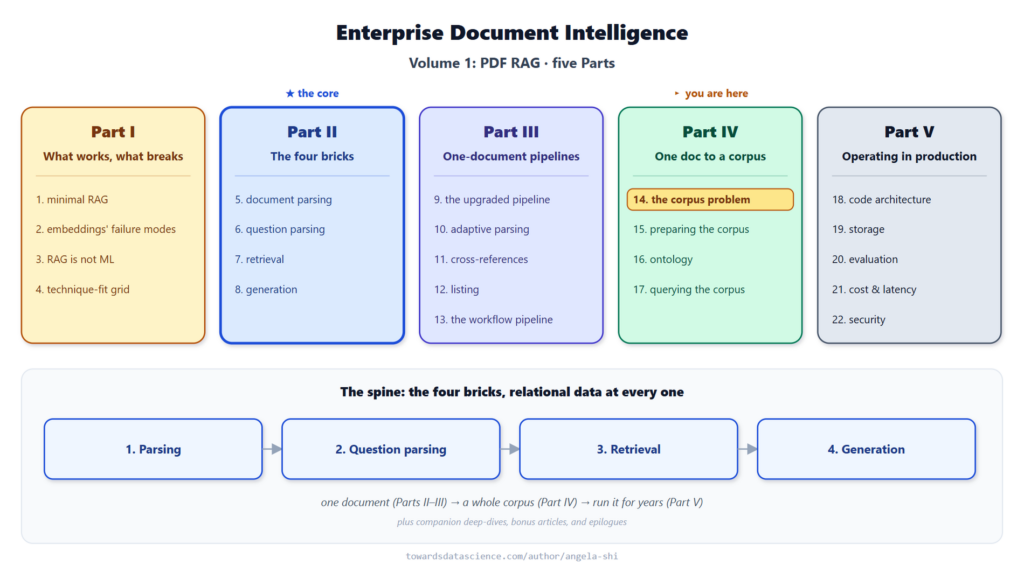 where this article sits: Part IV, the folder that needs no index - Image by author
📓 Build the two-level index over your own folder in the companion notebook : write one summary line per file, print the level-0 list, then run the routing call and watch it keep one file out of sixty-three before a single page is read. Repo → doc-intel/notebooks-vol1.
where this article sits: Part IV, the folder that needs no index - Image by author
📓 Build the two-level index over your own folder in the companion notebook : write one summary line per file, print the level-0 list, then run the routing call and watch it keep one file out of sixty-three before a single page is read. Repo → doc-intel/notebooks-vol1.
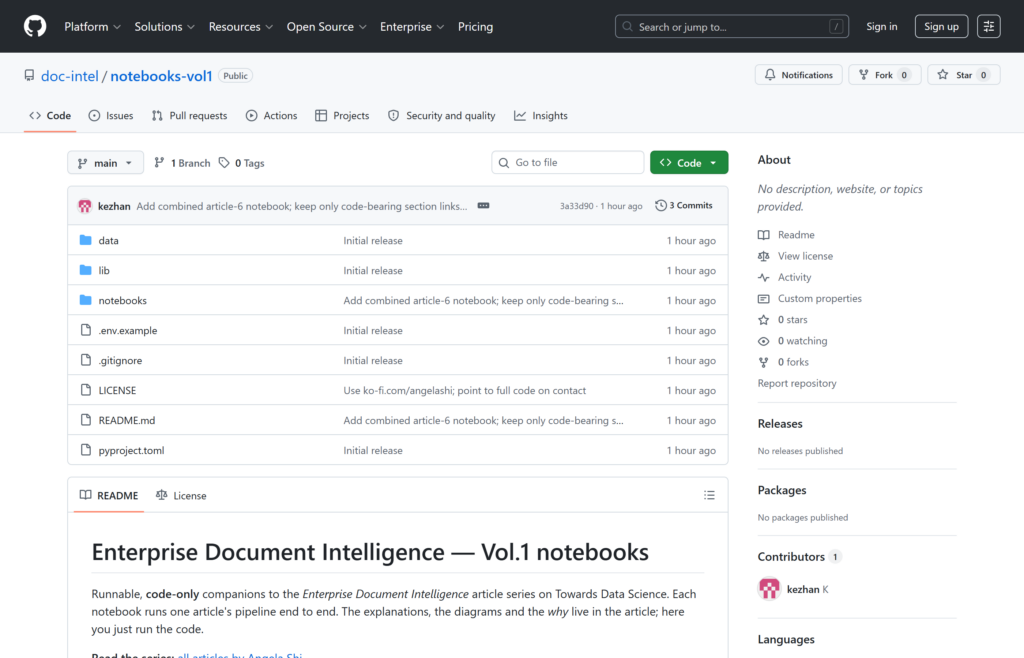 The public companion-code repo at doc-intel/notebooks-vol1 - Image by author
The folder used throughout is 63 public PDFs, 4,211 pages in total: 25 NIST files, which are 24 publications plus a three-page scan of one of them (US Government work, public domain in the US, see the NIST copyright statement), 31 arXiv papers (each under the arXiv non-exclusive distribution license declared on its own abstract page), and 7 issues of the World Bank Commodity Markets Outlook (CC BY 3.0 IGO, as declared on the OKR publication page for April 2026).
The public companion-code repo at doc-intel/notebooks-vol1 - Image by author
The folder used throughout is 63 public PDFs, 4,211 pages in total: 25 NIST files, which are 24 publications plus a three-page scan of one of them (US Government work, public domain in the US, see the NIST copyright statement), 31 arXiv papers (each under the arXiv non-exclusive distribution license declared on its own abstract page), and 7 issues of the World Bank Commodity Markets Outlook (CC BY 3.0 IGO, as declared on the OKR publication page for April 2026).
1. Which kind of folder do you have
Article 14A (three kinds of corpus, and what building for the wrong one costs) sets out three shapes a collection can take, and says that each one wants a different architecture. This article takes the one where the documents have nothing in common. Before building anything, it is worth being sure that is the case you are in, because the wrong guess costs a lot in either direction.
1.1. Two questions that decide it
The first question: do two documents in the folder ever refer to each other? An amendment refers to its master agreement. A renewal refers to last year’s policy. A certificate belongs to a contract. If that happens, the folder has a structure you must model, and this article is not the one you want.
The second question: can a business user name a field that every document has, and that means the same thing in each? Client, effective date, premium, policy number. If the answer comes back fast and confidently, the folder is a database nobody has typed yet, and typing it is the job.
If both answers are no, there is nothing to put in the columns. You could still extract metadata (file name, page count, creation date), but none of it is a field anyone will filter on. A column that is empty for most rows and means something different in the rest is not a column.
the same four questions, two folders, two architectures - Image by author
Mixed folders exist, and they are common. A shared drive can hold 5,000 look-alike contracts next to 300 miscellaneous files that belong to nobody. That is not a contradiction, it is two corpora sharing a disk. Split them and run the right architecture on each.
1.2. What the other case gets, and this one does not
The homogeneous case (Article 14C, where the business already knows the columns) gets three things this one cannot have.
It gets a filter. A question that says retailer X, currently in force becomes a SQL clause, and 18,000 rows become three before anything is read.
It gets aggregation. How many policies expire this quarter is answered by the index itself, with no document opened at all.
It gets a shared vocabulary. Every row has a client and a date, so the ontology that maps user words to column values pays off across the whole corpus.
None of that transfers here. There is no clause to write, nothing to count, and a vocabulary shared by a control catalogue and a commodity report would be a vocabulary about nothing. Articles 15 (preparing the corpus), 16 (the ontology behind the columns), and 17 (querying the corpus with SQL first) build all three, and they are the right articles when the second question above came back yes.
What is left when you take those away is smaller than it looks, and it is the whole architecture for this case: a folder whose documents have nothing in common is one long document. The files are its chapters. Their sections are its subsections. You already know how to read a long document. You read its table of contents.
2. The preparation: one line per file, plus the outline the parser returns
Two artefacts, built once at ingestion.
Level 0 is the list of files, one line each, saying what that file is about. Level 1 is each file’s own table of contents. Together they are a nested outline: the folder’s chapters, then each chapter’s sections.
That is the entire preparation. No classification pass, no field extraction, no schema, no ontology.
2.1. The summary line is the index, so write it for the router
Here is where most of the quality lives, and it is easy to underestimate because the artefact is one sentence.
The summary line is not documentation. Nobody reads it. Its only consumer is the routing call that has to decide, from 63 lines, which files could hold the answer. It should be written the way you would write a column definition, not the way you would write a blurb.
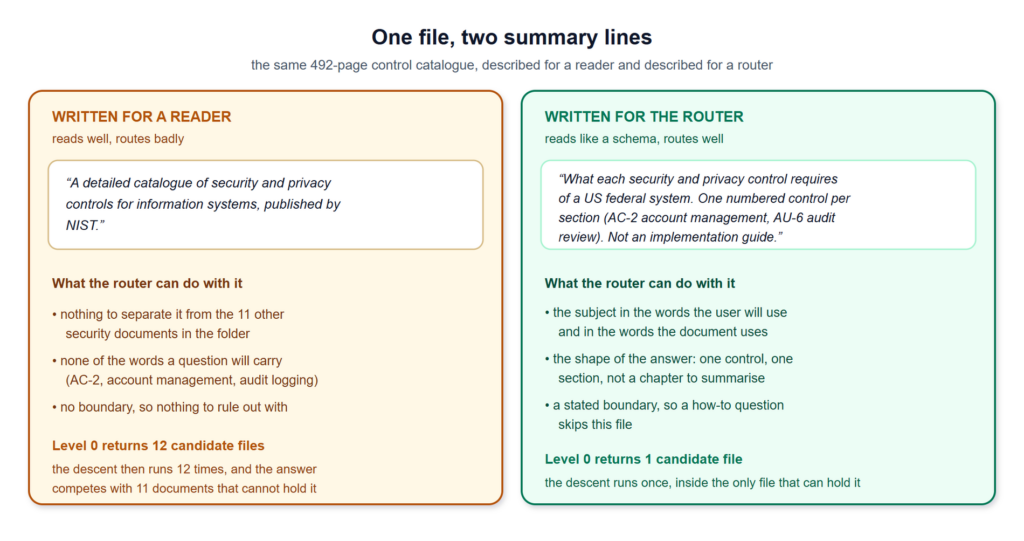 the same file, described two ways, and what each version lets the router do - Image by author
Three things make the difference between the two versions.
The subject in both vocabularies. The words the user will type, and the words the document itself uses. A question about account management has to land on a file whose line says account management and AC-2 , because the router matches on text, not on intent.
The shape of what the file answers. One numbered control per section is a different promise from a narrative report. It tells the router whether the answer is a section or a whole chapter, which is what the second level then acts on.
What the file is not about. This is the part people skip, and it is the one that makes routing precise. Not an implementation guide removes the file from every how-to question in one clause. Negative information is what lets a router discard sixty-two files without opening any of them.
Producing the lines is cheap. One call per document at ingestion, over the first pages plus the table of contents, gives a usable draft; on a folder this size you can also write them by hand in an afternoon. Either way, the cost is paid once per document and re-paid only when the file changes. What matters is that the lines get reviewed like schema, not like copy.
the same file, described two ways, and what each version lets the router do - Image by author
Three things make the difference between the two versions.
The subject in both vocabularies. The words the user will type, and the words the document itself uses. A question about account management has to land on a file whose line says account management and AC-2 , because the router matches on text, not on intent.
The shape of what the file answers. One numbered control per section is a different promise from a narrative report. It tells the router whether the answer is a section or a whole chapter, which is what the second level then acts on.
What the file is not about. This is the part people skip, and it is the one that makes routing precise. Not an implementation guide removes the file from every how-to question in one clause. Negative information is what lets a router discard sixty-two files without opening any of them.
Producing the lines is cheap. One call per document at ingestion, over the first pages plus the table of contents, gives a usable draft; on a folder this size you can also write them by hand in an afternoon. Either way, the cost is paid once per document and re-paid only when the file changes. What matters is that the lines get reviewed like schema, not like copy.
2.2. The second level costs nothing new
The parsing brick already returns a toc_df, one row per heading with its page range. Article 5B (the relational tables a parser returns) builds it from the PDF’s native outline. Nothing in this article extends it. Level 1 is that table, kept per file.
For the folder here, 47 of the 63 PDFs ship a native outline, and those 47 cost one parse each. The other 16 ship none: a scanned memo, a slide export, a two-page note.
Two answers work for those 16, and length is what picks between them. A short file becomes a leaf: when the router keeps it, you read it whole, and level 1 never runs. A long one gets its outline reconstructed first. Article 5septies (rebuilding the table of contents from the page that prints one) covers the case where the PDF shows a contents page but never encodes it as an outline. Building Document Structure with Loop Engineering covers the harder one, where there is no contents page either and the headings have to be recovered from the body typography.
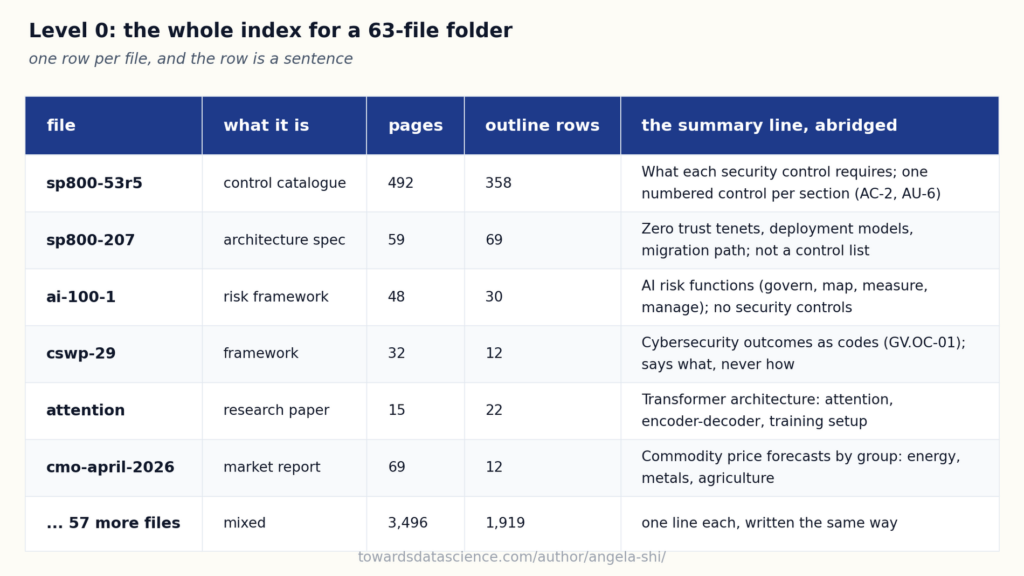 63 files, 4,211 pages, and an index that is 63 sentences long - Image by author
Across the folder the two levels come to 63 lines and 2,422 outline rows. The 63 is what the model reads on every question. The 2,422 is what it can reach, one file at a time, and almost never touches.
63 files, 4,211 pages, and an index that is 63 sentences long - Image by author
Across the folder the two levels come to 63 lines and 2,422 outline rows. The 63 is what the model reads on every question. The 2,422 is what it can reach, one file at a time, and almost never touches.
3. Query time: routing down two levels
Take one question through the folder: “what does the account management control require?” The answer is five pages of NIST SP 800-53 Rev. 5 (Security and Privacy Controls for Information Systems and Organizations , US Government work, public domain in the US), control AC-2, pages 46 to 50. Sixty-two other files cannot hold it, and none of them will be opened.
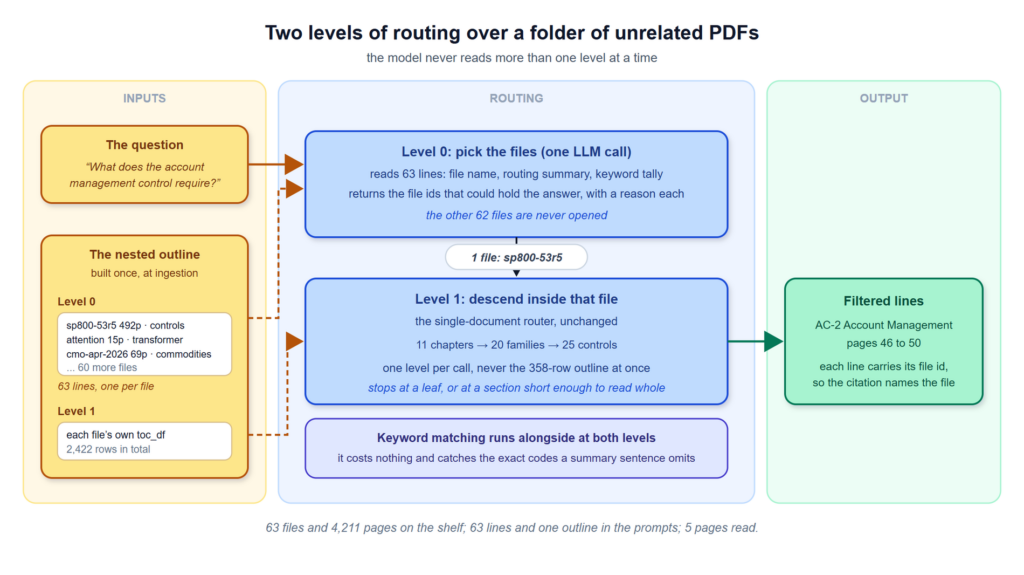 pick the files from 63 lines, then descend inside the ones that survive - Image by author
3.1. Level 0, picking the files
One call. The model reads 63 lines, each one a file name, its routing summary, and a keyword tally. It returns the file ids that could hold the answer, with a reason for each. Usually one to three files come back.
The keyword tally runs alongside, not instead. Counting how many of the question’s terms appear in a file’s summary line and in its outline titles costs nothing, and it catches what a summary sentence rounds off: an exact code like AC-2 or GV.OC-01 that the sentence never spelled out. The two signals go into the same prompt and the model decides, which is the pattern Article 7B (parallel detectors, then one call at the end) established inside a single document. Here it runs one level up, unchanged.
Two properties of this call are worth naming. It is bounded: 63 short lines, whatever the folder weighs on disk. And it is auditable: the reason string says why a file was kept, so a wrong answer can be traced to the routing decision rather than to a similarity score.
3.2. Level 1, descending inside the survivors
From here it is the single-document case, with nothing added. The file’s own outline becomes the current level, the model picks a branch, and if that branch has finer children the loop opens them and repeats. It stops at a leaf, or at a section short enough to read whole. Article 7quater (hierarchical retrieval, reading a long document by its table of contents) works that loop out in full on this same catalogue: eleven chapters, then twenty control families, then twenty-five controls, then AC-2.
The two levels are the same call.
python
# The folder's file list is the top level of ONE table of contents:
# level 0 rows are files, deeper rows are those files' own sections.
level = corpus_toc[corpus_toc.level == 0]           # 63 rows, one per file
files = reason_on_toc(question, level,              # the SAME router call
                      section_signals=keyword_hits(question, level))

sections = []
for file_id in files.section_ids:                   # typically 1 to 3
    level = corpus_toc[(corpus_toc.file_id == file_id)
                       & (corpus_toc.level == 1)]
    while True:                                     # the one-document loop
        pick    = reason_on_toc(question, level)
        section = level[level.section_id.isin(pick.section_ids)]
        kids    = immediate_children(corpus_toc, section)
        if kids.empty or section.n_pages.max() <= SMALL:
            break                                   # a leaf, or short enough
        level = kids                                # open it, descend
    sections.append(section)

# 63 files -> 1 file -> AC-2 ACCOUNT MANAGEMENT -> 5 pages out of 4,211
Every line that comes out keeps its file id, so a citation names the file it came from. On a folder whose documents share no vocabulary, that matters more than usual: an answer stitched from a control catalogue and a market report reads fluently and is worth nothing.
3.3. Why the whole nested outline never goes in one prompt
The nested outline is one object, 63 lines plus 2,422 rows. Nothing stops you from serialising all of it into a single call. Three reasons not to.
It stops fitting. Multiply this folder by twenty and the outline alone is a long prompt with no room left to reason in. The folders that need this architecture are the ones that keep growing.
Precision falls before the window does. At level 0 the model compares 63 whole-document descriptions, which is a decision it makes well. Handed 2,485 mixed rows, the section it needs competes with 357 siblings from a document that is not even relevant, and a section title read out of its document is a weak signal.
It costs on every question. Level 0 is 63 short lines, paid every time. Level 1 is only the outlines of the files that survived, so it is paid on one file rather than sixty-three.
The descent is also optional. On a folder of eight short files with shallow outlines, level 0 picks a file and there is nothing to descend into: the loop runs once and behaves like flat routing. The model decides at each level whether going deeper buys anything, which is the same termination rule the single-document loop uses.
4. Where it breaks
Four things go wrong with a two-level folder index, and they are not equally serious. The first is a writing problem you fix in an afternoon. The next two are parsing problems that show up as retrieval problems. The last one is a real ceiling.
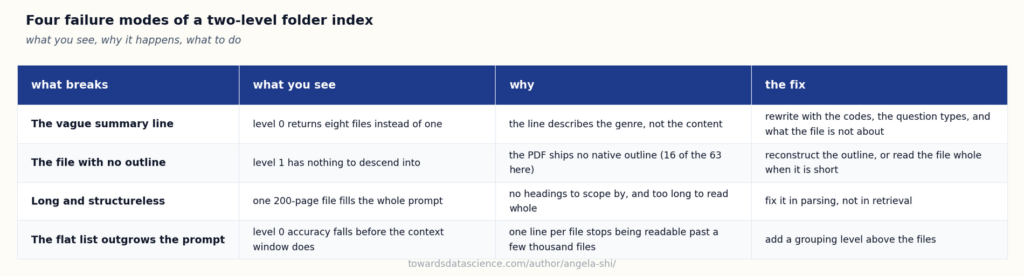 the four ways a folder index goes wrong, and what each one needs - Image by author
4.1. The summary line that says nothing
“A technical report on cybersecurity.” Twelve files match that description, so level 0 returns all twelve, or picks three of them for no reason you can reconstruct. The tell is specific: the level-0 call keeps too many files, while level 1 looks perfectly healthy on each one it is given.
The fix is to rewrite the line, and the test is cheap. Hold out ten real questions, run the level-0 call on each, and check that the file you would have picked by hand comes back. Ten questions catch most of it, because a bad summary line is usually bad for a whole class of question rather than for one.
Treat the lines as an artefact under review. They are the index; a sloppy line is a sloppy column definition, and it will not announce itself.
4.2. The document with no structure
Level 1 needs something to descend into. A file with no headings gives the loop nothing to pick from, so the router either reads it whole or reads nothing.
Reading it whole is fine most of the time. A three-page memo is a leaf, and the two-level scheme handles leaves naturally. The failure case is narrow and specific: long and structureless. A 200-page scanned bundle with no headings cannot be routed at any level, because there is nothing to route over.
That one is not a retrieval problem. It is a parsing problem, and it gets solved before this article’s machinery runs, by reconstructing an outline from whatever signal the document does carry.
4.3. The flat file list stops scaling
Level 0 is a flat list. It works while the list stays readable in one call.
A few hundred files is comfortable. A few thousand is not, and the failure is not the one people expect. The context window is not what gives out first; routing accuracy is. At 3,000 lines the level-0 call is the same top-k problem this whole architecture was built to avoid, moved up one floor.
The fix is one more level, not a different architecture. Group the files, by folder, by source, by year, by whatever grouping the shelf already has, and give each group its own summary line. Level 0 becomes 40 group lines, level 1 the files inside the groups the router kept, level 2 their outlines. Same routing call, one more turn of the same loop.
That is also the point where this case starts asking for what the homogeneous case has from day one. If the natural grouping turns out to be a field that every file has, the second question from section 1.1 has quietly changed its answer, and the folder wants an index after all.
5. Conclusion
A folder whose documents have nothing in common is one long document, and it wants the retrieval you already have rather than the corpus machinery of the articles around it.
What it does not need is worth listing, because each item is a project someone will otherwise propose. No relational index: there are no columns to fill. No ontology: a vocabulary shared by a control catalogue and a commodity report describes nothing. No SQL agent: there is nothing to query. No entity extraction pass over the corpus: the entities do not recur across files, so there is nothing to link.
What it does need is a sentence per file, written for the router, and the table of contents the parser already returns. Then routing runs twice: once over the file list, once inside the files that survived. Sixty-three files and 4,211 pages, and the model reads 63 lines plus one outline before landing on five pages.
The two follow-ups in this group take the other two shapes. Article 14C (the homogeneous corpus, where the business already knows the columns) covers the folder where the second question comes back yes. Article 14D (case files, one bundle about a single entity) covers the folder that is heterogeneous inside and repetitive across, which needs a bit of both.
6. Further reading and sources
Earlier in the series, on the pieces this article reuses:
Also referenced above, listed here without links: Article 5B (the relational tables a parser returns), Article 5septies (rebuilding a table of contents from the page that prints one), Article 7B (parallel detectors, then one call at the end), Article 7quater (hierarchical retrieval inside one long document), Article 14A (three kinds of corpus, and what building for the wrong one costs), Article 14C (the homogeneous corpus), Article 14D (case files), and Articles 15 to 17 (the index, the ontology, and the SQL-first query path for the other kind of folder).
External sources:
- Document Summary Index , LlamaIndex documentation (docs.llamaindex.ai). The same level-0 idea as a shipped open-source component: a summary per document, and retrieval that picks documents by summary before it picks passages. Worth reading for the prompt it uses to generate the summaries.
- Parth Sarthi et al., RAPTOR: Recursive Abstractive Processing for Tree-Organized Retrieval , 2024 (arXiv 2401.18059). Builds the tree by clustering and summarising recursively when no structure exists. The contrast is the point: a folder of documents already ships a tree, so there is nothing to infer.
- Anthropic, Introducing Contextual Retrieval , 2024 (anthropic.com). Prepends a short document-level context to each chunk so a passage stops being orphaned from its source. The summary line here is the same move at file granularity.
- Yunfan Gao et al., Retrieval-Augmented Generation for Large Language Models: A Survey , 2023 (arXiv 2312.10997). The naive, advanced, modular vocabulary this article’s baseline sits against.
- Scott Barnett et al., Seven Failure Points When Engineering a Retrieval Augmented Generation System , 2024 (arXiv 2401.05856). Field-measured failure modes; the missing-document and wrong-document points are exactly what level-0 routing is built to remove.
Register Now to Continue Reading
Unlock Towards Data Science with a Free Account
All articles on Towards Data Science are available to registered users. Create a free account today to access this article and thousands more.
Register for freeSign in to your account
 Written By
See all from Angela and Kezhan Shi
Document ProcessingLlmLlm ApplicationsRagRag Architecture
Share This Article
Towards Data Science is a community publication. Submit your insights to reach our global audience and earn through the TDS Author Payment Program.
Write for TDS
Related Articles
Large Language Model
A practical guide to building an evaluation workflow that catches retrieval failures, hallucinations, and performance drift before they reach users
Priyansh Bhardwaj
July 15, 20269 min read
Data Science
These 3 starter projects only take a weekend (and a few cups of coffee, maybe)
Thuwarakesh Murallie
January 23, 202513 min read
Data Science
What each one solves, and runnable code you can paste into a notebook.
Sara Nobrega
September 1, 202616 min read
Large Language Model
How I built a lightweight evaluation system that measures faithfulness, detects hallucinations, and turns subjective LLM outputs into reproducible metrics — all in pure Python
Emmimal P Alexander
May 17, 202622 min read
Large Language Model
Most RAG systems optimize for relevance, not cost. I built a production-ready cost control layer combining semantic caching, query routing, and budget enforcement that reduces LLM costs by 85% without sacrificing answer quality.
Emmimal P Alexander
May 29, 202620 min read
The Variable
If you're interested in insightful takes on AI's current blockers and limitations — and the ways we might be able to overcome them — read on.
TDS Editors
October 23, 20254 min read
Large Language Model
Enterprise Document Intelligence [Vol.1 #7bis] - Tobi Lütke and Andrej Karpathy named the practice in 2025. For a single document, each brick emits typed pieces that converge on one LLM call. Corpus, conversation, and tool extensions are follow-up work
Kezhan Shi
June 30, 202617 min read
Artificial Intelligence
Comparing two large-language models: Approach and example
Pranay Dave
June 23, 20235 min read
Agentic AI
Learn how to design and build effective tools to be used by AI Agents
Eivind Kjosbakken
October 15, 20259 min read
Your home for data science and AI. The world's leading publication for data science, data analytics, data engineering, machine learning, and artificial intelligence professionals.
Subscribe to Our NewsletterWrite For TDS•About•Advertise•Privacy Policy•Terms of Use
© Insight Media Group, LLC 2026•The New Stack•roadmap.sh•Creator Network
Recommended Articles
Close