保留正文与补采附件。源页面当前未重新核验;具体限制见交付清单。
 We value your privacy
We use cookies to enhance your browsing experience, serve personalised ads or content, and analyse our traffic. By clicking "Accept All", you consent to our use of cookies.
Customise Reject All Accept All
Customise Consent Preferences
We value your privacy
We use cookies to enhance your browsing experience, serve personalised ads or content, and analyse our traffic. By clicking "Accept All", you consent to our use of cookies.
Customise Reject All Accept All
Customise Consent Preferences  We use cookies to help you navigate efficiently and perform certain functions. You will find detailed information about all cookies under each consent category below.
The cookies that are categorised as "Necessary" are stored on your browser as they are essential for enabling the basic functionalities of the site. ... Show more
NecessaryAlways Active
Necessary cookies are required to enable the basic features of this site, such as providing secure log-in or adjusting your consent preferences. These cookies do not store any personally identifiable data.
We use cookies to help you navigate efficiently and perform certain functions. You will find detailed information about all cookies under each consent category below.
The cookies that are categorised as "Necessary" are stored on your browser as they are essential for enabling the basic functionalities of the site. ... Show more
NecessaryAlways Active
Necessary cookies are required to enable the basic features of this site, such as providing secure log-in or adjusting your consent preferences. These cookies do not store any personally identifiable data.
-
Cookie
BCTempID
-
Duration
10 minutes
-
Description
No description available.
-
Cookie
__cf_bm
-
Duration
1 hour
-
Description
This cookie, set by Cloudflare, is used to support Cloudflare Bot Management.
-
Cookie
AWSALBCORS
-
Duration
7 days
-
Description
Amazon Web Services set this cookie for load balancing.
-
Cookie
_cfuvid
-
Duration
session
-
Description
Cloudflare sets this cookie to track users across sessions to optimize user experience by maintaining session consistency and providing personalized services
-
Cookie
li_gc
-
Duration
6 months
-
Description
Linkedin set this cookie for storing visitor's consent regarding using cookies for non-essential purposes.
-
Cookie
__hssrc
-
Duration
session
-
Description
This cookie is set by Hubspot whenever it changes the session cookie. The __hssrc cookie set to 1 indicates that the user has restarted the browser, and if the cookie does not exist, it is assumed to be a new session.
-
Cookie
__hssc
-
Duration
1 hour
-
Description
HubSpot sets this cookie to keep track of sessions and to determine if HubSpot should increment the session number and timestamps in the __hstc cookie.
-
Cookie
wpEmojiSettingsSupports
-
Duration
session
-
Description
WordPress sets this cookie when a user interacts with emojis on a WordPress site. It helps determine if the user's browser can display emojis properly.
-
Cookie
BCSessionID
-
Duration
1 year 1 month 4 days
-
Description
Blueconic sets this cookie as a unique identifier for the BlueConic profile.
-
Cookie
_octo
-
Duration
1 year
-
Description
No description available.
-
Cookie
logged_in
-
Duration
1 year
-
Description
No description available.
-
Cookie
__Secure-YEC
-
Duration
past
-
Description
YouTube sets this cookie to stores the user's video player preferences using embedded YouTube video
-
Cookie
__eoi
-
Duration
6 months
-
Description
Description is currently not available.
-
Cookie
AWSALBTGCORS
-
Duration
7 days
-
Description
No description available.
-
Cookie
login-status-p
-
Duration
past
-
Description
Description is currently not available.
-
Cookie
AWSALBTG
-
Duration
7 days
-
Description
No description available.
-
Cookie
csrf_token
-
Duration
session
-
Description
No description available.
-
Cookie
token_v2
-
Duration
1 day
-
Description
Description is currently not available.
-
Cookie
D
-
Duration
1 year
-
Description
Description is currently not available.
-
Cookie
PHPSESSID
-
Duration
session
-
Description
This cookie is native to PHP applications. The cookie stores and identifies a user's unique session ID to manage user sessions on the website. The cookie is a session cookie and will be deleted when all the browser windows are closed.
-
Cookie
VISITOR_PRIVACY_METADATA
-
Duration
6 months
-
Description
YouTube sets this cookie to store the user's cookie consent state for the current domain.
-
Cookie
cookietest
-
Duration
session
-
Description
The cookietest cookie is typically used to determine whether the user's browser accepts cookies, essential for website functionality and user experience.
-
Cookie
__Host-airtable-session
-
Duration
1 year
-
Description
This cookie is used to enable us to integrate the services of Airtable.
-
Cookie
__Host-airtable-session.sig
-
Duration
1 year
-
Description
This cookie is used to enable us to integrate the services of Airtable.
-
Cookie
m
-
Duration
1 year 1 month 4 days
-
Description
Stripe sets this cookie for fraud prevention purposes. It identifies the device used to access the website, allowing the website to be formatted accordingly.
-
Cookie
BIGipServer*
-
Duration
session
-
Description
Marketo sets this cookie to collect information about the user's online activity and build a profile about their interests to provide advertisements relevant to the user.
-
Cookie
__cfruid
-
Duration
session
-
Description
Cloudflare sets this cookie to identify trusted web traffic.
-
Cookie
_GRECAPTCHA
-
Duration
6 months
-
Description
Google Recaptcha service sets this cookie to identify bots to protect the website against malicious spam attacks.
-
Cookie
__Secure-YNID
-
Duration
6 months
-
Description
Google cookie used to protect user security and prevent fraud, especially during the login process.
-
Cookie
cookieyes-consent
-
Duration
1 year
-
Description
CookieYes sets this cookie to remember users' consent preferences so that their preferences are respected on subsequent visits to this site. It does not collect or store any personal information about the site visitors.
Functional
Functional cookies help perform certain functionalities like sharing the content of the website on social media platforms, collecting feedback, and other third-party features.
-
Cookie
lidc
-
Duration
1 day
-
Description
LinkedIn sets the lidc cookie to facilitate data center selection.
-
Cookie
brw
-
Duration
1 year
-
Description
No description available.
-
Cookie
brwConsent
-
Duration
5 minutes
-
Description
Description is currently not available.
-
Cookie
WMF-Uniq
-
Duration
1 year
-
Description
Description is currently not available.
-
Cookie
loom_anon_comment
-
Duration
1 year
-
Description
No description available.
-
Cookie
loom_referral_video
-
Duration
session
-
Description
Description is currently not available.
-
Cookie
VISITOR_INFO1_LIVE
-
Duration
6 months
-
Description
A cookie set by YouTube to measure bandwidth that determines whether the user gets the new or old player interface.
-
Cookie
yt-remote-connected-devices
-
Duration
Never Expires
-
Description
YouTube sets this cookie to store the user's video preferences using embedded YouTube videos.
-
Cookie
ytidb::LAST_RESULT_ENTRY_KEY
-
Duration
Never Expires
-
Description
The cookie ytidb::LAST_RESULT_ENTRY_KEY is used by YouTube to store the last search result entry that was clicked by the user. This information is used to improve the user experience by providing more relevant search results in the future.
-
Cookie
yt-remote-device-id
-
Duration
Never Expires
-
Description
YouTube sets this cookie to store the user's video preferences using embedded YouTube videos.
-
Cookie
yt-remote-session-name
-
Duration
session
-
Description
The yt-remote-session-name cookie is used by YouTube to store the user's video player preferences using embedded YouTube video.
-
Cookie
yt-remote-fast-check-period
-
Duration
session
-
Description
The yt-remote-fast-check-period cookie is used by YouTube to store the user's video player preferences for embedded YouTube videos.
-
Cookie
yt-remote-session-app
-
Duration
session
-
Description
The yt-remote-session-app cookie is used by YouTube to store user preferences and information about the interface of the embedded YouTube video player.
-
Cookie
yt-remote-cast-available
-
Duration
session
-
Description
The yt-remote-cast-available cookie is used to store the user's preferences regarding whether casting is available on their YouTube video player.
-
Cookie
yt-remote-cast-installed
-
Duration
session
-
Description
The yt-remote-cast-installed cookie is used to store the user's video player preferences using embedded YouTube video.
-
Cookie
cp_session
-
Duration
3 months
-
Description
Codepen sets this cookie for Help systems found in the website.
-
Cookie
loid
-
Duration
1 year 1 month 4 days
-
Description
This cookie is set by the Reddit. The cookie enables the sharing of content from the website onto the social media platform.
Analytics
Analytical cookies are used to understand how visitors interact with the website. These cookies help provide information on metrics such as the number of visitors, bounce rate, traffic source, etc.
-
Cookie
__hstc
-
Duration
6 months
-
Description
Hubspot set this main cookie for tracking visitors. It contains the domain, initial timestamp (first visit), last timestamp (last visit), current timestamp (this visit), and session number (increments for each subsequent session).
-
Cookie
hubspotutk
-
Duration
6 months
-
Description
HubSpot sets this cookie to keep track of the visitors to the website. This cookie is passed to HubSpot on form submission and used when deduplicating contacts.
-
Cookie
_ga
-
Duration
1 year 1 month 4 days
-
Description
Google Analytics sets this cookie to calculate visitor, session and campaign data and track site usage for the site's analytics report. The cookie stores information anonymously and assigns a randomly generated number to recognise unique visitors.
-
Cookie
ga*
-
Duration
1 year 1 month 4 days
-
Description
Google Analytics sets this cookie to store and count page views.
-
Cookie
__Host-psifi.analyticsTrace
-
Duration
6 hours
-
Description
Description is currently not available.
-
Cookie
__Host-psifi.analyticsTraceV2
-
Duration
6 hours
-
Description
Description is currently not available.
-
Cookie
_gh_sess
-
Duration
session
-
Description
GitHub sets this cookie for temporary application and framework state between pages like what step the user is on in a multiple step form.
-
Cookie
YSC
-
Duration
session
-
Description
YSC cookie is set by Youtube and is used to track the views of embedded videos on Youtube pages.
-
Cookie
ajs_anonymous_id
-
Duration
1 year
-
Description
This cookie is set by Segment to count the number of people who visit a certain site by tracking if they have visited before.
-
Cookie
vuid
-
Duration
1 year 1 month 4 days
-
Description
Vimeo installs this cookie to collect tracking information by setting a unique ID to embed videos on the website.
Performance
Performance cookies are used to understand and analyse the key performance indexes of the website which helps in delivering a better user experience for the visitors.
-
Cookie
AWSALB
-
Duration
7 days
-
Description
AWSALB is an application load balancer cookie set by Amazon Web Services to map the session to the target.
-
Cookie
acq
-
Duration
past
-
Description
Description is currently not available.
-
Cookie
acq.sig
-
Duration
past
-
Description
Description is currently not available.
-
Cookie
ptc
-
Duration
2 years
-
Description
No description available.
Advertisement
Advertisement cookies are used to provide visitors with customised advertisements based on the pages you visited previously and to analyse the effectiveness of the ad campaigns.
-
Cookie
muc_ads
-
Duration
1 year 1 month 4 days
-
Description
Twitter sets this cookie to collect user behaviour and interaction data to optimize the website.
-
Cookie
guest_id_marketing
-
Duration
1 year 1 month 4 days
-
Description
Twitter sets this cookie to identify and track the website visitor.
-
Cookie
guest_id_ads
-
Duration
1 year 1 month 4 days
-
Description
Twitter sets this cookie to identify and track the website visitor.
-
Cookie
personalization_id
-
Duration
1 year 1 month 4 days
-
Description
Twitter sets this cookie to integrate and share features for social media and also store information about how the user uses the website, for tracking and targeting.
-
Cookie
guest_id
-
Duration
1 year 1 month 4 days
-
Description
Twitter sets this cookie to identify and track the website visitor. It registers if a user is signed in to the Twitter platform and collects information about ad preferences.
-
Cookie
bcookie
-
Duration
1 year
-
Description
LinkedIn sets this cookie from LinkedIn share buttons and ad tags to recognize browser IDs.
-
Cookie
__Secure-ROLLOUT_TOKEN
-
Duration
6 months
-
Description
YouTube sets this cookie to manage feature rollout and experimentation. It helps Google control which new features or interface changes are shown to users as part of testing and staged rollouts, ensuring consistent experience for a given user during an experiment.
-
Cookie
yt.innertube::nextId
-
Duration
Never Expires
-
Description
YouTube sets this cookie to register a unique ID to store data on what videos from YouTube the user has seen.
-
Cookie
yt.innertube::requests
-
Duration
Never Expires
-
Description
YouTube sets this cookie to register a unique ID to store data on what videos from YouTube the user has seen.
-
Cookie
session_tracker
-
Duration
session
-
Description
This cookie is set by the Reddit. This cookie is used to identify trusted web traffic. It also helps in adverstising on the website.
-
Cookie
edgebucket
-
Duration
session
-
Description
Reddit sets this cookie to save the information about a log-on Reddit user, for the purpose of advertisement recommendations and updating the content.
-
Cookie
did
-
Duration
1 year
-
Description
Arbor sets this cookie to show targeted ads to site visitors.This cookie expires after 2 months or 1 year.
Uncategorised
Other uncategorised cookies are those that are being analysed and have not been classified into a category as yet.
No cookies to display.
Reject All Save My Preferences Accept All
Toggle SearchToggle Mobile Navigation
Publish AI, ML & data-science insights to a global community of data professionals.
Sign inSubmit an Article
LatestEditor's PicksNewsletterShipAI
Write For TDS
LinkedInXToggle Search
Machine Learning
My Model Worked Perfectly. Then I Tried to Make It Useful.
Turning a trained churn classifier into a FastAPI service that other software can actually call.
Ibrahim Salami
September 3, 202611 min read
 Generated with Gemini AI
FastAPI churn classifier API
A few months ago, I tried to challenge myself to undertake a journey to transition from a data analytics background to data engineering. So far I’ve built a total of two impactful real-world projects that actually taught me something useful. I built a GitHub ETL pipeline that extracts GitHub repositories and loads them into a SQLite database — this ran on a schedule using GitHub Actions. I also built an RSS pipeline that extracts articles from RSS feeds and stores them into a Kestra database — orchestrated by Kestra to run on an hourly schedule.
Now that I’ve understood ETL to a point, I wanted to try something new. I wanted to keep practicing all I’ve learned in the past whilst building something new. I had always been fascinated by the field of machine learning, but never actually had the courage to step in because I thought it had complex math. Not anymore.
Recently, I built a churn prediction model for a fictional telecom company I am calling Northline Mobile (P.S. I’m using a fictional company because I understand things best with real-world scenarios). I provided it with data from 7043 customers, telling it whether they had signed up for a 1-year contract or month-to-month plans, length of customer, monthly charges, add-ons, etc. Furthermore, I told it who eventually left Northline Mobile. I cross-validated the model with customers it had not seen yet.
It achieved 81% accuracy. This taught me everything that goes into building a model. Obviously I didn’t understand all the complex code, because I prefer intuitive drag and drop interfaces rather than complex code. But I understood the essential building blocks of building a model; I’ll explain further below with a simplified architecture.
Learn this step by step with the interactive Machine Learning roadmap.
So building this model felt like a win from a machine learning perspective; my model worked.
But there was still one problem: it was still not really useful.
Assuming a Northline employee who needed a prediction comes to me, I would have to open Jupyter, load the right notebook, run the cells in the correct order and make a manual call to predict_churn(). Yeah, the model exists, but I was the only one that knows how to use it. No one else at Northline could just send information on a customer to the model and retrieve a prediction and it could not speak to any other application either.
This article will be covering this.
I recently learned that there is a difference between having a model and having a service.
If a model just sits in a notebook only the person who built it can use it. But making it a service makes it possible for everyone to use it, other teams, apps, dashboards and systems that do not need to know or care how the prediction is made.
It turns out building the machine learning model was the easiest part, but making it useful is another crucial element worth exploring.
Generated with Gemini AI
FastAPI churn classifier API
A few months ago, I tried to challenge myself to undertake a journey to transition from a data analytics background to data engineering. So far I’ve built a total of two impactful real-world projects that actually taught me something useful. I built a GitHub ETL pipeline that extracts GitHub repositories and loads them into a SQLite database — this ran on a schedule using GitHub Actions. I also built an RSS pipeline that extracts articles from RSS feeds and stores them into a Kestra database — orchestrated by Kestra to run on an hourly schedule.
Now that I’ve understood ETL to a point, I wanted to try something new. I wanted to keep practicing all I’ve learned in the past whilst building something new. I had always been fascinated by the field of machine learning, but never actually had the courage to step in because I thought it had complex math. Not anymore.
Recently, I built a churn prediction model for a fictional telecom company I am calling Northline Mobile (P.S. I’m using a fictional company because I understand things best with real-world scenarios). I provided it with data from 7043 customers, telling it whether they had signed up for a 1-year contract or month-to-month plans, length of customer, monthly charges, add-ons, etc. Furthermore, I told it who eventually left Northline Mobile. I cross-validated the model with customers it had not seen yet.
It achieved 81% accuracy. This taught me everything that goes into building a model. Obviously I didn’t understand all the complex code, because I prefer intuitive drag and drop interfaces rather than complex code. But I understood the essential building blocks of building a model; I’ll explain further below with a simplified architecture.
Learn this step by step with the interactive Machine Learning roadmap.
So building this model felt like a win from a machine learning perspective; my model worked.
But there was still one problem: it was still not really useful.
Assuming a Northline employee who needed a prediction comes to me, I would have to open Jupyter, load the right notebook, run the cells in the correct order and make a manual call to predict_churn(). Yeah, the model exists, but I was the only one that knows how to use it. No one else at Northline could just send information on a customer to the model and retrieve a prediction and it could not speak to any other application either.
This article will be covering this.
I recently learned that there is a difference between having a model and having a service.
If a model just sits in a notebook only the person who built it can use it. But making it a service makes it possible for everyone to use it, other teams, apps, dashboards and systems that do not need to know or care how the prediction is made.
It turns out building the machine learning model was the easiest part, but making it useful is another crucial element worth exploring.
What "Done" Meant Before the API
Here's roughly what building the model looked like:
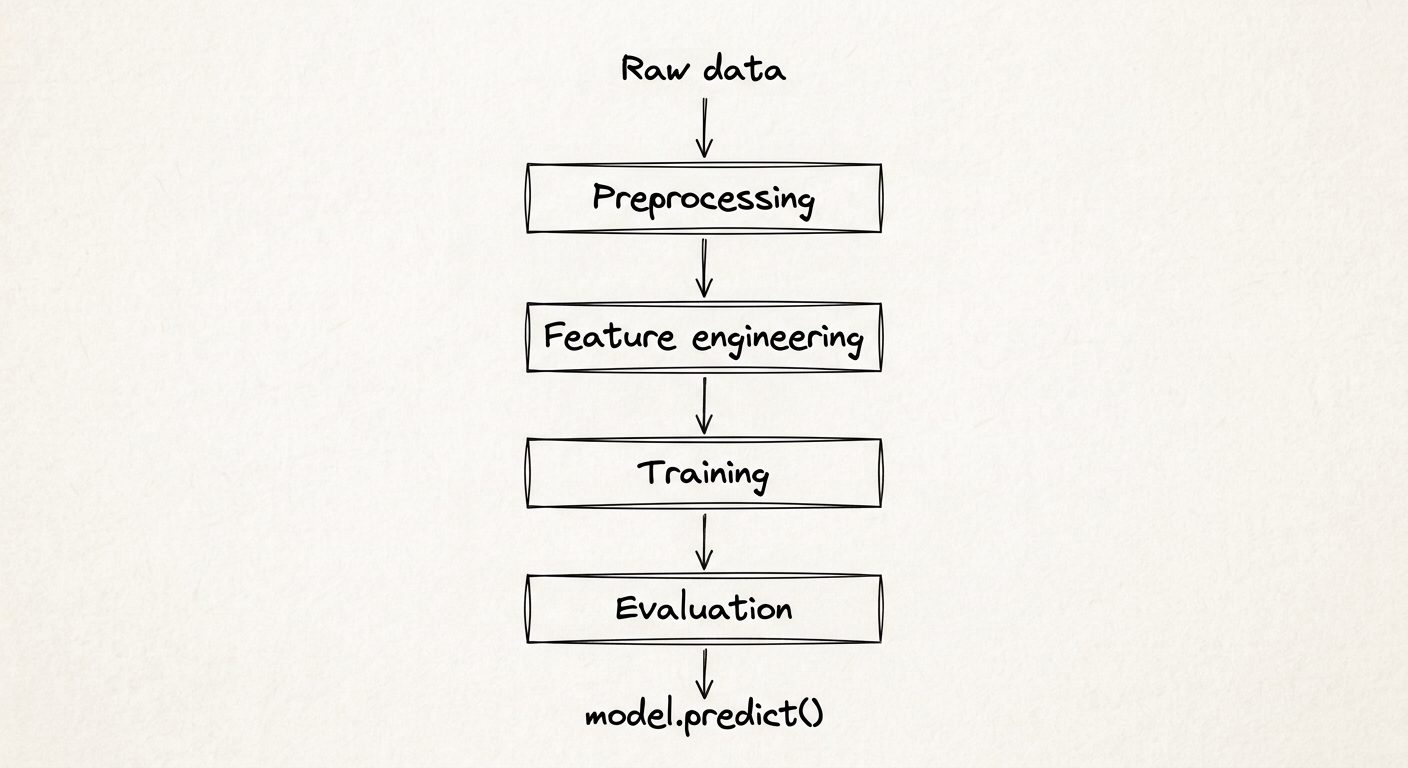 That’s pretty much it. Nothing too fancy.
By the end of that, I had a trained churn classifier, a preprocessing pipeline that cleaned and encoded the raw data, and evaluation numbers I was comfortable with (more on those numbers shortly, they're not perfect and I'm not going to pretend they are).
But like I said. Assuming Northline's retention team builds a dashboard, and they want it to flag at-risk customers automatically. Their dashboard can't reasonably open my Jupyter notebook and run my cells. It needs something else entirely. Something like this:
That’s pretty much it. Nothing too fancy.
By the end of that, I had a trained churn classifier, a preprocessing pipeline that cleaned and encoded the raw data, and evaluation numbers I was comfortable with (more on those numbers shortly, they're not perfect and I'm not going to pretend they are).
But like I said. Assuming Northline's retention team builds a dashboard, and they want it to flag at-risk customers automatically. Their dashboard can't reasonably open my Jupyter notebook and run my cells. It needs something else entirely. Something like this:
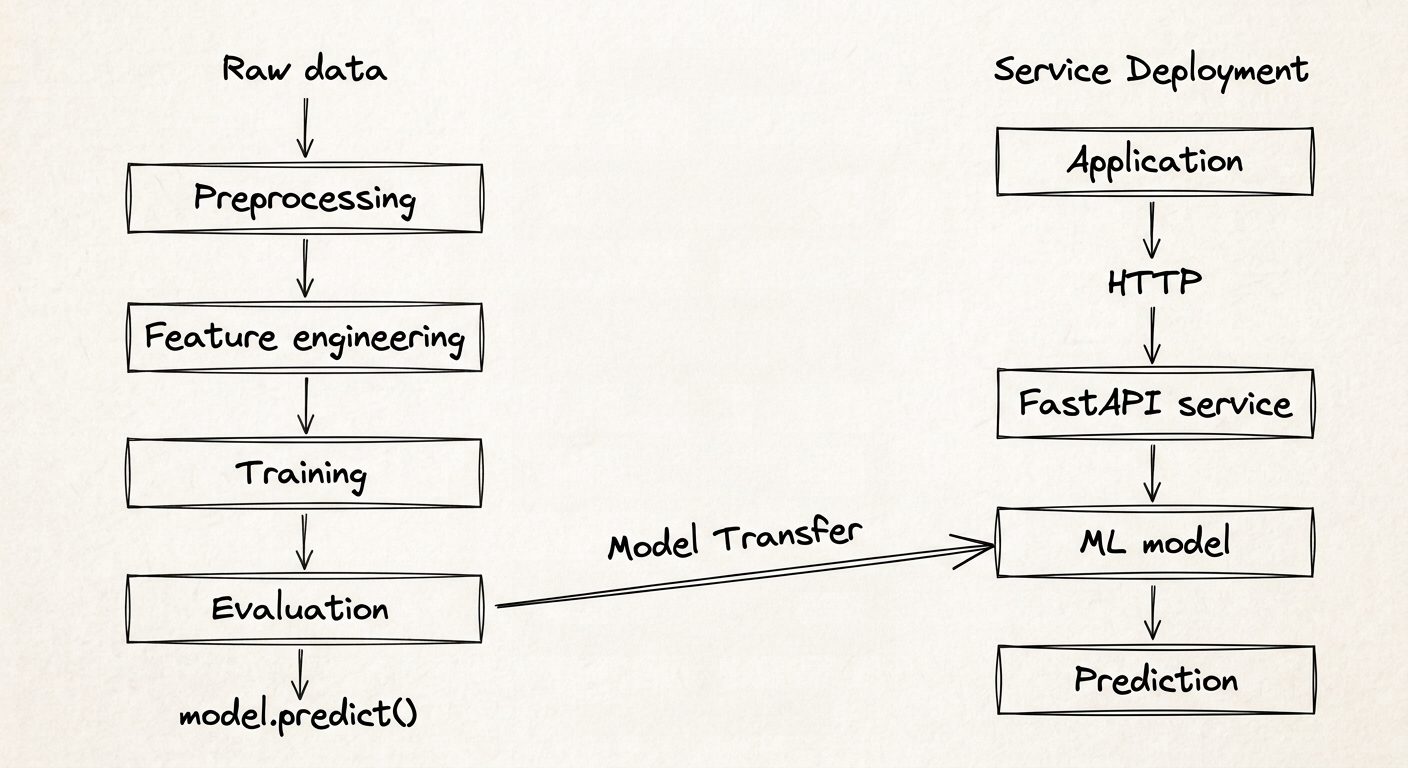 That's the shift this article covers. One quick disclaimer, though: this isn’t a FastAPI tutorial. FastAPI is simply the tool I happened to use to expose the model as a service. The interesting part, at least for me, was figuring out what that service should actually look like.
The Boundary I Actually Needed
The real question wasn't "how do I put FastAPI around my model." It was "what should the boundary between my software and my model actually look like."
I had two options. Full fidelity or something more simplified that only involves training the model on a handful of data. I settled on full fidelity: this means that the API accepts every raw field Northline's other systems would realistically have about a customer, the same columns as the original dataset, not some simplified subset. A request would typically look like this:
json
{

  "gender": "Female",

  "SeniorCitizen": 0,

  "Partner": "Yes",

  "Dependents": "No",

  "tenure": 12,

  "PhoneService": "Yes",

  "MultipleLines": "No",

  "InternetService": "Fiber optic",

  "OnlineSecurity": "No",

  "OnlineBackup": "Yes",

  "DeviceProtection": "No",

  "TechSupport": "No",

  "StreamingTV": "Yes",

  "StreamingMovies": "No",

  "Contract": "Month-to-month",

  "PaperlessBilling": "Yes",

  "PaymentMethod": "Electronic check",

  "MonthlyCharges": 75.5,

  "TotalCharges": 890.5

}
And the response is deliberately small:
json
{

  "churn_probability": 0.3136,

  "prediction": 0,

  "risk_level": "Medium"

}
I have to point out something real quick though. That risk_level field isn't something the model produces. The model only outputs a raw probability. But a raw 0.31 isn't something a retention rep can act on at a glance, so I added a simple bucket: below 0.3 is Low, 0.3 to 0.6 is Medium, above that is High. Those thresholds are a starting guess, not something I derived statistically, and I want to be upfront about that rather than pretend they're more rigorous than they are.
This is the boundary. Input schema, output schema, what's required, what's rejected. Once I'd actually thought this through, the endpoint itself was almost the easy part.
Preparing the Model for Life Outside the Notebook
There's a step between "request arrives" and "prediction comes back" that's easy to underestimate: the raw JSON coming in looks nothing like what the model actually expects. Here’s what the journey typically looks like:
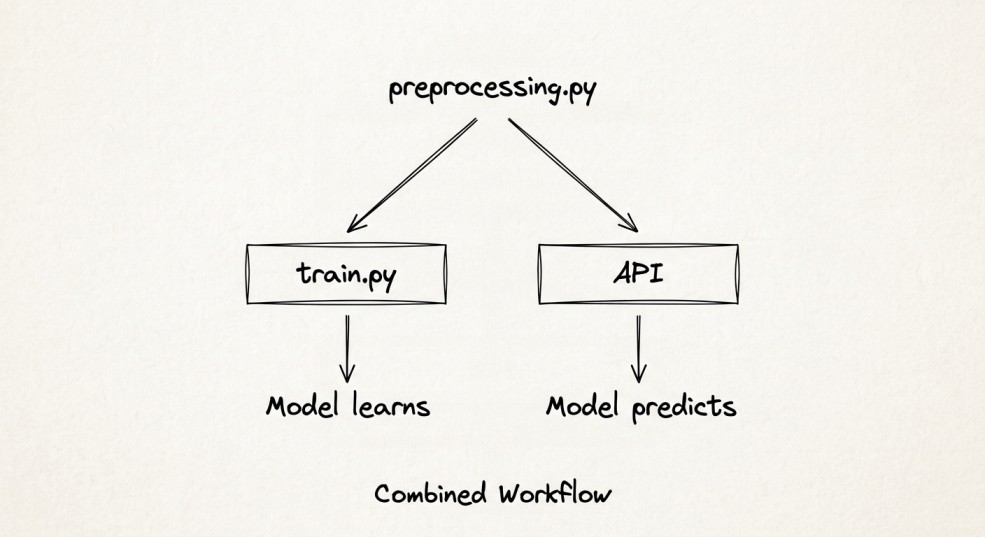
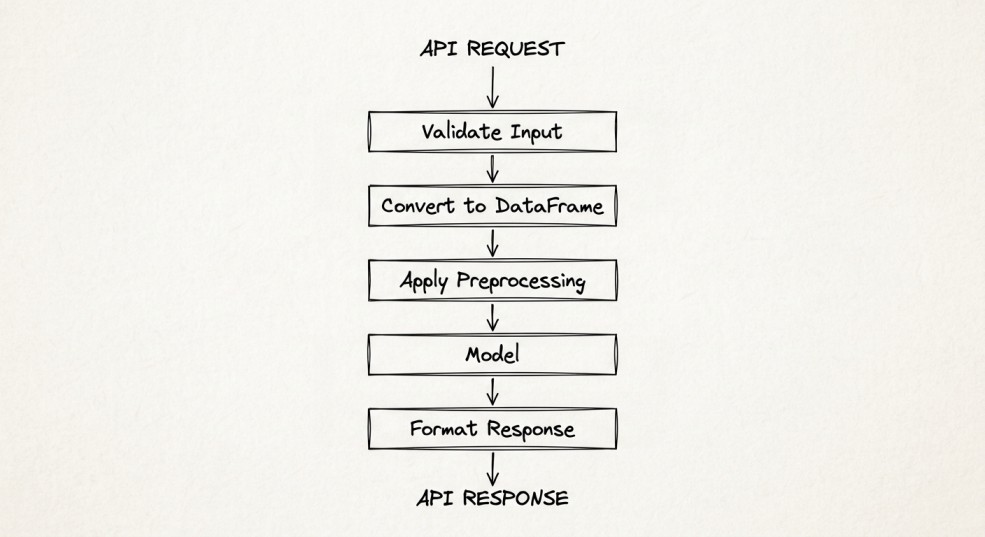 It’s worth keeping in mind that the API can't invent its own version of preprocessing. Whatever happened to the data during training has to happen, identically, at inference time. For instance, if training scales tenure and MonthlyCharges a certain way, and the API scales them differently, or forgets to scale them at all, the model is being handed numbers it's never seen the shape of before. But the fascinating thing is that it won't give you an error, it'll just quietly guess wrong.
So to prevent this issue, I built one
It’s worth keeping in mind that the API can't invent its own version of preprocessing. Whatever happened to the data during training has to happen, identically, at inference time. For instance, if training scales tenure and MonthlyCharges a certain way, and the API scales them differently, or forgets to scale them at all, the model is being handed numbers it's never seen the shape of before. But the fascinating thing is that it won't give you an error, it'll just quietly guess wrong.
So to prevent this issue, I built one preprocessing.py, imported by both the training script and the live API.
 There's a specific bug this caught, however. My binary-encoding function looked like this during training:
python
There's a specific bug this caught, however. My binary-encoding function looked like this during training:
python
binary_cols = ['Partner', 'Dependents', 'PhoneService', 'PaperlessBilling', 'Churn']

for col in binary_cols:

    df[col] = df[col].map({'Yes': 1, 'No': 0})
That's fine when training, because the training data has a Churn column, the actual answer. But a live request obviously doesn't have Churn in it. That's what we're trying to predict. Running this function unmodified against a request would crash looking for a column that was never going to exist. The fix was small, just check the column's actually present first, but it's exactly the kind of thing that only shows up once you try to run training-time code at inference time.
Building the FastAPI Layer
Here's how the project ended up structured:
plaintext
churn-api/

├── data/

├── notebooks/

│   └── 01_eda.ipynb

├── app/

│   ├── main.py

│   ├── schemas.py

│   ├── model.py

│   └── preprocessing.py

├── models/

│   ├── churn_pipeline.pkl

│   ├── scaler.pkl

│   └── feature_columns.pkl

├── train.py

└── requirements.txt
Two things are worth explaining about this layout. First, train.py lives at the project root, outside app/. app/ is specifically the code that runs the live service. Training isn't part of the service, it's a separate process that produces the artifacts the service depends on. Second, train.py reaches into app/ to reuse preprocessing.py, not the other way around. The service doesn't know or care how it was trained. It just needs the same preprocessing logic.
Loading the Model Once
One decision that seems obvious in hindsight but wasn't something I thought about until I nearly got it wrong: where do you load the model?
The wrong way is loading it inside the /predict function itself, so every single request reads the .pkl files off disk again. That's slow, and it's wasteful for no reason.
The right way is loading it once, when the module is first imported:
python
# app/model.py

import joblib

from pathlib import Path

MODEL_DIR = Path(__file__).resolve().parent.parent / "models"

model = joblib.load(MODELDIR / "churn_pipeline.pkl")

scaler = joblib.load(MODELDIR / "scaler.pkl")

featurecolumns = joblib.load(MODEL_DIR / "feature_columns.pkl")
By the time the API is actually serving requests, the model is already sitting in memory, ready to go. This is a small detail, but it's the difference between an API you built and an API you built like it's actually going to be result = predict_churn(customer.model_dump()) return resultused.
Designing /predict
With the model loaded once and preprocessing shared with training, the actual endpoint ended up small:
python
# app/main.py

from fastapi import FastAPI

from schemas import CustomerRequest, ChurnPrediction

from model import predict_churn

app = FastAPI(title="Northline Mobile Churn API")

@app.post("/predict", response_model=ChurnPrediction)

def predict(customer: CustomerRequest):
That smallness is intentional. All the actual logic, preprocessing, loading, prediction, lives in model.py and preprocessing.py. The route function's only job is to receive a validated request and hand it off. I didn't want business logic creeping into what should be pure HTTP plumbing.
Behind that route, predict_churn runs the request through the same steps training used, including one detail that took me a minute to understand: a single request can only ever produce one value per one-hot encoded category. Training data might generate four PaymentMethod dummy columns across thousands of rows, but one customer's request can only be one payment method. So before prediction, I reindex the request's columns against the exact list the model was trained on, filling anything missing with zero:
python
df = df.reindex(columns=_feature_columns, fill_value=0)
Without that, a single request's column layout wouldn't reliably match what the model expects, and scikit-learn would either error or silently misalign features. This is the sort of detail that never shows up when you're testing on a full dataset, only when you send the model exactly one row at a time.
Testing It Like Software
Getting a 200 OK in Swagger UI wasn't the finish line I thought it'd be. The more interesting question was what happens when the input isn't clean.
I sent a request with tenure missing entirely. The API rejected it before the model ever saw it:
json
{

  "detail": [

    {

      "type": "missing",

      "loc": ["body", "tenure"],

      "msg": "Field required"

    }

  ]

}
I sent "gender": "female", lowercase, instead of the expected "Female". Rejected again, with the exact reason:
json
{

  "detail": [

    {

      "type": "literal_error",

      "loc": ["body", "gender"],

      "msg": "Input should be 'Male' or 'Female'"

    }

  ]

}
Neither of these ever reached predict_churn(). That's the point. The schema isn't just documentation, it's an actual gate. Bad input gets a clear, specific error back, not a confusing model failure three layers deep, and not a silently wrong prediction because the model tried to make sense of something it was never trained to see.
When It Finally Felt Like Software
Before, getting a prediction meant:
python
model.predict(data)
with Jupyter open, the right cells run in order, the right variables still sitting in memory from earlier in the session.
Now it's POST /predictfrom anywhere. A curl command in a terminal. A request from a different application entirely. Someone who has never seen my code, never installed pandas, never heard of scikit-learn, can still get a churn prediction out of this model. That's the actual transformation. The model didn't get any smarter. It became something other software could use.
What Still Isn't Solved
Here's the honest part. Sure, the model works and the API works. But it only works on my laptop.
If a Northline engineer tried to run this exact project on their own machine, there's no guarantee it would work. Maybe their Python version is different. Maybe they don't have Anaconda installed the way I do. Maybe a package version mismatch breaks something silently. Right now, "it runs" is really shorthand for "it runs on my machine, under my specific setup, and I'm not fully sure which parts of that setup actually matter."
There's also no way to run this in the cloud yet. It's not reachable by anyone outside my own network. If my laptop is off, the API is off.
I'm not solving any of that here. That's genuinely the next article. What I wanted to nail down first was making sure the application itself, the boundary, the contract, the validation, was solid before adding infrastructure on top of it. Adding Docker and a cloud deployment to something with a shaky foundation just means the shaky part is now harder to debug.
What I Learned
- A working model isn't automatically a usable one.
Good evaluation metrics tell me the model learned something useful. They don't tell me that someone else can actually send it data and get a prediction back. Turning a model into something people can use requires another layer of engineering.
- The API is a contract, not just a wrapper.
I initially thought the API would mostly be a thin layer around the model. In practice, deciding what a request should contain, what the API should reject, and what it should return turned out to be just as important as calling the model itself.
- Inference is its own engineering problem.
Getting a model to predict inside a notebook is relatively straightforward. Making those predictions reliably through an API introduces a different set of concerns. Preprocessing has to match training exactly, the model should be loaded once rather than for every request, and even something as simple as how a single request is shaped can matter.
- Building locally first exposed the real problems early.
The Churn column bug, the reindexing issue, and even the convergence warning I ran into during training had nothing to do with the cloud. They were problems in the application itself. Finding them locally was much better than discovering them after adding Docker, EC2, and a deployment environment on top.
- A clear boundary makes deployment easier later.
I don't know exactly what Part 2 will throw at me once deployment enters the picture. But I do know that the application has a clear shape now: data comes in, it gets validated and prepared, the model makes a prediction, and a structured response goes back out. Whatever breaks next, at least it won't be because I never defined what the API was supposed to do.
Now I Had a New Problem
I started this article because the model worked but wasn't useful. By the end, it's useful, at least to me. Anyone on my own machine, hitting localhost:8000, can get a real prediction back, complete with validation that catches bad input before it ever reaches the model.
But that's still the whole limitation. My laptop is the only place this exists.
In the next part, I'm taking this exact service and putting it inside a container, then deploying it to AWS. A few assumptions that have been invisible this whole time, about my environment, my file paths, and my local Python setup are about to become impossible to ignore.
Register Now to Continue Reading
Unlock Towards Data Science with a Free Account
All articles on Towards Data Science are available to registered users. Create a free account today to access this article and thousands more.
Register for freeSign in to your account
 Written By
See all from Ibrahim Salami
Data EngineeringFastapiMlopsModel DeploymentProgramming
Share This Article
Towards Data Science is a community publication. Submit your insights to reach our global audience and earn through the TDS Author Payment Program.
Write for TDS
Related Articles
Artificial Intelligence
Fooled you! The trick is getting out of Pandas
Peter Grant
February 22, 20204 min read
Artificial Intelligence
The science behind personalized visual recommendations
James Le
January 24, 201813 min read
Machine Learning
A step-by-step guide to fine-tuning pre-trained NLP models for any domain
Shashank Kapadia
July 4, 20238 min read
Data Engineering
Extracting, Loading and Transforming Data
Marie Truong
February 7, 20237 min read
Machine Learning
6 graphics to explore your time series
Vitor Cerqueira
March 27, 20246 min read
Artificial Intelligence
Hands-on tutorial with examples
Soner Yıldırım
January 8, 20214 min read
Machine Learning
But you should definitely know about them
Terence Shin, MSc, MBA
November 12, 20207 min read
Machine Learning
How to Use Data Visualization to Guide Feature Selection
Destin Gong
May 24, 202110 min read
Programming
New features, updates and removals in the upcoming Python 3.12 release
Giorgos Myrianthous
January 4, 20236 min read
Your home for data science and AI. The world's leading publication for data science, data analytics, data engineering, machine learning, and artificial intelligence professionals.
Subscribe to Our NewsletterWrite For TDS•About•Advertise•Privacy Policy•Terms of Use
© Insight Media Group, LLC 2026•The New Stack•roadmap.sh•Creator Network
Recommended Articles
Close