Intel Scene Image Classification VGG Hyperparameter Tuning

Overview
Hyperparameter tuning is one of the lifecycle of designing and building machine learning algorithm. Hyperparameter tuning is a process to find the best parameter for algorithm based in our case. Although may not significantly improve the performance of the model, hyperparameter tuning can increase the performance of the model. This process may time exhausting because we need to try the best parameter from a lot of parameter that can be tuned. One of the tools that we can use is Wandb sweep.
Wandb sweep enable us to monitor the performance of the model based on hyperparameter tune that we have been use. This make easier for us to build a lot of model based on the parameter. There are several method that we can implement such as GridSearchCV, Random Search, and others. We will try to tune our hyperparameter based one previous VGG model on Intel Scene Image Classification.
Import Libraries
import tensorflow as tf
import matplotlib.pyplot as plt
import os
import datetime
from wandb.integration.keras import WandbMetricsLogger
import wandb
We need to import several libraries like tensorflow, matplotlib, and wandb
Login Wandb
wandb.login(key="key")
Login to your wandb account with specific key.
Data Preprocessing
Check Class Dataset
class_names = os.listdir("/kaggle/input/intel-image-classification/seg_train/seg_train")
print(len(class_names))
Based on the folder name we will convert it to class name. This enable us to give consistent class name order for future data processing pipeline.
Configuration
config = {
    "BATCH_SIZE" :64,
    "IMG_SIZE":150,
    "VAL_SPLIT":0.1,
    "EPOCHS":100,
    "PATIENCE":5
}
For easier configuration, we will make variable name that consist of variable that need to be define in our pipeline.
Load Dataset From Directory
train_dataset = tf.keras.preprocessing.image_dataset_from_directory(
    "/kaggle/input/intel-image-classification/seg_train/seg_train",
    labels="inferred",
    label_mode="categorical",
    class_names=class_names,
    color_mode="rgb",
    batch_size=config["BATCH_SIZE"],
    image_size=(config["IMG_SIZE"],config["IMG_SIZE"]),
    shuffle=True,
    seed=32,
    validation_split=config["VAL_SPLIT"],
    subset="training",
    interpolation="bilinear",
    verbose=True
)

valid_dataset = tf.keras.preprocessing.image_dataset_from_directory(
    "/kaggle/input/intel-image-classification/seg_train/seg_train",
    labels="inferred",
    label_mode="categorical",
    class_names=class_names,
    color_mode="rgb",
    batch_size=config["BATCH_SIZE"],
    image_size=(config["IMG_SIZE"],config["IMG_SIZE"]),
    shuffle=True,
    seed=32,
    validation_split=config["VAL_SPLIT"],
    subset="validation",
    interpolation="bilinear",
    verbose=True
)

test_dataset = tf.keras.preprocessing.image_dataset_from_directory(
    "/kaggle/input/intel-image-classification/seg_test/seg_test",
    labels='inferred',
    label_mode='categorical',
    class_names=class_names,
    color_mode='rgb',
    batch_size=config["BATCH_SIZE"],
    image_size=(config["IMG_SIZE"],config["IMG_SIZE"]),
    interpolation='bilinear',
    verbose=True
)
On the tensorflow we can use image_dataset_from_directory to convert our dataset to tf.data to improve our processing pipeline. TF.data have more efficient way to utilize our hardware accelerator while training.
Visualize Data Distribution
plt.figure(figsize=(10,10))
for img,label in train_dataset.take(1):
  for i in range(16):
    ax = plt.subplot(4,4,i+1)
    plt.imshow(img[i].numpy().astype("uint8"))
    plt.title(f"Label :{class_names[tf.argmax(label[i])]}")
    plt.axis(False)
plt.tight_layout()
plt.show()
In order to gain more information about the dataset, we will visualize first 16 image on the first batch.

Data Augmentation
def image_augmentation(img,label):
  img = tf.image.flip_left_right(img)
  img = tf.image.random_brightness(img, max_delta=0.2)
  img =tf.image.random_contrast(img,lower=0.8, upper=1.2)
  img = normalize_img(img,label)
  return img,label

def normalize_img(img,label):
  img = tf.cast(img,tf.float32)/255.0
  return img,label
Data augmentation in image classification took crucial aspect because image augmentation enable us to make different image data from the few number of image dataset. This method enable the model to learning vast of variation of dataset without need many images.
train_dataset = (train_dataset.map(lambda img,label : image_augmentation(img,label))
                  .prefetch(tf.data.AUTOTUNE))
valid_dataset = (valid_dataset.map(lambda img,label:normalize_img(img,label))
              .prefetch(tf.data.AUTOTUNE))
test_data = (
            test_dataset.map(lambda img,label:normalize_img(img,label))

            .prefetch(tf.data.AUTOTUNE)
)
Building Model VGG For Sweep
Building Sweep Configuration
sweep_config = {
    "method":"grid",
    "metric":{
        "name":"val_accuracy",
        "goal":"maximize"
    },
    "parameters":
    {
        "learning_rate":{
            "values":[0.001,0.0005]
        },
        "batch_size":{
            "value":64
        },
        "units":{
            "values":[1024,2048,4096]
        },
        "epochs":
        {
            "value":100
        },
        "num_blocks":{
            "values":[3,4,5,6]},
        "filter_mults":{
            "values":[1,2,3]},
        "dropouts":{
        "values":[0.3,0.4,0.5]},
        "IMG_SIZE" : {
            "values":[150,200]
        }
    }
}
In this practice, we will try to find the best parameters such as learning rate, number of block, filter multiply, dropout, and image size. The method that are use is grid search which will make exhausting search from all the parameters. It will take several hours to complete with GPU support.
Building Model
def train_models():
    wandb.init()
    config = wandb.config
    strategy = tf.distribute.MirroredStrategy()
    print(f"Number of GPUS : {strategy.num_replicas_in_sync}")

    with strategy.scope():
        VGG_model = VGG((config.IMG_SIZE,config.IMG_SIZE,3),len(class_names),
                       num_blocks = config.num_blocks,filter_mult=config.filter_mults,
                        dense_neurons=config.units,dropout=config.dropouts)
        VGG_model(tf.keras.layers.Input(shape=(config.IMG_SIZE,config.IMG_SIZE,3)))
        early_stopping_cb = tf.keras.callbacks.EarlyStopping(patience=3)
        VGG_model.compile(optimizer=tf.keras.optimizers.Adam(learning_rate=config.learning_rate),
                      loss=tf.keras.losses.CategoricalCrossentropy(),
                      metrics=["accuracy"])

        history = VGG_model.fit(
            train_dataset,
            epochs=config.epochs,
            validation_data=valid_dataset,
            callbacks=[early_stopping_cb,
                       WandbMetricsLogger(log_freq=10)]
        )
        val_loss = history.history["val_loss"][-1]
        train_loss = history.history["loss"][-1]
        val_accuracy = history.history["val_accuracy"][-1]
        accuracy = history.history["accuracy"][-1]
        wandb.log({"val_loss": val_loss,
                   "train_loss": train_loss,
                  "val_accuracy":val_accuracy,
                  "accuracy":accuracy})
Define the train function to call all the dependencies we need in training. In this training we will initialize and finish each of the model and push it to the wandb. This code utilize T4 × 2 on kaggle and took severals hours to complete. Make sure to use the GPUs.
Training Using Wandb Sweep
sweep_id = wandb.sweep(sweep_config,project="testing_sweep2")
wandb.agent(sweep_id, function=train_models)
We will train the model based on the agent and sweep. This code will call the train function and will do all combination of the parameters to train the models.
Result
After completing the sweep. We can see the performance of the model based on the combination of the parameters. In this model we use performance of val accuracy to measures our models.
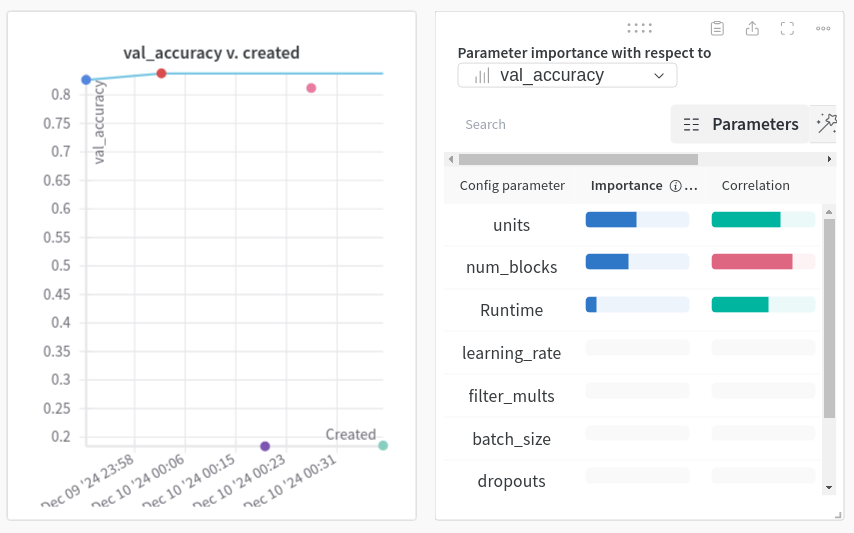
From the correlation and importance maps we can also see which parameters that have correlation and importance of the models. This is important to gain the insight to the models that we have been trained.
We can see the combination of parameters respect to the val accuracy. From this we can also mentioned some null values which is incomplete of the training because of the OOM (Out Of Memory) because of the parameters that lead to high complexity such as number of block and number of units (neurons).
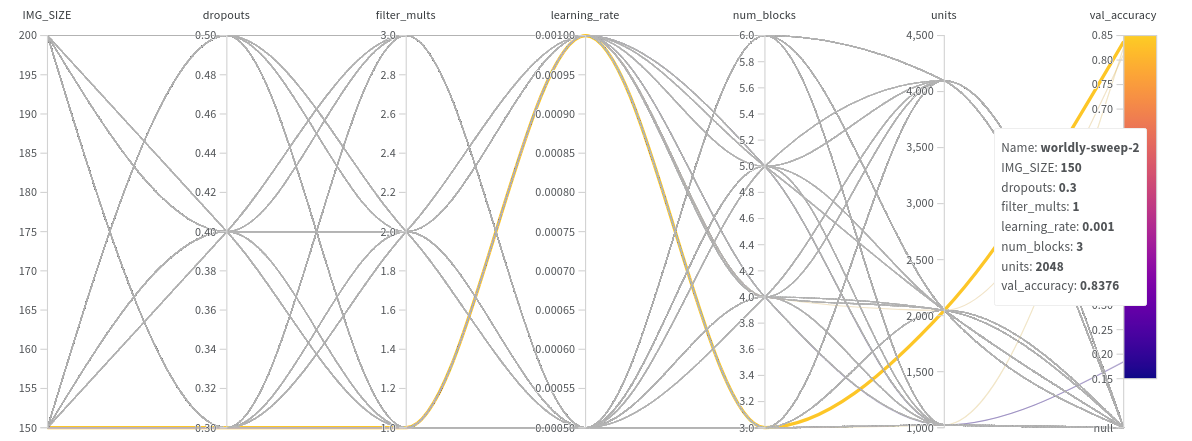
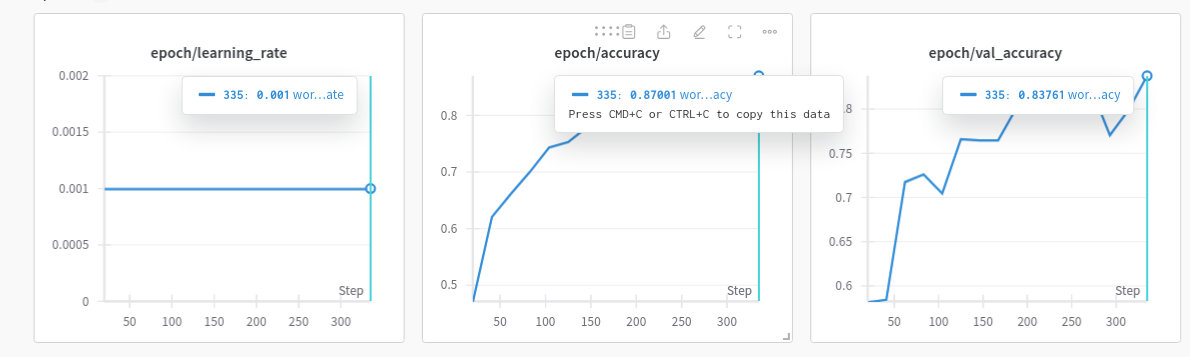
Based on the val accuracy, you can find that the best parameters is image size = 150, dropout = 0.3, filter mult = 1, learning rate = 0.001, num blocks = 3 and units = 2048. For more detail you can also read more about on the section wordly-sweep-2 (which may different) on the wandb
Summary
In summary, we already done hyperparameter tuning using wandb and monitore the performance of the model. This is important in machine learning pipeline to gain and find the best parameters on the models. Although there are several problem like OOM on the model, we already gain insight about the model behaviors.
Code Link :