保留正文与补采附件。源页面当前未重新核验;具体限制见交付清单。
 We value your privacy
We use cookies to enhance your browsing experience, serve personalised ads or content, and analyse our traffic. By clicking "Accept All", you consent to our use of cookies.
Customise Reject All Accept All
Customise Consent Preferences
We value your privacy
We use cookies to enhance your browsing experience, serve personalised ads or content, and analyse our traffic. By clicking "Accept All", you consent to our use of cookies.
Customise Reject All Accept All
Customise Consent Preferences  We use cookies to help you navigate efficiently and perform certain functions. You will find detailed information about all cookies under each consent category below.
The cookies that are categorised as "Necessary" are stored on your browser as they are essential for enabling the basic functionalities of the site. ... Show more
NecessaryAlways Active
Necessary cookies are required to enable the basic features of this site, such as providing secure log-in or adjusting your consent preferences. These cookies do not store any personally identifiable data.
We use cookies to help you navigate efficiently and perform certain functions. You will find detailed information about all cookies under each consent category below.
The cookies that are categorised as "Necessary" are stored on your browser as they are essential for enabling the basic functionalities of the site. ... Show more
NecessaryAlways Active
Necessary cookies are required to enable the basic features of this site, such as providing secure log-in or adjusting your consent preferences. These cookies do not store any personally identifiable data.
-
Cookie
BCTempID
-
Duration
10 minutes
-
Description
No description available.
-
Cookie
__cf_bm
-
Duration
1 hour
-
Description
This cookie, set by Cloudflare, is used to support Cloudflare Bot Management.
-
Cookie
AWSALBCORS
-
Duration
7 days
-
Description
Amazon Web Services set this cookie for load balancing.
-
Cookie
_cfuvid
-
Duration
session
-
Description
Cloudflare sets this cookie to track users across sessions to optimize user experience by maintaining session consistency and providing personalized services
-
Cookie
li_gc
-
Duration
6 months
-
Description
Linkedin set this cookie for storing visitor's consent regarding using cookies for non-essential purposes.
-
Cookie
__hssrc
-
Duration
session
-
Description
This cookie is set by Hubspot whenever it changes the session cookie. The __hssrc cookie set to 1 indicates that the user has restarted the browser, and if the cookie does not exist, it is assumed to be a new session.
-
Cookie
__hssc
-
Duration
1 hour
-
Description
HubSpot sets this cookie to keep track of sessions and to determine if HubSpot should increment the session number and timestamps in the __hstc cookie.
-
Cookie
wpEmojiSettingsSupports
-
Duration
session
-
Description
WordPress sets this cookie when a user interacts with emojis on a WordPress site. It helps determine if the user's browser can display emojis properly.
-
Cookie
BCSessionID
-
Duration
1 year 1 month 4 days
-
Description
Blueconic sets this cookie as a unique identifier for the BlueConic profile.
-
Cookie
_octo
-
Duration
1 year
-
Description
No description available.
-
Cookie
logged_in
-
Duration
1 year
-
Description
No description available.
-
Cookie
__Secure-YEC
-
Duration
past
-
Description
YouTube sets this cookie to stores the user's video player preferences using embedded YouTube video
-
Cookie
__eoi
-
Duration
6 months
-
Description
Description is currently not available.
-
Cookie
AWSALBTGCORS
-
Duration
7 days
-
Description
No description available.
-
Cookie
login-status-p
-
Duration
past
-
Description
Description is currently not available.
-
Cookie
AWSALBTG
-
Duration
7 days
-
Description
No description available.
-
Cookie
csrf_token
-
Duration
session
-
Description
No description available.
-
Cookie
token_v2
-
Duration
1 day
-
Description
Description is currently not available.
-
Cookie
D
-
Duration
1 year
-
Description
Description is currently not available.
-
Cookie
PHPSESSID
-
Duration
session
-
Description
This cookie is native to PHP applications. The cookie stores and identifies a user's unique session ID to manage user sessions on the website. The cookie is a session cookie and will be deleted when all the browser windows are closed.
-
Cookie
VISITOR_PRIVACY_METADATA
-
Duration
6 months
-
Description
YouTube sets this cookie to store the user's cookie consent state for the current domain.
-
Cookie
cookietest
-
Duration
session
-
Description
The cookietest cookie is typically used to determine whether the user's browser accepts cookies, essential for website functionality and user experience.
-
Cookie
__Host-airtable-session
-
Duration
1 year
-
Description
This cookie is used to enable us to integrate the services of Airtable.
-
Cookie
__Host-airtable-session.sig
-
Duration
1 year
-
Description
This cookie is used to enable us to integrate the services of Airtable.
-
Cookie
m
-
Duration
1 year 1 month 4 days
-
Description
Stripe sets this cookie for fraud prevention purposes. It identifies the device used to access the website, allowing the website to be formatted accordingly.
-
Cookie
BIGipServer*
-
Duration
session
-
Description
Marketo sets this cookie to collect information about the user's online activity and build a profile about their interests to provide advertisements relevant to the user.
-
Cookie
__cfruid
-
Duration
session
-
Description
Cloudflare sets this cookie to identify trusted web traffic.
-
Cookie
_GRECAPTCHA
-
Duration
6 months
-
Description
Google Recaptcha service sets this cookie to identify bots to protect the website against malicious spam attacks.
-
Cookie
__Secure-YNID
-
Duration
6 months
-
Description
Google cookie used to protect user security and prevent fraud, especially during the login process.
-
Cookie
cookieyes-consent
-
Duration
1 year
-
Description
CookieYes sets this cookie to remember users' consent preferences so that their preferences are respected on subsequent visits to this site. It does not collect or store any personal information about the site visitors.
Functional
Functional cookies help perform certain functionalities like sharing the content of the website on social media platforms, collecting feedback, and other third-party features.
-
Cookie
lidc
-
Duration
1 day
-
Description
LinkedIn sets the lidc cookie to facilitate data center selection.
-
Cookie
brw
-
Duration
1 year
-
Description
No description available.
-
Cookie
brwConsent
-
Duration
5 minutes
-
Description
Description is currently not available.
-
Cookie
WMF-Uniq
-
Duration
1 year
-
Description
Description is currently not available.
-
Cookie
loom_anon_comment
-
Duration
1 year
-
Description
No description available.
-
Cookie
loom_referral_video
-
Duration
session
-
Description
Description is currently not available.
-
Cookie
VISITOR_INFO1_LIVE
-
Duration
6 months
-
Description
A cookie set by YouTube to measure bandwidth that determines whether the user gets the new or old player interface.
-
Cookie
yt-remote-connected-devices
-
Duration
Never Expires
-
Description
YouTube sets this cookie to store the user's video preferences using embedded YouTube videos.
-
Cookie
ytidb::LAST_RESULT_ENTRY_KEY
-
Duration
Never Expires
-
Description
The cookie ytidb::LAST_RESULT_ENTRY_KEY is used by YouTube to store the last search result entry that was clicked by the user. This information is used to improve the user experience by providing more relevant search results in the future.
-
Cookie
yt-remote-device-id
-
Duration
Never Expires
-
Description
YouTube sets this cookie to store the user's video preferences using embedded YouTube videos.
-
Cookie
yt-remote-session-name
-
Duration
session
-
Description
The yt-remote-session-name cookie is used by YouTube to store the user's video player preferences using embedded YouTube video.
-
Cookie
yt-remote-fast-check-period
-
Duration
session
-
Description
The yt-remote-fast-check-period cookie is used by YouTube to store the user's video player preferences for embedded YouTube videos.
-
Cookie
yt-remote-session-app
-
Duration
session
-
Description
The yt-remote-session-app cookie is used by YouTube to store user preferences and information about the interface of the embedded YouTube video player.
-
Cookie
yt-remote-cast-available
-
Duration
session
-
Description
The yt-remote-cast-available cookie is used to store the user's preferences regarding whether casting is available on their YouTube video player.
-
Cookie
yt-remote-cast-installed
-
Duration
session
-
Description
The yt-remote-cast-installed cookie is used to store the user's video player preferences using embedded YouTube video.
-
Cookie
cp_session
-
Duration
3 months
-
Description
Codepen sets this cookie for Help systems found in the website.
-
Cookie
loid
-
Duration
1 year 1 month 4 days
-
Description
This cookie is set by the Reddit. The cookie enables the sharing of content from the website onto the social media platform.
Analytics
Analytical cookies are used to understand how visitors interact with the website. These cookies help provide information on metrics such as the number of visitors, bounce rate, traffic source, etc.
-
Cookie
__hstc
-
Duration
6 months
-
Description
Hubspot set this main cookie for tracking visitors. It contains the domain, initial timestamp (first visit), last timestamp (last visit), current timestamp (this visit), and session number (increments for each subsequent session).
-
Cookie
hubspotutk
-
Duration
6 months
-
Description
HubSpot sets this cookie to keep track of the visitors to the website. This cookie is passed to HubSpot on form submission and used when deduplicating contacts.
-
Cookie
_ga
-
Duration
1 year 1 month 4 days
-
Description
Google Analytics sets this cookie to calculate visitor, session and campaign data and track site usage for the site's analytics report. The cookie stores information anonymously and assigns a randomly generated number to recognise unique visitors.
-
Cookie
ga*
-
Duration
1 year 1 month 4 days
-
Description
Google Analytics sets this cookie to store and count page views.
-
Cookie
__Host-psifi.analyticsTrace
-
Duration
6 hours
-
Description
Description is currently not available.
-
Cookie
__Host-psifi.analyticsTraceV2
-
Duration
6 hours
-
Description
Description is currently not available.
-
Cookie
_gh_sess
-
Duration
session
-
Description
GitHub sets this cookie for temporary application and framework state between pages like what step the user is on in a multiple step form.
-
Cookie
YSC
-
Duration
session
-
Description
YSC cookie is set by Youtube and is used to track the views of embedded videos on Youtube pages.
-
Cookie
ajs_anonymous_id
-
Duration
1 year
-
Description
This cookie is set by Segment to count the number of people who visit a certain site by tracking if they have visited before.
-
Cookie
vuid
-
Duration
1 year 1 month 4 days
-
Description
Vimeo installs this cookie to collect tracking information by setting a unique ID to embed videos on the website.
Performance
Performance cookies are used to understand and analyse the key performance indexes of the website which helps in delivering a better user experience for the visitors.
-
Cookie
AWSALB
-
Duration
7 days
-
Description
AWSALB is an application load balancer cookie set by Amazon Web Services to map the session to the target.
-
Cookie
acq
-
Duration
past
-
Description
Description is currently not available.
-
Cookie
acq.sig
-
Duration
past
-
Description
Description is currently not available.
-
Cookie
ptc
-
Duration
2 years
-
Description
No description available.
Advertisement
Advertisement cookies are used to provide visitors with customised advertisements based on the pages you visited previously and to analyse the effectiveness of the ad campaigns.
-
Cookie
muc_ads
-
Duration
1 year 1 month 4 days
-
Description
Twitter sets this cookie to collect user behaviour and interaction data to optimize the website.
-
Cookie
guest_id_marketing
-
Duration
1 year 1 month 4 days
-
Description
Twitter sets this cookie to identify and track the website visitor.
-
Cookie
guest_id_ads
-
Duration
1 year 1 month 4 days
-
Description
Twitter sets this cookie to identify and track the website visitor.
-
Cookie
personalization_id
-
Duration
1 year 1 month 4 days
-
Description
Twitter sets this cookie to integrate and share features for social media and also store information about how the user uses the website, for tracking and targeting.
-
Cookie
guest_id
-
Duration
1 year 1 month 4 days
-
Description
Twitter sets this cookie to identify and track the website visitor. It registers if a user is signed in to the Twitter platform and collects information about ad preferences.
-
Cookie
bcookie
-
Duration
1 year
-
Description
LinkedIn sets this cookie from LinkedIn share buttons and ad tags to recognize browser IDs.
-
Cookie
__Secure-ROLLOUT_TOKEN
-
Duration
6 months
-
Description
YouTube sets this cookie to manage feature rollout and experimentation. It helps Google control which new features or interface changes are shown to users as part of testing and staged rollouts, ensuring consistent experience for a given user during an experiment.
-
Cookie
yt.innertube::nextId
-
Duration
Never Expires
-
Description
YouTube sets this cookie to register a unique ID to store data on what videos from YouTube the user has seen.
-
Cookie
yt.innertube::requests
-
Duration
Never Expires
-
Description
YouTube sets this cookie to register a unique ID to store data on what videos from YouTube the user has seen.
-
Cookie
session_tracker
-
Duration
session
-
Description
This cookie is set by the Reddit. This cookie is used to identify trusted web traffic. It also helps in adverstising on the website.
-
Cookie
edgebucket
-
Duration
session
-
Description
Reddit sets this cookie to save the information about a log-on Reddit user, for the purpose of advertisement recommendations and updating the content.
-
Cookie
did
-
Duration
1 year
-
Description
Arbor sets this cookie to show targeted ads to site visitors.This cookie expires after 2 months or 1 year.
Uncategorised
Other uncategorised cookies are those that are being analysed and have not been classified into a category as yet.
No cookies to display.
Reject All Save My Preferences Accept All
Toggle SearchToggle Mobile Navigation
Publish AI, ML & data-science insights to a global community of data professionals.
Sign inSubmit an Article
LatestEditor's PicksNewsletterShipAI
Write For TDS
LinkedInXToggle Search
Deep Learning
Efficient Image Segmentation Using PyTorch: Part 1
Concepts and Ideas
Dhruv Matani
June 27, 202319 min read
In this 4-part series, we'll implement image segmentation step by step from scratch using deep learning techniques in PyTorch. We'll start the series with the basic concepts and ideas needed for image segmentation in this article.
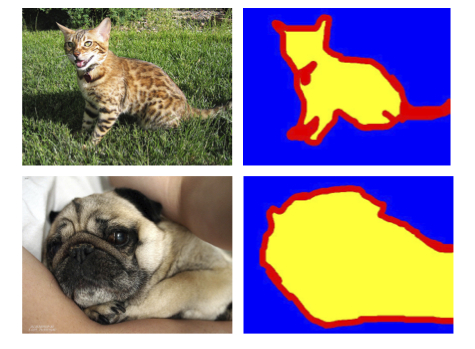 Figure 1: Pet images and their segmentation masks (Source: The Oxford-IIIT Pet Dataset)
Co-authored withNaresh Singh
Image Segmentation is a technique to isolate pixels belonging to specific objects in an image. Isolation of object pixels opens doors to interesting applications. For example, in Figure 1, the images on the right are the masks corresponding to the pet images on the left where the yellow pixels belong to the pet. Once the pixels are identified, we could easily make the pet bigger or change the image backgrounds. This technique is widely used in face filter features in several social media applications.
Our goal at the end of this article series is to give the reader a sense of all the steps it takes to build a vision AI model and run experiments with different settings using PyTorch.
Figure 1: Pet images and their segmentation masks (Source: The Oxford-IIIT Pet Dataset)
Co-authored withNaresh Singh
Image Segmentation is a technique to isolate pixels belonging to specific objects in an image. Isolation of object pixels opens doors to interesting applications. For example, in Figure 1, the images on the right are the masks corresponding to the pet images on the left where the yellow pixels belong to the pet. Once the pixels are identified, we could easily make the pet bigger or change the image backgrounds. This technique is widely used in face filter features in several social media applications.
Our goal at the end of this article series is to give the reader a sense of all the steps it takes to build a vision AI model and run experiments with different settings using PyTorch.
Learn this step by step with the interactive Machine Learning roadmap.
Articles in this series
This series is for readers at all experience levels with deep learning. If you want to learn about the practice of deep learning and vision AI along with some solid theory and hands-on experience, you've come to the right place! This is expected to be a 4-part series with the following articles:
- Concepts and Ideas (this article)
- A CNN-based model
- Depthwise separable convolutions
- A Vision Transformer-based model
Introduction to Image Segmentation
Image segmentation partitions or segments an image into regions that correspond to objects, backgrounds, and boundaries. Take a look at Figure 2 which shows a city scene. It marks regions corresponding to cars, motorcycles, trees, buildings, sidewalks, and other interesting objects with different color masks. These regions are identified through image segmentation techniques.
Historically, we have used specialized image processing tools and pipelines to break down an image into regions. However, due to the incredible growth of visual data in the last two decades, deep learning has emerged as a go-to solution to the image segmentation task. It significantly reduces the reliance on an expert to build a domain-specific image segmentation strategy as was done in the past. A deep learning practitioner can train an image segmentation model if enough training data is available for the task.
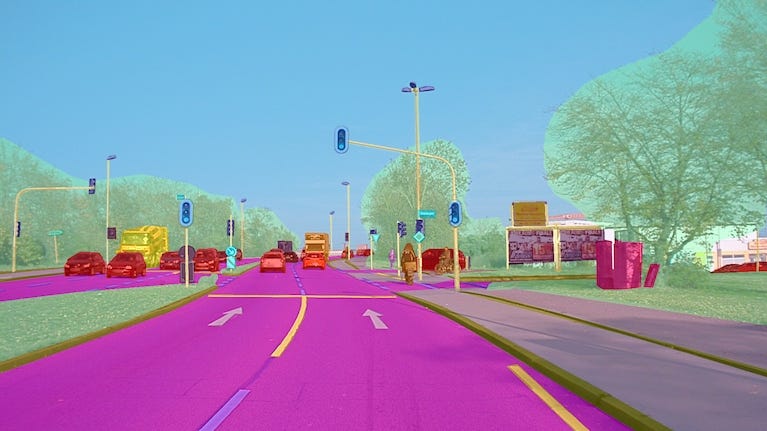 Figure 2: A segmented scene from the a2d2 dataset (CC BY-ND 4.0)
What are the applications of image segmentation?
Image Segmentation has applications in diverse fields such as communication, agriculture, transportation, healthcare, and more. Moreover, its applications are growing with the growth of visual data. Here are a few examples:
- In self-driving cars , a deep learning model constantly processes the video feed from the car cameras to segment the scene into objects such as cars, pedestrians, and traffic lights which is essential for the car to operate safely.
- In medical imaging , image segmentation assists doctors to identify areas in the medical scans that correspond to tumors, lesions, and other abnormalities.
- In Zoom video calls , it is used to preserve an individual's privacy by replacing the background with virtual scenes.
- In agriculture , the information about weed and crop regions identified using image segmentation is used to maintain healthy crop yields.
You can read more details about the practical applications of image segmentation on this page by v7labs.
What are the different types of image segmentation tasks?
There are many different types of image segmentation tasks, each with its advantages and disadvantages. The 2 most common types of image segmentation tasks are:
- Class or Semantic segmentation : Class Segmentation assigns a semantic class such as background , road , car, or person to each image pixel. If the image has 2 cars in it, then the pixels corresponding to both cars will be tagged as car pixels. It is often used for tasks such as autonomous driving and scene understanding.
- Object or Instance segmentation : Object segmentation identifies objects and assigns a mask to each unique object in an image. If the image has 2 cars in it, then the pixels corresponding to each car will be identified as belonging to separate objects. Object segmentation is often used for tracking individual objects, such as a self-driving car programmed to follow a specific car ahead of it
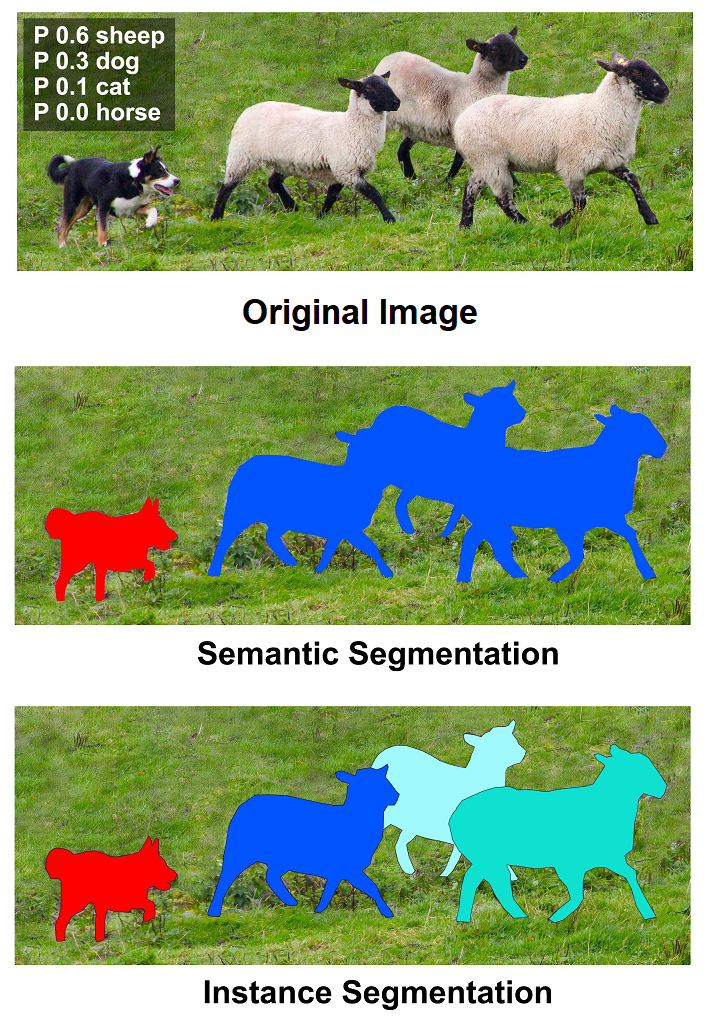 Figure 3: Object and class segmentations (Source: MS Coco - Creative Commons Attribution license)
In this series, we'll focus on class segmentation.
Figure 3: Object and class segmentations (Source: MS Coco - Creative Commons Attribution license)
In this series, we'll focus on class segmentation.
Decisions needed to implement efficient image segmentation
Efficiently training your model for speed and accuracy involves making numerous important decisions during the lifecycle of your project. This includes (but is not limited to):
- Choice of your deep learning framework
- Choosing a good model architecture
- Selecting an effective loss function that optimizes the aspect you care about
- Avoiding overfitting and underfitting
- Evaluating the model's accuracy
In the rest of this article, we'll dive deeper into each of the aspects mentioned above and provide numerous links to articles that discuss each topic in a lot more detail that can be covered here.
PyTorch for efficient image segmentation
What is PyTorch?
"PyTorch is an open source deep learning framework built to be flexible and modular for research, with the stability and support needed for production deployment. PyTorch provides a Python package for high-level features like tensor computation (like NumPy) with strong GPU acceleration and TorchScript for an easy transition between eager mode and graph mode. With the latest release of PyTorch, the framework provides graph-based execution, distributed training, mobile deployment, and quantization." (source: Meta AI page on PyTorch)
PyTorch is written in Python and C++, which makes it easy to use and learn as well as efficient to run. It supports a wide range of hardware platforms, including (server and mobile) CPUs, GPUs, and TPUs.
Why is PyTorch a good choice for image segmentation?
PyTorch is a popular choice for deep learning research and development, as it provides a flexible and powerful environment for creating and training neural networks. It is a great choice of framework for implementing deep learning-based image segmentation due to the following features:
- Flexibility : PyTorch is a flexible framework that allows you to create and train neural networks in a variety of ways. You can use pre-trained models, or you can create your own from scratch very easily
- Backend support : PyTorch supports multiple backends such as GPU/TPU hardware
- Domain libraries : PyTorch has a rich set of domain libraries that make working with specific data verticals very easy. For example, for vision (image/video) related AI, PyTorch provides a library called torchvision that we'll use extensively throughout this series
- Ease of use andcommunityadoption : PyTorch is an easy-to-use framework that is well-documented and has a large community of users and developers. Many researchers use PyTorch for their experiments, and the results in their published papers have an implementation of the model in PyTorch freely available
Choice of dataset
We're going to use the Oxford IIIT Pet dataset (licensed under CC BY-SA 4.0) for class segmentation. This dataset has 3680 images in the training set, and each image has a segmentation trimap associated with it. The trimap is one of 3 pixels classes:
- Pet
- Background
- Border
We choose this dataset since it is sufficiently diverse to provide us with a non-trivial class segmentation task. Additionally, it's not so complex that we end up spending time on things like dealing with class imbalance, etc... and lose track of the main problem we want to learn about and solve; namely class segmentation.
Other popular datasets used for image segmentation tasks include:
- Pascal VOC (visual object classes)
- MS Coco
- Cityscapes
Efficient image segmentation with PyTorch
In this series, we'll train multiple models for class segmentation from scratch. There are many considerations to account for when building and training a model from scratch. Below, we will look at some of the key decisions that you need to make when doing so.
Choosing the right model for your task
There are many factors to consider when choosing the right deep-learning model for image segmentation. Some of the most important factors include:
- The type of image segmentation task : There are two main types of image segmentation tasks: class (semantic) segmentation and object (instance) segmentation. Since we're focusing on the simpler class segmentation problem, we shall consider modeling our problem accordingly.
- Size and complexity of the dataset : The size and complexity of the dataset will affect the complexity of the model that we need to use. For example, if we are working with images with a small spatial dimension, we may use a simpler (or shallower) model, such as a fully convolutional network (FCN). If we are working with a large and complex dataset, we may use a more complex (or deeper) model such as a U-Net.
- Availability of pre-trained models : There are many pre-trained models available for image segmentation. These models can be used as a starting point for our own model or we can use them directly. However, if we use a pre-trained model, we may be constrained by the spatial dimensions of the input image to the model. In this series, we shall focus on training a model from scratch.
- Computational resources available : Deep learning models can be computationally expensive to train. If we have limited computational resources, we may need to choose simpler models or more efficient model architectures.
In this series, we are going to work with the Oxford IIIT Pet dataset since it's big enough for us to be able to train a medium size model and require the use of a GPU. We would highly recommend creating an account on kaggle.com or use Google Colab's free GPU for running the notebooks and code referenced in this series.
Model architectures
Here are some of the most popular deep learning model architectures for image segmentation:
- U-Net: The U-Net is a convolutional neural network that is commonly used for image segmentation tasks. It uses skip connections, which can help train the network faster and result in better overall accuracy. If you have to choose, U-Net is always an excellent default choice!
- FCN: The Fully Convolutional Network (FCN) is a fully convolutional network, but it is not as deep as the U-Net. The lack of depth is mainly due to the fact that at higher network depths, the accuracy drops. This makes it faster to train, but it may not be as accurate as the U-Net.
- SegNet: SegNet is a popular model architecture similar to U-Net, and uses lesser activation memory than U-Net. We shall use SegNet in this series.
- Vision Transformer (ViT): Vision Transformers have recently gained popularity due to their simple structure and applicability of the attention mechanism to text, vision, and other domains. Vision Transformers can be more efficient (compared to CNNs) for both training and inference, but historically have needed more data to train compared to convolutional neural networks. We shall also use ViT in this series.
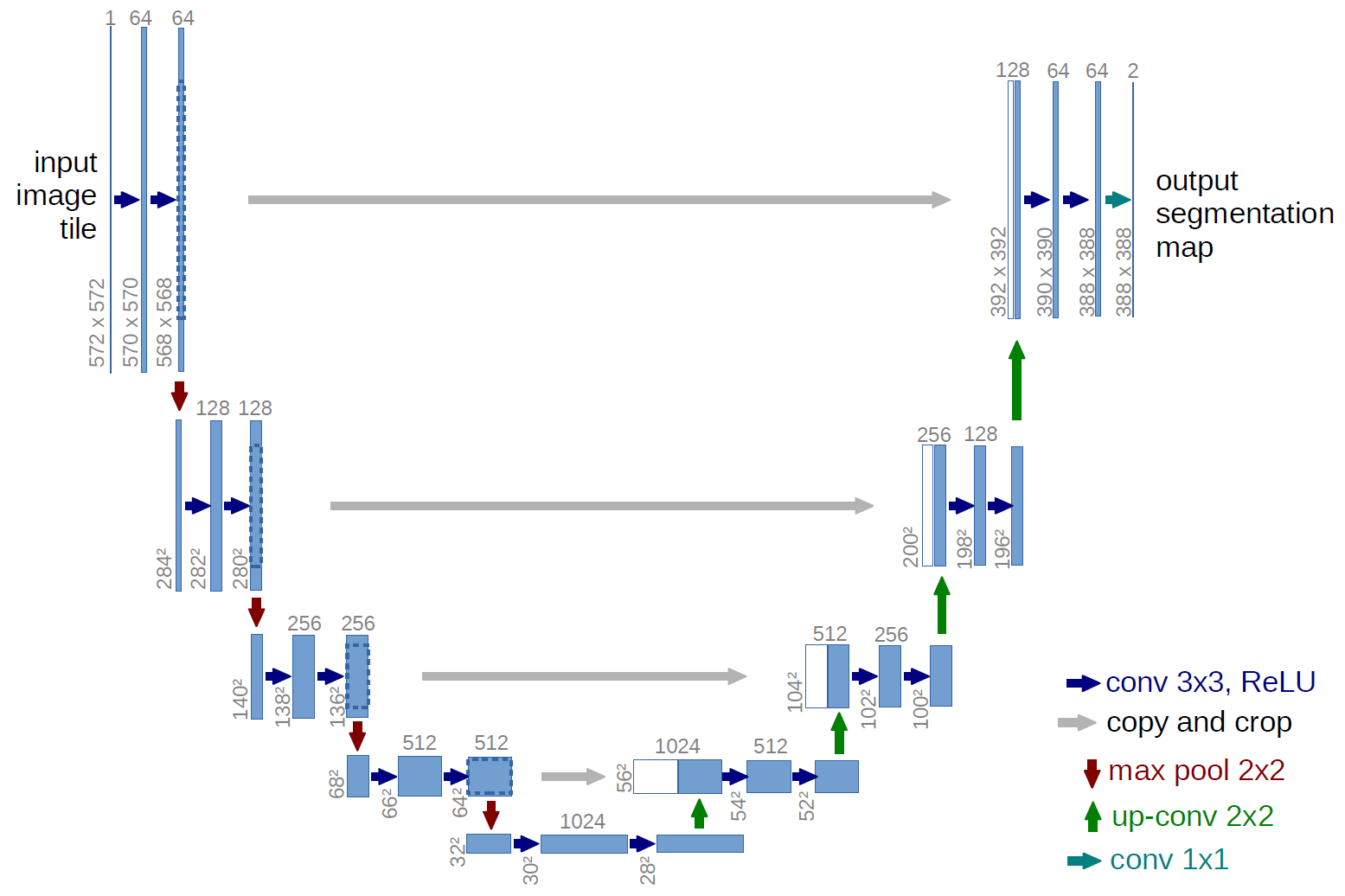 Figure 4: The U-Net model architecture. Source: The University of Freiburg, original author(s) of U-Net.
These are just a few of the many deep learning models that can be used for image segmentation. The best model for your specific task will depend on the factors mentioned earlier, on the specific task, and your own experiments.
Figure 4: The U-Net model architecture. Source: The University of Freiburg, original author(s) of U-Net.
These are just a few of the many deep learning models that can be used for image segmentation. The best model for your specific task will depend on the factors mentioned earlier, on the specific task, and your own experiments.
Choosing the right loss function
The choice of loss function for image segmentation tasks is an important one, as it can have a significant impact on the performance of the model. There are many different loss functions available, each with its own advantages and disadvantages. The most popular loss functions for image segmentation are:
- Cross-entropy loss: Cross-entropy loss is a measure of the difference between the predicted probability distribution and the ground truth probability distribution
- IoU loss : IoU loss measures the amount of overlap between the predicted mask and ground-truth mask per class. IoU loss penalizes cases where either the prediction or recall would suffer. IoU as defined is not differentiable, so we need to slightly tweak it to use it as a loss function
- Dice loss: Dice loss is also a measure of the overlap between the predicted mask and the ground truth mask.
- Tversky loss: Tversky loss is proposed as a robust loss function that can be used to handle imbalanced datasets.
- Focal loss: Focal loss is designed to focus on hard examples, which are examples that are difficult to classify. This can be helpful for improving the performance of the model on challenging datasets.
The best loss function for a particular task will depend on the specific requirements of the task. For example, if accuracy is more important, then IoU loss or Dice loss may be better choices. If the task is imbalanced, then Tversky loss or Focal loss may be good choices. The specific loss function used may impact the rate of convergence of your model when training it.
The loss function is a hyperparameter of your model, and using a different loss based on the results we see can allow us to reduce the loss faster and improve the model's accuracy.
Default : In this series, we shall use cross entropy loss, since it's always a good default to choose when the results are not known.
You can use the following resources to learn more about loss functions.
- PyTorch Loss Functions: The Ultimate Guide
- Torchvision - Losses
- Torchmetrics
Let's take a detailed look at the IoU Loss we define below as a robust alternative to the Cross Entropy Loss for segmentation tasks.
The Custom IoU Loss
IoU is defined as intersection over union. For image segmentation tasks, we can compute this by computing (for each class), the intersection of pixels in that class as predicted by the model and in the ground truth segmentation mask.
For example, if we have 2 classes:
- Background
- Person
Then we can determine which pixels were classified as a person, and compare that with the ground truth pixels for a person, and compute the IoU for the person class. Similarly, we can compute the IoU for the background class.
Once we have these class-specific IoU metrics, we can choose to average them unweighted or weigh them before averaging them to account for any sort of class imbalance as we saw in the example earlier.
The IoU metric as defined requires us to compute hard labels for each metric. This requires the use of the argmax() function, which isn't differentiable, so we can't use this metric as a loss function. Hence, instead of using hard labels, we apply softmax() and use the predicted probabilities as soft labels to compute the IoU metric. This results in a differentiable metric that we can then compute the loss from. Hence, sometimes, the IoU metric is also known as the soft-IoU-metric when used in the context of a loss function.
If we have a metric (M) that takes values between 0.0 and 1.0, we can compute the loss (L) as:
L = 1 - M
However, here's another trick one can use to convert a metric into a loss if your metric has the value between 0.0 and 1.0. Compute:
L = -log(M)
I.e. compute the negative log of the metric. This is meaningfully different from the previous formulation, and you can read about it [here](https://towardsdatascience.com/why-we-care-about-the-log-loss-50c00c8e777c) and here. Basically, it results in better learning for your model.
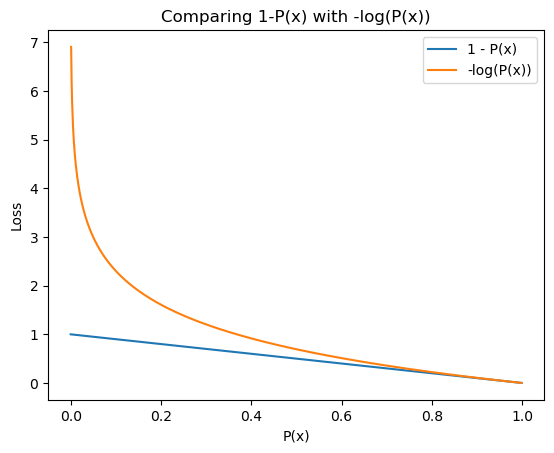 Figure 6: Comparing the loss resulting from 1-P(x) with -log(P(x)). Source: Author(s).
Using IoU as our loss also brings the loss function closer to capturing what we really care about. There are pros and cons of using an evaluation metric as the loss function. If you're interested in exploring this space more, you can start with this discussion on stackexchange.
Figure 6: Comparing the loss resulting from 1-P(x) with -log(P(x)). Source: Author(s).
Using IoU as our loss also brings the loss function closer to capturing what we really care about. There are pros and cons of using an evaluation metric as the loss function. If you're interested in exploring this space more, you can start with this discussion on stackexchange.
Data Augmentation
To train your model efficiently and effectively for good accuracy, one needs to be mindful of the amount and kind of training data used to train the model. The choice of training data used will significantly impact the final model's accuracy, so if there's one thing you wish to take away from this article series then this should be it!
Typically, we'd split our data into 3 parts with the parts being roughly in the proportions mentioned below.
- Training (80%)
- Validation (10%)
- Test (10%)
You'd train your model on the training set, evaluate accuracy on the validation set, and repeat the process till you're happy with the reported metrics. Only then would you evaluate the model on the test set, and then report the numbers. This is done to prevent any sort of bias from creeping into your model's architecture and hyperparameters used during training and evaluation. In general, the more you tweak your setup based on the outcomes you see with the test data, the less reliable your results will get. Hence, we must limit our decision making to only the results we see on the training and validation datasets.
In this series, we shall not use a test dataset. Instead, we'll use our test dataset as the validation dataset, and apply data augmentation on the test dataset so that we're always validating our models on data that's slightly different. This kind of prevents us from overfitting our decisions on the validation dataset. This is a bit of a hack, and we're doing this just for expediency and as a short-cut. For production model development, you should try to stick with the standard recipe mentioned above.
The dataset we're going to use in this series has 3680 images in the training set. While this may seem like a large number of images, we want to make sure that our model doesn't overfit on these images since we'll be training the model for numerous epochs.
In a single training epoch, we train the model on the entire training dataset, and we'd typically train models in production for 60 or more epochs. In this series, we shall train the model only for 20 epochs for faster iteration times. To prevent overfitting , we'll employ a technique called data augmentation that is used to generate new input data from existing input data. The basic idea behind data augmentation for image inputs is that if you change the image slightly, it feels like a new image to the model, but one can reason about whether the expected outputs would be the same. Here are some examples of data augmentations that we'll apply in this series.
- Random horizontal flip
- Random Color jitter
While we're going to use the Torchvision library for applying the data augmentations above, we'd encourage you to evaluate the Albumentations data augmentation library for vision tasks as well. Both libraries have a rich set of transformations available for use with image data. We personally continue to use Torchvision simply because it's what we started with. Albumentations supports richer primitives for data augmentation that can make changes to the input image as well as the ground truth labels or masks at the same time. For example, if you were to resize or flip an image, you'd need to make the same change to the ground truth segmentation mask. Albumentations can do this for you out of the box.
Broadly speaking, both libraries support transformations that are applied to the image either at the pixel-level or change the spatial dimensions of the image. The pixel-level transforms are called color transforms by torchvision, and the spatial transforms are called Geometric transforms by torchvision.
Below, we shall see some examples of both pixel-level as well as geometric transforms applied by the Torchvision and Albumentations libraries.
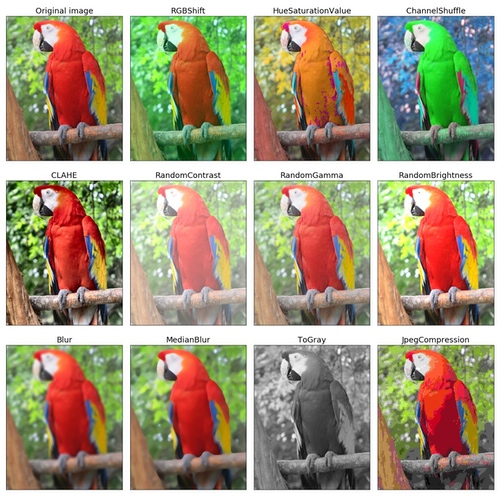 Figure 7: Examples of pixel level data augmentations applied to images using Albumentations. Source: Albumentations
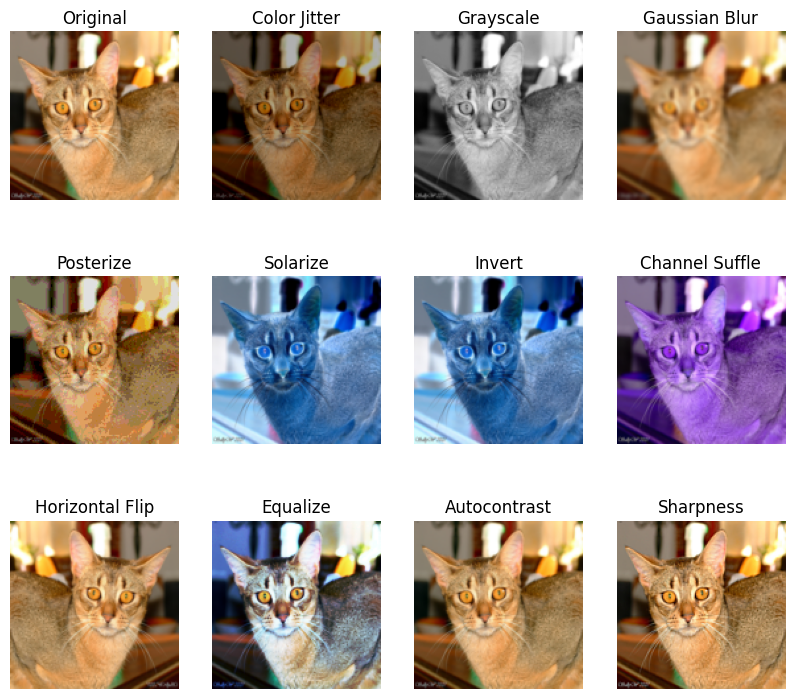 Figure 8: Examples of data augmentations applied to images using Torchvision transforms. Source: Author(s) (notebook)
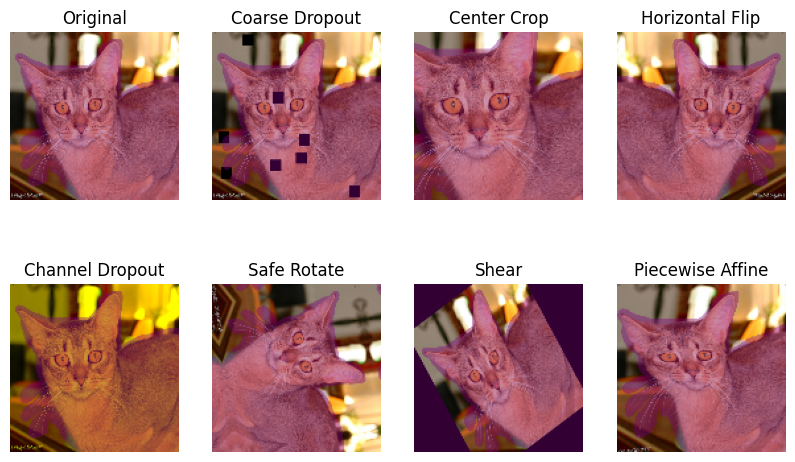 Figure 9: Examples of spatial level transforms applied using Albumentations. Source: Author(s) (notebook)
Evaluating your model's performance
When evaluating your model's performance, you'd want to know how it performs on a metric that is representative of the quality of the model's performance on real world data. For example, for the image segmentation task, we'd want to know how accurately a model is able to predict the correct class for a pixel. Hence, we say that Pixel Accuracy is the validation metric for this model.
You could use your evaluation metric as the loss function (why not optimize what you really care about!) except that this may not always be possible.
In addition to Accuracy, we'll also track the IoU metric (also called Jaccard Index), and the Custom IoU metric we defined above.
To read more about various accuracy metrics applicable to image segmentation tasks, please see:
The downside of using pixel accuracy as a performance metric
While the accuracy metric may be a good default choice to measure the performance of image segmentation tasks, it does have its own drawbacks, which may be significant based on your specific situation.
For example, consider an image segmentation task to identify a person's eyes in a picture, and mark those pixels accordingly. The model will hence classify each pixels as either one of:
- Background
- Eye
Assume that there's just 1 person in each image, and 98% of the pixels don't correspond to an eye. In this case, the model can simply learn to predict every pixel as being a background pixel and achieve 98% pixel accuracy on the segmentation task. Wow!
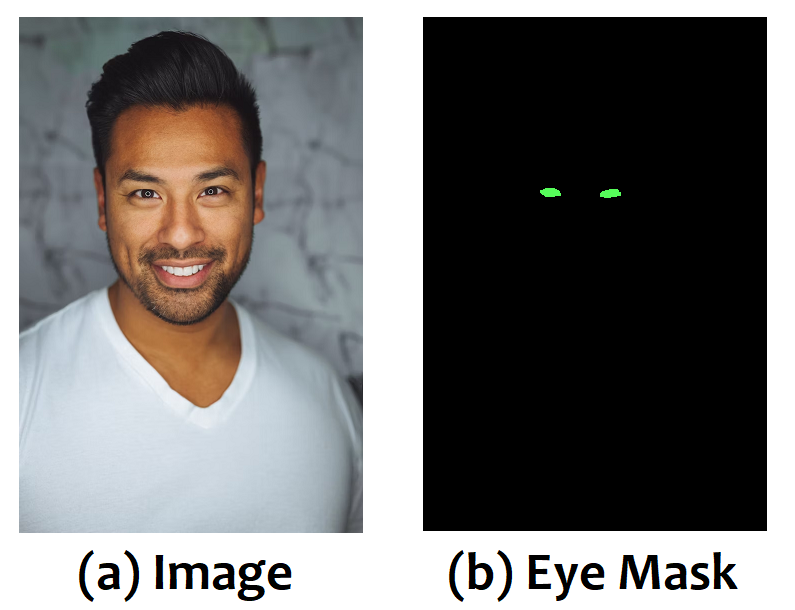 Figure 10: An image of a person's face and the corresponding segmentation mask for their eyes. You can see that the eyes occupy a very small fraction of the overall image. Source: Adapted from Unsplash
In such cases, using the IoU or Dice metric may be a much better idea, since IoU would capture how much of the prediction was correct, and wouldn't necessarily be biased by the region that each class or category occupies in the original image. You could even consider using the IoU or Dice coefficient per class as a metric. This may better capture the performance of your model for the task at hand.
When considering pixel accuracy alone, the precision and recall of the object we're looking to compute the segmentation mask for (eyes in the example above) can capture the details we're looking for.
Now that we have covered a large part of the theoretical underpinnings of image segmentation, let's take a detour into considerations related to inference and deployment of image segmentation for real-world workloads.
Figure 10: An image of a person's face and the corresponding segmentation mask for their eyes. You can see that the eyes occupy a very small fraction of the overall image. Source: Adapted from Unsplash
In such cases, using the IoU or Dice metric may be a much better idea, since IoU would capture how much of the prediction was correct, and wouldn't necessarily be biased by the region that each class or category occupies in the original image. You could even consider using the IoU or Dice coefficient per class as a metric. This may better capture the performance of your model for the task at hand.
When considering pixel accuracy alone, the precision and recall of the object we're looking to compute the segmentation mask for (eyes in the example above) can capture the details we're looking for.
Now that we have covered a large part of the theoretical underpinnings of image segmentation, let's take a detour into considerations related to inference and deployment of image segmentation for real-world workloads.
Model size and inference latency
Last but not least, we'd want to ensure that our model has a reasonable number of parameters but not too many, since we want a small and efficient model. We shall look into this aspect in greater detail in a future post related to reducing model size using efficient model architectures.
As far as inference latency is concerned, what matters is the number of mathematical operations (mult-adds) our model executes. Both the model size and mult-adds can be displayed using the torchinfo package. While mult-adds is a great proxy for determining the model's latency, there can be a large variation in latency across various backends. The only real way to determine the performance of your model on a specific backend or device is to profile and benchmark it on that specific device with the set of inputs you expect to see in production settings.
python
from torchinfo import summary
model = nn.Linear(1000, 500)
summary(
  model,
  input_size=(1, 1000),
  col_names=["kernel_size", "output_size", "num_params", "mult_adds"],
  col_width=15,
)
Output:
text
====================================================================================================
Layer (type:depth-idx)                   Kernel Shape    Output Shape    Param #         Mult-Adds
====================================================================================================
Linear                                   --              [1, 500]        500,500         500,500
====================================================================================================
Total params: 500,500
Trainable params: 500,500
Non-trainable params: 0
Total mult-adds (M): 0.50
====================================================================================================
Input size (MB): 0.00
Forward/backward pass size (MB): 0.00
Params size (MB): 2.00
Estimated Total Size (MB): 2.01
====================================================================================================
Further Reading
The following articles provide additional information regarding the basics of image segmentation. If you're the kind of person who likes reading different perspectives on the same subject, please consider reading them.
- Guide to Image Segmentation in Computer Vision: Best Practices
- An Introduction to Image Segmentation: Deep Learning vs. Traditional [+Examples]
- Image Segmentation: The Basics and 5 Key Techniques
If you wish to get your hands dirty with the Oxford IIIT Pet dataset and use torchvision and Albumentations to perform image augmentations, we have provided a starter notebook on Kaggle that you can clone and play around with. Many of the images in this article were generated by that notebook!
Article recap
Here's a quick recap of what we discussed so far.
- Image segmentation is a technique to partition an image into multiple segments (source: Wikipedia)
- There are two main types of image segmentation tasks: class (semantic) segmentation and object (instance) segmentation. Class segmentation assigns each pixel in an image to a semantic class. Object segmentation identifies each individual object in an image and assigns a mask to each unique object
- We shall use PyTorch as the deep learning framework and the Oxford IIIT Pet dataset in this series of efficient image segmentation
- There are many factors to consider when choosing the right deep learning model for image segmentation, including (but not limited to) the type of image segmentation task, the size and complexity of the dataset, the availability of pre-trained models, and the computational resources available. Some of the most popular deep learning model architectures for image segmentation include U-Net, FCN, SegNet, and Vision Transformer (ViT)
- The choice of loss function for image segmentation tasks is an important one, as it can have a significant impact on the performance of the model and on training efficiency. For image segmentation tasks, we can use cross-entropy loss, IoU Loss, Dice loss, or Focal loss (among others)
- Data augmentation is a valuable technique that is used to prevent overfitting as well as deal with insufficient training data
- Evaluating your model's performance is important for the task at hand and one must choose this metric carefully
- Model size and inference latency are vital metrics to consider when developing a model, especially if you intend it to be used in real-time applications such as face segmentation or background noise removal
In the next post, we shall look at a Convolutional Neural Network (CNN) built from scratch using PyTorch to perform image segmentation on the Oxford IIIT Pet dataset.
Register Now to Continue Reading
Unlock Towards Data Science with a Free Account
All articles on Towards Data Science are available to registered users. Create a free account today to access this article and thousands more.
Register for freeSign in to your account
 Written By
See all from Dhruv Matani
Deep LearningHands On TutorialsImage SegmentationPytorchPytorch Image Segment
Share This Article
Towards Data Science is a community publication. Submit your insights to reach our global audience and earn through the TDS Author Payment Program.
Write for TDS
Related Articles
Deep Learning
In this post, you will learn some cool command line tricks which can help you to speed up your day-to-day R&D.
Masoud Masoumi Moghadam
October 4, 20219 min read
Deep Learning
Deploy a text-to-image web app with just one command
Heiko Hotz
January 3, 20238 min read
Deep Learning
Fine-tuning VGG-16 to build Siamese Network trained on Triplet-Loss function for Face Recognition Tasks
Parth Rajesh Dedhia
September 27, 20205 min read
Deep Learning
Arguably the most essential feature representation method in Machine Learning
Prakhar Ganesh
October 14, 20195 min read
Deep Learning
Or, as I like to call it, "The black magic of discount factors"
Russo Alessio, PhD Student
June 28, 20217 min read
Deep Learning
Deep learning is revolutionizing design. These are some of the most interesting applications of deep learning in the space.
Javier Fuentes
September 30, 20215 min read
Deep Learning
Rethinking knowledge layering and construction for long-term viable AI
Gadi Singer
July 26, 202116 min read
A brief guide covering everything from modeling to deployment
Tatiana Grechishcheva
September 14, 20214 min read
Artificial Intelligence
A Simple Solution for Managing Cloud-Based ML-Training - Part 2
Chaim Rand
January 30, 202411 min read
Your home for data science and AI. The world's leading publication for data science, data analytics, data engineering, machine learning, and artificial intelligence professionals.
Subscribe to Our NewsletterWrite For TDS•About•Advertise•Privacy Policy•Terms of Use
© Insight Media Group, LLC 2026•The New Stack•roadmap.sh•Creator Network
Recommended Articles
Close