保留正文与补采附件。源页面当前未重新核验;具体限制见交付清单。
 We value your privacy
We use cookies to enhance your browsing experience, serve personalised ads or content, and analyse our traffic. By clicking "Accept All", you consent to our use of cookies.
Customise Reject All Accept All
Customise Consent Preferences
We value your privacy
We use cookies to enhance your browsing experience, serve personalised ads or content, and analyse our traffic. By clicking "Accept All", you consent to our use of cookies.
Customise Reject All Accept All
Customise Consent Preferences  We use cookies to help you navigate efficiently and perform certain functions. You will find detailed information about all cookies under each consent category below.
The cookies that are categorised as "Necessary" are stored on your browser as they are essential for enabling the basic functionalities of the site. ... Show more
NecessaryAlways Active
Necessary cookies are required to enable the basic features of this site, such as providing secure log-in or adjusting your consent preferences. These cookies do not store any personally identifiable data.
We use cookies to help you navigate efficiently and perform certain functions. You will find detailed information about all cookies under each consent category below.
The cookies that are categorised as "Necessary" are stored on your browser as they are essential for enabling the basic functionalities of the site. ... Show more
NecessaryAlways Active
Necessary cookies are required to enable the basic features of this site, such as providing secure log-in or adjusting your consent preferences. These cookies do not store any personally identifiable data.
-
Cookie
BCTempID
-
Duration
10 minutes
-
Description
No description available.
-
Cookie
__cf_bm
-
Duration
1 hour
-
Description
This cookie, set by Cloudflare, is used to support Cloudflare Bot Management.
-
Cookie
AWSALBCORS
-
Duration
7 days
-
Description
Amazon Web Services set this cookie for load balancing.
-
Cookie
_cfuvid
-
Duration
session
-
Description
Cloudflare sets this cookie to track users across sessions to optimize user experience by maintaining session consistency and providing personalized services
-
Cookie
li_gc
-
Duration
6 months
-
Description
Linkedin set this cookie for storing visitor's consent regarding using cookies for non-essential purposes.
-
Cookie
__hssrc
-
Duration
session
-
Description
This cookie is set by Hubspot whenever it changes the session cookie. The __hssrc cookie set to 1 indicates that the user has restarted the browser, and if the cookie does not exist, it is assumed to be a new session.
-
Cookie
__hssc
-
Duration
1 hour
-
Description
HubSpot sets this cookie to keep track of sessions and to determine if HubSpot should increment the session number and timestamps in the __hstc cookie.
-
Cookie
wpEmojiSettingsSupports
-
Duration
session
-
Description
WordPress sets this cookie when a user interacts with emojis on a WordPress site. It helps determine if the user's browser can display emojis properly.
-
Cookie
BCSessionID
-
Duration
1 year 1 month 4 days
-
Description
Blueconic sets this cookie as a unique identifier for the BlueConic profile.
-
Cookie
_octo
-
Duration
1 year
-
Description
No description available.
-
Cookie
logged_in
-
Duration
1 year
-
Description
No description available.
-
Cookie
__Secure-YEC
-
Duration
past
-
Description
YouTube sets this cookie to stores the user's video player preferences using embedded YouTube video
-
Cookie
__eoi
-
Duration
6 months
-
Description
Description is currently not available.
-
Cookie
AWSALBTGCORS
-
Duration
7 days
-
Description
No description available.
-
Cookie
login-status-p
-
Duration
past
-
Description
Description is currently not available.
-
Cookie
AWSALBTG
-
Duration
7 days
-
Description
No description available.
-
Cookie
csrf_token
-
Duration
session
-
Description
No description available.
-
Cookie
token_v2
-
Duration
1 day
-
Description
Description is currently not available.
-
Cookie
D
-
Duration
1 year
-
Description
Description is currently not available.
-
Cookie
PHPSESSID
-
Duration
session
-
Description
This cookie is native to PHP applications. The cookie stores and identifies a user's unique session ID to manage user sessions on the website. The cookie is a session cookie and will be deleted when all the browser windows are closed.
-
Cookie
VISITOR_PRIVACY_METADATA
-
Duration
6 months
-
Description
YouTube sets this cookie to store the user's cookie consent state for the current domain.
-
Cookie
cookietest
-
Duration
session
-
Description
The cookietest cookie is typically used to determine whether the user's browser accepts cookies, essential for website functionality and user experience.
-
Cookie
__Host-airtable-session
-
Duration
1 year
-
Description
This cookie is used to enable us to integrate the services of Airtable.
-
Cookie
__Host-airtable-session.sig
-
Duration
1 year
-
Description
This cookie is used to enable us to integrate the services of Airtable.
-
Cookie
m
-
Duration
1 year 1 month 4 days
-
Description
Stripe sets this cookie for fraud prevention purposes. It identifies the device used to access the website, allowing the website to be formatted accordingly.
-
Cookie
BIGipServer*
-
Duration
session
-
Description
Marketo sets this cookie to collect information about the user's online activity and build a profile about their interests to provide advertisements relevant to the user.
-
Cookie
__cfruid
-
Duration
session
-
Description
Cloudflare sets this cookie to identify trusted web traffic.
-
Cookie
_GRECAPTCHA
-
Duration
6 months
-
Description
Google Recaptcha service sets this cookie to identify bots to protect the website against malicious spam attacks.
-
Cookie
__Secure-YNID
-
Duration
6 months
-
Description
Google cookie used to protect user security and prevent fraud, especially during the login process.
-
Cookie
cookieyes-consent
-
Duration
1 year
-
Description
CookieYes sets this cookie to remember users' consent preferences so that their preferences are respected on subsequent visits to this site. It does not collect or store any personal information about the site visitors.
Functional
Functional cookies help perform certain functionalities like sharing the content of the website on social media platforms, collecting feedback, and other third-party features.
-
Cookie
lidc
-
Duration
1 day
-
Description
LinkedIn sets the lidc cookie to facilitate data center selection.
-
Cookie
brw
-
Duration
1 year
-
Description
No description available.
-
Cookie
brwConsent
-
Duration
5 minutes
-
Description
Description is currently not available.
-
Cookie
WMF-Uniq
-
Duration
1 year
-
Description
Description is currently not available.
-
Cookie
loom_anon_comment
-
Duration
1 year
-
Description
No description available.
-
Cookie
loom_referral_video
-
Duration
session
-
Description
Description is currently not available.
-
Cookie
VISITOR_INFO1_LIVE
-
Duration
6 months
-
Description
A cookie set by YouTube to measure bandwidth that determines whether the user gets the new or old player interface.
-
Cookie
yt-remote-connected-devices
-
Duration
Never Expires
-
Description
YouTube sets this cookie to store the user's video preferences using embedded YouTube videos.
-
Cookie
ytidb::LAST_RESULT_ENTRY_KEY
-
Duration
Never Expires
-
Description
The cookie ytidb::LAST_RESULT_ENTRY_KEY is used by YouTube to store the last search result entry that was clicked by the user. This information is used to improve the user experience by providing more relevant search results in the future.
-
Cookie
yt-remote-device-id
-
Duration
Never Expires
-
Description
YouTube sets this cookie to store the user's video preferences using embedded YouTube videos.
-
Cookie
yt-remote-session-name
-
Duration
session
-
Description
The yt-remote-session-name cookie is used by YouTube to store the user's video player preferences using embedded YouTube video.
-
Cookie
yt-remote-fast-check-period
-
Duration
session
-
Description
The yt-remote-fast-check-period cookie is used by YouTube to store the user's video player preferences for embedded YouTube videos.
-
Cookie
yt-remote-session-app
-
Duration
session
-
Description
The yt-remote-session-app cookie is used by YouTube to store user preferences and information about the interface of the embedded YouTube video player.
-
Cookie
yt-remote-cast-available
-
Duration
session
-
Description
The yt-remote-cast-available cookie is used to store the user's preferences regarding whether casting is available on their YouTube video player.
-
Cookie
yt-remote-cast-installed
-
Duration
session
-
Description
The yt-remote-cast-installed cookie is used to store the user's video player preferences using embedded YouTube video.
-
Cookie
cp_session
-
Duration
3 months
-
Description
Codepen sets this cookie for Help systems found in the website.
-
Cookie
loid
-
Duration
1 year 1 month 4 days
-
Description
This cookie is set by the Reddit. The cookie enables the sharing of content from the website onto the social media platform.
Analytics
Analytical cookies are used to understand how visitors interact with the website. These cookies help provide information on metrics such as the number of visitors, bounce rate, traffic source, etc.
-
Cookie
__hstc
-
Duration
6 months
-
Description
Hubspot set this main cookie for tracking visitors. It contains the domain, initial timestamp (first visit), last timestamp (last visit), current timestamp (this visit), and session number (increments for each subsequent session).
-
Cookie
hubspotutk
-
Duration
6 months
-
Description
HubSpot sets this cookie to keep track of the visitors to the website. This cookie is passed to HubSpot on form submission and used when deduplicating contacts.
-
Cookie
_ga
-
Duration
1 year 1 month 4 days
-
Description
Google Analytics sets this cookie to calculate visitor, session and campaign data and track site usage for the site's analytics report. The cookie stores information anonymously and assigns a randomly generated number to recognise unique visitors.
-
Cookie
ga*
-
Duration
1 year 1 month 4 days
-
Description
Google Analytics sets this cookie to store and count page views.
-
Cookie
__Host-psifi.analyticsTrace
-
Duration
6 hours
-
Description
Description is currently not available.
-
Cookie
__Host-psifi.analyticsTraceV2
-
Duration
6 hours
-
Description
Description is currently not available.
-
Cookie
_gh_sess
-
Duration
session
-
Description
GitHub sets this cookie for temporary application and framework state between pages like what step the user is on in a multiple step form.
-
Cookie
YSC
-
Duration
session
-
Description
YSC cookie is set by Youtube and is used to track the views of embedded videos on Youtube pages.
-
Cookie
ajs_anonymous_id
-
Duration
1 year
-
Description
This cookie is set by Segment to count the number of people who visit a certain site by tracking if they have visited before.
-
Cookie
vuid
-
Duration
1 year 1 month 4 days
-
Description
Vimeo installs this cookie to collect tracking information by setting a unique ID to embed videos on the website.
Performance
Performance cookies are used to understand and analyse the key performance indexes of the website which helps in delivering a better user experience for the visitors.
-
Cookie
AWSALB
-
Duration
7 days
-
Description
AWSALB is an application load balancer cookie set by Amazon Web Services to map the session to the target.
-
Cookie
acq
-
Duration
past
-
Description
Description is currently not available.
-
Cookie
acq.sig
-
Duration
past
-
Description
Description is currently not available.
-
Cookie
ptc
-
Duration
2 years
-
Description
No description available.
Advertisement
Advertisement cookies are used to provide visitors with customised advertisements based on the pages you visited previously and to analyse the effectiveness of the ad campaigns.
-
Cookie
muc_ads
-
Duration
1 year 1 month 4 days
-
Description
Twitter sets this cookie to collect user behaviour and interaction data to optimize the website.
-
Cookie
guest_id_marketing
-
Duration
1 year 1 month 4 days
-
Description
Twitter sets this cookie to identify and track the website visitor.
-
Cookie
guest_id_ads
-
Duration
1 year 1 month 4 days
-
Description
Twitter sets this cookie to identify and track the website visitor.
-
Cookie
personalization_id
-
Duration
1 year 1 month 4 days
-
Description
Twitter sets this cookie to integrate and share features for social media and also store information about how the user uses the website, for tracking and targeting.
-
Cookie
guest_id
-
Duration
1 year 1 month 4 days
-
Description
Twitter sets this cookie to identify and track the website visitor. It registers if a user is signed in to the Twitter platform and collects information about ad preferences.
-
Cookie
bcookie
-
Duration
1 year
-
Description
LinkedIn sets this cookie from LinkedIn share buttons and ad tags to recognize browser IDs.
-
Cookie
__Secure-ROLLOUT_TOKEN
-
Duration
6 months
-
Description
YouTube sets this cookie to manage feature rollout and experimentation. It helps Google control which new features or interface changes are shown to users as part of testing and staged rollouts, ensuring consistent experience for a given user during an experiment.
-
Cookie
yt.innertube::nextId
-
Duration
Never Expires
-
Description
YouTube sets this cookie to register a unique ID to store data on what videos from YouTube the user has seen.
-
Cookie
yt.innertube::requests
-
Duration
Never Expires
-
Description
YouTube sets this cookie to register a unique ID to store data on what videos from YouTube the user has seen.
-
Cookie
session_tracker
-
Duration
session
-
Description
This cookie is set by the Reddit. This cookie is used to identify trusted web traffic. It also helps in adverstising on the website.
-
Cookie
edgebucket
-
Duration
session
-
Description
Reddit sets this cookie to save the information about a log-on Reddit user, for the purpose of advertisement recommendations and updating the content.
-
Cookie
did
-
Duration
1 year
-
Description
Arbor sets this cookie to show targeted ads to site visitors.This cookie expires after 2 months or 1 year.
Uncategorised
Other uncategorised cookies are those that are being analysed and have not been classified into a category as yet.
No cookies to display.
Reject All Save My Preferences Accept All
Toggle SearchToggle Mobile Navigation
Publish AI, ML & data-science insights to a global community of data professionals.
Sign inSubmit an Article
LatestEditor's PicksNewsletterShipAI
Write For TDS
LinkedInXToggle Search
Artificial Intelligence
YOLOv2 & YOLO9000 Paper Walkthrough: Better, Faster, Stronger
From YOLOv1 to YOLOv2: prior box, k-means, Darknet-19, passthrough layer, and more
Muhammad Ardi Putra
February 3, 202622 min read
 Photo by Clay Banks on Unsplash
Better, Faster, Stronger — that’s the ambitious title the authors chose for their paper introducing both YOLOv2 and YOLO9000. The title of the paper itself is “ YOLO9000: Better, Faster, Stronger ” [1], which was published back in December 2016. The main focus of this paper is indeed to create YOLO9000. But let’s make things clear. Despite the title of the paper, the model proposed in the study is called YOLOv2. The name YOLO9000 is their proposed algorithm specialized to detect over 9000 object categories which is built on top of the YOLOv2 architecture.
In this article I am going to focus on how YOLOv2 works and how to implement the architecture from scratch with PyTorch. I will also talk a little bit about how the authors eventually ended up with YOLO9000.
···
Photo by Clay Banks on Unsplash
Better, Faster, Stronger — that’s the ambitious title the authors chose for their paper introducing both YOLOv2 and YOLO9000. The title of the paper itself is “ YOLO9000: Better, Faster, Stronger ” [1], which was published back in December 2016. The main focus of this paper is indeed to create YOLO9000. But let’s make things clear. Despite the title of the paper, the model proposed in the study is called YOLOv2. The name YOLO9000 is their proposed algorithm specialized to detect over 9000 object categories which is built on top of the YOLOv2 architecture.
In this article I am going to focus on how YOLOv2 works and how to implement the architecture from scratch with PyTorch. I will also talk a little bit about how the authors eventually ended up with YOLO9000.
···
From YOLOv1 to YOLOv2
As the name suggests, YOLOv2 is the advancement of YOLOv1. Thus, in order to understand YOLOv2, I recommend you read my previous article about YOLOv1 [2] and its loss function [3] before reading this one.
There were two main problems raised by the authors on YOLOv1: first, the high localization error, or in other words the bounding box predictions made by the model is not quite accurate. Second, the low recall, which is a condition where the model is unable to detect all objects within the image. There were lots of modifications made by the authors on YOLOv1 to address the above issues, which in general the changes they made are summarized in Figure 1. We are going to discuss each of these modifications one by one in the subsequent sub-sections.
Learn this step by step with the interactive AI Engineer roadmap.
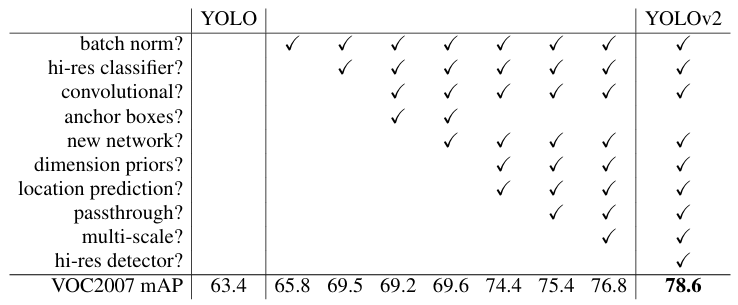 Figure 1. The changes the authors made on YOLOv1 to build YOLOv2 [1].
Batch Normalization
The first modification the authors did was applying batch normalization layer. Remember that YOLOv1 is quite old. It was first introduced back when BN layer was not quite popular just yet, which was the reason why YOLOv1 do not utilize this normalization mechanism in the first place. It is already proven that BN layer is able to stabilize training, speed up convergence, dan regularize model. Thanks to this reason, the dropout layer we previously have in YOLOv1 was omitted as we apply BN layers. It is mentioned in the paper that by attaching this type layer after each convolution they obtained 2.4% improvement in mAP from 63.4% to 65.8%.
Better Fine-Tuning
Next, the authors proposed a better way to perform fine-tuning. Previously in YOLOv1 the backbone model was pretrained on ImageNet classification dataset which the images had the size of 224×224. Then, they replaced the classification head with detection head and directly fine-tune it on PASCAL VOC detection dataset which contains images of size 448×448. Here we can clearly see that there was something like a “jump” thanks to the different image resolutions in pretraining and fine-tuning. The pipeline used for training YOLOv2 is slightly modified, where the authors added an intermediate step, namely fine-tuning the model on 448×448 ImageNet before fine-tuning it again on PASCAL VOC of the same image resolution. This additional step allows the model to get adapted to the higher resolution image before being fine-tuned for detection, unlike in YOLOv1 which the model is forced to work on 448×448 images directly after being pretrained on 224×224 images. This new fine-tuning pipeline allowed the mAP to increase by 3.7% from 65.8% to 69.5%.
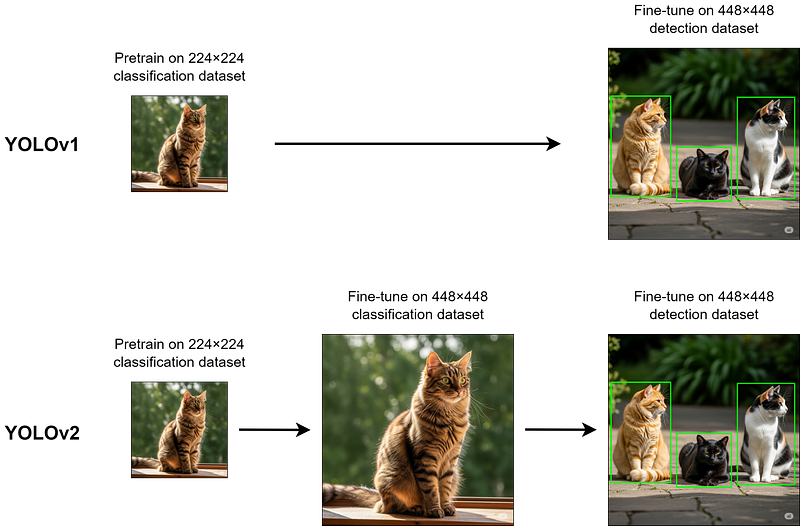 Figure 2. The fine-tuning mechanism of YOLOv1 and YOLOv2 [4].
Anchor Box and Fully Convolutional Network
The next modification was related to the use of anchor box. If you’re not yet familiar with it, this is essentially a template bounding box (a.k.a. prior box) corresponding to a single grid cell, which is rescaled to match the actual object size. The model is then trained to predict the offset of the anchor box rather than the bounding box coordinates like YOLOv1. We can think of an anchor box as the starting point of the model to make bounding box prediction. According to the paper, predicting offset like this is easier than predicting coordinates, hence allowing the model to perform better. Figure 3 below illustrates 5 anchor boxes that correspond to the top-left grid cell. Later on, the same anchor boxes will be applied to all grid cells within the image.
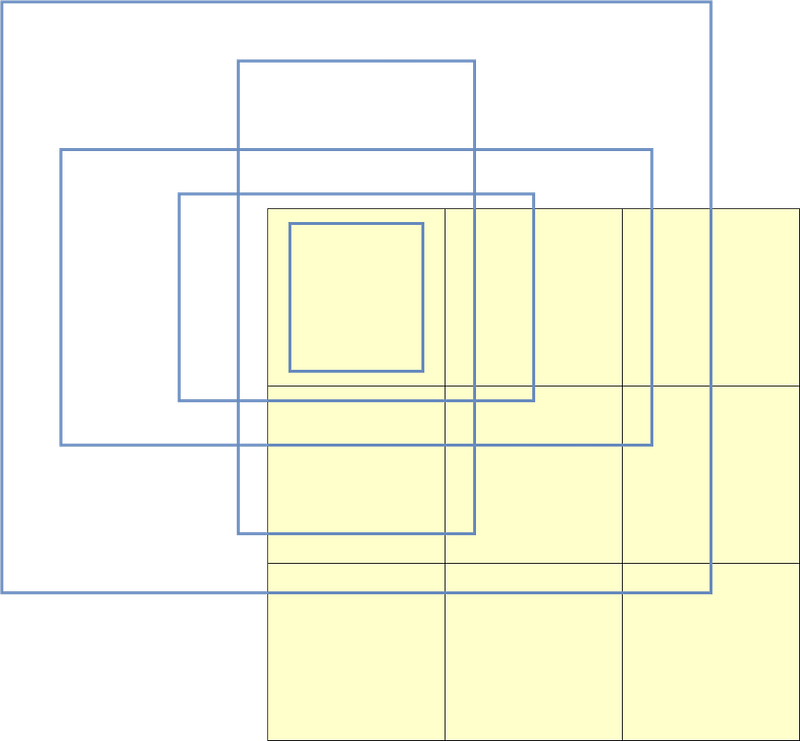 Figure 3. Example of 5 anchor boxes applied to the top-left grid cell of an image [5].
The use of anchor boxes also changed the way we do the object classification. Previously in YOLOv1 we had each grid cell predicted two bounding boxes, yet it could only predict a single object class. YOLOv2 addresses this issue by attaching the object classification mechanism with the anchor box rather than the grid cell, allowing each anchor box from the same grid cell to predict different object classes. Mathematically speaking, the length of the prediction vector of YOLOv1 can be formulated as (B×5)+C for each grid cell, whereas in YOLOv2 this prediction vector length changed to B×(5+C), where B is the number of bounding box to be generated, C is the number of classes in the dataset, and 5 is the number of xywh and the bounding box confidence value. With the mechanism introduced in YOLOv2, the prediction vector indeed becomes longer, but it allows each anchor box predicts its own class. The figure below illustrates the prediction vectors of YOLOv1 and YOLOv2, where we set B to 2 and C to 20. In this particular case, the length of the prediction vectors of both models are (2×5)+20=30 and 2×(5+20)=50, respectively.
Figure 3. Example of 5 anchor boxes applied to the top-left grid cell of an image [5].
The use of anchor boxes also changed the way we do the object classification. Previously in YOLOv1 we had each grid cell predicted two bounding boxes, yet it could only predict a single object class. YOLOv2 addresses this issue by attaching the object classification mechanism with the anchor box rather than the grid cell, allowing each anchor box from the same grid cell to predict different object classes. Mathematically speaking, the length of the prediction vector of YOLOv1 can be formulated as (B×5)+C for each grid cell, whereas in YOLOv2 this prediction vector length changed to B×(5+C), where B is the number of bounding box to be generated, C is the number of classes in the dataset, and 5 is the number of xywh and the bounding box confidence value. With the mechanism introduced in YOLOv2, the prediction vector indeed becomes longer, but it allows each anchor box predicts its own class. The figure below illustrates the prediction vectors of YOLOv1 and YOLOv2, where we set B to 2 and C to 20. In this particular case, the length of the prediction vectors of both models are (2×5)+20=30 and 2×(5+20)=50, respectively.
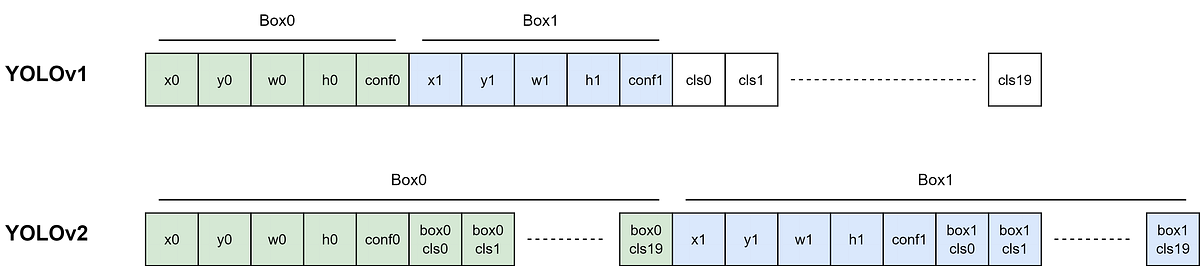 Figure 4. What the prediction vectors of YOLOv1 and YOLOv2 look like for 20-class PASCAL VOC object detection dataset [5].
At this point authors also replaced the fully-connected layers in YOLOv1 with a stack of convolution layers, causing the entire model to be a fully convolutional network which has the downsampling factor of 32. This downsampling factor causes an input tensor of size 448×448 to get reduced to 14×14. The authors argued that large objects are usually located in the middle of an image, so they made the output feature map to have odd dimensions, ensuring that there is a single center cell to predict such objects. In order to achieve this, the authors changed the input shape to 416×416 as the default configuration so that the output dimension has the spatial resolution of 13×13.
Interestingly, the use of anchor box and fully convolutional network caused the mAP to decrease by 0.3% from 69.5% to 69.2% instead, yet at the same time the recall increased by 7% from 81% to 88%. This improvement in recall was particularly caused by the increase of the number of predictions made by the model. In the case of YOLOv1, the model could only predict 7×7=49 objects in total, and now YOLOv2 can predict up to 13×13×5=845 objects, where the number 5 comes from the default number of anchor boxes used. Meanwhile, the decrease in mAP indicated that there was a room for improvement on the anchor boxes.
Figure 4. What the prediction vectors of YOLOv1 and YOLOv2 look like for 20-class PASCAL VOC object detection dataset [5].
At this point authors also replaced the fully-connected layers in YOLOv1 with a stack of convolution layers, causing the entire model to be a fully convolutional network which has the downsampling factor of 32. This downsampling factor causes an input tensor of size 448×448 to get reduced to 14×14. The authors argued that large objects are usually located in the middle of an image, so they made the output feature map to have odd dimensions, ensuring that there is a single center cell to predict such objects. In order to achieve this, the authors changed the input shape to 416×416 as the default configuration so that the output dimension has the spatial resolution of 13×13.
Interestingly, the use of anchor box and fully convolutional network caused the mAP to decrease by 0.3% from 69.5% to 69.2% instead, yet at the same time the recall increased by 7% from 81% to 88%. This improvement in recall was particularly caused by the increase of the number of predictions made by the model. In the case of YOLOv1, the model could only predict 7×7=49 objects in total, and now YOLOv2 can predict up to 13×13×5=845 objects, where the number 5 comes from the default number of anchor boxes used. Meanwhile, the decrease in mAP indicated that there was a room for improvement on the anchor boxes.
Prior Box Clustering and Constrained Predictions
The authors indeed saw a problem in the anchor boxes, and so in the subsequent step they tried to modify the way it works. Previously in Faster R-CNN the anchor boxes were manually handpicked, which caused them to not optimally represent all object shapes in the dataset. To address this problem, authors used K-means to cluster the distribution of the bounding box size. They did it by taking the w and h values of the bounding boxes in the object detection dataset, putting them into two-dimensional space, and clustering the datapoints using K-means as usual. The authors decided to use K =5, which essentially means that we will later have that number of clusters.
The illustration in Figure 5 below displays what the bounding box size distribution looks like, where each black datapoint represents a single bounding box in the dataset and the green circles are the centroids which will then act as the size of our anchor boxes. Note that this illustration is indeed created based on dummy data, but the idea here is that the datapoint located at the top-right represents a large square bounding box, the one in the top-left is a vertical rectangle box, and so on.
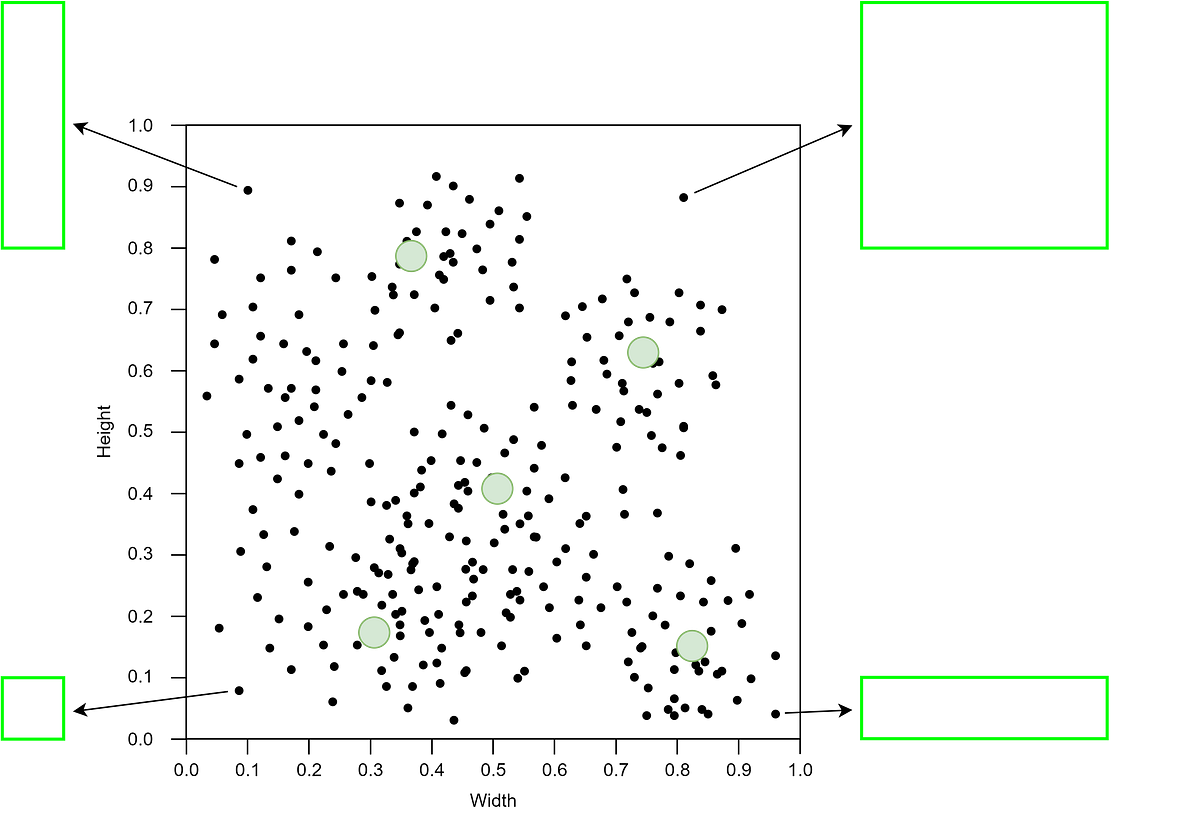 Figure 5. Example of a bounding box distribution. The bounding box sizes are scaled to 0–1 relative to the image size [5].
If you’re familiar with K-means, we typically use Euclidean distance to measure the distance between datapoints and the centroids. But here the authors created a new distance metric specifically for this case, in which they used the complement of the IOU between the bounding boxes and the cluster centroids. See the equation below for the details.
Figure 5. Example of a bounding box distribution. The bounding box sizes are scaled to 0–1 relative to the image size [5].
If you’re familiar with K-means, we typically use Euclidean distance to measure the distance between datapoints and the centroids. But here the authors created a new distance metric specifically for this case, in which they used the complement of the IOU between the bounding boxes and the cluster centroids. See the equation below for the details.
 Figure 6. The distance metric the authors use to measure distance between the bounding boxes in the dataset (black datapoints) and the anchor boxes (green centroids).
Using the distance metric above, we can see in the following table that the prior boxes generated using K-means clustering (highlighted in blue) have a greater average IOU compared to the prior boxes used in Faster R-CNN (highlighted in green) despite the smaller number of prior boxes (5 vs 9). This essentially indicates that the proposed clustering mechanism allows the resulting prior boxes to represent the bounding box size distribution in the dataset better as compared to the handpicked anchor boxes.
Figure 6. The distance metric the authors use to measure distance between the bounding boxes in the dataset (black datapoints) and the anchor boxes (green centroids).
Using the distance metric above, we can see in the following table that the prior boxes generated using K-means clustering (highlighted in blue) have a greater average IOU compared to the prior boxes used in Faster R-CNN (highlighted in green) despite the smaller number of prior boxes (5 vs 9). This essentially indicates that the proposed clustering mechanism allows the resulting prior boxes to represent the bounding box size distribution in the dataset better as compared to the handpicked anchor boxes.
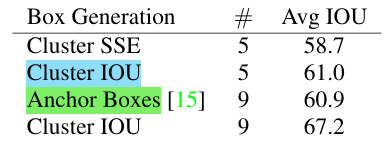 Figure 7. Comparison of different methods for generating prior box [1].
Still related to prior box, the authors found that predicting anchor box offset like Faster R-CNN was actually still not quite optimal thanks to the unbounded equation. If we take a look at the Figure 8 below, there is a possibility that the box position could be shifted wildly throughout the entire image, causing the training difficult especially in earlier stages.
Figure 7. Comparison of different methods for generating prior box [1].
Still related to prior box, the authors found that predicting anchor box offset like Faster R-CNN was actually still not quite optimal thanks to the unbounded equation. If we take a look at the Figure 8 below, there is a possibility that the box position could be shifted wildly throughout the entire image, causing the training difficult especially in earlier stages.
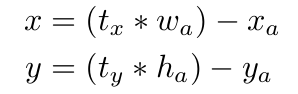 Figure 8. The equations used in Faster R-CNN for transforming anchor box coordinates and size [1].
Instead of being relative to the anchor box like Faster R-CNN, the authors solved this issue by adopting the idea of predicting location coordinates relative to the grid cell from YOLOv1. However, the authors further modify this by introducing sigmoid function to constrain the xy coordinate prediction of the network, effectively bounds the value to the range of 0 to 1 hence causing the predicted location will never fall outside the corresponding grid cell, as shown in the first and the second rows in Figure 9. Next, the w and h of the bounding box are processed with exponential function (third and fourth row), which is useful to prevent negative values because it is just nonsense to have negative width or height. Meanwhile, the way to compute confidence score at the fifth row is the same as YOLOv1, namely by calculating the multiplication of objectness confidence and the IOU between the predicted and the target box.
Figure 8. The equations used in Faster R-CNN for transforming anchor box coordinates and size [1].
Instead of being relative to the anchor box like Faster R-CNN, the authors solved this issue by adopting the idea of predicting location coordinates relative to the grid cell from YOLOv1. However, the authors further modify this by introducing sigmoid function to constrain the xy coordinate prediction of the network, effectively bounds the value to the range of 0 to 1 hence causing the predicted location will never fall outside the corresponding grid cell, as shown in the first and the second rows in Figure 9. Next, the w and h of the bounding box are processed with exponential function (third and fourth row), which is useful to prevent negative values because it is just nonsense to have negative width or height. Meanwhile, the way to compute confidence score at the fifth row is the same as YOLOv1, namely by calculating the multiplication of objectness confidence and the IOU between the predicted and the target box.
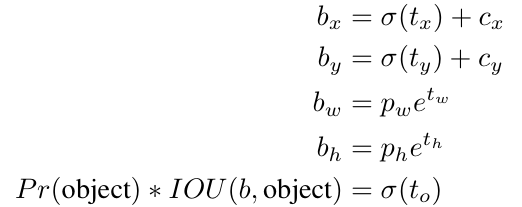 Figure 9. The equations used by YOLOv2 to make bounding box prediction [1].
So in simple words, we indeed adopt the concept of prior box introduced by Faster R-CNN, but instead of handpicking the box, we use clustering to automatically find the most optimal prior box sizes. The bounding box is created with additional sigmoid function for the xy and exponential function for the wh. It is worth noting that now the x and y are relative to the grid cell while the w and h are relative to the prior box. The authors found that this method improved mAP from 69.6% to 74.4%.
Figure 9. The equations used by YOLOv2 to make bounding box prediction [1].
So in simple words, we indeed adopt the concept of prior box introduced by Faster R-CNN, but instead of handpicking the box, we use clustering to automatically find the most optimal prior box sizes. The bounding box is created with additional sigmoid function for the xy and exponential function for the wh. It is worth noting that now the x and y are relative to the grid cell while the w and h are relative to the prior box. The authors found that this method improved mAP from 69.6% to 74.4%.
Passthrough Layer
The final output feature map of YOLOv2 has the spatial dimension of 13×13, in which each element corresponds to a single grid cell. The information contained within each grid cell is considered coarse, which absolutely makes sense because maxpooling layers within the network indeed work by taking only the highest values from the earlier feature map. This might not be a problem if the objects to be detected are considerably large. But if the objects are small, our model might be having hard time in performing the detection due to the loss of information contained in the non-prominent pixels.
To address this problem, authors proposed to apply the so-called passthrough layer. The objective of this layer is to preserve fine-grained information from earlier feature map before being downsampled by maxpooling layer. In Figure 12, the part of the network referred to as passthrough layer is the connection that branches out from the network before eventually merging back to the main flow in the end. The idea of this layer is quite similar to identity mapping introduced in ResNet. However, the process done in that model is simpler because the tensor dimension from the original flow and the one in the skip-connection matches exactly, allowing them to be element-wise sumed. The case is different in passthrough layer, in which here the latter feature map has a smaller spatial dimension, hence we need to think a way to combine information from the two tensors. The authors came up with an idea where they divide the image in the passthrough layer and then stack the divided tensors in channel-wise manner as shown in Figure 10 below. By doing so, we will have the spatial dimension of the resulting tensor matches with the subsequent feature map, allowing them to be concatenated along the channel axis. The fine-grained information from the former layer will then be combined with the higher-level features from the latter layer using a convolution layer.
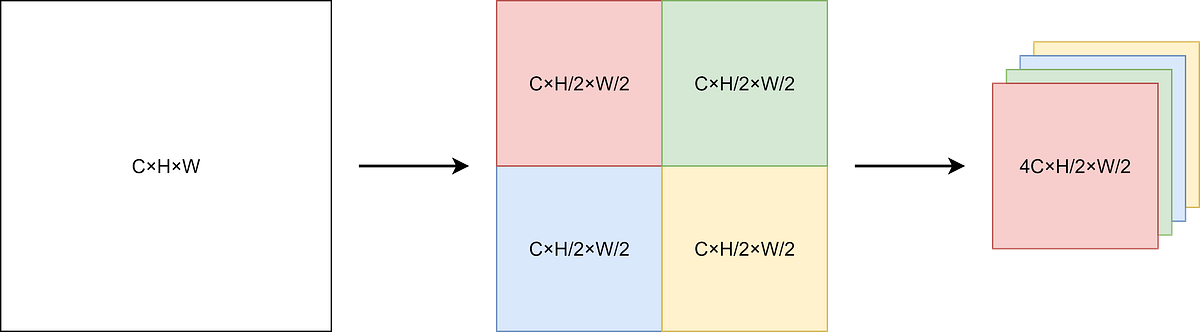 Figure 10. How the tensor is processed inside the passthrough layer to adapt the dimension to the subsequent layer [5].
Multi-Scale Training
Previously I’ve mentioned that in YOLOv2 all FC layers have been replaced with a stack of convolution layers. This essentially allows us to feed images of different scales within the same training process, considering that the weights of CNN-based model correspond to the trainable parameters in the kernel, which is independent of the input image dimension. In fact, this is actually the reason why the authors decided to remove the FC layers in the first place. During the training phase, authors changed the input resolution every 10 batches randomly from 320×320, 352×352, 384×384, and so on to 608×608, all with multiple of 32. This process can be thought of as their approach to augment the data so that the model can detect objects across varying input dimensions, which I believe it also allows the model to predict objects of different scales with better performance. This process boosted mAP to 76.8% on the default input resolution 416×416, and it got even higher to 78.6% when we they increased the image resolution further to 544×544.
Darknet-19
All modifications on YOLOv1 we discussed in the previous sub sections were all related to how the authors improve detection quality in terms of the mAP and recall. Now the focus of this sub section is to improve model performance in terms of the speed. It is mentioned in the paper that the authors use a model referred to as Darknet-19 as the backbone, which has less operations compared to the backbone of YOLOv1 (5.58 billion vs 8.52 billion), allowing YOLOv2 to run faster than its predecessor. The original version of this model consists of 19 convolution layers and 5 maxpooling layers, which the details can be seen in Figure 11 below.
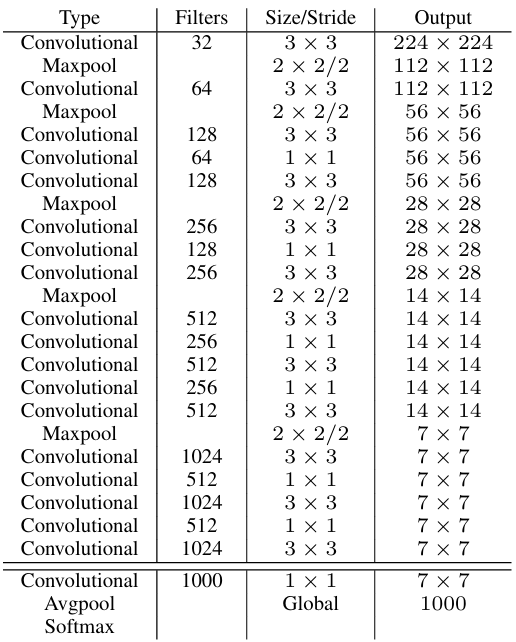 Figure 11. The vanilla Darknet-19 architecture [1].
It is important to note that the above architecture is the vanilla Darknet-19 model, which is only suitable for classification task. To adapt it with the requirement of YOLOv2, we need to slightly modify it by adding passthrough layer and replacing the classification head with detection head. You can see the modified architecture in Figure 12 below.
Figure 11. The vanilla Darknet-19 architecture [1].
It is important to note that the above architecture is the vanilla Darknet-19 model, which is only suitable for classification task. To adapt it with the requirement of YOLOv2, we need to slightly modify it by adding passthrough layer and replacing the classification head with detection head. You can see the modified architecture in Figure 12 below.
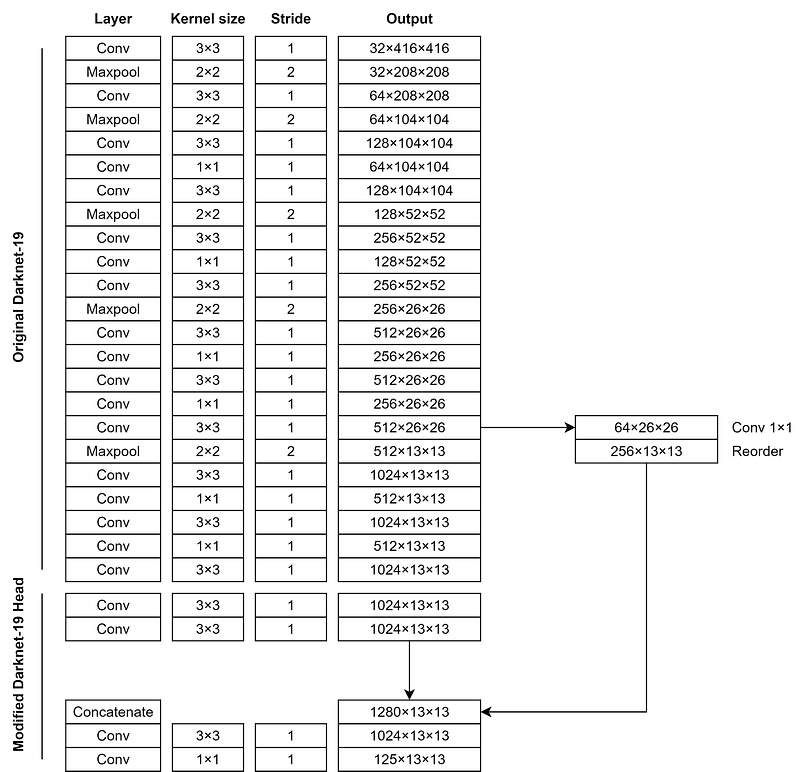 Figure 12. The complete YOLOv2 architecture [5].
Here you can see that the passthrough layer is placed after the last 26×26 feature map. This passthrough layer will reduce the spatial dimension to 13×13, allowing it to be concatenated in channel-wise manner with the 13×13 feature map from the main flow. Later in the next section I am going to demonstrate how to implement this Darknet-19 architecture from scratch including the detection head as well as the passthrough layer.
Figure 12. The complete YOLOv2 architecture [5].
Here you can see that the passthrough layer is placed after the last 26×26 feature map. This passthrough layer will reduce the spatial dimension to 13×13, allowing it to be concatenated in channel-wise manner with the 13×13 feature map from the main flow. Later in the next section I am going to demonstrate how to implement this Darknet-19 architecture from scratch including the detection head as well as the passthrough layer.
9000-Class Object Detection
YOLOv2 model was initially trained on PASCAL VOC and COCO datasets which have 20 and 80 number of object classes, respectively. The authors saw this as a problem because they thought that this number is very limited for general case, and hence lack of versatility. Due to this reason, it is necessary to improve the model such that it can detect a wider variety of object classes. However, creating object detection dataset is very expensive and laborious, because not only the object classes but we are also required to annotate the bounding box information.
The authors came up with a very clever idea, where they combined ImageNet, which has over 22,000 classes, with COCO using class hierarchy mechanism which they refer to as WordTree as shown in Figure 13. You can see the illustration in the figure that blue nodes are the classes from COCO dataset, while the red ones are from ImageNet dataset. The object categories available in the COCO dataset are relatively general, whereas the ones in ImageNet are a lot more fine-grained. For instance, if in COCO we got airplane , in ImageNet we got biplane , jet , airbus , and stealth fighter. So using the idea of WordTree, the authors put these four airplane types as the subclass of airplane. You can think of the inference like this: the model works by predicting bounding box and the parent class, then it will check if it got subclasses. If so, the model will continue predicting from the smaller subset of classes.
By combining the two datasets like this, we eventually ended up with a model that is capable of predicting over 9000 object classes (9418 to be exact), hence the name YOLO9000.
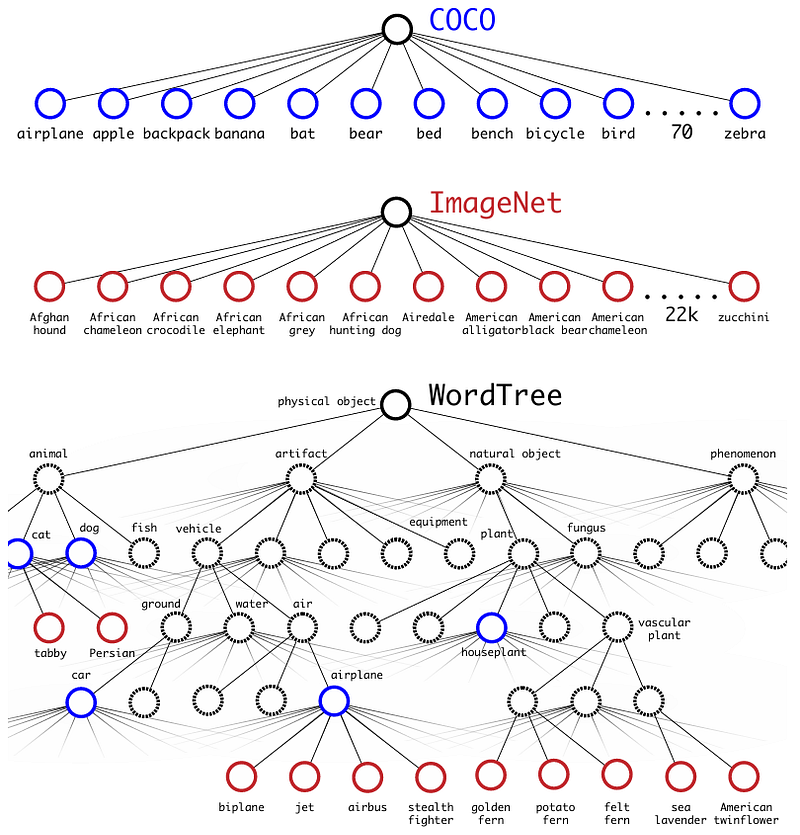 Figure 13. The class grouping mechanism used in YOLO9000 [1].
···
Figure 13. The class grouping mechanism used in YOLO9000 [1].
···
YOLOv2 Architecture Implementation
As I promised earlier, in this section I am going to demonstrate how to implement the YOLOv2 architecture from scratch so that you can get better understanding about how an input image eventually becomes a tensor containing bounding box and class predictions.
Now what we need to do first is to import the required modules which is shown in Codeblock 1 below.
python
# Codeblock 1
import torch
import torch.nn as nn
Next, we create the ConvBlock class, in which it is going to encapsulate the convolution layer itself, a batch normalization layer and a leaky ReLU activation function. The negative_slope parameter itself is set to 0.1 as shown at line #(1), which is exactly the same as the one used in YOLOv1.
python
# Codeblock 2
class ConvBlock(nn.Module):
    def __init__(self,
                 in_channels,
                 out_channels,
                 kernel_size,
                 padding):
        super().__init__()

        self.conv = nn.Conv2d(in_channels=in_channels,
                              out_channels=out_channels,
                              kernel_size=kernel_size,
                              padding=padding)
        self.bn = nn.BatchNorm2d(num_features=out_channels)
        self.leaky_relu = nn.LeakyReLU(negative_slope=0.1)    #(1)

    def forward(self, x):
        print(f'original\t: {x.size()}')

        x = self.conv(x)
        print(f'after conv\t: {x.size()}')

        x = self.leaky_relu(x)
        print(f'after leaky relu: {x.size()}')

        return x
Just to check if the above class works properly, here I test it with a very simple test case, where I initialize a ConvBlock instance which accepts an RGB image of size 416×416. You can see in the resulting output that the image now has 64 channels, proving that our ConvBlock works properly.
python
# Codeblock 3
convblock = ConvBlock(in_channels=3,
                      out_channels=64,
                      kernel_size=3,
                      padding=1)
x = torch.randn(1, 3, 416, 416)
out = convblock(x)
markup
# Codeblock 3 Outputoriginal : torch.Size([1, 3, 416, 416])after conv : torch.Size([1, 64, 416, 416])after leaky relu : torch.Size([1, 64, 416, 416])
Darknet-19 Implementation
Now let’s use this ConvBlock class to construct the Darknet-19 architecture. The way to do so is pretty simple, as what we need to do is just to stack multiple ConvBlock instances followed by a maxpooling layer according to the architecture in Figure 12. See the details in Codeblock 4a below. Note that the maxpooling layer for stage4 is placed at the beginning of stage5 as shown at the line marked with #(1). This is essentially done because the output of stage4 will directly be fed into the passthrough layer without being downsampled. In addition to this, it is important to note that the term “stage” is not officially mentioned in the paper. Rather, this is just a term I personally use for the sake of this implementation.
python
# Codeblock 4a
class Darknet(nn.Module):
    def __init__(self):
        super(Darknet, self).__init__()


        self.stage0 = nn.ModuleList([
            ConvBlock(3, 32, 3, 1),
            nn.MaxPool2d(kernel_size=2, stride=2)
        ])

        self.stage1 = nn.ModuleList([
            ConvBlock(32, 64, 3, 1),
            nn.MaxPool2d(kernel_size=2, stride=2)
        ])

        self.stage2 = nn.ModuleList([
            ConvBlock(64, 128, 3, 1),
            ConvBlock(128, 64, 1, 0),
            ConvBlock(64, 128, 3, 1),
            nn.MaxPool2d(kernel_size=2, stride=2)
        ])

        self.stage3 = nn.ModuleList([
            ConvBlock(128, 256, 3, 1),
            ConvBlock(256, 128, 1, 0),
            ConvBlock(128, 256, 3, 1),
            nn.MaxPool2d(kernel_size=2, stride=2)
        ])

        self.stage4 = nn.ModuleList([
            ConvBlock(256, 512, 3, 1),
            ConvBlock(512, 256, 1, 0),
            ConvBlock(256, 512, 3, 1),
            ConvBlock(512, 256, 1, 0),
            ConvBlock(256, 512, 3, 1),
        ])

        self.stage5 = nn.ModuleList([
            nn.MaxPool2d(kernel_size=2, stride=2),    #(1)
            ConvBlock(512, 1024, 3, 1),
            ConvBlock(1024, 512, 1, 0),
            ConvBlock(512, 1024, 3, 1),
            ConvBlock(1024, 512, 1, 0),
            ConvBlock(512, 1024, 3, 1),
        ])
As all layers have been initialized, the next thing we do is to connect all these layers using the forward() method in Codeblock 4b below. Previously I said that we will take the output of stage4 as the input for the passthrough layer. To do so, I store the feature map produced by the last layer of stage4 in a separate variable which I refer to as x_stage4 (#(1)). We then do the same thing for the output of stage5 (#(2)) and return both x_stage4 and x_stage5 as the output of our Darknet (#(3)).
python
# Codeblock 4b
    def forward(self, x):
        print(f'original\t: {x.size()}')

        print()
        for i in range(len(self.stage0)):
            x = self.stage0[i](x)
            print(f'after stage0 #{i}\t: {x.size()}')

        print()
        for i in range(len(self.stage1)):
            x = self.stage1[i](x)
            print(f'after stage1 #{i}\t: {x.size()}')

        print()
        for i in range(len(self.stage2)):
            x = self.stage2[i](x)
            print(f'after stage2 #{i}\t: {x.size()}')

        print()
        for i in range(len(self.stage3)):
            x = self.stage3[i](x)
            print(f'after stage3 #{i}\t: {x.size()}')

        print()
        for i in range(len(self.stage4)):
            x = self.stage4[i](x)
            print(f'after stage4 #{i}\t: {x.size()}')

        x_stage4 = x.clone()        #(1)

        print()
        for i in range(len(self.stage5)):
            x = self.stage5[i](x)
            print(f'after stage5 #{i}\t: {x.size()}')

        x_stage5 = x.clone()        #(2)

        return x_stage4, x_stage5   #(3)
Next, I test the Darknet-19 model above by passing the same dummy image as the one in our previous test case.
python
# Codeblock 5
darknet = Darknet()

x = torch.randn(1, 3, 416, 416)
out = darknet(x)
markup
# Codeblock 5 Outputoriginal : torch.Size([1, 3, 416, 416])after stage0 #0 : torch.Size([1, 32, 416, 416])after stage0 #1 : torch.Size([1, 32, 208, 208])after stage1 #0 : torch.Size([1, 64, 208, 208])after stage1 #1 : torch.Size([1, 64, 104, 104])after stage2 #0 : torch.Size([1, 128, 104, 104])after stage2 #1 : torch.Size([1, 64, 104, 104])after stage2 #2 : torch.Size([1, 128, 104, 104])after stage2 #3 : torch.Size([1, 128, 52, 52])after stage3 #0 : torch.Size([1, 256, 52, 52])after stage3 #1 : torch.Size([1, 128, 52, 52])after stage3 #2 : torch.Size([1, 256, 52, 52])after stage3 #3 : torch.Size([1, 256, 26, 26])after stage4 #0 : torch.Size([1, 512, 26, 26])after stage4 #1 : torch.Size([1, 256, 26, 26])after stage4 #2 : torch.Size([1, 512, 26, 26])after stage4 #3 : torch.Size([1, 256, 26, 26])after stage4 #4 : torch.Size([1, 512, 26, 26])after stage5 #0 : torch.Size([1, 512, 13, 13])after stage5 #1 : torch.Size([1, 1024, 13, 13])after stage5 #2 : torch.Size([1, 512, 13, 13])after stage5 #3 : torch.Size([1, 1024, 13, 13])after stage5 #4 : torch.Size([1, 512, 13, 13])after stage5 #5 : torch.Size([1, 1024, 13, 13])
Here we can see that our output matches exactly with the architectural details in Figure 12, indicating that our implementation of the Darknet-19 model is correct.
The Entire YOLOv2 Architecture
Before actually constructing the entire YOLOv2 architecture, we need to initialize the parameters for the model first. Here we want every single cell to generate 5 anchor boxes, hence we need to set the NUM_ANCHORS variable to that number. Next, I set NUM_CLASSES to 20 because we assume that we want to train the model on PASCAL VOC dataset.
python
# Codeblock 6
NUM_ANCHORS = 5
NUM_CLASSES = 20
Now it’s time to define the YOLOv2 class. In the Codeblock 7a below, we initially define the __init__() method, where we initialize the Darknet model (#(1)), a single ConvBlock for the passthrough layer (#(2)), a stack of two convolution layers which I refer to as stage6 (#(3)), and another stack of two convolution layers which the last one is used to map the tensor into prediction vector with B×(5+C) number of channels (#(4)).
python
# Codeblock 7a
class YOLOv2(nn.Module):
    def __init__(self):
        super().__init__()

        self.darknet = Darknet()                       #(1)

        self.passthrough = ConvBlock(512, 64, 1, 0)    #(2)

        self.stage6 = nn.ModuleList([                  #(3)
            ConvBlock(1024, 1024, 3, 1),
            ConvBlock(1024, 1024, 3, 1),
        ])

        self.stage7 = nn.ModuleList([
            ConvBlock(1280, 1024, 3, 1),
            ConvBlock(1024, NUM_ANCHORS*(5+NUM_CLASSES), 1, 0)    #(4)
        ])
Afterwards, we define the so-called reorder() method, which we will use to process the feature map in the passthrough layer. The logic of the code below is quite complicated though, but the main idea is that it follows the principle given in Figure 10. Here I show you the output of each line so that you can get better understanding of how the process goes inside the function given an input tensor of shape 1×64×26×26, which represents a single image of size 26×26 with 64 channels. In the last step we can see that the final output tensor has the shape of 1×256×13×13. This shape matches exactly with our requirement, where the channel dimension becomes 4 times larger than that of the input while at the same time the spatial dimension halves.
python
# Codeblock 7b
    def reorder(self, x, scale=2):                      # ([1, 64, 26, 26])
        B, C, H, W = x.shape
        h, w = H // scale, W // scale

        x = x.reshape(B, C, h, scale, w, scale)         # ([1, 64, 13, 2, 13, 2])
        x = x.transpose(3, 4)                           # ([1, 64, 13, 13, 2, 2])

        x = x.reshape(B, C, h * w, scale * scale)       # ([1, 64, 169, 4])
        x = x.transpose(2, 3)                           # ([1, 64, 4, 169])

        x = x.reshape(B, C, scale * scale, h, w)        # ([1, 64, 4, 13, 13])
        x = x.transpose(1, 2)                           # ([1, 4, 64, 13, 13])

        x = x.reshape(B, scale * scale * C, h, w)       # ([1, 256, 13, 13])

        return x
Next, the Codeblock 7c below shows how we create the flow of the network. We initially start from the darknet backbone, in which it returns x_stage4 and x_stage5 (#(1)). The x_stage5 tensor will directly be processed with the subsequent convolution layers which I refer to as stage6 (#(2)) whereas the x_stage4 tensor will be passed to the passthrough layer (#(3)) and processed by the reorder() (#(4)) method we defined in Codeblock 7b above. Afterwards, we then concatenate both tensors in channel-wise manner at line #(5). This concatenated tensor is then processed further with another stack of convolution layers called stage7 (#(6)) which returns the prediction vector.
python
# Codeblock 7c
    def forward(self, x):
        print(f'original\t\t\t: {x.size()}')

        x_stage4, x_stage5 = self.darknet(x)              #(1)
        print(f'\nx_stage4\t\t\t: {x_stage4.size()}')
        print(f'x_stage5\t\t\t: {x_stage5.size()}')

        print()
        x = x_stage5
        for i in range(len(self.stage6)):
            x = self.stage6[i](x)                         #(2)
            print(f'x_stage5 after stage6 #{i}\t: {x.size()}')

        x_stage4 = self.passthrough(x_stage4)             #(3)
        print(f'\nx_stage4 after passthrough\t: {x_stage4.size()}')

        x_stage4 = self.reorder(x_stage4)                 #(4)
        print(f'x_stage4 after reorder\t\t: {x_stage4.size()}')

        x = torch.cat([x_stage4, x], dim=1)               #(5)
        print(f'\nx after concatenate\t\t: {x.size()}')

        for i in range(len(self.stage7)):                 #(6)
            x = self.stage7[i](x)
            print(f'x after stage7 #{i}\t: {x.size()}')

        return x
Again, to test the above code we will pass through a tensor of size 1×3×416×416.
python
# Codeblock 8
yolov2 = YOLOv2()
x = torch.randn(1, 3, 416, 416)

out = yolov2(x)
And below is what the output looks like after the code is run. The outputs referred to as stage0 to stage5 are the processes within the Darknet backbone, in which this is exactly the same as the one I showed you earlier in Codeblock 5 Output. Afterwards we can see in stage6 that the shape of the x_stage5 tensor does not change at all (#(1–3)). Meanwhile, the channel dimension of x_stage4 increased from 64 to 256 after being processed by the reorder() operation (#(4–5)). The tensor from the main flow is then concatenated with the one from passthrough layer, which caused the number of channels in the resulting tensor became 1024+256=1280 (#(6)). Lastly, we pass the tensor to stage7 which returns a prediction tensor of size 125×13×13, denoting that we have 13×13 grid cells where every single of those cells contains a prediction vector of length 125 (#(7)), storing the bounding box and the object class predictions.
markup
# Codeblock 8 Outputoriginal : torch.Size([1, 3, 416, 416])after stage0 #0 : torch.Size([1, 32, 416, 416])after stage0 #1 : torch.Size([1, 32, 208, 208])after stage1 #0 : torch.Size([1, 64, 208, 208])after stage1 #1 : torch.Size([1, 64, 104, 104])after stage2 #0 : torch.Size([1, 128, 104, 104])after stage2 #1 : torch.Size([1, 64, 104, 104])after stage2 #2 : torch.Size([1, 128, 104, 104])after stage2 #3 : torch.Size([1, 128, 52, 52])after stage3 #0 : torch.Size([1, 256, 52, 52])after stage3 #1 : torch.Size([1, 128, 52, 52])after stage3 #2 : torch.Size([1, 256, 52, 52])after stage3 #3 : torch.Size([1, 256, 26, 26])after stage4 #0 : torch.Size([1, 512, 26, 26])after stage4 #1 : torch.Size([1, 256, 26, 26])after stage4 #2 : torch.Size([1, 512, 26, 26])after stage4 #3 : torch.Size([1, 256, 26, 26])after stage4 #4 : torch.Size([1, 512, 26, 26])after stage5 #0 : torch.Size([1, 512, 13, 13])after stage5 #1 : torch.Size([1, 1024, 13, 13])after stage5 #2 : torch.Size([1, 512, 13, 13])after stage5 #3 : torch.Size([1, 1024, 13, 13])after stage5 #4 : torch.Size([1, 512, 13, 13])after stage5 #5 : torch.Size([1, 1024, 13, 13])x_stage4 : torch.Size([1, 512, 26, 26])x_stage5 : torch.Size([1, 1024, 13, 13]) #(1)x_stage5 after stage6 #0 : torch.Size([1, 1024, 13, 13]) #(2)x_stage5 after stage6 #1 : torch.Size([1, 1024, 13, 13]) #(3)x_stage4 after passthrough : torch.Size([1, 64, 26, 26]) #(4)x_stage4 after reorder : torch.Size([1, 256, 13, 13]) #(5)x after concatenate : torch.Size([1, 1280, 13, 13]) #(6)x after stage7 #0 : torch.Size([1, 1024, 13, 13])x after stage7 #1 : torch.Size([1, 125, 13, 13])
···
Ending
I think that’s pretty much everything about YOLOv2 and its model architecture implementation from scratch. The code used in this article is also available on my GitHub repository [6]. Please let me know if you spot any mistake in my explanation or in the code. Thanks for reading, I hope you learn something new from this article. See ya in my next writing!
···
References
[1] Joseph Redmon and Ali Farhadi. YOLO9000: Better, Faster, Stronger. Arxiv. https://arxiv.org/abs/1612.08242 [Accessed August 9, 2025].
[2] Muhammad Ardi. YOLOv1 Paper Walkthrough: The Day YOLO First Saw the World. Medium. https://medium.com/ai-advances/yolov1-paper-walkthrough-the-day-yolo-first-saw-the-world-ccff8b60d84b [Accessed January 24, 2026].
[3] Muhammad Ardi. YOLOv1 Loss Function Walkthrough: Regression for All. Towards Data Science. https://towardsdatascience.com/yolov1-loss-function-walkthrough-regression-for-all/ [Accessed January 24, 2026].
[4] Image originally created by author, partially generated with Gemini
[5] Image originally created by author
[6] MuhammadArdiPutra. Better, Faster, Stronger — YOLOv2 and YOLO9000. GitHub. https://github.com/MuhammadArdiPutra/medium_articles/blob/main/Better%2C Faster%2C Stronger - YOLOv2 and YOLO9000.ipynb [Accessed August 9, 2025].
Register Now to Continue Reading
Unlock Towards Data Science with a Free Account
All articles on Towards Data Science are available to registered users. Create a free account today to access this article and thousands more.
Register for freeSign in to your account
 Written By
Deep learning storyteller
See all from Muhammad Ardi Putra
Editor's PicksDeep LearningObject DetectionPytorchYolo
Share This Article
Towards Data Science is a community publication. Submit your insights to reach our global audience and earn through the TDS Author Payment Program.
Write for TDS
Related Articles
Programming
A beginner-friendly Python tutorial
Mahnoor Javed
January 30, 20266 min read
Data Science
Part three of a comprehensive, practical guide to CLV techniques and real-world use-cases
Katherine Munro
November 17, 202310 min read
Data Science
Peek and conclude experiments adaptively without inflating the false-positive rate
Qike (Max) Li
August 24, 20229 min read
Artificial Intelligence
CLIP, which stands for Contrastive Language-Image Pretraining, is a deep learning model developed by OpenAI in 2021. CLIP's embeddings for...
Fahim Rustamy, PhD
December 11, 202310 min read
Artificial Intelligence
Keep your Python objects being referenced, or they will be released in memory.
Christopher Tao
August 29, 20217 min read
Deep Learning
CALVIN is a neural network that can plan, explore and navigate in novel 3D environments, provided expert demonstrations.
Shu Ishida
June 1, 20225 min read
Artificial Intelligence
Uncovering the secret behind why breads are always conveniently placed beside butter in groceries
Yenwee Lim
April 8, 20228 min read
Artificial Intelligence
An end-to-end deep learning geospatial segmentation project using Pytorch and TorchGeo packages
Maurício Cordeiro
November 30, 20228 min read
Artificial Intelligence
Your zero-to-hero guide to detecting duplicate and near-duplicate images
Orjuwan Zaafarani
April 30, 20225 min read
Your home for data science and AI. The world's leading publication for data science, data analytics, data engineering, machine learning, and artificial intelligence professionals.
Subscribe to Our NewsletterWrite For TDS•About•Advertise•Privacy Policy•Terms of Use
© Insight Media Group, LLC 2026•The New Stack•roadmap.sh•Creator Network
Recommended Articles
Close