保留正文与补采附件。源页面当前未重新核验;具体限制见交付清单。
 We value your privacy
We use cookies to enhance your browsing experience, serve personalised ads or content, and analyse our traffic. By clicking "Accept All", you consent to our use of cookies.
Customise Reject All Accept All
Customise Consent Preferences
We value your privacy
We use cookies to enhance your browsing experience, serve personalised ads or content, and analyse our traffic. By clicking "Accept All", you consent to our use of cookies.
Customise Reject All Accept All
Customise Consent Preferences  We use cookies to help you navigate efficiently and perform certain functions. You will find detailed information about all cookies under each consent category below.
The cookies that are categorised as "Necessary" are stored on your browser as they are essential for enabling the basic functionalities of the site. ... Show more
NecessaryAlways Active
Necessary cookies are required to enable the basic features of this site, such as providing secure log-in or adjusting your consent preferences. These cookies do not store any personally identifiable data.
We use cookies to help you navigate efficiently and perform certain functions. You will find detailed information about all cookies under each consent category below.
The cookies that are categorised as "Necessary" are stored on your browser as they are essential for enabling the basic functionalities of the site. ... Show more
NecessaryAlways Active
Necessary cookies are required to enable the basic features of this site, such as providing secure log-in or adjusting your consent preferences. These cookies do not store any personally identifiable data.
-
Cookie
BCTempID
-
Duration
10 minutes
-
Description
No description available.
-
Cookie
__cf_bm
-
Duration
1 hour
-
Description
This cookie, set by Cloudflare, is used to support Cloudflare Bot Management.
-
Cookie
AWSALBCORS
-
Duration
7 days
-
Description
Amazon Web Services set this cookie for load balancing.
-
Cookie
_cfuvid
-
Duration
session
-
Description
Cloudflare sets this cookie to track users across sessions to optimize user experience by maintaining session consistency and providing personalized services
-
Cookie
li_gc
-
Duration
6 months
-
Description
Linkedin set this cookie for storing visitor's consent regarding using cookies for non-essential purposes.
-
Cookie
__hssrc
-
Duration
session
-
Description
This cookie is set by Hubspot whenever it changes the session cookie. The __hssrc cookie set to 1 indicates that the user has restarted the browser, and if the cookie does not exist, it is assumed to be a new session.
-
Cookie
__hssc
-
Duration
1 hour
-
Description
HubSpot sets this cookie to keep track of sessions and to determine if HubSpot should increment the session number and timestamps in the __hstc cookie.
-
Cookie
wpEmojiSettingsSupports
-
Duration
session
-
Description
WordPress sets this cookie when a user interacts with emojis on a WordPress site. It helps determine if the user's browser can display emojis properly.
-
Cookie
BCSessionID
-
Duration
1 year 1 month 4 days
-
Description
Blueconic sets this cookie as a unique identifier for the BlueConic profile.
-
Cookie
_octo
-
Duration
1 year
-
Description
No description available.
-
Cookie
logged_in
-
Duration
1 year
-
Description
No description available.
-
Cookie
__Secure-YEC
-
Duration
past
-
Description
YouTube sets this cookie to stores the user's video player preferences using embedded YouTube video
-
Cookie
__eoi
-
Duration
6 months
-
Description
Description is currently not available.
-
Cookie
AWSALBTGCORS
-
Duration
7 days
-
Description
No description available.
-
Cookie
login-status-p
-
Duration
past
-
Description
Description is currently not available.
-
Cookie
AWSALBTG
-
Duration
7 days
-
Description
No description available.
-
Cookie
csrf_token
-
Duration
session
-
Description
No description available.
-
Cookie
token_v2
-
Duration
1 day
-
Description
Description is currently not available.
-
Cookie
D
-
Duration
1 year
-
Description
Description is currently not available.
-
Cookie
PHPSESSID
-
Duration
session
-
Description
This cookie is native to PHP applications. The cookie stores and identifies a user's unique session ID to manage user sessions on the website. The cookie is a session cookie and will be deleted when all the browser windows are closed.
-
Cookie
VISITOR_PRIVACY_METADATA
-
Duration
6 months
-
Description
YouTube sets this cookie to store the user's cookie consent state for the current domain.
-
Cookie
cookietest
-
Duration
session
-
Description
The cookietest cookie is typically used to determine whether the user's browser accepts cookies, essential for website functionality and user experience.
-
Cookie
__Host-airtable-session
-
Duration
1 year
-
Description
This cookie is used to enable us to integrate the services of Airtable.
-
Cookie
__Host-airtable-session.sig
-
Duration
1 year
-
Description
This cookie is used to enable us to integrate the services of Airtable.
-
Cookie
m
-
Duration
1 year 1 month 4 days
-
Description
Stripe sets this cookie for fraud prevention purposes. It identifies the device used to access the website, allowing the website to be formatted accordingly.
-
Cookie
BIGipServer*
-
Duration
session
-
Description
Marketo sets this cookie to collect information about the user's online activity and build a profile about their interests to provide advertisements relevant to the user.
-
Cookie
__cfruid
-
Duration
session
-
Description
Cloudflare sets this cookie to identify trusted web traffic.
-
Cookie
_GRECAPTCHA
-
Duration
6 months
-
Description
Google Recaptcha service sets this cookie to identify bots to protect the website against malicious spam attacks.
-
Cookie
__Secure-YNID
-
Duration
6 months
-
Description
Google cookie used to protect user security and prevent fraud, especially during the login process.
-
Cookie
cookieyes-consent
-
Duration
1 year
-
Description
CookieYes sets this cookie to remember users' consent preferences so that their preferences are respected on subsequent visits to this site. It does not collect or store any personal information about the site visitors.
Functional
Functional cookies help perform certain functionalities like sharing the content of the website on social media platforms, collecting feedback, and other third-party features.
-
Cookie
lidc
-
Duration
1 day
-
Description
LinkedIn sets the lidc cookie to facilitate data center selection.
-
Cookie
brw
-
Duration
1 year
-
Description
No description available.
-
Cookie
brwConsent
-
Duration
5 minutes
-
Description
Description is currently not available.
-
Cookie
WMF-Uniq
-
Duration
1 year
-
Description
Description is currently not available.
-
Cookie
loom_anon_comment
-
Duration
1 year
-
Description
No description available.
-
Cookie
loom_referral_video
-
Duration
session
-
Description
Description is currently not available.
-
Cookie
VISITOR_INFO1_LIVE
-
Duration
6 months
-
Description
A cookie set by YouTube to measure bandwidth that determines whether the user gets the new or old player interface.
-
Cookie
yt-remote-connected-devices
-
Duration
Never Expires
-
Description
YouTube sets this cookie to store the user's video preferences using embedded YouTube videos.
-
Cookie
ytidb::LAST_RESULT_ENTRY_KEY
-
Duration
Never Expires
-
Description
The cookie ytidb::LAST_RESULT_ENTRY_KEY is used by YouTube to store the last search result entry that was clicked by the user. This information is used to improve the user experience by providing more relevant search results in the future.
-
Cookie
yt-remote-device-id
-
Duration
Never Expires
-
Description
YouTube sets this cookie to store the user's video preferences using embedded YouTube videos.
-
Cookie
yt-remote-session-name
-
Duration
session
-
Description
The yt-remote-session-name cookie is used by YouTube to store the user's video player preferences using embedded YouTube video.
-
Cookie
yt-remote-fast-check-period
-
Duration
session
-
Description
The yt-remote-fast-check-period cookie is used by YouTube to store the user's video player preferences for embedded YouTube videos.
-
Cookie
yt-remote-session-app
-
Duration
session
-
Description
The yt-remote-session-app cookie is used by YouTube to store user preferences and information about the interface of the embedded YouTube video player.
-
Cookie
yt-remote-cast-available
-
Duration
session
-
Description
The yt-remote-cast-available cookie is used to store the user's preferences regarding whether casting is available on their YouTube video player.
-
Cookie
yt-remote-cast-installed
-
Duration
session
-
Description
The yt-remote-cast-installed cookie is used to store the user's video player preferences using embedded YouTube video.
-
Cookie
cp_session
-
Duration
3 months
-
Description
Codepen sets this cookie for Help systems found in the website.
-
Cookie
loid
-
Duration
1 year 1 month 4 days
-
Description
This cookie is set by the Reddit. The cookie enables the sharing of content from the website onto the social media platform.
Analytics
Analytical cookies are used to understand how visitors interact with the website. These cookies help provide information on metrics such as the number of visitors, bounce rate, traffic source, etc.
-
Cookie
__hstc
-
Duration
6 months
-
Description
Hubspot set this main cookie for tracking visitors. It contains the domain, initial timestamp (first visit), last timestamp (last visit), current timestamp (this visit), and session number (increments for each subsequent session).
-
Cookie
hubspotutk
-
Duration
6 months
-
Description
HubSpot sets this cookie to keep track of the visitors to the website. This cookie is passed to HubSpot on form submission and used when deduplicating contacts.
-
Cookie
_ga
-
Duration
1 year 1 month 4 days
-
Description
Google Analytics sets this cookie to calculate visitor, session and campaign data and track site usage for the site's analytics report. The cookie stores information anonymously and assigns a randomly generated number to recognise unique visitors.
-
Cookie
ga*
-
Duration
1 year 1 month 4 days
-
Description
Google Analytics sets this cookie to store and count page views.
-
Cookie
__Host-psifi.analyticsTrace
-
Duration
6 hours
-
Description
Description is currently not available.
-
Cookie
__Host-psifi.analyticsTraceV2
-
Duration
6 hours
-
Description
Description is currently not available.
-
Cookie
_gh_sess
-
Duration
session
-
Description
GitHub sets this cookie for temporary application and framework state between pages like what step the user is on in a multiple step form.
-
Cookie
YSC
-
Duration
session
-
Description
YSC cookie is set by Youtube and is used to track the views of embedded videos on Youtube pages.
-
Cookie
ajs_anonymous_id
-
Duration
1 year
-
Description
This cookie is set by Segment to count the number of people who visit a certain site by tracking if they have visited before.
-
Cookie
vuid
-
Duration
1 year 1 month 4 days
-
Description
Vimeo installs this cookie to collect tracking information by setting a unique ID to embed videos on the website.
Performance
Performance cookies are used to understand and analyse the key performance indexes of the website which helps in delivering a better user experience for the visitors.
-
Cookie
AWSALB
-
Duration
7 days
-
Description
AWSALB is an application load balancer cookie set by Amazon Web Services to map the session to the target.
-
Cookie
acq
-
Duration
past
-
Description
Description is currently not available.
-
Cookie
acq.sig
-
Duration
past
-
Description
Description is currently not available.
-
Cookie
ptc
-
Duration
2 years
-
Description
No description available.
Advertisement
Advertisement cookies are used to provide visitors with customised advertisements based on the pages you visited previously and to analyse the effectiveness of the ad campaigns.
-
Cookie
muc_ads
-
Duration
1 year 1 month 4 days
-
Description
Twitter sets this cookie to collect user behaviour and interaction data to optimize the website.
-
Cookie
guest_id_marketing
-
Duration
1 year 1 month 4 days
-
Description
Twitter sets this cookie to identify and track the website visitor.
-
Cookie
guest_id_ads
-
Duration
1 year 1 month 4 days
-
Description
Twitter sets this cookie to identify and track the website visitor.
-
Cookie
personalization_id
-
Duration
1 year 1 month 4 days
-
Description
Twitter sets this cookie to integrate and share features for social media and also store information about how the user uses the website, for tracking and targeting.
-
Cookie
guest_id
-
Duration
1 year 1 month 4 days
-
Description
Twitter sets this cookie to identify and track the website visitor. It registers if a user is signed in to the Twitter platform and collects information about ad preferences.
-
Cookie
bcookie
-
Duration
1 year
-
Description
LinkedIn sets this cookie from LinkedIn share buttons and ad tags to recognize browser IDs.
-
Cookie
__Secure-ROLLOUT_TOKEN
-
Duration
6 months
-
Description
YouTube sets this cookie to manage feature rollout and experimentation. It helps Google control which new features or interface changes are shown to users as part of testing and staged rollouts, ensuring consistent experience for a given user during an experiment.
-
Cookie
yt.innertube::nextId
-
Duration
Never Expires
-
Description
YouTube sets this cookie to register a unique ID to store data on what videos from YouTube the user has seen.
-
Cookie
yt.innertube::requests
-
Duration
Never Expires
-
Description
YouTube sets this cookie to register a unique ID to store data on what videos from YouTube the user has seen.
-
Cookie
session_tracker
-
Duration
session
-
Description
This cookie is set by the Reddit. This cookie is used to identify trusted web traffic. It also helps in adverstising on the website.
-
Cookie
edgebucket
-
Duration
session
-
Description
Reddit sets this cookie to save the information about a log-on Reddit user, for the purpose of advertisement recommendations and updating the content.
-
Cookie
did
-
Duration
1 year
-
Description
Arbor sets this cookie to show targeted ads to site visitors.This cookie expires after 2 months or 1 year.
Uncategorised
Other uncategorised cookies are those that are being analysed and have not been classified into a category as yet.
No cookies to display.
Reject All Save My Preferences Accept All
Toggle SearchToggle Mobile Navigation
Publish AI, ML & data-science insights to a global community of data professionals.
Sign inSubmit an Article
LatestEditor's PicksNewsletterShipAI
Write For TDS
LinkedInXToggle Search
Artificial Intelligence
Performing Customer Analytics with LangChain and LLMs
Discover the potentials and constraints of LangChain for customer analytics, accompanied by practical implementation codes
John Leung
February 13, 202411 min read
Discover the potentials and constraints of LangChain in calculating statistics, insight generation, visualization, and making conversation for customer analytics - with implementation codes
Many businesses possess a lot of proprietary data stored in their databases. However, the data is complex and unapproachable for users, so they often struggle to identify trends and extract actionable insights. That's where business intelligence (BI) dashboards play an essential role, which is the starting point for users to interact with the consolidated view of data at a glance.
The bottleneck of the BI dashboards
An effective BI dashboard should be designed to contain only the relevant information for the target audience and avoid picking cluttered visual elements into one. But this does not well address a challenge. Sometimes users suddenly have additional inquiries or wish to explore new analytical perspectives beyond what is displayed in the dashboard. If they do not have any technical background to dynamically tailor the underlying logic of visualization, it may fail to meet their needs.
 Photo by Emily Morter on Unsplash
The recent framework LangChain reduces the technical barrier of interacting with data due to its advanced language processing capabilities, it thus potentially presents new opportunities for businesses. Let's explore the basics of how it works.
Photo by Emily Morter on Unsplash
The recent framework LangChain reduces the technical barrier of interacting with data due to its advanced language processing capabilities, it thus potentially presents new opportunities for businesses. Let's explore the basics of how it works.
How LangChain works
Large-language models (LLMs), such as ChatGPT and Llama, have high abilities in language comprehension and text generation. As an open-source library, LangChain integrates LLMs into the applications. It provides multiple modules for efficient interaction and streamlining the workflow, such as:
- Document loader: Facilitate the data loading from various sources, including CSV files, SQL databases, and public datasets like Wikipedia.
- Agent: Use the language model as a reasoning engine to determine which actions to take and in which order. It repeats through a continuous cycle of thought-action-observation until the task is completed.
- Chain: Different from agents, they consist of predetermined sequences of actions, which are hard coded. It addresses complex and well-defined tasks by guiding multiple tools with high-level directions.
- Memory : Currently the beta version supports accessing windows of past messages, this provides the application with a conversational interface
Using these modules as the foundation, we will start coding a simple application that utilizes the LLM. In this hands-on journey, we will assume the roles of business users and experiment to see if we can conduct exploratory data analysis simply by inputting natural language inquiries.
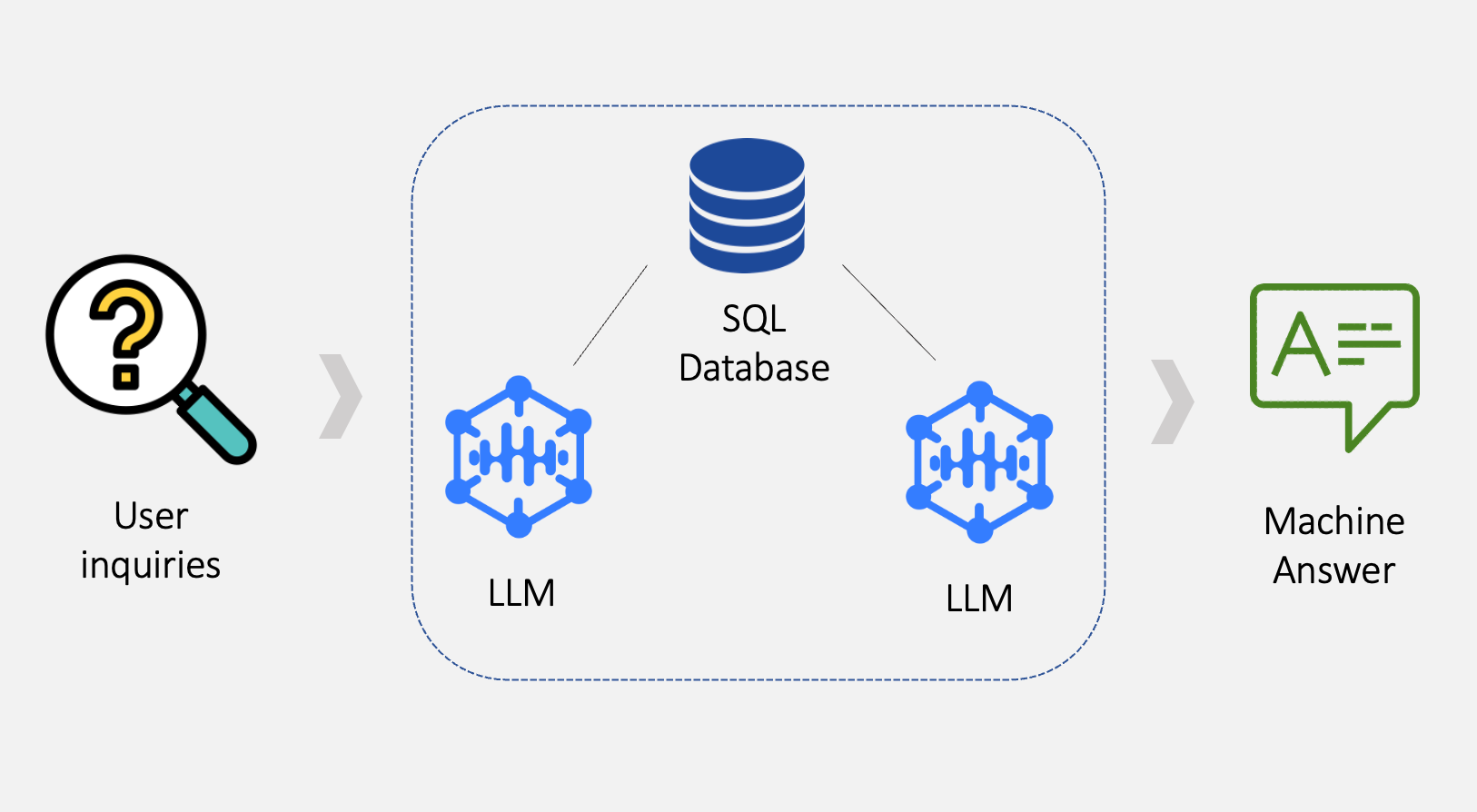 The flows that LLM-based application works (Image by author)
Consider a scenario where you plan to conduct customer analytics for a retail shop, so you have collected sales data over the past 12 months. Your goal is to understand better diverse aspects such as customer demographics, spending behaviors, and product categories.
The dataset [with license as CC0: Public domain] obtained from Kaggle contains several fields, including transaction ID, transaction date, customer ID, gender, age, product category, the number of units of the products purchased, the price per unit, and the total amount of transactions. We can begin our analysis now.
The flows that LLM-based application works (Image by author)
Consider a scenario where you plan to conduct customer analytics for a retail shop, so you have collected sales data over the past 12 months. Your goal is to understand better diverse aspects such as customer demographics, spending behaviors, and product categories.
The dataset [with license as CC0: Public domain] obtained from Kaggle contains several fields, including transaction ID, transaction date, customer ID, gender, age, product category, the number of units of the products purchased, the price per unit, and the total amount of transactions. We can begin our analysis now.
The initial setup
We need to set up the environment and configurations properly to use LangChain in Python.
- Prepare the Python environment with LangChain library alongside other necessary dependencies like SQLite and Pandas
- Configure an OpenAI Key to query GPT models
- Import a CSV file 'retail_sales_dataset.csv' into a table within the SQLite database
python
# Import necessary libraries and modules
from langchain.chat_models import ChatOpenAI
import sqlite3
import pandas as pd

# Set the OpenAI API key
OPENAI_API_KEY = "<OpenAI API key>"

# Initialize the Langchain ChatOpenAI model
llm = ChatOpenAI(openai_api_key=OPENAI_API_KEY, model_name="gpt-3.5-turbo-1106")

# Connect to the SQLite database
connection = sqlite3.connect("customer.db")

# Convert DataFrame to a SQLite table named "RetailSalesTable"
df.to_sql("RetailSalesTable", connection, if_exists='replace')
Create a LangChain Application
1 Generate basic statistics
What is the number of transactions per year and month?
To inquire about basic statistics related to the sales SQL table, we use the create_sql_agent agent helper. Both parameters verbose and return_intermediate_steps are set as True so that the internal states and steps during the execution process can be shown. This will be effective for us to iteratively evaluate and refine the approach to communicating with the agent.
python
# Import necessary libraries and modules
from langchain.agents import create_sql_agent
from langchain.agents.agent_toolkits import SQLDatabaseToolkit
from langchain.agents.agent_types import AgentType
from langchain.sql_database import SQLDatabase

# Create an instance of SQLDatabase using the 'customer.db' SQLite database
db = SQLDatabase.from_uri('sqlite:///customer.db')

# Create an SQL agent executor with specified parameters
agent_executor = create_sql_agent(
    llm=llm,
    toolkit=SQLDatabaseToolkit(db=db, llm=llm),
    agent_type=AgentType.ZERO_SHOT_REACT_DESCRIPTION,
    handle_parsing_errors=True,
    verbose=True,
    return_intermediate_steps=True
)

# Define user input
user_inquiry = "What is the number of transactions per year and month?"

# Run the agent to generate a response
agent_executor.run(user_inquiry)
The complete content of the outputs is provided below.
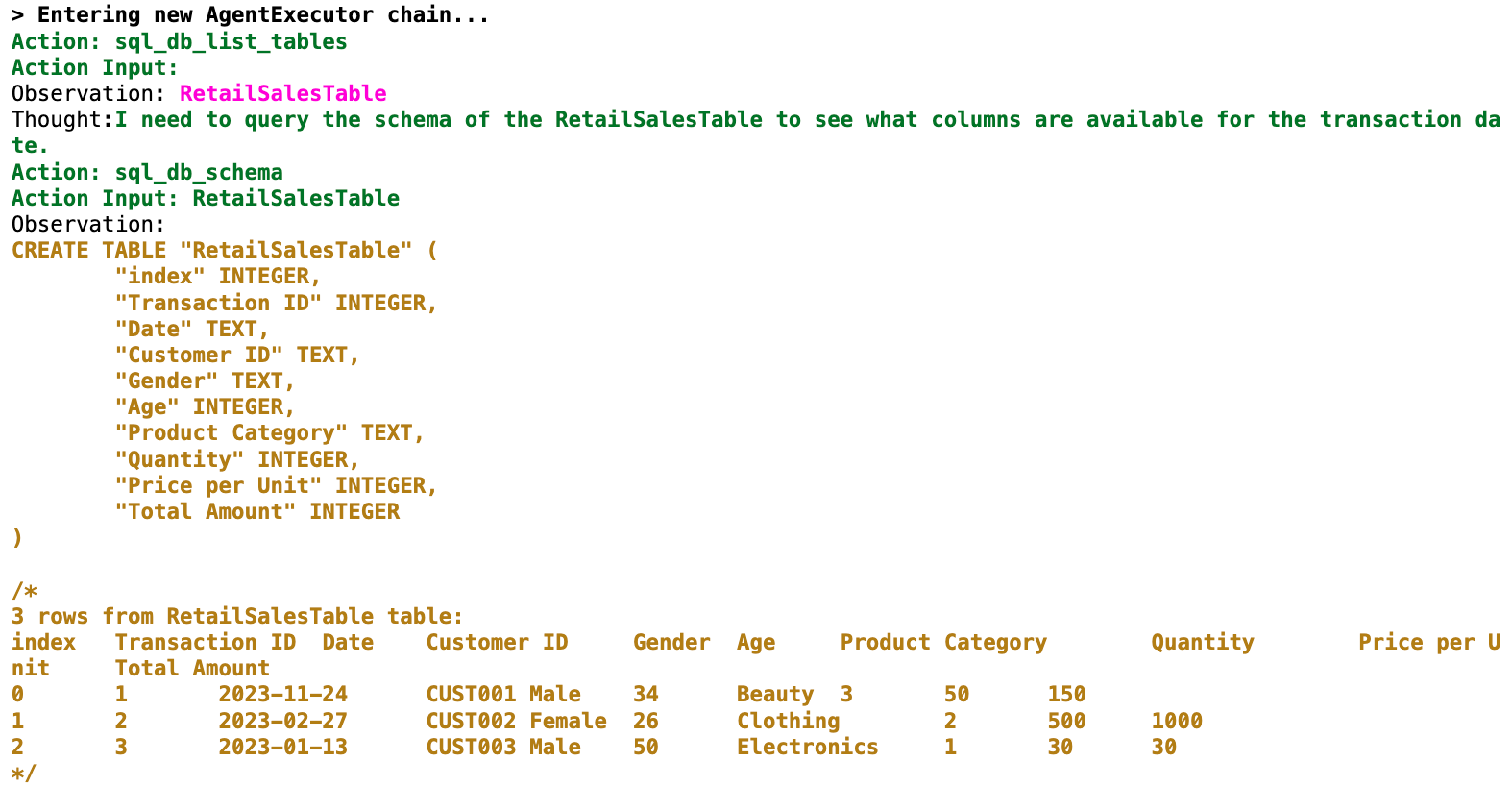 Agent's output steps - basic statistics (1/2) (Image by author)
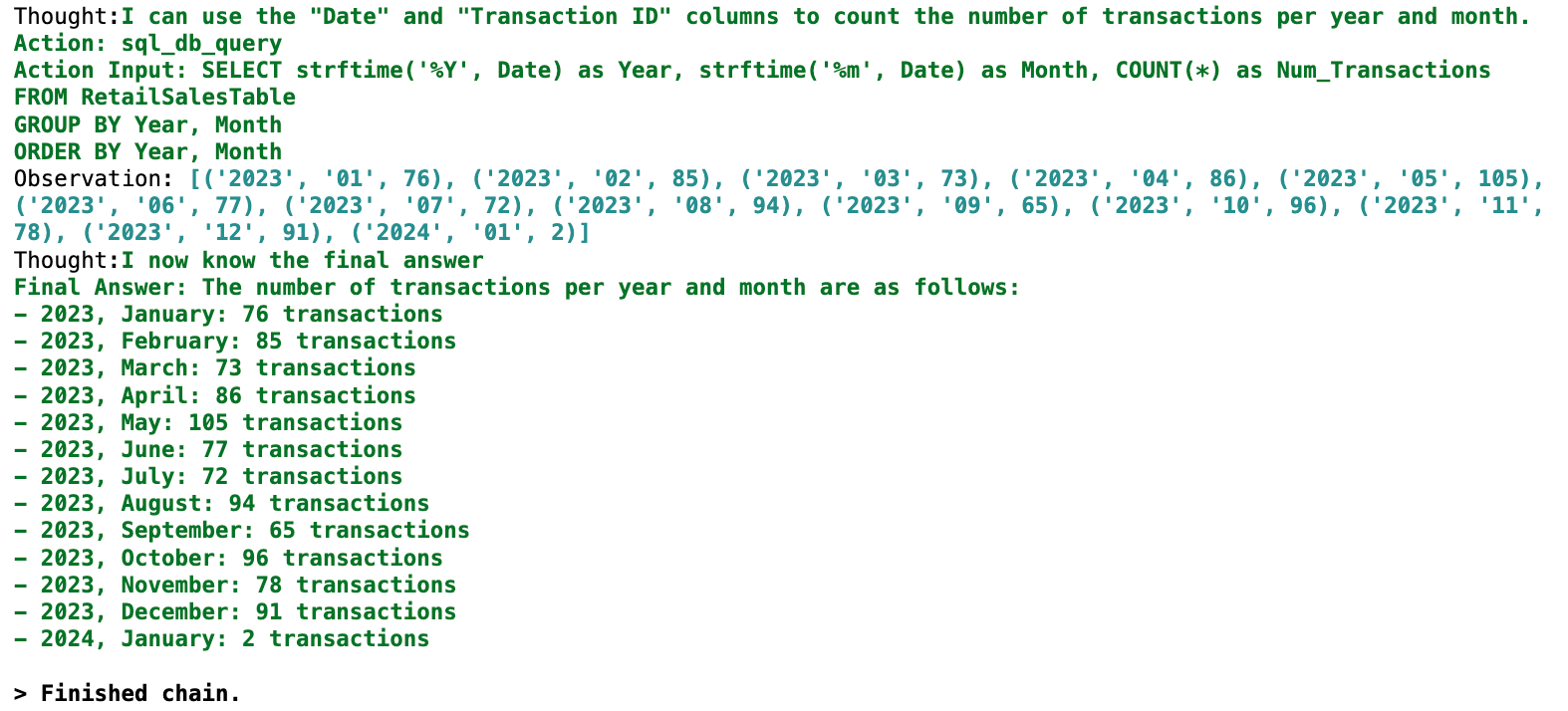 Agent's output steps - basic statistics (2/2) (Image by author)
The agent writes the query which includes rectifying the formatting of the 'Date' column and producing the correct results. It successfully presents the breakdown of transaction counts from Jan 2023 to Jan 2024.
Agent's output steps - basic statistics (2/2) (Image by author)
The agent writes the query which includes rectifying the formatting of the 'Date' column and producing the correct results. It successfully presents the breakdown of transaction counts from Jan 2023 to Jan 2024.
2 Perform feature engineering
What is the number of transactions across different age groups of customers?
This time, we slightly modified the inquiries to focus on the dimension 'age groups'. This aims to evaluate the agent's ability to generate new features that do not directly originate from the dataset. Applied with a similar concept, you can additionally explore statistics across dimensions like transaction dates categorized by weekdays/ weekends, purchasing frequency, etc.
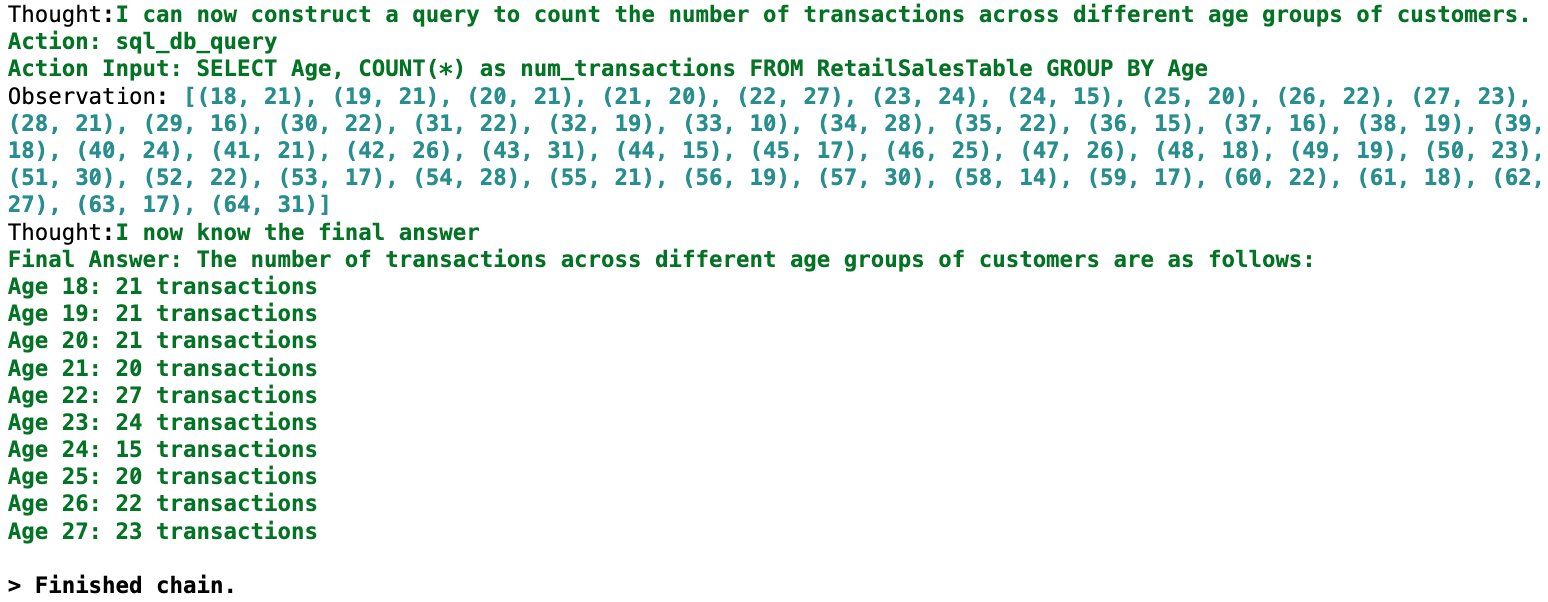 A portion of agent's output steps -feature engineering (Image by author)
The agent attempts to write the query but unfortunately gives the wrong answer. It seems that the agent oversimplifies the concept of 'age group', so it is not classified as a distinct dimension, and considers it as just 'age'.
Improvement: Use a prompt template with background context
When we find that the model misunderstood our intended meaning, or lacks certain knowledge, we can use class
A portion of agent's output steps -feature engineering (Image by author)
The agent attempts to write the query but unfortunately gives the wrong answer. It seems that the agent oversimplifies the concept of 'age group', so it is not classified as a distinct dimension, and considers it as just 'age'.
Improvement: Use a prompt template with background context
When we find that the model misunderstood our intended meaning, or lacks certain knowledge, we can use class PromptTemplate to create parametrized prompts for language models. In this case, I have supplemented additional context about examples of extra features in customer analytics as background information, right before showing the user inquiry. This aims to provide the model with clearer guidelines and deliver our human intent for generating appropriate machine-generated responses.
python
from langchain_core.prompts import PromptTemplate

# Create the prompt template
template = PromptTemplate(
    input_variables=["user_inquiry", "background_info"],
    template="""{background_info}
    Question: {user_inquiry}
    """
)

# Define the background information
background_info = """
As the customer analyst, my role is to analyze the transaction patterns of customers. The feature engineering in table 'RetailSalesTable' is crucial for statistical exploration. For example:
- column 'Age' can be grouped into bins of age ranges, such as 21-25, 26-30, and so on.
Understanding the data in these columns helps us gain insights about our customers, enabling us to offer personalized services and develop effective marketing strategies.
"""

# Define user input
user_inquiry = "What is the number of transactions across different age ranges of customers?"

# Run the agent with the formatted template
agent_executor.run(template.format(background_info=background_info, user_inquiry=user_inquiry))
Here are the key highlights from the corresponding outputs.
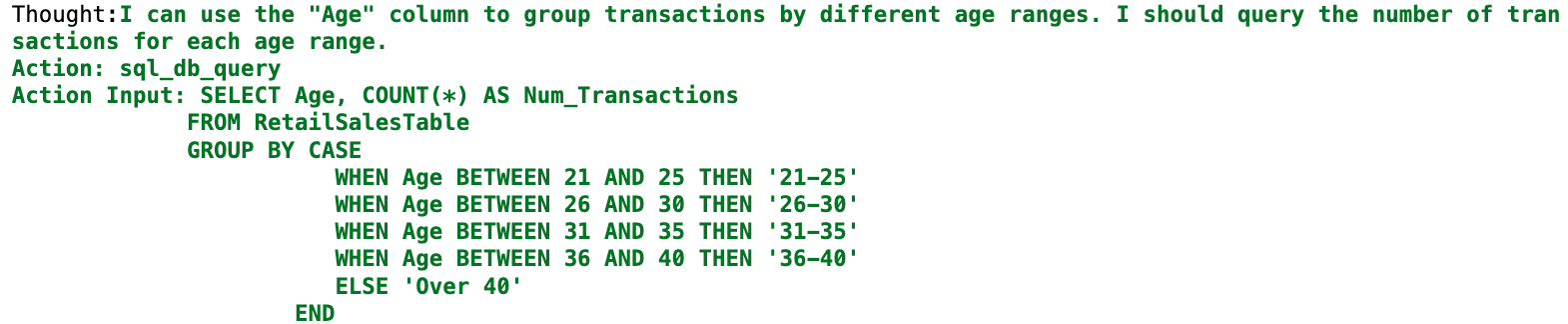 Agent's improved output - feature engineering (Image by author)
With the aid of the prompt, the agent now successfully categorizes the transactions into multiple age groups. It is worth mentioning that there are potentially other ways to achieve the same goal, such as using few-shot examples to demonstrate the question-answer pairs.
Agent's improved output - feature engineering (Image by author)
With the aid of the prompt, the agent now successfully categorizes the transactions into multiple age groups. It is worth mentioning that there are potentially other ways to achieve the same goal, such as using few-shot examples to demonstrate the question-answer pairs.
3 Plot chart for multi-dimensional features
We used the create_sql_agent agent to calculate basic statistics and generate insights. With the art of prompt design, the agent is consequently fit to perform the tasks. To support asking new inquiries that cannot be achieved solely by SQL query, we need to develop our custom tool.
Show a grouped bar graph visualizing the answer to the following question: What are the relationships between product category, average total amount, and gender?
In this example, the inquiry involves data exploration and visualization. We will create our agent based on create_sql_agent, and will add the tool PythonREPLTool for executing Python commands, such as using Matplotlib for visualization.
Let's see how the tools are implemented in practice.
python
from langchain import LLMChain
from langchain.agents import (AgentExecutor, Tool, ZeroShotAgent)
from langchain_experimental.tools import PythonREPLTool

# Define a description to suggest how to determine the choice of tool
description = (
    "Useful when you require to answer analytical questions about customers. "
    "Use this more than the Python REPL tool if the question is about customer analytics,"
    "like 'How many customers are there?' or 'count the number of transactions by age group'. "
    "Try not to use clause in the SQL."
)

# Create a Tool object for customer data with the previously defined agent executor 'create_sql_agent' and description
customer_data_tool = Tool(
    name="Customer",
    func=agent_executor.run,
    description=description,
)

# Create the whole list of tools
tools = [PythonREPLTool()]
tools.append(customer_data_tool)

# Define the prefix and suffix for the prompt
prefix = "Below are tools that you can access:"
suffix = (
    "Pass the relevant part of the request directly to the Customer tool.nn"
    "Request: {input}n"
    "{agent_scratchpad}"
)

# Create the prompt using ZeroShotAgent
# Use agent_scratchpad to store the actions previously used, guiding the subsequent responses.
agent_prompt = ZeroShotAgent.create_prompt(
    tools, prefix=prefix, suffix=suffix, input_variables=["input", "agent_scratchpad"]
)

# Create an instance of ZeroShotAgent with the LLMChain and the allowed tool names
zero_shot_agent = ZeroShotAgent(
    llm_chain=LLMChain(llm=llm, prompt=agent_prompt),
    allowed_tools=[tool.name for tool in tools]
)

# Create an AgentExecutor which enables verbose mode and handling parsing errors
agent_executor = AgentExecutor.from_agent_and_tools(
    agent=zero_shot_agent, tools=tools, verbose=True, handle_parsing_errors=True
)

# Define user input
user_inquiry = "Use a grouped bar graph to visualize the result of the following inquiry: "
          "What are the relationships between product category, average total amount, and gender?"

# Run the agent to generate a response
agent_executor.run(user_inquiry)
The flow of SQL agent output is similar to the previous examples we went through above, so it is omitted here. The subsequent output from the Python REPL tool is presented below.
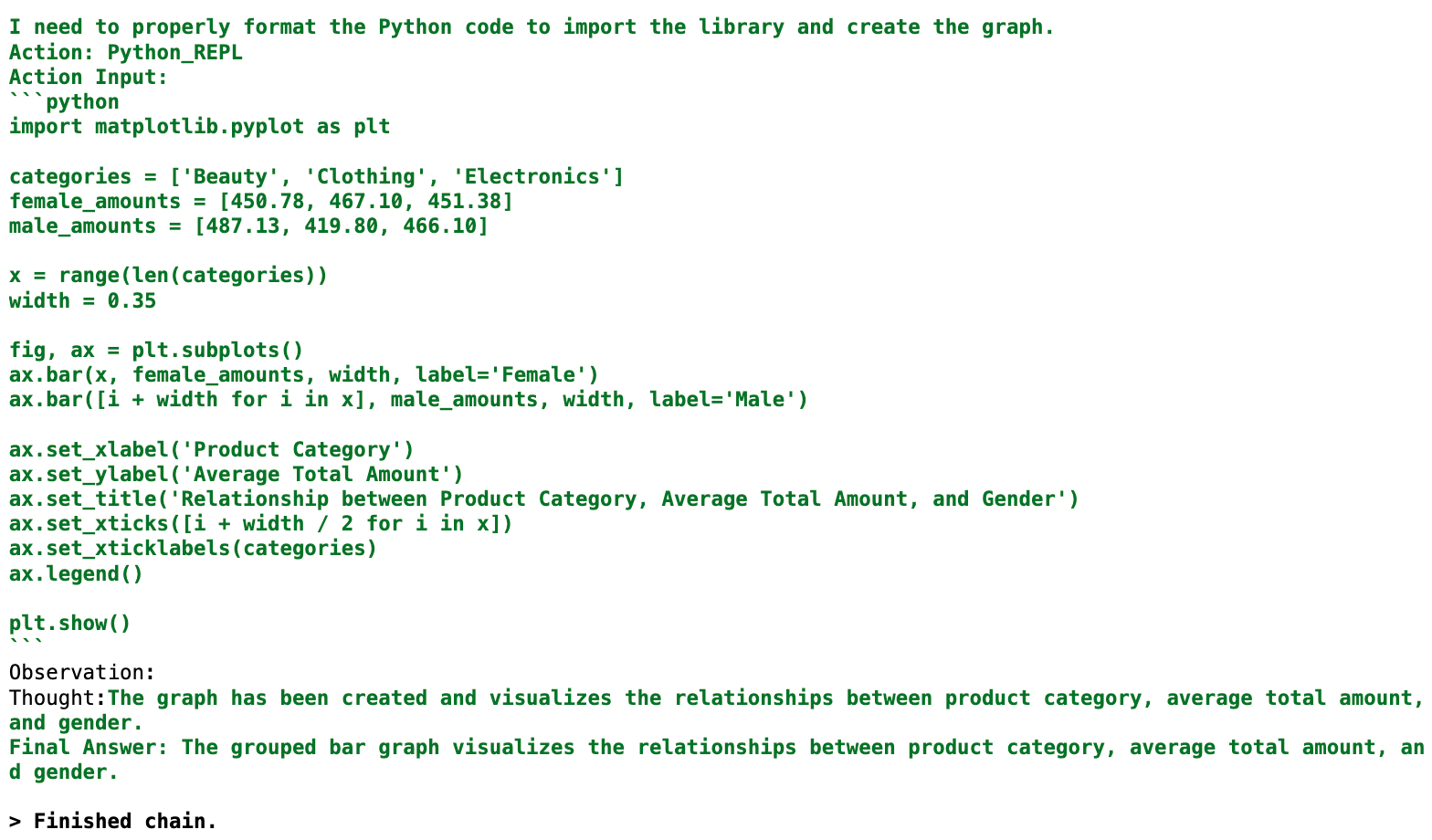 Agent's output - plot chart (1/2) (Image by author)
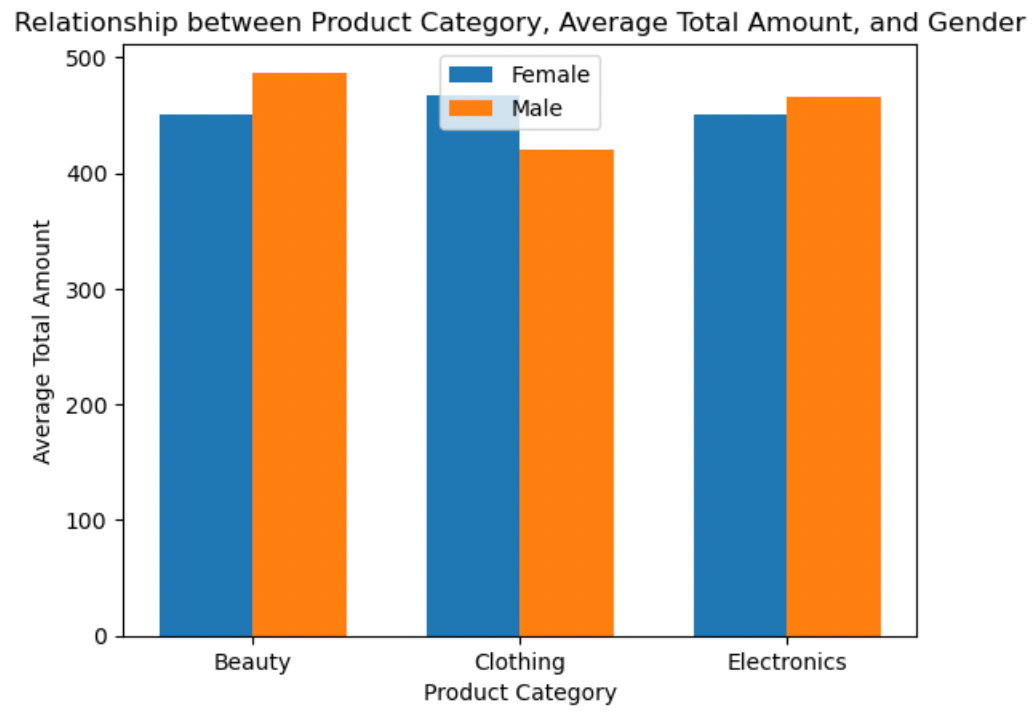 Agent's output - plot chart (2/2) (Image by author)
The customized tool combination successfully translates the natural language inquiry into an SQL query. The summarized query results are then used to generate a grouped bar chart, which clearly and effectively illustrates the relationships through the x-axis, y-axis, and legend.
While the overall design and execution process look smooth, there are indeed some limitations in the current design. For example, suppose we want to generate a scatter plot with most of the transaction data points. In that case, the execution process should generate a long query output that covers all the respective information. However, the agent's output may not be ideal, due to the occasional use of the
Agent's output - plot chart (2/2) (Image by author)
The customized tool combination successfully translates the natural language inquiry into an SQL query. The summarized query results are then used to generate a grouped bar chart, which clearly and effectively illustrates the relationships through the x-axis, y-axis, and legend.
While the overall design and execution process look smooth, there are indeed some limitations in the current design. For example, suppose we want to generate a scatter plot with most of the transaction data points. In that case, the execution process should generate a long query output that covers all the respective information. However, the agent's output may not be ideal, due to the occasional use of the LIMIT clause by the agent (that sets an upper limit on the number of tuples), or query result larger than the maximum token limit (in our case, 4096 tokens). The variety of visualizations that can be generated may thus be limited.
4 Make coherent conversation
In reality, business users often have follow-up questions once they receive the results of a customer analysis. To address these situations, we need to enhance the existing basic LLM application to become more chat-like. We add memory buffers to retain past interactions, allowing the LLM to generate responses for the ongoing conversation's context. This works by constantly storing LLM outputs and referencing the memory storage before generating a response.
Initial question: How do customers adapt their shopping habits during different seasons?
Follow-up question: Can you elaborate more?
We supplement and rectify the customized tools combination below:
python
from langchain.memory import ConversationBufferMemory

# Skipped here - Define your own prefix, suffix, and description with "chat_history" for the prompt
# Keep the original list of tools

# Create the prompt using ZeroShotAgent with additonal "chat_history" as input variables
agent_prompt = ZeroShotAgent.create_prompt(
    tools, prefix=prefix, suffix=suffix, input_variables=["input", "chat_history", "agent_scratchpad"],
)

# Create an instance of ZeroShotAgent with the LLMChain and the allowed tool names
zero_shot_agent = ZeroShotAgent(
    llm_chain=LLMChain(llm=llm, prompt=agent_prompt),
    allowed_tools=[tool.name for tool in tools]
)

# Initiate memory which allows for storing and extracting messages
memory = ConversationBufferMemory(memory_key="chat_history")

# Create an AgentExecutor with memory parameter
agent_chain = AgentExecutor.from_agent_and_tools(
    agent=zero_shot_agent, tools=tools, verbose=True, handle_parsing_errors=True, memory=memory
)

# Define initial question as user input
user_inquiry = "How do customers adapt their shopping habits during different seasons?"

# Run the agent to generate a response
agent_executor.run(user_inquiry)

# Define follow-up question as user input
user_inquiry = "Can you elaborate more?"

# Run the agent to generate another response
agent_executor.run(user_inquiry)
Agent's responses:
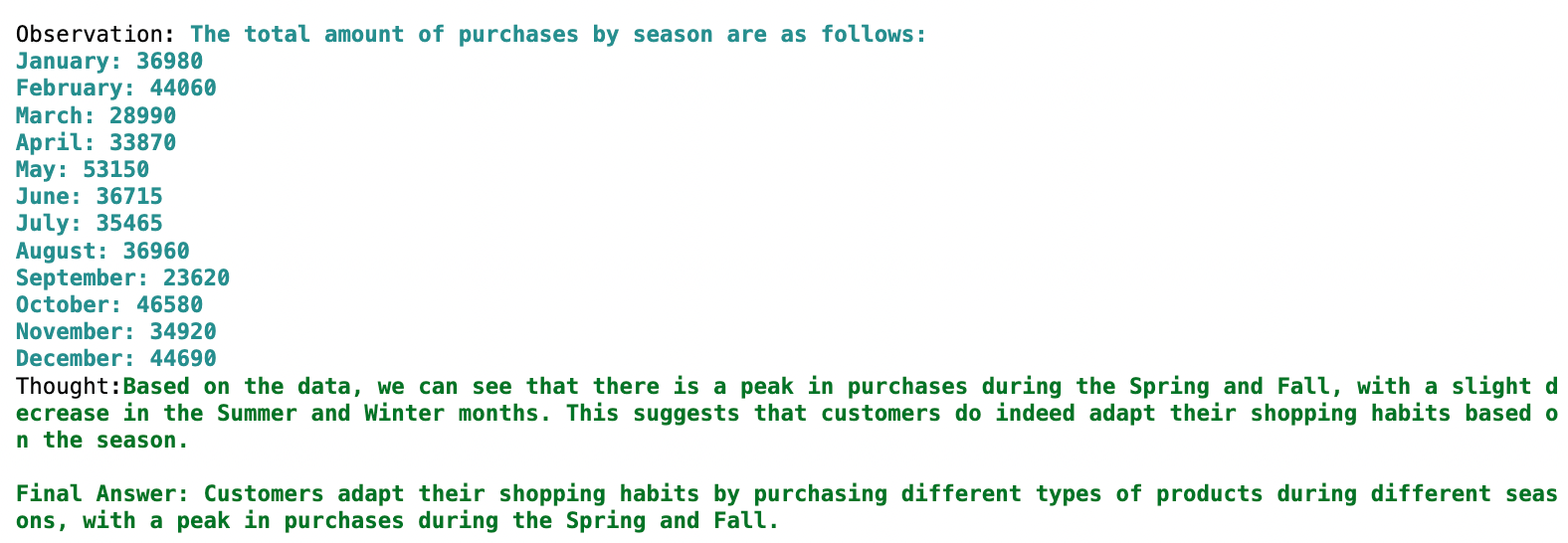 Agent's output - initial question (1/2) (Image by author)
 Agent's output - follow-up question (2/2) (Image by author)
In the follow-up question "Can you elaborate more?", we intentionally did not provide any hints/ keywords about what we were asking, but the agent demonstrated its ability to continue the analysis of shopping habits in various seasons. This indicates the effectiveness of using memory and shows its advantage by providing a more in-depth description across product categories and seasons.
Agent's output - follow-up question (2/2) (Image by author)
In the follow-up question "Can you elaborate more?", we intentionally did not provide any hints/ keywords about what we were asking, but the agent demonstrated its ability to continue the analysis of shopping habits in various seasons. This indicates the effectiveness of using memory and shows its advantage by providing a more in-depth description across product categories and seasons.
Wrapping it up
We conducted experiments to explore the key functionalities and potential approaches of LangChain in developing a customer analytics application based on LLM:
- Calculating statistics, by using an
create_sql_agent agent to query the database and retrieve relevant statistical information.
- Insight generation, by applying the prompt template to define the key data features.
- Visualization, by using the combination of a custom agent and tool
PythonREPLTool.
- Conversation capabilities, by adding the memory buffer to store and retrieve the chat history.
The choices of wordings in natural language inquiry often do not align precisely with those in the database schema. It was observed that the LangChain executor sometimes does not work as expected, and may even hallucinate, particularly when identifying the data relationships to generate a graph. Therefore, the development of codes requires iterative troubleshooting. While the LangChain framework may only be somewhat reliable and effective in handling diverse customer analytics tasks, it can still offer users with marginal advantage when they have a compelling need to discover insights beyond the traditional analysis dashboards.
The design of this application is only the initial stage, and there are further possibilities to discover. For example, customer data is sometimes available in text format, such as customer reviews or product descriptions. LangChain provides the tagging function so that we can conduct a comprehensive analysis by labeling the sentiments, language, style, and more.
Before you go
If you enjoy this reading, I invite you to **** follow my Medium page and LinkedIn page. By doing so, you can stay updated with exciting content related to data science side projects, Machine Learning Operations (MLOps) demonstrations, and project management methodologies.
Managing the Technical Debts of Machine Learning Systems
Monitoring Machine Learning Models in Production: Why and How?
Register Now to Continue Reading
Unlock Towards Data Science with a Free Account
All articles on Towards Data Science are available to registered users. Create a free account today to access this article and thousands more.
Register for freeSign in to your account
 Written By
See all from John Leung
Artificial IntelligenceBusiness IntelligenceLangchainLlmPython
Share This Article
Towards Data Science is a community publication. Submit your insights to reach our global audience and earn through the TDS Author Payment Program.
Write for TDS
Related Articles
Data Science
How to build, score, and interpret RFM segments step by step
Ibrahim Salami
January 1, 202612 min read
Artificial Intelligence
An introduction to key concepts and practical applications
Chinmay Kakatkar
November 6, 202515 min read
Artificial Intelligence
How to turn your Llama into a Giraffe
Donato Riccio
October 15, 20239 min read
Artificial Intelligence
How to use PyTorch and Hugging Face to classify named entities in a text
Marcello Politi
July 7, 20222 min read
Artificial Intelligence
Our weekly selection of must-read Editors' Picks and original features
TDS Editors
October 24, 20244 min read
Machine Learning
Let's get the basics covered. Source code included.
Dario Radečić
March 26, 20206 min read
Programming
Guidelines to use lists in Python
Amanda Iglesias Moreno
April 20, 20205 min read
Artificial Intelligence
The process behind my first individual project at Metis
Joe Cowell
October 14, 20207 min read
Data Science
Get you on your way to data analysis and model building quickly by pulling MongoDB data into Pandas
Brian Roepke
September 17, 20227 min read
Your home for data science and AI. The world's leading publication for data science, data analytics, data engineering, machine learning, and artificial intelligence professionals.
Subscribe to Our NewsletterWrite For TDS•About•Advertise•Privacy Policy•Terms of Use
© Insight Media Group, LLC 2026•The New Stack•roadmap.sh•Creator Network
Recommended Articles
Close