保留正文与补采附件。源页面当前未重新核验;具体限制见交付清单。
 We value your privacy
We use cookies to enhance your browsing experience, serve personalised ads or content, and analyse our traffic. By clicking "Accept All", you consent to our use of cookies.
Customise Reject All Accept All
Customise Consent Preferences
We value your privacy
We use cookies to enhance your browsing experience, serve personalised ads or content, and analyse our traffic. By clicking "Accept All", you consent to our use of cookies.
Customise Reject All Accept All
Customise Consent Preferences  We use cookies to help you navigate efficiently and perform certain functions. You will find detailed information about all cookies under each consent category below.
The cookies that are categorised as "Necessary" are stored on your browser as they are essential for enabling the basic functionalities of the site. ... Show more
NecessaryAlways Active
Necessary cookies are required to enable the basic features of this site, such as providing secure log-in or adjusting your consent preferences. These cookies do not store any personally identifiable data.
We use cookies to help you navigate efficiently and perform certain functions. You will find detailed information about all cookies under each consent category below.
The cookies that are categorised as "Necessary" are stored on your browser as they are essential for enabling the basic functionalities of the site. ... Show more
NecessaryAlways Active
Necessary cookies are required to enable the basic features of this site, such as providing secure log-in or adjusting your consent preferences. These cookies do not store any personally identifiable data.
-
Cookie
BCTempID
-
Duration
10 minutes
-
Description
No description available.
-
Cookie
__cf_bm
-
Duration
1 hour
-
Description
This cookie, set by Cloudflare, is used to support Cloudflare Bot Management.
-
Cookie
AWSALBCORS
-
Duration
7 days
-
Description
Amazon Web Services set this cookie for load balancing.
-
Cookie
_cfuvid
-
Duration
session
-
Description
Cloudflare sets this cookie to track users across sessions to optimize user experience by maintaining session consistency and providing personalized services
-
Cookie
li_gc
-
Duration
6 months
-
Description
Linkedin set this cookie for storing visitor's consent regarding using cookies for non-essential purposes.
-
Cookie
__hssrc
-
Duration
session
-
Description
This cookie is set by Hubspot whenever it changes the session cookie. The __hssrc cookie set to 1 indicates that the user has restarted the browser, and if the cookie does not exist, it is assumed to be a new session.
-
Cookie
__hssc
-
Duration
1 hour
-
Description
HubSpot sets this cookie to keep track of sessions and to determine if HubSpot should increment the session number and timestamps in the __hstc cookie.
-
Cookie
wpEmojiSettingsSupports
-
Duration
session
-
Description
WordPress sets this cookie when a user interacts with emojis on a WordPress site. It helps determine if the user's browser can display emojis properly.
-
Cookie
BCSessionID
-
Duration
1 year 1 month 4 days
-
Description
Blueconic sets this cookie as a unique identifier for the BlueConic profile.
-
Cookie
_octo
-
Duration
1 year
-
Description
No description available.
-
Cookie
logged_in
-
Duration
1 year
-
Description
No description available.
-
Cookie
__Secure-YEC
-
Duration
past
-
Description
YouTube sets this cookie to stores the user's video player preferences using embedded YouTube video
-
Cookie
__eoi
-
Duration
6 months
-
Description
Description is currently not available.
-
Cookie
AWSALBTGCORS
-
Duration
7 days
-
Description
No description available.
-
Cookie
login-status-p
-
Duration
past
-
Description
Description is currently not available.
-
Cookie
AWSALBTG
-
Duration
7 days
-
Description
No description available.
-
Cookie
csrf_token
-
Duration
session
-
Description
No description available.
-
Cookie
token_v2
-
Duration
1 day
-
Description
Description is currently not available.
-
Cookie
D
-
Duration
1 year
-
Description
Description is currently not available.
-
Cookie
PHPSESSID
-
Duration
session
-
Description
This cookie is native to PHP applications. The cookie stores and identifies a user's unique session ID to manage user sessions on the website. The cookie is a session cookie and will be deleted when all the browser windows are closed.
-
Cookie
VISITOR_PRIVACY_METADATA
-
Duration
6 months
-
Description
YouTube sets this cookie to store the user's cookie consent state for the current domain.
-
Cookie
cookietest
-
Duration
session
-
Description
The cookietest cookie is typically used to determine whether the user's browser accepts cookies, essential for website functionality and user experience.
-
Cookie
__Host-airtable-session
-
Duration
1 year
-
Description
This cookie is used to enable us to integrate the services of Airtable.
-
Cookie
__Host-airtable-session.sig
-
Duration
1 year
-
Description
This cookie is used to enable us to integrate the services of Airtable.
-
Cookie
m
-
Duration
1 year 1 month 4 days
-
Description
Stripe sets this cookie for fraud prevention purposes. It identifies the device used to access the website, allowing the website to be formatted accordingly.
-
Cookie
BIGipServer*
-
Duration
session
-
Description
Marketo sets this cookie to collect information about the user's online activity and build a profile about their interests to provide advertisements relevant to the user.
-
Cookie
__cfruid
-
Duration
session
-
Description
Cloudflare sets this cookie to identify trusted web traffic.
-
Cookie
_GRECAPTCHA
-
Duration
6 months
-
Description
Google Recaptcha service sets this cookie to identify bots to protect the website against malicious spam attacks.
-
Cookie
__Secure-YNID
-
Duration
6 months
-
Description
Google cookie used to protect user security and prevent fraud, especially during the login process.
-
Cookie
cookieyes-consent
-
Duration
1 year
-
Description
CookieYes sets this cookie to remember users' consent preferences so that their preferences are respected on subsequent visits to this site. It does not collect or store any personal information about the site visitors.
Functional
Functional cookies help perform certain functionalities like sharing the content of the website on social media platforms, collecting feedback, and other third-party features.
-
Cookie
lidc
-
Duration
1 day
-
Description
LinkedIn sets the lidc cookie to facilitate data center selection.
-
Cookie
brw
-
Duration
1 year
-
Description
No description available.
-
Cookie
brwConsent
-
Duration
5 minutes
-
Description
Description is currently not available.
-
Cookie
WMF-Uniq
-
Duration
1 year
-
Description
Description is currently not available.
-
Cookie
loom_anon_comment
-
Duration
1 year
-
Description
No description available.
-
Cookie
loom_referral_video
-
Duration
session
-
Description
Description is currently not available.
-
Cookie
VISITOR_INFO1_LIVE
-
Duration
6 months
-
Description
A cookie set by YouTube to measure bandwidth that determines whether the user gets the new or old player interface.
-
Cookie
yt-remote-connected-devices
-
Duration
Never Expires
-
Description
YouTube sets this cookie to store the user's video preferences using embedded YouTube videos.
-
Cookie
ytidb::LAST_RESULT_ENTRY_KEY
-
Duration
Never Expires
-
Description
The cookie ytidb::LAST_RESULT_ENTRY_KEY is used by YouTube to store the last search result entry that was clicked by the user. This information is used to improve the user experience by providing more relevant search results in the future.
-
Cookie
yt-remote-device-id
-
Duration
Never Expires
-
Description
YouTube sets this cookie to store the user's video preferences using embedded YouTube videos.
-
Cookie
yt-remote-session-name
-
Duration
session
-
Description
The yt-remote-session-name cookie is used by YouTube to store the user's video player preferences using embedded YouTube video.
-
Cookie
yt-remote-fast-check-period
-
Duration
session
-
Description
The yt-remote-fast-check-period cookie is used by YouTube to store the user's video player preferences for embedded YouTube videos.
-
Cookie
yt-remote-session-app
-
Duration
session
-
Description
The yt-remote-session-app cookie is used by YouTube to store user preferences and information about the interface of the embedded YouTube video player.
-
Cookie
yt-remote-cast-available
-
Duration
session
-
Description
The yt-remote-cast-available cookie is used to store the user's preferences regarding whether casting is available on their YouTube video player.
-
Cookie
yt-remote-cast-installed
-
Duration
session
-
Description
The yt-remote-cast-installed cookie is used to store the user's video player preferences using embedded YouTube video.
-
Cookie
cp_session
-
Duration
3 months
-
Description
Codepen sets this cookie for Help systems found in the website.
-
Cookie
loid
-
Duration
1 year 1 month 4 days
-
Description
This cookie is set by the Reddit. The cookie enables the sharing of content from the website onto the social media platform.
Analytics
Analytical cookies are used to understand how visitors interact with the website. These cookies help provide information on metrics such as the number of visitors, bounce rate, traffic source, etc.
-
Cookie
__hstc
-
Duration
6 months
-
Description
Hubspot set this main cookie for tracking visitors. It contains the domain, initial timestamp (first visit), last timestamp (last visit), current timestamp (this visit), and session number (increments for each subsequent session).
-
Cookie
hubspotutk
-
Duration
6 months
-
Description
HubSpot sets this cookie to keep track of the visitors to the website. This cookie is passed to HubSpot on form submission and used when deduplicating contacts.
-
Cookie
_ga
-
Duration
1 year 1 month 4 days
-
Description
Google Analytics sets this cookie to calculate visitor, session and campaign data and track site usage for the site's analytics report. The cookie stores information anonymously and assigns a randomly generated number to recognise unique visitors.
-
Cookie
ga*
-
Duration
1 year 1 month 4 days
-
Description
Google Analytics sets this cookie to store and count page views.
-
Cookie
__Host-psifi.analyticsTrace
-
Duration
6 hours
-
Description
Description is currently not available.
-
Cookie
__Host-psifi.analyticsTraceV2
-
Duration
6 hours
-
Description
Description is currently not available.
-
Cookie
_gh_sess
-
Duration
session
-
Description
GitHub sets this cookie for temporary application and framework state between pages like what step the user is on in a multiple step form.
-
Cookie
YSC
-
Duration
session
-
Description
YSC cookie is set by Youtube and is used to track the views of embedded videos on Youtube pages.
-
Cookie
ajs_anonymous_id
-
Duration
1 year
-
Description
This cookie is set by Segment to count the number of people who visit a certain site by tracking if they have visited before.
-
Cookie
vuid
-
Duration
1 year 1 month 4 days
-
Description
Vimeo installs this cookie to collect tracking information by setting a unique ID to embed videos on the website.
Performance
Performance cookies are used to understand and analyse the key performance indexes of the website which helps in delivering a better user experience for the visitors.
-
Cookie
AWSALB
-
Duration
7 days
-
Description
AWSALB is an application load balancer cookie set by Amazon Web Services to map the session to the target.
-
Cookie
acq
-
Duration
past
-
Description
Description is currently not available.
-
Cookie
acq.sig
-
Duration
past
-
Description
Description is currently not available.
-
Cookie
ptc
-
Duration
2 years
-
Description
No description available.
Advertisement
Advertisement cookies are used to provide visitors with customised advertisements based on the pages you visited previously and to analyse the effectiveness of the ad campaigns.
-
Cookie
muc_ads
-
Duration
1 year 1 month 4 days
-
Description
Twitter sets this cookie to collect user behaviour and interaction data to optimize the website.
-
Cookie
guest_id_marketing
-
Duration
1 year 1 month 4 days
-
Description
Twitter sets this cookie to identify and track the website visitor.
-
Cookie
guest_id_ads
-
Duration
1 year 1 month 4 days
-
Description
Twitter sets this cookie to identify and track the website visitor.
-
Cookie
personalization_id
-
Duration
1 year 1 month 4 days
-
Description
Twitter sets this cookie to integrate and share features for social media and also store information about how the user uses the website, for tracking and targeting.
-
Cookie
guest_id
-
Duration
1 year 1 month 4 days
-
Description
Twitter sets this cookie to identify and track the website visitor. It registers if a user is signed in to the Twitter platform and collects information about ad preferences.
-
Cookie
bcookie
-
Duration
1 year
-
Description
LinkedIn sets this cookie from LinkedIn share buttons and ad tags to recognize browser IDs.
-
Cookie
__Secure-ROLLOUT_TOKEN
-
Duration
6 months
-
Description
YouTube sets this cookie to manage feature rollout and experimentation. It helps Google control which new features or interface changes are shown to users as part of testing and staged rollouts, ensuring consistent experience for a given user during an experiment.
-
Cookie
yt.innertube::nextId
-
Duration
Never Expires
-
Description
YouTube sets this cookie to register a unique ID to store data on what videos from YouTube the user has seen.
-
Cookie
yt.innertube::requests
-
Duration
Never Expires
-
Description
YouTube sets this cookie to register a unique ID to store data on what videos from YouTube the user has seen.
-
Cookie
session_tracker
-
Duration
session
-
Description
This cookie is set by the Reddit. This cookie is used to identify trusted web traffic. It also helps in adverstising on the website.
-
Cookie
edgebucket
-
Duration
session
-
Description
Reddit sets this cookie to save the information about a log-on Reddit user, for the purpose of advertisement recommendations and updating the content.
-
Cookie
did
-
Duration
1 year
-
Description
Arbor sets this cookie to show targeted ads to site visitors.This cookie expires after 2 months or 1 year.
Uncategorised
Other uncategorised cookies are those that are being analysed and have not been classified into a category as yet.
No cookies to display.
Reject All Save My Preferences Accept All
Toggle SearchToggle Mobile Navigation
Publish AI, ML & data-science insights to a global community of data professionals.
Sign inSubmit an Article
LatestEditor's PicksNewsletterShipAI
Write For TDS
LinkedInXToggle Search
Deep Learning
Optimizing PyTorch Model Inference on AWS Graviton
Tips for accelerating AI/ML on CPU — Part 2
Chaim Rand
December 10, 20259 min read
 Photo by NASA on Unsplash
Developing and deploying AI/ML models can be an extremely expensive endeavor. Many of our posts have been focused on a wide variety of tips, tricks, and techniques for analyzing and optimizing the runtime performance of AI/ML workloads. Our argument has been twofold:
Photo by NASA on Unsplash
Developing and deploying AI/ML models can be an extremely expensive endeavor. Many of our posts have been focused on a wide variety of tips, tricks, and techniques for analyzing and optimizing the runtime performance of AI/ML workloads. Our argument has been twofold:
- Performance analysis and optimizations must be an integral process of every AI/ML development project, and,
- Reaching meaningful performance boosts and cost reduction does not require a high degree of specialization. Any AI/ML developer can do it. Every AI/ML developer should do it.
In a recent post, we addressed the challenge of optimizing an ML inference workload on an Intel® Xeon® processor. We began by reviewing a number of scenarios in which a CPU might be the best choice for AI/ML inference even in an era of multiple dedicated AI inference chips. We then introduced a toy image-classification PyTorch model and proceeded to demonstrate a wide number of techniques for boosting its runtime performance on an Amazon EC2 c7i.xlarge instance, powered by 4th Generation Intel Xeon Scalable processors. In this post, we extend our discussion to AWS’s homegrown Arm-based Graviton CPUs. We will revisit many of the optimizations we discussed in our previous posts — some of which will require adaptation to the Arm processor — and assess their impact on the same toy model. Given the profound differences between the Arm and Intel processors, the paths to the best performing configuration may take different paths.
Learn this step by step with the interactive Machine Learning roadmap.
AWS Graviton
AWS Graviton is a family of processors based on Arm Neoverse CPUs, that are custom designed and built by AWS for optimal price-performance and energy efficiency. Their dedicated engines for vector processing (NEON and SVE/SVE2) and matrix multiplication (MMLA), and their support for Bfloat16 operations (as of Graviton3), make them a compelling candidate for running compute intensive workloads such as AI/ML inference. To facilitate high-performance AI/ML on Graviton, the entire software stack has been optimized for its use:
- Low-Level Compute Kernels from the Arm Compute Library (ACL) are highly optimized to leverage the Graviton hardware accelerators (e.g., SVE and MMLA).
- ML Middleware Libraries such as oneDNN and OpenBLAS route deep learning and linear algebra operations to the specialized ACL kernels.
- AI/ML Frameworks like PyTorch and TensorFlow are compiled and configured to use these optimized backends.
In this post we will use an Amazon EC2 c8g.xlarge instance powered by four AWS Graviton4 processors and an AWS ARM64 PyTorch Deep Learning AMI (DLAMI).
The intention of this post is to demonstrate tips for boosting performance on an AWS Graviton instance. Importantly, our intention is not to draw a comparison between AWS Graviton and alternative chips, nor is it to advocate for the use of one chip over the other. The best choice of processor depends on a whole bunch of considerations beyond the scope of this post. One of the important considerations will be the maximum runtime performance of your model on each chip. In other words: how much “bang” can we get for our buck? Thus, making an informed decision about the best processor is one of the motivations for optimizing runtime performance on each one.
Another motivation for optimizing our model’s performance for multiple inference devices, is to increase its portability. The playing field of AI/ML is extremely dynamic and resilience to changing circumstances is crucial for success. It is not uncommon for compute instances of certain types to suddenly become unavailable or scarce. Conversely, an increase in capacity of AWS Graviton instances, could imply their availability at steep discounts, e.g., in the Amazon EC2 Spot Instance market, presenting cost-savings opportunities that you would not want to miss out on.
Disclaimers
The blocks code of code we will share, the optimization steps we will discuss, and the results we will reach, are intended as an example of the benefits you may see from ML performance optimization on an AWS Graviton instance. These may differ considerably from the results you might see with your own model and runtime environment. Please do not rely on the accuracy or optimality of the contents of this post. Please do not interpret the mention of any library, framework, or platform as an endorsement of its use.
Inference Optimization on AWS Graviton
As in our previous post, we will demonstrate the optimization steps on a toy image classification model:
python
import torch, torchvision
import time


def get_model(channels_last=False, compile=False):
    model = torchvision.models.resnet50()

    if channels_last:
        model= model.to(memory_format=torch.channels_last)

    model = model.eval()

    if compile:
        model = torch.compile(model)

    return model

def get_input(batch_size, channels_last=False):
    batch = torch.randn(batch_size, 3, 224, 224)
    if channels_last:
        batch = batch.to(memory_format=torch.channels_last)
    return batch

def get_inference_fn(model, enable_amp=False):
    def infer_fn(batch):
        with torch.inference_mode(), torch.amp.autocast(
                'cpu',
                dtype=torch.bfloat16,
                enabled=enable_amp
        ):
            output = model(batch)
        return output
    return infer_fn

def benchmark(infer_fn, batch):
    # warm-up
    for _ in range(20):
        _ = infer_fn(batch)

    iters = 100

    start = time.time()
    for _ in range(iters):
        _ = infer_fn(batch)
    end = time.time()

    return (end - start) / iters


batch_size = 1
model = get_model()
batch = get_input(batch_size)
infer_fn = get_inference_fn(model)
avg_time = benchmark(infer_fn, batch)
print(f"\nAverage samples per second: {(batch_size/avg_time):.2f}")
The initial throughput is 12 samples per second (SPS).
Upgrade to the Most Recent PyTorch Release
Whereas the version of PyTorch in our DLAMI is 2.8, the latest version of PyTorch, at the time of this writing, is 2.9. Given the rapid pace of development in the field of AI/ML, it is highly recommended to use the most up-to-date library packages. As our first step, we upgrade to PyTorch 2.9 which includes key updates to its Arm backend.
bash
pip3 install -U torch torchvision --index-url https://download.pytorch.org/whl/cpu
In the case of our model in its initial configuration, upgrading the PyTorch version does not have any effect. However, this step is crucial for getting the most out of the optimization techniques that we will assess.
Batched Inference
To reduce the overhead of launching overheads and increase the utilization of the HW accelerators, we group together samples and apply batched inference. The table below demonstrates how the model throughput varies as a function of batch size:
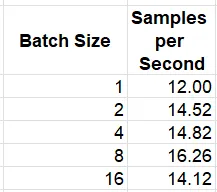 Inference Throughput for Varying Batch Sizes (by Author)
Memory Optimizations
We apply a number of techniques from our previous post for optimizing memory allocation and usage. These include the channels-last memory format, automatic mixed precision with the bfloat16 data type (supported from Graviton3), the TCMalloc allocation library, and huge page allocation. Please see the previous post for details. We also enable the fast math mode of the ACL GEMM kernels, and caching of the kernel primitives — two optimizations that appear in the official guidelines for running PyTorch inference on Graviton.
The command line instructions required to enable these optimizations are shown below:
bash
# install TCMalloc
sudo apt-get install google-perftools

# Program the use of TCMalloc
export LD_PRELOAD=/usr/lib/aarch64-linux-gnu/libtcmalloc.so.4

# Enable huge page memory allocation
export THP_MEM_ALLOC_ENABLE=1

# Enable the fast math mode of the GEMM kernels
export DNNL_DEFAULT_FPMATH_MODE=BF16

# Set LRU Cache capacity to cache the kernel primitives
export LRU_CACHE_CAPACITY=1024
The following table captures the impact of the memory optimizations, applied successively:
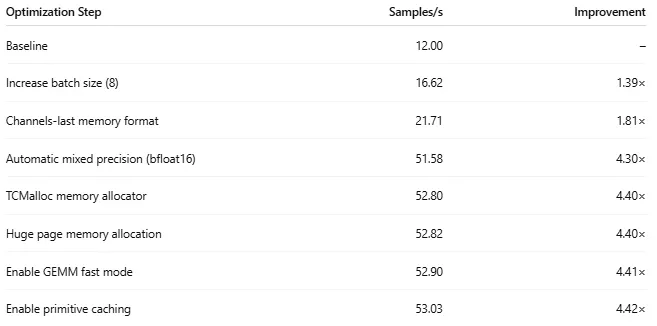 ResNet-50 Memory Optimization Results (by Author)
In the case of our toy model, the channels-last and bfloat16-mixed precision optimizations had the greatest impact. After applying all of the memory optimizations, the average throughput is 53.03 SPS.
ResNet-50 Memory Optimization Results (by Author)
In the case of our toy model, the channels-last and bfloat16-mixed precision optimizations had the greatest impact. After applying all of the memory optimizations, the average throughput is 53.03 SPS.
Model Compilation
The support of PyTorch compilation for AWS Graviton is an area of focused effort of the AWS Graviton team. However, in the case of our toy model, it results in a slight reduction in throughput, from 53.03 SPS to 52.23.
Multi-Worker Inference
While typically applied in settings with many more than four vCPUs, we demonstrate the implementation of multi-worker inference by modifying our script to support core pinning:
python
if __name__ == '__main__':
    # pin CPUs according to worker rank
    import os, psutil
    rank = int(os.environ.get('RANK','0'))
    world_size = int(os.environ.get('WORLD_SIZE','1'))
    cores = list(range(psutil.cpu_count(logical=True)))
    num_cores = len(cores)
    cores_per_process = num_cores // world_size
    start_index = rank * cores_per_process
    end_index = (rank + 1) * cores_per_process
    pid = os.getpid()
    p = psutil.Process(pid)
    p.cpu_affinity(cores[start_index:end_index])

    batch_size = 8
    model = get_model(channels_last=True)
    batch = get_input(batch_size, channels_last=True)
    infer_fn = get_inference_fn(model, enable_amp=True)
    avg_time = benchmark(infer_fn, batch)
    print(f"\nAverage samples per second: {(batch_size/avg_time):.2f}")
We note that contrary to other AWS EC2 CPU instance types, each Graviton vCPU maps directly to a single physical CPU core. We use the torchrun utility to start up four workers, with each running on a single CPU core:
bash
export OMP_NUM_THREADS=1 #set one OpenMP thread per worker
torchrun --nproc_per_node=4 main.py
This results in a throughput of 55.15 SPS, a 4% improvement over our previous best result.
INT8 Quantization for Arm
Another area of active development and continuous improvement on Arm is INT8 quantization. INT8 quantization tools are typically heavily tied to the target instance type. In our previous post we demonstrated PyTorch 2 Export Quantization with X86 Backend through Inductor using the TorchAO (0.12.1) library. Fortunately, recent versions of TorchAO include a dedicated quantizer for Arm. The updated quantization sequence is shown below. As in our previous post we are interested just in the potential performance impact. In practice, INT8 quantization can have a significant impact on the quality of the model and may necessitate a more sophisticated quantization strategy.
python
from torchao.quantization.pt2e.quantize_pt2e import prepare_pt2e, convert_pt2e
import torchao.quantization.pt2e.quantizer.arm_inductor_quantizer as aiq

def quantize_model(model):
    x = torch.randn(4, 3, 224, 224).contiguous(
                            memory_format=torch.channels_last)
    example_inputs = (x,)
    batch_dim = torch.export.Dim("batch")
    with torch.no_grad():
        exported_model = torch.export.export(
            model,
            example_inputs,
            dynamic_shapes=((batch_dim,
                             torch.export.Dim.STATIC,
                             torch.export.Dim.STATIC,
                             torch.export.Dim.STATIC),
                            )
        ).module()
    quantizer = aiq.ArmInductorQuantizer()
    quantizer.set_global(aiq.get_default_arm_inductor_quantization_config())
    prepared_model = prepare_pt2e(exported_model, quantizer)
    prepared_model(*example_inputs)
    converted_model = convert_pt2e(prepared_model)
    optimized_model = torch.compile(converted_model)
    return optimized_model


batch_size = 8
model = get_model(channels_last=True)
model = quantize_model(model)
batch = get_input(batch_size, channels_last=True)
infer_fn = get_inference_fn(model, enable_amp=True)
avg_time = benchmark(infer_fn, batch)
print(f"\nAverage samples per second: {(batch_size/avg_time):.2f}")
The resultant throughput is 56.77 SPS for a 7.1% improvement over the bfloat16 solution.
AOT Compilation Using ONNX and OpenVINO
In our previous post, we explored ahead-of-time (AOT) model compilation techniques using Open Neural Network Exchange (ONNX) and OpenVINO. Both libraries include dedicated support for running on AWS Graviton (e.g., see here and here). The experiments in this section require the following library installations:
bash
pip install onnxruntime onnxscript openvino nncf
The following code block demonstrates the model compilation and execution on Arm using ONNX:
python
def export_to_onnx(model, onnx_path="resnet50.onnx"):
    dummy_input = torch.randn(4, 3, 224, 224)
    batch = torch.export.Dim("batch")
    torch.onnx.export(
        model,
        dummy_input,
        onnx_path,
        input_names=["input"],
        output_names=["output"],
        dynamic_shapes=((batch,
                         torch.export.Dim.STATIC,
                         torch.export.Dim.STATIC,
                         torch.export.Dim.STATIC),
                        ),
        dynamo=True
    )
    return onnx_path

def onnx_infer_fn(onnx_path):
    import onnxruntime as ort

    sess = ort.InferenceSession(
        onnx_path,
        providers=["CPUExecutionProvider"]
   )
    sess_options = ort.SessionOptions()
    sess_options.add_session_config_entry(
               "mlas.enable_gemm_fastmath_arm64_bfloat16", "1")
    input_name = sess.get_inputs()[0].name

    def infer_fn(batch):
        result = sess.run(None, {input_name: batch})
        return result
    return infer_fn

batch_size = 8
model = get_model()
onnx_path = export_to_onnx(model)
batch = get_input(batch_size).numpy()
infer_fn = onnx_infer_fn(onnx_path)
avg_time = benchmark(infer_fn, batch)
print(f"\nAverage samples per second: {(batch_size/avg_time):.2f}")
It should be noted that the ONNX runtime supports a dedicated ACL-ExecutionProvider for running on Arm, but this requires a custom ONNX build (as of the time of this writing), which is out of the scope of this post.
Alternatively, we can compile the model using OpenVINO. The code block below demonstrates its use, including an option for INT8 quantization using NNCF:
python
import openvino as ov
import nncf

def openvino_infer_fn(compiled_model):
    def infer_fn(batch):
        result = compiled_model([batch])[0]
        return result
    return infer_fn

class RandomDataset(torch.utils.data.Dataset):
    def __len__(self):
        return 10000

    def __getitem__(self, idx):
        return torch.randn(3, 224, 224)

quantize_model = False
batch_size = 8
model = get_model()
calibration_loader = torch.utils.data.DataLoader(RandomDataset())
calibration_dataset = nncf.Dataset(calibration_loader)

if quantize_model:
    # quantize PyTorch model
    model = nncf.quantize(model, calibration_dataset)

ovm = ov.convert_model(model, example_input=torch.randn(1, 3, 224, 224))
ovm = ov.compile_model(ovm)
batch = get_input(batch_size).numpy()
infer_fn = openvino_infer_fn(ovm)
avg_time = benchmark(infer_fn, batch)
print(f"\nAverage samples per second: {(batch_size/avg_time):.2f}")
In the case of our toy model, OpenVINO compilation results in an additional boost of the throughput to 63.48 SPS, but the NNCF quantization disappoints, resulting in just 55.18 SPS.
Results
The results of our experiments are summarized in the table below:
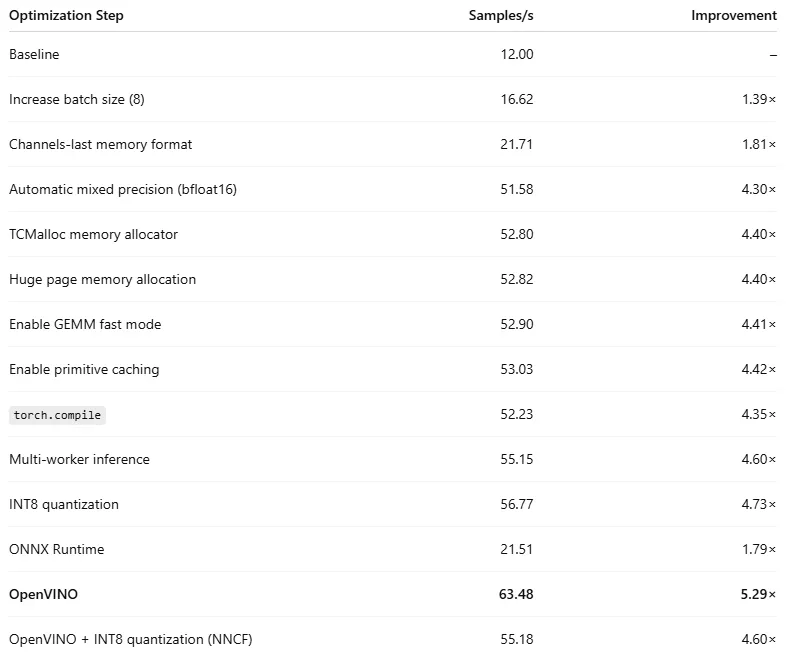 ResNet50 Inference Optimization Results (by Author)
As in our previous post, we reran our experiments on a second model — a Vision Transformer (ViT) from the timm library — to demonstrate how the impact of the runtime optimizations we discussed can vary based on the details of the model. The results are captured below:
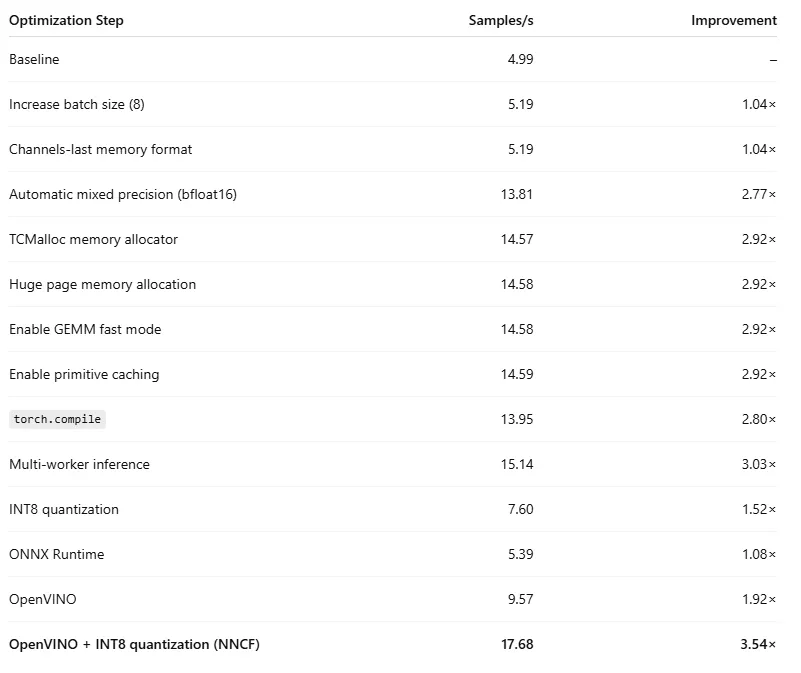 ViT Inference Optimization Results (by Author)
Summary
In this post, we reviewed a number of relatively simple optimization techniques and applied them to two toy PyTorch models. As the results demonstrated, the impact of each optimization step can vary greatly based on the details of the model, and the journey toward peak performance can take many different paths. The steps we presented in this post were just an appetizer; there are undoubtedly many more optimizations that can unlock even greater performance.
Along the way, we noted the many AI/ML libraries that have introduced deep support for the Graviton architecture, and the seemingly continuous community effort of ongoing optimization. The performance gains we achieved, combined with this apparent dedication, prove that AWS Graviton is firmly in the “big leagues” when it comes to running compute-intensive AI/ML workloads.
Register Now to Continue Reading
Unlock Towards Data Science with a Free Account
All articles on Towards Data Science are available to registered users. Create a free account today to access this article and thousands more.
Register for freeSign in to your account
 Written By
See all from Chaim Rand
Artificial IntelligenceDeep LearningInferenceMachine LearningPytorch
Share This Article
Towards Data Science is a community publication. Submit your insights to reach our global audience and earn through the TDS Author Payment Program.
Write for TDS
Related Articles
Deep Learning
Practical implementation
Ziad SALLOUM
January 19, 20196 min read
Deep Learning
How to leverage a pre-trained BERT model from Hugging Face to classify text of news articles
Ruben Winastwan
November 10, 20214 min read
Artificial Intelligence
What's new and what stayed the same 6 years after my 2017 article in TDS
Daniel Shapiro, PhD
January 12, 202311 min read
Artificial Intelligence
A Gentle Guide to the world of disruptive deep learning audio applications and architectures. And why we all need to know about...
Ketan Doshi
February 11, 202112 min read
Machine Learning
Learn basic concepts that make Support Vector Machine a powerful linear classifier
Rishabh Misra
August 10, 20247 min read
Deep Learning
Deep Learning with Class Imbalanced Data
Saptashwa Bhattacharyya
February 15, 20219 min read
Machine Learning
A fresh look on our favorite upside-down tree
Samy Baladram
August 30, 202410 min read
Data Science
A methodology for comparing Google Trends data across countries.
Leigh Collier
March 9, 202612 min read
Artificial Intelligence
Uncovering the secret behind why breads are always conveniently placed beside butter in groceries
Yenwee Lim
April 8, 20228 min read
Your home for data science and AI. The world's leading publication for data science, data analytics, data engineering, machine learning, and artificial intelligence professionals.
Subscribe to Our NewsletterWrite For TDS•About•Advertise•Privacy Policy•Terms of Use
© Insight Media Group, LLC 2026•The New Stack•roadmap.sh•Creator Network
Recommended Articles
Close