保留正文与补采附件。源页面当前未重新核验;具体限制见交付清单。
 We value your privacy
We use cookies to enhance your browsing experience, serve personalised ads or content, and analyse our traffic. By clicking "Accept All", you consent to our use of cookies.
Customise Reject All Accept All
Customise Consent Preferences
We value your privacy
We use cookies to enhance your browsing experience, serve personalised ads or content, and analyse our traffic. By clicking "Accept All", you consent to our use of cookies.
Customise Reject All Accept All
Customise Consent Preferences  We use cookies to help you navigate efficiently and perform certain functions. You will find detailed information about all cookies under each consent category below.
The cookies that are categorised as "Necessary" are stored on your browser as they are essential for enabling the basic functionalities of the site. ... Show more
NecessaryAlways Active
Necessary cookies are required to enable the basic features of this site, such as providing secure log-in or adjusting your consent preferences. These cookies do not store any personally identifiable data.
We use cookies to help you navigate efficiently and perform certain functions. You will find detailed information about all cookies under each consent category below.
The cookies that are categorised as "Necessary" are stored on your browser as they are essential for enabling the basic functionalities of the site. ... Show more
NecessaryAlways Active
Necessary cookies are required to enable the basic features of this site, such as providing secure log-in or adjusting your consent preferences. These cookies do not store any personally identifiable data.
-
Cookie
BCTempID
-
Duration
10 minutes
-
Description
No description available.
-
Cookie
__cf_bm
-
Duration
1 hour
-
Description
This cookie, set by Cloudflare, is used to support Cloudflare Bot Management.
-
Cookie
AWSALBCORS
-
Duration
7 days
-
Description
Amazon Web Services set this cookie for load balancing.
-
Cookie
_cfuvid
-
Duration
session
-
Description
Cloudflare sets this cookie to track users across sessions to optimize user experience by maintaining session consistency and providing personalized services
-
Cookie
li_gc
-
Duration
6 months
-
Description
Linkedin set this cookie for storing visitor's consent regarding using cookies for non-essential purposes.
-
Cookie
__hssrc
-
Duration
session
-
Description
This cookie is set by Hubspot whenever it changes the session cookie. The __hssrc cookie set to 1 indicates that the user has restarted the browser, and if the cookie does not exist, it is assumed to be a new session.
-
Cookie
__hssc
-
Duration
1 hour
-
Description
HubSpot sets this cookie to keep track of sessions and to determine if HubSpot should increment the session number and timestamps in the __hstc cookie.
-
Cookie
wpEmojiSettingsSupports
-
Duration
session
-
Description
WordPress sets this cookie when a user interacts with emojis on a WordPress site. It helps determine if the user's browser can display emojis properly.
-
Cookie
BCSessionID
-
Duration
1 year 1 month 4 days
-
Description
Blueconic sets this cookie as a unique identifier for the BlueConic profile.
-
Cookie
_octo
-
Duration
1 year
-
Description
No description available.
-
Cookie
logged_in
-
Duration
1 year
-
Description
No description available.
-
Cookie
__Secure-YEC
-
Duration
past
-
Description
YouTube sets this cookie to stores the user's video player preferences using embedded YouTube video
-
Cookie
__eoi
-
Duration
6 months
-
Description
Description is currently not available.
-
Cookie
AWSALBTGCORS
-
Duration
7 days
-
Description
No description available.
-
Cookie
login-status-p
-
Duration
past
-
Description
Description is currently not available.
-
Cookie
AWSALBTG
-
Duration
7 days
-
Description
No description available.
-
Cookie
csrf_token
-
Duration
session
-
Description
No description available.
-
Cookie
token_v2
-
Duration
1 day
-
Description
Description is currently not available.
-
Cookie
D
-
Duration
1 year
-
Description
Description is currently not available.
-
Cookie
PHPSESSID
-
Duration
session
-
Description
This cookie is native to PHP applications. The cookie stores and identifies a user's unique session ID to manage user sessions on the website. The cookie is a session cookie and will be deleted when all the browser windows are closed.
-
Cookie
VISITOR_PRIVACY_METADATA
-
Duration
6 months
-
Description
YouTube sets this cookie to store the user's cookie consent state for the current domain.
-
Cookie
cookietest
-
Duration
session
-
Description
The cookietest cookie is typically used to determine whether the user's browser accepts cookies, essential for website functionality and user experience.
-
Cookie
__Host-airtable-session
-
Duration
1 year
-
Description
This cookie is used to enable us to integrate the services of Airtable.
-
Cookie
__Host-airtable-session.sig
-
Duration
1 year
-
Description
This cookie is used to enable us to integrate the services of Airtable.
-
Cookie
m
-
Duration
1 year 1 month 4 days
-
Description
Stripe sets this cookie for fraud prevention purposes. It identifies the device used to access the website, allowing the website to be formatted accordingly.
-
Cookie
BIGipServer*
-
Duration
session
-
Description
Marketo sets this cookie to collect information about the user's online activity and build a profile about their interests to provide advertisements relevant to the user.
-
Cookie
__cfruid
-
Duration
session
-
Description
Cloudflare sets this cookie to identify trusted web traffic.
-
Cookie
_GRECAPTCHA
-
Duration
6 months
-
Description
Google Recaptcha service sets this cookie to identify bots to protect the website against malicious spam attacks.
-
Cookie
__Secure-YNID
-
Duration
6 months
-
Description
Google cookie used to protect user security and prevent fraud, especially during the login process.
-
Cookie
cookieyes-consent
-
Duration
1 year
-
Description
CookieYes sets this cookie to remember users' consent preferences so that their preferences are respected on subsequent visits to this site. It does not collect or store any personal information about the site visitors.
Functional
Functional cookies help perform certain functionalities like sharing the content of the website on social media platforms, collecting feedback, and other third-party features.
-
Cookie
lidc
-
Duration
1 day
-
Description
LinkedIn sets the lidc cookie to facilitate data center selection.
-
Cookie
brw
-
Duration
1 year
-
Description
No description available.
-
Cookie
brwConsent
-
Duration
5 minutes
-
Description
Description is currently not available.
-
Cookie
WMF-Uniq
-
Duration
1 year
-
Description
Description is currently not available.
-
Cookie
loom_anon_comment
-
Duration
1 year
-
Description
No description available.
-
Cookie
loom_referral_video
-
Duration
session
-
Description
Description is currently not available.
-
Cookie
VISITOR_INFO1_LIVE
-
Duration
6 months
-
Description
A cookie set by YouTube to measure bandwidth that determines whether the user gets the new or old player interface.
-
Cookie
yt-remote-connected-devices
-
Duration
Never Expires
-
Description
YouTube sets this cookie to store the user's video preferences using embedded YouTube videos.
-
Cookie
ytidb::LAST_RESULT_ENTRY_KEY
-
Duration
Never Expires
-
Description
The cookie ytidb::LAST_RESULT_ENTRY_KEY is used by YouTube to store the last search result entry that was clicked by the user. This information is used to improve the user experience by providing more relevant search results in the future.
-
Cookie
yt-remote-device-id
-
Duration
Never Expires
-
Description
YouTube sets this cookie to store the user's video preferences using embedded YouTube videos.
-
Cookie
yt-remote-session-name
-
Duration
session
-
Description
The yt-remote-session-name cookie is used by YouTube to store the user's video player preferences using embedded YouTube video.
-
Cookie
yt-remote-fast-check-period
-
Duration
session
-
Description
The yt-remote-fast-check-period cookie is used by YouTube to store the user's video player preferences for embedded YouTube videos.
-
Cookie
yt-remote-session-app
-
Duration
session
-
Description
The yt-remote-session-app cookie is used by YouTube to store user preferences and information about the interface of the embedded YouTube video player.
-
Cookie
yt-remote-cast-available
-
Duration
session
-
Description
The yt-remote-cast-available cookie is used to store the user's preferences regarding whether casting is available on their YouTube video player.
-
Cookie
yt-remote-cast-installed
-
Duration
session
-
Description
The yt-remote-cast-installed cookie is used to store the user's video player preferences using embedded YouTube video.
-
Cookie
cp_session
-
Duration
3 months
-
Description
Codepen sets this cookie for Help systems found in the website.
-
Cookie
loid
-
Duration
1 year 1 month 4 days
-
Description
This cookie is set by the Reddit. The cookie enables the sharing of content from the website onto the social media platform.
Analytics
Analytical cookies are used to understand how visitors interact with the website. These cookies help provide information on metrics such as the number of visitors, bounce rate, traffic source, etc.
-
Cookie
__hstc
-
Duration
6 months
-
Description
Hubspot set this main cookie for tracking visitors. It contains the domain, initial timestamp (first visit), last timestamp (last visit), current timestamp (this visit), and session number (increments for each subsequent session).
-
Cookie
hubspotutk
-
Duration
6 months
-
Description
HubSpot sets this cookie to keep track of the visitors to the website. This cookie is passed to HubSpot on form submission and used when deduplicating contacts.
-
Cookie
_ga
-
Duration
1 year 1 month 4 days
-
Description
Google Analytics sets this cookie to calculate visitor, session and campaign data and track site usage for the site's analytics report. The cookie stores information anonymously and assigns a randomly generated number to recognise unique visitors.
-
Cookie
ga*
-
Duration
1 year 1 month 4 days
-
Description
Google Analytics sets this cookie to store and count page views.
-
Cookie
__Host-psifi.analyticsTrace
-
Duration
6 hours
-
Description
Description is currently not available.
-
Cookie
__Host-psifi.analyticsTraceV2
-
Duration
6 hours
-
Description
Description is currently not available.
-
Cookie
_gh_sess
-
Duration
session
-
Description
GitHub sets this cookie for temporary application and framework state between pages like what step the user is on in a multiple step form.
-
Cookie
YSC
-
Duration
session
-
Description
YSC cookie is set by Youtube and is used to track the views of embedded videos on Youtube pages.
-
Cookie
ajs_anonymous_id
-
Duration
1 year
-
Description
This cookie is set by Segment to count the number of people who visit a certain site by tracking if they have visited before.
-
Cookie
vuid
-
Duration
1 year 1 month 4 days
-
Description
Vimeo installs this cookie to collect tracking information by setting a unique ID to embed videos on the website.
Performance
Performance cookies are used to understand and analyse the key performance indexes of the website which helps in delivering a better user experience for the visitors.
-
Cookie
AWSALB
-
Duration
7 days
-
Description
AWSALB is an application load balancer cookie set by Amazon Web Services to map the session to the target.
-
Cookie
acq
-
Duration
past
-
Description
Description is currently not available.
-
Cookie
acq.sig
-
Duration
past
-
Description
Description is currently not available.
-
Cookie
ptc
-
Duration
2 years
-
Description
No description available.
Advertisement
Advertisement cookies are used to provide visitors with customised advertisements based on the pages you visited previously and to analyse the effectiveness of the ad campaigns.
-
Cookie
muc_ads
-
Duration
1 year 1 month 4 days
-
Description
Twitter sets this cookie to collect user behaviour and interaction data to optimize the website.
-
Cookie
guest_id_marketing
-
Duration
1 year 1 month 4 days
-
Description
Twitter sets this cookie to identify and track the website visitor.
-
Cookie
guest_id_ads
-
Duration
1 year 1 month 4 days
-
Description
Twitter sets this cookie to identify and track the website visitor.
-
Cookie
personalization_id
-
Duration
1 year 1 month 4 days
-
Description
Twitter sets this cookie to integrate and share features for social media and also store information about how the user uses the website, for tracking and targeting.
-
Cookie
guest_id
-
Duration
1 year 1 month 4 days
-
Description
Twitter sets this cookie to identify and track the website visitor. It registers if a user is signed in to the Twitter platform and collects information about ad preferences.
-
Cookie
bcookie
-
Duration
1 year
-
Description
LinkedIn sets this cookie from LinkedIn share buttons and ad tags to recognize browser IDs.
-
Cookie
__Secure-ROLLOUT_TOKEN
-
Duration
6 months
-
Description
YouTube sets this cookie to manage feature rollout and experimentation. It helps Google control which new features or interface changes are shown to users as part of testing and staged rollouts, ensuring consistent experience for a given user during an experiment.
-
Cookie
yt.innertube::nextId
-
Duration
Never Expires
-
Description
YouTube sets this cookie to register a unique ID to store data on what videos from YouTube the user has seen.
-
Cookie
yt.innertube::requests
-
Duration
Never Expires
-
Description
YouTube sets this cookie to register a unique ID to store data on what videos from YouTube the user has seen.
-
Cookie
session_tracker
-
Duration
session
-
Description
This cookie is set by the Reddit. This cookie is used to identify trusted web traffic. It also helps in adverstising on the website.
-
Cookie
edgebucket
-
Duration
session
-
Description
Reddit sets this cookie to save the information about a log-on Reddit user, for the purpose of advertisement recommendations and updating the content.
-
Cookie
did
-
Duration
1 year
-
Description
Arbor sets this cookie to show targeted ads to site visitors.This cookie expires after 2 months or 1 year.
Uncategorised
Other uncategorised cookies are those that are being analysed and have not been classified into a category as yet.
No cookies to display.
Reject All Save My Preferences Accept All
Toggle SearchToggle Mobile Navigation
Publish AI, ML & data-science insights to a global community of data professionals.
Sign inSubmit an Article
LatestEditor's PicksNewsletterShipAI
Write For TDS
LinkedInXToggle Search
Data Science
NumPy for Absolute Beginners: A Project-Based Approach to Data Analysis
Build a high-performance sensor data pipeline from scratch and unlock the true speed of Python's scientific computing core
Ibrahim Salami
November 4, 202513 min read
 To learn NumPy, I’ve been running a series where I build mini projects. I’ve built a Personal Habit and Weather Analysis project. But I haven’t really gotten the chance to explore the full power and capability of NumPy. I want to try to understand why NumPy is so useful in data analysis. To wrap up this series, I’m going to be showcasing this in real time.
I’ll be using a fictional client or company to make things interactive. In this case, our client is going to beEnviroTech Dynamics , a global operator of industrial sensor networks.
Currently, EnviroTech relies on outdated, loop-based Python scripts to process over 1 million sensor readings daily. This process is agonizingly slow, delaying critical maintenance decisions and impacting operational efficiency. They need a modern, high-performance solution.
I’ve been tasked with creating a NumPy-based proof-of-concept to demonstrate how to turbocharge their data pipeline.
Learn this step by step with the interactive AI and Data Scientist roadmap.
To learn NumPy, I’ve been running a series where I build mini projects. I’ve built a Personal Habit and Weather Analysis project. But I haven’t really gotten the chance to explore the full power and capability of NumPy. I want to try to understand why NumPy is so useful in data analysis. To wrap up this series, I’m going to be showcasing this in real time.
I’ll be using a fictional client or company to make things interactive. In this case, our client is going to beEnviroTech Dynamics , a global operator of industrial sensor networks.
Currently, EnviroTech relies on outdated, loop-based Python scripts to process over 1 million sensor readings daily. This process is agonizingly slow, delaying critical maintenance decisions and impacting operational efficiency. They need a modern, high-performance solution.
I’ve been tasked with creating a NumPy-based proof-of-concept to demonstrate how to turbocharge their data pipeline.
Learn this step by step with the interactive AI and Data Scientist roadmap.
The Dataset: Simulated Sensor Readings
To prove the concept, I’ll be working with a large, simulated dataset generated using NumPy‘s random module, featuring entries with the following key arrays:
- Temperature —Each data point represents how hot a machine or system component is running. These readings can quickly help us detect when a machine starts overheating — a sign of possible failure, inefficiency, or safety risk.
- Pressure — data showing how much pressure is building up inside the system, and if it is within a safe range
- Status codes — represent the health or state of each machine or system at a given moment. 0 (Normal), 1 (Warning), 2 (Critical), 3 (Faulty/Missing).
Project Objectives
The core goal is to provide four clear, vectorised solutions to EnviroTech’s data challenges, demonstrating speed and power. So I’ll be showcasing all of these:
- Performance and efficiency benchmark
- Foundational statistical baseline
- Critical anomaly detection and
- Data cleaning and imputation
By the end of this article, you should be able to get a full grasp of NumPy and its usefulness in data analysis.
Objective 1: Performance and Efficiency Benchmark
First, we need a massive dataset to make the speed difference obvious. I’ll be using the 1,000,000 temperature readings we planned earlier.
python
import numpy as np
# Set the size of our data
NUM_READINGS = 1_000_000

# Generate the Temperature array (1 million random floating-point numbers)
# We use a seed so the results are the same every time you run the code
np.random.seed(42)
mean_temp = 45.0
std_dev_temp = 12.0
temperature_data = np.random.normal(loc=mean_temp, scale=std_dev_temp, size=NUM_READINGS)

print(f”Data array size: {temperature_data.size} elements”)
print(f”First 5 temperatures: {temperature_data[:5]}”)
Output:
text
Data array size: 1000000 elements
First 5 temperatures: [50.96056984 43.34082839 52.77226246 63.27635828 42.1901595 ]
Now that we have our records. Let’s check out the effectiveness of NumPy.
Assuming we wanted to calculate the average of all these elements using a standard Python loop, it’ll go something like this.
python
# Function using a standard Python loop
def calculate_mean_loop(data):
total = 0
count = 0
for value in data:
total += value
count += 1
return total / count

# Let’s run it once to make sure it works
loop_mean = calculate_mean_loop(temperature_data)
print(f”Mean (Loop method): {loop_mean:.4f}”)
There’s nothing wrong with this method. But it’s quite slow, because the computer has to process each number one by one, constantly moving between the Python interpreter and the CPU.
To truly showcase the speed, I’ll be using the%timeit command. This runs the code hundreds of times to provide a reliable average execution time.
python
# Time the standard Python loop (will be slow)
print(“ — — Timing the Python Loop — -”)
%timeit -n 10 -r 5 calculate_mean_loop(temperature_data)
Output
markup
--- Timing the Python Loop ---244 ms ± 51.5 ms per loop (mean ± std. dev. of 5 runs, 10 loops each)
Using the -n 10, I’m basically running the code in the loop 10 times (to get a stable average), and using the -r 5, the whole process will be repeated 5 times (for even more stability).
Now, let’s compare this with NumPy vectorisation. And by vectorisation, it means the entire operation (average in this case) will be performed on the entire array at once, using highly optimised C code in the background.
Here’s how the average will be calculated using NumPy
python
# Using the built-in NumPy mean function
def calculate_mean_numpy(data):
return np.mean(data)
# Let’s run it once to make sure it works
numpy_mean = calculate_mean_numpy(temperature_data)
print(f”Mean (NumPy method): {numpy_mean:.4f}”)
Output:
markup
Mean (NumPy method): 44.9808
Now let’s time it.
python
# Time the NumPy vectorized function (will be fast)
print(“ — — Timing the NumPy Vectorization — -”)
%timeit -n 10 -r 5 calculate_mean_numpy(temperature_data)
Output:
markup
--- Timing the NumPy Vectorization ---1.49 ms ± 114 μs per loop (mean ± std. dev. of 5 runs, 10 loops each)
Now, that’s a huge difference. That’s like almost non-existent. That’s the power of vectorisation.
Let's present this speed difference to the client:
“We compared two methods for performing the same calculation on one million temperature readings — a traditional Python for-loop and a NumPy vectorized operation.
The difference was dramatic: The pure Python loop took about 244 milliseconds per run while the NumPy version completed the same task in just 1.49 milliseconds.
That’s roughly a 160× speed improvement.”
Objective 2: Foundational Statistical Baseline
Another cool feature NumPy offers is the ability to perform basic to advanced statistics — this way, you can get a good overview of what’s going on in your dataset. It offers operations like:
- np.mean() — to calculate the average
- np.median — the middle value of the data
- np.std() — shows how spread out your numbers are from the average
- np.percentile() — tells you the value below which a certain percentage of your data falls.
Now that we’ve managed to provide an alternative and efficient solution to retrieve and perform summaries and calculations on their huge dataset, we can start playing around with it.
We already managed to generate our simulated temperature data. Let’s do the same for pressure. Calculating pressure is a great way to demonstrate the ability of NumPy to handle multiple massive arrays in no time at all.
For our client, it also allows me to showcase a health check on their industrial systems.
Also, temperature and pressure are often related. A sudden pressure drop might be the cause of a spike in temperature, or vice versa. Calculating baselines for both allows us to see if they are drifting together or independently
python
# Generate the Pressure array (Uniform distribution between 100.0 and 500.0)
np.random.seed(43) # Use a different seed for a new dataset
pressure_data = np.random.uniform(low=100.0, high=500.0, size=1_000_000)
print(“Data arrays ready.”)
Output:
markup
Data arrays ready.
Alright, let’s begin our calculations.
python
print(“\n — — Temperature Statistics — -”)
# 1. Mean and Median
temp_mean = np.mean(temperature_data)
temp_median = np.median(temperature_data)

# 2. Standard Deviation
temp_std = np.std(temperature_data)

# 3. Percentiles (Defining the 90% Normal Range)
temp_p5 = np.percentile(temperature_data, 5) # 5th percentile
temp_p95 = np.percentile(temperature_data, 95) # 95th percentile

# Formating our results
print(f”Mean (Average): {temp_mean:.2f}°C”)
print(f”Median (Middle): {temp_median:.2f}°C”)
print(f”Std. Deviation (Spread): {temp_std:.2f}°C”)
print(f”90% Normal Range: {temp_p5:.2f}°C to {temp_p95:.2f}°C”)
Here’s the output:
markup
--- Temperature Statistics ---Mean (Average): 44.98°CMedian (Middle): 44.99°CStd. Deviation (Spread): 12.00°C90% Normal Range: 25.24°C to 64.71°C
So to explain what you’re seeing here
The Mean (Average): 44.98°C basically gives us a central point around which most readings are expected to fall. This is pretty cool because we don’t have to scan through the entire large dataset. With this number, I’ve gotten a pretty good idea of where our temperature readings usually fall.
The Median (Middle): 44.99°C is quite identical to the mean if you notice. This tells us that there aren’t extreme outliers dragging the average too high or too low.
The standard deviation of 12°C means the temperatures vary quite a bit from the average. Basically, some days are much hotter or cooler than others. A lower value (say 3°C or 4°C) would have suggested more consistency, but 12°C indicates a highly variable pattern.
For the percentile , it basically means most days hover between 25°C and 65°C,
If I were to present this to the client, I could put it like this:
“On average, the system (or environment) maintains a temperature around 45°C , which serves as a reliable baseline for typical operating or environmental conditions. A deviation of 12°C indicates that temperature levels fluctuate significantly around the average.
To put it simply, the readings are not very stable. Lastly, 90% of all readings fall between 25°C and 65°C. This gives a realistic picture of what “normal” looks like, helping you define acceptable thresholds for alerts or maintenance. To improve performance or reliability, we could identify the causes of high fluctuations (e.g., external heat sources, ventilation patterns, system load).”
Let’s calculate for pressure also.
python
print(“\n — — Pressure Statistics — -”)
# Calculate all 5 measures for Pressure
pressure_stats = {
“Mean”: np.mean(pressure_data),
“Median”: np.median(pressure_data),
“Std. Dev”: np.std(pressure_data),
“5th %tile”: np.percentile(pressure_data, 5),
“95th %tile”: np.percentile(pressure_data, 95),
}
for label, value in pressure_stats.items():
print(f”{label:<12}: {value:.2f} kPa”)
To improve our codebase, I’m storing all the calculations performed in a dictionary called pressure stats, and I’m simply looping over the key-value pairs.
Here’s the output:
markup
--- Pressure Statistics ---Mean : 300.09 kPaMedian : 300.04 kPaStd. Dev : 115.47 kPa5th %tile : 120.11 kPa95th %tile : 480.09 kPa
If I were to present this to the client. It’d go something like this:
“Our pressure readings average around 300 kilopascals , and the median — the middle value — is almost the same. That tells us the pressure distribution is quite balanced overall. However, the standard deviation is about 115 kPa , which means there’s a lot of variation between readings. In other words, some readings are much higher or lower than the typical 300 kPa level.
Looking at the percentiles , 90% of our readings fall between 120 and 480 kPa. That’s a wide range, suggesting that pressure conditions are not stable — possibly fluctuating between low and high states during operation. So while the average looks fine, the variability could point to inconsistent performance or environmental factors affecting the system.”
Objective 3: Critical Anomaly Identification
One of my favourite features of NumPy is the ability to quickly identify and filter out anomalies in your dataset. To demonstrate this, our fictional client, EnviroTech Dynamics, provided us with another helpful array that contains system status codes. This tells us how the machine is consistently operating. It’s simply a range of codes (0–3).
- 0 → Normal
- 1 → Warning
- 2 → Critical
- 3 → Sensor Error
They receive millions of readings per day, and our job is to find every machine that’s both in a critical state and running dangerously hot.
Doing this manually, or even with a loop, would take ages. This is where Boolean Indexing (masking) comes in. It lets us filter huge datasets in milliseconds by applying logical conditions directly to arrays, without loops.
Earlier, we generated our temperature and pressure data. Let’s do the same for the status codes.
python
# Reusing 'temperature_data' from earlier
import numpy as np

np.random.seed(42) # For reproducibility

status_codes = np.random.choice(
a=[0, 1, 2, 3],
size=len(temperature_data),
p=[0.85, 0.10, 0.03, 0.02] # 0=Normal, 1=Warning, 2=Critical, 3=Offline
)

# Let’s preview our data
print(status_codes[:5])
Output:
markup
[0 2 0 0 0]
Each temperature reading now has a matching status code. This allows us to pinpoint which sensors report problems and how severe they are.
Next, we’ll need some sort of threshold or anomaly criteria. In most scenarios, anything above mean + 3 × standard deviation is considered a severe outlier, the kind of reading you don’t want in your system. To compute that
python
temp_mean = np.mean(temperature_data)
temp_std = np.std(temperature_data)
SEVERITY_THRESHOLD = temp_mean + (3 * temp_std)
print(f”Severe Outlier Threshold: {SEVERITY_THRESHOLD:.2f}°C”)
Output:
markup
Severe Outlier Threshold: 80.99°C
Next, we’ll create two filters (masks) to isolate data that meets our conditions. One for readings where the system status is Critical (code 2) and another for readings where the temperature exceeds the threshold.
python
# Mask 1 — Readings where system status = Critical (code 2)
critical_status_mask = (status_codes == 2)

# Mask 2 — Readings where temperature exceeds threshold
high_temp_outlier_mask = (temperature_data > SEVERITY_THRESHOLD)

print(f”Critical status readings: {critical_status_mask.sum()}”)
print(f”High-temp outliers: {high_temp_outlier_mask.sum()}”)
Here’s what's going on behind the scenes. NumPy creates two arrays filled with True or False. Every True marks a reading that satisfies the condition. True will be represented as 1, and False will be represented as 0. Summing them quickly counts how many match.
Here’s the output:
markup
Critical status readings: 30178High-temp outliers: 1333
Let’s combine both anomalies before printing our final result. We want readings that are both critical and too hot. NumPy allows us to filter on multiple conditions using logical operators. In this case, we’ll be using the AND function represented as &.
python
# Combine both conditions with a logical AND
critical_anomaly_mask = critical_status_mask & high_temp_outlier_mask

# Extract actual temperatures of those anomalies
extracted_anomalies = temperature_data[critical_anomaly_mask]
anomaly_count = critical_anomaly_mask.sum()

print(“\n — — Final Results — -”)
print(f”Total Critical Anomalies: {anomaly_count}”)
print(f”Sample Temperatures: {extracted_anomalies[:5]}”)
Output:
markup
--- Final Results ---Total Critical Anomalies: 34Sample Temperatures: [81.9465697 81.11047892 82.23841531 86.65859372 81.146086 ]
Let’s present this to the client
“After analyzing one million temperature readings, our system detected 34 critical anomalies — readings that were both flagged as ‘critical status’ by the machine and exceeded the high-temperature threshold.
The first few of these readings fall between 81°C and 86°C , which is well above our normal operating range of around 45°C. This suggests that a small number of sensors are reporting dangerous spikes , possibly indicating overheating or sensor malfunction.
In other words, while 99.99% of our data looks stable, these 34 points represent the exact spots where we should focus maintenance or investigate further.”
Let’s visualise this real quick with matplotlib
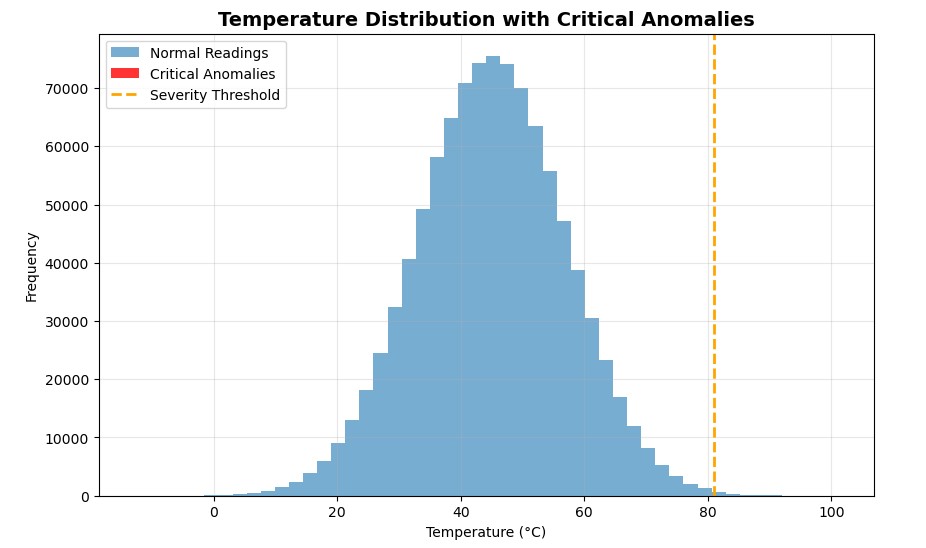 When I first plotted the results, I expected to see a cluster of red bars showing my critical anomalies. But there were none.
At first, I thought something was wrong, but then it clicked. Out of one million readings, only 34 were critical. That’s the beauty of Boolean masking: it detects what your eyes can’t. Even when the anomalies hide deep within millions of normal values, NumPy flags them in milliseconds.
When I first plotted the results, I expected to see a cluster of red bars showing my critical anomalies. But there were none.
At first, I thought something was wrong, but then it clicked. Out of one million readings, only 34 were critical. That’s the beauty of Boolean masking: it detects what your eyes can’t. Even when the anomalies hide deep within millions of normal values, NumPy flags them in milliseconds.
Objective 4: Data Cleaning and Imputation
Lastly, NumPy allows you to get rid of inconsistencies and data that doesn’t make sense. You might have come across the concept of data cleaning in data analysis. In Python, NumPy and Pandas are often used to streamline this activity.
To demonstrate this, our status_codes contain entries with a value of 3 (Faulty/Missing). If we use these faulty temperature readings in our overall analysis, they will skew our results. The solution is to replace the faulty readings with a statistically sound estimated value.
The first step is to figure out what value we should use to replace the bad data. The median is always a great choice because, unlike the mean, it is less affected by extreme values.
python
# TASK: Identify the mask for ‘Valid’ data (where status_codes is NOT 3 — Faulty/Missing).
valid_data_mask = (status_codes != 3)

# TASK: Calculate the median temperature ONLY for the Valid data points. This is our imputation value.
valid_median_temp = np.median(temperature_data[valid_data_mask])
print(f”Median of all valid readings: {valid_median_temp:.2f}°C”)
Output:
markup
Median of all valid readings: 44.99°C
Now, we’ll perform some conditional replacement using the powerful np.where() function. Here’s a typical structure of the function.
np.where(Condition, Value_if_True, Value_if_False)
In our case:
- Condition: Is the status code 3 (Faulty/Missing)?
- Value if True: Use our calculated
valid_median_temp.
- Value if False: Keep the original temperature reading.
python
# TASK: Implement the conditional replacement using np.where().
cleaned_temperature_data = np.where(
status_codes == 3, # CONDITION: Is the reading faulty?
valid_median_temp, # VALUE_IF_TRUE: Replace with the calculated median.
temperature_data # VALUE_IF_FALSE: Keep the original temperature value.
)

# TASK: Print the total number of replaced values.
imputed_count = (status_codes == 3).sum()
print(f”Total Faulty readings imputed: {imputed_count}”)
Output:
markup
Total Faulty readings imputed: 20102
I didn’t expect the missing values to be this much. It probably affected our reading above in some way. Good thing, we managed to replace them in seconds.
Now, let’s verify the fix by checking the median for both the original and cleaned data
python
# TASK: Print the change in the overall mean or median to show the impact of the cleaning.
print(f”\nOriginal Median: {np.median(temperature_data):.2f}°C”)
print(f”Cleaned Median: {np.median(cleaned_temperature_data):.2f}°C”)
Output:
markup
Original Median: 44.99°CCleaned Median: 44.99°C
In this case, even after cleaning over 20,000 faulty records, the median temperature remained steady at 44.99°C, indicating that the dataset is statistically sound and balanced.
Let’s present this to the client:
“Out of one million temperature readings, 20,102 were marked as faulty (status code = 3). Instead of removing these faulty records, we replaced them with the median temperature value (≈ 45°C) — a standard data-cleaning approach that keeps the dataset consistent without distorting the trend.
Interestingly, the median temperature remained unchanged (44.99°C) before and after cleaning. That’s a good sign: it means the faulty readings didn’t skew the dataset, and the replacement didn’t alter the overall data distribution.”
Conclusion
And there we go! We initiated this project to address a critical issue for EnviroTech Dynamics : the need for faster, loop-free data analysis. The power of NumPy arrays and vectorisation allowed us to fix the problem and future-proof their analytical pipeline.
NumPy ndarray is the silent engine of the entire Python data science ecosystem. Every major library, like Pandas , scikit-learn , TensorFlow , and PyTorch, uses NumPy arrays at its core for fast numerical computation.
By mastering NumPy, you’ve built a powerful analytical foundation. The next logical step for me is to move from single arrays to structured analysis with the Pandas library, which organises NumPy arrays into tables (DataFrames) for even easier labelling and manipulation.
Thanks for reading! Feel free to connect with me:
Medium
LinkedIn
Twitter
YouTube
Register Now to Continue Reading
Unlock Towards Data Science with a Free Account
All articles on Towards Data Science are available to registered users. Create a free account today to access this article and thousands more.
Register for freeSign in to your account
 Written By
See all from Ibrahim Salami
Deep DivesBig DataData AnalyticsNumpyNumpy ArrayPython
Share This Article
Towards Data Science is a community publication. Submit your insights to reach our global audience and earn through the TDS Author Payment Program.
Write for TDS
Related Articles
Data Science
Real numbers, earnings, and data-driven growth strategy for Medium writers
Yu Dong
November 11, 20249 min read
Data Science
Building CNN classifiers in Apache MxNet Gluon framework to classify articles of clothing
Andrea Yoss
December 16, 202010 min read
Artificial Intelligence
PyTrix#1: Speeding up our Python Code
Kurtis Pykes
May 7, 20204 min read
NLP
A simple walkthrough for setting up a Rasa chatbot for your Facebook page
Ikshura Tachintha
July 27, 20217 min read
Data Science
Top python interview questions for data scientists
Alexandros Zenonos, PhD
August 16, 20204 min read
Coding
In the beginning when statistics was discovered to answer questions related to gambling win chances in the 18th century, normal...
Hanan Ahmed
February 19, 20218 min read
Artificial Intelligence
Updated for Python 3.11
Nikos Kafritsas
July 27, 20227 min read
Agentic AI
Why the skill-inflation panic is aimed at the wrong thing, and what it costs to make agent knowledge a build artifact instead of a file.
Tomer Mesika
September 14, 202614 min read
Data Science
And how much I made my first year
Haden Pelletier
October 27, 20246 min read
Your home for data science and AI. The world's leading publication for data science, data analytics, data engineering, machine learning, and artificial intelligence professionals.
Subscribe to Our NewsletterWrite For TDS•About•Advertise•Privacy Policy•Terms of Use
© Insight Media Group, LLC 2026•The New Stack•roadmap.sh•Creator Network
Recommended Articles
Close