保留正文与补采附件。源页面当前未重新核验;具体限制见交付清单。
 We value your privacy
We use cookies to enhance your browsing experience, serve personalised ads or content, and analyse our traffic. By clicking "Accept All", you consent to our use of cookies.
Customise Reject All Accept All
Customise Consent Preferences
We value your privacy
We use cookies to enhance your browsing experience, serve personalised ads or content, and analyse our traffic. By clicking "Accept All", you consent to our use of cookies.
Customise Reject All Accept All
Customise Consent Preferences  We use cookies to help you navigate efficiently and perform certain functions. You will find detailed information about all cookies under each consent category below.
The cookies that are categorised as "Necessary" are stored on your browser as they are essential for enabling the basic functionalities of the site. ... Show more
NecessaryAlways Active
Necessary cookies are required to enable the basic features of this site, such as providing secure log-in or adjusting your consent preferences. These cookies do not store any personally identifiable data.
We use cookies to help you navigate efficiently and perform certain functions. You will find detailed information about all cookies under each consent category below.
The cookies that are categorised as "Necessary" are stored on your browser as they are essential for enabling the basic functionalities of the site. ... Show more
NecessaryAlways Active
Necessary cookies are required to enable the basic features of this site, such as providing secure log-in or adjusting your consent preferences. These cookies do not store any personally identifiable data.
-
Cookie
BCTempID
-
Duration
10 minutes
-
Description
No description available.
-
Cookie
__cf_bm
-
Duration
1 hour
-
Description
This cookie, set by Cloudflare, is used to support Cloudflare Bot Management.
-
Cookie
AWSALBCORS
-
Duration
7 days
-
Description
Amazon Web Services set this cookie for load balancing.
-
Cookie
_cfuvid
-
Duration
session
-
Description
Cloudflare sets this cookie to track users across sessions to optimize user experience by maintaining session consistency and providing personalized services
-
Cookie
li_gc
-
Duration
6 months
-
Description
Linkedin set this cookie for storing visitor's consent regarding using cookies for non-essential purposes.
-
Cookie
__hssrc
-
Duration
session
-
Description
This cookie is set by Hubspot whenever it changes the session cookie. The __hssrc cookie set to 1 indicates that the user has restarted the browser, and if the cookie does not exist, it is assumed to be a new session.
-
Cookie
__hssc
-
Duration
1 hour
-
Description
HubSpot sets this cookie to keep track of sessions and to determine if HubSpot should increment the session number and timestamps in the __hstc cookie.
-
Cookie
wpEmojiSettingsSupports
-
Duration
session
-
Description
WordPress sets this cookie when a user interacts with emojis on a WordPress site. It helps determine if the user's browser can display emojis properly.
-
Cookie
BCSessionID
-
Duration
1 year 1 month 4 days
-
Description
Blueconic sets this cookie as a unique identifier for the BlueConic profile.
-
Cookie
_octo
-
Duration
1 year
-
Description
No description available.
-
Cookie
logged_in
-
Duration
1 year
-
Description
No description available.
-
Cookie
__Secure-YEC
-
Duration
past
-
Description
YouTube sets this cookie to stores the user's video player preferences using embedded YouTube video
-
Cookie
__eoi
-
Duration
6 months
-
Description
Description is currently not available.
-
Cookie
AWSALBTGCORS
-
Duration
7 days
-
Description
No description available.
-
Cookie
login-status-p
-
Duration
past
-
Description
Description is currently not available.
-
Cookie
AWSALBTG
-
Duration
7 days
-
Description
No description available.
-
Cookie
csrf_token
-
Duration
session
-
Description
No description available.
-
Cookie
token_v2
-
Duration
1 day
-
Description
Description is currently not available.
-
Cookie
D
-
Duration
1 year
-
Description
Description is currently not available.
-
Cookie
PHPSESSID
-
Duration
session
-
Description
This cookie is native to PHP applications. The cookie stores and identifies a user's unique session ID to manage user sessions on the website. The cookie is a session cookie and will be deleted when all the browser windows are closed.
-
Cookie
VISITOR_PRIVACY_METADATA
-
Duration
6 months
-
Description
YouTube sets this cookie to store the user's cookie consent state for the current domain.
-
Cookie
cookietest
-
Duration
session
-
Description
The cookietest cookie is typically used to determine whether the user's browser accepts cookies, essential for website functionality and user experience.
-
Cookie
__Host-airtable-session
-
Duration
1 year
-
Description
This cookie is used to enable us to integrate the services of Airtable.
-
Cookie
__Host-airtable-session.sig
-
Duration
1 year
-
Description
This cookie is used to enable us to integrate the services of Airtable.
-
Cookie
m
-
Duration
1 year 1 month 4 days
-
Description
Stripe sets this cookie for fraud prevention purposes. It identifies the device used to access the website, allowing the website to be formatted accordingly.
-
Cookie
BIGipServer*
-
Duration
session
-
Description
Marketo sets this cookie to collect information about the user's online activity and build a profile about their interests to provide advertisements relevant to the user.
-
Cookie
__cfruid
-
Duration
session
-
Description
Cloudflare sets this cookie to identify trusted web traffic.
-
Cookie
_GRECAPTCHA
-
Duration
6 months
-
Description
Google Recaptcha service sets this cookie to identify bots to protect the website against malicious spam attacks.
-
Cookie
__Secure-YNID
-
Duration
6 months
-
Description
Google cookie used to protect user security and prevent fraud, especially during the login process.
-
Cookie
cookieyes-consent
-
Duration
1 year
-
Description
CookieYes sets this cookie to remember users' consent preferences so that their preferences are respected on subsequent visits to this site. It does not collect or store any personal information about the site visitors.
Functional
Functional cookies help perform certain functionalities like sharing the content of the website on social media platforms, collecting feedback, and other third-party features.
-
Cookie
lidc
-
Duration
1 day
-
Description
LinkedIn sets the lidc cookie to facilitate data center selection.
-
Cookie
brw
-
Duration
1 year
-
Description
No description available.
-
Cookie
brwConsent
-
Duration
5 minutes
-
Description
Description is currently not available.
-
Cookie
WMF-Uniq
-
Duration
1 year
-
Description
Description is currently not available.
-
Cookie
loom_anon_comment
-
Duration
1 year
-
Description
No description available.
-
Cookie
loom_referral_video
-
Duration
session
-
Description
Description is currently not available.
-
Cookie
VISITOR_INFO1_LIVE
-
Duration
6 months
-
Description
A cookie set by YouTube to measure bandwidth that determines whether the user gets the new or old player interface.
-
Cookie
yt-remote-connected-devices
-
Duration
Never Expires
-
Description
YouTube sets this cookie to store the user's video preferences using embedded YouTube videos.
-
Cookie
ytidb::LAST_RESULT_ENTRY_KEY
-
Duration
Never Expires
-
Description
The cookie ytidb::LAST_RESULT_ENTRY_KEY is used by YouTube to store the last search result entry that was clicked by the user. This information is used to improve the user experience by providing more relevant search results in the future.
-
Cookie
yt-remote-device-id
-
Duration
Never Expires
-
Description
YouTube sets this cookie to store the user's video preferences using embedded YouTube videos.
-
Cookie
yt-remote-session-name
-
Duration
session
-
Description
The yt-remote-session-name cookie is used by YouTube to store the user's video player preferences using embedded YouTube video.
-
Cookie
yt-remote-fast-check-period
-
Duration
session
-
Description
The yt-remote-fast-check-period cookie is used by YouTube to store the user's video player preferences for embedded YouTube videos.
-
Cookie
yt-remote-session-app
-
Duration
session
-
Description
The yt-remote-session-app cookie is used by YouTube to store user preferences and information about the interface of the embedded YouTube video player.
-
Cookie
yt-remote-cast-available
-
Duration
session
-
Description
The yt-remote-cast-available cookie is used to store the user's preferences regarding whether casting is available on their YouTube video player.
-
Cookie
yt-remote-cast-installed
-
Duration
session
-
Description
The yt-remote-cast-installed cookie is used to store the user's video player preferences using embedded YouTube video.
-
Cookie
cp_session
-
Duration
3 months
-
Description
Codepen sets this cookie for Help systems found in the website.
-
Cookie
loid
-
Duration
1 year 1 month 4 days
-
Description
This cookie is set by the Reddit. The cookie enables the sharing of content from the website onto the social media platform.
Analytics
Analytical cookies are used to understand how visitors interact with the website. These cookies help provide information on metrics such as the number of visitors, bounce rate, traffic source, etc.
-
Cookie
__hstc
-
Duration
6 months
-
Description
Hubspot set this main cookie for tracking visitors. It contains the domain, initial timestamp (first visit), last timestamp (last visit), current timestamp (this visit), and session number (increments for each subsequent session).
-
Cookie
hubspotutk
-
Duration
6 months
-
Description
HubSpot sets this cookie to keep track of the visitors to the website. This cookie is passed to HubSpot on form submission and used when deduplicating contacts.
-
Cookie
_ga
-
Duration
1 year 1 month 4 days
-
Description
Google Analytics sets this cookie to calculate visitor, session and campaign data and track site usage for the site's analytics report. The cookie stores information anonymously and assigns a randomly generated number to recognise unique visitors.
-
Cookie
ga*
-
Duration
1 year 1 month 4 days
-
Description
Google Analytics sets this cookie to store and count page views.
-
Cookie
__Host-psifi.analyticsTrace
-
Duration
6 hours
-
Description
Description is currently not available.
-
Cookie
__Host-psifi.analyticsTraceV2
-
Duration
6 hours
-
Description
Description is currently not available.
-
Cookie
_gh_sess
-
Duration
session
-
Description
GitHub sets this cookie for temporary application and framework state between pages like what step the user is on in a multiple step form.
-
Cookie
YSC
-
Duration
session
-
Description
YSC cookie is set by Youtube and is used to track the views of embedded videos on Youtube pages.
-
Cookie
ajs_anonymous_id
-
Duration
1 year
-
Description
This cookie is set by Segment to count the number of people who visit a certain site by tracking if they have visited before.
-
Cookie
vuid
-
Duration
1 year 1 month 4 days
-
Description
Vimeo installs this cookie to collect tracking information by setting a unique ID to embed videos on the website.
Performance
Performance cookies are used to understand and analyse the key performance indexes of the website which helps in delivering a better user experience for the visitors.
-
Cookie
AWSALB
-
Duration
7 days
-
Description
AWSALB is an application load balancer cookie set by Amazon Web Services to map the session to the target.
-
Cookie
acq
-
Duration
past
-
Description
Description is currently not available.
-
Cookie
acq.sig
-
Duration
past
-
Description
Description is currently not available.
-
Cookie
ptc
-
Duration
2 years
-
Description
No description available.
Advertisement
Advertisement cookies are used to provide visitors with customised advertisements based on the pages you visited previously and to analyse the effectiveness of the ad campaigns.
-
Cookie
muc_ads
-
Duration
1 year 1 month 4 days
-
Description
Twitter sets this cookie to collect user behaviour and interaction data to optimize the website.
-
Cookie
guest_id_marketing
-
Duration
1 year 1 month 4 days
-
Description
Twitter sets this cookie to identify and track the website visitor.
-
Cookie
guest_id_ads
-
Duration
1 year 1 month 4 days
-
Description
Twitter sets this cookie to identify and track the website visitor.
-
Cookie
personalization_id
-
Duration
1 year 1 month 4 days
-
Description
Twitter sets this cookie to integrate and share features for social media and also store information about how the user uses the website, for tracking and targeting.
-
Cookie
guest_id
-
Duration
1 year 1 month 4 days
-
Description
Twitter sets this cookie to identify and track the website visitor. It registers if a user is signed in to the Twitter platform and collects information about ad preferences.
-
Cookie
bcookie
-
Duration
1 year
-
Description
LinkedIn sets this cookie from LinkedIn share buttons and ad tags to recognize browser IDs.
-
Cookie
__Secure-ROLLOUT_TOKEN
-
Duration
6 months
-
Description
YouTube sets this cookie to manage feature rollout and experimentation. It helps Google control which new features or interface changes are shown to users as part of testing and staged rollouts, ensuring consistent experience for a given user during an experiment.
-
Cookie
yt.innertube::nextId
-
Duration
Never Expires
-
Description
YouTube sets this cookie to register a unique ID to store data on what videos from YouTube the user has seen.
-
Cookie
yt.innertube::requests
-
Duration
Never Expires
-
Description
YouTube sets this cookie to register a unique ID to store data on what videos from YouTube the user has seen.
-
Cookie
session_tracker
-
Duration
session
-
Description
This cookie is set by the Reddit. This cookie is used to identify trusted web traffic. It also helps in adverstising on the website.
-
Cookie
edgebucket
-
Duration
session
-
Description
Reddit sets this cookie to save the information about a log-on Reddit user, for the purpose of advertisement recommendations and updating the content.
-
Cookie
did
-
Duration
1 year
-
Description
Arbor sets this cookie to show targeted ads to site visitors.This cookie expires after 2 months or 1 year.
Uncategorised
Other uncategorised cookies are those that are being analysed and have not been classified into a category as yet.
No cookies to display.
Reject All Save My Preferences Accept All
Toggle SearchToggle Mobile Navigation
Publish AI, ML & data-science insights to a global community of data professionals.
Sign inSubmit an Article
LatestEditor's PicksNewsletterShipAI
Write For TDS
LinkedInXToggle Search
Machine Learning
Evaluate Topic Models: Latent Dirichlet Allocation (LDA)
A step-by-step guide to building interpretable topic models
Shashank Kapadia
August 19, 201912 min read
 Preface: This article aims to provide consolidated information on the underlying topic and is not to be considered as the original work. The information and the code are repurposed through several online articles, research papers, books, and open-source code.
In the previous article, I introduced the concept of topic modeling and walked through the code for developing your first topic model using Latent Dirichlet Allocation (LDA) method in Python using Gensim implementation.
Pursuing that understanding, in this article, we’ll go a few steps deeper by outlining the framework to quantitatively evaluate topic models through the measure of topic coherence and share the code template in Python using Gensim implementation to allow for end-to-end model development.
Preface: This article aims to provide consolidated information on the underlying topic and is not to be considered as the original work. The information and the code are repurposed through several online articles, research papers, books, and open-source code.
In the previous article, I introduced the concept of topic modeling and walked through the code for developing your first topic model using Latent Dirichlet Allocation (LDA) method in Python using Gensim implementation.
Pursuing that understanding, in this article, we’ll go a few steps deeper by outlining the framework to quantitatively evaluate topic models through the measure of topic coherence and share the code template in Python using Gensim implementation to allow for end-to-end model development.
Why evaluate topic models?
We know probabilistic topic models, such as LDA, are popular tools for text analysis, providing both a predictive and latent topic representation of the corpus. However, there is a longstanding assumption that the latent space discovered by these models is generally meaningful and useful, and that evaluating such assumptions is challenging due to its unsupervised training process. Besides, there is a no-gold standard list of topics to compare against every corpus.
Learn this step by step with the interactive Machine Learning roadmap.
Nevertheless, it is equally important to identify if a trained model is objectively good or bad, as well have an ability to compare different models/methods. To do so, one would require an objective measure for the quality. Traditionally, and still for many practical applications, to evaluate if “the correct thing” has been learned about the corpus, an implicit knowledge and “eyeballing” approaches are used. Ideally, we’d like to capture this information in a single metric that can be maximized, and compared.
Let’s take a look at roughly what approaches are commonly used for the evaluation:
Eyeballing Models
- Top N words
- Topics/documents
Intrinsic evaluation metrics
- Capturing model semantics
- Topics interpretability
Human judgements
Extrinsic evaluation metrics/evaluation at task
- Is the model good at performing predefined tasks, such as classification?
Natural language is messy, ambiguous and full of subjective interpretation, and sometimes, trying to cleanse ambiguity reduces the language to an unnatural form. In this article, we’ll explore more about topic coherence, an intrinsic evaluation metric, and how you can use it to quantitatively justify the model selection.
What is topic coherence?
Before we understand topic coherence, let’s briefly look at the perplexity measure. Perplexity as well is one of the intrinsic evaluation metric, and is widely used for language model evaluation. It captures how surprised a model is by new data it has not seen before and is measured as the normalized log-likelihood of a held-out test set.
Focussing on the log-likelihood part, you can think of the perplexity metric as measuring how probable some new unseen data is given the model that was learned earlier. That is to say, how well does the model represent or reproduce the statistics of the held-out data?
However, recent studies have shown that predictive likelihood (or equivalently, perplexity) and human judgment are often not correlated, and even sometimes slightly anti-correlated.
Optimizing for perplexity may not yield human-interpretable topics.
This limitation of perplexity measure served as a motivation for more work trying to model the human judgment and, thus, Topic Coherence.
The concept of topic coherence combines a number of measures into a framework to evaluate the coherence between topics inferred by a model. But before that…
What is topic coherence?
Topic Coherence measures score a single topic by measuring the degree of semantic similarity between high scoring words in the topic. These measurements help distinguish between topics that are semantically interpretable topics and topics that are artifacts of statistical inference. But …
What is coherence?
A set of statements or facts is said to be coherent, if they support each other. Thus, a coherent fact set can be interpreted in a context that covers all or most of the facts. An example of a coherent fact set is “the game is a team sport”, “the game is played with a ball”, “the game demands great physical efforts.”
Coherence measures
Let’s take quick look at different coherence measures, and how they are calculated:
- C_v measure is based on a sliding window, one-set segmentation of the top words and an indirect confirmation measure that uses normalized pointwise mutual information (NPMI) and the cosine similarity
- C_p is based on a sliding window, one-preceding segmentation of the top words and the confirmation measure of Fitelson’s coherence
- C_uci measure is based on a sliding window and the pointwise mutual information (PMI) of all word pairs of the given top words
- C_umass is based on document cooccurrence counts, a one-preceding segmentation and a logarithmic conditional probability as confirmation measure
- C_npmi is an enhanced version of the C_uci coherence using the normalized pointwise mutual information (NPMI)
- C_a is baseed on a context window, a pairwise comparison of the top words and an indirect confirmation measure that uses normalized pointwise mutual information (NPMI) and the cosine similarity
There is, of course, a lot more to the concept of topic model evaluation, and the coherence measure. However, keeping in mind the length, and purpose of this article, let’s apply these concepts into developing a model that is at least better than with the default parameters. Also, we’ll be re-purposing already available online pieces of code to support this exercise instead of re-inventing the wheel.
Model implementation
The complete code is available as a Jupyter Notebook on GitHub.
- Loading data
- Data cleaning
- Phrase modeling: Bi-grams and tri-grams
- Data transformation: Corpus and dictionary
- Base model
- Hyperparameter tuning
- Final model
- Visualize results
Loading data
 For this tutorial, we’ll use the dataset of papers published in NIPS conference. The NIPS conference (Neural Information Processing Systems) is one of the most prestigious yearly events in the machine learning community. The CSV data file contains information on the different NIPS papers that were published from 1987 until 2016 (29 years!). These papers discuss a wide variety of topics in machine learning, from neural networks to optimization methods, and many more.
Let’s start by looking at the content of the file:
python
For this tutorial, we’ll use the dataset of papers published in NIPS conference. The NIPS conference (Neural Information Processing Systems) is one of the most prestigious yearly events in the machine learning community. The CSV data file contains information on the different NIPS papers that were published from 1987 until 2016 (29 years!). These papers discuss a wide variety of topics in machine learning, from neural networks to optimization methods, and many more.
Let’s start by looking at the content of the file:
python
import zipfile
import pandas as pd
import os

# Open the zip file
with zipfile.ZipFile("./data/NIPS Papers.zip", "r") as zip_ref:
    # Extract the file to a temporary directory
    zip_ref.extractall("temp")

# Read the CSV file into a pandas DataFrame
papers = pd.read_csv("temp/NIPS Papers/papers.csv")

# Print head
papers.head()

Data cleaning
Since the goal of this analysis is to perform topic modeling, we will solely focus on the text data from each paper, and drop other metadata columns.
python
# Remove the columns
papers = papers.drop(columns=['id', 'title', 'abstract',
                              'event_type', 'pdf_name', 'year'], axis=1)

# sample only 100 papers
papers = papers.sample(100)

# Print out the first rows of papers
papers.head()
Remove punctuation/lower casing
Next, let’s perform a simple preprocessing on the content of paper_text column to make them more amenable for analysis, and reliable results. To do that, we’ll use a regular expression to remove any punctuation, and then lowercase the text.
python
# Load the regular expression library
import re

# Remove punctuation
papers['paper_text_processed'] = papers['paper_text'].map(lambda x: re.sub('[,\.!?]', '', x))

# Convert the titles to lowercase
papers['paper_text_processed'] = papers['paper_text_processed'].map(lambda x: x.lower())

# Print out the first rows of papers
papers['paper_text_processed'].head()
 Tokenize words and further clean-up text
Let’s tokenize each sentence into a list of words, removing punctuations and unnecessary characters altogether.
python
Tokenize words and further clean-up text
Let’s tokenize each sentence into a list of words, removing punctuations and unnecessary characters altogether.
python
import gensim
from gensim.utils import simple_preprocess

def sent_to_words(sentences):
    for sentence in sentences:
        yield(gensim.utils.simple_preprocess(str(sentence), deacc=True))  # deacc=True removes punctuations

data = papers.paper_text_processed.values.tolist()
data_words = list(sent_to_words(data))

print(data_words[:1][0][:30])

Phrase modeling: Bigram and trigram models
Bigrams are two words frequently occurring together in the document. Trigrams are 3 words frequently occurring. Some examples in our example are: ‘back_bumper’, ‘oil_leakage’, ‘maryland_college_park’ etc.
Gensim’s Phrases model can build and implement the bigrams, trigrams, quadgrams and more. The two important arguments to Phrases are min_count and threshold.
The higher the values of these param, the harder it is for words to be combined.
python
# Build the bigram and trigram models
bigram = gensim.models.Phrases(data_words, min_count=5, threshold=100) # higher threshold fewer phrases.
trigram = gensim.models.Phrases(bigram[data_words], threshold=100)

# Faster way to get a sentence clubbed as a trigram/bigram
bigram_mod = gensim.models.phrases.Phraser(bigram)
trigram_mod = gensim.models.phrases.Phraser(trigram)
Remove stopwords, make bigrams and lemmatize
The phrase models are ready. Let’s define the functions to remove the stopwords, make trigrams and lemmatization, and call them sequentially.
python
# NLTK Stop words
import nltk
nltk.download('stopwords')
from nltk.corpus import stopwords

stop_words = stopwords.words('english')
stop_words.extend(['from', 'subject', 're', 'edu', 'use'])

# Define functions for stopwords, bigrams, trigrams and lemmatization
def remove_stopwords(texts):
    return [[word for word in simple_preprocess(str(doc)) if word not in stop_words] for doc in texts]

def make_bigrams(texts):
    return [bigram_mod[doc] for doc in texts]

def make_trigrams(texts):
    return [trigram_mod[bigram_mod[doc]] for doc in texts]

def lemmatization(texts, allowed_postags=['NOUN', 'ADJ', 'VERB', 'ADV']):
    """https://spacy.io/api/annotation"""
    texts_out = []
    for sent in texts:
        doc = nlp(" ".join(sent))
        texts_out.append([token.lemma_ for token in doc if token.pos_ in allowed_postags])
    return texts_out
Let’s call the functions in order.
python
!python -m spacy download en_core_web_sm
import spacy

# Remove Stop Words
data_words_nostops = remove_stopwords(data_words)

# Form Bigrams
data_words_bigrams = make_bigrams(data_words_nostops)

# Initialize spacy 'en' model, keeping only tagger component (for efficiency)
nlp = spacy.load("en_core_web_sm", disable=['parser', 'ner'])

# Do lemmatization keeping only noun, adj, vb, adv
data_lemmatized = lemmatization(data_words_bigrams, allowed_postags=['NOUN', 'ADJ', 'VERB', 'ADV'])

print(data_lemmatized[:1][0][:30])

Data transformation: Corpus and dictionary
The two main inputs to the LDA topic model are the dictionary(id2word) and the corpus. Let’s create them.
python
import gensim.corpora as corpora

# Create Dictionary
id2word = corpora.Dictionary(data_lemmatized)

# Create Corpus
texts = data_lemmatized

# Term Document Frequency
corpus = [id2word.doc2bow(text) for text in texts]

# View
print(corpus[:1][0][:30])
 Gensim creates a unique id for each word in the document. The produced corpus shown above is a mapping of (word_id, word_frequency).
For example, (0, 7) above implies, word id 0 occurs seven times in the first document. Likewise, word id 1 occurs thrice, and so on.
Gensim creates a unique id for each word in the document. The produced corpus shown above is a mapping of (word_id, word_frequency).
For example, (0, 7) above implies, word id 0 occurs seven times in the first document. Likewise, word id 1 occurs thrice, and so on.
Base model
We have everything required to train the base LDA model. In addition to the corpus and dictionary, you need to provide the number of topics as well. Apart from that, alpha and eta are hyperparameters that affect sparsity of the topics. According to the Gensim docs, both defaults to 1.0/num_topics prior (we’ll use default for the base model).
chunksize controls how many documents are processed at a time in the training algorithm. Increasing chunksize will speed up training, at least as long as the chunk of documents easily fit into memory.
passes controls how often we train the model on the entire corpus (set to 10). Another word for passes might be “epochs”. iterations is somewhat technical, but essentially it controls how often we repeat a particular loop over each document. It is important to set the number of “passes” and “iterations” high enough.
python
# Build LDA model
lda_model = gensim.models.LdaMulticore(corpus=corpus,
                                       id2word=id2word,
                                       num_topics=10,
                                       random_state=100,
                                       chunksize=100,
                                       passes=10,
                                       per_word_topics=True)
View the topics in LDA model
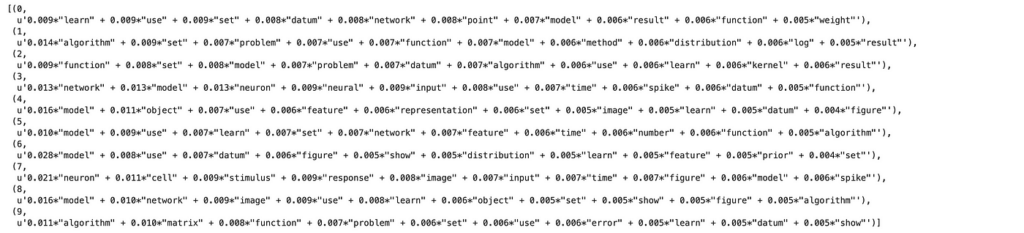
The above LDA model is built with 10 different topics where each topic is a combination of keywords and each keyword contributes a certain weightage to the topic.
You can see the keywords for each topic and the weightage(importance) of each keyword using _lda_model.print_topics()_
python
from pprint import pprint

# Print the Keyword in the 10 topics
pprint(lda_model.print_topics())
doc_lda = lda_model[corpus]
 Compute model perplexity and coherence score
Let’s calculate the baseline coherence score:
python
Compute model perplexity and coherence score
Let’s calculate the baseline coherence score:
python
from gensim.models import CoherenceModel

# Compute Coherence Score
coherence_model_lda = CoherenceModel(model=lda_model, texts=data_lemmatized, dictionary=id2word, coherence='c_v')
coherence_lda = coherence_model_lda.get_coherence()
print('Coherence Score: ', coherence_lda)
Coherence Score: 0.301
Hyperparameter tuning
First, let’s differentiate between model hyperparameters and model parameters:
Model hyperparameters can be thought of as settings for a machine learning algorithm that are tuned by the data scientist before training. Examples would be the number of trees in the random forest, or in our case, number of topics K
Model parameters can be thought of as what the model learns during training, such as the weights for each word in a given topic
Now that we have the baseline coherence score for the default LDA model, let’s perform a series of sensitivity tests to help determine the following model hyperparameters:
- Number of topics (K)
- Dirichlet hyperparameter alpha: Document-topic density
- Dirichlet hyperparameter beta: Word-topic density
We’ll perform these tests in sequence, one parameter at a time by keeping others constant and run them over the two different validation corpus sets. We’ll use C_v as our choice of metric for performance comparison.
python
# supporting function
def compute_coherence_values(corpus, dictionary, k, a, b):

    lda_model = gensim.models.LdaMulticore(corpus=corpus,
                                           id2word=dictionary,
                                           num_topics=k,
                                           random_state=100,
                                           chunksize=100,
                                           passes=10,
                                           alpha=a,
                                           eta=b)

    coherence_model_lda = CoherenceModel(model=lda_model, texts=data_lemmatized, dictionary=id2word, coherence='c_v')

    return coherence_model_lda.get_coherence()
Let’s call the function, and iterate it over the range of topics, alpha, and beta parameter values:
python
import numpy as np
import tqdm

grid = {}
grid['Validation_Set'] = {}

# Topics range
min_topics = 2
max_topics = 11
step_size = 1
topics_range = range(min_topics, max_topics, step_size)

# Alpha parameter
alpha = list(np.arange(0.01, 1, 0.3))
alpha.append('symmetric')
alpha.append('asymmetric')

# Beta parameter
beta = list(np.arange(0.01, 1, 0.3))
beta.append('symmetric')

# Validation sets
num_of_docs = len(corpus)
corpus_sets = [gensim.utils.ClippedCorpus(corpus, int(num_of_docs*0.75)),
               corpus]

corpus_title = ['75% Corpus', '100% Corpus']

model_results = {'Validation_Set': [],
                 'Topics': [],
                 'Alpha': [],
                 'Beta': [],
                 'Coherence': []
                }

# Can take a long time to run
if 1 == 1:
    pbar = tqdm.tqdm(total=(len(beta)*len(alpha)*len(topics_range)*len(corpus_title)))

    # iterate through validation corpuses
    for i in range(len(corpus_sets)):
        # iterate through number of topics
        for k in topics_range:
            # iterate through alpha values
            for a in alpha:
                # iterare through beta values
                for b in beta:
                    # get the coherence score for the given parameters
                    cv = compute_coherence_values(corpus=corpus_sets[i], dictionary=id2word,
                                                  k=k, a=a, b=b)
                    # Save the model results
                    model_results['Validation_Set'].append(corpus_title[i])
                    model_results['Topics'].append(k)
                    model_results['Alpha'].append(a)
                    model_results['Beta'].append(b)
                    model_results['Coherence'].append(cv)

                    pbar.update(1)
    pd.DataFrame(model_results).to_csv('./results/lda_tuning_results.csv', index=False)
    pbar.close()
Investigate results
Let’s start by determining the optimal number of topics. The chart below outlines the coherence score, C_v, for the number of topics across two validation sets, and a fixed alpha = 0.01 and beta = 0.1.
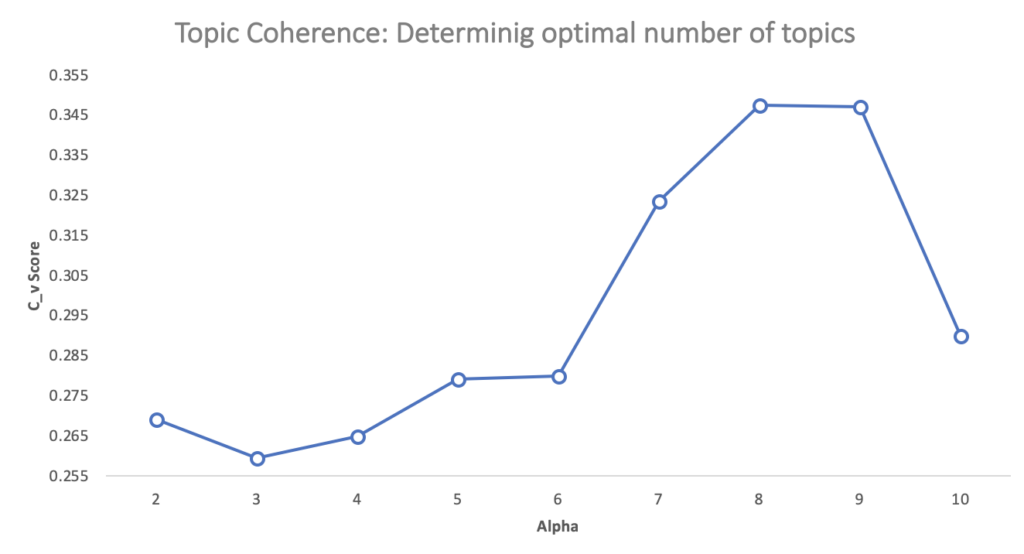 With the coherence score seems to keep increasing with the number of topics, it may make better sense to pick the model that gave the highest CV before flattening out or a major drop. In this case, we picked K=8.
Next, we want to select the optimal alpha and beta parameters. While there are other sophisticated approaches to tackle the selection process, for this tutorial, we choose the values that yielded maximum C_v score for K=8.
With the coherence score seems to keep increasing with the number of topics, it may make better sense to pick the model that gave the highest CV before flattening out or a major drop. In this case, we picked K=8.
Next, we want to select the optimal alpha and beta parameters. While there are other sophisticated approaches to tackle the selection process, for this tutorial, we choose the values that yielded maximum C_v score for K=8.
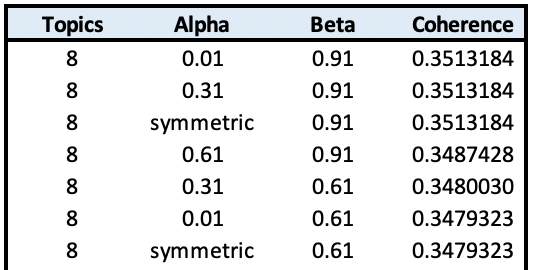
alpha=0.01
beta=0.9
K=8
That yields approx. 17% improvement over the baseline score.
Final model
Let’s train the final model using the above selected parameters:
python
num_topics = 8

lda_model = gensim.models.LdaMulticore(corpus=corpus,
                                           id2word=id2word,
                                           num_topics=num_topics,
                                           random_state=100,
                                           chunksize=100,
                                           passes=10,
                                           alpha=0.01,
                                           eta=0.9)
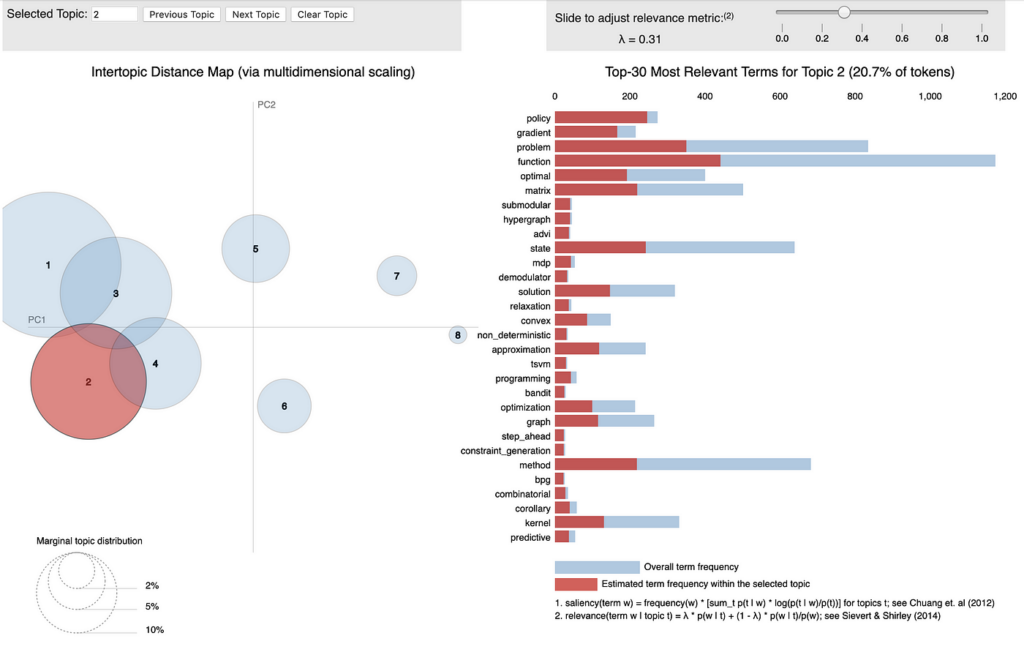
Visualize topics
python
import pyLDAvis.gensim_models as gensimvis
import pickle
import pyLDAvis

# Visualize the topics
pyLDAvis.enable_notebook()

LDAvis_data_filepath = os.path.join('./results/ldavis_tuned_'+str(num_topics))

# # this is a bit time consuming - make the if statement True
# # if you want to execute visualization prep yourself
if 1 == 1:
    LDAvis_prepared = gensimvis.prepare(lda_model, corpus, id2word)
    with open(LDAvis_data_filepath, 'wb') as f:
        pickle.dump(LDAvis_prepared, f)

# load the pre-prepared pyLDAvis data from disk
with open(LDAvis_data_filepath, 'rb') as f:
    LDAvis_prepared = pickle.load(f)

pyLDAvis.save_html(LDAvis_prepared, './results/ldavis_tuned_'+ str(num_topics) +'.html')

LDAvis_prepared
Closing notes
We started with understanding why evaluating the topic model is essential. Next, we reviewed existing methods and scratched the surface of topic coherence, along with the available coherence measures. Then we built a default LDA model using Gensim implementation to establish the baseline coherence score and reviewed practical ways to optimize the LDA hyperparameters.
Hopefully, this article has managed to shed light on the underlying topic evaluation strategies, and intuitions behind it.
References:
- http://qpleple.com/perplexity-to-evaluate-topic-models/
- https://www.amazon.com/Machine-Learning-Probabilistic-Perspective-Computation/dp/0262018020
- https://papers.nips.cc/paper/3700-reading-tea-leaves-how-humans-interpret-topic-models.pdf
- https://github.com/mattilyra/pydataberlin-2017/blob/master/notebook/EvaluatingUnsupervisedModels.ipynb
- https://www.machinelearningplus.com/nlp/topic-modeling-gensim-python/
- http://svn.aksw.org/papers/2015/WSDM_Topic_Evaluation/public.pdf
- http://palmetto.aksw.org/palmetto-webapp/
Thanks for reading. If you have any feedback, please feel free to reach out by messaging me on LinkedIn or shooting me an email (shmkapadia[at]gmail.com)
Register Now to Continue Reading
Unlock Towards Data Science with a Free Account
All articles on Towards Data Science are available to registered users. Create a free account today to access this article and thousands more.
Register for freeSign in to your account
SK
Written By
See all from Shashank Kapadia
Data ScienceModel EvaluationNLPtopic model
Share This Article
Towards Data Science is a community publication. Submit your insights to reach our global audience and earn through the TDS Author Payment Program.
Write for TDS
Related Articles
Data Science
A product review based on my 6 major differentiators of BI tools.
Adam Finer
November 26, 202010 min read
Artificial Intelligence
Quantitative reasoning is hard for humans and it is hard for computers. Minerva just got astonishing results in solving math problems
Salvatore Raieli
July 8, 20226 min read
Machine Learning
Gain a deeper understanding of Gaussian processes by implementing them with only NumPy
Theo Wolf
January 6, 20245 min read
Programming
Make your python codes run smoothly
Benjamin Nweke
May 26, 20224 min read
Machine Learning
A practical beginner guide to Neural Networks in Python
Chayma Zatout
January 24, 202319 min read
Deep Learning
Learn how to use the Builder design pattern to enhance your code
Marcello Politi
October 12, 20236 min read
Data Science
In the age where everyone uses ChatGPT for work and school, I am taking advantage of that to help me study in my university course
Jubayer Hossain Ahad
July 19, 20249 min read
Machine Learning
A practical tutorial for setting up a local dev environment using Docker Container
Ido Leshem
December 20, 20236 min read
Data Science
Learn How to Use Streamlit to Build an App that Generates Bar Chart Race Animations within Seconds and No Coding
My Data Talk
February 22, 20228 min read
Your home for data science and AI. The world's leading publication for data science, data analytics, data engineering, machine learning, and artificial intelligence professionals.
Subscribe to Our NewsletterWrite For TDS•About•Advertise•Privacy Policy•Terms of Use
© Insight Media Group, LLC 2026•The New Stack•roadmap.sh•Creator Network
Recommended Articles
Close