保留正文与补采附件。源页面当前未重新核验;具体限制见交付清单。
 We value your privacy
We use cookies to enhance your browsing experience, serve personalised ads or content, and analyse our traffic. By clicking "Accept All", you consent to our use of cookies.
Customise Reject All Accept All
Customise Consent Preferences
We value your privacy
We use cookies to enhance your browsing experience, serve personalised ads or content, and analyse our traffic. By clicking "Accept All", you consent to our use of cookies.
Customise Reject All Accept All
Customise Consent Preferences  We use cookies to help you navigate efficiently and perform certain functions. You will find detailed information about all cookies under each consent category below.
The cookies that are categorised as "Necessary" are stored on your browser as they are essential for enabling the basic functionalities of the site. ... Show more
NecessaryAlways Active
Necessary cookies are required to enable the basic features of this site, such as providing secure log-in or adjusting your consent preferences. These cookies do not store any personally identifiable data.
We use cookies to help you navigate efficiently and perform certain functions. You will find detailed information about all cookies under each consent category below.
The cookies that are categorised as "Necessary" are stored on your browser as they are essential for enabling the basic functionalities of the site. ... Show more
NecessaryAlways Active
Necessary cookies are required to enable the basic features of this site, such as providing secure log-in or adjusting your consent preferences. These cookies do not store any personally identifiable data.
-
Cookie
BCTempID
-
Duration
10 minutes
-
Description
No description available.
-
Cookie
__cf_bm
-
Duration
1 hour
-
Description
This cookie, set by Cloudflare, is used to support Cloudflare Bot Management.
-
Cookie
AWSALBCORS
-
Duration
7 days
-
Description
Amazon Web Services set this cookie for load balancing.
-
Cookie
_cfuvid
-
Duration
session
-
Description
Cloudflare sets this cookie to track users across sessions to optimize user experience by maintaining session consistency and providing personalized services
-
Cookie
li_gc
-
Duration
6 months
-
Description
Linkedin set this cookie for storing visitor's consent regarding using cookies for non-essential purposes.
-
Cookie
__hssrc
-
Duration
session
-
Description
This cookie is set by Hubspot whenever it changes the session cookie. The __hssrc cookie set to 1 indicates that the user has restarted the browser, and if the cookie does not exist, it is assumed to be a new session.
-
Cookie
__hssc
-
Duration
1 hour
-
Description
HubSpot sets this cookie to keep track of sessions and to determine if HubSpot should increment the session number and timestamps in the __hstc cookie.
-
Cookie
wpEmojiSettingsSupports
-
Duration
session
-
Description
WordPress sets this cookie when a user interacts with emojis on a WordPress site. It helps determine if the user's browser can display emojis properly.
-
Cookie
BCSessionID
-
Duration
1 year 1 month 4 days
-
Description
Blueconic sets this cookie as a unique identifier for the BlueConic profile.
-
Cookie
_octo
-
Duration
1 year
-
Description
No description available.
-
Cookie
logged_in
-
Duration
1 year
-
Description
No description available.
-
Cookie
__Secure-YEC
-
Duration
past
-
Description
YouTube sets this cookie to stores the user's video player preferences using embedded YouTube video
-
Cookie
__eoi
-
Duration
6 months
-
Description
Description is currently not available.
-
Cookie
AWSALBTGCORS
-
Duration
7 days
-
Description
No description available.
-
Cookie
login-status-p
-
Duration
past
-
Description
Description is currently not available.
-
Cookie
AWSALBTG
-
Duration
7 days
-
Description
No description available.
-
Cookie
csrf_token
-
Duration
session
-
Description
No description available.
-
Cookie
token_v2
-
Duration
1 day
-
Description
Description is currently not available.
-
Cookie
D
-
Duration
1 year
-
Description
Description is currently not available.
-
Cookie
PHPSESSID
-
Duration
session
-
Description
This cookie is native to PHP applications. The cookie stores and identifies a user's unique session ID to manage user sessions on the website. The cookie is a session cookie and will be deleted when all the browser windows are closed.
-
Cookie
VISITOR_PRIVACY_METADATA
-
Duration
6 months
-
Description
YouTube sets this cookie to store the user's cookie consent state for the current domain.
-
Cookie
cookietest
-
Duration
session
-
Description
The cookietest cookie is typically used to determine whether the user's browser accepts cookies, essential for website functionality and user experience.
-
Cookie
__Host-airtable-session
-
Duration
1 year
-
Description
This cookie is used to enable us to integrate the services of Airtable.
-
Cookie
__Host-airtable-session.sig
-
Duration
1 year
-
Description
This cookie is used to enable us to integrate the services of Airtable.
-
Cookie
m
-
Duration
1 year 1 month 4 days
-
Description
Stripe sets this cookie for fraud prevention purposes. It identifies the device used to access the website, allowing the website to be formatted accordingly.
-
Cookie
BIGipServer*
-
Duration
session
-
Description
Marketo sets this cookie to collect information about the user's online activity and build a profile about their interests to provide advertisements relevant to the user.
-
Cookie
__cfruid
-
Duration
session
-
Description
Cloudflare sets this cookie to identify trusted web traffic.
-
Cookie
_GRECAPTCHA
-
Duration
6 months
-
Description
Google Recaptcha service sets this cookie to identify bots to protect the website against malicious spam attacks.
-
Cookie
__Secure-YNID
-
Duration
6 months
-
Description
Google cookie used to protect user security and prevent fraud, especially during the login process.
-
Cookie
cookieyes-consent
-
Duration
1 year
-
Description
CookieYes sets this cookie to remember users' consent preferences so that their preferences are respected on subsequent visits to this site. It does not collect or store any personal information about the site visitors.
Functional
Functional cookies help perform certain functionalities like sharing the content of the website on social media platforms, collecting feedback, and other third-party features.
-
Cookie
lidc
-
Duration
1 day
-
Description
LinkedIn sets the lidc cookie to facilitate data center selection.
-
Cookie
brw
-
Duration
1 year
-
Description
No description available.
-
Cookie
brwConsent
-
Duration
5 minutes
-
Description
Description is currently not available.
-
Cookie
WMF-Uniq
-
Duration
1 year
-
Description
Description is currently not available.
-
Cookie
loom_anon_comment
-
Duration
1 year
-
Description
No description available.
-
Cookie
loom_referral_video
-
Duration
session
-
Description
Description is currently not available.
-
Cookie
VISITOR_INFO1_LIVE
-
Duration
6 months
-
Description
A cookie set by YouTube to measure bandwidth that determines whether the user gets the new or old player interface.
-
Cookie
yt-remote-connected-devices
-
Duration
Never Expires
-
Description
YouTube sets this cookie to store the user's video preferences using embedded YouTube videos.
-
Cookie
ytidb::LAST_RESULT_ENTRY_KEY
-
Duration
Never Expires
-
Description
The cookie ytidb::LAST_RESULT_ENTRY_KEY is used by YouTube to store the last search result entry that was clicked by the user. This information is used to improve the user experience by providing more relevant search results in the future.
-
Cookie
yt-remote-device-id
-
Duration
Never Expires
-
Description
YouTube sets this cookie to store the user's video preferences using embedded YouTube videos.
-
Cookie
yt-remote-session-name
-
Duration
session
-
Description
The yt-remote-session-name cookie is used by YouTube to store the user's video player preferences using embedded YouTube video.
-
Cookie
yt-remote-fast-check-period
-
Duration
session
-
Description
The yt-remote-fast-check-period cookie is used by YouTube to store the user's video player preferences for embedded YouTube videos.
-
Cookie
yt-remote-session-app
-
Duration
session
-
Description
The yt-remote-session-app cookie is used by YouTube to store user preferences and information about the interface of the embedded YouTube video player.
-
Cookie
yt-remote-cast-available
-
Duration
session
-
Description
The yt-remote-cast-available cookie is used to store the user's preferences regarding whether casting is available on their YouTube video player.
-
Cookie
yt-remote-cast-installed
-
Duration
session
-
Description
The yt-remote-cast-installed cookie is used to store the user's video player preferences using embedded YouTube video.
-
Cookie
cp_session
-
Duration
3 months
-
Description
Codepen sets this cookie for Help systems found in the website.
-
Cookie
loid
-
Duration
1 year 1 month 4 days
-
Description
This cookie is set by the Reddit. The cookie enables the sharing of content from the website onto the social media platform.
Analytics
Analytical cookies are used to understand how visitors interact with the website. These cookies help provide information on metrics such as the number of visitors, bounce rate, traffic source, etc.
-
Cookie
__hstc
-
Duration
6 months
-
Description
Hubspot set this main cookie for tracking visitors. It contains the domain, initial timestamp (first visit), last timestamp (last visit), current timestamp (this visit), and session number (increments for each subsequent session).
-
Cookie
hubspotutk
-
Duration
6 months
-
Description
HubSpot sets this cookie to keep track of the visitors to the website. This cookie is passed to HubSpot on form submission and used when deduplicating contacts.
-
Cookie
_ga
-
Duration
1 year 1 month 4 days
-
Description
Google Analytics sets this cookie to calculate visitor, session and campaign data and track site usage for the site's analytics report. The cookie stores information anonymously and assigns a randomly generated number to recognise unique visitors.
-
Cookie
ga*
-
Duration
1 year 1 month 4 days
-
Description
Google Analytics sets this cookie to store and count page views.
-
Cookie
__Host-psifi.analyticsTrace
-
Duration
6 hours
-
Description
Description is currently not available.
-
Cookie
__Host-psifi.analyticsTraceV2
-
Duration
6 hours
-
Description
Description is currently not available.
-
Cookie
_gh_sess
-
Duration
session
-
Description
GitHub sets this cookie for temporary application and framework state between pages like what step the user is on in a multiple step form.
-
Cookie
YSC
-
Duration
session
-
Description
YSC cookie is set by Youtube and is used to track the views of embedded videos on Youtube pages.
-
Cookie
ajs_anonymous_id
-
Duration
1 year
-
Description
This cookie is set by Segment to count the number of people who visit a certain site by tracking if they have visited before.
-
Cookie
vuid
-
Duration
1 year 1 month 4 days
-
Description
Vimeo installs this cookie to collect tracking information by setting a unique ID to embed videos on the website.
Performance
Performance cookies are used to understand and analyse the key performance indexes of the website which helps in delivering a better user experience for the visitors.
-
Cookie
AWSALB
-
Duration
7 days
-
Description
AWSALB is an application load balancer cookie set by Amazon Web Services to map the session to the target.
-
Cookie
acq
-
Duration
past
-
Description
Description is currently not available.
-
Cookie
acq.sig
-
Duration
past
-
Description
Description is currently not available.
-
Cookie
ptc
-
Duration
2 years
-
Description
No description available.
Advertisement
Advertisement cookies are used to provide visitors with customised advertisements based on the pages you visited previously and to analyse the effectiveness of the ad campaigns.
-
Cookie
muc_ads
-
Duration
1 year 1 month 4 days
-
Description
Twitter sets this cookie to collect user behaviour and interaction data to optimize the website.
-
Cookie
guest_id_marketing
-
Duration
1 year 1 month 4 days
-
Description
Twitter sets this cookie to identify and track the website visitor.
-
Cookie
guest_id_ads
-
Duration
1 year 1 month 4 days
-
Description
Twitter sets this cookie to identify and track the website visitor.
-
Cookie
personalization_id
-
Duration
1 year 1 month 4 days
-
Description
Twitter sets this cookie to integrate and share features for social media and also store information about how the user uses the website, for tracking and targeting.
-
Cookie
guest_id
-
Duration
1 year 1 month 4 days
-
Description
Twitter sets this cookie to identify and track the website visitor. It registers if a user is signed in to the Twitter platform and collects information about ad preferences.
-
Cookie
bcookie
-
Duration
1 year
-
Description
LinkedIn sets this cookie from LinkedIn share buttons and ad tags to recognize browser IDs.
-
Cookie
__Secure-ROLLOUT_TOKEN
-
Duration
6 months
-
Description
YouTube sets this cookie to manage feature rollout and experimentation. It helps Google control which new features or interface changes are shown to users as part of testing and staged rollouts, ensuring consistent experience for a given user during an experiment.
-
Cookie
yt.innertube::nextId
-
Duration
Never Expires
-
Description
YouTube sets this cookie to register a unique ID to store data on what videos from YouTube the user has seen.
-
Cookie
yt.innertube::requests
-
Duration
Never Expires
-
Description
YouTube sets this cookie to register a unique ID to store data on what videos from YouTube the user has seen.
-
Cookie
session_tracker
-
Duration
session
-
Description
This cookie is set by the Reddit. This cookie is used to identify trusted web traffic. It also helps in adverstising on the website.
-
Cookie
edgebucket
-
Duration
session
-
Description
Reddit sets this cookie to save the information about a log-on Reddit user, for the purpose of advertisement recommendations and updating the content.
-
Cookie
did
-
Duration
1 year
-
Description
Arbor sets this cookie to show targeted ads to site visitors.This cookie expires after 2 months or 1 year.
Uncategorised
Other uncategorised cookies are those that are being analysed and have not been classified into a category as yet.
No cookies to display.
Reject All Save My Preferences Accept All
Toggle SearchToggle Mobile Navigation
Publish AI, ML & data-science insights to a global community of data professionals.
Sign inSubmit an Article
LatestEditor's PicksNewsletterShipAI
Write For TDS
LinkedInXToggle Search
Probability
Text Classification Using Naive Bayes: Theory & A Working Example
In this article, I explain how the Naive Bayes works and I implement a multi-class text classification problem step-by-step in Python.
Serafeim Loukas, PhD
October 12, 202010 min read
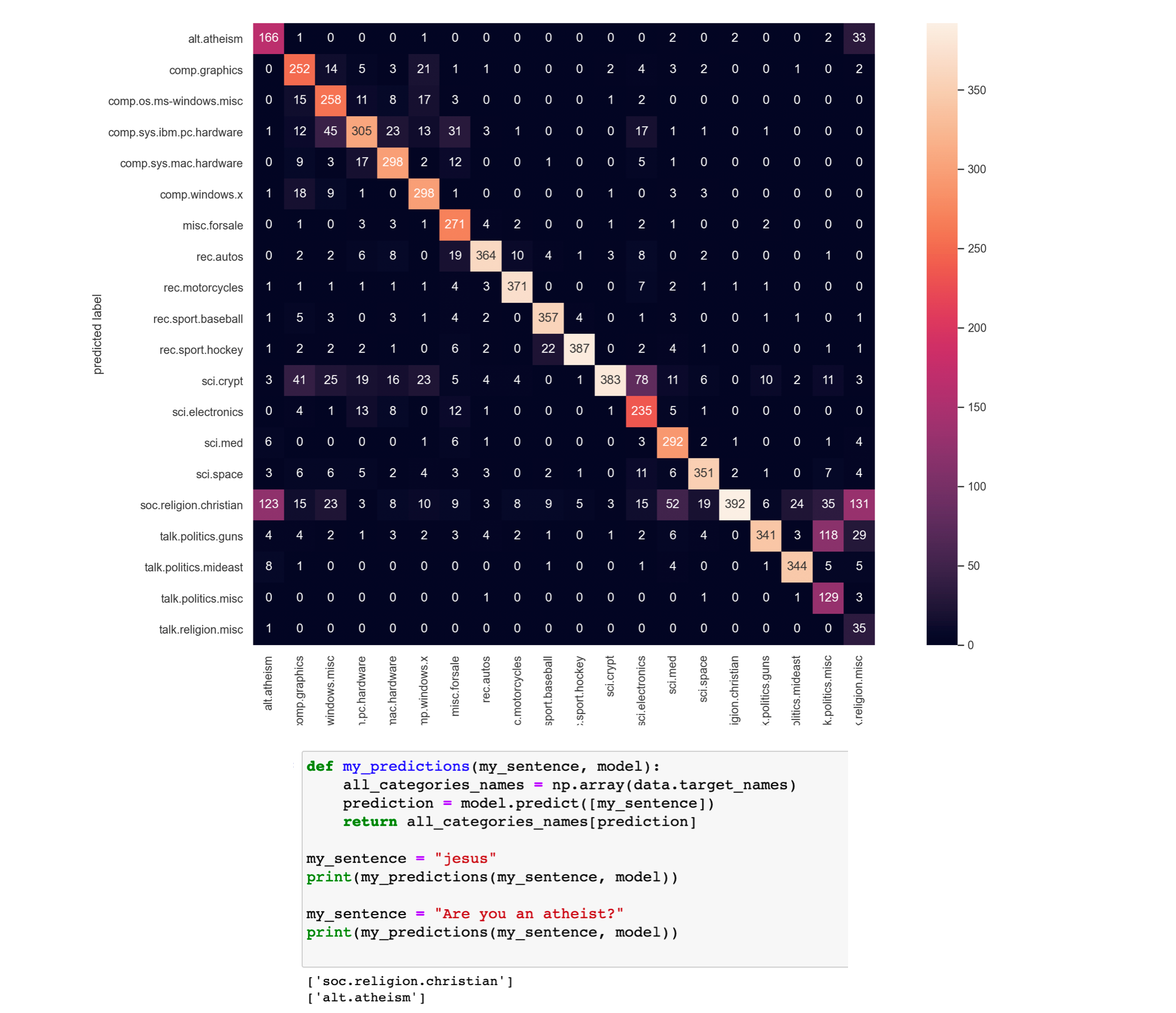 Figure created by the author.
Learn this step by step with the interactive Computer Science and Machine Learning roadmaps.
Figure created by the author.
Learn this step by step with the interactive Computer Science and Machine Learning roadmaps.
Table of contents
- Introduction
- The Naive Bayes algorithm
- Dealing with text data
- Working Example in Python (step-by-step guide)
- Bonus: Having fun with the model
- Conclusions
1. Introduction
Naive Bayes classifiers are a collection of classification algorithms based on Bayes' Theorem. It is not a single algorithm but a family of algorithms where all of them share a common principle, i.e. every pair of features being classified is independent of each other.
Naive Bayes classifiers have been heavily used for text classification and text analysis machine learning problems.
Text Analysis is a major application field for machine learning algorithms. However the raw data, a sequence of symbols (i.e. strings) cannot be fed directly to the algorithms themselves as most of them expect numerical feature vectors with a fixed size rather than the raw text documents with variable length.
In this article I explain a) how Naive Bayes works**,** b) how we can use text data and fit them into a model after transforming them into a more appropriate form. Finally, I implement a multi-class text classification problem step-by-step in Python.
Let's get started !!!
- NEW : After a great deal of hard work and staying behind the scenes for quite a while, we're excited to now offer our expertise through a platform, the "Data Science Hub" on Patreon (https://www.patreon.com/TheDataScienceHub). This hub is our way of providing you with bespoke consulting services and comprehensive responses to all your inquiries , ranging from Machine Learning to strategic data analytics planning.
2. The Naive Bayes algorithm
Naive Bayes classifiers are a collection of classification algorithms based on Bayes' Theorem. It is not a single algorithm but a family of algorithms where all of them share a common principle, i.e. every pair of features being classified is independent of each other.
The dataset is divided into two parts, namely, feature matrix and the response/target vector.
- The Feature matrix (X) contains all the vectors(rows) of the dataset in which each vector consists of the value of dependent features. The number of features is d i.e. X = (x1,x2,x2, xd).
- The Response/target vector (y) contains the value of class/group variable for each row of feature matrix.
2.1. The main two assumptions of Naive Bayes
Naive Bayes assumes that each feature/variable of the same class makes an:
contribution to the outcome.
Side Note: The assumptions made by Naive Bayes are not generally correct in real-world situations. In-fact, the independence assumption is often not met and this is why it is called "Naive " i.e. because it assumes something that might not be true.
2.2. The Bayes' Theorem
Bayes' Theorem finds the probability of an event occurring given the probability of another event that has already occurred. Bayes' theorem is stated mathematically as follows:
 Figure created by the author.
where:
Figure created by the author.
where:
- A and B are called events.
- P(A | B) is the probability of event A, given the event B is true (has occured). Event B is also termed as evidence.
- P(A) is the priori of A (the prior independent probability, i.e. probability of event before evidence is seen).
- P(B | A) is the probability of B given event A, i.e. probability of event B after evidence A is seen.
Summary
 Figure created by the author.
2.3. The Naive Bayes Model
Given a data matrix X and a target vector y, we state our problem as:
 Figure created by the author.
where, y is class variable and X is a dependent feature vector with dimension d i.e. X = (x1,x2,x2, xd), where d is the number of variables/features of the sample.
Figure created by the author.
where, y is class variable and X is a dependent feature vector with dimension d i.e. X = (x1,x2,x2, xd), where d is the number of variables/features of the sample.
- P(y|X) is the probability of observing the class y given the sample X with X = (x1,x2,x2, xd), where d is the number of variables/features of the sample.
Now the "naïve" conditional independence assumptions come into play: assume that all features in X are mutually independent, conditional on the category y :
 Figure created by the author.
Finally, to find the probability of a given sample for all possible values of the class variable y , we just need to find the output with maximum probability:
Figure created by the author.
Finally, to find the probability of a given sample for all possible values of the class variable y , we just need to find the output with maximum probability:
 Figure created by the author.
3. Dealing with text data
One question that arises at this point is the following:
How are we going to use the raw text data to train the model ? The raw data is a collection of strings !
Text Analysis is a major application field for machine learning algorithms. However the raw data, a sequence of symbols (i.e. strings) cannot be fed directly to the algorithms themselves as most of them expect numerical feature vectors with a fixed size rather than the raw text documents with variable length.
In order to address this, scikit-learn provides utilities for the most common ways to extract numerical features from text content, namely:
- tokenizing strings and giving an integer id for each possible token, for instance by using white-spaces and punctuation as token separators.
- counting the occurrences of tokens in each document.
In this scheme, features and samples are defined as follows:
- each individual token occurrence frequency is treated as a feature.
- the vector of all the token frequencies for a given document is considered a multivariate sample.
"Counting" Example (to really understand this before we move on):
text
from sklearn.feature_extraction.text import CountVectorizer
corpus = [
    'This is the first document.',
    'This document is the second document.',
    'And this is the third one.',
    'Is this the first document?',
]
text
vectorizer = CountVectorizer()
X = vectorizer.fit_transform(corpus)
text
print(vectorizer.get_feature_names())
['and', 'document', 'first', 'is', 'one', 'second', 'the', 'third', 'this']
text
print(X.toarray())
[[0 1 1 1 0 0 1 0 1]
 [0 2 0 1 0 1 1 0 1]
 [1 0 0 1 1 0 1 1 1]
 [0 1 1 1 0 0 1 0 1]]
In the above toy example, we have a collection of strings stored into the variable corpus. Using the text transformer , we can see that we have a specific number of unique strings (vocabulary) in our data.
This can be seen by printing the vectorizer.get_feature_names() variable**.** We observe that we have 9 unique words.
Next, we printed the transformed data (X) and we observe the following :
- We have 4 rows in X as the number of our text strings (we have the same number of samples after the transformation).
- We have the same number of columns (features/variables) in the transformed data (X) for all the samples ( this was not the case before that transformation i.e. the individual strings had different lengths).
- The values 0,1,2, encode the frequency of a word that appeared in the initial text data.
E.g. The first transformed row is [0 1 1 1 0 0 1 0 1] and **** th** e unique vocabularyi s ['and', 'document', 'first', 'is', 'one', 'second', 'the', 'third', 'this'],** thus this means that the words "document", "first", "is", "the" and "this" appeared 1 time each in the initial text string (i.e. 'This is the first document.').
Side note: This is the counting approach. The term-frequency transform is nothing more than a transformation of a count matrix into a normalized term-frequency matrix.
Hope everything is clear now. If not, read this paragraph as many times as it is needed in order to really grasp the idea and understand this transformation. It is a fundamental step.
4. Working example in Python
Now that you understood how the Naive Bayes and the Text Transformation work, it's time to start coding !
Problem Statement
As a working example, we will use some text data and we will build a Naive Bayes model to predict the categories of the texts. This is a multi-class (20 classes) text classification problem.
Let's start (I will walk you through). First, we will load all the necessary libraries :
text
import numpy as np, pandas as pd
import seaborn as sns
import matplotlib.pyplot as plt
from sklearn.datasets import fetch_20newsgroups
from sklearn.feature_extraction.text import TfidfVectorizer
from sklearn.naive_bayes import MultinomialNB
from sklearn.pipeline import make_pipeline
from sklearn.metrics import confusion_matrix, accuracy_score
text
sns.set() # use seaborn plotting style
Next, let's load the data (training and test sets):
text
# Load the dataset
data = fetch_20newsgroups()
text
# Get the text categories
text_categories = data.target_names
text
# define the training set
train_data = fetch_20newsgroups(subset="train", categories=text_categories)
text
# define the test set
test_data = fetch_20newsgroups(subset="test", categories=text_categories)
Let's find out how many classes and samples we have:
text
print("We have {} unique classes".format(len(text_categories)))
print("We have {} training samples".format(len(train_data.data)))
print("We have {} test samples".format(len(test_data.data)))
The above prints:
text
We have 20 unique classes
We have 11314 training samples
We have 7532 test samples
So, this is a 20-class text classification problem with n_train = 11314 training samples (text sentences) and n_test = 7532 test samples (text sentences).
Let's visualize the 5th training sample:
text
# let's have a look as some training data
print(test_data.data[5])
As mentioned previously, our data are texts (more specifically, emails) so you should see something like the following printed out:
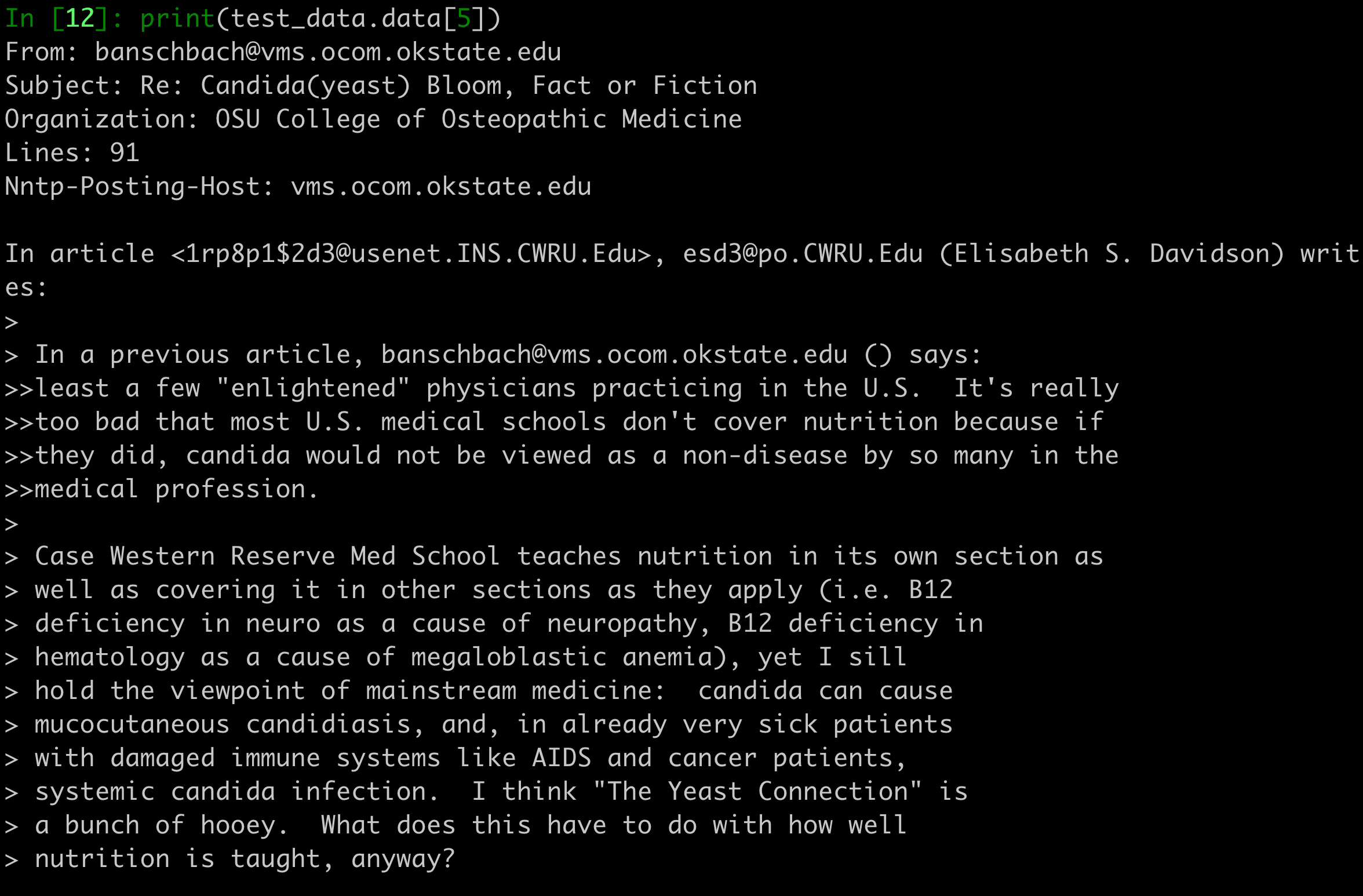 Figure created by the author.
The next step consists of building the Naive Bayes classifier and finally training the model. In our example, we will convert the collection of text documents (train and test sets) into a matrix of token counts (I explained how this works in Section 3).
Figure created by the author.
The next step consists of building the Naive Bayes classifier and finally training the model. In our example, we will convert the collection of text documents (train and test sets) into a matrix of token counts (I explained how this works in Section 3).
To implement that text transformation we will use the make_pipeline function. This will internally transform the text data and then the model will be fitted using the transformed data.
text
# Build the model
model = make_pipeline(TfidfVectorizer(), MultinomialNB())
text
# Train the model using the training data
model.fit(train_data.data, train_data.target)
text
# Predict the categories of the test data
predicted_categories = model.predict(test_data.data)
The last line of code predicts the labels of the test set.
Let's see the predicted categories names:
text
print(np.array(test_data.target_names)[predicted_categories])
array(['rec.autos', 'sci.crypt', 'alt.atheism', ..., 'rec.sport.baseball', 'comp.sys.ibm.pc.hardware', 'soc.religion.christian'], dtype='<U24')
Finally, let's build the multi-class confusion matrix to see if the model is good or if the model predicts correctly only specific text categories.
text
# plot the confusion matrix
mat = confusion_matrix(test_data.target, predicted_categories)
sns.heatmap(mat.T, square = True, annot=True, fmt = "d", xticklabels=train_data.target_names,yticklabels=train_data.target_names)
plt.xlabel("true labels")
plt.ylabel("predicted label")
plt.show()
text
print("The accuracy is {}".format(accuracy_score(test_data.target, predicted_categories)))
text
The accuracy is 0.7738980350504514
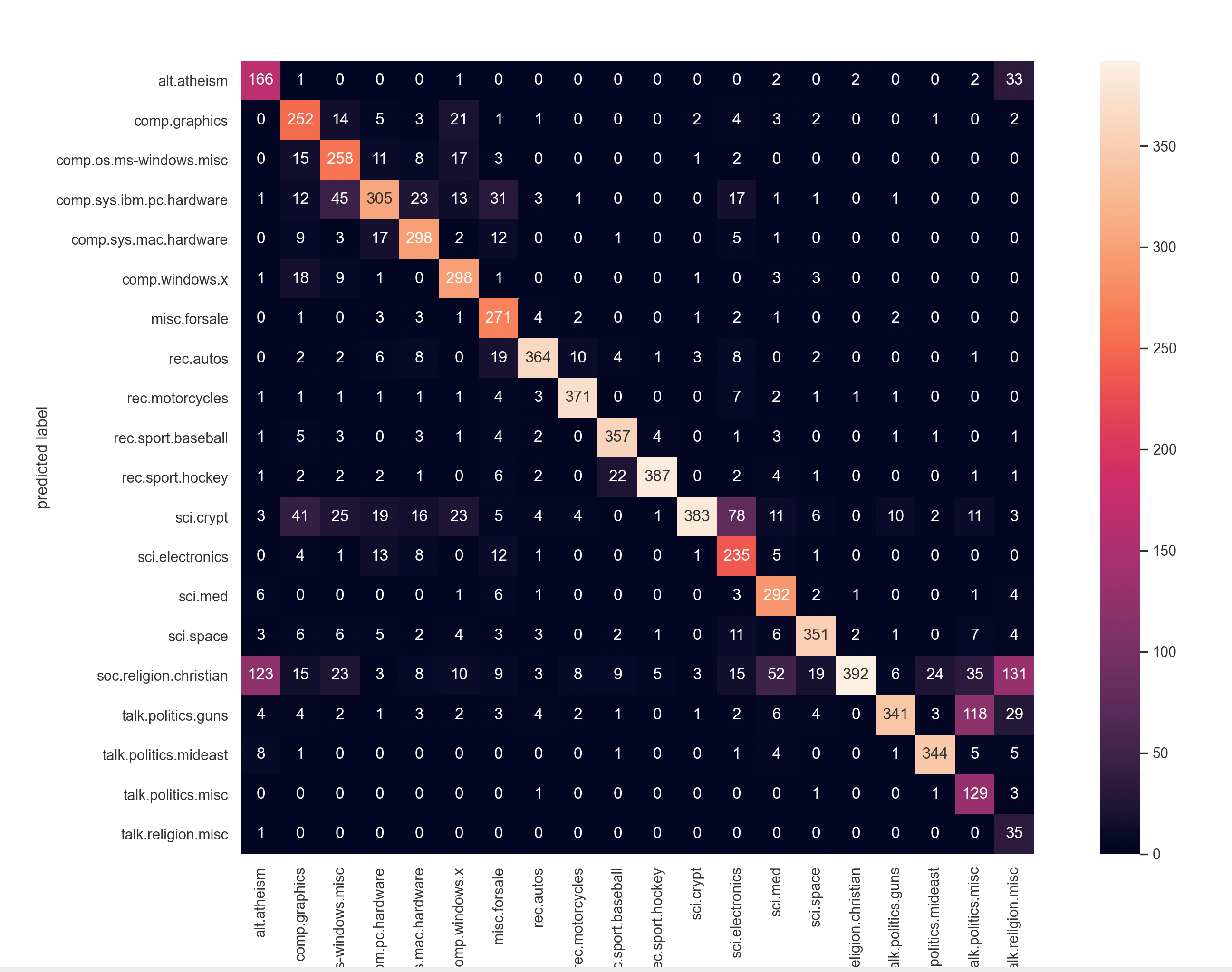 Figure created by the author.
Note: If you're passionate about diving deeper into machine learning with Python and sklearn, I highly recommend checking out this book; it's a game-changer in breaking down complex topics into digestible insights.
Hands-On Machine Learning with Scikit-Learn, Keras, and TensorFlow: Concepts, Tools, and Techniques...
5. Bonus: Having fun with the model
Let's have some fun using the trained model. Let's classify whatever sentence we like 😄 .
text
# custom function to have fun
def my_predictions(my_sentence, model):
    all_categories_names = np.array(data.target_names)
    prediction = model.predict([my_sentence])
    return all_categories_names[prediction]
text
my_sentence = "jesus"
print(my_predictions(my_sentence, model))
['soc.religion.christian']
text
my_sentence = "Are you an atheist?"
print(my_predictions(my_sentence, model))
['alt.atheism']
We inserted the string "jesus" to the model and it predicted the class "['soc.religion.christian']".
Change the "my_sentence" into other stings and play with the model 😃 .
6. Conclusions
We saw that Naive Bayes is a very powerful algorithm for multi-class text classification problems.
Side Note : If you want to know more about the confusion matrix (and the ROC curve) read this:
ROC Curve Explained using a COVID-19 hypothetical example: Binary & Multi-Class Classification...
Interpreting the confusion matrix
From the above confusion matrix , we can verify that the model is really good.
- It is able to correctly predict all 20 classes of the text data (most values are on the diagonal and few are off-the-diagonal).
- We also notice that the highest miss-classification (value off-the-diagonal) is 131 (5 lines from the end, last column at the right). The value 131 means that 131 documents that belonged to the "religion miscellaneous " category were miss-classified as belonging to the "religion christian " category.
Interesting thing that these 2 categories are really similar and actually one could characterize these as 2 subgroups of a larger group e.g. "religion" in general.
Finally, the accuracy on the test set is 0.7739 which is quite good for a 20-class text classification problem 🚀 .
That's all folks! Hope you liked this article.
If you liked and found this article useful, follow 👣 me to be able to see all my new posts.
Questions? Post them as a comment and I will reply as soon as possible.
My Profile (have a look to find out about my collection of articles):
Serafeim Loukas - Towards Data Science
Get in touch with me
You may also like:
Support Vector Machines (SVM) clearly explained: A python tutorial for classification problems...
K-Means Clustering: How It Works & Finding The Optimum Number Of Clusters In The Data
LSTM Time-Series Forecasting: Predicting Stock Prices Using An LSTM Model
Time-Series Forecasting: Predicting Stock Prices Using An ARIMA Model
The Best FREE Data Science Resources: FREE Books & Online Courses
ROC Curve Explained using a COVID-19 hypothetical example: Binary & Multi-Class Classification...
Support Vector Machines (SVM) clearly explained: A python tutorial for classification problems...
PCA clearly explained - How, when, why to use it and feature importance: A guide in Python
Everything you need to know about Min-Max normalization in Python
How Scikit-Learn's StandardScaler works
Register Now to Continue Reading
Unlock Towards Data Science with a Free Account
All articles on Towards Data Science are available to registered users. Create a free account today to access this article and thousands more.
Register for freeSign in to your account
 Written By
See all from Serafeim Loukas, PhD
ClassificationGetting StartedMachine LearningNaive BayesProbability
Share This Article
Towards Data Science is a community publication. Submit your insights to reach our global audience and earn through the TDS Author Payment Program.
Write for TDS
Related Articles
Machine Learning
An Overview Of IBM's "Advanced Machine Learning and Signal Processing" on Coursera
Keenan Kon
August 2, 20209 min read
Artificial Intelligence
LOF explained step by step, with tiny datasets
Angela and Kezhan Shi
December 9, 20257 min read
Machine Learning
How to leverage the Kaggle Python API to download any dataset from their website
Heiko Hotz
January 6, 20223 min read
Machine Learning
An open source, machine learning based approach to resolve identities at scale
Sonal Goyal
November 22, 202211 min read
Artificial Intelligence
Understanding how the math behind neural networks using the MNIST dataset - my key takeaways from fast.ai
Daniel Ching
November 28, 20213 min read
Artificial Intelligence
So you have built a model and want to productionize it as a serverless solution on google cloud platform (GCP). Let me show you how to do...
Saed Hussain
January 17, 20216 min read
Machine Learning
It isn't labeled 'Target_Variable' in your Production Database!
Chris Bruehl
November 14, 20235 min read
Probability
Quick evaluation of A/B (or A/B/C/...) tests using Bayesian approach
Matúš Baniar
January 3, 20223 min read
Machine Learning
Lessons from a multi-node simulator
Salman Toor
September 10, 20257 min read
Your home for data science and AI. The world's leading publication for data science, data analytics, data engineering, machine learning, and artificial intelligence professionals.
Subscribe to Our NewsletterWrite For TDS•About•Advertise•Privacy Policy•Terms of Use
© Insight Media Group, LLC 2026•The New Stack•roadmap.sh•Creator Network
Recommended Articles
Close