
I write technical articles that analyze real world engineering problems through the lens of production systems.
My work focuses on architectural tradeoffs, UI layer system design, performance optimization, and reliability patterns derived from shipping and maintaining scalable applications.
The deployment was live. Users were accessing the application seamlessly through CloudFront. Everything appeared perfect, until I opened the browser’s Network tab during a routine debugging session.
What I saw was concerning.
While investigating an unrelated API issue, I noticed something concerning in the Network tab. Beyond the expected API calls and asset requests, my entire file structure was visible. Source files like Login.tsx, Dashboard.tsx, and component hierarchies were laid bare. The actual source code wasn't minified or obscured. It was completely readable, with variable names, component structure, and implementation patterns exposed to anyone with basic browser DevTools knowledge.
This was a security concern. While critical business logic should never live on the frontend, having your entire application structure, routing logic, validation patterns, and UI implementation details visible is poor practice. It makes the application vulnerable in multiple ways. Attackers could identify potential injection points, understand the exact flow of user interactions, spot validation weaknesses, or even discover API endpoint patterns and parameter structures embedded in the code.
Beyond security, there’s the matter of intellectual property. The way we structured our components, our custom hooks, specific UI/UX implementations, and problem-solving approaches represented genuine development effort. Having all of this freely inspectable felt wrong.
Before diving into the solution, I needed to understand exactly how this was happening. When I clicked through the Network tab, I could see the JavaScript bundle files clearly. Opening them revealed readable code with recognizable patterns.
The reason was simple: source maps.
During development, Vite generates source maps (.map files) that create a bridge between your minified production code and the original source files. These maps allow browser DevTools to show you the actual source code when debugging, even though the browser is running minified bundles.
If you accidentally deploy with sourcemap: true in your build config, or if the default setting generates inline source maps, your entire codebase becomes visible. The browser downloads these map files and reconstructs your original source code structure, complete with file names, folder hierarchies, and readable variable names.
Even without source maps, standard minification only compresses code. It shortens variable names and removes whitespace, but the logic structure remains intact. Anyone with patience can still understand what your code does.
I checked my vite.config.ts and confirmed the issue. The source maps were being generated and deployed alongside the production bundles.
Modern JavaScript bundlers like Vite create highly optimized production builds, but they face a fundamental tension between performance and security. Here’s what was happening:
The Bundling Process: When Vite builds for production, it transforms your source code through several stages:
Module Resolution: Collects all imports and dependencies
Tree Shaking: Removes unused code
Code Splitting: Breaks the application into smaller chunks for lazy loading
Minification: Compresses code by removing whitespace and shortening variable names
Hashing: Generates unique filenames based on content for cache busting
However, standard minification only makes code harder to read, it doesn’t make it unintelligible. Variable names become single characters (a, b, c), but the control flow and logic patterns remain intact. A determined individual can still understand what the code does.
Additionally, source maps (files ending in .map) provide a bridge between minified production code and original source files. While invaluable for debugging, they completely negate any obfuscation efforts if accidentally deployed.
I decided to implement JavaScript obfuscation, a technique that transforms code into a functionally equivalent but deliberately convoluted version that’s extremely difficult to reverse-engineer. This goes far beyond minification.
Obfuscation employs several sophisticated techniques:
1. Control Flow Flattening Transforms the natural flow of code into a state machine with dispatcher logic. Instead of straightforward if-else chains or switch statements, the code execution jumps between seemingly random states, making the logic flow nearly impossible to follow manually.
2. String Array Encoding Extracts all string literals into an encoded array at the top of the file. References to strings become index lookups through decryption functions. So "username" might become _0x4a2b[0x1a] where the actual value is retrieved through a rotation algorithm.
3. Dead Code Injection Inserts blocks of code that never execute but appear legitimate, creating false paths that confuse static analysis tools and human readers attempting to understand the code’s purpose.
4. Identifier Renaming Goes beyond simple minification by replacing identifiers with hexadecimal or randomized strings that carry no semantic meaning. Function names, variable names, and property accessors become completely opaque.
5. String Splitting and Rotation Breaks strings into fragments and rotates the storage array periodically, making it harder to reconstruct original string values through pattern matching.
I researched various approaches and selected the vite-plugin-javascript-obfuscator package, configuring it carefully to balance security with performance.
Here’s where my initial implementation went catastrophically wrong.
I configured the obfuscation plugin like this:
javascriptObfuscator({
  include: ["src/**/*.ts", "src/**/*.tsx", "src/**/*.js"],
  options: { /* obfuscation settings */ }
})
The plugin ran on my source files before Vite’s bundling process. This seemed logical, obfuscate everything at the source level, right?
Wrong.
After building and deploying, the application broke spectacularly. Pages wouldn’t load. The console flooded with errors:
Failed to fetch dynamically imported module: https://[domain]/assets/Login-[hash].js
The server responded with a non-JavaScript MIME type of "text/html"
Users clicking navigation links saw blank screens. React’s lazy-loaded route components failed to load. The application was fundamentally broken.
I dove deep into the error patterns to understand what went wrong.
The Problem with Pre-Bundle Obfuscation:
Modern React applications use code splitting extensively. We declare routes like:
const Login = lazy(() => import('./pages/Login/Login'));
const Dashboard = lazy(() => import('./pages/Dashboard/Dashboard'));
These dynamic imports are crucial for performance, they tell the bundler to create separate chunk files that load on-demand rather than including everything in the initial bundle.
When the obfuscation plugin ran on source files, it mangled these import paths. The string './pages/Login/Login' became something like _0x2b4a('0x15'). Vite's module resolver couldn't interpret this during bundling, leading to broken chunk references.
Even worse, the obfuscated source code confused Vite’s internal dependency graph. The bundler couldn’t properly:
Resolve module relationships
Generate correct chunk filenames
Create the manifest mapping chunks to their hashed filenames
Handle asset imports like images and CSS
When the browser requested a chunk file, it received the fallback index.html instead (since CloudFront's single-page application routing returns the HTML shell for missing files). The browser then tried to parse HTML as JavaScript, triggering the MIME type error.
The Error Chain:
Source obfuscation mangles import paths
Vite can’t resolve modules correctly during bundling
Chunk files generate with broken references
Browser requests non-existent chunks
CloudFront returns HTML fallback
JavaScript engine receives HTML, throws MIME type error
Application crashes
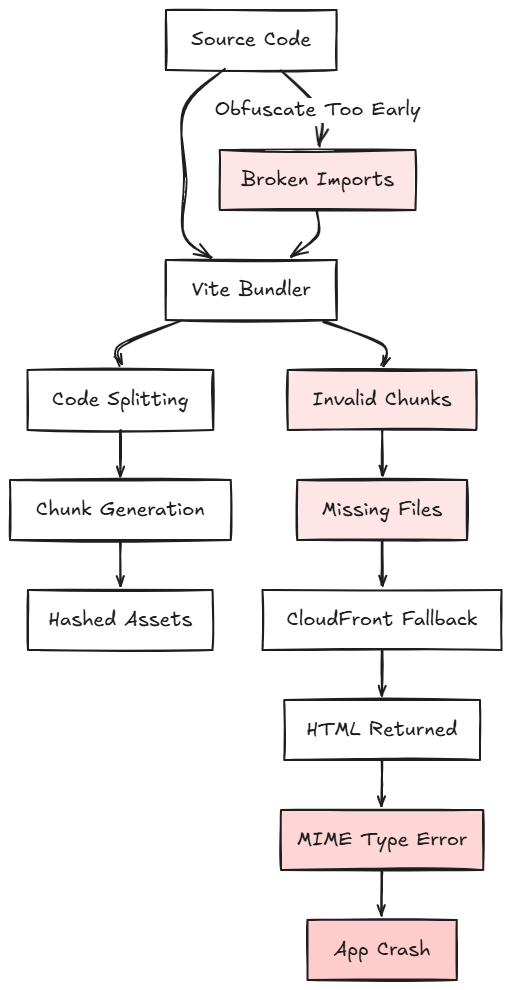
The breakthrough came from understanding when obfuscation should occur in the build pipeline.
The Fix: Obfuscate the final bundled output, not the source files.
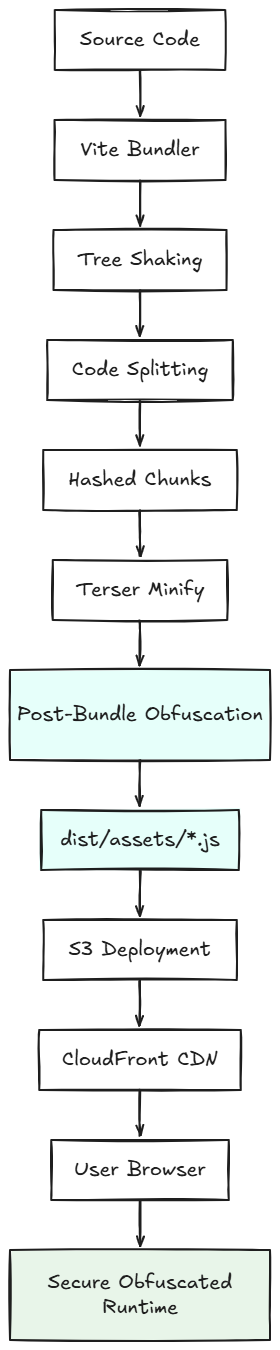
Here’s the corrected configuration:
javascriptObfuscator({
  apply: 'build',                    // Only run during production builds
  include: ["dist/assets/*.js"],     // Target compiled bundles only
  exclude: ["node_modules/**"],
  options: {
    controlFlowFlattening: true,
    controlFlowFlatteningThreshold: 0.6,
    deadCodeInjection: false,         // Avoid excessive size bloat
    debugProtection: false,           // Prevent performance issues
    disableConsoleOutput: true,       // Remove console statements
    identifierNamesGenerator: "hexadecimal",
    log: false,
    renameGlobals: false,             // Preserve global scope references
    splitStrings: true,
    stringArray: true,
    stringArrayThreshold: 0.75,
    stringArrayShuffle: true,
    rotateStringArray: true,
  },
})
Why This Works:
By targeting dist/assets/*.js, the obfuscation runs after Vite completes bundling. At this stage:
All modules are resolved and bundled correctly
Dynamic imports are already transformed into static chunk references
The manifest file maps logical imports to hashed filenames
Asset references are finalized
Code splitting is complete
The obfuscation now transforms the final JavaScript artifacts without breaking the module system. The chunks still load correctly because their filenames and references were established before obfuscation.
To ensure robustness, I also updated the build configuration:
build: {
  sourcemap: false,                  // Never ship source maps
  minify: "terser",                  // Use Terser for better compression
  manifest: true,                    // Generate manifest for chunk mapping
  chunkSizeWarningLimit: 1500,
  rollupOptions: {
    output: {
      manualChunks: undefined,       // Let Vite optimize chunking
      entryFileNames: "assets/[hash].js",
      chunkFileNames: "assets/[hash].js",
      assetFileNames: "assets/[hash].[ext]"
    },
  },
}
Key Settings:
sourcemap: false prevents the generation of .map files that would expose original source code
minify: "terser" applies aggressive minification before obfuscation, reducing bundle size
manifest: true creates a mapping file that helps dynamic imports work reliably
Hash-based filenames ensure cache invalidation while maintaining chunk reference integrity
After implementing these changes, I performed a complete build pipeline reset:
rm -rf dist node_modules/.vite
npm install
npm run build
The build completed successfully. I deployed to S3 and created a CloudFront invalidation. The crucial test: hard refreshing the browser to bypass all caches.
The application loaded perfectly. Routes worked. Lazy-loaded components appeared correctly. No console errors.
Then came the security verification. Opening the Network tab revealed completely obfuscated JavaScript. Instead of readable function names and logic, I saw:
var _0x4b2c=['getElementById','click','prototype','constructor',
'addEventListener','DOMContentLoaded'];(function(_0x2d8f05,_0x4b2c3a){
var _0x4d74cb=function(_0x32719f){while(--_0x32719f){
_0x2d8f05['push'](_0x2d8f05['shift']());}};_0x4d74cb(++_0x4b2c3a);}
(_0x4b2c,0x1f4));
The file structure was obscured. Variable names were hexadecimal strings. Control flow was flattened into incomprehensible state machines. Business logic was buried under layers of encoding and indirection.
Mission accomplished.
Obfuscation isn’t free. The transformed code is larger and slightly slower to parse. Here’s what I observed:
Bundle Size Impact:
Original minified bundle: ~320KB
Obfuscated bundle: ~385KB
Increase: ~20%
However, this was still significantly smaller than the unoptimized build that was initially on S3 before implementing proper minification and obfuscation together. The combination of Terser minification followed by selective obfuscation kept the bundle size reasonable.
Runtime Performance:
Initial load time: +50–80ms (negligible for most users)
Runtime execution: No measurable difference for typical user interactions
Memory usage: Marginally higher due to string array and decoder functions
For a production application where intellectual property protection outweighs a few dozen milliseconds of load time, this trade-off is absolutely worthwhile.
This experience reinforced several critical principles:
1. Understand Your Build Pipeline Tools like Vite perform complex transformations. Understanding the order of operations, module resolution, tree shaking, code splitting, minification, is essential for integrating additional build steps like obfuscation.
2. Obfuscate Output, Not Source Any transformation that modifies code structure or identifiers should run on the final bundled output. Attempting to obfuscate source files breaks module systems and dependency resolution.
3. Security is Layered Obfuscation isn’t encryption. A determined reverse engineer can eventually understand obfuscated code. But raising the barrier to entry protects against casual inspection, automated scraping tools, and opportunistic competitors.
4. Test Thoroughly After Transformations Build-time transformations can introduce subtle bugs. Testing lazy-loaded routes, dynamic imports, and edge cases is critical after implementing obfuscation.
5. Document Configuration Decisions Future developers (including future you) need to understand why the obfuscation is configured a specific way. Inline comments explaining settings like renameGlobals: false prevent well-intentioned "optimizations" that break the application.
For anyone implementing similar protections, here’s the complete workflow:
Step 1: Clean Build
rm -rf dist
npm run build
Step 2: Verify Obfuscation Check dist/assets/*.js files, they should be unreadable while maintaining valid JavaScript syntax.
Step 3: Local Testing
npm run preview
Test all routes, especially lazy-loaded pages.
Step 4: Deploy to S3
aws s3 sync dist/ s3://your-bucket-name --delete
Step 5: Invalidate CloudFront Cache
aws cloudfront create-invalidation \
  --distribution-id YOUR_DISTRIBUTION_ID \
  --paths "/*"
Step 6: Hard Refresh and Test Open the application, hard refresh, test critical user flows, and verify obfuscation in the Network tab.
What began as a concerning discovery in the Network tab evolved into a comprehensive security enhancement. The journey from identifying exposed source code to implementing production-grade obfuscation taught me that protecting client-side code requires understanding the intricate relationship between module systems, bundlers, and transformation tools.
The failure mode, where pre-bundle obfuscation broke dynamic imports, proved to be the most valuable learning experience. It forced me to dissect Vite’s build pipeline, understand how modern JavaScript bundlers resolve modules, and recognize that the timing of code transformations is just as important as the transformations themselves.
Now, our production application maintains its functionality while presenting an impenetrable facade to anyone attempting to inspect the code. Business logic remains proprietary. Implementation details stay confidential. And I gained deeper insight into the build tools that power modern web development.
The next time you deploy a frontend application, open the Network tab and look critically at what you’re exposing. Your code might be more transparent than you realize, and fixing that problem is both a technical challenge and an opportunity to truly understand the tools you use every day.
The journey of securing production code never truly ends. As build tools evolve and new attack vectors emerge, the techniques we use to protect intellectual property must evolve too. What security measures have you implemented in your frontend applications? I’d love to hear about challenges you’ve faced and solutions you’ve discovered.
Note: This article was originally published on Medium and is republished here for wider access and long-term reference.