保留正文与补采附件。源页面当前未重新核验;具体限制见交付清单。
 We value your privacy
We use cookies to enhance your browsing experience, serve personalised ads or content, and analyse our traffic. By clicking "Accept All", you consent to our use of cookies.
Customise Reject All Accept All
Customise Consent Preferences
We value your privacy
We use cookies to enhance your browsing experience, serve personalised ads or content, and analyse our traffic. By clicking "Accept All", you consent to our use of cookies.
Customise Reject All Accept All
Customise Consent Preferences  We use cookies to help you navigate efficiently and perform certain functions. You will find detailed information about all cookies under each consent category below.
The cookies that are categorised as "Necessary" are stored on your browser as they are essential for enabling the basic functionalities of the site. ... Show more
NecessaryAlways Active
Necessary cookies are required to enable the basic features of this site, such as providing secure log-in or adjusting your consent preferences. These cookies do not store any personally identifiable data.
We use cookies to help you navigate efficiently and perform certain functions. You will find detailed information about all cookies under each consent category below.
The cookies that are categorised as "Necessary" are stored on your browser as they are essential for enabling the basic functionalities of the site. ... Show more
NecessaryAlways Active
Necessary cookies are required to enable the basic features of this site, such as providing secure log-in or adjusting your consent preferences. These cookies do not store any personally identifiable data.
-
Cookie
BCTempID
-
Duration
10 minutes
-
Description
No description available.
-
Cookie
__cf_bm
-
Duration
1 hour
-
Description
This cookie, set by Cloudflare, is used to support Cloudflare Bot Management.
-
Cookie
AWSALBCORS
-
Duration
7 days
-
Description
Amazon Web Services set this cookie for load balancing.
-
Cookie
_cfuvid
-
Duration
session
-
Description
Cloudflare sets this cookie to track users across sessions to optimize user experience by maintaining session consistency and providing personalized services
-
Cookie
li_gc
-
Duration
6 months
-
Description
Linkedin set this cookie for storing visitor's consent regarding using cookies for non-essential purposes.
-
Cookie
__hssrc
-
Duration
session
-
Description
This cookie is set by Hubspot whenever it changes the session cookie. The __hssrc cookie set to 1 indicates that the user has restarted the browser, and if the cookie does not exist, it is assumed to be a new session.
-
Cookie
__hssc
-
Duration
1 hour
-
Description
HubSpot sets this cookie to keep track of sessions and to determine if HubSpot should increment the session number and timestamps in the __hstc cookie.
-
Cookie
wpEmojiSettingsSupports
-
Duration
session
-
Description
WordPress sets this cookie when a user interacts with emojis on a WordPress site. It helps determine if the user's browser can display emojis properly.
-
Cookie
BCSessionID
-
Duration
1 year 1 month 4 days
-
Description
Blueconic sets this cookie as a unique identifier for the BlueConic profile.
-
Cookie
_octo
-
Duration
1 year
-
Description
No description available.
-
Cookie
logged_in
-
Duration
1 year
-
Description
No description available.
-
Cookie
__Secure-YEC
-
Duration
past
-
Description
YouTube sets this cookie to stores the user's video player preferences using embedded YouTube video
-
Cookie
__eoi
-
Duration
6 months
-
Description
Description is currently not available.
-
Cookie
AWSALBTGCORS
-
Duration
7 days
-
Description
No description available.
-
Cookie
login-status-p
-
Duration
past
-
Description
Description is currently not available.
-
Cookie
AWSALBTG
-
Duration
7 days
-
Description
No description available.
-
Cookie
csrf_token
-
Duration
session
-
Description
No description available.
-
Cookie
token_v2
-
Duration
1 day
-
Description
Description is currently not available.
-
Cookie
D
-
Duration
1 year
-
Description
Description is currently not available.
-
Cookie
PHPSESSID
-
Duration
session
-
Description
This cookie is native to PHP applications. The cookie stores and identifies a user's unique session ID to manage user sessions on the website. The cookie is a session cookie and will be deleted when all the browser windows are closed.
-
Cookie
VISITOR_PRIVACY_METADATA
-
Duration
6 months
-
Description
YouTube sets this cookie to store the user's cookie consent state for the current domain.
-
Cookie
cookietest
-
Duration
session
-
Description
The cookietest cookie is typically used to determine whether the user's browser accepts cookies, essential for website functionality and user experience.
-
Cookie
__Host-airtable-session
-
Duration
1 year
-
Description
This cookie is used to enable us to integrate the services of Airtable.
-
Cookie
__Host-airtable-session.sig
-
Duration
1 year
-
Description
This cookie is used to enable us to integrate the services of Airtable.
-
Cookie
m
-
Duration
1 year 1 month 4 days
-
Description
Stripe sets this cookie for fraud prevention purposes. It identifies the device used to access the website, allowing the website to be formatted accordingly.
-
Cookie
BIGipServer*
-
Duration
session
-
Description
Marketo sets this cookie to collect information about the user's online activity and build a profile about their interests to provide advertisements relevant to the user.
-
Cookie
__cfruid
-
Duration
session
-
Description
Cloudflare sets this cookie to identify trusted web traffic.
-
Cookie
_GRECAPTCHA
-
Duration
6 months
-
Description
Google Recaptcha service sets this cookie to identify bots to protect the website against malicious spam attacks.
-
Cookie
__Secure-YNID
-
Duration
6 months
-
Description
Google cookie used to protect user security and prevent fraud, especially during the login process.
-
Cookie
cookieyes-consent
-
Duration
1 year
-
Description
CookieYes sets this cookie to remember users' consent preferences so that their preferences are respected on subsequent visits to this site. It does not collect or store any personal information about the site visitors.
Functional
Functional cookies help perform certain functionalities like sharing the content of the website on social media platforms, collecting feedback, and other third-party features.
-
Cookie
lidc
-
Duration
1 day
-
Description
LinkedIn sets the lidc cookie to facilitate data center selection.
-
Cookie
brw
-
Duration
1 year
-
Description
No description available.
-
Cookie
brwConsent
-
Duration
5 minutes
-
Description
Description is currently not available.
-
Cookie
WMF-Uniq
-
Duration
1 year
-
Description
Description is currently not available.
-
Cookie
loom_anon_comment
-
Duration
1 year
-
Description
No description available.
-
Cookie
loom_referral_video
-
Duration
session
-
Description
Description is currently not available.
-
Cookie
VISITOR_INFO1_LIVE
-
Duration
6 months
-
Description
A cookie set by YouTube to measure bandwidth that determines whether the user gets the new or old player interface.
-
Cookie
yt-remote-connected-devices
-
Duration
Never Expires
-
Description
YouTube sets this cookie to store the user's video preferences using embedded YouTube videos.
-
Cookie
ytidb::LAST_RESULT_ENTRY_KEY
-
Duration
Never Expires
-
Description
The cookie ytidb::LAST_RESULT_ENTRY_KEY is used by YouTube to store the last search result entry that was clicked by the user. This information is used to improve the user experience by providing more relevant search results in the future.
-
Cookie
yt-remote-device-id
-
Duration
Never Expires
-
Description
YouTube sets this cookie to store the user's video preferences using embedded YouTube videos.
-
Cookie
yt-remote-session-name
-
Duration
session
-
Description
The yt-remote-session-name cookie is used by YouTube to store the user's video player preferences using embedded YouTube video.
-
Cookie
yt-remote-fast-check-period
-
Duration
session
-
Description
The yt-remote-fast-check-period cookie is used by YouTube to store the user's video player preferences for embedded YouTube videos.
-
Cookie
yt-remote-session-app
-
Duration
session
-
Description
The yt-remote-session-app cookie is used by YouTube to store user preferences and information about the interface of the embedded YouTube video player.
-
Cookie
yt-remote-cast-available
-
Duration
session
-
Description
The yt-remote-cast-available cookie is used to store the user's preferences regarding whether casting is available on their YouTube video player.
-
Cookie
yt-remote-cast-installed
-
Duration
session
-
Description
The yt-remote-cast-installed cookie is used to store the user's video player preferences using embedded YouTube video.
-
Cookie
cp_session
-
Duration
3 months
-
Description
Codepen sets this cookie for Help systems found in the website.
-
Cookie
loid
-
Duration
1 year 1 month 4 days
-
Description
This cookie is set by the Reddit. The cookie enables the sharing of content from the website onto the social media platform.
Analytics
Analytical cookies are used to understand how visitors interact with the website. These cookies help provide information on metrics such as the number of visitors, bounce rate, traffic source, etc.
-
Cookie
__hstc
-
Duration
6 months
-
Description
Hubspot set this main cookie for tracking visitors. It contains the domain, initial timestamp (first visit), last timestamp (last visit), current timestamp (this visit), and session number (increments for each subsequent session).
-
Cookie
hubspotutk
-
Duration
6 months
-
Description
HubSpot sets this cookie to keep track of the visitors to the website. This cookie is passed to HubSpot on form submission and used when deduplicating contacts.
-
Cookie
_ga
-
Duration
1 year 1 month 4 days
-
Description
Google Analytics sets this cookie to calculate visitor, session and campaign data and track site usage for the site's analytics report. The cookie stores information anonymously and assigns a randomly generated number to recognise unique visitors.
-
Cookie
ga*
-
Duration
1 year 1 month 4 days
-
Description
Google Analytics sets this cookie to store and count page views.
-
Cookie
__Host-psifi.analyticsTrace
-
Duration
6 hours
-
Description
Description is currently not available.
-
Cookie
__Host-psifi.analyticsTraceV2
-
Duration
6 hours
-
Description
Description is currently not available.
-
Cookie
_gh_sess
-
Duration
session
-
Description
GitHub sets this cookie for temporary application and framework state between pages like what step the user is on in a multiple step form.
-
Cookie
YSC
-
Duration
session
-
Description
YSC cookie is set by Youtube and is used to track the views of embedded videos on Youtube pages.
-
Cookie
ajs_anonymous_id
-
Duration
1 year
-
Description
This cookie is set by Segment to count the number of people who visit a certain site by tracking if they have visited before.
-
Cookie
vuid
-
Duration
1 year 1 month 4 days
-
Description
Vimeo installs this cookie to collect tracking information by setting a unique ID to embed videos on the website.
Performance
Performance cookies are used to understand and analyse the key performance indexes of the website which helps in delivering a better user experience for the visitors.
-
Cookie
AWSALB
-
Duration
7 days
-
Description
AWSALB is an application load balancer cookie set by Amazon Web Services to map the session to the target.
-
Cookie
acq
-
Duration
past
-
Description
Description is currently not available.
-
Cookie
acq.sig
-
Duration
past
-
Description
Description is currently not available.
-
Cookie
ptc
-
Duration
2 years
-
Description
No description available.
Advertisement
Advertisement cookies are used to provide visitors with customised advertisements based on the pages you visited previously and to analyse the effectiveness of the ad campaigns.
-
Cookie
muc_ads
-
Duration
1 year 1 month 4 days
-
Description
Twitter sets this cookie to collect user behaviour and interaction data to optimize the website.
-
Cookie
guest_id_marketing
-
Duration
1 year 1 month 4 days
-
Description
Twitter sets this cookie to identify and track the website visitor.
-
Cookie
guest_id_ads
-
Duration
1 year 1 month 4 days
-
Description
Twitter sets this cookie to identify and track the website visitor.
-
Cookie
personalization_id
-
Duration
1 year 1 month 4 days
-
Description
Twitter sets this cookie to integrate and share features for social media and also store information about how the user uses the website, for tracking and targeting.
-
Cookie
guest_id
-
Duration
1 year 1 month 4 days
-
Description
Twitter sets this cookie to identify and track the website visitor. It registers if a user is signed in to the Twitter platform and collects information about ad preferences.
-
Cookie
bcookie
-
Duration
1 year
-
Description
LinkedIn sets this cookie from LinkedIn share buttons and ad tags to recognize browser IDs.
-
Cookie
__Secure-ROLLOUT_TOKEN
-
Duration
6 months
-
Description
YouTube sets this cookie to manage feature rollout and experimentation. It helps Google control which new features or interface changes are shown to users as part of testing and staged rollouts, ensuring consistent experience for a given user during an experiment.
-
Cookie
yt.innertube::nextId
-
Duration
Never Expires
-
Description
YouTube sets this cookie to register a unique ID to store data on what videos from YouTube the user has seen.
-
Cookie
yt.innertube::requests
-
Duration
Never Expires
-
Description
YouTube sets this cookie to register a unique ID to store data on what videos from YouTube the user has seen.
-
Cookie
session_tracker
-
Duration
session
-
Description
This cookie is set by the Reddit. This cookie is used to identify trusted web traffic. It also helps in adverstising on the website.
-
Cookie
edgebucket
-
Duration
session
-
Description
Reddit sets this cookie to save the information about a log-on Reddit user, for the purpose of advertisement recommendations and updating the content.
-
Cookie
did
-
Duration
1 year
-
Description
Arbor sets this cookie to show targeted ads to site visitors.This cookie expires after 2 months or 1 year.
Uncategorised
Other uncategorised cookies are those that are being analysed and have not been classified into a category as yet.
No cookies to display.
Reject All Save My Preferences Accept All
Toggle SearchToggle Mobile Navigation
Publish AI, ML & data-science insights to a global community of data professionals.
Sign inSubmit an Article
LatestEditor's PicksNewsletterShipAI
Write For TDS
LinkedInXToggle Search
Artificial Intelligence
Unsupervised Learning Series: Exploring the Mean-Shift Algorithm
Let's learn one of the most famous density-based clustering algorithms, Mean-Shift.
Ivo Bernardo
August 19, 202410 min read
 K-Means, Hierarchical Clustering, Expectation-Maximization, and DBScan are probably the most famous clustering algorithms you may know in the context of Machine Learning.
However, there is another density-based algorithm that has been solving a variety of problems, ranging from satellite image segmentation to object tracking, and its name is mean-shift. This algorithm is renowned for finding the modes of a specific dataset by building clusters around areas with higher data point densities.
Visualizing mean-shift is easy. Normally, I use the skyscraper skyline analogy. If you consider a skyscraper skyline:
Learn this step by step with the interactive AI Engineer and Machine Learning roadmaps.
K-Means, Hierarchical Clustering, Expectation-Maximization, and DBScan are probably the most famous clustering algorithms you may know in the context of Machine Learning.
However, there is another density-based algorithm that has been solving a variety of problems, ranging from satellite image segmentation to object tracking, and its name is mean-shift. This algorithm is renowned for finding the modes of a specific dataset by building clusters around areas with higher data point densities.
Visualizing mean-shift is easy. Normally, I use the skyscraper skyline analogy. If you consider a skyscraper skyline:
Learn this step by step with the interactive AI Engineer and Machine Learning roadmaps.
 Two Clusters of Density using Skyscrapers - Image generated by AI in Microsoft Image Designer
We can clearly see two different clusters of density if we consider the skyscrapers as our datapoints:
Two Clusters of Density using Skyscrapers - Image generated by AI in Microsoft Image Designer
We can clearly see two different clusters of density if we consider the skyscrapers as our datapoints:
 Two Clusters of Density using Skyscrapers - Image generated by AI in Microsoft Image Designer
But let's expand the image below, to see more skyscraper areas. As we expeand the image, we can see other clusters of density, with different "peak" size:
Two Clusters of Density using Skyscrapers - Image generated by AI in Microsoft Image Designer
But let's expand the image below, to see more skyscraper areas. As we expeand the image, we can see other clusters of density, with different "peak" size:
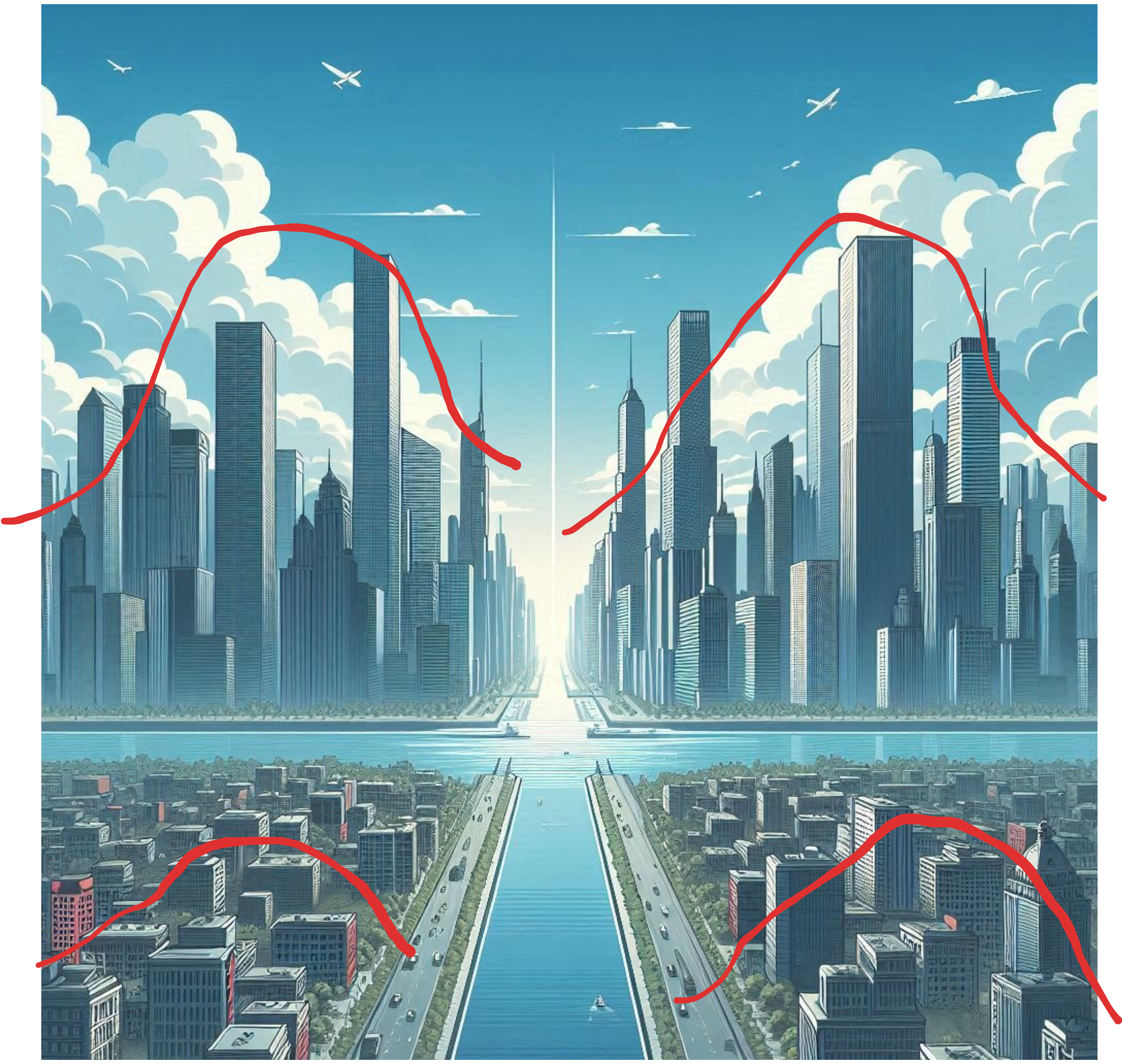 Four Clusters of Density using Skyscrapers - Image generated by AI in Microsoft Image Designer
The goal of the mean-shift algorithm is to find these different clusters (of varying peak) within a dataset. It achieves this by shifting the cluster means until they reaches a "peak", similarly to dbscan.
It's a powerful technique to leverage, particularly when our data contains non-spherical clusters.
In this blog post, we will:
Four Clusters of Density using Skyscrapers - Image generated by AI in Microsoft Image Designer
The goal of the mean-shift algorithm is to find these different clusters (of varying peak) within a dataset. It achieves this by shifting the cluster means until they reaches a "peak", similarly to dbscan.
It's a powerful technique to leverage, particularly when our data contains non-spherical clusters.
In this blog post, we will:
- See a step-by-step implementation of the mean-shift algorithm.
- Check the
sklearn implementation of the algorithm.
- Go through a practical use case of the algorithm using real-data.
If you would like, you can also check the other blog posts of this unsupervised learning series, using the links below:
Compared to the latter (DBScan , another density based algorithm), mean-shift only requires the tuning of one hyperparameter. This comes with a cost, as it doesn't provide the robustness to outliers that DBScan can offer.
Hope you're ready, and let's start!
Why K-Means doesn't work for Non-Spherical Shapes
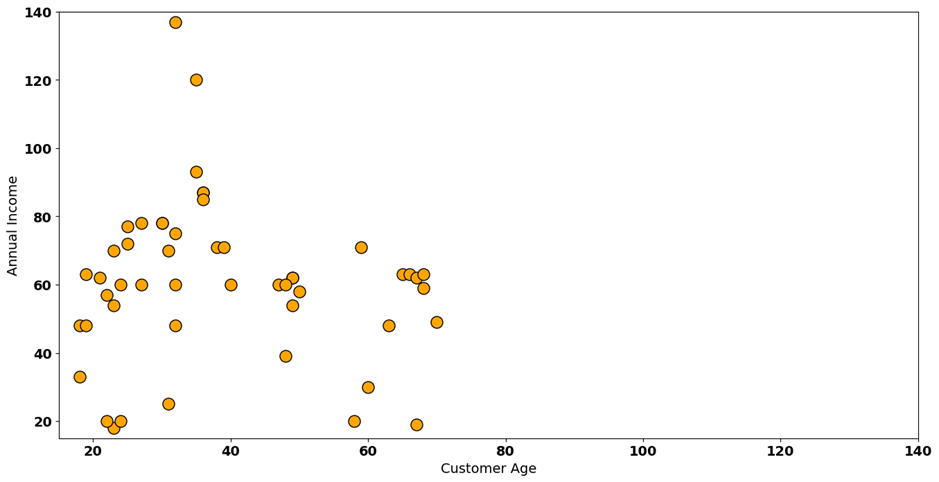
For our introduction of the mean-shift algorithm, we'll start by understanding why traditional clustering methods fail on some datasets. Take the following dataset with generated customer data. Our two variables are annual income (in k euros) and average spending for a group of customers:
 Customer Dataset - Image by Author
Visually, it's hard to understand the number of different clusters we have on this dataset. We can consider three, four or five. For example, if we consider 5 different clusters, we'll probably outline the following:
Customer Dataset - Image by Author
Visually, it's hard to understand the number of different clusters we have on this dataset. We can consider three, four or five. For example, if we consider 5 different clusters, we'll probably outline the following:
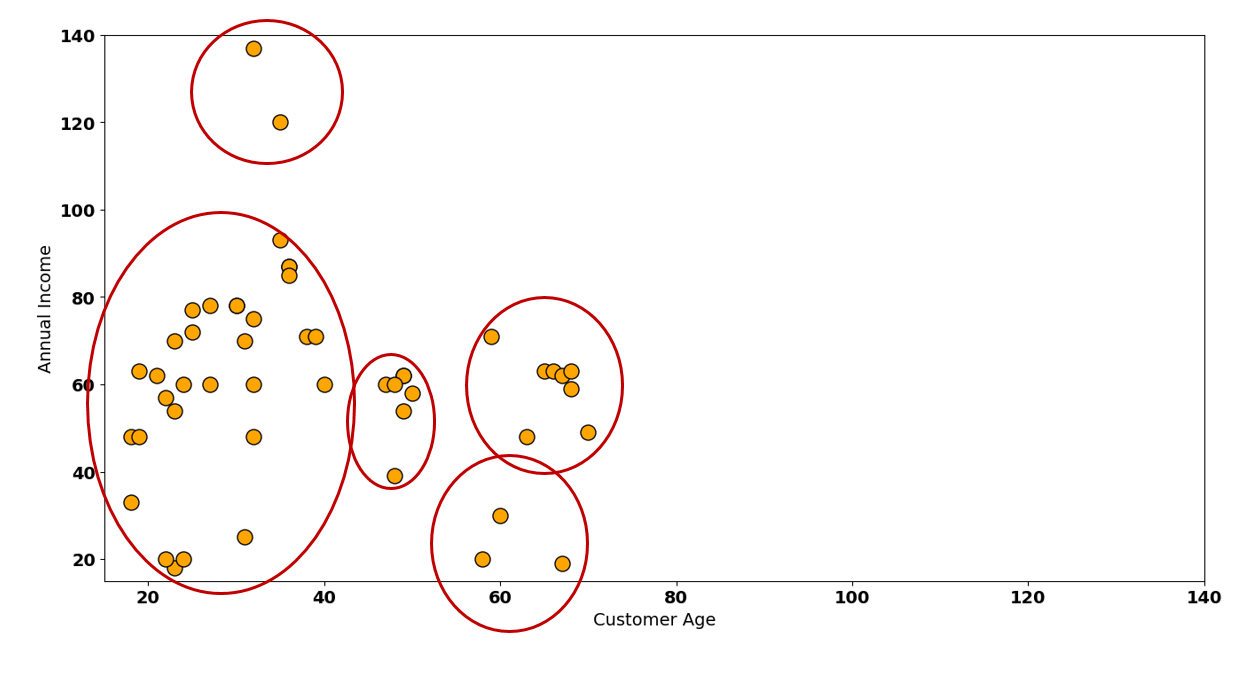 Customer Dataset Visual Clusters— Image by Author
The image above is tricking us a bit, though. As with most clustering algorithms that deal with distances, it's important to standardize our data - let's do that:
Customer Dataset Visual Clusters— Image by Author
The image above is tricking us a bit, though. As with most clustering algorithms that deal with distances, it's important to standardize our data - let's do that:
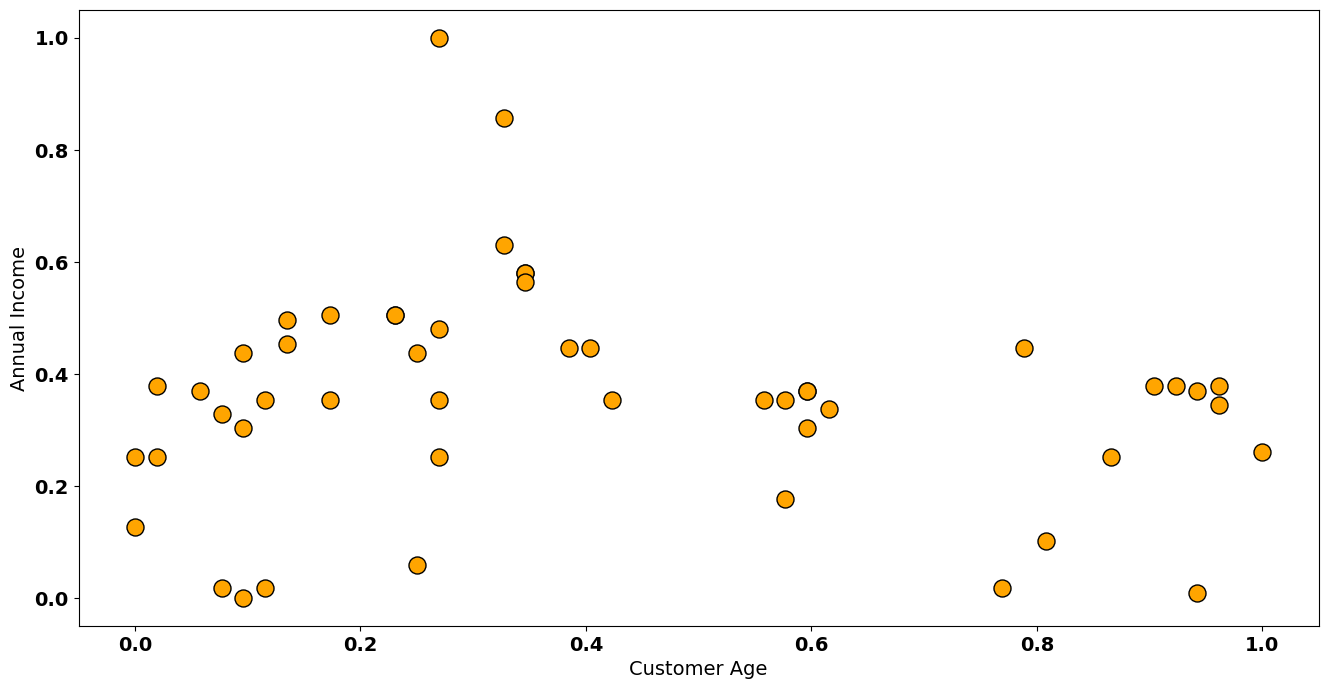 Customer Standardized Dataset— Image by Author
Now, our densities are a bit different:
Customer Standardized Dataset— Image by Author
Now, our densities are a bit different:
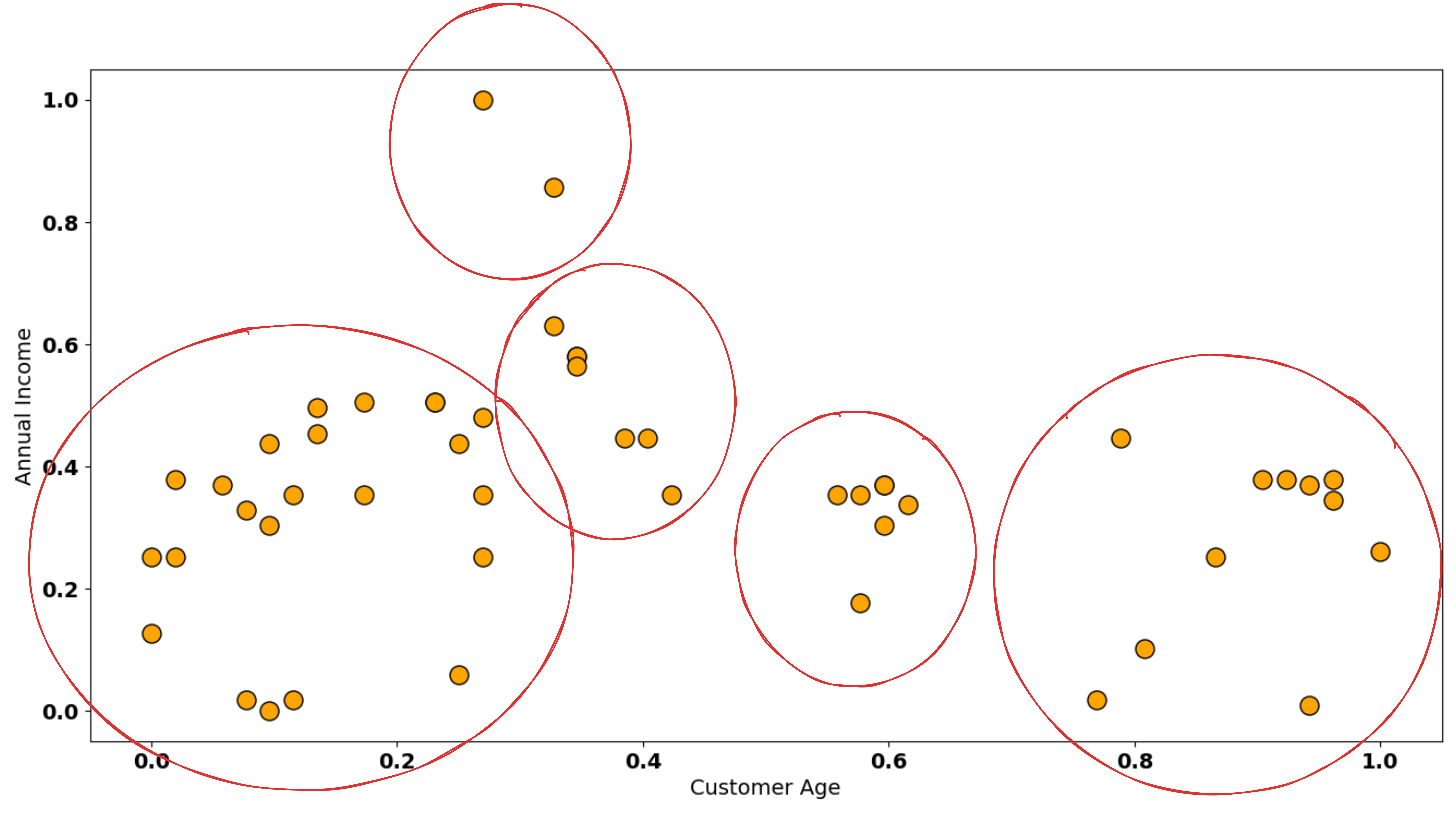 Customer Standardized Dataset Visual Clusters - Image by Author
Another hypothesis is to combine some these data points into 3 or 4 clusters. Of course, doing this visually is a bit tricky, so how does K-Means behave in this dataset - first let's see the 5 cluster example:
Customer Standardized Dataset Visual Clusters - Image by Author
Another hypothesis is to combine some these data points into 3 or 4 clusters. Of course, doing this visually is a bit tricky, so how does K-Means behave in this dataset - first let's see the 5 cluster example:
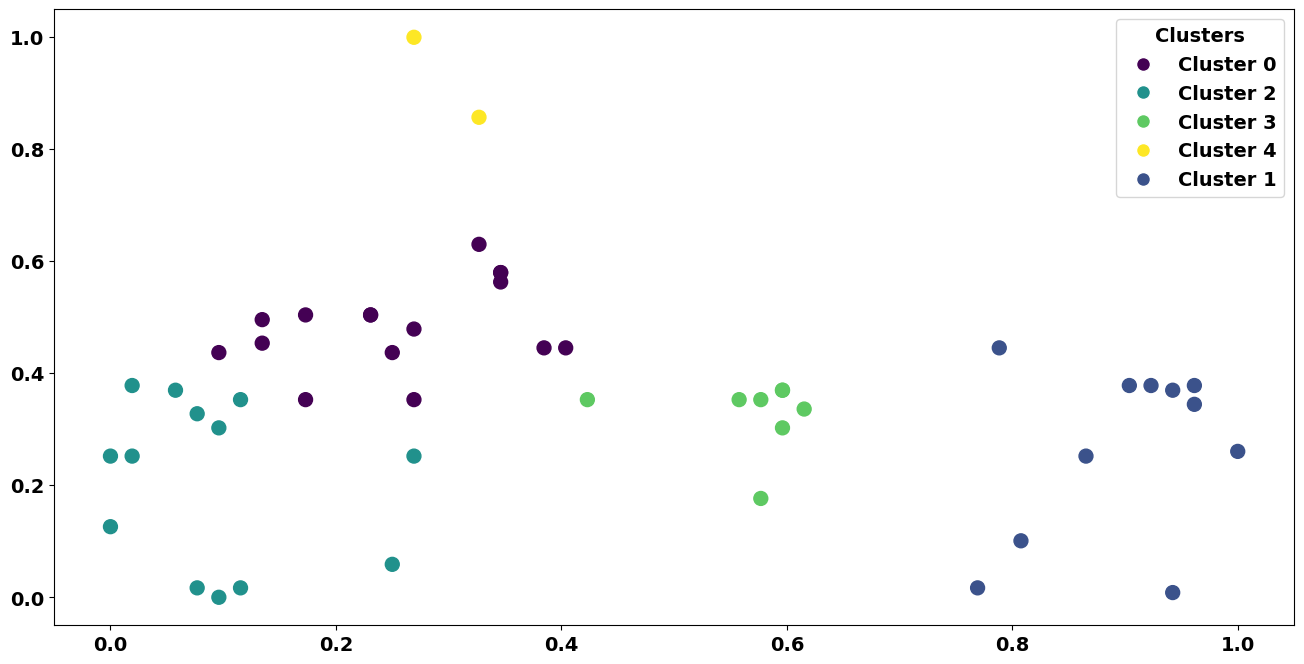 K-Means solution on Dataset - Image by Author
As you can see, K-Means clustering has some trouble to define these clusters. Mostly, this happens due to the non-spherical nature of the data. Let's see what happens if I fit a k-means solution with 4 clusters:
K-Means solution on Dataset - Image by Author
As you can see, K-Means clustering has some trouble to define these clusters. Mostly, this happens due to the non-spherical nature of the data. Let's see what happens if I fit a k-means solution with 4 clusters:
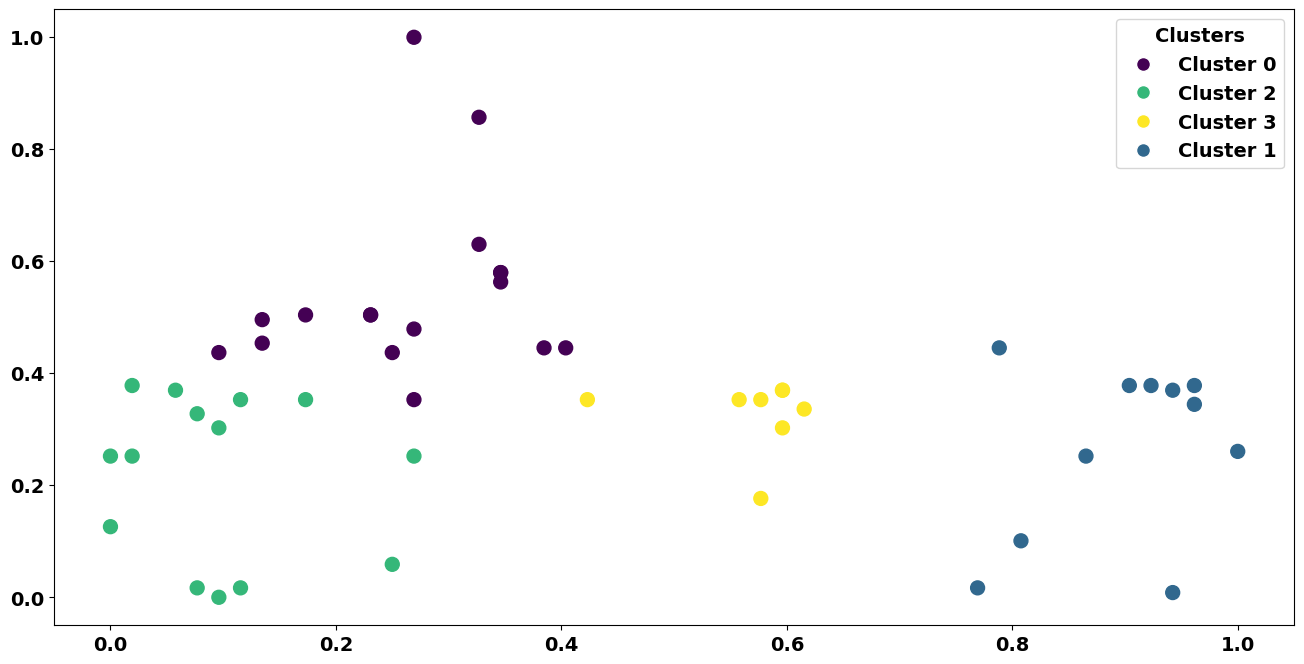 4 Clusters K-Means solution on Dataset - Image by Author
It's an interesting solution, but becoming too influenced by outliers. Notice how these 3 data points impact one of the clusters in a major way:
4 Clusters K-Means solution on Dataset - Image by Author
It's an interesting solution, but becoming too influenced by outliers. Notice how these 3 data points impact one of the clusters in a major way:
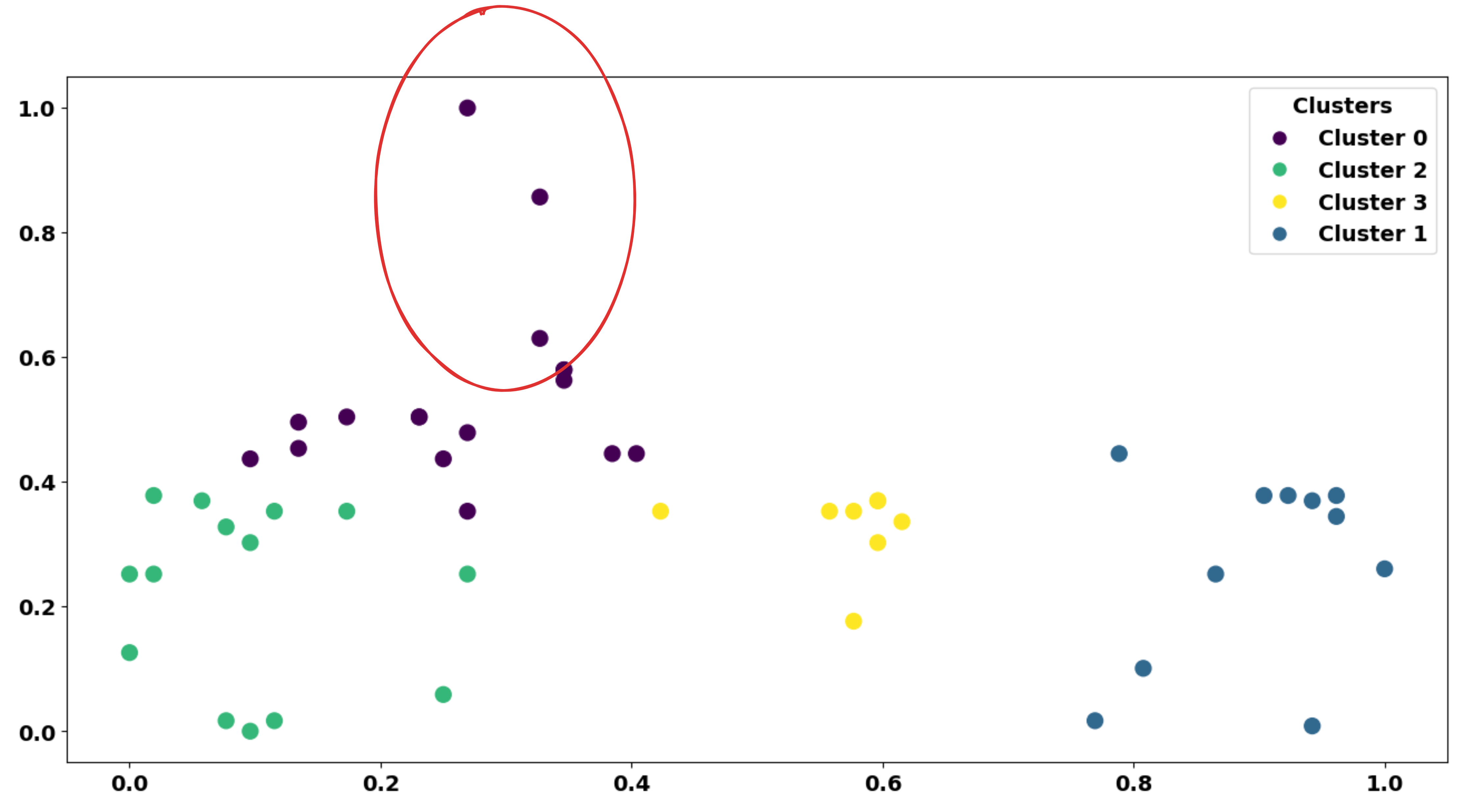 Outliers influencing - Image by Author
Now let's see what happens with mean-shift :
Outliers influencing - Image by Author
Now let's see what happens with mean-shift :
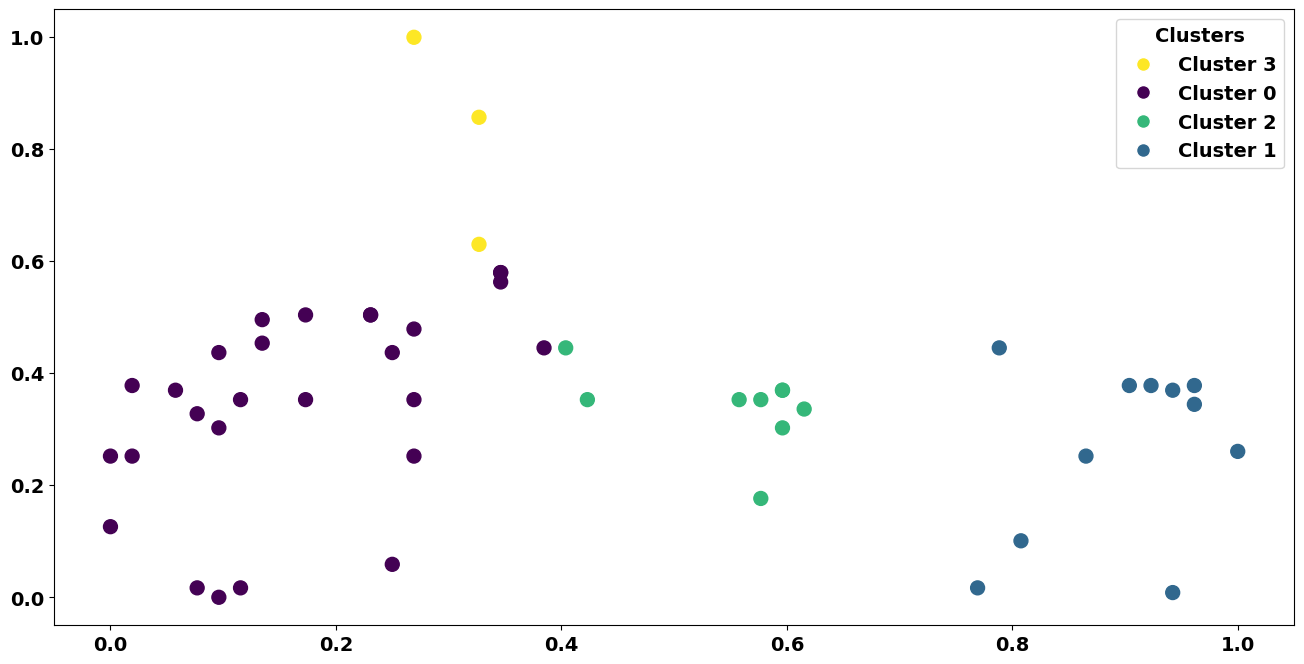 Mean-Shift Solution - Image by Author
We see clusters that are more aligned with the density we've seen before. Although the solution is not perfect, it's an interesting pattern discovered by the algorithm.
But why is mean-shift so different from K-Means? As usual, no question is left unanswered - let's see!
Mean-Shift Solution - Image by Author
We see clusters that are more aligned with the density we've seen before. Although the solution is not perfect, it's an interesting pattern discovered by the algorithm.
But why is mean-shift so different from K-Means? As usual, no question is left unanswered - let's see!
Mean-Shift Walkthrough, step-by-step
First, we'll start with a clean version of our dataset (without any clusters assigned). Mean-shift starts with a random data point (highlighted in orange below):
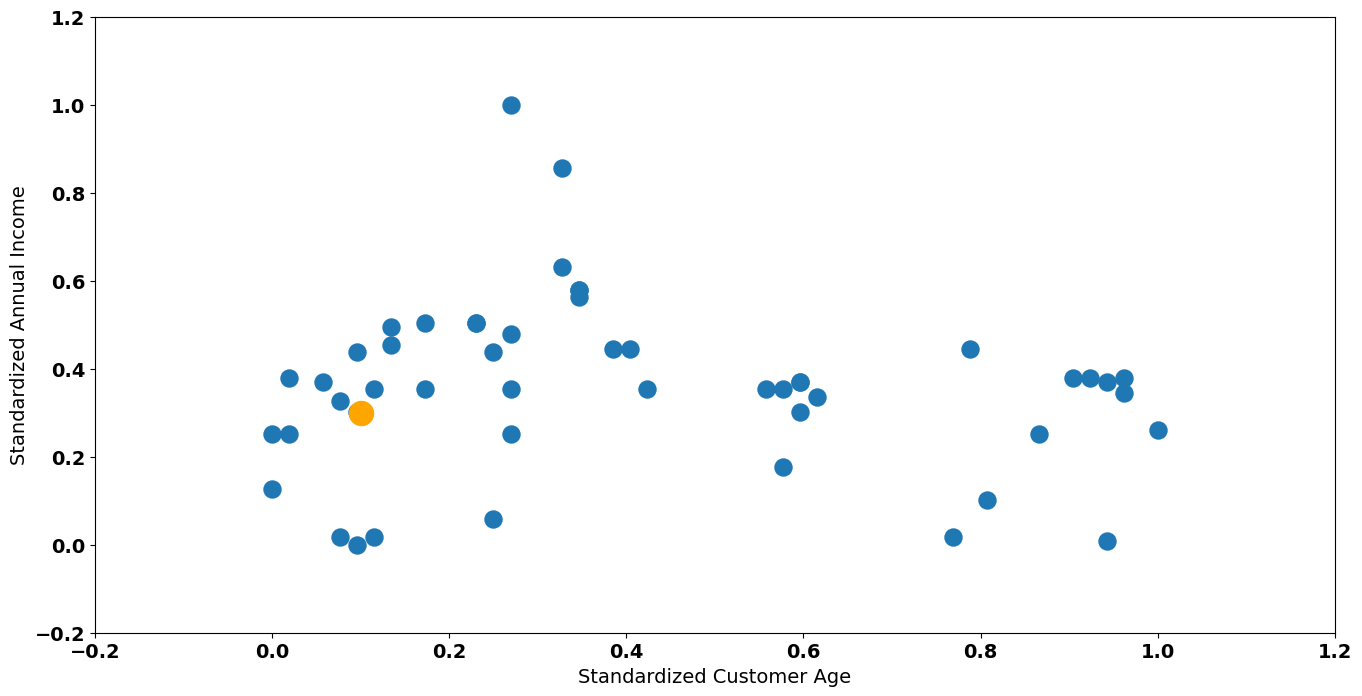 Random Data Point Selected - Image by Author
Next step is to draw a circle around this data point with a radius (hyperparameter of the algorithm). I'll define 0.1 as the value of the radius of our circle:
Random Data Point Selected - Image by Author
Next step is to draw a circle around this data point with a radius (hyperparameter of the algorithm). I'll define 0.1 as the value of the radius of our circle:
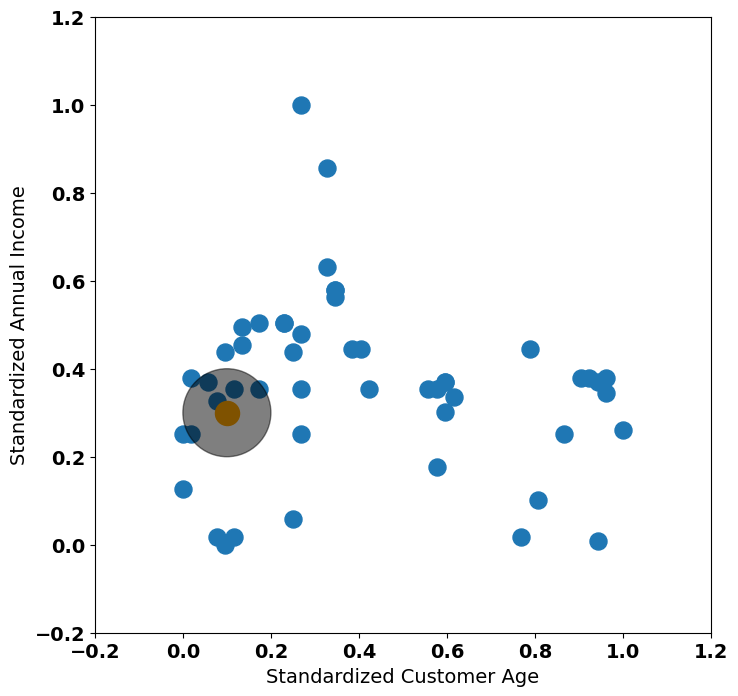 Radius Definition - Image by Author
Note: From now on, I'll show squared plots so that we can correctly see the circles generated by the radius. Default matplotlib definitions shows an elipsis as the plot is stretched on the x-axis.
We now need to perform a crucial step of the mean-shift algorithm: the shifting operation!
This is actually very simple. Depending on the kernel, we will drag this orange point to its center of density. The most famous kernels to use within mean-shift are:
Radius Definition - Image by Author
Note: From now on, I'll show squared plots so that we can correctly see the circles generated by the radius. Default matplotlib definitions shows an elipsis as the plot is stretched on the x-axis.
We now need to perform a crucial step of the mean-shift algorithm: the shifting operation!
This is actually very simple. Depending on the kernel, we will drag this orange point to its center of density. The most famous kernels to use within mean-shift are:
- Gaussian kernel
- Mexican-hat
- Uniform kernel
The gaussian and mexican-hat kernels consider the points that are farther from the center should have less influence in the shifting operation. The uniform kernel is a bit less flexible and states that any data point within the radius should have equal influence in the shifting operation.
We'll use uniform kernel as an example, due to its simplicity, although gaussian kernel is also used often.
First, we need to assess which data points are within our radius:
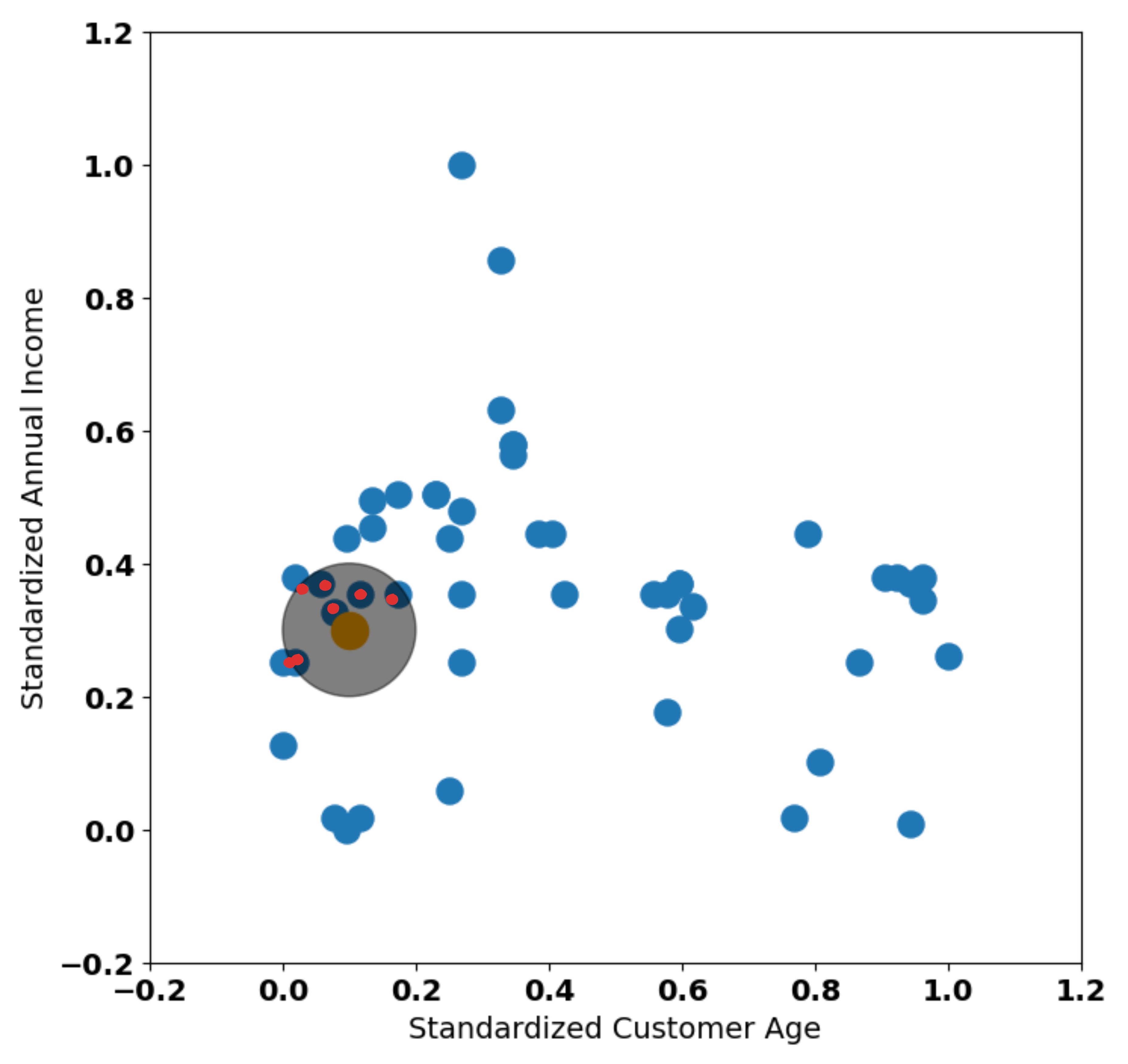 Highlighted points within the radius - Image by Author
I'll consider that every data point that touches some part of the radius is part of the cirle. Subsetting these data points (and the point itself):
Highlighted points within the radius - Image by Author
I'll consider that every data point that touches some part of the radius is part of the cirle. Subsetting these data points (and the point itself):
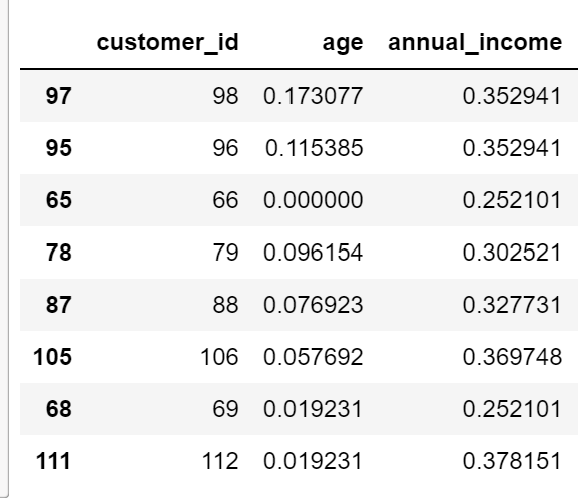 Subset of Customers within the Radius - Image by Author
Now, we can use the averages both age and _annual income of this subset of customers to drag the "centroid".
Subset of Customers within the Radius - Image by Author
Now, we can use the averages both age and _annual income of this subset of customers to drag the "centroid".
- age average is approximately 0.0679
- _annual income average is approximately 0.324
These are the two values that contain the coordinates where we are going to shift our mean inside the radius:
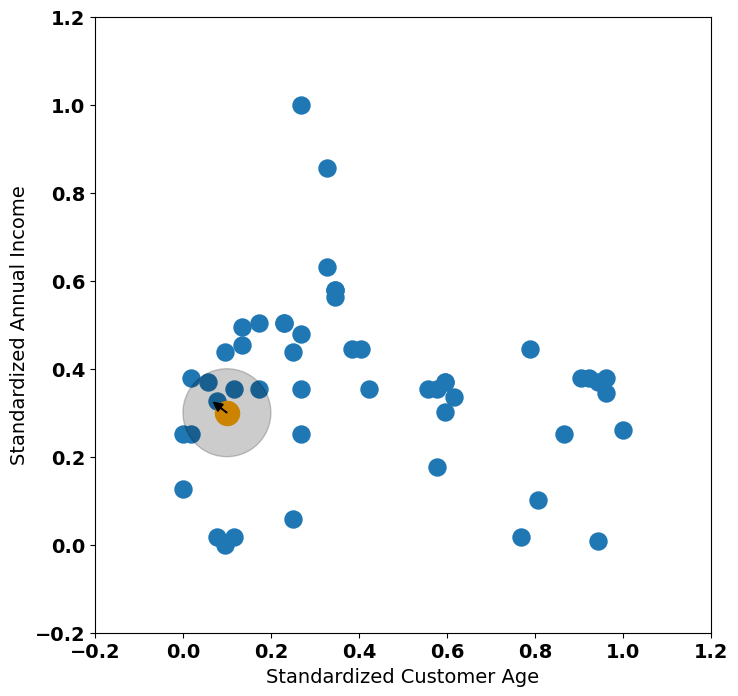 Mean shift operation - Image by Author
Our centroid gets shifted northwest. Let's reposition it:
Mean shift operation - Image by Author
Our centroid gets shifted northwest. Let's reposition it:
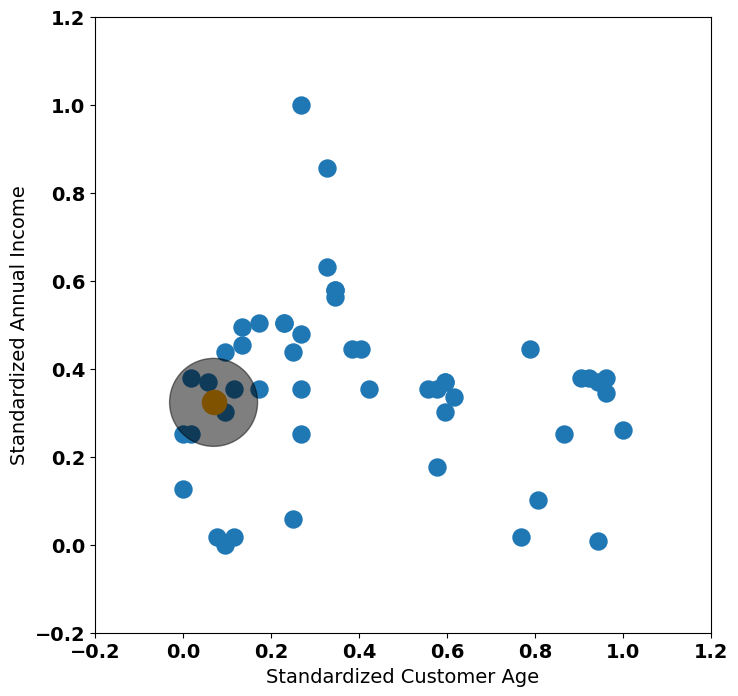 Shifted Centroid - Image by Author
In this case, our new radius touches the same data points. Our centroid converged to this region and it will stay there.
Next iteration is doing exactly the same for every data point. Let's visualize what would happen with another data point in a different region:
Shifted Centroid - Image by Author
In this case, our new radius touches the same data points. Our centroid converged to this region and it will stay there.
Next iteration is doing exactly the same for every data point. Let's visualize what would happen with another data point in a different region:
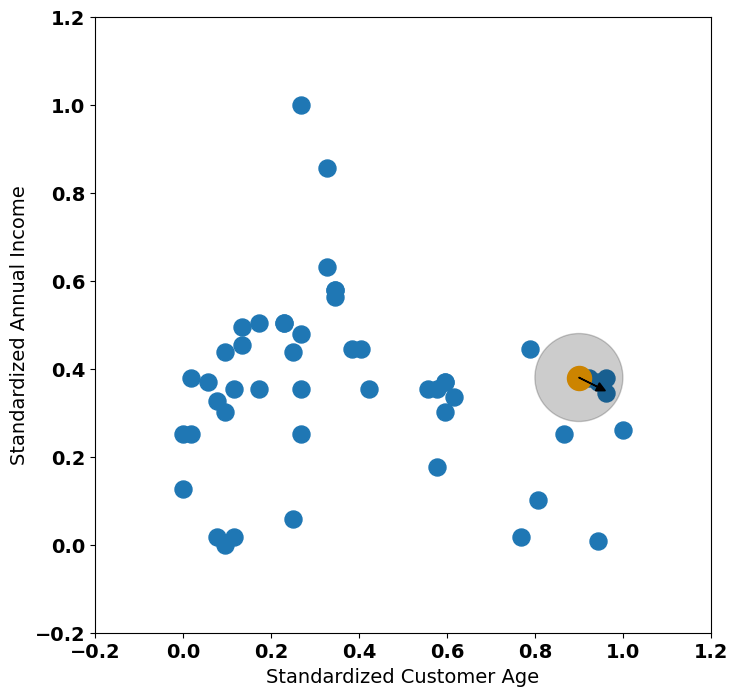 Second Random Data Point Example - Image by Author
In this case, the mean would shift southeast. If we start in an isolated data point:
Second Random Data Point Example - Image by Author
In this case, the mean would shift southeast. If we start in an isolated data point:
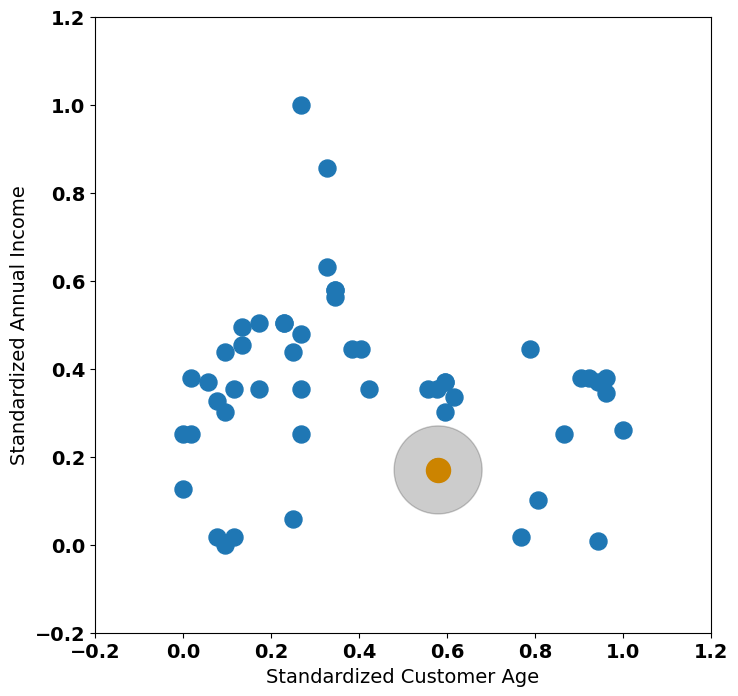 Third Random Data Point Example - Image by Author
In this case, the mean that started on this data point won't change. This data point will form a cluster by itself.
During the algorithm run, different data points will land in a same "center of mass". Tthese peaks will be combined to become a cluster (different implementations of mean-shift may do this last step in different ways). The key is that all implementations respect the principle: "same density peak, same cluster".
Depending on the implementation, the algorithm will finish when one of the conditions is met:
Third Random Data Point Example - Image by Author
In this case, the mean that started on this data point won't change. This data point will form a cluster by itself.
During the algorithm run, different data points will land in a same "center of mass". Tthese peaks will be combined to become a cluster (different implementations of mean-shift may do this last step in different ways). The key is that all implementations respect the principle: "same density peak, same cluster".
Depending on the implementation, the algorithm will finish when one of the conditions is met:
- Reaches a certain number of iterations given by the user. One iteration is equal to one pass through all the data points.
- The centroids no longer move after a few iterations.
- Some implementations define that when all cluster peaks are within a radius boundary, the algorithm should finish.
In sklearn 's implementation, the choice is route number 1 - after 300 iterations the algorithm stops, by default.
Mean-shift has only one important hyperparameter - the radius. Compare the following two solutions:
Radius = 0.1 - Image by Author
We are revisiting our first example - in this case, our radius is 0.1. What happens we we raise this value?
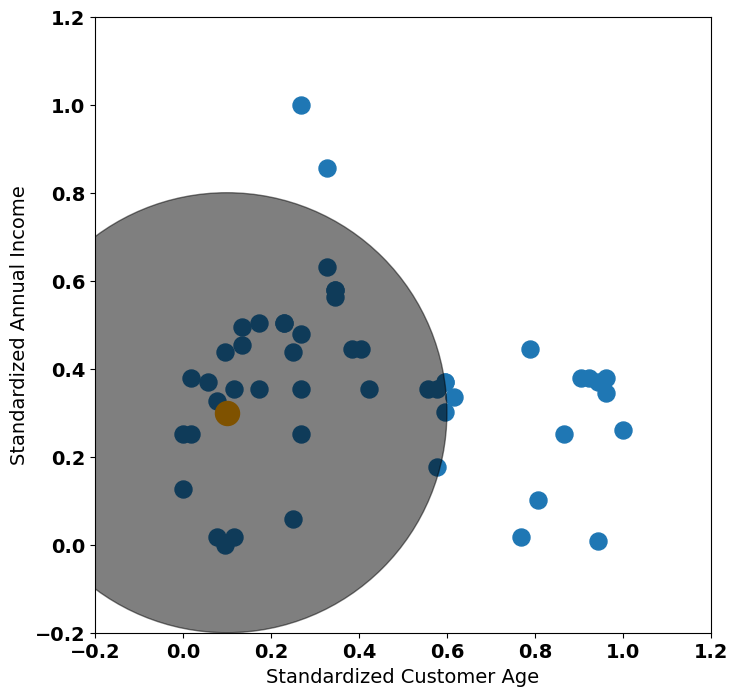 Radius = 0.5— Image by Author
With a radius of 0.5, we can see that more points will tend to navigate to the same density peak. The downside of the radius hyperparameter (user defined) is that it's the same for every data point. Due to that, mean-shift may not be able to lead very well with datasets that contain clusters of different densities.
With no surprise, shifting is the most important operation of the algorithm! It's time to see it in action, using the
Radius = 0.5— Image by Author
With a radius of 0.5, we can see that more points will tend to navigate to the same density peak. The downside of the radius hyperparameter (user defined) is that it's the same for every data point. Due to that, mean-shift may not be able to lead very well with datasets that contain clusters of different densities.
With no surprise, shifting is the most important operation of the algorithm! It's time to see it in action, using the sklearn implementation!
Mean-shift in Action
As customer segmentantion is one of the oldest (and most relevant) usages of clustering algorithms, we'll play around with the Wholesale Customer Dataset, available on UCI's Machine Learning Repository.
We'll start with the usual load operation of the dataset:
python
import pandas as pd
wholesale_customers = pd.read_csv('data/Wholesale customers data.csv')
Here's a preview of it:
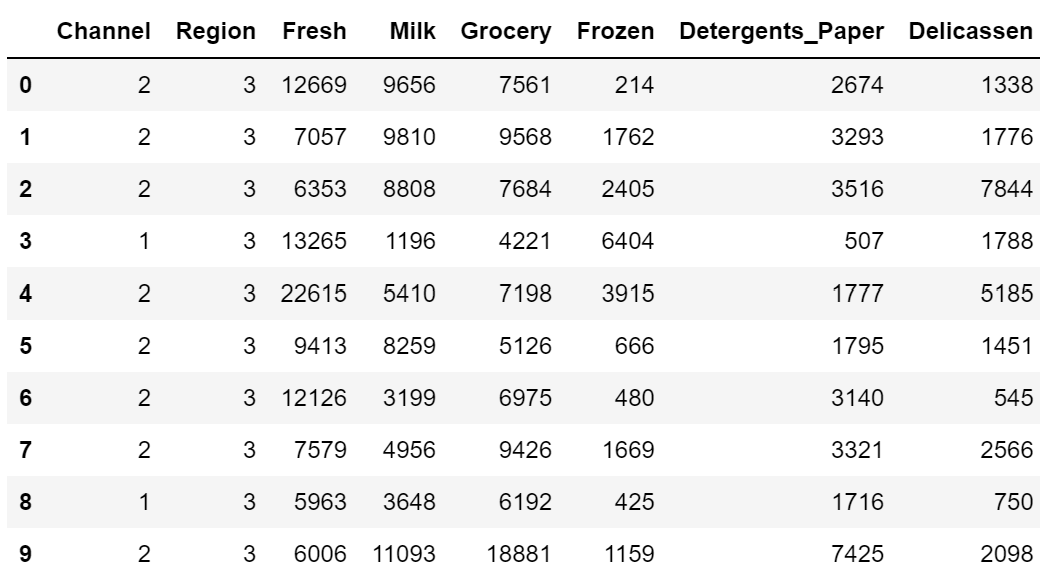 Preview of Wholesale Customer Dataset - Image by Author
According to the metadata available at the UCI repository, the description of the columns is the following:
Preview of Wholesale Customer Dataset - Image by Author
According to the metadata available at the UCI repository, the description of the columns is the following:
- FRESH: annual spending (m.u.) on fresh products (Continuous);
- MILK: annual spending (m.u.) on milk products (Continuous);
- GROCERY: annual spending (m.u.)on grocery products (Continuous);
- FROZEN: annual spending (m.u.)on frozen products (Continuous)
- DETERGENTS_PAPER: annual spending (m.u.) on detergents and paper products (Continuous)
- DELICATESSEN: annual spending (m.u.)on and delicatessen products (Continuous);
- CHANNEL: Customer's Channel - Horeca (Hotel/Restaurant/Cafe) or Retail channel (Nominal)
- REGION: Customers's Region: " Lisbon, Oporto or Other (Nominal)
For this example, we'll only use the monetary values.
The first step in our mean-shift solution is to determine the bandwith of the algorithm. The bandwith represents the radius we've seen in the step-by-step example.
Estimating bandwith manually is very hard. One cool function we have in sklearn is estimate_bandwith that uses nearest neighbors average distance to find a good baseline value.
But before checking the bandwidth, do you think there is something missing? We are dealing with an algorithm that relates to distances, so... we need standardization!
python
from sklearn.preprocessing import MinMaxScaler

mmc = MinMaxScaler()
scaled_dataset = mmc.fit_transform(
    wholesale_customers[['Fresh','Milk','Grocery','Frozen','Detergents_Paper','Delicassen']]
)
With the scaled dataset, we can run estimate_bandwith :
python
from sklearn.cluster import MeanShift, estimate_bandwidth

bandwith_estimation = estimate_bandwidth(scaled_dataset)
The estimated bandwith was approximately 0.183. We can now fit the algorithm to the scaled dataset:
python
meanshiftmodel = MeanShift(bandwidth=bandwith_estimation)
wholesale_customers['meanshift_clustering'] = meanshiftmodel.fit_predict(
    scaled_dataset
)
Let's see how many data points we have per cluster:
scss
wholesale_customers['meanshift_clustering'].value_counts()
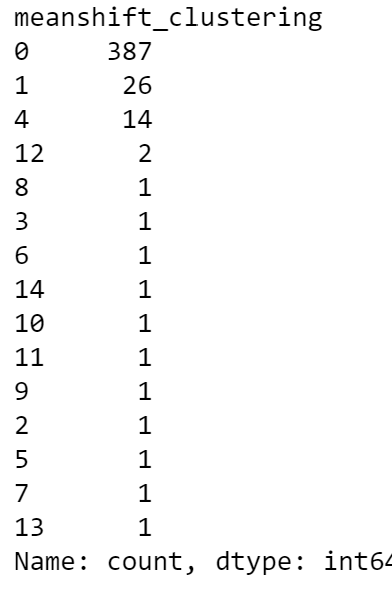 Clusters' data points count - Image by Author
We have some clusters that only contain one data point. These are probably outliers isolated by our radius. There's three alternatives we can use:
Clusters' data points count - Image by Author
We have some clusters that only contain one data point. These are probably outliers isolated by our radius. There's three alternatives we can use:
- We can remove uni-variate outliers manually before fitting the algorithm.
- We can remove these clusters from our dataset.
- We can raise the bandwith we are using and re-run the clustering solution again.
Let's go through the latter!
makefile
meanshiftmodel = MeanShift(bandwidth=bandwith_estimation+0.1)
wholesale_customers['meanshift_clustering_extra_band'] = meanshiftmodel.fit_predict(
 scaled_dataset
)
Checking the clusters again:
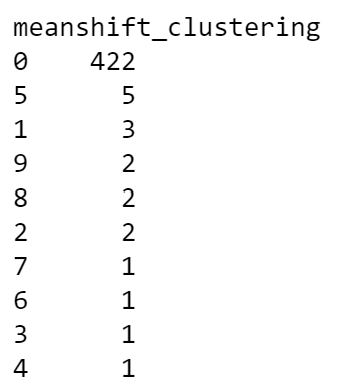 Clusters' data points count - Image by Author
Oh no! Too high. Tweaking the
Clusters' data points count - Image by Author
Oh no! Too high. Tweaking the bandwidth parameter is difficult. Let's settle with the first solution we have and remove outlier clusters manually:
java
outlier_clusters = (
    wholesale_customers['meanshift_clustering'].value_counts().loc[
        wholesale_customers['meanshift_clustering'].value_counts() <= 3
    ]
).index

clustering_solution = wholesale_customers.loc[~wholesale_customers.meanshift_clustering.isin(outlier_clusters)]
And checking the profiling of our clusters:
css
clustering_solution.groupby(['meanshift_clustering']).mean().iloc[:,2:]
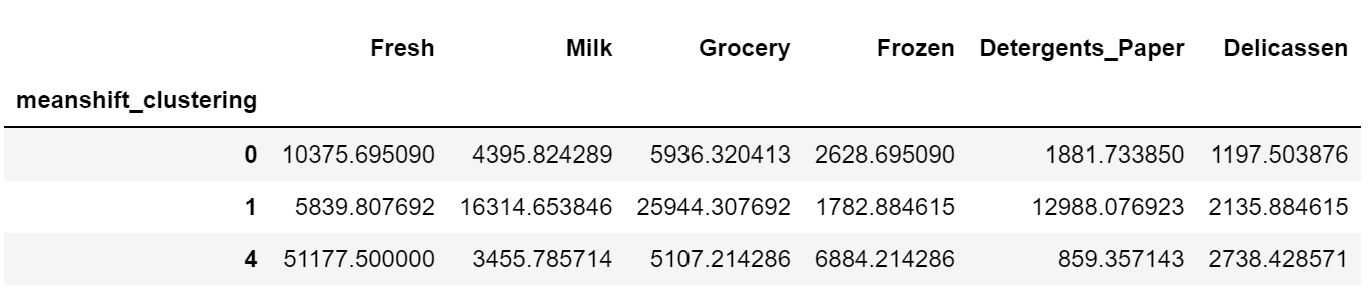 Cluster Profilling - Image by Author
Cool! So our first cluster (Cluster 0) is characterized by moderate fresh buyers with low values on the other categories.
Cluster 1 is characterized by high grocery and detergent shoppers.
Finally, cluster 4 is characterized by high grocery and frozen shoppers.
A word of cautioning about this type of profilling - using simple mean profiling on density clusters is a biased solution (particularly in mean-shift, where clusters may not be spherical). An alternative to profile and check the quality of the clustering is to plot the clustering solution with T-SNE or UMAP embeddings.
Also, by the distribution of the data points in the clusters, this is not a good dataset to apply a density based clustering method. When you see a high concentration of data points in a single cluster, other methods should be tested (but don't forget to play around with the bandwidth parameter first).
Cluster Profilling - Image by Author
Cool! So our first cluster (Cluster 0) is characterized by moderate fresh buyers with low values on the other categories.
Cluster 1 is characterized by high grocery and detergent shoppers.
Finally, cluster 4 is characterized by high grocery and frozen shoppers.
A word of cautioning about this type of profilling - using simple mean profiling on density clusters is a biased solution (particularly in mean-shift, where clusters may not be spherical). An alternative to profile and check the quality of the clustering is to plot the clustering solution with T-SNE or UMAP embeddings.
Also, by the distribution of the data points in the clusters, this is not a good dataset to apply a density based clustering method. When you see a high concentration of data points in a single cluster, other methods should be tested (but don't forget to play around with the bandwidth parameter first).
Hope you've enjoyed this blog post on mean-shift clustering! As mentioned, this is an interesting density based algorithm that can find out interesting patterns in your data.
On the upside, mean-shift can find out non-spherical clusters on the data, while uncovering the different distribution peaks. On the downside, it tends to isolate outliers as clusters. Also, the bandwith hyperparameter is relatively difficult to tweak.
If you are curious about other unsupervised learning algorithms, feel free to check the other blog posts of this series:
If you want to read / see more content related to AI and DS, subscribe my youtube Channel "The Data Journey ":
 https://www.youtube.com/@TheDataJourney42
The dataset used in this blog post is Wholesale Customer Dataset with license Creative Commons Attribution 4.0 (https://archive.ics.uci.edu/dataset/292/wholesale+customers)
https://www.youtube.com/@TheDataJourney42
The dataset used in this blog post is Wholesale Customer Dataset with license Creative Commons Attribution 4.0 (https://archive.ics.uci.edu/dataset/292/wholesale+customers)
Register Now to Continue Reading
Unlock Towards Data Science with a Free Account
All articles on Towards Data Science are available to registered users. Create a free account today to access this article and thousands more.
Register for freeSign in to your account
 Written By
See all from Ivo Bernardo
Artificial IntelligenceClusteringMachine LearningMean ShiftUnsupervised Learning
Share This Article
Towards Data Science is a community publication. Submit your insights to reach our global audience and earn through the TDS Author Payment Program.
Write for TDS
Related Articles
Artificial Intelligence
Assess probabilities of various business outcomes
Bassel Karami
December 17, 20208 min read
Deep Learning
Theory and PyTorch Implementation
Alexey Kravets
August 9, 202317 min read
Machine Learning
A brief story about how we realized how to use - and how not not use - Jupyter notebooks in Machine Learning projects
Emanuele Fabbiani
May 6, 20196 min read
Machine Learning
Exploring statistics using Calculus
Rahul Ravi
September 16, 202117 min read
Machine Learning
Overcoming the infamous 512 token limit
Heiko Hotz
April 13, 20214 min read
Artificial Intelligence
Customise Jupyter Lab, an IDE tool, for yourself
Christopher Tao
January 10, 20216 min read
Artificial Intelligence
Detecting whether a new data is an outlier or not
Cornellius Wijaya
June 20, 20206 min read
Machine Learning
Connect, learn, and get inspired. Earlier this month, I wrote an article about the importance...
Sara A. Metwalli
May 1, 20216 min read
Machine Learning
With Playable AI generated Music Files
Victor Sim
February 12, 20218 min read
Your home for data science and AI. The world's leading publication for data science, data analytics, data engineering, machine learning, and artificial intelligence professionals.
Subscribe to Our NewsletterWrite For TDS•About•Advertise•Privacy Policy•Terms of Use
© Insight Media Group, LLC 2026•The New Stack•roadmap.sh•Creator Network
Recommended Articles
Close