When working on machine learning projects, we often get excited about building and training models. But here’s the truth: your model is only as good as your data.
If the data is noisy, inconsistent, or incomplete, no algorithm—no matter how powerful—will give you reliable results. This is where data preprocessing comes in.
In this article, we’ll walk through the essential steps of preparing your data before model training.
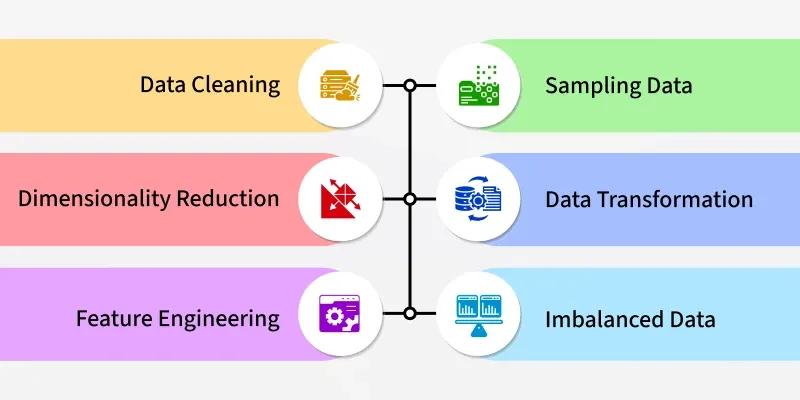
The quality of your dataset directly affects:
Model performance (better accuracy and predictions)
Training efficiency (less complexity for the algorithm)
Interpretability (cleaner results that make sense)
That’s why preprocessing is often said to take 80% of a data scientist’s time.
Commonly used libraries for preprocessing:
Pandas – for data cleaning and manipulation
NumPy – for numerical computations
Real-world data is often incomplete. For example, in a dataset of student records, some students might have missing grades. We can’t just feed missing values into a model.
Ways to handle missing data:
Replace missing data with mean, median, or mode
Use advanced imputation methods
Drop rows or columns if too many values are missing
# Example: Fill missing values with the column mean
df['Age'].fillna(df['Age'].mean(), inplace=True)

# Or drop rows with missing values
df.dropna(inplace=True)
Outliers are unusual values that don’t fit the general pattern. For example:
Why remove them?
Techniques include:
Using boxplots or z-scores to detect outliers
Removing or adjusting them
Data may have duplicates, typos, or irrelevant values. For instance, two identical rows in a sales dataset can bias results.
Steps:
Remove duplicates
Standardize formats (e.g., date formats, units like “kg” vs “kilograms”)
# Remove duplicate rows
df.drop_duplicates(inplace=True)
Not all features add value. Sometimes, combining or transforming features improves model performance.
Examples:
Creating a new feature like BMI = weight / height²
Dropping irrelevant features like “student ID”
Selecting only features that affect predictions
  # Example: Create BMI from height & weight
  df['BMI'] = df['Weight'] / (df['Height']/100)**2

  # Drop irrelevant columns
  df.drop(columns=['Student_ID'], inplace=True)
Machine learning algorithms work with numbers, not text. So categorical data (like “Male/Female” or “Yes/No”) must be converted.
Common techniques:
Label Encoding: Assigns numbers to categories (e.g., Male=0, Female=1)
One-Hot Encoding: Creates separate binary columns for each category
Ordinal Encoding: Useful when categories have an order (e.g., Small=1, Medium=2, Large=3)
Features like salary (in thousands) and age (in years) exist on different scales. Models may give more importance to larger values unless we scale them.
Popular techniques:
Min-Max Scaling – converts values into a fixed range (e.g., 0–1)
Standardization – rescales data to have mean=0 and standard deviation=1
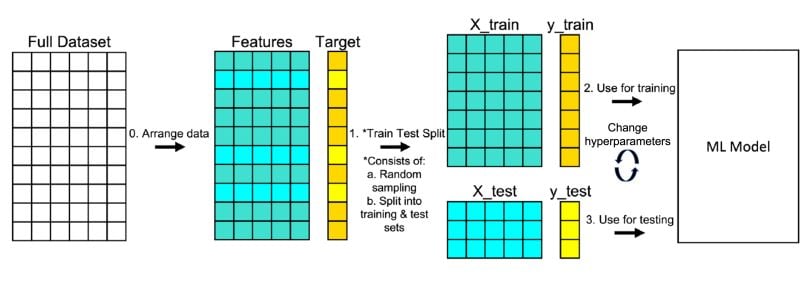
Once preprocessing is complete, we split the dataset:
Training set (70–80%) – used to train the model
Testing set (20–30%) – used to evaluate performance
This ensures the model doesn’t just “memorize” data but generalizes well to unseen data.
from sklearn.model_selection import train_test_split

X = df.drop('Target', axis=1)  # features
y = df['Target']               # target variable

X_train, X_test, y_train, y_test = train_test_split(
    X, y, test_size=0.3, random_state=42
)
Target Variable (y): The outcome we want to predict
Example: Whether a patient has cancer (Yes/No)
Input Features (X): Independent variables used for prediction
Example: Age, blood pressure, cholesterol level
Data preprocessing may seem less exciting than building models, but it’s the most critical step in any ML pipeline. If you invest time in preparing high-quality data, your models will reward you with accuracy, stability, and reliability.