保留正文与补采附件。源页面当前未重新核验;具体限制见交付清单。
 We value your privacy
We use cookies to enhance your browsing experience, serve personalised ads or content, and analyse our traffic. By clicking "Accept All", you consent to our use of cookies.
Customise Reject All Accept All
Customise Consent Preferences
We value your privacy
We use cookies to enhance your browsing experience, serve personalised ads or content, and analyse our traffic. By clicking "Accept All", you consent to our use of cookies.
Customise Reject All Accept All
Customise Consent Preferences  We use cookies to help you navigate efficiently and perform certain functions. You will find detailed information about all cookies under each consent category below.
The cookies that are categorised as "Necessary" are stored on your browser as they are essential for enabling the basic functionalities of the site. ... Show more
NecessaryAlways Active
Necessary cookies are required to enable the basic features of this site, such as providing secure log-in or adjusting your consent preferences. These cookies do not store any personally identifiable data.
We use cookies to help you navigate efficiently and perform certain functions. You will find detailed information about all cookies under each consent category below.
The cookies that are categorised as "Necessary" are stored on your browser as they are essential for enabling the basic functionalities of the site. ... Show more
NecessaryAlways Active
Necessary cookies are required to enable the basic features of this site, such as providing secure log-in or adjusting your consent preferences. These cookies do not store any personally identifiable data.
-
Cookie
BCTempID
-
Duration
10 minutes
-
Description
No description available.
-
Cookie
__cf_bm
-
Duration
1 hour
-
Description
This cookie, set by Cloudflare, is used to support Cloudflare Bot Management.
-
Cookie
AWSALBCORS
-
Duration
7 days
-
Description
Amazon Web Services set this cookie for load balancing.
-
Cookie
_cfuvid
-
Duration
session
-
Description
Cloudflare sets this cookie to track users across sessions to optimize user experience by maintaining session consistency and providing personalized services
-
Cookie
li_gc
-
Duration
6 months
-
Description
Linkedin set this cookie for storing visitor's consent regarding using cookies for non-essential purposes.
-
Cookie
__hssrc
-
Duration
session
-
Description
This cookie is set by Hubspot whenever it changes the session cookie. The __hssrc cookie set to 1 indicates that the user has restarted the browser, and if the cookie does not exist, it is assumed to be a new session.
-
Cookie
__hssc
-
Duration
1 hour
-
Description
HubSpot sets this cookie to keep track of sessions and to determine if HubSpot should increment the session number and timestamps in the __hstc cookie.
-
Cookie
wpEmojiSettingsSupports
-
Duration
session
-
Description
WordPress sets this cookie when a user interacts with emojis on a WordPress site. It helps determine if the user's browser can display emojis properly.
-
Cookie
BCSessionID
-
Duration
1 year 1 month 4 days
-
Description
Blueconic sets this cookie as a unique identifier for the BlueConic profile.
-
Cookie
_octo
-
Duration
1 year
-
Description
No description available.
-
Cookie
logged_in
-
Duration
1 year
-
Description
No description available.
-
Cookie
__Secure-YEC
-
Duration
past
-
Description
YouTube sets this cookie to stores the user's video player preferences using embedded YouTube video
-
Cookie
__eoi
-
Duration
6 months
-
Description
Description is currently not available.
-
Cookie
AWSALBTGCORS
-
Duration
7 days
-
Description
No description available.
-
Cookie
login-status-p
-
Duration
past
-
Description
Description is currently not available.
-
Cookie
AWSALBTG
-
Duration
7 days
-
Description
No description available.
-
Cookie
csrf_token
-
Duration
session
-
Description
No description available.
-
Cookie
token_v2
-
Duration
1 day
-
Description
Description is currently not available.
-
Cookie
D
-
Duration
1 year
-
Description
Description is currently not available.
-
Cookie
PHPSESSID
-
Duration
session
-
Description
This cookie is native to PHP applications. The cookie stores and identifies a user's unique session ID to manage user sessions on the website. The cookie is a session cookie and will be deleted when all the browser windows are closed.
-
Cookie
VISITOR_PRIVACY_METADATA
-
Duration
6 months
-
Description
YouTube sets this cookie to store the user's cookie consent state for the current domain.
-
Cookie
cookietest
-
Duration
session
-
Description
The cookietest cookie is typically used to determine whether the user's browser accepts cookies, essential for website functionality and user experience.
-
Cookie
__Host-airtable-session
-
Duration
1 year
-
Description
This cookie is used to enable us to integrate the services of Airtable.
-
Cookie
__Host-airtable-session.sig
-
Duration
1 year
-
Description
This cookie is used to enable us to integrate the services of Airtable.
-
Cookie
m
-
Duration
1 year 1 month 4 days
-
Description
Stripe sets this cookie for fraud prevention purposes. It identifies the device used to access the website, allowing the website to be formatted accordingly.
-
Cookie
BIGipServer*
-
Duration
session
-
Description
Marketo sets this cookie to collect information about the user's online activity and build a profile about their interests to provide advertisements relevant to the user.
-
Cookie
__cfruid
-
Duration
session
-
Description
Cloudflare sets this cookie to identify trusted web traffic.
-
Cookie
_GRECAPTCHA
-
Duration
6 months
-
Description
Google Recaptcha service sets this cookie to identify bots to protect the website against malicious spam attacks.
-
Cookie
__Secure-YNID
-
Duration
6 months
-
Description
Google cookie used to protect user security and prevent fraud, especially during the login process.
-
Cookie
cookieyes-consent
-
Duration
1 year
-
Description
CookieYes sets this cookie to remember users' consent preferences so that their preferences are respected on subsequent visits to this site. It does not collect or store any personal information about the site visitors.
Functional
Functional cookies help perform certain functionalities like sharing the content of the website on social media platforms, collecting feedback, and other third-party features.
-
Cookie
lidc
-
Duration
1 day
-
Description
LinkedIn sets the lidc cookie to facilitate data center selection.
-
Cookie
brw
-
Duration
1 year
-
Description
No description available.
-
Cookie
brwConsent
-
Duration
5 minutes
-
Description
Description is currently not available.
-
Cookie
WMF-Uniq
-
Duration
1 year
-
Description
Description is currently not available.
-
Cookie
loom_anon_comment
-
Duration
1 year
-
Description
No description available.
-
Cookie
loom_referral_video
-
Duration
session
-
Description
Description is currently not available.
-
Cookie
VISITOR_INFO1_LIVE
-
Duration
6 months
-
Description
A cookie set by YouTube to measure bandwidth that determines whether the user gets the new or old player interface.
-
Cookie
yt-remote-connected-devices
-
Duration
Never Expires
-
Description
YouTube sets this cookie to store the user's video preferences using embedded YouTube videos.
-
Cookie
ytidb::LAST_RESULT_ENTRY_KEY
-
Duration
Never Expires
-
Description
The cookie ytidb::LAST_RESULT_ENTRY_KEY is used by YouTube to store the last search result entry that was clicked by the user. This information is used to improve the user experience by providing more relevant search results in the future.
-
Cookie
yt-remote-device-id
-
Duration
Never Expires
-
Description
YouTube sets this cookie to store the user's video preferences using embedded YouTube videos.
-
Cookie
yt-remote-session-name
-
Duration
session
-
Description
The yt-remote-session-name cookie is used by YouTube to store the user's video player preferences using embedded YouTube video.
-
Cookie
yt-remote-fast-check-period
-
Duration
session
-
Description
The yt-remote-fast-check-period cookie is used by YouTube to store the user's video player preferences for embedded YouTube videos.
-
Cookie
yt-remote-session-app
-
Duration
session
-
Description
The yt-remote-session-app cookie is used by YouTube to store user preferences and information about the interface of the embedded YouTube video player.
-
Cookie
yt-remote-cast-available
-
Duration
session
-
Description
The yt-remote-cast-available cookie is used to store the user's preferences regarding whether casting is available on their YouTube video player.
-
Cookie
yt-remote-cast-installed
-
Duration
session
-
Description
The yt-remote-cast-installed cookie is used to store the user's video player preferences using embedded YouTube video.
-
Cookie
cp_session
-
Duration
3 months
-
Description
Codepen sets this cookie for Help systems found in the website.
-
Cookie
loid
-
Duration
1 year 1 month 4 days
-
Description
This cookie is set by the Reddit. The cookie enables the sharing of content from the website onto the social media platform.
Analytics
Analytical cookies are used to understand how visitors interact with the website. These cookies help provide information on metrics such as the number of visitors, bounce rate, traffic source, etc.
-
Cookie
__hstc
-
Duration
6 months
-
Description
Hubspot set this main cookie for tracking visitors. It contains the domain, initial timestamp (first visit), last timestamp (last visit), current timestamp (this visit), and session number (increments for each subsequent session).
-
Cookie
hubspotutk
-
Duration
6 months
-
Description
HubSpot sets this cookie to keep track of the visitors to the website. This cookie is passed to HubSpot on form submission and used when deduplicating contacts.
-
Cookie
_ga
-
Duration
1 year 1 month 4 days
-
Description
Google Analytics sets this cookie to calculate visitor, session and campaign data and track site usage for the site's analytics report. The cookie stores information anonymously and assigns a randomly generated number to recognise unique visitors.
-
Cookie
ga*
-
Duration
1 year 1 month 4 days
-
Description
Google Analytics sets this cookie to store and count page views.
-
Cookie
__Host-psifi.analyticsTrace
-
Duration
6 hours
-
Description
Description is currently not available.
-
Cookie
__Host-psifi.analyticsTraceV2
-
Duration
6 hours
-
Description
Description is currently not available.
-
Cookie
_gh_sess
-
Duration
session
-
Description
GitHub sets this cookie for temporary application and framework state between pages like what step the user is on in a multiple step form.
-
Cookie
YSC
-
Duration
session
-
Description
YSC cookie is set by Youtube and is used to track the views of embedded videos on Youtube pages.
-
Cookie
ajs_anonymous_id
-
Duration
1 year
-
Description
This cookie is set by Segment to count the number of people who visit a certain site by tracking if they have visited before.
-
Cookie
vuid
-
Duration
1 year 1 month 4 days
-
Description
Vimeo installs this cookie to collect tracking information by setting a unique ID to embed videos on the website.
Performance
Performance cookies are used to understand and analyse the key performance indexes of the website which helps in delivering a better user experience for the visitors.
-
Cookie
AWSALB
-
Duration
7 days
-
Description
AWSALB is an application load balancer cookie set by Amazon Web Services to map the session to the target.
-
Cookie
acq
-
Duration
past
-
Description
Description is currently not available.
-
Cookie
acq.sig
-
Duration
past
-
Description
Description is currently not available.
-
Cookie
ptc
-
Duration
2 years
-
Description
No description available.
Advertisement
Advertisement cookies are used to provide visitors with customised advertisements based on the pages you visited previously and to analyse the effectiveness of the ad campaigns.
-
Cookie
muc_ads
-
Duration
1 year 1 month 4 days
-
Description
Twitter sets this cookie to collect user behaviour and interaction data to optimize the website.
-
Cookie
guest_id_marketing
-
Duration
1 year 1 month 4 days
-
Description
Twitter sets this cookie to identify and track the website visitor.
-
Cookie
guest_id_ads
-
Duration
1 year 1 month 4 days
-
Description
Twitter sets this cookie to identify and track the website visitor.
-
Cookie
personalization_id
-
Duration
1 year 1 month 4 days
-
Description
Twitter sets this cookie to integrate and share features for social media and also store information about how the user uses the website, for tracking and targeting.
-
Cookie
guest_id
-
Duration
1 year 1 month 4 days
-
Description
Twitter sets this cookie to identify and track the website visitor. It registers if a user is signed in to the Twitter platform and collects information about ad preferences.
-
Cookie
bcookie
-
Duration
1 year
-
Description
LinkedIn sets this cookie from LinkedIn share buttons and ad tags to recognize browser IDs.
-
Cookie
__Secure-ROLLOUT_TOKEN
-
Duration
6 months
-
Description
YouTube sets this cookie to manage feature rollout and experimentation. It helps Google control which new features or interface changes are shown to users as part of testing and staged rollouts, ensuring consistent experience for a given user during an experiment.
-
Cookie
yt.innertube::nextId
-
Duration
Never Expires
-
Description
YouTube sets this cookie to register a unique ID to store data on what videos from YouTube the user has seen.
-
Cookie
yt.innertube::requests
-
Duration
Never Expires
-
Description
YouTube sets this cookie to register a unique ID to store data on what videos from YouTube the user has seen.
-
Cookie
session_tracker
-
Duration
session
-
Description
This cookie is set by the Reddit. This cookie is used to identify trusted web traffic. It also helps in adverstising on the website.
-
Cookie
edgebucket
-
Duration
session
-
Description
Reddit sets this cookie to save the information about a log-on Reddit user, for the purpose of advertisement recommendations and updating the content.
-
Cookie
did
-
Duration
1 year
-
Description
Arbor sets this cookie to show targeted ads to site visitors.This cookie expires after 2 months or 1 year.
Uncategorised
Other uncategorised cookies are those that are being analysed and have not been classified into a category as yet.
No cookies to display.
Reject All Save My Preferences Accept All
Toggle SearchToggle Mobile Navigation
Publish AI, ML & data-science insights to a global community of data professionals.
Sign inSubmit an Article
LatestEditor's PicksNewsletterShipAI
Write For TDS
LinkedInXToggle Search
Agentic AI
Building a Proper Backend for My LangGraph AI Agent
Turning a demo agent into something that can keep real booking data
Soner Yıldırım
August 22, 20266 min read
 Photo by Towfiqu barbhuiya on Unsplash
In the first two articles of this series, I built a stateful LangGraph agent that handles a 15-minute booking process and wrapped it up with a Streamlit UI to improve user experience.
The agent handles the entire booking process like a real customer service representative. It’s a LangGraph-based agent that orchestrates the following operations:
Photo by Towfiqu barbhuiya on Unsplash
In the first two articles of this series, I built a stateful LangGraph agent that handles a 15-minute booking process and wrapped it up with a Streamlit UI to improve user experience.
The agent handles the entire booking process like a real customer service representative. It’s a LangGraph-based agent that orchestrates the following operations:
- Responds to customer queries and understands their needs.
- Calculates the price for the service and informs the customer.
- Handles the customer’s acceptance or rejection.
- Proposes optimized time slots.
- Confirms and records the appointment.
The next phase is to build a proper backend and we start by implementing a Postgres database instead of keeping everything in memory.
We keep Streamlit as the user interface and replace the in-memory adapters with PostgreSQL.
This will also allow us to have multiple fronts (e.g. WhatsApp, Streamlit) that share the same backend. So we are turning this into a proper product that will handle a real business.
The full source code of this project is available on GitHub at customer-service-agent. Feel free to clone the repo and test it yourself.
Learn this step by step with the interactive AI Agents roadmap.
What the database looks like now
It's hard to even call it a database as it's just two Python objects that lived inside the process:
The first one is a LangGraph checkpointer, which is a state persistence layer that saves a snapshot of an agent’s graph state at every step of execution.
When the graph is compiled, conversation state is stored in memory.
python
graph.compile(checkpointer=checkpointer or MemorySaver())
The checkpointer allows the agent resume across turns. If we don't have it, every customer message would be a new conversation.
The second object is a Python list behind a lock. Confirmed appointments are stored in an in-memory repository that looks like this:
python
class InMemoryBookingRepository:
    def __init__(self) -> None:
        self._lock = threading.RLock()
        self.technicians = {...}  # hardcoded cleaners
        self._bookings: list[Booking] = []

    def list_bookings(self) -> list[Booking]:
        with self._lock:
            return list(self._bookings)

    def create_booking(self, option, details, price) -> Booking:
        # check overlap in Python, then append to self._bookings
        ...
The scheduling engine called list_bookings() to avoid double-booking. Confirmation called create_booking(), which re-checked overlap and appended to the list.
This is a very simple structure designed for initial testing and demo purposes. It allows us to test LangGraph routing and logic.
Why we need a proper database
The current "database" relies on in-memory persistence so it fails as soon as we leave a single demo process.
When the process restarts, conversation checkpoints and bookings vanish.
Since it's in memory, there is no shared availability. Session A cannot see bookings created by Session B, which means every process has its own calendar.
Even worse for a booking product is that the agent can offer a slot based on a stale in-memory view, then “confirm” a booking that another session already took.
When we use the Streamlit UI, it looked like a product but the storage still behaved like a notebook kernel.
Long story short, we need a proper database for our agent to be considered as a product.
We will use Postgres, which is a free and open-source relational database system. We need a relational database with bookings and technician information stored in separate (and related) tables.
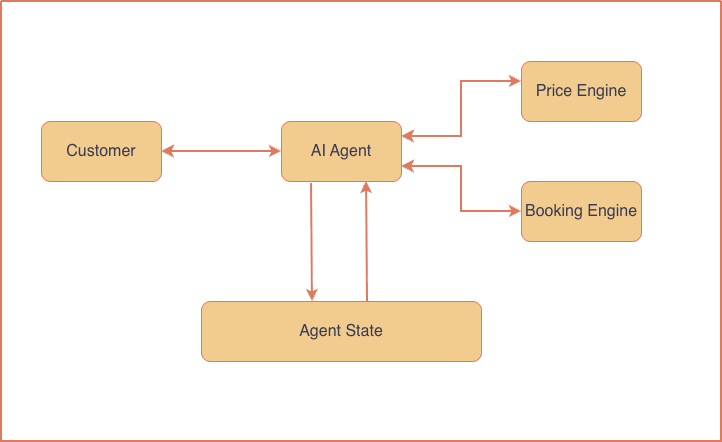
Before Postgres implementation, the agent structure looks like this:
 And after we complete Postgres implementation, it will look like this:
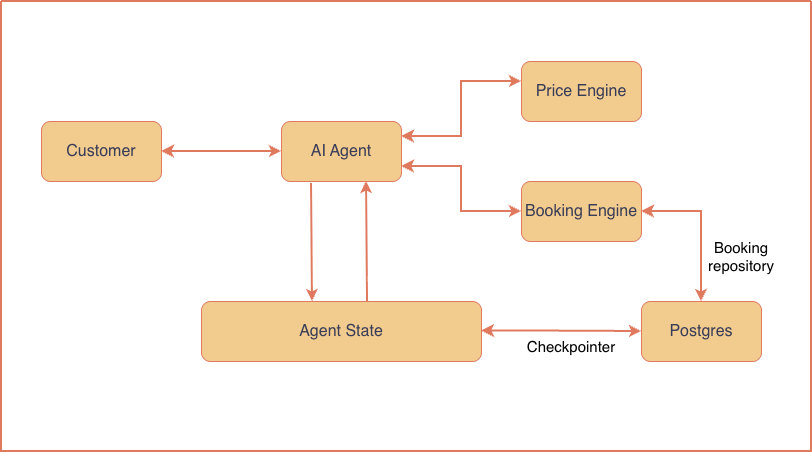 After the Postgres backend,
 AgentState will still be the working memory of the graph but it will be persisted through a checkpointer and a booking engine.
We will learn how these are implemented and they function in the remaining part of the article.
Postgres implementation
We first create a protocol so that the graph and engines can depend on a stable interface, not on Postgres (or memory) specifically.
python
from typing import Protocol

class BookingRepository(Protocol):
    """Persistence interface used by scheduling and confirmation."""

    @property
    def technicians(self) -> dict[str, Technician]:
        """Return technicians keyed by id."""

    def list_bookings(self) -> list[Booking]:
        """Return all confirmed bookings."""

    def create_booking(
        self, option: TimeOption, details: BookingDetails, price: float
    ) -> Booking:
        """Persist a booking after re-checking overlap; raise ValueError if taken."""
With this protocol, we just plug PostgresBookingRepository or InMemoryBookingRepository at startup (depending on using Postgres or in-memory). Then, the nodes can call list_bookings and create_booking functions.
When we use InMemoryBookingRepository, no database tables are created. Confirmed bookings are kept in a Python list inside the running process, and the same repository methods (list_bookings, create_booking) still work. They just never touch Postgres.
The in-memory mode ideal for unit tests and quick local demos. It's important to also mention that, with the in-memory mode, everything disappears when the app restarts.
When we use PostgresBookingRepository , there is an actual database. Inside the postgres.py script, you can see the database schema that consists of two tables, which are technicians and bookings .
You can also see the definition of the PostgresBookingRepository class. I won't copy it here because it's close to 100 lines of code. We also define the functions list_bookings and create_booking inside this class.
At app startup, create_persistence() chooses Postgres vs in-memory. When DATABASE_URL is set, both the booking repository and LangGraph checkpointer use Postgres. Otherwise both stay in memory.
So the repository is either a PostgresBookingRepository or InMemoryBookingRepository (both satisfy the BookingRepository protocol), and that instance is passed into the build_graph function:
python
def build_graph(
    llm: BaseChatModel,
    *,
    repository: BookingRepository | None = None,
    checkpointer: Any | None = None,
) -> Any:
    """Build a compiled, multi-turn booking graph."""
    repository = repository or InMemoryBookingRepository()
    graph = StateGraph(AgentState)

    # truncated
The repository is then used by the graph nodes to interact with the database.
For example, we define the confirm_booking_node function as follows:
python
    def confirm_booking_node(state: AgentState) -> dict[str, Any]:
        option = state.get("selected_slot")
        if option is None:
            raise ValueError("A slot must be selected before confirmation.")
        booking = repository.create_booking(
            option, state["booking_details"], float(state["calculated_price"])
        )
        return {
            "booking_id": booking.id,
            "status": "confirmed",
            "messages": [
                AIMessage(
                    content=(
                        f"Confirmed! Booking {booking.id} is scheduled for "
                        f"{option.start_at}. Your total is ${booking.price:.2f}."
                    )
                )
            ],
        }
We can see that it's using the repository to create a booking in the database.
Database interactions
The current agentic workflow is as follows:
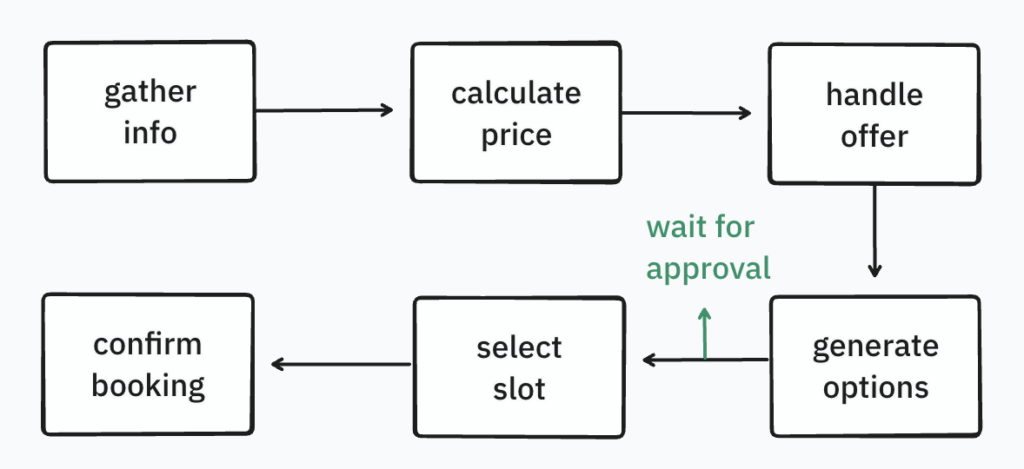 During a booking session, conversation lives in
 AgentState, which can be considered as the working memory of the graph. Each node returns a partial update, and LangGraph merges it into that state. The checkpointer persists it across turns with Postgres.
Only two nodes talk to the booking repository (either PostgresBookingRepository or InMemoryBookingRepository):
- generate options (read): Load existing bookings (+ technicians), then compute free slots
- confirm booking (write): Insert the confirmed appointment
The other nodes only read or update the AgentState. They do not query the bookings table.
To propose appointments, we add generate_schedule_options_node to the graph:
python
def generate_schedule_options_node(state: AgentState) -> dict[str, Any]:
    options = generate_schedule_options(state["booking_details"], repository)
    lines = ["Great—please choose one of these optimized appointments:"]
    for index, option in enumerate(options, 1):
        lines.append(f"{index}. {option.start_at} ({option.technician_id})")
    return {
        "time_options": options,
        "status": "awaiting_slot_selection",
        "messages": [AIMessage(content="\n".join(lines))],
    }
This node calls the generate_schedule_options() function from engines.py , which:
- Calls
repository.list_bookings() (a SELECT from bookings when using Postgres)
- Uses
repository.technicians
- Applies deterministic rules (next 7 days, skip Sundays, fixed start times, duration, travel scoring)
- Returns the best 3 available time options
LangGraph handles merging this information into AgentState, updating time_options, status, and messages :
python
class AgentState(TypedDict):
    messages: Annotated[list[AnyMessage], add_messages]
    booking_details: BookingDetails
    calculated_price: NotRequired[float | None]
    time_options: NotRequired[list[TimeOption]]
    selected_slot: NotRequired[TimeOption | None]
    status: BookingStatus
    booking_id: NotRequired[str | None]
After the customer confirms a slot, select_slot_node only sets selected_slot in AgentState. The write happens in confirm_booking_node:
python
def confirm_booking_node(state: AgentState) -> dict[str, Any]:
    option = state.get("selected_slot")
    if option is None:
        raise ValueError("A slot must be selected before confirmation.")
    booking = repository.create_booking(
        option, state["booking_details"], float(state["calculated_price"])
    )
    return {
        "booking_id": booking.id,
        "status": "confirmed",
        "messages": [
            AIMessage(
                content=(
                    f"Confirmed! Booking {booking.id} is scheduled for "
                    f"{option.start_at}. Your total is ${booking.price:.2f}."
                )
            )
        ],
    }
On success, LangGraph merges booking_id, status="confirmed", and the confirmation message into AgentState, and the checkpointer saves that snapshot for the conversation thread_id.
We now have a proper Postgres backend for our customer service agent. In the next article, I’ll walk through how to run and verify this setup with Docker, and how to point the same app at a hosted Postgres instance.
Thank you for reading.
Register Now to Continue Reading
Unlock Towards Data Science with a Free Account
All articles on Towards Data Science are available to registered users. Create a free account today to access this article and thousands more.
Register for freeSign in to your account
 Written By
See all from Soner Yıldırım
Agentic AiAI AgentsLanggraphProgrammingStreamlit
Share This Article
Towards Data Science is a community publication. Submit your insights to reach our global audience and earn through the TDS Author Payment Program.
Write for TDS
Related Articles
Artificial Intelligence
Learn to standardize your machine learning development
Cornellius Wijaya
May 5, 20227 min read
Agentic AI
Create a local CLI Agent from scratch completely for free
Mauro Di Pietro
August 3, 20265 min read
Machine Learning
A brief introduction to Python class object and how it is created
Ilija Lazarevic
October 6, 20239 min read
Productivity
If you want to highlight your work and applications, this is a strong option.
Ivo Bernardo
September 5, 20258 min read
Agentic AI
LLM-as-a-Judge, regression testing, and end-to-end traceability of multi-agent LLM systems
Partha Sarkar
December 17, 20258 min read
Programming
What you need to know as graph theory adoption continues to take off
Miguel Saldana
March 22, 20218 min read
Agentic AI
Build and deploy an agent on AWS with Strands and AgentCore
Thomas Reid
July 1, 202623 min read
Agentic AI
What our over-dependence on external consulting teaches us about delegating our minds to machines
Chinmay Kakatkar
July 10, 202620 min read
Programming
Learn the difference between long-form and wide-form data, and how to transition between them in Pandas.
Murtaza Ali
October 13, 20225 min read
Your home for data science and AI. The world's leading publication for data science, data analytics, data engineering, machine learning, and artificial intelligence professionals.
Subscribe to Our NewsletterWrite For TDS•About•Advertise•Privacy Policy•Terms of Use
© Insight Media Group, LLC 2026•The New Stack•roadmap.sh•Creator Network