保留正文与补采附件。源页面当前未重新核验;具体限制见交付清单。
 We value your privacy
We use cookies to enhance your browsing experience, serve personalised ads or content, and analyse our traffic. By clicking "Accept All", you consent to our use of cookies.
Customise Reject All Accept All
Customise Consent Preferences
We value your privacy
We use cookies to enhance your browsing experience, serve personalised ads or content, and analyse our traffic. By clicking "Accept All", you consent to our use of cookies.
Customise Reject All Accept All
Customise Consent Preferences  We use cookies to help you navigate efficiently and perform certain functions. You will find detailed information about all cookies under each consent category below.
The cookies that are categorised as "Necessary" are stored on your browser as they are essential for enabling the basic functionalities of the site. ... Show more
NecessaryAlways Active
Necessary cookies are required to enable the basic features of this site, such as providing secure log-in or adjusting your consent preferences. These cookies do not store any personally identifiable data.
We use cookies to help you navigate efficiently and perform certain functions. You will find detailed information about all cookies under each consent category below.
The cookies that are categorised as "Necessary" are stored on your browser as they are essential for enabling the basic functionalities of the site. ... Show more
NecessaryAlways Active
Necessary cookies are required to enable the basic features of this site, such as providing secure log-in or adjusting your consent preferences. These cookies do not store any personally identifiable data.
-
Cookie
BCTempID
-
Duration
10 minutes
-
Description
No description available.
-
Cookie
__cf_bm
-
Duration
1 hour
-
Description
This cookie, set by Cloudflare, is used to support Cloudflare Bot Management.
-
Cookie
AWSALBCORS
-
Duration
7 days
-
Description
Amazon Web Services set this cookie for load balancing.
-
Cookie
_cfuvid
-
Duration
session
-
Description
Cloudflare sets this cookie to track users across sessions to optimize user experience by maintaining session consistency and providing personalized services
-
Cookie
li_gc
-
Duration
6 months
-
Description
Linkedin set this cookie for storing visitor's consent regarding using cookies for non-essential purposes.
-
Cookie
__hssrc
-
Duration
session
-
Description
This cookie is set by Hubspot whenever it changes the session cookie. The __hssrc cookie set to 1 indicates that the user has restarted the browser, and if the cookie does not exist, it is assumed to be a new session.
-
Cookie
__hssc
-
Duration
1 hour
-
Description
HubSpot sets this cookie to keep track of sessions and to determine if HubSpot should increment the session number and timestamps in the __hstc cookie.
-
Cookie
wpEmojiSettingsSupports
-
Duration
session
-
Description
WordPress sets this cookie when a user interacts with emojis on a WordPress site. It helps determine if the user's browser can display emojis properly.
-
Cookie
BCSessionID
-
Duration
1 year 1 month 4 days
-
Description
Blueconic sets this cookie as a unique identifier for the BlueConic profile.
-
Cookie
_octo
-
Duration
1 year
-
Description
No description available.
-
Cookie
logged_in
-
Duration
1 year
-
Description
No description available.
-
Cookie
__Secure-YEC
-
Duration
past
-
Description
YouTube sets this cookie to stores the user's video player preferences using embedded YouTube video
-
Cookie
__eoi
-
Duration
6 months
-
Description
Description is currently not available.
-
Cookie
AWSALBTGCORS
-
Duration
7 days
-
Description
No description available.
-
Cookie
login-status-p
-
Duration
past
-
Description
Description is currently not available.
-
Cookie
AWSALBTG
-
Duration
7 days
-
Description
No description available.
-
Cookie
csrf_token
-
Duration
session
-
Description
No description available.
-
Cookie
token_v2
-
Duration
1 day
-
Description
Description is currently not available.
-
Cookie
D
-
Duration
1 year
-
Description
Description is currently not available.
-
Cookie
PHPSESSID
-
Duration
session
-
Description
This cookie is native to PHP applications. The cookie stores and identifies a user's unique session ID to manage user sessions on the website. The cookie is a session cookie and will be deleted when all the browser windows are closed.
-
Cookie
VISITOR_PRIVACY_METADATA
-
Duration
6 months
-
Description
YouTube sets this cookie to store the user's cookie consent state for the current domain.
-
Cookie
cookietest
-
Duration
session
-
Description
The cookietest cookie is typically used to determine whether the user's browser accepts cookies, essential for website functionality and user experience.
-
Cookie
__Host-airtable-session
-
Duration
1 year
-
Description
This cookie is used to enable us to integrate the services of Airtable.
-
Cookie
__Host-airtable-session.sig
-
Duration
1 year
-
Description
This cookie is used to enable us to integrate the services of Airtable.
-
Cookie
m
-
Duration
1 year 1 month 4 days
-
Description
Stripe sets this cookie for fraud prevention purposes. It identifies the device used to access the website, allowing the website to be formatted accordingly.
-
Cookie
BIGipServer*
-
Duration
session
-
Description
Marketo sets this cookie to collect information about the user's online activity and build a profile about their interests to provide advertisements relevant to the user.
-
Cookie
__cfruid
-
Duration
session
-
Description
Cloudflare sets this cookie to identify trusted web traffic.
-
Cookie
_GRECAPTCHA
-
Duration
6 months
-
Description
Google Recaptcha service sets this cookie to identify bots to protect the website against malicious spam attacks.
-
Cookie
__Secure-YNID
-
Duration
6 months
-
Description
Google cookie used to protect user security and prevent fraud, especially during the login process.
-
Cookie
cookieyes-consent
-
Duration
1 year
-
Description
CookieYes sets this cookie to remember users' consent preferences so that their preferences are respected on subsequent visits to this site. It does not collect or store any personal information about the site visitors.
Functional
Functional cookies help perform certain functionalities like sharing the content of the website on social media platforms, collecting feedback, and other third-party features.
-
Cookie
lidc
-
Duration
1 day
-
Description
LinkedIn sets the lidc cookie to facilitate data center selection.
-
Cookie
brw
-
Duration
1 year
-
Description
No description available.
-
Cookie
brwConsent
-
Duration
5 minutes
-
Description
Description is currently not available.
-
Cookie
WMF-Uniq
-
Duration
1 year
-
Description
Description is currently not available.
-
Cookie
loom_anon_comment
-
Duration
1 year
-
Description
No description available.
-
Cookie
loom_referral_video
-
Duration
session
-
Description
Description is currently not available.
-
Cookie
VISITOR_INFO1_LIVE
-
Duration
6 months
-
Description
A cookie set by YouTube to measure bandwidth that determines whether the user gets the new or old player interface.
-
Cookie
yt-remote-connected-devices
-
Duration
Never Expires
-
Description
YouTube sets this cookie to store the user's video preferences using embedded YouTube videos.
-
Cookie
ytidb::LAST_RESULT_ENTRY_KEY
-
Duration
Never Expires
-
Description
The cookie ytidb::LAST_RESULT_ENTRY_KEY is used by YouTube to store the last search result entry that was clicked by the user. This information is used to improve the user experience by providing more relevant search results in the future.
-
Cookie
yt-remote-device-id
-
Duration
Never Expires
-
Description
YouTube sets this cookie to store the user's video preferences using embedded YouTube videos.
-
Cookie
yt-remote-session-name
-
Duration
session
-
Description
The yt-remote-session-name cookie is used by YouTube to store the user's video player preferences using embedded YouTube video.
-
Cookie
yt-remote-fast-check-period
-
Duration
session
-
Description
The yt-remote-fast-check-period cookie is used by YouTube to store the user's video player preferences for embedded YouTube videos.
-
Cookie
yt-remote-session-app
-
Duration
session
-
Description
The yt-remote-session-app cookie is used by YouTube to store user preferences and information about the interface of the embedded YouTube video player.
-
Cookie
yt-remote-cast-available
-
Duration
session
-
Description
The yt-remote-cast-available cookie is used to store the user's preferences regarding whether casting is available on their YouTube video player.
-
Cookie
yt-remote-cast-installed
-
Duration
session
-
Description
The yt-remote-cast-installed cookie is used to store the user's video player preferences using embedded YouTube video.
-
Cookie
cp_session
-
Duration
3 months
-
Description
Codepen sets this cookie for Help systems found in the website.
-
Cookie
loid
-
Duration
1 year 1 month 4 days
-
Description
This cookie is set by the Reddit. The cookie enables the sharing of content from the website onto the social media platform.
Analytics
Analytical cookies are used to understand how visitors interact with the website. These cookies help provide information on metrics such as the number of visitors, bounce rate, traffic source, etc.
-
Cookie
__hstc
-
Duration
6 months
-
Description
Hubspot set this main cookie for tracking visitors. It contains the domain, initial timestamp (first visit), last timestamp (last visit), current timestamp (this visit), and session number (increments for each subsequent session).
-
Cookie
hubspotutk
-
Duration
6 months
-
Description
HubSpot sets this cookie to keep track of the visitors to the website. This cookie is passed to HubSpot on form submission and used when deduplicating contacts.
-
Cookie
_ga
-
Duration
1 year 1 month 4 days
-
Description
Google Analytics sets this cookie to calculate visitor, session and campaign data and track site usage for the site's analytics report. The cookie stores information anonymously and assigns a randomly generated number to recognise unique visitors.
-
Cookie
ga*
-
Duration
1 year 1 month 4 days
-
Description
Google Analytics sets this cookie to store and count page views.
-
Cookie
__Host-psifi.analyticsTrace
-
Duration
6 hours
-
Description
Description is currently not available.
-
Cookie
__Host-psifi.analyticsTraceV2
-
Duration
6 hours
-
Description
Description is currently not available.
-
Cookie
_gh_sess
-
Duration
session
-
Description
GitHub sets this cookie for temporary application and framework state between pages like what step the user is on in a multiple step form.
-
Cookie
YSC
-
Duration
session
-
Description
YSC cookie is set by Youtube and is used to track the views of embedded videos on Youtube pages.
-
Cookie
ajs_anonymous_id
-
Duration
1 year
-
Description
This cookie is set by Segment to count the number of people who visit a certain site by tracking if they have visited before.
-
Cookie
vuid
-
Duration
1 year 1 month 4 days
-
Description
Vimeo installs this cookie to collect tracking information by setting a unique ID to embed videos on the website.
Performance
Performance cookies are used to understand and analyse the key performance indexes of the website which helps in delivering a better user experience for the visitors.
-
Cookie
AWSALB
-
Duration
7 days
-
Description
AWSALB is an application load balancer cookie set by Amazon Web Services to map the session to the target.
-
Cookie
acq
-
Duration
past
-
Description
Description is currently not available.
-
Cookie
acq.sig
-
Duration
past
-
Description
Description is currently not available.
-
Cookie
ptc
-
Duration
2 years
-
Description
No description available.
Advertisement
Advertisement cookies are used to provide visitors with customised advertisements based on the pages you visited previously and to analyse the effectiveness of the ad campaigns.
-
Cookie
muc_ads
-
Duration
1 year 1 month 4 days
-
Description
Twitter sets this cookie to collect user behaviour and interaction data to optimize the website.
-
Cookie
guest_id_marketing
-
Duration
1 year 1 month 4 days
-
Description
Twitter sets this cookie to identify and track the website visitor.
-
Cookie
guest_id_ads
-
Duration
1 year 1 month 4 days
-
Description
Twitter sets this cookie to identify and track the website visitor.
-
Cookie
personalization_id
-
Duration
1 year 1 month 4 days
-
Description
Twitter sets this cookie to integrate and share features for social media and also store information about how the user uses the website, for tracking and targeting.
-
Cookie
guest_id
-
Duration
1 year 1 month 4 days
-
Description
Twitter sets this cookie to identify and track the website visitor. It registers if a user is signed in to the Twitter platform and collects information about ad preferences.
-
Cookie
bcookie
-
Duration
1 year
-
Description
LinkedIn sets this cookie from LinkedIn share buttons and ad tags to recognize browser IDs.
-
Cookie
__Secure-ROLLOUT_TOKEN
-
Duration
6 months
-
Description
YouTube sets this cookie to manage feature rollout and experimentation. It helps Google control which new features or interface changes are shown to users as part of testing and staged rollouts, ensuring consistent experience for a given user during an experiment.
-
Cookie
yt.innertube::nextId
-
Duration
Never Expires
-
Description
YouTube sets this cookie to register a unique ID to store data on what videos from YouTube the user has seen.
-
Cookie
yt.innertube::requests
-
Duration
Never Expires
-
Description
YouTube sets this cookie to register a unique ID to store data on what videos from YouTube the user has seen.
-
Cookie
session_tracker
-
Duration
session
-
Description
This cookie is set by the Reddit. This cookie is used to identify trusted web traffic. It also helps in adverstising on the website.
-
Cookie
edgebucket
-
Duration
session
-
Description
Reddit sets this cookie to save the information about a log-on Reddit user, for the purpose of advertisement recommendations and updating the content.
-
Cookie
did
-
Duration
1 year
-
Description
Arbor sets this cookie to show targeted ads to site visitors.This cookie expires after 2 months or 1 year.
Uncategorised
Other uncategorised cookies are those that are being analysed and have not been classified into a category as yet.
No cookies to display.
Reject All Save My Preferences Accept All
Toggle SearchToggle Mobile Navigation
Publish AI, ML & data-science insights to a global community of data professionals.
Sign inSubmit an Article
LatestEditor's PicksNewsletterShipAI
Write For TDS
LinkedInXToggle Search
Large Language Model
Building Document Structure with Loop Engineering: Recovering a PDF’s Outline from Body Typography for RAG
Enterprise Document Intelligence [Vol.1 #5octies] - Rules propose, LLM validates: six deterministic signals on span-level typography surface heading candidates, one bounded loop keeps the real ones, and the same toc_df drops back into the RAG pipeline
Angela and Kezhan Shi
August 5, 202622 min read
 Photo by icon0.com, via Pexels.
A structured RAG pipeline needs the document’s table of contents: retrieval scopes by section, and the chunker cuts on heading boundaries instead of mid-sentence. But some documents don’t have one. A paper exported straight from LaTeX has no native outline and no printed contents page, so there is no
Photo by icon0.com, via Pexels.
A structured RAG pipeline needs the document’s table of contents: retrieval scopes by section, and the chunker cuts on heading boundaries instead of mid-sentence. But some documents don’t have one. A paper exported straight from LaTeX has no native outline and no printed contents page, so there is no toc_df for the pipeline to read. The headings are still right there on the body, section by section, bigger and bolder than the text around them. Article 5septies (TOC reconstruction from a table of content) handled the document that at least prints a contents page; this one prints none. So the pipeline rebuilds the toc_df from the one signal left: the way the headings look.
This article is a document parsing companion in Enterprise Document Intelligence, the series that builds an enterprise RAG system from four bricks. It sits in brick 1 (document parsing) and closes the TOC-reconstruction thread that Article 5 (document parsing), Article 5B (the relational data model), and Article 5septies (TOC reconstruction from a table of content) opened.
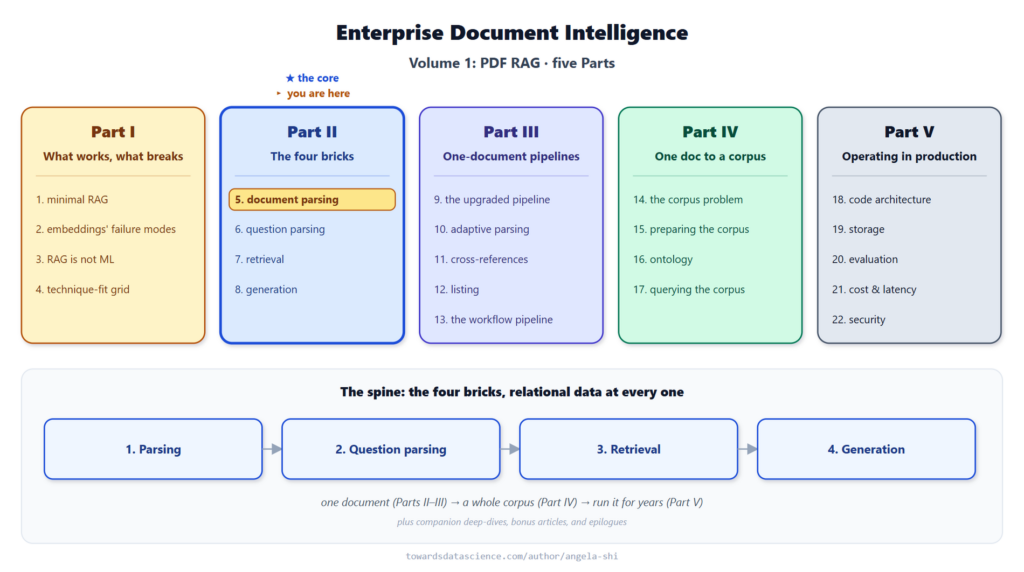 where this article sits: brick 1 (document parsing), Part II, the TOC-reconstruction case deferred by Article 5septies - Image by author
📓 The runnable notebook walks the attention paper (
where this article sits: brick 1 (document parsing), Part II, the TOC-reconstruction case deferred by Article 5septies - Image by author
📓 The runnable notebook walks the attention paper (data/paper/1706.03762v7.pdf) through the loop from line_df + span_df to a 24-entry toc_df with 21 real headings and 3 false positives that the LLM validation drops: doc-intel/notebooks-vol1.
Learn this step by step with the interactive AI Engineer roadmap.
1. Where this article sits and what it does
Article 5septies (TOC reconstruction from a table of content) drew a line: TOC detection reads a page that already exists (a native outline or a printed table of content); recovering structure from body typography belonged to summarisation. That line was pragmatic. It kept the table of content cascade small and testable. But the summarisation intent has different failure modes (long-context, prompt-first) and different guarantees (no fixed shape, no source column). For a document that has clear typographic headings on its body, we do not need a summarisation loop. We need the same toc_df shape as everywhere else, filled from the signals the body carries. So the frontier moves: body-typography reconstruction is a fourth detection case, not a summarisation fallback.
In: a line_df (plus a span_df when the parser exposes typography) whose native TOC and printed table of content both came up empty. Out: a toc_df in the standard Article 5B shape, so retrieval, chunking, and summarisation keep working unchanged.
Once you have that fourth case, three neighbouring situations come along for free:
- The PDF has no structure at all , the case just described.
- The PDF has a partial native outline that stops at level 2 while the body clearly has a level 3 (
3.2.1 ..., 3.2.2 ...). The body-typography pass deepens what the outline gives you.
- The PDF is composite : two or more documents concatenated. Section numbering re-inits mid-file, and the native outline (if any) is flat. The same pass, with a merge step, reconciles the streams.
The rest of the article walks each in turn, in the same order the cascade tries them.
2. Four cases, one cascade
The cascade grew by one. Same order: cheapest first, drop through to the next when a case does not fire or returns too little. Case 4 is the new one; the earlier three come from Article 5septies (TOC reconstruction from a table of content) unchanged.
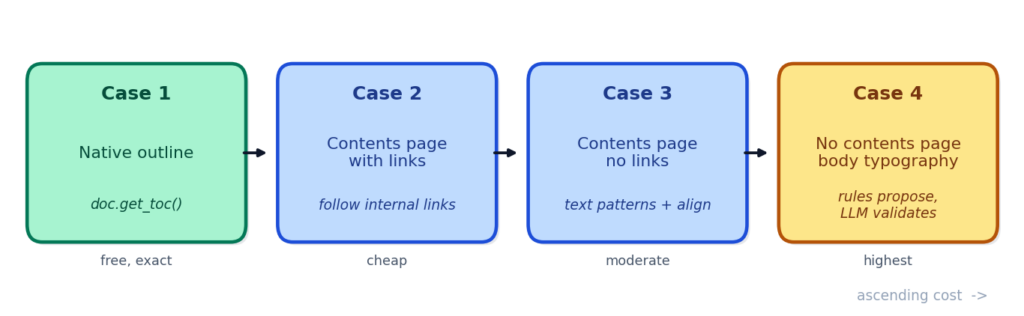 Case 4 is the new one: the only case where the LLM does real detection, not coherence-checking - Image by author
- Case 1 , native outline, and Case 2 , contents page with links. Article 5septies (TOC reconstruction from a table of content) covers both. Deterministic, cheap, exact when they work.
- Case 3 , printed contents page without links. Same article, text patterns plus label-to-page alignment.
- Case 4 , no contents page at all. This article. Body typography surfaces heading candidates; an LLM loop keeps the real ones.
Case 4 is opt-in in the cascade because it is genuinely the most expensive: several passes of an LLM in the worst case, one pass when the deterministic signals are clean enough. Enable it by passing methods=("links", "contents_text", "llm", "body_structure") to reconstruct_toc_df, or call reconstruct_toc_from_body directly when you know upfront that the file has no contents page.
3. How the cascade reconstructs a TOC
With the four cases mapped, here is how the cascade actually turns a document’s pages into a toc_df, one stage at a time, from the signals it reads off the page to the LLM check at the end.
3.1 The parser matrix: what each parsing method gives us
Every rule the body-typography detector reads is a column of the extracted table. So the question is not “what are the six signals” first, it is “which columns does the parser give me at all”. The answer depends on how the PDF was parsed. The four bricks live one level up; here we live inside brick 1, and brick 1 has (already, in the earlier articles) several implementations.
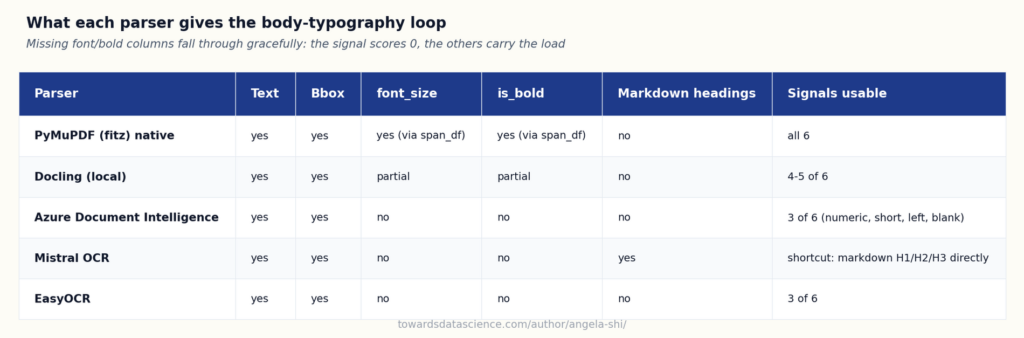 How four parsers differ on TOC signals, from fitz (richest) down to EasyOCR (position and text only) - Image by author
Two practical points that shape the code:
How four parsers differ on TOC signals, from fitz (richest) down to EasyOCR (position and text only) - Image by author
Two practical points that shape the code:
- PyMuPDF exposes typography per span, not per line. A span is one contiguous run of characters in one font, size, weight, italic and color. A line that mixes bold and non-bold text expands to multiple spans. So the module provides a helper
enrich_line_df_with_style(line_df, span_df) that aggregates the spans of each line down to one row and appends font_size (character-weighted), bold_ratio, is_bold, is_italic, dominant_font_name. Consumers pass a line_df when the parser has no typography, or a line_df plus a span_df when it does.
- Missing typography does not break the loop. Each of the six signal functions checks the columns it needs and returns a zero series when they are absent. Font size and bold contribute 0.0 to the score in that case; the four position and text signals (numeric prefix, short length, left alignment, blank-line-above) carry the load. Azure OCR Layout and EasyOCR both fall in this regime.
Mistral OCR is a special case: it returns the document already in markdown, and its # / ## / ### headings are the reconstructed outline. When you have a Mistral output you skip Case 4 entirely and read the markdown structure. That is the parser matrix’s shortcut column.
3.2 Six signals a heading gives off
Now the six signals themselves. Each is one function of one input frame, each returns a pd.Series[float] in [0, 1], and the combined score is a plain weighted sum.
- Font size ratio. A heading uses a larger font than body prose. Score =
(font_size / median_body_size) - 1, clipped to [0, 1]. A line at 12pt in a body of 10pt scores 0.2; at 16pt in a 10pt body it saturates to 1.0.
- Boldness. Headings are often bold. When the enriched line_df carries
bold_ratio, we use that; otherwise is_bold as a 0/1 fallback.
- Numeric prefix.
1., 1.2, 1.2.3, I., A.. Regex ^\s*(?:\d+(?:\.\d+)*\.?|[IVXLCDM]+\.|[A-Z]\.)(?:\s|$). Present ⇒ 1, absent ⇒ 0. Also carries the level signal: 1.2.3 is a level-3 heading. Fitz artefact. A LaTeX-exported PDF often emits "1" and "Introduction" as two separate lines; the loop pre-merges bare-number lines with their next line via merge_split_headings before scoring, so the numeric prefix is recovered on the merged line.
- Short length. A heading is short. Score linearly decays from 1 for lines shorter than 20 characters to 0 at 90 characters. A paragraph rarely lives on a single line; a heading rarely spills across two.
- Left alignment. A heading starts at the left margin (or the block’s own left indent). Score = 1 when
x0 matches the page’s median left margin within a small tolerance, decays with distance.
- Blank line above. Headings sit in visual isolation. Score = 1 when the vertical gap above the line is wider than the median gap between prose lines on that page.
None of these is decisive on its own. Bold-and-large by itself catches figure captions (“Figure 3: architecture” is often bold and larger). Numeric prefix by itself catches enumerated lists inside a paragraph. The point is to combine them, and combining them is where the weights live.
python
# The six per-line signals, cheap, deterministic, engine-agnostic.
from docintel.parsing.pdf.toc.body_structure import (
    enrich_line_df_with_style,
    score_font_size_ratio,
    score_is_bold,
    score_has_numeric_prefix,
    score_is_short,
    score_is_left_aligned,
    score_has_blank_before,
)

line_df = enrich_line_df_with_style(line_df, span_df)

signals = {
    "font_size_ratio":   score_font_size_ratio(line_df),
    "is_bold":           score_is_bold(line_df),
    "has_numeric_prefix":score_has_numeric_prefix(line_df),
    "is_short":          score_is_short(line_df),
    "is_left_aligned":   score_is_left_aligned(line_df),
    "has_blank_before":  score_has_blank_before(line_df),
}
3.3 Combining signals into candidates
A weighted sum turns six scores into one. Weights come from prior belief, not from a training run. Numeric prefix is the strongest single signal (1.6). Font size ratio next (1.4). Boldness middle (1.0). Blank-line-above (0.8), short length (0.6), left alignment (0.4) are supporting evidence. Sum of weights is 5.8. The default threshold is 3.0 (about half the sum), which on the attention paper picks up every real heading plus a handful of table-cell false positives.
python
candidates_df = detect_body_headings(line_df, threshold=3.0)

candidates_df[["text", "heading_score", "candidate_level",
               "signal_font_size_ratio", "signal_has_numeric_prefix"]].head()
On the attention paper (Vaswani et al. 2017, an arXiv LaTeX export), the deterministic pass at threshold 3.5 finds 24 candidates : 21 real section headings (from 1 Introduction to 7 Conclusion, all subsections included) and 3 false positives (28.4, 4.33, 26.4, BLEU scores from the results table on page 8-9 that happen to be bold and short). Recall on real headings is 91 % (21 of 23 real headings, 1 Introduction sits just below the threshold and comes back at 3.0). Precision is 88 %. Level accuracy from numeric prefix is 100 % on the recovered rows. Those are the numbers from a real run, not a projection.
3.4 Rules propose, LLM validates
Here is where the LLM does real detection work. Not free-form. Fixed schema. The prompt describes what a heading is, what a false positive looks like (figure caption, table row label, bold in-body emphasis, BLEU score in a results table), gives the candidates in reading order with page and snippet, and asks for a JSON list of the kept entries. Missed headings (small caps, italics, an unnumbered epilogue) can be added by the same pass because it also sees a slice of the surrounding lines.
The loop is bounded. At most max_passes iterations (3 by default). Each pass reads the current keep list and can drop entries or propose additions. Convergence is when a pass changes nothing.
python
def my_llm_parse(system_prompt: str, user_content: str) -> list[dict]:
    ...  # user's LLM client, returns the kept-entries JSON list

toc_df = reconstruct_toc_from_body(
    line_df,
    span_df=span_df,
    mode="no_toc",
    max_passes=3,
    llm_parse=my_llm_parse,
)
Two things worth spelling out. First, the LLM is told what it may return. The response schema is fixed (title, page, level, source), matching the table of content cascade so downstream code does not branch on which case fired. Second, llm_parse is an injected callable. Tests hand in a mock; CI can replay from a JSON cache; the module never opens a socket by itself. That is the discipline every LLM-touching module in this series follows.
3.5 Extending a partial native outline
Some PDFs have a native outline that stops at level 2. 1. Introduction, 1.1 Motivation, 2. Method, 2.1 Data, and the file is done. But the body clearly runs 2.1.1, 2.1.2, 2.2.1. The retrieval brick wants those. So does the chunker, if the section runs long.
reconstruct_toc_from_body handles this with mode="extend_native". The native outline is preserved verbatim (each row carries source="native"). The body-typography pass runs on top, and any candidate whose title-and-page pair does not already exist in the native outline is added with source="body_structure". The reader can see, row by row, which entries came from the file and which came from the body pass. That is what source is for.
python
deeper_toc = reconstruct_toc_from_body(
    line_df,
    existing_toc_df=native_toc,   # from doc.get_toc(), stops at level 2
    span_df=span_df,
    mode="extend_native",
)

deeper_toc[deeper_toc["source"] == "body_structure"].head()
mode="auto" (the default) picks this branch when existing_toc_df is non-empty and its max level is ≤ 2, so most callers do not have to think about which mode to pass.
3.6 Composite documents, and the API in one call
The other case: a single PDF file that concatenates two or more documents. An arXiv paper followed by a supplementary memo. A request-for-proposal bundle where each vendor answer is its own document. A review dossier of the letter and the response side-by-side. The native outline (if any) is flat and confusing: two "1. Introduction" entries, page numbers that do not increase monotonically, a re-init of the numbering half-way through.
detect_document_boundaries looks for three deterministic signals: numbering re-init (a "1." on a page after "N.something"), style rupture (a jump in median font size between pages N-1 and N), and cover pages (a page with a large title, low line count, no body text). Each returns a small frame of boundary rows. When any boundary is confirmed, reconstruct_toc_from_body(..., mode="composite") re-roots the outline: each internal document becomes a top-level entry ("Document 1", "Document 2", …) with the original outlines nested under.
This is the case where the merge is worth an LLM pass, because a re-init in numbering could also just be a document that legitimately restarts a counter inside a chapter. The MERGE_PROMPT asks the LLM to confirm each boundary or reject it, then to return the merged outline as a JSON list. The whole subpackage funnels through one public entry point:
python
toc_df = reconstruct_toc_from_body(line_df, span_df=span_df, mode="no_toc")
toc_df = reconstruct_toc_from_body(
    line_df, existing_toc_df=native_toc, span_df=span_df, mode="extend_native",
)
toc_df = reconstruct_toc_from_body(
    line_df, existing_toc_df=native_toc, span_df=span_df, mode="composite",
)
toc_df = reconstruct_toc_from_body(line_df, existing_toc_df=native_toc, span_df=span_df, mode="auto")
For the pipeline caller who already uses reconstruct_toc_df and wants the body-typography case as a cascade fallback rather than a separate call, add "body_structure" to the methods tuple: reconstruct_toc_df(pdf_path, methods=("links", "contents_text", "llm", "body_structure")). The cascade will try the table of content methods first and fall through to Case 4 when they return empty.
4. Testing against native outlines: how well does it work
The honest way to score this is against ground truth. Take six PDFs that DO carry a native outline, hide it, run the body-typography loop on the body, and compare the reconstruction to the outline the file was hiding. The six fixtures are all tier-1 open sources with different flavours of structure:
- Vaswani et al., Attention Is All You Need (arXiv 1706.03762, arXiv non-exclusive distribution). A LaTeX-exported NIPS paper, decimal numbering.
- NIST, Zero Trust Architecture (SP 800-207, US government work, public domain). Decimal numbering, dot-leader table of content.
- NIST, Protecting Controlled Unclassified Information in Nonfederal Systems and Organizations (SP 800-171r2, public domain). Nested numeric prefixes, heavy front matter.
- NIST, Standards for Security Categorization of Federal Information and Information Systems (FIPS 199, public domain). Very short, appendix-heavy.
- NIST, Securing Distributed Energy Resources: An Example of Industrial Internet of Things Cybersecurity (SP 1800-32, public domain). A large practice guide, 152 pages, mixed numbering.
- FEMA, NFIP Flood Insurance Manual, Appendices (Policy Forms) (US government work, public domain). The hardest case in the set, appendices titled with Roman numerals (
IV. PROPERTY NOT INSURED) and named sub-forms.
The script that runs the eval lives at scripts/checks/eval_toc_body_structure_vs_native.py; each row below is the deterministic pass ONLY (no LLM validation), threshold 3.0 with the default weights, span_df typography enrich on.
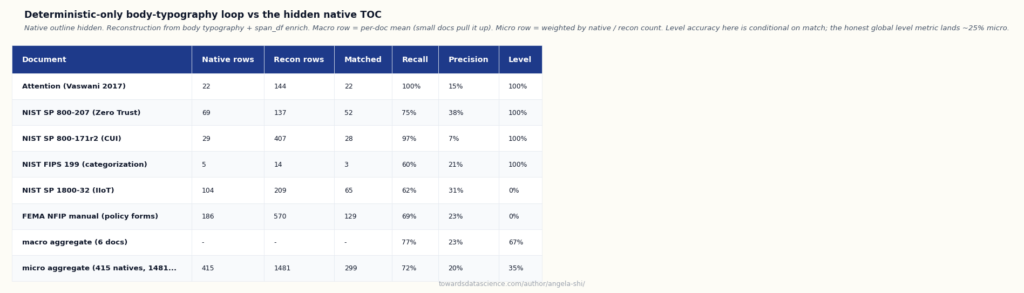 High recall, lower precision, and level assignment that breaks on Roman-numeral outlines; page accuracy holds at 100% - Image by author
Three things read off the table.
Aggregate reporting: macro and micro tell different stories. The
High recall, lower precision, and level assignment that breaks on Roman-numeral outlines; page accuracy holds at 100% - Image by author
Three things read off the table.
Aggregate reporting: macro and micro tell different stories. The aggregate row is the macro-average (each doc weighs one). The micro-average, weighted by native rows, is different: 299 / 415 = 72% micro-recall and 299 / 1481 = 20% micro-precision. The gap between macro (77% recall) and micro (72% recall) has a specific driver: FEMA NFIP (186 natives, 69% recall) and NIST SP 1800-32 (104 natives, 62% recall) carry most of the native count, and both sit below the macro. The macro over-represents Vaswani (only 22 natives at 100% recall). Both numbers matter; neither alone is enough.
The deterministic pass is a high-recall filter on decimal-numbered docs. 75 to 100% recall on Vaswani, SP 800-207, SP 800-171r2 and FIPS 199. The 100% recall on Vaswani is the fitz-artefact merge doing its job: every "1" + "Introduction" pair reunited on the fly. Recall drops on the two non-decimal fixtures (FEMA NFIP 69%, NIST SP 1800-32 62%). The missed rows are the ones whose numbering the numeric-prefix regex does not match, plus level-3 named sections (National Flood Insurance Program Dwelling Form) that carry no prefix at all.
Precision without LLM is poor. 7 to 38% across the corpus. The pass drags in a lot of noise, and the noise falls into five predictable categories.
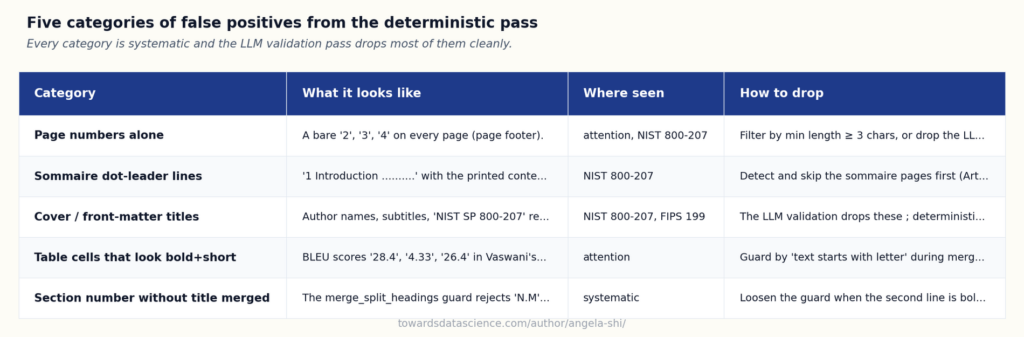 Every category is systematic; Section 3.4’s validation pass targets each, though the drop rate is not yet measured - Image by author
Level accuracy is reported conditional on match, and that framing hides a bias. The 100% level accuracy on the four decimal-numbered docs is
Every category is systematic; Section 3.4’s validation pass targets each, though the drop rate is not yet measured - Image by author
Level accuracy is reported conditional on match, and that framing hides a bias. The 100% level accuracy on the four decimal-numbered docs is (matched rows where recon-level equals native-level) / matched. It tells you that when the algorithm identifies a heading whose title matches a native, the numeric-prefix regex reads the level correctly. On FEMA NFIP and NIST SP 1800-32 the recon regex fails to assign a level at all (Roman numerals, named appendices), the matched rows carry NaN, and the conditional ratio collapses to 0. The honest global metric is (native rows where recon predicted the correct level) / all native rows. It lands at exactly 105 / 415 = 25% micro across the six fixtures. Page accuracy stays at 100% within ±1 on every matched row, but that near-tautology sits because both recon and native read page_num from fitz. The rows where it would matter (a heading whose native page is off by one from where fitz shows the text) are not represented in this fixture set.
4.1 What the algorithm sees on a real page
The best way to make the decision visible is to overlay the algorithm’s per-line output on the raster of the page. Green boxes are lines the deterministic loop scored above the 3.0 threshold and kept as heading candidates. Grey outlines are the other lines the algorithm looked at (body prose, page headers, footnotes) but did not keep. The tag on the right shows what span_df exposed for each candidate: (level, bold flag, font size, heading score).
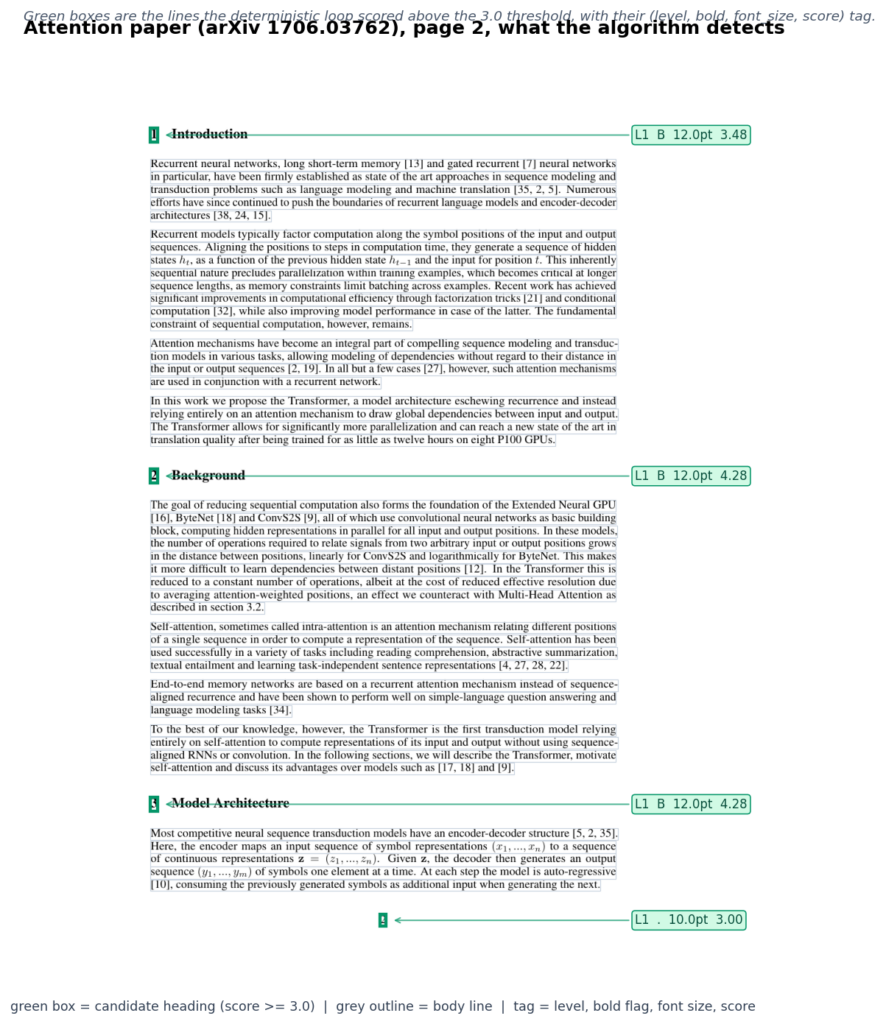 Attention paper page 2, algorithm overlay on the split “1” + “Introduction” heading pair - Image by author
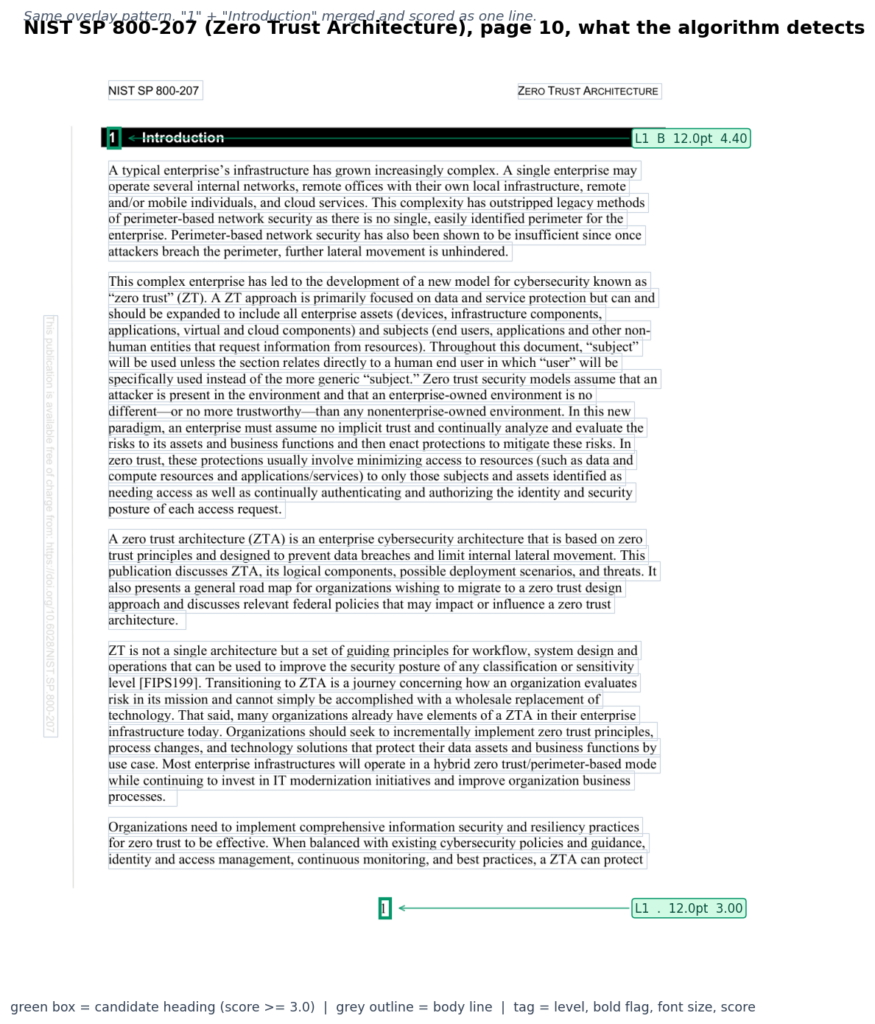 NIST SP 800-207 page 10, the same overlay pattern on a public-domain doc - Image by author
Two things read off the overlay. First, the number of green boxes per page is small (four on Vaswani p2, two on NIST p10), which confirms the threshold is picking headings rather than sprinkling them across the page. Second, the tags show the algorithm sees the right numbers: 11.9 pt bold for NIST section titles, 11.9 pt bold for Vaswani chapter titles, both with heading scores near 4.28 (well above the 3.0 threshold). The signals
NIST SP 800-207 page 10, the same overlay pattern on a public-domain doc - Image by author
Two things read off the overlay. First, the number of green boxes per page is small (four on Vaswani p2, two on NIST p10), which confirms the threshold is picking headings rather than sprinkling them across the page. Second, the tags show the algorithm sees the right numbers: 11.9 pt bold for NIST section titles, 11.9 pt bold for Vaswani chapter titles, both with heading scores near 4.28 (well above the 3.0 threshold). The signals span_df exposes match what a human reader would flag as a heading, and the scorer combines them without needing per-document tuning.
Here is the exact code that ran to produce these overlays. It reads the same line_df + span_df the rest of the pipeline reads, then loops over the candidates for the page and draws the boxes.
python
pdf = "data/nist/NIST.SP.800-207.pdf"
line_df = fitz_pdf_to_line_df(pdf)
span_df = build_span_df(pdf)
enriched = enrich_line_df_with_style(line_df, span_df)   # per-line font + bold
candidates = detect_body_headings(enriched, threshold=3.0)

page = 10
for _, row in candidates[candidates["page_num"] == page].iterrows():
    print(row["text"], row["heading_score"], row["candidate_level"],
          row["font_size"], bool(row["is_bold"]))
# 1 Introduction 4.28 1 12.0 True
4.2 What the LLM validation buys
Every category in the taxonomy above is one the LLM is designed to catch on the first pass.
- Page numbers alone: a candidate whose text is a single digit is never a heading.
- Table of content dot-leader lines:
"1 Introduction ..........." is a contents-page entry, not a body heading.
- Cover-page author names: no numeric prefix, wrong page.
- Table cells: bold and short but not a section title.
- The
HEADING_VALIDATION_PROMPT names each category explicitly. Here is the measured effect of a single validation pass with gpt-4.1 (Azure OpenAI, cache on) on the six-fixture eval.
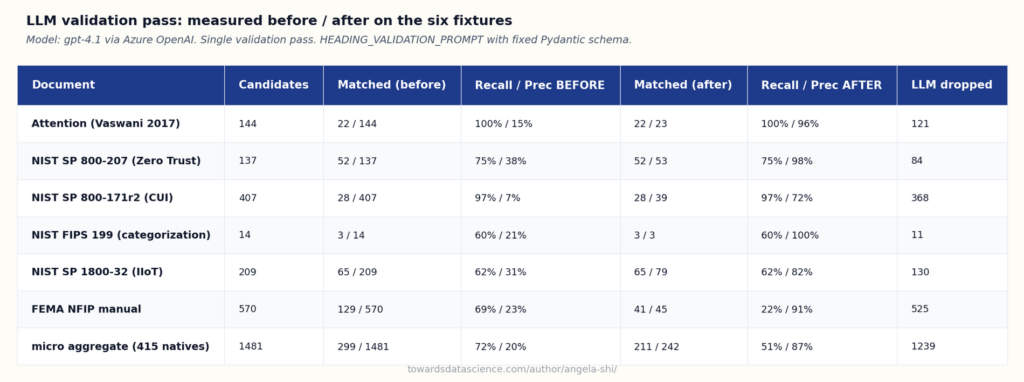 One validation pass lifts precision from 20% to 87% across six fixtures; recall holds on five of six - Image by author
Three things read off the measurement.
Precision lifts massively. From 15% up to 96% on the attention paper, 38% to 98% on NIST SP 800-207, 21% to 100% on FIPS 199, 31% to 82% on NIST SP 1800-32, 7% to 72% on SP 800-171r2. The LLM removes exactly the FP categories the taxonomy above named.
Recall is preserved on five of six fixtures. The LLM validation is conservative in the good sense: it drops false positives without touching the real headings the deterministic pass already found. On Vaswani, 100% recall is preserved; on SP 800-207, 75%; on SP 800-171r2, 97%; on FIPS 199, 60%; on SP 1800-32, 62%. The micro-aggregate on those five docs stays close to before.
FEMA NFIP is the outlier where the LLM over-drops. Recall collapses from 69% to 22%. The Roman-numeral appendices (
One validation pass lifts precision from 20% to 87% across six fixtures; recall holds on five of six - Image by author
Three things read off the measurement.
Precision lifts massively. From 15% up to 96% on the attention paper, 38% to 98% on NIST SP 800-207, 21% to 100% on FIPS 199, 31% to 82% on NIST SP 1800-32, 7% to 72% on SP 800-171r2. The LLM removes exactly the FP categories the taxonomy above named.
Recall is preserved on five of six fixtures. The LLM validation is conservative in the good sense: it drops false positives without touching the real headings the deterministic pass already found. On Vaswani, 100% recall is preserved; on SP 800-207, 75%; on SP 800-171r2, 97%; on FIPS 199, 60%; on SP 1800-32, 62%. The micro-aggregate on those five docs stays close to before.
FEMA NFIP is the outlier where the LLM over-drops. Recall collapses from 69% to 22%. The Roman-numeral appendices (IV. PROPERTY NOT INSURED) and named sub-forms (National Flood Insurance Program Dwelling Form) do not fit the LLM’s mental model of “section heading with a numeric prefix”, and it drops them alongside the false positives. This is a known limit: the LLM prompt was tuned on decimal-numbered outlines. A per-domain prompt or a two-pass loop with a corrective critic would recover here.
The catch that even the LLM does not fix is deeper. Look at what SP 800-207 has that the deterministic pass genuinely misses: unnumbered top-level titles like "References", "Acronyms", and the front-page "NIST SP 800-207, Zero Trust Architecture". These do not carry a numeric prefix, and their font signal blends with the body. The LLM can propose them when it sees the surrounding context, but the deterministic recall does not include them by construction. That is the ceiling of the method: a document that wants a perfectly-nested reconstructed outline has to carry visible signals for every heading.
4.3 Limitations of this eval
The numbers above are honest but small. Four caveats that a rigorous reader should know:
- The threshold 3.0 is a default, not a tuned choice. No cross-validation, no ROC / precision-recall sweep. A per-corpus sweep would likely lift precision meaningfully on the noisier fixtures.
- The
**matching**step is loose. Titles normalize by stripping leading numbers, then compare exactly. A document with two sections named Introduction (a body intro and an appendix intro) can match either, and the greedy assignment picks the closest page.
- The
**page-within-1**metric is almost tautological. Native and recon both derive page from fitz’s page_num, so an off-by-one at that stage is rare by construction. A stress test would randomize the ground-truth page assignment or use an OCR fixture where the page number is inferred.
- Six fixtures, English only, tier-1 open sources only. No confidence intervals. No multilingual document. No RTL script. No handwritten / scanned insurance CG (which is tier-2 anyway). The pattern generalizes in ways this eval does not confirm.
Section 3.4’s LLM validation pass has now been measured on the six-fixture eval (see Section 4.2 above). Micro precision moves from 20% to 87%, recall from 72% to 51% (the drop is entirely FEMA NFIP, whose Roman appendices confuse the LLM). Per-corpus prompt tuning is a real follow-up; the current prompt was written against decimal-numbered outlines.
5. Beyond a single hierarchical TOC: multi-tag enriched structure
A recovered TOC is one dimension of a document’s structure. It is not the whole thing. Two examples make this clear.
Insurance auto contract. A section titled 3.2 Collision Guarantee explains coverage, then names the plafond, then names the exclusions that apply. The exclusions do not necessarily live in a separate chapter titled Exclusions. They live inside the guarantee section. A retrieval that scopes by section (via toc_df.start_page, end_page) and asks “what exclusions apply to the collision guarantee?” pulls back the whole section. The answer is there, but so is a lot of noise, and the query cannot filter on exclusion alone.
Composite / poorly-written docs. A transcription, a meeting minute, a legal opinion, a forensic report. None of these have a clean hierarchical TOC. Themes recur across paragraphs, actors appear and reappear, and the useful navigation is not “which section” but “which topic”. A hierarchical outline of a transcription is close to useless.
5.1 Two layers per line or paragraph: level from typography, tags from the business
The idea, in one line: the algorithm recovers the level (5octies loop), and the business adds tags on top. Two layers stack on the same line or paragraph. Neither replaces the other.
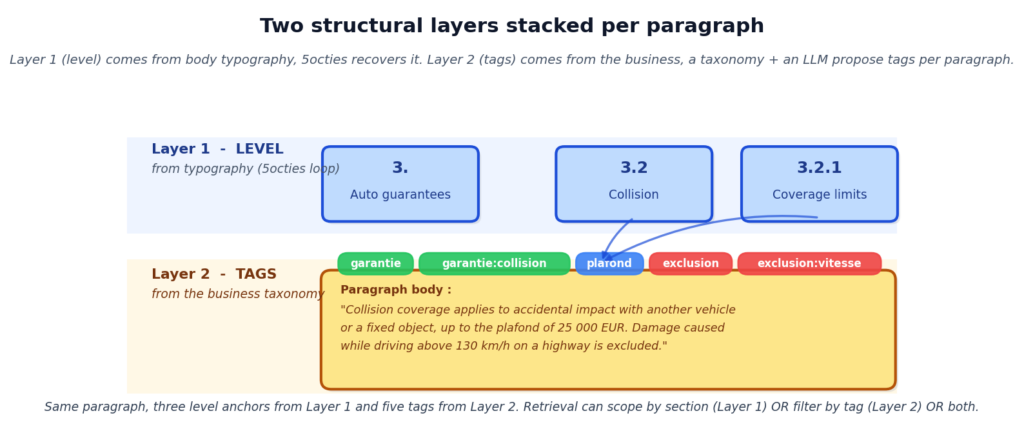 Two axes on the same paragraph: section level from the typographic loop, thematic tags from a business taxonomy - Image by author
- Layer 1: LEVEL. From the body-typography loop above. Chapter 3, section 3.2, subsection 3.2.1. This is
toc_df and the section anchors on every paragraph via start_page/end_page.
- Layer 2: TAGS. A
list[str] per paragraph, drawn from a domain taxonomy. In the insurance example: ["garantie", "garantie:collision", "plafond", "exclusion", "exclusion:vitesse"]. Tags come from a fixed taxonomy defined by the business (or bootstrapped from the corpus and validated by an expert), then an LLM proposes tags per paragraph.
Retrieval implications : the query “what exclusions apply to the collision guarantee?” becomes an intersection on Layer 2 (garantie:collision AND exclusion:*), which is exact even when the answer lives inside a guarantee section, not an exclusions section. The query “section 3.2 in full” still works on Layer 1. The two are complementary.
5.2 A concrete example, drawn from a synthetic contract
Illustration on a synthesized auto-contract paragraph (fabricated for the article, no real insurer named, the point is the pattern, not the fixture):
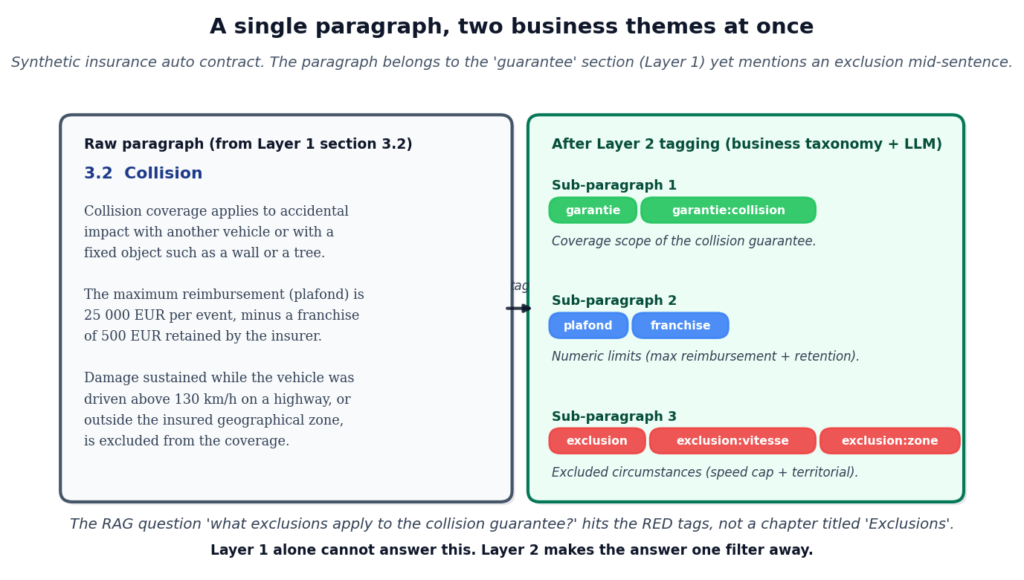 One paragraph holds both a guarantee and an exclusion, and Layer 2 tagging surfaces each theme separately - Image by author
The example is synthetic on purpose. Real insurance conditions générales are tier-2 documents and cannot be published verbatim on TDS; the pattern this figure shows is representative, not a specific insurer’s wording.
One paragraph holds both a guarantee and an exclusion, and Layer 2 tagging surfaces each theme separately - Image by author
The example is synthetic on purpose. Real insurance conditions générales are tier-2 documents and cannot be published verbatim on TDS; the pattern this figure shows is representative, not a specific insurer’s wording.
5.3 Honest limitations of the multi-tag layer
The idea is powerful. It is also hard. Four costs to name upfront:
- Redundancy with Layer 1. Tagging a paragraph garantie when it lives inside a section titled Auto guarantees often duplicates information already in
toc_df.breadcrumb. Useful tags are the ones that cross the section boundary: exclusion inside a guarantee section, condition that applies to two different guarantees.
- Taxonomy chicken-and-egg. Without a fixed taxonomy, an LLM invents new tags each pass, producing label proliferation and cross-document inconsistency. With a fixed taxonomy, the tag set is brittle across domains (an auto taxonomy will not work on a health-insurance contract without adaptation).
- Paragraph unit is fuzzy. Fitz’s paragraph boundary is not the semantic paragraph a human would draw. A single displayed paragraph can span multiple
line_df blocks, be broken by page footers, or run across pages. Layer 2 needs a paragraph model, not just a line stream.
- Cost per document. One thousand paragraphs is one thousand LLM calls if the tagger runs one paragraph at a time. Batching, cache, and hierarchical clustering (tag a group of similar paragraphs together) matter for practical use.
5.4 Where this fits and what closes it
The tagging pass belongs to a later brick in the series. Two natural homes:
- Volume 2 (Multi-format, multi-intent documents). The classification intent tags each paragraph against a fixed taxonomy. That is Layer 2, packaged as a first-class RAG intent.
- Volume 3 (Agentic Bricks). An agent reads the taxonomy, walks the paragraphs it has not tagged yet, proposes tags, checks consistency across paragraphs of the same section, and re-runs on the paragraphs whose tags were rejected. That is Layer 2 with a feedback loop.
Tables are a third axis I did not open here. The parsing brick keeps each table entire; the retrieval brick decides whether to score the table as one chunk or as individual rows serialised with their column headers. A follow-up article in Part III builds that row-level retrieval loop and pairs it with this parsing choice.
The TOC loop this article built stays useful on its own. It is the first axis of the super structure. Layers 2 and 3 come on top when the use case calls for them.
6. Conclusion
A PDF that has neither an outline nor a printed contents page is not a dead end. The body carries every signal a heading gives off: font size, boldness, numeric prefix, short length, left alignment, blank line above. Six per-line scoring functions read from an enriched line_df (the parser matrix says which parsers give what), a weighted sum surfaces candidates, and the LLM validates them in a bounded loop that stops on convergence. Rules propose, LLM validates. The same subpackage extends a partial native outline (mode extend_native) and reconciles composite files (mode composite), all through one entry point that returns the same toc_df shape as the table of content cascade, with a source column so an audit can see which case fired. Retrieval, chunking, summarisation keep working unchanged. Case 4 is the first place in the parsing brick where the LLM does real detection work rather than checking coherence, and it needs the harness discipline around it: injected llm_parse callable, fixed response schema, bounded pass count, cached raw responses.
The next article (5nonies, in the queue) closes the parsing brick with an agentic parsing loop: given a document, pick which parsing methods to run at all (fitz, Azure, Docling, EasyOCR, vision LLM), execute them in the right order, synthesise their outputs into one enriched corpus. Case 4 of this cascade is one of the tools that agent will pick from.
7. Further reading and sources
Earlier in the series (payable-window links, out-of-window titles listed without a link):
External sources (worked examples and prior art):
- Vaswani et al., Attention Is All You Need , arXiv:1706.03762, NeurIPS 2017. The paper we run the body-typography loop on in Section 4 (arXiv non-exclusive distribution).
- NIST, Framework for Improving Critical Infrastructure Cybersecurity, v1.1 (NIST CSF, 2018). The second worked example (US government work, public domain).
- PyMuPDF (fitz) documentation,
page.get_text("dict"). The span-level API build_span_df reads.
- Manning et al., Introduction to Information Retrieval (Cambridge University Press, 2008), ch. 20. The “sections as retrieval scope” premise that motivates a rich
toc_df.
- Bast et al., Extracting the table of contents of PDF documents , DocEng 2010. Prior art on TOC recovery from body typography, focused on the deterministic layer this article extends with an LLM loop.
Register Now to Continue Reading
Unlock Towards Data Science with a Free Account
All articles on Towards Data Science are available to registered users. Create a free account today to access this article and thousands more.
Register for freeSign in to your account
 Written By
See all from Angela and Kezhan Shi
Document ProcessingLlm ApplicationsParsingRagRag Architecture
Share This Article
Towards Data Science is a community publication. Submit your insights to reach our global audience and earn through the TDS Author Payment Program.
Write for TDS
Related Articles
Large Language Model
Enterprise Document Intelligence [Vol.1 #9ter] - The pipeline from Article 9 calls a model at several steps to be sure it is right. On easy questions that is needless latency. A per-question signal routes them past the model, about two seconds saved for a keyword match.
Angela and Kezhan Shi
August 13, 202611 min read
Large Language Models
Enterprise Document Intelligence [Vol.1 #6c] - The decisions the parser makes on top of the user string, using the document’s profile: dispatch, activations, full schema, three approaches to deciding what fires, the audit _meta block, and a broker-corpus walkthrough
Angela and Kezhan Shi
June 18, 202624 min read
Large Language Model
From installing Ollama to launching OpenCode with a local model, step by step.
Shuai Guo
June 23, 20266 min read
Large Language Model
Building a knowledge base for AI models isn’t a one-time task but an iterative process of refinement.
Nidhin Karunakaran Ponon
May 4, 202615 min read
Agentic AI
Mapping power, concentration, and usage in the emerging AI developer ecosystem
Sruly Rosenblat
September 29, 202511 min read
Large Language Model
Enterprise Document Intelligence [Vol.1 #7ter] - Six positions on the retrieval brick that contradict the cosine-first reflex of mainstream RAG
Kezhan Shi
July 3, 20268 min read
Make better product decisions by taking a peek under the hood of LLM-based products
Ninad Sohoni
November 28, 202336 min read
Programming
Automating the classification and extraction of PII from emails using AWS
Thomas Reid
July 24, 202612 min read
Large Language Models
Why do few chatbots return figures from source documents in their responses?
Partha Sarkar
November 3, 202510 min read
Your home for data science and AI. The world's leading publication for data science, data analytics, data engineering, machine learning, and artificial intelligence professionals.
Subscribe to Our NewsletterWrite For TDS•About•Advertise•Privacy Policy•Terms of Use
© Insight Media Group, LLC 2026•The New Stack•roadmap.sh•Creator Network
Recommended Articles
Close