保留正文与补采附件。源页面当前未重新核验;具体限制见交付清单。
 We value your privacy
We use cookies to enhance your browsing experience, serve personalised ads or content, and analyse our traffic. By clicking "Accept All", you consent to our use of cookies.
Customise Reject All Accept All
Customise Consent Preferences
We value your privacy
We use cookies to enhance your browsing experience, serve personalised ads or content, and analyse our traffic. By clicking "Accept All", you consent to our use of cookies.
Customise Reject All Accept All
Customise Consent Preferences  We use cookies to help you navigate efficiently and perform certain functions. You will find detailed information about all cookies under each consent category below.
The cookies that are categorised as "Necessary" are stored on your browser as they are essential for enabling the basic functionalities of the site. ... Show more
NecessaryAlways Active
Necessary cookies are required to enable the basic features of this site, such as providing secure log-in or adjusting your consent preferences. These cookies do not store any personally identifiable data.
We use cookies to help you navigate efficiently and perform certain functions. You will find detailed information about all cookies under each consent category below.
The cookies that are categorised as "Necessary" are stored on your browser as they are essential for enabling the basic functionalities of the site. ... Show more
NecessaryAlways Active
Necessary cookies are required to enable the basic features of this site, such as providing secure log-in or adjusting your consent preferences. These cookies do not store any personally identifiable data.
-
Cookie
BCTempID
-
Duration
10 minutes
-
Description
No description available.
-
Cookie
__cf_bm
-
Duration
1 hour
-
Description
This cookie, set by Cloudflare, is used to support Cloudflare Bot Management.
-
Cookie
AWSALBCORS
-
Duration
7 days
-
Description
Amazon Web Services set this cookie for load balancing.
-
Cookie
_cfuvid
-
Duration
session
-
Description
Cloudflare sets this cookie to track users across sessions to optimize user experience by maintaining session consistency and providing personalized services
-
Cookie
li_gc
-
Duration
6 months
-
Description
Linkedin set this cookie for storing visitor's consent regarding using cookies for non-essential purposes.
-
Cookie
__hssrc
-
Duration
session
-
Description
This cookie is set by Hubspot whenever it changes the session cookie. The __hssrc cookie set to 1 indicates that the user has restarted the browser, and if the cookie does not exist, it is assumed to be a new session.
-
Cookie
__hssc
-
Duration
1 hour
-
Description
HubSpot sets this cookie to keep track of sessions and to determine if HubSpot should increment the session number and timestamps in the __hstc cookie.
-
Cookie
wpEmojiSettingsSupports
-
Duration
session
-
Description
WordPress sets this cookie when a user interacts with emojis on a WordPress site. It helps determine if the user's browser can display emojis properly.
-
Cookie
BCSessionID
-
Duration
1 year 1 month 4 days
-
Description
Blueconic sets this cookie as a unique identifier for the BlueConic profile.
-
Cookie
_octo
-
Duration
1 year
-
Description
No description available.
-
Cookie
logged_in
-
Duration
1 year
-
Description
No description available.
-
Cookie
__Secure-YEC
-
Duration
past
-
Description
YouTube sets this cookie to stores the user's video player preferences using embedded YouTube video
-
Cookie
__eoi
-
Duration
6 months
-
Description
Description is currently not available.
-
Cookie
AWSALBTGCORS
-
Duration
7 days
-
Description
No description available.
-
Cookie
login-status-p
-
Duration
past
-
Description
Description is currently not available.
-
Cookie
AWSALBTG
-
Duration
7 days
-
Description
No description available.
-
Cookie
csrf_token
-
Duration
session
-
Description
No description available.
-
Cookie
token_v2
-
Duration
1 day
-
Description
Description is currently not available.
-
Cookie
D
-
Duration
1 year
-
Description
Description is currently not available.
-
Cookie
PHPSESSID
-
Duration
session
-
Description
This cookie is native to PHP applications. The cookie stores and identifies a user's unique session ID to manage user sessions on the website. The cookie is a session cookie and will be deleted when all the browser windows are closed.
-
Cookie
VISITOR_PRIVACY_METADATA
-
Duration
6 months
-
Description
YouTube sets this cookie to store the user's cookie consent state for the current domain.
-
Cookie
cookietest
-
Duration
session
-
Description
The cookietest cookie is typically used to determine whether the user's browser accepts cookies, essential for website functionality and user experience.
-
Cookie
__Host-airtable-session
-
Duration
1 year
-
Description
This cookie is used to enable us to integrate the services of Airtable.
-
Cookie
__Host-airtable-session.sig
-
Duration
1 year
-
Description
This cookie is used to enable us to integrate the services of Airtable.
-
Cookie
m
-
Duration
1 year 1 month 4 days
-
Description
Stripe sets this cookie for fraud prevention purposes. It identifies the device used to access the website, allowing the website to be formatted accordingly.
-
Cookie
BIGipServer*
-
Duration
session
-
Description
Marketo sets this cookie to collect information about the user's online activity and build a profile about their interests to provide advertisements relevant to the user.
-
Cookie
__cfruid
-
Duration
session
-
Description
Cloudflare sets this cookie to identify trusted web traffic.
-
Cookie
_GRECAPTCHA
-
Duration
6 months
-
Description
Google Recaptcha service sets this cookie to identify bots to protect the website against malicious spam attacks.
-
Cookie
__Secure-YNID
-
Duration
6 months
-
Description
Google cookie used to protect user security and prevent fraud, especially during the login process.
-
Cookie
cookieyes-consent
-
Duration
1 year
-
Description
CookieYes sets this cookie to remember users' consent preferences so that their preferences are respected on subsequent visits to this site. It does not collect or store any personal information about the site visitors.
Functional
Functional cookies help perform certain functionalities like sharing the content of the website on social media platforms, collecting feedback, and other third-party features.
-
Cookie
lidc
-
Duration
1 day
-
Description
LinkedIn sets the lidc cookie to facilitate data center selection.
-
Cookie
brw
-
Duration
1 year
-
Description
No description available.
-
Cookie
brwConsent
-
Duration
5 minutes
-
Description
Description is currently not available.
-
Cookie
WMF-Uniq
-
Duration
1 year
-
Description
Description is currently not available.
-
Cookie
loom_anon_comment
-
Duration
1 year
-
Description
No description available.
-
Cookie
loom_referral_video
-
Duration
session
-
Description
Description is currently not available.
-
Cookie
VISITOR_INFO1_LIVE
-
Duration
6 months
-
Description
A cookie set by YouTube to measure bandwidth that determines whether the user gets the new or old player interface.
-
Cookie
yt-remote-connected-devices
-
Duration
Never Expires
-
Description
YouTube sets this cookie to store the user's video preferences using embedded YouTube videos.
-
Cookie
ytidb::LAST_RESULT_ENTRY_KEY
-
Duration
Never Expires
-
Description
The cookie ytidb::LAST_RESULT_ENTRY_KEY is used by YouTube to store the last search result entry that was clicked by the user. This information is used to improve the user experience by providing more relevant search results in the future.
-
Cookie
yt-remote-device-id
-
Duration
Never Expires
-
Description
YouTube sets this cookie to store the user's video preferences using embedded YouTube videos.
-
Cookie
yt-remote-session-name
-
Duration
session
-
Description
The yt-remote-session-name cookie is used by YouTube to store the user's video player preferences using embedded YouTube video.
-
Cookie
yt-remote-fast-check-period
-
Duration
session
-
Description
The yt-remote-fast-check-period cookie is used by YouTube to store the user's video player preferences for embedded YouTube videos.
-
Cookie
yt-remote-session-app
-
Duration
session
-
Description
The yt-remote-session-app cookie is used by YouTube to store user preferences and information about the interface of the embedded YouTube video player.
-
Cookie
yt-remote-cast-available
-
Duration
session
-
Description
The yt-remote-cast-available cookie is used to store the user's preferences regarding whether casting is available on their YouTube video player.
-
Cookie
yt-remote-cast-installed
-
Duration
session
-
Description
The yt-remote-cast-installed cookie is used to store the user's video player preferences using embedded YouTube video.
-
Cookie
cp_session
-
Duration
3 months
-
Description
Codepen sets this cookie for Help systems found in the website.
-
Cookie
loid
-
Duration
1 year 1 month 4 days
-
Description
This cookie is set by the Reddit. The cookie enables the sharing of content from the website onto the social media platform.
Analytics
Analytical cookies are used to understand how visitors interact with the website. These cookies help provide information on metrics such as the number of visitors, bounce rate, traffic source, etc.
-
Cookie
__hstc
-
Duration
6 months
-
Description
Hubspot set this main cookie for tracking visitors. It contains the domain, initial timestamp (first visit), last timestamp (last visit), current timestamp (this visit), and session number (increments for each subsequent session).
-
Cookie
hubspotutk
-
Duration
6 months
-
Description
HubSpot sets this cookie to keep track of the visitors to the website. This cookie is passed to HubSpot on form submission and used when deduplicating contacts.
-
Cookie
_ga
-
Duration
1 year 1 month 4 days
-
Description
Google Analytics sets this cookie to calculate visitor, session and campaign data and track site usage for the site's analytics report. The cookie stores information anonymously and assigns a randomly generated number to recognise unique visitors.
-
Cookie
ga*
-
Duration
1 year 1 month 4 days
-
Description
Google Analytics sets this cookie to store and count page views.
-
Cookie
__Host-psifi.analyticsTrace
-
Duration
6 hours
-
Description
Description is currently not available.
-
Cookie
__Host-psifi.analyticsTraceV2
-
Duration
6 hours
-
Description
Description is currently not available.
-
Cookie
_gh_sess
-
Duration
session
-
Description
GitHub sets this cookie for temporary application and framework state between pages like what step the user is on in a multiple step form.
-
Cookie
YSC
-
Duration
session
-
Description
YSC cookie is set by Youtube and is used to track the views of embedded videos on Youtube pages.
-
Cookie
ajs_anonymous_id
-
Duration
1 year
-
Description
This cookie is set by Segment to count the number of people who visit a certain site by tracking if they have visited before.
-
Cookie
vuid
-
Duration
1 year 1 month 4 days
-
Description
Vimeo installs this cookie to collect tracking information by setting a unique ID to embed videos on the website.
Performance
Performance cookies are used to understand and analyse the key performance indexes of the website which helps in delivering a better user experience for the visitors.
-
Cookie
AWSALB
-
Duration
7 days
-
Description
AWSALB is an application load balancer cookie set by Amazon Web Services to map the session to the target.
-
Cookie
acq
-
Duration
past
-
Description
Description is currently not available.
-
Cookie
acq.sig
-
Duration
past
-
Description
Description is currently not available.
-
Cookie
ptc
-
Duration
2 years
-
Description
No description available.
Advertisement
Advertisement cookies are used to provide visitors with customised advertisements based on the pages you visited previously and to analyse the effectiveness of the ad campaigns.
-
Cookie
muc_ads
-
Duration
1 year 1 month 4 days
-
Description
Twitter sets this cookie to collect user behaviour and interaction data to optimize the website.
-
Cookie
guest_id_marketing
-
Duration
1 year 1 month 4 days
-
Description
Twitter sets this cookie to identify and track the website visitor.
-
Cookie
guest_id_ads
-
Duration
1 year 1 month 4 days
-
Description
Twitter sets this cookie to identify and track the website visitor.
-
Cookie
personalization_id
-
Duration
1 year 1 month 4 days
-
Description
Twitter sets this cookie to integrate and share features for social media and also store information about how the user uses the website, for tracking and targeting.
-
Cookie
guest_id
-
Duration
1 year 1 month 4 days
-
Description
Twitter sets this cookie to identify and track the website visitor. It registers if a user is signed in to the Twitter platform and collects information about ad preferences.
-
Cookie
bcookie
-
Duration
1 year
-
Description
LinkedIn sets this cookie from LinkedIn share buttons and ad tags to recognize browser IDs.
-
Cookie
__Secure-ROLLOUT_TOKEN
-
Duration
6 months
-
Description
YouTube sets this cookie to manage feature rollout and experimentation. It helps Google control which new features or interface changes are shown to users as part of testing and staged rollouts, ensuring consistent experience for a given user during an experiment.
-
Cookie
yt.innertube::nextId
-
Duration
Never Expires
-
Description
YouTube sets this cookie to register a unique ID to store data on what videos from YouTube the user has seen.
-
Cookie
yt.innertube::requests
-
Duration
Never Expires
-
Description
YouTube sets this cookie to register a unique ID to store data on what videos from YouTube the user has seen.
-
Cookie
session_tracker
-
Duration
session
-
Description
This cookie is set by the Reddit. This cookie is used to identify trusted web traffic. It also helps in adverstising on the website.
-
Cookie
edgebucket
-
Duration
session
-
Description
Reddit sets this cookie to save the information about a log-on Reddit user, for the purpose of advertisement recommendations and updating the content.
-
Cookie
did
-
Duration
1 year
-
Description
Arbor sets this cookie to show targeted ads to site visitors.This cookie expires after 2 months or 1 year.
Uncategorised
Other uncategorised cookies are those that are being analysed and have not been classified into a category as yet.
No cookies to display.
Reject All Save My Preferences Accept All
Toggle SearchToggle Mobile Navigation
Publish AI, ML & data-science insights to a global community of data professionals.
Sign inSubmit an Article
LatestEditor's PicksNewsletterShipAI
Write For TDS
LinkedInXToggle Search
Data Science
How to Empower Pandas with GPUs
A quick introduction to cuDF, an NVIDIA framework for accelerating Pandas
Naser Tamimi
April 7, 20247 min read
DATA SCIENCE
 Photo by BoliviaInteligente on Unsplash
Pandas remains a crucial tool in data analytics and machine learning endeavors, offering extensive capabilities for tasks such as data reading, transformation, cleaning, and writing. However, its efficiency with large datasets is somewhat limited, hindering its application in production environments or for constructing resilient data pipelines, despite its widespread use in data science projects.
Similar to Apache Spark, Pandas loads the data into memory for computation and transformation. But unlike Spark, Pandas is not a distributed compute platform, and therefore everything must be done on a single system CPU and memory (single-node processing). This feature limits the use of Pandas in two ways:
Photo by BoliviaInteligente on Unsplash
Pandas remains a crucial tool in data analytics and machine learning endeavors, offering extensive capabilities for tasks such as data reading, transformation, cleaning, and writing. However, its efficiency with large datasets is somewhat limited, hindering its application in production environments or for constructing resilient data pipelines, despite its widespread use in data science projects.
Similar to Apache Spark, Pandas loads the data into memory for computation and transformation. But unlike Spark, Pandas is not a distributed compute platform, and therefore everything must be done on a single system CPU and memory (single-node processing). This feature limits the use of Pandas in two ways:
- Pandas on a single system cannot handle a large amount of data.
- Even for the data that fits into a single system memory, it may take considerable time to process a relatively small dataset.
Learn this step by step with the interactive AI and Data Scientist, Computer Science and Machine Learning roadmaps.
Pandas on Steroid
The first issue is addressed by frameworks such as Dask. Dask DataFrame helps you process large tabular data by parallelizing Pandas on a distributed cluster of computers. In many ways, Pandas empowered by Dask is similar to Apache Spark (however, still Spark can handle large datasets more efficiently and that's why it is a preferred tool among data engineers).
Although Dask enables parallel processing of large datasets across a cluster of machines, in reality, the data for most machine learning projects can be accommodated within a single system's memory. Consequently, employing a cluster of machines for such projects might be excessive. Thus, there is a need for a tool that efficiently executes Pandas operations in parallel on a single machine, addressing the second issue mentioned earlier.
Whenever someone talks about parallel processing, the first word that comes to most engineers' minds is GPU. For a long time, it was a wish to run Pandas on GPU for efficient parallel computing. The wish came true with the introduction of NVIDIA RAPIDS cuDF. cuDF (pronounced "KOO-dee-eff") is a GPU DataFrame library for processing data in parallel using GPU.
At NVIDIA GTC 2024, it was announced that RAPIDS cuDF can now bring GPU acceleration to 9.5M million pandas users without requiring them to change their code.
Installation
Before proceeding with the installation, ensure that you have access to an NVIDIA GPU on your system. If you possess an NVIDIA graphics card locally, you can execute cuDF on your machine. Alternatively, if you lack such hardware, you can still run your cuDF code on cloud platforms like Google Colab, which offers sufficient GPU resources for your use case. Personally, I have a GeForce RTX 3090 installed on my system, hence I opted to conduct this test locally. However, beginners may find it more convenient to run the cuDF codes in this tutorial on a Google Colab instance.
In addition, as of April 2024, cuDF only runs on Linux OS and Python 3.9 or higher. Please visit this page for system requirements, before starting the installation.
To facilitate easier comprehension for readers, I've divided the installation part into two sections. The first section helps users who want to install cuDF on their local system, and the second section guides the Google Colab users through the installation.
Installing on a System with a GPU
As the cuDF name suggests, it works on the CUDA platform (developed by NVIDIA). Therefore, you need to install the CUDA toolkit on your system first. I suggest to install CUDA 12.0 if you don't have it installed. Otherwise, any CUDA 11 or newer should work fine.
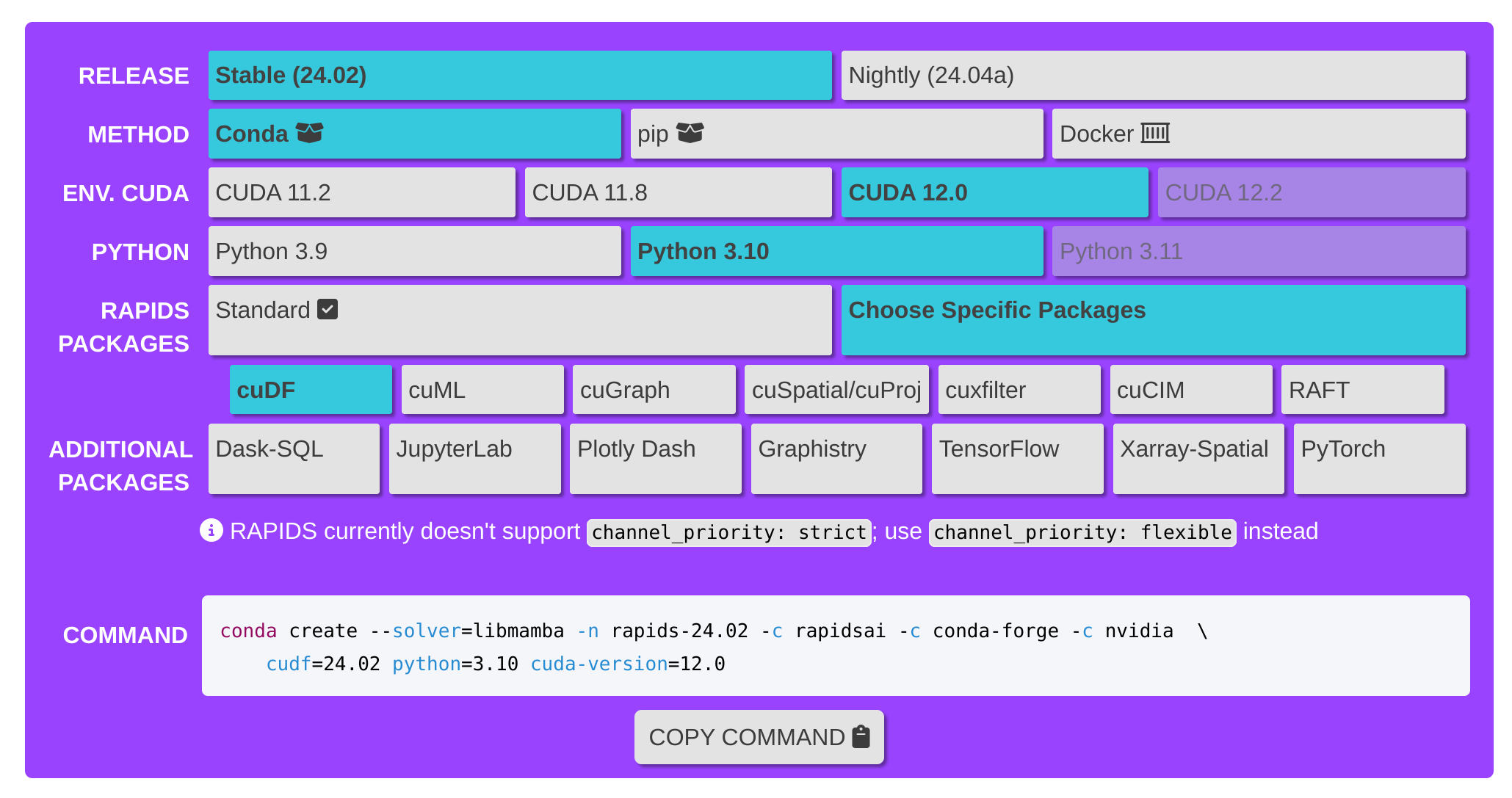
If you are planning to run cuDF on your local system, after installing the CUDA toolkit, you need to install the RAPIDS framework. Installing RAPIDS using the UI command builder is easy and straightforward. You need to navigate to https://docs.rapids.ai/install and select your system CUDA and Python versions. You can choose the Standard Package (which includes cuDF, cuML, cuGraph, cuSpatial, cuProj, cuxfilter, cuCIM, RAFT) or choose cuDF only through "Choose Specific Package". The following screenshot is what I chose for my system.
Google Colab
If you are planning to run cuDF on Google Colab, you have an easier path. First, Google Colab and many similar services have the CUDA toolkit already installed on their GPU instances.
For installing RAPIDS, as this document from Google explains in detail, you need to take two steps. Step 1 is to choose a Colab runtime that uses a GPU accelerator. Step 2 is running the following commands in your notebook to install RAPIDS on your Colab instance via pip.
bash
 !pip install cudf-cu11 --extra-index-url=https://pypi.ngc.nvidia.com
 !rm -rf /usr/local/lib/python3.8/dist-packages/cupy*
 !pip install cupy-cuda11x
Please read the "Getting Started with RAPIDS on Colab" section of the mentioned document for more details.
An Example to Test
To compare the capabilities of CuDF Pandas and standard Pandas, I ran a test using a fake dataset with 10 million records. You can find all the required files in this repository: https://github.com/tamiminaser/cudf-examples/tree/master/example1
First, we need to create a large test dataset. If you have access to a big dataset that you can load into Pandas, you can go ahead with your dataset. I decided to create a fake CSV dataset with 10 million rows and use it for this test. I used the following Python code (link to repo) to create my fake dataset and called it data_10000000.csv.
python
import csv
from faker import Faker
import datetime
from tqdm import tqdm

def datagenerate(records, headers):
    fake = Faker('en_US')
    with open("data_10000000.csv", 'wt') as csvFile:
        writer = csv.DictWriter(csvFile, fieldnames=headers)
        writer.writeheader()
        for i in tqdm(range(records)):
            full_name = fake.name()
            FLname = full_name.split(" ")
            Fname = FLname[0]
            Lname = FLname[1]
            domain_name = "@testDomain.com"
            userId = Fname +"."+ Lname + domain_name

            writer.writerow({
                    "user_id": fake.unique.random_int(min=1111111111111, max=9999999999999),
                    "name": fake.name(),
                    "date_of_birth" : fake.date(pattern="%d-%m-%Y", end_datetime=datetime.date(2000, 1,1)),
                    "country_of_birth": fake.country(),
                    "email": fake.email(),
                    "record_year": fake.year(),
                    "score": fake.random_int(min=1, max=999),
                    })

records = 100000000
headers = ["user_id", "name", "date_of_birth", "country_of_birth", "email", "record_year", "score"]
datagenerate(records, headers)
print("CSV generation complete!")
It will take a long time to create such a 10 million rows csv file and the output file size will be about 8 GB. You can lower the records number (for example to 3M records) in the code to produce smaller datasets. Also, I used my NVIDIA GeForce RTX 3090, which has 24 GB memory and I had no issue loading such a large dataset, but if you are using GPUs with smaller memories, you might need to work with a smaller dataset.
After producing the fake CSV file, you can do the following test on the file. First, let's begin with standard Pandas and observe the processing time for this dataset. Below is the Jupyter Notebook we utilized for the initial phase of the test. (Note, I limited my code to 3M records here to loop the test 10 times for a more accurate comparison).
Now, let's do the same processing using cuDF Pandas.
As you see, both codes are similar and the only difference is in the first cell of the cuDF notebook. In Jupiter Notebook, simply by adding %load_ext cudf.pandas before importing Pandas we could use cudf.pandas instead of standard Pandas and enjoy all of its benefits (it could not be simpler).
As you see, the group by process (cell #3) took about 1.06 seconds via standard Pandas, and it took only 122 ms via cuDF Pandas. It means that cuDF Pandas is about 8 times faster than the standard Pandas on CPU.
In Cell #4, we did a more complicated series of joining and transformations. For this one, it took 6 seconds for the standard Pandas to process the data, but it took about 109 ms for cuDF Pandas to do the same process. Therefore, cuDF Pandas could process the same data 55 times faster.
Summary
As you see, cuDF provides an API that enables us to transform Pandas dataframes on GPUs with minimum effort. The performance of cuDF compared to standard Pandas on a CPU is 10–100 times faster according to our test.
As mentioned at the beginning, Dask is another popular tool that enables us to run Pandas transformations and jobs on a cluster of machines. cuDF and Dask could be combined to even enhance the processing further and take advantage of both distributed compute systems as well as GPUs to process the data faster (read more).
Update
At Google I/O 2024, Laurence Moroney, the Head of AI Advocacy at Google, announced the integration of RAPIDS cuDF into Google Colab. This enables developers to significantly speed up pandas code, achieving up to a 50x performance boost on Google Colab GPU instances, all while allowing them to continue using pandas seamlessly as their data scales. Read more here.
Register Now to Continue Reading
Unlock Towards Data Science with a Free Account
All articles on Towards Data Science are available to registered users. Create a free account today to access this article and thousands more.
Register for freeSign in to your account
 Written By
See all from Naser Tamimi
DataData ScienceMachine LearningProgrammingTechnology
Share This Article
Towards Data Science is a community publication. Submit your insights to reach our global audience and earn through the TDS Author Payment Program.
Write for TDS
Related Articles
Machine Learning
Creativity, grit, and perseverance will become the three words you live by.
Madison Hunter
January 12, 20217 min read
Artificial Intelligence
Some cold knowledge about Python you need to know
Christopher Tao
November 28, 20217 min read
Programming
Because not all of Sensible Vim might be sensible for you
Rionaldi Chandraseta
March 26, 202113 min read
Machine Learning
How you can learn and avoid these mistakes in the future
Abhishek Pawar
June 16, 20225 min read
Data Science
Become more business-savvy, a better thinker, and overall better human through listening
Jacob H. Marquez
January 6, 20228 min read
Machine Learning
Want to deliver faster optimization for time-consuming objective functions? Consider surrogate optimization.
Shuai Guo
December 17, 202013 min read
Data Science
How to prepare for inevitable mistakes
Valerie Carey
November 30, 202113 min read
Data Science
Examine your data through insightful graphs
Chi Nguyen
January 4, 20225 min read
Data Science
Event Study Designs: What are they and what are they not.
Arieda Muço
July 20, 20249 min read
Your home for data science and AI. The world's leading publication for data science, data analytics, data engineering, machine learning, and artificial intelligence professionals.
Subscribe to Our NewsletterWrite For TDS•About•Advertise•Privacy Policy•Terms of Use
© Insight Media Group, LLC 2026•The New Stack•roadmap.sh•Creator Network
Recommended Articles
Close