保留正文与补采附件。源页面当前未重新核验;具体限制见交付清单。
 We value your privacy
We use cookies to enhance your browsing experience, serve personalised ads or content, and analyse our traffic. By clicking "Accept All", you consent to our use of cookies.
Customise Reject All Accept All
Customise Consent Preferences
We value your privacy
We use cookies to enhance your browsing experience, serve personalised ads or content, and analyse our traffic. By clicking "Accept All", you consent to our use of cookies.
Customise Reject All Accept All
Customise Consent Preferences  We use cookies to help you navigate efficiently and perform certain functions. You will find detailed information about all cookies under each consent category below.
The cookies that are categorised as "Necessary" are stored on your browser as they are essential for enabling the basic functionalities of the site. ... Show more
NecessaryAlways Active
Necessary cookies are required to enable the basic features of this site, such as providing secure log-in or adjusting your consent preferences. These cookies do not store any personally identifiable data.
We use cookies to help you navigate efficiently and perform certain functions. You will find detailed information about all cookies under each consent category below.
The cookies that are categorised as "Necessary" are stored on your browser as they are essential for enabling the basic functionalities of the site. ... Show more
NecessaryAlways Active
Necessary cookies are required to enable the basic features of this site, such as providing secure log-in or adjusting your consent preferences. These cookies do not store any personally identifiable data.
-
Cookie
BCTempID
-
Duration
10 minutes
-
Description
No description available.
-
Cookie
__cf_bm
-
Duration
1 hour
-
Description
This cookie, set by Cloudflare, is used to support Cloudflare Bot Management.
-
Cookie
AWSALBCORS
-
Duration
7 days
-
Description
Amazon Web Services set this cookie for load balancing.
-
Cookie
_cfuvid
-
Duration
session
-
Description
Cloudflare sets this cookie to track users across sessions to optimize user experience by maintaining session consistency and providing personalized services
-
Cookie
li_gc
-
Duration
6 months
-
Description
Linkedin set this cookie for storing visitor's consent regarding using cookies for non-essential purposes.
-
Cookie
__hssrc
-
Duration
session
-
Description
This cookie is set by Hubspot whenever it changes the session cookie. The __hssrc cookie set to 1 indicates that the user has restarted the browser, and if the cookie does not exist, it is assumed to be a new session.
-
Cookie
__hssc
-
Duration
1 hour
-
Description
HubSpot sets this cookie to keep track of sessions and to determine if HubSpot should increment the session number and timestamps in the __hstc cookie.
-
Cookie
wpEmojiSettingsSupports
-
Duration
session
-
Description
WordPress sets this cookie when a user interacts with emojis on a WordPress site. It helps determine if the user's browser can display emojis properly.
-
Cookie
BCSessionID
-
Duration
1 year 1 month 4 days
-
Description
Blueconic sets this cookie as a unique identifier for the BlueConic profile.
-
Cookie
_octo
-
Duration
1 year
-
Description
No description available.
-
Cookie
logged_in
-
Duration
1 year
-
Description
No description available.
-
Cookie
__Secure-YEC
-
Duration
past
-
Description
YouTube sets this cookie to stores the user's video player preferences using embedded YouTube video
-
Cookie
__eoi
-
Duration
6 months
-
Description
Description is currently not available.
-
Cookie
AWSALBTGCORS
-
Duration
7 days
-
Description
No description available.
-
Cookie
login-status-p
-
Duration
past
-
Description
Description is currently not available.
-
Cookie
AWSALBTG
-
Duration
7 days
-
Description
No description available.
-
Cookie
csrf_token
-
Duration
session
-
Description
No description available.
-
Cookie
token_v2
-
Duration
1 day
-
Description
Description is currently not available.
-
Cookie
D
-
Duration
1 year
-
Description
Description is currently not available.
-
Cookie
PHPSESSID
-
Duration
session
-
Description
This cookie is native to PHP applications. The cookie stores and identifies a user's unique session ID to manage user sessions on the website. The cookie is a session cookie and will be deleted when all the browser windows are closed.
-
Cookie
VISITOR_PRIVACY_METADATA
-
Duration
6 months
-
Description
YouTube sets this cookie to store the user's cookie consent state for the current domain.
-
Cookie
cookietest
-
Duration
session
-
Description
The cookietest cookie is typically used to determine whether the user's browser accepts cookies, essential for website functionality and user experience.
-
Cookie
__Host-airtable-session
-
Duration
1 year
-
Description
This cookie is used to enable us to integrate the services of Airtable.
-
Cookie
__Host-airtable-session.sig
-
Duration
1 year
-
Description
This cookie is used to enable us to integrate the services of Airtable.
-
Cookie
m
-
Duration
1 year 1 month 4 days
-
Description
Stripe sets this cookie for fraud prevention purposes. It identifies the device used to access the website, allowing the website to be formatted accordingly.
-
Cookie
BIGipServer*
-
Duration
session
-
Description
Marketo sets this cookie to collect information about the user's online activity and build a profile about their interests to provide advertisements relevant to the user.
-
Cookie
__cfruid
-
Duration
session
-
Description
Cloudflare sets this cookie to identify trusted web traffic.
-
Cookie
_GRECAPTCHA
-
Duration
6 months
-
Description
Google Recaptcha service sets this cookie to identify bots to protect the website against malicious spam attacks.
-
Cookie
__Secure-YNID
-
Duration
6 months
-
Description
Google cookie used to protect user security and prevent fraud, especially during the login process.
-
Cookie
cookieyes-consent
-
Duration
1 year
-
Description
CookieYes sets this cookie to remember users' consent preferences so that their preferences are respected on subsequent visits to this site. It does not collect or store any personal information about the site visitors.
Functional
Functional cookies help perform certain functionalities like sharing the content of the website on social media platforms, collecting feedback, and other third-party features.
-
Cookie
lidc
-
Duration
1 day
-
Description
LinkedIn sets the lidc cookie to facilitate data center selection.
-
Cookie
brw
-
Duration
1 year
-
Description
No description available.
-
Cookie
brwConsent
-
Duration
5 minutes
-
Description
Description is currently not available.
-
Cookie
WMF-Uniq
-
Duration
1 year
-
Description
Description is currently not available.
-
Cookie
loom_anon_comment
-
Duration
1 year
-
Description
No description available.
-
Cookie
loom_referral_video
-
Duration
session
-
Description
Description is currently not available.
-
Cookie
VISITOR_INFO1_LIVE
-
Duration
6 months
-
Description
A cookie set by YouTube to measure bandwidth that determines whether the user gets the new or old player interface.
-
Cookie
yt-remote-connected-devices
-
Duration
Never Expires
-
Description
YouTube sets this cookie to store the user's video preferences using embedded YouTube videos.
-
Cookie
ytidb::LAST_RESULT_ENTRY_KEY
-
Duration
Never Expires
-
Description
The cookie ytidb::LAST_RESULT_ENTRY_KEY is used by YouTube to store the last search result entry that was clicked by the user. This information is used to improve the user experience by providing more relevant search results in the future.
-
Cookie
yt-remote-device-id
-
Duration
Never Expires
-
Description
YouTube sets this cookie to store the user's video preferences using embedded YouTube videos.
-
Cookie
yt-remote-session-name
-
Duration
session
-
Description
The yt-remote-session-name cookie is used by YouTube to store the user's video player preferences using embedded YouTube video.
-
Cookie
yt-remote-fast-check-period
-
Duration
session
-
Description
The yt-remote-fast-check-period cookie is used by YouTube to store the user's video player preferences for embedded YouTube videos.
-
Cookie
yt-remote-session-app
-
Duration
session
-
Description
The yt-remote-session-app cookie is used by YouTube to store user preferences and information about the interface of the embedded YouTube video player.
-
Cookie
yt-remote-cast-available
-
Duration
session
-
Description
The yt-remote-cast-available cookie is used to store the user's preferences regarding whether casting is available on their YouTube video player.
-
Cookie
yt-remote-cast-installed
-
Duration
session
-
Description
The yt-remote-cast-installed cookie is used to store the user's video player preferences using embedded YouTube video.
-
Cookie
cp_session
-
Duration
3 months
-
Description
Codepen sets this cookie for Help systems found in the website.
-
Cookie
loid
-
Duration
1 year 1 month 4 days
-
Description
This cookie is set by the Reddit. The cookie enables the sharing of content from the website onto the social media platform.
Analytics
Analytical cookies are used to understand how visitors interact with the website. These cookies help provide information on metrics such as the number of visitors, bounce rate, traffic source, etc.
-
Cookie
__hstc
-
Duration
6 months
-
Description
Hubspot set this main cookie for tracking visitors. It contains the domain, initial timestamp (first visit), last timestamp (last visit), current timestamp (this visit), and session number (increments for each subsequent session).
-
Cookie
hubspotutk
-
Duration
6 months
-
Description
HubSpot sets this cookie to keep track of the visitors to the website. This cookie is passed to HubSpot on form submission and used when deduplicating contacts.
-
Cookie
_ga
-
Duration
1 year 1 month 4 days
-
Description
Google Analytics sets this cookie to calculate visitor, session and campaign data and track site usage for the site's analytics report. The cookie stores information anonymously and assigns a randomly generated number to recognise unique visitors.
-
Cookie
ga*
-
Duration
1 year 1 month 4 days
-
Description
Google Analytics sets this cookie to store and count page views.
-
Cookie
__Host-psifi.analyticsTrace
-
Duration
6 hours
-
Description
Description is currently not available.
-
Cookie
__Host-psifi.analyticsTraceV2
-
Duration
6 hours
-
Description
Description is currently not available.
-
Cookie
_gh_sess
-
Duration
session
-
Description
GitHub sets this cookie for temporary application and framework state between pages like what step the user is on in a multiple step form.
-
Cookie
YSC
-
Duration
session
-
Description
YSC cookie is set by Youtube and is used to track the views of embedded videos on Youtube pages.
-
Cookie
ajs_anonymous_id
-
Duration
1 year
-
Description
This cookie is set by Segment to count the number of people who visit a certain site by tracking if they have visited before.
-
Cookie
vuid
-
Duration
1 year 1 month 4 days
-
Description
Vimeo installs this cookie to collect tracking information by setting a unique ID to embed videos on the website.
Performance
Performance cookies are used to understand and analyse the key performance indexes of the website which helps in delivering a better user experience for the visitors.
-
Cookie
AWSALB
-
Duration
7 days
-
Description
AWSALB is an application load balancer cookie set by Amazon Web Services to map the session to the target.
-
Cookie
acq
-
Duration
past
-
Description
Description is currently not available.
-
Cookie
acq.sig
-
Duration
past
-
Description
Description is currently not available.
-
Cookie
ptc
-
Duration
2 years
-
Description
No description available.
Advertisement
Advertisement cookies are used to provide visitors with customised advertisements based on the pages you visited previously and to analyse the effectiveness of the ad campaigns.
-
Cookie
muc_ads
-
Duration
1 year 1 month 4 days
-
Description
Twitter sets this cookie to collect user behaviour and interaction data to optimize the website.
-
Cookie
guest_id_marketing
-
Duration
1 year 1 month 4 days
-
Description
Twitter sets this cookie to identify and track the website visitor.
-
Cookie
guest_id_ads
-
Duration
1 year 1 month 4 days
-
Description
Twitter sets this cookie to identify and track the website visitor.
-
Cookie
personalization_id
-
Duration
1 year 1 month 4 days
-
Description
Twitter sets this cookie to integrate and share features for social media and also store information about how the user uses the website, for tracking and targeting.
-
Cookie
guest_id
-
Duration
1 year 1 month 4 days
-
Description
Twitter sets this cookie to identify and track the website visitor. It registers if a user is signed in to the Twitter platform and collects information about ad preferences.
-
Cookie
bcookie
-
Duration
1 year
-
Description
LinkedIn sets this cookie from LinkedIn share buttons and ad tags to recognize browser IDs.
-
Cookie
__Secure-ROLLOUT_TOKEN
-
Duration
6 months
-
Description
YouTube sets this cookie to manage feature rollout and experimentation. It helps Google control which new features or interface changes are shown to users as part of testing and staged rollouts, ensuring consistent experience for a given user during an experiment.
-
Cookie
yt.innertube::nextId
-
Duration
Never Expires
-
Description
YouTube sets this cookie to register a unique ID to store data on what videos from YouTube the user has seen.
-
Cookie
yt.innertube::requests
-
Duration
Never Expires
-
Description
YouTube sets this cookie to register a unique ID to store data on what videos from YouTube the user has seen.
-
Cookie
session_tracker
-
Duration
session
-
Description
This cookie is set by the Reddit. This cookie is used to identify trusted web traffic. It also helps in adverstising on the website.
-
Cookie
edgebucket
-
Duration
session
-
Description
Reddit sets this cookie to save the information about a log-on Reddit user, for the purpose of advertisement recommendations and updating the content.
-
Cookie
did
-
Duration
1 year
-
Description
Arbor sets this cookie to show targeted ads to site visitors.This cookie expires after 2 months or 1 year.
Uncategorised
Other uncategorised cookies are those that are being analysed and have not been classified into a category as yet.
No cookies to display.
Reject All Save My Preferences Accept All
Toggle SearchToggle Mobile Navigation
Publish AI, ML & data-science insights to a global community of data professionals.
Sign inSubmit an Article
LatestEditor's PicksNewsletterShipAI
Write For TDS
LinkedInXToggle Search
Data Science
Stop Writing Messy Boolean Masks: 10 Elegant Ways to Filter Pandas DataFrames
Master the art of readable, high-performance data selection using .query(), .isin(), and advanced vectorized logic.
Ibrahim Salami
January 22, 20267 min read
 Image by Author. Created with Gemini
In a recent article, I discussed how to create your first DataFrame using Pandas. I mentioned that the first thing you need to master is Data structures and arrays before moving on to data analysis with Python.
Pandas is an excellent library for data manipulation and retrieval. Combine it with Numpy and Seaborne, and you’ve got yourself a powerhouse for data analysis.
In this article, I’ll be walking you through practical ways to filter data in pandas , starting with simple conditions and moving on to powerful methods like
Image by Author. Created with Gemini
In a recent article, I discussed how to create your first DataFrame using Pandas. I mentioned that the first thing you need to master is Data structures and arrays before moving on to data analysis with Python.
Pandas is an excellent library for data manipulation and retrieval. Combine it with Numpy and Seaborne, and you’ve got yourself a powerhouse for data analysis.
In this article, I’ll be walking you through practical ways to filter data in pandas , starting with simple conditions and moving on to powerful methods like .isin(), .str.startswith(), and .query(). By the end, you’ll have a toolkit of filtering techniques you can apply to any dataset.
Without further ado, let’s get into it!
Importing our data
Ok, to start, I’ll import our pandas library
python
# importing the pandas library
import pandas as pd
That’s the only library I’ll need for this use case
Next, I’ll import the dataset. The dataset comes from ChatGPT, btw. It consists of basic sales transaction records. Let’s take a look at our dataset.
python
# checking out our data
df_sales = pd.read_csv('sales_data.csv')
df_sales
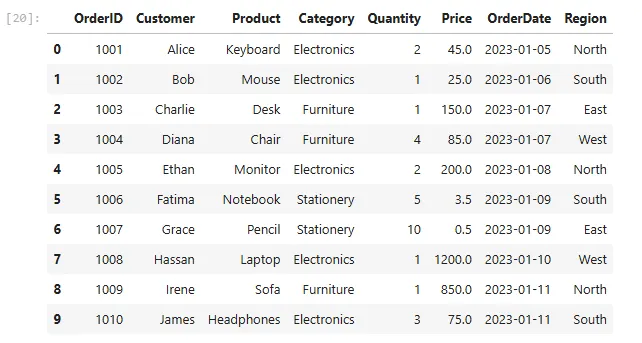
Here’s a preview of the data
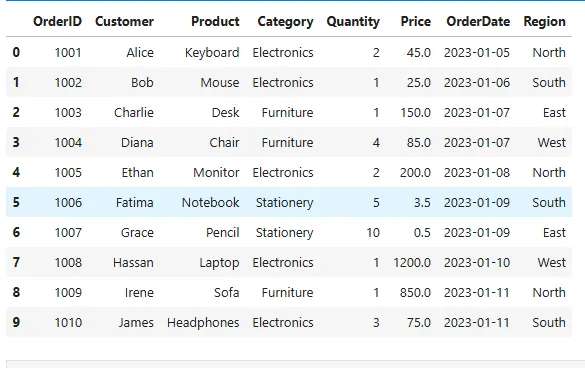 It consists of basic sales records with columns OrderId, Customer, Product, Category, Quantity, Price, OrderDate and Region.
Alright, let’s begin our filtering!
It consists of basic sales records with columns OrderId, Customer, Product, Category, Quantity, Price, OrderDate and Region.
Alright, let’s begin our filtering!
Filtering by a single condition
Let’s try to select all records from a particular category. For instance, I want to know how many unique orders were made in the Electronics category. To do that, it’s pretty straightforward
python
# Filter by a single condition
# Example: All orders from the “Electronics” category.
df_sales[‘Category’] == ‘Electronics’
In Python, you need to distinguish between the = operator and the == operator.
= is used to assign a value to a variable.
For instance
python
x = 10 # Assigns the value 10 to the variable x
== on the other hand is used to compare two values together. For instance
python
a = 3
b = 3
print(a == b) # Output: True

c = 5
d = 10
print(c == d) # Output: False
With that said, let’s apply the same notion to the filtering I did above
python
# Filter by a single condition
# Example: All orders from the “Electronics” category.
df_sales[‘Category’] == ‘Electronics’
Here, I’m basically telling Python to search through our entire record to find a category named Electronics. When it finds a match, it displays a Boolean result, True or False. Here’s the result
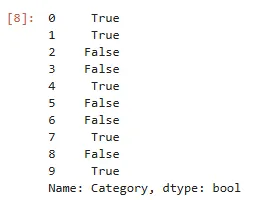 As you can see. We are getting a Boolean output. True means Electronics exists, while False means the latter. This is okay and all, but it can become confusing if you’re dealing with a large number of records. Let’s fix that.
python
As you can see. We are getting a Boolean output. True means Electronics exists, while False means the latter. This is okay and all, but it can become confusing if you’re dealing with a large number of records. Let’s fix that.
python
# Filter by a single condition
# Example: All orders from the “Electronics” category.
df_sales[df_sales[‘Category’] == ‘Electronics’]
Here, I just wrapped the condition in the DataFrame. And with that, we get this output
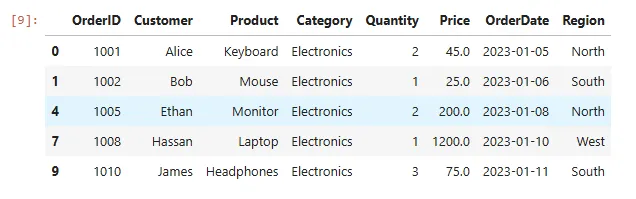 Much better, right? Let’s move on
Filter rows by numeric condition
Let’s try to retrieve records where the order quantity is greater than 2. It’s pretty straightforward.
python
# Filter rows by numeric condition
# Example: Orders where Quantity > 2
df_sales[‘Quantity’] > 2
Here, I’m using the greater than > operator. Similar to our output above, we’re gonna get a Boolean result with True and False values. Let’s fix it up real quick.
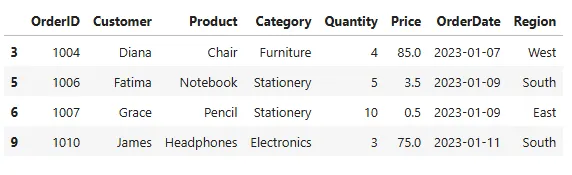 And there we go!
Filter by date condition
Filtering by date is straightforward. For instance.
python
# Filter by date condition
# Example: Orders placed after “2023–01–08”
df_sales[df_sales[“OrderDate”] > “2023–01–08”]
This checks for orders placed after January 8, 2023. And here’s the output.
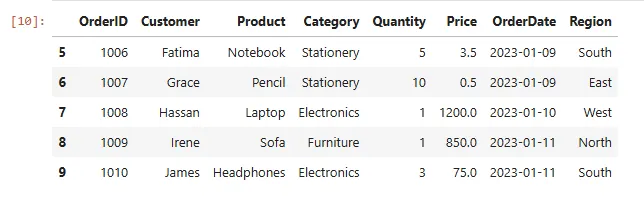 The cool thing about Pandas is that it converts string data types to dates automatically. In cases where you encounter an error. You might want to convert to a date before filtering using the
 to_datetime() function. Here’s an example
python
df[“OrderDate”] = pd.to_datetime(df[“OrderDate”])
This converts our OrderDate column to a date data type. Let’s kick things up a notch.
Filtering by Multiple Conditions (AND, OR, NOT)
Pandas enables us to filter on multiple conditions using logical operators. However, these operators are different from Python's built-in operators like (and, or, not). Here are the logical operators you’ll be working with the most
& (Logical AND)
The ampersand (&) symbol represents AND in pandas. We use this when we’re trying to fulfil two conditions. In this case, both conditions have to be true. For instance, let’s retrieve orders from the “Furniture” category where Price > 500.
python
# Multiple conditions (AND)
# Example: Orders from “Furniture” where Price > 500
df_sales[(df_sales[“Category”] == “Furniture”) & (df_sales[“Price”] > 500)]
Let’s break this down. Here, we have two conditions. One that retrieves orders in the Furniture category and another that filters for prices > 500. Using the &, we’re able to combine both conditions.
Here’s the result.
 One record was managed to be retrieved. Looking at it, it meets our condition. Let’s do the same for OR
| (Logical OR)
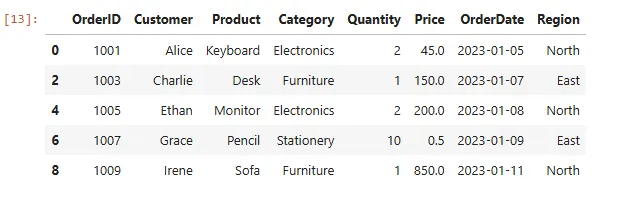
The |,vertical bar symbol is used to represent OR in pandas. In this case, at least one of the corresponding elements should be True. For instance, let’s retrieve records with orders from the “North” region OR “East” region.
python
# Multiple conditions (OR)
# Example: Orders from “North” region OR “East” region.
df_sales[(df_sales[“Region”] == “North”) | (df_sales[“Region”] == “East”)]
Here’s the output
Filter with isin()
Let’s say I want to retrieve orders from multiple customers. I could always use the & operator. For instance
python
df_sales[(df_sales[‘Customer’] == ‘Alice’) | (df_sales[‘Customer’] == ‘Charlie’)]
Output:
 Nothing wrong with that. But there’s a better and easier way to do this. That’s by using the
 isin() function. Here’s how it works
python
# Orders from customers ["Alice", "Diana", "James"].
df_sales[df_sales[“Customer”].isin([“Alice”, “Diana”, “James”])]
Output:
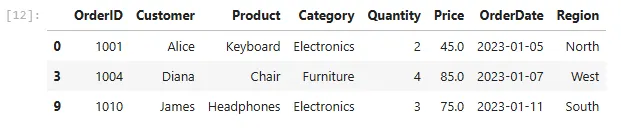 The code is much easier and cleaner. Using the
 isin() function, I can add as many parameters as I want. Let’s move on to some more advanced filtering.
Filter using string matching
One of Pandas' powerful but underused functions is string matching. It helps a ton in data cleaning tasks when you’re trying to search through patterns in the records in your DataFrame. Similar to the LIKE operator in SQL. For instance, let’s retrieve customers whose name starts with “A”.
python
# Customers whose name starts with "A".
df_sales[df_sales[“Customer”].str.startswith(“A”)]
Output:
 Pandas gives you the
 .str accessor to use string functions. Here’s another example
python
# Products ending with “top” (e.g., Laptop).
df_sales[df_sales[“Product”].str.endswith(“top”)]
Output:

Filter using query() method
If you’re coming from a SQL background, this method would be so helpful for you. Let’s try to retrieve orders from the electronics category where the quantity > 2. It can always go like this.
python
df_sales[(df_sales[“Category”] == “Electronics”) & (df_sales[“Quantity”] >= 2)]
Output:
But if you’re someone trying to bring in your SQL sauce. This will work for you instead
python
df.query(“Category == ‘Electronics’ and Quantity >= 2”)
You’ll get the same output above. Pretty similar to SQL if you ask me, and you’ll be able to ditch the & symbol. I’m gonna be using this method quite often.
Filter by column values in a range
Pandas allows you to retrieve a range of values. For instance, Orders where the Price is between 50 and 500 would go like this
python
# Orders where the Price is between 50 and 500
df_sales[df_sales[“Price”].between(50, 500)]
Output:
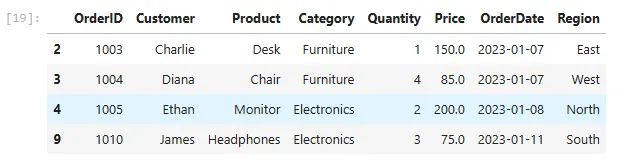 Pretty straightforward.
Filter missing values (NaN)
This is probably the most helpful function because, as a data analyst, one of the data cleaning tasks you’ll be working on the most is filtering out missing values. To do this in Pandas is straightforward. That’s by using the notna() function. Let’s filter rows where Price is not null.
python
# filter rows where Price is not null.
df_sales[df_sales[“Price”].notna()]
Output:
 And there you go. I don’t really notice the difference, though, but I’m gonna trust it’s done.
Conclusion
The next time you open a messy CSV and wonder “Where do I even start?” , try filtering first. It’s the quickest way to cut through the noise and find the story hidden in your data.
The transition to Python for data analysis used to feel like a huge step, coming from a SQL background. But for some reason, Pandas seems way easier and less time-consuming for me for filtering data
The cool part about this is that these same techniques work no matter the dataset — sales numbers, survey responses, web analytics, you name it.
I hope you found this article helpful.
I write these articles as a way to test and strengthen my own understanding of technical concepts — and to share what I’m learning with others who might be on the same path. Feel free to share with others. Let’s learn and grow together. Cheers!
Feel free to say hi on any of these platforms
Medium
LinkedIn
Twitter
YouTube
Register Now to Continue Reading
Unlock Towards Data Science with a Free Account
All articles on Towards Data Science are available to registered users. Create a free account today to access this article and thousands more.
Register for freeSign in to your account
 Written By
See all from Ibrahim Salami
Data AnalyticsPandasPandas DataframeProgrammingPython
Share This Article
Towards Data Science is a community publication. Submit your insights to reach our global audience and earn through the TDS Author Payment Program.
Write for TDS
Related Articles
Data Science
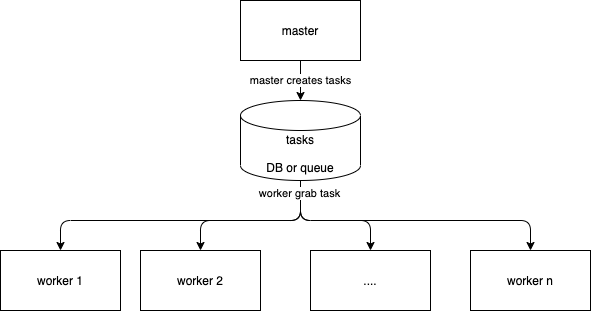
This describes a simple architecture in python and with celery to train multiple models without increasing the total training duration.
Geoffroy Gobert
January 4, 20214 min read
Deep Learning
Train a convolutional neural network adopting a transfer learning approach
Marcello Politi
May 30, 20224 min read
Data Science
Analyzing your own data can make you a good data analyst!
Pranay Dave
July 19, 20224 min read
Data Science
And what does it tell us?
Sara A. Metwalli
April 20, 20267 min read
Machine Learning
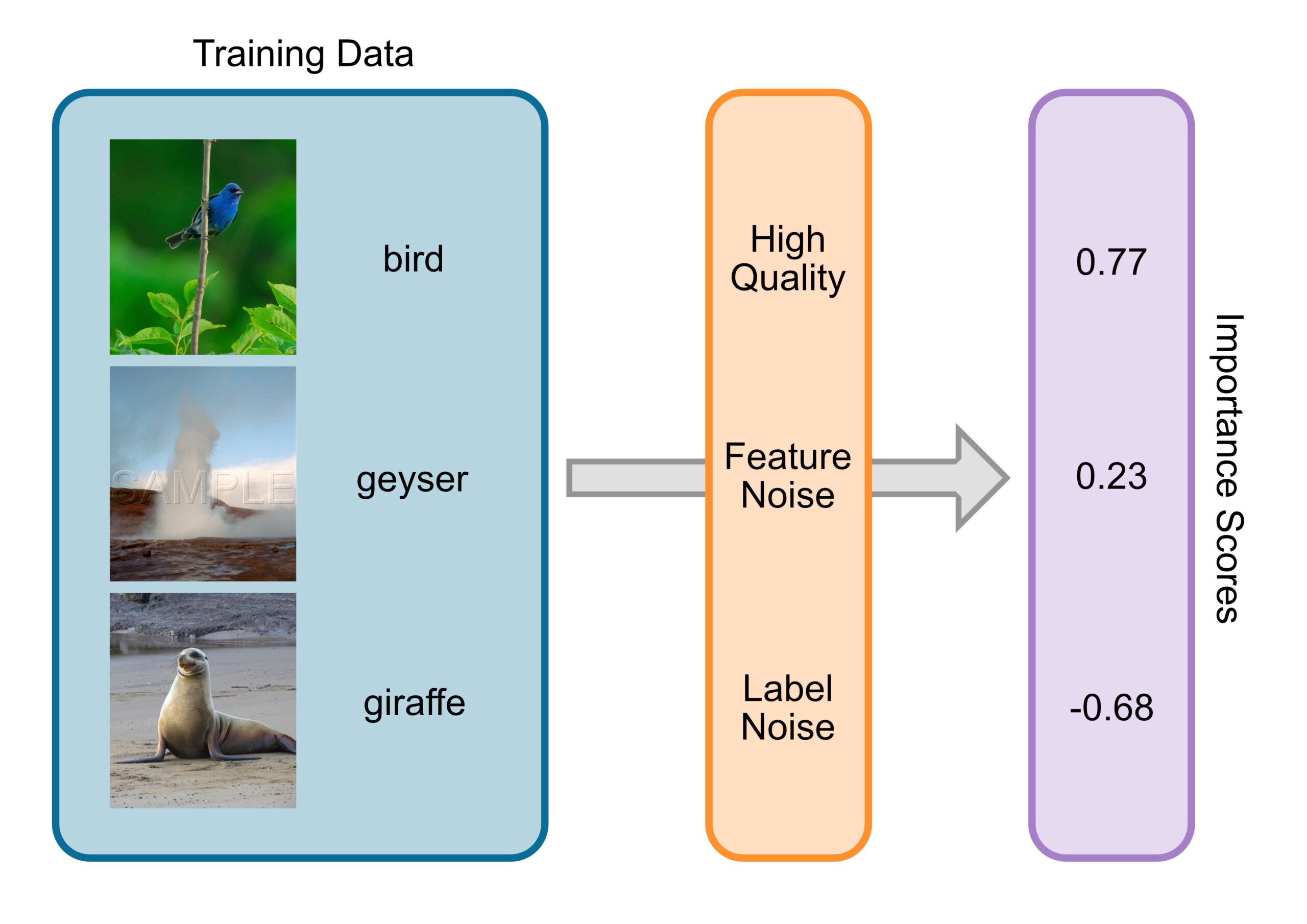
ChatGPT and similar LLMs were trained on insane amounts of data. OpenAI and Co. scraped the internet, collecting books, articles, and...
Tim Wibiral
December 12, 202410 min read
Data Science
And use data from your Drive and BigQuery
Fidocia Wima Adityawarman
November 4, 20205 min read
Machine Learning
Neural Networks
Benjamin Lau
December 27, 20188 min read
Deep Learning
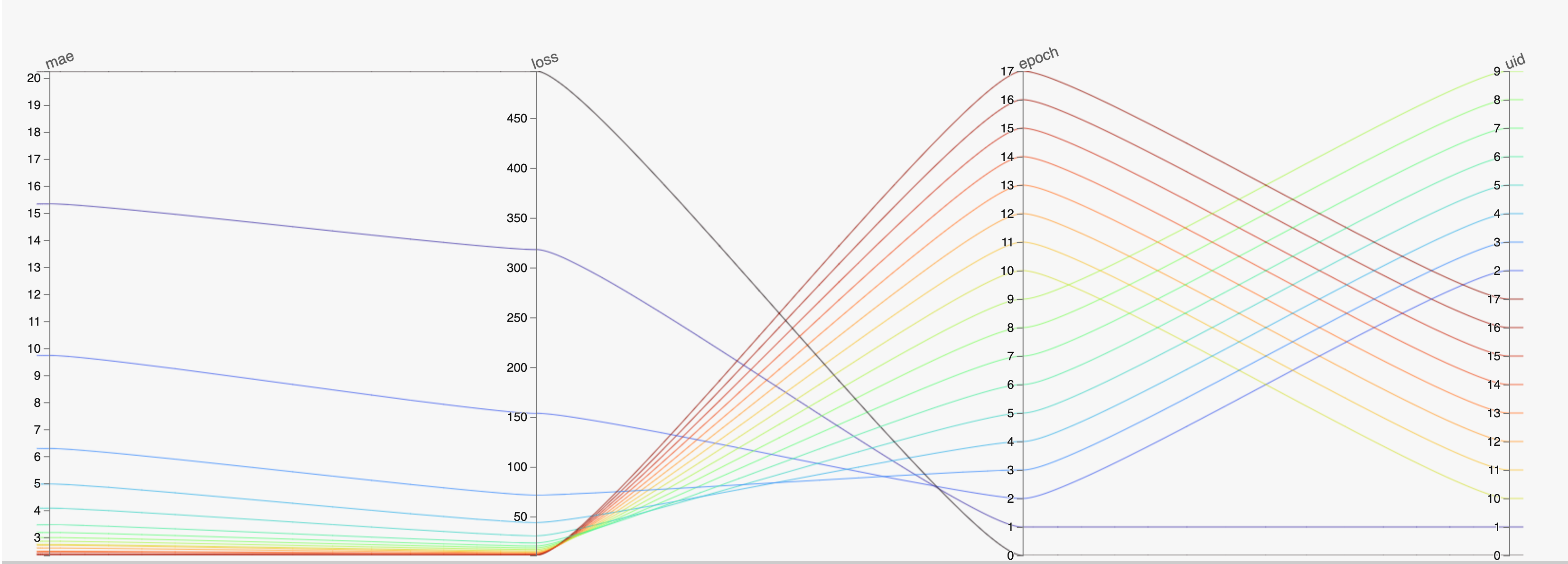
Using HiPlot to generate parallel coordinate plots to visualize deep learning model training.
Deval Parikh
January 14, 20225 min read
Mathematics
Discussing Research Papers in Graph Theory
Vatsal
January 4, 202213 min read
Your home for data science and AI. The world's leading publication for data science, data analytics, data engineering, machine learning, and artificial intelligence professionals.
Subscribe to Our NewsletterWrite For TDS•About•Advertise•Privacy Policy•Terms of Use
© Insight Media Group, LLC 2026•The New Stack•roadmap.sh•Creator Network
Recommended Articles
Close