保留正文与补采附件。源页面当前未重新核验;具体限制见交付清单。
 We value your privacy
We use cookies to enhance your browsing experience, serve personalised ads or content, and analyse our traffic. By clicking "Accept All", you consent to our use of cookies.
Customise Reject All Accept All
Customise Consent Preferences
We value your privacy
We use cookies to enhance your browsing experience, serve personalised ads or content, and analyse our traffic. By clicking "Accept All", you consent to our use of cookies.
Customise Reject All Accept All
Customise Consent Preferences  We use cookies to help you navigate efficiently and perform certain functions. You will find detailed information about all cookies under each consent category below.
The cookies that are categorised as "Necessary" are stored on your browser as they are essential for enabling the basic functionalities of the site. ... Show more
NecessaryAlways Active
Necessary cookies are required to enable the basic features of this site, such as providing secure log-in or adjusting your consent preferences. These cookies do not store any personally identifiable data.
We use cookies to help you navigate efficiently and perform certain functions. You will find detailed information about all cookies under each consent category below.
The cookies that are categorised as "Necessary" are stored on your browser as they are essential for enabling the basic functionalities of the site. ... Show more
NecessaryAlways Active
Necessary cookies are required to enable the basic features of this site, such as providing secure log-in or adjusting your consent preferences. These cookies do not store any personally identifiable data.
-
Cookie
BCTempID
-
Duration
10 minutes
-
Description
No description available.
-
Cookie
__cf_bm
-
Duration
1 hour
-
Description
This cookie, set by Cloudflare, is used to support Cloudflare Bot Management.
-
Cookie
AWSALBCORS
-
Duration
7 days
-
Description
Amazon Web Services set this cookie for load balancing.
-
Cookie
_cfuvid
-
Duration
session
-
Description
Cloudflare sets this cookie to track users across sessions to optimize user experience by maintaining session consistency and providing personalized services
-
Cookie
li_gc
-
Duration
6 months
-
Description
Linkedin set this cookie for storing visitor's consent regarding using cookies for non-essential purposes.
-
Cookie
__hssrc
-
Duration
session
-
Description
This cookie is set by Hubspot whenever it changes the session cookie. The __hssrc cookie set to 1 indicates that the user has restarted the browser, and if the cookie does not exist, it is assumed to be a new session.
-
Cookie
__hssc
-
Duration
1 hour
-
Description
HubSpot sets this cookie to keep track of sessions and to determine if HubSpot should increment the session number and timestamps in the __hstc cookie.
-
Cookie
wpEmojiSettingsSupports
-
Duration
session
-
Description
WordPress sets this cookie when a user interacts with emojis on a WordPress site. It helps determine if the user's browser can display emojis properly.
-
Cookie
BCSessionID
-
Duration
1 year 1 month 4 days
-
Description
Blueconic sets this cookie as a unique identifier for the BlueConic profile.
-
Cookie
_octo
-
Duration
1 year
-
Description
No description available.
-
Cookie
logged_in
-
Duration
1 year
-
Description
No description available.
-
Cookie
__Secure-YEC
-
Duration
past
-
Description
YouTube sets this cookie to stores the user's video player preferences using embedded YouTube video
-
Cookie
__eoi
-
Duration
6 months
-
Description
Description is currently not available.
-
Cookie
AWSALBTGCORS
-
Duration
7 days
-
Description
No description available.
-
Cookie
login-status-p
-
Duration
past
-
Description
Description is currently not available.
-
Cookie
AWSALBTG
-
Duration
7 days
-
Description
No description available.
-
Cookie
csrf_token
-
Duration
session
-
Description
No description available.
-
Cookie
token_v2
-
Duration
1 day
-
Description
Description is currently not available.
-
Cookie
D
-
Duration
1 year
-
Description
Description is currently not available.
-
Cookie
PHPSESSID
-
Duration
session
-
Description
This cookie is native to PHP applications. The cookie stores and identifies a user's unique session ID to manage user sessions on the website. The cookie is a session cookie and will be deleted when all the browser windows are closed.
-
Cookie
VISITOR_PRIVACY_METADATA
-
Duration
6 months
-
Description
YouTube sets this cookie to store the user's cookie consent state for the current domain.
-
Cookie
cookietest
-
Duration
session
-
Description
The cookietest cookie is typically used to determine whether the user's browser accepts cookies, essential for website functionality and user experience.
-
Cookie
__Host-airtable-session
-
Duration
1 year
-
Description
This cookie is used to enable us to integrate the services of Airtable.
-
Cookie
__Host-airtable-session.sig
-
Duration
1 year
-
Description
This cookie is used to enable us to integrate the services of Airtable.
-
Cookie
m
-
Duration
1 year 1 month 4 days
-
Description
Stripe sets this cookie for fraud prevention purposes. It identifies the device used to access the website, allowing the website to be formatted accordingly.
-
Cookie
BIGipServer*
-
Duration
session
-
Description
Marketo sets this cookie to collect information about the user's online activity and build a profile about their interests to provide advertisements relevant to the user.
-
Cookie
__cfruid
-
Duration
session
-
Description
Cloudflare sets this cookie to identify trusted web traffic.
-
Cookie
_GRECAPTCHA
-
Duration
6 months
-
Description
Google Recaptcha service sets this cookie to identify bots to protect the website against malicious spam attacks.
-
Cookie
__Secure-YNID
-
Duration
6 months
-
Description
Google cookie used to protect user security and prevent fraud, especially during the login process.
-
Cookie
cookieyes-consent
-
Duration
1 year
-
Description
CookieYes sets this cookie to remember users' consent preferences so that their preferences are respected on subsequent visits to this site. It does not collect or store any personal information about the site visitors.
Functional
Functional cookies help perform certain functionalities like sharing the content of the website on social media platforms, collecting feedback, and other third-party features.
-
Cookie
lidc
-
Duration
1 day
-
Description
LinkedIn sets the lidc cookie to facilitate data center selection.
-
Cookie
brw
-
Duration
1 year
-
Description
No description available.
-
Cookie
brwConsent
-
Duration
5 minutes
-
Description
Description is currently not available.
-
Cookie
WMF-Uniq
-
Duration
1 year
-
Description
Description is currently not available.
-
Cookie
loom_anon_comment
-
Duration
1 year
-
Description
No description available.
-
Cookie
loom_referral_video
-
Duration
session
-
Description
Description is currently not available.
-
Cookie
VISITOR_INFO1_LIVE
-
Duration
6 months
-
Description
A cookie set by YouTube to measure bandwidth that determines whether the user gets the new or old player interface.
-
Cookie
yt-remote-connected-devices
-
Duration
Never Expires
-
Description
YouTube sets this cookie to store the user's video preferences using embedded YouTube videos.
-
Cookie
ytidb::LAST_RESULT_ENTRY_KEY
-
Duration
Never Expires
-
Description
The cookie ytidb::LAST_RESULT_ENTRY_KEY is used by YouTube to store the last search result entry that was clicked by the user. This information is used to improve the user experience by providing more relevant search results in the future.
-
Cookie
yt-remote-device-id
-
Duration
Never Expires
-
Description
YouTube sets this cookie to store the user's video preferences using embedded YouTube videos.
-
Cookie
yt-remote-session-name
-
Duration
session
-
Description
The yt-remote-session-name cookie is used by YouTube to store the user's video player preferences using embedded YouTube video.
-
Cookie
yt-remote-fast-check-period
-
Duration
session
-
Description
The yt-remote-fast-check-period cookie is used by YouTube to store the user's video player preferences for embedded YouTube videos.
-
Cookie
yt-remote-session-app
-
Duration
session
-
Description
The yt-remote-session-app cookie is used by YouTube to store user preferences and information about the interface of the embedded YouTube video player.
-
Cookie
yt-remote-cast-available
-
Duration
session
-
Description
The yt-remote-cast-available cookie is used to store the user's preferences regarding whether casting is available on their YouTube video player.
-
Cookie
yt-remote-cast-installed
-
Duration
session
-
Description
The yt-remote-cast-installed cookie is used to store the user's video player preferences using embedded YouTube video.
-
Cookie
cp_session
-
Duration
3 months
-
Description
Codepen sets this cookie for Help systems found in the website.
-
Cookie
loid
-
Duration
1 year 1 month 4 days
-
Description
This cookie is set by the Reddit. The cookie enables the sharing of content from the website onto the social media platform.
Analytics
Analytical cookies are used to understand how visitors interact with the website. These cookies help provide information on metrics such as the number of visitors, bounce rate, traffic source, etc.
-
Cookie
__hstc
-
Duration
6 months
-
Description
Hubspot set this main cookie for tracking visitors. It contains the domain, initial timestamp (first visit), last timestamp (last visit), current timestamp (this visit), and session number (increments for each subsequent session).
-
Cookie
hubspotutk
-
Duration
6 months
-
Description
HubSpot sets this cookie to keep track of the visitors to the website. This cookie is passed to HubSpot on form submission and used when deduplicating contacts.
-
Cookie
_ga
-
Duration
1 year 1 month 4 days
-
Description
Google Analytics sets this cookie to calculate visitor, session and campaign data and track site usage for the site's analytics report. The cookie stores information anonymously and assigns a randomly generated number to recognise unique visitors.
-
Cookie
ga*
-
Duration
1 year 1 month 4 days
-
Description
Google Analytics sets this cookie to store and count page views.
-
Cookie
__Host-psifi.analyticsTrace
-
Duration
6 hours
-
Description
Description is currently not available.
-
Cookie
__Host-psifi.analyticsTraceV2
-
Duration
6 hours
-
Description
Description is currently not available.
-
Cookie
_gh_sess
-
Duration
session
-
Description
GitHub sets this cookie for temporary application and framework state between pages like what step the user is on in a multiple step form.
-
Cookie
YSC
-
Duration
session
-
Description
YSC cookie is set by Youtube and is used to track the views of embedded videos on Youtube pages.
-
Cookie
ajs_anonymous_id
-
Duration
1 year
-
Description
This cookie is set by Segment to count the number of people who visit a certain site by tracking if they have visited before.
-
Cookie
vuid
-
Duration
1 year 1 month 4 days
-
Description
Vimeo installs this cookie to collect tracking information by setting a unique ID to embed videos on the website.
Performance
Performance cookies are used to understand and analyse the key performance indexes of the website which helps in delivering a better user experience for the visitors.
-
Cookie
AWSALB
-
Duration
7 days
-
Description
AWSALB is an application load balancer cookie set by Amazon Web Services to map the session to the target.
-
Cookie
acq
-
Duration
past
-
Description
Description is currently not available.
-
Cookie
acq.sig
-
Duration
past
-
Description
Description is currently not available.
-
Cookie
ptc
-
Duration
2 years
-
Description
No description available.
Advertisement
Advertisement cookies are used to provide visitors with customised advertisements based on the pages you visited previously and to analyse the effectiveness of the ad campaigns.
-
Cookie
muc_ads
-
Duration
1 year 1 month 4 days
-
Description
Twitter sets this cookie to collect user behaviour and interaction data to optimize the website.
-
Cookie
guest_id_marketing
-
Duration
1 year 1 month 4 days
-
Description
Twitter sets this cookie to identify and track the website visitor.
-
Cookie
guest_id_ads
-
Duration
1 year 1 month 4 days
-
Description
Twitter sets this cookie to identify and track the website visitor.
-
Cookie
personalization_id
-
Duration
1 year 1 month 4 days
-
Description
Twitter sets this cookie to integrate and share features for social media and also store information about how the user uses the website, for tracking and targeting.
-
Cookie
guest_id
-
Duration
1 year 1 month 4 days
-
Description
Twitter sets this cookie to identify and track the website visitor. It registers if a user is signed in to the Twitter platform and collects information about ad preferences.
-
Cookie
bcookie
-
Duration
1 year
-
Description
LinkedIn sets this cookie from LinkedIn share buttons and ad tags to recognize browser IDs.
-
Cookie
__Secure-ROLLOUT_TOKEN
-
Duration
6 months
-
Description
YouTube sets this cookie to manage feature rollout and experimentation. It helps Google control which new features or interface changes are shown to users as part of testing and staged rollouts, ensuring consistent experience for a given user during an experiment.
-
Cookie
yt.innertube::nextId
-
Duration
Never Expires
-
Description
YouTube sets this cookie to register a unique ID to store data on what videos from YouTube the user has seen.
-
Cookie
yt.innertube::requests
-
Duration
Never Expires
-
Description
YouTube sets this cookie to register a unique ID to store data on what videos from YouTube the user has seen.
-
Cookie
session_tracker
-
Duration
session
-
Description
This cookie is set by the Reddit. This cookie is used to identify trusted web traffic. It also helps in adverstising on the website.
-
Cookie
edgebucket
-
Duration
session
-
Description
Reddit sets this cookie to save the information about a log-on Reddit user, for the purpose of advertisement recommendations and updating the content.
-
Cookie
did
-
Duration
1 year
-
Description
Arbor sets this cookie to show targeted ads to site visitors.This cookie expires after 2 months or 1 year.
Uncategorised
Other uncategorised cookies are those that are being analysed and have not been classified into a category as yet.
No cookies to display.
Reject All Save My Preferences Accept All
Toggle SearchToggle Mobile Navigation
Publish AI, ML & data-science insights to a global community of data professionals.
Sign inSubmit an Article
LatestEditor's PicksNewsletterShipAI
Write For TDS
LinkedInXToggle Search
Agentic AI
Hybrid AI: Combining Deterministic Analytics with LLM Reasoning
How AI architecture prevents plausible but wrong analytics
Ingo Nowitzky
May 22, 202617 min read
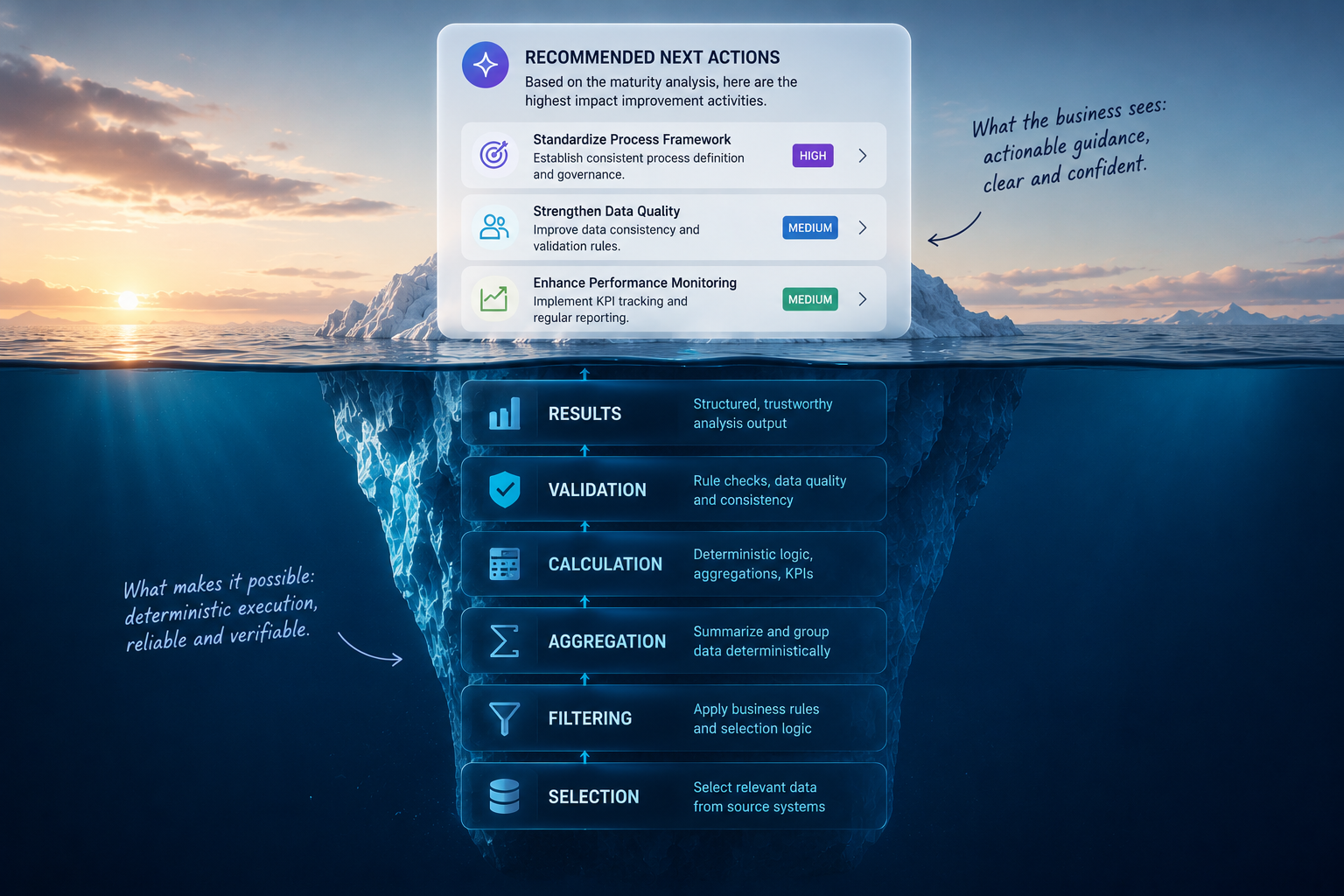 Generated by author using ChatGPT
Introduction
I tried to build an agentic AI network for my company that advises manufacturing plants on how to mature their operations. The system was designed to be data-driven, allowing users to upload assessment data directly through the chat interface. The first working prototype was finished surprisingly quickly, and at first glance the results looked promising.
There was only one problem: Most of the results were wrong!
Even worse, the AI quickly learned which numerical ranges looked plausible and began generating convincing — but fabricated — outputs. Combined with the eloquent language generation of the LLM, these results could easily be mistaken for truth. And this behavior was not limited to a single model. Similar patterns appeared across all tested systems: ChatGPT, Gemini Enterprise, DIA Brain, and Microsoft Copilot.
But plausible data is not enough, Enterprise AI systems require reliable data.
Further investigation revealed recurring failure modes. Even with “Code Interpreter” enabled, the systems:
- skipped rows or columns,
- applied incorrect filters,
- returned identical results for different inputs,
- silently mixed parts of the dataset,
- or simply collapsed under more complex analytical tasks.
This led to a crucial realization:
Probabilistic reasoning is extremely powerful for interpretation and interaction — but foundational data analysis requires deterministic execution.
Learn this step by step with the interactive AI Agents roadmap.
Table of contents
1 The Use Case
2 The Hybrid Architecture
3 The Analysis Planner
4 The Analysis Engine
5 An End-to-End example
6 Why AI Architecture Matters
1 The Use Case
Although the specific use case is of secondary importance, it is briefly outlined here to support the practical understanding of the underlying architectural challenge.
The primary task of our agent is to advise manufacturing plants and value streams on how to improve their operational maturity: optimizing processes, improving productivity, reducing inventory levels, and ultimately lowering operational costs. To achieve this, the consultation agent operates in two modes:
- It provides generic recommendations for improving specific operational topics based on the retrieval of specialized “how-to” documentation and assessment questionnaires.
- The agent is intended to analyze the current situation of a plant or value stream based on assessment results and assessors’ written recommendations. Based on this analysis, it is expected to provide highly specific recommendations for the next improvement steps.
In both modes — as with most LLM-based AI models — the user can interactively discuss ideas and recommendations with the agent in order to derive the most suitable action plan.
For the second operation mode, it is essential that the agent can reliably process and analyze assessment data. In our case, this data is provided as an Excel export from a central database. Ideally, the agent should be able to process the file without any prior manual preparation.
The structure of the file, however, is challenging. Since all assessment results, intermediate calculations, metadata, and detailed assessment questions are stored in separate columns, the worksheet contains more than 800 columns. The number of rows corresponds to the number of assessments in the database and can range from one to several hundreds (Fig. 1). Assessment ratings are represented as integers from 0 to 4. In addition, the file contains more than 160 free-text fields with qualitative observations, strengths, weaknesses, and recommendations from the assessors.
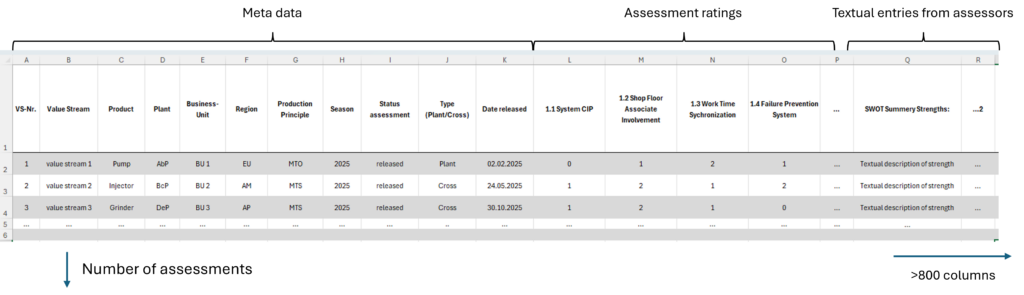 Figure 1: Assessment data structure | image by author
The analytical tasks of the agent include filtering relevant rows and columns for a specific request, calculating averages, aggregating maturity scores, summarizing textual recommendations, and deriving meaningful improvement suggestions from the results.
Initially, these tasks appeared to be well within the capabilities of modern LLM-based AI systems, especially with “Code Interpreter” mode enabled. As already mentioned in the introduction, this assumption quickly turned out to be a misconception.
Figure 1: Assessment data structure | image by author
The analytical tasks of the agent include filtering relevant rows and columns for a specific request, calculating averages, aggregating maturity scores, summarizing textual recommendations, and deriving meaningful improvement suggestions from the results.
Initially, these tasks appeared to be well within the capabilities of modern LLM-based AI systems, especially with “Code Interpreter” mode enabled. As already mentioned in the introduction, this assumption quickly turned out to be a misconception.
2 The Hybrid Architecture
The core idea for overcoming the analytical challenge was to clearly separate deterministic data analysis from LLM-based reasoning and interpretation. Fig. 2 shows the selected system architecture after several improvement iterations. The system was implemented in Microsoft Copilot Studio because the platform allows deterministic workflow elements, such as topics and flows, to be combined with LLM-based reasoning components.
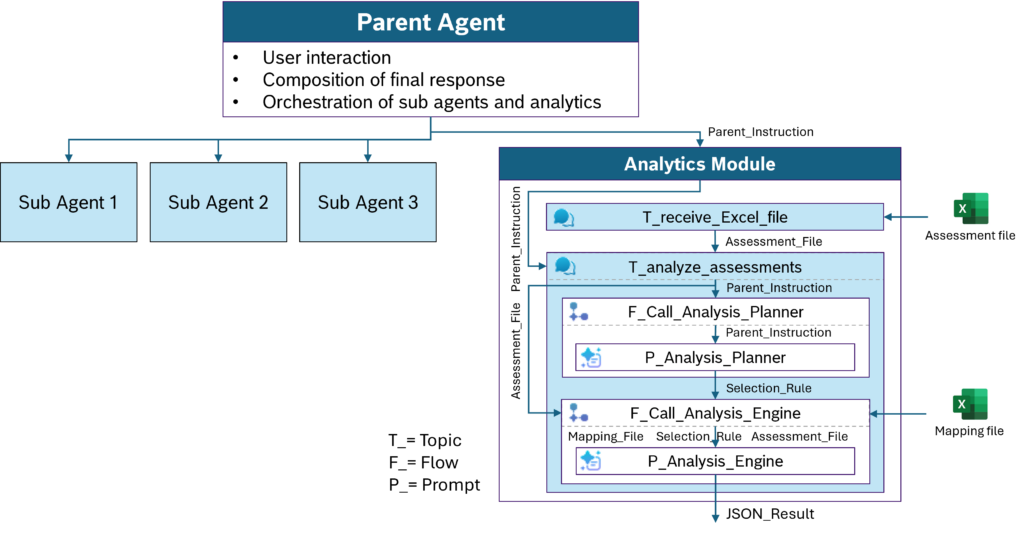 Figure 2: System architecture of the consultation agent with integrated analytics module | image by author
The parent agent handles all communication with the user. It orchestrates the sub agents and the analytics module, delegates tasks to them, receives their responses, and composes the final answer.
The sub agents are specialized LLM-based modules with access to specific knowledge sources. These include descriptions of maturity-level expectations for the value streams, questionnaires with detailed assessment questions, and more general guidelines for operational excellence. The sub agents are called by the parent agent according to their specific capabilities and respond to the parent agent rather than directly to the user.
The analytics module is the main focus of this article. It performs the deterministic data analysis and is designed to provide reproducible and reliable analytical results. It receives an analysis instruction in natural language from the parent agent, referred to as
Figure 2: System architecture of the consultation agent with integrated analytics module | image by author
The parent agent handles all communication with the user. It orchestrates the sub agents and the analytics module, delegates tasks to them, receives their responses, and composes the final answer.
The sub agents are specialized LLM-based modules with access to specific knowledge sources. These include descriptions of maturity-level expectations for the value streams, questionnaires with detailed assessment questions, and more general guidelines for operational excellence. The sub agents are called by the parent agent according to their specific capabilities and respond to the parent agent rather than directly to the user.
The analytics module is the main focus of this article. It performs the deterministic data analysis and is designed to provide reproducible and reliable analytical results. It receives an analysis instruction in natural language from the parent agent, referred to as Parent_Instruction. The analytics module itself consists of topics, flows, and AI modules, which are called “prompts” in Copilot Studio.
The topic T_receive_Excel_File handles the upload and storage of assessment files. It is triggered when a file is uploaded in the chat window, indicated by the variable System.Activity.Attachments having a value. The topic checks whether the uploaded file is an Excel file and, if so, stores it in the global variable Assessment_File.
The topic T_analyze_assessments is actively called by the parent agent if it has an analytics task to conduct and receives Parent_Instruction as input. A second input is the assessment data stored in the global variable Assessment_File. The topic contains the two core analytics components: Analysis_Planner and Analysis_Engine. Both are embedded in agentic flows, F_Call_Analysis_Planner and F_Call_Analysis_Engine. These flows serve as connectors between the topic T_analyze_assessments and the AI prompts P_Analysis_Planner and P_Analysis_Engine.
F_Call_Analysis_Planner receives only one input, Parent_Instruction, and forwards it to P_Analysis_Planner. This component generates the Selection_Rule, the core analysis instruction to be executed by P_Analysis_Engine. The inner workings of P_Analysis_Planner are discussed in Chapter 3.
F_Call_Analysis_Engine receives three inputs: the Selection_Rule from Analysis_Planner, a Mapping_File provided from SharePoint, and the Assessment_File. All three inputs are forwarded to the AI prompt P_Analysis_Engine, which conducts the data analysis as specified by Analysis_Planner. The P_Analysis_Engine is discussed in detail in Chapter 4.
3 The Analysis Planner
The P_Analysis_Planner is the intelligent part of the data analysis pipeline and generates the analysis instruction, called Selection_Rule. This instruction is a translation of the natural language Parent_Instruction and is generally unique for each request. In order to minimize probabilistic variation, the translation process is constrained by strict rules.
The Analysis_Planner does not analyze the assessment data itself. Its sole responsibility is to translate the probabilisticParent_Instructioninto a deterministic analysis specification.
In the following, we will examine selected parts of the instruction in more detail. You can download the full instruction here.
markup
You are Analysis_Planner, an expert assistant for translating natural-language assessment analysis requests into structured Selection_Rules.Your task is to create a Selection_Rule JSON object for the Analysis_Engine.You receive only one input:1. Parent_Instruction :A natural-language analysis request from the parent agent (orchestrator).You must analyze Parent_Instruction and determine:- which type of analysis is required,- which assessment content categories are relevant,- whether concept or execution maturity/findings are requested,- whether specific chapters are requested,- and whether row filters are required.The Selection_Rule you generate will later be used by the Analysis_Engine together with:- the real assessment data file,- and the Mapping_Fileto execute the analysis deterministically.
The code box above shows the initial instruction for P_Analysis_Planner. It clearly defines purpose and scope and explicitly separates planning from execution. The planner translates the request, while the actual execution is delegated to the P_Analysis_Engine.
Next follows a longer section describing the semantics of the assessment data. Of course, this part is highly specific to the individual use case and dataset. It defines semantic categories used for row filtering and categories used to select the actual analysis targets (TARGET CONTENT CATEGORIES and TARGET SELECTION ATTRIBUTES).
yaml
ASSESSMENT DATA SEMANTICS

The assessment data can be addressed through the following semantic categories.

ROW FILTER CATEGORIES

Use these categories only for row_filters:

- VS_Nr:
    Unique identifier of the value stream.
    Use when filtering by value stream number.

- Value Stream:
    Name of the value stream.
    Use when filtering by value stream name.

- ...

TARGET CONTENT CATEGORIES

Use these categories only in target_selection_rules.data_category:

- chapter_score:
    Numeric maturity score.
    Use for maturity calculations, score analysis, and average maturity analysis.

- strength:
    Assessor statements describing strengths.

- ...

TARGET SELECTION ATTRIBUTES

Use these attributes only inside target_selection_rules:

- data_category:
    Defines which target content category is needed.

- aggregation_allowed:
    Use:
        - mean for numeric maturity averages
        - summary for textual summaries

- ...
The planner never interacts directly with physical dataset columns. Instead, it operates on a semantic abstraction layer that decouples natural language from the underlying dataset structure.
This separation is important because the assessment dataset contains more than 800 columns, including:
- maturity ratings,
- textual assessor findings,
- metadata,
- organizational mappings,
- questionnaire variants,
- and concept/execution distinctions.
Selecting the correct target columns therefore becomes a critical part of the analysis process.
Restricting the allowed analysis types is equally important. The planner is intentionally prevented from inventing arbitrary analytical operations. The section ANALYSIS TYPES therefore defines the only valid analysis types — currently just two. This significantly improves the predictability and robustness of downstream execution. Of course, the list can easily be extended for individual use cases.
yaml
ANALYSIS TYPES

Use exactly one of these analysis_type values:

- numeric_mean
    Use for:
    - average maturity
    - mean maturity
    - ...

- text_summary
    Use for:
    - strengths
    - improvement potentials
    - ...
The next section defines how the planner selects the relevant target columns in an abstract and deterministic way. The rules distinguish between the two predefined analysis types numeric_mean and text_summary and finally determine which dataset columns are selected for a specific request.
yaml
RULES FOR target_selection_rules

NUMERIC MATURITY ANALYSIS

For numeric maturity analysis:
- analysis_type must be:
    "numeric_mean"
- data_category must be:
    ["chapter_score"]
- ...

TEXT SUMMARY ANALYSIS

For textual summary analysis:
- analysis_type must be:
    "text_summary"
- data_category:
    include only requested categories:
        - "strength"
        - "potential"
        - "recommendation"
        - "remark"
- ...
A similar logic applies to the row filtering process.
yaml
RULES FOR row_filters

Use row_filters only for filtering rows in the assessment dataset.

Allowed row filter keys are:
- VS_Nr
- Value Stream
- ...

Do NOT use row_filters for:
- chapter_id
- ...

These belong only to target_selection_rules.
Finally, the instruction defines the required output structure together with several strict “do-not rules”. This section is particularly important because the generated output is directly forwarded to the P_Analysis_Engine and therefore must follow a clearly defined and machine-readable structure.
json
OUTPUT FORMAT

Return only valid JSON.
Do not return markdown.
Do not return Python code.
...

Use exactly this structure:

{
  "status": "success",
  "parent_instruction_summary": "",
  "selection_rule": {
    "analysis_type": "",
    "target_selection_rules": {
      "data_category": [],
      "aggregation_allowed": [],
      "concept_execution": null,
      "chapter_id": null
    },
    "row_filters": {}
  },
  "warnings": []
}
If the request is unclear, the planner must explicitly return an error structure instead of “guessing” a potentially wrong analysis instruction.
json
If the task is unclear, return:

{
  "status": "error",
  "parent_instruction_summary": "",
  "selection_rule": {
    "analysis_type": null,
    "target_selection_rules": {
      "data_category": [],
      "aggregation_allowed": [],
      "concept_execution": null,
      "chapter_id": null
    },
    "row_filters": {}
  },
  "warnings": [
    "The analysis task is not clearly understood."
  ]
}
At this point, the planner has transformed ambiguous natural language into a deterministic analysis specification. However, the actual data execution still has not happened.
In chapter 5, we will follow a real user request through the complete pipeline and examine how P_Analysis_Planner generates the Selection_Rule and how P_Analysis_Engine executes it on the assessment dataset.
4 The Analysis Engine
Unlike the P_Analysis_Planner, the P_Analysis_Engine does not reason about the task. It only executes the analysis specification generated by P_Analysis_Planner.
As in chapter 3, we will focus only on the most relevant parts of the instruction. The full specification can be downloaded here.
The instruction of P_Analysis_Engine starts with the basic task definition. In essence, the AI prompt is used as a controlled Python execution environment. The code is predefined in the prompt instruction and must only be executed, not modified.
markup
You are Analysis_Engine, a deterministic pandas-based analysis executor.Your task is to analyze an Excel assessment dataset using Code Interpreter.You receive three inputs:1. document The Excel file containing the assessment data.2. Mapping_File The Excel file describing the columns of document.3. Selection_Rule A JSON object that defines: - which columns to select from Mapping_File - which row filters to apply to document - which type of analysis to performYou must not reinterpret the original user request.You must not infer additional columns.You must not change Selection_Rule.You must not generate a new analysis approach.You must only execute the deterministic Python script below.Use Code Interpreter to execute the Python script.Return only the JSON result printed by the script.Do not return markdown.Do not explain the code.Do not add text before or after the JSON result.
P_Analysis_Engine receives three input files:
- The
Assessment_File uploaded from the user in the chat interface. It is stored in the prompt-internal variable document.
- A
Mapping_File which the flow F_Call_Analysis_Engine loads from SharePoint in preparation of the execution.
- The
Selection_Rule generated by P_Analysis_Planner (see chapter 3).
The Mapping_File plays a crucial role in defining the semantics of the many columns in Assessment_File on a higher level of abstraction. With this abstraction layer, the Selection_Rule only needs to specify which type of information is required, while the P_Analysis_Engine selects the corresponding dataset columns during execution.
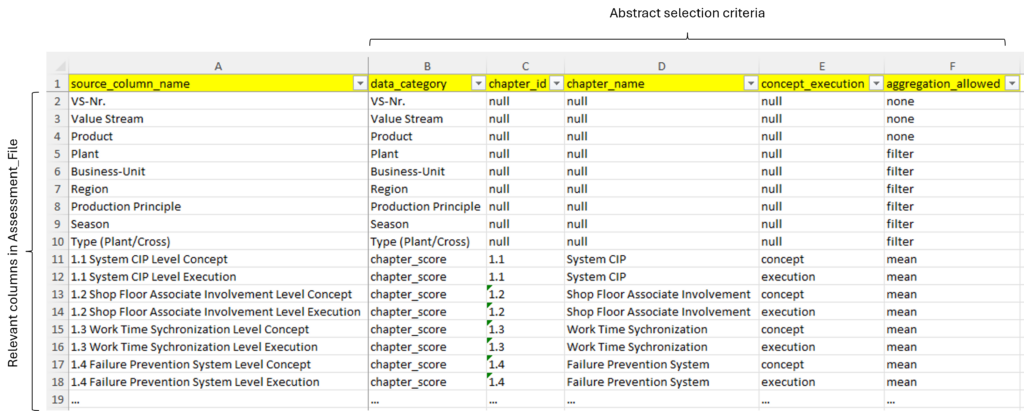 Figure 3: Structure of
 Mapping_File | image by author
Fig. 3 shows the structure of Mapping_File. It contains a row for each column of Assessment_File, that is potentially relevant for the data analysis. Data columns that are clearly irrelevant are not represented in Mapping_File and therefore are not visible to P_Analysis_Engine. For each row, the file specifies the selection criteria:
data_category:
Functional meaning of the column, e.g. maturity score, strength, plant name, region, or season.chapter_id:
Unique identifier of the assessment chapter.chapter_name:
Human-readable name of the assessment chapter.concept_execution:
Indicates whether the column belongs to concept or execution maturity.aggregation_allowed:
Defines which type of aggregation is valid for the column, e.g. mean for numeric maturity scores or summary for textual findings.
Next in P_Analysis_Engine’s instruction comes a paragraph about how to interpret the Selection_Rule.
markup
Rules for Selection_Rule:- analysis_type = "numeric_mean": Calculate arithmetic means for all selected numeric target columns.- analysis_type = "text_summary": Collect non-empty text entries from all selected text target columns.- target_selection_rules: Select target columns by matching Mapping_File attributes. A rule value of null means: do not filter by this attribute. A list means: keep rows where the Mapping_File attribute is in the list.- row_filters: Apply row filters to document. Keys are data_category values from Mapping_File, such as "Plant", "Region", "Production Principle", "Season". Values are lists of accepted values.
The selection specifies:
- which analysis operation must be executed (
analysis_type),
- how relevant target columns are selected from the
Mapping_File (target_selection_rules),
- and how the assessment dataset is filtered before the analysis is performed (
row_filters).
This instruction is intentionally deterministic. The P_Analysis_Engine is not allowed to reinterpret the original user request or invent additional analytical operations.
After the instruction block, the P_Analysis_Engine receives the actual Python script. The full script contains more than 300 lines of code and is part of the AI prompt instruction. It is linked at the top of this chapter and can be downloaded. Many of the code lines are not conceptually important for the architecture. They handle practical robustness: cleaning column names, normalizing input values, handling missing columns, converting Copilot wrapper objects, and returning structured error messages.
For the article, I will focus only on the central logic.
The first important step is that the engine loads the uploaded assessment data (now available in document) and the Mapping_File. From this point on, the LLM is no longer interpreting the user request. It only executes the deterministic script based on the Selection_Rule.
python
mapping_df = pd.read_excel(Mapping_File)
data_df = pd.read_excel(document)

mapping_df = strip_column_names(mapping_df)
data_df = strip_column_names(data_df)
The key architectural element is the selection of target columns. The P_Analysis_Engine never guesses which Excel columns may be relevant. Instead, it filters the Mapping_File according to the attributes defined in target_selection_rules.
python
target_mapping = mapping_df.copy()

for attr, rule_value in target_selection_rules.items():

    values = normalize_rule_value(rule_value)
    values = normalize_list_for_matching(values)

    if values is None:
        continue

    target_mapping = target_mapping[
        target_mapping[attr]
        .apply(normalize_for_matching)
        .isin(values)
    ]

selected_target_columns = (
    target_mapping["source_column_name"]
    .dropna()
    .tolist()
)
This is the point where the abstract analysis instruction becomes concrete. For example, a rule such as chapter_id = ["3.5"], data_category = ["chapter_score"], and aggregation_allowed = ["mean"] is translated into the actual Excel columns containing the Concept and Execution maturity scores for chapter 3.5.
The same principle is applied to row filters. Again, the engine does not infer anything from natural language. It only applies the filters explicitly provided in the Selection_Rule.
python
filtered_df = data_df.copy()

for filter_category, filter_values in row_filters.items():

    filter_mapping = mapping_df[
        mapping_df["data_category"]
        .apply(normalize_for_matching)
        == normalize_for_matching(filter_category)
    ]

    filter_col = filter_mapping["source_column_name"].iloc[0]

    filtered_df = filtered_df[
        filtered_df[filter_col]
        .apply(normalize_for_matching)
        .isin(values)
    ]
After column selection and row filtering, the actual analysis logic becomes intentionally straightforward. For numeric maturity analysis, the engine calculates arithmetic means for all selected numeric target columns.
python
if analysis_type == "numeric_mean":

    numeric_result = {}

    for col in available_target_columns:

        series = pd.to_numeric(filtered_df[col], errors="coerce")
        valid_count = int(series.notna().sum())

        numeric_result[col] = {
            "mean": float(series.mean()) if valid_count > 0 else None,
            "valid_count": valid_count
        }

    result["result"] = numeric_result
For textual analysis, the engine collects non-empty assessor statements instead of calculating values.
python
elif analysis_type == "text_summary":

    text_result = {}

    for col in available_target_columns:

        values = [
            clean_text_value(v)
            for v in filtered_df[col].tolist()
        ]

        values = [v for v in values if v is not None]

        text_result[col] = {
            "entries": values,
            "entry_count": len(values)
        }

    result["result"] = text_result
Finally, the result is returned as JSON. This is important because the output is not yet the final user-facing answer. It is the reliable analytical foundation for the next LLM step: interpretation by the parent agent.
python
print(json.dumps(result, indent=2, ensure_ascii=False))
This design deliberately keeps the P_Analysis_Engine “boring”. It does not reason, it does not explain, and it does not improve the analysis. It only executes. And that is exactly the point. The more deterministic this layer is, the more trust can be placed in the later LLM-generated interpretation.
5 End-to-End Example
To illustrate the complete workflow, let us follow a realistic example through the full pipeline.
Triggered by the user interaction, the parent agent might raise the following Parent_Instruction to the analytics module:
“Summarize the main improvement potentials for chapter 1.4 Failure Prevention System in plant AbcP.”
The request looks simple for a human reader, but it already contains multiple semantic tasks:
- identify the requested assessment chapters,
- detect the requested content type,
- apply a row filter,
- retrieve the correct text columns,
- aggregate textual findings,
- and finally generate a meaningful interpretation ( → parent agent).
This is exactly the type of task where a pure LLM-based analysis becomes unreliable. The system therefore separates the workflow into deterministic execution steps and probabilistic interpretation steps.
5.1 Translation from Analysis Planner
The first step is performed by P_Analysis_Planner.
It translates the natural language request into a deterministic Selection_Rule.
json
{
  "status": "success",
  "parent_instruction_summary": "Summarize improvement potentials for chapter 1.4 Failure Prevention System in plant AbcP.",
  "selection_rule": {
    "analysis_type": "text_summary",
    "target_selection_rules": {
      "data_category": ["potential"],
      "aggregation_allowed": ["summary"],
      "concept_execution": null,
      "chapter_id": ["1.4"]
    },
    "row_filters": {
      "Plant": ["AbcP"]
    }
  },
  "warnings": []
}
The Selection_Rule already contains the complete deterministic analysis specification:
analysis_type = "text_summary"
indicates that textual assessor findings must be collected instead of numeric calculations.data_category = ["potential"]
restricts the analysis to improvement potentials.chapter_id = ["1.4"]
limits the analysis to the Failure Prevention System chapter.row_filters = {"Plant": ["AbcP"]}
restricts the dataset to the requested plant.
At this stage, no data analysis has happened yet. The result is only an execution instruction for the next step.
5.2 Execution from Analysis Engine
This Selection_Rule is handed over to P_Analysis_Engine for execution. First, the engine selects all matching target columns from the Mapping_File.
python
target_mapping = target_mapping[
    target_mapping[attr]
    .apply(normalize_for_matching)
    .isin(values)
]
This translates the abstract selection criteria into real dataset columns, for example:
python
selected_target_columns = [
    "1.4 CON L2 Improvement potentials",
    "1.4 CON L3 Improvement potentials",
    "1.4 EXE L2 Improvement potentials",
    "1.4 EXE L3 Improvement potentials"
]
Next, the row filters are applied:
python
filtered_df = filtered_df[
    filtered_df[filter_col]
    .apply(normalize_for_matching)
    .isin(values)
]
In this example, the dataset is reduced to assessment rows belonging to plant AbcP.
Finally, the engine collects all non-empty text entries from the selected columns.
python
values = [
    clean_text_value(v)
    for v in filtered_df[col].tolist()
]

values = [v for v in values if v is not None]
As we can see, the engine does not interpret the findings. It only retrieves and structures them according to the Python script.
The engine’s output is a collection of assessors’ written statements about the value stream’s improvement potentials as a JSON object.
json
{
  "entry_count": 6,
  "entries": [
    "Root causes are not systematically tracked.",
    "Escalation rules for recurring failures are unclear.",
    "Lessons learned are not transferred between shifts.",
    "Preventive maintenance findings are not integrated into CIP activities.",
    "Failure trends are visualized inconsistently.",
    "Problem-solving activities focus mainly on symptoms instead of root causes."
  ]
}
At this point, the system has still not generated any recommendations. It has only produced a reliable collection of relevant assessment findings. This JSON object is returned to the parent agent for interpretation and generation of the final response to the user.
5.3 Interpretation from Parent Agent
In the final step, the parent agent collects all responses (potentially additional responses from the sub agents) and generates the final output.
markup
The collected findings indicate that the Failure Prevention System iscurrently more reactive than preventive. Most gaps are related to missingsystematic root-cause management and weak organizational learning acrossshifts and teams. The highest leverage improvements would likely come fromstrengthening escalation routines, integrating preventive maintenance findingsinto CIP activities, and establishing consistent cross-shift learningmechanisms.
To summarize the central architectural idea of the system:
The LLM no longer creates the analytical foundation itself. Instead, it interprets a deterministic set of already validated findings.
The probabilistic reasoning capability of the LLM is used where it creates value: interpretation, prioritization, explanation, and communication — not data processing itself.
6 Why AI Architecture Matters
Large Language Models are naturally strong at interpretation, reasoning, and language generation, but still weak at reliable numerical analytics. Their optimization target is plausibility, not deterministic reproducibility. Even with extensions such as “Code Interpreter”, this weakness remains visible in more complex analytical scenarios.
The good news is that this limitation can largely be compensated through intelligent system architecture. The key is a clear separation of responsibilities: deterministic data-processing layers execute the analytical foundation, while LLMs focus on interpretation, prioritization, explanation, and communication.
In the presented approach, the most important design decision was therefore not adding more AI to the system. It was defining very carefully where probabilistic reasoning should end and deterministic execution should begin.
Reliable agentic systems will likely require exactly these kinds of hybrid architectures: combining the robustness of classical data science pipelines with the inference capabilities of Large Language Models.
Register Now to Continue Reading
Unlock Towards Data Science with a Free Account
All articles on Towards Data Science are available to registered users. Create a free account today to access this article and thousands more.
Register for freeSign in to your account
 Written By
PhD Engineer, Lean Production professional, and AI enthisiast.
See all from Ingo Nowitzky
Deep DivesAi AgentArtificial IntelligenceData ScienceLlm
Share This Article
Towards Data Science is a community publication. Submit your insights to reach our global audience and earn through the TDS Author Payment Program.
Write for TDS
Related Articles
Artificial Intelligence
Reusable, maintainable and easy to understand machine learning code.
Daniel
June 14, 20227 min read
Data Science
An approachable guide to creating unstructured data-driven, innovative apps in Microsoft Azure.
Xiaoqian Wang
August 13, 202113 min read
Agentic AI
Four skills worth adding to your workflow today if you don't want to be left behind
Haden Pelletier
August 29, 20268 min read
Agentic AI
Git worktrees, parallel agentic coding sessions, and the setup tax you should be aware of
Ruben Broekx
April 18, 202617 min read
Agentic AI
Learn how to set up OpenClaw as a personalized AI agent
Eivind Kjosbakken
February 17, 20269 min read
Agentic AI
Learn how to design and build effective tools to be used by AI Agents
Eivind Kjosbakken
October 15, 20259 min read
Data Science
Data governance is dead. Here's how we can resurrect it.
Louise de Leyritz
February 3, 202216 min read
Agentic AI
Learn how to apply coding agents to all tasks on your computer
Eivind Kjosbakken
April 13, 20267 min read
Agentic AI
A viral debate over loops versus graphs points to a bigger shift in how we build AI systems. Here’s what graph engineering actually means, how it differs from prompt, context, and loop engineering, and why it matters.
Nhu Hoang
September 14, 202617 min read
Your home for data science and AI. The world's leading publication for data science, data analytics, data engineering, machine learning, and artificial intelligence professionals.
Subscribe to Our NewsletterWrite For TDS•About•Advertise•Privacy Policy•Terms of Use
© Insight Media Group, LLC 2026•The New Stack•roadmap.sh•Creator Network
Recommended Articles
Close