保留正文与补采附件。源页面当前未重新核验;具体限制见交付清单。
 We value your privacy
We use cookies to enhance your browsing experience, serve personalised ads or content, and analyse our traffic. By clicking "Accept All", you consent to our use of cookies.
Customise Reject All Accept All
Customise Consent Preferences
We value your privacy
We use cookies to enhance your browsing experience, serve personalised ads or content, and analyse our traffic. By clicking "Accept All", you consent to our use of cookies.
Customise Reject All Accept All
Customise Consent Preferences  We use cookies to help you navigate efficiently and perform certain functions. You will find detailed information about all cookies under each consent category below.
The cookies that are categorised as "Necessary" are stored on your browser as they are essential for enabling the basic functionalities of the site. ... Show more
NecessaryAlways Active
Necessary cookies are required to enable the basic features of this site, such as providing secure log-in or adjusting your consent preferences. These cookies do not store any personally identifiable data.
We use cookies to help you navigate efficiently and perform certain functions. You will find detailed information about all cookies under each consent category below.
The cookies that are categorised as "Necessary" are stored on your browser as they are essential for enabling the basic functionalities of the site. ... Show more
NecessaryAlways Active
Necessary cookies are required to enable the basic features of this site, such as providing secure log-in or adjusting your consent preferences. These cookies do not store any personally identifiable data.
-
Cookie
BCTempID
-
Duration
10 minutes
-
Description
No description available.
-
Cookie
__cf_bm
-
Duration
1 hour
-
Description
This cookie, set by Cloudflare, is used to support Cloudflare Bot Management.
-
Cookie
AWSALBCORS
-
Duration
7 days
-
Description
Amazon Web Services set this cookie for load balancing.
-
Cookie
_cfuvid
-
Duration
session
-
Description
Cloudflare sets this cookie to track users across sessions to optimize user experience by maintaining session consistency and providing personalized services
-
Cookie
li_gc
-
Duration
6 months
-
Description
Linkedin set this cookie for storing visitor's consent regarding using cookies for non-essential purposes.
-
Cookie
__hssrc
-
Duration
session
-
Description
This cookie is set by Hubspot whenever it changes the session cookie. The __hssrc cookie set to 1 indicates that the user has restarted the browser, and if the cookie does not exist, it is assumed to be a new session.
-
Cookie
__hssc
-
Duration
1 hour
-
Description
HubSpot sets this cookie to keep track of sessions and to determine if HubSpot should increment the session number and timestamps in the __hstc cookie.
-
Cookie
wpEmojiSettingsSupports
-
Duration
session
-
Description
WordPress sets this cookie when a user interacts with emojis on a WordPress site. It helps determine if the user's browser can display emojis properly.
-
Cookie
BCSessionID
-
Duration
1 year 1 month 4 days
-
Description
Blueconic sets this cookie as a unique identifier for the BlueConic profile.
-
Cookie
_octo
-
Duration
1 year
-
Description
No description available.
-
Cookie
logged_in
-
Duration
1 year
-
Description
No description available.
-
Cookie
__Secure-YEC
-
Duration
past
-
Description
YouTube sets this cookie to stores the user's video player preferences using embedded YouTube video
-
Cookie
__eoi
-
Duration
6 months
-
Description
Description is currently not available.
-
Cookie
AWSALBTGCORS
-
Duration
7 days
-
Description
No description available.
-
Cookie
login-status-p
-
Duration
past
-
Description
Description is currently not available.
-
Cookie
AWSALBTG
-
Duration
7 days
-
Description
No description available.
-
Cookie
csrf_token
-
Duration
session
-
Description
No description available.
-
Cookie
token_v2
-
Duration
1 day
-
Description
Description is currently not available.
-
Cookie
D
-
Duration
1 year
-
Description
Description is currently not available.
-
Cookie
PHPSESSID
-
Duration
session
-
Description
This cookie is native to PHP applications. The cookie stores and identifies a user's unique session ID to manage user sessions on the website. The cookie is a session cookie and will be deleted when all the browser windows are closed.
-
Cookie
VISITOR_PRIVACY_METADATA
-
Duration
6 months
-
Description
YouTube sets this cookie to store the user's cookie consent state for the current domain.
-
Cookie
cookietest
-
Duration
session
-
Description
The cookietest cookie is typically used to determine whether the user's browser accepts cookies, essential for website functionality and user experience.
-
Cookie
__Host-airtable-session
-
Duration
1 year
-
Description
This cookie is used to enable us to integrate the services of Airtable.
-
Cookie
__Host-airtable-session.sig
-
Duration
1 year
-
Description
This cookie is used to enable us to integrate the services of Airtable.
-
Cookie
m
-
Duration
1 year 1 month 4 days
-
Description
Stripe sets this cookie for fraud prevention purposes. It identifies the device used to access the website, allowing the website to be formatted accordingly.
-
Cookie
BIGipServer*
-
Duration
session
-
Description
Marketo sets this cookie to collect information about the user's online activity and build a profile about their interests to provide advertisements relevant to the user.
-
Cookie
__cfruid
-
Duration
session
-
Description
Cloudflare sets this cookie to identify trusted web traffic.
-
Cookie
_GRECAPTCHA
-
Duration
6 months
-
Description
Google Recaptcha service sets this cookie to identify bots to protect the website against malicious spam attacks.
-
Cookie
__Secure-YNID
-
Duration
6 months
-
Description
Google cookie used to protect user security and prevent fraud, especially during the login process.
-
Cookie
cookieyes-consent
-
Duration
1 year
-
Description
CookieYes sets this cookie to remember users' consent preferences so that their preferences are respected on subsequent visits to this site. It does not collect or store any personal information about the site visitors.
Functional
Functional cookies help perform certain functionalities like sharing the content of the website on social media platforms, collecting feedback, and other third-party features.
-
Cookie
lidc
-
Duration
1 day
-
Description
LinkedIn sets the lidc cookie to facilitate data center selection.
-
Cookie
brw
-
Duration
1 year
-
Description
No description available.
-
Cookie
brwConsent
-
Duration
5 minutes
-
Description
Description is currently not available.
-
Cookie
WMF-Uniq
-
Duration
1 year
-
Description
Description is currently not available.
-
Cookie
loom_anon_comment
-
Duration
1 year
-
Description
No description available.
-
Cookie
loom_referral_video
-
Duration
session
-
Description
Description is currently not available.
-
Cookie
VISITOR_INFO1_LIVE
-
Duration
6 months
-
Description
A cookie set by YouTube to measure bandwidth that determines whether the user gets the new or old player interface.
-
Cookie
yt-remote-connected-devices
-
Duration
Never Expires
-
Description
YouTube sets this cookie to store the user's video preferences using embedded YouTube videos.
-
Cookie
ytidb::LAST_RESULT_ENTRY_KEY
-
Duration
Never Expires
-
Description
The cookie ytidb::LAST_RESULT_ENTRY_KEY is used by YouTube to store the last search result entry that was clicked by the user. This information is used to improve the user experience by providing more relevant search results in the future.
-
Cookie
yt-remote-device-id
-
Duration
Never Expires
-
Description
YouTube sets this cookie to store the user's video preferences using embedded YouTube videos.
-
Cookie
yt-remote-session-name
-
Duration
session
-
Description
The yt-remote-session-name cookie is used by YouTube to store the user's video player preferences using embedded YouTube video.
-
Cookie
yt-remote-fast-check-period
-
Duration
session
-
Description
The yt-remote-fast-check-period cookie is used by YouTube to store the user's video player preferences for embedded YouTube videos.
-
Cookie
yt-remote-session-app
-
Duration
session
-
Description
The yt-remote-session-app cookie is used by YouTube to store user preferences and information about the interface of the embedded YouTube video player.
-
Cookie
yt-remote-cast-available
-
Duration
session
-
Description
The yt-remote-cast-available cookie is used to store the user's preferences regarding whether casting is available on their YouTube video player.
-
Cookie
yt-remote-cast-installed
-
Duration
session
-
Description
The yt-remote-cast-installed cookie is used to store the user's video player preferences using embedded YouTube video.
-
Cookie
cp_session
-
Duration
3 months
-
Description
Codepen sets this cookie for Help systems found in the website.
-
Cookie
loid
-
Duration
1 year 1 month 4 days
-
Description
This cookie is set by the Reddit. The cookie enables the sharing of content from the website onto the social media platform.
Analytics
Analytical cookies are used to understand how visitors interact with the website. These cookies help provide information on metrics such as the number of visitors, bounce rate, traffic source, etc.
-
Cookie
__hstc
-
Duration
6 months
-
Description
Hubspot set this main cookie for tracking visitors. It contains the domain, initial timestamp (first visit), last timestamp (last visit), current timestamp (this visit), and session number (increments for each subsequent session).
-
Cookie
hubspotutk
-
Duration
6 months
-
Description
HubSpot sets this cookie to keep track of the visitors to the website. This cookie is passed to HubSpot on form submission and used when deduplicating contacts.
-
Cookie
_ga
-
Duration
1 year 1 month 4 days
-
Description
Google Analytics sets this cookie to calculate visitor, session and campaign data and track site usage for the site's analytics report. The cookie stores information anonymously and assigns a randomly generated number to recognise unique visitors.
-
Cookie
ga*
-
Duration
1 year 1 month 4 days
-
Description
Google Analytics sets this cookie to store and count page views.
-
Cookie
__Host-psifi.analyticsTrace
-
Duration
6 hours
-
Description
Description is currently not available.
-
Cookie
__Host-psifi.analyticsTraceV2
-
Duration
6 hours
-
Description
Description is currently not available.
-
Cookie
_gh_sess
-
Duration
session
-
Description
GitHub sets this cookie for temporary application and framework state between pages like what step the user is on in a multiple step form.
-
Cookie
YSC
-
Duration
session
-
Description
YSC cookie is set by Youtube and is used to track the views of embedded videos on Youtube pages.
-
Cookie
ajs_anonymous_id
-
Duration
1 year
-
Description
This cookie is set by Segment to count the number of people who visit a certain site by tracking if they have visited before.
-
Cookie
vuid
-
Duration
1 year 1 month 4 days
-
Description
Vimeo installs this cookie to collect tracking information by setting a unique ID to embed videos on the website.
Performance
Performance cookies are used to understand and analyse the key performance indexes of the website which helps in delivering a better user experience for the visitors.
-
Cookie
AWSALB
-
Duration
7 days
-
Description
AWSALB is an application load balancer cookie set by Amazon Web Services to map the session to the target.
-
Cookie
acq
-
Duration
past
-
Description
Description is currently not available.
-
Cookie
acq.sig
-
Duration
past
-
Description
Description is currently not available.
-
Cookie
ptc
-
Duration
2 years
-
Description
No description available.
Advertisement
Advertisement cookies are used to provide visitors with customised advertisements based on the pages you visited previously and to analyse the effectiveness of the ad campaigns.
-
Cookie
muc_ads
-
Duration
1 year 1 month 4 days
-
Description
Twitter sets this cookie to collect user behaviour and interaction data to optimize the website.
-
Cookie
guest_id_marketing
-
Duration
1 year 1 month 4 days
-
Description
Twitter sets this cookie to identify and track the website visitor.
-
Cookie
guest_id_ads
-
Duration
1 year 1 month 4 days
-
Description
Twitter sets this cookie to identify and track the website visitor.
-
Cookie
personalization_id
-
Duration
1 year 1 month 4 days
-
Description
Twitter sets this cookie to integrate and share features for social media and also store information about how the user uses the website, for tracking and targeting.
-
Cookie
guest_id
-
Duration
1 year 1 month 4 days
-
Description
Twitter sets this cookie to identify and track the website visitor. It registers if a user is signed in to the Twitter platform and collects information about ad preferences.
-
Cookie
bcookie
-
Duration
1 year
-
Description
LinkedIn sets this cookie from LinkedIn share buttons and ad tags to recognize browser IDs.
-
Cookie
__Secure-ROLLOUT_TOKEN
-
Duration
6 months
-
Description
YouTube sets this cookie to manage feature rollout and experimentation. It helps Google control which new features or interface changes are shown to users as part of testing and staged rollouts, ensuring consistent experience for a given user during an experiment.
-
Cookie
yt.innertube::nextId
-
Duration
Never Expires
-
Description
YouTube sets this cookie to register a unique ID to store data on what videos from YouTube the user has seen.
-
Cookie
yt.innertube::requests
-
Duration
Never Expires
-
Description
YouTube sets this cookie to register a unique ID to store data on what videos from YouTube the user has seen.
-
Cookie
session_tracker
-
Duration
session
-
Description
This cookie is set by the Reddit. This cookie is used to identify trusted web traffic. It also helps in adverstising on the website.
-
Cookie
edgebucket
-
Duration
session
-
Description
Reddit sets this cookie to save the information about a log-on Reddit user, for the purpose of advertisement recommendations and updating the content.
-
Cookie
did
-
Duration
1 year
-
Description
Arbor sets this cookie to show targeted ads to site visitors.This cookie expires after 2 months or 1 year.
Uncategorised
Other uncategorised cookies are those that are being analysed and have not been classified into a category as yet.
No cookies to display.
Reject All Save My Preferences Accept All
Toggle SearchToggle Mobile Navigation
Publish AI, ML & data-science insights to a global community of data professionals.
Sign inSubmit an Article
LatestEditor's PicksNewsletterShipAI
Write For TDS
LinkedInXToggle Search
Data Engineering
I Deployed My Data Pipeline to AWS. Then Everything That Was “Local” Broke.
What moving a Dockerized pipeline off my laptop taught me about containers, networking, and hidden assumptions.
Ibrahim Salami
August 25, 202612 min read
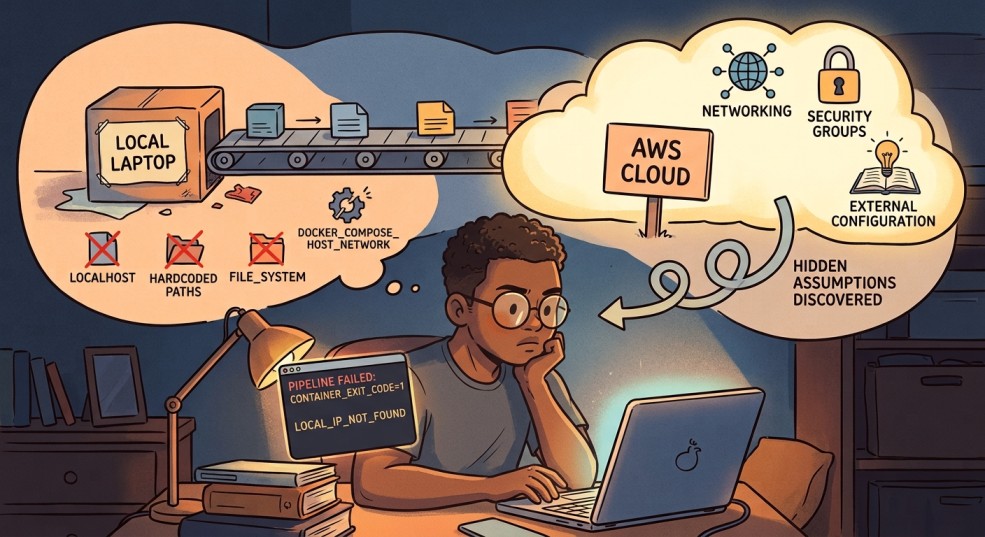 Generated with Gemini AI
For the past few months, I've been building a small data pipeline entirely on my Windows machine. RSS ingestion running in WSL2, Postgres in Docker, Kestra orchestrating the whole thing, dbt transforming the data on top. Every piece worked. I had a working lineage graph, passing tests, a scheduled flow that fetched articles and saved them to a database.
It all worked because it was all sitting in one place. My laptop.
This article is about what happened when I tried to move it off my laptop and onto a real server, using nothing but the CLI. I expected the hard part to be AWS itself: accounts, instances, networking. It wasn't. The hard part was everything I didn't know I'd built on top of "it's all running on the same machine." That assumption was doing more work than I realized, and taking it away broke things one at a time, in ways that taught me more than the original build did.
Generated with Gemini AI
For the past few months, I've been building a small data pipeline entirely on my Windows machine. RSS ingestion running in WSL2, Postgres in Docker, Kestra orchestrating the whole thing, dbt transforming the data on top. Every piece worked. I had a working lineage graph, passing tests, a scheduled flow that fetched articles and saved them to a database.
It all worked because it was all sitting in one place. My laptop.
This article is about what happened when I tried to move it off my laptop and onto a real server, using nothing but the CLI. I expected the hard part to be AWS itself: accounts, instances, networking. It wasn't. The hard part was everything I didn't know I'd built on top of "it's all running on the same machine." That assumption was doing more work than I realized, and taking it away broke things one at a time, in ways that taught me more than the original build did.
Setting up the box
Getting a server running was, honestly, the easy part.
Learn this step by step with the interactive Data Engineer roadmap.
I created an AWS account on the newer $100-credit free tier, set up an IAM user for CLI work instead of using root (a small good habit that saved me from myself more than once), and launched a t3.small EC2 instance running Ubuntu 22.04.
A few small surprises came up along the way. Nothing major, but enough to remind me that a cloud server isn't just my computer in a different location.
The default 8GB disk was too small before I'd even started. Resizing it meant running growpart and resize2fs, and the instructions I found online kept referencing a device called xvda. My instance didn't have one. Newer instance types use the Nitro system, which names drives things like nvme0n1 instead. Small naming difference, but it's the kind of thing that makes you doubt everything else you're about to type, since if the first command doesn't even find its target, what else is going to quietly not apply.
I also saw the instance go “impaired” at one point while Kestra was pulling its Docker image for the first time. My best guess was that it had run out of memory. I added a 1GB swap file as a bit of extra breathing room, and it hasn’t happened since. Basically, it gives the system somewhere to offload memory when the RAM gets full, using disk space as a slower backup. It was a simple fix, but it was also my first reminder that a rented server doesn’t have quite the same headroom I’d gotten used to on my laptop.
I attached an Elastic IP so the server's address wouldn't change every time I stopped and started it, and locked down the security group so only my own IP could reach ports 22 (SSH), 8080 (Kestra's UI), and 5432 (Postgres). That last part turned into its own minor recurring chore: my home internet doesn't give me a fixed IP address, so most sessions started with me re-authorizing whatever address I currently had before anything else would even load.
None of this was hard. It was just a lot of small, specific facts about this particular kind of computer that nothing in my local setup had ever forced me to learn.
Getting the pipeline over
I installed Docker, brought over my project with rsync instead of git, since my repo is public and my .env file has real secrets in it, and ran docker compose up -d. Postgres came up healthy. Kestra came up too.
One thing caught me off guard here: Kestra's flows don't live in files that sync automatically when you copy a project over. They live inside Kestra's own internal database. My one flow, fetch_rss, simply didn't exist on the server until I pasted its YAML into the UI myself. It's a small thing, but it's the first hint of a pattern that showed up again and again during this whole process: things that felt like "my project" were actually split across two different kinds of state, files I own and copy around, and internal state that lives only inside the running system.
I clicked Execute. It failed immediately.
The toolbox that wasn't there
My flow used a Process task runner for the actual work. It built the Python virtual environment, installed the dependencies, and ran my ETL script. That was exactly how I had it set up locally, and it had never caused me any problems.
The error was about a missing package: python3.12-venv. Digging in, I learned something I genuinely hadn't considered. The Process task runner doesn't run on the EC2 host. It runs inside Kestra's own container. Kestra's container had Python, but not the piece needed to build a virtual environment.
I fixed it temporarily by running apt-get install -y python3.12-venv directly inside the container. It worked, but I knew it wouldn’t survive a restart because the change wasn’t part of the image itself. I’d fixed the immediate problem, but not the underlying setup.
This is where I had to make a real decision, and it's the first genuinely useful lesson from this whole project: the manager and the worker shouldn't be the same thing. Kestra's job is to decide when things run and keep track of them. It is not supposed to also be the thing building Python environments and installing packages by hand. Every time a task needed something new, I'd be rebuilding Kestra's own image to fit, which is a strange amount of responsibility to hand to your orchestrator.
Instead of trying to keep patching Kestra itself, I moved the actual work out of it and switched the task to Kestra’s Docker task runner. The idea was pretty simple: Kestra would spin up a separate container just for the Python job, run the ETL script there, and get rid of the container when the job was done. It was closer to how I wanted the setup to work, although I was about to run into a few more complications.
Giving the manager a key it didn't know it needed
For Kestra to launch a separate worker container, it needs to be able to talk to Docker itself, the actual daemon managing containers on the host. The way you grant that is by mounting the Docker socket into Kestra's own container:
yaml
kestra:
  volumes:
    - /var/run/docker.sock:/var/run/docker.sock
This is worth sitting with for a second, because it's not a neutral decision. Anything with access to that socket can effectively ask Docker to do anything on the host, including spinning up containers with far more access than they should have. Locally, on my own laptop, this never registered as a real tradeoff. On a machine sitting on the open internet, it's a genuine one. I decided it was acceptable for a learning project running a single low-stakes flow, but it's exactly the kind of decision that deserves to be made on purpose, not discovered by accident three steps into a debugging session.
With the socket mounted, I updated the flow to use the Docker task runner and pointed it at a python:3.12-slim image. First real test: Permission denied.
Turned out the socket being mounted wasn't enough. Kestra's own process inside the container wasn't running as root, and that particular door only opens for root. Having the key isn't the same as being allowed to use it.
Adding user: "0:0" to Kestra's service definition fixed it, though not before I spent a confusing round-trip discovering that Docker Compose doesn't always rebuild a container just because you changed a line in the file. docker compose up -d --force-recreate kestra was the command that actually made the change take effect. up -d alone quietly decided nothing important had changed.
The volume that wasn't really there
With permissions sorted, the flow ran further, and hit a new wall: Could not open requirements file: No such file or directory.
I'd mounted my project folder into the worker container so it could see the script and its dependencies. I could prove the mount worked by running the exact same docker run command by hand, outside of Kestra, and it worked perfectly. Whatever Kestra was doing, it wasn't the same thing.
This ended up being the longest detour in the whole project, and honestly, probably the one that annoyed me the most in hindsight. The worst part was how quietly it failed. I first tried a setting called volume-enabled, but I had it in the wrong part of the config. Then I tried again with the correct property name, volumeEnabled—no dash—and put it in the right place, under plugins.configurations, targeting the Docker task runner plugin by its full class name. Still nothing.
No error. No warning. Nothing. It just kept silently ignoring the setting.
Eventually, I found the real explanation: host-folder mounting for the Docker task runner appears to require Kestra’s Enterprise edition. I’d been chasing a setting that simply doesn’t work on the free tier I’m using. It wasn’t a typo or a misconfiguration. I was basically trying to open a door that I didn’t even know was locked. The frustrating part was that Kestra never made that clear—it just quietly ignored the setting and left me wondering what I was doing wrong.
I want to flag this specifically for anyone following a similar path: when a setting appears to do nothing no matter how correctly you write it, stop assuming you have the syntax wrong. Check whether the feature exists in the edition you're actually running.
The way that's actually meant to work
The fix wasn't to force the mount to work. It was to stop trying to mount anything at all.
Kestra has a feature called Namespace Files, essentially a small file store that lives inside Kestra itself. You upload your project's files into it once, and Kestra hands them to worker containers automatically at runtime, no host folder access required. It's the fully-supported version of what I was trying to hack together with volumes.
Uploading them from the server turned into its own small chain of mistakes, which by this point in the day felt almost expected. I tried a PUT request first; Kestra wanted a POST with the file wrapped as multipart form data. I got that right and got back silence, no confirmation, no error, which I initially read as success. It wasn't.
A curl -i flag to actually show me the response headers revealed the real problem: 401 Unauthorized. Basic auth had been on the whole time, my browser just never told me because it was already logged in. curl has no memory like that. Adding -u username:password to every request fixed it.
Once the files were uploading, I made a habit of checking each one immediately after, since one early batch attempt had somehow paired the wrong file sizes with the wrong filenames. Slower, but it meant every mismatch got caught the moment it happened instead of surfacing three steps later as a mysterious script error.
With all six files confirmed correct, I rewrote the flow to use namespaceFiles: enabled: true instead of a volume mount, and switched the file paths from absolute (/workspace/python/...) to relative (python/...), since Namespace Files land directly in the container's working directory rather than wherever I'd been mounting things.
This time, it actually ran the script. Fetched 25 articles. Parsed them. And then:
text
psycopg.OperationalError: connection failed: connection to server at "127.0.0.1", port 5432 failed: Connection refused
The last assumption: localhost isn't a place
This was the smallest fix of the whole day, and also the most honest one, in the sense that it exposed an assumption I'd never had reason to question before.
My database config had DB_HOST=localhost by default. And locally, that was perfectly fine. Everything was running on the same machine, so saying “the database is right here” was actually true.
But on AWS, Kestra’s worker was running in its own separate container. So when it tried to connect to localhost, it was basically looking inside its own little container and saying, “Where’s the database?” Postgres was sitting in a different container, one that it could reach through the shared Docker network using the service name postgres instead.
I passed the real connection details into the worker container as environment variables, matching them against the container network we'd set up earlier (networkMode: rss-pipeline_default, the same network Postgres and Kestra already shared), and the pipeline finally ran start to finish. Fetched articles, saved them, done.
The very last thing I fixed, immediately after, was the password sitting in plain text in that same config. Kestra has a KV store built for exactly this, a place to store a value once and reference it from the flow ({{ kv('DB_PASSWORD') }}) instead of writing it out anywhere. Small thing, but it felt like the right note to end on: getting something working and then immediately asking whether the way it's working is one I'd be comfortable with someone else seeing.
What actually broke, and why it matters
Zooming out, every single failure in this process traced back to one of two things:
Things That Worked Locally but Broke Across Containers
“The database is on localhost”, “The Python environment I set up by hand is still here.”. Locally, being on the same machine does a lot of invisible work for you. You don’t think of those things as requirements because you never had to. They’re just there, and everything works. Once you move to separate containers, those assumptions disappear, and suddenly you realize how much you were relying on them without even noticing.
Things That Failed Silently Instead of Loudly.
A mistyped config property. A feature that doesn't exist in the tier you're running. An unauthenticated request that returns nothing instead of an error. None of these crashed anything. They just quietly did less than I asked, which is a much harder thing to debug than an actual crash, because there's no stack trace pointing at the gap. You just have to notice that something didn't happen.
If I had to compress this into one piece of advice for someone doing this for the first time: when something you built locally moves to a real server, treat every assumption about "things being in the same place" as a claim you need to re-prove, not a fact you get to keep. And when a fix seems to do nothing at all, however many times you double check the syntax, consider that it might genuinely be doing nothing, because the feature isn't available to you in the first place.
What's Next
The pipeline itself is done, running, and actually saving real data to a cloud database. That was the goal for this piece, and it's genuinely satisfying to type that sentence after the day I just had.
I've been going back and forth on what comes after this. Part of me wants to finish the full loop, connect rss-transform, my dbt project, to this new cloud database, and close out the RSS pipeline as one complete, end-to-end story from raw feed to clean, tested data. There's something appealing about that kind of closure.
But if I'm honest, this project has already taught me most of what it set out to teach me. I went from "what even is a Docker container" to debugging Docker socket permissions, silent config failures, and container networking, on a real server, with real consequences when I got something wrong. That was the whole point of picking this project in the first place, and at some point, squeezing more lessons out of the same pipeline starts to feel like staying somewhere past when I've actually outgrown it.
So I'm genuinely undecided, and I think that's an honest place to leave this piece. Maybe the next article is the dbt-to-cloud connection, wrapping this series up properly. Maybe it's something completely new, a fresh project, a different set of skills, a reason to feel like a beginner again in a new way. I don't know yet, and I'd rather say that plainly than manufacture a tidy roadmap I'm not actually committed to.
Either way, I'll be documenting it the same way I documented this: honestly, mistakes included.
This is part of my ongoing series documenting my transition from systems analyst to data engineer. If you’ve been following along, thank you.
Connect with me on LinkedIn ,YouTube , and Twitter .
Register Now to Continue Reading
Unlock Towards Data Science with a Free Account
All articles on Towards Data Science are available to registered users. Create a free account today to access this article and thousands more.
Register for freeSign in to your account
 Written By
See all from Ibrahim Salami
AWSData PipelineData ScienceDockerProgramming
Share This Article
Towards Data Science is a community publication. Submit your insights to reach our global audience and earn through the TDS Author Payment Program.
Write for TDS
Related Articles
Programming
Share your self-built Python package using your git repo.
Mike Huls
July 3, 20216 min read
Machine Learning
by creating them from scratch
Victor Sim
September 27, 20207 min read
Deep Learning
Randomly generating splits of the data set is not always the optimal solution, as the proportions in the target variable can be extremely...
Angel Igareta
July 21, 20213 min read
Data Science
The Dos and Don'ts of data engineering
Nam Nguyen
August 6, 20216 min read
Machine Learning
R is a really flexible language - here, we are going to learn the objects that will power up your R Data Analytics and Science scripts
Ivo Bernardo
October 29, 20216 min read
Programming
A simpler path to coding real-time web applications
Thomas Reid
August 4, 202512 min read
Machine Learning
Everything you need to turn a .csv file of timestamped data into a Kafka stream with Python and Docker
Maria Patterson
August 29, 20215 min read
Machine Learning
Your daily dose of data science
TDS Editors
January 4, 20211 min read
Data Engineering
How the latest Dataflow enhancements change the way we play the game
Nikola Ilic
January 13, 20268 min read
Your home for data science and AI. The world's leading publication for data science, data analytics, data engineering, machine learning, and artificial intelligence professionals.
Subscribe to Our NewsletterWrite For TDS•About•Advertise•Privacy Policy•Terms of Use
© Insight Media Group, LLC 2026•The New Stack•roadmap.sh•Creator Network
Recommended Articles
Close