
保留正文与补采附件。源页面当前未重新核验;具体限制见交付清单。
We use essential cookies to make our site work. With your consent, we may also use non-essential cookies to improve user experience and analyze website traffic. By clicking “Accept,” you agree to our website's cookie use as described in our Cookie Policy. You can change your cookie settings at any time by clicking “Preferences.”
Accept
Search ... Results See all results
Updated July 31, 2026: The original tutorial, examples, media, narrative, and teaching order are preserved below. The labelled 2026 correction area adds only the verified API, compatibility, validation, and failure-handling changes needed for current OpenCV; where a historical snippet uses an obsolete API, the correction area is the runnable path.
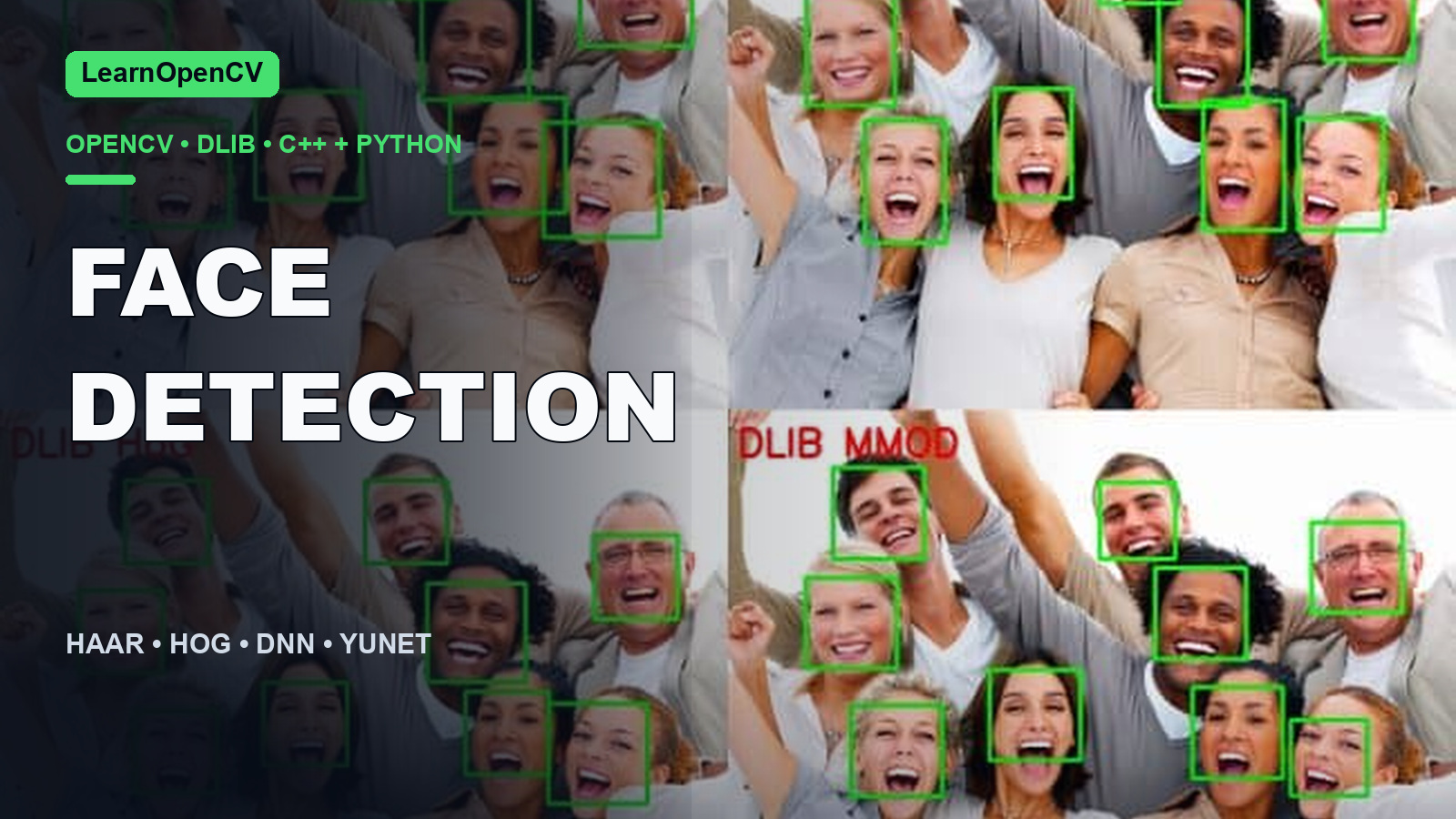
Updated July 31, 2026: The original tutorial, examples, media, narrative, and teaching order are preserved below. The labelled 2026 correction area adds only the verified API, compatibility, validation, and failure-handling changes needed for current OpenCV; where a historical snippet uses an obsolete API, the correction area is the runnable path. In this tutorial, we will discuss the various Face Detection methods in OpenCV, Dlib, and Deep Learning and compare the methods quantitatively. We will share code in C++ and Python for the following Face Detectors:
We will not go into the theory of any of them and only discuss their usage. We will also share some rules of thumb on which model to prefer according to your application. Throughout the post, we will assume image size of 300×300.
Haar Cascade-based Face Detector was the state-of-the-art in Face Detection for many years since 2001 when Viola and Jones introduced it. There have been many improvements in recent years. OpenCV has many Haar-based models, which can be found in Github.
Please download the code from the link below. We have provided code snippets throughout the blog for better understanding. You will find CPP and python files for each face detector and a separate file that compares all the methods together ( run-all.py and run-all.cpp ). We also share all the models required for running the code.
| 1 2 3 4 5 6 | faceCascade ``= cv2.CascadeClassifier(``'./haarcascade_frontalface_default.xml'``) faces ``= faceCascade.detectMultiScale(frameGray) for face ``in faces: x1, y1, w, h ``= face x2 ``= x1 ``+ w y2 ``= y1 ``+ h |
| --- | --- |
| 1 2 3 4 5 6 7 8 9 10 11 12 | faceCascadePath = ``"./haarcascade_frontalface_default.xml"``; faceCascade.load( faceCascadePath ) std::vector<Rect> faces; faceCascade.detectMultiScale(frameGray, faces); for ( ``size_t i = 0; i < faces.size(); i++ ) { int x1 = faces[i].x; int y1 = faces[i].y; int x2 = faces[i].x + faces[i].width; int y2 = faces[i].y + faces[i].height; } |
| --- | --- |
The above code snippet loads the haar cascade model file and applies it to a grayscale image. the output is a list containing the detected faces. Each list member is again a list with 4 elements indicating the (x, y) coordinates of the top-left corner and the width and height of the detected face.
This model was included in OpenCV from version 3.3. It is based on a Single-Shot-Multibox detector and uses ResNet-10 Architecture as the backbone. The model was trained using images from the web, but the source is not disclosed. OpenCV provides 2 models for this face detector.
We have included both models along with the code.
| 1 2 3 4 5 6 7 8 9 | DNN ``= "TF" if DNN ``=``= "CAFFE"``: modelFile ``= "res10_300x300_ssd_iter_140000_fp16.caffemodel" configFile ``= "deploy.prototxt" net ``= cv2.dnn.readNetFromCaffe(configFile, modelFile) else``: modelFile ``= "opencv_face_detector_uint8.pb" configFile ``= "opencv_face_detector.pbtxt" net ``= cv2.dnn.readNetFromTensorflow(modelFile, configFile) |
| --- | --- |
| 1 2 3 4 5 6 7 8 9 10 11 | const std::string caffeConfigFile = ``"./deploy.prototxt"``; const std::string caffeWeightFile = ``"./res10_300x300_ssd_iter_140000_fp16.caffemodel"``; const std::string tensorflowConfigFile = ``"./opencv_face_detector.pbtxt"``; const std::string tensorflowWeightFile = ``"./opencv_face_detector_uint8.pb"``; #ifdef CAFFE Net net = cv::dnn::readNetFromCaffe(caffeConfigFile, caffeWeightFile); #else Net net = cv::dnn::readNetFromTensorflow(tensorflowWeightFile, tensorflowConfigFile); #endif |
| --- | --- |
We load the required model using the above code. If we want to use the floating point model of Caffe, we use the caffemodel and prototxt files. Otherwise, we use the quantized TensorFlow model. Also, note the difference in how we read the networks for Caffe and Tensorflow.
| 1 2 3 4 5 6 7 8 9 10 11 12 | blob ``= cv2.dnn.blobFromImage(frameOpencvDnn, ``1.0``, (``300``, ``300``), [``104``, ``117``, ``123``], ``False``, ``False``) net.setInput(blob) detections ``= net.forward() bboxes ``= [] for i ``in range``(detections.shape[``2``]): confidence ``= detections[``0``, ``0``, i, ``2``] if confidence > conf_threshold: x1 ``= int``(detections[``0``, ``0``, i, ``3``] ``* frameWidth) y1 ``= int``(detections[``0``, ``0``, i, ``4``] ``* frameHeight) x2 ``= int``(detections[``0``, ``0``, i, ``5``] ``* frameWidth) y2 ``= int``(detections[``0``, ``0``, i, ``6``] ``* frameHeight) |
| --- | --- |
| 1 2 3 4 5 6 7 8 9 10 11 12 13 14 15 16 17 18 19 20 21 22 23 24 25 | #ifdef CAFFE cv::Mat inputBlob = cv::dnn::blobFromImage(frameOpenCVDNN, inScaleFactor, cv::Size(inWidth, inHeight), meanVal, ``false``, ``false``); #else cv::Mat inputBlob = cv::dnn::blobFromImage(frameOpenCVDNN, inScaleFactor, cv::Size(inWidth, inHeight), meanVal, ``true``, ``false``); #endif net.setInput(inputBlob, ``"data"``); cv::Mat detection = net.forward(``"detection_out"``); cv::Mat detectionMat(detection.size[2], detection.size[3], CV_32F, detection.ptr<``float``>()); for``(``int i = 0; i < detectionMat.rows; i++) { float confidence = detectionMat.at<``float``>(i, 2); if``(confidence > confidenceThreshold) { int x1 = ``static_cast``<``int``>(detectionMat.at<``float``>(i, 3) * frameWidth); int y1 = ``static_cast``<``int``>(detectionMat.at<``float``>(i, 4) * frameHeight); int x2 = ``static_cast``<``int``>(detectionMat.at<``float``>(i, 5) * frameWidth); int y2 = ``static_cast``<``int``>(detectionMat.at<``float``>(i, 6) * frameHeight); cv::rectangle(frameOpenCVDNN, cv::Point(x1, y1), cv::Point(x2, y2), cv::Scalar(0, 255, 0),2, 4); } } |
| --- | --- |
In the above code, the image is converted to a blob and passed through the network using the forward() function. The output detections is a 4-D matrix, where
The output coordinates of the bounding box are normalized between [0,1]. Thus the coordinates should be multiplied by the height and width of the original image to get the correct bounding box on the image.
The method has the following merits :
The DNN-based detector overcomes all the drawbacks of the Haar cascade based detector without compromising on any benefit provided by Haar. We could not see any major drawback for this method except that it is slower than the Dlib HoG-based Face Detector discussed next. It would be safe to say that it is time to bid farewell to Haar-based face detector and DNN based Face Detector should be the preferred choice in OpenCV.
This is a widely used face detection model based on the Histogram of Oriented Gradients (HoG) features and SVM. The model is built out of 5 HOG filters – front looking, left looking, right looking, front looking but rotated left, and a front looking but rotated right. The model comes embedded in the header file itself. The dataset used for training consists of 2825 images obtained from the LFW dataset and manually annotated by Davis King, the author of Dlib. It can be downloaded from here.
| 1 2 3 4 5 6 7 | hogFaceDetector ``= dlib.get_frontal_face_detector() faceRects ``= hogFaceDetector(frameDlibHogSmall, ``0``) for faceRect ``in faceRects: x1 ``= faceRect.left() y1 ``= faceRect.top() x2 ``= faceRect.right() y2 ``= faceRect.bottom() |
| --- | --- |
| 1 2 3 4 5 6 7 8 9 10 11 12 13 14 15 16 | frontal_face_detector hogFaceDetector = get_frontal_face_detector(); // Convert OpenCV image format to Dlib's image format cv_image<bgr_pixel> dlibIm(frameDlibHogSmall); // Detect faces in the image std::vector<dlib::rectangle> faceRects = hogFaceDetector(dlibIm); for ( ``size_t i = 0; i < faceRects.size(); i++ ) { int x1 = faceRects[i].left(); int y1 = faceRects[i].top(); int x2 = faceRects[i].right(); int y2 = faceRects[i].bottom(); cv::rectangle(frameDlibHog, Point(x1, y1), Point(x2, y2), Scalar(0,255,0), (``int``)(frameHeight/150.0), 4); } |
| --- | --- |
In the above code, we first load the face detector. Then we pass it the image through the detector. The second argument is the number of times we want to upscale the image. The more you upscale, the better the chances of detecting smaller faces. However, upscaling the image will have a substantial impact on the computation speed. The output is in the form of a list of faces with the (x, y) coordinates of the diagonal corners.
Basically, this method works under most cases except a few, as discussed below.
This method uses a Maximum-Margin Object Detector ( MMOD ) with CNN-based features. The training process for this method is very simple and you don’t need a large amount of data to train a custom object detector. For more information on training, visit the dlib c++ library blog.
The model can be downloaded from the dlib-models repository.
It uses a dataset manually labeled by its Author, Davis King, consisting of images from various datasets like ImageNet, PASCAL VOC, VGG, WIDER, Face Scrub. It contains 7220 images. The dataset can be downloaded from here.
| 1 2 3 4 5 6 7 | dnnFaceDetector ``= dlib.cnn_face_detection_model_v1(``"./mmod_human_face_detector.dat"``) faceRects ``= dnnFaceDetector(frameDlibHogSmall, ``0``) for faceRect ``in faceRects: x1 ``= faceRect.rect.left() y1 ``= faceRect.rect.top() x2 ``= faceRect.rect.right() y2 ``= faceRect.rect.bottom() |
| --- | --- |
| 1 2 3 4 5 6 7 8 9 10 11 12 13 14 15 16 17 18 19 20 | String mmodModelPath = ``"./mmod_human_face_detector.dat"``; net_type mmodFaceDetector; deserialize(mmodModelPath) >> mmodFaceDetector; // Convert OpenCV image format to Dlib's image format cv_image<bgr_pixel> dlibIm(frameDlibMmodSmall); matrix<rgb_pixel> dlibMatrix; assign_image(dlibMatrix, dlibIm); // Detect faces in the image std::vector<dlib::mmod_rect> faceRects = mmodFaceDetector(dlibMatrix); for ( ``size_t i = 0; i < faceRects.size(); i++ ) { int x1 = faceRects[i].rect.left(); int y1 = faceRects[i].rect.top(); int x2 = faceRects[i].rect.right(); int y2 = faceRects[i].rect.bottom(); cv::rectangle(frameDlibMmod, Point(x1, y1), Point(x2, y2), Scalar(0,255,0), (``int``)(frameHeight/150.0), 4); } |
| --- | --- |
The code is similar to the HoG detector except that, in this case, we load the CNN face detection model. Also, the coordinates are present inside a rect object.
I tried to evaluate the 4 models using the FDDB dataset using the script used for evaluating the OpenCV-DNN model. However, I found surprising results. Dlib had worse numbers than Haar, although visually dlib outputs look much better. Given below are the Precision scores for the 4 methods.

Where,
AP_50 = Precision when the overlap between Ground Truth and predicted bounding box is at least 50% ( IoU = 50% )
AP_75 = Precision when the overlap between Ground Truth and predicted bounding box is at least 75% ( IoU = 75% )
AP_Small = Average Precision for small size faces ( Average of IoU = 50% to 95% )
AP_medium = Average Precision for medium size faces ( Average of IoU = 50% to 95% )
AP_Large = Average Precision for large size faces ( Average of IoU = 50% to 95% )
mAP = Average precision across different IoU ( Average of IoU = 50% to 95% )
On closer inspection, I found that this evaluation is not fair for Dlib.
According to my analysis, the reasons for lower numbers for dlib are as follows :


 Thus, the only relevant metric for a fair comparison between OpenCV and Dlib is AP_50 ( or even less than 50 since we mostly compare the number of detected faces ). However, this point should always be considered while using the Dlib Face detectors.
We used a 300×300 image for the comparison of the methods. The MMOD detector can be run on a GPU, but the support for NVIDIA GPUs in OpenCV is still not there. So, we evaluate the methods on CPU only and also report results for MMOD on GPU as well as CPU.
Processor : Intel Core i7 6850K – 6 Core
RAM : 32 GB
GPU : NVIDIA GTX 1080 Ti with 11 GB RAM
OS : Linux 16.04 LTS
Programming Language : Python
We run each method 10000 times on the given image and take 10 such iterations and average the time taken. Given below are the results.
 As you can see from the image of this size, all the methods perform in real-time, except MMOD. MMOD detector is very fast on a GPU but is very slow on a CPU.
It should also be noted that these numbers can be different on different systems.
As you can see from the image of this size, all the methods perform in real-time, except MMOD. MMOD detector is very fast on a GPU but is very slow on a CPU.
It should also be noted that these numbers can be different on different systems.
Apart from accuracy and speed, there are some other factors that help us decide which one to use. In this section, we will compare the methods based on various other factors which are also important.
We will see an example where, in the same video, the person goes back n forth, thus making the face smaller and bigger. We notice that the OpenCV DNN (Deep Neural network) detects all the faces while Dlib detects only those faces which are bigger in size. We also show the size of the detected face along with the bounding box.
 It can be seen that dlib based methods can detect faces of size up to ~(70×70) after which they fail to detect. As we discussed earlier, I think this is the major drawback of Dlib based methods. Since it is impossible to know the size of the face beforehand in most cases, we can get rid of this problem by upscaling the image, but then the speed advantage of dlib as compared to OpenCV-DNN goes away.
Non-frontal can look towards the right, left, up, or down. Again, to be fair with dlib, we ensure the face size is more than 80×80. Given below are some examples.


 As expected, Haar based detector fails totally. The hoG-based detector does detect faces for left or right looking faces ( since it was trained on them ) but is not as accurate as theDNN-based detectors of OpenCV and Dlib.
Let us see how well the methods perform under occlusion.


 Again, the DNN methods outperform the other two, with OpenCV-DNN slightly better than Dlib-MMOD. This is mainly because the CNN features are much more robust than HoG or Haar features.
We discussed the pros and cons of each method in the respective sections. I recommend trying both OpenCV-DNN and HoG methods for your application and deciding accordingly. We share some tips to get started.
In most applications, we won’t know the face size in the image beforehand. Thus, it is better to use OpenCV – DNN method as it is pretty fast and very accurate, even for small sized faces. It also detects faces at various angles. We recommend using OpenCV-DNN in most.
Dlib HoG is the fastest method on the CPU. But it does not detect small sized faces ( < 70×70 ). So, if you know that your application will not be dealing with very small sized faces ( for example, a selfie app ), then HoG based Face detector is a better option. Also, If you can use a GPU, then the MMOD face detector is the best option as it is very fast on GPU and provides detection at various angles.
Since feeding high-resolution images is not possible with these algorithms ( for computation speed ), HoG / MMOD detectors might fail when you scale down the image. On the other hand, the OpenCV-DNN method can be used for these since it detects small faces. Have any other suggestions? Please mention them in the comments, and we’ll update the post accordingly!
| We have crafted the following articles especially for you.
[FDDB Comparison code]
[Dlib Blog]
[dlib mmod python example]
[dlib mmod cpp example]
[OpenCV DNN Face detector]
[Haar Based Face Detector]
Scope of this correction: Add YuNet and label old benchmarks historical. The material below is retained from the tested modernization only where it addresses that scope; it does not replace the original explanation or examples above.
The original 2018 comparison included OpenCV Haar, OpenCV Caffe/TensorFlow SSD, dlib HOG, and dlib MMOD. That snapshot is historically useful, but it is not the best default dependency graph for a current OpenCV project.
The refreshed implementation uses YuNet, a lightweight, anchor-free face detector designed for efficient inference. OpenCV exposes it through the high-level FaceDetectorYN API, so the application does not need to reproduce model-specific preprocessing or non-maximum suppression.
The detector roles are now explicit:
| Detector | Role in this tutorial | Default dependency? | Output |
| --- | --- | --- | --- |
| YuNet through FaceDetectorYN | Current primary path | Yes | Box, five landmarks, score |
| OpenCV Haar cascade | Optional historical baseline | No | Box |
| dlib HOG | Optional historical baseline | No | Box |
| dlib MMOD | Legacy material only | No | Not part of the current build or tests |
| OpenCV Caffe/TensorFlow SSD | Legacy assets only | No | Not loaded by current programs |
The filenames face_detection_opencv_dnn.py and face_detection_opencv_dnn.cpp remain for continuity with the original tutorial. Their current implementation loads YuNet ONNX through FaceDetectorYN; it does not load the retained Caffe or TensorFlow SSD files.
The current model is face_detection_yunet_2026may.onnx. Its height and width are dynamic, so the program can set the network input to each decoded frame’s actual size. The pinned OpenCV Zoo model notes explain that this export replaces fixed height and width dimensions with symbolic dimensions for variable-resolution inference, including the OpenCV 5 ONNX Runtime path.
Dynamic input does not mean unlimited accuracy at every resolution. Very small, blurred, strongly occluded, or extreme-profile faces can still be missed. It means the model contract can accept changing frame dimensions without the application pretending every source is a fixed 300×300 image.
Use Python 3.10 or newer with NumPy and OpenCV:
| 1 2 | python3 -m pip install -r requirements.txt python3 download_models.py |
| --- | --- |
The primary requirements are intentionally small:
| 1 2 | numpy>=1.23,<3 opencv-python>=4.10,<6 |
| --- | --- |
The model downloader pins one exact OpenCV Zoo state and verifies the bytes before installing the model:
| Field | Verified value |
| --- | --- |
| Model | face_detection_yunet_2026may.onnx |
| Upstream | OpenCV Zoo |
| Pinned commit | 47534e27c9851bb1128ccc0102f1145e27f23f98 |
| File size | 229,738 bytes |
| SHA-256 | ebafce4e3c118d6554634be5c27ab333b4c047a9a8c3faf1d7cf93101c22f0f0 |
| License | MIT |
| Copyright | Shiqi Yu |
The exact license is recorded in the companion project’s model provenance file and in the pinned OpenCV Zoo license. The downloader first writes to a temporary file, checks both size and SHA-256, and only then atomically moves the verified file into models/. An existing model is also reverified before reuse.
That workflow protects against a truncated transfer or an upstream file changing while a tutorial still claims reproducible results. It is an integrity check, not a malware scanner or a substitute for reviewing model provenance.
The core pipeline has four steps:
detect.The Python wrapper checks the model path and the three main post-processing parameters before constructing OpenCV’s detector:
| 1 2 3 4 5 6 7 8 9 10 11 | backend_id, target_id ``= backend_target(device) self``._model ``= cv2.FaceDetectorYN.create( str``(model_path), "", (``320``, ``320``), score_threshold, nms_threshold, top_k, backend_id, target_id, ) |
| --- | --- |
The creation size is a valid initial size. The real input size is set immediately before each detection. The refreshed defaults are:
score_threshold=0.7: discard lower-scoring candidates.nms_threshold=0.3: suppress sufficiently overlapping boxes after scoring.top_k=5000: cap the candidates retained before non-maximum suppression.device=cpu: pair OpenCV’s default DNN backend with the CPU target.Lowering the score threshold can improve recall, but it usually increases false positives and the number of candidates processed by non-maximum suppression. Tune thresholds against labeled data from the actual camera and environment.
The model returns one 15-value row per face. OpenCV uses None when Python has no detections, so the wrapper converts that case into an empty array with a stable shape:
| 1 2 3 4 5 6 | height, width ``= frame.shape[:``2``] self``._model.setInputSize((width, height)) _, faces ``= self``._model.detect(frame) if faces ``is None``: return np.empty((``0``, ``15``), dtype``=``np.float32) return np.asarray(faces, dtype``=``np.float32).reshape(``-``1``, ``15``) |
| --- | --- |
Normalizing the empty case keeps downstream code simple: drawing, validation, and comparison can iterate over zero or more rows without a special None branch.
The tutorial’s --validate mode checks invariants that should remain stable across codecs and supported OpenCV versions:
[0, 1];The drawing function clips boxes before rendering, writes each score, and colors the five YuNet landmarks. Clipping is a visualization safeguard. It should not be used to hide invalid detector output, which is why validation also checks the original numeric values.
The program runs headlessly by default. It resolves its bundled model, sample video, and output folders relative to the script rather than the shell’s current directory.
Process two frames of the bundled video, save a 720×720 MJPEG AVI, and validate it:
| 1 2 3 4 | python3 face_detection_opencv_dnn.py \ --max-frames 2 \ --no-display \ --validate |
| --- | --- |
The output is output/yunet-video.avi. A limit of zero processes the full video. The writer uses the source width, height, and frame rate; when a source reports no usable frame rate, the example uses 25 FPS as a documented fallback.
Every decoded frame is processed exactly once. The writer is created from the source geometry before the loop, so the old pattern of consuming a first frame merely to discover its dimensions is avoided.
For an image, choose image mode explicitly and provide a path:
| 1 2 3 4 5 6 | python3 face_detection_opencv_dnn.py \ --input /absolute/path/to/face-image.jpg \ --mode image \ --output-dir /absolute/path/to/results \ --no-display \ --validate |
| --- | --- |
The saved file is yunet-image.jpg and has the same width, height, and channel count as the decoded input. --mode auto uses common image suffixes and otherwise treats the input as video.
| Option | Purpose |
| --- | --- |
| --model PATH | Use a specific YuNet ONNX file |
| --device cpu|cuda | Choose the DNN backend/target pair |
| --score-threshold FLOAT | Filter low-confidence candidates |
| --nms-threshold FLOAT | Control overlap suppression |
| --top-k INTEGER | Limit candidates before NMS |
| --max-frames INTEGER | Bound video work for tests or previews |
| --display | Open an interactive window |
| --no-display | Make headless intent explicit |
| --validate | Check detections and saved output |
CPU is the tested default. CUDA support depends on how OpenCV was built and was not part of this article’s regression matrix.
The comparison program defaults to YuNet alone, so it does not import dlib or require Haar. Optional detectors are created only when requested:
| 1 2 3 4 5 | python3 run-all.py \ --detectors yunet,haar \ --max-frames 1 \ --no-display \ --validate |
| --- | --- |
Each detector receives the same original frame. Its annotated panel keeps the original W×H size, and the panels are concatenated horizontally. Two detectors therefore produce a 2W×H frame. On the 720×720 fixture, the tested YuNet-plus-Haar comparison wrote 1440×720, with two YuNet detections and one Haar detection.
That single frame is regression evidence, not an accuracy ranking. A meaningful detector comparison needs a labeled dataset, a fixed matching policy, precision-recall metrics, and representative pose, scale, lighting, and occlusion.
Haar remains useful for teaching classical cascaded detection and for constrained frontal-face scenarios. The optional wrapper resizes to a fixed height, converts to grayscale, detects faces, and scales each box back independently in x and y.
The C++ Haar target is built only with OpenCV 4. In the tested OpenCV 5 configuration, the historical CascadeClassifier path is not available through the core API used by this project, so CMake disables that target. Python reports a clear error if its OpenCV binding lacks CascadeClassifier.
dlib’s frontal detector is a HOG-pyramid detector with five embedded filters for frontal, side-looking, and rotated-frontal views, as documented in the official dlib source. Install it only when you want this baseline:
| 1 2 3 4 5 | python3 -m pip install -r requirements-dlib.txt python3 face_detection_dlib_hog.py \ --max-frames 2 \ --no-display \ --validate |
| --- | --- |
The Python import is lazy, and the C++ targets are added only when CMake finds dlib::dlib. The current default path never unpacks the historical dlib.zip. dlib was not installed in the validation environment, so its actual detection output was not tested for this refresh; only the clear missing-dependency behavior and CMake’s clean disable path were checked.
The C++ project requires CMake 3.16 or newer, a C++17 compiler, and OpenCV 4.10 or newer but earlier than 6:
| 1 2 3 | cmake -S . -B build -DCMAKE_BUILD_TYPE=Release cmake --build build --parallel ctest --test-dir build --output-on-failure |
| --- | --- |
Run the primary video path:
| 1 2 3 4 | ./build/face_detection_opencv_dnn \ --max-frames 2 \ --no-display \ --validate |
| --- | --- |
The C++ detector uses the same API and parameters as Python:
| 1 2 3 4 5 6 7 8 9 10 11 12 13 | model_ = cv::FaceDetectorYN::create( model_path.string(), ""``, cv::Size(320, 320), score_threshold, nms_threshold, top_k, backend_id, target_id); model_->setInputSize(frame.size()); cv::Mat faces; model_->detect(frame, faces); |
| --- | --- |
Each CV_32F row must have 15 columns. The wrapper copies the first four values into a rectangle, the next ten into five landmarks, and the final value into the score. Both language paths then share the same conceptual validation and output contract.
All default C++ targets compile with strict warnings treated as errors on Clang and GCC. Tests are registered only after the verified model exists, which turns a missing setup step into a clear configure-time error.
The refresh was tested from unrelated working directories so that accidental dependence on the caller’s current folder would fail.
| Path | Environment | Result |
| --- | --- | --- |
| Python tests | Python 3.14.3, OpenCV 4.13.0 | 5/5 passed |
| C++ tests | OpenCV 4.12.0, C++17 | 2/2 CTests passed |
| Python tests | Official OpenCV 5.0.0 build | 5/5 passed |
| C++ tests | Official OpenCV 5.0.0 build, C++17 | 2/2 CTests passed |
The stable fixture results were:
720×720 image: exactly two YuNet faces;720×720, exactly two frames saved, four YuNet detections in total;720×720, two frames, four detections in total;1440×720, two YuNet detections and one Haar detection;2 with a specific read/open error;Image and video tests assert dimensions, frame counts, valid boxes, finite landmarks, confidence bounds, and readable output. They do not compare encoded JPEG or AVI bytes, because codec output can vary even when decoded geometry and detections are correct. Exact OpenCV 4.14 was not available in the local validation environment. It remains the intended OpenCV 4 release target, but this handoff does not claim an exact 4.14 run. The OpenCV 5 build used for testing did not include ONNX Runtime, so OpenCV’s native DNN fallback was exercised rather than the OpenCV 5 ONNX Runtime engine.
Big Vision takes computer vision projects through the full journey, not just the easy parts.
 Satya Mallick Founder - Big Vision & LearnOpenCV
Talk to our Team
Satya Mallick Founder - Big Vision & LearnOpenCV
Talk to our Team
The two-face fixture proves a stable execution path, not broad accuracy. Build a labeled validation set that includes the smallest expected face, motion blur, masks, glasses, partial occlusion, profile views, backlighting, skin-tone diversity, camera compression, and realistic non-face negatives. Measure precision and recall over threshold choices instead of choosing 0.7 from one screenshot.
The example detects every frame independently. It does not attach persistent identities, smooth boxes, or bridge missed detections. For video analytics, add a tracker and define when a track is created, confirmed, lost, and retired.
YuNet’s five points can support coarse alignment. Applications that need eye contours, expression geometry, dense face meshes, or robust pose estimation should use a dedicated landmark model after detection.
--device cuda works only when the installed OpenCV DNN build supports the requested CUDA backend and target. OpenCV 5 can also use an ONNX Runtime engine for the dynamic model, but that exact engine was not present in this test build. Benchmark the precise OpenCV package, backend, target, model, resolution, and hardware that will ship.
Faces are personal data in many contexts. Minimize collection, document retention, protect stored media, and obtain appropriate consent. A detector’s confidence score is not proof of identity, age, emotion, intent, or liveness. Was This Article Helpful? Post Views: 123
If you liked this article and would like to download code (C++ and Python) and example images used in this post, please [click here](javascript:void(0)). In our newsletter, we share Computer Vision and AI tutorials and examples written in C++/Python, and Computer Vision and Machine Learning algorithms and news.
[ Download Example Code](javascript:void(0))
PrevPreviousKatharsis : A Software Engineer’s first steps in Computer Vision and Machine Learning NextInstall OpenCV from source on Windows – C++ / PythonNext
Before a flight, I left Astra a short prompt and a signed-in Roboflow account. It
Learn a production model training playbook from PINTO’s face alignment project: reframe the task, engineer
How VGGT and VGGT-Ω work, what changed, and real benchmark numbers, speed, GPU memory, depth,
Founder - Big Vision & LearnOpenCV
Helping startups and enterprises build and deploy scalable solutions that work in the real world. Schedule a Call
Was This Article Helpful?
 3D Computer Vision3D ReconstructionSegmentationSpatialAI-DepthVideo Analysis
Adnan Shaikh July 18, 2026
3D Computer Vision3D ReconstructionSegmentationSpatialAI-DepthVideo Analysis
Adnan Shaikh July 18, 2026
Reconstruct the 3D swing plane of Virat Kohli's flick shot from a single 2D video with off-the-shelf vision models. No…
 Object DetectionOpenCV 5OpenCV DNNYOLO
Sudip Chakrabarty July 9, 2026
Object DetectionOpenCV 5OpenCV DNNYOLO
Sudip Chakrabarty July 9, 2026
Learn about the new OpenCV 5 and how to use its DNN engine to run object detection models on the…
 Computer VisionObject DetectionYOLO
Sudip Chakrabarty June 18, 2026
Computer VisionObject DetectionYOLO
Sudip Chakrabarty June 18, 2026
Learn how to fine-tune YOLO26 on your own data. We build a construction PPE safety detector and a sign-language reader…
Subscribe to our email newsletter to get the latest posts delivered right to your email.
Name
Email
Send
 Empowering innovation through education, LearnOpenCV provides in-depth tutorials, code, and guides in AI, Computer Vision, and Deep Learning. Led by Dr. Satya Mallick, we're dedicated to nurturing a community keen on technology breakthroughs.
Read More
Categories
Empowering innovation through education, LearnOpenCV provides in-depth tutorials, code, and guides in AI, Computer Vision, and Deep Learning. Led by Dr. Satya Mallick, we're dedicated to nurturing a community keen on technology breakthroughs.
Read More
Categories
Getting Started
Big Vision
Copyright © 2026 – BIG VISION LLC Privacy Policy Terms and Conditions
[  Click here to download the source code to this post ](javascript:void(0))