保留正文与补采附件。源页面当前未重新核验;具体限制见交付清单。
 We value your privacy
We use cookies to enhance your browsing experience, serve personalised ads or content, and analyse our traffic. By clicking "Accept All", you consent to our use of cookies.
Customise Reject All Accept All
Customise Consent Preferences
We value your privacy
We use cookies to enhance your browsing experience, serve personalised ads or content, and analyse our traffic. By clicking "Accept All", you consent to our use of cookies.
Customise Reject All Accept All
Customise Consent Preferences  We use cookies to help you navigate efficiently and perform certain functions. You will find detailed information about all cookies under each consent category below.
The cookies that are categorised as "Necessary" are stored on your browser as they are essential for enabling the basic functionalities of the site. ... Show more
NecessaryAlways Active
Necessary cookies are required to enable the basic features of this site, such as providing secure log-in or adjusting your consent preferences. These cookies do not store any personally identifiable data.
We use cookies to help you navigate efficiently and perform certain functions. You will find detailed information about all cookies under each consent category below.
The cookies that are categorised as "Necessary" are stored on your browser as they are essential for enabling the basic functionalities of the site. ... Show more
NecessaryAlways Active
Necessary cookies are required to enable the basic features of this site, such as providing secure log-in or adjusting your consent preferences. These cookies do not store any personally identifiable data.
-
Cookie
BCTempID
-
Duration
10 minutes
-
Description
No description available.
-
Cookie
__cf_bm
-
Duration
1 hour
-
Description
This cookie, set by Cloudflare, is used to support Cloudflare Bot Management.
-
Cookie
AWSALBCORS
-
Duration
7 days
-
Description
Amazon Web Services set this cookie for load balancing.
-
Cookie
_cfuvid
-
Duration
session
-
Description
Cloudflare sets this cookie to track users across sessions to optimize user experience by maintaining session consistency and providing personalized services
-
Cookie
li_gc
-
Duration
6 months
-
Description
Linkedin set this cookie for storing visitor's consent regarding using cookies for non-essential purposes.
-
Cookie
__hssrc
-
Duration
session
-
Description
This cookie is set by Hubspot whenever it changes the session cookie. The __hssrc cookie set to 1 indicates that the user has restarted the browser, and if the cookie does not exist, it is assumed to be a new session.
-
Cookie
__hssc
-
Duration
1 hour
-
Description
HubSpot sets this cookie to keep track of sessions and to determine if HubSpot should increment the session number and timestamps in the __hstc cookie.
-
Cookie
wpEmojiSettingsSupports
-
Duration
session
-
Description
WordPress sets this cookie when a user interacts with emojis on a WordPress site. It helps determine if the user's browser can display emojis properly.
-
Cookie
BCSessionID
-
Duration
1 year 1 month 4 days
-
Description
Blueconic sets this cookie as a unique identifier for the BlueConic profile.
-
Cookie
_octo
-
Duration
1 year
-
Description
No description available.
-
Cookie
logged_in
-
Duration
1 year
-
Description
No description available.
-
Cookie
__Secure-YEC
-
Duration
past
-
Description
YouTube sets this cookie to stores the user's video player preferences using embedded YouTube video
-
Cookie
__eoi
-
Duration
6 months
-
Description
Description is currently not available.
-
Cookie
AWSALBTGCORS
-
Duration
7 days
-
Description
No description available.
-
Cookie
login-status-p
-
Duration
past
-
Description
Description is currently not available.
-
Cookie
AWSALBTG
-
Duration
7 days
-
Description
No description available.
-
Cookie
csrf_token
-
Duration
session
-
Description
No description available.
-
Cookie
token_v2
-
Duration
1 day
-
Description
Description is currently not available.
-
Cookie
D
-
Duration
1 year
-
Description
Description is currently not available.
-
Cookie
PHPSESSID
-
Duration
session
-
Description
This cookie is native to PHP applications. The cookie stores and identifies a user's unique session ID to manage user sessions on the website. The cookie is a session cookie and will be deleted when all the browser windows are closed.
-
Cookie
VISITOR_PRIVACY_METADATA
-
Duration
6 months
-
Description
YouTube sets this cookie to store the user's cookie consent state for the current domain.
-
Cookie
cookietest
-
Duration
session
-
Description
The cookietest cookie is typically used to determine whether the user's browser accepts cookies, essential for website functionality and user experience.
-
Cookie
__Host-airtable-session
-
Duration
1 year
-
Description
This cookie is used to enable us to integrate the services of Airtable.
-
Cookie
__Host-airtable-session.sig
-
Duration
1 year
-
Description
This cookie is used to enable us to integrate the services of Airtable.
-
Cookie
m
-
Duration
1 year 1 month 4 days
-
Description
Stripe sets this cookie for fraud prevention purposes. It identifies the device used to access the website, allowing the website to be formatted accordingly.
-
Cookie
BIGipServer*
-
Duration
session
-
Description
Marketo sets this cookie to collect information about the user's online activity and build a profile about their interests to provide advertisements relevant to the user.
-
Cookie
__cfruid
-
Duration
session
-
Description
Cloudflare sets this cookie to identify trusted web traffic.
-
Cookie
_GRECAPTCHA
-
Duration
6 months
-
Description
Google Recaptcha service sets this cookie to identify bots to protect the website against malicious spam attacks.
-
Cookie
__Secure-YNID
-
Duration
6 months
-
Description
Google cookie used to protect user security and prevent fraud, especially during the login process.
-
Cookie
cookieyes-consent
-
Duration
1 year
-
Description
CookieYes sets this cookie to remember users' consent preferences so that their preferences are respected on subsequent visits to this site. It does not collect or store any personal information about the site visitors.
Functional
Functional cookies help perform certain functionalities like sharing the content of the website on social media platforms, collecting feedback, and other third-party features.
-
Cookie
lidc
-
Duration
1 day
-
Description
LinkedIn sets the lidc cookie to facilitate data center selection.
-
Cookie
brw
-
Duration
1 year
-
Description
No description available.
-
Cookie
brwConsent
-
Duration
5 minutes
-
Description
Description is currently not available.
-
Cookie
WMF-Uniq
-
Duration
1 year
-
Description
Description is currently not available.
-
Cookie
loom_anon_comment
-
Duration
1 year
-
Description
No description available.
-
Cookie
loom_referral_video
-
Duration
session
-
Description
Description is currently not available.
-
Cookie
VISITOR_INFO1_LIVE
-
Duration
6 months
-
Description
A cookie set by YouTube to measure bandwidth that determines whether the user gets the new or old player interface.
-
Cookie
yt-remote-connected-devices
-
Duration
Never Expires
-
Description
YouTube sets this cookie to store the user's video preferences using embedded YouTube videos.
-
Cookie
ytidb::LAST_RESULT_ENTRY_KEY
-
Duration
Never Expires
-
Description
The cookie ytidb::LAST_RESULT_ENTRY_KEY is used by YouTube to store the last search result entry that was clicked by the user. This information is used to improve the user experience by providing more relevant search results in the future.
-
Cookie
yt-remote-device-id
-
Duration
Never Expires
-
Description
YouTube sets this cookie to store the user's video preferences using embedded YouTube videos.
-
Cookie
yt-remote-session-name
-
Duration
session
-
Description
The yt-remote-session-name cookie is used by YouTube to store the user's video player preferences using embedded YouTube video.
-
Cookie
yt-remote-fast-check-period
-
Duration
session
-
Description
The yt-remote-fast-check-period cookie is used by YouTube to store the user's video player preferences for embedded YouTube videos.
-
Cookie
yt-remote-session-app
-
Duration
session
-
Description
The yt-remote-session-app cookie is used by YouTube to store user preferences and information about the interface of the embedded YouTube video player.
-
Cookie
yt-remote-cast-available
-
Duration
session
-
Description
The yt-remote-cast-available cookie is used to store the user's preferences regarding whether casting is available on their YouTube video player.
-
Cookie
yt-remote-cast-installed
-
Duration
session
-
Description
The yt-remote-cast-installed cookie is used to store the user's video player preferences using embedded YouTube video.
-
Cookie
cp_session
-
Duration
3 months
-
Description
Codepen sets this cookie for Help systems found in the website.
-
Cookie
loid
-
Duration
1 year 1 month 4 days
-
Description
This cookie is set by the Reddit. The cookie enables the sharing of content from the website onto the social media platform.
Analytics
Analytical cookies are used to understand how visitors interact with the website. These cookies help provide information on metrics such as the number of visitors, bounce rate, traffic source, etc.
-
Cookie
__hstc
-
Duration
6 months
-
Description
Hubspot set this main cookie for tracking visitors. It contains the domain, initial timestamp (first visit), last timestamp (last visit), current timestamp (this visit), and session number (increments for each subsequent session).
-
Cookie
hubspotutk
-
Duration
6 months
-
Description
HubSpot sets this cookie to keep track of the visitors to the website. This cookie is passed to HubSpot on form submission and used when deduplicating contacts.
-
Cookie
_ga
-
Duration
1 year 1 month 4 days
-
Description
Google Analytics sets this cookie to calculate visitor, session and campaign data and track site usage for the site's analytics report. The cookie stores information anonymously and assigns a randomly generated number to recognise unique visitors.
-
Cookie
ga*
-
Duration
1 year 1 month 4 days
-
Description
Google Analytics sets this cookie to store and count page views.
-
Cookie
__Host-psifi.analyticsTrace
-
Duration
6 hours
-
Description
Description is currently not available.
-
Cookie
__Host-psifi.analyticsTraceV2
-
Duration
6 hours
-
Description
Description is currently not available.
-
Cookie
_gh_sess
-
Duration
session
-
Description
GitHub sets this cookie for temporary application and framework state between pages like what step the user is on in a multiple step form.
-
Cookie
YSC
-
Duration
session
-
Description
YSC cookie is set by Youtube and is used to track the views of embedded videos on Youtube pages.
-
Cookie
ajs_anonymous_id
-
Duration
1 year
-
Description
This cookie is set by Segment to count the number of people who visit a certain site by tracking if they have visited before.
-
Cookie
vuid
-
Duration
1 year 1 month 4 days
-
Description
Vimeo installs this cookie to collect tracking information by setting a unique ID to embed videos on the website.
Performance
Performance cookies are used to understand and analyse the key performance indexes of the website which helps in delivering a better user experience for the visitors.
-
Cookie
AWSALB
-
Duration
7 days
-
Description
AWSALB is an application load balancer cookie set by Amazon Web Services to map the session to the target.
-
Cookie
acq
-
Duration
past
-
Description
Description is currently not available.
-
Cookie
acq.sig
-
Duration
past
-
Description
Description is currently not available.
-
Cookie
ptc
-
Duration
2 years
-
Description
No description available.
Advertisement
Advertisement cookies are used to provide visitors with customised advertisements based on the pages you visited previously and to analyse the effectiveness of the ad campaigns.
-
Cookie
muc_ads
-
Duration
1 year 1 month 4 days
-
Description
Twitter sets this cookie to collect user behaviour and interaction data to optimize the website.
-
Cookie
guest_id_marketing
-
Duration
1 year 1 month 4 days
-
Description
Twitter sets this cookie to identify and track the website visitor.
-
Cookie
guest_id_ads
-
Duration
1 year 1 month 4 days
-
Description
Twitter sets this cookie to identify and track the website visitor.
-
Cookie
personalization_id
-
Duration
1 year 1 month 4 days
-
Description
Twitter sets this cookie to integrate and share features for social media and also store information about how the user uses the website, for tracking and targeting.
-
Cookie
guest_id
-
Duration
1 year 1 month 4 days
-
Description
Twitter sets this cookie to identify and track the website visitor. It registers if a user is signed in to the Twitter platform and collects information about ad preferences.
-
Cookie
bcookie
-
Duration
1 year
-
Description
LinkedIn sets this cookie from LinkedIn share buttons and ad tags to recognize browser IDs.
-
Cookie
__Secure-ROLLOUT_TOKEN
-
Duration
6 months
-
Description
YouTube sets this cookie to manage feature rollout and experimentation. It helps Google control which new features or interface changes are shown to users as part of testing and staged rollouts, ensuring consistent experience for a given user during an experiment.
-
Cookie
yt.innertube::nextId
-
Duration
Never Expires
-
Description
YouTube sets this cookie to register a unique ID to store data on what videos from YouTube the user has seen.
-
Cookie
yt.innertube::requests
-
Duration
Never Expires
-
Description
YouTube sets this cookie to register a unique ID to store data on what videos from YouTube the user has seen.
-
Cookie
session_tracker
-
Duration
session
-
Description
This cookie is set by the Reddit. This cookie is used to identify trusted web traffic. It also helps in adverstising on the website.
-
Cookie
edgebucket
-
Duration
session
-
Description
Reddit sets this cookie to save the information about a log-on Reddit user, for the purpose of advertisement recommendations and updating the content.
-
Cookie
did
-
Duration
1 year
-
Description
Arbor sets this cookie to show targeted ads to site visitors.This cookie expires after 2 months or 1 year.
Uncategorised
Other uncategorised cookies are those that are being analysed and have not been classified into a category as yet.
No cookies to display.
Reject All Save My Preferences Accept All
Toggle SearchToggle Mobile Navigation
Publish AI, ML & data-science insights to a global community of data professionals.
Sign inSubmit an Article
LatestEditor's PicksNewsletterShipAI
Write For TDS
LinkedInXToggle Search
Data Science
Topic Modeling Open-Source Research with the OpenAlex API
An overview of topic modeling global research through the OpenAlex API and visualizing results
Alex Davis
July 15, 20249 min read
Open-source intelligence (OSINT) is something that can add tremendous value to organizations. Insight gained from analyzing social media data, web data, or global research, can be great in supporting all kinds of analyses. This article will give an overview of using topic modeling to help us make sense of thousands of pieces of open-source research.
 "resorting to paper... #research# #proposal" by catherinecronin is licensed under CC BY-SA 2.0. To view a copy of this license, visit https://creativecommons.org/licenses/by-sa/2.0/?ref=openverse.
Learn this step by step with the interactive AI and Data Scientist and Machine Learning roadmaps.
What is Topic Modeling?
Topic modeling is an unsupervised machine learning technique used to analyze documents and identity 'topics' using semantic similarity. This is similar to clustering, but not every document is exclusive to one topic. It is more about grouping the content found in a corpus. Topic modeling has many different applications but is mainly used to better understand large amounts of text data.
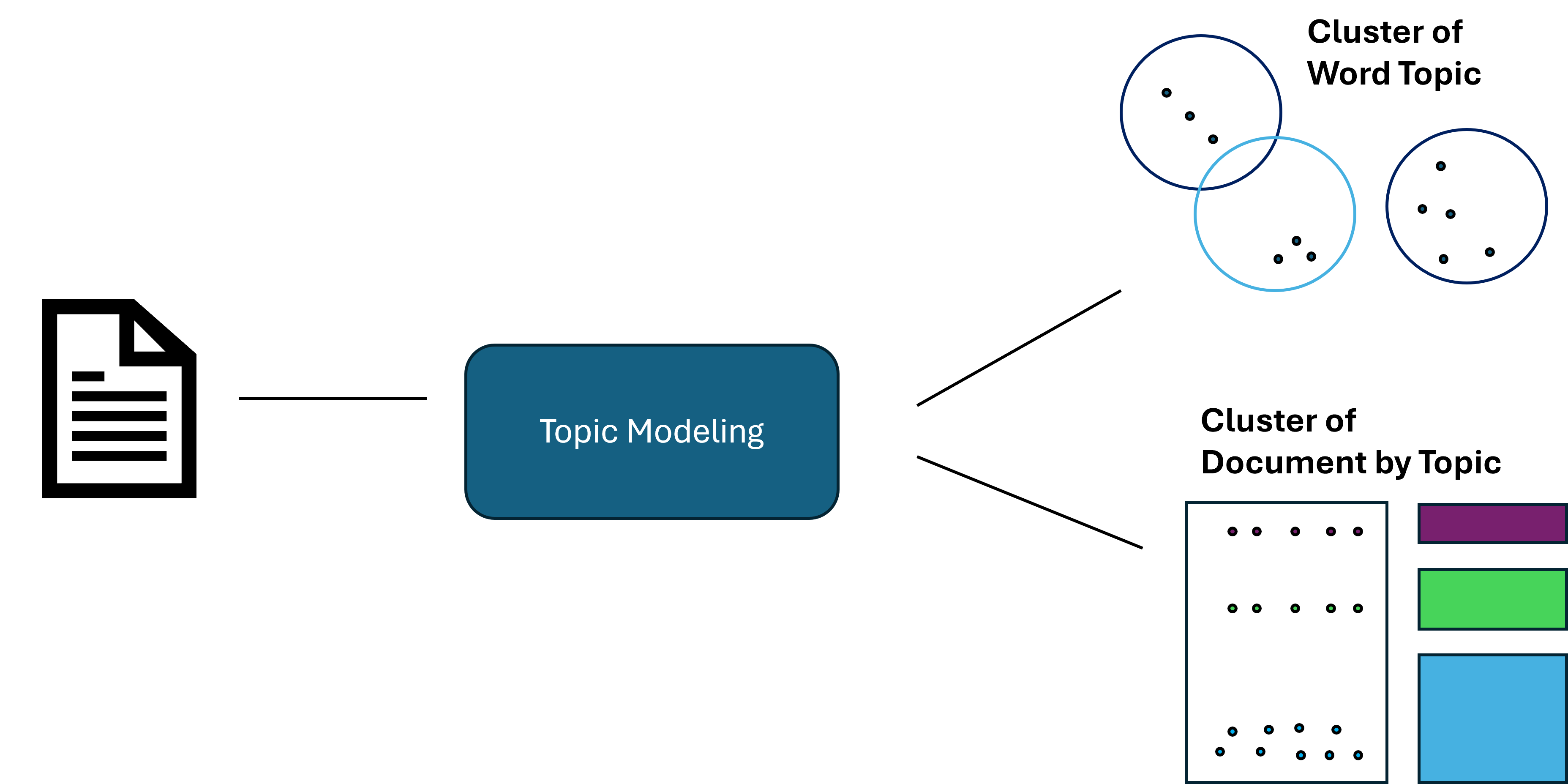 Image by Author
For example, a retail chain may model customer surveys and reviews to identify negative reviews and drill down into the key issues outlined by their customers. In this case, we will import a large amount of articles and abstracts to understand the key topics in our dataset.
Note: Topic modeling can be computationally expensive at scale. In this example, I used the Amazon Sagemaker environment to take advantage of their CPU.
Image by Author
For example, a retail chain may model customer surveys and reviews to identify negative reviews and drill down into the key issues outlined by their customers. In this case, we will import a large amount of articles and abstracts to understand the key topics in our dataset.
Note: Topic modeling can be computationally expensive at scale. In this example, I used the Amazon Sagemaker environment to take advantage of their CPU.
OpenAlex
OpenAlex is a free to use catalogue system of global research. They have indexed over 250 million pieces of news, articles, abstracts, and more.
OpenAlex
Luckily for us, they have a free (but limited) and flexible API that will allow us to quickly ingest tens of thousands of articles while also applying filters, such as year, type of media, keywords, etc.
Creating a Data Pipeline
While we ingest the data from the API, we will apply some criteria. First, we will only ingest documents where the year is between 2016 and 2022. We want fairly recent language as terms and taxonomy of certain subjects can change over long periods of time.
We will also add key terms and conduct multiple searches. While normally we would likely ingest random subject areas, we will use key terms to narrow our search. This way, we will have an idea of how may high-level topics we have, and can compare that to the output of the model. Below, we create a function where we can add key terms and conduct searches through the API.
python
import pandas as pd
import requests
python
def import_data(pages, start_year, end_year, search_terms):

    """
    This function is used to use the OpenAlex API, conduct a search on works, a return a dataframe with associated works.

    Inputs:
        - pages: int, number of pages to loop through
        - search_terms: str, keywords to search for (must be formatted according to OpenAlex standards)
        - start_year and end_year: int, years to set as a range for filtering works
    """

    #create an empty dataframe
    search_results = pd.DataFrame()

    for page in range(1, pages):

        #use paramters to conduct request and format to a dataframe
        response = requests.get(f'https://api.openalex.org/works?page={page}&per-page=200&filter=publication_year:{start_year}-{end_year},type:article&search={search_terms}')
        data = pd.DataFrame(response.json()['results'])

        #append to empty dataframe
        search_results = pd.concat([search_results, data])

    #subset to relevant features
    search_results = search_results[["id", "title", "display_name", "publication_year", "publication_date",
                                        "type", "countries_distinct_count","institutions_distinct_count",
                                        "has_fulltext", "cited_by_count", "keywords", "referenced_works_count", "abstract_inverted_index"]]

    return(search_results)
We conduct 5 different searches, each being a different technology area. These technology areas are inspired by the DoD "Critical Technology Areas". See more here:
USD(R &E) Strategic Vision and Critical Technology Areas - DoD Research & Engineering, OUSD(R&E)
Here is an example of a search using the required OpenAlex syntax:
python
#search for Trusted AI and Autonomy
ai_search = import_data(35, 2016, 2024, "'artificial intelligence' OR 'deep learn' OR 'neural net' OR 'autonomous' OR drone")
After compiling our searches and dropping duplicate documents, we must clean the data to prepare it for our topic model. There are 2 main issues with our current output.
- The abstracts are returned as an inverted index (due to legal reasons). However, we can use these to return the original text.
- Once we obtain the original text, it will be raw and unprocessed, creating noise and hurting our model. We will conduct traditional NLP preprocessing to get it ready for the model.
Below is a function to return original text from an inverted index.
python
def undo_inverted_index(inverted_index):

    """
    The purpose of the function is to 'undo' and inverted index. It inputs an inverted index and
    returns the original string.
    """

    #create empty lists to store uninverted index
    word_index = []
    words_unindexed = []

    #loop through index and return key-value pairs
    for k,v in inverted_index.items():
        for index in v: word_index.append([k,index])

    #sort by the index
    word_index = sorted(word_index, key = lambda x : x[1])

    #join only the values and flatten
    for pair in word_index:
        words_unindexed.append(pair[0])
    words_unindexed = ' '.join(words_unindexed)

    return(words_unindexed)
Now that we have the raw text, we can conduct our traditional preprocessing steps, such as standardization, removing stop words, lemmatization, etc. Below are functions that can be mapped to a list or series of documents.
python
def preprocess(text):

    """
    This function takes in a string, coverts it to lowercase, cleans
    it (remove special character and numbers), and tokenizes it.
    """

    #convert to lowercase
    text = text.lower()

    #remove special character and digits
    text = re.sub(r'd+', '', text)
    text = re.sub(r'[^ws]', '', text)

    #tokenize
    tokens = nltk.word_tokenize(text)

    return(tokens)
python
def remove_stopwords(tokens):

    """
    This function takes in a list of tokens (from the 'preprocess' function) and
    removes a list of stopwords. Custom stopwords can be added to the 'custom_stopwords' list.
    """

    #set default and custom stopwords
    stop_words = nltk.corpus.stopwords.words('english')
    custom_stopwords = []
    stop_words.extend(custom_stopwords)

    #filter out stopwords
    filtered_tokens = [word for word in tokens if word not in stop_words]

    return(filtered_tokens)
python
def lemmatize(tokens):

    """
    This function conducts lemmatization on a list of tokens (from the 'remove_stopwords' function).
    This shortens each word down to its root form to improve modeling results.
    """

    #initalize lemmatizer and lemmatize
    lemmatizer = nltk.WordNetLemmatizer()
    lemmatized_tokens = [lemmatizer.lemmatize(token) for token in tokens]

    return(lemmatized_tokens)
python
def clean_text(text):

    """
    This function uses the previously defined functions to take a string and
    run it through the entire data preprocessing process.
    """

    #clean, tokenize, and lemmatize a string
    tokens = preprocess(text)
    filtered_tokens = remove_stopwords(tokens)
    lemmatized_tokens = lemmatize(filtered_tokens)
    clean_text = ' '.join(lemmatized_tokens)

    return(clean_text)
Now that we have a preprocessed series of documents, we can create our first topic model!
Creating a Topic Model
For our topic model, we will use gensim to create a Latent Dirichlet Allocation (LDA) model. LDA is the most common model for topic modeling, as it is very effective in identifying high-level themes within a corpus. Below are the packages used to create the model.
python
import gensim.corpora as corpora
from gensim.corpora import Dictionary
from gensim.models.coherencemodel import CoherenceModel
from gensim.models.ldamodel import LdaModel
Before we create our model, we must prepare our corpus and ID mappings. This can be done with just a few lines of code.
python
#convert the preprocessed text to a list
documents = list(data["clean_text"])

#seperate by ' ' to tokenize each article
texts = [x.split(' ') for x in documents]

#construct word ID mappings
id2word = Dictionary(texts)

#use word ID mappings to build corpus
corpus = [id2word.doc2bow(text) for text in texts]
Now we can create a topic model. As you will see below, there are many different parameters that will affect the model's performance. You can read about the many parameters in gensim's documentation.
python
#build LDA model
lda_model = LdaModel(corpus = corpus, id2word = id2word, num_topics = 10, decay = 0.5,
                     random_state = 0, chunksize = 100, alpha = 'auto', per_word_topics = True)
The most import parameter will be the number of topics. Here, we set an arbitrary 10. Since we don't know how many topics there should be, this parameter should definitely be optimized. But how do we measure the quality of our model?
This is where coherence scores come in. The coherence score is a measure from 0–1. Coherence scores measure the quality of our topics by making sure they are sound and distinct. We want clear boundaries between well-defined topics. While this is a bit subjective in the end, it gives us a great idea of the quality of our results.
python
#compute coherence score
coherence_model_lda = CoherenceModel(model = lda_model, texts = texts, dictionary = id2word, coherence = 'c_v')
coherence_score = coherence_model_lda.get_coherence()
print(coherence_score)
Here, we get a coherence score of about 0.48, which isn't too bad! But not ready for production.
Visualize Our Topic Model
Topic models can be difficult to visualize. Lucky for us, there is a great module 'pyLDAvis' that can automatically produce an interactive visualization that allows us to view our topics in a vector space and drill down into each topic.
python
import pyLDAvis

#create Topic Distance Visualization
pyLDAvis.enable_notebook()
lda_viz = pyLDAvis.gensim.prepare(lda_model, corpus, id2word)
lda_viz
As you can see below, this produces a great visualization where we can get a quick idea of how our model performed. By looking into the vector space, we see some topics are distinct and well-defined. However, we also have some overlapping topics.
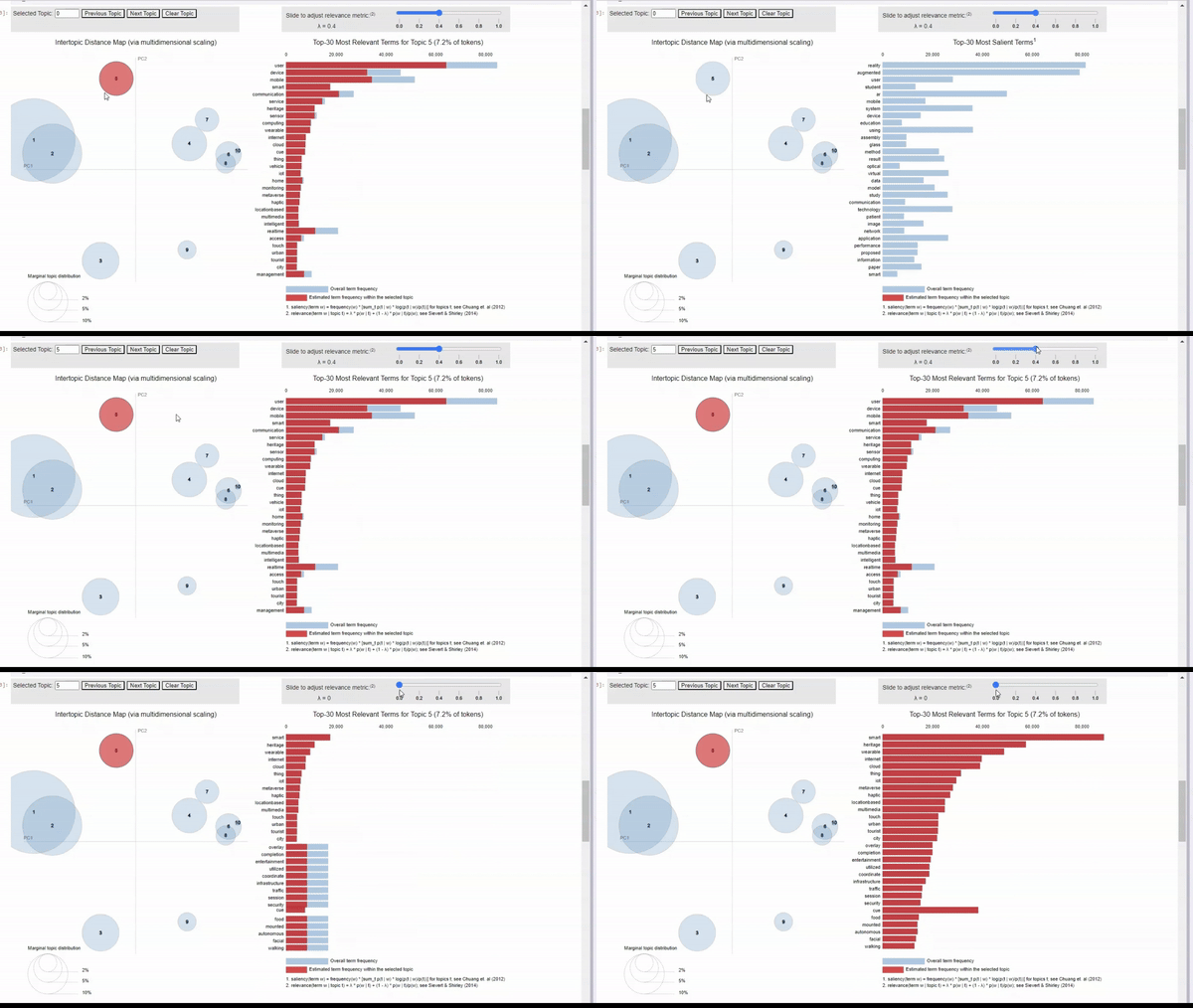 Image by Author
We can click on a topic to few the most relevant tokens. As we adjust the relevance metric (lambda), we can see topic-specific tokens by sliding it left, and seeing relevant but less topic-specific tokens by sliding it to the right.
When clicking into each topic, I can vaguely see the topics that I originally searched for. For example, topic 5 seems to align with my 'human-machine interfaces' search. There is also a cluster of topics that seem to be related to biotechnology, but some are more clear than others.
Image by Author
We can click on a topic to few the most relevant tokens. As we adjust the relevance metric (lambda), we can see topic-specific tokens by sliding it left, and seeing relevant but less topic-specific tokens by sliding it to the right.
When clicking into each topic, I can vaguely see the topics that I originally searched for. For example, topic 5 seems to align with my 'human-machine interfaces' search. There is also a cluster of topics that seem to be related to biotechnology, but some are more clear than others.
Optimize the Topic Model
From the pyLDAvis interface and our coherence score of 0.48, there is definitely room for improvement. For our final step, lets write a function where we can loop through values for different parameters and try to optimize our coherence score. Below, is a function that tests different values of the number of topics and the decay rate. The function computes the coherence score for every combination of parameters and saves them in a data frame.
python
def lda_model_evaluation():

    """
    This function loops through a number of parameters for an LDA model, creates the model,
    computes the coherenece score, and saves the results in a pandas dataframe. The outputed dataframe
    contains the values of the parameters tested and the resulting coherence score.
    """

    #define empty lists to save results
    topic_number, decay_rate_list, score  = [], [], []

    #loop through a number of parameters
    for topics in range(5,12):
        for decay_rate in [0.5, 0.6, 0.7]:

                #build LDA model
                lda_model = LdaModel(corpus = corpus, id2word = id2word, num_topics = topics, decay = decay_rate,
                               random_state = 0, chunksize = 100, alpha = 'auto', per_word_topics = True)

                #compute coherence score
                coherence_model_lda = CoherenceModel(model = lda_model, texts = texts, dictionary = id2word, coherence = 'c_v')
                coherence_score = coherence_model_lda.get_coherence()

                #append parameters to lists
                topic_number.append(topics)
                decay_rate_list.append(decay_rate)
                score.append(coherence_score)

                print("Model Saved")

    #gather result into a dataframe
    results = {"Number of Topics": topic_number,
                "Decay Rate": decay_rate_list,
                "Score": score}

    results = pd.DataFrame(results)

    return(results)
Just by passing a couple of small ranges through two parameters, we identified parameters that increased our coherence score from 0.48 to 0.55, a sizable improvement.
Next Steps
To continue to build a production-level model, there is plenty of experimentation to be had with the parameters. Because LDA is so computationally expensive, I kept the experiment above limited and only compared about 20 different models. But with more time and power, we can compare hundreds of models.
As well, there are improvements to be made with our data pipeline. I noticed several words that may need to be added to our stop word list. Words like 'use' and 'department' are not adding any semantic value, especially for documents about different technologies. As well, there are technical terms that do not get processed correctly, resulting in a single letter or a group of letters. We could spend some time doing a bag-of-words analysis to identify those stop word opportunities. This would eliminate noise in our dataset.
Conclusion
In this article, we:
- Got an introduction to topic modeling and the OpenAlex data source
- Built a data pipeline to ingest data from an API and prepare it for an NLP model
- Constructed an LDA model and visualized the results using pyLDAvis
- Wrote code to help us find the optimal parameters
- Discussed next steps for model improvement
This is my first Medium article, so I hope you enjoyed it. Please feel free to leave feedback, ask questions, or request other topics!
Register Now to Continue Reading
Unlock Towards Data Science with a Free Account
All articles on Towards Data Science are available to registered users. Create a free account today to access this article and thousands more.
Register for freeSign in to your account
 Written By
See all from Alex Davis
Data ScienceNLPResearchTopic ModelingVisualization
Share This Article
Towards Data Science is a community publication. Submit your insights to reach our global audience and earn through the TDS Author Payment Program.
Write for TDS
Related Articles
Machine Learning
With the 2020 election going on, it is more important that we understand a politician's affiliation. Today, we will use ML to do that.
Ming Lun Wu
October 26, 20207 min read
Data Science
Follow this tutorial to put your apps online in Medium posts.
Gustavo Santos
May 30, 20235 min read
Programming
Take the first steps towards becoming an R shiny expert
Sheenal Srivastava
October 15, 202110 min read
Programming
Polynomial Fit in Python with NumPy
Florian Trautweiler
January 5, 20256 min read
Programming
A simpler (and less efficient) way to create text than use neural nets.
Dimitris Panagopoulos
December 6, 20204 min read
Data Science
How should we reason about the importance and impact of data quality to the businesses we support as data practitioners?
Kevin Hu, PhD
July 28, 20227 min read
Artificial Intelligence
From someone who hated corporates for so long
Arunn Thevapalan
April 14, 20225 min read
Machine Learning
A big part of data science is keeping up to date with new techniques and models.
Sara A. Metwalli
January 26, 20217 min read
Data Science
Plotting surface of error in 3D using PyTorch🔥
Aleksei Rozanov
September 29, 20245 min read
Your home for data science and AI. The world's leading publication for data science, data analytics, data engineering, machine learning, and artificial intelligence professionals.
Subscribe to Our NewsletterWrite For TDS•About•Advertise•Privacy Policy•Terms of Use
© Insight Media Group, LLC 2026•The New Stack•roadmap.sh•Creator Network
Recommended Articles
Close