保留正文与补采附件。源页面当前未重新核验;具体限制见交付清单。
 We value your privacy
We use cookies to enhance your browsing experience, serve personalised ads or content, and analyse our traffic. By clicking "Accept All", you consent to our use of cookies.
Customise Reject All Accept All
Customise Consent Preferences
We value your privacy
We use cookies to enhance your browsing experience, serve personalised ads or content, and analyse our traffic. By clicking "Accept All", you consent to our use of cookies.
Customise Reject All Accept All
Customise Consent Preferences  We use cookies to help you navigate efficiently and perform certain functions. You will find detailed information about all cookies under each consent category below.
The cookies that are categorised as "Necessary" are stored on your browser as they are essential for enabling the basic functionalities of the site. ... Show more
NecessaryAlways Active
Necessary cookies are required to enable the basic features of this site, such as providing secure log-in or adjusting your consent preferences. These cookies do not store any personally identifiable data.
We use cookies to help you navigate efficiently and perform certain functions. You will find detailed information about all cookies under each consent category below.
The cookies that are categorised as "Necessary" are stored on your browser as they are essential for enabling the basic functionalities of the site. ... Show more
NecessaryAlways Active
Necessary cookies are required to enable the basic features of this site, such as providing secure log-in or adjusting your consent preferences. These cookies do not store any personally identifiable data.
-
Cookie
BCTempID
-
Duration
10 minutes
-
Description
No description available.
-
Cookie
__cf_bm
-
Duration
1 hour
-
Description
This cookie, set by Cloudflare, is used to support Cloudflare Bot Management.
-
Cookie
AWSALBCORS
-
Duration
7 days
-
Description
Amazon Web Services set this cookie for load balancing.
-
Cookie
_cfuvid
-
Duration
session
-
Description
Cloudflare sets this cookie to track users across sessions to optimize user experience by maintaining session consistency and providing personalized services
-
Cookie
li_gc
-
Duration
6 months
-
Description
Linkedin set this cookie for storing visitor's consent regarding using cookies for non-essential purposes.
-
Cookie
__hssrc
-
Duration
session
-
Description
This cookie is set by Hubspot whenever it changes the session cookie. The __hssrc cookie set to 1 indicates that the user has restarted the browser, and if the cookie does not exist, it is assumed to be a new session.
-
Cookie
__hssc
-
Duration
1 hour
-
Description
HubSpot sets this cookie to keep track of sessions and to determine if HubSpot should increment the session number and timestamps in the __hstc cookie.
-
Cookie
wpEmojiSettingsSupports
-
Duration
session
-
Description
WordPress sets this cookie when a user interacts with emojis on a WordPress site. It helps determine if the user's browser can display emojis properly.
-
Cookie
BCSessionID
-
Duration
1 year 1 month 4 days
-
Description
Blueconic sets this cookie as a unique identifier for the BlueConic profile.
-
Cookie
_octo
-
Duration
1 year
-
Description
No description available.
-
Cookie
logged_in
-
Duration
1 year
-
Description
No description available.
-
Cookie
__Secure-YEC
-
Duration
past
-
Description
YouTube sets this cookie to stores the user's video player preferences using embedded YouTube video
-
Cookie
__eoi
-
Duration
6 months
-
Description
Description is currently not available.
-
Cookie
AWSALBTGCORS
-
Duration
7 days
-
Description
No description available.
-
Cookie
login-status-p
-
Duration
past
-
Description
Description is currently not available.
-
Cookie
AWSALBTG
-
Duration
7 days
-
Description
No description available.
-
Cookie
csrf_token
-
Duration
session
-
Description
No description available.
-
Cookie
token_v2
-
Duration
1 day
-
Description
Description is currently not available.
-
Cookie
D
-
Duration
1 year
-
Description
Description is currently not available.
-
Cookie
PHPSESSID
-
Duration
session
-
Description
This cookie is native to PHP applications. The cookie stores and identifies a user's unique session ID to manage user sessions on the website. The cookie is a session cookie and will be deleted when all the browser windows are closed.
-
Cookie
VISITOR_PRIVACY_METADATA
-
Duration
6 months
-
Description
YouTube sets this cookie to store the user's cookie consent state for the current domain.
-
Cookie
cookietest
-
Duration
session
-
Description
The cookietest cookie is typically used to determine whether the user's browser accepts cookies, essential for website functionality and user experience.
-
Cookie
__Host-airtable-session
-
Duration
1 year
-
Description
This cookie is used to enable us to integrate the services of Airtable.
-
Cookie
__Host-airtable-session.sig
-
Duration
1 year
-
Description
This cookie is used to enable us to integrate the services of Airtable.
-
Cookie
m
-
Duration
1 year 1 month 4 days
-
Description
Stripe sets this cookie for fraud prevention purposes. It identifies the device used to access the website, allowing the website to be formatted accordingly.
-
Cookie
BIGipServer*
-
Duration
session
-
Description
Marketo sets this cookie to collect information about the user's online activity and build a profile about their interests to provide advertisements relevant to the user.
-
Cookie
__cfruid
-
Duration
session
-
Description
Cloudflare sets this cookie to identify trusted web traffic.
-
Cookie
_GRECAPTCHA
-
Duration
6 months
-
Description
Google Recaptcha service sets this cookie to identify bots to protect the website against malicious spam attacks.
-
Cookie
__Secure-YNID
-
Duration
6 months
-
Description
Google cookie used to protect user security and prevent fraud, especially during the login process.
-
Cookie
cookieyes-consent
-
Duration
1 year
-
Description
CookieYes sets this cookie to remember users' consent preferences so that their preferences are respected on subsequent visits to this site. It does not collect or store any personal information about the site visitors.
Functional
Functional cookies help perform certain functionalities like sharing the content of the website on social media platforms, collecting feedback, and other third-party features.
-
Cookie
lidc
-
Duration
1 day
-
Description
LinkedIn sets the lidc cookie to facilitate data center selection.
-
Cookie
brw
-
Duration
1 year
-
Description
No description available.
-
Cookie
brwConsent
-
Duration
5 minutes
-
Description
Description is currently not available.
-
Cookie
WMF-Uniq
-
Duration
1 year
-
Description
Description is currently not available.
-
Cookie
loom_anon_comment
-
Duration
1 year
-
Description
No description available.
-
Cookie
loom_referral_video
-
Duration
session
-
Description
Description is currently not available.
-
Cookie
VISITOR_INFO1_LIVE
-
Duration
6 months
-
Description
A cookie set by YouTube to measure bandwidth that determines whether the user gets the new or old player interface.
-
Cookie
yt-remote-connected-devices
-
Duration
Never Expires
-
Description
YouTube sets this cookie to store the user's video preferences using embedded YouTube videos.
-
Cookie
ytidb::LAST_RESULT_ENTRY_KEY
-
Duration
Never Expires
-
Description
The cookie ytidb::LAST_RESULT_ENTRY_KEY is used by YouTube to store the last search result entry that was clicked by the user. This information is used to improve the user experience by providing more relevant search results in the future.
-
Cookie
yt-remote-device-id
-
Duration
Never Expires
-
Description
YouTube sets this cookie to store the user's video preferences using embedded YouTube videos.
-
Cookie
yt-remote-session-name
-
Duration
session
-
Description
The yt-remote-session-name cookie is used by YouTube to store the user's video player preferences using embedded YouTube video.
-
Cookie
yt-remote-fast-check-period
-
Duration
session
-
Description
The yt-remote-fast-check-period cookie is used by YouTube to store the user's video player preferences for embedded YouTube videos.
-
Cookie
yt-remote-session-app
-
Duration
session
-
Description
The yt-remote-session-app cookie is used by YouTube to store user preferences and information about the interface of the embedded YouTube video player.
-
Cookie
yt-remote-cast-available
-
Duration
session
-
Description
The yt-remote-cast-available cookie is used to store the user's preferences regarding whether casting is available on their YouTube video player.
-
Cookie
yt-remote-cast-installed
-
Duration
session
-
Description
The yt-remote-cast-installed cookie is used to store the user's video player preferences using embedded YouTube video.
-
Cookie
cp_session
-
Duration
3 months
-
Description
Codepen sets this cookie for Help systems found in the website.
-
Cookie
loid
-
Duration
1 year 1 month 4 days
-
Description
This cookie is set by the Reddit. The cookie enables the sharing of content from the website onto the social media platform.
Analytics
Analytical cookies are used to understand how visitors interact with the website. These cookies help provide information on metrics such as the number of visitors, bounce rate, traffic source, etc.
-
Cookie
__hstc
-
Duration
6 months
-
Description
Hubspot set this main cookie for tracking visitors. It contains the domain, initial timestamp (first visit), last timestamp (last visit), current timestamp (this visit), and session number (increments for each subsequent session).
-
Cookie
hubspotutk
-
Duration
6 months
-
Description
HubSpot sets this cookie to keep track of the visitors to the website. This cookie is passed to HubSpot on form submission and used when deduplicating contacts.
-
Cookie
_ga
-
Duration
1 year 1 month 4 days
-
Description
Google Analytics sets this cookie to calculate visitor, session and campaign data and track site usage for the site's analytics report. The cookie stores information anonymously and assigns a randomly generated number to recognise unique visitors.
-
Cookie
ga*
-
Duration
1 year 1 month 4 days
-
Description
Google Analytics sets this cookie to store and count page views.
-
Cookie
__Host-psifi.analyticsTrace
-
Duration
6 hours
-
Description
Description is currently not available.
-
Cookie
__Host-psifi.analyticsTraceV2
-
Duration
6 hours
-
Description
Description is currently not available.
-
Cookie
_gh_sess
-
Duration
session
-
Description
GitHub sets this cookie for temporary application and framework state between pages like what step the user is on in a multiple step form.
-
Cookie
YSC
-
Duration
session
-
Description
YSC cookie is set by Youtube and is used to track the views of embedded videos on Youtube pages.
-
Cookie
ajs_anonymous_id
-
Duration
1 year
-
Description
This cookie is set by Segment to count the number of people who visit a certain site by tracking if they have visited before.
-
Cookie
vuid
-
Duration
1 year 1 month 4 days
-
Description
Vimeo installs this cookie to collect tracking information by setting a unique ID to embed videos on the website.
Performance
Performance cookies are used to understand and analyse the key performance indexes of the website which helps in delivering a better user experience for the visitors.
-
Cookie
AWSALB
-
Duration
7 days
-
Description
AWSALB is an application load balancer cookie set by Amazon Web Services to map the session to the target.
-
Cookie
acq
-
Duration
past
-
Description
Description is currently not available.
-
Cookie
acq.sig
-
Duration
past
-
Description
Description is currently not available.
-
Cookie
ptc
-
Duration
2 years
-
Description
No description available.
Advertisement
Advertisement cookies are used to provide visitors with customised advertisements based on the pages you visited previously and to analyse the effectiveness of the ad campaigns.
-
Cookie
muc_ads
-
Duration
1 year 1 month 4 days
-
Description
Twitter sets this cookie to collect user behaviour and interaction data to optimize the website.
-
Cookie
guest_id_marketing
-
Duration
1 year 1 month 4 days
-
Description
Twitter sets this cookie to identify and track the website visitor.
-
Cookie
guest_id_ads
-
Duration
1 year 1 month 4 days
-
Description
Twitter sets this cookie to identify and track the website visitor.
-
Cookie
personalization_id
-
Duration
1 year 1 month 4 days
-
Description
Twitter sets this cookie to integrate and share features for social media and also store information about how the user uses the website, for tracking and targeting.
-
Cookie
guest_id
-
Duration
1 year 1 month 4 days
-
Description
Twitter sets this cookie to identify and track the website visitor. It registers if a user is signed in to the Twitter platform and collects information about ad preferences.
-
Cookie
bcookie
-
Duration
1 year
-
Description
LinkedIn sets this cookie from LinkedIn share buttons and ad tags to recognize browser IDs.
-
Cookie
__Secure-ROLLOUT_TOKEN
-
Duration
6 months
-
Description
YouTube sets this cookie to manage feature rollout and experimentation. It helps Google control which new features or interface changes are shown to users as part of testing and staged rollouts, ensuring consistent experience for a given user during an experiment.
-
Cookie
yt.innertube::nextId
-
Duration
Never Expires
-
Description
YouTube sets this cookie to register a unique ID to store data on what videos from YouTube the user has seen.
-
Cookie
yt.innertube::requests
-
Duration
Never Expires
-
Description
YouTube sets this cookie to register a unique ID to store data on what videos from YouTube the user has seen.
-
Cookie
session_tracker
-
Duration
session
-
Description
This cookie is set by the Reddit. This cookie is used to identify trusted web traffic. It also helps in adverstising on the website.
-
Cookie
edgebucket
-
Duration
session
-
Description
Reddit sets this cookie to save the information about a log-on Reddit user, for the purpose of advertisement recommendations and updating the content.
-
Cookie
did
-
Duration
1 year
-
Description
Arbor sets this cookie to show targeted ads to site visitors.This cookie expires after 2 months or 1 year.
Uncategorised
Other uncategorised cookies are those that are being analysed and have not been classified into a category as yet.
No cookies to display.
Reject All Save My Preferences Accept All
Toggle SearchToggle Mobile Navigation
Publish AI, ML & data-science insights to a global community of data professionals.
Sign inSubmit an Article
LatestEditor's PicksNewsletterShipAI
Write For TDS
LinkedInXToggle Search
Artificial Intelligence
Building a Personal AI Agent in a couple of Hours
We are living in a Brave New World and prototyping just got fun
Ivo Bernardo
March 31, 202614 min read
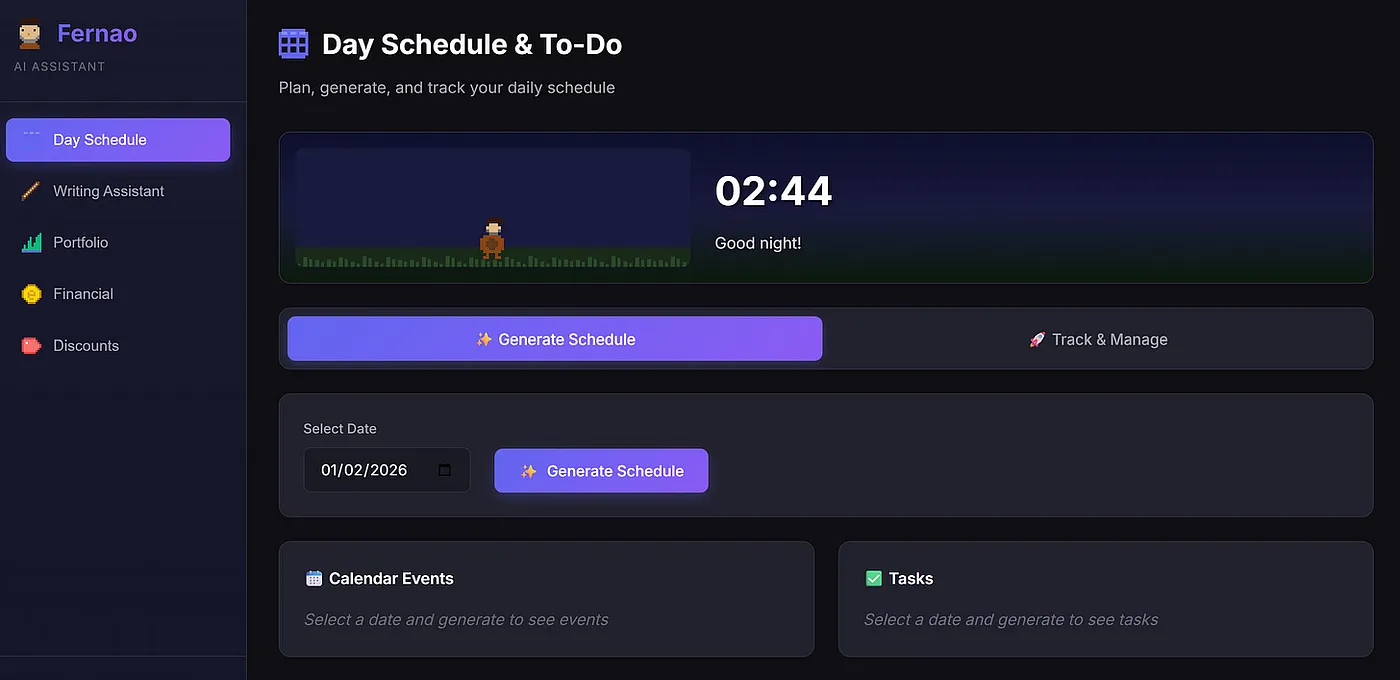 Fernão's Home Page - Image by Author
I’ve been so surprised by how fast individual builders can now ship real and useful prototypes.
Tools like Claude Code, Google AntiGravity, and the growing ecosystem around them have crossed a threshold: you can inspect what others are building online and realize just how fast you can build today.
Over the past weeks, I’ve started reserving one to two hours a day exclusively for building with my AI-first stack:
Fernão's Home Page - Image by Author
I’ve been so surprised by how fast individual builders can now ship real and useful prototypes.
Tools like Claude Code, Google AntiGravity, and the growing ecosystem around them have crossed a threshold: you can inspect what others are building online and realize just how fast you can build today.
Over the past weeks, I’ve started reserving one to two hours a day exclusively for building with my AI-first stack:
- Google AntiGravity
- Google Gemini Pro
- Claude models accessed through AntiGravity
This setup has fundamentally changed how I think about prototyping, iteration speed, and what a “personal AI agent” can realistically do today. More importantly, it pulled me back into hands-on coding and building, something I had personally sacrificed once my role at DareData shifted toward management and orchestration rather than execution.
Learn this step by step with the interactive AI Engineer roadmap.
Individually, this revolution has been a blessing someone who was always going to drift toward management roles. It removes the trade-off I had accepted: that growing a company meant abandoning building entirely. I no longer have to choose between building and managing, they actually reinforce each other.
But, there is a broader implication here for people who are “just” developing. If AI agents increasingly handle execution, then pure implementation stops being enough. Developers will be pushed (whether they want it or not) toward coordination, decision-making, and.. management — something that individual contributors hate by heart. In other words, management skills become part of the technical stack, and AI agents are part of the context being managed.
What surprised me most is how transferable my existing management skills turned out to be:
- Guiding the agent rather than micromanaging it
- Asking for outcomes instead of instructions
- Mapping, prioritizing, and pointing the grey areas
In practice, I am managing and coordinating a virtual employee. I can deeply influence some parts of its work while remaining almost entirely ignorant of others — and that is not a bug, it is a big feature. In my personal AI assistant, for example, I can reason clearly about the backend, yet remain mostly clueless about the frontend. The system still works, because my role is no longer to know everything, but to steer the system in the right direction.
This is directly analogous to how I coordinate people inside the company. As DareData grows, we do not hire replicas of founders. We intentionally hire people who can do things we cannot do, and, over time, things we will never learn deeply enough to do well.
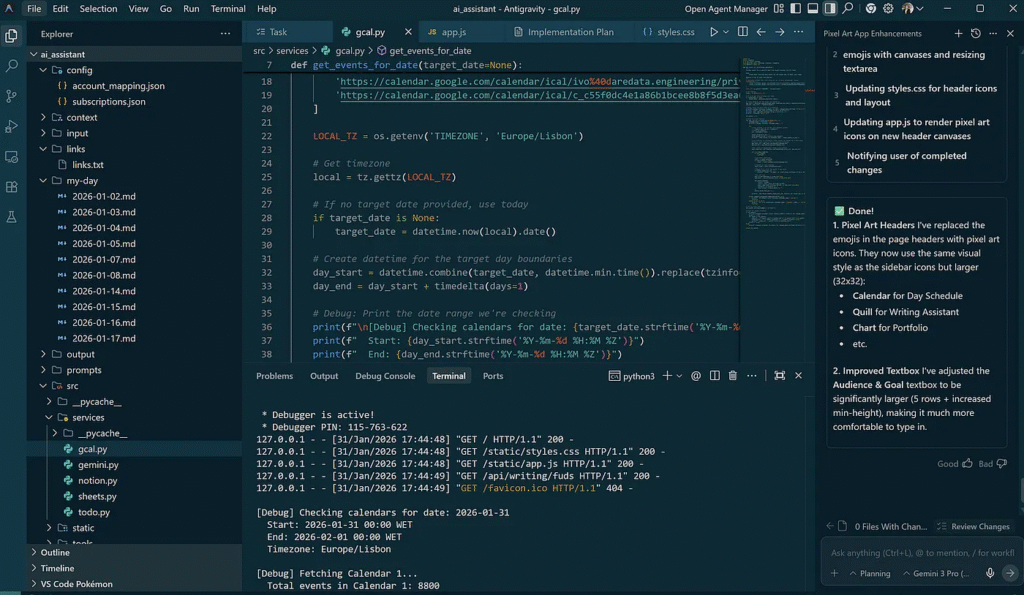 Current Building Stack — Google AntiGravity - Image by Author
Enough self-reflection on management. Let’s look at what I’m building because that’s what you are here for:
Current Building Stack — Google AntiGravity - Image by Author
Enough self-reflection on management. Let’s look at what I’m building because that’s what you are here for:
- A personal AI assistant designed around my actual routines, not a generic productivity template. It adapts to how I work, think, and make decisions.
- A mobile app that recommends one music album per week, without a traditional recommendation system. No comfort-zone reinforcement and that helps me expand my listening zones.
- A mobile game built around a single character progressing through layered dungeons, developed primarily as a creative playground rather than a commercial product.
The interesting part is that, while I’m comfortable coding most of the backend, front-end development is not a skill I have — and if I were forced to do it myself, these projects would slow down from hours to days, or simply never ship.
That constraint is now largely irrelevant. With this new stack, imagination becomes the real bottleneck. The cost of “not knowing” an entire layer has collapsed.
So, in the rest of this post, I’ll walk through my personal AI assistant: what it does, how it’s structured, and why it works for me. My goal is to open-source it once it stabilizes, so others can adapt it to their own workflows. It is currently very specific to my life, but that specificity is intentional, and making it more general is part of the experiment.
Meet Fernão
Fernão Lopes was a chronicler of the Portuguese monarchy. I chose a Portuguese historical figure deliberately — Portuguese people have a habit of attaching historical names to almost anything. If that sounds stereotypically Portuguese, that’s intentional.
Fernão is Portuguese but actually speaks English, call it a modern day chronicler for the 21st century.
 Fernão Lopes, Chronicler of the Portuguese Kingdom - Image Source: Wikimedia Foundation
At this point, I’m doing two things I usually avoid: anthropomorphizing AI and leaning into a very Portuguese naming instinct. Consider it a harmless sign of me turning older.
That aside, what does Fernão actually do for me? The best place to start is his front page.
Fernão Lopes, Chronicler of the Portuguese Kingdom - Image Source: Wikimedia Foundation
At this point, I’m doing two things I usually avoid: anthropomorphizing AI and leaning into a very Portuguese naming instinct. Consider it a harmless sign of me turning older.
That aside, what does Fernão actually do for me? The best place to start is his front page.
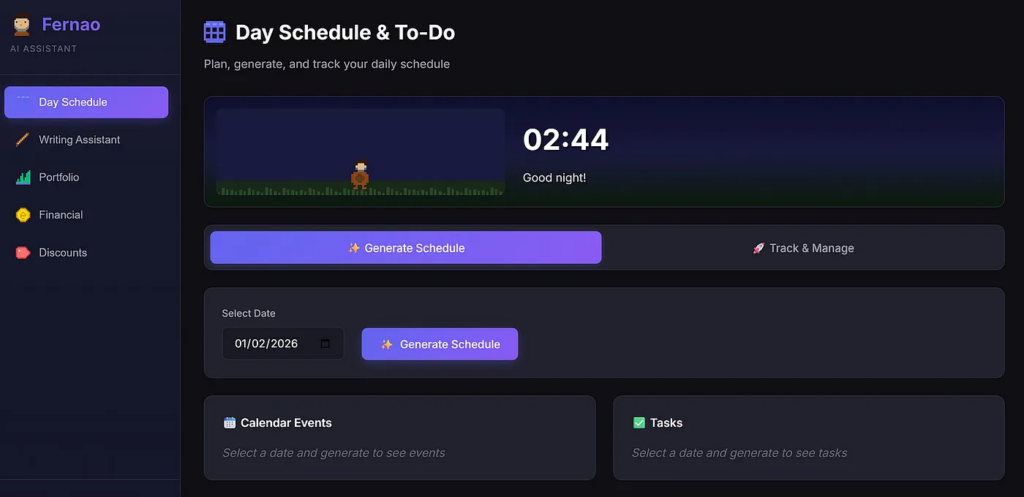 Fernão’s Front Page - Image by Author
Fernão is a cool-looking dude who currently handles five tasks:
Fernão’s Front Page - Image by Author
Fernão is a cool-looking dude who currently handles five tasks:
- Day Schedule : plans my day by pulling together calendars, to-dos, and objectives, then turning them into something I can follow.
- Writing Assistant : helps me review and clean up drafts of blog posts and other texts.
- Portfolio Helper : suggests companies or ETFs to add based on rebalancing needs and what’s going on in the macro world (without pretending to be a crystal ball).
- Financial Organizer : extracts spending from my bank statements and uploads everything into the Cashew app, saving me from yet another task that took me about 3 to 4 hours monthly.
- Subscriptions & Discounts: keeps track of all my subscriptions and surfaces discounts or benefits I probably have but never remember to use.
In this post, I’ll focus on the Day Schedule app.
At the moment, Fernão’s Day Schedule does three simple things:
- Fetches my calendar, including all scheduled meetings
- Pulls my to-dos from Microsoft To Do
- Retrieves my personal Key Results from Notion
All of this is connected through APIs. The idea is straightforward: every day, Fernão looks at my constraints, priorities, and commitments, then generates the best possible schedule for me.
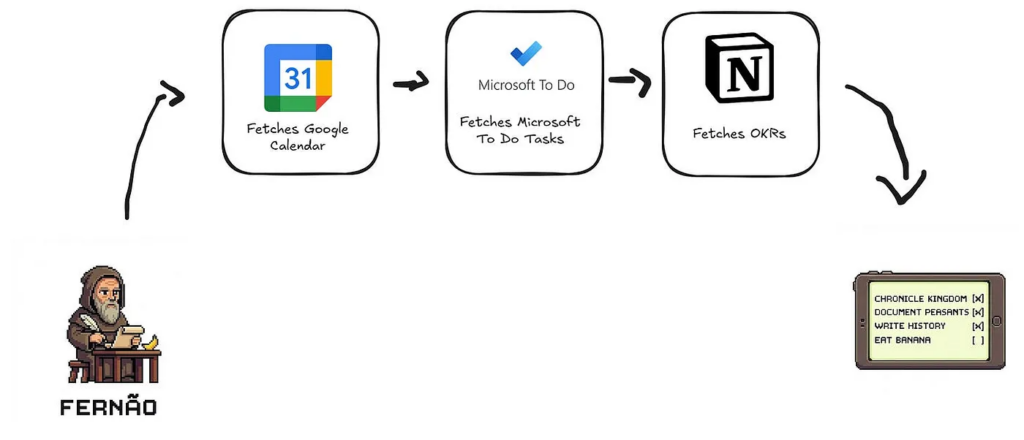 Fernão’s Current Powers - Image by Author
To generate a schedule in the front-end is pretty easy (all the front-end was vibe coded). Here is the generate schedule button:
Fernão’s Current Powers - Image by Author
To generate a schedule in the front-end is pretty easy (all the front-end was vibe coded). Here is the generate schedule button:
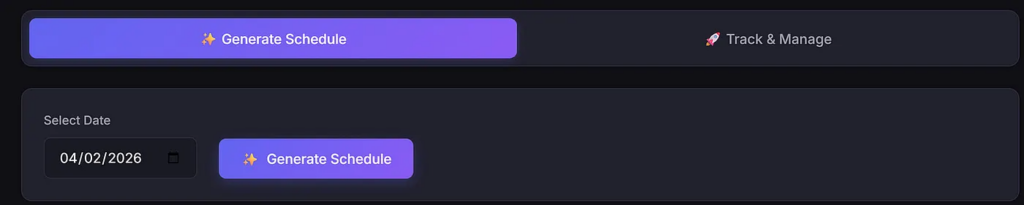 Generate Schedule for a Specific Day - Image by Author
Once I hit Generate Schedule, Fernão starts cooking in the background:
Generate Schedule for a Specific Day - Image by Author
Once I hit Generate Schedule, Fernão starts cooking in the background:
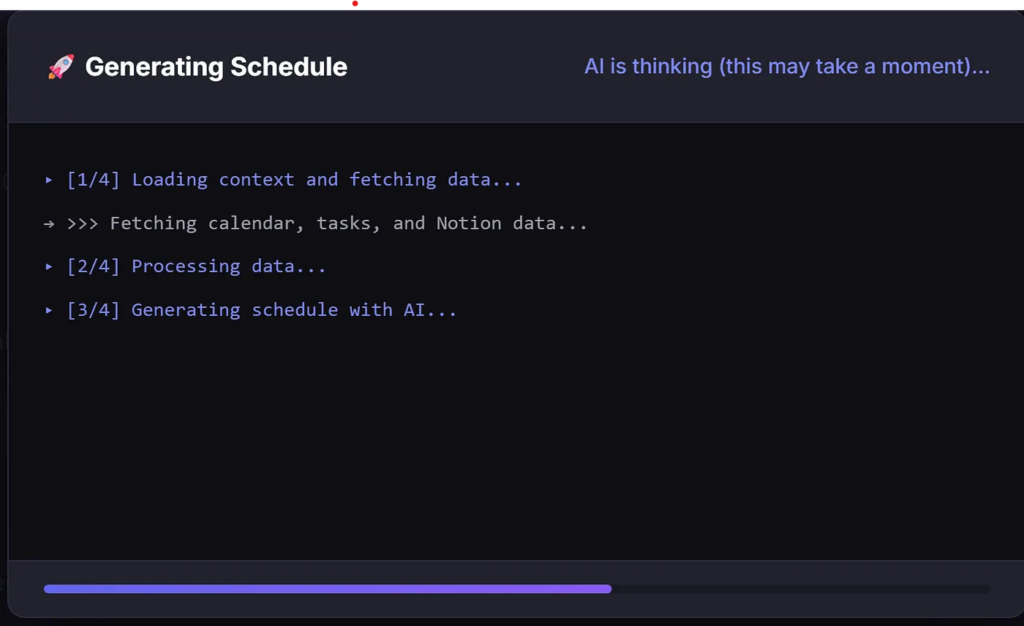 Fernão is Generating a Schedule - Image by Author
The steps are then, in order: fetching my calendar, tasks, and Notion data.
The next point is also where basic coding literacy really starts to matter, not because everything the following code does not work, but because you need to understand what is happening and where things may eventually break or need improvement.
Let’s start with the calendar fetch. At the moment, this is handled by a single, gigantic function created by Claude that is completely unoptimized.
python
Fernão is Generating a Schedule - Image by Author
The steps are then, in order: fetching my calendar, tasks, and Notion data.
The next point is also where basic coding literacy really starts to matter, not because everything the following code does not work, but because you need to understand what is happening and where things may eventually break or need improvement.
Let’s start with the calendar fetch. At the moment, this is handled by a single, gigantic function created by Claude that is completely unoptimized.
python
def get_events_for_date(target_date=None):
    """
    Fetches events for a specific date from Google Calendar via ICS feeds.

    Args:
        target_date: datetime.date object for the target day. If None, uses today.

    Returns a list of event dictionaries.
    """
    # Hardcoded calendar URLs (not using env var to avoid placeholder issues)
    CALENDAR_URLS = [
        'cal1url',
        'call2url'
    ]

    LOCAL_TZ = os.getenv('TIMEZONE', 'Europe/Lisbon')

    # Get timezone
    local = tz.gettz(LOCAL_TZ)

    # If no target date provided, use today
    if target_date is None:
        target_date = datetime.now(local).date()

    # Create datetime for the target day boundaries
    day_start = datetime.combine(target_date, datetime.min.time()).replace(tzinfo=local)
    day_end = day_start + timedelta(days=1)

    # Debug: Print the date range we're checking
    print(f"\n[Debug] Checking calendars for date: {target_date.strftime('%Y-%m-%d')}")
    print(f"  Start: {day_start.strftime('%Y-%m-%d %H:%M %Z')}")
    print(f"  End: {day_end.strftime('%Y-%m-%d %H:%M %Z')}")
    print(f"  Timezone: {LOCAL_TZ}")

    all_events = []

    # Fetch from each calendar
    for idx, cal_url in enumerate(CALENDAR_URLS, 1):
        calendar_name = f"Calendar {idx}"
        print(f"\n[Debug] Fetching {calendar_name}...")

        try:
            # Load calendar from ICS URL with adequate timeout
            r = requests.get(cal_url, timeout=30)
            r.raise_for_status()
            cal = Calendar(r.text)

            events_found_this_cal = 0
            total_events_in_cal = len(list(cal.events))
            print(f"  Total events in {calendar_name}: {total_events_in_cal}")

            # Use timeline to efficiently filter events for target day's date range
            # Convert local times to UTC for timeline filtering
            day_start_utc = day_start.astimezone(timezone.utc)
            day_end_utc = day_end.astimezone(timezone.utc)

            # Get events in target day's range using timeline
            days_timeline = cal.timeline.overlapping(day_start_utc, day_end_utc)

            for e in days_timeline:
                if not e.begin:
                    continue

                # Get event start time
                start = e.begin.datetime
                if start.tzinfo is None:
                    start = start.replace(tzinfo=timezone.utc)

                # Convert to local timezone
                start_local = start.astimezone(local)

                # Debug: Print first few events to see dates
                if events_found_this_cal < 3:
                    print(f"  Event: '{e.name}' at {start_local.strftime('%Y-%m-%d %H:%M')}")

                # Get end time
                end = e.end.datetime if e.end else None
                end_local = end.astimezone(local) if end else None

                all_events.append({
                    "title": e.name,
                    "start": start_local.strftime("%H:%M"),
                    "end": end_local.strftime("%H:%M") if end_local else None,
                    "location": e.location or "",
                    "description": e.description or ""
                })
                events_found_this_cal += 1

            print(f"  [OK] Found {events_found_this_cal} event(s) for target day in {calendar_name}")

        except requests.exceptions.RequestException as e:
            print(f"  [X] Network error fetching {calendar_name}: {str(e)}")
            continue
        except Exception as e:
            print(f"  [X] Error processing {calendar_name}: {type(e).__name__}: {str(e)}")
            continue

    # Sort by start time
    all_events.sort(key=lambda x: x["start"])

    # Print all events in detail
    if all_events:
        print(f"\n[Google Calendar] Found {len(all_events)} event(s) for {target_date.strftime('%Y-%m-%d')}:")
        print("-" * 60)
        for event in all_events:
            time_str = f"{event['start']}-{event['end']}" if event['end'] else event['start']
            location_str = f" @ {event['location']}" if event['location'] else ""
            print(f"  {time_str} | {event['title']}{location_str}")
        print("-" * 60)
    else:
        print(f"\n[Google Calendar] No events for {target_date.strftime('%Y-%m-%d')}")

    return all_events
As a Python developer, all the print statements give me the ick. But that’s a problem for the next phase of Fernão: refactoring and optimizing the code once the product logic is solid.
This is also where I really see the human + AI dynamic working. I can immediately spot several ways to improve this function (reduce verbosity, cut unnecessary latency, clean up the flow) but doing that well still requires time, judgment, and intent. AI helps me move fast; it doesn’t replace the need to know what extraordinary looks like.
For now, I haven’t spent much time optimizing it, and that’s a conscious choice. Despite its rough edges, the function does exactly what it needs to do: it pulls data from my calendars and feeds the meeting information into Fernão, enabling everything that comes next.
Next, Fernão pulls my tasks from Microsoft To Do. This is where my daily to-dos live (the small, concrete things that need to get done and that give structure to a specific day). All of this is configured directly in the Microsoft To Do app, which is a core part of my daily workflow.
If you’re curious about the broader productivity system behind this, I’ve written about it in a related post on the brother of this blog (Wait a Day) linked below.
So, let’s look at another verbosed function:
python
def get_tasks(target_date=None):
    """
    Fetches tasks from Microsoft To Do for a specific date (tasks due on or before that date).

    Args:
        target_date: datetime.date object for the target day. If None, uses today.

    Returns a list of task dictionaries.
    """
    CLIENT_ID = os.getenv('MS_CLIENT_ID', 'CLIENT_ID_KEY')
    AUTHORITY = "https://login.microsoftonline.com/consumers"
    SCOPES = ['Tasks.ReadWrite', 'User.Read']

    # Setup persistent token cache
    cache = SerializableTokenCache()
    cache_file = os.path.join(os.path.dirname(os.path.dirname(os.path.dirname(__file__))), '.token_cache.bin')

    if os.path.exists(cache_file):
        with open(cache_file, 'r') as f:
            cache.deserialize(f.read())

    # Authentication with persistent cache
    app = PublicClientApplication(CLIENT_ID, authority=AUTHORITY, token_cache=cache)
    accounts = app.get_accounts()

    result = None
    if accounts:
        result = app.acquire_token_silent(SCOPES, account=accounts[0])
        if not result or "access_token" not in result:
            for account in accounts:
                app.remove_account(account)
            result = None

    if not result:
        flow = app.initiate_device_flow(scopes=SCOPES)
        if "user_code" not in flow:
            print(f"[MS To Do] Failed to create device flow: {flow.get('error_description', 'Unknown error')}")
            return []
        if "message" in flow:
            print(flow['message'])
        result = app.acquire_token_by_device_flow(flow)

    if not result or "access_token" not in result:
        print(f"[MS To Do] Authentication failed: {result.get('error_description', 'No access token') if result else 'No result'}")
        return []
    headers = {"Authorization": f"Bearer {result['access_token']}"}

    # Get date boundaries for target date
    # If no target date provided, use today
    if target_date is None:
        from datetime import date
        target_date = date.today()

    # Convert date to datetime in UTC for comparison
    now = datetime.now(timezone.utc)
    target_day_end = datetime.combine(target_date, datetime.max.time()).replace(tzinfo=timezone.utc)

    # Fetch all lists
    lists_r = requests.get("https://graph.microsoft.com/v1.0/me/todo/lists", headers=headers)
    if lists_r.status_code != 200:
        return []

    lists_res = lists_r.json().get("value", [])
    all_tasks = []

    # Fetch tasks from all lists with server-side filtering
    for task_list in lists_res:
        list_id = task_list["id"]
        list_name = task_list["displayName"]

        # Simple filter - just get incomplete tasks
        params = {"$filter": "status ne 'completed'"}

        tasks_r = requests.get(
            f"https://graph.microsoft.com/v1.0/me/todo/lists/{list_id}/tasks",
            headers=headers,
            params=params
        )

        if tasks_r.status_code != 200:
            continue

        tasks = tasks_r.json().get("value", [])

        # Filter and transform tasks
        for task in tasks:
            due_date_obj = task.get("dueDateTime")

            if not due_date_obj:
                continue

            due_date_str = due_date_obj.get("dateTime")
            if not due_date_str:
                continue

            try:
                due_date = datetime.fromisoformat(due_date_str.split('.')[0])
                if due_date.tzinfo is None:
                    due_date = due_date.replace(tzinfo=timezone.utc)

                # Include all tasks due on or before the target date
                if due_date <= target_day_end:
                    # Determine status based on target date
                    target_day_start = datetime.combine(target_date, datetime.min.time()).replace(tzinfo=timezone.utc)

                    if due_date < target_day_start:
                        status = "OVERDUE"
                    elif due_date <= target_day_end:
                        status = f"DUE {target_date.strftime('%Y-%m-%d')}"
                    else:
                        status = "FUTURE"

                    all_tasks.append({
                        "list": list_name,
                        "title": task["title"],
                        "due": due_date.strftime("%Y-%m-%d"),
                        "importance": task.get("importance", "normal"),
                        "status": status
                    })
            except Exception as e:
                continue

    # Print task summary
    if all_tasks:
        print(f"[MS To Do] {len(all_tasks)} task(s) for {target_date.strftime('%Y-%m-%d')} or overdue")
    else:
        print(f"[MS To Do] No tasks due on {target_date.strftime('%Y-%m-%d')} or overdue")

    # Save token cache for next run
    if cache.has_state_changed:
        with open(cache_file, 'w') as f:
            f.write(cache.serialize())

    return all_tasks
This function retrieves a full list of my tasks for the current day (and overdue from previous days) — here’s an example of how they look in to-do:
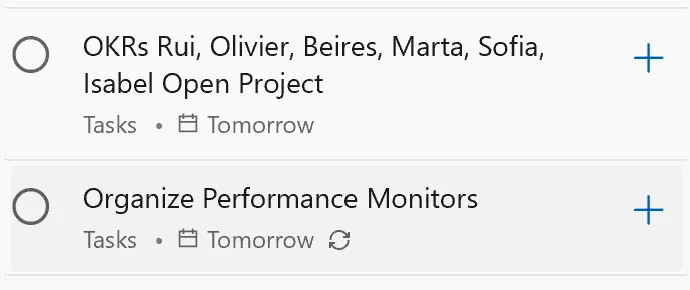 Example of Tasks in the To-Do App - Image by Author
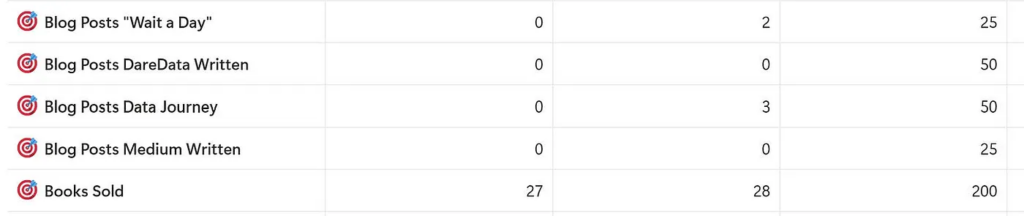
After pulling tasks from To Do, I also want Fernão to understand where I’m trying to go , not just what’s on today’s list. For that, it fetches my objectives directly from a Notion page where I have the key results for my year.
Here’s an example of how those objectives are structured:
Example of Tasks in the To-Do App - Image by Author
After pulling tasks from To Do, I also want Fernão to understand where I’m trying to go , not just what’s on today’s list. For that, it fetches my objectives directly from a Notion page where I have the key results for my year.
Here’s an example of how those objectives are structured:
- the first column shows my baseline at the start of the year,
- the last column defines the target I want to reach,
- and the column on the right tracks my current progress.
The sample below include how many blog posts I want to write for you this year, as well as the total number of books I aim to sell across my three titles.
This gives Fernão broader context on what to priority in the tasks, as you’ll see in the prompt to create the schedule.
 Personal Objectives Example - Image by Author
Btw, while writing this post, I ended up adding a small widget to the app. If we’re building a personal assistant, it might as well have some personality.
So I asked Gemini:
Personal Objectives Example - Image by Author
Btw, while writing this post, I ended up adding a small widget to the app. If we’re building a personal assistant, it might as well have some personality.
So I asked Gemini:
“Can you add a fun animation while the app is retrieving calendar events, checking to-dos, and pulling Notion data? Maybe a small widget of Fernão stirring a pot, with the caption ‘Fernão is cooking’ .”
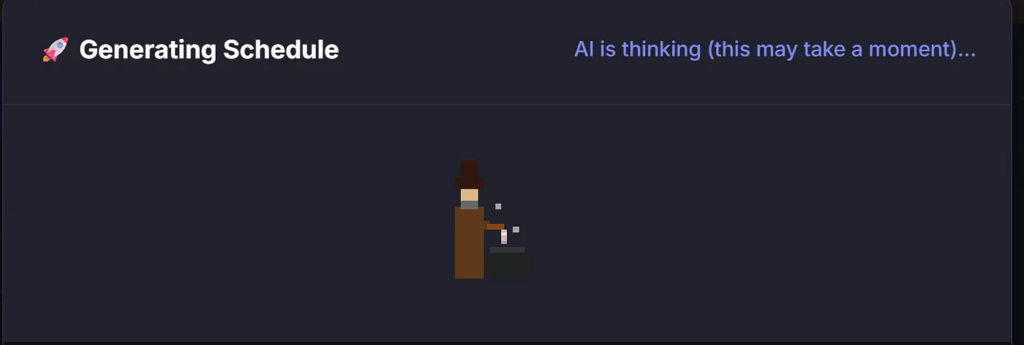 Fernão is cooking - Image by Author
Once this round finishes, tasks and calendar events are successfully collected and displayed in Fernão’s front end (a sample of the tasks and meetings for my day is shown below).
Fernão is cooking - Image by Author
Once this round finishes, tasks and calendar events are successfully collected and displayed in Fernão’s front end (a sample of the tasks and meetings for my day is shown below).
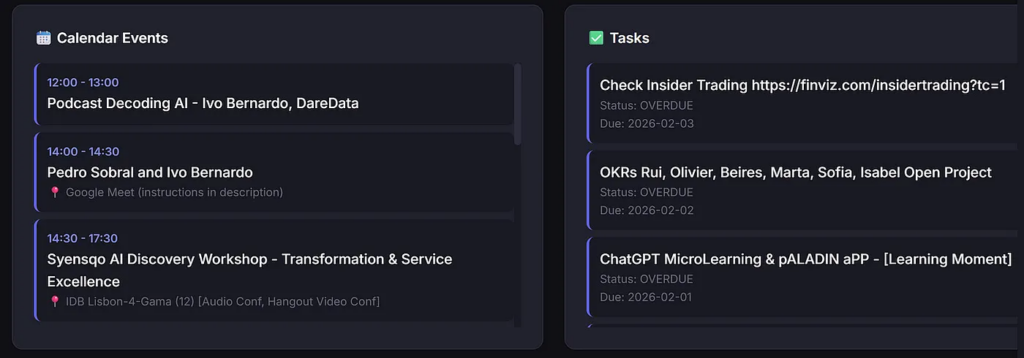 Tasks and Calendar Events fetched by Fernao - Image by Author
And now the fun part: with calendars, tasks, and objectives in hand, Fernão composes my entire day into a single, magical plan:
text
Tasks and Calendar Events fetched by Fernao - Image by Author
And now the fun part: with calendars, tasks, and objectives in hand, Fernão composes my entire day into a single, magical plan:
text
07:30-09:30 | Gym
09:30-09:40 | Check Timesheets on Odoo (Due: 2026-02-04)
09:40-09:55 | Review Tasks in To-Do - [Organization Task] (Due: 2026-02-04)
09:55-10:15 | Read Feedly Stuff - [News Catchup] (Due: 2026-02-04)
10:15-10:30 | Write culture doc, inspiration: https://pt.slideshare.net/slideshow/culture-1798664/1798664 (Due: 2026-02-04)
10:30-10:45 | Answer LinkedIns - [Organization Task] (Due: 2026-02-04)
10:45-11:00 | Check Looker (Due: 2026-02-04)
11:00-11:30 | This Week in AI Post (Due: 2026-02-04)
11:30-12:00 | Prepare Podcast Decoding AI
12:00-13:00 | Podcast Decoding AI - Ivo Bernardo, DareData (Event)
13:00-14:00 | Lunch Break
14:00-14:30 | Candidate 1 (name hidden) and Ivo Bernardo @ Google Meet (Event)
14:30-18:00 | Prepare DareData State of the Union
18:00-18:30 | Candidate 2 (name hidden) and Ivo Bernardo @ Google Meet (Event)
18:30-19:00 | Candidate 3 (name hidden) and Ivo Bernardo @ Google Meet (Event)
19:00-19:30 | Candidate 4 (name hidden) and Ivo Bernardo @ Google Meet (Event)
19:30-20:00 | Candidate 5 (name hidden) and Ivo Bernardo @ Google Meet (Event)
20:00-20:15 | Check Insider Trading Signals for Stock Ideas https://finviz.com/insidertrading?tc=1 (Overdue)
20:15-20:30 | Marketing Timeline (Overdue)
20:30-21:00 | Dinner Break
21:00-22:00 | Ler
22:00-22:15 | Close of Day - Review and prep for tomorrow
This is one of those moments that genuinely feels a bit magical. Not because the technology is opaque, but because the outcome is so clean. A messy mix of meetings, tasks, and long-term goals turns into a day I can actually execute.
What makes it even more interesting is how simple the final step is. After all the heavy lifting is done in the background (calendar events, to-dos, objectives), I don’t orchestrate a complex pipeline or chain of prompts. I use a single prompt.
That one prompt takes everything Fernão knows about my constraints and priorities and turns it into the day you’re about to see.
text
name: daily_schedule
description: Generate a daily schedule based on calendar events and tasks
model: gemini-2.5-flash-lite
temperature: 0.3
max_tokens: 8192
text
variables:
  - date_context
  - events_str
  - tasks_str
  - context
  - todo_context
  - auto_context
  - currently_reading
  - notion_context
  - is_today
template: |
  You are my personal AI scheduling assistant. Help me plan my day!
  **TARGET DATE:** Planning for {date_context}
  **EVENTS (Fixed):**
  {events_str}
  **TASKS TO SCHEDULE:**
  {tasks_str}
  **MY CONTEXT:**
  {context}
  **TASK CONTEXT (how long tasks typically take):**
  {todo_context}
  **AUTO-LEARNED CONTEXT:**
  {auto_context}
  **CURRENTLY READING:**
  {currently_reading}
  **RESULTS & OBJECTIVES (from Notion):**
  {notion_context}
  **SCHEDULING RULES:**
  1. **Cannot schedule tasks during calendar events** - events are fixed
  2. **Mandatory breaks:**
     - Lunch: 12:30-13:30 (reserve when possible)
     - Dinner: 20:30-21:00
     - Playing with my cat: 45-60 minutes somewhere scattered around the day
  3. **Task fitting:** Intelligently fit tasks between events based on available time
  4. **Time estimates:** Use the task context to estimate how long each task will take
  5. **Working hours:** 09:30 to 22:00
  6. **Start the schedule:** {is_today}

  **YOUR JOB:**
  1. Create a complete hourly schedule for {date_context}
  2. Fit all tasks between events and breaks
  3. **Prioritize tasks based on my Results & Objectives from Notion** - focus on what matters most
  4. Be conversational - if you need more info about a task, ask me!
  5. **Save learnings:** If I give you context about tasks, acknowledge it and say you'll remember it
  **FORMAT:**
  Start with a friendly greeting, then provide the schedule in this format:
09:30-10:00 | Task/Event
10:00-11:00 | Task/Event
...
After the schedule, ask if I need any adjustments or if you need clarification on any tasks.
Generate my day's schedule now, thanks!
And with this, Fernão is definitely cooking:
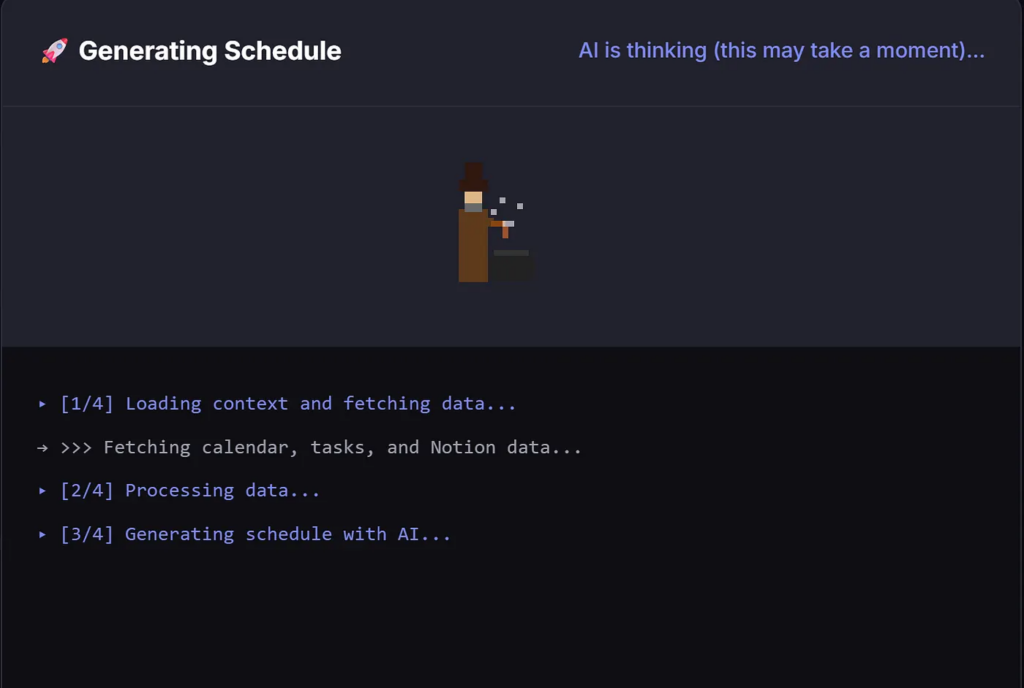 Fernão is Cooking again - Image by Author
This has been a genuinely fun system to build. I’ll keep evolving Fernão, giving him new responsibilities, breaking things, fixing them, and sharing what I learn along the way here.
Over time, I also plan to write practical tutorials on how to build and deploy similar apps yourself. For now, Fernão lives only on my machine, and that’s likely to remain the case. Still, I do intend to open-source it. Not because it’s universally useful in its current form (it’s deeply tailored to my life), but because the underlying ideas might be.
To make that possible, I’ll need to abstract tools, modularize functionality, and allow features to be turned on and off so others can shape the assistant around their own workflows, rather than mine.
I could have built something similar using Claude Code alone. I didn’t. I wanted full control: the freedom to swap models, mix providers, and eventually run Fernão on a local LLM instead of relying on external APIs. Ownership and flexibility matter more to me than convenience here.
If you were building a personal AI assistant, what tasks would you give it? I’d genuinely like to hear your ideas and try to build them inside Fernão. Leave a comment as this project is still evolving, and outside perspectives are often the fastest way to make it better.
Fernão is Cooking again - Image by Author
This has been a genuinely fun system to build. I’ll keep evolving Fernão, giving him new responsibilities, breaking things, fixing them, and sharing what I learn along the way here.
Over time, I also plan to write practical tutorials on how to build and deploy similar apps yourself. For now, Fernão lives only on my machine, and that’s likely to remain the case. Still, I do intend to open-source it. Not because it’s universally useful in its current form (it’s deeply tailored to my life), but because the underlying ideas might be.
To make that possible, I’ll need to abstract tools, modularize functionality, and allow features to be turned on and off so others can shape the assistant around their own workflows, rather than mine.
I could have built something similar using Claude Code alone. I didn’t. I wanted full control: the freedom to swap models, mix providers, and eventually run Fernão on a local LLM instead of relying on external APIs. Ownership and flexibility matter more to me than convenience here.
If you were building a personal AI assistant, what tasks would you give it? I’d genuinely like to hear your ideas and try to build them inside Fernão. Leave a comment as this project is still evolving, and outside perspectives are often the fastest way to make it better.
Register Now to Continue Reading
Unlock Towards Data Science with a Free Account
All articles on Towards Data Science are available to registered users. Create a free account today to access this article and thousands more.
Register for freeSign in to your account
 Written By
See all from Ivo Bernardo
Deep DivesArtificial IntelligenceBuildingpersonal assistantPrototype
Share This Article
Towards Data Science is a community publication. Submit your insights to reach our global audience and earn through the TDS Author Payment Program.
Write for TDS
Related Articles
Artificial Intelligence
This article is an introduction to K-means clustering through its Python implementation. Also, it includes its application to image...
Ching (Chingis)
February 13, 20212 min read
Artificial Intelligence
Wisdom is not bound to specific fields of work and it is time we look beyond ours.
Bernardo Pereira
November 15, 20204 min read
Artificial Intelligence
Using Node Embeddings as features for GNN model
Rohith Teja
August 14, 20214 min read
Artificial Intelligence
The Magic of Mixture Density Networks Explained
Miguel Dias, PhD
May 19, 20246 min read
Artificial Intelligence
A few weeks of learning can help you stand out from the crowd in the long run
Arunn Thevapalan
August 23, 20214 min read
Data Science
An Introduction to the Conditional World
Ani Madurkar
July 19, 202120 min read
Large Language Models
Looking at the performance of different pipelines
Ida Silfverskiold
January 12, 202619 min read
Artificial Intelligence
An overview of how to succeed in this world-class data analytics program.
Madison Hunter
March 31, 20219 min read
Artificial Intelligence
More people learning data science is great, but not everyone who passes an online class should push their models to production.
Tim Lee
March 5, 20216 min read
Your home for data science and AI. The world's leading publication for data science, data analytics, data engineering, machine learning, and artificial intelligence professionals.
Subscribe to Our NewsletterWrite For TDS•About•Advertise•Privacy Policy•Terms of Use
© Insight Media Group, LLC 2026•The New Stack•roadmap.sh•Creator Network
Recommended Articles
Close