Building a GPT Model from Scratch (Part 4): Training and Loading Pretrained Weights
From cross-entropy loss and backpropagation to decoding strategies and loading Open AI’s pretrained GPT-2 weights.

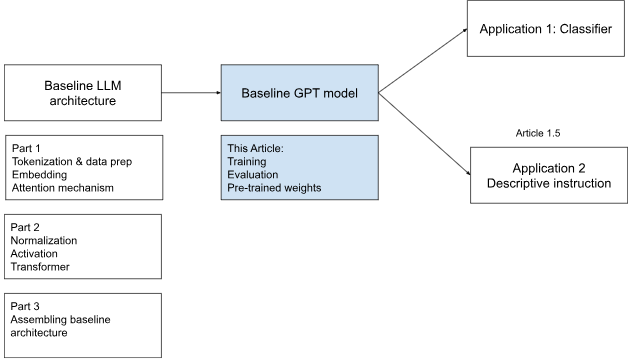
In the previous article, we completed the base architecture of our GPT model. The token and positional embeddings, transformer blocks, normalization layers, and output layer were all in place. The model worked, but its weights were randomly initialized, so its output was random. We had built the machinery, but it had not learned anything yet.
In this article, we will look at how to turn that architecture into a model that can generate more meaningful text. We will cover this in three parts.
First, we will look at training: preparing the data pipeline, dividing the data into training and validation sets, and defining a loss function that measures how far the model’s predictions are from the expected output.
Second, we will explore decoding strategies used during inference. The model produces a score for every token in the vocabulary, but we still need a method for selecting the next token and converting those scores into generated text.
Finally, we will download the publicly available pretrained GPT-2 weights released by OpenAI and load them into our custom architecture. Training a model on internet-scale text would require significant data, computing power, and time, so we will reuse OpenAI’s trained weights and map them to the corresponding layers in our model.
Model Training and Validation
For our initial training run, we will use a short text file, The Verdict:
file_path = "the-verdict.txt"

with open(file_path, "r", encoding="utf-8") as file:
    text_data = file.read()

total_characters = len(text_data)
total_tokens = len(tokenizer.encode(text_data))

print(f"Total characters: {total_characters}")
print(f"Total tokens: {total_tokens}")
Total characters: 20,479
Total tokens: 5,145
We divide this text into smaller batches using the sliding-window approach discussed in the earlier articles. Each input sequence is paired with the same sequence shifted one position forward, allowing the model to learn next-token prediction.
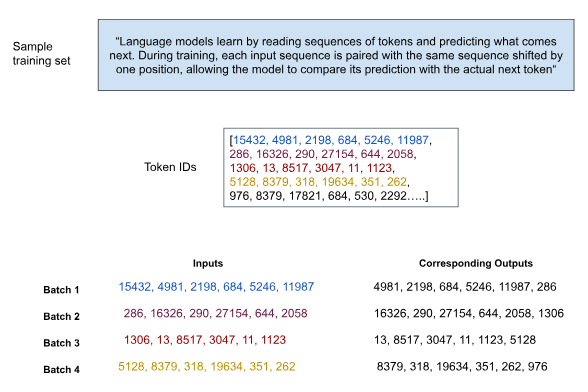
Once the input and target sequences are ready, the next step is to define the loss function that training will minimize. Before doing that, it helps to understand exactly what the model produces.
What Does the Model Output?
When a sequence enters the model, each token is first represented by an embedding vector. In our GPT-2 configuration, each vector has 768 dimensions.
As these vectors pass through the transformer blocks, they are updated using information from the preceding tokens. The final transformer block therefore produces a contextualized 768-dimensional vector for every position in the sequence.
The output layer then maps each vector from the embedding dimension to the vocabulary dimension. Since our vocabulary contains 50,257 tokens, the model produces 50,257 numbers at every sequence position.
These numbers are called logits. Each logit represents how strongly the model favors one vocabulary token as the next token. Logits are scores rather than probabilities, so they do not need to add up to one. We can apply softmax to convert them into probabilities.
During training, the model makes one prediction at every position in the sequence. Consider the following input and target pair:
Input:  [15432, 4981, 2198, 684, 5246, 11987]
Target: [4981, 2198, 684, 5246, 11987, 268]
This creates six next-token prediction tasks:
| Position | Context available to the model | Target token |
|---|---|---|
| 1 | 15432 |
4981 |
| 2 | 15432, 4981 |
2198 |
| 3 | 15432, 4981, 2198 |
684 |
| 4 | 15432, 4981, 2198, 684 |
5246 |
| 5 | 15432, 4981, 2198, 684, 5246 |
11987 |
| 6 | 15432, 4981, 2198, 684, 5246, 11987 |
268 |
The model therefore learns from every position in the sequence, not only from the final token.
Calculating the Loss
We use cross-entropy loss to measure the quality of the model’s predictions. At each position, the model produces one logit for every token in the vocabulary. Cross-entropy compares these scores with the actual next token and assigns a higher loss when the model gives the correct token a low probability.
The token-level losses are then averaged across all sequence positions and samples in the batch. A lower loss means the model is becoming better at predicting the next token.
Consider a simplified vocabulary of four tokens, where the correct next token is “cat”:
| Token | Logit (z_i) | (e^{z_i}) | Probability | Correct token? | Loss contribution |
|---|---|---|---|---|---|
| dog | 1.2 | 3.32 | (3.32/16.30 = 0.204) | No | 0 |
| cat | 2.4 | 11.02 | (11.02/16.30 = 0.676) | Yes | (-\log(0.676)=0.39) |
| house | 0.3 | 1.35 | (1.35/16.30 = 0.083) | No | 0 |
| ran | -0.5 | 0.61 | (0.61/16.30 = 0.037) | No | 0 |
| Total | — | 16.30 | 1.000 | — | Loss = 0.39 |
The model assigned a probability of approximately 67.6% to the correct token, resulting in a cross-entropy loss of approximately 0.39.
The incorrect tokens do not contribute directly to the final cross-entropy value because the target identifies “cat” as the correct token. However, their logits still affect the softmax denominator and therefore influence the probability assigned to “cat.”
Cross-entropy is useful because it considers not only whether the prediction was correct, but also how much probability the model assigned to the correct token. It gives a small loss to confident correct predictions and heavily penalizes confident incorrect ones. By minimizing this loss across many sequences, the model gradually learns to assign higher probabilities to tokens that are more likely to appear next.
Training the Model
With the data pipeline and loss function in place, we are ready to train the model:
def train_model_simple(
    model,train_loader, val_loader, optimizer, device, num_epochs, eval_freq,eval_iter,start_context,tokenizer
):
    train_losses = []
    val_losses = []
    track_tokens_seen = []

    tokens_seen = 0
    global_step = -1

    for epoch in range(num_epochs):
        model.train()

        for input_batch, target_batch in train_loader:
            optimizer.zero_grad()

            loss = calc_loss_batch(
                input_batch,
                target_batch,
                model,
                device
            )

            loss.backward()
            optimizer.step()

            tokens_seen += input_batch.numel()
            global_step += 1

            if global_step % eval_freq == 0:
                train_loss, val_loss = evaluate_model(
                    model,
                    train_loader,
                    val_loader,
                    device,
                    eval_iter
                )

                train_losses.append(train_loss)
                val_losses.append(val_loss)
                track_tokens_seen.append(tokens_seen)

                print(
                    f"Epoch: {epoch + 1}, "
                    f"Global Step: {global_step}, "
                    f"Train Loss: {train_loss:.4f}, "
                    f"Val Loss: {val_loss:.4f}"
                )

        generate_and_print_sample(model,tokenizer,device,
            start_context)

    return train_losses, val_losses, track_tokens_seen
Most of the training loop’s work happens in three lines:
loss = calc_loss_batch(input_batch, target_batch,model,
    device)

loss.backward()
optimizer.step()
Step 1: Calculate the Loss
The model’s predictions are compared with the target tokens using the cross-entropy loss discussed above.
Step 2: Run Backpropagation
Starting from the output layer, backpropagation calculates how much each trainable parameter contributed to the loss. These gradients indicate the direction and extent to which the weights should change to reduce it.
Step 3: Update the Weights
The optimizer uses these gradients to adjust the model’s parameters. We use AdamW, which adapts the update size for different parameters and applies weight decay to support stable training.
Let us run the training loop:
torch.manual_seed(123)

model = GPTModel(GPT_CONFIG_124M)
model.to(device)

optimizer = torch.optim.AdamW(model.parameters(),lr=3e-4,
    weight_decay=0.1)

num_epochs = 10

train_losses, val_losses, track_tokens_seen = train_model_simple(model,train_loader,val_loader,optimizer,
    device,num_epochs=num_epochs,eval_freq=5,eval_iter=5,
    start_context="Every effort moves you",      tokenizer=tokenizer)
A shortened version of the output is shown below:
Epoch: 1, Global Step: 0, Train Loss: 9.9989, Val Loss: 10.1392
Epoch: 1, Global Step: 5, Train Loss: 8.3282, Val Loss: 8.6033
....

Epoch: 3, Global Step: 20, Train Loss: 5.8362, Val Loss: 6.5150
Epoch: 3, Global Step: 25, Train Loss: 5.3558, Val Loss: 6.3479

Every effort moves you. " "I I--I. "I. ""I, and I...
...

Epoch: 9, Global Step: 75, Train Loss: 1.7470, Val Loss: 6.1943
Epoch: 9, Global Step: 80, Train Loss: 1.4977, Val Loss: 6.2237

Every effort moves you?" "Yes--quite insensible to the fact
with equanimity. Gisburn's an awful...
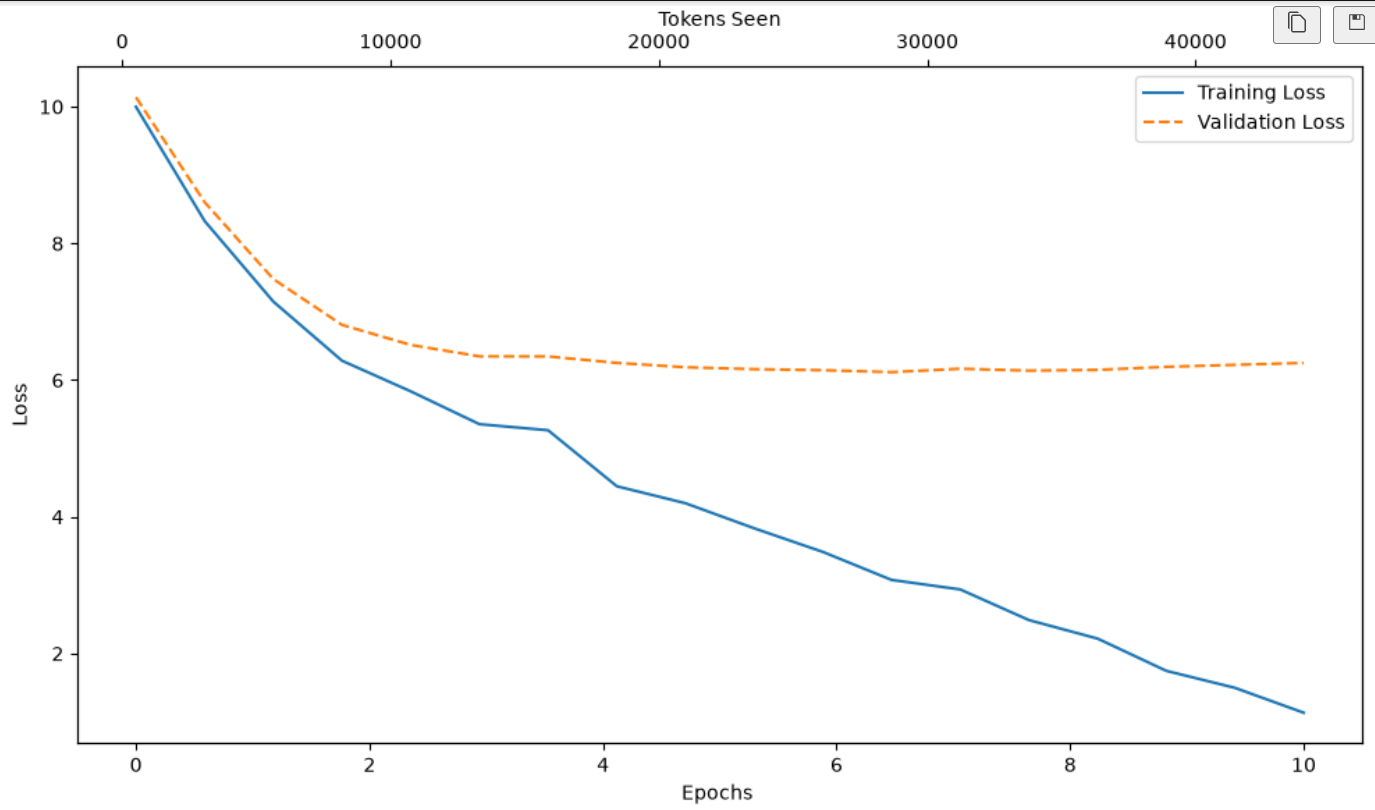
The training loss decreases sharply, and the generated text begins to develop some structure. However, the validation loss eventually stops improving while the training loss continues to fall. This widening gap indicates overfitting, which is expected when training a large model on such a small text sample.
Let us conclude this section with the mandatory visualization of losses over time:
Generation and Decoding Strategies
During training, the model receives both input and target sequences. During inference, it receives only the input, so we use the logits from the final sequence position to select the next token.
Common decoding strategies include:
Temperature scaling: Adjusts how concentrated or spread out the token probabilities are. Lower values make the output more predictable, while higher values increase randomness.
Top-k sampling: Limits the choice to the
khighest-scoring tokens.Greedy decoding: Always selects the highest-scoring token.
Multinomial sampling: Samples from the full probability distribution.
Top-p sampling: Samples from the smallest group of tokens whose combined probability exceeds a chosen threshold.
In our GPT model, we combine temperature scaling and top-k sampling. Let us return to our earlier example and apply:
temperature = 1.2
top_k = 3
We first divide each logit by the temperature and then retain only the three highest-scoring tokens. Softmax converts the remaining logits into probabilities, from which the next token is sampled.
| Token | Original logit | After temperature | After top-k | Probability |
|---|---|---|---|---|
| dog | 3.4 | 2.83 | 2.83 | 14.0% |
| cat | 4.4 | 3.67 | 3.67 | 32.5% |
| house | 2.0 | 1.67 | Removed | 0% |
| ran | -4.0 | -3.33 | Removed | 0% |
| over | -1.0 | -0.83 | Removed | 0% |
| the | 5.0 | 4.17 | 4.17 | 53.5% |
Only dog, cat, and the remain eligible. The model samples from these probabilities, so “the” is the most likely next token, although it is not guaranteed to be selected.
Loading Pretrained Weights
So far, we have seen how a GPT model is trained and how decoding strategies convert its logits into generated text. However, training a model of this size on an internet-scale dataset would require substantial data, computing power, and time.
Instead of doing that from scratch, we will load the publicly available GPT-2 weights released by OpenAI into the architecture we have already built.
OpenAI released the GPT-2 checkpoints through its official GPT-2 GitHub repository. Its download script retrieves the trained weights, model configuration, and tokenizer files from OpenAI’s public storage.
For example, the 124M checkpoint corresponds to GPT-2 Small. These files contain the pretrained model parameters and supporting files—not the original WebText training dataset.
GPT-2 was released in four configurations:
| Model parameter | GPT-2 Small | GPT-2 Medium | GPT-2 Large | GPT-2 XL |
|---|---|---|---|---|
| Approx. parameters | 124 million | 355 million | 774 million | 1.558 billion |
| Transformer blocks | 12 | 24 | 36 | 48 |
| Attention heads | 12 | 16 | 20 | 25 |
| Embedding dimension | 768 | 1,024 | 1,280 | 1,600 |
| Context length | 1,024 | 1,024 | 1,024 | 1,024 |
| Vocabulary size | 50,257 | 50,257 | 50,257 | 50,257 |
We use the following code to download the GPT-2 Small weights and load them into our model:
from gpt_download import download_and_load_gpt2

settings, params = download_and_load_gpt2(
    model_size="124M",
    models_dir="gpt2"
)

gpt = GPTModel(NEW_CONFIG)

load_weights_into_gpt(gpt, params)

gpt.to(device)
gpt.eval()
The model configuration must match the selected checkpoint. For example, the 124M weights require a model with 12 transformer blocks, 12 attention heads, and an embedding dimension of 768.
download_and_load_gpt2() reads OpenAI’s TensorFlow checkpoint and organizes its parameters. load_weights_into_gpt() then copies them into the corresponding components of our PyTorch model, including the token and positional embeddings, attention projections, activation layers, normalization layers, and output layer.
Once this mapping is complete, the architecture is no longer operating with random weights. It is now powered by the language patterns learned during OpenAI’s original GPT-2 pretraining.
Let us test the pretrained model:
torch.manual_seed(123)

token_ids = generate(
    model=gpt,
    idx=text_to_token_ids(
        "today's hit movies are",
        tokenizer
    ).to(device),
    max_new_tokens=50,
    context_size=NEW_CONFIG["context_length"],
    top_k=50,
    temperature=1.5
)

print(
    "Output text:",
    token_ids_to_text(token_ids, tokenizer)
)
today's hit movies are not only awesome, it's actually kinda cool!

What makes them special: Their unique, magical feel (along with the
best scenes, humor, comedy, a lot of that humor from a film noir-type
angle) is the main...
The output is not perfect, but it is a clear improvement over the random text generated by the untrained model. The architecture has not changed—the difference comes entirely from loading weights that have already learned patterns from a large collection of text.
Conclusion
In this article, we moved from a randomly initialized GPT architecture to a working language model. We looked at how training data is prepared, how cross-entropy loss and backpropagation help the model learn, how decoding strategies turn logits into generated text, and how pretrained GPT-2 weights can be loaded into our custom architecture.
In the next two articles, we will build on this foundation and explore two practical applications: fine-tuning the model for text classification and instruction following.
References
Sebastian Raschka — Build a Large Language Model (From Scratch) The primary reference for this project, covering tokenization, attention, GPT-style model construction, pretraining, and fine-tuning. Book on Manning Official book website Official companion code repository
Aman Jain — LLMs From Scratch Project The complete code accompanying this article series, including the baseline GPT architecture, GPT-2 weight loading, classification fine-tuning, and instruction fine-tuning. View the project on GitHub
OpenAI — GPT-2 Code and Model Checkpoints OpenAI’s official repository containing the GPT-2 code, model configurations, tokenizer files, and released model checkpoints. OpenAI GPT-2 repository
OpenAI — GPT-2 Model Download Script The official script used to download the
124M,355M,774M, and1558MGPT-2 checkpoints from OpenAI’s public storage. Viewdownload_model.pyRadford et al. — Language Models are Unsupervised Multitask Learners The original GPT-2 paper describing the model architecture, WebText training corpus, model configurations, and zero-shot performance. Read the GPT-2 paper
Vaswani et al. — Attention Is All You Need The original paper introducing the transformer architecture and scaled dot-product attention. Read the paper on arXiv
Ba, Kiros, and Hinton — Layer Normalization The foundational paper introducing layer normalization. Read the paper on arXiv
Xiong et al. — On Layer Normalization in the Transformer Architecture An analysis of where layer normalization is placed within transformer blocks and how that placement affects training. Read the paper on arXiv
Hendrycks and Gimpel — Gaussian Error Linear Units (GELUs) The paper introducing GELU, the activation function used in GPT-2. Read the paper on arXiv