保留正文与补采附件。源页面当前未重新核验;具体限制见交付清单。
 We value your privacy
We use cookies to enhance your browsing experience, serve personalised ads or content, and analyse our traffic. By clicking "Accept All", you consent to our use of cookies.
Customise Reject All Accept All
Customise Consent Preferences
We value your privacy
We use cookies to enhance your browsing experience, serve personalised ads or content, and analyse our traffic. By clicking "Accept All", you consent to our use of cookies.
Customise Reject All Accept All
Customise Consent Preferences  We use cookies to help you navigate efficiently and perform certain functions. You will find detailed information about all cookies under each consent category below.
The cookies that are categorised as "Necessary" are stored on your browser as they are essential for enabling the basic functionalities of the site. ... Show more
NecessaryAlways Active
Necessary cookies are required to enable the basic features of this site, such as providing secure log-in or adjusting your consent preferences. These cookies do not store any personally identifiable data.
We use cookies to help you navigate efficiently and perform certain functions. You will find detailed information about all cookies under each consent category below.
The cookies that are categorised as "Necessary" are stored on your browser as they are essential for enabling the basic functionalities of the site. ... Show more
NecessaryAlways Active
Necessary cookies are required to enable the basic features of this site, such as providing secure log-in or adjusting your consent preferences. These cookies do not store any personally identifiable data.
-
Cookie
BCTempID
-
Duration
10 minutes
-
Description
No description available.
-
Cookie
__cf_bm
-
Duration
1 hour
-
Description
This cookie, set by Cloudflare, is used to support Cloudflare Bot Management.
-
Cookie
AWSALBCORS
-
Duration
7 days
-
Description
Amazon Web Services set this cookie for load balancing.
-
Cookie
_cfuvid
-
Duration
session
-
Description
Cloudflare sets this cookie to track users across sessions to optimize user experience by maintaining session consistency and providing personalized services
-
Cookie
li_gc
-
Duration
6 months
-
Description
Linkedin set this cookie for storing visitor's consent regarding using cookies for non-essential purposes.
-
Cookie
__hssrc
-
Duration
session
-
Description
This cookie is set by Hubspot whenever it changes the session cookie. The __hssrc cookie set to 1 indicates that the user has restarted the browser, and if the cookie does not exist, it is assumed to be a new session.
-
Cookie
__hssc
-
Duration
1 hour
-
Description
HubSpot sets this cookie to keep track of sessions and to determine if HubSpot should increment the session number and timestamps in the __hstc cookie.
-
Cookie
wpEmojiSettingsSupports
-
Duration
session
-
Description
WordPress sets this cookie when a user interacts with emojis on a WordPress site. It helps determine if the user's browser can display emojis properly.
-
Cookie
BCSessionID
-
Duration
1 year 1 month 4 days
-
Description
Blueconic sets this cookie as a unique identifier for the BlueConic profile.
-
Cookie
_octo
-
Duration
1 year
-
Description
No description available.
-
Cookie
logged_in
-
Duration
1 year
-
Description
No description available.
-
Cookie
__Secure-YEC
-
Duration
past
-
Description
YouTube sets this cookie to stores the user's video player preferences using embedded YouTube video
-
Cookie
__eoi
-
Duration
6 months
-
Description
Description is currently not available.
-
Cookie
AWSALBTGCORS
-
Duration
7 days
-
Description
No description available.
-
Cookie
login-status-p
-
Duration
past
-
Description
Description is currently not available.
-
Cookie
AWSALBTG
-
Duration
7 days
-
Description
No description available.
-
Cookie
csrf_token
-
Duration
session
-
Description
No description available.
-
Cookie
token_v2
-
Duration
1 day
-
Description
Description is currently not available.
-
Cookie
D
-
Duration
1 year
-
Description
Description is currently not available.
-
Cookie
PHPSESSID
-
Duration
session
-
Description
This cookie is native to PHP applications. The cookie stores and identifies a user's unique session ID to manage user sessions on the website. The cookie is a session cookie and will be deleted when all the browser windows are closed.
-
Cookie
VISITOR_PRIVACY_METADATA
-
Duration
6 months
-
Description
YouTube sets this cookie to store the user's cookie consent state for the current domain.
-
Cookie
cookietest
-
Duration
session
-
Description
The cookietest cookie is typically used to determine whether the user's browser accepts cookies, essential for website functionality and user experience.
-
Cookie
__Host-airtable-session
-
Duration
1 year
-
Description
This cookie is used to enable us to integrate the services of Airtable.
-
Cookie
__Host-airtable-session.sig
-
Duration
1 year
-
Description
This cookie is used to enable us to integrate the services of Airtable.
-
Cookie
m
-
Duration
1 year 1 month 4 days
-
Description
Stripe sets this cookie for fraud prevention purposes. It identifies the device used to access the website, allowing the website to be formatted accordingly.
-
Cookie
BIGipServer*
-
Duration
session
-
Description
Marketo sets this cookie to collect information about the user's online activity and build a profile about their interests to provide advertisements relevant to the user.
-
Cookie
__cfruid
-
Duration
session
-
Description
Cloudflare sets this cookie to identify trusted web traffic.
-
Cookie
_GRECAPTCHA
-
Duration
6 months
-
Description
Google Recaptcha service sets this cookie to identify bots to protect the website against malicious spam attacks.
-
Cookie
__Secure-YNID
-
Duration
6 months
-
Description
Google cookie used to protect user security and prevent fraud, especially during the login process.
-
Cookie
cookieyes-consent
-
Duration
1 year
-
Description
CookieYes sets this cookie to remember users' consent preferences so that their preferences are respected on subsequent visits to this site. It does not collect or store any personal information about the site visitors.
Functional
Functional cookies help perform certain functionalities like sharing the content of the website on social media platforms, collecting feedback, and other third-party features.
-
Cookie
lidc
-
Duration
1 day
-
Description
LinkedIn sets the lidc cookie to facilitate data center selection.
-
Cookie
brw
-
Duration
1 year
-
Description
No description available.
-
Cookie
brwConsent
-
Duration
5 minutes
-
Description
Description is currently not available.
-
Cookie
WMF-Uniq
-
Duration
1 year
-
Description
Description is currently not available.
-
Cookie
loom_anon_comment
-
Duration
1 year
-
Description
No description available.
-
Cookie
loom_referral_video
-
Duration
session
-
Description
Description is currently not available.
-
Cookie
VISITOR_INFO1_LIVE
-
Duration
6 months
-
Description
A cookie set by YouTube to measure bandwidth that determines whether the user gets the new or old player interface.
-
Cookie
yt-remote-connected-devices
-
Duration
Never Expires
-
Description
YouTube sets this cookie to store the user's video preferences using embedded YouTube videos.
-
Cookie
ytidb::LAST_RESULT_ENTRY_KEY
-
Duration
Never Expires
-
Description
The cookie ytidb::LAST_RESULT_ENTRY_KEY is used by YouTube to store the last search result entry that was clicked by the user. This information is used to improve the user experience by providing more relevant search results in the future.
-
Cookie
yt-remote-device-id
-
Duration
Never Expires
-
Description
YouTube sets this cookie to store the user's video preferences using embedded YouTube videos.
-
Cookie
yt-remote-session-name
-
Duration
session
-
Description
The yt-remote-session-name cookie is used by YouTube to store the user's video player preferences using embedded YouTube video.
-
Cookie
yt-remote-fast-check-period
-
Duration
session
-
Description
The yt-remote-fast-check-period cookie is used by YouTube to store the user's video player preferences for embedded YouTube videos.
-
Cookie
yt-remote-session-app
-
Duration
session
-
Description
The yt-remote-session-app cookie is used by YouTube to store user preferences and information about the interface of the embedded YouTube video player.
-
Cookie
yt-remote-cast-available
-
Duration
session
-
Description
The yt-remote-cast-available cookie is used to store the user's preferences regarding whether casting is available on their YouTube video player.
-
Cookie
yt-remote-cast-installed
-
Duration
session
-
Description
The yt-remote-cast-installed cookie is used to store the user's video player preferences using embedded YouTube video.
-
Cookie
cp_session
-
Duration
3 months
-
Description
Codepen sets this cookie for Help systems found in the website.
-
Cookie
loid
-
Duration
1 year 1 month 4 days
-
Description
This cookie is set by the Reddit. The cookie enables the sharing of content from the website onto the social media platform.
Analytics
Analytical cookies are used to understand how visitors interact with the website. These cookies help provide information on metrics such as the number of visitors, bounce rate, traffic source, etc.
-
Cookie
__hstc
-
Duration
6 months
-
Description
Hubspot set this main cookie for tracking visitors. It contains the domain, initial timestamp (first visit), last timestamp (last visit), current timestamp (this visit), and session number (increments for each subsequent session).
-
Cookie
hubspotutk
-
Duration
6 months
-
Description
HubSpot sets this cookie to keep track of the visitors to the website. This cookie is passed to HubSpot on form submission and used when deduplicating contacts.
-
Cookie
_ga
-
Duration
1 year 1 month 4 days
-
Description
Google Analytics sets this cookie to calculate visitor, session and campaign data and track site usage for the site's analytics report. The cookie stores information anonymously and assigns a randomly generated number to recognise unique visitors.
-
Cookie
ga*
-
Duration
1 year 1 month 4 days
-
Description
Google Analytics sets this cookie to store and count page views.
-
Cookie
__Host-psifi.analyticsTrace
-
Duration
6 hours
-
Description
Description is currently not available.
-
Cookie
__Host-psifi.analyticsTraceV2
-
Duration
6 hours
-
Description
Description is currently not available.
-
Cookie
_gh_sess
-
Duration
session
-
Description
GitHub sets this cookie for temporary application and framework state between pages like what step the user is on in a multiple step form.
-
Cookie
YSC
-
Duration
session
-
Description
YSC cookie is set by Youtube and is used to track the views of embedded videos on Youtube pages.
-
Cookie
ajs_anonymous_id
-
Duration
1 year
-
Description
This cookie is set by Segment to count the number of people who visit a certain site by tracking if they have visited before.
-
Cookie
vuid
-
Duration
1 year 1 month 4 days
-
Description
Vimeo installs this cookie to collect tracking information by setting a unique ID to embed videos on the website.
Performance
Performance cookies are used to understand and analyse the key performance indexes of the website which helps in delivering a better user experience for the visitors.
-
Cookie
AWSALB
-
Duration
7 days
-
Description
AWSALB is an application load balancer cookie set by Amazon Web Services to map the session to the target.
-
Cookie
acq
-
Duration
past
-
Description
Description is currently not available.
-
Cookie
acq.sig
-
Duration
past
-
Description
Description is currently not available.
-
Cookie
ptc
-
Duration
2 years
-
Description
No description available.
Advertisement
Advertisement cookies are used to provide visitors with customised advertisements based on the pages you visited previously and to analyse the effectiveness of the ad campaigns.
-
Cookie
muc_ads
-
Duration
1 year 1 month 4 days
-
Description
Twitter sets this cookie to collect user behaviour and interaction data to optimize the website.
-
Cookie
guest_id_marketing
-
Duration
1 year 1 month 4 days
-
Description
Twitter sets this cookie to identify and track the website visitor.
-
Cookie
guest_id_ads
-
Duration
1 year 1 month 4 days
-
Description
Twitter sets this cookie to identify and track the website visitor.
-
Cookie
personalization_id
-
Duration
1 year 1 month 4 days
-
Description
Twitter sets this cookie to integrate and share features for social media and also store information about how the user uses the website, for tracking and targeting.
-
Cookie
guest_id
-
Duration
1 year 1 month 4 days
-
Description
Twitter sets this cookie to identify and track the website visitor. It registers if a user is signed in to the Twitter platform and collects information about ad preferences.
-
Cookie
bcookie
-
Duration
1 year
-
Description
LinkedIn sets this cookie from LinkedIn share buttons and ad tags to recognize browser IDs.
-
Cookie
__Secure-ROLLOUT_TOKEN
-
Duration
6 months
-
Description
YouTube sets this cookie to manage feature rollout and experimentation. It helps Google control which new features or interface changes are shown to users as part of testing and staged rollouts, ensuring consistent experience for a given user during an experiment.
-
Cookie
yt.innertube::nextId
-
Duration
Never Expires
-
Description
YouTube sets this cookie to register a unique ID to store data on what videos from YouTube the user has seen.
-
Cookie
yt.innertube::requests
-
Duration
Never Expires
-
Description
YouTube sets this cookie to register a unique ID to store data on what videos from YouTube the user has seen.
-
Cookie
session_tracker
-
Duration
session
-
Description
This cookie is set by the Reddit. This cookie is used to identify trusted web traffic. It also helps in adverstising on the website.
-
Cookie
edgebucket
-
Duration
session
-
Description
Reddit sets this cookie to save the information about a log-on Reddit user, for the purpose of advertisement recommendations and updating the content.
-
Cookie
did
-
Duration
1 year
-
Description
Arbor sets this cookie to show targeted ads to site visitors.This cookie expires after 2 months or 1 year.
Uncategorised
Other uncategorised cookies are those that are being analysed and have not been classified into a category as yet.
No cookies to display.
Reject All Save My Preferences Accept All
Toggle SearchToggle Mobile Navigation
Publish AI, ML & data-science insights to a global community of data professionals.
Sign inSubmit an Article
LatestEditor's PicksNewsletterShipAI
Write For TDS
LinkedInXToggle Search
Deep Learning
SENet Paper Walkthrough: The Channel-Wise Attention
Applying the Squeeze and Excitation module on ResNeXt using PyTorch
Muhammad Ardi Putra
August 7, 202520 min read
 Photo by Clark Van Der Beken on Unsplash
Introduction
When we talk about attention in computer vision, one thing that probably comes to your mind first is the one used in the Vision Transformer (ViT) architecture. In fact, that’s not the only attention mechanism we have for image data. There is actually another one called Squeeze and Excitation Network (SENet). If the attention in ViT operates spatially, i.e., assigning weights to different patches of an image, the attention mechanism proposed in SENet operates in channel-wise manner, i.e., assigning weights to different channels. — In this article, we are going to discuss how the Squeeze and Excitation architecture works, how to implement it from scratch, and how to integrate the network into the ResNeXt model.
···
The Squeeze and Excitation Module
SENet, which was first proposed in a paper titled “ Squeeze-and-Excitation Networks ” by Hu et al.[1], is not a standalone network like VGG, Inception, or ResNet. Instead, it is actually a building block to be placed on an existing network. In CNN-based models, we assume that pixels spatially close to each other have high correlations, which is the reason that we employ small-sized kernels to capture these correlations. This kind of assumption is basically the inductive bias of CNN. On the other hand, SENet introduces a new inductive bias, where the authors assume that every image channel contributes differently to predicting a specific class. By applying SE modules to a CNN, the model not only relies on spatial patterns but also captures the importance of each channel. To better illustrate this, we can think of an image of fire, where the red channel would theoretically give a higher contribution to the final prediction than the blue and green channels.
The structure of the SE module itself is shown in Figure 1. As the name of the network suggests, there are two main steps done in this module: squeeze and excitation. The squeeze part corresponds to the operation denoted as F_sq , while the excitation part includes both F_ex and F_scale. On the other hand, the F_tr operation, is actually not the part of the SE module. Rather, it represents a transformation function that originally belongs to the model where the SE module is applied. For example, if we were to place this SE module on ResNet, the F_tr operation refers to the stack of convolution layers within the bottleneck block.
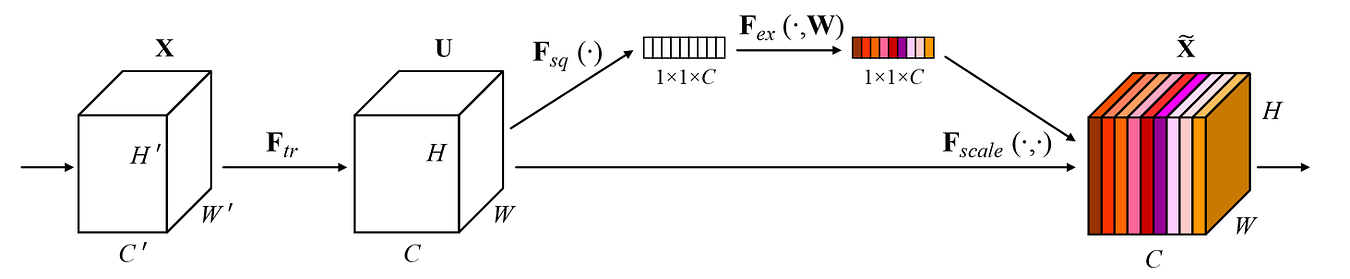 Figure 1. The structure of the Squeeze and Excitation module [1].
Talking more specifically about the F_sq operation, it essentially works by utilizing global average pooling mechanism, where it is used to capture the information from the entire spatial dimension of each channel. By doing so, every channel of the input tensor is going to be represented by a single number, which is basically just the average value of the corresponding channel. The authors refer to this operation as global information embedding. Mathematically speaking, this can formally be written in the equation shown in Figure 2, where we basically sum all values across the height H and width W before eventually dividing it with the number of pixels within that channel (H×W).
Figure 1. The structure of the Squeeze and Excitation module [1].
Talking more specifically about the F_sq operation, it essentially works by utilizing global average pooling mechanism, where it is used to capture the information from the entire spatial dimension of each channel. By doing so, every channel of the input tensor is going to be represented by a single number, which is basically just the average value of the corresponding channel. The authors refer to this operation as global information embedding. Mathematically speaking, this can formally be written in the equation shown in Figure 2, where we basically sum all values across the height H and width W before eventually dividing it with the number of pixels within that channel (H×W).
 Figure 2. The mathematical expression of the global average pooling mechanism in SE module [1].
Meanwhile, both excitation and scaling operations are referred to as adaptive recalibration since what they essentially do is to dynamically adjust the weightings of each channel in the input tensor according to its importance. In fact, the diagram in Figure 1 does not completely depict the entire SENet architecture. You can see in the figure that F_ex appears to be a single operation, yet it actually consists of two linear layers each followed by an activation function. See the Figure 3 below for the details.
Figure 2. The mathematical expression of the global average pooling mechanism in SE module [1].
Meanwhile, both excitation and scaling operations are referred to as adaptive recalibration since what they essentially do is to dynamically adjust the weightings of each channel in the input tensor according to its importance. In fact, the diagram in Figure 1 does not completely depict the entire SENet architecture. You can see in the figure that F_ex appears to be a single operation, yet it actually consists of two linear layers each followed by an activation function. See the Figure 3 below for the details.
 Figure 3. The mathematical formulation of the F_ex operation [1].
The two linear layers are denoted as W_1 and W_2 , whereas δ and σ represent ReLU and sigmoid activation functions, respectively. So, based on this mathematical definition, what we basically need to do later in the implementation is to pass tensor z (the average-pooled tensor) through the first linear layer, followed by the ReLU activation function, the second linear layer, and lastly the sigmoid activation function. Remember that the sigmoid function normalizes input values to be within the range of 0 to 1. In this case, we will perceive the resulting output as the weight of each channel, where a value close to 1 indicates that the corresponding channel contains important information, hence we allow the model to pay more attention to that channel. Otherwise, if the resulting number is close to 0, it indicates that the corresponding channel does not contribute that much to the output.
In order to utilize these channel weights, we can perform the F_scale operation, which is basically just a multiplication of the original tensor u and the weight tensor s , as shown in Figure 4 below. By doing this, we essentially retain the values within the important channels while at the same time suppressing the values of the unimportant ones.
Figure 3. The mathematical formulation of the F_ex operation [1].
The two linear layers are denoted as W_1 and W_2 , whereas δ and σ represent ReLU and sigmoid activation functions, respectively. So, based on this mathematical definition, what we basically need to do later in the implementation is to pass tensor z (the average-pooled tensor) through the first linear layer, followed by the ReLU activation function, the second linear layer, and lastly the sigmoid activation function. Remember that the sigmoid function normalizes input values to be within the range of 0 to 1. In this case, we will perceive the resulting output as the weight of each channel, where a value close to 1 indicates that the corresponding channel contains important information, hence we allow the model to pay more attention to that channel. Otherwise, if the resulting number is close to 0, it indicates that the corresponding channel does not contribute that much to the output.
In order to utilize these channel weights, we can perform the F_scale operation, which is basically just a multiplication of the original tensor u and the weight tensor s , as shown in Figure 4 below. By doing this, we essentially retain the values within the important channels while at the same time suppressing the values of the unimportant ones.
 Figure 4. The scaling process is just a multiplication of the original and the weight tensors [1].
By the way sorry for getting a bit too mathy here, lol. But I believe this will help you understand the code later in the implementation section.
Figure 4. The scaling process is just a multiplication of the original and the weight tensors [1].
By the way sorry for getting a bit too mathy here, lol. But I believe this will help you understand the code later in the implementation section.
Where to Put the SE Module
Applying the SE module on a plain CNN model like VGG is easy, as we can simply place it right after each convolution layer. However, it might not be straightforward in the case of Inception or ResNet thanks to the presence of parallel branches in these two networks. To address this confusion, authors provide a guide to implement the SE module specifically on the two models as shown in Figure 5 below.
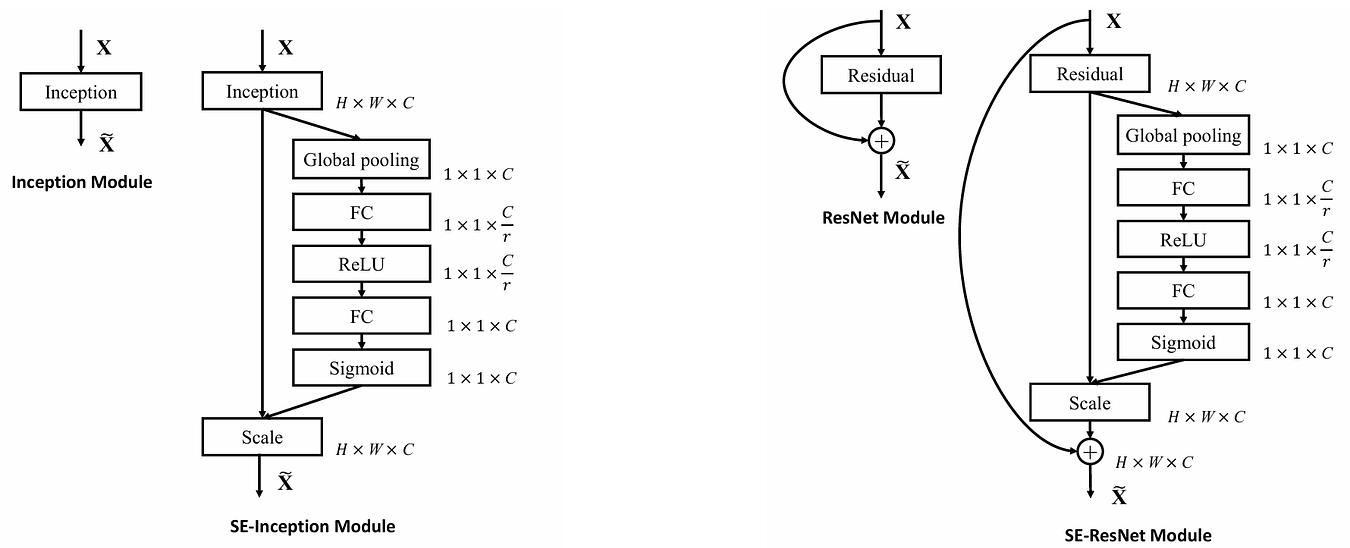 Figure 5. Where SE module is placed in Inception and ResNet [1].
For the Inception model, instead of placing SE module right after each convolution layer, we pass the input tensor through the entire Inception block (including all the branches inside) and then attach the SE module afterwards. The same approach also works for ResNet, but keep in mind that the summation between the tensor in skip connection and the main flow happens after the main tensor has been processed by the SE module.
As I mentioned earlier, the excitation stage essentially consists of two linear layers. If we take a closer look at the above structure, we can see that the output shape of the first linear layer is 1×1×C/r. The variable r is called reduction ratio which reduces the dimensionality of the weight tensor before eventually projecting it back to 1×1×C through the second linear layer. The dimensionality reduction done by the first layer acts as a bottleneck operation, which is useful to limit model complexity and to improve generalization. Authors conducted experiments on different r values, and they found that r = 16 produces the best balance between accuracy and complexity.
Figure 5. Where SE module is placed in Inception and ResNet [1].
For the Inception model, instead of placing SE module right after each convolution layer, we pass the input tensor through the entire Inception block (including all the branches inside) and then attach the SE module afterwards. The same approach also works for ResNet, but keep in mind that the summation between the tensor in skip connection and the main flow happens after the main tensor has been processed by the SE module.
As I mentioned earlier, the excitation stage essentially consists of two linear layers. If we take a closer look at the above structure, we can see that the output shape of the first linear layer is 1×1×C/r. The variable r is called reduction ratio which reduces the dimensionality of the weight tensor before eventually projecting it back to 1×1×C through the second linear layer. The dimensionality reduction done by the first layer acts as a bottleneck operation, which is useful to limit model complexity and to improve generalization. Authors conducted experiments on different r values, and they found that r = 16 produces the best balance between accuracy and complexity.
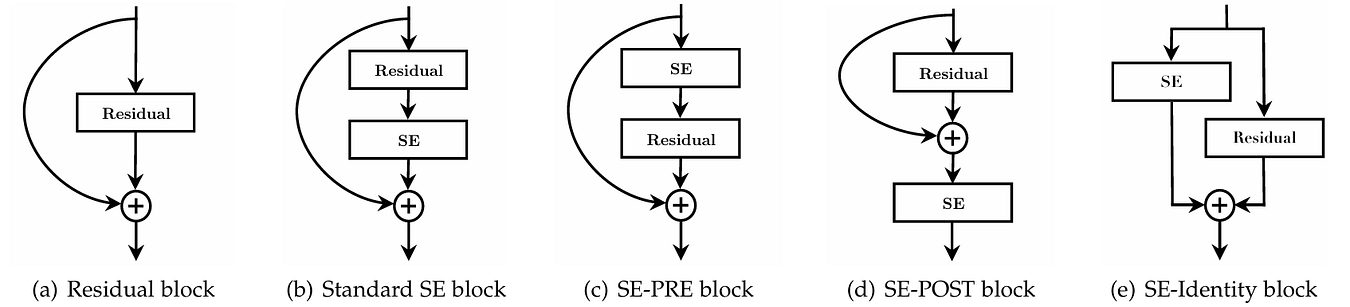 Figure 6. Several ways possible to be used to attach SE module in ResNet [1].
In addition to implementing the SE module in ResNet, it is seen in Figure 6 that there are actually several ways we can follow to do so. According to the experimental results in Figure 7, it looks like the standard SE, SE-PRE, and SE-Identity blocks obtained similar results, while at the same time all of them outperformed SE-POST by a significant margin. This suggests that the placement of the SE module affects model performance in terms of accuracy. Based on these findings, the authors argue that we are going to obtain good results as long as we apply the SE module before the element-wise summation operation. Later in the coding section, I am going to demonstrate how to implement the standard SE block.
Figure 6. Several ways possible to be used to attach SE module in ResNet [1].
In addition to implementing the SE module in ResNet, it is seen in Figure 6 that there are actually several ways we can follow to do so. According to the experimental results in Figure 7, it looks like the standard SE, SE-PRE, and SE-Identity blocks obtained similar results, while at the same time all of them outperformed SE-POST by a significant margin. This suggests that the placement of the SE module affects model performance in terms of accuracy. Based on these findings, the authors argue that we are going to obtain good results as long as we apply the SE module before the element-wise summation operation. Later in the coding section, I am going to demonstrate how to implement the standard SE block.
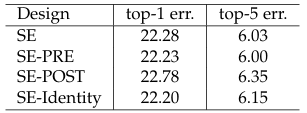 Figure 7. Experimental results on different SE module integration strategies [1].
More Experimental Results
There are actually a lot more experimental results discussed in the paper. One of them is a table displaying accuracy score improvements when SE module is applied to existing CNN-based models. The table I am referring to is displayed in Figure 8 below.
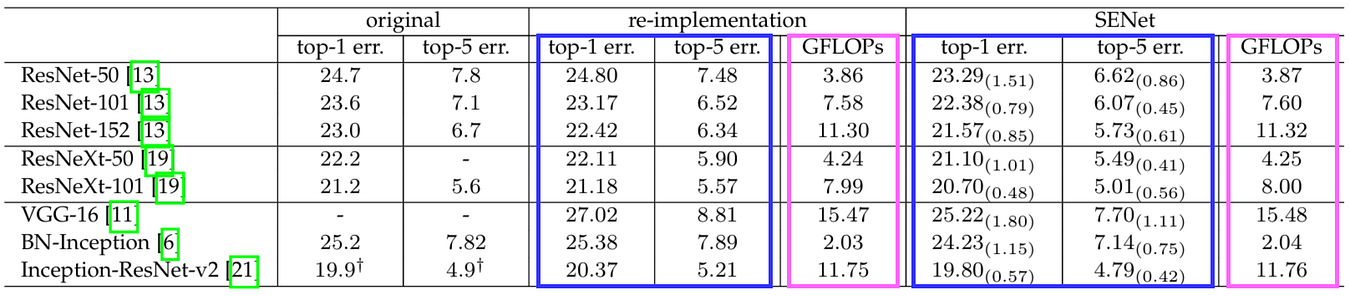 Figure 8. Experimental results on applying SE module on different models [1][2].
The columns highlighted in blue represent the error rates of each model and the ones in pink indicate the computational complexity measured in GFLOPs. The re-implementation column refers to the plain model that the authors implemented themselves, whereas the SENet column represents the same model equipped with SE module. The table clearly shows that both top-1 and top-5 errors decrease when the SE module is applied. It is important to know that although adding the SE module causes the GFLOPs to get higher, yet this increase is considerably marginal compared to the reduction in error rate.
Next, we can actually reveal interesting insights by printing out the values contained in the SE modules during the inference phase. Let’s take a look at the charts in Figure 9 below to better illustrate this. The x axis of these charts denotes the channel numbers, the y axis represents how much weight does each channel have according to its importance, and the color of the lines indicates the class being predicted.
Figure 8. Experimental results on applying SE module on different models [1][2].
The columns highlighted in blue represent the error rates of each model and the ones in pink indicate the computational complexity measured in GFLOPs. The re-implementation column refers to the plain model that the authors implemented themselves, whereas the SENet column represents the same model equipped with SE module. The table clearly shows that both top-1 and top-5 errors decrease when the SE module is applied. It is important to know that although adding the SE module causes the GFLOPs to get higher, yet this increase is considerably marginal compared to the reduction in error rate.
Next, we can actually reveal interesting insights by printing out the values contained in the SE modules during the inference phase. Let’s take a look at the charts in Figure 9 below to better illustrate this. The x axis of these charts denotes the channel numbers, the y axis represents how much weight does each channel have according to its importance, and the color of the lines indicates the class being predicted.
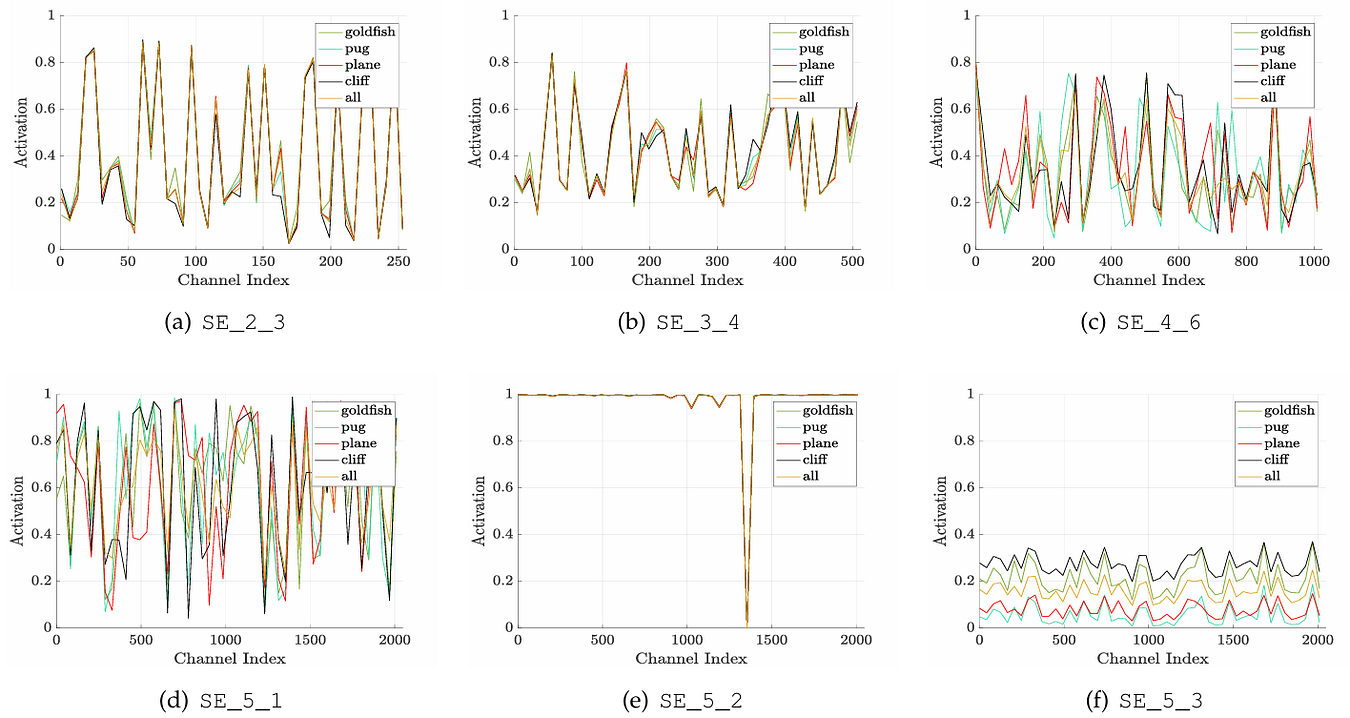 Figure 9. What the activation of SE modules looks like in different network depth [1].
In shallower layers, the features captured by SE module are class-agnostic , which basically means that it captures generic information required to predict all classes. The charts referred to as (a) and (b), which are the SE modules from ResNet stage 2 and 3, show that there is not much difference in channel activity from one class to another, indicating that these two modules do not capture information regarding a specific class. The case is actually different from the SE modules in deeper layers, i.e., the ones in stage 4 (c) and stage 5 (d). We can see that these two modules adjust channel weights differently depending on the class being predicted. This is essentially the reason that the SE modules in deeper layers are said to be class-specific. However, the authors acknowledge that there might be unusual behavior happening in some of the SE modules which happens in the 2nd block of stage 5 (e). Here the SE module does not show meaningful channel recalibration behavior, indicating that it does not contribute as much as the ones we discussed earlier.
Figure 9. What the activation of SE modules looks like in different network depth [1].
In shallower layers, the features captured by SE module are class-agnostic , which basically means that it captures generic information required to predict all classes. The charts referred to as (a) and (b), which are the SE modules from ResNet stage 2 and 3, show that there is not much difference in channel activity from one class to another, indicating that these two modules do not capture information regarding a specific class. The case is actually different from the SE modules in deeper layers, i.e., the ones in stage 4 (c) and stage 5 (d). We can see that these two modules adjust channel weights differently depending on the class being predicted. This is essentially the reason that the SE modules in deeper layers are said to be class-specific. However, the authors acknowledge that there might be unusual behavior happening in some of the SE modules which happens in the 2nd block of stage 5 (e). Here the SE module does not show meaningful channel recalibration behavior, indicating that it does not contribute as much as the ones we discussed earlier.
The Detailed Architecture
In this article we are going to implement the SE-ResNeXt-50 (32×4d) model, which in Figure 10 it corresponds to the one in the rightmost column. The ResNeXt model itself is similar to ResNet, except that the group parameter of the second convolution layer within each block is set to 32. If you’re familiar with ResNeXt, this is essentially the simplest yet effective way to implement the so-called cardinality. I recommend you read my previous article about ResNeXt if you are not yet familiar with it, which the link is provided at reference number [3] at the end of this article.
Taking a closer look at the architecture, what differentiates SE-ResNet-50 from ResNet-50 is solely the presence of SE modules. The same also applies to SE-ResNeXt-50 (32×4d) compared to ResNeXt-50 (32×4d) (not displayed in the table). Notice in the figure below that the models with SE modules have an fc layer attached after the last convolution layer within each block, which the corresponding two numbers indicate the first and second fully-connected layers inside the SE module.
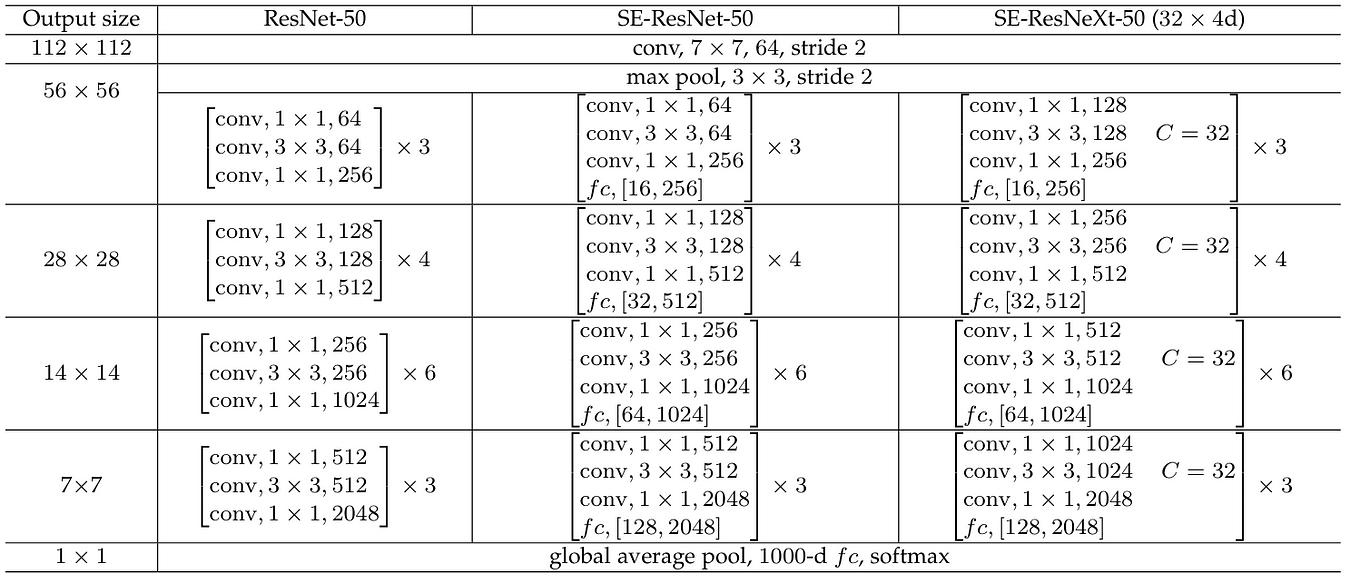 Figure 10. The complete architecture of ResNet-50, SE-ResNet-50 and SE-ResNeXt-50 (32×4d) [1].
···
Figure 10. The complete architecture of ResNet-50, SE-ResNet-50 and SE-ResNeXt-50 (32×4d) [1].
···
From Scratch Implementation
Remember that here we are about to integrate the SE module on ResNeXt, so we need to implement both of them from scratch. Technically speaking, it is actually possible to take the ResNeXt architecture directly from PyTorch, then manually attach the SE module on it. However, here I decided to use the ResNeXt implementation from my previous article instead since I feel like it is a lot easier to understand than the one from PyTorch. Note that here I will focus on constructing the SE module and how to attach it to the ResNeXt model rather than explaining the ResNeXt itself since I’ve already covered it in that article [3].
Now let’s start the code by importing the required modules.
python
# Codeblock 1
import torch
import torch.nn as nn
Squeeze and Excitation Module
The following SE module implementation follows the diagram shown in Figure 5 (right). It is worth noting that the SEModule class below does not include the skip-connection (curved arrow), as the entire SE module is applied after the initial branching but before the merging (summation).
The __init__() method of this class accepts two parameters: num_channels and r, as shown at line #(1) in Codeblock 2a. We definitely want this SE module to be usable throughout the entire network. So, we need to set the num_channels parameter to be adjustable because the number of output channels varies across ResNeXt blocks at different stages, as shown back in Figure 10. Meanwhile, even though we typically use the same reduction ratio r in the SE modules within the entire network, but it is technically possible for us to use different r for different stage, which might probably be an interesting thing to experiment with. So, this is essentially the reason that I also set the r parameter to be adjustable.
python
# Codeblock 2a
class SEModule(nn.Module):
    def __init__(self, num_channels, r):                     #(1)
        super().__init__()

        self.global_pooling = nn.AdaptiveAvgPool2d(output_size=(1,1))  #(2)
        self.fc0 = nn.Linear(in_features=num_channels,       #(3)
                             out_features=num_channels//r,
                             bias=False)
        self.relu = nn.ReLU()                                #(4)
        self.fc1 = nn.Linear(in_features=num_channels//r,    #(5)
                             out_features=num_channels,
                             bias=False)
        self.sigmoid = nn.Sigmoid()                          #(6)
There are 5 layers we need to initialize inside the __init__() method. I write them down according to the sequence given in Figure 5, i.e., global average pooling layer (#(2)), linear layer (#(3)), ReLU activation function (#(4)), another linear layer (#(5)), and sigmoid activation function (#(6)). Here you can see that the first linear layer is responsible to perform dimensionality reduction by shrinking the number of channels from num_channels to num_channels//r, which will then be expanded back to num_channels by the second linear layer. Note that we set the bias term of both linear layers to False, which essentially means that we will only utilize the weight tensors. The absence of bias terms in the two layers forces the SE module to learn the correlation between one channel to the others rather than just adding fixed adjustments.
Still with the SEModule class, let’s now move on to the forward() method to define the flow of the network. You can see at line #(1) in Codeblock 2b that we start from a single input x, which in the case of ResNeXt it is essentially a tensor produced by the third convolution layer within the same ResNeXt block. As shown in Figure 5, what we need to do next is to branch out the network. Here we directly process the branch using the global_pooling layer, which I name the resulting tensor squeezed (#(2)). The original input tensor x itself will be left as is since we are not going to perform any operation on it until the scaling phase. Next, we need to drop the spatial dimension of the squeezed tensor using torch.flatten() (#(3)). This is basically done because we want to process it further with the linear layers at line #(4) and #(5), which can only work with a single-dimensional tensor. The spatial dimension is then introduced again at line #(6), allowing us to perform multiplication between x (the original tensor) and excited (the channel weights) at line #(7). This entire process produces a recalibrated version of x which we refer to as scaled. Here I print out the tensor dimension after each step so that you can better understand the flow of this SE module.
python
# Codeblock 2b
    def forward(self, x):                                  #(1)
        print(f'original\t\t: {x.size()}')

        squeezed = self.global_pooling(x)                  #(2)
        print(f'after avgpool\t\t: {squeezed.size()}')

        squeezed = torch.flatten(squeezed, 1)              #(3)
        print(f'after flatten\t\t: {squeezed.size()}')

        excited = self.relu(self.fc0(squeezed))            #(4)
        print(f'after fc0-relu\t\t: {excited.size()}')

        excited = self.sigmoid(self.fc1(excited))          #(5)
        print(f'after fc1-sigmoid\t: {excited.size()}')

        excited = excited[:, :, None, None]                #(6)
        print(f'after reshape\t\t: {excited.size()}')

        scaled = x * excited                               #(7)
        print(f'after scaling\t\t: {scaled.size()}')

        return scaled
Now we are going to see if we have implemented the network correctly by passing a dummy tensor through it. In Codeblock 3 below, I initialize an SE module and configure it to accept an image tensor of 512 channels and has a reduction ratio of 16 (#(1)). If you take a look at the SE-ResNeXt architecture in Figure 10, this SE module basically corresponds to the one in the third stage (which the output size is 28×28). Thus, at line #(2) we need to adjust the shape of the dummy tensor accordingly. We then feed this tensor into the network using the code at line #(3).
python
# Codeblock 3
semodule = SEModule(num_channels=512, r=16)    #(1)
x = torch.randn(1, 512, 28, 28)                #(2)

out = semodule(x)      #(3)
And below is what the print functions give us.
markup
# Codeblock 3 Outputoriginal : torch.Size([1, 512, 28, 28]) #(1)after avgpool : torch.Size([1, 512, 1, 1]) #(2)after flatten : torch.Size([1, 512]) #(3)after fc0-relu : torch.Size([1, 32]) #(4)after fc1-sigmoid : torch.Size([1, 512]) #(5)after reshape : torch.Size([1, 512, 1, 1]) #(6)after scaling : torch.Size([1, 512, 28, 28]) #(7)
You can see that the original tensor shape matches exactly with our dummy tensor, i.e., 1×512×28×28 (#(1)). By the way we can ignore the number 1 in the 0th axis since it essentially denotes the batch size, which in this case I assume that we only got a single image in a batch. After being pooled, the spatial dimension collapses to 1×1 since now each channel is represented by a single number (#(2)). The purpose of the flatten operation I explained earlier is to drop the two empty axes (#(3)) since the subsequent linear layers can only work with single-dimensional tensor. Here you can see that the first linear layer reduces the tensor dimension to 32 thanks to the reduction ratio which we previously set to 16 (#(4)). The length of this tensor is then expanded back to 512 by the second linear layer (#(5)). Next, we unsqueeze the tensor so that we get our 1×1 spatial dimension back (#(6)), allowing us to multiply it with the input tensor (#(7)). Based on this detailed flow, you can see that an SE module basically preserves the original tensor dimension, proving that this module can be attached to any CNN-based model without disrupting the original flow of the network.
ResNeXt
As we have understood how to implement SE module from scratch, now that I am going to show you how we can attach it on a ResNeXt model. Before doing so, we need to initialize the parameters required to implement the ResNeXt architecture. In the Codeblock 4 below the first four variables are determined according to the ResNeXt-50 (32×4d) variant, whereas the last one (R) represents the reduction ratio for the SE modules.
python
# Codeblock 4
CARDINALITY  = 32
NUM_CHANNELS = [3, 64, 256, 512, 1024, 2048]
NUM_BLOCKS   = [3, 4, 6, 3]
NUM_CLASSES  = 1000
R = 16
The Block class defined in Codeblock 5a and 5b is the ResNeXt block from my previous article. There are actually lots of things we do inside the __init__() method, but the general idea is that we initialize three convolution layers referred to as conv0 (#(1)), conv1 (#(2)), and conv2 (#(3)) before initializing the SE module at line #(4). We will later configure these layers according to the SE-ResNeXt architecture shown back in Figure 10.
python
# Codeblock 5a
class Block(nn.Module):
    def __init__(self,
                 in_channels,
                 add_channel=False,
                 channel_multiplier=2,
                 downsample=False):
        super().__init__()

        self.add_channel = add_channel
        self.channel_multiplier = channel_multiplier
        self.downsample = downsample


        if self.add_channel:
            out_channels = in_channels*self.channel_multiplier
        else:
            out_channels = in_channels

        mid_channels = out_channels//2


        if self.downsample:
            stride = 2
        else:
            stride = 1


        if self.add_channel or self.downsample:
            self.projection = nn.Conv2d(in_channels=in_channels,
                                        out_channels=out_channels,
                                        kernel_size=1,
                                        stride=stride,
                                        padding=0,
                                        bias=False)
            nn.init.kaiming_normal_(self.projection.weight, nonlinearity='relu')
            self.bn_proj = nn.BatchNorm2d(num_features=out_channels)

        self.conv0 = nn.Conv2d(in_channels=in_channels,       #(1)
                               out_channels=mid_channels,
                               kernel_size=1,
                               stride=1,
                               padding=0,
                               bias=False)
        nn.init.kaiming_normal_(self.conv0.weight, nonlinearity='relu')
        self.bn0 = nn.BatchNorm2d(num_features=mid_channels)

        self.conv1 = nn.Conv2d(in_channels=mid_channels,      #(2)
                               out_channels=mid_channels,
                               kernel_size=3,
                               stride=stride,
                               padding=1,
                               bias=False,
                               groups=CARDINALITY)
        nn.init.kaiming_normal_(self.conv1.weight, nonlinearity='relu')
        self.bn1 = nn.BatchNorm2d(num_features=mid_channels)

        self.conv2 = nn.Conv2d(in_channels=mid_channels,      #(3)
                               out_channels=out_channels,
                               kernel_size=1,
                               stride=1,
                               padding=0,
                               bias=False)
        nn.init.kaiming_normal_(self.conv2.weight, nonlinearity='relu')
        self.bn2 = nn.BatchNorm2d(num_features=out_channels)

        self.relu = nn.ReLU()

        self.semodule = SEModule(num_channels=out_channels, r=R)    #(4)
The forward() method itself is generally also the same as the original ResNeXt model, except that here we need to put the SE module right before the element-wise summation as shown at line #(1) in the Codeblock 5b below. Remember that this implementation follows the standard SE block architecture in Figure 6 (b).
python
# Codeblock 5b
    def forward(self, x):
        print(f'original\t\t: {x.size()}')

        if self.add_channel or self.downsample:
            residual = self.bn_proj(self.projection(x))
            print(f'after projection\t: {residual.size()}')
        else:
            residual = x
            print(f'no projection\t\t: {residual.size()}')

        x = self.conv0(x)
        x = self.bn0(x)
        x = self.relu(x)
        print(f'after conv0-bn0-relu\t: {x.size()}')

        x = self.conv1(x)
        x = self.bn1(x)
        x = self.relu(x)
        print(f'after conv1-bn1-relu\t: {x.size()}')

        x = self.conv2(x)
        x = self.bn2(x)
        print(f'after conv2-bn2\t\t: {x.size()}')

        x = self.semodule(x)      #(1)
        print(f'after semodule\t\t: {x.size()}')

        x = x + residual
        x = self.relu(x)
        print(f'after summation\t\t: {x.size()}')

        return x
With the above implementation, every time we instantiate a Block object we will have a ResNeXt block which is already equipped with an SE module. Now we are going to test the above class to see if we have implemented it correctly. Here I am going to simulate a ResNeXt block within the third stage. The add_channel and downsample parameters are set to False since we want to preserve both the number of channels and the spatial dimension of the input tensor.
python
# Codeblock 6
block = Block(in_channels=512, add_channel=False, downsample=False)
x = torch.randn(1, 512, 28, 28)

out = block(x)
Below is what the output looks like. Here you can see that our first convolution layer successfully reduced the number of channels from 512 to 256 (#(1)), which is then expanded back to its original dimension by the third convolution layer (#(2)). Afterwards, the tensor goes through the SE block which the resulting output size is the same as its input, just like what we saw earlier in Codeblock 3 (#(3)). As the processing with SE module is done, we can finally perform the element-wise summation between the tensor from the main branch and the one from the skip-connection (#(4)).
markup
original : torch.Size([1, 512, 28, 28])no projection : torch.Size([1, 512, 28, 28])after conv0-bn0-relu : torch.Size([1, 256, 28, 28]) #(1)after conv1-bn1-relu : torch.Size([1, 256, 28, 28])after conv2-bn2 : torch.Size([1, 512, 28, 28]) #(2)after semodule : torch.Size([1, 512, 28, 28]) #(3)after summation : torch.Size([1, 512, 28, 28]) #(4)
And below is how I implement the entire architecture. What we essentially need to do is just to stack multiple SE-ResNeXt blocks according to the architecture in Figure 10. In fact, the SEResNeXt class in Codeblock 7 is exactly the same as the ResNeXt class in my previous article [3] (I literally copy-pasted it) since what makes SE-ResNeXt different from the original ResNeXt is only the presence of SE module within the Block class we discussed earlier.
python
# Codeblock 7
class SEResNeXt(nn.Module):
    def __init__(self):
        super().__init__()

        # conv1 stage
        self.resnext_conv1 = nn.Conv2d(in_channels=NUM_CHANNELS[0],
                                       out_channels=NUM_CHANNELS[1],
                                       kernel_size=7,
                                       stride=2,
                                       padding=3,
                                       bias=False)
        nn.init.kaiming_normal_(self.resnext_conv1.weight,
                                nonlinearity='relu')
        self.resnext_bn1 = nn.BatchNorm2d(num_features=NUM_CHANNELS[1])
        self.relu = nn.ReLU()
        self.resnext_maxpool1 = nn.MaxPool2d(kernel_size=3,
                                             stride=2,
                                             padding=1)

        # conv2 stage
        self.resnext_conv2 = nn.ModuleList([
            Block(in_channels=NUM_CHANNELS[1],
                  add_channel=True,
                  channel_multiplier=4,
                  downsample=False)
        ])
        for _ in range(NUM_BLOCKS[0]-1):
            self.resnext_conv2.append(Block(in_channels=NUM_CHANNELS[2]))

        # conv3 stage
        self.resnext_conv3 = nn.ModuleList([Block(in_channels=NUM_CHANNELS[2],
                                                  add_channel=True,
                                                  downsample=True)])
        for _ in range(NUM_BLOCKS[1]-1):
            self.resnext_conv3.append(Block(in_channels=NUM_CHANNELS[3]))


        # conv4 stage
        self.resnext_conv4 = nn.ModuleList([Block(in_channels=NUM_CHANNELS[3],
                                                  add_channel=True,
                                                  downsample=True)])

        for _ in range(NUM_BLOCKS[2]-1):
            self.resnext_conv4.append(Block(in_channels=NUM_CHANNELS[4]))


        # conv5 stage
        self.resnext_conv5 = nn.ModuleList([Block(in_channels=NUM_CHANNELS[4],
                                                  add_channel=True,
                                                  downsample=True)])

        for _ in range(NUM_BLOCKS[3]-1):
            self.resnext_conv5.append(Block(in_channels=NUM_CHANNELS[5]))


        self.avgpool = nn.AdaptiveAvgPool2d(output_size=(1,1))

        self.fc = nn.Linear(in_features=NUM_CHANNELS[5],
                            out_features=NUM_CLASSES)


    def forward(self, x):
        print(f'original\t\t: {x.size()}')

        x = self.relu(self.resnext_bn1(self.resnext_conv1(x)))
        print(f'after resnext_conv1\t: {x.size()}')

        x = self.resnext_maxpool1(x)
        print(f'after resnext_maxpool1\t: {x.size()}')

        for i, block in enumerate(self.resnext_conv2):
            x = block(x)
            print(f'after resnext_conv2 #{i}\t: {x.size()}')

        for i, block in enumerate(self.resnext_conv3):
            x = block(x)
            print(f'after resnext_conv3 #{i}\t: {x.size()}')

        for i, block in enumerate(self.resnext_conv4):
            x = block(x)
            print(f'after resnext_conv4 #{i}\t: {x.size()}')

        for i, block in enumerate(self.resnext_conv5):
            x = block(x)
            print(f'after resnext_conv5 #{i}\t: {x.size()}')

        x = self.avgpool(x)
        print(f'after avgpool\t\t: {x.size()}')

        x = torch.flatten(x, start_dim=1)
        print(f'after flatten\t\t: {x.size()}')

        x = self.fc(x)
        print(f'after fc\t\t: {x.size()}')

        return x
As the entire SE-ResNeXt-50 (32×4d) architecture is completed, now that we are going to test it by passing through a tensor of size 1×3×224×224 through the network, simulating a single RGB image of size 224×224. You can see in the output of the Codeblock 8 below that it seems like model works properly since the tensor successfully passed through all layers within the seresnext model without returning any error. Thus, I believe this model is now ready to be trained. By the way don’t forget to change the number of neurons in the output channel according to the number of classes in your dataset if you want to actually train this model.
python
# Codeblock 8
seresnext = SEResNeXt()
x = torch.randn(1, 3, 224, 224)

out = seresnext(x)
markup
# Codeblock 8 Outputoriginal : torch.Size([1, 3, 224, 224])after resnext_conv1 : torch.Size([1, 64, 112, 112])after resnext_maxpool1 : torch.Size([1, 64, 56, 56])after resnext_conv2 #0 : torch.Size([1, 256, 56, 56])after resnext_conv2 #1 : torch.Size([1, 256, 56, 56])after resnext_conv2 #2 : torch.Size([1, 256, 56, 56])after resnext_conv3 #0 : torch.Size([1, 512, 28, 28])after resnext_conv3 #1 : torch.Size([1, 512, 28, 28])after resnext_conv3 #2 : torch.Size([1, 512, 28, 28])after resnext_conv3 #3 : torch.Size([1, 512, 28, 28])after resnext_conv4 #0 : torch.Size([1, 1024, 14, 14])after resnext_conv4 #1 : torch.Size([1, 1024, 14, 14])after resnext_conv4 #2 : torch.Size([1, 1024, 14, 14])after resnext_conv4 #3 : torch.Size([1, 1024, 14, 14])after resnext_conv4 #4 : torch.Size([1, 1024, 14, 14])after resnext_conv4 #5 : torch.Size([1, 1024, 14, 14])after resnext_conv5 #0 : torch.Size([1, 2048, 7, 7])after resnext_conv5 #1 : torch.Size([1, 2048, 7, 7])after resnext_conv5 #2 : torch.Size([1, 2048, 7, 7])after avgpool : torch.Size([1, 2048, 1, 1])after flatten : torch.Size([1, 2048])after fc : torch.Size([1, 1000])
Additionally, we can also print out the number of parameters this model has using the following code. Here you can see that the codeblock returns 27,543,848. This number of parameters is slightly higher than the original ResNeXt model counterpart, which only has 25,028,904 parameters as mentioned in my previous article as well as the official PyTorch documentation [4]. Such an increase in the model size definitely makes sense since the ResNeXt blocks throughout the entire network now have more layers thanks to the presence of SE modules.
python
# Codeblock 9
def count_parameters(model):
    return sum([params.numel() for params in model.parameters()])

count_parameters(seresnext)
markup
# Codeblock 9 Output27543848
···
Ending
And that’s pretty much everything about the Squeeze and Excitation module. I do encourage you to explore from here by training this model on your own dataset so that you will see whether the findings presented in the paper also apply to your case. Not only that, I think it would also be interesting if you try to implement SE module on other neural network architectures like VGG or Inception by yourself.
I hope you learn something new today. Thanks for reading!
By the way you can also find the code used in this article in my GitHub repo [5].
···
[1] Jie Hu et al. Squeeze and Excitation Networks. Arxiv. https://arxiv.org/abs/1709.01507 [Accessed March 17, 2025].
[2] Image originally created by author.
[3] Taking ResNet to the Next Level. Towards Data Science. https://towardsdatascience.com/taking-resnet-to-the-next-level/ [Accessed July 22, 2025].
[4] Resnext50_32x4d. PyTorch. https://pytorch.org/vision/main/models/generated/torchvision.models.resnext50_32x4d.html#torchvision.models.resnext50_32x4d [Accessed March 17, 2025].
[5] MuhammadArdiPutra. The Channel-Wise Attention — Squeeze and Excitation. GitHub. https://github.com/MuhammadArdiPutra/medium_articles/blob/main/The Channel-Wise Attention - Squeeze and Excitation.ipynb [Accessed April 7, 2025].
Register Now to Continue Reading
Unlock Towards Data Science with a Free Account
All articles on Towards Data Science are available to registered users. Create a free account today to access this article and thousands more.
Register for freeSign in to your account
 Written By
Deep learning storyteller
See all from Muhammad Ardi Putra
Deep DivesComputer VisionMachine LearningNeural NetworkPytorch
Share This Article
Towards Data Science is a community publication. Submit your insights to reach our global audience and earn through the TDS Author Payment Program.
Write for TDS
Related Articles
Artificial Intelligence
Why even care about sample space, events, and probability measures?
Marvin Lanhenke
December 18, 20217 min read
Deep Learning
Language agnostic model for transforming text into sentences
Moran Beladev
August 1, 20214 min read
Deep Learning
My argument against homemade solutions and an alternative proposal
Amine Elhattami
March 24, 20226 min read
Deep Learning
Graph attention, graph convolution, network propagation are all special cases of message passing in graph neural networks.
Remy Lau
June 27, 20213 min read
Deep Learning
Dive into RNNs, the backbone of time series, understand their mathematics, implement them from scratch, and explore their applications
Cristian Leo
April 27, 202423 min read
Deep Learning
In this article let's build a Deep Q-network similar to the DeepMind's Atari agent to play Gridworld problem. We will build virtually the...
NandaKishore Joshi
December 5, 202115 min read
Deep Learning
In my previous article, I explored using the pre-trained model VGG-16 as a feature extractor for transfer learning on the RAVDESS Audio...
Muriel Kosaka
November 10, 20204 min read
Artificial Intelligence
Recently, One topic in-particular has been reoccurring in my discussions with friends. The importance of branding! I was not going to...
Kurtis Pykes
October 13, 20208 min read
Deep Learning
Featuring the best augmentation libraries (along with sample codes) for your next computer vision project
Kenneth Leung
August 2, 20215 min read
Your home for data science and AI. The world's leading publication for data science, data analytics, data engineering, machine learning, and artificial intelligence professionals.
Subscribe to Our NewsletterWrite For TDS•About•Advertise•Privacy Policy•Terms of Use
© Insight Media Group, LLC 2026•The New Stack•roadmap.sh•Creator Network
Recommended Articles
Close