保留正文与补采附件。源页面当前未重新核验;具体限制见交付清单。
 We value your privacy
We use cookies to enhance your browsing experience, serve personalised ads or content, and analyse our traffic. By clicking "Accept All", you consent to our use of cookies.
Customise Reject All Accept All
Customise Consent Preferences
We value your privacy
We use cookies to enhance your browsing experience, serve personalised ads or content, and analyse our traffic. By clicking "Accept All", you consent to our use of cookies.
Customise Reject All Accept All
Customise Consent Preferences  We use cookies to help you navigate efficiently and perform certain functions. You will find detailed information about all cookies under each consent category below.
The cookies that are categorised as "Necessary" are stored on your browser as they are essential for enabling the basic functionalities of the site. ... Show more
NecessaryAlways Active
Necessary cookies are required to enable the basic features of this site, such as providing secure log-in or adjusting your consent preferences. These cookies do not store any personally identifiable data.
We use cookies to help you navigate efficiently and perform certain functions. You will find detailed information about all cookies under each consent category below.
The cookies that are categorised as "Necessary" are stored on your browser as they are essential for enabling the basic functionalities of the site. ... Show more
NecessaryAlways Active
Necessary cookies are required to enable the basic features of this site, such as providing secure log-in or adjusting your consent preferences. These cookies do not store any personally identifiable data.
-
Cookie
BCTempID
-
Duration
10 minutes
-
Description
No description available.
-
Cookie
__cf_bm
-
Duration
1 hour
-
Description
This cookie, set by Cloudflare, is used to support Cloudflare Bot Management.
-
Cookie
AWSALBCORS
-
Duration
7 days
-
Description
Amazon Web Services set this cookie for load balancing.
-
Cookie
_cfuvid
-
Duration
session
-
Description
Cloudflare sets this cookie to track users across sessions to optimize user experience by maintaining session consistency and providing personalized services
-
Cookie
li_gc
-
Duration
6 months
-
Description
Linkedin set this cookie for storing visitor's consent regarding using cookies for non-essential purposes.
-
Cookie
__hssrc
-
Duration
session
-
Description
This cookie is set by Hubspot whenever it changes the session cookie. The __hssrc cookie set to 1 indicates that the user has restarted the browser, and if the cookie does not exist, it is assumed to be a new session.
-
Cookie
__hssc
-
Duration
1 hour
-
Description
HubSpot sets this cookie to keep track of sessions and to determine if HubSpot should increment the session number and timestamps in the __hstc cookie.
-
Cookie
wpEmojiSettingsSupports
-
Duration
session
-
Description
WordPress sets this cookie when a user interacts with emojis on a WordPress site. It helps determine if the user's browser can display emojis properly.
-
Cookie
BCSessionID
-
Duration
1 year 1 month 4 days
-
Description
Blueconic sets this cookie as a unique identifier for the BlueConic profile.
-
Cookie
_octo
-
Duration
1 year
-
Description
No description available.
-
Cookie
logged_in
-
Duration
1 year
-
Description
No description available.
-
Cookie
__Secure-YEC
-
Duration
past
-
Description
YouTube sets this cookie to stores the user's video player preferences using embedded YouTube video
-
Cookie
__eoi
-
Duration
6 months
-
Description
Description is currently not available.
-
Cookie
AWSALBTGCORS
-
Duration
7 days
-
Description
No description available.
-
Cookie
login-status-p
-
Duration
past
-
Description
Description is currently not available.
-
Cookie
AWSALBTG
-
Duration
7 days
-
Description
No description available.
-
Cookie
csrf_token
-
Duration
session
-
Description
No description available.
-
Cookie
token_v2
-
Duration
1 day
-
Description
Description is currently not available.
-
Cookie
D
-
Duration
1 year
-
Description
Description is currently not available.
-
Cookie
PHPSESSID
-
Duration
session
-
Description
This cookie is native to PHP applications. The cookie stores and identifies a user's unique session ID to manage user sessions on the website. The cookie is a session cookie and will be deleted when all the browser windows are closed.
-
Cookie
VISITOR_PRIVACY_METADATA
-
Duration
6 months
-
Description
YouTube sets this cookie to store the user's cookie consent state for the current domain.
-
Cookie
cookietest
-
Duration
session
-
Description
The cookietest cookie is typically used to determine whether the user's browser accepts cookies, essential for website functionality and user experience.
-
Cookie
__Host-airtable-session
-
Duration
1 year
-
Description
This cookie is used to enable us to integrate the services of Airtable.
-
Cookie
__Host-airtable-session.sig
-
Duration
1 year
-
Description
This cookie is used to enable us to integrate the services of Airtable.
-
Cookie
m
-
Duration
1 year 1 month 4 days
-
Description
Stripe sets this cookie for fraud prevention purposes. It identifies the device used to access the website, allowing the website to be formatted accordingly.
-
Cookie
BIGipServer*
-
Duration
session
-
Description
Marketo sets this cookie to collect information about the user's online activity and build a profile about their interests to provide advertisements relevant to the user.
-
Cookie
__cfruid
-
Duration
session
-
Description
Cloudflare sets this cookie to identify trusted web traffic.
-
Cookie
_GRECAPTCHA
-
Duration
6 months
-
Description
Google Recaptcha service sets this cookie to identify bots to protect the website against malicious spam attacks.
-
Cookie
__Secure-YNID
-
Duration
6 months
-
Description
Google cookie used to protect user security and prevent fraud, especially during the login process.
-
Cookie
cookieyes-consent
-
Duration
1 year
-
Description
CookieYes sets this cookie to remember users' consent preferences so that their preferences are respected on subsequent visits to this site. It does not collect or store any personal information about the site visitors.
Functional
Functional cookies help perform certain functionalities like sharing the content of the website on social media platforms, collecting feedback, and other third-party features.
-
Cookie
lidc
-
Duration
1 day
-
Description
LinkedIn sets the lidc cookie to facilitate data center selection.
-
Cookie
brw
-
Duration
1 year
-
Description
No description available.
-
Cookie
brwConsent
-
Duration
5 minutes
-
Description
Description is currently not available.
-
Cookie
WMF-Uniq
-
Duration
1 year
-
Description
Description is currently not available.
-
Cookie
loom_anon_comment
-
Duration
1 year
-
Description
No description available.
-
Cookie
loom_referral_video
-
Duration
session
-
Description
Description is currently not available.
-
Cookie
VISITOR_INFO1_LIVE
-
Duration
6 months
-
Description
A cookie set by YouTube to measure bandwidth that determines whether the user gets the new or old player interface.
-
Cookie
yt-remote-connected-devices
-
Duration
Never Expires
-
Description
YouTube sets this cookie to store the user's video preferences using embedded YouTube videos.
-
Cookie
ytidb::LAST_RESULT_ENTRY_KEY
-
Duration
Never Expires
-
Description
The cookie ytidb::LAST_RESULT_ENTRY_KEY is used by YouTube to store the last search result entry that was clicked by the user. This information is used to improve the user experience by providing more relevant search results in the future.
-
Cookie
yt-remote-device-id
-
Duration
Never Expires
-
Description
YouTube sets this cookie to store the user's video preferences using embedded YouTube videos.
-
Cookie
yt-remote-session-name
-
Duration
session
-
Description
The yt-remote-session-name cookie is used by YouTube to store the user's video player preferences using embedded YouTube video.
-
Cookie
yt-remote-fast-check-period
-
Duration
session
-
Description
The yt-remote-fast-check-period cookie is used by YouTube to store the user's video player preferences for embedded YouTube videos.
-
Cookie
yt-remote-session-app
-
Duration
session
-
Description
The yt-remote-session-app cookie is used by YouTube to store user preferences and information about the interface of the embedded YouTube video player.
-
Cookie
yt-remote-cast-available
-
Duration
session
-
Description
The yt-remote-cast-available cookie is used to store the user's preferences regarding whether casting is available on their YouTube video player.
-
Cookie
yt-remote-cast-installed
-
Duration
session
-
Description
The yt-remote-cast-installed cookie is used to store the user's video player preferences using embedded YouTube video.
-
Cookie
cp_session
-
Duration
3 months
-
Description
Codepen sets this cookie for Help systems found in the website.
-
Cookie
loid
-
Duration
1 year 1 month 4 days
-
Description
This cookie is set by the Reddit. The cookie enables the sharing of content from the website onto the social media platform.
Analytics
Analytical cookies are used to understand how visitors interact with the website. These cookies help provide information on metrics such as the number of visitors, bounce rate, traffic source, etc.
-
Cookie
__hstc
-
Duration
6 months
-
Description
Hubspot set this main cookie for tracking visitors. It contains the domain, initial timestamp (first visit), last timestamp (last visit), current timestamp (this visit), and session number (increments for each subsequent session).
-
Cookie
hubspotutk
-
Duration
6 months
-
Description
HubSpot sets this cookie to keep track of the visitors to the website. This cookie is passed to HubSpot on form submission and used when deduplicating contacts.
-
Cookie
_ga
-
Duration
1 year 1 month 4 days
-
Description
Google Analytics sets this cookie to calculate visitor, session and campaign data and track site usage for the site's analytics report. The cookie stores information anonymously and assigns a randomly generated number to recognise unique visitors.
-
Cookie
ga*
-
Duration
1 year 1 month 4 days
-
Description
Google Analytics sets this cookie to store and count page views.
-
Cookie
__Host-psifi.analyticsTrace
-
Duration
6 hours
-
Description
Description is currently not available.
-
Cookie
__Host-psifi.analyticsTraceV2
-
Duration
6 hours
-
Description
Description is currently not available.
-
Cookie
_gh_sess
-
Duration
session
-
Description
GitHub sets this cookie for temporary application and framework state between pages like what step the user is on in a multiple step form.
-
Cookie
YSC
-
Duration
session
-
Description
YSC cookie is set by Youtube and is used to track the views of embedded videos on Youtube pages.
-
Cookie
ajs_anonymous_id
-
Duration
1 year
-
Description
This cookie is set by Segment to count the number of people who visit a certain site by tracking if they have visited before.
-
Cookie
vuid
-
Duration
1 year 1 month 4 days
-
Description
Vimeo installs this cookie to collect tracking information by setting a unique ID to embed videos on the website.
Performance
Performance cookies are used to understand and analyse the key performance indexes of the website which helps in delivering a better user experience for the visitors.
-
Cookie
AWSALB
-
Duration
7 days
-
Description
AWSALB is an application load balancer cookie set by Amazon Web Services to map the session to the target.
-
Cookie
acq
-
Duration
past
-
Description
Description is currently not available.
-
Cookie
acq.sig
-
Duration
past
-
Description
Description is currently not available.
-
Cookie
ptc
-
Duration
2 years
-
Description
No description available.
Advertisement
Advertisement cookies are used to provide visitors with customised advertisements based on the pages you visited previously and to analyse the effectiveness of the ad campaigns.
-
Cookie
muc_ads
-
Duration
1 year 1 month 4 days
-
Description
Twitter sets this cookie to collect user behaviour and interaction data to optimize the website.
-
Cookie
guest_id_marketing
-
Duration
1 year 1 month 4 days
-
Description
Twitter sets this cookie to identify and track the website visitor.
-
Cookie
guest_id_ads
-
Duration
1 year 1 month 4 days
-
Description
Twitter sets this cookie to identify and track the website visitor.
-
Cookie
personalization_id
-
Duration
1 year 1 month 4 days
-
Description
Twitter sets this cookie to integrate and share features for social media and also store information about how the user uses the website, for tracking and targeting.
-
Cookie
guest_id
-
Duration
1 year 1 month 4 days
-
Description
Twitter sets this cookie to identify and track the website visitor. It registers if a user is signed in to the Twitter platform and collects information about ad preferences.
-
Cookie
bcookie
-
Duration
1 year
-
Description
LinkedIn sets this cookie from LinkedIn share buttons and ad tags to recognize browser IDs.
-
Cookie
__Secure-ROLLOUT_TOKEN
-
Duration
6 months
-
Description
YouTube sets this cookie to manage feature rollout and experimentation. It helps Google control which new features or interface changes are shown to users as part of testing and staged rollouts, ensuring consistent experience for a given user during an experiment.
-
Cookie
yt.innertube::nextId
-
Duration
Never Expires
-
Description
YouTube sets this cookie to register a unique ID to store data on what videos from YouTube the user has seen.
-
Cookie
yt.innertube::requests
-
Duration
Never Expires
-
Description
YouTube sets this cookie to register a unique ID to store data on what videos from YouTube the user has seen.
-
Cookie
session_tracker
-
Duration
session
-
Description
This cookie is set by the Reddit. This cookie is used to identify trusted web traffic. It also helps in adverstising on the website.
-
Cookie
edgebucket
-
Duration
session
-
Description
Reddit sets this cookie to save the information about a log-on Reddit user, for the purpose of advertisement recommendations and updating the content.
-
Cookie
did
-
Duration
1 year
-
Description
Arbor sets this cookie to show targeted ads to site visitors.This cookie expires after 2 months or 1 year.
Uncategorised
Other uncategorised cookies are those that are being analysed and have not been classified into a category as yet.
No cookies to display.
Reject All Save My Preferences Accept All
Toggle SearchToggle Mobile Navigation
Publish AI, ML & data-science insights to a global community of data professionals.
Sign inSubmit an Article
LatestEditor's PicksNewsletterShipAI
Write For TDS
LinkedInXToggle Search
Deep Learning
PyTorch Explained: From Automatic Differentiation to Training Custom Neural Networks
The core mechanics of Deep Learning, and how to think the PyTorch way.
Avishek Biswas
September 24, 202513 min read
 Let's learn PyTorch!
Deep learning is shaping our world as we speak. In fact, it has been slowly revolutionizing software since the early 2010s. In 2025, PyTorch is at the forefront of this revolution, emerging as one of the most important libraries to train neural networks.
Whether you are working with computer vision, building large language models (LLMs), training a reinforcement learning agent, or experimenting with graph neural networks - your path is going to cross through PyTorch once you enter deep learning city.
All images provided in this article have been produced by the author.
This guide will provide a whirlwind tour of PyTorch's methodologies and design principles. Over the next hour, we're going to cut through the noise and get straight to the heart of how neural networks are actually trained.
Let's learn PyTorch!
Deep learning is shaping our world as we speak. In fact, it has been slowly revolutionizing software since the early 2010s. In 2025, PyTorch is at the forefront of this revolution, emerging as one of the most important libraries to train neural networks.
Whether you are working with computer vision, building large language models (LLMs), training a reinforcement learning agent, or experimenting with graph neural networks - your path is going to cross through PyTorch once you enter deep learning city.
All images provided in this article have been produced by the author.
This guide will provide a whirlwind tour of PyTorch's methodologies and design principles. Over the next hour, we're going to cut through the noise and get straight to the heart of how neural networks are actually trained.
This article is about PyTorch's foundational concepts and how to compose and train models — from simple linear regression all the way to a modern transformer block.
More importantly than the specific code examples presented here, the goal of this article is to teach the main ideas, project-level architectures, and abstractions to work with PyTorch.
In other words, how to think "the PyTorch way".
Before we get that far, it is important to understand the basics. PyTorch is built on two core abstractions: tensors and automatic differentiation. Master these two — how tensors store data, and how gradients are used to train neural networks — and the rest of PyTorch will feel natural. Let's discuss Tensors first.
Learn this step by step with the interactive Machine Learning roadmap.
1. Basics of Tensors
A tensor is a multidimensional array with a dtype, a device, and optional gradient tracking. If you know NumPy arrays, think of tensors as numpy arrays with a few major benefits:
- GPU utilization : Tensors can perform massively parallel operations in the GPU. Matrix multiplications, additions, and even conditional statements are all supported.
- Computation Graph: Instead of imagining tensors as an isolated block of data, think of it as a node on a computation graph. (Shown below)
- Automatic Differentiation: PyTorch automatically calculates partial derivatives of each differentiable operation it performs. We will discuss what this actually means, and why this is a huge deal for training neural networks very shortly.
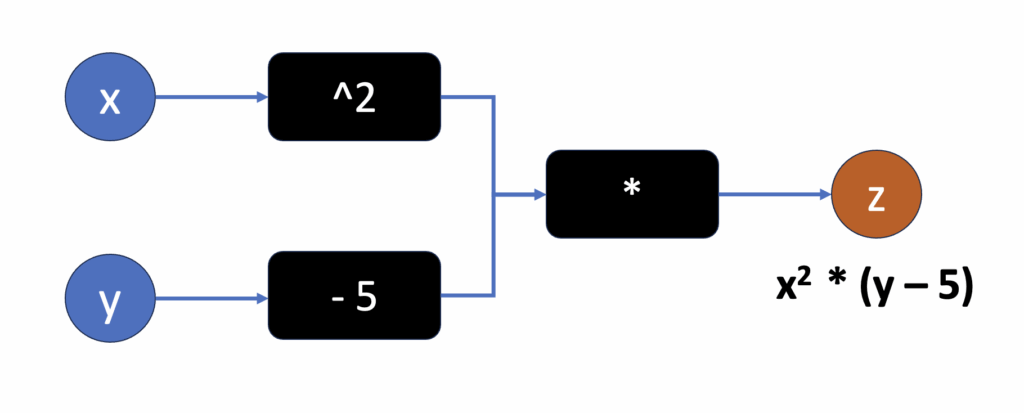 A simple computation graph. Pytorch doesn't just calculate the output, but it also stores information about what nodes the data flows through to generate the output. (Source: Author)
2. Automatic Differentiation (Autograd)
Neural networks in PyTorch construct a dynamic computation graph, and use it to compute gradients automatically. Let's see a simple example to learn this.
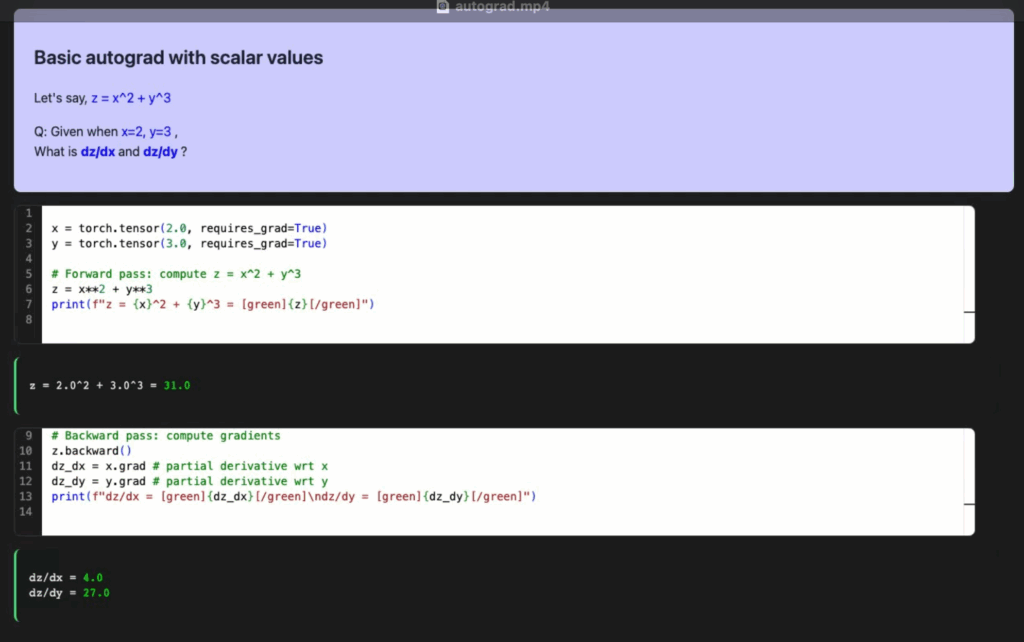
Let us begin with a clean, scalar example so that shapes and values are easy to reason about. The following code computes z = x^2 + y^3 for scalar x and y, then calls backward to obtain dz/dx and dz/dy.
python
x = torch.tensor(2.0, requires_grad=True)
y = torch.tensor(3.0, requires_grad=True)

# Forward pass: compute z = x^2 + y^3
z = x**2 + y**3

# Backward pass: compute gradients
z.backward()
dz_dx = x.grad # partial derivative wrt x
dz_dy = y.grad # partial derivative wrt y
What is happening:
- We created two tensors
x and y with requires_grad=True. This tells autograd to track their operations.
- The forward computation constructs a small graph for z.
z.backward() triggers the reverse-mode autodiff: PyTorch computes the gradients and places them in x.grad and y.grad.
Here is what the results of the above block of code will look like:
 If you did some mental math, here's what the partial derivatives look like for that equation when calculated analytically (spoiler: it works!):
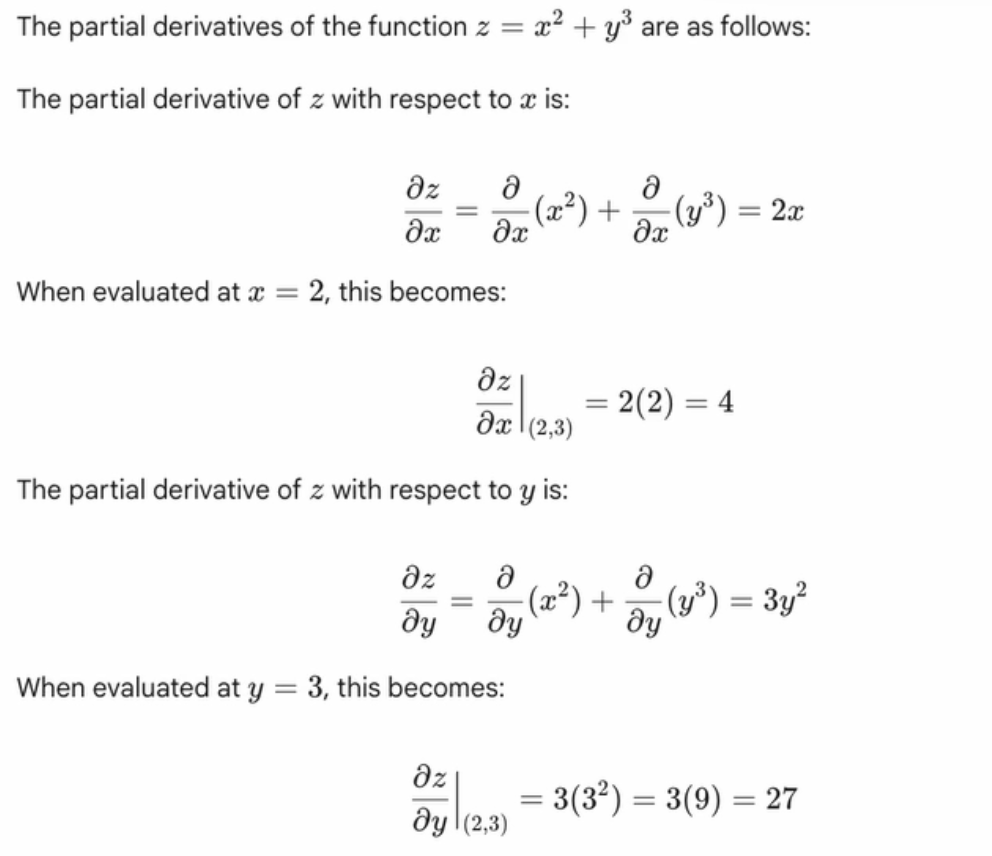 Analytical Solution (Source: Author)
Chain Rule
Chain Rule in calculus is a fundamental formula for differentiating composite functions, which are essentially functions within other functions. In simpler terms, you work from the outside in, taking the derivative of each "layer" of the function and multiplying them together.
Let's take a simple example of how the chain rule works in PyTorch. Let's say you have the following three-step equation:
Eqn 1: y = x^2
Eqn 2: z = y + 1
Eqn 3: w = z^2
Basically, w depends on z, z depends on y, y depends on x. A basic chain of compositionality. And let's say you want to find the derivative of w with respect to x
The chain rule in calculus states that to find dw/dx we calculate the gradients up the chain of dependencies and multiply them. So:
dw/dx = dw/dz * dz/dy * dy/dx
Let's see how PyTorch does this:
python
# requires_grad=True tells PyTorch to compute the gradients for this tensor
x = torch.tensor(2.0, requires_grad=True)

# Define the forward pass
y = x**2
z = y + 1
w = z**2

# Calculate the gradient
w.backward()

# print the gradient
print(x.grad) # 40
And that's it! It just works.
What's even more special is that instead of defining x as a scalar like we did above, we can also define it as a multi-dimensional tensor.
Here's what happens when we change the first line from initializing a scalar with torch.tensor(2) to a 1D-tensor with torch.tensor([-1, 2])
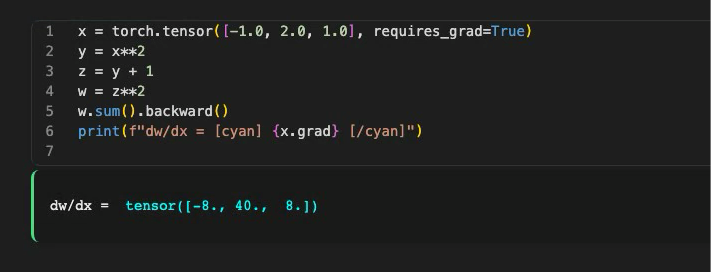 Notice how when x is a vector, Pytorch calculates the gradients for each element of x
This is what makes PyTorch so cool. You can simultaneously (or parallely) compute gradients for multiple elements just like that.
When working on deep learning projects, our inputs are generally multi-dimensional, so PyTorch does a lot of heavy lifting in the background by parallelizing the gradient computation!
Notice how when x is a vector, Pytorch calculates the gradients for each element of x
This is what makes PyTorch so cool. You can simultaneously (or parallely) compute gradients for multiple elements just like that.
When working on deep learning projects, our inputs are generally multi-dimensional, so PyTorch does a lot of heavy lifting in the background by parallelizing the gradient computation!
The Pytorch formula
As seen in the previous example, the PyTorch game plan is pretty simple.
- Define the "forward pass" of your equation, i.e., how is your dependent variable derived from your independent variables?
- PyTorch automatically computes the backward propagation (provided your equations are differentiable)
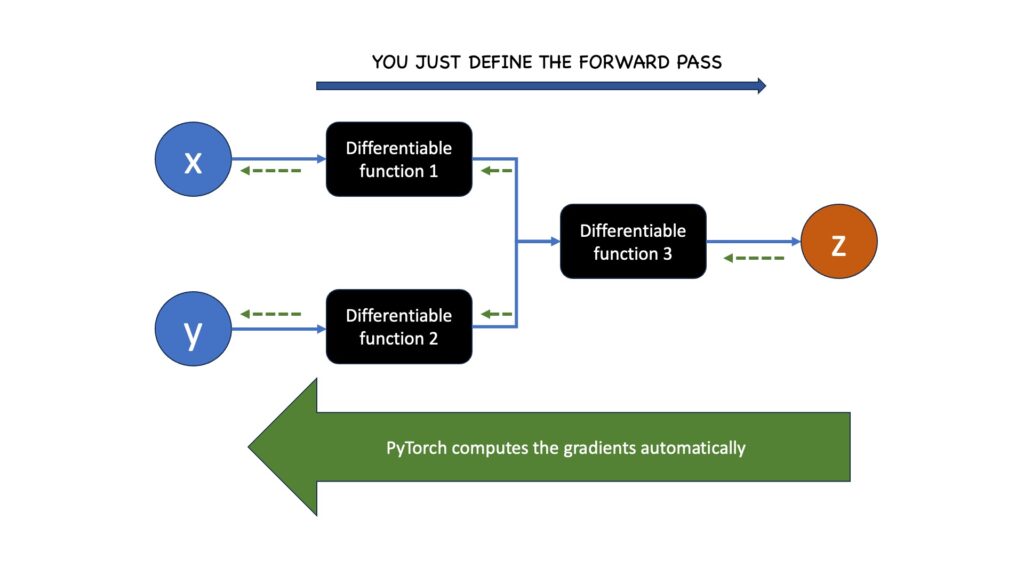 We define the forward function of the computation graph. PyTorch automatically computes the gradients. (Source: Author)
3. Training models
Now that we understand the basics of auto differentiation, let's see how linear regression works in PyTorch. The code below constructs a small housing-style dataset with two features (area and age), normalizes them to the range of [-1, 1], and prepares us for some good old-fashioned linear regression.
python
df = pd.DataFrame(
    {
        "area": [120, 180, 150, 210, 105],
        "age": [5, 2, 1, 2, 1],
        "price": [30, 90, 100, 180, 85]
    }
)
df = normalize(df)
To do anything with PyTorch, we must first transfer the data into tensors! Notice how the data tensors X and Y do not require gradients because they are constants (i.e., they don't change during training).
The weights W and B are trainable, though. We will update them to fit our dataset. To make it trainable through backpropagation, we need to set requires_grad=True for these declarations.
Look at the code below:
python
# Note that these are constants, we are not going to update them
X = torch.tensor(df[["area", "age"]].values, dtype=torch.float32)
Y = torch.tensor(df[["price"]].values, dtype=torch.float32)

# These "require_grad" So they are trainable weights.
W = torch.rand(size=(2, 1), requires_grad=True)
B = torch.rand(1, requires_grad=True)
Next, let's generate a prediction! The forward pass uses the idiomatic matrix multiplication and addition, i.e. X @ W + B.
python
# Generate a prediction
pred = X @ W + B
The @ operator basically does matrix multiplication between X and W. The X @ W + B model performs a "linear transformation" of X. Our goal is to tune the trainable weights W and B so that the prediction is closer to our target ground truth.
Next, we calculate the error as the mean square error loss. It calculates the distance between our current prediction and the ground truth. If we call loss.backward() we will also get the gradients of the trainable variables in the graph (i.e., W and B).
python
loss.backward()
dW = W.grad # Tells us "how much W must change to reduce the loss"
dB = B.grad # and "how much B must change to reduce the loss"
dW and dB are the gradients of W and B with respect to the loss function. We can apply "gradient descent" to nudge these trainable parameters in the direction indicated by the gradient.
python
lr = 0.2 # Learning rate: tells us how much we should update the weights
with torch.no_grad():
    W = W - lr * dW # Updating W with Gradient descent
    B = B - lr * dB # Updating B with Gradient descent
Understanding linear regression, loss calculation, and gradient descent are some of the pillars of machine learning, and by extension, deep learning. While updating the weights manually by subtracting the gradients is possible, it is infeasible in practice for deep neural networks with multiple layers of weights. If only there had been a way to automatically update weights without worrying about keeping track like this!
Side note
The above technique of taking small steps in the optimization space to iteratively learn the weights is called Gradient Descent. Note that there are better ways to learn the optimal W and B for small datasets. Like the Normal equation , which gives us an analytical solution that doesn't require any steps or iteration. It is however, computationally expensive for large datasets. For large matrices, the standard approach is to divide the data into minibatches and apply gradient descent individually. This technique is known as Stochastic Gradient Descent (SGD).
Optimizers
PyTorch optimizers are algorithms (like SGD, Adam, or RMSprop) that adjust the model's weights and biases based on the computed gradients to minimize the loss function.
Let's check how the above Linear Regression code will look if we replaced the manual weight updates with PyTorch optimizers.
python
from torch.optim import SGD
...

W = torch.rand(size=(2, 1), requires_grad=True)
B = torch.rand(1, requires_grad=True)
optimizer = SGD(params = [W, B], lr=0.1)
for step in range(10):
    pred = X @ W + B # Forward pass
    loss = ((Y - pred) ** 2).mean() # Calculate loss
    loss.backward() # Calculate gradients
    optimizer.step() # Update W and B according to gradients
    optimizer.zero_grad() # Reset all gradients
The core loop for training models in PyTorch looks like this:
- Forward pass to compute
pred
- Calculate
loss by finding the error between the prediction (pred) and the ground truth (Y)
- Backward pass with
loss.backward() to populate W.grad and B.grad.
- Step with
optimizer.step() to update parameters.
- Zero gradients with
optimizer.zero_grad() to avoid accumulation.
SGD is a solid baseline for linear regression. As you scale up or face noisier gradients, adaptive optimizers can help. This is where PyTorch's suite of open source optimizers comes into play. This includes adaptive optimizers, like Adam, that use techniques such as momentum and per-parameter learning rates to achieve faster and more stable convergence on these challenging tasks. Here is a flashcard comparing various popular ones:
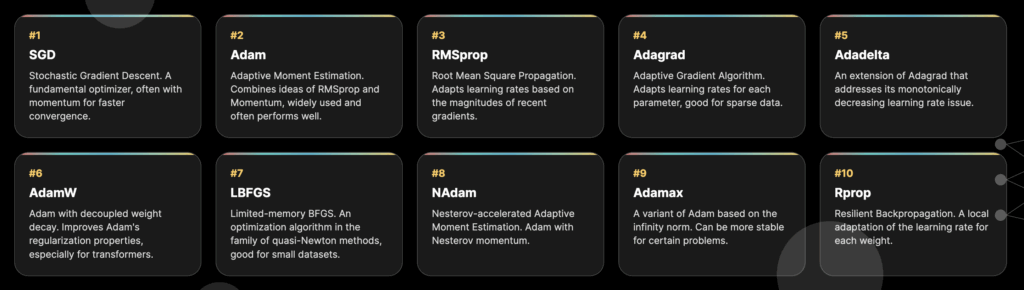 Some common PyTorch optimizers! (Source: Author)
Not just optimizers, because Torch also provides a host of different loss functions too! Here are some examples:
Some common PyTorch optimizers! (Source: Author)
Not just optimizers, because Torch also provides a host of different loss functions too! Here are some examples:
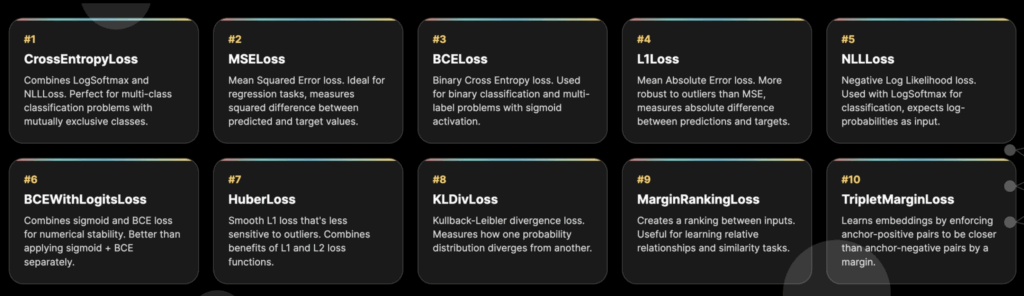 Some common PyTorch loss functions (Source: Author)
4. Layers and Modules
Just like we don't need to write our own optimizers, we don't need to declare raw tensors and matrix multiplication logic on our own (for the most part). Pytorch modules have us covered.
A PyTorch Module is the fundamental building block for all neural networks in PyTorch, acting as a container for layers, learnable parameters, and the logic for how data flows through them. For example, that linear layer we wrote earlier, where we manually declared the weights and biases, we can instead use these lines of code:
python
linear_model = nn.Linear(in_size, out_size) # Torch takes care of initializing weights
prediction = linear_model(input) # Forward pass
We learned how to make linear models (yay!), but what we really need to learn is how to train larger and deeper neural networks. The simplest type of neural network is the multi-layer perceptron (MLP). An MLP is basically multiple linear layers with non-linear functions in between.
Creating MLPs is pretty straightforward in Torch. nn.Sequentialis a common PyTorch module that is used to sequentially pass the input through multiple layers. Here is the code:
python
# A 2 layer MLP
mlp_2_layers = nn.Sequential(
    nn.Linear(in_size, hidden_units),
    nn.ReLU(),
    nn.Linear(hidden_units, out_size)
)

# A 3 layer MLP
mlp_3_layers = nn.Sequential(
    nn.Linear(in_size, hidden_units),
    nn.ReLU(),
    nn.Linear(hidden_units, hidden_units),
    nn.ReLU(),
    nn.Linear(hidden_units, out_size)
)
Multi-layer perceptrons can learn compositional and non-linear functions! Here is an example of a zig-zag function and how a 2-layer MLP with RELU learns it.
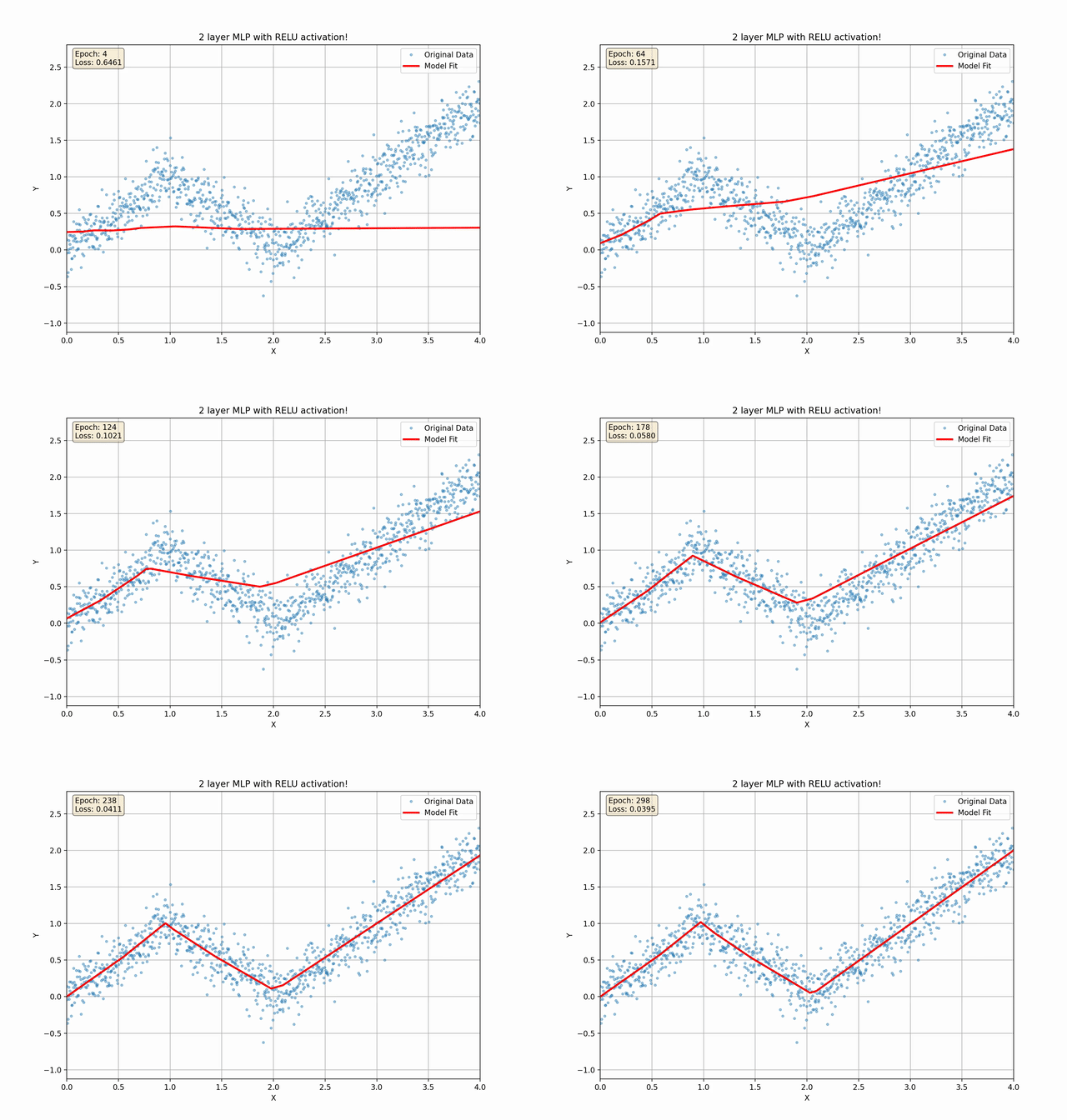 A 2 layer MLP training on a piecewise linear function (Source: Author)
5. Writing custom networks
Torch has a vast array of awesome layers and modules that have inspired entire research papers. You can think about these as lego blocks that you can fit into and compose any neural network.
Want a convolutional network layer for images? Use nn.Conv2d.
A GRU layer to process sequential tokens? Use nn.GRU
But most often in research, you would want to write a custom neural network architecture from scratch. The recipe for this process is as follows:
- Subclass from
nn.Module
- In the
__init__ constructor function, initialize all your layers and weights
- Define a
forward() where you write the logic of the forward pass
Here is an example where we implement the classic ResNet architecture:
python
class ResNetBlock(nn.Module):
    def __init__(self, in_channels, out_channels, stride=1, downsample=None):
        super(ResNetBlock, self).__init__()

        self.conv1 = nn.Conv2d(
            in_channels,
            out_channels,
            kernel_size=3,
            stride=stride,
            padding=1,
            bias=False,
        )
        self.bn1 = nn.BatchNorm2d(out_channels)
        self.conv2 = nn.Conv2d(
            out_channels, out_channels, kernel_size=3, stride=1, padding=1, bias=False
        )
        self.bn2 = nn.BatchNorm2d(out_channels)

        self.downsample = downsample

    def forward(self, x):
        residual = x

        out = F.relu(self.bn1(self.conv1(x)))
        out = self.bn2(self.conv2(out))

        if self.downsample:
            residual = self.downsample(x)

        out += residual
        out = F.relu(out)

        return out
That's it! You just initialize your layers and define the forward pass computation graph, and Torch will directly do the backward pass on its own.
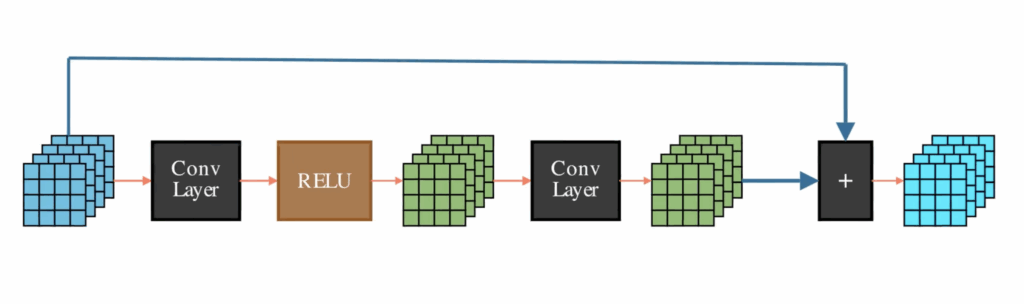 A standard ResNet Block passes embeddings through a short stack of neural network layers (like convolution) and then adds the original embeddings back to the final output
Of course, you can use your custom layers and modules as parts of a much larger network! For example, here is an example of writing a single transformer block.
python
A standard ResNet Block passes embeddings through a short stack of neural network layers (like convolution) and then adds the original embeddings back to the final output
Of course, you can use your custom layers and modules as parts of a much larger network! For example, here is an example of writing a single transformer block.
python
class AttentionLayer(nn.Module):
    def __init__(self, input_dim, attention_dim=64):
        super(SimpleAttention, self).__init__()

        # Linear layers for attention computation
        self.query = nn.Linear(input_dim, attention_dim)
        self.key = nn.Linear(input_dim, attention_dim)
        self.value = nn.Linear(input_dim, attention_dim)

        # Scaling factor
        self.scale = torch.sqrt(torch.FloatTensor([attention_dim]))

    def forward(self, x):
        # x shape: (batch_size, sequence_length, input_dim)
        batch_size, seq_len, input_dim = x.size()

        # Compute Q, K, V
        Q = self.query(x)  # (batch_size, seq_len, attention_dim)
        K = self.key(x)  # (batch_size, seq_len, attention_dim)
        V = self.value(x)  # (batch_size, seq_len, attention_dim)

        attention_scores = torch.matmul(Q, K.transpose(-2, -1)) / self.scale # Scaled dot-product attention
        attention_weights = F.softmax(attention_scores, dim=-1) # Convert attention weights to probabilities
        attended_output = torch.matmul(attention_weights, V) # Apply attention to values

        return attended_output, attention_weights

class TransformerBlock(nn.Module):
    """
    A single transformer block composed of self-attention and a feed-forward network.
    """
    def __init__(self, embed_dim, ffn_hidden_dim):
        """
        Args:
            embed_dim (int): The dimensionality of the model's embeddings.
            ffn_hidden_dim (int): The dimensionality of the hidden layer in the FFN.
        """
        super(TransformerBlock, self).__init__()
        self.attention = SimpleAttention(embed_dim, embed_dim)
        self.norm1 = nn.LayerNorm(embed_dim)
        self.norm2 = nn.LayerNorm(embed_dim)

        self.ffn = nn.Sequential(
            nn.Linear(embed_dim, ffn_hidden_dim),
            nn.ReLU(),
            nn.Linear(ffn_hidden_dim, embed_dim)
        )

    def forward(self, x):
        """
        Forward pass for the transformer block.

        Args:
            x (torch.Tensor): Input tensor of shape (batch_size, sequence_length, embed_dim).

        Returns:
            torch.Tensor: The output tensor of the transformer block.
        """
        # Self-attention part
        attended, _ = self.attention(x)
        # Add & Norm (residual connection)
        x = self.norm1(attended + x)

        # Feed-forward part
        ffn_out = self.ffn(x)
        # Add & Norm (residual connection)
        x = self.norm2(ffn_out + x)

        return x

class TransformerEncoder(nn.Module):
    """
    A transformer encoder that stacks multiple TransformerBlocks.
    """
    def __init__(self, num_layers, embed_dim, ffn_hidden_dim, seq_len, output_dim):
        """
        Args:
            num_layers (int): The number of transformer blocks to stack.
            embed_dim (int): The dimensionality of the model's embeddings.
            ffn_hidden_dim (int): The dimensionality of the hidden layer in the FFN.
            seq_len (int): The length of the input sequences.
            output_dim (int): The dimensionality of the final output (e.g., number of classes).
        """
        super(TransformerEncoder, self).__init__()

        # Create a list of transformer blocks
        self.layers = nn.ModuleList(
            [TransformerBlock(embed_dim, ffn_hidden_dim) for _ in range(num_layers)]
        )

        # Final classification head
        self.classifier = nn.Linear(embed_dim * seq_len, output_dim)

    def forward(self, x):
        """
        Forward pass for the full transformer encoder.

        Args:
            x (torch.Tensor): Input tensor of shape (batch_size, sequence_length, embed_dim).

        Returns:
            torch.Tensor: The final output logits from the classifier.
        """
        # Pass input through all transformer blocks
        for layer in self.layers:
            x = layer(x)

        # Flatten the output for the classifier
        x = x.view(x.size(0), -1)

        # Final classification
        output = self.classifier(x)
        return output
Notice how the first module AttentionLayer computes the scaled-dot-product attention. TransformerBlock applies layer norms and feedforward networks on top of it. And finally, the TransformerEncoder module applies multiple Transformer blocks in a sequence! And just like that, we have a BERT model that incorporates multiple stacks of bidirectional attention layers, along with various optimizations such as layer norms and residual connections.
If you are a beginner and this part overwhelms you, this is very much expected! The cool thing with PyTorch is you get to choose the level of complexity you want to work with depending on your skill level.
When you are beginning, you may want to stick to the hundreds of readymade modules Pytorch offers out of the box. You will slowly find the need to branch out and customizing them for your own use-case. And as you write a couple of custom ones on your own, you will grow more and more confident and proficient.
The goal of this section was to show you the capabilities and infinite customization you can do by combining modules together. Remember: you write the forward pass, and as long as the full graph is differentiable, Torch will always be able to do the auto-differentiation for you!
Next steps
The features and concepts covered in this article were handpicked to provide a whirlwind tour of some of Torch's most important capabilities. I have a YouTube video that explains all of these concepts, along with some additional ones like model deployment, dataloaders, distributions, and training methods.
That's it for this article! Here are some links where you can learn more about my work. Thanks for the read!
Support me on Patreon:https://www.patreon.com/NeuralBreakdownwithAVB
My YouTube channel:
https://www.youtube.com/@avb_fj
Follow me on Twitter:
https://x.com/neural_avb
Read my articles:
https://towardsdatascience.com/author/neural-avb/
Register Now to Continue Reading
Unlock Towards Data Science with a Free Account
All articles on Towards Data Science are available to registered users. Create a free account today to access this article and thousands more.
Register for freeSign in to your account
 Written By
See all from Avishek Biswas
Deep DivesMachine LearningNeural NetworkPytorchTensor
Share This Article
Towards Data Science is a community publication. Submit your insights to reach our global audience and earn through the TDS Author Payment Program.
Write for TDS
Related Articles
Deep Learning
Is the quest of the perfect activation function accessible?
Kevin Berlemont, PhD
September 22, 20227 min read
Deep Learning
Solving complex NLP tasks in 10 lines of Python code
Dmitrii Eliuseev
September 2, 202310 min read
Deep Learning
Estimating vital signs like heart rate, breathing rate and SpO2 levels from facial videos using...
Anwesh Marwade
May 3, 20219 min read
Artificial Intelligence
From Research, Prototype to Production
Admond Lee
July 6, 20197 min read
Machine Learning
Learn about the most fundamental machine learning algorithm
Slava Efimov
November 12, 20226 min read
Deep Learning
How to make ML model deployment and serving easier with TensorFlow
Dimitre Oliveira
September 28, 202211 min read
Deep Learning
An easy-to-understand deep dive into how N-BEATS works and how you can use it.
Jonte Dancker
May 11, 202411 min read
Deep Learning
Train your models with GPU instances on the AWS cloud.
NVS Yashwanth
October 1, 202010 min read
Machine Learning
It started like a times series project. It ended up being a PCA project.
Guillermina Sutter Schneider
December 10, 20205 min read
Your home for data science and AI. The world's leading publication for data science, data analytics, data engineering, machine learning, and artificial intelligence professionals.
Subscribe to Our NewsletterWrite For TDS•About•Advertise•Privacy Policy•Terms of Use
© Insight Media Group, LLC 2026•The New Stack•roadmap.sh•Creator Network
Recommended Articles
Close