
Understanding Random Forest — The Power of Many Trees

In our previous article, we explored how a Decision Tree works step-by-step and how it makes predictions in a simple and interpretable way.
Now, let’s move to the next algorithm in our Supervised Learning series — one that takes decision trees to the next level: Random Forest.
Notebook Link [Click Here ]
What is Random Forest?
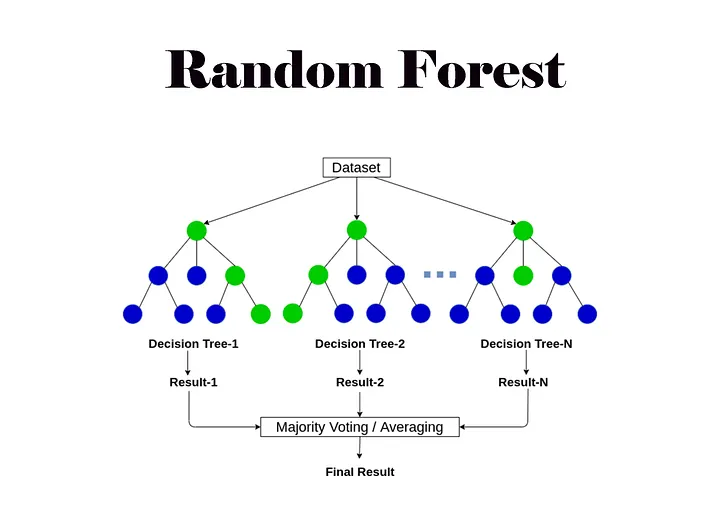
Random Forest is a machine learning algorithm that combines multiple Decision Trees to make a single, more accurate prediction.
Think of it like this 👇
“A forest of trees makes better decisions than a single tree.”
Each decision tree in the forest is trained on a random subset of data and features.
When it’s time to make a prediction:
For classification, each tree gives a vote, and the majority wins.
For regression, each tree gives a value, and the final result is the average of all outputs.
Because it relies on multiple trees rather than one, Random Forest becomes an ensemble learning technique — meaning it combines the power of many models to reduce errors and improve accuracy
Working of Random Forest (Step-by-Step)
Here’s how Random Forest actually works behind the scenes:
Create Many Decision Trees: The algorithm generates several decision trees during training.
Pick Random Features: Each tree uses a random subset of features, preventing overfitting.
Each Tree Makes a Prediction: Every tree gives its own output (class or value).
Combine the Predictions: The model combines all trees’ outputs — either by majority vote (classification) or average (regression).
So instead of trusting one tree (which might make mistakes), Random Forest uses the wisdom of the crowd to make decisions.
Random Forest for Classification vs Regression
Like Decision Trees, Random Forest can solve both:
Classification: Predicting discrete labels (e.g., “spam” or “not spam”)
Regression: Predicting continuous values (e.g., house prices or temperature).
The only difference is in how predictions are combined:
Classification → Voting
Regression → Averaging
Real-Life Analogy
Imagine you’re trying to decide which fruit to eat. You ask 10 friends, and each has different opinions and experiences. Some care about taste, others about color & variety. When you combine all their opinions, you’re more likely to make a balanced and accurate decision. That’s exactly what Random Forest does. It combines multiple perspectives (trees) to get a reliable result.

Key Features of Random Forest
Handles Missing Data: Works even when some data points are missing.
Shows Feature Importance: Helps identify which features contribute the most to predictions.
Scalable & Efficient: Handles large and complex datasets with many features.
Versatile: Works for both classification (predicting categories) and regression (predicting numbers).
Practical Use: From flower classification to fraud detection and disease prediction — Random Forest remains a go-to model.
Applications of Random Forest
Random Forest is widely used in many real-world domains:
Healthcare: Predicting diseases from patient data.
Finance: Fraud detection and credit scoring.
E-commerce: Recommendation systems and customer segmentation.
Environment: Weather prediction and forest classification.
Implementing Random Forest for Classification Tasks — Iris Dataset Example
We learned how random forest works let’s explore how Random Forest takes that idea further by combining multiple trees for better accuracy, robustness, and stability. Random Forest can be used for both classification and regression tasks.
Here, we’ll use it for classifying Iris flower species based on features like petal and sepal size.
Steps Overview
Import the required libraries.
Load the Iris dataset (built into scikit-learn).
Split the data into training and testing sets.
Train a Random Forest Classifier.
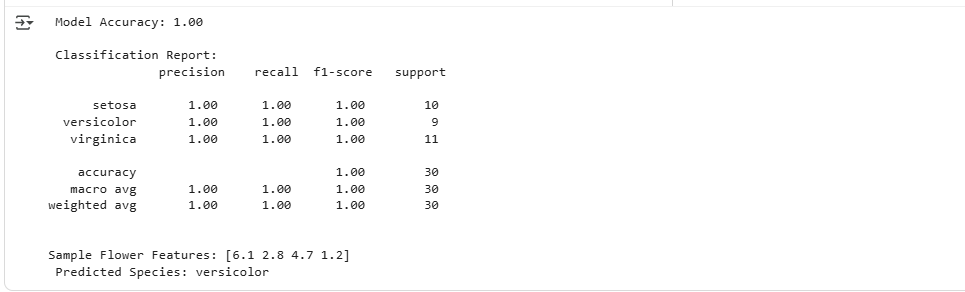
Make predictions and evaluate accuracy.
Wrap it with a Gradio UI to test interactively.
from sklearn.datasets import load_iris
from sklearn.model_selection import train_test_split
from sklearn.ensemble import RandomForestClassifier
from sklearn.metrics import accuracy_score, classification_report
import pandas as pd
import warnings
warnings.filterwarnings("ignore")

# Load the Iris dataset
iris = load_iris()
X = iris.data
y = iris.target

# Convert to DataFrame for readability
df = pd.DataFrame(X, columns=iris.feature_names)
df['target'] = y

# Split the data
X_train, X_test, y_train, y_test = train_test_split(
    X, y, test_size=0.2, random_state=42
)

# Initialize and train Random Forest
rf_model = RandomForestClassifier(n_estimators=100, random_state=42)
rf_model.fit(X_train, y_train)

# Predict on test data
y_pred = rf_model.predict(X_test)

# Evaluate model
accuracy = accuracy_score(y_test, y_pred)
print(f" Model Accuracy: {accuracy:.2f}")
print("\n Classification Report:\n", classification_report(y_test, y_pred, target_names=iris.target_names))

# Test sample prediction
sample = X_test[0].reshape(1, -1)
prediction = iris.target_names[rf_model.predict(sample)[0]]

print(f"\nSample Flower Features: {X_test[0]}")
print(f" Predicted Species: {prediction}")
Make it Interactive with Gradio
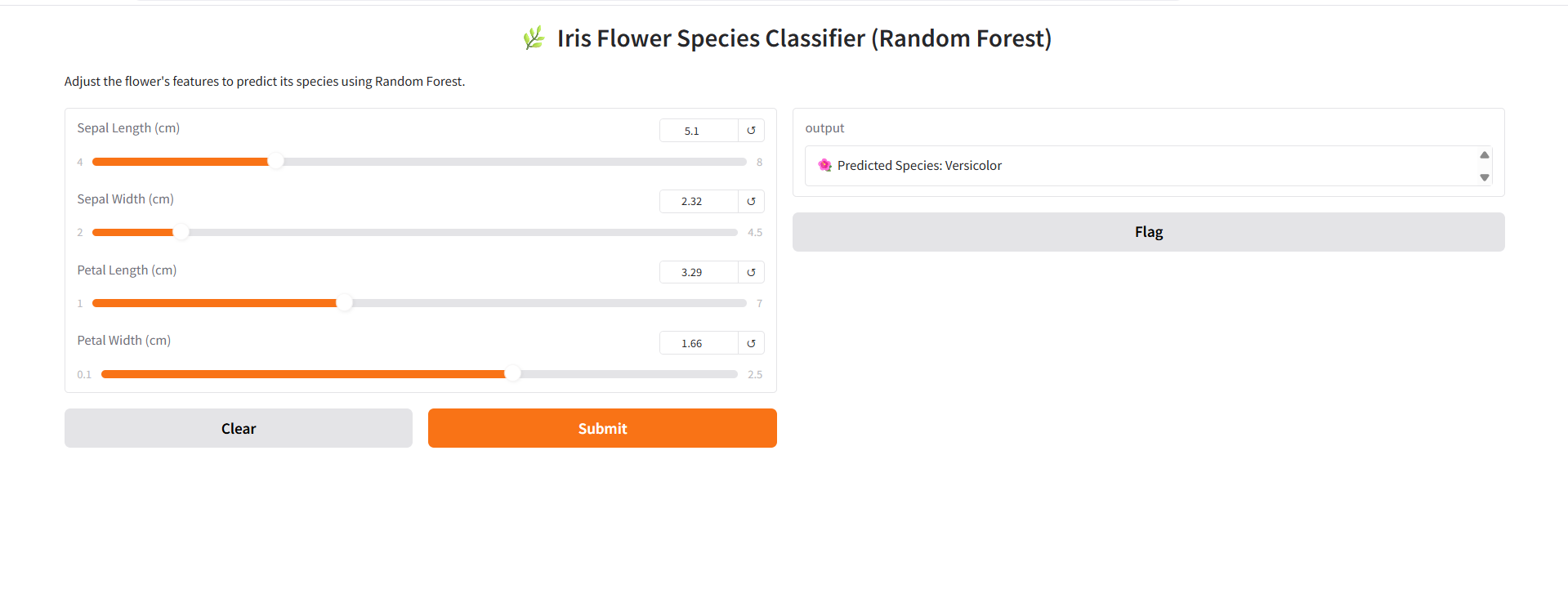
Let’s add a Gradio interface so anyone can play with petal/sepal sizes and see predictions in real time
import gradio as gr
from sklearn.datasets import load_iris
from sklearn.ensemble import RandomForestClassifier

# Load dataset and model
iris = load_iris()
X = iris.data
y = iris.target

model = RandomForestClassifier(n_estimators=100, random_state=42)
model.fit(X, y)

# Prediction function
def predict_iris(sepal_length, sepal_width, petal_length, petal_width):
    sample = [[sepal_length, sepal_width, petal_length, petal_width]]
    pred = model.predict(sample)[0]
    return f"🌺 Predicted Species: {iris.target_names[pred].capitalize()}"

# Gradio Interface
interface = gr.Interface(
    fn=predict_iris,
    inputs=[
        gr.Slider(4.0, 8.0, value=5.5, label="Sepal Length (cm)"),
        gr.Slider(2.0, 4.5, value=3.0, label="Sepal Width (cm)"),
        gr.Slider(1.0, 7.0, value=4.0, label="Petal Length (cm)"),
        gr.Slider(0.1, 2.5, value=1.2, label="Petal Width (cm)")
    ],
    outputs="text",
    title="🌿 Iris Flower Species Classifier (Random Forest)",
    description="Adjust the flower's features to predict its species using Random Forest."
)

interface.launch()
Conclusion
Random Forest is one of the most powerful yet beginner-friendly algorithms in supervised learning.
It builds upon the concept of Decision Trees — but instead of relying on a single tree (which might overfit), it combines the results of multiple trees to make smarter, more stable predictions.
In the next part of our Supervised Learning series, we’ll continue exploring more algorithms that build upon these foundations making machine learning even more intuitive and practical


