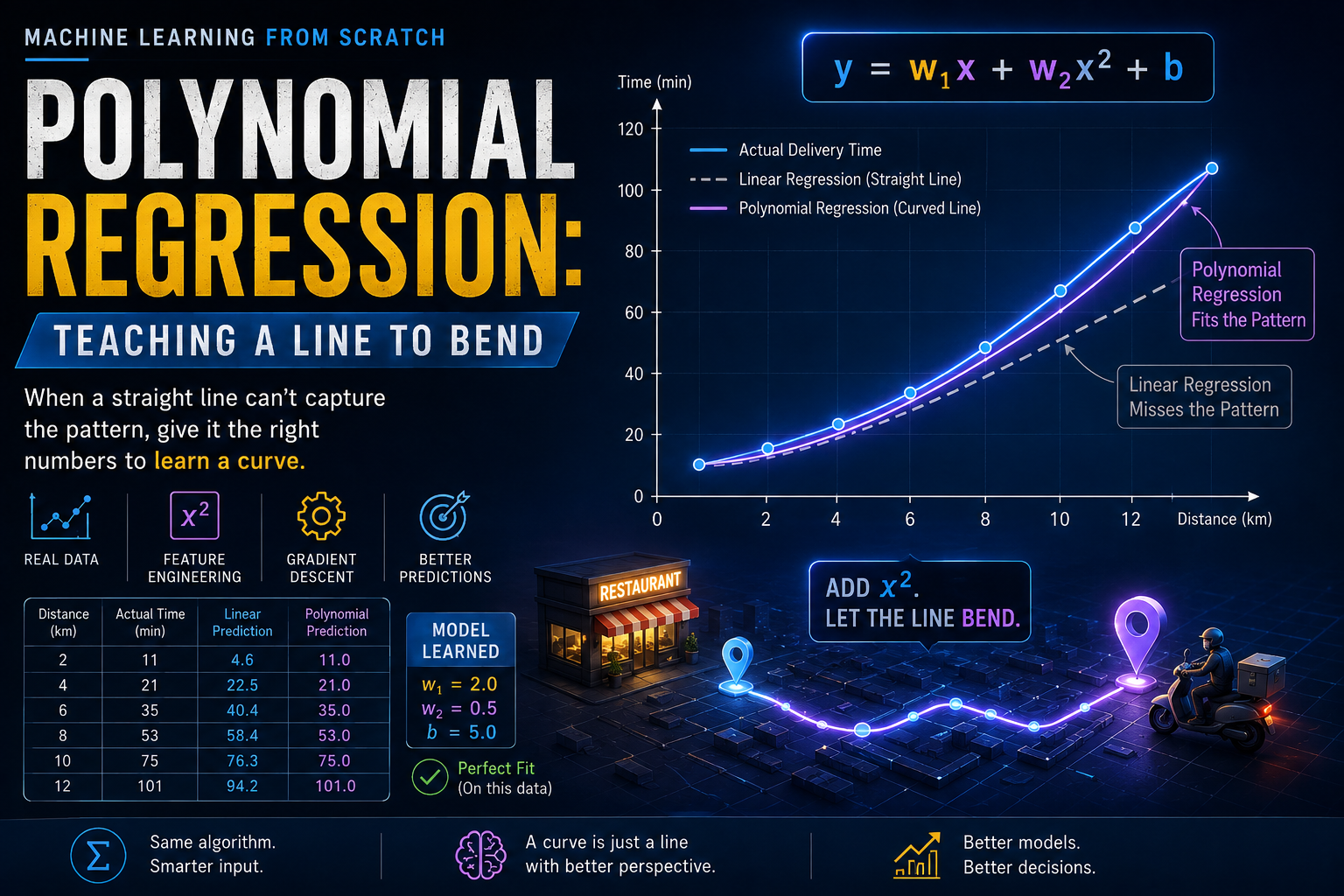
Take our best straight-line model so far, the one that fit our five-order table perfectly. Now widen the range a bit. Some orders close by, a couple kilometers away. Some far, ten or twelve kilometers away. Feed all of them to the same straight-line model.
It starts missing. Not by a little. By a lot. And the misses aren't random, they follow a pattern. Short orders come in higher than predicted. Long orders come in higher too. Only the orders in the middle land close to the line.
That pattern is the whole story of this post.
Here are six orders, spread across a wider range of distances than we've used before.
| Distance (km) | Actual Time (min) |
|---|---|
| 2 | 11 |
| 4 | 21 |
| 6 | 35 |
| 8 | 53 |
| 10 | 75 |
| 12 | 101 |
One thing worth being upfront about: I built this table on purpose so the numbers follow a clean quadratic pattern. It's a teaching example, not a real delivery log, and real data would be a lot messier. But it's clean for a reason, it lets us see the idea we're after without any noise getting in the way.
Look at how the time grows as distance grows. From 2 km to 4 km, time goes up by 10 minutes. From 4 km to 6 km, it goes up by 14 minutes. From 6 to 8, it jumps by 18. From 8 to 10, by 22. From 10 to 12, by 26.
Each step adds more time than the last one did. A straight line can't do that. A straight line adds the exact same amount for every extra kilometer, no matter where you are on it. This data isn't behaving like a straight line at all.
It's tempting to explain this away with a story: short orders go out on bikes, long orders switch to scooters or cars, get grouped with other stops, pick up delays a short trip never sees. That story might even be true sometimes. But I want to be careful here, because our table wasn't built from any of that. It was built directly from a formula. So the honest version of this section isn't "delivery time is secretly quadratic." It's this:
Real-world data can bend for all sorts of reasons, traffic, batching, prep time, road conditions, take your pick. A straight line has no way to represent any of that, because it assumes every extra kilometer costs exactly the same amount of time, forever. Our job isn't to prove why this particular curve happens. It's to build a model that isn't stuck assuming everything is a straight line in the first place.
We already know how to fit a straight line to this data, we built the exact code for it two posts ago. Let's run it on this new table and look at what comes out.
w, b = gradient_descent(distances, actual_times, w=0, b=0, learning_rate=0.001, iterations=20000)
The line it settles on gives these predictions:
| Distance | Actual | Predicted by the line | Error |
|---|---|---|---|
| 2 | 11 | 4.6 | +6.4 |
| 4 | 21 | 22.5 | −1.5 |
| 6 | 35 | 40.4 | −5.4 |
| 8 | 53 | 58.4 | −5.4 |
| 10 | 75 | 76.3 | −1.3 |
| 12 | 101 | 94.2 | +6.8 |
Look at that error column on its own for a second. It starts positive, dips negative in the middle, then swings positive again at the far end. That shape, high, dip, high, is the model's way of telling us something. The line isn't randomly wrong. It's too low at both ends and too high in the middle, which means whatever pattern it's missing has a curve to it. That's the clue.
At 2 km, the line predicts 4.6 minutes when the real answer is 11. At 12 km, it predicts 94.2 when the real answer is 101. It can only pass through the middle of the data and miss both edges.
Here's the fix, and it's simpler than it sounds. We don't need a new kind of model. We just need to hand our existing straight-line model a second input, one that already bends.
That second input is distance squared, written as x². Look at how it grows compared to plain distance:
| Distance (x) | Distance Squared (x²) |
|---|---|
| 2 | 4 |
| 4 | 16 |
| 6 | 36 |
| 8 | 64 |
| 10 | 100 |
| 12 | 144 |
Distance itself grows steadily, 2, 4, 6, 8. But x² shoots up faster and faster, 4, 16, 36, 64. That's exactly the shape our delivery times were showing. We're not changing the model's job. We're changing what we give it to look at.
If we let the model use both x and x² as inputs, it can multiply x² by some weight and get exactly the curve it needs, using nothing but the multiple linear regression code we already built.
The formula barely changes from what we already know:
prediction = w1 × x + w2 × x² + b
This is still, underneath everything, the same linear regression from the earlier posts. We haven't invented a new algorithm. We've just fed it a new number to multiply.
Here's the part worth sitting with for a second. If it's still linear regression, how is it allowed to draw a curve? The answer is that "linear" here describes how the model treats its weights, not how the final prediction looks. The prediction curves with respect to x, because x² bends. But with respect to w1 and w2, it's still just addition and multiplication, the same thing gradient descent has been doing since the first post. We didn't teach it how to draw curves. We gave it a curved input and let the same gradient descent do its job.
This step, going from one input to more than one, already happened once before in this series, when we moved from a single feature to multiple. Polynomial regression isn't a third, unrelated idea, it's the same move again, just with x² standing in as a new "feature" built from x itself.
Let's pick the order at 6 km and check it ourselves. Its new second input is 6² = 36.
If w1 = 2, w2 = 0.5, and b = 5, the prediction works out to:
prediction = 2 × 6 + 0.5 × 36 + 5
prediction = 12 + 18 + 5
prediction = 35
That matches the actual value in our table exactly. And when we train the model on this table, it discovers weights that land right around these same numbers, which is exactly what we'll do next.
First, let's build the x² column.
import numpy as np

distances = np.array([2, 4, 6, 8, 10, 12], dtype=float)
actual_times = np.array([11, 21, 35, 53, 75, 101], dtype=float)

distance_squared = distances ** 2

X = np.column_stack([distances, distance_squared])
print(X)
[[  2.   4.]
 [  4.  16.]
 [  6.  36.]
 [  8.  64.]
 [ 10. 100.]
 [ 12. 144.]]
Notice the two columns here. One goes up to 12. The other goes up to 144. Now our two inputs are on very different scales, and that's the exact same mismatch we spent the whole last post fixing. So before training, we scale both columns the same way we already know how to.
X_mean = X.mean(axis=0)
X_std = X.std(axis=0)
X_scaled = (X - X_mean) / X_std
Now we hand this straight to the same gradient_descent function from the multiple regression post, completely unchanged.
w, b = gradient_descent(X_scaled, actual_times, w=np.zeros(2), b=0.0, learning_rate=0.1, iterations=5000)

predictions = X_scaled.dot(w) + b
print(predictions)
[ 11. 21. 35. 53. 75. 101.]
Every single prediction lands right on the actual value. But the predictions alone aren't the interesting part. Let's look at what the model actually learned:
print("Weights:", w)
print("Bias:", b)
Weights: [2.  0.5]
Bias: 5.0
Those numbers should look familiar. They're the same 2 and 0.5 we used in the hand calculation earlier. The model found them on its own, starting from nothing but zeros, using the same gradient descent code we've reused since the second post in this series. Put back into the formula, that's:
prediction = 2 × x + 0.5 × x² + 5
Which, unsurprisingly, is exactly the equation this table was built from in the first place. The only new idea in this entire post was handing the model one extra number to work with.
That said, I'd be doing you a disservice if I let "every prediction is exact" sit there unchallenged. Six data points, three numbers to learn, and a dataset built precisely from the formula we're asking it to find, of course it lands exactly. That's not really a demonstration of how good the model is. It's a demonstration of how clean the setup is. On real data, a model that fits every single training point perfectly is often a warning sign, not a win, something we'll get into properly when we talk about overfitting.
Once you see that x² is just another input, there's nothing stopping you from adding x³, x⁴, or beyond, the same way. Each one lets the line bend a little differently. In practice, you rarely need to go very far past x² or x³ before the model starts fitting noise instead of the real pattern, something we'll come back to properly when we talk about overfitting. But the core idea stops here. A curve, in the end, is just a straight line that's been handed the right extra numbers.
Every model we've built across this entire series, all the way back to the first post, has been answering the same kind of question. Given some inputs, predict a number. Delivery time in minutes. A number that could be small, large, anywhere on a scale.
But not every real question looks like that. Sometimes the answer isn't a number at all. Sometimes it's just yes or no. Will this order be late, or won't it? That's not a number to predict, it's a decision to make. And it turns out, everything we've built so far is about to hit its first real wall trying to answer a question shaped like that.
That's exactly where we're headed next.
The full code for this post is up on GitHub here: github.com/tharun-pandya/Machine-Learning-Blog-Series/blob/main/Polynomial_Regression.ipynb
See you in the next one.