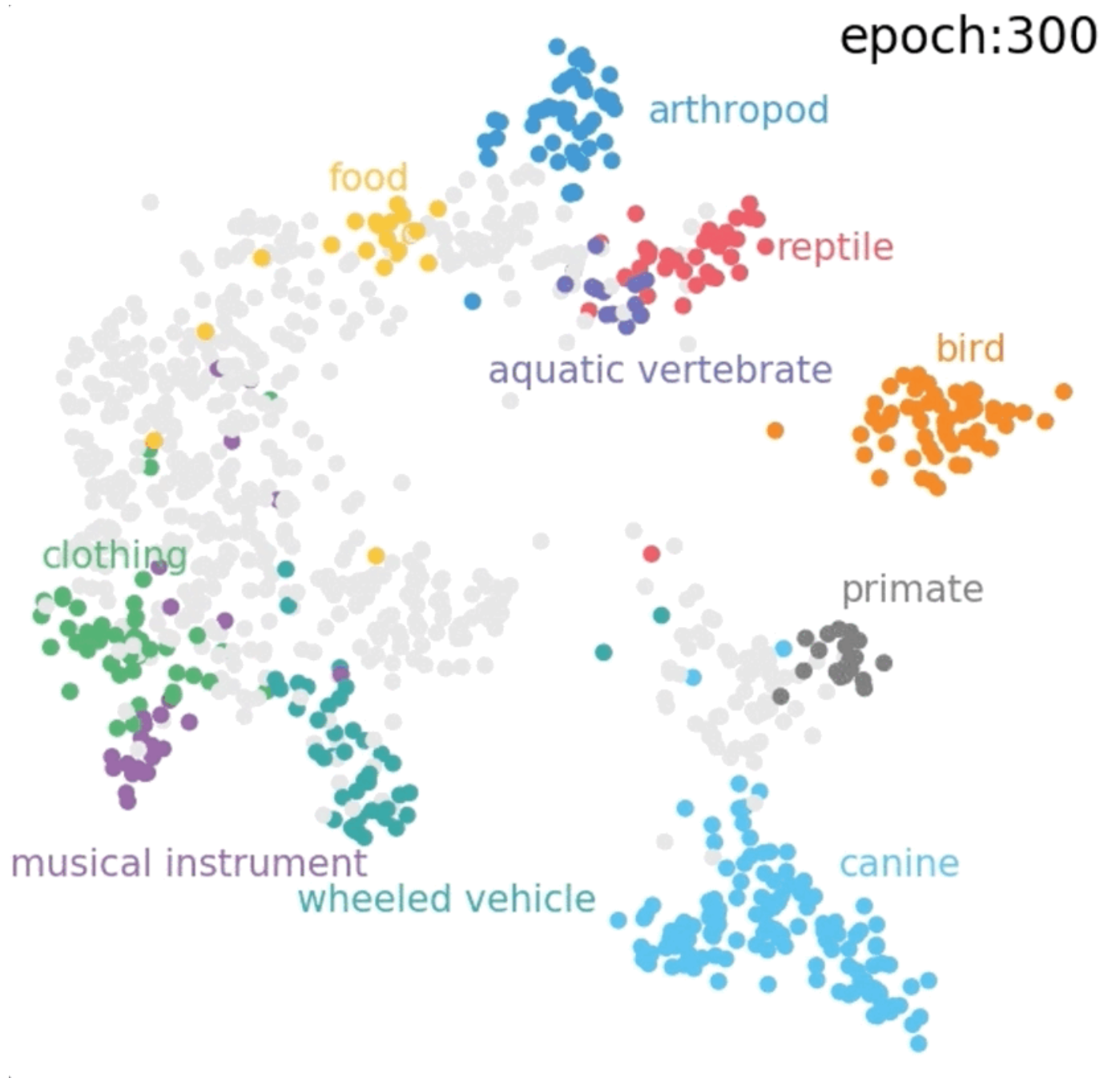
保留正文与补采附件。源页面当前未重新核验;具体限制见交付清单。
 We value your privacy
We use cookies to enhance your browsing experience, serve personalised ads or content, and analyse our traffic. By clicking "Accept All", you consent to our use of cookies.
Customise Reject All Accept All
Customise Consent Preferences
We value your privacy
We use cookies to enhance your browsing experience, serve personalised ads or content, and analyse our traffic. By clicking "Accept All", you consent to our use of cookies.
Customise Reject All Accept All
Customise Consent Preferences  We use cookies to help you navigate efficiently and perform certain functions. You will find detailed information about all cookies under each consent category below.
The cookies that are categorised as "Necessary" are stored on your browser as they are essential for enabling the basic functionalities of the site. ... Show more
NecessaryAlways Active
Necessary cookies are required to enable the basic features of this site, such as providing secure log-in or adjusting your consent preferences. These cookies do not store any personally identifiable data.
We use cookies to help you navigate efficiently and perform certain functions. You will find detailed information about all cookies under each consent category below.
The cookies that are categorised as "Necessary" are stored on your browser as they are essential for enabling the basic functionalities of the site. ... Show more
NecessaryAlways Active
Necessary cookies are required to enable the basic features of this site, such as providing secure log-in or adjusting your consent preferences. These cookies do not store any personally identifiable data.
-
Cookie
BCTempID
-
Duration
10 minutes
-
Description
No description available.
-
Cookie
__cf_bm
-
Duration
1 hour
-
Description
This cookie, set by Cloudflare, is used to support Cloudflare Bot Management.
-
Cookie
AWSALBCORS
-
Duration
7 days
-
Description
Amazon Web Services set this cookie for load balancing.
-
Cookie
_cfuvid
-
Duration
session
-
Description
Cloudflare sets this cookie to track users across sessions to optimize user experience by maintaining session consistency and providing personalized services
-
Cookie
li_gc
-
Duration
6 months
-
Description
Linkedin set this cookie for storing visitor's consent regarding using cookies for non-essential purposes.
-
Cookie
__hssrc
-
Duration
session
-
Description
This cookie is set by Hubspot whenever it changes the session cookie. The __hssrc cookie set to 1 indicates that the user has restarted the browser, and if the cookie does not exist, it is assumed to be a new session.
-
Cookie
__hssc
-
Duration
1 hour
-
Description
HubSpot sets this cookie to keep track of sessions and to determine if HubSpot should increment the session number and timestamps in the __hstc cookie.
-
Cookie
wpEmojiSettingsSupports
-
Duration
session
-
Description
WordPress sets this cookie when a user interacts with emojis on a WordPress site. It helps determine if the user's browser can display emojis properly.
-
Cookie
BCSessionID
-
Duration
1 year 1 month 4 days
-
Description
Blueconic sets this cookie as a unique identifier for the BlueConic profile.
-
Cookie
_octo
-
Duration
1 year
-
Description
No description available.
-
Cookie
logged_in
-
Duration
1 year
-
Description
No description available.
-
Cookie
__Secure-YEC
-
Duration
past
-
Description
YouTube sets this cookie to stores the user's video player preferences using embedded YouTube video
-
Cookie
__eoi
-
Duration
6 months
-
Description
Description is currently not available.
-
Cookie
AWSALBTGCORS
-
Duration
7 days
-
Description
No description available.
-
Cookie
login-status-p
-
Duration
past
-
Description
Description is currently not available.
-
Cookie
AWSALBTG
-
Duration
7 days
-
Description
No description available.
-
Cookie
csrf_token
-
Duration
session
-
Description
No description available.
-
Cookie
token_v2
-
Duration
1 day
-
Description
Description is currently not available.
-
Cookie
D
-
Duration
1 year
-
Description
Description is currently not available.
-
Cookie
PHPSESSID
-
Duration
session
-
Description
This cookie is native to PHP applications. The cookie stores and identifies a user's unique session ID to manage user sessions on the website. The cookie is a session cookie and will be deleted when all the browser windows are closed.
-
Cookie
VISITOR_PRIVACY_METADATA
-
Duration
6 months
-
Description
YouTube sets this cookie to store the user's cookie consent state for the current domain.
-
Cookie
cookietest
-
Duration
session
-
Description
The cookietest cookie is typically used to determine whether the user's browser accepts cookies, essential for website functionality and user experience.
-
Cookie
__Host-airtable-session
-
Duration
1 year
-
Description
This cookie is used to enable us to integrate the services of Airtable.
-
Cookie
__Host-airtable-session.sig
-
Duration
1 year
-
Description
This cookie is used to enable us to integrate the services of Airtable.
-
Cookie
m
-
Duration
1 year 1 month 4 days
-
Description
Stripe sets this cookie for fraud prevention purposes. It identifies the device used to access the website, allowing the website to be formatted accordingly.
-
Cookie
BIGipServer*
-
Duration
session
-
Description
Marketo sets this cookie to collect information about the user's online activity and build a profile about their interests to provide advertisements relevant to the user.
-
Cookie
__cfruid
-
Duration
session
-
Description
Cloudflare sets this cookie to identify trusted web traffic.
-
Cookie
_GRECAPTCHA
-
Duration
6 months
-
Description
Google Recaptcha service sets this cookie to identify bots to protect the website against malicious spam attacks.
-
Cookie
__Secure-YNID
-
Duration
6 months
-
Description
Google cookie used to protect user security and prevent fraud, especially during the login process.
-
Cookie
cookieyes-consent
-
Duration
1 year
-
Description
CookieYes sets this cookie to remember users' consent preferences so that their preferences are respected on subsequent visits to this site. It does not collect or store any personal information about the site visitors.
Functional
Functional cookies help perform certain functionalities like sharing the content of the website on social media platforms, collecting feedback, and other third-party features.
-
Cookie
lidc
-
Duration
1 day
-
Description
LinkedIn sets the lidc cookie to facilitate data center selection.
-
Cookie
brw
-
Duration
1 year
-
Description
No description available.
-
Cookie
brwConsent
-
Duration
5 minutes
-
Description
Description is currently not available.
-
Cookie
WMF-Uniq
-
Duration
1 year
-
Description
Description is currently not available.
-
Cookie
loom_anon_comment
-
Duration
1 year
-
Description
No description available.
-
Cookie
loom_referral_video
-
Duration
session
-
Description
Description is currently not available.
-
Cookie
VISITOR_INFO1_LIVE
-
Duration
6 months
-
Description
A cookie set by YouTube to measure bandwidth that determines whether the user gets the new or old player interface.
-
Cookie
yt-remote-connected-devices
-
Duration
Never Expires
-
Description
YouTube sets this cookie to store the user's video preferences using embedded YouTube videos.
-
Cookie
ytidb::LAST_RESULT_ENTRY_KEY
-
Duration
Never Expires
-
Description
The cookie ytidb::LAST_RESULT_ENTRY_KEY is used by YouTube to store the last search result entry that was clicked by the user. This information is used to improve the user experience by providing more relevant search results in the future.
-
Cookie
yt-remote-device-id
-
Duration
Never Expires
-
Description
YouTube sets this cookie to store the user's video preferences using embedded YouTube videos.
-
Cookie
yt-remote-session-name
-
Duration
session
-
Description
The yt-remote-session-name cookie is used by YouTube to store the user's video player preferences using embedded YouTube video.
-
Cookie
yt-remote-fast-check-period
-
Duration
session
-
Description
The yt-remote-fast-check-period cookie is used by YouTube to store the user's video player preferences for embedded YouTube videos.
-
Cookie
yt-remote-session-app
-
Duration
session
-
Description
The yt-remote-session-app cookie is used by YouTube to store user preferences and information about the interface of the embedded YouTube video player.
-
Cookie
yt-remote-cast-available
-
Duration
session
-
Description
The yt-remote-cast-available cookie is used to store the user's preferences regarding whether casting is available on their YouTube video player.
-
Cookie
yt-remote-cast-installed
-
Duration
session
-
Description
The yt-remote-cast-installed cookie is used to store the user's video player preferences using embedded YouTube video.
-
Cookie
cp_session
-
Duration
3 months
-
Description
Codepen sets this cookie for Help systems found in the website.
-
Cookie
loid
-
Duration
1 year 1 month 4 days
-
Description
This cookie is set by the Reddit. The cookie enables the sharing of content from the website onto the social media platform.
Analytics
Analytical cookies are used to understand how visitors interact with the website. These cookies help provide information on metrics such as the number of visitors, bounce rate, traffic source, etc.
-
Cookie
__hstc
-
Duration
6 months
-
Description
Hubspot set this main cookie for tracking visitors. It contains the domain, initial timestamp (first visit), last timestamp (last visit), current timestamp (this visit), and session number (increments for each subsequent session).
-
Cookie
hubspotutk
-
Duration
6 months
-
Description
HubSpot sets this cookie to keep track of the visitors to the website. This cookie is passed to HubSpot on form submission and used when deduplicating contacts.
-
Cookie
_ga
-
Duration
1 year 1 month 4 days
-
Description
Google Analytics sets this cookie to calculate visitor, session and campaign data and track site usage for the site's analytics report. The cookie stores information anonymously and assigns a randomly generated number to recognise unique visitors.
-
Cookie
ga*
-
Duration
1 year 1 month 4 days
-
Description
Google Analytics sets this cookie to store and count page views.
-
Cookie
__Host-psifi.analyticsTrace
-
Duration
6 hours
-
Description
Description is currently not available.
-
Cookie
__Host-psifi.analyticsTraceV2
-
Duration
6 hours
-
Description
Description is currently not available.
-
Cookie
_gh_sess
-
Duration
session
-
Description
GitHub sets this cookie for temporary application and framework state between pages like what step the user is on in a multiple step form.
-
Cookie
YSC
-
Duration
session
-
Description
YSC cookie is set by Youtube and is used to track the views of embedded videos on Youtube pages.
-
Cookie
ajs_anonymous_id
-
Duration
1 year
-
Description
This cookie is set by Segment to count the number of people who visit a certain site by tracking if they have visited before.
-
Cookie
vuid
-
Duration
1 year 1 month 4 days
-
Description
Vimeo installs this cookie to collect tracking information by setting a unique ID to embed videos on the website.
Performance
Performance cookies are used to understand and analyse the key performance indexes of the website which helps in delivering a better user experience for the visitors.
-
Cookie
AWSALB
-
Duration
7 days
-
Description
AWSALB is an application load balancer cookie set by Amazon Web Services to map the session to the target.
-
Cookie
acq
-
Duration
past
-
Description
Description is currently not available.
-
Cookie
acq.sig
-
Duration
past
-
Description
Description is currently not available.
-
Cookie
ptc
-
Duration
2 years
-
Description
No description available.
Advertisement
Advertisement cookies are used to provide visitors with customised advertisements based on the pages you visited previously and to analyse the effectiveness of the ad campaigns.
-
Cookie
muc_ads
-
Duration
1 year 1 month 4 days
-
Description
Twitter sets this cookie to collect user behaviour and interaction data to optimize the website.
-
Cookie
guest_id_marketing
-
Duration
1 year 1 month 4 days
-
Description
Twitter sets this cookie to identify and track the website visitor.
-
Cookie
guest_id_ads
-
Duration
1 year 1 month 4 days
-
Description
Twitter sets this cookie to identify and track the website visitor.
-
Cookie
personalization_id
-
Duration
1 year 1 month 4 days
-
Description
Twitter sets this cookie to integrate and share features for social media and also store information about how the user uses the website, for tracking and targeting.
-
Cookie
guest_id
-
Duration
1 year 1 month 4 days
-
Description
Twitter sets this cookie to identify and track the website visitor. It registers if a user is signed in to the Twitter platform and collects information about ad preferences.
-
Cookie
bcookie
-
Duration
1 year
-
Description
LinkedIn sets this cookie from LinkedIn share buttons and ad tags to recognize browser IDs.
-
Cookie
__Secure-ROLLOUT_TOKEN
-
Duration
6 months
-
Description
YouTube sets this cookie to manage feature rollout and experimentation. It helps Google control which new features or interface changes are shown to users as part of testing and staged rollouts, ensuring consistent experience for a given user during an experiment.
-
Cookie
yt.innertube::nextId
-
Duration
Never Expires
-
Description
YouTube sets this cookie to register a unique ID to store data on what videos from YouTube the user has seen.
-
Cookie
yt.innertube::requests
-
Duration
Never Expires
-
Description
YouTube sets this cookie to register a unique ID to store data on what videos from YouTube the user has seen.
-
Cookie
session_tracker
-
Duration
session
-
Description
This cookie is set by the Reddit. This cookie is used to identify trusted web traffic. It also helps in adverstising on the website.
-
Cookie
edgebucket
-
Duration
session
-
Description
Reddit sets this cookie to save the information about a log-on Reddit user, for the purpose of advertisement recommendations and updating the content.
-
Cookie
did
-
Duration
1 year
-
Description
Arbor sets this cookie to show targeted ads to site visitors.This cookie expires after 2 months or 1 year.
Uncategorised
Other uncategorised cookies are those that are being analysed and have not been classified into a category as yet.
No cookies to display.
Reject All Save My Preferences Accept All
Toggle SearchToggle Mobile Navigation
Publish AI, ML & data-science insights to a global community of data professionals.
Sign inSubmit an Article
LatestEditor's PicksNewsletterShipAI
Write For TDS
LinkedInXToggle Search
NT-Xent (Normalized Temperature-Scaled Cross-Entropy) Loss Explained and Implemented in PyTorch
An intuitive explanation of the NT-Xent loss with a step-by-step explanation of the operation and our implementation in PyTorch
Dhruv Matani
June 13, 202314 min read
Co-authored with Naresh Singh.
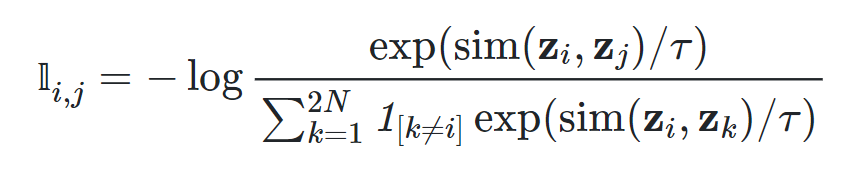 Formula for NT-Xent loss. Source: Papers with code (CC-BY-SA)
Introduction
Recent advances in self-supervised learning and contrastive learning have excited researchers and practitioners in Machine Learning (ML) to explore this space with renewed interest.
In particular, the SimCLR paper that presents a simple framework for contrastive learning of visual representations has gained a lot of attention in the self-supervised and contrastive learning space.
The central idea behind the paper is very simple - allow the model to learn if a pair of images were derived from the same or different initial image.
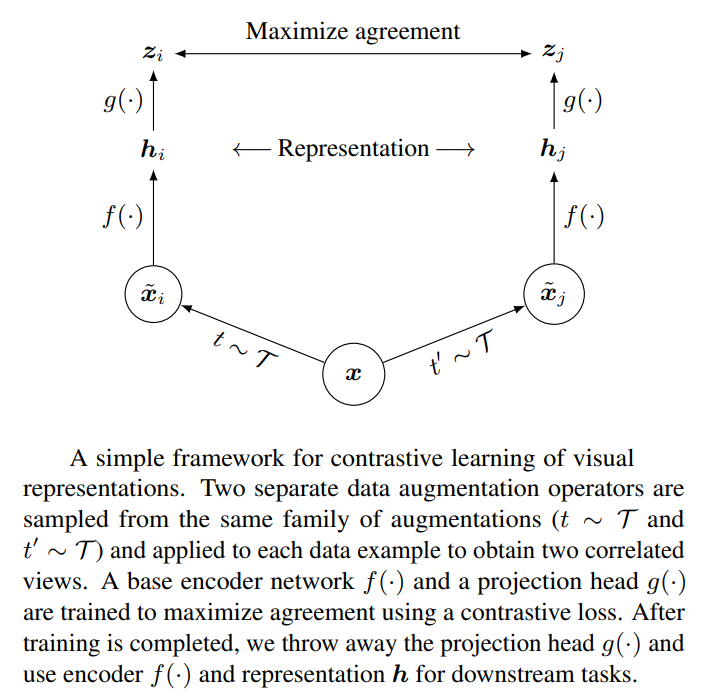 Figure 1: The high-level idea behind SimCLR. Source: SimCLR paper
The SimCLR approach encodes each input image i as a feature vector zi. There are 2 cases to consider:
Figure 1: The high-level idea behind SimCLR. Source: SimCLR paper
The SimCLR approach encodes each input image i as a feature vector zi. There are 2 cases to consider:
- Positive Pairs : The same image is augmented using a different set of augmentations, and the resulting feature vectors zi and zj are compared. These feature vectors are forced to be similar by the loss function.
- Negative Pairs : Different images are augmented using a different set of augmentations, and the resulting feature vectors zi and zk are compared. These feature vectors are forced to be dissimilar by the loss function.
The rest of this article will focus on explaining and understanding this loss function, and its efficient implementation using PyTorch.
The NT-Xent Loss
At a high level, the contrastive learning model is fed 2N images, originating from N underlying images. Each of the N underlying images is augmented using a random set of image augmentations to produce 2 augmented images. This is how we end up with 2N images in a single train batch fed to the model.
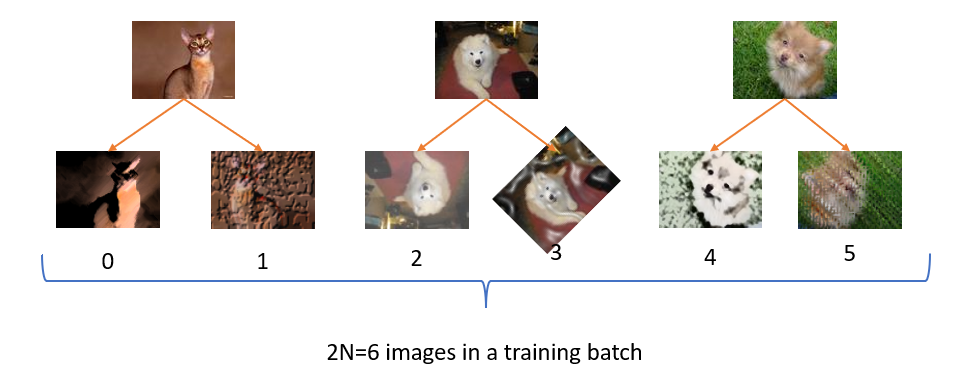 Figure 2: A batch of 6 images in a single training batch for contrastive learning. The number below each image is the index of that image in the input batch when fed into a contrastive learning model. Image Source: Oxford Visual Geometry Group (CC-SA).
In the following sections, we will dive deep into the following aspects of the NT-Xent loss.
Figure 2: A batch of 6 images in a single training batch for contrastive learning. The number below each image is the index of that image in the input batch when fed into a contrastive learning model. Image Source: Oxford Visual Geometry Group (CC-SA).
In the following sections, we will dive deep into the following aspects of the NT-Xent loss.
- The effect of temperature on SoftMax and Sigmoid
- A simple and intuitive interpretation of the NT-Xent loss
- A step-by-step implementation of NT-Xent in PyTorch
- Motivating the need for a multi-label loss function (NT-BXent)
- A step-by-step implementation of NT-BXent in PyTorch
All the code for steps 2–5 can be found in [this notebook](https://github.com/dhruvbird/ml-notebooks/blob/main/nt-xent-loss/NT-Xent%20Loss.ipynb). The code for step-1 can be found in this notebook.
The effect of temperature on SoftMax and Sigmoid
To understand all the moving parts of the contrastive loss function we'll be studying in this article, we need to first understand the effect of temperature on the SoftMax and Sigmoid activation functions.
Typically, temperature scaling is applied to the input to SoftMax or Sigmoid to either smooth out or accentuate the output of those activation functions. The input logits are divided by the temperature before passing into the activation functions. You can find all the code for this section in this notebook.
SoftMax : For SoftMax, a high temperature reduces the variance in the output distribution which results in softening of the labels. A low temperature increases the variance in the output distribution and makes the maximum value stand out over the other values. See the charts below for the effect of temperature on SoftMax when fed with the input tensor [0.1081, 0.4376, 0.7697, 0.1929, 0.3626, 2.8451].
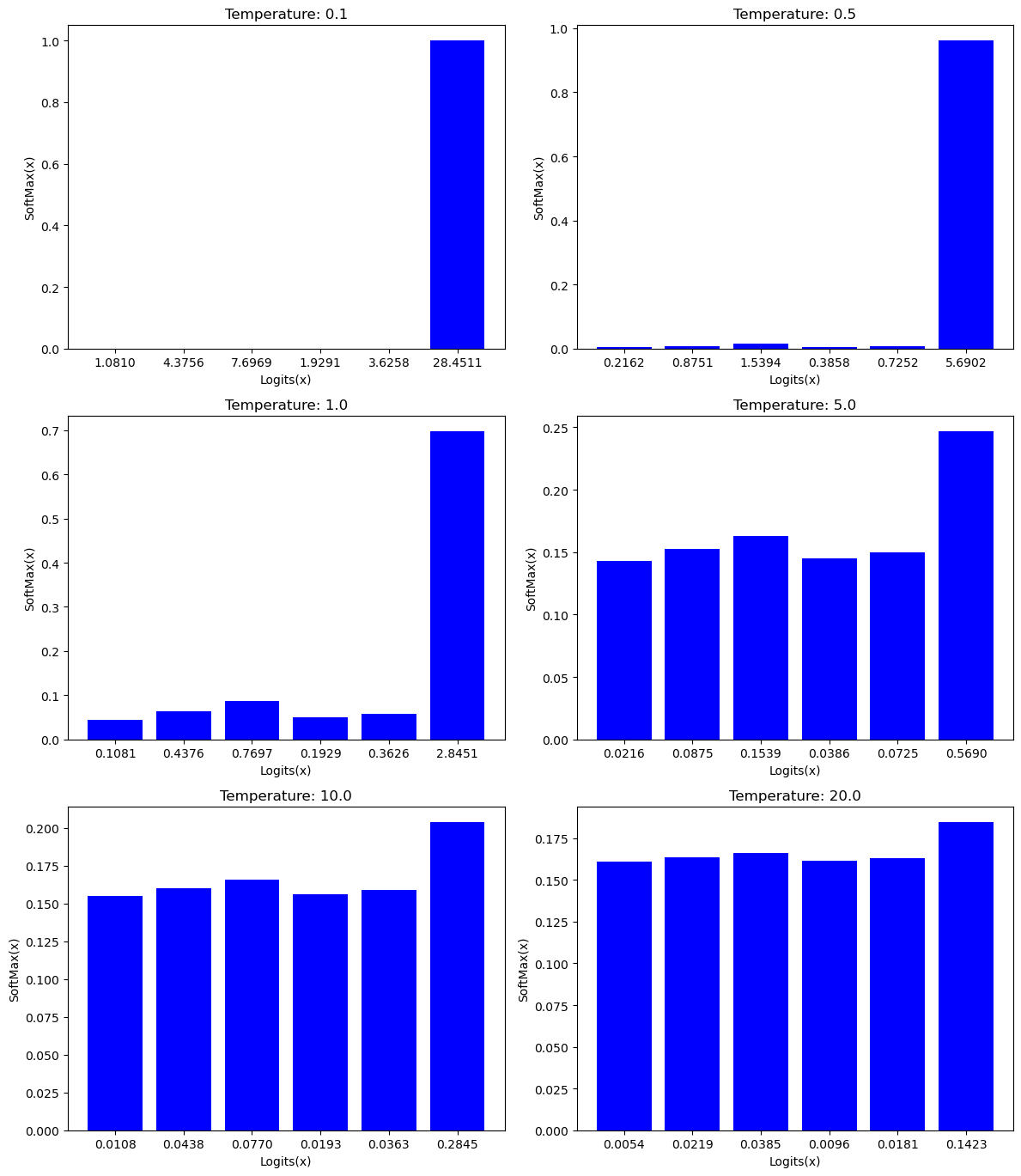 Figure 3: Effect of temperature on SoftMax. Source: Author(s)
Sigmoid : For Sigmoid, a high-temperature results in an output distribution that is pulled towards 0.0, whereas a low temperature stretches the inputs to higher values, stretching the outputs to be closer to either 0.0 or 1.0 depending on the unsigned magnitude of the input.
Figure 3: Effect of temperature on SoftMax. Source: Author(s)
Sigmoid : For Sigmoid, a high-temperature results in an output distribution that is pulled towards 0.0, whereas a low temperature stretches the inputs to higher values, stretching the outputs to be closer to either 0.0 or 1.0 depending on the unsigned magnitude of the input.
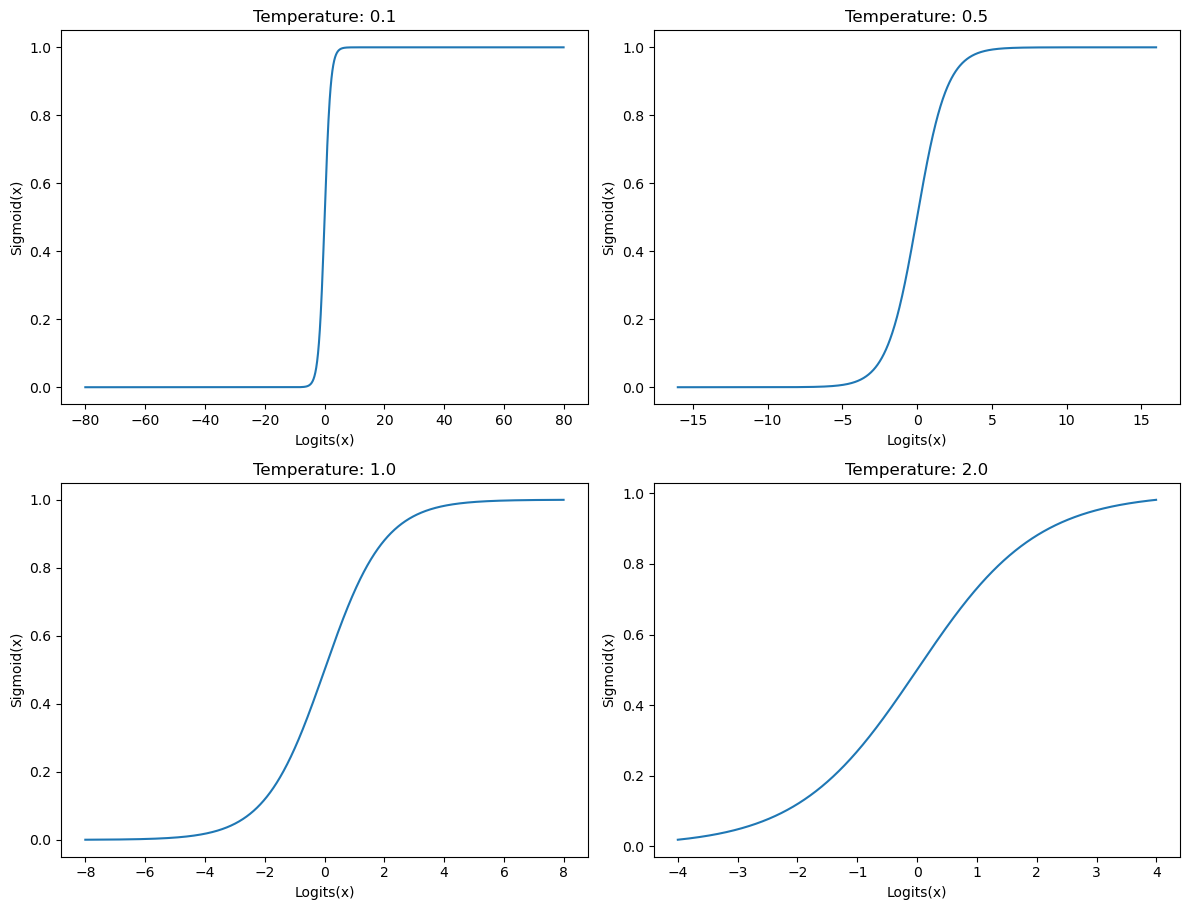 Figure 4: Effect of temperature on Sigmoid. Source: Author(s)
Now that we understand the effect of various temperature values on the SoftMax and Sigmoid functions, let's see how this applies to our understanding of the NT-Xent loss.
Figure 4: Effect of temperature on Sigmoid. Source: Author(s)
Now that we understand the effect of various temperature values on the SoftMax and Sigmoid functions, let's see how this applies to our understanding of the NT-Xent loss.
Interpreting the NT-Xent loss
The NT-Xent loss is understood by understanding the individual terms in the name of this loss.
- Normalized: Cosine similarity produces a normalized score in the range [-1.0 to +1.0]
- Temperature-scaled: The all-pairs cosine similarity is scaled by a temperature before computing the cross-entropy loss
- Cross-entropy loss: The underlying loss is a multi-class (single-label) cross-entropy loss
As mentioned above, we assume that for a batch of size 2N, the feature vectors at the following indices represent positive pairs (0, 1), (2, 3), (4, 5), (6, 7), ... and the rest of the combinations represent negative pairs. This is an important factor to keep in mind throughout the interpretation of the NT-Xent loss as it relates to SimCLR.
Now that we understand what the terms mean in the context of the NT-Xent loss, let's take a look at the mechanical steps needed to compute the NT-Xent loss on a batch of feature vectors.
- The all-pairs Cosine Similarity score is computed for each of the 2N vectors produced by the SimCLR model. This results in (2N)² similarity scores represented as a 2N x 2N matrix
- Comparison results between the same value (i, i) are discarded (since a distribution is perfectly similar to itself and can't possibly allow the model to learn anything useful)
- Each value (cosine similarity) is scaled by a temperature parameter 𝜏 (which is a hyper-parameter)
- Cross-entropy loss is applied to each row of the resulting matrix above. The following paragraph explains more in detail
- Typically, the mean of these losses (one loss per element in a batch) is used for backpropagation
The way that the cross-entropy loss is used here is semantically slightly different from how it's used in standard classification tasks. In classification tasks, a final "classification head" is trained to produce a one-hot-probability vector for each input, and we compute the cross-entropy loss on that one-hot-probability vector since we're effectively computing the difference between 2 distributions. This video explains the concept of cross-entropy loss beautifully. In the NT-Xent loss, there isn't a 1:1 correspondence between a trainable layer and the output distribution. Instead, a feature vector is computed for each input, and we then compute the cosine similarity between every pair of feature vectors. The trick here is that since each image is similar to exactly 1 other image in the input batch (positive pair) (if we ignore the similarity of a feature vector with itself), we can consider this to be a classification-like setting where the probability distribution of the similarity probability between images represents a classification task where one of them will be close to 1.0 and the rest will be close to 0.0.
Now that we have a solid overall understanding of the NT-Xent loss, we should be in great shape to implement these ideas in PyTorch. Let's get going!
Implementation of NT-Xent loss in PyTorch
All the code in this section can be found in this notebook.
Code Reuse : Many implementations of the NT-Xent loss seen online implement all the operations from scratch. Furthermore, some of them implement the loss function inefficiently, preferring to use for loops instead of GPU parallelism. Instead, we will use a different approach. We'll implement this loss in terms of the standard cross-entropy loss that PyTorch already provides. To do this, we need to massage the predictions and ground-truth labels in a format that cross_entropy can accept. Let's see how to do this below.
Predictions Tensor : First, we need to create a PyTorch tensor that will represent the output from our contrastive learning model. Let's assume that our batch size is 8 (2N=8), and our feature vectors have 2 dimensions (2 values). We'll call our input variable "x".
python
x = torch.randn(8, 2)
Cosine Similarity : Next, we'll compute the all-pairs cosine similarity between every feature vector in this batch and store the result in the variable named "xcs". If the line below seems confusing, please read the details on this page. This is the "normalize" step.
python
xcs = F.cosine_similarity(x[None,:,:], x[:,None,:], dim=-1)
As mentioned above, we need to ignore the self-similarity score of every feature vector since it doesn't contribute to the model's learning and will be an unnecessary nuisance later on when we want to compute the cross-entropy loss. For this purpose, we'll define a variable "eye" which is a matrix with the elements on the principal diagonal having a value of 1.0 and the rest being 0.0. We can create such a matrix using the following command.
python
eye = torch.eye(8)
Now let's convert this into a boolean matrix so that we can index into the "xcs" variable using this mask matrix.
python
eye = eye.bool()
Let's clone the tensor "xcs" into a tensor named "y" so that we can reference the "xcs" tensor later.
python
y = xcs.clone()
Now, we will set the values along the principal diagonal of the all-pairs cosine similarity matrix to -inf so that when we compute the softmax on each row, this value will contribute nothing.
python
y[eye] = float("-inf")
The tensor "y" scaled by a temperature parameter will be one of the inputs (predictions) to the cross-entropy loss API in PyTorch. Next, we need to compute the ground-truth labels (target) that we need to feed to the cross-entropy loss API.
Ground Truth labels (Target tensor) : For the example we are using (2N=8), this is what the ground-truth tensor should look like.
tensor([1, 0, 3, 2, 5, 4, 7, 6])
That's because the following index pairs in the tensor "y" contain positive pairs.
(0, 1), (1, 0)
(2, 3), (3, 2)
(4, 5), (5, 4)
(6, 7), (7, 6)
To interpret the index pairs above, we look at a single example. The pair (4, 5) means that column 5 at row 4 is supposed to be set to 1.0 (positive pair), which is what the tensor above is also saying. Great!
To create the tensor above, we can use the following PyTorch code, which stores the ground-truth labels in the variable "target".
python
target = torch.arange(8)
target[0::2] += 1
target[1::2] -= 1
cross-entropy Loss : We have all the ingredients we need to compute our loss! The only thing that remains to be done is to call the cross_entropy API in PyTorch.
python
loss = F.cross_entropy(y / temperature, target, reduction="mean")
The variable "loss" now contains the computed NT-Xent loss. Let's wrap all the code in a single python function below.
python
def nt_xent_loss(x, temperature):
  assert len(x.size()) == 2

  # Cosine similarity
  xcs = F.cosine_similarity(x[None,:,:], x[:,None,:], dim=-1)
  xcs[torch.eye(x.size(0)).bool()] = float("-inf")

  # Ground truth labels
  target = torch.arange(8)
  target[0::2] += 1
  target[1::2] -= 1

  # Standard cross-entropy loss
  return F.cross_entropy(xcs / temperature, target, reduction="mean")
The code above works as long as each feature vector has exactly one positive pair in the batch when training our contrastive learning model. Let's take a look at how to handle multiple positive pairs in a contrastive learning task.
A multi-label loss for contrastive learning: NT-BXent
In the SimCLR paper, every image i has exactly 1 similar pair at index j. This makes cross-entropy loss a perfect choice for the task since it resembles a multi-class problem. Instead, if we have M > 2 augmentations of the same image fed into the contrastive learning model's single training batch, then each batch would have image M-1 similar pairs for image i. This task would resemble a multi-label problem.
The obvious choice would be to replace cross-entropy loss with binary cross-entropy loss. Hence the name NT-BXent loss, which stands for Normalized Temperature-scaled Binary cross-entropy Loss.
The formulation below shows the loss Li for the element i. The σ in the formula below stands for the Sigmoid function.
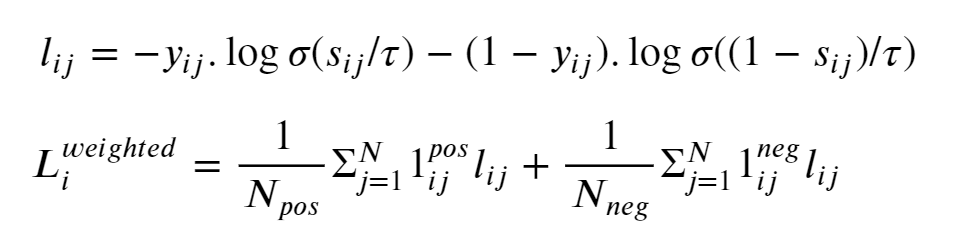 Figure 5: Formulation for the NT-BXent loss. Image source: Author(s) of this article
To avoid the class imbalance problem, we weigh the positive and negative pairs by the inverse of the number of positive and negative pairs in our mini-batch. The final loss in the mini-batch used for backpropagation will be the mean of the losses of each sample in our mini-batch.
Next, let's focus our attention on our implementation of the NT-BXent loss in PyTorch.
Figure 5: Formulation for the NT-BXent loss. Image source: Author(s) of this article
To avoid the class imbalance problem, we weigh the positive and negative pairs by the inverse of the number of positive and negative pairs in our mini-batch. The final loss in the mini-batch used for backpropagation will be the mean of the losses of each sample in our mini-batch.
Next, let's focus our attention on our implementation of the NT-BXent loss in PyTorch.
Implementation of NT-BXent loss in PyTorch
All the code in this section can be found in this notebook.
Code Reuse : Similar to our implementation of the NT-Xent loss, we shall re-use the Binary Cross-entropy (BCE) loss method provided by PyTorch. The setup of our ground-truth labels will be similar to that of a multi-label classification problem where BCE loss is used.
Predictions Tensor : We'll use the same (8, 2) predictions tensor as we used for the implementation of the NT-Xent loss.
python
x = torch.randn(8, 2)
Cosine Similarity : Since the input tensor x is same, the all-pairs cosine similarity tensor xcs will also be the same. Please see this page for a detailed explanation of what the line below does.
python
xcs = F.cosine_similarity(x[None,:,:], x[:,None,:], dim=-1)
To ensure that the loss from the element at position (i, i) is 0 , we'll need to perform some gymnastics to have our xcs tensor contain a value 1 at every index (i, i) after Sigmoid is applied to it. Since we'll be using BCE Loss, we will mark the self-similarity score of every feature vector with the value infinity in tensor xcs. That's because applying the sigmoid function on the xcs tensor, will convert infinity to the value 1 , and we will set up our ground-truth labels so that every position (i, i) in the ground-truth labels has the value 1.
Let's create a masking tensor that has the value True along the principal diagonal (xcs has self-similarity scores along the principal diagonal), and False everywhere else.
python
eye = torch.eye(8).bool()
Let's clone the tensor "xcs" into a tensor named "y" so that we can reference the "xcs" tensor later.
python
y = xcs.clone()
Now, we will set the values along the principal diagonal of the all-pairs cosine similarity matrix to infinity so that when we compute the sigmoid on each row, we get 1 in these positions.
python
y[eye] = float("inf")
The tensor "y" scaled by a temperature parameter will be one of the inputs (predictions) to the BCE loss API in PyTorch. Next, we need to compute the ground-truth labels (target) that we need to feed to the BCE loss API.
Ground Truth labels (Target tensor) : We will expect the user to pass to us the pair of all (x, y) index pairs which contain positive examples. This is a departure for what we did for the NT-Xent loss, since the positive pairs were implicit, whereas here, the positive pairs are explicit.
In addition to the locations provided by the user, we will set all the diagonal elements as positive pairs as explained above. We will use the PyTorch tensor indexing API to pluck out all the elements at those locations and set them to 1, whereas the rest are initialized to 0.
python
target = torch.zeros(8, 8)
pos_indices = torch.tensor([
  (0, 0), (0, 2), (0, 4),
  (1, 4), (1, 6), (1, 1),
  (2, 3),
  (3, 7),
  (4, 3),
  (7, 6),
])
# Add indexes of the principal diagonal as positive indexes.
# This will be useful since we will use the BCELoss in PyTorch,
# which will expect a value for the elements on the principal
# diagonal as well.
pos_indices = torch.cat([pos_indices, torch.arange(8).reshape(8, 1).expand(-1, 2)], dim=0)
# Set the values in the target vector to 1.
target[pos_indices[:,0], pos_indices[:,1]] = 1
Binary cross-entropy (BCE) Loss : Unlike the NT-Xent loss, we can't simply call the torch.nn.functional.binary_cross_entropy_function, since we want to weigh the positive and negative loss based on how many positive and negative pairs the element at index i has in the current mini-batch.
The first step though is to compute the element-wise BCE loss.
python
temperature = 0.1
loss = F.binary_cross_entropy((y / temperature).sigmoid(), target, reduction="none")
We'll create a binary mask of positive and negative pairs and then create 2 tensors, loss_pos and loss_neg that contain only those elements from the computed loss that correspond to the positive and negative pairs.
python
target_pos = target.bool()
target_neg = ~target_pos
# loss_pos and loss_neg below contain non-zero values only for those elements
# that are positive pairs and negative pairs respectively.
loss_pos = torch.zeros(x.size(0), x.size(0)).masked_scatter(target_pos, loss[target_pos])
loss_neg = torch.zeros(x.size(0), x.size(0)).masked_scatter(target_neg, loss[target_neg])
Next, we'll sum up the positive and negative pair loss (separately) corresponding to each element i in our mini-batch.
python
# loss_pos and loss_neg now contain the sum of positive and negative pair losses
# as computed relative to the i'th input.
loss_pos = loss_pos.sum(dim=1)
loss_neg = loss_neg.sum(dim=1)
To perform weighting, we need to track the number of positive and negative pairs corresponding to each element i in our mini-batch. Tensors _"num pos" and _"num neg" will store these values.
python
# num_pos and num_neg below contain the number of positive and negative pairs
# computed relative to the i'th input. In an actual setting, this number should
# be the same for every input element, but we let it vary here for maximum
# flexibility.
num_pos = target.sum(dim=1)
num_neg = target.size(0) - num_pos
We have all the ingredients we need to compute our loss! The only thing that we need to do is weigh the positive and negative loss by the number of positive and negative pairs, and then average the loss across the mini-batch.
python
def nt_bxent_loss(x, pos_indices, temperature):
    assert len(x.size()) == 2

    # Add indexes of the principal diagonal elements to pos_indices
    pos_indices = torch.cat([
        pos_indices,
        torch.arange(x.size(0)).reshape(x.size(0), 1).expand(-1, 2),
    ], dim=0)

    # Ground truth labels
    target = torch.zeros(x.size(0), x.size(0))
    target[pos_indices[:,0], pos_indices[:,1]] = 1.0

    # Cosine similarity
    xcs = F.cosine_similarity(x[None,:,:], x[:,None,:], dim=-1)
    # Set logit of diagonal element to "inf" signifying complete
    # correlation. sigmoid(inf) = 1.0 so this will work out nicely
    # when computing the Binary cross-entropy Loss.
    xcs[torch.eye(x.size(0)).bool()] = float("inf")

    # Standard binary cross-entropy loss. We use binary_cross_entropy() here and not
    # binary_cross_entropy_with_logits() because of
    # https://github.com/pytorch/pytorch/issues/102894
    # The method *_with_logits() uses the log-sum-exp-trick, which causes inf and -inf values
    # to result in a NaN result.
    loss = F.binary_cross_entropy((xcs / temperature).sigmoid(), target, reduction="none")

    target_pos = target.bool()
    target_neg = ~target_pos

    loss_pos = torch.zeros(x.size(0), x.size(0)).masked_scatter(target_pos, loss[target_pos])
    loss_neg = torch.zeros(x.size(0), x.size(0)).masked_scatter(target_neg, loss[target_neg])
    loss_pos = loss_pos.sum(dim=1)
    loss_neg = loss_neg.sum(dim=1)
    num_pos = target.sum(dim=1)
    num_neg = x.size(0) - num_pos

    return ((loss_pos / num_pos) + (loss_neg / num_neg)).mean()

pos_indices = torch.tensor([
    (0, 0), (0, 2), (0, 4),
    (1, 4), (1, 6), (1, 1),
    (2, 3),
    (3, 7),
    (4, 3),
    (7, 6),
])
for t in (0.01, 0.1, 1.0, 10.0, 20.0):
    print(f"Temperature: {t:5.2f}, Loss: {nt_bxent_loss(x, pos_indices, temperature=t)}")
Prints.
Temperature: 0.01, Loss: 62.898780822753906
Temperature: 0.10, Loss: 4.851151943206787
Temperature: 1.00, Loss: 1.0727109909057617
Temperature: 10.00, Loss: 0.9827173948287964
Temperature: 20.00, Loss: 0.982099175453186
Conclusion
Self-supervised learning is an upcoming field in deep learning and allows one to train models on unlabeled data. This technique lets us work around the requirement of labeled data at scale.
In this article, we learned about loss functions for contrastive learning. The first one, named NT-Xent loss, is used for learning on a single positive pair per input in a mini-batch. We introduced the NT-BXent loss which is used for learning on multiple (> 1) positive pairs per input in a mini-batch. We learned to interpret them intuitively, building on our knowledge of cross-entropy loss and binary cross-entropy loss. Finally, we implemented them both efficiently in PyTorch.
Register Now to Continue Reading
Unlock Towards Data Science with a Free Account
All articles on Towards Data Science are available to registered users. Create a free account today to access this article and thousands more.
Register for freeSign in to your account
 Written By
See all from Dhruv Matani
Binary Cross EntropyCross EntropyLoss FunctionPytorchSelf Supervised Learning
Share This Article
Towards Data Science is a community publication. Submit your insights to reach our global audience and earn through the TDS Author Payment Program.
Write for TDS
Related Articles
Machine Learning
Understanding why entropy is a measure of chaos
Aayush Agarwal
April 29, 20225 min read
Machine Learning
I took the official sklearn MOOC tutorial. Here are my takeaways.
Yoann Mocquin
November 22, 202310 min read
Deep Learning
Understanding how to choose activation function in the final layer and loss function for neural network
Ibrahim Kovan
April 14, 20226 min read
Artificial Intelligence
A PyTorch implementation on the YOLOv3 architecture from scratch
Muhammad Ardi Putra
March 2, 202623 min read
Deep Learning
Line-by-Line Tutorial Implementation of a Deep Convolutional Neural Network for the Clustering of Mushroom Photos
Anders Ohrn
November 9, 202018 min read
Slowly removing the injection of human knowledge from the training process
Leon Sick
January 1, 20226 min read
Artificial Intelligence
In this article I am going to discuss several important approaches and techniques that can help improve the efficiency of neural networks.
Tudor Surdoiu
July 1, 20216 min read
Data Engineering
A deep dive on data transfer bottlenecks, their identification, and their resolution with the help of NVIDIA Nsight™ Systems – part 3
Chaim Rand
January 23, 202613 min read
Deep Learning
What is Self-supervised Learning?
Nilesh Vijayrania
December 15, 20209 min read
Your home for data science and AI. The world's leading publication for data science, data analytics, data engineering, machine learning, and artificial intelligence professionals.
Subscribe to Our NewsletterWrite For TDS•About•Advertise•Privacy Policy•Terms of Use
© Insight Media Group, LLC 2026•The New Stack•roadmap.sh•Creator Network
Recommended Articles
Close