保留正文与补采附件。源页面当前未重新核验;具体限制见交付清单。
 We value your privacy
We use cookies to enhance your browsing experience, serve personalised ads or content, and analyse our traffic. By clicking "Accept All", you consent to our use of cookies.
Customise Reject All Accept All
Customise Consent Preferences
We value your privacy
We use cookies to enhance your browsing experience, serve personalised ads or content, and analyse our traffic. By clicking "Accept All", you consent to our use of cookies.
Customise Reject All Accept All
Customise Consent Preferences  We use cookies to help you navigate efficiently and perform certain functions. You will find detailed information about all cookies under each consent category below.
The cookies that are categorised as "Necessary" are stored on your browser as they are essential for enabling the basic functionalities of the site. ... Show more
NecessaryAlways Active
Necessary cookies are required to enable the basic features of this site, such as providing secure log-in or adjusting your consent preferences. These cookies do not store any personally identifiable data.
We use cookies to help you navigate efficiently and perform certain functions. You will find detailed information about all cookies under each consent category below.
The cookies that are categorised as "Necessary" are stored on your browser as they are essential for enabling the basic functionalities of the site. ... Show more
NecessaryAlways Active
Necessary cookies are required to enable the basic features of this site, such as providing secure log-in or adjusting your consent preferences. These cookies do not store any personally identifiable data.
-
Cookie
BCTempID
-
Duration
10 minutes
-
Description
No description available.
-
Cookie
__cf_bm
-
Duration
1 hour
-
Description
This cookie, set by Cloudflare, is used to support Cloudflare Bot Management.
-
Cookie
AWSALBCORS
-
Duration
7 days
-
Description
Amazon Web Services set this cookie for load balancing.
-
Cookie
_cfuvid
-
Duration
session
-
Description
Cloudflare sets this cookie to track users across sessions to optimize user experience by maintaining session consistency and providing personalized services
-
Cookie
li_gc
-
Duration
6 months
-
Description
Linkedin set this cookie for storing visitor's consent regarding using cookies for non-essential purposes.
-
Cookie
__hssrc
-
Duration
session
-
Description
This cookie is set by Hubspot whenever it changes the session cookie. The __hssrc cookie set to 1 indicates that the user has restarted the browser, and if the cookie does not exist, it is assumed to be a new session.
-
Cookie
__hssc
-
Duration
1 hour
-
Description
HubSpot sets this cookie to keep track of sessions and to determine if HubSpot should increment the session number and timestamps in the __hstc cookie.
-
Cookie
wpEmojiSettingsSupports
-
Duration
session
-
Description
WordPress sets this cookie when a user interacts with emojis on a WordPress site. It helps determine if the user's browser can display emojis properly.
-
Cookie
BCSessionID
-
Duration
1 year 1 month 4 days
-
Description
Blueconic sets this cookie as a unique identifier for the BlueConic profile.
-
Cookie
_octo
-
Duration
1 year
-
Description
No description available.
-
Cookie
logged_in
-
Duration
1 year
-
Description
No description available.
-
Cookie
__Secure-YEC
-
Duration
past
-
Description
YouTube sets this cookie to stores the user's video player preferences using embedded YouTube video
-
Cookie
__eoi
-
Duration
6 months
-
Description
Description is currently not available.
-
Cookie
AWSALBTGCORS
-
Duration
7 days
-
Description
No description available.
-
Cookie
login-status-p
-
Duration
past
-
Description
Description is currently not available.
-
Cookie
AWSALBTG
-
Duration
7 days
-
Description
No description available.
-
Cookie
csrf_token
-
Duration
session
-
Description
No description available.
-
Cookie
token_v2
-
Duration
1 day
-
Description
Description is currently not available.
-
Cookie
D
-
Duration
1 year
-
Description
Description is currently not available.
-
Cookie
PHPSESSID
-
Duration
session
-
Description
This cookie is native to PHP applications. The cookie stores and identifies a user's unique session ID to manage user sessions on the website. The cookie is a session cookie and will be deleted when all the browser windows are closed.
-
Cookie
VISITOR_PRIVACY_METADATA
-
Duration
6 months
-
Description
YouTube sets this cookie to store the user's cookie consent state for the current domain.
-
Cookie
cookietest
-
Duration
session
-
Description
The cookietest cookie is typically used to determine whether the user's browser accepts cookies, essential for website functionality and user experience.
-
Cookie
__Host-airtable-session
-
Duration
1 year
-
Description
This cookie is used to enable us to integrate the services of Airtable.
-
Cookie
__Host-airtable-session.sig
-
Duration
1 year
-
Description
This cookie is used to enable us to integrate the services of Airtable.
-
Cookie
m
-
Duration
1 year 1 month 4 days
-
Description
Stripe sets this cookie for fraud prevention purposes. It identifies the device used to access the website, allowing the website to be formatted accordingly.
-
Cookie
BIGipServer*
-
Duration
session
-
Description
Marketo sets this cookie to collect information about the user's online activity and build a profile about their interests to provide advertisements relevant to the user.
-
Cookie
__cfruid
-
Duration
session
-
Description
Cloudflare sets this cookie to identify trusted web traffic.
-
Cookie
_GRECAPTCHA
-
Duration
6 months
-
Description
Google Recaptcha service sets this cookie to identify bots to protect the website against malicious spam attacks.
-
Cookie
__Secure-YNID
-
Duration
6 months
-
Description
Google cookie used to protect user security and prevent fraud, especially during the login process.
-
Cookie
cookieyes-consent
-
Duration
1 year
-
Description
CookieYes sets this cookie to remember users' consent preferences so that their preferences are respected on subsequent visits to this site. It does not collect or store any personal information about the site visitors.
Functional
Functional cookies help perform certain functionalities like sharing the content of the website on social media platforms, collecting feedback, and other third-party features.
-
Cookie
lidc
-
Duration
1 day
-
Description
LinkedIn sets the lidc cookie to facilitate data center selection.
-
Cookie
brw
-
Duration
1 year
-
Description
No description available.
-
Cookie
brwConsent
-
Duration
5 minutes
-
Description
Description is currently not available.
-
Cookie
WMF-Uniq
-
Duration
1 year
-
Description
Description is currently not available.
-
Cookie
loom_anon_comment
-
Duration
1 year
-
Description
No description available.
-
Cookie
loom_referral_video
-
Duration
session
-
Description
Description is currently not available.
-
Cookie
VISITOR_INFO1_LIVE
-
Duration
6 months
-
Description
A cookie set by YouTube to measure bandwidth that determines whether the user gets the new or old player interface.
-
Cookie
yt-remote-connected-devices
-
Duration
Never Expires
-
Description
YouTube sets this cookie to store the user's video preferences using embedded YouTube videos.
-
Cookie
ytidb::LAST_RESULT_ENTRY_KEY
-
Duration
Never Expires
-
Description
The cookie ytidb::LAST_RESULT_ENTRY_KEY is used by YouTube to store the last search result entry that was clicked by the user. This information is used to improve the user experience by providing more relevant search results in the future.
-
Cookie
yt-remote-device-id
-
Duration
Never Expires
-
Description
YouTube sets this cookie to store the user's video preferences using embedded YouTube videos.
-
Cookie
yt-remote-session-name
-
Duration
session
-
Description
The yt-remote-session-name cookie is used by YouTube to store the user's video player preferences using embedded YouTube video.
-
Cookie
yt-remote-fast-check-period
-
Duration
session
-
Description
The yt-remote-fast-check-period cookie is used by YouTube to store the user's video player preferences for embedded YouTube videos.
-
Cookie
yt-remote-session-app
-
Duration
session
-
Description
The yt-remote-session-app cookie is used by YouTube to store user preferences and information about the interface of the embedded YouTube video player.
-
Cookie
yt-remote-cast-available
-
Duration
session
-
Description
The yt-remote-cast-available cookie is used to store the user's preferences regarding whether casting is available on their YouTube video player.
-
Cookie
yt-remote-cast-installed
-
Duration
session
-
Description
The yt-remote-cast-installed cookie is used to store the user's video player preferences using embedded YouTube video.
-
Cookie
cp_session
-
Duration
3 months
-
Description
Codepen sets this cookie for Help systems found in the website.
-
Cookie
loid
-
Duration
1 year 1 month 4 days
-
Description
This cookie is set by the Reddit. The cookie enables the sharing of content from the website onto the social media platform.
Analytics
Analytical cookies are used to understand how visitors interact with the website. These cookies help provide information on metrics such as the number of visitors, bounce rate, traffic source, etc.
-
Cookie
__hstc
-
Duration
6 months
-
Description
Hubspot set this main cookie for tracking visitors. It contains the domain, initial timestamp (first visit), last timestamp (last visit), current timestamp (this visit), and session number (increments for each subsequent session).
-
Cookie
hubspotutk
-
Duration
6 months
-
Description
HubSpot sets this cookie to keep track of the visitors to the website. This cookie is passed to HubSpot on form submission and used when deduplicating contacts.
-
Cookie
_ga
-
Duration
1 year 1 month 4 days
-
Description
Google Analytics sets this cookie to calculate visitor, session and campaign data and track site usage for the site's analytics report. The cookie stores information anonymously and assigns a randomly generated number to recognise unique visitors.
-
Cookie
ga*
-
Duration
1 year 1 month 4 days
-
Description
Google Analytics sets this cookie to store and count page views.
-
Cookie
__Host-psifi.analyticsTrace
-
Duration
6 hours
-
Description
Description is currently not available.
-
Cookie
__Host-psifi.analyticsTraceV2
-
Duration
6 hours
-
Description
Description is currently not available.
-
Cookie
_gh_sess
-
Duration
session
-
Description
GitHub sets this cookie for temporary application and framework state between pages like what step the user is on in a multiple step form.
-
Cookie
YSC
-
Duration
session
-
Description
YSC cookie is set by Youtube and is used to track the views of embedded videos on Youtube pages.
-
Cookie
ajs_anonymous_id
-
Duration
1 year
-
Description
This cookie is set by Segment to count the number of people who visit a certain site by tracking if they have visited before.
-
Cookie
vuid
-
Duration
1 year 1 month 4 days
-
Description
Vimeo installs this cookie to collect tracking information by setting a unique ID to embed videos on the website.
Performance
Performance cookies are used to understand and analyse the key performance indexes of the website which helps in delivering a better user experience for the visitors.
-
Cookie
AWSALB
-
Duration
7 days
-
Description
AWSALB is an application load balancer cookie set by Amazon Web Services to map the session to the target.
-
Cookie
acq
-
Duration
past
-
Description
Description is currently not available.
-
Cookie
acq.sig
-
Duration
past
-
Description
Description is currently not available.
-
Cookie
ptc
-
Duration
2 years
-
Description
No description available.
Advertisement
Advertisement cookies are used to provide visitors with customised advertisements based on the pages you visited previously and to analyse the effectiveness of the ad campaigns.
-
Cookie
muc_ads
-
Duration
1 year 1 month 4 days
-
Description
Twitter sets this cookie to collect user behaviour and interaction data to optimize the website.
-
Cookie
guest_id_marketing
-
Duration
1 year 1 month 4 days
-
Description
Twitter sets this cookie to identify and track the website visitor.
-
Cookie
guest_id_ads
-
Duration
1 year 1 month 4 days
-
Description
Twitter sets this cookie to identify and track the website visitor.
-
Cookie
personalization_id
-
Duration
1 year 1 month 4 days
-
Description
Twitter sets this cookie to integrate and share features for social media and also store information about how the user uses the website, for tracking and targeting.
-
Cookie
guest_id
-
Duration
1 year 1 month 4 days
-
Description
Twitter sets this cookie to identify and track the website visitor. It registers if a user is signed in to the Twitter platform and collects information about ad preferences.
-
Cookie
bcookie
-
Duration
1 year
-
Description
LinkedIn sets this cookie from LinkedIn share buttons and ad tags to recognize browser IDs.
-
Cookie
__Secure-ROLLOUT_TOKEN
-
Duration
6 months
-
Description
YouTube sets this cookie to manage feature rollout and experimentation. It helps Google control which new features or interface changes are shown to users as part of testing and staged rollouts, ensuring consistent experience for a given user during an experiment.
-
Cookie
yt.innertube::nextId
-
Duration
Never Expires
-
Description
YouTube sets this cookie to register a unique ID to store data on what videos from YouTube the user has seen.
-
Cookie
yt.innertube::requests
-
Duration
Never Expires
-
Description
YouTube sets this cookie to register a unique ID to store data on what videos from YouTube the user has seen.
-
Cookie
session_tracker
-
Duration
session
-
Description
This cookie is set by the Reddit. This cookie is used to identify trusted web traffic. It also helps in adverstising on the website.
-
Cookie
edgebucket
-
Duration
session
-
Description
Reddit sets this cookie to save the information about a log-on Reddit user, for the purpose of advertisement recommendations and updating the content.
-
Cookie
did
-
Duration
1 year
-
Description
Arbor sets this cookie to show targeted ads to site visitors.This cookie expires after 2 months or 1 year.
Uncategorised
Other uncategorised cookies are those that are being analysed and have not been classified into a category as yet.
No cookies to display.
Reject All Save My Preferences Accept All
Toggle SearchToggle Mobile Navigation
Publish AI, ML & data-science insights to a global community of data professionals.
Sign inSubmit an Article
LatestEditor's PicksNewsletterShipAI
Write For TDS
LinkedInXToggle Search
Data Science
Feature Engineering for Time-Series Using PySpark on Databricks
Discover the potentials of PySpark for time-series data: Ingest, extract, and visualize data, accompanied by practical implementation codes
John Leung
May 15, 20249 min read
Discover the potentials of PySpark for time-series data: Ingest, extract, and visualize data, accompanied by practical implementation code
With the increasing demand for high-speed querying and analysis on large datasets, Apache Spark has stood out as one of the most popular analytical engines in recent years. It is powerful in distributed data processing due to its master-worker architecture. This includes a driver program that coordinates with the cluster manager (master) and controls the execution of distributing smaller tasks to worker nodes. Besides, designed as an in-memory data processing engine, Spark primarily uses RAM to store and manipulate data, rather than relying on disk storage. These coordinately facilitate faster execution of overall tasks.
 Photo by Dawid Zawiła on Unsplash
Learn this step by step with the interactive AI and Data Scientist roadmap.
Photo by Dawid Zawiła on Unsplash
Learn this step by step with the interactive AI and Data Scientist roadmap.
Apache Spark: From low-level to high-level
At the lower level, its architecture is designed based on two main abstractions:
- Resilient Distributed Dataset (RDD) - A low-level data abstraction in which each dataset can be divided into logical portions and executed on cluster worker nodes, thus aiding in parallel programming.
- Directed Acyclic Graph (DAG) - The representation that facilitates optimizing and scheduling the dependencies and sequences of tasks.
At the higher level, we can leverage a rich set of high-level tools using languages Scala, Python, or R. Examples of tools include Spark SQL for SQL and DataFrames, Pandas API on Spark for Pandas workloads, and Structured Streaming for stream processing.
However, before enjoying these functionalities, we may need much effort to self-manage a Spark cluster with the setup of infrastructure and a bunch of complex tools, which could cause a headache.
PySpark on Databricks
To address these challenges, PySpark on Databricks is recently one of the high-level solutions in the industry. PySpark is the Python API for Spark, while Databricks is a full software platform built on top of Spark. It includes notebooks, infrastructure orchestration (auto-provisioning and scaling), process orchestration (job submission and scheduling), managed clusters, and even source control.
Using PySpark APIs in Databricks, we will demonstrate and perform a feature engineering project on time series data. In this hands-on journey, we will simulate how Pandas library generally behaves for data processing, with the extra benefits of scalability and parallelism.
Note: If you want to know further how to dynamically orchestrate this Databricks notebook written in PySpark APIs in Azure, you can click here .
 Photo by Alexandru Boicu on Unsplash
Consider a scenario in which you have the electric power consumption data for your household on hand, sampled at a one-minute rate from December 2006 to November 2010. Our objective is to ingest and manipulate data, extract features, and generate visualizations.
The dataset [with license as Database: Open Database, Contents: Database Contents], obtained from Kaggle, includes various fields such as date, time, global power (active and reactive), voltage, global intensity, and submetering (1, 2 and 3). We can begin our analysis now.
Photo by Alexandru Boicu on Unsplash
Consider a scenario in which you have the electric power consumption data for your household on hand, sampled at a one-minute rate from December 2006 to November 2010. Our objective is to ingest and manipulate data, extract features, and generate visualizations.
The dataset [with license as Database: Open Database, Contents: Database Contents], obtained from Kaggle, includes various fields such as date, time, global power (active and reactive), voltage, global intensity, and submetering (1, 2 and 3). We can begin our analysis now.
The initial setup
To begin, we need to create a user account for Databricks Community Edition, which gives a suitable Databricks environment for our proof-of-concept purpose. Afterward, we can upload the input data file to the FileStore, a dedicated Databricks path. By clicking "Create Table in Notebook", you are provided with the code template to initiate data ingestion.
 Initial setup (1/2) - Create a user account (Image by author)
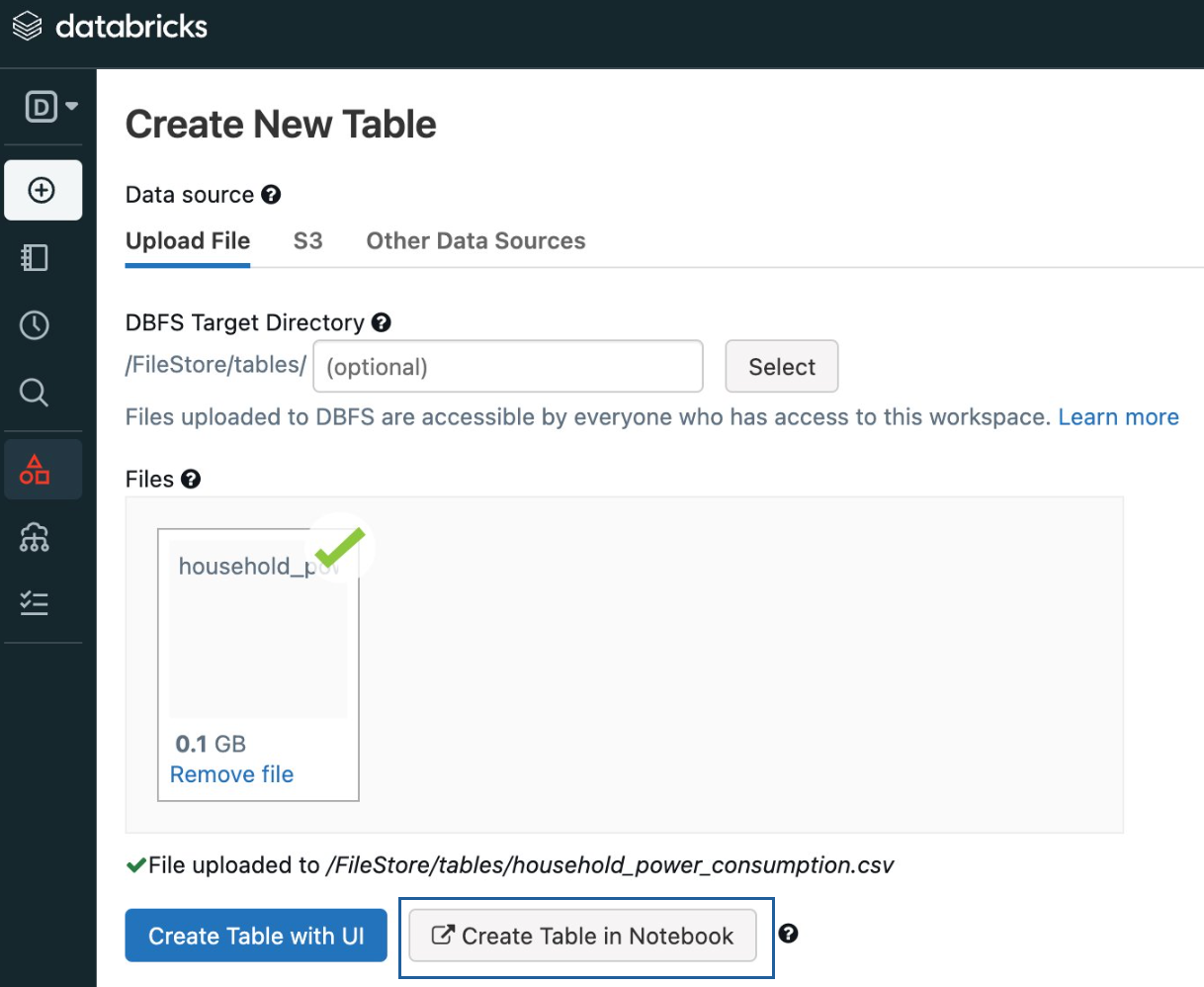 Initial setup (2/2) - Create a new table (Image by author)
Create a feature engineering project
#1 Ingest data
We use the method spark.read() to read our data source and return a DataFrame, a relational table. It supports various data sources such as CSV, JSON, Parquet, and more. In this case, we read the power consumption data in CSV format with a defined schema, where the first row serves as the header, and ";" is as the delimiter.
python
# File location and type
file_location = "/FileStore/tables/household_power_consumption.csv"
file_type = "csv"

# CSV options
schema = "Date STRING, Time STRING, Global_active_power DOUBLE, Global_reactive_power DOUBLE, Voltage DOUBLE, Global_intensity DOUBLE, Sub_metering_1 DOUBLE, Sub_metering_2 DOUBLE, Sub_metering_3 DOUBLE"
first_row_as_header = "true"
delimiter = ";"

# Read CSV files
org_df = spark.read.format(file_type)
.schema(schema)
.option("header", first_row_as_header)
.option("delimiter", delimiter)
.load(file_location)

display(org_df)
The output of the DataFrame with the first several rows:
 Output of the DataFrame (Image by author)
In scenarios where data is continuously generated, we use stream processing techniques to read it incrementally. To demonstrate Spark's behavior, I partitioned the original dataset into 10 subsets and stored them at the path "/FileStore/tables/stream/" beforehand. We then use another method spark.readStream()for streaming data.
python
sourceStream=spark.readStream.format("csv")
.option("header",True)
.schema(schema)
.option("mode","dropMalformed")
.option("maxFilesPerTrigger",1)
.option("ignoreLeadingWhiteSpace",True)
.load("dbfs:/FileStore/tables/stream")
It is worth mentioning that the mode setting as "dropMalformed" means that we discard the corrupted records, no matter whether the corruption is due to structural inconsistencies or other factors that make them unusable. Also, we choose to process only one file per trigger event.
By starting to receive data and checking the record count every ten seconds, we can observe the continuous arrival of streaming data.
python
import time

# Stream the content of the DataFrame
query = sourceStream.writeStream
.queryName("count")
.format("memory")
.outputMode("append")
.start()

# Display the count of rows
for _ in range(10):
  spark.sql("SELECT COUNT(*) AS no_of_rows FROM count").show()
  time.sleep(10)
#2 Manipulate and explore data
Since the number of rows with missing values is relatively negligible, we choose to drop them. Besides, we extract time-related features so that patterns can potentially be observed in higher dimensions later.
python
from pyspark.sql.functions import col, concat_ws, to_date

# Drop rows with missing values
df = org_df.na.drop()

# Convert columns "Date" and "Time" into new column "DateTime"
df = df.withColumn("Date", to_date(col("Date"),"d/M/y"))
df = df.withColumn("Date", df["Date"].cast("date"))
df = df.select(concat_ws(" ", to_date(col("Date"),"d/M/y"), col("Time")).alias("DateTime"), "*")
df = df.withColumn("DateTime", df["DateTime"].cast("timestamp"))

# Add time-related features
df = df.withColumn("year", year("DateTime"))
df = df.withColumn("month", month("DateTime"))
df = df.withColumn("week_num", weekofyear("DateTime"))
df = df.withColumn("hour", hour("DateTime"))
We can explore data with various basic PySpark methods.
(1) Select
The "'select" method allows us to create a subset of the data frame column-wise. In this example, we select columns in descending order of global active power.
python
df.select("DateTime", "Global_active_power", "Global_intensity").sort("Global_active_power", ascending=False).show(5)
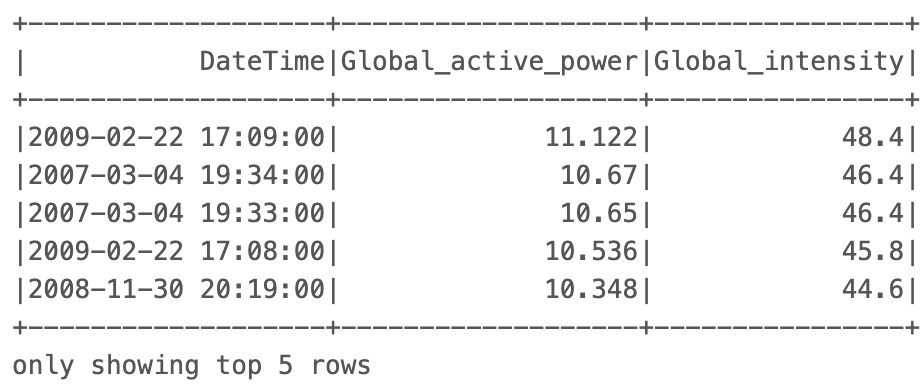 Output of "select" method (Image by author)
(2) Filter
This filters data points based on column values. In this example, we filter by two columns: "year" and "Global_intensity".
python
Output of "select" method (Image by author)
(2) Filter
This filters data points based on column values. In this example, we filter by two columns: "year" and "Global_intensity".
python
df.filter(
    (col("year") == 2009) &
    (col("Global_intensity") > 40)
).count()

# Output: 10
(3) groupby
We can also perform some aggregations. In our dataset, we calculate the average of global active power and sub-meterings for different months.
python
df.groupby("month").agg(
     round(mean("Global_active_power"), 2).alias("Avg_global_active_power"),
     round(mean("Sub_metering_1"), 2).alias("Avg_sub_metering_1"),
     round(mean("Sub_metering_2"), 2).alias("Avg_sub_metering_2"),
     round(mean("Sub_metering_3"), 2).alias("Avg_sub_metering_3"),
).sort(["month"]).show(5)
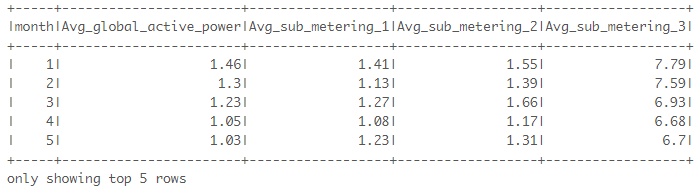 Output of "groupby" method (Image by author)
#3 Extract features using Window functions
In addition to the above basic PySpark methods and functions, we can leverage Window functions to generate additional features to capture temporal dependencies and relationships in time series data. Assuming we have a transformed dataset ("df2") where the total global active power is aggregated by day from one-minute rate samples. Let's explore how we can obtain these features.
(1) Lag features
These represent the metrics' values from previous days, which aids our models in learning from historical data and identifying trends.
python
Output of "groupby" method (Image by author)
#3 Extract features using Window functions
In addition to the above basic PySpark methods and functions, we can leverage Window functions to generate additional features to capture temporal dependencies and relationships in time series data. Assuming we have a transformed dataset ("df2") where the total global active power is aggregated by day from one-minute rate samples. Let's explore how we can obtain these features.
(1) Lag features
These represent the metrics' values from previous days, which aids our models in learning from historical data and identifying trends.
python
from pyspark.sql.window import Window
from pyspark.sql.functions import lag, round

# Create a Window specification based on the 'Date' column
windowSpec = Window.orderBy("Date")

# Calculate the lagged value of 'Total_global_active_power'
df2 = df2.withColumn("power_lag1", round(lag(col("Total_global_active_power"), 1).over(windowSpec), 2))

display(df2)
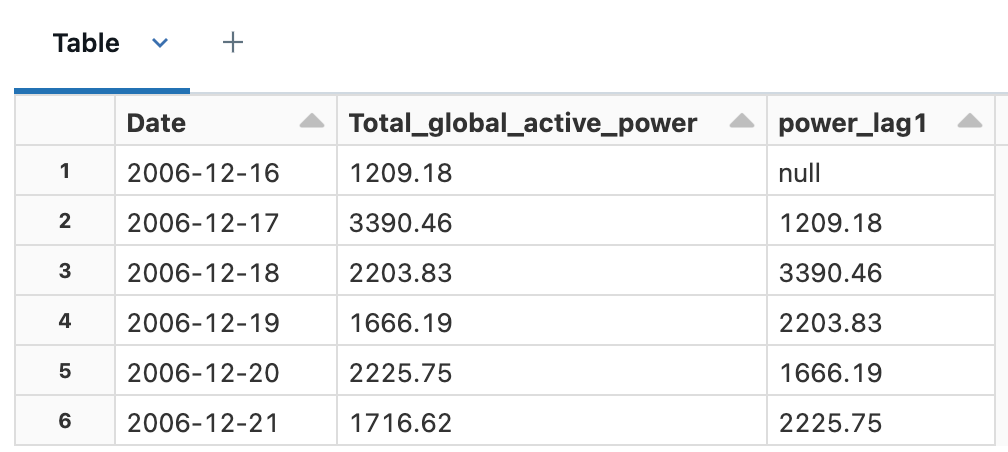 Output - Lag features (Image by author)
(2) Delta features
This is to take a subsequent step to capture short-term changes or variations over time by calculating the difference between original data fields and the lag features.
python
Output - Lag features (Image by author)
(2) Delta features
This is to take a subsequent step to capture short-term changes or variations over time by calculating the difference between original data fields and the lag features.
python
# Calculate the difference between columns
df2 = df2.withColumn("power_lag1_delta", round(col("power_lag1") - col("Total_global_active_power"), 2))

display(df2)
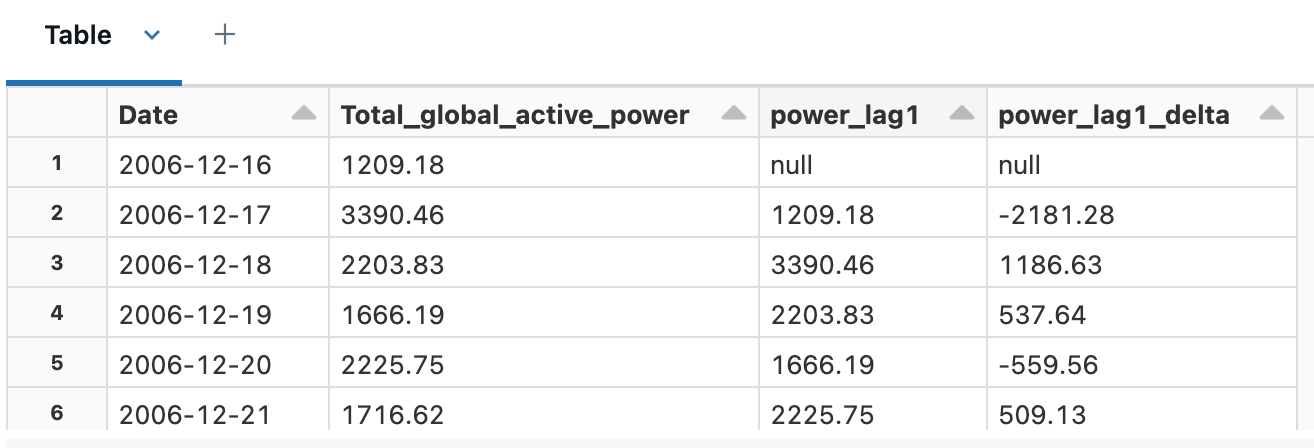 Output - Delta features (Image by author)
(3) Window average features
These features calculate the average value of our target data fields within a sliding window, enabling us to capture the smoothed patterns and relatively long-term trends. Here I pick the window sizes as 14 (2 weeks) and 30 (roughly 1 month).
python
Output - Delta features (Image by author)
(3) Window average features
These features calculate the average value of our target data fields within a sliding window, enabling us to capture the smoothed patterns and relatively long-term trends. Here I pick the window sizes as 14 (2 weeks) and 30 (roughly 1 month).
python
# Add window average fields to the DataFrame for the specified window sizes
def add_window_avg_features(df, window_sizes):
    for window_size in window_sizes:
        window_col_name = f"avg_power_l{window_size}"
        windowSpec = Window.orderBy("Date").rowsBetween(-window_size, 0)
        df = df.withColumn(window_col_name, round(avg(col("Total_global_active_power")).over(windowSpec), 2))
    return df

window_sizes = [14, 30]
df2 = add_window_avg_features(df2, window_sizes)

df2.select("Date", "Total_global_active_power", "avg_power_l14", "avg_power_l30").sort("Date", ascending=False).show(5)
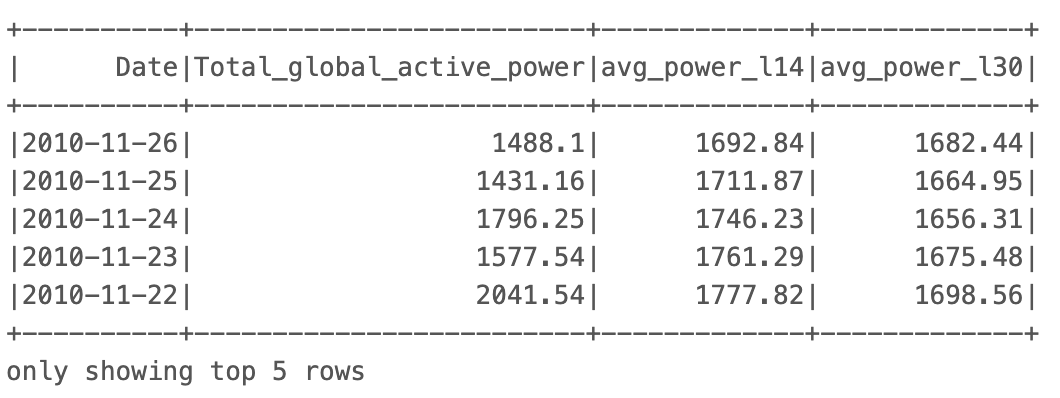 Output - Window average features (Image by author)
(4) Exponentially weighted moving average (EWMA) features
EWMA features are the rectified version of window average features by assigning more weight and emphasis to recent data, and less to past data. A higher value of weight (alpha) means that the EWMA features track more closely to the original time series. Here I pick two separate weights: 0.2 and 0.8.
python
Output - Window average features (Image by author)
(4) Exponentially weighted moving average (EWMA) features
EWMA features are the rectified version of window average features by assigning more weight and emphasis to recent data, and less to past data. A higher value of weight (alpha) means that the EWMA features track more closely to the original time series. Here I pick two separate weights: 0.2 and 0.8.
python
import pyspark.pandas as ps

#  Add EWMA features to the DataFrame for the specified alpha values
def add_ewma_features(df, alphas):
    for alpha in alphas:
        ewma_col_name = f"ewma_power_w{str(alpha).replace('.', '')}"
        windowSpec = Window.orderBy("Date")
        df[ewma_col_name] = df.Total_global_active_power.ewm(alpha=alpha).mean().round(2)
    return df

alphas = [0.2, 0.8]
# Convert into a pandas-on-Spark DataFrame, to use EWM function
df2_pd = df2.pandas_api()
df2_pd = add_ewma_features(df2_pd, alphas)
# Convert back to a Spark DataFrame
df2 = df2_pd.to_spark()

df2.select("Date", "Total_global_active_power", "ewma_power_w02", "ewma_power_w08").sort("Date", ascending=False).show(5)
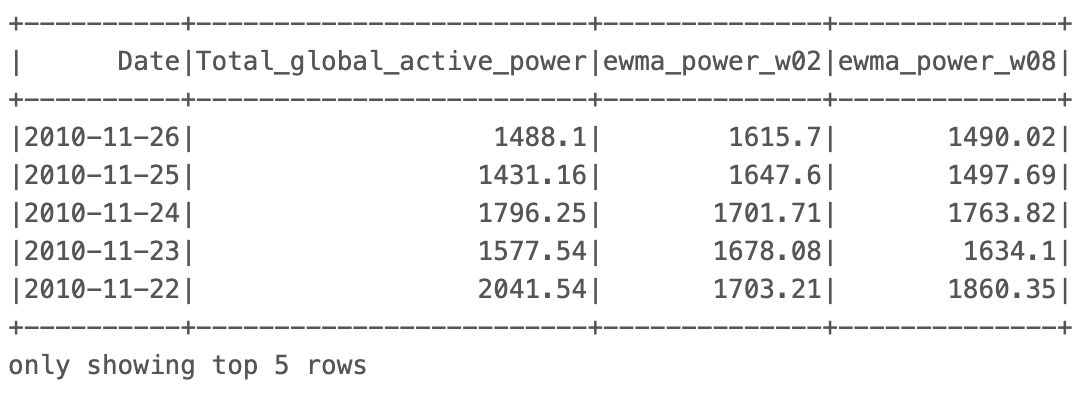 Output - EWMA features (Image by author)
#4 Generate visualizations on Notebook
After extracting time-related data and features using various PySpark functions and methods, we can use the built-in support from Databricks to create visualizations efficiently. This works by dragging and dropping data fields and configuring visual settings in the visualization editor. Some examples are shown below.
Output - EWMA features (Image by author)
#4 Generate visualizations on Notebook
After extracting time-related data and features using various PySpark functions and methods, we can use the built-in support from Databricks to create visualizations efficiently. This works by dragging and dropping data fields and configuring visual settings in the visualization editor. Some examples are shown below.
- Scatter plot: Relationship between global active power and global intensity
Interpretation: There is a highly positive correlation between the two fields.
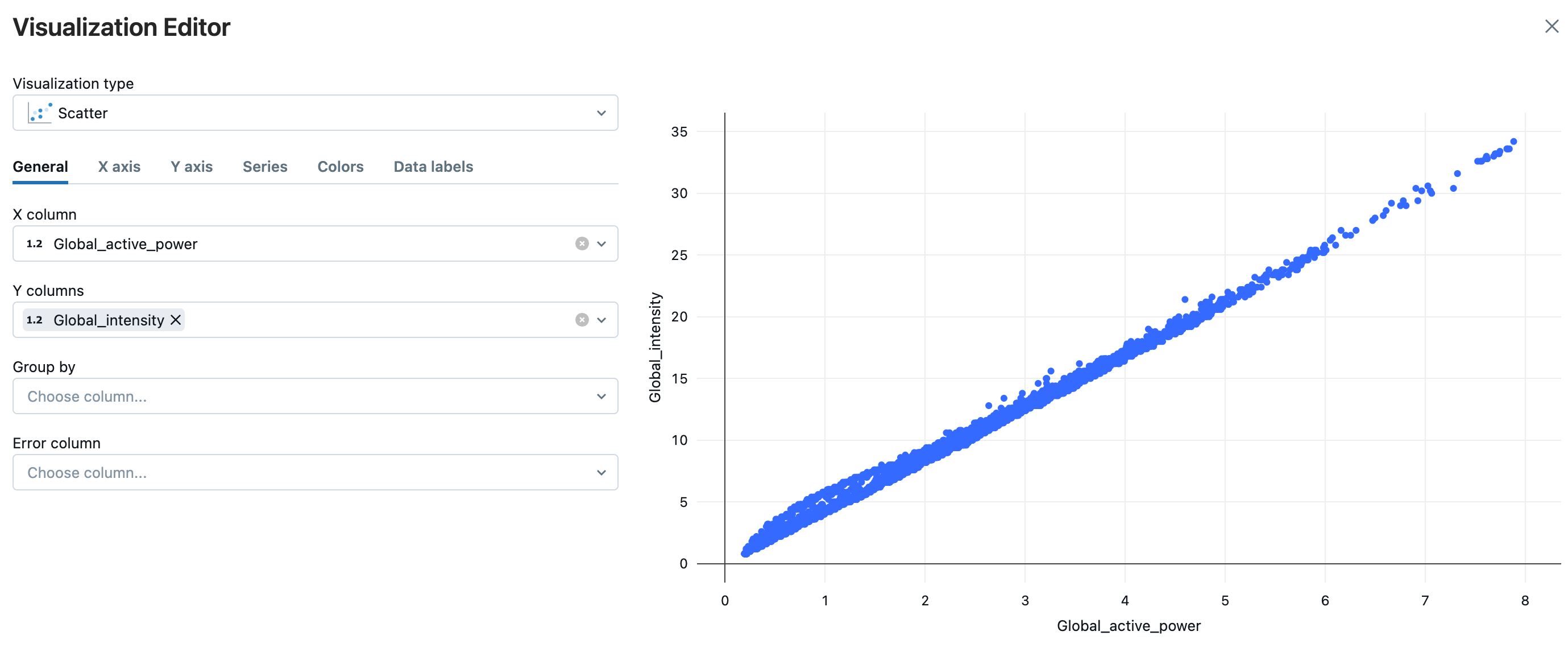 Scatter plot, using a visualization editor (Image by author)
- Box plot: The distribution of global active power across hours
Interpretation: There are relatively large variations of global active power from 7:00 to 21:00.
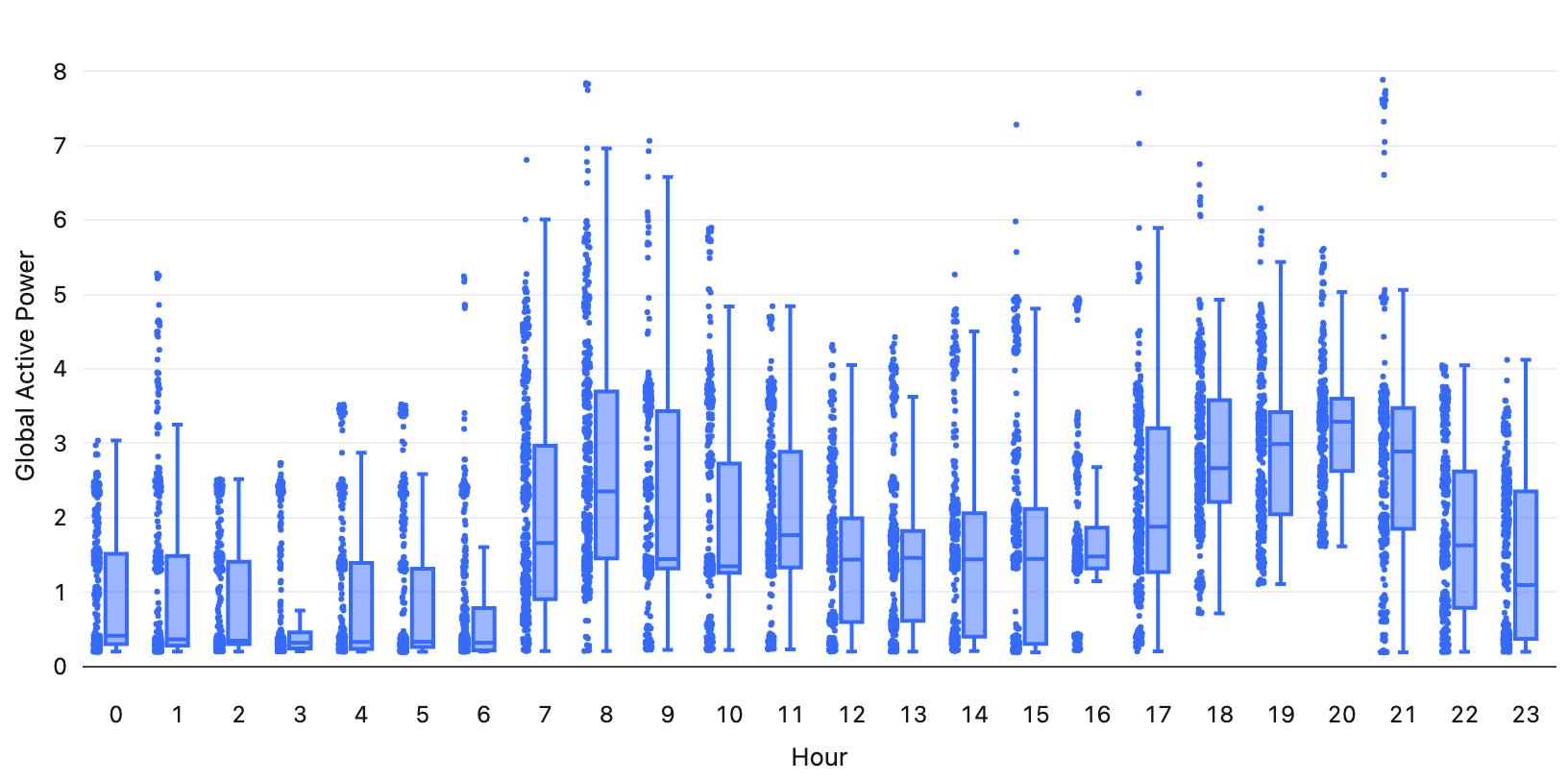 Box plot (Image by author)
- Line chart: The changes in total global active power, EWMA with alpha 0.2, and EWMA with alpha 0.8 from Jan 2008 to Mar 2008
Interpretation: EWMA with alpha 0.8 sticks more closely to the original time series than EWMA with alpha 0.2.
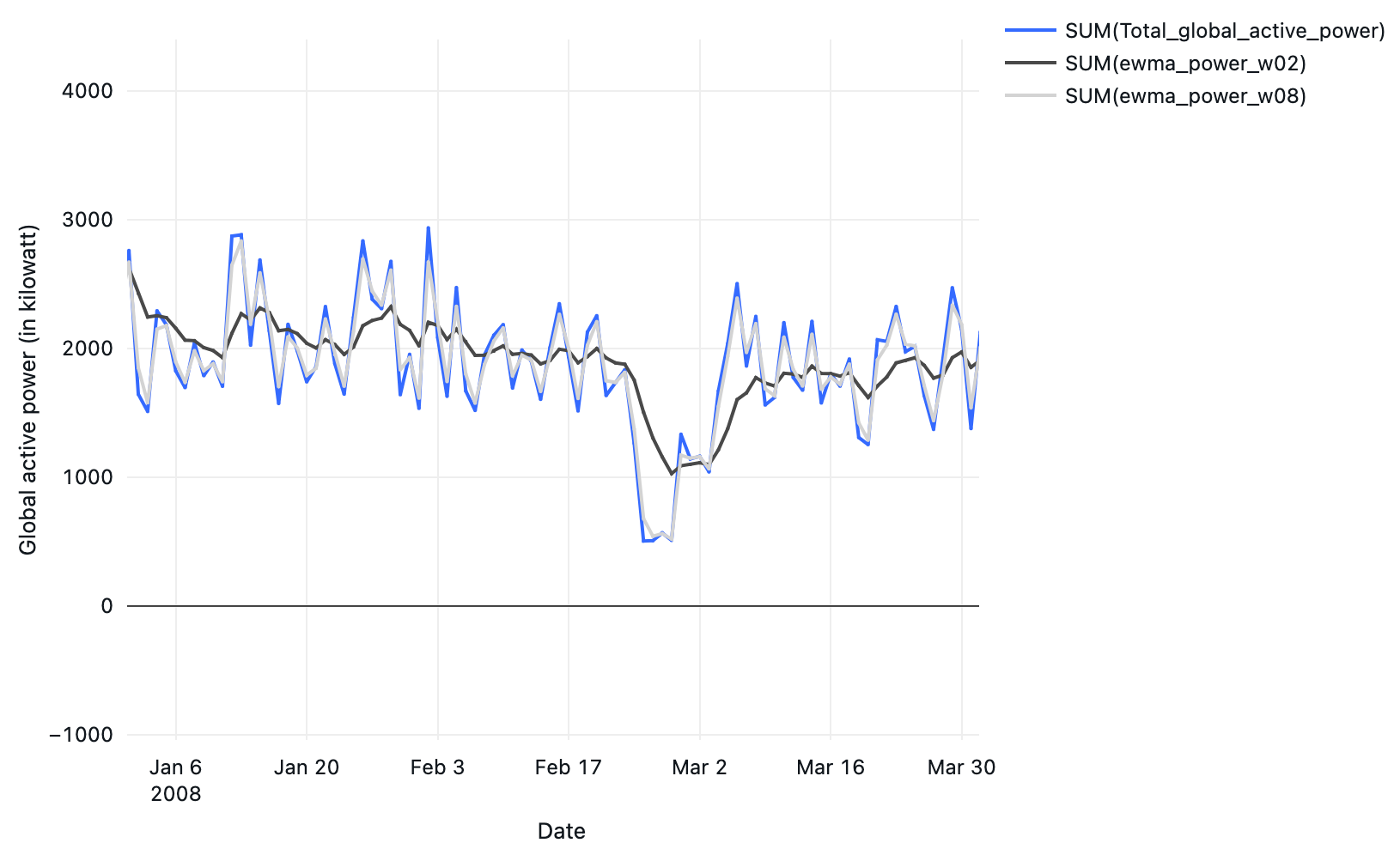 Line chart (Image by author)
Besides, we can generate the default data profiles to display summary statistics such as count, % of missing values, and data distributions. This ensures data quality throughout the entire feature engineering process. These above visualizations can alternatively be created by the query output using Databricks SQL.
Line chart (Image by author)
Besides, we can generate the default data profiles to display summary statistics such as count, % of missing values, and data distributions. This ensures data quality throughout the entire feature engineering process. These above visualizations can alternatively be created by the query output using Databricks SQL.
Wrapping it up
In our hands-on exploration, we used PySpark for feature engineering of time-series data using the Databricks platform:
- Ingesting static and streaming data, by using the
spark.read() and spark.readStream() methods respectively.
- Manipulating and exploring data, by using a range of basic PySpark functions available in
pyspark.sql.functions, and DataFrame methods.
- Extract trend-related features, by calculating the relationship within groups of data using
pyspark.sql.Window.
- Visualization, by using the built-in features of Databricks Notebook.
When dealing with a massive dataset, PySpark is often preferred over Pandas due to its scalability and performance capabilities. PySpark's support for lazy evaluation also means that computations are only performed when necessary, which reduces the overhead. However, Scala can sometimes be a better option, because we can closely catch up with the latest features as Spark itself is written in Scala. And more likely that systems which are less error-prone can be designed with the use of immutable objects. Different languages or libraries have their edges. Ultimately, the choice depends on the enterprise requirements, developers' learning curves, and integration with other systems.
Before you go
If you enjoy this reading, I invite you to **** follow my Medium page and LinkedIn page. By doing so, you can stay updated with exciting content related to data science side projects, and Machine Learning Operations (MLOps) demonstrations methodologies.
Performing Customer Analytics with LangChain and LLMs
Managing the Technical Debts of Machine Learning Systems
Register Now to Continue Reading
Unlock Towards Data Science with a Free Account
All articles on Towards Data Science are available to registered users. Create a free account today to access this article and thousands more.
Register for freeSign in to your account
 Written By
See all from John Leung
Big DataData ScienceDatabricksPythonSpark
Share This Article
Towards Data Science is a community publication. Submit your insights to reach our global audience and earn through the TDS Author Payment Program.
Write for TDS
Related Articles
Machine Learning
Advice and tips from a data scientist who landed two internships in a year
Sara Nobrega
September 4, 202415 min read
Programming
An introduction to using Enums in Python for ML projects
Eirik Berge
May 28, 20238 min read
Machine Learning
As the saying goes: garbage in is garbage out. Input data quality is the most crucial component of a machine learning system. Whether or...
Emeli Dral
January 19, 202113 min read
Data Science
Jump right into the Data Visualisation process with these easy and intuitive tools.
Parul Pandey
March 12, 20199 min read
Machine Learning
An introduction to panel data cross validation using PanelSplit
Eric Frey
March 8, 20245 min read
Data Science
Structured and reproducible approach for analysis
Prateek Bhatnagar
August 19, 20213 min read
Machine Learning
Native NumPy objects in Python provides speed advantage over regular objects. It works for as simple a task as reading data from file.
Tirthajyoti Sarkar
March 20, 20186 min read
Programming
I have recently been interested in making highly customizable visualizations. Here is one example of trying to recreate 538's election...
Dea Bardhoshi
February 22, 20222 min read
Machine Learning
In conversation with Shivam Bansal: A Data Scientist, a Kaggle Kernel's Grandmaster, and three times winner of Kaggle's Data Science for...
Parul Pandey
October 18, 20197 min read
Your home for data science and AI. The world's leading publication for data science, data analytics, data engineering, machine learning, and artificial intelligence professionals.
Subscribe to Our NewsletterWrite For TDS•About•Advertise•Privacy Policy•Terms of Use
© Insight Media Group, LLC 2026•The New Stack•roadmap.sh•Creator Network
Recommended Articles
Close