保留正文与补采附件。源页面当前未重新核验;具体限制见交付清单。
 We value your privacy
We use cookies to enhance your browsing experience, serve personalised ads or content, and analyse our traffic. By clicking "Accept All", you consent to our use of cookies.
Customise Reject All Accept All
Customise Consent Preferences
We value your privacy
We use cookies to enhance your browsing experience, serve personalised ads or content, and analyse our traffic. By clicking "Accept All", you consent to our use of cookies.
Customise Reject All Accept All
Customise Consent Preferences  We use cookies to help you navigate efficiently and perform certain functions. You will find detailed information about all cookies under each consent category below.
The cookies that are categorised as "Necessary" are stored on your browser as they are essential for enabling the basic functionalities of the site. ... Show more
NecessaryAlways Active
Necessary cookies are required to enable the basic features of this site, such as providing secure log-in or adjusting your consent preferences. These cookies do not store any personally identifiable data.
We use cookies to help you navigate efficiently and perform certain functions. You will find detailed information about all cookies under each consent category below.
The cookies that are categorised as "Necessary" are stored on your browser as they are essential for enabling the basic functionalities of the site. ... Show more
NecessaryAlways Active
Necessary cookies are required to enable the basic features of this site, such as providing secure log-in or adjusting your consent preferences. These cookies do not store any personally identifiable data.
-
Cookie
BCTempID
-
Duration
10 minutes
-
Description
No description available.
-
Cookie
__cf_bm
-
Duration
1 hour
-
Description
This cookie, set by Cloudflare, is used to support Cloudflare Bot Management.
-
Cookie
AWSALBCORS
-
Duration
7 days
-
Description
Amazon Web Services set this cookie for load balancing.
-
Cookie
_cfuvid
-
Duration
session
-
Description
Cloudflare sets this cookie to track users across sessions to optimize user experience by maintaining session consistency and providing personalized services
-
Cookie
li_gc
-
Duration
6 months
-
Description
Linkedin set this cookie for storing visitor's consent regarding using cookies for non-essential purposes.
-
Cookie
__hssrc
-
Duration
session
-
Description
This cookie is set by Hubspot whenever it changes the session cookie. The __hssrc cookie set to 1 indicates that the user has restarted the browser, and if the cookie does not exist, it is assumed to be a new session.
-
Cookie
__hssc
-
Duration
1 hour
-
Description
HubSpot sets this cookie to keep track of sessions and to determine if HubSpot should increment the session number and timestamps in the __hstc cookie.
-
Cookie
wpEmojiSettingsSupports
-
Duration
session
-
Description
WordPress sets this cookie when a user interacts with emojis on a WordPress site. It helps determine if the user's browser can display emojis properly.
-
Cookie
BCSessionID
-
Duration
1 year 1 month 4 days
-
Description
Blueconic sets this cookie as a unique identifier for the BlueConic profile.
-
Cookie
_octo
-
Duration
1 year
-
Description
No description available.
-
Cookie
logged_in
-
Duration
1 year
-
Description
No description available.
-
Cookie
__Secure-YEC
-
Duration
past
-
Description
YouTube sets this cookie to stores the user's video player preferences using embedded YouTube video
-
Cookie
__eoi
-
Duration
6 months
-
Description
Description is currently not available.
-
Cookie
AWSALBTGCORS
-
Duration
7 days
-
Description
No description available.
-
Cookie
login-status-p
-
Duration
past
-
Description
Description is currently not available.
-
Cookie
AWSALBTG
-
Duration
7 days
-
Description
No description available.
-
Cookie
csrf_token
-
Duration
session
-
Description
No description available.
-
Cookie
token_v2
-
Duration
1 day
-
Description
Description is currently not available.
-
Cookie
D
-
Duration
1 year
-
Description
Description is currently not available.
-
Cookie
PHPSESSID
-
Duration
session
-
Description
This cookie is native to PHP applications. The cookie stores and identifies a user's unique session ID to manage user sessions on the website. The cookie is a session cookie and will be deleted when all the browser windows are closed.
-
Cookie
VISITOR_PRIVACY_METADATA
-
Duration
6 months
-
Description
YouTube sets this cookie to store the user's cookie consent state for the current domain.
-
Cookie
cookietest
-
Duration
session
-
Description
The cookietest cookie is typically used to determine whether the user's browser accepts cookies, essential for website functionality and user experience.
-
Cookie
__Host-airtable-session
-
Duration
1 year
-
Description
This cookie is used to enable us to integrate the services of Airtable.
-
Cookie
__Host-airtable-session.sig
-
Duration
1 year
-
Description
This cookie is used to enable us to integrate the services of Airtable.
-
Cookie
m
-
Duration
1 year 1 month 4 days
-
Description
Stripe sets this cookie for fraud prevention purposes. It identifies the device used to access the website, allowing the website to be formatted accordingly.
-
Cookie
BIGipServer*
-
Duration
session
-
Description
Marketo sets this cookie to collect information about the user's online activity and build a profile about their interests to provide advertisements relevant to the user.
-
Cookie
__cfruid
-
Duration
session
-
Description
Cloudflare sets this cookie to identify trusted web traffic.
-
Cookie
_GRECAPTCHA
-
Duration
6 months
-
Description
Google Recaptcha service sets this cookie to identify bots to protect the website against malicious spam attacks.
-
Cookie
__Secure-YNID
-
Duration
6 months
-
Description
Google cookie used to protect user security and prevent fraud, especially during the login process.
-
Cookie
cookieyes-consent
-
Duration
1 year
-
Description
CookieYes sets this cookie to remember users' consent preferences so that their preferences are respected on subsequent visits to this site. It does not collect or store any personal information about the site visitors.
Functional
Functional cookies help perform certain functionalities like sharing the content of the website on social media platforms, collecting feedback, and other third-party features.
-
Cookie
lidc
-
Duration
1 day
-
Description
LinkedIn sets the lidc cookie to facilitate data center selection.
-
Cookie
brw
-
Duration
1 year
-
Description
No description available.
-
Cookie
brwConsent
-
Duration
5 minutes
-
Description
Description is currently not available.
-
Cookie
WMF-Uniq
-
Duration
1 year
-
Description
Description is currently not available.
-
Cookie
loom_anon_comment
-
Duration
1 year
-
Description
No description available.
-
Cookie
loom_referral_video
-
Duration
session
-
Description
Description is currently not available.
-
Cookie
VISITOR_INFO1_LIVE
-
Duration
6 months
-
Description
A cookie set by YouTube to measure bandwidth that determines whether the user gets the new or old player interface.
-
Cookie
yt-remote-connected-devices
-
Duration
Never Expires
-
Description
YouTube sets this cookie to store the user's video preferences using embedded YouTube videos.
-
Cookie
ytidb::LAST_RESULT_ENTRY_KEY
-
Duration
Never Expires
-
Description
The cookie ytidb::LAST_RESULT_ENTRY_KEY is used by YouTube to store the last search result entry that was clicked by the user. This information is used to improve the user experience by providing more relevant search results in the future.
-
Cookie
yt-remote-device-id
-
Duration
Never Expires
-
Description
YouTube sets this cookie to store the user's video preferences using embedded YouTube videos.
-
Cookie
yt-remote-session-name
-
Duration
session
-
Description
The yt-remote-session-name cookie is used by YouTube to store the user's video player preferences using embedded YouTube video.
-
Cookie
yt-remote-fast-check-period
-
Duration
session
-
Description
The yt-remote-fast-check-period cookie is used by YouTube to store the user's video player preferences for embedded YouTube videos.
-
Cookie
yt-remote-session-app
-
Duration
session
-
Description
The yt-remote-session-app cookie is used by YouTube to store user preferences and information about the interface of the embedded YouTube video player.
-
Cookie
yt-remote-cast-available
-
Duration
session
-
Description
The yt-remote-cast-available cookie is used to store the user's preferences regarding whether casting is available on their YouTube video player.
-
Cookie
yt-remote-cast-installed
-
Duration
session
-
Description
The yt-remote-cast-installed cookie is used to store the user's video player preferences using embedded YouTube video.
-
Cookie
cp_session
-
Duration
3 months
-
Description
Codepen sets this cookie for Help systems found in the website.
-
Cookie
loid
-
Duration
1 year 1 month 4 days
-
Description
This cookie is set by the Reddit. The cookie enables the sharing of content from the website onto the social media platform.
Analytics
Analytical cookies are used to understand how visitors interact with the website. These cookies help provide information on metrics such as the number of visitors, bounce rate, traffic source, etc.
-
Cookie
__hstc
-
Duration
6 months
-
Description
Hubspot set this main cookie for tracking visitors. It contains the domain, initial timestamp (first visit), last timestamp (last visit), current timestamp (this visit), and session number (increments for each subsequent session).
-
Cookie
hubspotutk
-
Duration
6 months
-
Description
HubSpot sets this cookie to keep track of the visitors to the website. This cookie is passed to HubSpot on form submission and used when deduplicating contacts.
-
Cookie
_ga
-
Duration
1 year 1 month 4 days
-
Description
Google Analytics sets this cookie to calculate visitor, session and campaign data and track site usage for the site's analytics report. The cookie stores information anonymously and assigns a randomly generated number to recognise unique visitors.
-
Cookie
ga*
-
Duration
1 year 1 month 4 days
-
Description
Google Analytics sets this cookie to store and count page views.
-
Cookie
__Host-psifi.analyticsTrace
-
Duration
6 hours
-
Description
Description is currently not available.
-
Cookie
__Host-psifi.analyticsTraceV2
-
Duration
6 hours
-
Description
Description is currently not available.
-
Cookie
_gh_sess
-
Duration
session
-
Description
GitHub sets this cookie for temporary application and framework state between pages like what step the user is on in a multiple step form.
-
Cookie
YSC
-
Duration
session
-
Description
YSC cookie is set by Youtube and is used to track the views of embedded videos on Youtube pages.
-
Cookie
ajs_anonymous_id
-
Duration
1 year
-
Description
This cookie is set by Segment to count the number of people who visit a certain site by tracking if they have visited before.
-
Cookie
vuid
-
Duration
1 year 1 month 4 days
-
Description
Vimeo installs this cookie to collect tracking information by setting a unique ID to embed videos on the website.
Performance
Performance cookies are used to understand and analyse the key performance indexes of the website which helps in delivering a better user experience for the visitors.
-
Cookie
AWSALB
-
Duration
7 days
-
Description
AWSALB is an application load balancer cookie set by Amazon Web Services to map the session to the target.
-
Cookie
acq
-
Duration
past
-
Description
Description is currently not available.
-
Cookie
acq.sig
-
Duration
past
-
Description
Description is currently not available.
-
Cookie
ptc
-
Duration
2 years
-
Description
No description available.
Advertisement
Advertisement cookies are used to provide visitors with customised advertisements based on the pages you visited previously and to analyse the effectiveness of the ad campaigns.
-
Cookie
muc_ads
-
Duration
1 year 1 month 4 days
-
Description
Twitter sets this cookie to collect user behaviour and interaction data to optimize the website.
-
Cookie
guest_id_marketing
-
Duration
1 year 1 month 4 days
-
Description
Twitter sets this cookie to identify and track the website visitor.
-
Cookie
guest_id_ads
-
Duration
1 year 1 month 4 days
-
Description
Twitter sets this cookie to identify and track the website visitor.
-
Cookie
personalization_id
-
Duration
1 year 1 month 4 days
-
Description
Twitter sets this cookie to integrate and share features for social media and also store information about how the user uses the website, for tracking and targeting.
-
Cookie
guest_id
-
Duration
1 year 1 month 4 days
-
Description
Twitter sets this cookie to identify and track the website visitor. It registers if a user is signed in to the Twitter platform and collects information about ad preferences.
-
Cookie
bcookie
-
Duration
1 year
-
Description
LinkedIn sets this cookie from LinkedIn share buttons and ad tags to recognize browser IDs.
-
Cookie
__Secure-ROLLOUT_TOKEN
-
Duration
6 months
-
Description
YouTube sets this cookie to manage feature rollout and experimentation. It helps Google control which new features or interface changes are shown to users as part of testing and staged rollouts, ensuring consistent experience for a given user during an experiment.
-
Cookie
yt.innertube::nextId
-
Duration
Never Expires
-
Description
YouTube sets this cookie to register a unique ID to store data on what videos from YouTube the user has seen.
-
Cookie
yt.innertube::requests
-
Duration
Never Expires
-
Description
YouTube sets this cookie to register a unique ID to store data on what videos from YouTube the user has seen.
-
Cookie
session_tracker
-
Duration
session
-
Description
This cookie is set by the Reddit. This cookie is used to identify trusted web traffic. It also helps in adverstising on the website.
-
Cookie
edgebucket
-
Duration
session
-
Description
Reddit sets this cookie to save the information about a log-on Reddit user, for the purpose of advertisement recommendations and updating the content.
-
Cookie
did
-
Duration
1 year
-
Description
Arbor sets this cookie to show targeted ads to site visitors.This cookie expires after 2 months or 1 year.
Uncategorised
Other uncategorised cookies are those that are being analysed and have not been classified into a category as yet.
No cookies to display.
Reject All Save My Preferences Accept All
Toggle SearchToggle Mobile Navigation
Publish AI, ML & data-science insights to a global community of data professionals.
Sign inSubmit an Article
LatestEditor's PicksNewsletterShipAI
Write For TDS
LinkedInXToggle Search
Large Language Models
A Production RAG Pipeline for PDFs: Relational Parsing, TOC Retrieval, Typed Answers
Enterprise Document Intelligence [Vol.1 #9A] - Same paper, same question as Article 1. One upgraded contract per brick: document parsing, question parsing, retrieval, generation
Angela and Kezhan Shi
July 7, 202624 min read
 Photo by Job Vermeulen, via Unsplash.
This article opens Part III of Enterprise Document Intelligence, a series that builds an enterprise RAG system from four bricks: document parsing, question parsing, retrieval, and generation.
It is the first of two parts on the upgraded pipeline: this part upgrades each brick, one contract at a time, on the same paper and the same question as Article 1 (minimal RAG). The second part, Composing the four RAG bricks into one pipeline, tested on real documents (link to come), wires them into one call and runs it on several real documents.
Photo by Job Vermeulen, via Unsplash.
This article opens Part III of Enterprise Document Intelligence, a series that builds an enterprise RAG system from four bricks: document parsing, question parsing, retrieval, and generation.
It is the first of two parts on the upgraded pipeline: this part upgrades each brick, one contract at a time, on the same paper and the same question as Article 1 (minimal RAG). The second part, Composing the four RAG bricks into one pipeline, tested on real documents (link to come), wires them into one call and runs it on several real documents.
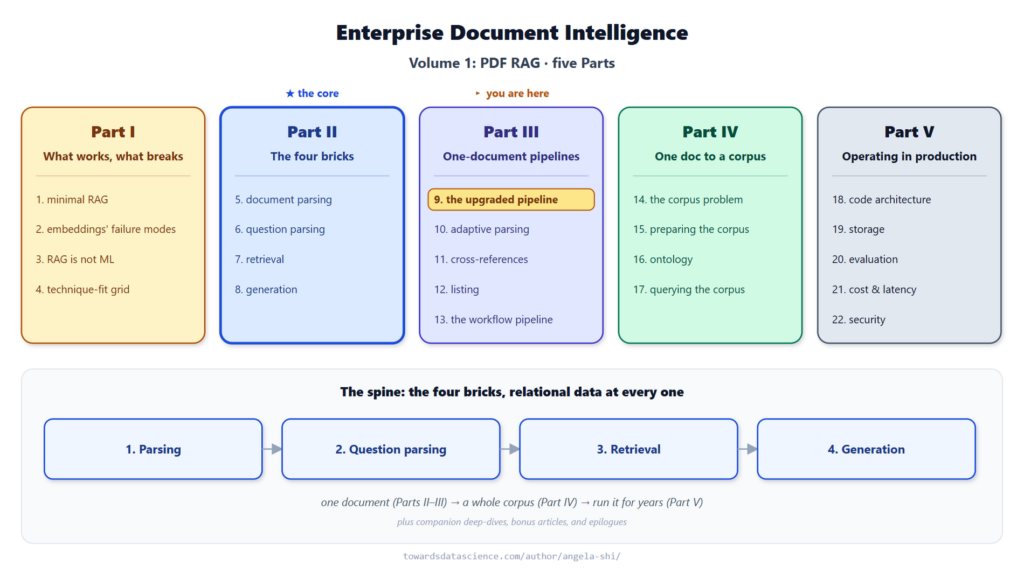 where this article sits in the series: Article 9 (the upgraded pipeline), opening Part III - Image by author
📓 Runnable companion notebooks are on GitHub : doc-intel/notebooks-vol1.
Learn this step by step with the interactive AI Engineer roadmap.
where this article sits in the series: Article 9 (the upgraded pipeline), opening Part III - Image by author
📓 Runnable companion notebooks are on GitHub : doc-intel/notebooks-vol1.
Learn this step by step with the interactive AI Engineer roadmap.
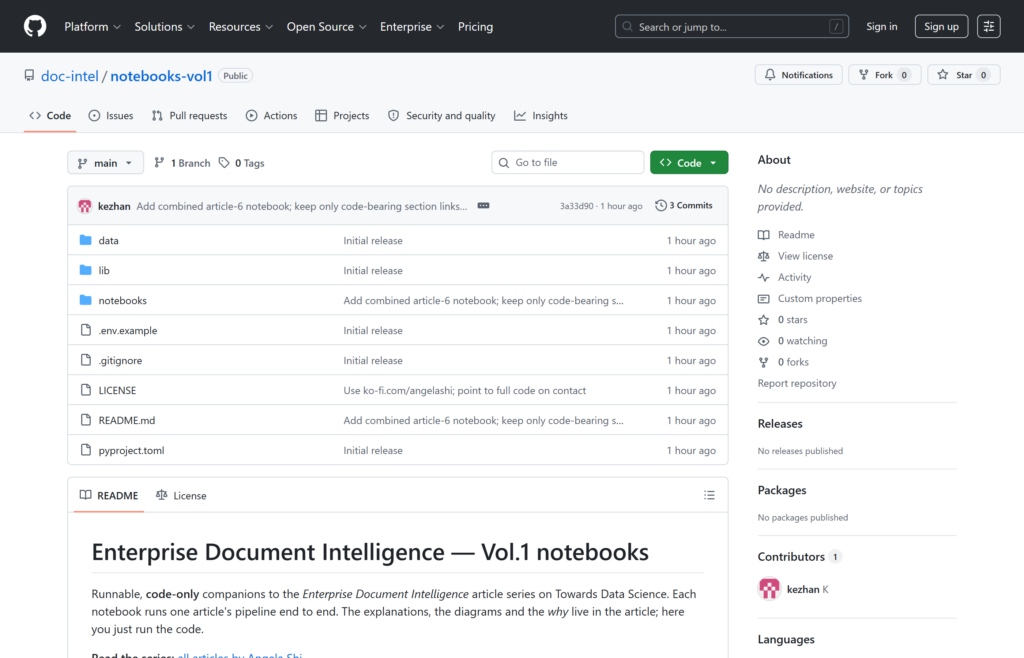 The public companion-code repo at doc-intel/notebooks-vol1 - Image by author
A hundred lines of Python wire four functions together: parse the PDF, parse the question, retrieve a few pages, ask a model.
That pipeline returns the right answer on a clean question against a paper with a built-in table of contents. On a real corpus it breaks the first time the user types “positonal encodig” with two typos, the first time the document is a 200-page contract with no PDF outline, the first time the question asks for every exclusion instead of one, the first time downstream code wants a typed object instead of a string. Four bricks need an upgrade each before the pipeline ships.
The public companion-code repo at doc-intel/notebooks-vol1 - Image by author
A hundred lines of Python wire four functions together: parse the PDF, parse the question, retrieve a few pages, ask a model.
That pipeline returns the right answer on a clean question against a paper with a built-in table of contents. On a real corpus it breaks the first time the user types “positonal encodig” with two typos, the first time the document is a 200-page contract with no PDF outline, the first time the question asks for every exclusion instead of one, the first time downstream code wants a typed object instead of a string. Four bricks need an upgrade each before the pipeline ships.
- Document parsing now returns more than a flat
line_df: a relational set including a TOC, page-level metadata, and a typed parsing_summary carrying the document’s type, language, and a one-paragraph summary of what it is about.
- Question parsing turns the noisy user input into a structured brief, with keywords corrected against the corpus’s own vocabulary and an inferred answer shape (single value, listing, table).
- Retrieval reads the TOC the way an expert would: hand the whole TOC to a small LLM that picks sections by semantic relevance, then merge with the keyword pages.
- Generation returns a typed answer with one citable span per item, plus four context-quality indicators the pipeline reads to decide whether to ship the answer or run another pass.
The running paper is a public 15-page arXiv submission, Attention Is All You Need. The question, “What are the options for positional encoding?” , comes in with two typos so the question-parsing brick has something to do. The output is what an enterprise user needs: a typed answer, with verbatim quotes tied to line ranges, and a full audit trail from question to citation.
1. Where the baseline RAG breaks
Pick a clean question on a clean PDF, run it through the simplest RAG pipeline: parse the PDF, extract keywords from the question, retrieve a few pages, ask an LLM. On the Attention paper with the question “What are the options for positional encoding?” , that pipeline returns “sinusoidal positional encoding and learned positional embeddings” with one contiguous span of pages cited. It worked, on a clean question, on a clean paper.
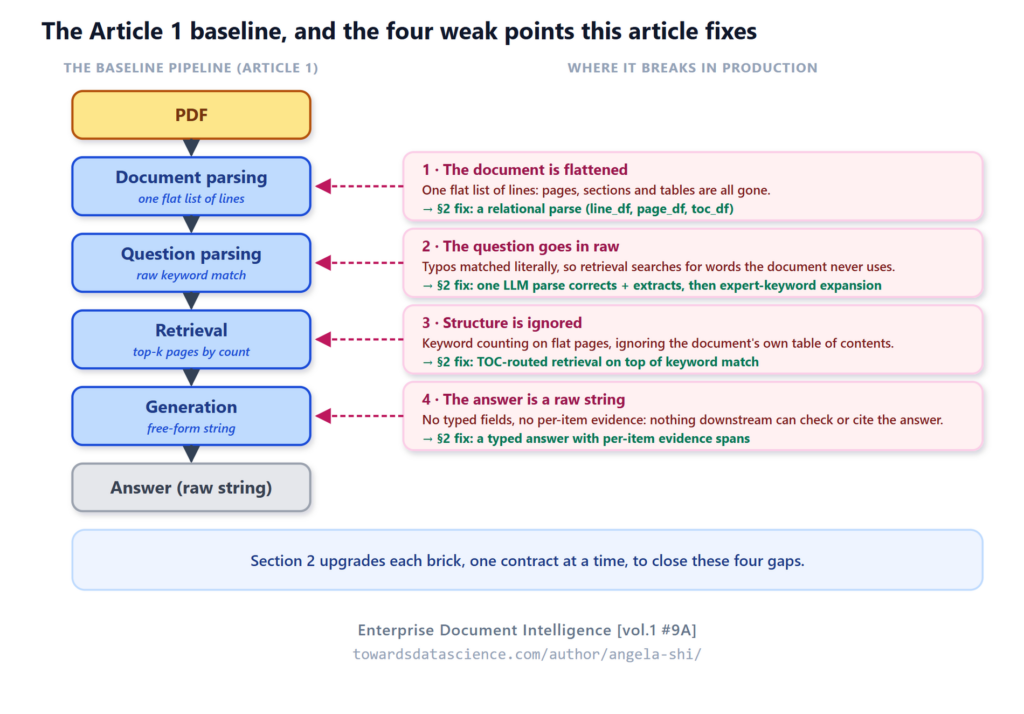 The Article 1 baseline: the weak point each brick exposes on enterprise input, and its §2 fix. - Image by author
Drop the same pipeline into an enterprise setting and four weak points appear quickly, one per brick:
The Article 1 baseline: the weak point each brick exposes on enterprise input, and its §2 fix. - Image by author
Drop the same pipeline into an enterprise setting and four weak points appear quickly, one per brick:
- Document parsing : the document is flattened. Article 1 (minimal RAG) parsed the PDF into one flat list of lines, enough to count keywords but nothing more. The pages, the sections, the tables, all the structure a downstream brick could scope on, thrown away at the first step.
- Question parsing : the question users type is rarely clean. “What are the optoins for posiitional encoding?” has two typos. The baseline keyword extractor never saw the word positional , it saw posiitional , so retrieval misses the very pages the answer lives on.
- Retrieval : the baseline never looks at structure. The Attention paper carries a clean built-in TOC, named sections with page numbers, three levels deep. The most precise retrieval signal in the whole document, ignored.
- Generation : the answer comes back as a raw string. A list question (options) asks for one item per option, each with its own evidence. Free-form prose forces the caller to re-parse the answer to find the items; a typed schema with a per-item evidence span removes that step.
The four bricks below address those four weak points. Same paper, same question, real LLM calls. The output is a typed list with verbatim quotes, line ranges, and the full chain of decisions that produced it.
2. Four bricks, upgraded
The shape that survives the upgrade is the same four bricks Article 1 (minimal RAG) introduced. What changes is the contract per brick: what each one consumes, what it produces, and how the next one consumes it. The diagram below is the full contract: every brick, the outputs it produces, and which downstream brick consumes each one (including the parsing_summary side channel into both question parsing and generation). The per-brick subsections then zoom into each box.
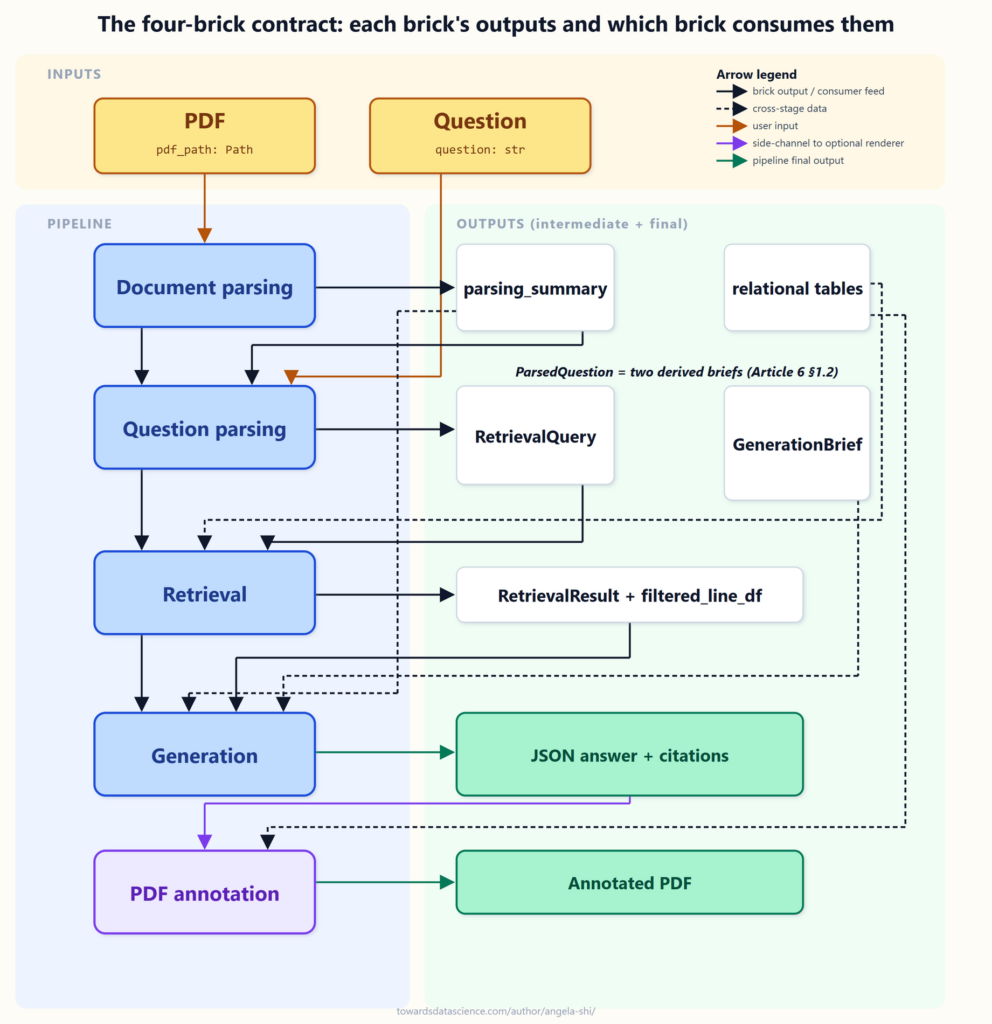 The full contract: every brick, its outputs, and which brick consumes each. The per-brick schemas below zoom in on one box at a time. - Image by author
Each of the four bricks is upgraded in its own articles, worth reading for the full contract:
The full contract: every brick, its outputs, and which brick consumes each. The per-brick schemas below zoom in on one box at a time. - Image by author
Each of the four bricks is upgraded in its own articles, worth reading for the full contract:
2.1 Document parsing: a small relational set
Parsing runs once and turns the PDF into the small set of tables every later brick reuses.
In: pdf_path, the PDF on disk. Out: line_df, page_df, toc_df, parsing_summary.
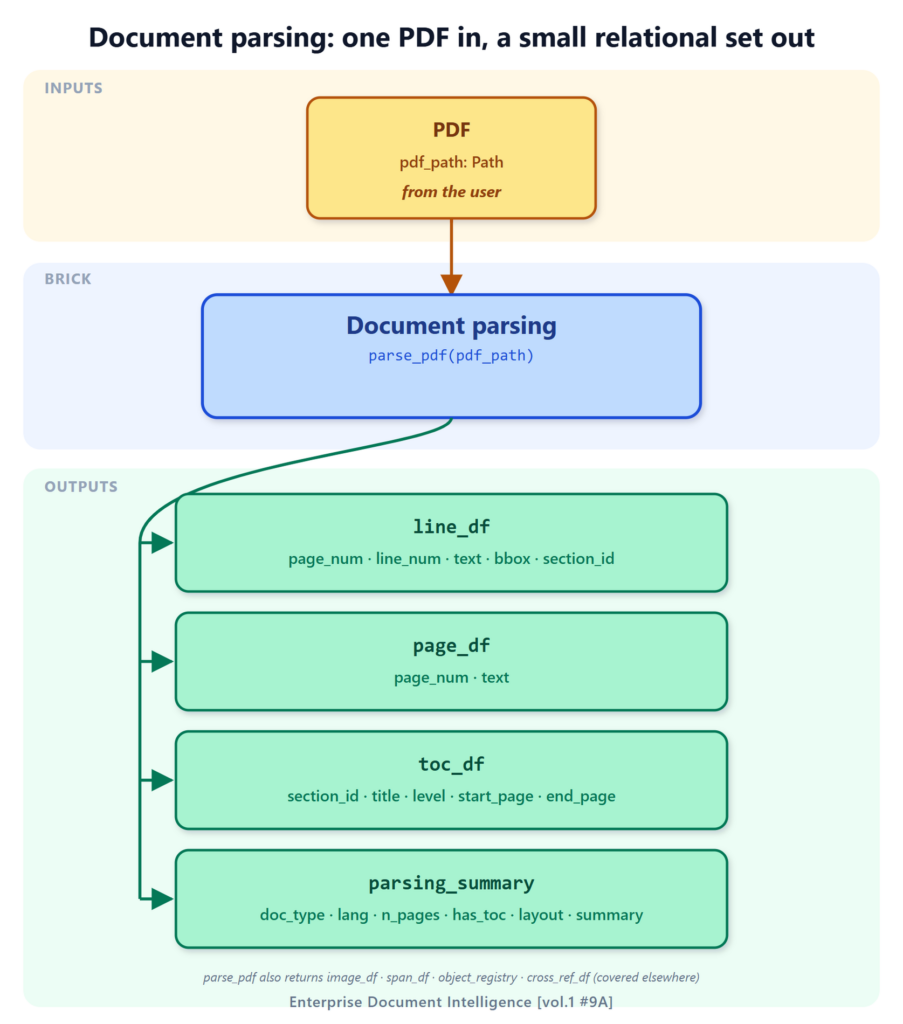 Document parsing:
_parse_pdf_reads the PDF once and returns the small relational set every downstream brick reuses. - Image by author
What comes out, one row per unit:
line_df: one row per visible line (page_num, line_num, text, bounding box). The citation unit.page_df: one row per page (page_num, text). The coarse scan surface.toc_df: one row per section (title, level, start_page). The document’s own map.parsing_summary: document-level metadata (doc type, language, page count, layout). The side channel into the LLM bricks.
Article 1 (minimal RAG) parsed the PDF into one DataFrame called line_df, one row per visible line of text. Enough for keyword retrieval, not enough for anything else. Article 5 (document parsing) reframes parsing as building a small relational set : line_df stays, page_df aggregates lines to pages with their text, and toc_df carries the document’s native table of contents.
The bootstrap chunk at the top of the article already produced the three DataFrames on the Attention paper. A look at each:
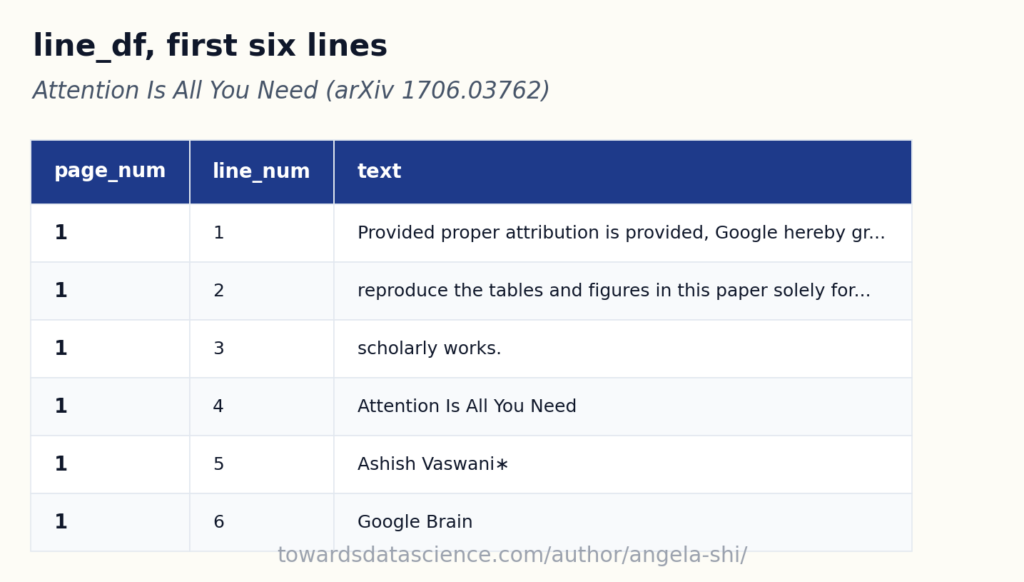 One row per visible line, with
 _page_num_and _line_num_for citations - Image by author
The page_num and line_num on each row are what turn an answer into a citation. Drawn back onto the page they came from, the rows are literal: every recognized line is one box, and its line_num sits in the gutter.
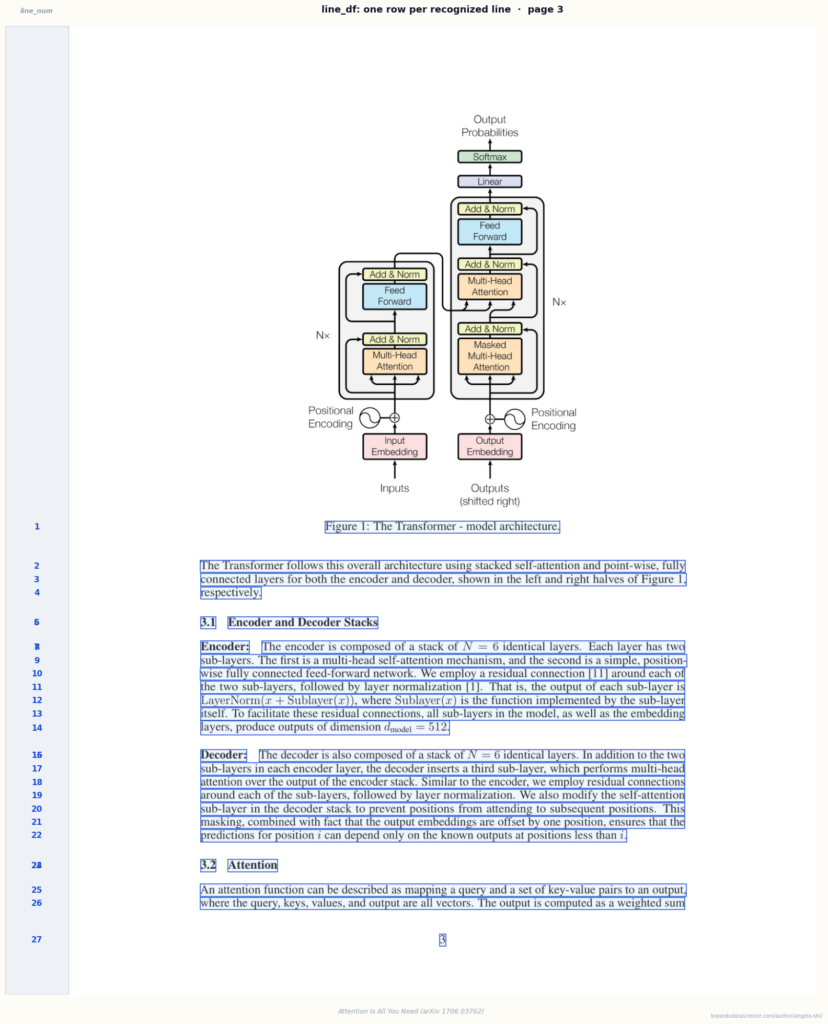 The same rows, drawn back onto the page: each blue box is one
 _line_df_row, the gutter number is its _line_num_- Image by author
Aggregating the lines page by page gives page_df, the natural page unit that carries whole-page text and page-level context:
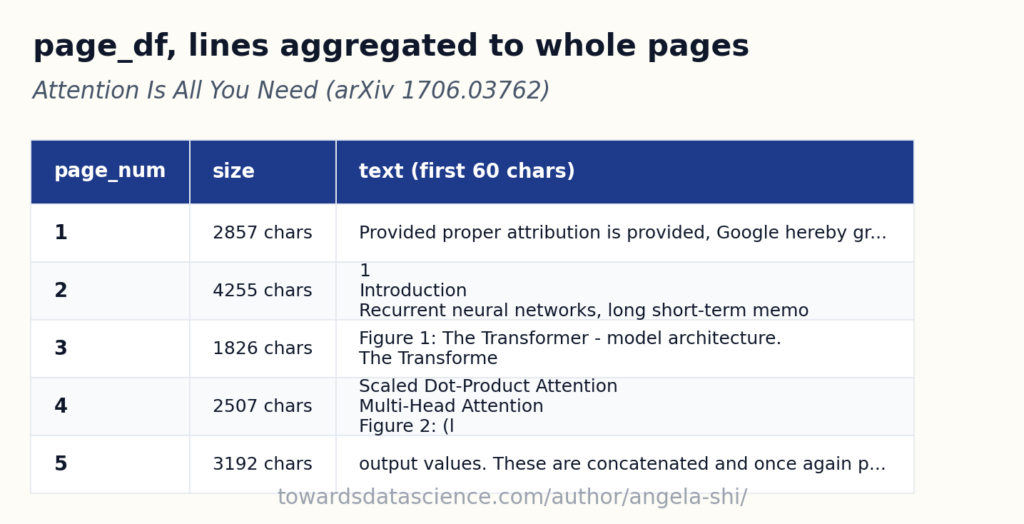 One row per page: the natural page unit, whole-page text plus context - Image by author
toc_df carries the native outline; on the Attention paper it has three levels and twenty-two entries, one row per section with its title, level, and start page:
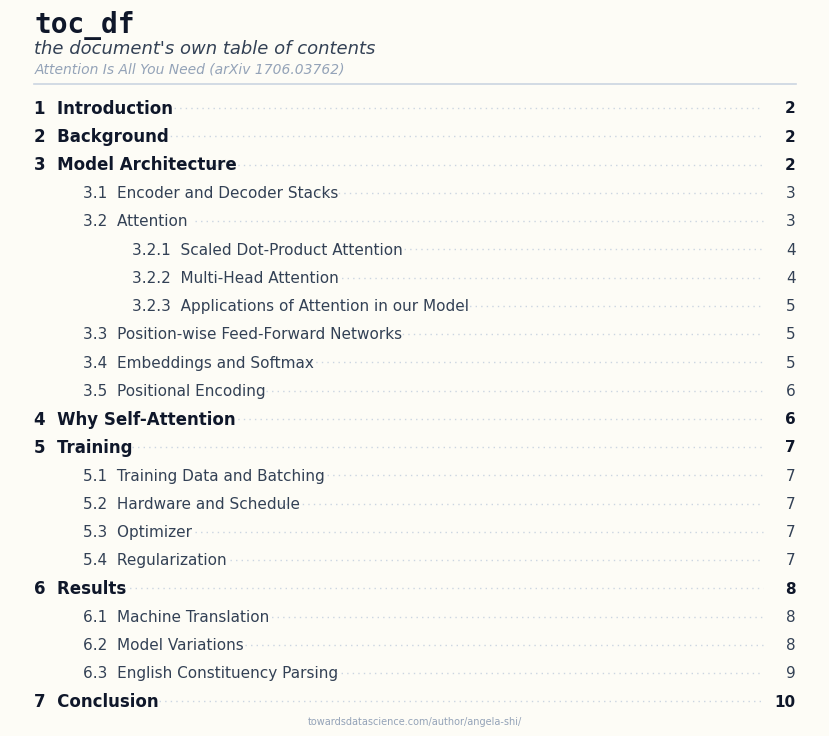 The native TOC, three levels deep, read straight from the document: one row per section, with its level and start page - Image by author
Three tables, same shape contract, same numeric primary keys. Downstream bricks read what they need without re-parsing the PDF; Retrieval (Section 2.3) scans keyword hits and reads
The native TOC, three levels deep, read straight from the document: one row per section, with its level and start page - Image by author
Three tables, same shape contract, same numeric primary keys. Downstream bricks read what they need without re-parsing the PDF; Retrieval (Section 2.3) scans keyword hits and reads toc_df to anchor on the right section, then sizes the context around it (the whole section, or a line window) at the granularity the question implies. page_df is the page-level scan unit, toc_df the map, line_df the atomic lines the anchor and window are cut from. parse_pdf actually returns more in the same dict (image regions, internal references, named objects) plus a parsing_summary carrying document-level metadata (doc type, language, page count, layout, typical fields, a short summary); this section focuses on the three tables retrieval reads, and parsing_summary returns in the second part as the side channel that travels into the LLM bricks.
2.2 Question parsing: from noise to brief
Question parsing turns the raw user string into a typed brief the next two bricks can act on.
In: the raw question, the expert’s concept_keywords_df, and parsing_summary for document context. Out: a ParsedQuestion carrying intent, keywords, a RetrievalQuery brief, and a GenerationBrief.
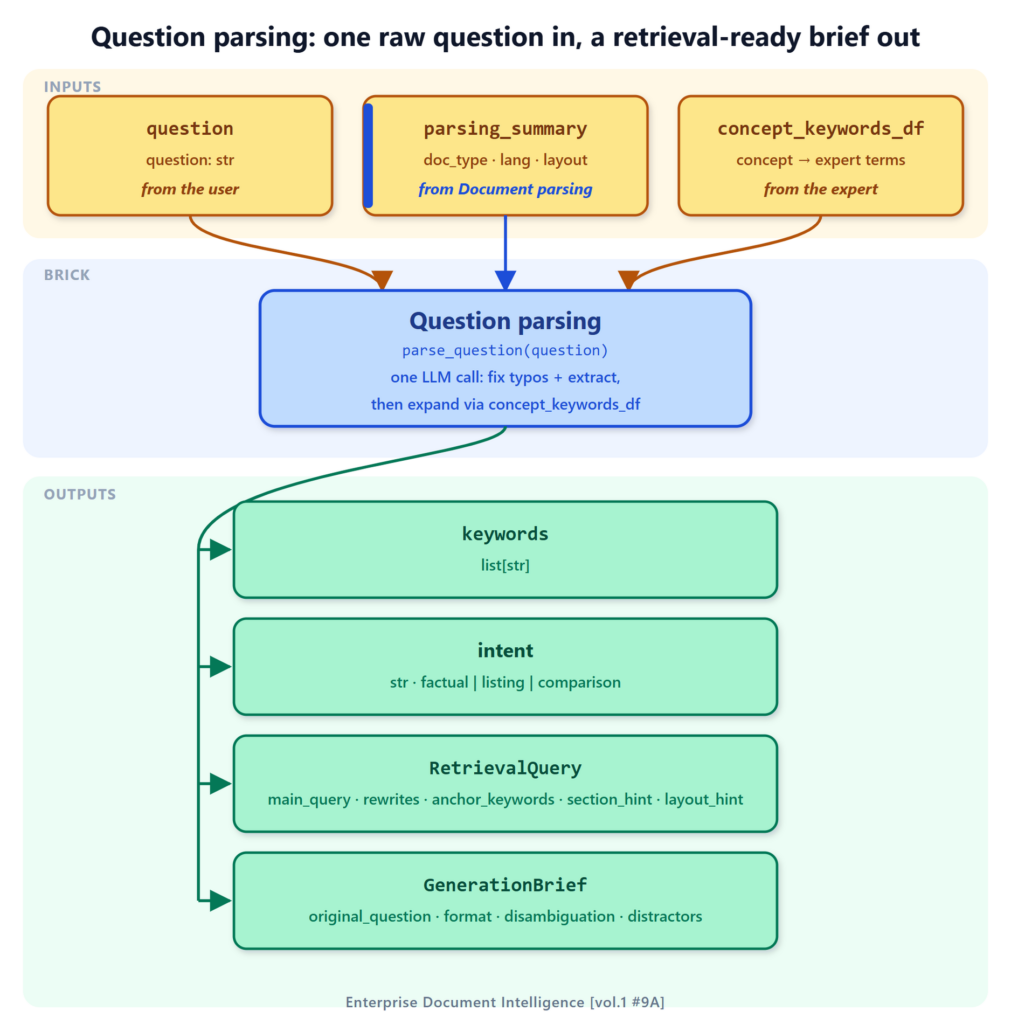 Question parsing: one LLM call corrects the typos and extracts the keywords, then concept_keywords_df expands them. - Image by author
What comes out:
Question parsing: one LLM call corrects the typos and extracts the keywords, then concept_keywords_df expands them. - Image by author
What comes out:
keywords: typos fixed and content terms pulled in one LLM call, then expanded with the expert’s vocabulary.intent: the answer shape the question implies (factual, listing, comparison).RetrievalQuery: the brief retrieval consumes (main_query, rewrites, anchor_keywords, section_hint, layout_hint).GenerationBrief: only the fields generation can act on (the question, the answer shape, disambiguation).
Article 1 (minimal RAG) called get_keywords_from_question on the clean question and got a corrected_question plus a short list of keywords back, in one LLM call. That single call does two jobs at once: it fixes the surface typos and pulls the content keywords. The corrected keywords come straight out of the parse, with no separate spell-checking pass bolted on afterward. If a keyword genuinely does not exist in the document, the recovery is retrieval’s feedback loop (Article 13, the workflow pipeline), which re-searches with the terms the document actually uses, not a blind snap onto the nearest corpus token.
What this article adds on top of the parse is the expert vocabulary layer. The corrected keywords are expanded with the domain terms a practitioner would also search for, pulled from the expert’s concept_keywords_df. Asked about positional encoding , the expansion adds the two concrete methods, sinusoidal and learned , so retrieval matches them even though the question never named them.
Article 6 (question parsing) bundles both layers into the full parse_question brick. The output is a typed ParsedQuestion Pydantic carrying the user’s intent, the extracted keywords, a RetrievalQuery sub-brief that retrieval consumes (main_query, rewrites, anchor_keywords, section_hint, layout_hint), and structural_hints for page / sheet / slide pinning when the question carries them. The question’s intent also fixes how much to keep around the anchor: the whole section when it maps to one, or a line window for a pinpoint fact, so retrieval knows the granularity, not just where to look. Article 7A (retrieval as filtering) develops this two-level anchor / context model in full. Section 1.2 of Article 6 (question parsing) develops the two derived briefs pattern: the same ParsedQuestion yields one brief for retrieval and a GenerationBrief for generation, each carrying only the fields its consumer can act on.
Each step is explicit, so retrieval downstream can use all of it and an audit log can be reconstructed.
The noisy question is the same one a frustrated user would type:
The one call already corrected the typos: optoins and posiitional came back as clean, content keywords, with no second spell-checking pass bolted on. Now expand them with the expert’s vocabulary, the concept_keywords_df table that maps each topic to the terms a practitioner would also search for:
python
{
  "original_question": "What are the optoins for posiitional encoding?",
  "keywords": ["positional encoding"],
  "expanded_keywords": ["positional encoding", "sinusoidal", "learned"]
}
Two things happened in one pass. The keywords came back corrected: posiitional and optoins were typos, and the single parse_question call fixed them while pulling the content noun phrase, dropping framing words like options. If a keyword still did not exist in the document, retrieval’s feedback loop (Article 13, the workflow pipeline) would recover it, not a blind snap onto the nearest corpus token.
The expanded keywords come from concept_keywords_df. Asked about positional encoding , the expansion adds the two concrete methods the paper uses, sinusoidal and learned , so retrieval matches them even though the question never named them. The table is small on purpose: each entry narrows on the topic, not a generic word like position that would pollute the search. Article 6 (question parsing) develops how it is built and maintained.
For the question-parsing code in detail, see the three articles that develop the brick:
- Article 6A (the thesis): parse the question before you search, the missing step in most RAG pipelines.
- Article 6B (extraction): the five fields the parser pulls from any question (keywords, scope, shape, decomposition, clarification).
- Article 6C (dispatch): what the parsed question decides downstream (chunk strategy, model tier, fragments, audit trail).
2.3 Retrieval: structured tables
Retrieval narrows the document down to the lines generation will read. It filters on the structured tables, it does not search a vector index.
In: the RetrievalQuery brief (from question parsing), plus line_df and toc_df (from document parsing). Out: a RetrievalResult: the kept pages and filtered_line_df, the section or line window generation reads.
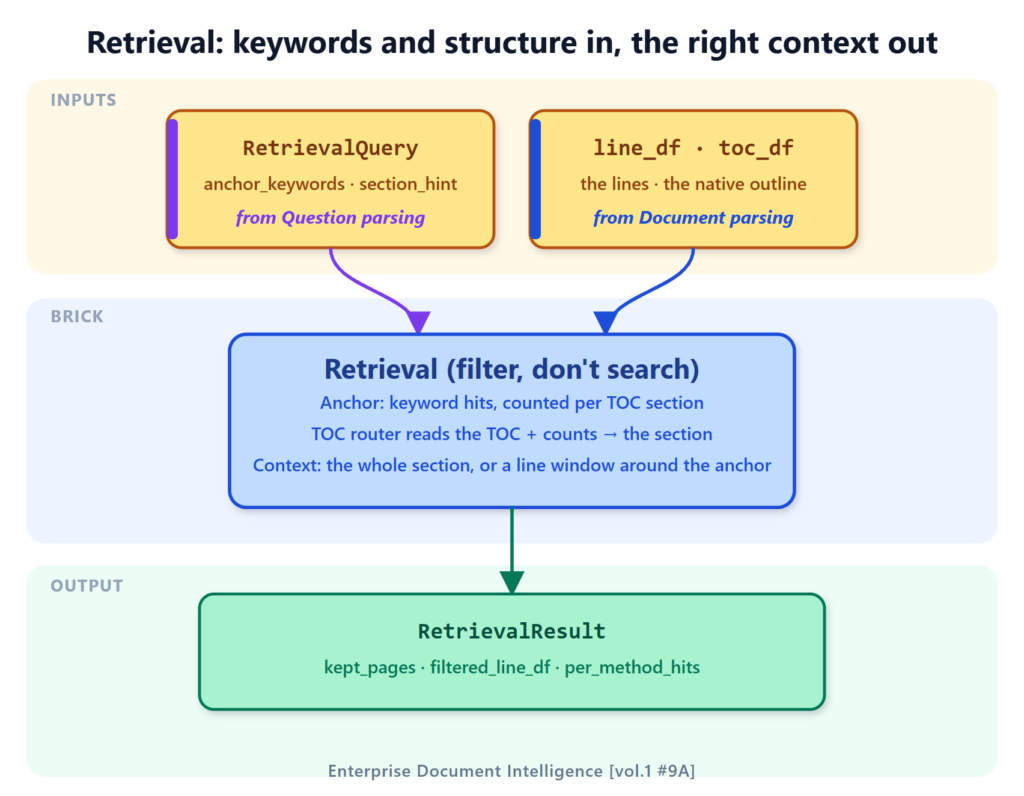 Retrieval filters, it does not search: keyword hits per section and the TOC router anchor on the section, then the context is sized (the whole section, or a line window) into filtered_line_df. - Image by author
How it works, in two phases:
Retrieval filters, it does not search: keyword hits per section and the TOC router anchor on the section, then the context is sized (the whole section, or a line window) into filtered_line_df. - Image by author
How it works, in two phases:
- Anchor : keyword hits counted per TOC section, then the LLM TOC router reads the outline and picks the section that answers the question.
- Context : sized around the anchor at the granularity the question implies (the whole section for a listing, a line window for a pinpoint fact).
filtered_line_df: just the lines generation will read, each carrying its page_num and line_num for citations.
Article 1 (minimal RAG) ran one retrieval method, keyword matching on page_df, and kept the top three pages by match count. Article 7 (retrieval) reframes retrieval as a filter on the small relational set built in Section 2.1: narrow the candidate scope using structured tables before scoring keywords. The keyword method still runs, but toc_df opens a second signal. The natural way to use it is not substring matching on titles. The author of the document already grouped lines into sections and wrote a title for each. A small LLM call can read the whole TOC, reason about which section answers the question, and return its picks with a one-sentence rationale.
Retrieval works in two phases (Article 7A, retrieval as filtering). First it finds the anchor : keyword hits, counted per TOC section, tell the router which sections carry the question’s terms; reason_on_toc reads the TOC plus those counts and picks the section. Then it sizes the context around that anchor, following the granularity the question implies (Section 2.2): the whole section for a listing or section question, or a line window around the match for a pinpoint fact. The section is the natural context unit; page_df is the coarse scan surface, line_df the atomic lines the window is cut from.
Here, to stay incremental on Article 1 (minimal RAG), this article runs the two detectors and merges their pages; the production hybrid routes them into sections instead (Article 7 (retrieval), the section-first arbiter above). The keyword method runs first (cheap, no LLM, deterministic). The LLM TOC router runs next on the same toc_df. The union of their pages goes to generation.
Article 7B (anchor detection) develops the LLM TOC router in detail (the prompt, the Pydantic output, why it beats substring matching on real documents). Article 7C (the LLM arbiter) completes the picture, ranking every candidate page from every detector in a single call. We use the standalone reason_on_toc here because it carries its weight on its own: the upgrade from substring is the single most impactful change a team running Article 1 (minimal RAG)’s pipeline can make to retrieval.
Article 7 (retrieval) introduces the unified retrieve_context(question, line_df, *, method, top_k, ...) → RetrievalResult dispatcher that routes to keyword / embedding / TOC / hybrid behind a single signature, and returns a typed RetrievalResult instead of two tuples. We use the raw retrieve_pages and reason_on_toc here to keep this article incremental on top of Article 1 (minimal RAG); production code calls retrieve_context or the shared dispatch_page_retrieval helper.
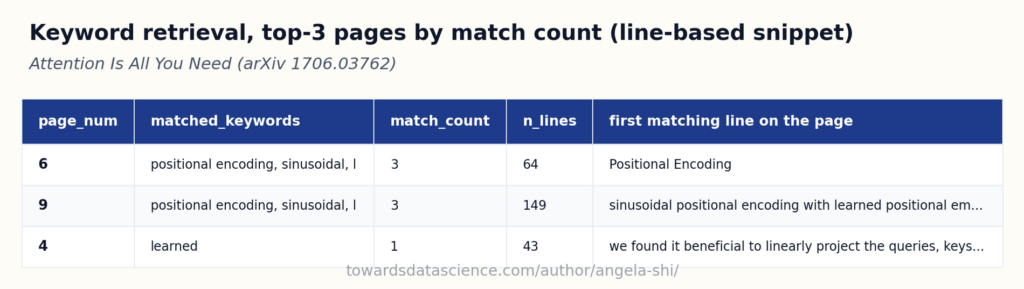 Keyword matching at the page level: a few high-count pages, zeros dropped - Image by author
A useful check before trusting that table. The first matching line column scans line by line, one line at a time. That works for single-token keywords. A multi-word keyword like positional encoding can be broken across a line break in the PDF, with positional at the end of one line and encoding at the start of the next. Each line on its own contains neither phrase. The line-by-line scan finds nothing, even when the keyword is right there on the page.
Count the misses across the document:
Keyword matching at the page level: a few high-count pages, zeros dropped - Image by author
A useful check before trusting that table. The first matching line column scans line by line, one line at a time. That works for single-token keywords. A multi-word keyword like positional encoding can be broken across a line break in the PDF, with positional at the end of one line and encoding at the start of the next. Each line on its own contains neither phrase. The line-by-line scan finds nothing, even when the keyword is right there on the page.
Count the misses across the document:
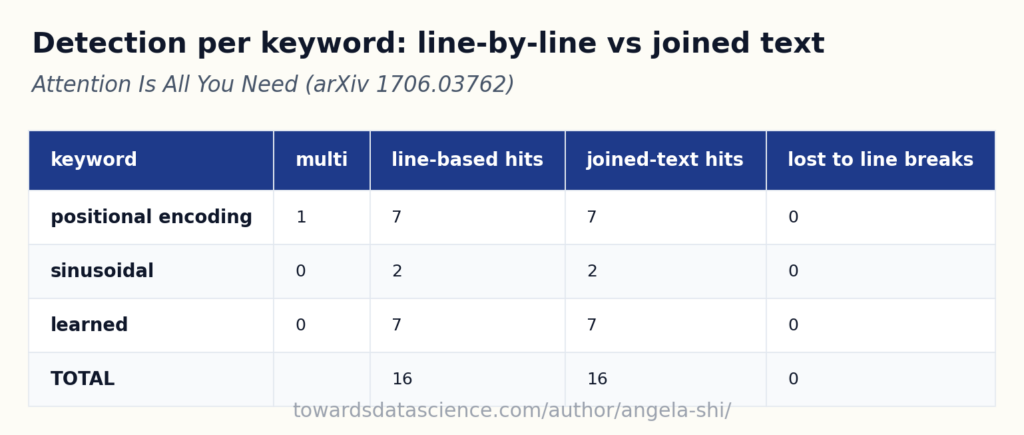 Line-unit vs passage-unit detection: multi-word keywords lose hits across line breaks - Image by author
The line is a PDF rendering artifact. The text the parser sees as one line is whatever fits between two visual line-break decisions made by the PDF generator. There is no semantic reason the unit of detection should map to that arbitrary boundary. The fix is to detect on a passage instead, where a passage is a small window of adjacent lines joined with a space. Any keyword that exists in the passage will be found, no matter where the line breaks fall.
Line-unit vs passage-unit detection: multi-word keywords lose hits across line breaks - Image by author
The line is a PDF rendering artifact. The text the parser sees as one line is whatever fits between two visual line-break decisions made by the PDF generator. There is no semantic reason the unit of detection should map to that arbitrary boundary. The fix is to detect on a passage instead, where a passage is a small window of adjacent lines joined with a space. Any keyword that exists in the passage will be found, no matter where the line breaks fall.
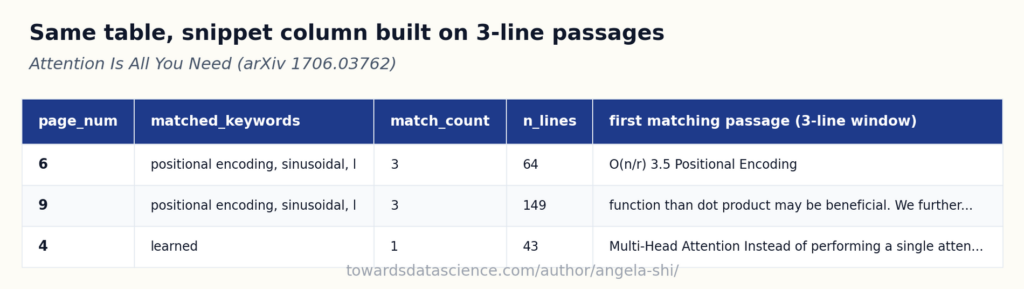 Same pages, same counts; snippets now built on three-line passages - Image by author
The page-level
Same pages, same counts; snippets now built on three-line passages - Image by author
The page-level match_count was already correct, because retrieve_pages joins all lines on a page before scanning. The fix targets the line-grained helpers that the snippet column, the highlighting, and any later chunking step need. From here on, every helper that scans below the page level uses a passage window, not a single line.
The LLM TOC router fills the other gap exposed above. Same toc_df from parsing, but the LLM reads it whole and reasons about which section answers the question, returning the picked section ids plus a one-sentence rationale. The function itself is short (format each TOC row, drop it in a prompt with the question, parse a typed SectionSelection back); Article 7B (anchor detection) shows it in full.
Run on the noisy question against the paper’s 22 TOC entries:
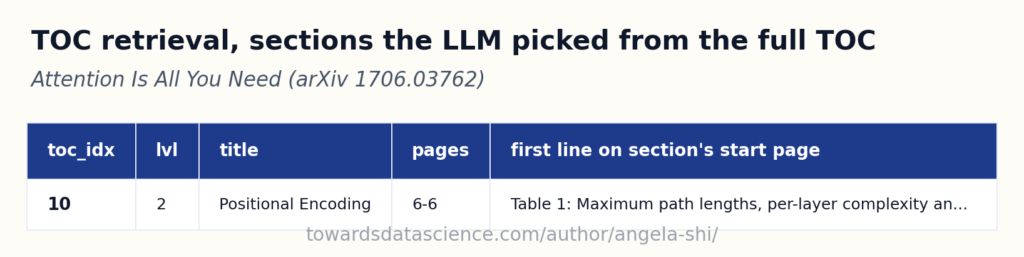 The LLM read 22 TOC entries and picked the one that answers the question - Image by author
One LLM call, the whole TOC inside the prompt, a typed list of
The LLM read 22 TOC entries and picked the one that answers the question - Image by author
One LLM call, the whole TOC inside the prompt, a typed list of section_ids back with a sentence of reasoning. The substring matcher this article used to ship would have caught 3.5 Positional Encoding on this specific question because encoding appears in the title. It would have missed every question phrased differently from the author. “What happens if we exit early?” against a contract whose section is titled “Termination” : substring zero, LLM one. The cost is a small LLM call (a few thousand tokens for a typical TOC, a few hundred milliseconds), and it is cached forever on identical inputs.
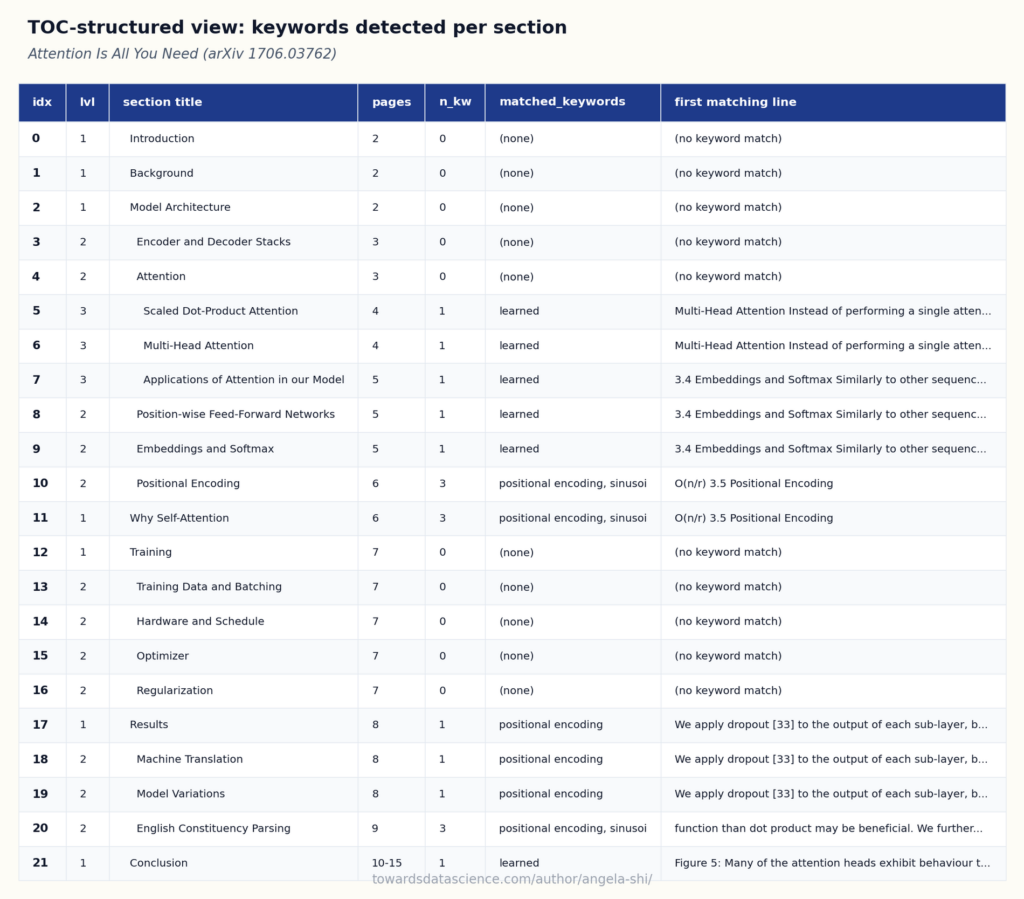 TOC as backbone with per-section keyword hits; empty sections stay visible - Image by author
This view is what an expert reads. Not a flat page list with cosine scores, but the document’s own outline, with the parsed-question keywords marked where they land. Article 7C (the LLM arbiter) consumes exactly this shape as a structured brief, one row per candidate, and ranks them with per-candidate roles + reasons. That arbiter is an upgrade on top of the LLM TOC router walked above, kept out of scope here to stay incremental on Article 1 (minimal RAG).
For the retrieval code in detail, see the three articles that develop the brick:
TOC as backbone with per-section keyword hits; empty sections stay visible - Image by author
This view is what an expert reads. Not a flat page list with cosine scores, but the document’s own outline, with the parsed-question keywords marked where they land. Article 7C (the LLM arbiter) consumes exactly this shape as a structured brief, one row per candidate, and ranks them with per-candidate roles + reasons. That arbiter is an upgrade on top of the LLM TOC router walked above, kept out of scope here to stay incremental on Article 1 (minimal RAG).
For the retrieval code in detail, see the three articles that develop the brick:
2.4 Generation: a typed answer
Generation fills a typed schema from the retrieved lines. It is controlled execution against a contract, not free-form prose.
In: the GenerationBrief (question and answer shape, from question parsing), filtered_line_df (from retrieval), and the answer schema. Out: a typed AnswerWithEvidence, or a ListAnswer when the question asks for a list.
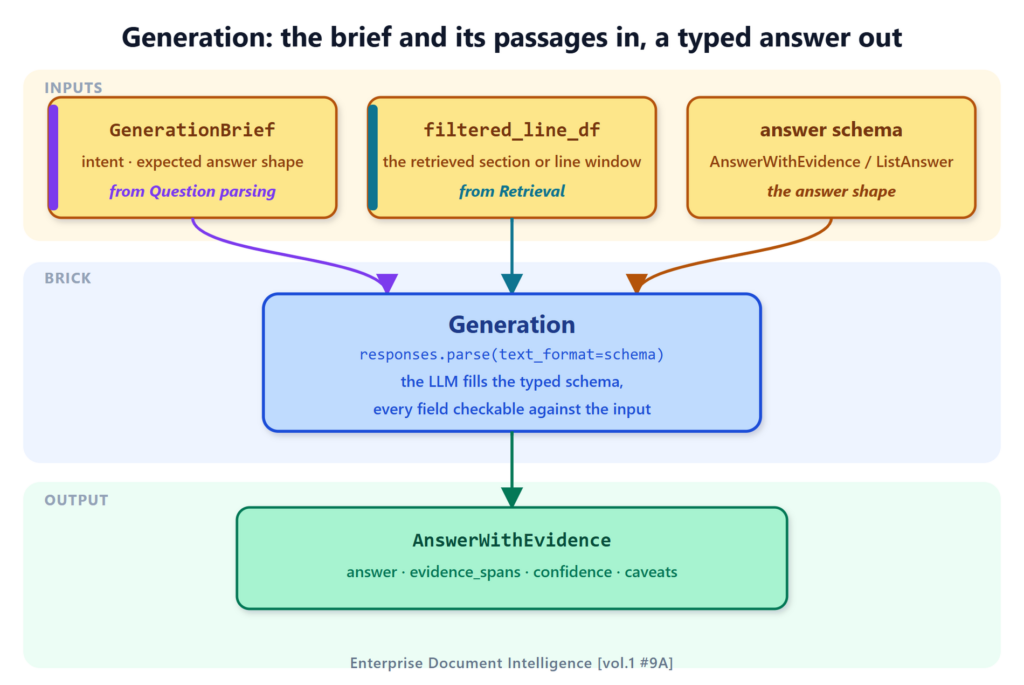 Generation as controlled execution: the LLM fills a typed schema whose every field is checkable against the retrieved lines. - Image by author
What comes out:
Generation as controlled execution: the LLM fills a typed schema whose every field is checkable against the retrieved lines. - Image by author
What comes out:
answer: shaped to the question, one string for a single fact, one entry per item for a listing.evidence_spans: a line range plus a verbatim quote per item, checkable against filtered_line_df.- quality signals:
confidence, caveats, and a context_structured flag the LLM sets when the retrieved text no longer reads in order.
Article 1 (minimal RAG)’s AnswerWithEvidence returns one answer: str, one contiguous evidence span, a few quotes. Good for a question with a single answer (“What dataset was used?”). The running question asks for options , plural. The baseline schema can list them inside the string, but the caller has no clean way to iterate over the items or to attribute one citation per option.
Article 8 makes the schema match the shape of the expected answer. When the question parser flagged expected_answer_shape = "listing" (Article 12 (listing) develops these in depth), the generation brick returns a ListAnswer with one entry per item, each carrying its own evidence span and its own verbatim quote.
The shape is what matters: one AnswerItem per option (its text, a start/end line-range span, and a verbatim quote), wrapped in a ListAnswer that also carries the answer-quality flags (answer_found, complete_answer_found, context_structured, confidence, caveats). Article 8 (generation) develops the schema in full.
Filled in on the noisy positional-encoding question, the schema returns two items and the full set of quality indicators:
python
{
  "items": [
    {
      "text": "Sinusoidal positional encodings (sine and cosine functions of different frequencies).",
      "start_page_num": 6, "start_line_num": 33, "end_page_num": 6, "end_line_num": 37,
      "quote": "we use sine and cosine functions of different frequencies"
    },
    {
      "text": "Learned positional embeddings.",
      "start_page_num": 6, "start_line_num": 39, "end_page_num": 6, "end_line_num": 41,
      "quote": "we also experimented with using learned positional embeddings"
    }
  ],
  "answer_found": true,
  "complete_answer_found": true,
  "context_completeness": 1.0,
  "context_structured": true,
  "confidence": 0.98,
  "caveats": []
}
The four indicators carry the answer’s trust profile. complete_answer_found says whether the answer covers every option the document mentions or only a subset. context_completeness says how well the retrieved lines covered the question, separate from whether the answer itself is right. context_structured flips to false when the LLM cannot follow the reading order, the canonical OCR-failure signal. A downstream router reads them: high confidence + complete + structured = ship the answer; low completeness or unstructured context = retry retrieval, or fall back to a deeper parse (the path Article 10 develops).
context_structured is the indicator the article does not get to see fire on a clean paper. To prove the LLM uses it, the same lines fed in random order should flip it to false:
python
{
  "clean context": {
    "answer_found": true,
    "complete_answer_found": true,
    "context_completeness": 1.0,
    "context_structured": true,
    "confidence": 1.0,
    "n_items": 2,
    "caveats": []
  },
  "shuffled context (same lines, random order)": {
    "answer_found": true,
    "complete_answer_found": true,
    "context_completeness": 1.0,
    "context_structured": true,
    "confidence": 0.95,
    "n_items": 2,
    "caveats": []
  }
}
In production, scrambled context comes from a different source than df.sample. PDFs with two-column layouts that the parser read column by column instead of row by row, scanned documents OCR’d by a model that lost the layout, exports from Word that broke long tables across hidden anchors. The pipeline cannot self-correct on those, but the answer schema tells the caller something went wrong, and a separate code path takes over.
Compare with the baseline RAG output. Same question, same paper, but the caller now gets a structured object: number of items known up front, each item independently citable, four quality indicators that route the answer to the right next step. A UI renders the items as a clickable list. A SQL pipeline writes one row per item. An annotated PDF highlights each quote on its source page. None of those consumers had to parse prose, and none of them ships a confidently-wrong answer because the schema makes the failure modes visible.
2.5 Before and after, per brick
Four bricks, four upgrades. Side by side, the same pipeline before and after, one brick per row:
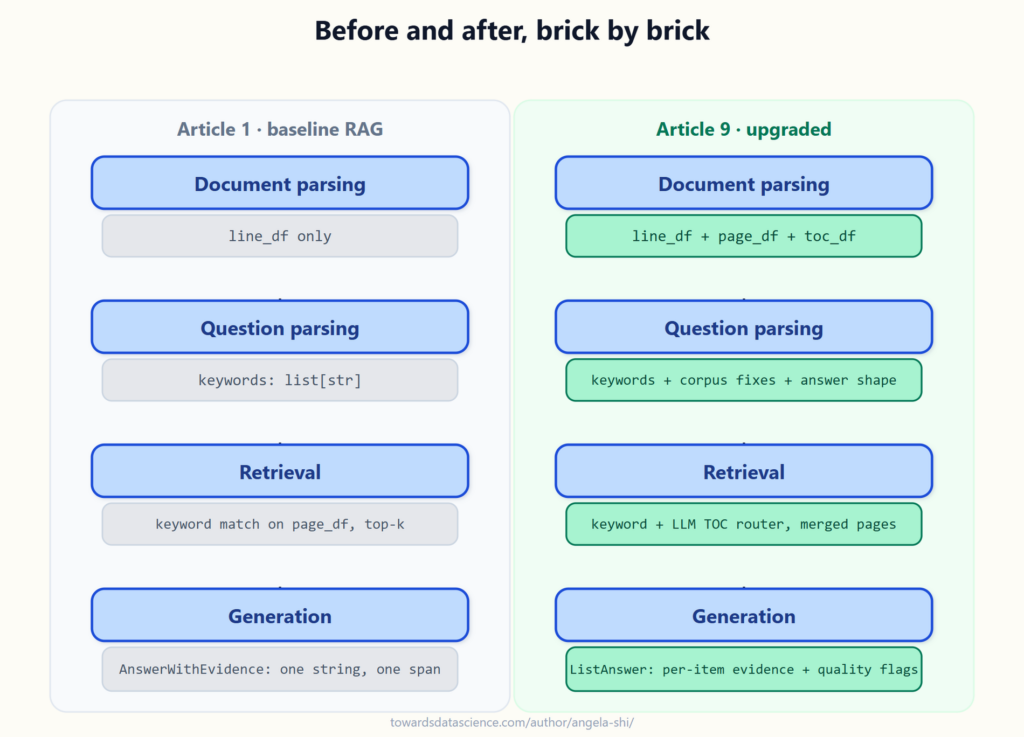 Same four bricks, two contracts: the baseline outputs on the left, the upgraded typed outputs on the right - Image by author
The four upgrades are independent. A team running Article 1 (minimal RAG)’s pipeline can adopt them one at a time: a TOC at parsing, a corpus-vocab spell-check at question parsing, an LLM TOC router + keyword fallback at retrieval, a list-shaped schema at generation. Each one is a small drop-in, none of them rewrites the surrounding code.
Same four bricks, two contracts: the baseline outputs on the left, the upgraded typed outputs on the right - Image by author
The four upgrades are independent. A team running Article 1 (minimal RAG)’s pipeline can adopt them one at a time: a TOC at parsing, a corpus-vocab spell-check at question parsing, an LLM TOC router + keyword fallback at retrieval, a list-shaped schema at generation. Each one is a small drop-in, none of them rewrites the surrounding code.
3. Conclusion
The four bricks now speak in typed contracts:
- Parsing emits a relational set, not a flat dump.
- Question parsing emits a brief, not a bag of words.
- Retrieval emits a merged page set backed by the document’s own structure, not a top-k guess.
- Generation emits a typed answer with a span per item, not a paragraph the caller has to read again.
Each upgrade earned its place against a concrete failure of the baseline: the typo that missed the page, the TOC the keyword search ignored, the list flattened into prose. What the bricks do not have yet is a single entry point and a feedback path between them. The second part wires them into one call and runs it on real documents, including one whose TOC is broken, in Composing the four RAG bricks into one pipeline, tested on real documents (link to come).
It helps to see where this pass sits on a longer climb. The same four bricks stay fixed; what changes from one rung to the next is where the control lives. This article is rung two: pdf_qa, a single richer pass that already emits the feedback fields (retrieval confidence, missing keywords) but does nothing with them yet. Article 13 turns that pass into pdf_qa_flow, the Volume 1 composite that dispatches on question patterns and re-runs the pass in a bounded loop, acting on exactly those fields. Volume 2’s pdf_chat puts a multi-intent entry in front. Only the last rung hands the control loop to the LLM itself.
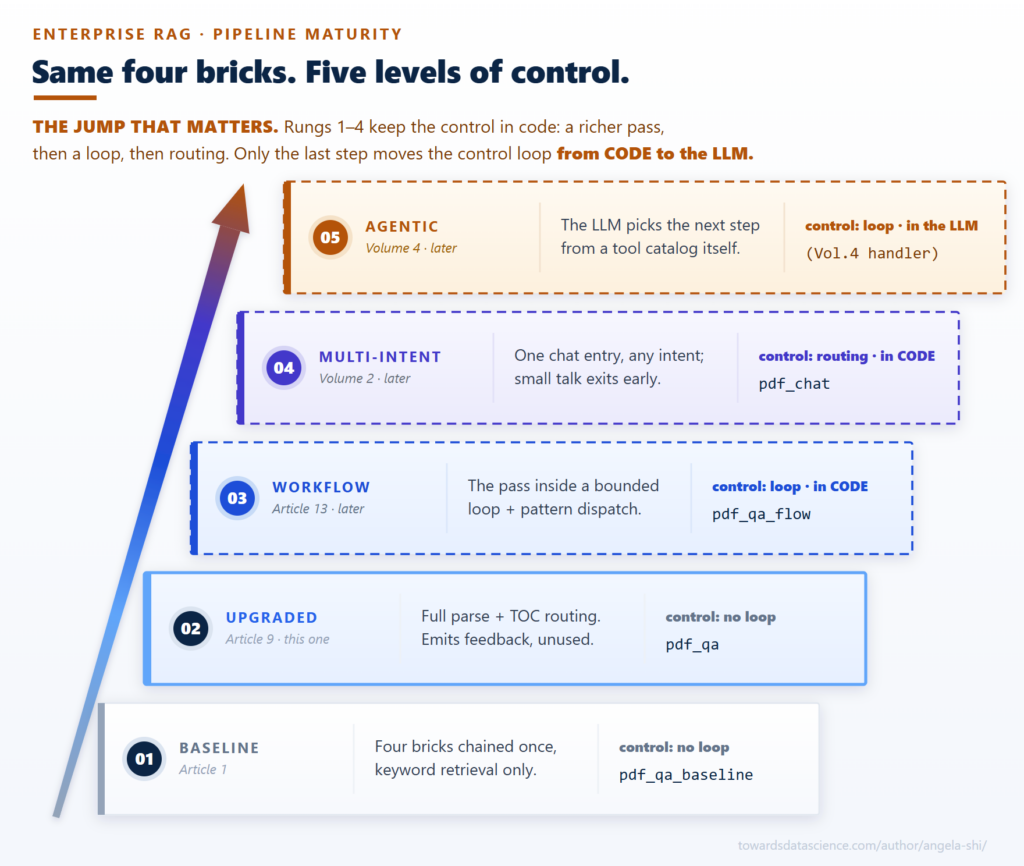 Same four bricks, five levels of control: this article is rung two, the richer pass whose feedback fields become the loop one rung up - Image by author
4. Sources and further reading
This part upgrades the four bricks (from Articles 5-8) one contract at a time, on the Attention Is All You Need paper. The second part composes them end to end and runs the assembled pipeline on several documents. The responses.parse(text_format=Schema) pattern at the question-parsing and generation boundaries uses OpenAI’s Structured Outputs (Aug 2024). The closest published production-grade write-up of this kind of pipeline is Anthropic’s Contextual Retrieval (Sept 2024). The agentic upgrade path on top of the same four bricks is follow-up work; the per-brick provenance keeps the agent’s choices auditable.
Earlier in the series:
What works, what breaks
- Baseline Enterprise RAG, from PDF to highlighted answer. The four-brick pipeline end to end: PDF in, highlighted answer out.
- Embeddings Aren’t Magic: The Predictable Failure Modes of RAG Retrieval. Where embedding similarity wins (synonyms, typos, paraphrase), where it predictably breaks (unknown terms, negation, term-vs-answer relevance), and how to use it anyway.
- RAG is not machine learning, and the ML toolkit solves the wrong problem. Why chunk-size sweeps and finetuning optimize the wrong thing; route by question type instead.
- From regex to vision models: which RAG technique fits which problem. Two axes, document complexity and question control, that pick the technique for each case.
Document parsing
- Beyond extract_text: the two layers of a PDF that drive RAG quality. The first half of the parsing brick: the document’s nature, signals, and summary.
- Stop returning flat text from a PDF: the relational tables RAG needs. The second half of the parsing brick: the relational tables every downstream brick reads.
- When PyMuPDF can’t see the table: parse PDFs for RAG with Azure Layout. The same tables from Azure Layout: native table cells, OCR, paragraph roles.
- Parse PDFs for RAG locally with Docling: rich tables, no cloud upload. The same tables computed locally with Docling: TableFormer cells, nothing leaves the machine.
- Vision LLMs are PDF parsers too: reading charts and diagrams for RAG. Vision as a parser: the pictures become searchable text.
- Parse scanned PDFs for RAG with EasyOCR: free OCR gives you words, not a document. Where traditional OCR stops: text recovered, structure lost.
- Making a PDF’s images searchable for RAG, without paying to read them all. The image cascade: filter cheap, classify, describe only what is worth reading.
- Reconstructing the table of contents a PDF forgot to ship, so RAG can scope by section. Rebuilding toc_df when the PDF prints a contents page but ships no outline.
Question parsing
- RAG questions need parsing too: turn the user’s string into briefs for retrieval and generation. The thesis of question parsing: why a user string needs the same parsing as a document, and how it splits into a retrieval brief and a generation brief.
- What the question parser extracts from a user string: keywords, scope, shape, decomposition, clarification. The five families of columns the parser reads straight from the user’s question, with the code that fills each one.
- Dispatching the parsed RAG question: chunk strategy, model tier, activations, audit. The decisions the parser makes on top of the user string, using the document’s profile: dispatch, activations, full schema, the audit trail (pipeline_trace.json), and a broker-corpus walkthrough.
Retrieval
Generation
- Make RAG generation return a typed contract: citations, typed values, and self-checks (link to come). The answer schema as the contract: typed values, items with evidence spans, self-assessment fields, and the completeness signal the pipeline computes itself.
- Assemble each RAG generation prompt from a base prompt plus the rules each question needs (link to come). The dispatcher: a fixed BASE prompt plus the rules each question needs, the schema picked from the registry, and the full trace kept on every call.
- Validating the RAG answer before the user sees it: spans, quotes, and the feedback loop (link to come). The post-generation validator (spans, verbatim quotes, formats), not-found as a first-class answer, and the feedback loops that close the pipeline.
Same direction as the article:
- Anthropic, Contextual Retrieval (Sept 2024 engineering post). The closest published “minimal but production-grade” upgrade write-up; lands on hybrid retrieval + reranking, complements the TOC-aware brick upgrade in this article.
- OpenAI, Structured Outputs. The
responses.parse(text_format=Schema) pattern used at the question-parsing and generation boundaries.
- Vaswani et al., Attention Is All You Need , NeurIPS 2017 (arXiv:1706.03762). The paper this part runs every brick on. arXiv non-exclusive distribution license, declared on the arXiv abstract page.
- NIST, The NIST Cybersecurity Framework (CSF) 2.0, NIST CSWP 29, February 2024 (DOI 10.6028/NIST.CSWP.29). A compliance document the assembled pipeline is tested on in the second part. US Government work, public domain in the US, see the NIST copyright statement.
- Lewis et al., Retrieval-Augmented Generation for Knowledge-Intensive NLP Tasks , NeurIPS 2020 (arXiv:2005.11401). The RAG paper itself, a test for the assembled pipeline in the second part. arXiv non-exclusive distribution license, declared on the arXiv abstract page.
- World Bank, Commodity Markets Outlook, April 2024 issue. The degenerate-TOC stress test (blank bookmark titles), in the second part. CC BY 3.0 IGO, as declared on the OKR publication page for April 2024.
Runnable code paths call OpenAI services governed by OpenAI’s Terms of Use.
Different angle, different context:
- Yao et al., ReAct: Synergizing Reasoning and Acting in Language Models , ICLR 2023 (arXiv:2210.03629). Founding paper of agentic RAG. The context is general-purpose tool-picking at runtime. Developing this line, where the four upgraded bricks become the agent’s audited toolkit, is follow-up work.
- Lee et al., Can Long-Context Language Models Subsume Retrieval, RAG, SQL, and More? , 2024 (arXiv:2406.13121). The long-context-replaces-RAG upgrade path: skip parsing, skip retrieval, dump the whole document in. Empirical data on where this works and where it breaks.
Register Now to Continue Reading
Unlock Towards Data Science with a Free Account
All articles on Towards Data Science are available to registered users. Create a free account today to access this article and thousands more.
Register for freeSign in to your account
 Written By
See all from Angela and Kezhan Shi
Document ProcessingLlmRagRag Architectureretrieval
Share This Article
Towards Data Science is a community publication. Submit your insights to reach our global audience and earn through the TDS Author Payment Program.
Write for TDS
Related Articles
Large Language Models
Exactly how does it differ from ReAct, CodeAct, Self-Loops, and Subagents?
Avishek Biswas
May 16, 202619 min read
Large Language Models
Transform raw transcripts into well-structured documents
Yann-Aël Le Borgne
September 9, 202412 min read
Large Language Models
SOM is proposed to bolster efficient retrieval of LLM context for RAG...
Murali Kashaboina
March 16, 202417 min read
Artificial Intelligence
In this article, we talk about how LLMs work, from scratch - assuming only that you know how to add and multiply two numbers. The article...
Rohit Patel
October 19, 202443 min read
Large Language Models
How retrieval-augmented generation is evolving from static pipelines to governed, context-aware systems that make AI more explainable, trustworthy, and scalable
Steve Hedden
October 21, 202515 min read
Master Advanced Information Retrieval: Cutting-edge Techniques to Optimize the Selection of Relevant Documents with Langchain to Create...
Damian Gil
April 17, 202420 min read
Artificial Intelligence
The foundations of designing an AI agent
Fabiana Clemente
June 3, 20258 min read
Deep Learning
Unveiling the power of question answering
Mina Ghashami
February 7, 202416 min read
Machine Learning
An End to End Example Of Seeing How Well An LLM Model Can Answer Amazon SageMaker Related Questions
Ram Vegiraju
October 10, 20239 min read
Your home for data science and AI. The world's leading publication for data science, data analytics, data engineering, machine learning, and artificial intelligence professionals.
Subscribe to Our NewsletterWrite For TDS•About•Advertise•Privacy Policy•Terms of Use
© Insight Media Group, LLC 2026•The New Stack•roadmap.sh•Creator Network
Recommended Articles
Close