保留正文与补采附件。源页面当前未重新核验;具体限制见交付清单。
 We value your privacy
We use cookies to enhance your browsing experience, serve personalised ads or content, and analyse our traffic. By clicking "Accept All", you consent to our use of cookies.
Customise Reject All Accept All
Customise Consent Preferences
We value your privacy
We use cookies to enhance your browsing experience, serve personalised ads or content, and analyse our traffic. By clicking "Accept All", you consent to our use of cookies.
Customise Reject All Accept All
Customise Consent Preferences  We use cookies to help you navigate efficiently and perform certain functions. You will find detailed information about all cookies under each consent category below.
The cookies that are categorised as "Necessary" are stored on your browser as they are essential for enabling the basic functionalities of the site. ... Show more
NecessaryAlways Active
Necessary cookies are required to enable the basic features of this site, such as providing secure log-in or adjusting your consent preferences. These cookies do not store any personally identifiable data.
We use cookies to help you navigate efficiently and perform certain functions. You will find detailed information about all cookies under each consent category below.
The cookies that are categorised as "Necessary" are stored on your browser as they are essential for enabling the basic functionalities of the site. ... Show more
NecessaryAlways Active
Necessary cookies are required to enable the basic features of this site, such as providing secure log-in or adjusting your consent preferences. These cookies do not store any personally identifiable data.
-
Cookie
BCTempID
-
Duration
10 minutes
-
Description
No description available.
-
Cookie
__cf_bm
-
Duration
1 hour
-
Description
This cookie, set by Cloudflare, is used to support Cloudflare Bot Management.
-
Cookie
AWSALBCORS
-
Duration
7 days
-
Description
Amazon Web Services set this cookie for load balancing.
-
Cookie
_cfuvid
-
Duration
session
-
Description
Cloudflare sets this cookie to track users across sessions to optimize user experience by maintaining session consistency and providing personalized services
-
Cookie
li_gc
-
Duration
6 months
-
Description
Linkedin set this cookie for storing visitor's consent regarding using cookies for non-essential purposes.
-
Cookie
__hssrc
-
Duration
session
-
Description
This cookie is set by Hubspot whenever it changes the session cookie. The __hssrc cookie set to 1 indicates that the user has restarted the browser, and if the cookie does not exist, it is assumed to be a new session.
-
Cookie
__hssc
-
Duration
1 hour
-
Description
HubSpot sets this cookie to keep track of sessions and to determine if HubSpot should increment the session number and timestamps in the __hstc cookie.
-
Cookie
wpEmojiSettingsSupports
-
Duration
session
-
Description
WordPress sets this cookie when a user interacts with emojis on a WordPress site. It helps determine if the user's browser can display emojis properly.
-
Cookie
BCSessionID
-
Duration
1 year 1 month 4 days
-
Description
Blueconic sets this cookie as a unique identifier for the BlueConic profile.
-
Cookie
_octo
-
Duration
1 year
-
Description
No description available.
-
Cookie
logged_in
-
Duration
1 year
-
Description
No description available.
-
Cookie
__Secure-YEC
-
Duration
past
-
Description
YouTube sets this cookie to stores the user's video player preferences using embedded YouTube video
-
Cookie
__eoi
-
Duration
6 months
-
Description
Description is currently not available.
-
Cookie
AWSALBTGCORS
-
Duration
7 days
-
Description
No description available.
-
Cookie
login-status-p
-
Duration
past
-
Description
Description is currently not available.
-
Cookie
AWSALBTG
-
Duration
7 days
-
Description
No description available.
-
Cookie
csrf_token
-
Duration
session
-
Description
No description available.
-
Cookie
token_v2
-
Duration
1 day
-
Description
Description is currently not available.
-
Cookie
D
-
Duration
1 year
-
Description
Description is currently not available.
-
Cookie
PHPSESSID
-
Duration
session
-
Description
This cookie is native to PHP applications. The cookie stores and identifies a user's unique session ID to manage user sessions on the website. The cookie is a session cookie and will be deleted when all the browser windows are closed.
-
Cookie
VISITOR_PRIVACY_METADATA
-
Duration
6 months
-
Description
YouTube sets this cookie to store the user's cookie consent state for the current domain.
-
Cookie
cookietest
-
Duration
session
-
Description
The cookietest cookie is typically used to determine whether the user's browser accepts cookies, essential for website functionality and user experience.
-
Cookie
__Host-airtable-session
-
Duration
1 year
-
Description
This cookie is used to enable us to integrate the services of Airtable.
-
Cookie
__Host-airtable-session.sig
-
Duration
1 year
-
Description
This cookie is used to enable us to integrate the services of Airtable.
-
Cookie
m
-
Duration
1 year 1 month 4 days
-
Description
Stripe sets this cookie for fraud prevention purposes. It identifies the device used to access the website, allowing the website to be formatted accordingly.
-
Cookie
BIGipServer*
-
Duration
session
-
Description
Marketo sets this cookie to collect information about the user's online activity and build a profile about their interests to provide advertisements relevant to the user.
-
Cookie
__cfruid
-
Duration
session
-
Description
Cloudflare sets this cookie to identify trusted web traffic.
-
Cookie
_GRECAPTCHA
-
Duration
6 months
-
Description
Google Recaptcha service sets this cookie to identify bots to protect the website against malicious spam attacks.
-
Cookie
__Secure-YNID
-
Duration
6 months
-
Description
Google cookie used to protect user security and prevent fraud, especially during the login process.
-
Cookie
cookieyes-consent
-
Duration
1 year
-
Description
CookieYes sets this cookie to remember users' consent preferences so that their preferences are respected on subsequent visits to this site. It does not collect or store any personal information about the site visitors.
Functional
Functional cookies help perform certain functionalities like sharing the content of the website on social media platforms, collecting feedback, and other third-party features.
-
Cookie
lidc
-
Duration
1 day
-
Description
LinkedIn sets the lidc cookie to facilitate data center selection.
-
Cookie
brw
-
Duration
1 year
-
Description
No description available.
-
Cookie
brwConsent
-
Duration
5 minutes
-
Description
Description is currently not available.
-
Cookie
WMF-Uniq
-
Duration
1 year
-
Description
Description is currently not available.
-
Cookie
loom_anon_comment
-
Duration
1 year
-
Description
No description available.
-
Cookie
loom_referral_video
-
Duration
session
-
Description
Description is currently not available.
-
Cookie
VISITOR_INFO1_LIVE
-
Duration
6 months
-
Description
A cookie set by YouTube to measure bandwidth that determines whether the user gets the new or old player interface.
-
Cookie
yt-remote-connected-devices
-
Duration
Never Expires
-
Description
YouTube sets this cookie to store the user's video preferences using embedded YouTube videos.
-
Cookie
ytidb::LAST_RESULT_ENTRY_KEY
-
Duration
Never Expires
-
Description
The cookie ytidb::LAST_RESULT_ENTRY_KEY is used by YouTube to store the last search result entry that was clicked by the user. This information is used to improve the user experience by providing more relevant search results in the future.
-
Cookie
yt-remote-device-id
-
Duration
Never Expires
-
Description
YouTube sets this cookie to store the user's video preferences using embedded YouTube videos.
-
Cookie
yt-remote-session-name
-
Duration
session
-
Description
The yt-remote-session-name cookie is used by YouTube to store the user's video player preferences using embedded YouTube video.
-
Cookie
yt-remote-fast-check-period
-
Duration
session
-
Description
The yt-remote-fast-check-period cookie is used by YouTube to store the user's video player preferences for embedded YouTube videos.
-
Cookie
yt-remote-session-app
-
Duration
session
-
Description
The yt-remote-session-app cookie is used by YouTube to store user preferences and information about the interface of the embedded YouTube video player.
-
Cookie
yt-remote-cast-available
-
Duration
session
-
Description
The yt-remote-cast-available cookie is used to store the user's preferences regarding whether casting is available on their YouTube video player.
-
Cookie
yt-remote-cast-installed
-
Duration
session
-
Description
The yt-remote-cast-installed cookie is used to store the user's video player preferences using embedded YouTube video.
-
Cookie
cp_session
-
Duration
3 months
-
Description
Codepen sets this cookie for Help systems found in the website.
-
Cookie
loid
-
Duration
1 year 1 month 4 days
-
Description
This cookie is set by the Reddit. The cookie enables the sharing of content from the website onto the social media platform.
Analytics
Analytical cookies are used to understand how visitors interact with the website. These cookies help provide information on metrics such as the number of visitors, bounce rate, traffic source, etc.
-
Cookie
__hstc
-
Duration
6 months
-
Description
Hubspot set this main cookie for tracking visitors. It contains the domain, initial timestamp (first visit), last timestamp (last visit), current timestamp (this visit), and session number (increments for each subsequent session).
-
Cookie
hubspotutk
-
Duration
6 months
-
Description
HubSpot sets this cookie to keep track of the visitors to the website. This cookie is passed to HubSpot on form submission and used when deduplicating contacts.
-
Cookie
_ga
-
Duration
1 year 1 month 4 days
-
Description
Google Analytics sets this cookie to calculate visitor, session and campaign data and track site usage for the site's analytics report. The cookie stores information anonymously and assigns a randomly generated number to recognise unique visitors.
-
Cookie
ga*
-
Duration
1 year 1 month 4 days
-
Description
Google Analytics sets this cookie to store and count page views.
-
Cookie
__Host-psifi.analyticsTrace
-
Duration
6 hours
-
Description
Description is currently not available.
-
Cookie
__Host-psifi.analyticsTraceV2
-
Duration
6 hours
-
Description
Description is currently not available.
-
Cookie
_gh_sess
-
Duration
session
-
Description
GitHub sets this cookie for temporary application and framework state between pages like what step the user is on in a multiple step form.
-
Cookie
YSC
-
Duration
session
-
Description
YSC cookie is set by Youtube and is used to track the views of embedded videos on Youtube pages.
-
Cookie
ajs_anonymous_id
-
Duration
1 year
-
Description
This cookie is set by Segment to count the number of people who visit a certain site by tracking if they have visited before.
-
Cookie
vuid
-
Duration
1 year 1 month 4 days
-
Description
Vimeo installs this cookie to collect tracking information by setting a unique ID to embed videos on the website.
Performance
Performance cookies are used to understand and analyse the key performance indexes of the website which helps in delivering a better user experience for the visitors.
-
Cookie
AWSALB
-
Duration
7 days
-
Description
AWSALB is an application load balancer cookie set by Amazon Web Services to map the session to the target.
-
Cookie
acq
-
Duration
past
-
Description
Description is currently not available.
-
Cookie
acq.sig
-
Duration
past
-
Description
Description is currently not available.
-
Cookie
ptc
-
Duration
2 years
-
Description
No description available.
Advertisement
Advertisement cookies are used to provide visitors with customised advertisements based on the pages you visited previously and to analyse the effectiveness of the ad campaigns.
-
Cookie
muc_ads
-
Duration
1 year 1 month 4 days
-
Description
Twitter sets this cookie to collect user behaviour and interaction data to optimize the website.
-
Cookie
guest_id_marketing
-
Duration
1 year 1 month 4 days
-
Description
Twitter sets this cookie to identify and track the website visitor.
-
Cookie
guest_id_ads
-
Duration
1 year 1 month 4 days
-
Description
Twitter sets this cookie to identify and track the website visitor.
-
Cookie
personalization_id
-
Duration
1 year 1 month 4 days
-
Description
Twitter sets this cookie to integrate and share features for social media and also store information about how the user uses the website, for tracking and targeting.
-
Cookie
guest_id
-
Duration
1 year 1 month 4 days
-
Description
Twitter sets this cookie to identify and track the website visitor. It registers if a user is signed in to the Twitter platform and collects information about ad preferences.
-
Cookie
bcookie
-
Duration
1 year
-
Description
LinkedIn sets this cookie from LinkedIn share buttons and ad tags to recognize browser IDs.
-
Cookie
__Secure-ROLLOUT_TOKEN
-
Duration
6 months
-
Description
YouTube sets this cookie to manage feature rollout and experimentation. It helps Google control which new features or interface changes are shown to users as part of testing and staged rollouts, ensuring consistent experience for a given user during an experiment.
-
Cookie
yt.innertube::nextId
-
Duration
Never Expires
-
Description
YouTube sets this cookie to register a unique ID to store data on what videos from YouTube the user has seen.
-
Cookie
yt.innertube::requests
-
Duration
Never Expires
-
Description
YouTube sets this cookie to register a unique ID to store data on what videos from YouTube the user has seen.
-
Cookie
session_tracker
-
Duration
session
-
Description
This cookie is set by the Reddit. This cookie is used to identify trusted web traffic. It also helps in adverstising on the website.
-
Cookie
edgebucket
-
Duration
session
-
Description
Reddit sets this cookie to save the information about a log-on Reddit user, for the purpose of advertisement recommendations and updating the content.
-
Cookie
did
-
Duration
1 year
-
Description
Arbor sets this cookie to show targeted ads to site visitors.This cookie expires after 2 months or 1 year.
Uncategorised
Other uncategorised cookies are those that are being analysed and have not been classified into a category as yet.
No cookies to display.
Reject All Save My Preferences Accept All
Toggle SearchToggle Mobile Navigation
Publish AI, ML & data-science insights to a global community of data professionals.
Sign inSubmit an Article
LatestEditor's PicksNewsletterShipAI
Write For TDS
LinkedInXToggle Search
Deep Learning
DenseNet Paper Walkthrough: All Connected
Understanding and implementing the DenseNet architecture from scratch with PyTorch
Muhammad Ardi Putra
April 3, 202619 min read
 Photo by israel palacio on Unsplash
When we try to train a very deep neural network model, one issue that we might encounter is the vanishing gradient problem. This is essentially a problem where the weight update of a model during training slows down or even stops, hence causing the model not to improve. When a network is very deep, the gradient computation during backpropagation involves multiplying many derivative terms together through the chain rule. Remember that if we multiply small numbers (typically less than 1) too many times, it will make the resulting numbers becoming extremely small. In the case of neural networks, these numbers are used as the basis of the weight update. So, if the gradient is very small, then the weight update will be very slow, causing the training to be slow as well.
To address this vanishing gradient problem, we can actually use shortcut paths so that the gradients can flow more easily through a deep network. One of the most popular architectures that attempts to solve this is ResNet, where it implements skip connections that jump over several layers in the network. This idea is adopted by DenseNet, where the skip connections are implemented much more aggressively, making it better than ResNet in handling the vanishing gradient problem. In this article I would like to talk about how exactly DenseNet works and how to implement the architecture from scratch.
···
Learn this step by step with the interactive Machine Learning roadmap.
Photo by israel palacio on Unsplash
When we try to train a very deep neural network model, one issue that we might encounter is the vanishing gradient problem. This is essentially a problem where the weight update of a model during training slows down or even stops, hence causing the model not to improve. When a network is very deep, the gradient computation during backpropagation involves multiplying many derivative terms together through the chain rule. Remember that if we multiply small numbers (typically less than 1) too many times, it will make the resulting numbers becoming extremely small. In the case of neural networks, these numbers are used as the basis of the weight update. So, if the gradient is very small, then the weight update will be very slow, causing the training to be slow as well.
To address this vanishing gradient problem, we can actually use shortcut paths so that the gradients can flow more easily through a deep network. One of the most popular architectures that attempts to solve this is ResNet, where it implements skip connections that jump over several layers in the network. This idea is adopted by DenseNet, where the skip connections are implemented much more aggressively, making it better than ResNet in handling the vanishing gradient problem. In this article I would like to talk about how exactly DenseNet works and how to implement the architecture from scratch.
···
Learn this step by step with the interactive Machine Learning roadmap.
The DenseNet Architecture
Dense Block
DenseNet was originally proposed in a paper titled “ Densely Connected Convolutional Networks ” written by Gao Huang et al. back in 2016 [1]. The main idea of DenseNet is indeed to solve the vanishing gradient problem. The reason that it performs better than ResNet is because of the shortcut paths branching out from a single layer to all other subsequent layers. To better illustrate this idea, you can see in Figure 1 below that the input tensor x₀ is forwarded to H₁ , H₂ , H₃ , H₄ , and the transition layers. We do the same thing to all layers within this block, making all tensors connected densely — hence the name DenseNet. With all these shortcut connections, information can flow seamlessly between layers. Not only that, but this mechanism also enables feature reuse where each layer can directly benefit from the features produced by all previous layers.
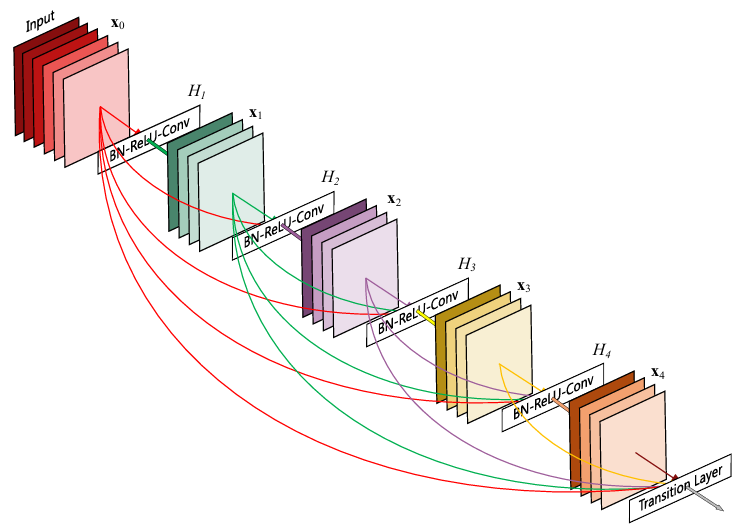 Figure 1. The structure of a single Dense block [1].
In a standard CNN, if we have L layers, we will also have L connections. Assuming that the above illustration is just a traditional 5-layer CNN, we basically only have the 5 straight arrows coming out from each tensor. In DenseNet, if we have L layers, we will have L(L +1)/2 connections. So in the above case we basically got 5(5+1)/2 = 15 connections in total. You can verify this by manually tallying the arrows one by one: 5 red arrows, 4 green arrows, 3 purple arrows, 2 yellow arrows, and 1 brown arrow.
Another key difference between ResNet and DenseNet is how they combine information from different layers. In ResNet, we combine information from two tensors by element-wise summation, which can mathematically be defined in Figure 2 below. Instead of performing element-wise summation, DenseNet combines information by channel-wise concatenation as expressed in Figure 3. With this mechanism, the feature maps produced by all previous layers are concatenated with the output of the current layer before eventually being used as the input of the subsequent layer.
Figure 1. The structure of a single Dense block [1].
In a standard CNN, if we have L layers, we will also have L connections. Assuming that the above illustration is just a traditional 5-layer CNN, we basically only have the 5 straight arrows coming out from each tensor. In DenseNet, if we have L layers, we will have L(L +1)/2 connections. So in the above case we basically got 5(5+1)/2 = 15 connections in total. You can verify this by manually tallying the arrows one by one: 5 red arrows, 4 green arrows, 3 purple arrows, 2 yellow arrows, and 1 brown arrow.
Another key difference between ResNet and DenseNet is how they combine information from different layers. In ResNet, we combine information from two tensors by element-wise summation, which can mathematically be defined in Figure 2 below. Instead of performing element-wise summation, DenseNet combines information by channel-wise concatenation as expressed in Figure 3. With this mechanism, the feature maps produced by all previous layers are concatenated with the output of the current layer before eventually being used as the input of the subsequent layer.
 Figure 2. The mathematical notation of a residual block in ResNet [1].
 Figure 3. The mathematical notation of the last layer within a dense block in DenseNet [1].
Performing channel-wise concatenation like this actually has a side effect: the number of feature maps grows as we get deeper into the network. In the example I showed you in Figure 1, we initially have an input tensor of 6 channels. The H₁ layer processes this tensor and produces a 4-channel tensor. These two tensors are then concatenated before being forwarded to H₂. This essentially means that the H₂ layer accepts 10 channels. Following the same pattern, we will later have the H₃ , H₄ , and the transition layers to accept tensors of 14, 18, and 22 channels, respectively. This is actually an example of a DenseNet that uses the growth rate parameter of 4, meaning that each layer produces 4 new feature maps. Later on, we will use k to denote this parameter as suggested in the original paper.
Despite having such complex connections, DenseNet is actually a lot more efficient as compared to the traditional CNN in terms of the number of parameters. Let’s do a little bit of math to prove this. The structure given in Figure 1 consists of 4 conv layers (let’s ignore the transition layer for now). To compute how many parameters a convolution layer has, we can simply calculate input_channels × kernel_height × kernel_width × output_channels. Assuming that all these convolutions use 3×3 kernel, our layers in the DenseNet architecture would have the following number of parameters:
Figure 3. The mathematical notation of the last layer within a dense block in DenseNet [1].
Performing channel-wise concatenation like this actually has a side effect: the number of feature maps grows as we get deeper into the network. In the example I showed you in Figure 1, we initially have an input tensor of 6 channels. The H₁ layer processes this tensor and produces a 4-channel tensor. These two tensors are then concatenated before being forwarded to H₂. This essentially means that the H₂ layer accepts 10 channels. Following the same pattern, we will later have the H₃ , H₄ , and the transition layers to accept tensors of 14, 18, and 22 channels, respectively. This is actually an example of a DenseNet that uses the growth rate parameter of 4, meaning that each layer produces 4 new feature maps. Later on, we will use k to denote this parameter as suggested in the original paper.
Despite having such complex connections, DenseNet is actually a lot more efficient as compared to the traditional CNN in terms of the number of parameters. Let’s do a little bit of math to prove this. The structure given in Figure 1 consists of 4 conv layers (let’s ignore the transition layer for now). To compute how many parameters a convolution layer has, we can simply calculate input_channels × kernel_height × kernel_width × output_channels. Assuming that all these convolutions use 3×3 kernel, our layers in the DenseNet architecture would have the following number of parameters:
- H₁ → 6×3×3×4 = 216
- H₂ → 10×3×3×4 = 360
- H₃ → 14×3×3×4 = 504
- H₄ → 18×3×3×4 = 648
By summing these four numbers, we will have 1,728 params in total. Note that this number does not include the bias term. Now if we try to create the exact same structure with a traditional CNN, we will require the following number of params for each layer:
- H₁ → 6×3×3×10 = 540
- H₂ → 10×3×3×14 = 1,260
- H₃ → 14×3×3×18 = 2,268
- H₄ → 18×3×3×22 = 3,564
Summing those up, a traditional CNN hits 7,632 params — that’s over 4× higher! With this parameter count in mind, we can clearly see that DenseNet is indeed much more lightweight than traditional CNNs. The reason why DenseNet can be so efficient is because of the feature reuse mechanism, where instead of computing all feature maps from scratch, it only computes k feature maps and concatenate them with the existing feature maps from the previous layers.
···
Transition Layer
The structure I showed you earlier is actually just the main building block of the DenseNet model, which is referred to as the dense block. Figure 4 below shows how these building blocks are assembled, where three of them are connected by the so-called transition layers. Each transition layer consists of a convolution followed by a pooling layer. This component has two main responsibilities: first, to reduce the spatial dimension of the tensor, and second, to reduce the number of channels. The reduction in spatial dimension is standard practice when constructing CNN-based model, where the deeper feature maps should typically have lower dimension than that of the shallower ones. Meanwhile, reducing the number of channels is necessary because they might drastically increase due to the channel-wise concatenation mechanism done within each layer in the dense block.
 Figure 4. The higher-level view of the DenseNet architecture. The convolution-pooling pair is the so-called transition layer [1].
To understand how the transition layer reduces channels, we need to look at the compression factor parameter. This parameter, which the authors refer to as θ (theta), should have the value of somewhere between 0 and 1. Suppose we set θ to 0.2, then the number of channels to be forwarded to the next dense block will only be 20% of the total number of channels produced by the current dense block.
···
Figure 4. The higher-level view of the DenseNet architecture. The convolution-pooling pair is the so-called transition layer [1].
To understand how the transition layer reduces channels, we need to look at the compression factor parameter. This parameter, which the authors refer to as θ (theta), should have the value of somewhere between 0 and 1. Suppose we set θ to 0.2, then the number of channels to be forwarded to the next dense block will only be 20% of the total number of channels produced by the current dense block.
···
The Entire DenseNet Architecture
As we have understood the dense block and the transition layer, we can now move on to the complete DenseNet architecture shown in Figure 5 below. It initially accepts an RGB image of size 224×224, which is then processed by a 7×7 conv and a 3×3 maxpooling layer. Keep in mind that these two layers use the stride of 2, causing the spatial dimension to shrink to 112×112 and 56×56, respectively. At this point the tensor is ready to be passed through the first dense block which consists of 6 bottleneck blocks — I’ll talk more about this component very soon. The resulting output will then be forwarded to the first transition layer, followed by the second dense block, and so on until we eventually reach the global average pooling layer. Finally, we pass the tensor to the fully-connected layer which is responsible for making class predictions.
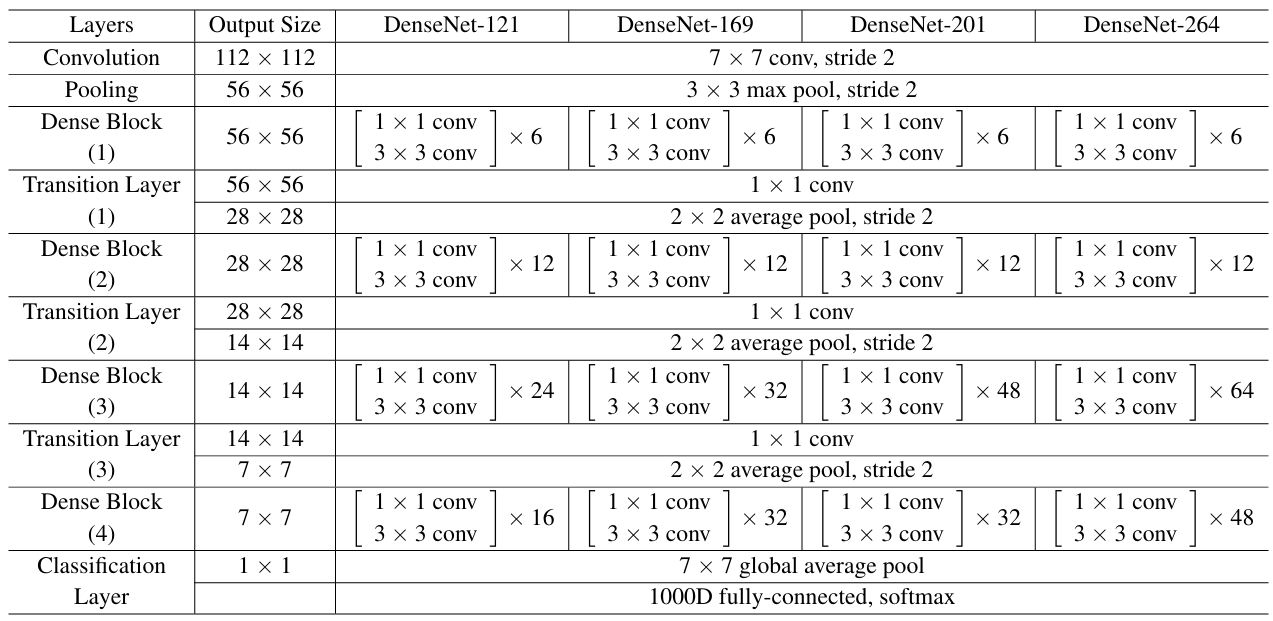 Figure 5. The complete DenseNet architecture [1].
There are actually several more details I need to explain regarding the architecture above. First, the number of feature maps produced in each step is not explicitly mentioned. This is essentially because the architecture is adaptive according to the k and θ parameters. The only layer with a fixed number is the very first convolution layer (the 7×7 one), which produces 64 feature maps (not displayed in the figure). Second, it is also important to note that every convolution layer shown in the architecture follows the BN-ReLU-conv-dropout sequence, except for the 7×7 convolution which does not include the dropout layer. Third, the authors implemented several DenseNet variants, which they refer to as DenseNet (the vanilla one), DenseNet-B (the variant that uses bottleneck blocks), DenseNet-C (the one that utilizes compression factor θ), and DenseNet-BC (the variant that employs both). The architecture given in Figure 5 is the DenseNet-B (or DenseNet-BC) variant.
The so-called bottleneck block itself is the stack of 1×1 and 3×3 convolutions. The 1×1 conv is used to reduce the number of channels to 4 k before eventually being shrunk further to k by the subsequent 3×3 conv. The reason for this is because 3×3 convolution is computationally expensive on tensors with many channels. So to make the computation faster, we need to reduce the channels first using the 1×1 conv. Later in the coding section we are going to implement this DenseNet-BC variant. However, if you want to implement the standard DenseNet (or DenseNet-C) instead, you can simply omit the 1×1 conv so that each dense block only comprises 3×3 convolutions.
···
Figure 5. The complete DenseNet architecture [1].
There are actually several more details I need to explain regarding the architecture above. First, the number of feature maps produced in each step is not explicitly mentioned. This is essentially because the architecture is adaptive according to the k and θ parameters. The only layer with a fixed number is the very first convolution layer (the 7×7 one), which produces 64 feature maps (not displayed in the figure). Second, it is also important to note that every convolution layer shown in the architecture follows the BN-ReLU-conv-dropout sequence, except for the 7×7 convolution which does not include the dropout layer. Third, the authors implemented several DenseNet variants, which they refer to as DenseNet (the vanilla one), DenseNet-B (the variant that uses bottleneck blocks), DenseNet-C (the one that utilizes compression factor θ), and DenseNet-BC (the variant that employs both). The architecture given in Figure 5 is the DenseNet-B (or DenseNet-BC) variant.
The so-called bottleneck block itself is the stack of 1×1 and 3×3 convolutions. The 1×1 conv is used to reduce the number of channels to 4 k before eventually being shrunk further to k by the subsequent 3×3 conv. The reason for this is because 3×3 convolution is computationally expensive on tensors with many channels. So to make the computation faster, we need to reduce the channels first using the 1×1 conv. Later in the coding section we are going to implement this DenseNet-BC variant. However, if you want to implement the standard DenseNet (or DenseNet-C) instead, you can simply omit the 1×1 conv so that each dense block only comprises 3×3 convolutions.
···
Some Experimental Results
It is seen in the paper that the authors performed lots of experiments comparing DenseNet with other models. In this section I am going to show you some interesting things they discovered.
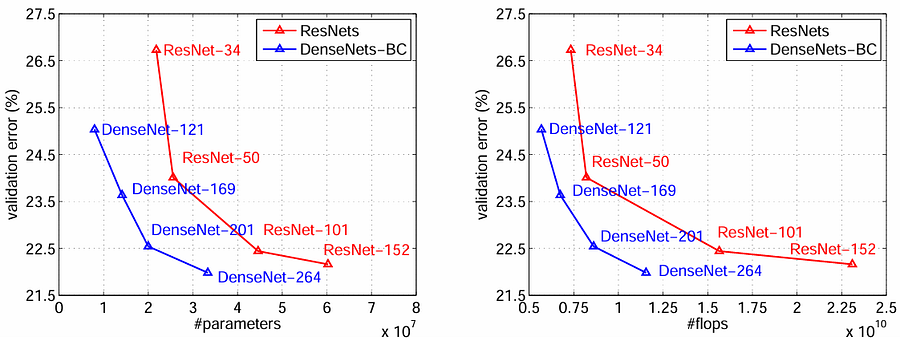 Figure 6. DenseNet achieves better accuracy than ResNet with fewer parameters and lower computational cost across different network depths [1].
The first experimental result I found interesting is that DenseNet actually has much better performance than ResNet. Figure 6 above shows that it consistently outperforms ResNet across all network depths. When comparing variants with similar accuracy, DenseNet is actually a lot more efficient. Let’s take a closer look at the DenseNet-201 variant. Here you can see that the validation error is nearly the same as ResNet-101. Despite being 2× deeper (201 vs 101 layers), it is roughly 2× smaller in terms of both parameters and FLOPs (floating point operations).
Figure 6. DenseNet achieves better accuracy than ResNet with fewer parameters and lower computational cost across different network depths [1].
The first experimental result I found interesting is that DenseNet actually has much better performance than ResNet. Figure 6 above shows that it consistently outperforms ResNet across all network depths. When comparing variants with similar accuracy, DenseNet is actually a lot more efficient. Let’s take a closer look at the DenseNet-201 variant. Here you can see that the validation error is nearly the same as ResNet-101. Despite being 2× deeper (201 vs 101 layers), it is roughly 2× smaller in terms of both parameters and FLOPs (floating point operations).
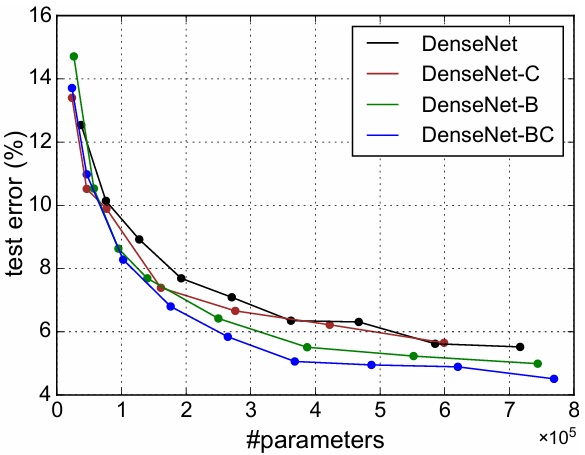 Figure 7. How bottleneck layer and compression factor affect model performance [1].
Next, the authors also performed ablation study regarding the use of bottleneck layer and compression factor. We can see in Figure 7 above that utilizing both the bottleneck layer within the dense block and performing channel count reduction in the transition layer allows the model to achieve higher accuracy (DenseNet-BC). It might seem a bit counterintuitive to see that the reduction in the number of channels due to the compression factor improves the accuracy instead. In fact, in deep learning, too many features might instead hurt accuracy due to information redundancy. So, reducing the number of channels can be perceived as a regularization mechanism which can prevent the model from overfitting, allowing it to obtain higher validation accuracy.
···
Figure 7. How bottleneck layer and compression factor affect model performance [1].
Next, the authors also performed ablation study regarding the use of bottleneck layer and compression factor. We can see in Figure 7 above that utilizing both the bottleneck layer within the dense block and performing channel count reduction in the transition layer allows the model to achieve higher accuracy (DenseNet-BC). It might seem a bit counterintuitive to see that the reduction in the number of channels due to the compression factor improves the accuracy instead. In fact, in deep learning, too many features might instead hurt accuracy due to information redundancy. So, reducing the number of channels can be perceived as a regularization mechanism which can prevent the model from overfitting, allowing it to obtain higher validation accuracy.
···
DenseNet From Scratch
As we have understood the underlying theory behind DenseNet, we can now implement the architecture from scratch. What we need to do first is to import the required modules and initializing the configurable variables. In the Codeblock 1 below, the k and θ we discussed earlier are denoted as GROWTH and COMPRESSION, which the values are set to 12 and 0.5, respectively. These two values are the defaults given in the paper, which we can definitely change if we want to. Next, here I also initialize the REPEATS list to store the number of bottleneck blocks within each dense block.
python
# Codeblock 1
import torch
import torch.nn as nn

GROWTH      = 12
COMPRESSION = 0.5
REPEATS     = [6, 12, 24, 16]
Bottleneck Implementation
Now let’s take a look at the Bottleneck class below to see how I implement the stack of 1×1 and 3×3 convolutions. Previously I’ve mentioned that each convolution layer follows the BN-ReLU-Conv-dropout structure, so here we need to initialize all these layers in the __init__() method.
The two convolution layers are initialized as conv0 and conv1, each with their corresponding batch normalization layers. Don’t forget to set the out_channels parameter of the conv0 layer to GROWTH*4 because we want it to return 4 k feature maps (see the line marked with #(1)). This number of feature maps will then be shrunk even further by the conv1 layer to k by setting the out_channels to GROWTH (#(2)). As all layers have been initialized, we can now define the flow in the forward() method. Just keep in mind that at the end of the process we have to concatenate the resulting tensor (out) with the original one (x) to implement the skip-connection (#(3)).
python
# Codeblock 2
class Bottleneck(nn.Module):
    def __init__(self, in_channels):
        super().__init__()

        self.relu = nn.ReLU()
        self.dropout = nn.Dropout(p=0.2)

        self.bn0   = nn.BatchNorm2d(num_features=in_channels)
        self.conv0 = nn.Conv2d(in_channels=in_channels,
                               out_channels=GROWTH*4,          #(1)
                               kernel_size=1,
                               padding=0,
                               bias=False)

        self.bn1   = nn.BatchNorm2d(num_features=GROWTH*4)
        self.conv1 = nn.Conv2d(in_channels=GROWTH*4,
                               out_channels=GROWTH,            #(2)
                               kernel_size=3,
                               padding=1,
                               bias=False)

    def forward(self, x):
        print(f'original\t: {x.size()}')

        out = self.dropout(self.conv0(self.relu(self.bn0(x))))
        print(f'after conv0\t: {out.size()}')

        out = self.dropout(self.conv1(self.relu(self.bn1(out))))
        print(f'after conv1\t: {out.size()}')

        concatenated = torch.cat((out, x), dim=1)              #(3)
        print(f'after concat\t: {concatenated.size()}')

        return concatenated
In order to check if our Bottleneck class works properly, we will now create one that accepts 64 feature maps and pass a dummy tensor through it. The bottleneck layer I instantiate below essentially corresponds to the very first bottleneck inside the first dense block (refer back to Figure 5 if you’re unsure). So, to simulate actual the flow of the network, we are going to pass a tensor of size 64×56×56, which is essentially the shape produced by the 3×3 maxpooling layer.
python
# Codeblock 3
bottleneck = Bottleneck(in_channels=64)

x = torch.randn(1, 64, 56, 56)
x = bottleneck(x)
Once the above code is run, we will get the following output appear on our screen.
text
# Codeblock 3 Output
original     : torch.Size([1, 64, 56, 56])
after conv0  : torch.Size([1, 48, 56, 56])    #(1)
after conv1  : torch.Size([1, 12, 56, 56])    #(2)
after concat : torch.Size([1, 76, 56, 56])
···
Here we can see that our conv0 layer successfully reduced the feature maps from 64 to 48 (#(1)), where 48 is the 4 k (remember that our k is 12). This 48-channel tensor is then processed by the conv1 layer, which reduces the number of feature maps even further to k (#(2)). This output tensor is then concatenated with the original one, resulting in a tensor of 64+12 = 76 feature maps. And here is actually where the pattern starts. Later in the dense block, if we repeat this bottleneck multiple times, then we will have each layer produce:
- second layer → 64+(2×12) = 88 feature maps
- third layer → 64+(3×12) = 100 feature maps
- fourth layer → 64+(4×12) = 112 feature maps
- and so on …
···
Dense Block Implementation
Now let’s actually create the DenseBlock class to store the sequence of Bottleneck instances. Look at the Codeblock 4 below to see how I do that. The way to do it is pretty easy, we can just initialize a module list (#(1)) and then append the bottleneck blocks one by one (#(3)). Note that we need to keep track of the number of input channels of each bottleneck using the current_in_channels variable (#(2)). Lastly, in the forward() method we can simply pass the tensor sequentially.
python
# Codeblock 4
class DenseBlock(nn.Module):
    def __init__(self, in_channels, repeats):
        super().__init__()

        self.bottlenecks = nn.ModuleList()    #(1)

        for i in range(repeats):
            current_in_channels = in_channels + i*GROWTH    #(2)
            self.bottlenecks.append(Bottleneck(in_channels=current_in_channels))  #(3)

    def forward(self, x):
        for i, bottleneck in enumerate(self.bottlenecks):
            x = bottleneck(x)
            print(f'after bottleneck #{i}\t: {x.size()}')

        return x
We can test the code above by simulating the first dense block in the network. You can see in Figure 5 that it contains 6 bottleneck blocks, so in the Codeblock 5 below I set the repeats parameter to that number (#(1)). We can see in the resulting output that the input tensor, which initially has the shape of 64×56×56, is transformed to 136×56×56. The 136 feature maps come from 64+(6×12), which follows the pattern I gave you earlier.
python
# Codeblock 5
dense_block = DenseBlock(in_channels=64, repeats=6)    #(1)
x = torch.randn(1, 64, 56, 56)

x = dense_block(x)
text
# Codeblock 5 Output
after bottleneck #0 : torch.Size([1, 76, 56, 56])
after bottleneck #1 : torch.Size([1, 88, 56, 56])
after bottleneck #2 : torch.Size([1, 100, 56, 56])
after bottleneck #3 : torch.Size([1, 112, 56, 56])
after bottleneck #4 : torch.Size([1, 124, 56, 56])
after bottleneck #5 : torch.Size([1, 136, 56, 56])
···
Transition Layer
The next component we are going to implement is the transition layer, which is shown in Codeblock 6 below. Similar to the convolution layers in the bottleneck blocks, here we also use the BN-ReLU-conv-dropout structure, yet this one is with an additional average pooling layer at the end (#(1)). Don’t forget to set the stride of this pooling layer to 2 to reduce the spatial dimension by half.
python
# Codeblock 6
class Transition(nn.Module):
    def __init__(self, in_channels, out_channels):
        super().__init__()

        self.bn   = nn.BatchNorm2d(num_features=in_channels)
        self.relu = nn.ReLU()
        self.conv = nn.Conv2d(in_channels=in_channels,
                              out_channels=out_channels,
                              kernel_size=1,
                              padding=0,
                              bias=False)
        self.dropout = nn.Dropout(p=0.2)
        self.pool = nn.AvgPool2d(kernel_size=2, stride=2)    #(1)

    def forward(self, x):
        print(f'original\t: {x.size()}')

        out = self.pool(self.dropout(self.conv(self.relu(self.bn(x)))))
        print(f'after transition: {out.size()}')

        return out
Now let’s take a look at the testing code in the Codeblock 7 below to see how a tensor transforms as it is passed through the above network. In this example I am trying to simulate the very first transition layer, i.e., the one right after the first dense block. This is essentially the reason that I set this layer to accept 136 channels. Previously I mentioned that this layer is used to shrink the channel dimension through the θ parameter, so to implement it we can simply multiply the number of input feature maps with the COMPRESSION variable for the out_channels parameter.
python
# Codeblock 7
transition = Transition(in_channels=136, out_channels=int(136*COMPRESSION))

x = torch.randn(1, 136, 56, 56)
x = transition(x)
Once above code is run, we should obtain the following output. Here you can see that the spatial dimension of the input tensor shrinks from 56×56 to 28×28, whereas the number of channels also reduces from 136 to 68. This essentially indicates that our transition layer implementation is correct.
text
# Codeblock 7 Output
original         : torch.Size([1, 136, 56, 56])
after transition : torch.Size([1, 68, 28, 28])
···
The Entire DenseNet Architecture
As we have successfully implemented the main components of the DenseNet model, we are now going to construct the entire architecture. Here I separate the __init__() and the forward() methods into two codeblocks as they are pretty long. Just ensure that you put Codeblock 8a and 8b within the same notebook cell if you want to run it on your own.
python
# Codeblock 8a
class DenseNet(nn.Module):
    def __init__(self):
        super().__init__()

        self.first_conv = nn.Conv2d(in_channels=3,
                                    out_channels=64,
                                    kernel_size=7,    #(1)
                                    stride=2,         #(2)
                                    padding=3,        #(3)
                                    bias=False)
        self.first_pool = nn.MaxPool2d(kernel_size=3, stride=2, padding=1)  #(4)
        channel_count = 64


        # Dense block #0
        self.dense_block_0 = DenseBlock(in_channels=channel_count,
                                        repeats=REPEATS[0])          #(5)
        channel_count = int(channel_count+REPEATS[0]*GROWTH)         #(6)
        self.transition_0 = Transition(in_channels=channel_count,
                                       out_channels=int(channel_count*COMPRESSION))
        channel_count = int(channel_count*COMPRESSION)               #(7)


        # Dense block #1
        self.dense_block_1 = DenseBlock(in_channels=channel_count,
                                        repeats=REPEATS[1])
        channel_count = int(channel_count+REPEATS[1]*GROWTH)
        self.transition_1 = Transition(in_channels=channel_count,
                                       out_channels=int(channel_count*COMPRESSION))
        channel_count = int(channel_count*COMPRESSION)

        # # Dense block #2
        self.dense_block_2 = DenseBlock(in_channels=channel_count,
                                        repeats=REPEATS[2])
        channel_count = int(channel_count+REPEATS[2]*GROWTH)

        self.transition_2 = Transition(in_channels=channel_count,
                                       out_channels=int(channel_count*COMPRESSION))
        channel_count = int(channel_count*COMPRESSION)

        # Dense block #3
        self.dense_block_3 = DenseBlock(in_channels=channel_count,
                                        repeats=REPEATS[3])
        channel_count = int(channel_count+REPEATS[3]*GROWTH)


        self.avgpool = nn.AdaptiveAvgPool2d(output_size=(1,1))       #(8)
        self.fc = nn.Linear(in_features=channel_count, out_features=1000)  #(9)
What we do first in the __init__() method above is to initialize the first_conv and the first_pool layers. Keep in mind that these two layers neither belong to the dense block nor the transition layer, so we need to manually initialize them as nn.Conv2d and nn.MaxPool2d instances. In fact, these two initial layers are quite unique. The convolution layer uses a very large kernel of size 7x7 (#(1)) with the stride of 2 (#(2)). So, not only capturing information from large area, but this layer also performs spatial downsampling in-place. Here we also need to set the padding to 3 (#(3)) to compensate for the large kernel so that the spatial dimension doesn’t get reduced too much. Next, the pooling layer is different from the ones in the transition layer, where we use 3×3 maxpooling rather than 2×2 average pooling (#(4)).
As the first two layers are done, what we do next is to initialize the dense blocks and the transition layers. The idea is pretty straightforward, where we need to initialize the dense blocks consisting of several bottleneck blocks (which the number bottlenecks is passed through the repeats parameter (#(5))). Remember to keep track of the channel count of each step (#(6,7)) so that we can match the input shape of the subsequent layer with the output shape of the previous one. And then we basically do the exact same thing for the remaining dense blocks and the transition layers.
As we have reached the last dense block, we now initialize the global average pooling layer (#(8)), which is responsible for taking the average value across the spatial dimension, before eventually initializing the classification head (#(9)). Finally, as all layers have been initialized, we can now connect them all inside the forward() method below.
python
# Codeblock 8b
    def forward(self, x):
        print(f'original\t\t: {x.size()}')

        x = self.first_conv(x)
        print(f'after first_conv\t: {x.size()}')

        x = self.first_pool(x)
        print(f'after first_pool\t: {x.size()}')

        x = self.dense_block_0(x)
        print(f'after dense_block_0\t: {x.size()}')

        x = self.transition_0(x)
        print(f'after transition_0\t: {x.size()}')

        x = self.dense_block_1(x)
        print(f'after dense_block_1\t: {x.size()}')

        x = self.transition_1(x)
        print(f'after transition_1\t: {x.size()}')

        x = self.dense_block_2(x)
        print(f'after dense_block_2\t: {x.size()}')

        x = self.transition_2(x)
        print(f'after transition_2\t: {x.size()}')

        x = self.dense_block_3(x)
        print(f'after dense_block_3\t: {x.size()}')

        x = self.avgpool(x)
        print(f'after avgpool\t\t: {x.size()}')

        x = torch.flatten(x, start_dim=1)
        print(f'after flatten\t\t: {x.size()}')

        x = self.fc(x)
        print(f'after fc\t\t: {x.size()}')

        return x
That’s basically all of the implementation of the DenseNet architecture. We can test if it works properly by running the Codeblock 9 below. Here we pass the x tensor through the network, in which it simulates a batch of a single 224×224 RGB image.
python
# Codeblock 9
densenet = DenseNet()
x = torch.randn(1, 3, 224, 224)

x = densenet(x)
And below is what the output looks like. Here I intentionally print out the tensor shape after each step so that you can clearly see how the tensor transforms throughout the entire network. Despite having so many layers, this is actually the smallest DenseNet variant, i.e., DenseNet-121. You can actually make the model even larger by changing the values in the REPEATS list according to the number of bottleneck blocks within each dense block given in Figure 5.
text
# Codeblock 9 Output
original             : torch.Size([1, 3, 224, 224])
after first_conv     : torch.Size([1, 64, 112, 112])
after first_pool     : torch.Size([1, 64, 56, 56])
after bottleneck #0  : torch.Size([1, 76, 56, 56])
after bottleneck #1  : torch.Size([1, 88, 56, 56])
after bottleneck #2  : torch.Size([1, 100, 56, 56])
after bottleneck #3  : torch.Size([1, 112, 56, 56])
after bottleneck #4  : torch.Size([1, 124, 56, 56])
after bottleneck #5  : torch.Size([1, 136, 56, 56])
after dense_block_0  : torch.Size([1, 136, 56, 56])
after transition_0   : torch.Size([1, 68, 28, 28])
after bottleneck #0  : torch.Size([1, 80, 28, 28])
after bottleneck #1  : torch.Size([1, 92, 28, 28])
after bottleneck #2  : torch.Size([1, 104, 28, 28])
after bottleneck #3  : torch.Size([1, 116, 28, 28])
after bottleneck #4  : torch.Size([1, 128, 28, 28])
after bottleneck #5  : torch.Size([1, 140, 28, 28])
after bottleneck #6  : torch.Size([1, 152, 28, 28])
after bottleneck #7  : torch.Size([1, 164, 28, 28])
after bottleneck #8  : torch.Size([1, 176, 28, 28])
after bottleneck #9  : torch.Size([1, 188, 28, 28])
after bottleneck #10 : torch.Size([1, 200, 28, 28])
after bottleneck #11 : torch.Size([1, 212, 28, 28])
after dense_block_1  : torch.Size([1, 212, 28, 28])
after transition_1   : torch.Size([1, 106, 14, 14])
after bottleneck #0  : torch.Size([1, 118, 14, 14])
after bottleneck #1  : torch.Size([1, 130, 14, 14])
after bottleneck #2  : torch.Size([1, 142, 14, 14])
after bottleneck #3  : torch.Size([1, 154, 14, 14])
after bottleneck #4  : torch.Size([1, 166, 14, 14])
after bottleneck #5  : torch.Size([1, 178, 14, 14])
after bottleneck #6  : torch.Size([1, 190, 14, 14])
after bottleneck #7  : torch.Size([1, 202, 14, 14])
after bottleneck #8  : torch.Size([1, 214, 14, 14])
after bottleneck #9  : torch.Size([1, 226, 14, 14])
after bottleneck #10 : torch.Size([1, 238, 14, 14])
after bottleneck #11 : torch.Size([1, 250, 14, 14])
after bottleneck #12 : torch.Size([1, 262, 14, 14])
after bottleneck #13 : torch.Size([1, 274, 14, 14])
after bottleneck #14 : torch.Size([1, 286, 14, 14])
after bottleneck #15 : torch.Size([1, 298, 14, 14])
after bottleneck #16 : torch.Size([1, 310, 14, 14])
after bottleneck #17 : torch.Size([1, 322, 14, 14])
after bottleneck #18 : torch.Size([1, 334, 14, 14])
after bottleneck #19 : torch.Size([1, 346, 14, 14])
after bottleneck #20 : torch.Size([1, 358, 14, 14])
after bottleneck #21 : torch.Size([1, 370, 14, 14])
after bottleneck #22 : torch.Size([1, 382, 14, 14])
after bottleneck #23 : torch.Size([1, 394, 14, 14])
after dense_block_2  : torch.Size([1, 394, 14, 14])
after transition_2   : torch.Size([1, 197, 7, 7])
after bottleneck #0  : torch.Size([1, 209, 7, 7])
after bottleneck #1  : torch.Size([1, 221, 7, 7])
after bottleneck #2  : torch.Size([1, 233, 7, 7])
after bottleneck #3  : torch.Size([1, 245, 7, 7])
after bottleneck #4  : torch.Size([1, 257, 7, 7])
after bottleneck #5  : torch.Size([1, 269, 7, 7])
after bottleneck #6  : torch.Size([1, 281, 7, 7])
after bottleneck #7  : torch.Size([1, 293, 7, 7])
after bottleneck #8  : torch.Size([1, 305, 7, 7])
after bottleneck #9  : torch.Size([1, 317, 7, 7])
after bottleneck #10 : torch.Size([1, 329, 7, 7])
after bottleneck #11 : torch.Size([1, 341, 7, 7])
after bottleneck #12 : torch.Size([1, 353, 7, 7])
after bottleneck #13 : torch.Size([1, 365, 7, 7])
after bottleneck #14 : torch.Size([1, 377, 7, 7])
after bottleneck #15 : torch.Size([1, 389, 7, 7])
after dense_block_3  : torch.Size([1, 389, 7, 7])
after avgpool        : torch.Size([1, 389, 1, 1])
after flatten        : torch.Size([1, 389])
after fc             : torch.Size([1, 1000])
···
Ending
I think that’s pretty much everything about the theory and the implementation of the DenseNet model. You can also find all the codes above in my GitHub repo [2]. See ya in my next article!
···
References
[1] Gao Huang et al. Densely Connected Convolutional Networks. Arxiv. https://arxiv.org/abs/1608.06993 [Accessed September 18, 2025].
[2] MuhammadArdiPutra. DenseNet. GitHub. https://github.com/MuhammadArdiPutra/medium_articles/blob/main/DenseNet.ipynb [Accessed September 18, 2025].
Register Now to Continue Reading
Unlock Towards Data Science with a Free Account
All articles on Towards Data Science are available to registered users. Create a free account today to access this article and thousands more.
Register for freeSign in to your account
 Written By
Deep learning storyteller
See all from Muhammad Ardi Putra
Editor's PicksComputer VisionNeural NetworkPythonPytorch
Share This Article
Towards Data Science is a community publication. Submit your insights to reach our global audience and earn through the TDS Author Payment Program.
Write for TDS
Related Articles
Artificial Intelligence
Neural Networks from scratch including math and python code
Vincent Mueller
July 27, 202110 min read
Artificial Intelligence
Understand Transformers and harness their power to solve real-life problems in Python.
Zoumana Keita
January 31, 20233 min read
Deep Learning
Did you know that TensorFlow has a custom format to store data? It's called TensorFlowRecords - or TFRecords for short -, and builds upon...
Pascal Janetzky
March 2, 20236 min read
Data Science
Introducing four types of plotting functions and relevant tricks for exploratory data analysis based on Seaborn
Mintao Wei
June 9, 20227 min read
Data Visualization
How to create a cool interactive figure in Python: the Globe plotted by Plotly.
Ryota Kiuchi, Ph.D.
November 24, 20206 min read
Deep Learning
All the theory you need to know about Image Augmentation. For beginners and experts. Data...
Olga Chernytska
June 1, 20219 min read
Artificial Intelligence
How to work with iterables
Soner Yıldırım
December 8, 20215 min read
Data Science
I recently applied for a Data Science job and one of the requirements to submit the application was for me to copy and paste code into a...
John Kundycki
November 12, 20204 min read
Artificial Intelligence
Third CNN?
Vidisha Jitani
October 2, 20207 min read
Your home for data science and AI. The world's leading publication for data science, data analytics, data engineering, machine learning, and artificial intelligence professionals.
Subscribe to Our NewsletterWrite For TDS•About•Advertise•Privacy Policy•Terms of Use
© Insight Media Group, LLC 2026•The New Stack•roadmap.sh•Creator Network
Recommended Articles
Close